[Transfer] How to set up xiaoya’s docker and tvbox configuration
Article source: https://xiaoyaliu.notion.site/xiaoya-docker-69404af849504fa5bcf9f2dd5ecaa75f
How to set up xiaoya’s docker
To get the latest information about Xiaoya, please follow Xiaoya’s tg channel https://t.me/xiaoyaliu
If you have any difficulties in using it, you can come here to find me or others for help https://t.me/PlutoPlayer
Table of contents
What do you need to install xiaoya’s docker
- The soft routing box is similar to n1, etc., with openwrt environment (can be configured with one click on the terminal)
- NAS and other devices have docker plug-ins (it is impossible or difficult to log in to the terminal and requires graphical self-configuration)
- Cloud servers are also commonly known as vps (can be configured with one click on the terminal)
How to install
Install under openwrt or vps, call up the terminal command line
The left side of the openwrt control panel (find “TTY Terminal” under “System” or “Services”)
ssh login openwrt
Then install it with one click
If you are installing in host mode, use
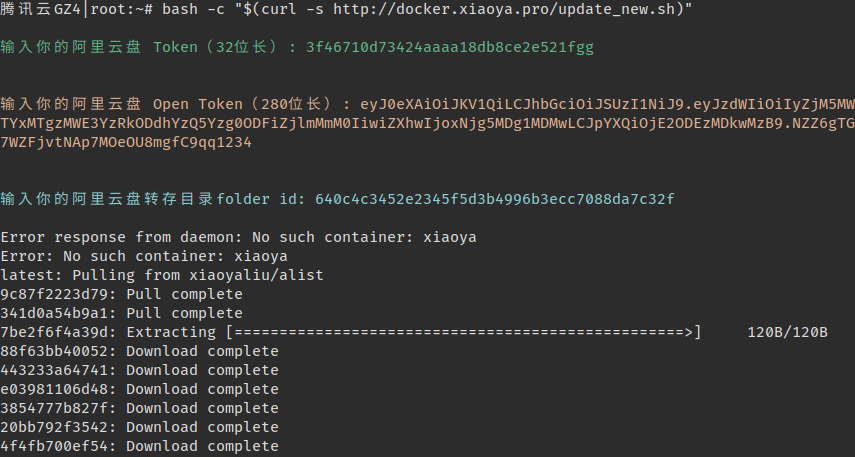
The following display will appear during the first installation:
You need to configure three necessary parameters before installation:
| | Corresponding files | How to obtain | | Folder id of the transferred directory | /etc/xiaoya/temp_transfer_folder_id.txt | First transfer this https://www.aliyundrive.com/s/rP9gP3h9asE to your own network disk (select the resource disk), then open the transferred directory in the browser, the last string of the browser’s url https://www.aliyundrive.com/drive/file/resource/640xxxxxxxxxxxxxxxxxxxca8a is, remember not to delete this directory, the content inside can be deleted regularly |
Reference video
For the content and format of the configuration, please refer to the “File Function Description of the /data Directory in the Container” chapter. Some platforms need to open additional ports on the server’s firewall and choose to release port 5678 or 6789.
Graphical configuration installation under NAS
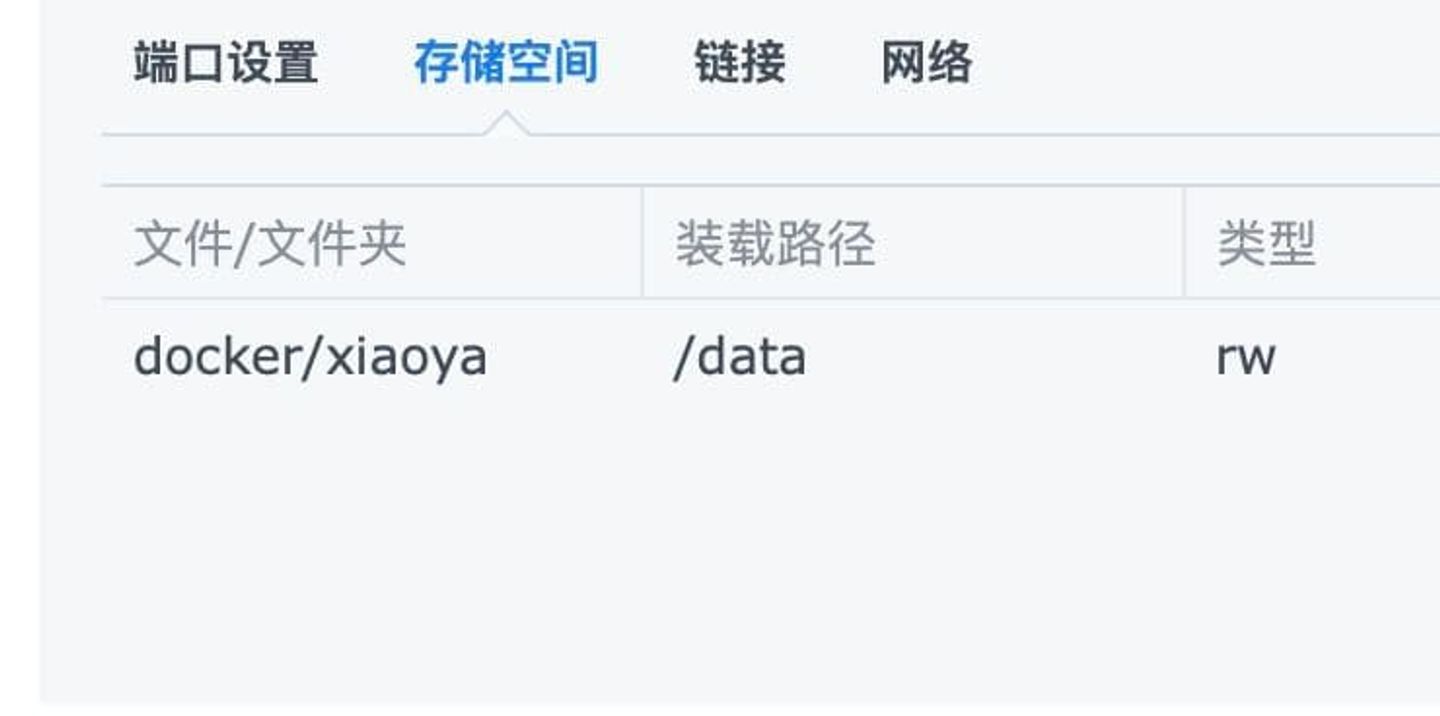
Please refer to the Synology configuration screenshot below. The configurations of other NAS products are similar.
See http://alist.xiaoya.pro/安装,配置,修复%20xiaoya%20docker%20指南/群晖NAS%20Docker安装xiaoya.pdf for details
For some Synology, due to firmware reasons, the loading path is /data and saving the application will fail. Then try this
This is the configuration reference for unraid
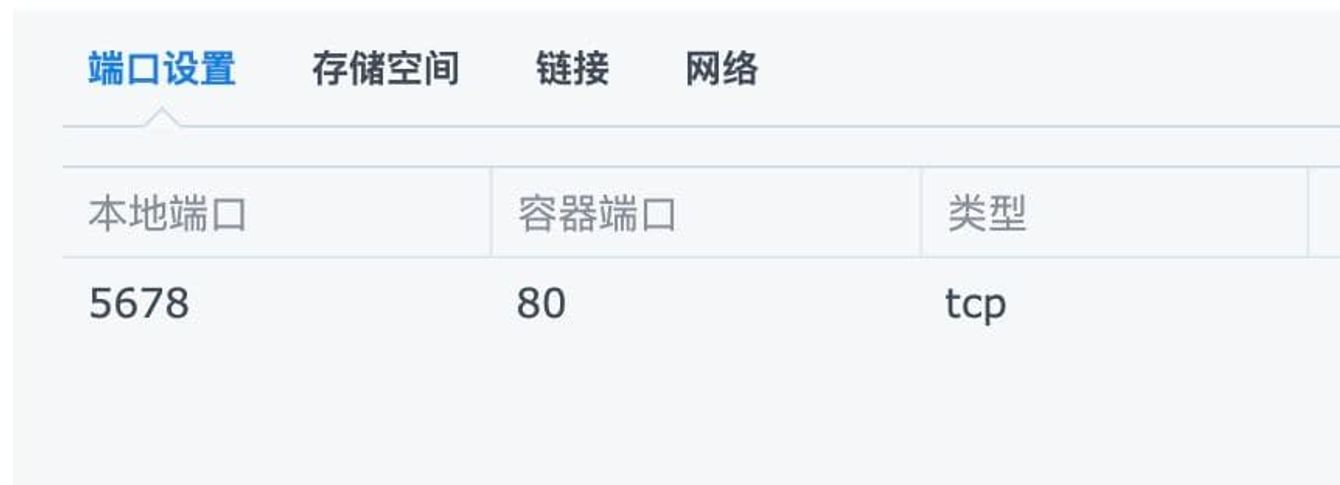
Remember that the port mapping is 5678 → 80, not 5244 Otherwise, the search will fail and the following error will appear.


Extra features
- Automatic sign-in
- Check token validity tool
- With TVBOX’s json file, you can search xiaoya’s docker content
- Mount customized pikpak sharing
- Mount multiple pikpak network disks of your own
- Mount customized Alibaba shared resources
#Set forced login and custom password
Save the password to /etc/xiaoya/guestpass.txt (but do not set weird symbols, such as &#“~@()*$ and the like)
If your xiaoya is placed on the public network, in order to prevent others from using the network, you can set up forced login, add the file /etc/xiaoya/guestlogin.txt, and restart. It does not matter whether the file has content. If you cancel the forced login, delete this file. The account for forced login is dav, the password is set in /etc/xiaoya/guestpass.txt, and the user dav is used for webdav connection.
After the above two functions are set, you need to restart docker to take effect.
#File function description of the /data directory in the container:
Files marked ******* are necessary and must exist and have content. The default location of all configuration files is /etc/xiaoya on the host machine.
File: **mytoken.txt ***** Purpose: Used to load Alibaba shares and automatically sign in Format: 75fee1ca79514e60aa6d46c8370b9afd Note: 32-bit length, refer to https://t.me/PlutoPlayer/239324
File: **myopentoken.txt ***** Purpose: Used to load your own Alibaba cloud disk (open interface) Format: eyJ0eXAiOixxxxxLCJhbGciOiJSUzI1NiJ9.eyJzd999999wNzBkOWRiNWQ5YmQ0YT….. Note: A very long string, 280 digits, obtained by https://alist.nn.ci/zh/guide/drivers/aliyundrive_open.html
File: **temp_transfer_folder_id.txt ***** Purpose: The folder id of the dump directory of your Alibaba network disk Format: 640xxxxxxxxxxxxxxxxxxxxca8a Note: Open your Alibaba Cloud Disk webpage, and the browser address where the directory is located is https://www.aliyundrive.com/drive/folder/640xxxxxxxxxxxxxxxxxxxca8a. The last string is
If you upgrade to Alibaba Cloud App 4.9 or above, then the settings of the entire account will be greatly changed. You need to create a directory in the new “Resource Library” and transfer this first.
Then open the browser, open the transferred directory, and get the folder id from the browser url.
File: pikpak.txt Purpose: Used to watch pikpak sharing Format: “xxxxxxxx” “yyyyyyyy” Note: The account number can be an email address and a mobile phone number. The mobile phone number must be preceded by an area code, that is, “+86xxxx”. In this way, if you use Google shortcut to log in during registration, you cannot use Google mailbox to log in (alist does not support it)
File: guestpass.txt Purpose: Change the password of the guest account yourself Note: If forced login is enabled, this password will also be used to log in to the account dav.
File: guestlogin.txt Purpose: Determine whether to enable forced login based on the existence of this file Format: Blank file, if the forced login function is not required, delete this file
File: show_my_ali.txt Purpose: Use the existence of this file to determine whether to load your own Alibaba Cloud disk Format: Blank file, if it does not need to be loaded, delete this file
File: docker_address.txt Purpose: Cooperate with TVBOX’s alist search Format: http://xxxxx:5678 (don’t add / at the end)
TVBOX configuration address http://xxxxx:5678/tvbox/my.json TVBOX configuration address (multiple warehouses, TVBox shell support is required) http://xxxxx:5678/tvbox/juhe.json
File: docker_address_ext.txt Purpose: External network address, used with tvbox external network access, the corresponding configuration address is http://xxxx/tvbox/my_ext.json Format: http://xxxxx:5678 (don’t add / at the end)
File: iptv.m3u Purpose: Customize additional live broadcast source “My Private Use” in my.json Format: standard m3u format
File: tv.txt Purpose: Mount custom live broadcast source to xiaoya Format: tvbox live broadcast source format, as shown in the figure
Note: Live broadcast sources have issues such as format and regional restrictions. Some can be viewed on the web, while others require a player.
File: proxy.txt Purpose: Use proxy, http, https, socks5 protocol Format: http://xxxxx:7890 or socks5://xxxxx:7891 (don’t add / at the end)
File: alist_token_expire_time.txt Purpose: Set the validity period of alist auth token, the default is 4800 (convenient for users who don’t care about security) Format: 72 (number, unit is hour)
File: alist_auth_token.txt Purpose: No setting required, automatically generated, can be used to configure alist v3 matryoshka, a new one will be regenerated after deletion Format: alist-09ceb38a-f143-47f7-b255-c3eec819cd7bxxxxxxxxxxxxx
File: tvbox_security.txt Purpose: Enable the random subscription address of tvbox to prevent others from being scammed on the public Internet and prevent others from guessing your subscription address. Format: Blank file, if not, it will not be opened.
File: tvbox_config.txt Purpose: No setting required, automatically generated, Format: http://xxxxx:5678/tvbox/sdfh02ye.my.txt
File: tvbox_config_ext.txt Purpose: No setting required, automatically generated, random subscription address from the external network, Format: http://xxxxx:5678/tvbox/sdfh02ye.my_ext.txt
File: my.json Purpose: Customize tvbox configuration file Format: TVBOX compatible json configuration file format
File: pikpak_list.txt Purpose: Mount one or more pikpak accounts of your own Format: Mount name “Account” “Password”, separated by spaces (pikpak2 “abc@hotmail.com” “123456”), one per line
Note: The mount name cannot have spaces.
File: alist_list.txt Purpose: Mount one or more Alist matryoshka dolls Format: mount name alist version (v2 or v3) URL directory, separate one per line with spaces Note: The mount name cannot have spaces, and the URL should not have a slash at the end.
File: pikpakshare_list.txt Purpose: Mount one or more pikpak shares of your own Format: Mount name, share ID, share directory, separated by spaces (Zhao Badao VNRT8Wr8BGyw1kt1HkijKR4Qo1 VNQf6ZmWE3pVWGpuFriGqyPzo1), one per line Note: The mount name cannot have spaces.
File:alishare_list.txt Purpose: Mount custom sharing ID Format: mount name Alibaba share ID file folder id, separated by spaces, one per line 120T movie resources ZpevUcDZ2Pn 636c8ba0703acd24cd44b19dd00312ef15b1e8 60T various information s6NBDauc5VZ 63b16e82a50ca34f6c7466293235a06d1af8ea3
Note: The mount name cannot have spaces.
Also a reminder, text file formats are different due to different platforms. Make sure it is in Unix format and UTF-8 encoding. Otherwise, there will be garbled characters, web page errors, inability to enter the directory and other strange problems. Take a look at the screenshot to make sure the encoding format is correct.
Demonstration configuration file
What should I do if docker is configured but the browser cannot access it
Unable to open page
The simplest is to install it once in host mode (port 6789), which can avoid problems such as firewall rule conflicts in bridge mode.
                 
Slow startup loading
Please check the network connection of the device where alist is located first.
The normal loading time is between 1 minute and 5 minutes. If it exceeds 5 minutes, there may be a problem. Check the log.
If you see
Then it triggers the restriction of alist’s open interface.
Then you need to pause for one hour and stop all alist-related mirrors
Open these mirrors again after one hour
Or you can circumvent this restriction by changing the IP by scientifically switching nodes online (because it is calculated based on IP)
“The input paramter refresh_token is not valid” appears
Replace token, mytoken.txt with the 32-bit long token
 
bash -c "$(curl -s http://docker.xiaoya.pro/update_new.sh)" -s host
How to fix
Check to see if you have obtained the version number
If the version number is not obtained, then it is a network problem. Solve the problem of network connectivity first.
If the above test can get the version number, it means there is no problem with the network, then it is most likely a firewall problem. It is possible that other software interferes with the docker firewall rules. You can try to repair the docker firewall rules like this
or (depending on your system)
The purpose is to restart the Docker Daemon management process to rebuild the docker firewall rules, and then
If that still doesn’t work, then you have to use the ultimate move.
Execute in sequence
#Alibaba’s risk control
Alibaba has updated the interface, and several people have experienced problems with being able to put it on for a while and not being able to put it on for a while. The common point is that they all use infuse, and then scrape and scan. So combined, it can be judged that Alibaba will have restrictions on a large number of requests for the same IP in a short period of time.
The performance is that ParamFlowException appears on the web page.
The performance of the player is 500 error
Please pay attention and stop scanning as much as possible. It will automatically recover after a while.
So don’t scrape it now. Alibaba has started dynamic connection management. A large number of requests in a short time will directly throw errors. I am not sure how it will be handled in a long time. There will definitely be restrictions on tokens and accounts, because from the perspective of being connected, it looks like a traffic attack. I used similar methods to prevent others from indexing my website.
Now the following behaviors have become high-risk operations
- Use default settings such as infuse to scan and obtain metadata.
- Use kodi, plex, jellyfin, emby for scraping
- Use alist to build indexes
Be careful not to let short-term restrictions turn into long-term restrictions on your account. Stop the above 3 behaviors.
  
docker stop xiaoya
docker stop xiaoya-hostmode  (如果是host模式安装的镜像)
docker stop alist
docker start xiaoya
docker start alist
What software can connect to xiaoya?

File management type:
- ES file browser, Solid Explorer

service dockerd restart
systemctl restart docker
iptables -F
service dockerd restart
docker restart xiaoya
Video Player:
- IOS platform: infuse, fileball, nplayer
- Android platform: nplayer, Kodi, Reex, NovaPlayer (modified version)
- windows: potplayer
 
Mount to local directory:
- rclone,davfs2,raidrive,Mountain Duck
How to connect xiaoya’s docker through webdav on the player
Refer to the configuration screenshots of potplayer, nplayer, and kodi.
webdav account password
User: guest
Password: guest_Api789
Nova magic modified version (supports webdav, https://t.me/PlutoPlayer/127849)
Fill in your docker url into docker_address.txt (default is in the /etc/xiaoya directory)
For example http://192.168.2.1:5678
Fill in http://192.168.2.1:5678/tvbox/my.json in the configuration address of TVBOX
Can support xiaoya search
You can also browse
If you want to customize the configured json file, just place it in /etc/xiaoya/my.json
How to configure your own token
Ali token
****https://alist.nn.ci/zh/guide/drivers/aliyundrive.html or
Get your mobile token
Then, in the terminal command line (xxxxxxxxxxxxxxxx is the token you obtained)
Or paste the token you obtained into the etc/xiaoya/mytoken.txt file and save it.
For NAS or other self-configured files, please put them in the folder you set in the configuration. The file name is mytoken.txt.
Remember, it must be obtained from the mobile terminal and must be 32 bits in length.
Whether it is placed correctly can be confirmed by the following command
Pikpak account
Save your pikpak account to /etc/xiaoya/pikpak.txt
The format is as follows:
“xxx” “yyy” (Replace xxx with account number and yyy with password. There are spaces between “account number” and “password”. Remember to use English characters in quotation marks, " not “)
If the account number is a mobile phone number, you need + area code. For example, if your mobile phone number is 12345678900, then fill in “+8612345678900”
If you registered through third-party authentication (such as Google), please pay attention to the content of “My account number is correct, why can’t I see the content in the pikpak directory”
Register 2 accounts, one for saving and one for viewing
After registration, enter the “Redemption Code” 73900974 at the location shown in the picture to get a 5-day trial membership, and then you use 5 days to fill up the space. After the 5-day membership expires, the content will not be deleted, you can only view it but not save it. This account will also be speed-limited, and you can use it as a sharing disk (share it with another account of yours or others)
Register another account and do not save more than 6G. As long as it does not exceed the free 6G space of the basic membership, the speed is not limited. This is used to view other people’s sharing or the sharing of another account of your own.
Please use your email address to register as much as possible. You can register many people with this method.
If the following icons appear, it means that you need to access the Internet scientifically. Some areas can directly connect, and some areas cannot.

**How to confirm whether your pikpak account is set up? **
Confirm with the following command

My account number is correct, why can’t I see the content in the pikpak directory?
If the account and password are not filled in incorrectly, then I guess you are in this situation. When registering, you used a third-party quick registration such as Google or FB. Although it seems that the account is a Google email, you cannot actually log in with an email. You must use third-party verification. Alist does not currently support this kind of jump to third-party verification, so you can either bind an email in the account settings, or register a new account.
You can verify it yourself, choose your email to log in, enter your gmail email and see if it works
 
**How to test that my alist can connect to the pikpak server? **
Enter at the command line of the device where alist is located
If a lot of content appears, it means that pikpak can be connected, and vice versa.

What should I do if the video cannot be played? What should I do if the video has images but no sound?
If some browsers can play it but some cannot, then it is most likely that the browser’s video decoding capability is insufficient. Please call a third-party player to try, or connect alist through webdav to play (general browsers do not support H.265 and AC3 encoded videos)

What to do if “Disk is full, troubleshooting” appears
There are several possibilities:
- Your network disk is full
- Token or opentoken is invalid
- Unable to refresh opentoken (limit of 10 times in 60 minutes)
- Token and opentoken are not the same account
- You deleted the dump directory (even if you create a new one with the same name, it will be useless, the folder id has changed)
  
What should I do if Alist V3 cannot mount xiaoya?
Execute the following code to obtain the token
Fill in the token in Authorization. Select the local docker address for Server. Do not fill in the account number and password.
If I deploy it on a vps, will it consume my traffic?
What is the difference between 302 redirect and local proxy?
Assumptions:
- A is the player
- B is alist
- C is Ali
302: A visits B, and B tells A that what you want is at C. I will give you an address, and you go directly to C, and then A directly connects to C.
Because A is directly connected to C when it is best to play, it does not consume B’s traffic, which is the traffic of the vps where B is located.
Local agent: A visits B, B visits C, gets the content back, and returns it directly to A. B acts as an intermediary for forwarding.
B consumes the traffic of fetching content from C (pull) + passing it to A (push) during the playback process of C, one in and one out.
I will use this resource as an example to explain specifically.
What you get from copying the connection is
Connect to this url to get the first jump
It is the number of this resource (flac file) in the Alibaba Cloud disk system.
This long list is the real resource storage address. The player uses this final URL to open the resource for playback. This resource has a validity period. It is this sign, which is a Unix timestamp. You can convert it and you will know that it is 6 hours.
That is to say, if you use the same URL after six hours, you will not be able to open the connection because it is invalid. Why is it so complicated? Alibaba just gives a resource storage address directly. This is because in order to give users the best experience and open it faster, a pre-cached cache is used, that is, CDN. Different users may obtain different CDN resource addresses. Alibaba’s CDN is all over the country, including Beijing and Guangdong. Users in Beijing can go to Guangdong to get it. The principle of slowness is to go to the nearest and fastest speed. Those near Beijing point to CDN resources in Beijing, and those near Guangdong point to CDN resources in Guangdong. However, CDN is used for caching in the middle layer, just like the first-level cache of your hard disk, not the final storage place of resources. The quantity is limited and expensive (using memory and high-speed hard disk is definitely expensive), so unused resources need to be deleted to make room for useful ones. Therefore, there is a limit on the validity period. After the validity period, they will be deleted to make room.
In addition, it should be noted that the proxy role of alist is a traffic proxy, not a caching proxy, so it cannot improve the smoothness of real video playback. I use water pipes as an example.
Traffic proxy:
When the network is open, the A → C straight pipe connection is the fastest, and B is like the elbow/tee of the water pipe. There is a wall between A and C and cannot be directly connected, so the only way is A → B, and then B → C. How much connection is made in this way will be damaged, and the flow rate (in network terms, it means more delay). The actual experience is that what cannot be seen becomes visible.
Caching Proxy:
It can be achieved when A and C are connected or not. This is because B’s role is more like a booster valve. The pipe from A → B should be thicker than the pipe from B → C. The booster valve is used to ensure the (water pressure) flow rate of B → C. The caching agent includes the function of the above flow agent. The actual experience is that it can not only be viewed but also does not look stuck.
How to synchronize data with the website regularly
If you are based on Linux system (including openwrt), you can use the following method to set up scheduled updates and execute it in the terminal
add a record
- Press o to insert a row
- Then enter this bunch of text into
- Then press the ESC key in the upper left corner of the keyboard to exit editing mode.
- Enter :wq to save and exit.
It means automatically restarting xiaoya docker at 6 am every day to synchronize data. If you change 6 to 13, it will be 1 pm. As for how to use the editor vi, please go to Baidu.
   
Some of my invitation codes, recommendations and widgets
Ali registration
There is 500G registered through my shared link. You can register a small account to use with docker.

pikpak registration
Airport recommendations
Tiger Cloud
Coupon code: pluto95

Check the validity of the token (32 bits)
xxxxxxxxxxxxxxxxxxxxxxxxxx is your token

Check the validity of open token (280 bits)
xxxxxxxxxxxxxxxxxxxxxxxxxx is your open token

docker exec -i xiaoya sqlite3 data/data.db <<EOF
select value from x_setting_items where key = "token";
EOF
Manually sign in to Alibaba Cloud Disk
xxxxxxxxxxxxxxxxxxxxxxxxxx is your token
   
Oil Monkey Douban plug-in (including Xiaoya search)
If you think Xiaoya has helped you, please give Xiaoya a reward, don’t be stingy.