HomeAssistant: Common HACS, Github Third-party Support Library Repos
HACS
- HACS Official Website
- HACS Installation Documentation
Verified with Mi Home Series
Mi Smart Internet Air Conditioner, zhimi.aircondition.ma3
https://github.com/margrop/zhimi Sample configuration file as follows
climate:
  - platform: xiaomi_miio_airconditioningcompanionmcn02
    name: 主卧空调
    host: 192.168.1.xxx
    token: 00000000996745e6373da0000000000
    target_sensor: sensor.none
    scan_interval: 60
  - platform: xiaomi_miio_airconditioningcompanionmcn02
    name: 次卧空调
    host: 192.168.1.xxx
    token: 00000000eb4b89209de37fd00000000
    target_sensor: sensor.none
    scan_interval: 60
Xiaomi Air Conditioner Companion 2, lumi.acpartner.mcn02
https://github.com/EugeneLiu/xiaomi_airconditioningcompanionMCN02 Sample configuration file as follows
climate:
  - platform: zhiair
    name: 客厅空调
    host: 192.168.1.xxx
    token: 000000060cbdb81c632a6ea00000000
  - platform: zhiair
    name: 儿童房空调
    host: 192.168.1.xxx
    token: 0000000008a4efa9b0f3fb000000000
XiaoAi Touch Screen Speaker, DingTalk group message reminders, xiaomi.wifispeaker.lx04
https://github.com/Yonsm/ZhiMsg https://github.com/Yonsm/ZhiMi https://github.com/Yonsm/ZhiBot Sample configuration file as follows
zhimsg:
  - platform: ding
    name: 钉钉信使
    token: !secret dingbot_token
    secret: !secret dingbot_secret
  - platform: miai
    name: 小爱触屏音箱
    did: 2671000000
    model: lx04

zhibot:
  - platform: genie
  - platform: miai
    token: !secret zhibot_token
  - platform: ding
    token: !secret zhibot_token
  - platform: ding
    name: 小爱触屏音响
    token: !secret zhibot_token
Mi Universal Remote Controller, chuangmi.remote.v2
https://github.com/custom-components/remote_homeassistant Sample configuration file as follows
remote:
  - platform: xiaomi_miio
    host: 192.168.1.xxx
    token: 0000000649a5afc10f6fc60b0000000
    model: chuangmi.remote.v2
    name: 万能遥控 SH
    slot: 1
    timeout: 30
    hidden: false
Mi Smart Socket Basic Version (WIFI), chuangmi.plug.m1, can be used directly with the official xiaomi_miio
https://www.home-assistant.io/integrations/xiaomi_miio/ Sample configuration file as follows
switch:
  - platform: xiaomi_miio
    name: N4插座SH主卧
    host: 192.168.1.xxx
    token: 00000000c002be49862b1d1e00000000
    model: chuangmi.plug.m1
  - platform: xiaomi_miio
    name: N3插座SH主卧
    host: 192.168.1.xxx
    token: 0000000016e418341ece619100000000
    model: chuangmi.plug.m1
Verified with Tmall Genie and Xiaodu Speaker
HAVCS stands for Home Assistant Voice Control Skill, aimed at providing Home Assistant with the capability to integrate with speaker platforms. By running this plugin on Home Assistant, it can connect to speaker manufacturers’ skill open platforms (custom skills or using existing skills), responding to speaker commands to control related devices. https://github.com/cnk700i/havcs
- HAVCS Author’s: HAVCS Usage Guide
https://ljr.im/articles/plugins-havcs-edible-instructions/ Sample configuration file as follows
havcs:
  platform:
   - aligenie
   - dueros
  http:
    clients:
      aligenievisiter: Br9opxYY000000
    ha_url: https://blog.margrop.net
  device_config: ui
Solution: HAVCS Menu Nesting Issue (HAVCS Menu Displaying Infinitely Nested)
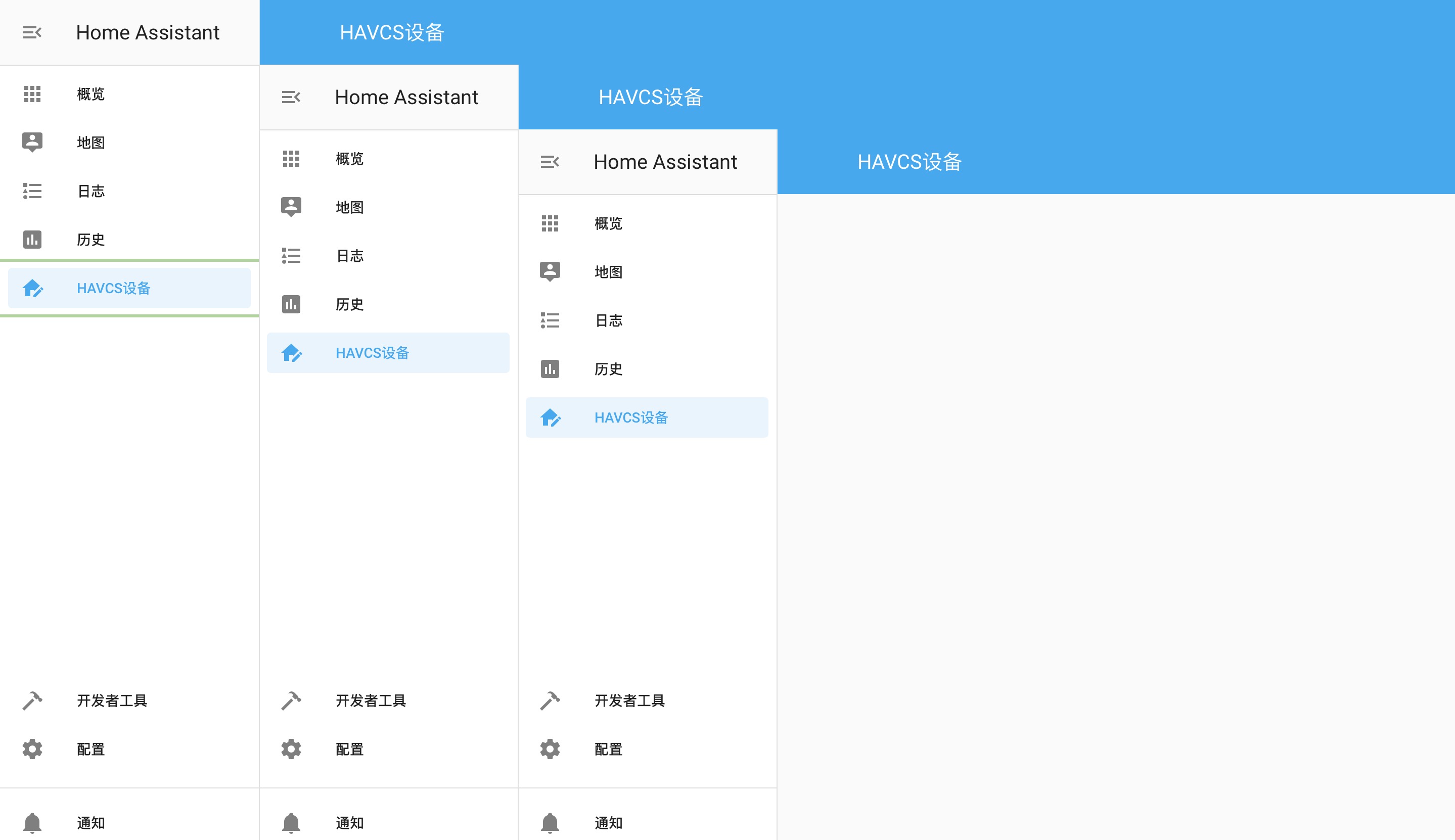
- Navigate to the
Supervisorpage, open the add-onFile editor, open the directorycustom_components/havcs/ - Replace
/havcs/inindex.htmlwith/havcshtml/ - Replace
/havcs/inlogin.htmlwith/havcshtml/ - Find the
class HavcsDeviceViewclass inhttp.py, locate the code snippet below, changehavcsin the code below tohavcshtml
hass.http.register_static_path('/havcs', local, False)
- Still in the file
http.py, locate the code snippet below, changehavcsin the code below tohavcshtml
config = {"url": '/havcs/index.html'}`
- After verifying there are no errors, restart HA
Verified with Apple Series
iCloud Device https://github.com/gcobb321/icloud3