How to use CentOS 7 to run N2N—supernode
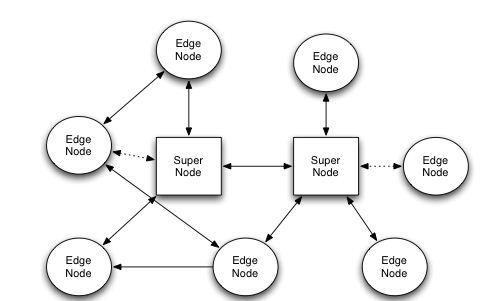
超级节点(supernode): It allows edge nodes to announce and discover other nodes. It must have a port that is publicly accessible on the Internet.
First review the basic elements of n2n
n2n is a lightweight VPN software that makes it easy to create virtual networks that bypass intervening firewalls. In order to start using n2n, two elements are required:
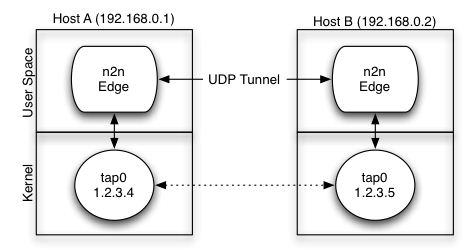
一个超级节点(supernode): It allows edge nodes to announce and discover other nodes. It must have a port that is publicly accessible on the Internet.边缘节点(node): The node that will be part of the virtual network. The virtual network shared between multiple edge nodes in n2n is called社区(community). A single supernode can relay multiple communities, and a computer can be part of multiple communities at the same time. Edge nodes can use encryption keys to encrypt packets in the community. n2n attempts to establish direct对等连接(p2p)between edge nodes via udp where possible. If this is not possible (usually due to special NAT devices), supernodes are also used to relay packets.
#Compiled files
Compilation environment:
Manually start supernode
*Give executable permissions
If you download the executable file directly, please copy it to the path below.
- Test whether it can start normally
Tip: Please modify the following
-lparameters according to your needs.
- A simple explanation of the supernode parameters. For detailed explanation, enter supernode directly on the command line.
Parameter name | English | Chinese | Example -l | Set UDP main listen port to | Set UDP main listening port to | -l 2345 -v | Increase verbosity. Can be used multiple times | Start verbose mode and print more logs | -v
yum install openssl
wget https://download.margrop.net/d/oneindex/network/n2n_2.8_stable/CentOS7/supernode -O supernode
Automatically start supernode
-
Edit systemctl startup file
-
Start service
*Set to start automatically
chmod +x /usr/local/sbin/supernode
/usr/local/sbin/supernode -l 2345 -v
References
vim /etc/systemd/system/supernode.service
[Unit]
Description=N2N SuperNode Run On Port 2012 UDP
After=network.target

[Service]
Type=simple
ExecStart=/usr/local/sbin/supernode -l 2345
TimeoutStartSec=0

[Install]
WantedBy=default.target
systemctl daemon-reload
systemctl stop supernode
systemctl start supernode
systemctl status supernode
systemctl enable supernode