Adding Proxy Support to Antigravity and Claude on macOS: Safely Wrapping Electron Apps Without Patching Them
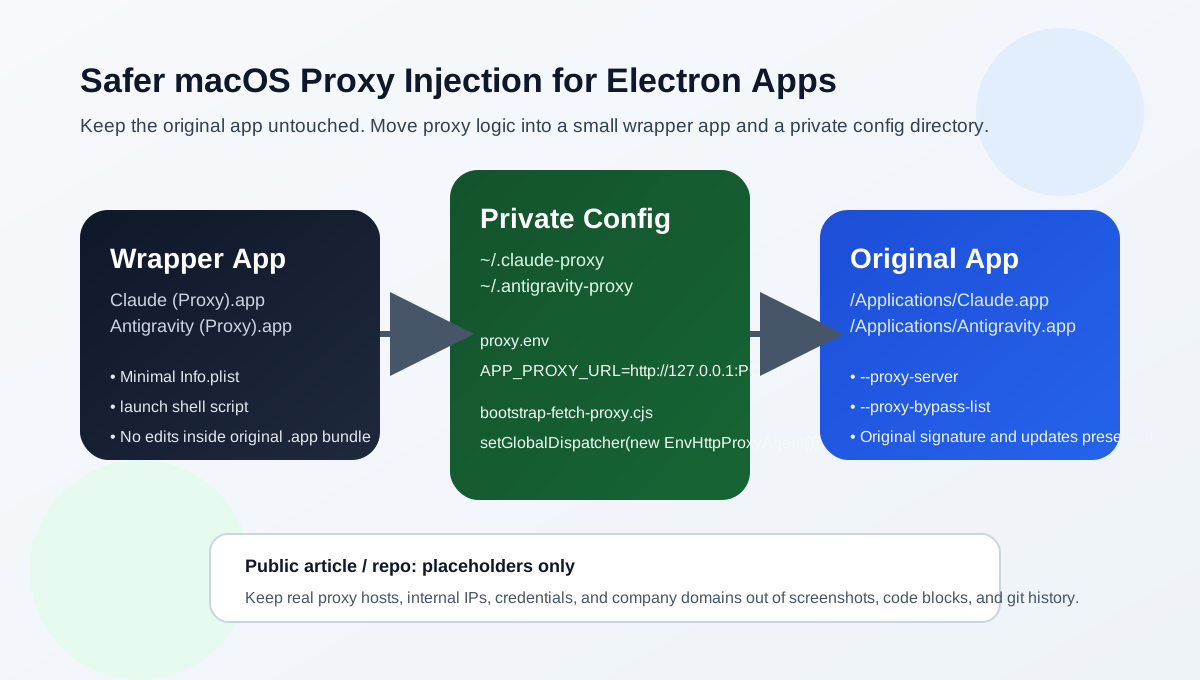
Before You Start This post documents a pattern that has already been validated in a real macOS environment: do not patch the original application bundle, and do not publish your real proxy endpoint. Instead, place a tiny wrapper app in front of the original Electron application. That wrapper becomes the stable place where proxy settings, launch flags, and Node-side bootstrap logic live.
When people first hit this problem, the instinct is usually to edit /Applications/Claude.app or /Applications/Antigravity.app directly. That can work once, but it is a poor long-term operational choice for three reasons:
- You may break code signing behavior and make future launches or permission prompts more fragile.
- Auto-updates can overwrite your local modifications at any time.
- If you hardcode a real proxy endpoint into the app bundle, screenshots, scripts, or a public post, you can leak private infrastructure details that never needed to be exposed.
The approach that proved much more stable was:
- Leave the original
Claude.appandAntigravity.appuntouched. - Create
Claude (Proxy).appandAntigravity (Proxy).appunder~/Applications. - Let each wrapper app do only three things: load a private
proxy.env, export upper/lower-case proxy variables, and launch the original Electron binary with--proxy-server. - If the target app also uses Node/undici
fetch, inject a very smallNODE_OPTIONS=--require=...bootstrap so Node-side requests follow the same proxy path.
All proxy endpoints in this article are intentionally redacted and replaced with placeholders such as:
http://127.0.0.1:PORT
Replace that value with your own local proxy entrypoint. Do not publish real proxy hosts, internal IP addresses, usernames, passwords, tokens, or internal domains in a public article, repository, or screenshot.
1. Why a wrapper app is safer than patching the original app
The real problem is not “Claude has no proxy setting.” The real problem is:
- You need to pass proxy settings into Chromium/Electron.
- You may also need Node-side
fetch/undicitraffic to follow the same proxy. - You want all of that without destabilizing the original app bundle.
A wrapper app solves those goals cleanly:
- The original app stays under
/Applicationswith its bundle structure untouched. - The proxy logic lives in one readable shell script, which is easy to port to another Electron app later.
- The real proxy endpoint lives in
proxy.envunder the user directory, where it belongs. - Rollback is trivial: remove the wrapper app and its private config directory.
This pattern works especially well for:
- Claude
- Antigravity
- VS Code and VS Code forks
- Other Electron apps where the main executable path can be identified reliably
2. What the structure looks like
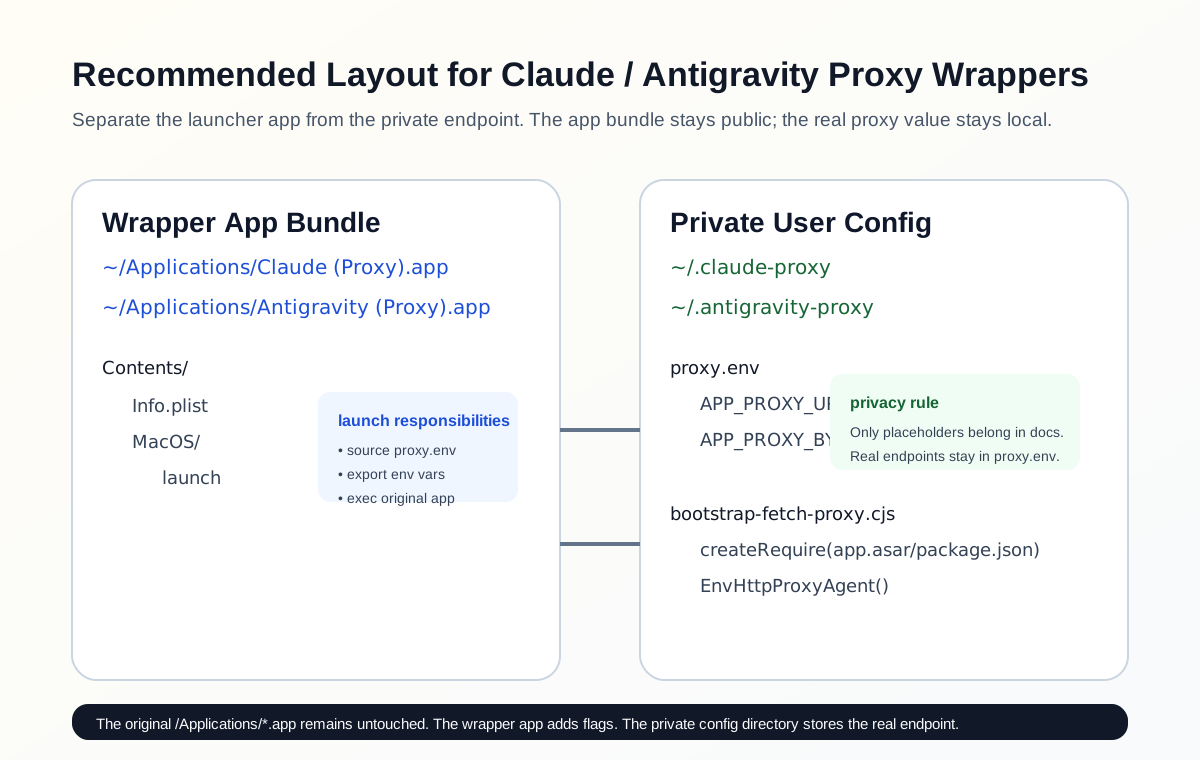
A minimal working layout usually looks like this:
~/Applications/Claude (Proxy).app/
└── Contents/
    ├── Info.plist
    └── MacOS/
        └── launch

~/.claude-proxy/
├── proxy.env
└── bootstrap-fetch-proxy.cjs
Each file has a narrow responsibility:
Info.plisttells macOS that this is a minimal app wrapper.launchis the real entrypoint. It exports env vars and launches the original app.proxy.envstores the private endpoint.bootstrap-fetch-proxy.cjsextends proxy coverage into Node/undici.
3. Start with a reusable Node fetch proxy bootstrap
This file can be reused for Claude, Antigravity, and similar Electron apps.
Suggested locations:
~/.claude-proxy/bootstrap-fetch-proxy.cjs
~/.antigravity-proxy/bootstrap-fetch-proxy.cjs
Contents:
'use strict';

const path = require('path');
const { createRequire } = require('module');

function firstNonEmpty(...values) {
  for (const value of values) {
    if (typeof value === 'string' && value.trim() !== '') {
      return value.trim();
    }
  }
}

function resolveAppRequire() {
  const explicitPackageJson = firstNonEmpty(process.env.APP_PROXY_APP_PACKAGE_JSON);
  const packageJsonPath =
    explicitPackageJson ||
    path.resolve(
      path.dirname(process.execPath),
      '..',
      'Resources',
      'app.asar',
      'package.json'
    );

  return createRequire(packageJsonPath);
}

function resolveUndici() {
  const explicitModule = firstNonEmpty(process.env.APP_PROXY_UNDICI_MODULE);
  if (explicitModule) {
    return require(explicitModule);
  }

  try {
    return require('undici');
  } catch (_) {
    return resolveAppRequire()('undici');
  }
}

function enableFetchProxy() {
  const proxyUrl = firstNonEmpty(
    process.env.APP_PROXY_URL,
    process.env.HTTPS_PROXY,
    process.env.HTTP_PROXY,
    process.env.https_proxy,
    process.env.http_proxy
  );

  if (!proxyUrl) {
    return;
  }

  try {
    const undici = resolveUndici();
    if (
      typeof undici.setGlobalDispatcher === 'function' &&
      typeof undici.EnvHttpProxyAgent === 'function'
    ) {
      undici.setGlobalDispatcher(new undici.EnvHttpProxyAgent());
      process.env.APP_FETCH_PROXY_ACTIVE = '1';
    }
  } catch (error) {
    console.error(`[app-proxy] failed to enable fetch proxy: ${error.message}`);
  }
}

enableFetchProxy();
The important design choices are simple:
- Read the endpoint from environment variables rather than hardcoding it.
- Try
require('undici')first, then fall back to resolvingundicifrom the target app’s ownapp.asar.
4. Claude: a complete reusable setup
Prepare the directories first:
mkdir -p "$HOME/Applications/Claude (Proxy).app/Contents/MacOS"
mkdir -p "$HOME/.claude-proxy"
4.1 Info.plist
File path:
$HOME/Applications/Claude (Proxy).app/Contents/Info.plist
Contents:
<?xml version="1.0" encoding="UTF-8"?>
<!DOCTYPE plist PUBLIC "-//Apple//DTD PLIST 1.0//EN" "http://www.apple.com/DTDs/PropertyList-1.0.dtd">
<plist version="1.0">
<dict>
  <key>CFBundleExecutable</key>
  <string>launch</string>
  <key>CFBundleIdentifier</key>
  <string>com.example.claude.proxy-wrapper</string>
  <key>CFBundleName</key>
  <string>Claude (Proxy)</string>
  <key>CFBundlePackageType</key>
  <string>APPL</string>
  <key>CFBundleVersion</key>
  <string>1.0</string>
</dict>
</plist>
4.2 launch
File path:
$HOME/Applications/Claude (Proxy).app/Contents/MacOS/launch
Contents:
#!/bin/bash
set -euo pipefail

CONFIG_DIR="${HOME}/.claude-proxy"
ENV_FILE="${CONFIG_DIR}/proxy.env"
BOOTSTRAP="${CONFIG_DIR}/bootstrap-fetch-proxy.cjs"
APP_BIN="/Applications/Claude.app/Contents/MacOS/Claude"

if [[ -f "${ENV_FILE}" ]]; then
  set -a
  # shellcheck disable=SC1090
  source "${ENV_FILE}"
  set +a
fi

PROXY_URL="${APP_PROXY_URL:-${HTTPS_PROXY:-${HTTP_PROXY:-http://127.0.0.1:PORT}}}"
NO_PROXY_VALUE="${NO_PROXY:-localhost,127.0.0.1,::1}"
PROXY_BYPASS_LIST="${APP_PROXY_BYPASS_LIST:-localhost;127.0.0.1;::1}"

export APP_PROXY_URL="${PROXY_URL}"
export HTTP_PROXY="${HTTP_PROXY:-${PROXY_URL}}"
export HTTPS_PROXY="${HTTPS_PROXY:-${PROXY_URL}}"
export ALL_PROXY="${ALL_PROXY:-${PROXY_URL}}"
export NO_PROXY="${NO_PROXY_VALUE}"

export http_proxy="${http_proxy:-${HTTP_PROXY}}"
export https_proxy="${https_proxy:-${HTTPS_PROXY}}"
export all_proxy="${all_proxy:-${ALL_PROXY}}"
export no_proxy="${no_proxy:-${NO_PROXY}}"

if [[ -f "${BOOTSTRAP}" ]]; then
  if [[ -n "${NODE_OPTIONS:-}" ]]; then
    export NODE_OPTIONS="--require=${BOOTSTRAP} ${NODE_OPTIONS}"
  else
    export NODE_OPTIONS="--require=${BOOTSTRAP}"
  fi
fi

# Finder may launch the wrapper under Rosetta.
# On Apple Silicon, detect hardware capability and force Claude to arm64.
if [[ "$(/usr/sbin/sysctl -in hw.optional.arm64 2>/dev/null || echo 0)" == "1" ]]; then
  exec /usr/bin/arch -arm64 "${APP_BIN}" \
    --proxy-server="${PROXY_URL}" \
    --proxy-bypass-list="${PROXY_BYPASS_LIST}" \
    "$@"
fi

exec "${APP_BIN}" \
  --proxy-server="${PROXY_URL}" \
  --proxy-bypass-list="${PROXY_BYPASS_LIST}" \
  "$@"
Do not forget to make it executable:
chmod +x "$HOME/Applications/Claude (Proxy).app/Contents/MacOS/launch"
4.3 proxy.env
File path:
$HOME/.claude-proxy/proxy.env
Contents:
# Replace with your own local proxy entrypoint.
# Do not commit or publish a real internal endpoint.
APP_PROXY_URL="http://127.0.0.1:PORT"

# Optional: Chromium/Electron bypass list
# APP_PROXY_BYPASS_LIST="localhost;127.0.0.1;::1"
4.4 bootstrap-fetch-proxy.cjs
Copy the reusable bootstrap from the previous section into:
$HOME/.claude-proxy/bootstrap-fetch-proxy.cjs
5. Antigravity: the same pattern with only three meaningful changes
If Claude already works, Antigravity is almost the same job with different names and paths:
mkdir -p "$HOME/Applications/Antigravity (Proxy).app/Contents/MacOS"
mkdir -p "$HOME/.antigravity-proxy"
Info.plist only needs the application name changed to Antigravity (Proxy).
The key differences are the variables at the top of launch:
CONFIG_DIR="${HOME}/.antigravity-proxy"
ENV_FILE="${CONFIG_DIR}/proxy.env"
BOOTSTRAP="${CONFIG_DIR}/bootstrap-fetch-proxy.cjs"
APP_BIN="/Applications/Antigravity.app/Contents/MacOS/Electron"
If your Antigravity binary lives elsewhere, replace APP_BIN with the real path.
The private proxy config remains the same idea:
APP_PROXY_URL="http://127.0.0.1:PORT"
6. How to verify that the proxy is really active
The easiest validation is not “the icon opened.” The easiest validation is process arguments.
Quit the original app first, then launch the proxy wrapper, then run:
pgrep -lf '/Applications/Claude.app/Contents/MacOS/Claude'
pgrep -lf '/Applications/Antigravity.app/Contents/MacOS/Electron'
You should see arguments similar to:
--proxy-server=http://127.0.0.1:PORT
--proxy-bypass-list=localhost;127.0.0.1;::1
If you also want to verify that the Node-side bootstrap was activated, inspect app logs or environment output for:
APP_FETCH_PROXY_ACTIVE=1
6.1 If Claude shows “quit unexpectedly” on Apple Silicon
This failure mode is worth documenting separately, because it can look like “the proxy setup broke Claude,” while the real root cause is often different: the wrapper launched Claude as x64 under Rosetta instead of arm64.
The concrete pattern I validated was:
- Claude immediately triggered the macOS “Claude quit unexpectedly” dialog
- The crash report showed
translated: trueandcpuType: "X86-64" ~/Library/Logs/Claude/main.logshowedarch: 'x64'- The same machine was actually Apple Silicon, and forcing
arch -arm64made Claude stable again
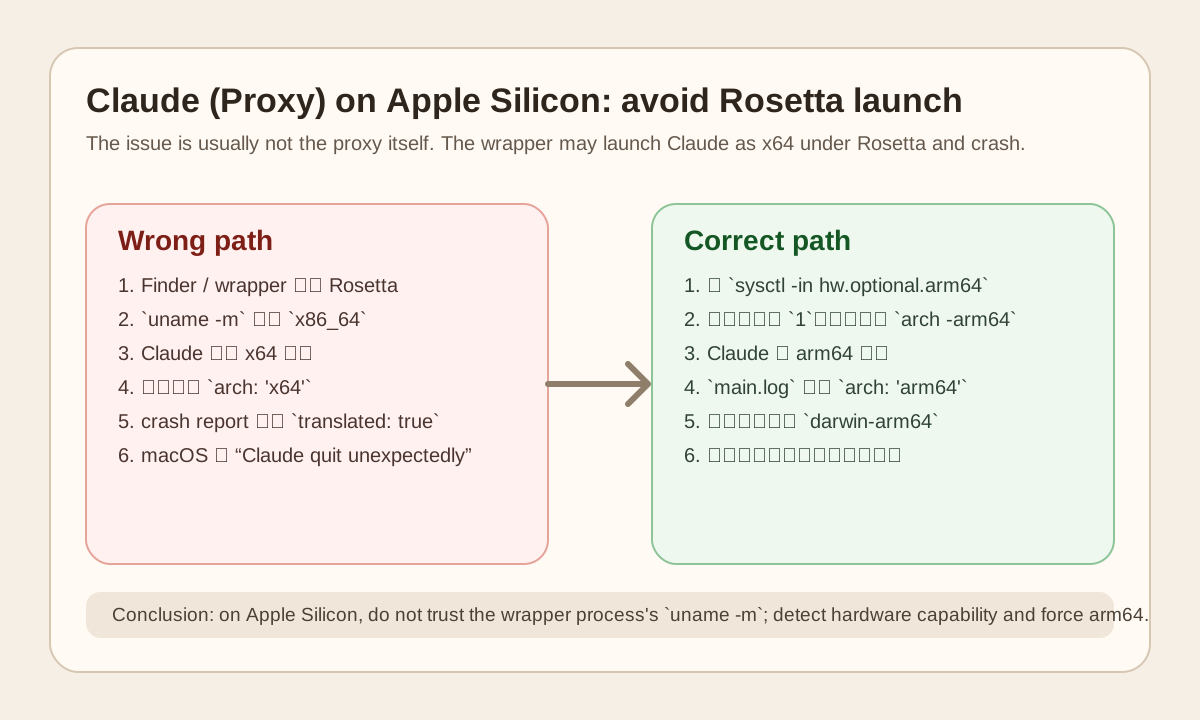
The subtle mistake is usually here:
- Many wrapper scripts use
uname -mto detect architecture - If the wrapper itself was launched in a Rosetta context,
uname -mmay reportx86_64 - The script then incorrectly starts a universal Claude binary as x64
- Depending on the Claude/Electron version combination, that may be slow, unstable, or immediately crash
The safer pattern is:
- Use
sysctl -in hw.optional.arm64to detect whether the machine supports arm64 - If the result is
1, launch Claude witharch -arm64 - Do not rely on the wrapper process’s current
uname -mvalue
A quick check looks like this:
sysctl -in hw.optional.arm64
grep -n "Starting app" "$HOME/Library/Logs/Claude/main.log" | tail -n 2
If the first command returns 1 but the log still shows arch: 'x64', the wrapper is almost certainly launching Claude through the wrong architecture path.
After the fix, you should see:
arch: 'arm64'
And when Claude downloads or updates internal components, the resource target should switch from darwin-x64 to darwin-arm64.
7. Why this pattern fits Claude, Antigravity, and similar apps
This approach depends on two stable Electron capabilities:
- Chromium supports
--proxy-serverand--proxy-bypass-list - Node supports
NODE_OPTIONS=--require=...
That means the portability question is usually reduced to three checks:
- Can you locate the app’s real executable?
- Is it an Electron or Chromium-shell desktop app?
- Can you keep real proxy values outside public artifacts?
If the answer is yes, then Claude, Antigravity, and many similar apps are fundamentally the same problem.
8. Common mistakes
8.1 The app opens, but it is still the old non-proxy instance
If the original Claude or Antigravity instance is already running, opening the proxy wrapper may simply hand off to that existing instance instead of starting a fresh process with the new flags.
The safe sequence is:
- Quit the original app
- Launch
Claude (Proxy).apporAntigravity (Proxy).app - Inspect the process arguments
8.2 Only setting HTTP_PROXY is often not enough
Chromium traffic and Node/undici traffic are not always the same execution path. Setting only environment variables may not cover all Electron-originated traffic. Setting only --proxy-server may still leave Node-side fetch outside the proxy path.
The more reliable pattern is to use all three layers:
- Environment variables
- Chromium launch flags
- A small
NODE_OPTIONSbootstrap
8.3 Never publish the real proxy endpoint
This is worth repeating clearly.
Many tutorials accidentally expose:
- Real proxy hostnames
- Internal IP addresses
- Proxy usernames and passwords
- Corporate domains
- Internal VPN or egress topology
None of that is required for a useful public post.
The public version should use placeholders like:
http://127.0.0.1:PORT
The real values should live only in private files such as:
~/.claude-proxy/proxy.env
~/.antigravity-proxy/proxy.env
9. Bottom line
If you need proxy support for Claude, Antigravity, or another Electron app on macOS, the safest long-term pattern is not to patch the original .app. The safer pattern is to put a minimal wrapper app in front of it and keep proxy configuration, launch flags, and Node fetch bootstrap logic in the user directory.
That gives you four concrete benefits:
- Minimal intrusion into the original app bundle
- Low migration cost to other Electron apps
- A reusable team template that avoids repeated one-off hacks
- A much better chance of keeping private proxy infrastructure out of public documentation