Upgrading OpenClaw to 2026.3.23-2: A Real Compatibility Upgrade Playbook
This post documents a real OpenClaw upgrade, not a laboratory demo. The goal was not simply to change a version string. The real goal was to move a small multi-node environment from 2026.3.8 / 2026.3.13 to 2026.3.23-2 while keeping message channels, external plugins, service startup behavior, and rollback paths under control.
In practice, the most difficult part was not the OpenClaw core package. The hardest part was everything around it: plugin SDK compatibility, JIT cache reuse, mixed installation layouts, restricted outbound access on an edge node, and differences in bind mode that changed what health probes actually meant. If you do not identify those variables first, an upgrade can easily look successful while one or more production channels are already broken.
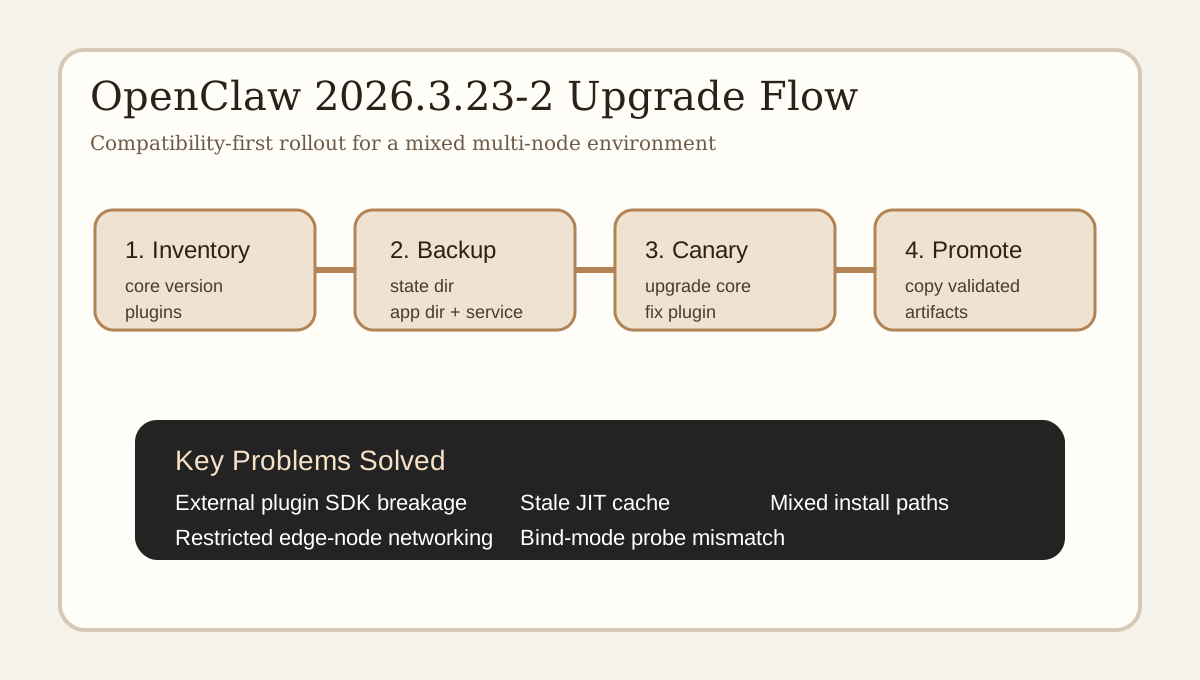
1. Why this was not a simple npm install -g
In a clean single-node environment, the upgrade path appears trivial:
npm install -g openclaw@2026.3.23-2
That was not the environment here. The actual estate contained three different node types:
- A canary VM using a standard system-wide global npm installation.
- A similar VM running OpenClaw from an
nvmpath, while still keeping an unused system-wide installation on disk. - An edge node using a wrapper script at
/usr/local/bin/openclaw, with the actual application rooted at/opt/openclaw/app.
On top of that, the nodes were not running “core only”:
- Built-in channels such as Feishu were active.
- External plugins such as DingTalk Connector were active.
- Different nodes had different service, browser, and bind settings.
That immediately created several upgrade risks:
- The new OpenClaw core might not remain compatible with the current plugin SDK assumptions.
- The service might still point to an older binary path after the package upgrade appears to succeed.
- The machine might contain multiple OpenClaw copies, and the upgrade command might target the wrong one.
- The edge node might fail to reach npm or GitHub during the maintenance window.
For this reason, the correct order was:
- Identify the latest version and read the release notes.
- Inventory every active plugin and service entrypoint.
- Decide whether external plugins must be upgraded together with the core.
- Build rollback packages first.
- Upgrade a canary node.
- Only then roll the validated result across the rest of the estate.
2. Inventory first, change later
Before stopping any service, I collected the same baseline from each node:
openclaw --version
openclaw plugins list
openclaw channels status
systemctl cat openclaw.service
systemctl cat openclaw-gateway.service
That inventory quickly exposed the real shape of the environment:
- Two Linux VMs were still on
2026.3.8. - The management machine and the edge node were already on
2026.3.13. - DingTalk Connector was still behind the core upgrade line.
- At least one node had multiple OpenClaw installations present on disk.
The key compatibility concern came from the OpenClaw 2026.3.22+ line, where plugin-facing SDK behavior had changed enough that an external channel plugin could fail during service startup even while the core binary itself upgraded cleanly.
This is the operational difference between “package management” and “runtime compatibility management.” The package manager may say “done,” while the service runtime may already be broken.
3. Rollback had to be local, fast, and complete
Every node got its own dedicated upgrade backup directory containing at least:
- A full archive of
~/.openclaw. - A full archive of the currently active OpenClaw program directory.
- The relevant systemd unit file.
- A captured
openclaw plugins list. - A captured
openclaw channels status.
That backup design was intentional.
If you only back up configuration, you may still need to re-download the old package from the internet to roll back. If the network is unstable during the incident, rollback becomes slow and risky.
If you only back up the program directory but not ~/.openclaw, you can still end up with mismatched plugin records, missing external extension directories, or different channel metadata.
A real rollback package for this kind of system needs:
- Program bits.
- Runtime state.
- Plugin directories.
- Service metadata.
Only then can rollback be done in minutes rather than by improvisation.
4. Why the canary node mattered
The canary choice followed three rules:
- It had to use the most standard installation layout.
- It had to exercise the most important channel/plugin combination.
- It had to be easy to roll back without broad impact.
The best fit was the global npm Linux VM because it covered:
- Core OpenClaw upgrade.
- Built-in Feishu channel behavior.
- External DingTalk plugin behavior.
If that node passed, the remaining rollout would become mostly a deployment-shape problem rather than an unknown compatibility problem.
5. First real failure: DingTalk Connector 0.8.3 was still not enough
My initial plan was simple:
- Upgrade DingTalk Connector to
0.8.3. - Upgrade OpenClaw core to
2026.3.23-2. - Restart and validate.
The service restarted, but the logs immediately showed the real problem:
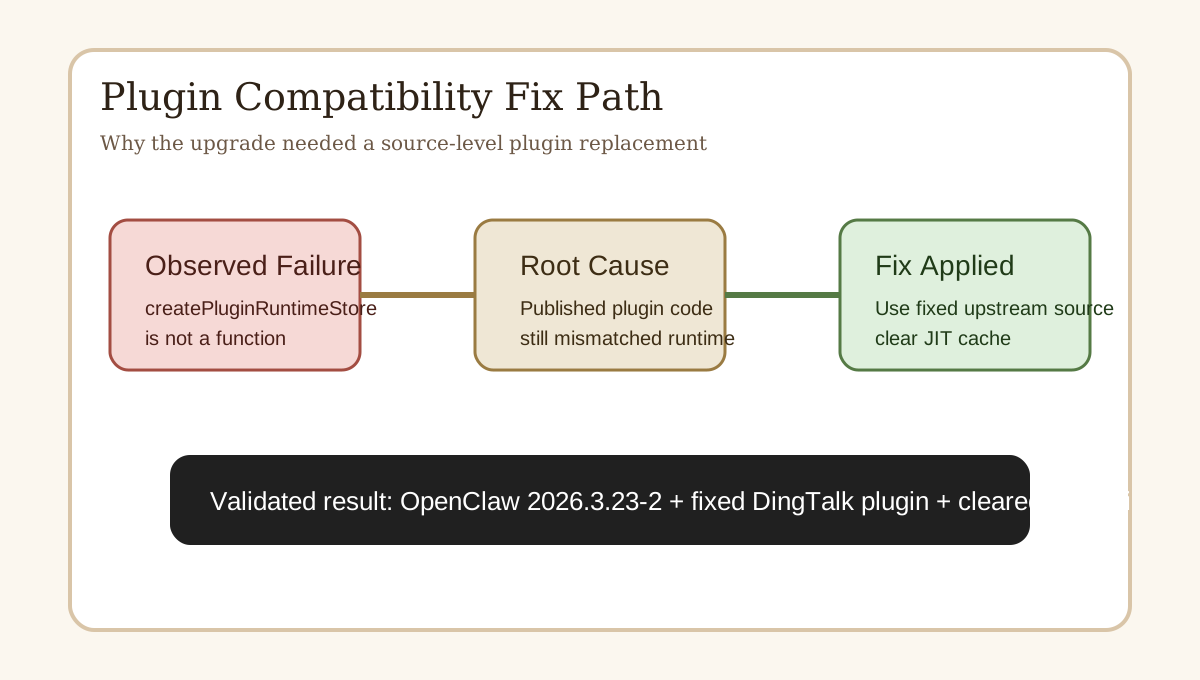
TypeError: createPluginRuntimeStore is not a function
That error matters because it means the plugin did not merely misbehave at runtime. It failed to load.
At that point, relying on openclaw --version would be misleading. The core binary was already upgraded. The service could even appear active. But the channel plugin had failed before becoming usable.
The correct place to look was the service journal:
journalctl -u openclaw-gateway.service -n 80 --no-pager
This was also the moment that confirmed an important operational lesson:
The latest published npm version of a plugin is not always the same thing as the latest working code in the upstream repository.
6. Second real failure: the source code was fixed, but the service still executed the old logic
After checking the upstream repository, I confirmed that the main branch had already replaced the old createPluginRuntimeStore dependency with an inline runtime store implementation.
I copied the fixed plugin source to the canary node, restarted the service, and still saw the old failure.
That kind of symptom is easy to misdiagnose. The instinctive guesses are:
- The files were not copied correctly.
- The service restart did not really happen.
- The wrong plugin directory is still being used.
In this case, the real culprit was JIT cache reuse.
Because the plugin path stayed the same, the runtime still had a chance to reuse stale compiled artifacts from /tmp/jiti/. In other words, the filesystem contained the fixed code, but the process was still executing an older compiled module.
The fix was straightforward:
systemctl stop openclaw-gateway.service
rm -rf /tmp/jiti
systemctl start openclaw-gateway.service
Once the JIT cache was cleared, the plugin finally loaded as expected.
7. Third real failure mode: one machine had two OpenClaw installations
One of the VMs had the classic long-lived operations problem:
- One OpenClaw installation under
nvm. - Another older system-level installation still present under the global node_modules tree.
- A service pointing to the currently active
nvmbinary.
This is exactly the type of machine where an operator can run a successful upgrade command and still touch the wrong target.
The rule I followed was intentionally conservative:
- Upgrade only the exact installation path that the active systemd unit uses.
- Do not clean up the unused historical installation during the same maintenance window.
That is not the tidiest outcome, but it is the safest operational choice. During an upgrade window, reducing uncertainty matters more than making the machine aesthetically perfect.
8. Fourth real failure mode: the edge node could not reliably access npm
The edge node was not a standard global npm deployment. It ran OpenClaw from /opt/openclaw/app behind a wrapper script.
When I tried the usual package path there, outbound access to npm failed. At that point there were two possible responses:
- Keep debugging edge-node networking, proxy paths, and package registries inside the maintenance window.
- Copy a fully validated installation from the canary node and deploy it locally.
I chose the second option because it was much more deterministic.
The procedure was:
- Build a complete archive of the already validated OpenClaw installation directory from the canary node.
- Build a complete archive of the already validated DingTalk plugin directory from the canary node.
- Transfer both archives to the edge node.
- Replace the local application and plugin directories in place.
- Update the plugin install metadata in the runtime config.
- Start the service and validate through logs.
For restricted or unreliable production networks, this is a strong pattern. Instead of repeatedly resolving dependencies on each node, you promote a known-good artifact set across identical Linux targets.
9. Fifth real issue: channels status can be misleading on custom bind setups
The edge node also had a bind-mode nuance.
Its gateway bind behavior was not the simple loopback default. As a result, openclaw channels status could report a local reachability problem when probing the default loopback target, even while:
- The service was active.
- The plugin had started.
- The logs already showed a successful connection sequence.
That does not mean the command is useless. It means it should not be treated as the only source of truth in a custom bind scenario.
The more reliable validation stack was:
systemctl is-active.journalctlfor plugin load errors.journalctlfor channel startup lines.journalctlforconnect success.channels statusas a confirmation, not the only signal.
This is a good reminder that operational maturity is rarely about memorizing one command. It is about correlating service state, logs, network behavior, and configuration intent.
10. The final working combination
The stable result across the upgraded nodes ended up being:
OpenClaw 2026.3.23-2- DingTalk Connector from the upstream repository’s fixed main branch
- Plugin install metadata normalized to
path - JIT cache cleared before restart on nodes where the plugin path stayed unchanged
I did not keep using the npm-published 0.8.3 because actual service validation had already demonstrated that it still failed in this runtime combination. Once the canary exposes that kind of failure, the correct response is not to “try it on the other machines anyway.” The correct response is to stop, isolate the real fix, and only then continue.
11. The operational principles I would reuse next time
If I had to compress the whole experience into a reusable upgrade playbook, it would be these five rules.
Rule 1: inventory before change
Never start by stopping services. First learn:
- Which version is installed.
- Which plugins are active.
- Which binary path systemd actually executes.
- Which node is the safest canary.
Rule 2: validate plugins before mass rollout
Core upgrades often look easier than they are because the core binary itself upgrades cleanly. The real blast radius usually comes from plugin loading.
Rule 3: make rollback independent from the internet
If rollback still depends on npm or GitHub being reachable, rollback is not really ready.
Rule 4: once the canary works, copy the validated artifact
On homogeneous Linux nodes, promoting a known-good directory can be much safer than re-resolving dependencies everywhere.
Rule 5: if fixed source still shows the old error, suspect cache
JIT caches, stale compiled artifacts, and reused service paths are common upgrade traps.
12. Follow-up rollout: a minimal gateway node and a macOS host
After the first Linux rollout was stable, I continued with two more environments that looked simpler on paper but exposed a different class of issues:
- a very clean Linux node running only
openclaw gateway, with no external plugins, and - a macOS workstation running OpenClaw together with iMessage, WeCom, DingTalk, and Weixin-related plugins.
That second wave mattered because it demonstrated that the method was not limited to the first three Linux nodes. It also surfaced two additional compatibility lessons that are easy to miss if you only upgrade homogeneous servers.
12.1 A “simple” gateway-only node can still lie to you
The minimal Linux node had no external plugin complexity. Its expected path looked almost trivial:
npm install -g openclaw@2026.3.23-2
systemctl restart openclaw-gateway.service
But verification revealed a classic operations trap: an orphaned openclaw-gateway process outside systemd was still holding the service port.
That created a deceptive state:
openclaw --versionalready showed the new build.systemctl statusshowed the new wrapper process.- But the actual listening socket still belonged to an older process.
- The newly started gateway kept retrying because the port was already occupied.
This is an important distinction. The package upgrade had succeeded, but the traffic-bearing process had not actually been replaced yet.
The fix was deliberately narrow:
- stop the systemd unit,
- identify the exact orphan holding the port,
- terminate only that process instead of using a broad
pkill, - restart cleanly,
- confirm the final state with
ss -lntp,systemctl status, and gateway listen logs.
That case reinforced a useful lesson: a node without plugins is not automatically a node without upgrade risk. Sometimes the complexity lives in residual process state instead of runtime code.
12.2 The macOS host was really a plugin-combination problem
The macOS host started on OpenClaw 2026.3.13, but the core version was not the real problem. The real problem was the plugin stack attached to it:
- iMessage
- WeCom
- DingTalk Connector
- openclaw-weixin
The oldest risk item was DingTalk Connector, which was still on a pre-modern clawdbot/plugin-sdk lineage. Upgrading the core without touching that plugin would have been almost guaranteed to fail.
So the workable macOS sequence became:
- back up
~/.openclaw, the Homebrew global OpenClaw directory, and the launchd plists, - stop
ai.openclaw.gatewayandai.openclaw.nodesoKeepAlivewould not interfere with an in-place half-upgrade, - replace the old DingTalk plugin with the already validated fixed source,
- switch its install metadata to
path, - install dependencies locally on macOS rather than copying Linux
node_modules, - clear
/tmp/jiti, - upgrade the Homebrew global OpenClaw package,
- restart launchd services and validate.
That sequence solved DingTalk and preserved the configured iMessage and WeCom channels, but it also exposed a separate issue in the local Weixin plugin.
12.3 openclaw-weixin 1.0.x was not just old, it was on the wrong SDK contract
The original local openclaw-weixin was still on 1.0.2. After the core upgrade, its first failure looked like a simple dependency problem:
Cannot find module 'openclaw/plugin-sdk'
After stabilizing local dependency resolution, the error became more specific:
resolvePreferredOpenClawTmpDir is not a function
At that point the problem was no longer “a dependency did not install.” The problem was that the plugin version and the host SDK contract had diverged.
The correct move was not to keep forcing 1.0.x. The correct move was to check whether the plugin already had a host-compatible line. It did: openclaw-weixin 2.0.1, which explicitly targets OpenClaw >= 2026.3.22.
So the local fix became:
- replace the plugin with
openclaw-weixin 2.0.1, - install dependencies in the plugin directory on the macOS host,
- update the plugin metadata in
~/.openclaw/openclaw.json, - restart and validate again.
12.4 The upgraded Weixin plugin still had a hidden compatibility-check bug
Even after upgrading to 2.0.1, the plugin exposed a subtler failure mode.
It performed a fail-fast host compatibility check by reading api.runtime.version and assuming that value was the host OpenClaw version. In practice, that field could contain non-date semantic plugin versions such as 0.8.3-beta or 2.0.1, not a host-style date version like 2026.3.23.
That led to a false conclusion:
0.8.3-betawas treated as an “old host version,” and- even
2.0.1could be interpreted as being “older than2026.3.22.”
From the outside, that looked absurd: the core had already been upgraded, yet the plugin still claimed the host was too old. The real bug was not in OpenClaw core. The real bug was in the plugin’s version parser, which treated any x.y.z string like a date-based OpenClaw version.
The local remediation was simple and pragmatic:
- only accept real
YYYY.M.DDstrings as host versions, - skip the fail-fast host-version check when the runtime string is clearly not a host date version,
- correct the plugin’s metadata so its own version no longer reported
2.0.0while the package was actually2.0.1, - clear the JIT cache and restart again.
After that patch, plugin enumeration and channel validation stabilized again. A final real QR-login pass completed successfully, the Weixin account files were written back into local state, and the plugin moved into a true running state instead of merely being loadable.
12.5 What the second wave proved
By the end of the second wave, the rollout had covered five distinct deployment semantics:
- standard global npm Linux nodes,
nvm-backed Linux nodes,- edge nodes behind wrapper scripts and custom application roots,
- lightweight gateway-only Linux nodes,
- and a launchd-managed macOS workstation with multiple active messaging plugins.
The final outcome was:
- the OpenClaw core converged to
2026.3.23-2everywhere, - the configured DingTalk, WeCom, and iMessage channels returned to running state,
- the Weixin plugin completed real QR binding and entered
running, - and every node retained an independent rollback point.
That matters because the exercise was no longer just “we upgraded a few Linux servers.” It became a stronger proof that the upgrade method still works when you add a gateway-only node and a plugin-heavy macOS host.
13. A practical upgrade checklist
Here is the distilled checklist I would actually reuse:
1. Confirm the target version and read release notes
2. Inventory core version, plugin version, and service entrypoint on every node
3. Back up ~/.openclaw, the application directory, unit files, and channel status
4. Choose the canary node
5. Upgrade the core
6. Upgrade or replace external plugins
7. Clear JIT/runtime cache if plugin code changed in place
8. Restart the service
9. Read journalctl before trusting the version output
10. Validate with service state + channel status + connection logs
11. Promote the validated result to the rest of the estate
12. Keep rollback archives until at least one full business cycle passes
Conclusion
This upgrade confirmed something I increasingly believe about systems like OpenClaw: the hard part of upgrades is not package installation. It is runtime compatibility governance.
What you are really upgrading is not just one executable. You are upgrading a living environment made of:
- systemd entrypoints,
- external plugins,
- JIT cache,
- network behavior,
- node-specific deployment layouts,
- and your ability to validate and roll back quickly.
In a toy environment, these problems stay invisible. In a real multi-node setup with long-running message channels, they become the upgrade.
The biggest success here was not simply ending up on 2026.3.23-2. The bigger success was proving a reliable method:
- assess first,
- canary first,
- trust logs over assumptions,
- copy validated artifacts when the edge node cannot fetch dependencies,
- clear JIT caches when fixed code still behaves like the old version,
- and include plugin-side host-version checks in the troubleshooting scope when a macOS multi-plugin host still misbehaves after the core upgrade.
That method is useful well beyond OpenClaw. Any service with plugins, systemd units, and heterogeneous nodes can benefit from the same approach.