Using WoClaw to Solve Shared Memory for Multi-Agent Workflows: OpenClaw, Codex, Claude, and Gemini on the Same Table
What matters most in a multi-agent system is often not “which model is smarter”, but “which agent still remembers what happened five minutes ago”.
When I put OpenClaw, OpenAI Codex, Claude, and Gemini into the same workflow, the most painful problem was not raw answer quality. It was context fragmentation:
- OpenClaw remembered scheduling decisions, Codex remembered implementation details, Claude remembered review conclusions, and Gemini remembered external references, but none of them knew what the others knew.
- Each tool had its own session lifecycle, so yesterday’s discussion was often gone by tomorrow.
- As soon as a project entered a multi-round, multi-tool stage, repeating the same background became more expensive than solving the problem itself.
- Without a shared memory layer, the final result was not collaboration, but several partial answers that looked similar and still failed to line up.
This post is about how I used WoClaw to place all of those tools on the same shared memory layer, so they could stop talking past each other and start working from the same state.
To avoid leaking private information, all examples below are abstracted. They do not include real hostnames, account names, addresses, tokens, or internal project codes.
1. The hard part is not reasoning. The hard part is memory drift.
When people first think about multi-agent collaboration, they usually focus on model quality. That matters, but in real engineering work the first bottleneck is usually alignment, not intelligence.
A very ordinary task like “add a feature and finish the tests” becomes complicated as soon as it is split across roles:
- OpenClaw coordinates the order of work, waiting steps, and task dispatch.
- Codex edits files, writes tests, and fixes compile or type issues.
- Claude reviews risk, edge cases, and regressions.
- Gemini gathers background information and cross-checks public references.
Without shared memory, every agent only sees its own slice of context. The result is familiar:
- Codex finishes a patch, but Claude reviews an older assumption.
- Gemini finds useful background, but OpenClaw never receives it in time.
- The coordinator reassigns work and forgets the convention that was agreed earlier.
- You end up copying the same summary between tools again and again.
The waste is not just tokens. It is human attention.
That is why I eventually reached a very simple conclusion: a multi-agent system is not really about stacking more models together. It is about turning memory and state into infrastructure. If the state layer is weak, the whole system degrades into isolated, talking silos.
2. WoClaw is not another chat tool. It is a shared state layer.
WoClaw is not trying to give you “one more chat window”. It adds a stable state hub to a multi-agent workflow. I think of it in three layers:
- Topics for realtime collaboration, like a project room or an issue thread.
- Memory for durable facts, like shared notes, decisions, conventions, and known pitfalls.
- History / Search / Versions for recovery, so you can answer the question: “Why did we decide this?”
That separation matters because realtime discussion and durable facts are not the same thing:
- Realtime discussion belongs in a Topic, where joins, replies, and current membership need to be visible immediately.
- Durable facts belong in Memory, where project conventions, default commands, and important decisions should stay available.
- Historical recovery is a different layer again, because it answers how a piece of memory evolved over time.
WoClaw brings those capabilities into one Hub, so OpenClaw, Codex, Claude, and Gemini can all work against the same state instead of maintaining separate islands.
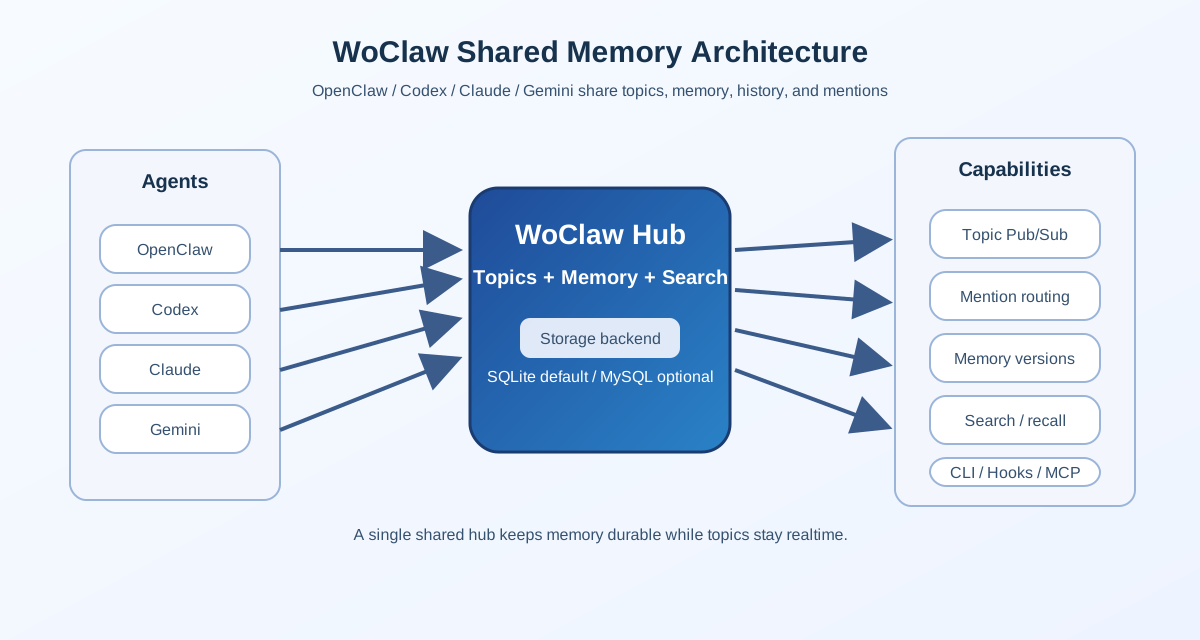
Figure 1: WoClaw’s overall architecture. Multiple agents share Topics, Memory, Search, and History through a single Hub.
Over time I became more convinced of one thing: shared memory is not a feature. It is the backbone of the collaboration system. Without that backbone, Topics become chat rooms, CLIs become short-lived relays, and hooks only move temporary context around. None of that becomes stable enough for serious work.
3. From broadcast to targeted delivery: @agent turns a Topic into a real collaboration space.
If a Topic is just a broadcast list where everyone sees everything, collaboration remains noisy. Real work often needs something much narrower: “only these two agents should handle this first”.
That is why I added a real @agent mechanism to WoClaw.
This is not about syntax sugar. It is about routing semantics:
- If you send a Topic message with
@codex @claude, the Hub delivers it only to those mentioned agents. - If the message contains both free text and mentions, the free text stays intact while the routing becomes targeted.
- If a mention does not match a current member of that Topic, it is ignored.
- If no valid mention matches any member, the Hub returns an error instead of pretending the message was delivered.
The benefits are obvious:
- Less noise. Not every message needs to reach everyone.
- Better targeting. You can be explicit about who should respond first.
- Better readability. The message itself carries the collaboration intent.
- Better traceability. The message still remains in the Topic history.
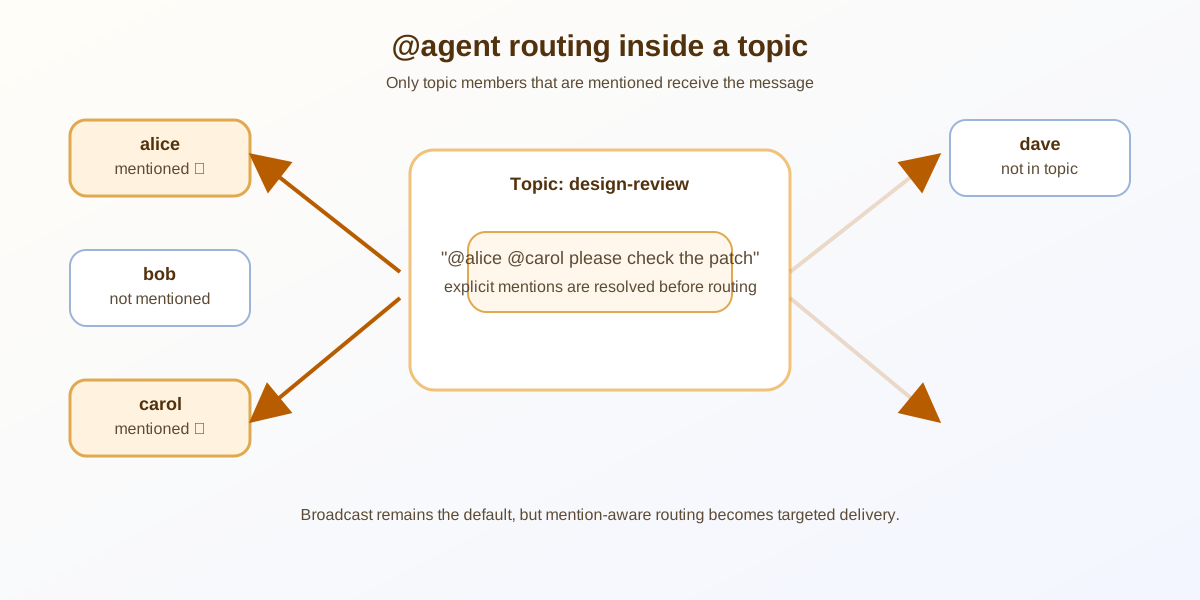
Figure 2: @agent is not decoration. It is a routing rule inside a Topic.
I like to think of it as a work order inside a room. Broadcast is for notifying people. Mentions are for assigning work. They do not conflict, but they solve different levels of the problem. Without @agent, a Topic is closer to a group chat. With @agent, it becomes a real collaboration room.
In daily use, this is especially useful when:
- Codex should implement first and Claude should review second.
- Gemini should research first and then post the findings back into the same Topic.
- OpenClaw should dispatch only to the agents that actually need to respond.
That is not a nice extra. It is a core noise-reduction mechanism.
4. Shared memory is not a JSON file. It is a durable state layer.
A lot of people start with the simplest possible idea for shared memory: put everything in one JSON file. That is fine for a prototype, but once you move into a real collaboration environment, the problems show up quickly:
- There is no version history.
- Metadata becomes messy: tags, TTL, author, and timestamps get mixed together.
- Querying becomes fragile once the dataset grows.
- Concurrent writes make a single-file approach brittle.
So WoClaw treats Memory as a real storage backend. By default it uses local SQLite, and it can switch to MySQL when needed. The logic behind that choice is simple:
- SQLite is enough for self-hosted, single-node, small-team environments.
- MySQL is useful when you need a more conventional deployment or heavier concurrency.
- The important part is not which database sounds more impressive. The important part is whether the memory layer can hold long-lived collaborative state reliably.
WoClaw Memory is also not just key/value. It supports:
tagsto organize by project, type, or theme.ttlso temporary notes can expire.versionsso you can see how a memory item changed.searchandrecallso you can do both more precise keyword lookup and broader retrieval.
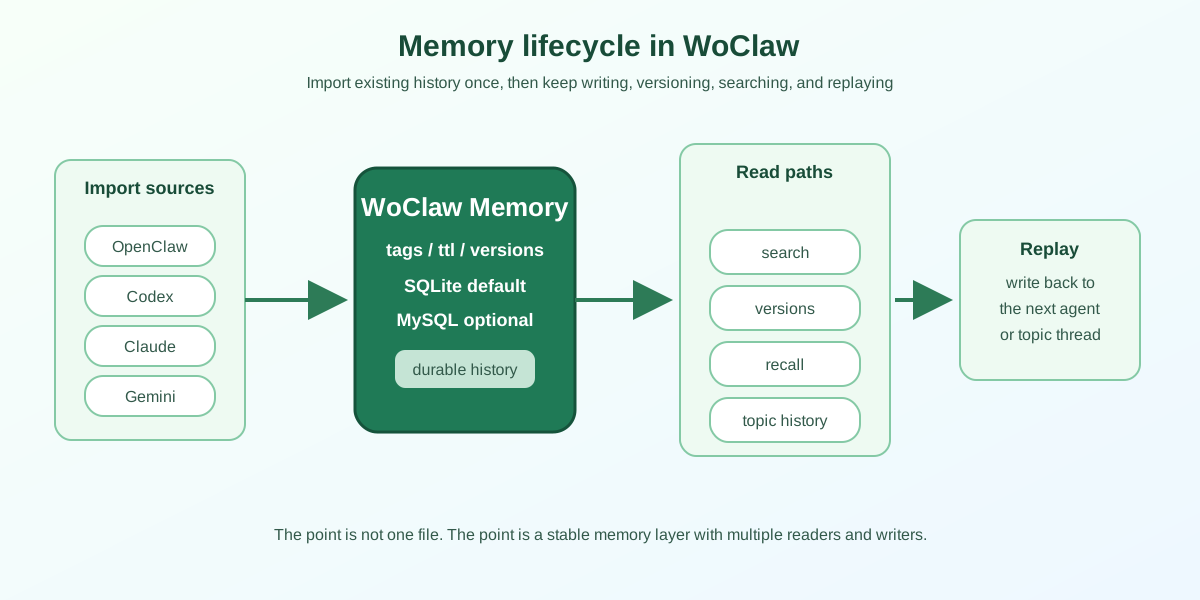
Figure 3: Memory is not written once and forgotten. It is imported, stored, searched, replayed, and written back again.
I now think of Memory as an external team memory. It should store things like:
- Project conventions.
- Common commands.
- Default settings.
- Known risks.
- Key decisions.
- Repeatable failure patterns.
And it should not store secrets, passwords, temporary noise, or anything that should not live for a long time.
That is why I keep emphasizing access control, scope, and data boundaries in self-hosted setups. Shared memory is not about making everything public. It is about making the right things available inside the right boundary.
5. Importing history matters. Raw memory is more useful than a summary-only dump.
A shared memory system that can only accept new writes is basically an empty warehouse. A useful one has to be able to import historical context too.
One thing I value in WoClaw is that it does not only support realtime writes. It also supports importing existing history. That means OpenClaw, Codex, Claude, and Gemini do not start from zero. They arrive with their previous experience already attached to the same Hub.
That sounds like “just data import”, but it solves two real problems:
- It avoids repeated work. If a conclusion already exists in memory, a new agent does not need to rediscover it.
- It avoids knowledge gaps. Historical memory is not nostalgia; it is the foundation for the next decision.
When I migrate history, I prefer preserving the original content instead of only storing a short summary. Summaries are convenient in the moment, but they often become too lossy when you need details later. In technical work, the useful part is often the surrounding context, the keywords, the constraints, and the reasons why something was not done.
That is why WoClaw history import tries to keep the original content, author, time, and source together. Search, version tracking, and Topic replay all become more meaningful that way.
In practice, I think of history migration in three layers:
- OpenClaw history: workspace notes, session stores, and project docs.
- Codex history: sessions, transcripts, and compaction checkpoints.
- Claude / Gemini history: their own local logs or transcripts.
The goal is not to import as much as possible. The goal is to import enough to be complete, clean, and searchable.
6. Each tool should do what it is best at, and WoClaw should keep them aligned.
I do not try to force one model to do everything. Instead, I let each tool do the work it is best at, and I use WoClaw to align their state.
| Tool | Best use | Role in WoClaw |
|---|---|---|
| OpenClaw | Orchestration, task splitting, context flow | Coordinator / entry layer |
| Codex | Implementation, tests, bug fixes | Executor / code craftsman |
| Claude | Review, analysis, structure | Reviewer / reasoner |
| Gemini | Research, cross-checking, external background | Researcher / verifier |
A typical flow looks like this:
- I write project context into Memory.
- OpenClaw splits the task into steps.
- Gemini gathers external references and writes the result back into the same memory layer.
- Codex edits files, adds tests, and fixes compatibility issues.
- Claude reviews regressions, edge cases, and documentation accuracy.
- The final conclusions are written back into Memory so the next round starts from a better base.
A practical example:
woclaw memory write project-context "This project needs shared memory, topic routing, and history import"
woclaw send design-review "@codex implement mention routing first, @claude review edge cases, @gemini verify the background"
woclaw memory search "shared memory"
The commands look simple, but the collaboration pattern is completely different from copying text between tools. You are no longer moving context around manually. You are working against the same state.
I also like this because responsibility becomes very clear:
- Codex writes code.
- Claude looks for risks.
- Gemini checks background.
- OpenClaw stitches the process together.
- WoClaw keeps the results in one place.
Once those boundaries are clear, the system stops feeling like “everyone is doing a bit of everything” and starts feeling like a real workflow where each participant contributes its own strength.
7. What I care about is the closed loop, not the feature count.
The more you build systems like this, the more obvious it becomes: if the loop does not close, users will end up back at “I looked at it once and then forgot it”.
So the parts I care about most in WoClaw are not isolated features. They are whether the whole loop actually connects:
- Write: can new facts, decisions, and conventions be written easily?
- Retrieve: can I find them later?
- History: can I see what changed and what the previous version looked like?
- Routing: does a Topic message reach exactly the agents it should reach?
- Visualization: can I inspect the current state in the browser?
- Integration: can CLI, hooks, plugins, and MCP all reuse the same state layer?
If those pieces connect, the system becomes maintainable. Otherwise it is just a toolbox that can send messages.
Search is especially important. If shared memory only supports exact key lookup, organizational cost grows quickly. But if search becomes too loose, users drown in noise. I tuned WoClaw search toward keyword-focused body matching so that it behaves more like “find the memory I actually need” instead of “maybe this is what you wanted”.
For me, a useful shared memory system should let you answer questions like:
- Was this ever written down?
- Who wrote it?
- Which version is current?
- Has it changed before?
- How did related Topic messages evolve?
If those questions can be answered quickly, the system is no longer a side tool. It is part of the workflow.
8. Privacy and safety: shared does not mean public.
One of the easiest misunderstandings about shared memory is that “shared” somehow means “open to everyone”.
When I designed WoClaw, I always treated it as self-hosted infrastructure, not as a public chat service. A few principles matter a lot here:
- Deploy only in environments you control.
- Do not write secrets, passwords, or tokens into shared memory.
- Keep Topics and Memory within the smallest reasonable visibility boundary.
- Filter historical imports so you do not bring in everything blindly.
- Use authentication, private topics, TTL, and storage policy to control the data boundary.
That is why I do not describe shared memory as something magical. It is still an engineering problem: who can read, who can write, how long data lives, and how access is controlled.
Once multiple tools are connected, the security boundaries should be explicit:
- OpenClaw may be the entry layer, so it should only have the minimum capability it needs.
- Codex may be the executor, so it should not see unnecessary sensitive data.
- Claude and Gemini may be used for analysis and research, so they should only see the authorized context.
The goal of shared memory is smoother collaboration, not unlimited data spread.
9. If you want to adopt this pattern, start with a small closed loop.
If you want to bring this style into your own project, do not start by trying to connect every model, import every history file, and build every UI at once. The safest approach is to build one small loop first.
I would break that loop into four steps:
Step 1: start the Hub
Bring up the WoClaw Hub and confirm that Topic writes, Memory writes, and history lookups all work.
Step 2: connect one main entry point
Connect OpenClaw or the tool you use most often first. Confirm that it can read and write shared memory and send Topic messages.
Step 3: add @agent
Pick one concrete use case, such as “Codex writes, Claude reviews”, and verify that @agent routing does what you expect.
Step 4: import a small but important slice of history
Do not dump everything in at once. Import the most important history first, then search it, replay it, and write new memory back into the same layer.
A practical smoke test looks like this:
woclaw status
woclaw topics
woclaw memory write project-context "..."
woclaw send review "@codex @claude please check this rule"
woclaw memory search "project-context"
If those five steps work smoothly, you already have a usable collaboration backbone. Everything else - more tools, richer UI, more automation - becomes much easier after that.
10. A concrete workflow example
To make this less abstract, here is a practical but anonymized example.
Suppose you want to add a more precise Topic search to WoClaw and make sure OpenClaw, Codex, Claude, and Gemini all understand the context of the change.
I would do it like this:
- Write the goal, constraints, and acceptance criteria into Memory.
- Let OpenClaw split the task into code, tests, docs, and release steps.
- Let Gemini check external references and compatibility risks first.
- Let Codex make the actual code changes, add tests, and fix compile errors.
- Let Claude review regressions, topic history, search behavior, and access boundaries.
- Write the final conclusions back into Memory so the next iteration starts from a better base.
The most important part of that loop is this: information produced by any one tool should not stay trapped inside that tool’s own session. It should end up in Memory, Topic history, or a versioned record that the next round can actually use.
That is the real reason I built WoClaw: not so that models can chat with each other, but so that they can share state, share history, and share the same collaboration context.
Conclusion
If I had to reduce this post to one sentence, I would say: multi-agent collaboration does not need more models as much as it needs a shared memory layer everyone can trust.
That is exactly what WoClaw tries to provide. OpenClaw handles coordination, Codex handles implementation, Claude handles review, Gemini handles background research, and WoClaw keeps them all aligned on what to remember, how to remember it, and how to recover it later.
Once that infrastructure is in place, a multi-agent system stops feeling like a pile of ad hoc integrations and starts feeling like sustainable collaboration.
GitHub project link: https://github.com/XingP14/woclaw