How to Prompt OpenClaw, HermesAgent, Codex, Claude, Gemini, OpenCode, and Droid to Write Articles and Publish WeChat Drafts
Short version
If you want an agent such as OpenClaw, HermesAgent, Codex, Claude, Gemini, OpenCode, or Droid to write an article, prepare a Hugo blog post, convert the Chinese version into WeChat-compatible HTML, preview it, fix layout issues, and create a WeChat Official Account draft, the prompt cannot simply say “write and publish an article.” A useful prompt must define the goal, source material, paths, account constraints, fixed-IP requirements, conversion steps, preview checks, failure recovery, privacy boundaries, and final verification evidence.
This post describes a reusable prompting pattern for article automation. It explains how to prepare the WeChat draft API, why a Linux machine with a fixed public IP is often required, how to tell an agent to try local API access first and then fall back to a fixed-egress host, how to use a Markdown-to-WeChat-HTML converter, and how to make the agent check for invisible white text, strange indentation, broken images, and accidental leaks before declaring the job done.
All examples are privacy-safe. They use placeholders rather than real secrets, private IP addresses, hostnames, repository URLs, tokens, cookies, or personal paths. Replace placeholders with your own values only in a protected runtime environment, never in a public article, public repository, or screenshot.
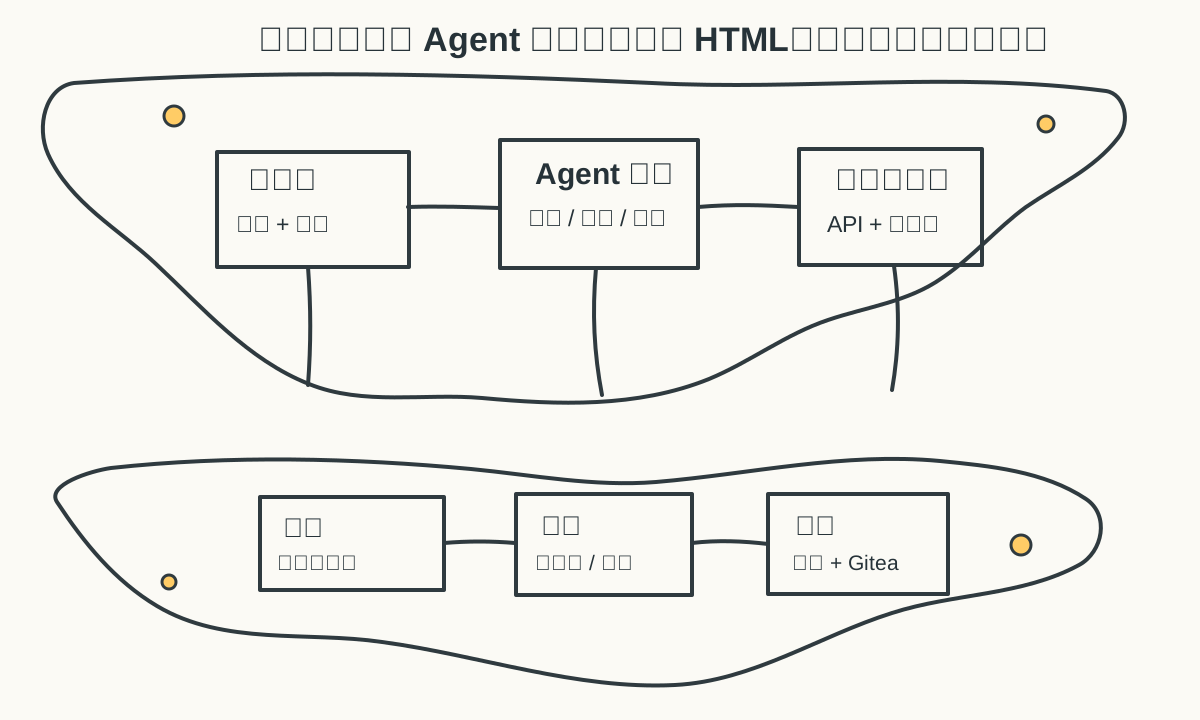
Figure 1: automated publishing is not a single writing step. It is a loop across prompting, writing, conversion, preview, API calls, and verification.
1. Why this deserves a dedicated prompt
Many people start with a prompt like this:
Write an article for me and publish it to my WeChat Official Account.
That may be enough to generate text, but it is not enough to automate publishing. The agent does not know the article style, the blog repository path, the image directory, whether the WeChat HTML must go through a converter, whether the WeChat API is restricted by an IP whitelist, whether a fixed-IP Linux host is available, or what checks must pass before completion.
Publishing to a WeChat draft is not just text generation. A reliable workflow usually includes:
- Writing the title, summary, article structure, and full body.
- Creating or preparing images that are publicly usable.
- Converting Markdown into WeChat-friendly HTML.
- Previewing the HTML locally and checking headings, spacing, code blocks, and images.
- Requesting an
access_tokenfrom the WeChat API. - Uploading inline images and a cover image, then creating the draft.
- Verifying the draft, the live blog page, and the source repository state.
The main idea is simple: a prompt is an operating contract, not a wish list. It should tell the agent what to do, what not to do, how to recover, and what evidence proves that the task is complete.
2. Prepare the WeChat draft API
The WeChat draft API is straightforward, but several details matter.
2.1 AppID and AppSecret
An Official Account provides an AppID and an AppSecret. The common flow starts by calling:
https://api.weixin.qq.com/cgi-bin/token?grant_type=client_credential&appid=<WECHAT_APPID>&secret=<WECHAT_APPSECRET>
After receiving an access_token, the automation can upload images, upload the cover image, and create or update a draft.
The AppSecret should be stored only in environment variables, a secret manager, or another protected configuration channel. It should not be written into a blog post, Git repository, issue, screenshot, or agent memory. The prompt should say this explicitly:
Read WECHAT_APPID and WECHAT_APPSECRET from environment variables. Do not write secrets into any file.
This lets the agent produce reusable scripts without baking credentials into the source tree.
2.2 The IP whitelist requirement
The WeChat API enforces an IP whitelist. Even with a correct AppID and AppSecret, requests may be rejected if they come from a public egress IP that is not on the whitelist.
That is why this workflow often needs a Linux machine with a fixed public IP address. The machine does not need to write the article. It only needs stable outbound access to the WeChat API, and its public egress IP must be added to the Official Account whitelist.
A practical workflow has two paths:
- The local agent calls the WeChat API directly if the local egress IP is already allowed.
- If direct access fails because of the whitelist or egress network, the local agent sends the HTML, images, and parameters to the fixed-IP Linux host, and that host calls the WeChat API.
The prompt should define this order. Otherwise the agent may waste time debugging proxies, trying the jump host first, or repeatedly retrying a request from the wrong network.
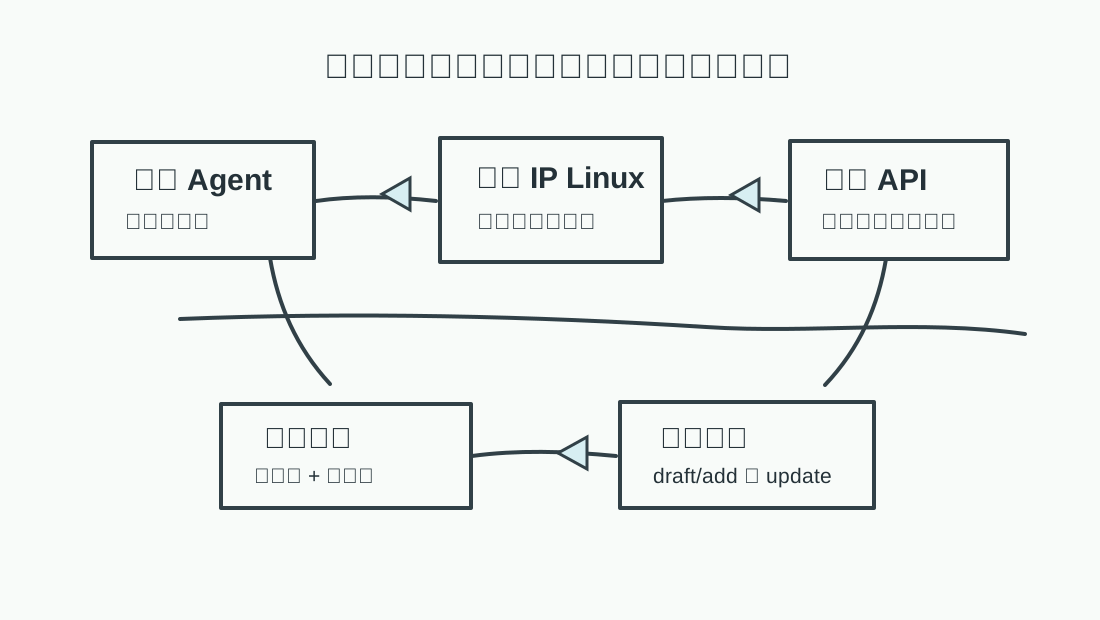
Figure 2: the whitelist is an egress-network problem. Writing can happen locally, while API calls can be delegated to a fixed-public-IP Linux machine.
2.3 Image upload and draft creation are separate steps
Images in a WeChat article cannot safely point to local files or private network URLs. A reliable script scans the HTML for local image paths, uploads each image through the WeChat image endpoint, receives WeChat-hosted image URLs, and replaces the local src values.
The cover image is different. It must be uploaded as a material so the API can return a thumb_media_id, which is then used in the draft payload.
A typical flow looks like this:
Read HTML
Find local image paths
Upload inline images -> receive WeChat image URLs
Replace local image paths in HTML
Upload cover image -> receive thumb media_id
Call draft/add
Print draft_media_id
This avoids two common failures: broken inline images and drafts that exist but have an invalid cover.
3. Why use a Markdown-to-WeChat-HTML converter
Markdown is good for writing. The WeChat editor is not a normal web page. CSS support, tags, images, code blocks, spacing, and style isolation all behave differently. If you paste raw blog Markdown into the editor, headings may look weak, code blocks may be hard to read, lists may have strange spacing, and image margins may look unstable.
A better workflow is to convert Markdown into WeChat-friendly HTML first. A local wrapper can call a converter and save the returned HTML for preview and API upload.
The core conversion logic can be as small as this:
def direct_network_env() -> None:
    for key in ("http_proxy", "https_proxy", "HTTP_PROXY", "HTTPS_PROXY", "ALL_PROXY", "all_proxy"):
        os.environ.pop(key, None)


def convert(markdown: str) -> str:
    data = urllib.parse.urlencode(
        {
            "name": "Author",
            "pic": "",
            "color": "greenblue",
            "font": "1",
            "numbers": "1",
            "f": "notime",
            "u": "mp",
            "mdtxt": markdown,
        }
    ).encode("utf-8")
    request = urllib.request.Request(
        "https://mp.knb.im/tohtml.php",
        data=data,
        headers={
            "Content-Type": "application/x-www-form-urlencoded; charset=utf-8",
            "User-Agent": "Mozilla/5.0",
            "Referer": "https://mp.knb.im/",
            "Origin": "https://mp.knb.im",
        },
    )
    with urllib.request.urlopen(request, timeout=45) as response:
        page = response.read().decode("utf-8", errors="replace")
    match = re.search(r'<textarea name="editor1" id="editor1">\\s*(.*?)\\s*</textarea>', page, flags=re.S)
    if not match:
        raise RuntimeError("converter did not return editor HTML")
    return html.unescape(match.group(1)).strip() + "\\n"
This is only the essential fragment. A production script should also handle browser fallback, proxy cleanup, file input and output, diagnostics, and preview generation. If you need the full script, follow the WeChat Official Account ClawLoader and reply with convert_knb.
3.1 Conversion is not the final step
A converter can produce useful HTML, but the output still needs inspection. The agent should check:
- Heading hierarchy and section readability.
- Whether the guide section, chapter headings, and subheadings are visually distinct.
- Whether code blocks remain readable.
- Whether images are missing, distorted, too wide, or too small.
- Whether white text may appear on a white background.
- Whether repeated spaces or
values create strange indentation. - Whether private paths, secrets, IP addresses, or hostnames leaked into the article.
Your prompt should say “convert, then inspect and fix,” not merely “convert to HTML.”
4. The structure of a useful automation prompt
A good publishing prompt should have ten sections: goal, source material, privacy rules, writing style, images, blog output, WeChat conversion, API strategy, validation checks, and final reporting.
4.1 Goal
Define final deliverables, not just actions:
Write a bilingual blog post and convert the Chinese version into a WeChat Official Account draft.
The final deliverables are:
1. A Chinese Hugo post and an English Hugo post.
2. Several images in the post image directory.
3. A WeChat-specific Markdown file and HTML file.
4. Local browser preview checks.
5. A WeChat draft created through the API.
6. Live blog URL verification.
7. A Git commit and push.
Now the agent knows that stopping after Markdown is incomplete.
4.2 Source material and privacy
If the user provides a real prompt, code, host, or account configuration, the prompt must require redaction:
You may use the provided prompt structure as a reference, but the article must remove all sensitive information.
Do not include real AppID, AppSecret, tokens, cookies, private IP addresses, jump-host addresses, private repository URLs, usernames, hostnames, or personal directories.
Use placeholders such as <WECHAT_APPID>, <WECHAT_APPSECRET>, <PUBLIC_EGRESS_IP>, and <BLOG_REPO_PATH>.
This is more effective than saying “be careful with privacy,” because it lists the forbidden categories and the replacement pattern.
4.3 Writing style
If the article should match an existing blog, tell the agent to inspect recent posts:
Inspect recent technical posts first, then write the new article in the same style.
Use a conclusion-first opening, clear sections, concrete operation steps, recovery paths, and a practical tone.
The Chinese article must be at least <MIN_CHINESE_LENGTH> characters. Provide a complete English mirror article.
This matters because generated articles often fail not in grammar, but in operational density.
4.4 Images
Image requirements should include count, purpose, style, and location:
Create several illustrations:
1. The first image is a hand-drawn overview of the whole article.
2. Place other images near concepts such as API whitelist, agent loop, and preview validation.
3. Do not include sensitive details in images.
4. Put blog assets under static/post-images/<SLUG>/.
5. If the WeChat version should not depend on SVG, convert the images to PNG.
The agent will then treat images as part of the article, not as decorative afterthoughts.
4.5 Conversion and preview
Make the conversion and preview steps explicit:
Use scripts/convert_knb_wechat.py to convert the WeChat Markdown into HTML.
Then render the HTML in a local browser and check:
1. White text on white background.
2. Strange indentation or visible repeated spaces.
3. Missing heading and guide-section styles.
4. Broken images.
5. Unreadable code blocks.
If problems are found, fix the Markdown or HTML and check again.
The phrase “check again” is important. Without it, the agent may report the issue instead of fixing it.
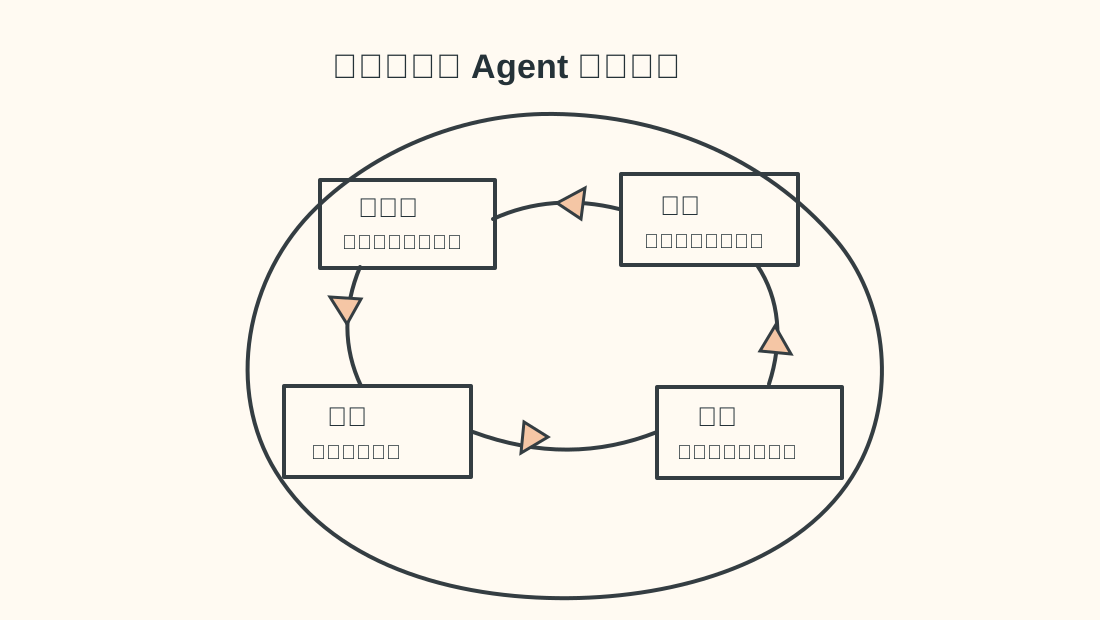
Figure 3: the prompt should create a closed loop rather than a one-shot writing task.
4.6 API order
Because of the WeChat API whitelist, define the network order:
Try the WeChat developer API directly from the local environment first.
If direct access fails and the failure is related to IP whitelist or egress network, use the fixed-public-IP Linux host <PUBLIC_EGRESS_HOST> to make the API call.
Do not put the jump-host address, private IPs, or secrets into the article body.
This prevents the agent from confusing DNS failures, proxy issues, invalid credentials, and whitelist failures.
4.7 Acceptance criteria
End the prompt with explicit evidence:
When complete, report:
1. Files created or modified.
2. Chinese and English length checks.
3. HTML preview result.
4. White-text scan result.
5. Repeated-space scan result.
6. WeChat draft media_id.
7. Live Chinese and English blog URLs and HTTP status.
8. Git commit and push result.
This makes the agent prove completion instead of just saying “done.”
5. A reusable full prompt template
Here is a template you can adapt:
Please write a blog post and publish the Chinese version to a WeChat Official Account draft.

Topic:
<ARTICLE_TOPIC>

Writing requirements:
1. Follow the style of recent technical posts in the current blog.
2. The Chinese article must be at least <MIN_CHINESE_LENGTH> characters.
3. Provide a complete English mirror article.
4. Use a conclusion-first opening, clear sections and subsections, concrete steps, failure recovery, and security notes.
5. Do not include sensitive information. Replace real secrets, tokens, cookies, private IPs, jump-host addresses, private repository URLs, usernames, hostnames, and personal paths with placeholders.

Images:
1. Create at least <IMAGE_COUNT> illustrations.
2. The first image must be a hand-drawn overview of the article.
3. Place the other images near the concepts they explain.
4. Save images under static/post-images/<SLUG>/.

Blog publishing:
1. Chinese Hugo post: content/post/<SLUG>.md.
2. English Hugo post: content/post/<SLUG>.en.md.
3. Run the deployment script.
4. Verify the live Chinese and English URLs return HTTP 200 and contain the title.
5. Commit and push the repository.

WeChat:
1. Use <WECHAT_AUTHOR> as the author.
2. Use scripts/convert_knb_wechat.py to convert the WeChat Markdown to HTML.
3. Preview the HTML in a local browser.
4. Check and fix invisible white text, strange indentation, extra visible spaces, broken images, missing heading styles, and unreadable code blocks.
5. Read WECHAT_APPID and WECHAT_APPSECRET from environment variables only.
6. Try the WeChat API locally first. If it fails because of whitelist or egress network, call the API through <PUBLIC_EGRESS_HOST>.
7. Print the draft media_id after creation.

Final report:
List file paths, preview checks, white-text scan, repeated-space scan, draft media_id, live URLs, Git commit, and push result.
6. How to organize the scripts
Avoid a single giant script. A small-tool layout is easier for agents to understand and repair:
build_wechat_<slug>.py: generate WeChat-specific Markdown from the blog post.convert_knb_wechat.py: convert Markdown into WeChat-friendly HTML.publish_wechat_draft.py: upload images, upload cover, and create or update the draft.deploy_github_pages.sh: build and publish the Hugo site.validate_wechat_html.py: scan HTML for invisible text, strange spaces, private paths, and sensitive values.
This separation makes failure diagnosis much clearer. Conversion failures belong to the converter. Draft failures belong to the WeChat API path. A live 404 belongs to Hugo publishing, slug, or date handling.
7. Preview and validation
The most common WeChat draft issues are invisible body text, odd indentation, and broken resources. Use both static checks and browser rendering.
7.1 White text on white background
Static scanning can look for:
color: #fff
color: #ffffff
color: white
rgb(255, 255, 255)
But do not delete all white text. Many converters use white text on dark heading blocks or gradient labels, which is fine. The real risk is white text without a non-white background.
The prompt should say:
Scan white text styles and determine whether the current node or a parent has a non-white background. Keep white text used on dark decorations. Fix any white text that may appear on a white background.
7.2 Repeated spaces and odd indentation
Repeated spaces are also context-sensitive. Code blocks and heading decorations may need spacing. Body paragraphs usually should not contain long runs of , full-width spaces, or tab characters.
Check:
Repeated   in body paragraphs
Multiple full-width spaces at paragraph starts
Three or more normal spaces in non-code text
Tabs outside code blocks
Do not globally remove every . Some WeChat converters use it to preserve heading decorations. Clean body text, not converter-generated heading structure.
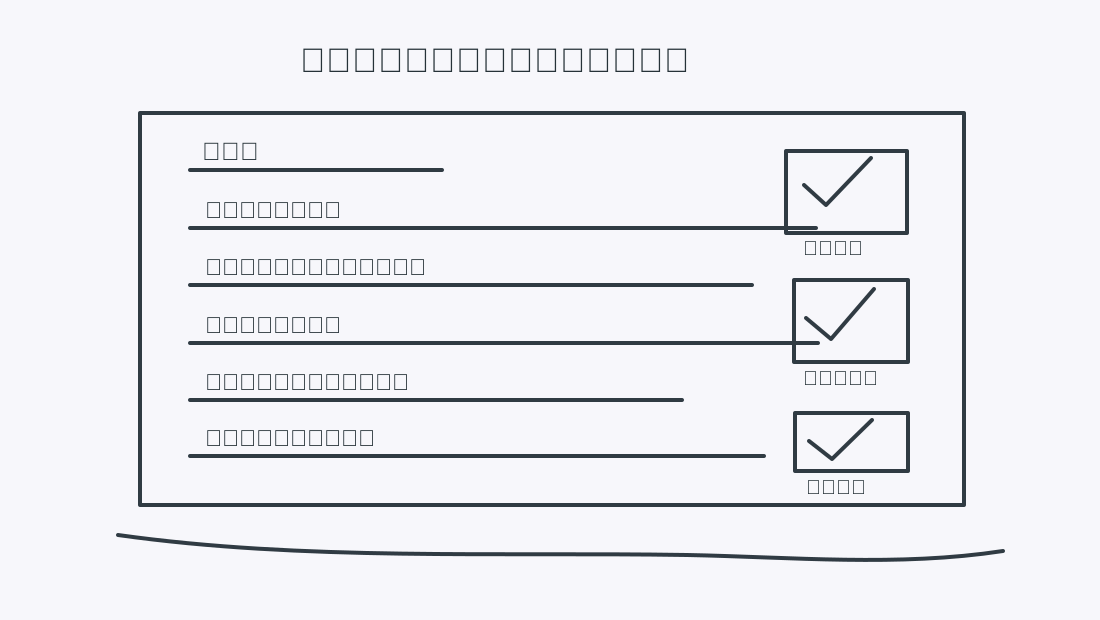
Figure 4: preview validation needs a checklist, not a quick glance.
7.3 Privacy scan
Publishing automation can leak details because the agent reads real paths, commands, and configs. Require a final scan:
Before publishing, scan Markdown, HTML, image text, and the commit diff. Confirm that no real secret, token, cookie, private IP, private repository URL, username, hostname, personal directory, or jump-host address is present. Replace anything found with placeholders before publishing.
If the article itself is about WeChat draft automation, this matters even more. You can explain that a fixed-public-IP Linux host is required without naming your actual host.
8. Failure recovery
A good prompt should tell the agent how to react when something fails.
8.1 Converter failure
Separate converter failures into:
- DNS or network failure.
- Converter page structure changed.
- The Markdown content triggered a converter error.
The agent should preserve the Markdown, try browser fallback if available, and still produce a local preview HTML if the online converter is unavailable.
8.2 WeChat API failure
WeChat API failures should be categorized:
- Invalid credentials: check
AppIDandAppSecret. - IP not in whitelist: check public egress IP and Official Account whitelist.
- Invalid
media_id: check cover upload. - Image upload failure: check format, file size, and path.
- Network failure: check DNS, proxy, TLS, and the fixed-IP fallback host.
The prompt should include:
If the WeChat API fails, classify the error by errcode and errmsg. Do not assume every failure is an IP whitelist problem.
8.3 Blog publishing failure
Hugo build success does not guarantee a live page. Common causes include future-dated posts, wrong slug, case-sensitive image paths, static deployment failure, and cache.
So the prompt must require live URL verification, not just “run the deploy script.”
9. How to adapt this to different agents
The same pattern works across OpenClaw, HermesAgent, Codex, Claude, Gemini, OpenCode, and Droid, but the emphasis should vary.
OpenClaw is useful when the publishing workflow spans several tools, machines, and channels. If your process includes a blog repository, the WeChat API, a fixed-public-IP Linux host, image conversion scripts, and live verification, OpenClaw can organize those steps as a traceable automation flow.
HermesAgent is useful for repeatable execution in a fixed runtime environment. It can run the WeChat HTML conversion, call the API from the whitelisted host, inspect the draft, and return structured status. Prompts for HermesAgent should be explicit about inputs, outputs, error categories, and idempotency.
Codex is strong when it can operate on a repository: writing files, running scripts, checking diffs, committing, and verifying URLs. Give it paths, commands, constraints, and acceptance evidence.
Claude is strong for long-form structure and explanation. It can draft the article and refine the narrative, then hand the result to an execution-capable agent.
Gemini is useful when the source material is large or multimodal. It can summarize screenshots, prior articles, and references before the execution agent builds the post.
OpenCode is useful inside an existing local codebase. Give it exact scripts, paths, commands, and checks.
Droid may run in a more constrained environment. It can prepare content, titles, summaries, and checklists, while API publishing can be delegated to a desktop or fixed-IP Linux machine.
10. Conclusion
If you treat an agent as a writing tool, you get an article. If you write the prompt as an operating contract, you get a publishing workflow.
The workflow depends on a few principles:
- Clear deliverables: blog post, WeChat HTML, draft, live verification, and Git push.
- Clear privacy boundaries: secrets, private networks, and personal paths must be redacted.
- Clear network strategy: try local API access first, then fixed-public-IP fallback.
- Clear conversion rule: Markdown becomes WeChat HTML through a converter, then gets previewed.
- Clear quality checks: invisible text, odd spaces, images, code blocks, and headings.
- Clear evidence: URLs, media IDs, scan results, and commit status.
The model itself matters, but the process matters more. A carefully written prompt turns OpenClaw, HermesAgent, Codex, Claude, Gemini, OpenCode, or Droid from a text generator into a publishing assistant that knows where to write, how to convert, what to verify, how to recover, and when the job is genuinely done.