Small Models Make Agents Drift. Superpowers Gives Them Rails.
The short version
When an agent powered by a smaller or weaker model behaves unpredictably, the problem is not always solved by writing a longer prompt. Smaller models often struggle with long-horizon consistency, tool discipline, evidence tracking, and multi-step execution. Superpowers does not turn a weak model into a frontier model. What it does is more practical: it gives the agent an external engineering workflow made of reusable Skills, checkpoints, testing habits, debugging rules, review steps, and completion verification.
For agents such as OpenClaw, HermesAgent, Codex, Claude, Gemini, OpenCode, Droid, Cursor, and similar tools, Superpowers is best understood as an engineering-discipline layer. It makes the agent less dependent on improvisation and more likely to follow a repeatable process.
This article is about a very common failure mode in modern agent workflows: the model can talk fluently, but the agent does not behave reliably once the task becomes long, stateful, tool-heavy, or distributed across multiple agents.
The issue becomes more visible when using smaller domestic models, local models, quantized models, or cost-optimized models. They may answer normal questions well enough, but once they need to read a repository, follow a constraint, modify files, run tests, interpret logs, preserve privacy, and report only verified results, the instability becomes obvious.
All examples in this article are generic. No private hostnames, internal addresses, credentials, project names, or personal paths are included.
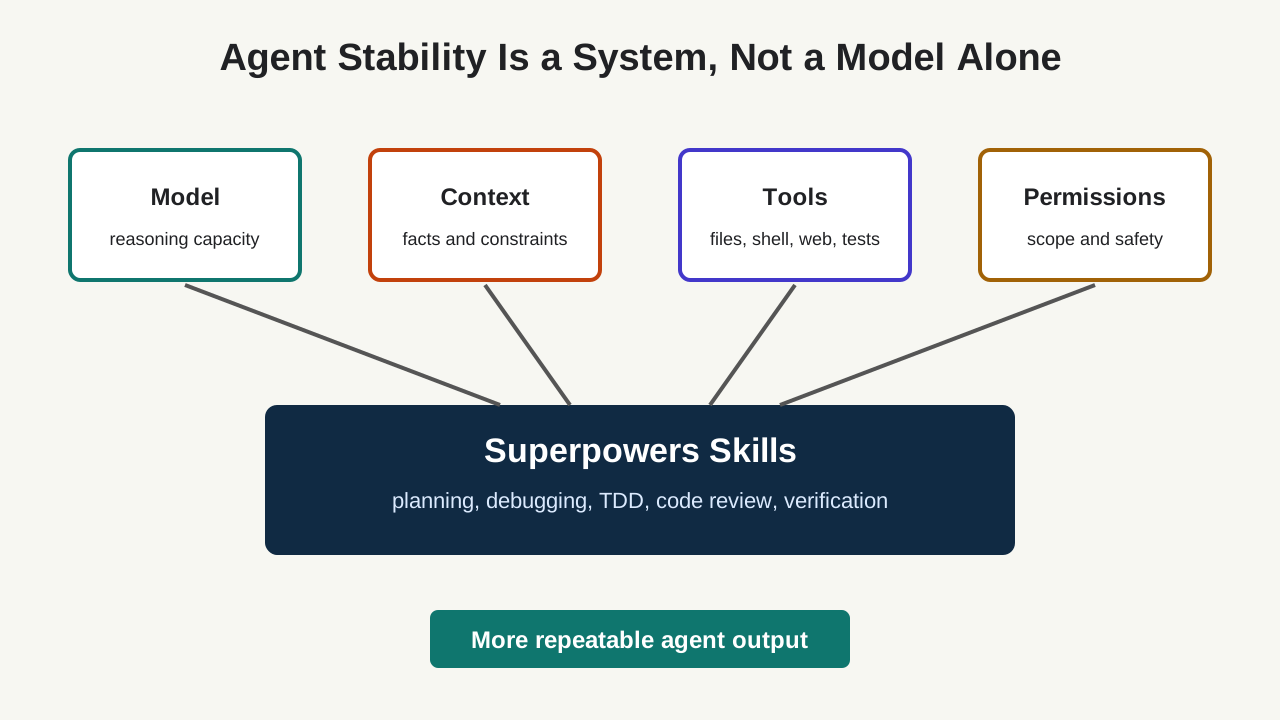
Figure 1: Superpowers adds a workflow layer around the model. It does not replace model capability, but it reduces reliance on improvisation.
1. What “unstable model output” really means
People often say that a model is unstable when it gives different answers to the same question. In agent workflows, the problem is broader. The agent may understand the task in one turn, forget an important constraint two turns later, claim that it verified something without running a command, or edit unrelated files while trying to fix a small issue.
In real engineering work, instability usually appears as process drift:
- The agent agrees to evaluate first, then starts changing files immediately.
- It says privacy matters, then includes real paths or addresses in an example.
- It sees a failure, guesses the root cause, and edits configuration before collecting evidence.
- It finishes a feature without tests, then describes the result as “verified”.
- It starts with a narrow task and gradually expands into unrelated refactoring.
- It confuses old facts with new facts when the context grows.
- In a multi-agent setup, each agent keeps a different version of the task state.
These are not just style problems. They are execution risks.
An agent is not just a chat model. It is a loop: understand the request, inspect context, choose actions, call tools, change files, run verification, and communicate results. A failure at any point can look like “the model is bad”, but the engineering cause may be missing process control.
Smaller models are more likely to drift because they have less spare capacity for long-horizon consistency. They may know the right rule in isolation, but fail to keep applying it across a multi-step task. That is exactly where an external Skill system helps.
2. Why longer prompts are not enough
A longer system prompt can help, but it has limits.
First, long prompts compete with the rest of the context. Once the agent is reading code, logs, command output, web pages, review comments, and user corrections, a paragraph saying “always verify before completion” may not remain operationally strong.
Second, a prompt is not a state machine. Test-driven development is not just the sentence “write tests first”. It is a sequence: write a failing test, run it and observe the failure, implement the smallest change, run it again, refactor, and verify. A plain prompt can describe that sequence, but it does not naturally create checkpoints.
Third, prompts do not distribute cleanly across tools. A prompt written for Claude Code may not be loaded by Codex. A Codex instruction may not be visible to OpenCode. Gemini CLI has a different extension mechanism. Custom agents such as OpenClaw or HermesAgent may have their own initialization path.
A Skill is a better unit of reuse. It can define triggers, required steps, anti-patterns, tool mappings, verification gates, and completion rules. It turns a vague instruction into a reusable operating procedure.
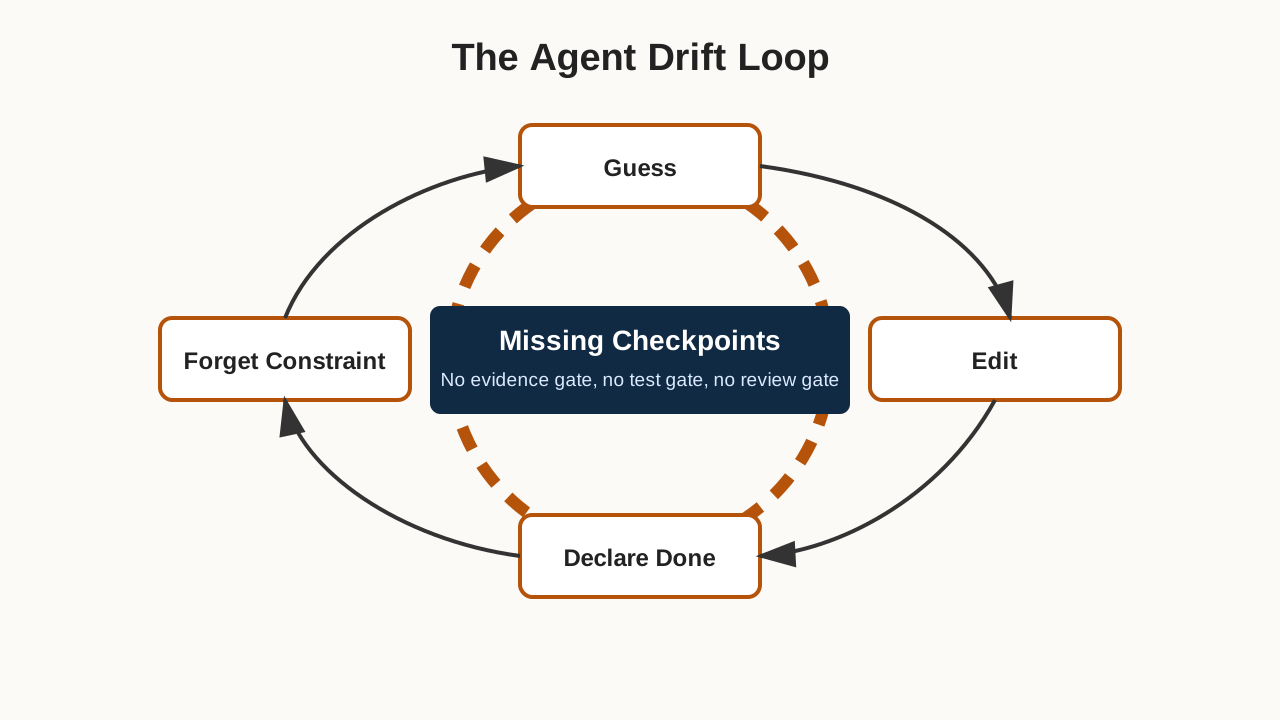
Figure 2: The failure loop is usually caused by missing checkpoints, not by the absence of one more warning sentence in the prompt.
3. What Superpowers is
Superpowers is an agentic skills framework and software development methodology maintained in the obra/superpowers GitHub repository. Its goal is to give coding agents a complete workflow built from composable skills and startup instructions that make sure the agent uses those skills.
In practical terms, Superpowers is an engineering discipline pack for agents.
It includes skills for requirement discovery, planning, isolated workspaces, test-driven development, systematic debugging, code review, review response, subagent-driven work, and final verification. The important point is not the list of names. The important point is that each skill captures a repeatable behavior.
A few examples:
| Area | Example Skills | What they stabilize |
|---|---|---|
| Design and planning | brainstorming, writing-plans |
Prevents jumping into implementation too early |
| Execution | using-git-worktrees, executing-plans, subagent-driven-development |
Keeps work isolated and decomposed |
| Testing and completion | test-driven-development, verification-before-completion |
Stops “it should work” from becoming “done” |
| Debugging and review | systematic-debugging, requesting-code-review, receiving-code-review |
Pushes evidence before guesses and quality before merge |
| Meta workflow | using-superpowers, writing-skills, finishing-a-development-branch |
Makes skills discoverable and helps close work cleanly |
This benefits strong models too. But the benefit is especially visible with smaller models, because the Skill system reduces the amount of discipline the model must hold internally at every moment.
4. Why it helps smaller or less stable models
Superpowers does not increase model parameters. It changes the operating environment around the model.
Without skills, an agent receives a task and has to infer the entire workflow from memory: ask questions, plan, edit, test, debug, review, verify, and report. If the model drifts, any one of those steps can disappear.
With skills, the workflow becomes externalized:
- Before feature work,
brainstormingpushes the agent to clarify intent and design. - Once the design is clear,
writing-plansdecomposes work into small steps. - For isolated development,
using-git-worktreesavoids contaminating the main workspace. - During implementation,
test-driven-developmentenforces the red-green-refactor loop. - During debugging,
systematic-debuggingrequires evidence before fixes. - Before claiming success,
verification-before-completionrequires real verification output. - At the end,
finishing-a-development-branchhelps decide how the work should be integrated.
That structure gives the model rails. It can still reason, but it is less free to skip the boring steps that make engineering reliable.
This is valuable when:
- You use local, domestic, quantized, or cost-optimized models that are good enough for short tasks but inconsistent on long ones.
- You combine multiple agents, for example OpenClaw for orchestration, HermesAgent for execution, Codex for edits, Claude for review, Gemini for research, and OpenCode for terminal work.
- You operate real repositories, services, and configuration files where false completion reports are costly.
- You want multiple agents to share the same engineering habits instead of carrying separate hand-written prompts for each tool.
5. Install it separately for each agent
A key detail: installing Superpowers in one harness does not automatically install it everywhere. Claude Code, Codex CLI, Codex App, Gemini CLI, OpenCode, Droid, Cursor, and Copilot CLI all have different plugin or skill discovery mechanisms.
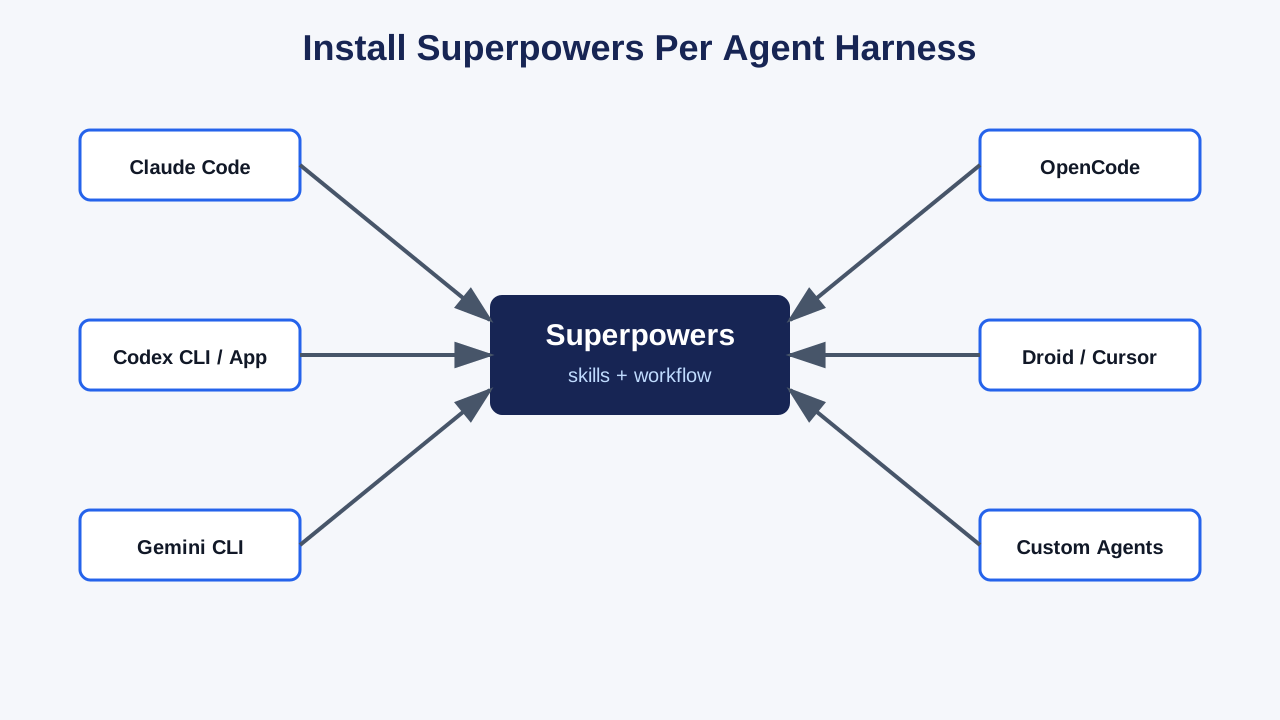
Figure 3: Superpowers must be installed per agent harness.
The commands below are based on the current Superpowers README and install documents.
Claude Code
Use the official Claude plugin marketplace:
/plugin install superpowers@claude-plugins-official
Or register the Superpowers marketplace first:
/plugin marketplace add obra/superpowers-marketplace
/plugin install superpowers@superpowers-marketplace
Restart or open a new session after installation.
Codex CLI
The README describes installation through the plugin interface:
/plugins
Search for:
superpowers
Then choose Install Plugin.
For Codex environments using native skill discovery, the official Codex install document also describes a clone-and-symlink setup:
git clone https://github.com/obra/superpowers.git ~/.codex/superpowers
mkdir -p ~/.agents/skills
ln -s ~/.codex/superpowers/skills ~/.agents/skills/superpowers
Restart Codex and verify:
ls -la ~/.agents/skills/superpowers
If you previously used an older bootstrap method, update the repository, create the symlink, and remove obsolete bootstrap instructions from your Codex startup file.
Codex App
Open Plugins in the sidebar, find Superpowers under Coding, click the +, and follow the prompts.
Gemini CLI
Install the extension:
gemini extensions install https://github.com/obra/superpowers
Update later with:
gemini extensions update superpowers
Open a fresh Gemini session and confirm that the skills are available.
OpenCode
OpenCode uses its own plugin configuration. Add Superpowers to the plugin array in global or project-level opencode.json:
{
  "plugin": ["superpowers@git+https://github.com/obra/superpowers.git"]
}
Restart OpenCode. A simple verification prompt is:
Tell me about your superpowers
If you used the older symlink setup, remove the old plugin and skill symlinks before switching to the plugin-based setup. Some OpenCode and Bun versions may cache git-backed dependencies, so a reinstall or cache cleanup may be required when updating.
Factory Droid
Register the marketplace and install:
droid plugin marketplace add https://github.com/obra/superpowers
droid plugin install superpowers@superpowers
Cursor and GitHub Copilot CLI
Cursor Agent chat:
/add-plugin superpowers
GitHub Copilot CLI:
copilot plugin marketplace add obra/superpowers-marketplace
copilot plugin install superpowers@superpowers-marketplace
6. OpenClaw and HermesAgent
For custom or self-hosted agents such as OpenClaw and HermesAgent, the installation pattern depends on how the agent loads instructions, plugins, and skills. The important rule is not a specific command. The important rule is this:
The agent that actually performs the work must be able to load and follow the relevant SKILL.md files.
A practical integration pattern looks like this:
- Place the Superpowers repository or
skillsdirectory somewhere the agent can read. - Add startup instructions that load
using-superpowersat session start. - Map tool names from the skill documentation to the agent’s real tools. For example, a skill written for Claude Code may mention
Task,TodoWrite, orSkill; your custom agent may expose those as subtask dispatch, task tracking, or a local skill loader. - Define fallbacks. If a custom agent has no subagent mechanism, it should execute the plan in batches rather than pretending subagents exist.
- Run a small verification task and inspect behavior, not just installation logs.
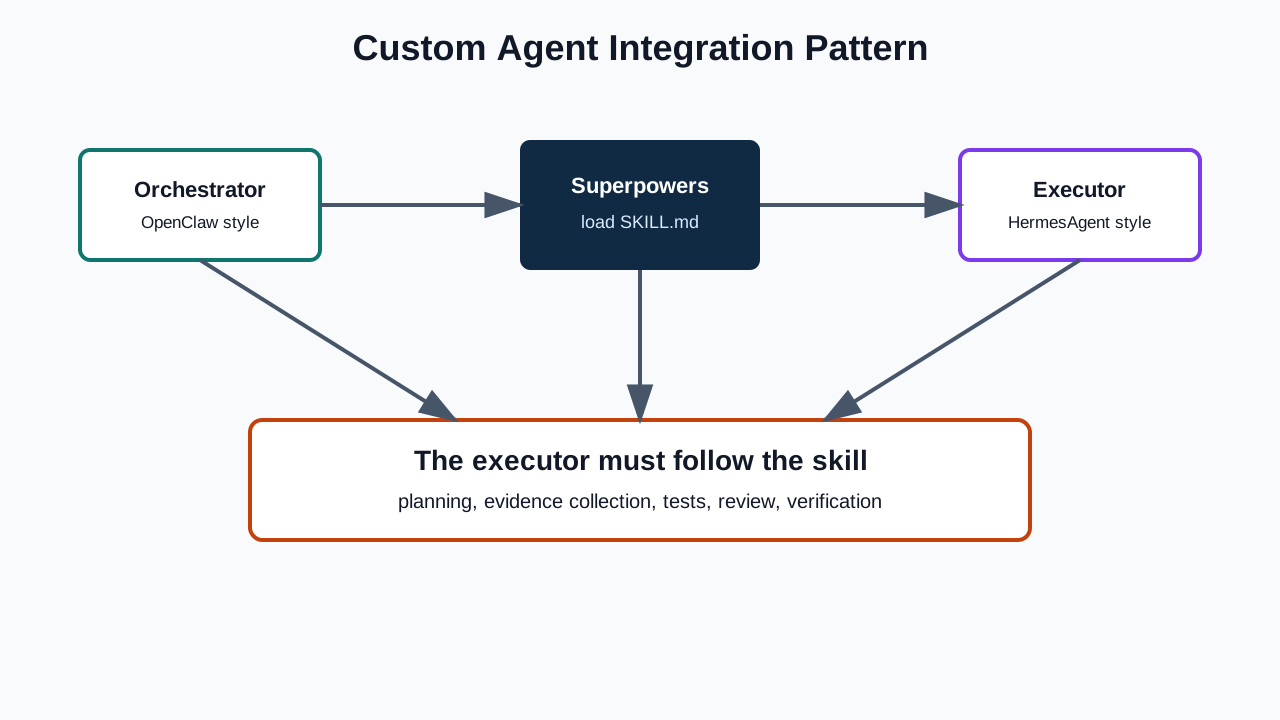
Figure 4: For custom agents, the key is operational loading, not just copying files.
For OpenClaw-style orchestration, I prefer a two-layer approach: the orchestrator should understand the workflow vocabulary, and the execution agent should also load the relevant skills. If only the orchestrator has Superpowers, it may ask for verification while the executor still reports success without evidence.
7. How to tell whether it is working
Installation is not the same as behavior. After installing Superpowers, test it.
First, ask the agent what Superpowers skills it can see. It should be able to name or describe core skills such as using-superpowers, brainstorming, systematic-debugging, and verification-before-completion.
Second, give it a small feature request. It should not immediately rush into editing files if the task requires design or behavior changes. It should clarify intent and present a plan or design at the appropriate point.
Third, give it a small bug. It should collect evidence before proposing a fix.
Fourth, require a real verification command before completion. The final answer should say what was run, what passed, and what remains unverified.
Fifth, in a multi-agent setup, ask each agent to describe its role in the same workflow. Codex, Claude, Gemini, OpenCode, OpenClaw, and HermesAgent do not need to do identical work, but they should share the same checkpoints.
8. What Superpowers will not fix
Superpowers is not a magic model upgrade.
It will not teach an unsuitable model a programming language it does not understand. It will not expand a tiny context window. It will not fix a broken tool runner, network failure, missing permission, dependency mismatch, or bad repository structure. It will not replace human judgment about business risk.
What it can do is reduce avoidable failures:
- Starting work before understanding the goal.
- Guessing root causes without evidence.
- Claiming completion without verification.
- Letting multiple agents use incompatible workflows.
- Turning a small change into an uncontrolled rewrite.
That is enough to matter.
9. A recommended rollout order
If you already use several agents, do not install everything everywhere and call it done. Roll it out deliberately.
Start with one high-use agent such as Codex or Claude Code. Test Superpowers in a low-risk repository. Focus first on debugging and completion verification. Then add planning and TDD. After that, bring in Gemini, OpenCode, Droid, Cursor, or other tools. Finally, integrate custom orchestration layers such as OpenClaw or HermesAgent.
This order matters because single-agent discipline should come before multi-agent coordination. Several unstable agents connected together do not create reliability; they create distributed confusion.
The three skills I would verify first are:
systematic-debugging, because it forces evidence before fixes.verification-before-completion, because it stops false completion reports.writing-plans, because it reduces the burden on the model during long tasks.
10. The real lesson
Model capability matters. Parameter count, training data, tool-use tuning, long-context robustness, and reasoning depth all matter. Frontier models are still better at many long-horizon engineering tasks.
But agent reliability is not only a model problem. It is a system problem.
The model is the engine. Skills are the operating procedure. Tests are the brakes. Logs are the instrument panel. Permissions are guardrails. Version control is the recovery path. When the engine is weaker, the rest of the system becomes more important, not less.
Superpowers is useful because it does not promise a miracle. It gives agents a repeatable engineering workflow. Strong models become more disciplined. Weak models fail earlier and more visibly. Multi-agent systems gain a shared vocabulary. Real projects get closer to evidence-based completion.
If your agents are drifting, do not only ask for a larger model or a longer prompt. First give them rails.
Sources and further reading
- Superpowers GitHub repository: https://github.com/obra/superpowers
- Superpowers Codex install instructions (the old
.codex/INSTALL.mdwas removed; it now installs through the plugin marketplace): https://github.com/obra/superpowers#codex-cli - Superpowers OpenCode install document: https://raw.githubusercontent.com/obra/superpowers/refs/heads/main/.opencode/INSTALL.md
- Claude Code, Codex, Gemini CLI, Droid, Cursor, and Copilot CLI installation notes are summarized from the current Superpowers README.