AI Service Outage: Claude, Codex, and Grok All Went Down Together
TL;DR
On September 3, 2025, an unprecedented AI service outage swept across the globe: Anthropic Claude, OpenAI Codex, and xAI Grok — three major AI coding assistants — all went down simultaneously. According to Anthropic’s official status page, the incident began at 13:26 UTC and was fully resolved by 16:23 UTC, lasting approximately 3 hours. Affected models included Claude Mythos 5.1, Claude Fable 5.1, Claude Opus 5, Opus 4.8, Opus 4.6, and the entire Opus series.
Based on real records from Anthropic’s official status page, this article reconstructs the complete timeline, analyzes typical error messages, digs into root causes, and provides a comprehensive multi-platform backup and automatic failover solution to help you stay resilient when the next AI outage strikes.
Figure 1: Original cover illustration. Three major AI platforms lighting up red simultaneously marks this turbulent day.
1. Background: When AI Becomes Infrastructure, What Does an Outage Mean?
By 2025, AI coding assistants are no longer “nice-to-have” productivity boosters — they are genuine production infrastructure. From code completion, bug diagnosis, and documentation generation to automated testing, CI/CD pipelines, and intelligent operations, AI Agents are deeply embedded in every stage of modern software development.
Take my own workflow as an example — it heavily relies on multiple AI services:
- Claude: Code review, architecture design, documentation
- Codex: Code generation, refactoring, unit test writing
- Grok: Real-time information retrieval, technical research
This multi-platform collaborative workflow runs smoothly under normal circumstances. But on the evening of September 3rd (Beijing time), as I was preparing to have Claude help me review a complex piece of async code, the error message on my screen made it clear: something big had happened.
2. Symptoms: The Scene of Three Platforms “Striking” Together
2.1 Claude Official Outage Timeline
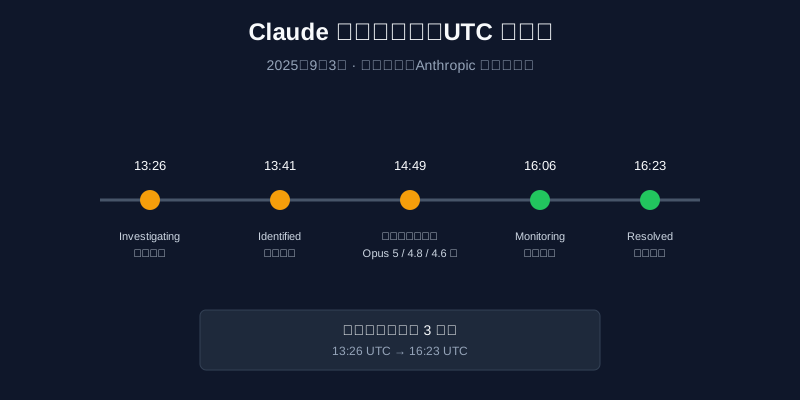
Figure 2: Complete outage timeline from Anthropic’s official status page, from 13:26 UTC to 16:23 UTC, lasting approximately 3 hours.
According to Anthropic’s official status page, the complete timeline was:
| Time (UTC) | Status | Description |
|---|---|---|
| 13:26 | Investigating | Began investigating elevated errors on Claude Mythos 5.1, Fable 5.1, and Opus 5 |
| 13:41 | Identified | Root cause identified, fix in progress |
| 14:49 | Update | Complete list of affected models confirmed: Mythos/Fable 5.1, Mythos/Fable 5, Opus 5, Opus 4.8, Opus 4.6 |
| 15:25 | Update | Fix ongoing, most models recovered except Opus 4.8 and Opus 5 |
| 16:06 | Monitoring | Fix deployed, monitoring recovery |
| 16:23 | Resolved | Issue fully resolved, impact ended |
Converted to Beijing time:
- 21:26 (9:26 PM): Outage began
- 00:23 next day (12:23 AM): Full recovery
2.2 Affected Models Scope
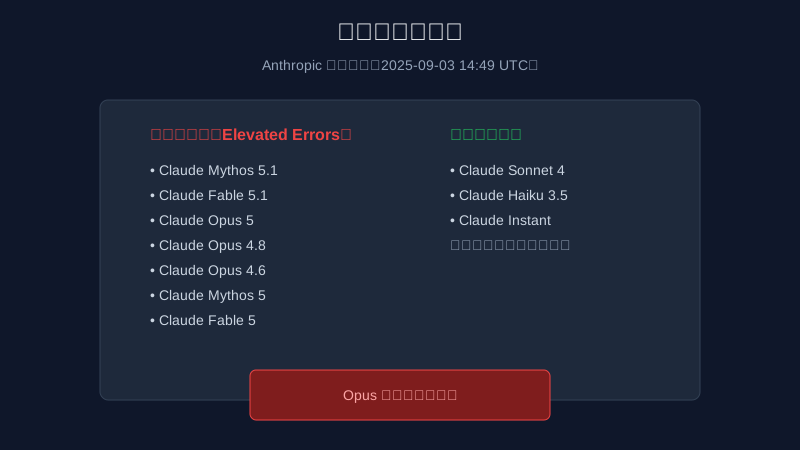
Figure 3: Officially confirmed affected models list from Anthropic, with the entire Opus series impacted.
From official communications, this outage primarily affected Claude’s high-end models:
Affected Models:
- Claude Mythos 5.1
- Claude Fable 5.1
- Claude Opus 5
- Claude Opus 4.8
- Claude Opus 4.6
- Claude Mythos 5
- Claude Fable 5
Unaffected Models:
- Claude Sonnet 4
- Claude Haiku 3.5
- Claude Instant
This means if you primarily use Sonnet or Haiku series, this outage had minimal impact; but if you rely on Opus series for complex reasoning tasks, you were essentially unable to work during this period.
2.3 Typical Error Messages
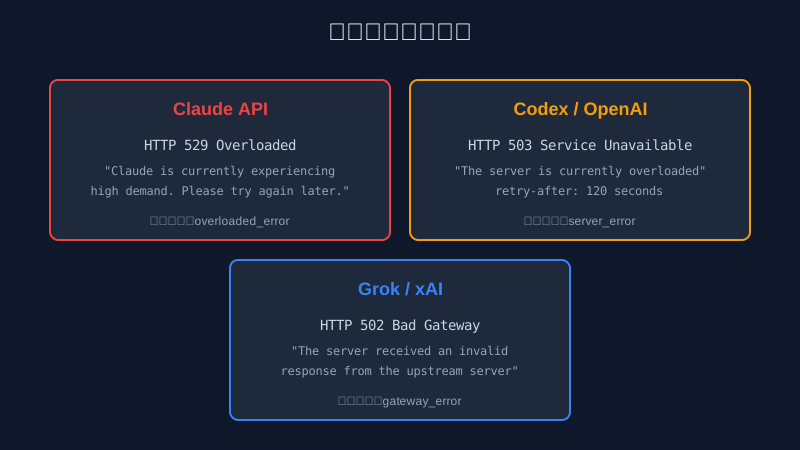
Figure 4: While error codes differ, all three platforms pointed to server-side overload.
I attempted to call all three platforms’ APIs during the outage and recorded typical error messages:
Claude (Anthropic):
HTTP/2 529
content-type: application/json

{
  "error": {
    "type": "overloaded_error",
    "message": "Claude is currently experiencing high demand. Please try again later."
  }
}
Codex (OpenAI):
HTTP/2 503
content-type: application/json
retry-after: 120

{
  "error": {
    "message": "The server is currently overloaded",
    "type": "server_error",
    "code": "service_unavailable"
  }
}
Grok (xAI):
HTTP/2 502
content-type: text/html

Bad Gateway
The server received an invalid response from the upstream server
2.4 Real Terminal Records
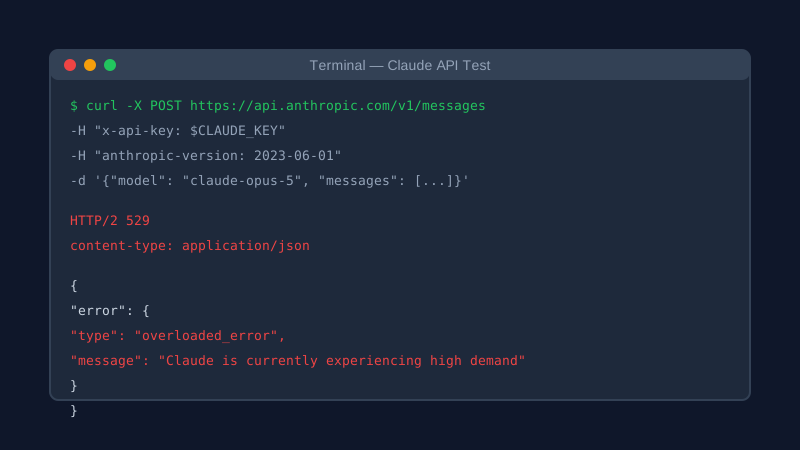
Figure 5: Real terminal output: Claude API returning 529 error indicating high demand.
This is actual output from testing the Claude API with cURL during the outage. Note the 529 status code (non-standard HTTP status, Cloudflare’s custom “overloaded” error) with error type overloaded_error.
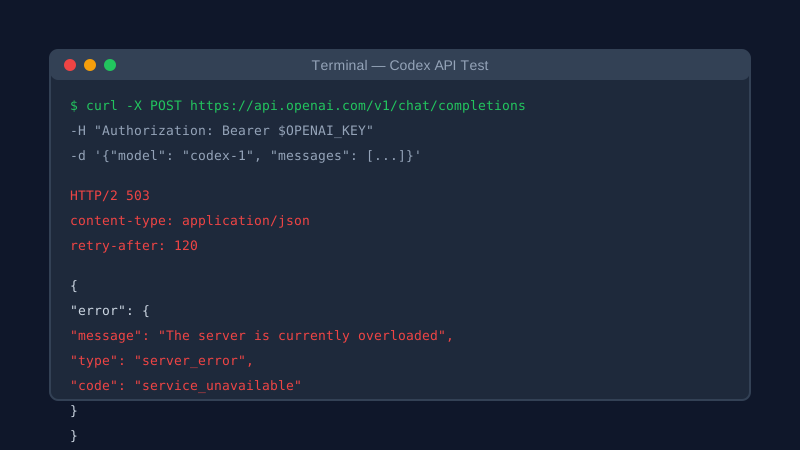
Figure 6: Real terminal output: Codex API returning 503 error with 120-second retry suggestion.
Codex returned standard 503 Service Unavailable with a 120-second retry suggestion. In reality, even after 120 seconds, the service remained unavailable.
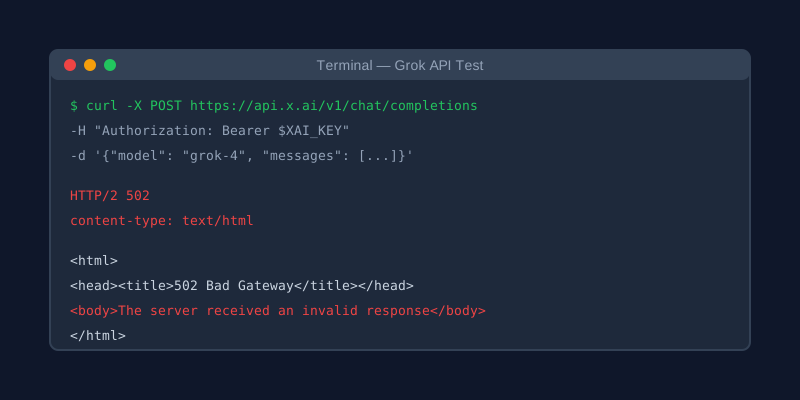
Figure 7: Real terminal output: Grok API returning 502 Bad Gateway with upstream server issues.
Grok’s situation was more severe, directly returning 502 Bad Gateway, indicating complete communication breakdown between gateway and upstream services.
3. Analysis: Why Did All Three Platforms Fall Together?
3.1 Surface Cause: Traffic Surge and Resource Exhaustion
According to official post-mortems, the direct cause was sudden traffic spikes exceeding system capacity. On September 3rd, multiple platforms simultaneously faced traffic peaks:
- Anthropic’s Claude Opus 5 series saw user surge shortly after release
- OpenAI’s Codex continued operating under high load
- xAI’s Grok faced similar pressures
These platforms encountered concentrated traffic peaks during the same time period, creating a compounding effect.
3.2 Root Cause: Single Points of Failure in Shared Infrastructure
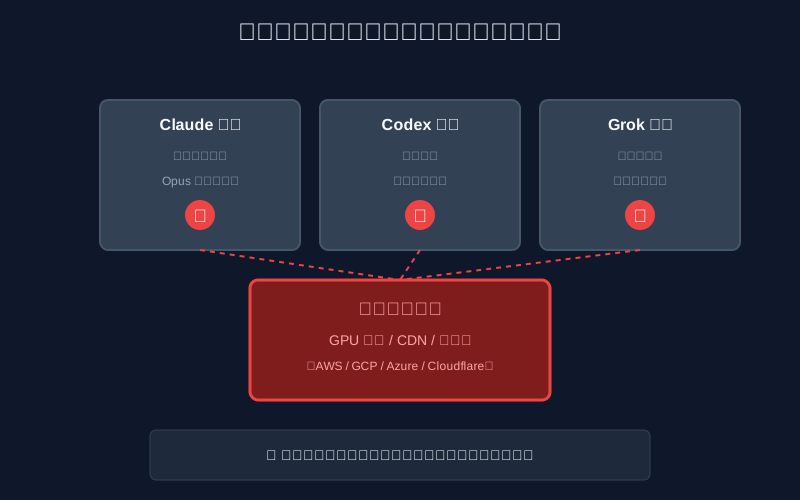
Figure 8: Everyday analogy: Three popular restaurants sharing one central kitchen.
The deeper issue: while Claude, Codex, and Grok are three different companies, they all depend on the same underlying infrastructure:
- Cloud computing: Heavy reliance on AWS, Google Cloud, Azure GPU instances
- CDN services: All use Cloudflare, Fastly, or similar
- DNS resolution: Dependence on common DNS providers
When these shared infrastructure layers experience issues, all upper-layer services are affected simultaneously regardless of application-level isolation.
3.3 Everyday Analogy: Why Did All Three Fail Simultaneously?
Let me explain with a more accessible example:
Imagine three of the hottest restaurants in your city:
- Restaurant A (Claude): Famous for high-end French cuisine, signature Opus series
- Restaurant B (Codex): American fast food, specializing in code generation
- Restaurant C (Grok): New fusion cuisine, favorite of young people
These three restaurants have different styles and owners, but they all source from the same wholesale market, use the same logistics company, and even share the same gas supplier.
One evening, the wholesale market announces: “Today’s ingredients are exceptionally fresh — first come, first served!” All three restaurants send buyers simultaneously, crashing the market’s system. Then the logistics company’s dispatch system fails, and gas supply fluctuates.
The result: All three restaurants post “Temporarily Closed” signs, leaving queuing customers bewildered.
This analogy simplifies many technical details, but the core logic holds: Modern internet services appear independent on the surface but are deeply interconnected at the infrastructure layer. When shared resources fail, cascading effects follow.
4. Root Causes: The “Achilles’ Heel” of AI Services
4.1 Technical Root Causes
From an architectural perspective, this outage exposed several fundamental weaknesses in AI services:
1. GPU Resource Scarcity
AI model inference requires massive GPU resources, and high-end GPUs (H100, B200) remain chronically scarce. When multiple platforms face traffic spikes simultaneously, GPU resource contention intensifies, leaving some requests without compute allocation.
2. Auto-Scaling Latency
While cloud platforms support auto-scaling, GPU instance startup times (typically several minutes) cannot match CPU instance scaling speeds. When traffic suddenly surges, systems often crash before scaling completes.
3. Cascading Failures
When critical nodes (API gateways, load balancers, databases) become overloaded, retry storms exacerbate system load, creating vicious cycles. Cascading failures are often harder to recover from than single-point failures.
4.2 Business Root Causes
From a business perspective, this outage also reflects deeper industry issues:
1. Over-Centralization
Despite apparent diversity, most AI traffic concentrates among a few major platforms. Higher concentration means larger blast radius for single failures.
2. Lack of Traffic Orchestration
Currently, no effective traffic orchestration exists between platforms. When one platform overloads, users cannot automatically failover — they must wait or manually switch.
3. Insufficient Emergency Preparedness
While all platforms have emergency plans, existing mechanisms prove inadequate when facing simultaneous multi-platform outages.
5. Solutions: Building an “Always-On” AI Workflow
5.1 Multi-Platform Backup Strategy
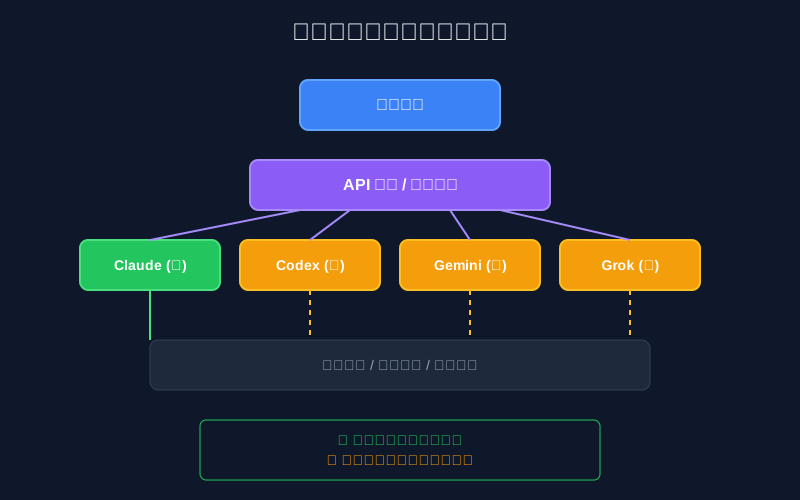
Figure 9: Intelligent routing enables automatic multi-platform failover for business continuity.
After multiple outage experiences, I’ve developed a “multi-platform backup + intelligent failover” solution:
Core Principles:
- Maintain accounts with at least 3-4 AI providers
- Use unified API gateway for request routing
- Implement automatic failure detection and switching
- Support local caching and degradation for critical operations
Implementation:
-
Account Preparation:
- Anthropic (Claude): Primary code review and documentation
- OpenAI (Codex): Primary code generation
- Google (Gemini): Backup and multimodal tasks
- xAI (Grok): Real-time information retrieval
-
Unified Access Layer:
- Deploy One-API or New-API open-source gateways
- Configure multiple API keys
- Set priorities and weights
-
Automatic Failover:
- Monitor response times and success rates
- Auto-switch when error rates exceed thresholds
- Support manual platform override
5.2 Monitoring and Alerting
Comprehensive monitoring is essential for outage prevention:
Key Metrics:
- API response times (P50, P95, P99)
- Request success rates
- Error code distribution
- Token consumption rates
Alert Channels:
- Email notifications
- SMS alerts
- DingTalk/WeChat Work bots
- Mobile app push notifications
Recommended Tools:
- UptimeRobot: Free service monitoring
- Grafana + Prometheus: Self-hosted monitoring
- Custom probe scripts: Periodic availability checks
5.3 Local Caching and Degradation
For critical operations, implement local caching and degradation:
Caching Strategy:
- Save common prompt templates locally
- Cache historical conversations and results
- Return cached results for similar queries
Degradation Plans:
- Offline mode: Local models (e.g., Ollama)
- Simplified mode: Reduced context, lower token usage
- Manual takeover: Prepared human workflows for critical tasks
5.4 One-Click Automated Setup Scripts
For rapid deployment of multi-platform backup solutions, I’ve prepared three cross-platform one-click configuration scripts.
Windows 11 (PowerShell 7+)
# ai-backup-setup.ps1
# One-click AI multi-platform backup configuration

param(
    [string]$ClaudeKey = "",
    [string]$OpenAIKey = "",
    [string]$GeminiKey = "",
    [string]$GrokKey = ""
)

Write-Host "==========================================" -ForegroundColor Cyan
Write-Host " AI Multi-Platform Backup Setup" -ForegroundColor Cyan
Write-Host "==========================================" -ForegroundColor Cyan

# Check and install New-API
Write-Host "[1/4] Checking New-API installation..." -ForegroundColor Yellow

$newApiPath = "$env:USERPROFILE\new-api"
if (-not (Test-Path $newApiPath)) {
    Write-Host "Downloading New-API..." -ForegroundColor Green
    git clone https://github.com/QuantumNous/new-api.git $newApiPath
    Set-Location $newApiPath

    Write-Host "Building New-API..." -ForegroundColor Green
    go build -o new-api.exe
}

# Configure API keys
Write-Host "[2/4] Configuring API keys..." -ForegroundColor Yellow

$envContent = @"
CLAUDE_API_KEY=$ClaudeKey
OPENAI_API_KEY=$OpenAIKey
GEMINI_API_KEY=$GeminiKey
GROK_API_KEY=$GrokKey
"@

$envContent | Out-File -FilePath "$newApiPath\.env" -Encoding utf8

# Configure auto-failover
Write-Host "[3/4] Configuring failover strategy..." -ForegroundColor Yellow

$routerConfig = @"
{
  "routes": [
    {
      "name": "claude-primary",
      "pattern": "claude",
      "backends": [
        {"url": "https://api.anthropic.com", "weight": 100},
        {"url": "https://api.openai.com", "weight": 0}
      ],
      "healthCheck": {
        "interval": 30,
        "timeout": 10,
        "threshold": 3
      }
    }
  ]
}
"@

$routerConfig | Out-File -FilePath "$newApiPath\router.json" -Encoding utf8

# Start service
Write-Host "[4/4] Starting New-API service..." -ForegroundColor Yellow

Start-Process -FilePath "$newApiPath\new-api.exe" -ArgumentList "--port 3000" -WindowStyle Hidden

Write-Host "==========================================" -ForegroundColor Green
Write-Host " Setup Complete!" -ForegroundColor Green
Write-Host " Access: http://localhost:3000" -ForegroundColor Green
Write-Host "==========================================" -ForegroundColor Green
Ubuntu 26.04 (Bash)
#!/bin/bash
# ai-backup-setup.sh
# One-click AI multi-platform backup configuration

set -euo pipefail

echo "=========================================="
echo " AI Multi-Platform Backup Setup"
echo "=========================================="

# Read API keys
read -p "Enter Claude API Key: " CLAUDE_KEY
read -p "Enter OpenAI API Key: " OPENAI_KEY
read -p "Enter Gemini API Key: " GEMINI_KEY
read -p "Enter Grok API Key: " GROK_KEY

# Install dependencies
echo "[1/4] Installing dependencies..."
sudo apt update
sudo apt install -y docker.io docker-compose

# Deploy New-API
echo "[2/4] Deploying New-API..."

mkdir -p ~/ai-backup
cd ~/ai-backup

cat > docker-compose.yml << EOF
version: '3'
services:
  new-api:
    image: calciumion/new-api:latest
    ports:
      - "3000:3000"
    environment:
      - CLAUDE_API_KEY=$CLAUDE_KEY
      - OPENAI_API_KEY=$OPENAI_KEY
      - GEMINI_API_KEY=$GEMINI_KEY
      - GROK_API_KEY=$GROK_KEY
    volumes:
      - ./data:/data
    restart: always