Stop Dragging Files Around: BaiduPCS-Go CLI and Agent Workflows for Baidu Netdisk
Bottom line first
If you only download one or two files from Baidu Netdisk once in a while, the web UI and official desktop client are fine. Once you start doing batch downloads, remote server pulls, archive uploads, directory audits, or Agent-assisted workflows with Codex, Claude, OpenClaw, HermesAgent, or similar tools, the graphical UI becomes friction.
BaiduPCS-Gois useful not because it is a magic speed booster, but because it turns Baidu Netdisk into something scripts, terminals, and Agents can operate. This article walks through installation checks, BDUSS/STOKEN login, everyday commands, configuration, safety rules, and practical Agent integration.All accounts, cookies, paths, tasks, and settings in this article are sanitized examples. They do not contain real BDUSS, STOKEN, cookies, private directories, internal addresses, or business information.
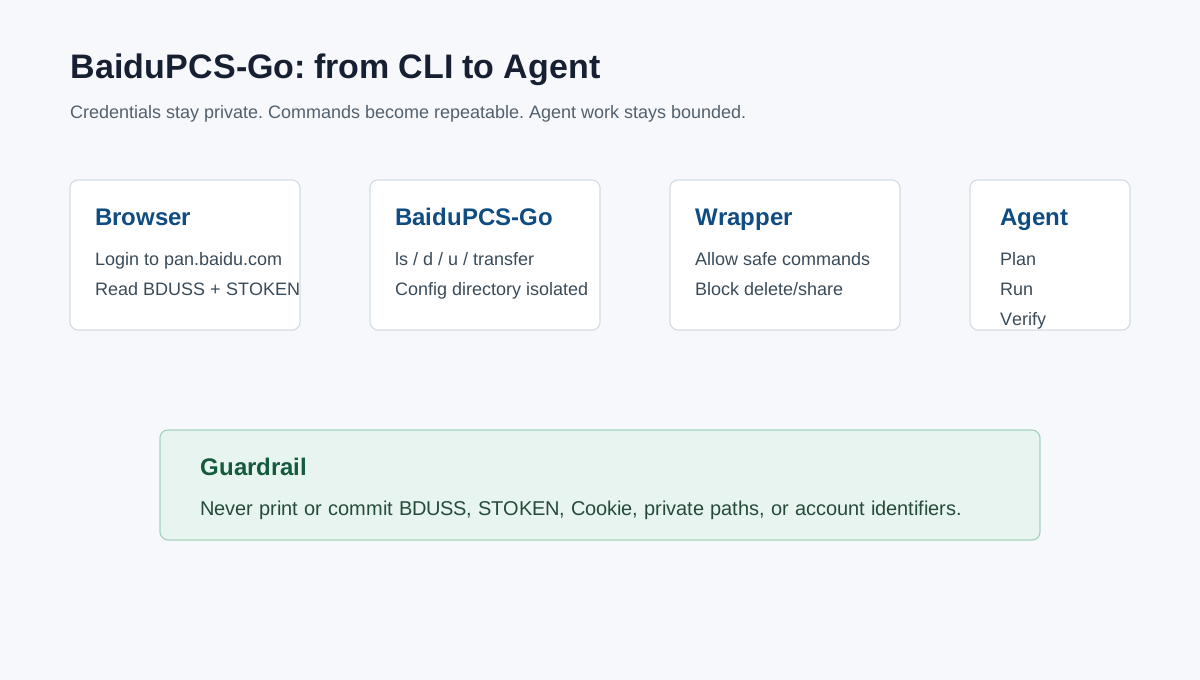
Figure 1: Command-line access first, Agent automation second, with credentials kept outside the prompt.
1. Why Use a CLI for Baidu Netdisk
The web UI and official client are designed for a person sitting in front of a machine: open the page, search, click, choose a local folder, wait. That is fine for casual use. It becomes awkward when the target is a VPS, NAS, CI runner, home server, temporary container, or remote development box.
A CLI gives you repeatability. The same command can list a directory today, download another directory tomorrow, and run on a remote host next week. It also gives Agents a clean interface. Agents are good at reading command output, planning steps, executing shell commands, checking results, and correcting small failures. They are much less reliable when the only interface is browser clicking. BaiduPCS-Go should be understood as an automation adapter: you keep control of authorization and boundaries, the CLI performs file operations, and the Agent coordinates multi-step workflows.
2. What BaiduPCS-Go Provides
BaiduPCS-Go is a Baidu Netdisk command-line client with a Linux-shell-like command style. The familiar commands are all there: ls, cd, pwd, download or d, upload or u, mkdir, rm, cp, mv, search, quota, and transfer.
BaiduPCS-Go ls /
BaiduPCS-Go cd /我的资源
BaiduPCS-Go pwd
BaiduPCS-Go d /我的资源/example.zip --saveto ./downloads
BaiduPCS-Go u ./report.pdf /文档
For this article I verified a local installation reporting BaiduPCS-Go version v4.0.1. The upstream release notes list v4.0.1 as a 2026-03-26 fix release for param error issues in commands such as ls. Before relying on your own installation, run:
BaiduPCS-Go --version
BaiduPCS-Go login --help
BaiduPCS-Go config set --help
The upstream README also makes an important point: this tool does not provide speed beyond the official client. For ordinary accounts, aggressive parallelism can trigger rate limiting. Treat it as an automation tool, not a speed hack.
3. Installation and Verification
Installation depends on the platform, but the checklist is the same: use a trusted source, choose the correct architecture, install the binary, and verify it with real commands.
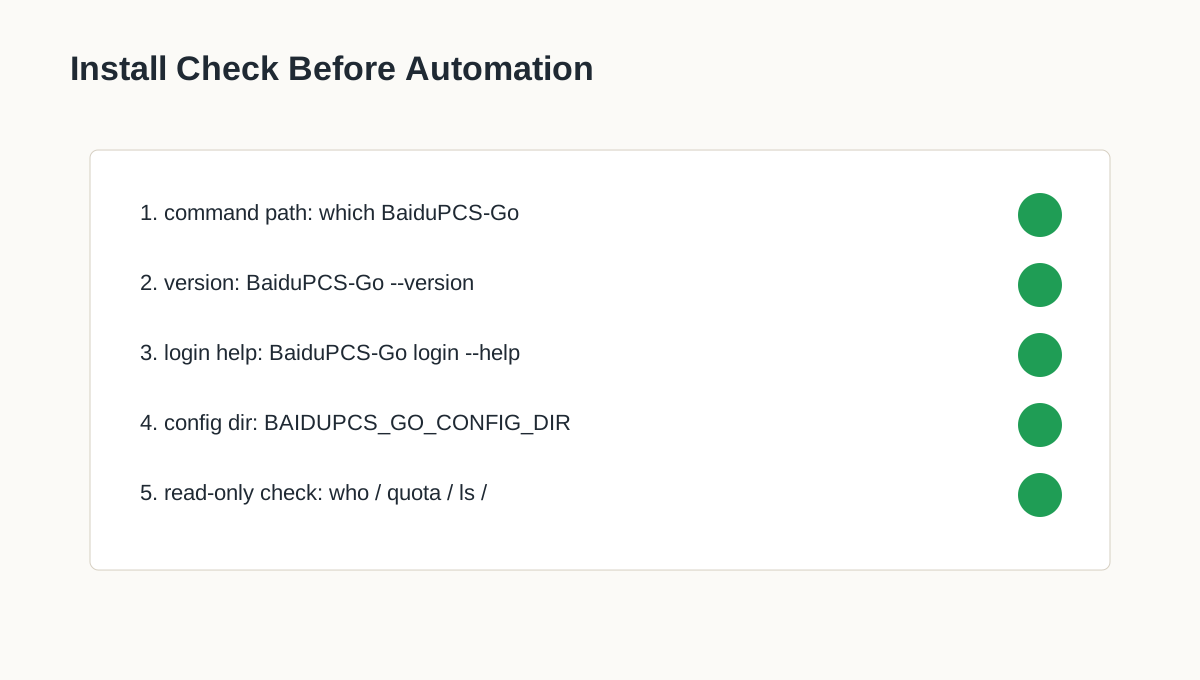
chmod +x BaiduPCS-Go
./BaiduPCS-Go --version
sudo install -m 0755 BaiduPCS-Go /usr/local/bin/BaiduPCS-Go
BaiduPCS-Go --version
For Agent use, I recommend a dedicated configuration directory:
export BAIDUPCS_GO_CONFIG_DIR="$HOME/.config/baidupcs-agent"
mkdir -p "$BAIDUPCS_GO_CONFIG_DIR"
BaiduPCS-Go env
This keeps your human workflow and Agent workflow separate. It also makes cleanup and auditing easier.
4. Prefer BDUSS and STOKEN Login
BaiduPCS-Go supports interactive login, BDUSS/STOKEN login, and full-cookie login. The help output notes that interactive login is no longer the preferred path, so a browser-derived credential is more practical.
BaiduPCS-Go login -bduss=<BDUSS> -stoken=<STOKEN>
BDUSS and STOKEN are still credentials. Anyone who obtains valid values may be able to act as your logged-in account for some operations. Treat them like passwords: do not screenshot them, paste them into random tools, commit them to Git, or include them in Agent prompts.
Full-cookie login is also supported, but BDUSS plus STOKEN is cleaner because you copy only the fields the CLI needs.
5. Getting BDUSS and STOKEN
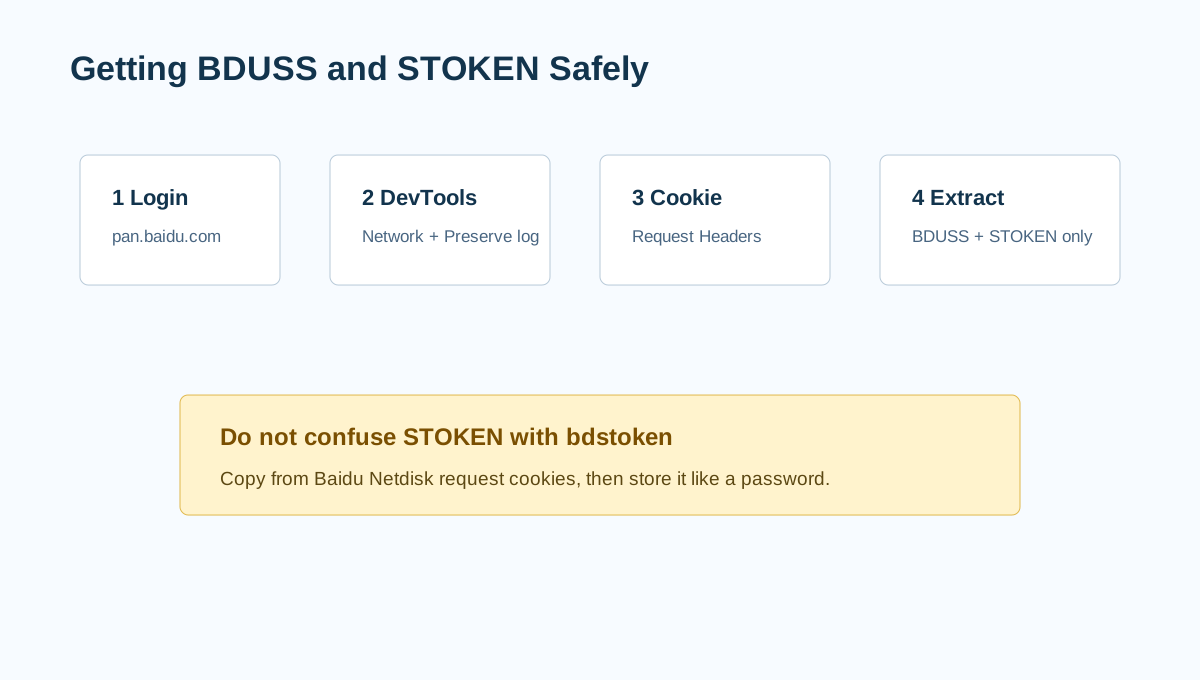
Use Chrome, Edge, or another Chromium browser as an example. Open https://pan.baidu.com/, log in normally, open Developer Tools, go to the Network tab, enable Preserve log, refresh the page, select a request to pan.baidu.com, and inspect the Cookie: request header. Copy the value after BDUSS= up to the next semicolon, and the value after STOKEN= up to the next semicolon.
A sanitized cookie line looks like this:
BAIDUID=<BAIDUID>; BDUSS=<BDUSS>; STOKEN=<STOKEN>; PANWEB=1; ...
Do not confuse STOKEN with bdstoken. They are different. The upstream README also warns that STOKEN should be obtained from the Baidu Netdisk page, otherwise it may not work.
6. First Login and Read-Only Checks
After obtaining BDUSS and STOKEN, log in inside an isolated configuration directory and run read-only checks first:
export BAIDUPCS_GO_CONFIG_DIR="$HOME/.config/baidupcs-demo"
mkdir -p "$BAIDUPCS_GO_CONFIG_DIR"
BaiduPCS-Go login -bduss='<BDUSS>' -stoken='<STOKEN>'
BaiduPCS-Go who
BaiduPCS-Go quota
BaiduPCS-Go ls /
If this works, your credentials, configuration directory, and network path are usable. For multiple accounts, use multiple configuration directories. Do not mix personal accounts, work accounts, and Agent accounts in the same config.
7. File-System-Like Operations
Start with read-only commands:
BaiduPCS-Go pwd
BaiduPCS-Go ls /
BaiduPCS-Go ls /我的资源
BaiduPCS-Go tree /我的资源
BaiduPCS-Go meta /我的资源/example.zip
BaiduPCS-Go search -path=/ -r keyword
These are ideal for Agent reconnaissance. Ask the Agent to list a directory and produce a plan before it downloads or uploads anything. Remember that BaiduPCS-Go’s current directory is the Netdisk working directory, not the local shell directory.
8. Downloads, Uploads, and Transfers
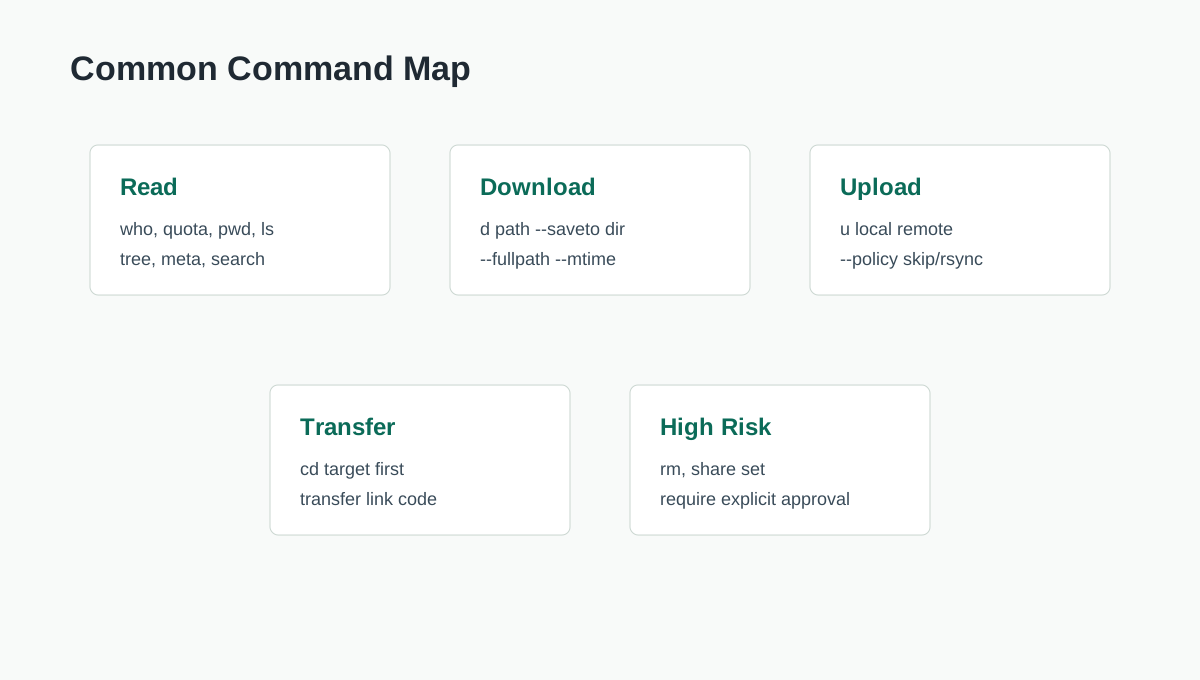
Common download commands:
BaiduPCS-Go d /我的资源/example.zip
BaiduPCS-Go d /我的资源/materials --saveto ./downloads
BaiduPCS-Go d /我的资源/materials --fullpath --saveto ./downloads
Set the default save directory:
BaiduPCS-Go config set -savedir "$HOME/Downloads/BaiduPCS"
For ordinary accounts, keep parallelism conservative:
BaiduPCS-Go config set -max_parallel 1 -max_download_load 1
Upload format:
BaiduPCS-Go u <local-file-or-directory> <remote-target-directory>
BaiduPCS-Go u ./archive /AgentDrop --policy rsync
State conflict policy explicitly: skip, overwrite, or rsync. “Sync this folder” is too vague for an Agent.
Transfer uses the current Netdisk directory:
BaiduPCS-Go cd /转存
BaiduPCS-Go transfer 'https://pan.baidu.com/s/<SHARE_ID>' '<code>'
Sharing and deletion are high-risk operations. Do not allow Agents to create shares or delete files by default.
9. Stable Configuration Beats Aggressive Configuration
A stable default:
BaiduPCS-Go config set -savedir "$HOME/Downloads/BaiduPCS" -max_parallel 1 -max_download_load 1 -max_upload_parallel 4 -max_upload_load 2 -upload_policy skip
On an overseas VPS, uploads to pan.baidu.com may need a proxy. The upstream v4.0.0 notes mention proxy_hostnames for this scenario:
BaiduPCS-Go config set -proxy 'http://127.0.0.1:7890' -proxy_hostnames 'pan.baidu.com'
Use your own secure proxy configuration. Do not publish real proxy credentials.
10. Integrating BaiduPCS-Go With Agents
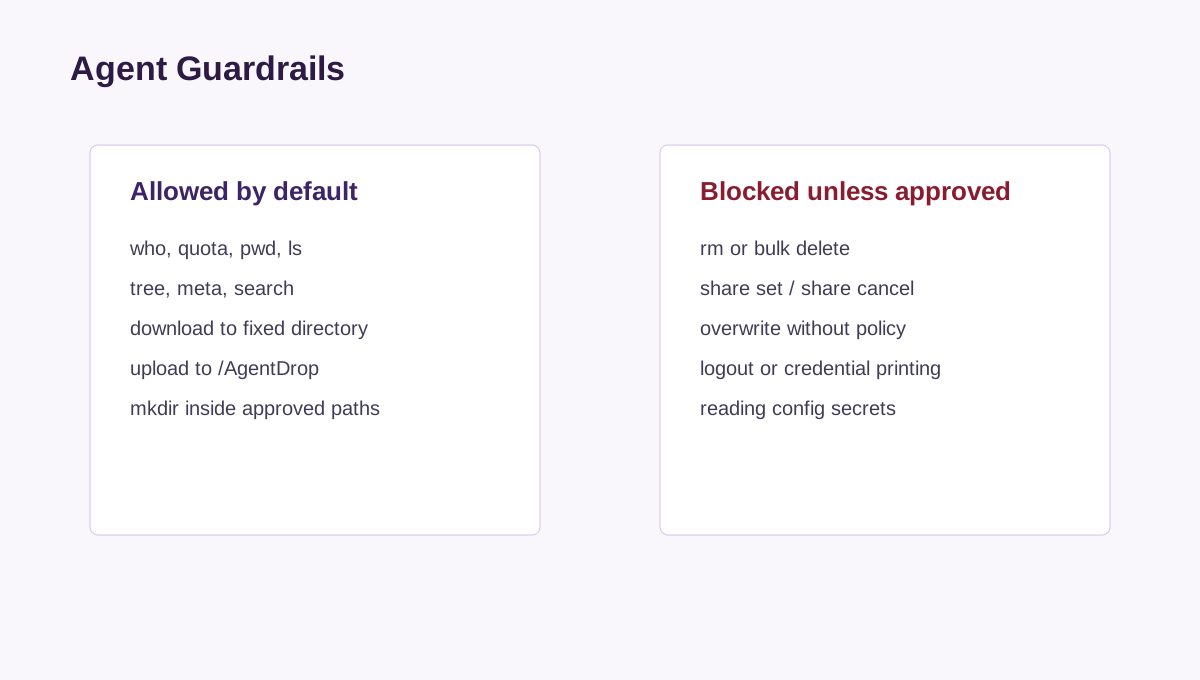
Do not paste BDUSS/STOKEN into the Agent prompt. Prepare a logged-in, isolated environment first:
export BAIDUPCS_GO_CONFIG_DIR="$HOME/.config/baidupcs-agent"
mkdir -p "$BAIDUPCS_GO_CONFIG_DIR"
BaiduPCS-Go login -bduss='<BDUSS>' -stoken='<STOKEN>'
BaiduPCS-Go config set -savedir "$HOME/agent-downloads/baidupcs" -max_parallel 1 -max_download_load 1
BaiduPCS-Go who
BaiduPCS-Go quota
Then give the Agent boundaries: use the current BAIDUPCS_GO_CONFIG_DIR; do not read, print, or commit credentials; allow only read commands plus controlled download/upload/mkdir; block rm, share, and logout unless explicitly authorized; download only to the approved local directory; upload only to /AgentDrop or another explicit path; show a plan before every write operation; verify after execution.
For stricter control, wrap the CLI:
#!/usr/bin/env bash
set -euo pipefail
export BAIDUPCS_GO_CONFIG_DIR="${BAIDUPCS_GO_CONFIG_DIR:-$HOME/.config/baidupcs-agent}"
cmd="${1:-}"
shift || true
case "$cmd" in
  who|quota|pwd|ls|tree|meta|search|download|d|upload|u|mkdir)
    exec BaiduPCS-Go "$cmd" "$@"
    ;;
  *)
    echo "blocked command: $cmd" >&2
    exit 2
    ;;
esac
Now the Agent can only use approved subcommands.
11. Three Agent Task Templates
Read-only audit: run who, quota, and pwd; list the first-level directories under /资料; search for filenames containing a keyword; do not upload, download, delete, or share anything; end with recommendations, not modifications.
Controlled download: list the target directory first, estimate file count, use conservative parallelism, use --fullpath and --mtime, count local files and total size after download, and never create shares or delete remote files.
Controlled upload: count local files and total size first, create the target directory if missing, use --policy skip, verify with ls after upload, and never run rm, share, or credential-printing commands.
12. Logs, History, and Credential Hygiene
Credential leakage often happens outside the tool itself. Watch shell history, screenshots, terminal recordings, Agent logs, Git repositories, and clipboard managers. A safer login pattern is:
read -rsp 'BDUSS: ' BAIDU_BDUSS; echo
read -rsp 'STOKEN: ' BAIDU_STOKEN; echo
BaiduPCS-Go login -bduss="$BAIDU_BDUSS" -stoken="$BAIDU_STOKEN"
unset BAIDU_BDUSS BAIDU_STOKEN
chmod 700 "$BAIDUPCS_GO_CONFIG_DIR"
If you suspect leakage, do not only delete the local config. Invalidate the session from Baidu account security settings, change credentials if needed, and obtain fresh BDUSS/STOKEN values.
13. Recommended Workflow
My baseline setup would be: install BaiduPCS-Go v4.0.1 or a newer stable release; create $HOME/.config/baidupcs-agent; obtain BDUSS/STOKEN from pan.baidu.com and log in once from a controlled terminal; set a fixed savedir and conservative parallelism; create /AgentDrop in Netdisk for Agent uploads; use a wrapper script that blocks delete, share, and logout by default; require plan first, execution second, verification last in every Agent prompt; periodically audit config permissions, Agent logs, and share lists.
BaiduPCS-Go is best understood as a command-line bridge for Baidu Netdisk. It does not solve every speed limit and should not be used to bypass platform rules. Its real value is making repeatable file workflows scriptable, remote-server-friendly, and Agent-readable.
Sources and Notes
- BaiduPCS-Go open-source project:
https://github.com/qjfoidnh/BaiduPCS-Go - Commands verified against:
BaiduPCS-Go version v4.0.1 - All examples are placeholders and contain no real account, cookie, token, internal address, or private path.