Scan Succeeds, Download Says Not Logged In: How I Recovered BBDown's Missing Cookie
“Short version”
If your BBDown is still 1.6.3 (released August 2024, the last official release before the repository was archived), QR code login has been silently broken since Bilibili changed its login API. The phone app says login succeeded, but the credential file only stores a short-lived “pickup ticket” (a ticket parameter). The real login cookie (SESSDATA) never arrives. Every download then reports that you are not logged in, no matter how many times you scan.
This article walks through the reproduction, analysis, root cause, and fix, and provides one-command repair scripts for Windows 11, Ubuntu 26.04, and macOS 26, with both manual and Agent-driven usage. The scripts only talk to Bilibili’s official passport endpoints and never touch a third-party server. All credential fields in the real outputs below are masked.
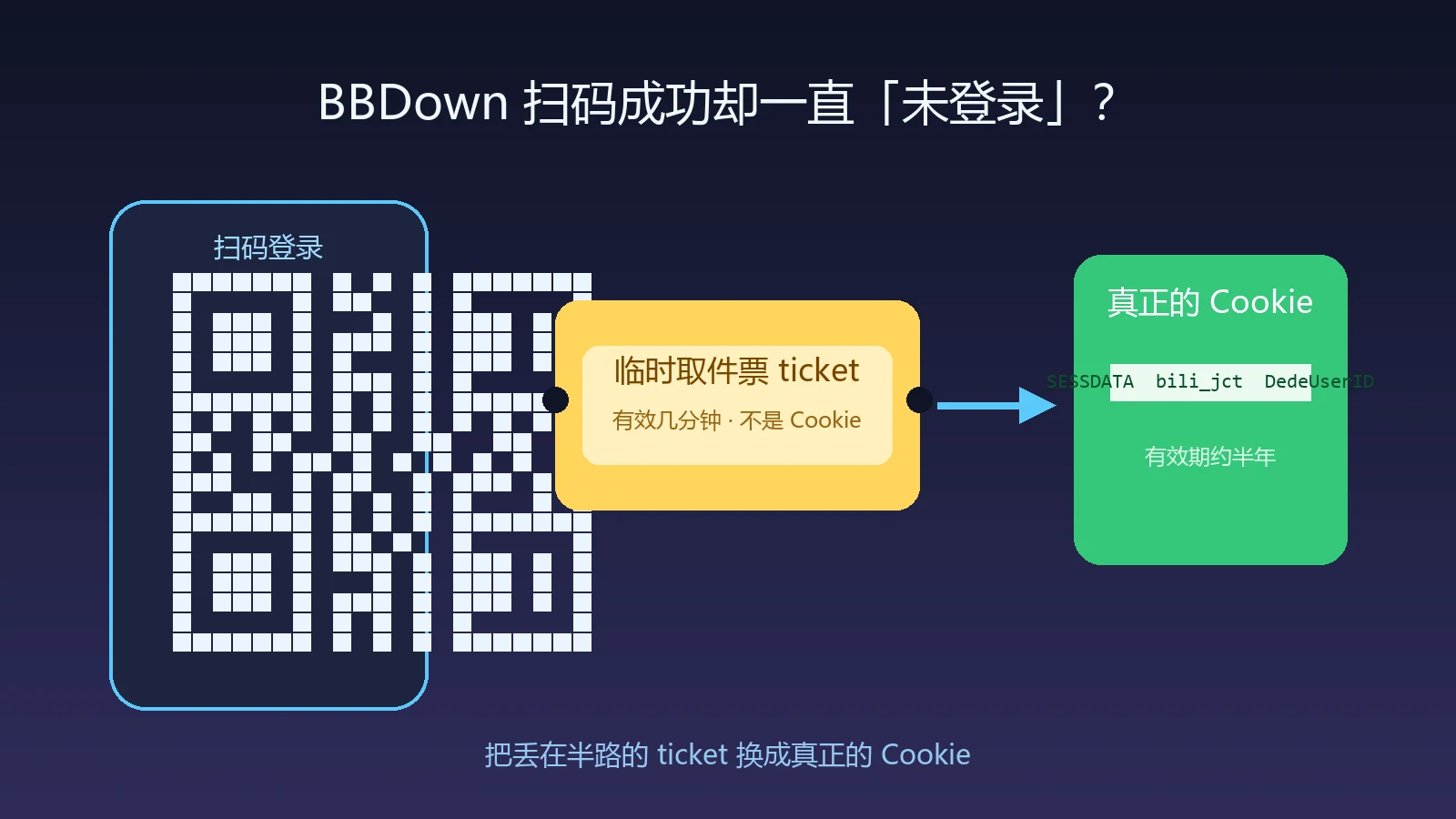
Figure 1: AI-generated cover. The fix is not “log in again”. It is adding back the missing exchange step in the middle of the flow.
1. Background: a growing piece of login folklore
BBDown is a popular command-line Bilibili downloader that works with aria2c and ffmpeg to batch-download videos, anime series, and collections. Whether you are logged in matters a lot: without a login you get limited quality; after logging in, 1080P high-bitrate and premium quality become selectable.
On a machine that had been used for video downloads for a long time, BBDown 1.6.3 showed a classic pattern. Running “BBDown login” and scanning the QR code with the phone app said login succeeded. Back on the computer, downloading said “you are not logged in”. Scanning again changed nothing. Oddly, BBDownTV.data (the TV-side login) stayed healthy, and the “-tv” parse mode kept working.
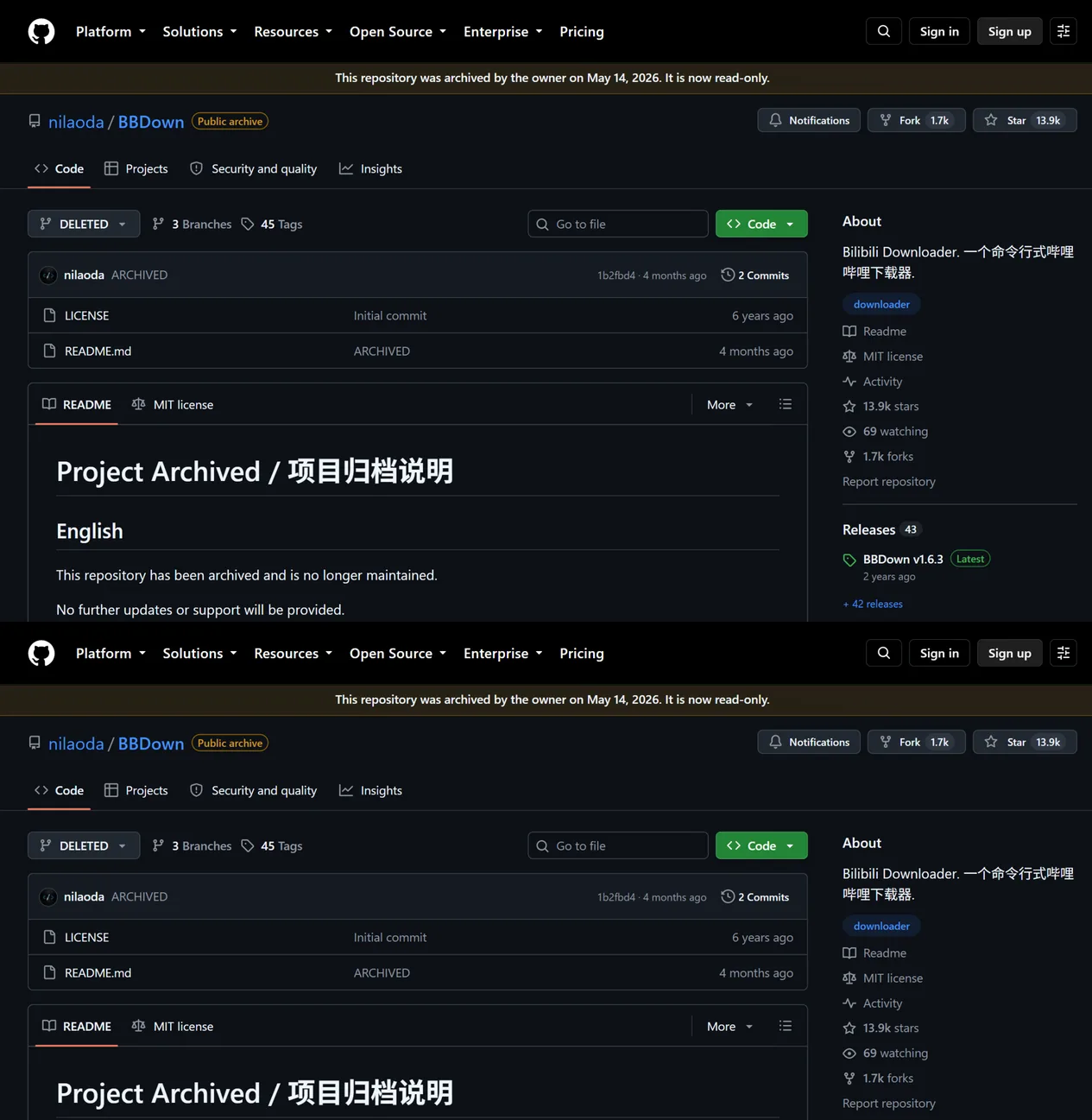
Figure 2: The official repository is archived and read-only, so “upgrade to the latest version” is not a way out. We need to understand the problem and add the missing step ourselves.
2. Symptoms: the scan succeeded, the login did not
Reproducing is trivial — parse any video:
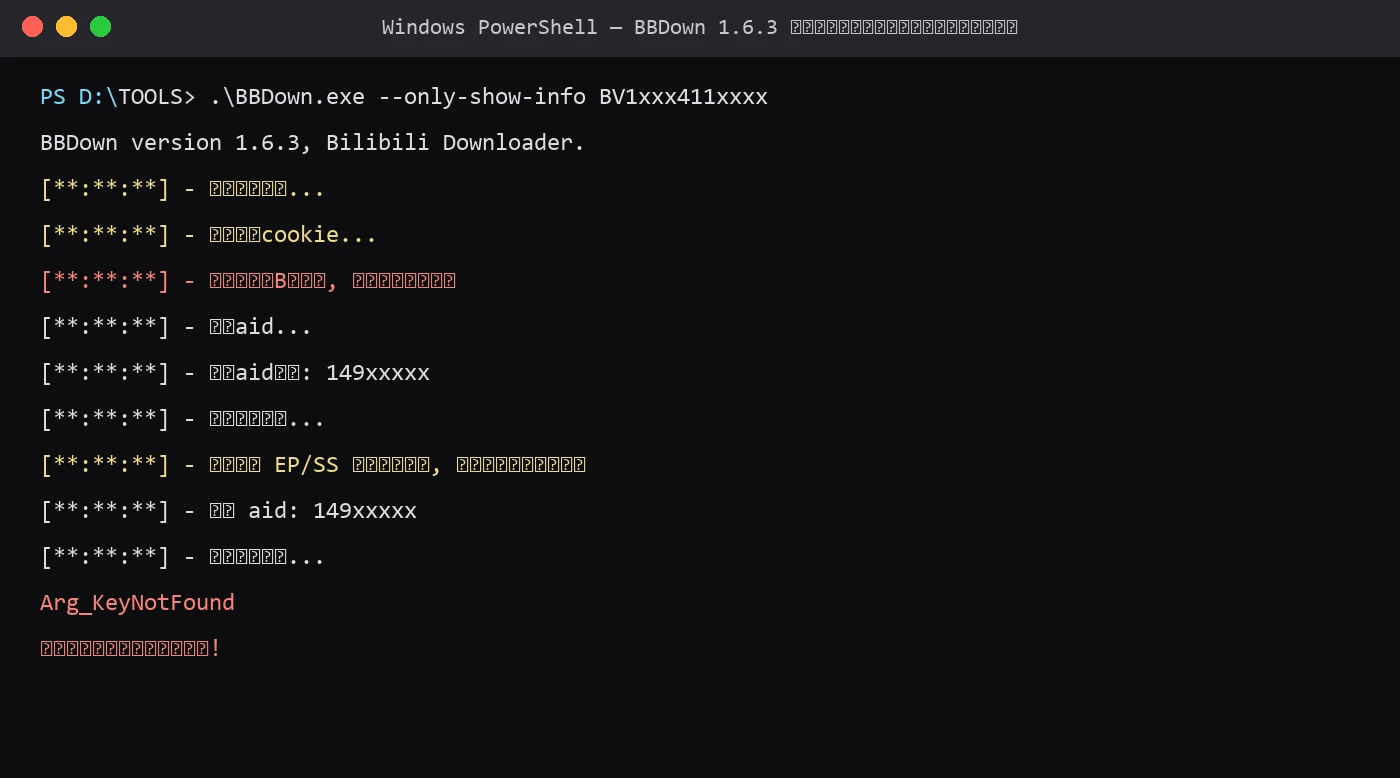
Figure 3: Real session output before the fix (credentials and paths masked). Note that “loading local cookie” is immediately followed by “you are not logged in”: the program did read the credential file, but found no valid login state inside.
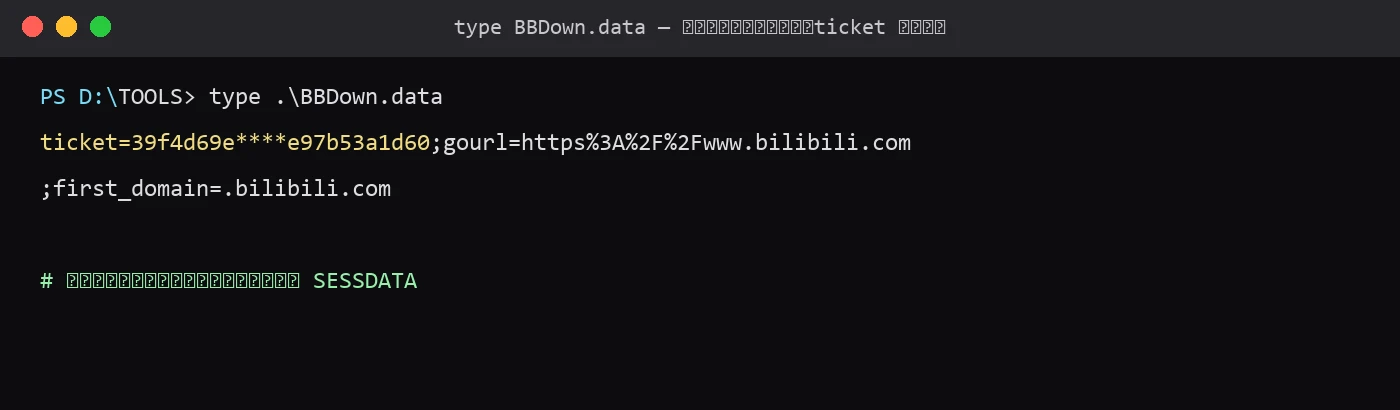
Figure 4: The full content of the credential file after a “successful” scan (ticket masked). There is no SESSDATA anywhere in the file.
Putting the two observations together: the scan step works (Bilibili did authenticate your phone), but the “store the login state” step silently failed. The program believes it stored the login; in reality it stored a temporary voucher that expires within minutes.
3. Analysis: from “is it the old version” to reading the source
Two instincts come first: the cookie expired, or the version is too old. Both fail. If the cookie had expired, one fresh scan would fix it, and we scanned many times. And the newest official release is 1.6.3 from August 2024 — exactly what this machine already runs.

Figure 5: The releases page. Note that 1.6.2 once shipped “QR login API fix” — this login path has been broken by API changes before.
Since upgrading cannot help, the next stop is the source. BBDown is open source, and the login logic lives in BBDownLoginUtil.cs: generate a QR code, poll the status every second, and once success is returned, parse the returned URL, convert its query parameters into a semicolon-separated cookie string, and write it to BBDown.data.
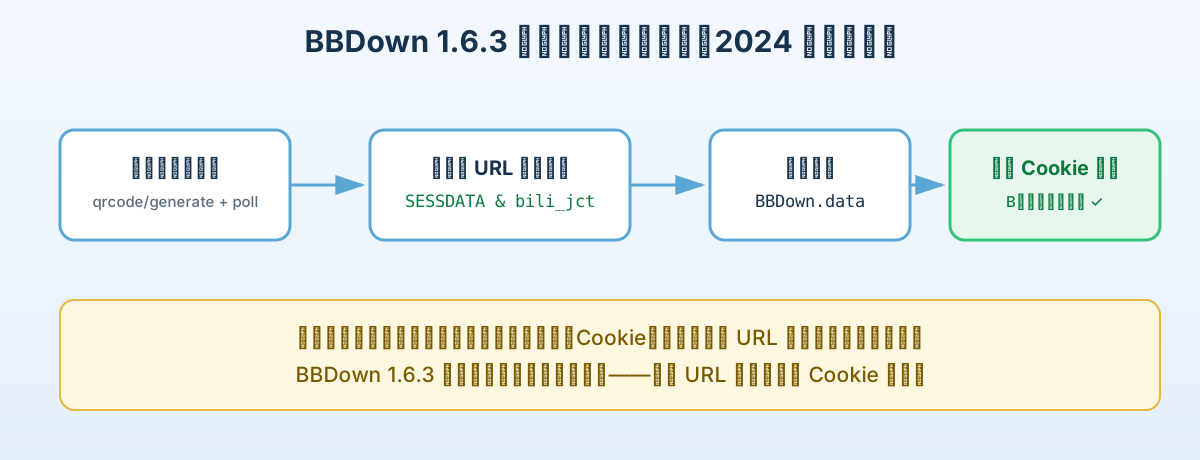
Figure 6: In 2024 and earlier, the success URL contained SESSDATA and bili_jct directly, and BBDown stored them as-is. The code matched the platform behavior of its time perfectly.
The code is not wrong — it is outdated. It assumes “after a successful scan, the cookie is inside the returned URL”. Bilibili later removed that assumption.
4. Root cause: Bilibili split “issuing the cookie” into two steps
Capturing a real login flow confirms it: after a successful scan today, the poll response URL no longer carries SESSDATA. Instead it is a cross-domain confirmation address with a ticket parameter. Only when a browser visits that address do the Set-Cookie headers deliver the real login state.
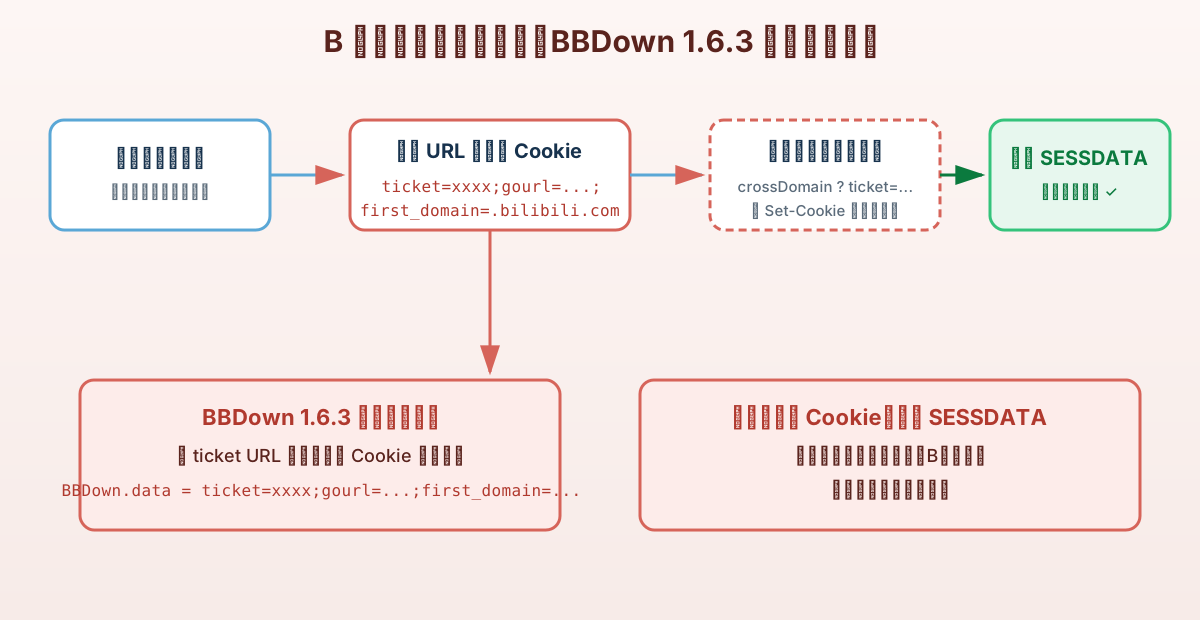
Figure 7: The breakpoint is visible. BBDown stores the ticket URL’s parameters verbatim, and never performs the missing step of visiting the cross-domain address to collect the cookies.
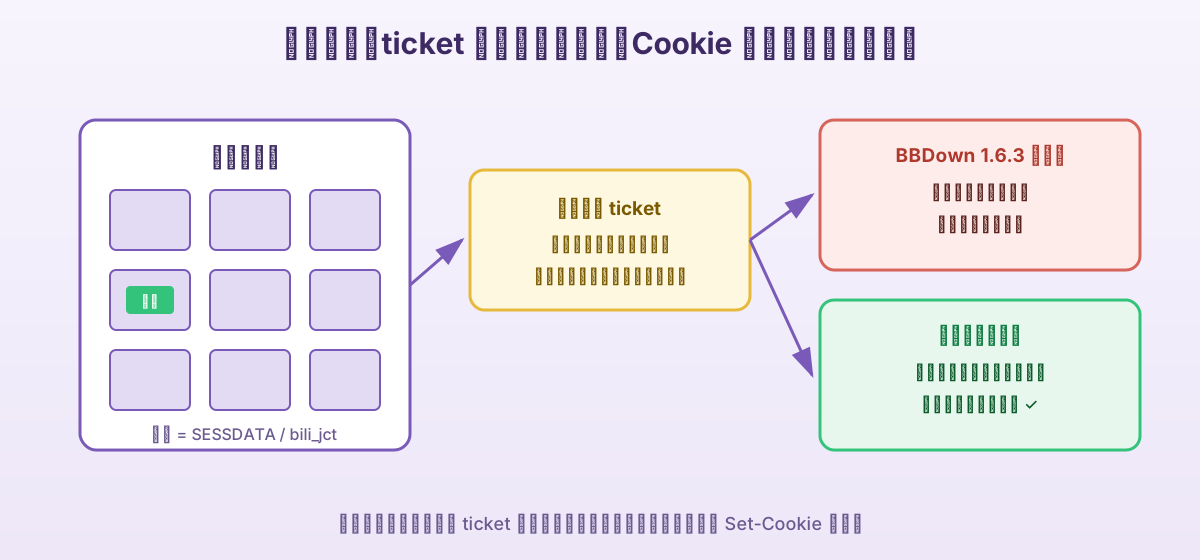
Figure 8: A parcel-locker analogy. The ticket is like a pickup text message: it proves a parcel is waiting for you, but it cannot open the locker door, and it expires within minutes. The cookie is the door code. BBDown stuffed the message into the door seam, and of course the door did not move. The fix first exchanges the message for the code at the counter, then opens the door.
There is also a trap: the ticket is extremely short-lived. An early attempt to reuse the old ticket still sitting in BBDown.data failed with a bare 302 redirect — it was long dead. The repair must scan and exchange in the same session; old tickets cannot be redeemed.
5. The fix: adding the exchange step back
The repair script does little, but every link matters: generate the QR code, poll, exchange the ticket at the cross-domain endpoint, collect the Set-Cookie headers, write BBDown.data back in the exact format BBDown expects (query string, commas escaped as %2C, semicolon separators), and finally parse a video to verify.
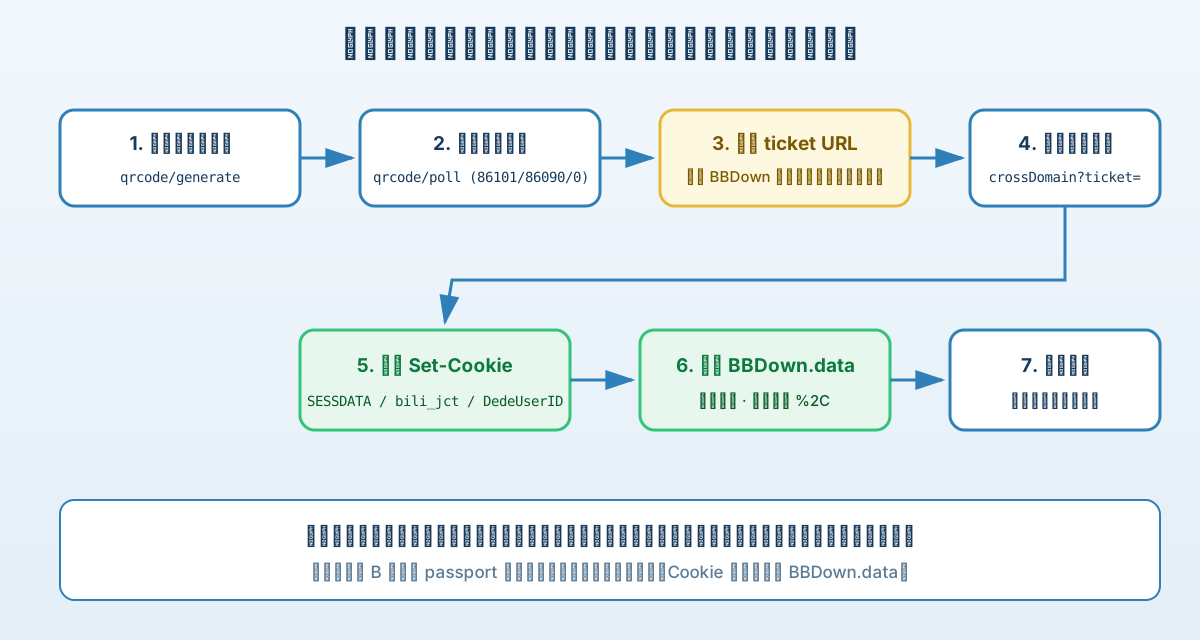
Figure 9: A seven-step pipeline. The script simply does, on the command line, what the browser has always done automatically.
A real successful run:
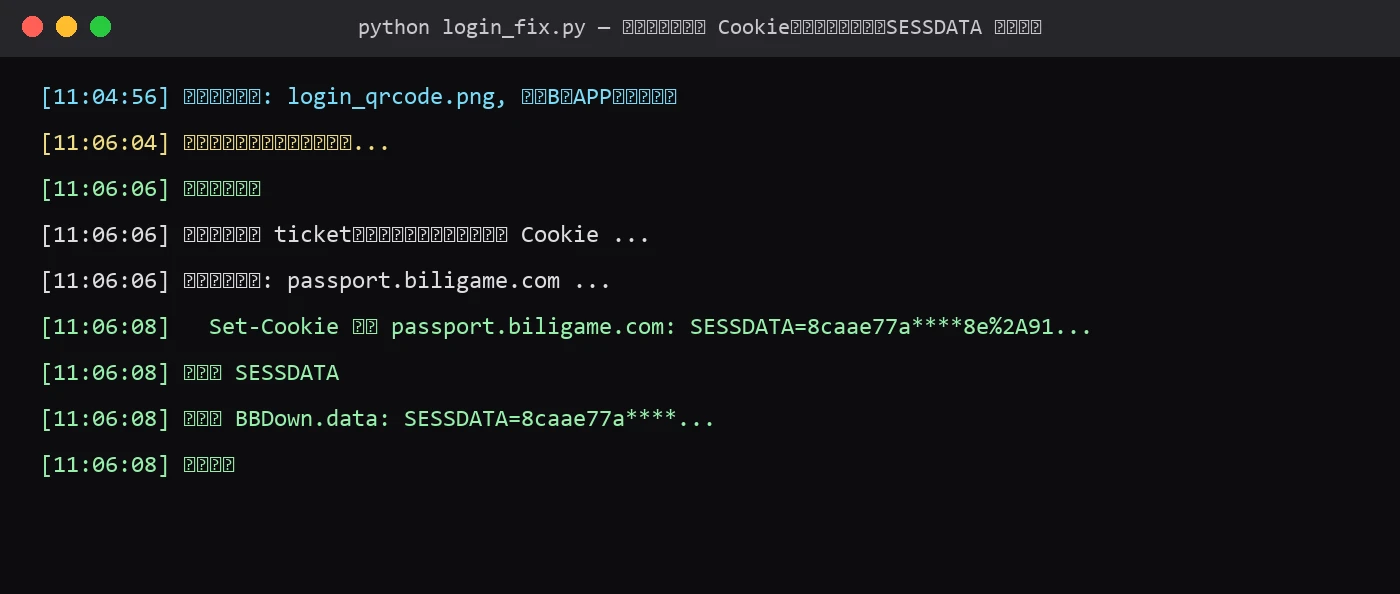
Figure 10: Real session output. The “new flow” branch after the scan is exactly the step the old BBDown never performed.
After the fix, the warning disappears and the full quality list is back:
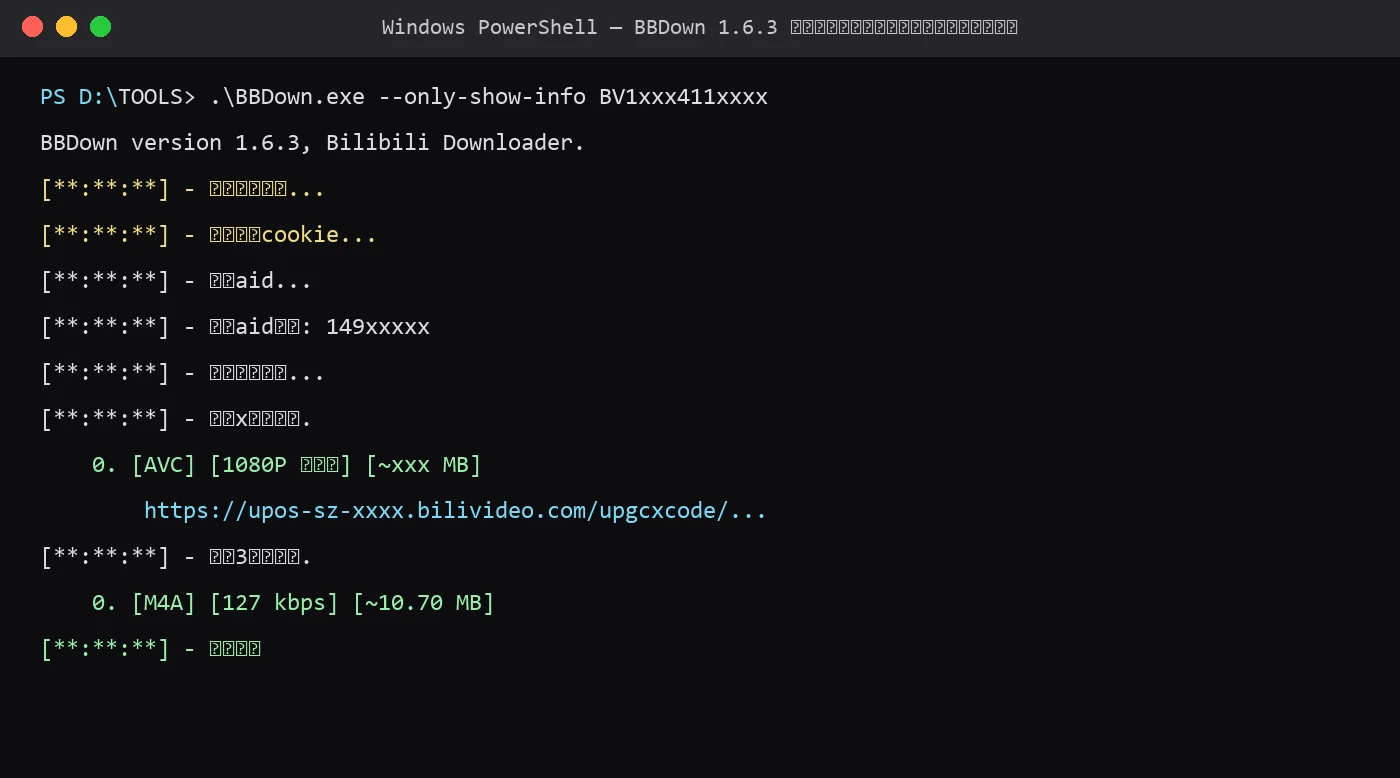
Figure 11: Real session output after the fix (download links truncated). The acceptance criterion is simple: no “not logged in” line, and a complete quality list.
5.1 One-command scripts (manual execution)
All three platforms share the same core file, bbdown_login_core.py (full listing below). The wrapper prepares the environment, calls the core, and verifies automatically. Nothing depends on a third-party cloud service — only built-in system tools and two pure-Python libraries.
Core script bbdown_login_core.py (identical on all platforms, placed next to the wrapper):
#!/usr/bin/env python3
# -*- coding: utf-8 -*-
# bbdown_login_core.py — BBDown QR login repair core
# Talks only to Bilibili's official passport endpoints; writes only local BBDown.data
import argparse, os, re, subprocess, sys, time
from urllib.parse import urlparse, parse_qs, quote
GEN_URL = "https://passport.bilibili.com/x/passport-login/web/qrcode/generate?source=main-fe-header"
POLL_URL = "https://passport.bilibili.com/x/passport-login/web/qrcode/poll?qrcode_key={key}&source=main-fe-header"
UA = ("Mozilla/5.0 (Windows NT 10.0; Win64; x64) AppleWebKit/537.36 "
"(KHTML, like Gecko) Chrome/126.0.0.0 Safari/537.36")
def log(msg):
print(f"[{time.strftime('%H:%M:%S')}] {msg}", flush=True)
def mask(v, keep=8):
return v[:keep] + "……" if len(v) > keep else "……"
def collect_set_cookies(resp):
out = []
for r in resp.history + [resp]:
for k, v in r.headers.items():
if k.lower() == "set-cookie":
pair = v.split(";")[0]
if "=" in pair:
n, val = pair.split("=", 1)
if n.strip() and val.strip():
out.append((urlparse(r.url).netloc, n.strip(), val.strip()))
return out
def exchange_ticket(session, ticket, gourl):
"""Exchange the cross-domain ticket for real cookies (the step old BBDown never did)"""
cookies = {}
urls = [
f"https://passport.biligame.com/x/passport-login/web/crossDomain?ticket={ticket}&gourl={quote(gourl, safe='')}",
f"https://passport.bilibili.com/x/passport-login/web/crossDomain?ticket={ticket}&gourl={quote(gourl, safe='')}",
f"https://passport.biligame.com/crossDomain?ticket={ticket}&gourl={quote(gourl, safe='')}",
]
for url in urls:
log(f"Trying cross-domain confirm: {urlparse(url).netloc} ...")
try:
r = session.get(url, timeout=15, allow_redirects=True)
except Exception as e:
log(f" request failed: {e}")
continue
for src, n, v in collect_set_cookies(r):
log(f" Set-Cookie from {src}: {n}={mask(v)}")
cookies[n] = v
for m in re.findall(r"https?://[^\"'\s<>]+", r.text):
m = m.replace("\\u0026", "&").replace("&", "&")
if "sso" in m.lower() and ("bilibili" in m or "biligame" in m):
try:
for _, n, v in collect_set_cookies(session.get(m, timeout=15)):
cookies[n] = v
except Exception:
pass
if "SESSDATA" in cookies:
log("SESSDATA obtained")
break
return cookies
def open_image(path):
try:
if sys.platform == "win32":
os.startfile(path)
elif sys.platform == "darwin":
subprocess.Popen(["open", path])
else:
subprocess.Popen(["xdg-open", path])
except Exception:
pass
def do_login(data_dir):
import requests, qrcode
s = requests.Session()
s.headers.update({"User-Agent": UA, "Referer": "https://passport.bilibili.com/"})
qr_url = s.get(GEN_URL, timeout=15).json()["data"]["url"]
key = parse_qs(urlparse(qr_url).query)["qrcode_key"][0]
png = os.path.join(data_dir, "login_qrcode.png")
qrcode.make(qr_url).save(png)
open_image(png)
log(f"QR code saved and opened: {png}. Scan it with the Bilibili app and confirm.")
deadline = time.time() + 180
success_url = None
while time.time() < deadline:
time.sleep(2)
code = s.get(POLL_URL.format(key=key), timeout=15).json()["data"]["code"]
if code == 86101:
continue
if code == 86090:
log("Scanned. Please confirm on the phone...")
continue
if code == 86038:
log("QR code expired, please re-run")
return 2
if code == 0:
success_url = s.get(POLL_URL.format(key=key), timeout=15).json()["data"]["url"]
log("Login confirmed")
break
log(f"unexpected code={code}")
return 2
if not success_url:
log("Timed out waiting for the scan, please re-run")
return 2
q = parse_qs(urlparse(success_url).query)
if "SESSDATA" in q:
cookie_str = success_url.split("?", 1)[1].replace("&", ";").replace(",", "%2C")
log("URL carries cookies directly (old flow)")
elif "ticket" in q:
log("Got a cross-domain ticket (new flow), exchanging for real cookies ...")
cookies = exchange_ticket(s, q["ticket"][0], q.get("gourl", ["https://www.bilibili.com"])[0])
if "SESSDATA" not in cookies:
log(f"Exchange failed! keys: {', '.join(cookies.keys()) or 'none'}")
return 3
cookie_str = ";".join(f"{k}={v}" for k, v in cookies.items()).replace(",", "%2C")
else:
log("Unrecognized success URL")
return 4
data_file = os.path.join(data_dir, "BBDown.data")
if os.path.exists(data_file):
bak = data_file + ".bak-" + time.strftime("%Y%m%d-%H%M%S")
os.replace(data_file, bak)
log(f"Backed up the old credential file: {os.path.basename(bak)}")
with open(data_file, "w", encoding="utf-8") as f:
f.write(cookie_str)
log("Done. Verify with a normal BBDown download.")
return 0
def main():
ap = argparse.ArgumentParser()
ap.add_argument("--data-dir", default=".")
ap.add_argument("--check", action="store_true", help="only check whether BBDown.data contains SESSDATA")
args = ap.parse_args()
if args.check:
data_file = os.path.join(args.data_dir, "BBDown.data")
if os.path.exists(data_file):
has = "SESSDATA=" in open(data_file, encoding="utf-8").read()
print(f"BBDown.data exists, contains SESSDATA: {has}")
sys.exit(0 if has else 1)
print("BBDown.data does not exist")
sys.exit(1)
sys.exit(do_login(args.data_dir))
if __name__ == "__main__":
main()
Windows 11 wrapper Fix-BBDown-Login.ps1 (save as UTF-8, next to the core script):
param(
    [string]$BBDownDir = (Get-Location).Path,
    [switch]$CheckOnly
)
$ErrorActionPreference = "Stop"
$core = Join-Path $PSScriptRoot "bbdown_login_core.py"
if (-not (Test-Path $core)) { throw "bbdown_login_core.py not found next to this script" }

# 1. Locate Python 3 (py launcher first, then PATH; install via the built-in winget if absent)
$py = $null
foreach ($cand in @(@("py", "-3"), @("python"))) {
    try {
        $v = & $cand[0] -c "import sys; print(sys.version_info[0])" 2>$null
        if ($v -eq "3") { $py = $cand; break }
    } catch { }
}
if (-not $py) {
    Write-Host "Python 3 not found. Installing via winget..."
    winget install --id Python.Python.3.12 --silent --accept-package-agreements --accept-source-agreements
    $py = @("py", "-3")
}

# 2. Isolated venv + two pure-Python dependencies
$venv = Join-Path $env:TEMP "bbdown-login-venv"
if (-not (Test-Path (Join-Path $venv "Scripts\python.exe"))) { & $py[0] $py[1] -m venv $venv }
$vpy = Join-Path $venv "Scripts\python.exe"
& $vpy -m pip install --quiet --disable-pip-version-check requests qrcode
if ($LASTEXITCODE -ne 0) { throw "pip install failed" }

# 3. Check or repair
if ($CheckOnly) { & $vpy $core --data-dir $BBDownDir --check; return }
& $vpy $core --data-dir $BBDownDir
if ($LASTEXITCODE -ne 0) { throw "login fix failed, see messages above" }

# 4. Verify
$exe = Join-Path $BBDownDir "BBDown.exe"
if (Test-Path $exe) {
    Write-Host "`n[Verify] BBDown parse test..."
    $out = & $exe --only-show-info BV1Ad4y1g7AZ 2>&1 | Out-String
    if ($out -match "尚未登录") { Write-Host "VERIFY FAILED: still reports not logged in." -ForegroundColor Red }
    elseif ($out -match "任务完成|共计") { Write-Host "VERIFY OK: logged in and parse succeeded." -ForegroundColor Green }
    else { Write-Host "VERIFY UNCLEAR: review the output above manually." }
} else {
    Write-Host "BBDown.exe not found in $BBDownDir; skip verify."
}
Usage: dry check with “powershell -ExecutionPolicy Bypass -File .\Fix-BBDown-Login.ps1 -CheckOnly”; repair with “powershell -ExecutionPolicy Bypass -File .\Fix-BBDown-Login.ps1 -BBDownDir “C:\path\to\BBDown””.

Figure 12: When Python 3 is missing, the script installs it silently with Windows’ built-in WinGet — a system component, not a third-party updater.
Ubuntu 26.04 wrapper fix-bbdown-login-ubuntu2604.sh:
#!/usr/bin/env bash
set -euo pipefail
SCRIPT_DIR="$(cd "$(dirname "${BASH_SOURCE[0]}")" && pwd)"
CORE="$SCRIPT_DIR/bbdown_login_core.py"
[ -f "$CORE" ] || { echo "bbdown_login_core.py not found next to this script"; exit 1; }

MODE="${1:-}"
if [ "$MODE" = "--check" ]; then DATA_DIR="${2:-.}"; else DATA_DIR="${1:-.}"; fi

# 1. Ensure Python 3 and venv support (apt only when missing)
if ! command -v python3 >/dev/null 2>&1; then
  sudo apt-get update && sudo apt-get install -y python3
fi
if ! python3 -m venv --help >/dev/null 2>&1; then
  sudo apt-get install -y python3-venv
fi

# 2. Isolated venv + dependencies
VENV="$HOME/.cache/bbdown-login-venv"
if [ ! -x "$VENV/bin/python" ] && [ ! -x "$VENV/Scripts/python.exe" ]; then
  python3 -m venv "$VENV"
fi
VPY="$VENV/bin/python"
[ -x "$VPY" ] || VPY="$VENV/Scripts/python.exe"
"$VPY" -m pip install --quiet --disable-pip-version-check requests qrcode

# 3. Check or repair
if [ "$MODE" = "--check" ]; then exec "$VPY" "$CORE" --data-dir "$DATA_DIR" --check; fi
"$VPY" "$CORE" --data-dir "$DATA_DIR"

# 4. Verify
if [ -x "$DATA_DIR/BBDown" ]; then
  echo "[Verify] BBDown parse test..."
  if "$DATA_DIR/BBDown" --only-show-info BV1Ad4y1g7AZ 2>&1 | grep -q "尚未登录"; then
    echo "VERIFY FAILED: still reports not logged in."
  else
    echo "VERIFY OK: logged in and parse succeeded."
  fi
else
  echo "BBDown binary not found in $DATA_DIR; skip verify."
fi
Usage: dry check with “bash fix-bbdown-login-ubuntu2604.sh –check”; repair with “bash fix-bbdown-login-ubuntu2604.sh /path/to/bbdown-dir”.
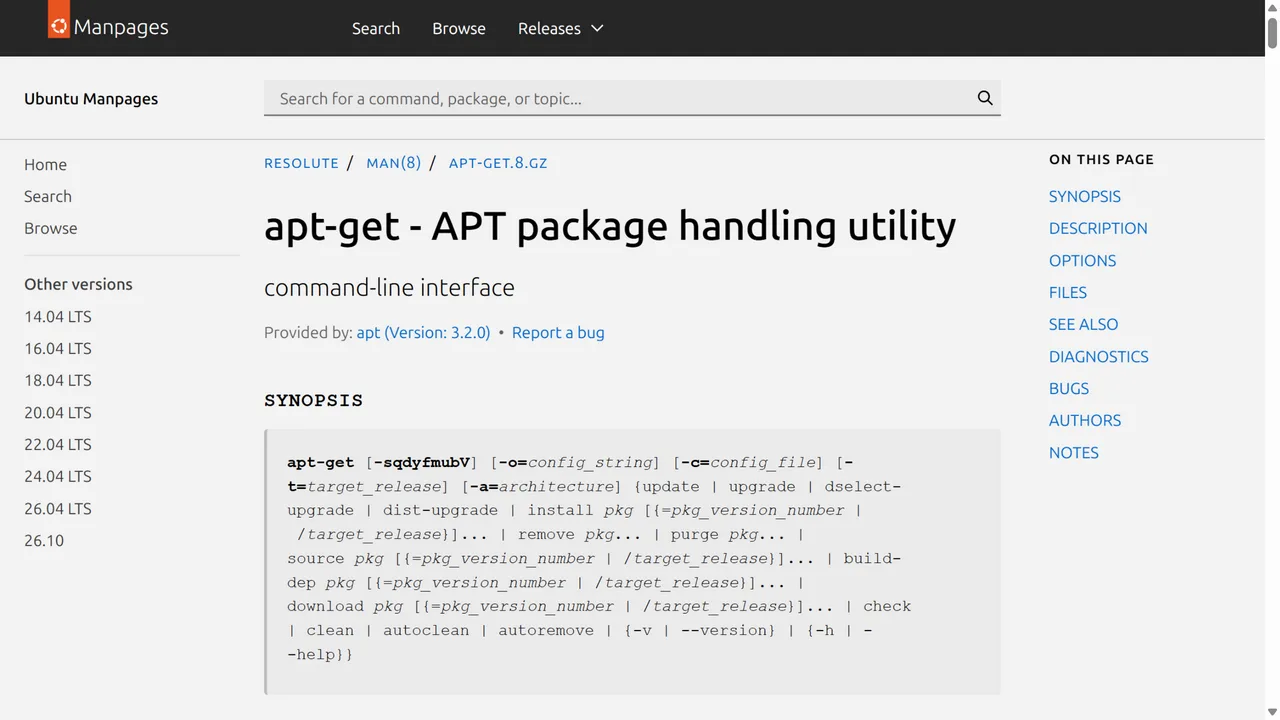
Figure 13: The script installs python3-venv through the system package manager only when missing; everything else stays inside its own venv.
macOS 26 wrapper fix-bbdown-login-macos26.zsh:
#!/bin/zsh
set -euo pipefail
SCRIPT_DIR="${0:A:h}"
CORE="$SCRIPT_DIR/bbdown_login_core.py"
[ -f "$CORE" ] || { echo "bbdown_login_core.py not found next to this script"; exit 1; }

MODE="${1:-}"
if [[ "$MODE" == "--check" ]]; then DATA_DIR="${2:-.}"; else DATA_DIR="${1:-.}"; fi

# 1. macOS 26 ships python3 with the command-line tools; if absent, ask for it instead of mutating the system
if ! command -v python3 >/dev/null 2>&1; then
  echo "python3 not found. Run 'xcode-select --install' first, then re-run."
  exit 1
fi

# 2. Isolated venv + dependencies
VENV="$HOME/.cache/bbdown-login-venv"
if [[ ! -x "$VENV/bin/python" && ! -x "$VENV/Scripts/python.exe" ]]; then
  python3 -m venv "$VENV"
fi
VPY="$VENV/bin/python"
[[ -x "$VPY" ]] || VPY="$VENV/Scripts/python.exe"
"$VPY" -m pip install --quiet --disable-pip-version-check requests qrcode

# 3. Check or repair
if [[ "$MODE" == "--check" ]]; then exec "$VPY" "$CORE" --data-dir "$DATA_DIR" --check; fi
"$VPY" "$CORE" --data-dir "$DATA_DIR"

# 4. Verify
BBDOWN_BIN=""
for c in "$DATA_DIR/BBDown" "$DATA_DIR/BBDown.exe"; do
  [[ -x "$c" ]] && BBDOWN_BIN="$c" && break
done
if [[ -n "$BBDOWN_BIN" ]]; then
  echo "[Verify] BBDown parse test..."
  if "$BBDOWN_BIN" --only-show-info BV1Ad4y1g7AZ 2>&1 | grep -q "尚未登录"; then
    echo "VERIFY FAILED: still reports not logged in."
  else
    echo "VERIFY OK: logged in and parse succeeded."
  fi
else
  echo "BBDown binary not found in $DATA_DIR; skip verify."
fi
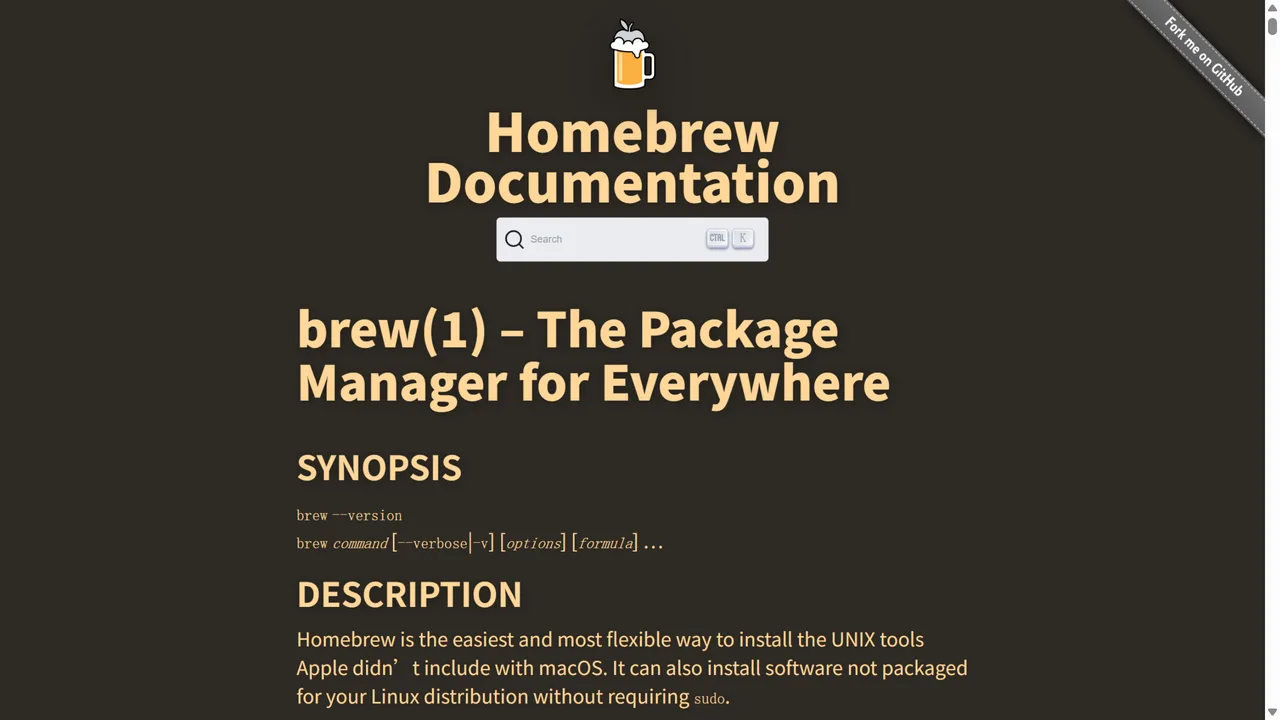
Figure 14: This repair does not need Homebrew. If you manage BBDown with brew, note that its install location may differ from a manually downloaded binary — pass the directory of the binary you actually use.
5.2 One-command scripts (Agent-driven configuration)
If you already run a local command-executing Agent (Codex, Claude Code, HermesAgent, etc.), hand it this brief:
Please fix the "not logged in" problem of BBDown QR login on this machine. Requirements:
1. Locate the BBDown executable directory and the actual BBDown.data path (in 1.6.3 it lives next to the exe).
2. Inspect BBDown.data: if it contains ticket= but no SESSDATA=, apply the fix described in the article; otherwise report the actual content to the user first.
3. Choose the repair path by OS: Windows 11 via PowerShell, Ubuntu 26.04 via bash, macOS 26 via zsh; create an isolated venv with the system Python, install the two pure-Python libraries requests and qrcode, then run the core login script.
4. Remind the user to scan the QR code; never skip the human confirmation step; never try to redeem an old ticket (it expires within minutes).
5. Verify after the fix: run BBDown to parse a public video and confirm the output contains no "not logged in" line.
6. Never print full cookies, raw SESSDATA or ticket values, private addresses, full computer names, or any account information; always mask.
7. Do not modify the BBDown binary itself, do not install unknown binaries, do not upload any local files.
5.3 Manual or Agent?
For one or two personal machines, go manual: put both files in one directory, run the check, run the repair, watch the QR code — five minutes total. For a fleet of family machines, or if you already let an Agent handle maintenance, give it the brief from 5.2 and let it run check, repair, and verify per machine, collecting failures into a summary. Both methods share the same scripts; only the person pressing Enter differs.
5.4 Two reminders about the core script
First, the script backs up the original BBDown.data to a timestamped .bak file, so you can always roll back. Second, the script masks cookie values in its output. If you plan to paste logs online while asking for help, double-check that the raw SESSDATA never leaves your machine — it is the door code to your account.
6. Q&A
Q1: Can upgrading BBDown fix it?
Not currently. The official repository is archived and 1.6.3 is the final release. Community forks exist, but choosing one means trusting another builder with your login cookie. This repair does not touch BBDown itself, which keeps the risk surface small.
Q2: How long does the fix last?
SESSDATA is typically valid for about half a year. When it expires, the “not logged in” message returns; re-run the script and scan once more. This is exactly why a repeatable script beats a one-off manual hack.
Q3: Why did the “-tv” mode keep working?
The TV login uses a completely different access_token system stored in BBDownTV.data, and Bilibili never changed that flow. That asymmetry was an important clue that the problem lived in the web cookie path.
Q4: Is the Arg_KeyNotFound error the same problem?
No. It is a 1.6.3 parsing quirk with a few very old videos, unrelated to login. After the fix, regular videos and anime parse normally.
Q5: Does the script send my account anywhere else?
No. The core script talks only to Bilibili’s official passport domains and writes the exchanged cookies to the local BBDown.data. Every request URL is visible in the listing above for review.
Q6: Is scanning a QR code shown on screen safe?
The QR code only encodes the login confirmation link — the same official endpoints the Bilibili website uses. The confirmation happens between your phone and Bilibili; the script only receives the resulting cookie. The precondition is a trustworthy script, which is why the full source is printed here for review.
7. Closing thoughts
The biggest lesson from this troubleshooting session: when an unmaintained tool meets a continuously changing platform API, the failure is rarely a bug in the code. It is a once-valid assumption inside the code that quietly stopped holding. BBDown 1.6.3 assumed a successful scan delivers the cookie — true in 2024, no longer true now.
For this kind of folklore bug, a reliable path is: split the failure into “which step succeeded, which step never happened”, read what the code of that step assumes, and verify the assumption against the platform’s real behavior. Adding the missing step is much safer than rewriting everything. The same approach applies to many self-hosted tools that “worked yesterday and broke today”.
References
- BBDown official repository (archived), https://github.com/nilaoda/BBDown
- BBDown v1.6.3 release page, https://github.com/nilaoda/BBDown/releases/tag/1.6.3
- BBDown login source BBDownLoginUtil.cs (tag 1.6.3), https://github.com/nilaoda/BBDown/blob/1.6.3/BBDown/BBDownLoginUtil.cs
- bilibili-API-collect community API documentation, https://github.com/SocialSisterYi/bilibili-API-collect
- WinGet documentation (Windows environment preparation), https://learn.microsoft.com/en-us/windows/package-manager/winget/upgrade
- apt-get manpage (Ubuntu 26.04 series), https://manpages.ubuntu.com/manpages/resolute/man8/apt-get.8.html
- Homebrew manpage (macOS reference), https://docs.brew.sh/Manpage