Stop Mirror Hopping! The Ultimate Guide to CERNET Mirror Hub: National-Grade Open Source Aggregator Unleashed
Executive Summary (TL;DR)
- Say Goodbye to “Mirror Decision Paralysis”: No more toggling blindly between Tsinghua (TUNA), USTC, SJTU, NJU, and Alibaba mirrors whenever an upgrade stalls. The Campus Network Joint Mirror Station (mirrors.cernet.edu.cn), officially backed by the CERNET (China Education and Research Network) Network Center, provides the unified “super portal” for open-source software distribution across China.
- Powered by Intelligent 302 Routing (MirrorZ): Behind the clean frontend lies the open-source MirrorZ scheduling engine. Whenever a client requests a package or an OS ISO, the system inspects the client’s Geo-IP and ASN topology in real time, automatically redirecting (HTTP 302 Found) the request to the nearest, fastest, and most up-to-date university mirror node.
- Resilient to Node Outages: Traditional static mirrors fail hard with
502 Bad Gatewayor404 Not Foundwhen upstream synchronization stalls or storage goes offline. The CERNET aggregator continuously monitors node health; if an issue arises on one university cluster, traffic is shifted dynamically within milliseconds—completely transparent to end users.- Production-Ready, Zero-Dependency Automation Toolbox: This guide provides offline scripts for Windows 11, Ubuntu 26.04, and macOS 26, supporting both interactive human operation and programmatic inspection/remediation via AI Agents with JSON output.
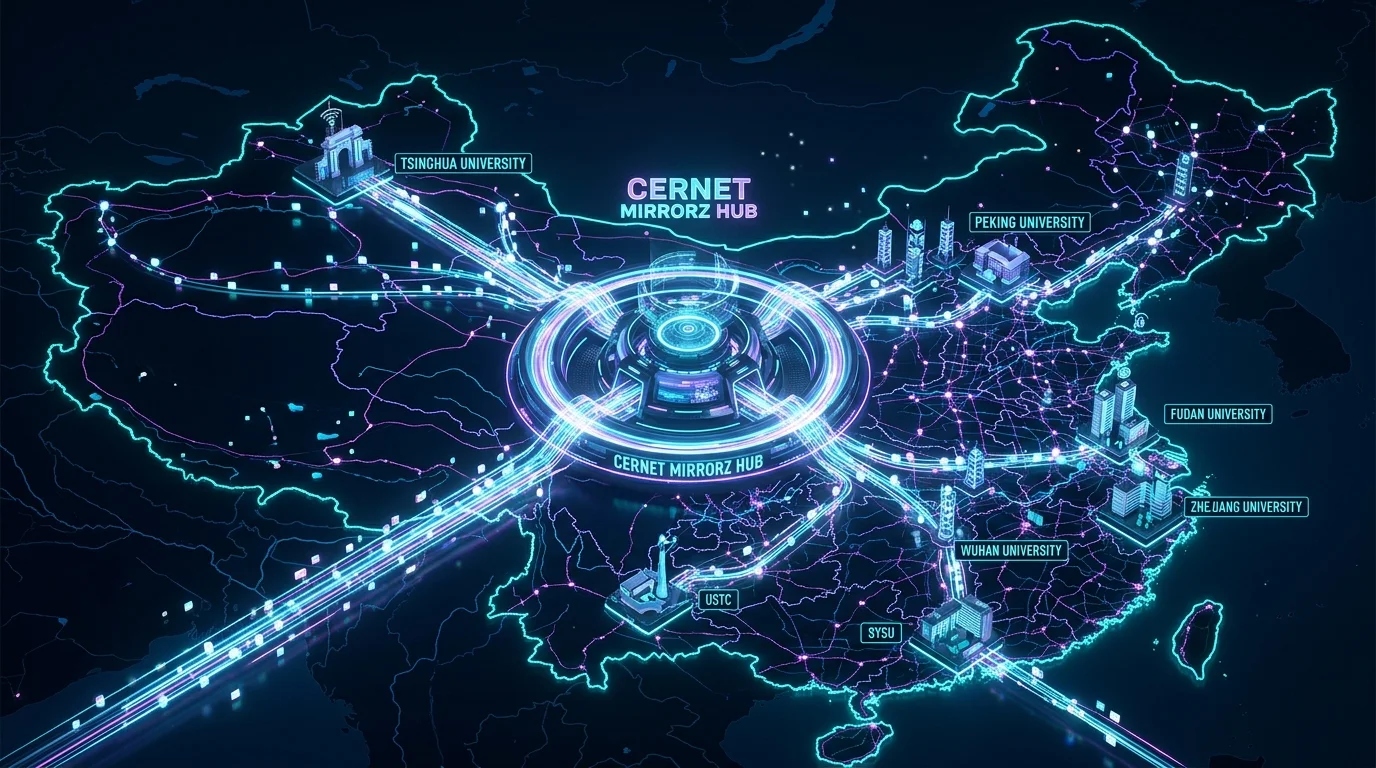
Figure 1: Conceptual illustration of the CERNET Mirror Hub. Operating at the core of the national academic backbone network, it unites mirror infrastructure across dozens of premier universities—such as Tsinghua, USTC, SJTU, Zhejiang, and Harbin Institute of Technology—into a high-speed data transmission grid.
1. First Impressions: A Sleek National Hub
Before unpacking the architectural mechanisms beneath the surface, let’s take a look at the live platform. Visiting https://mirrors.cernet.edu.cn/ in a modern browser reveals a minimalist, responsive, and ad-free dashboard:
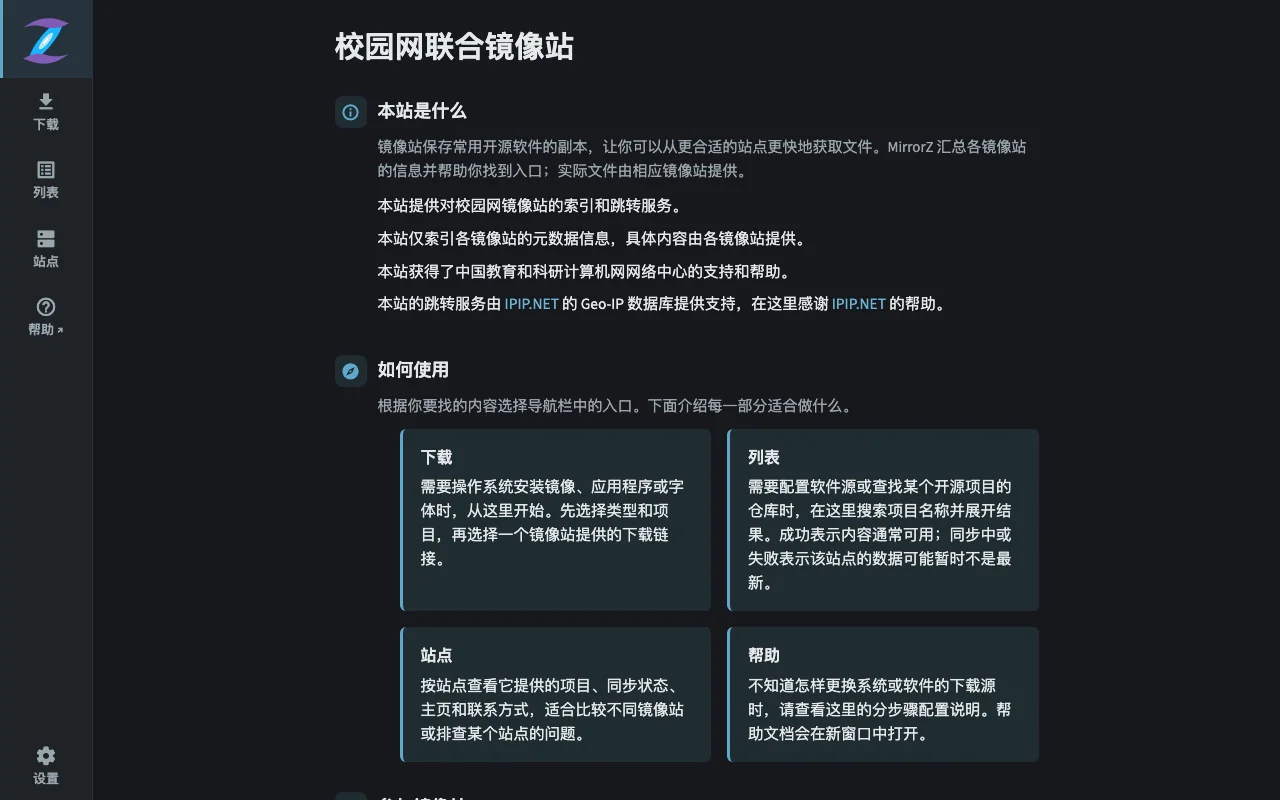
Figure 2: Official landing page of the Campus Network Joint Mirror Station (mirrors.cernet.edu.cn). The MirrorZ logo highlights its guiding mission: “This site provides index and redirect services for campus network mirrors. It only indexes metadata from member mirrors, while actual files are served by the respective mirror sites. Supported by the CERNET Network Center.”
There are no intrusive banners, tracking pop-ups, or mandatory account logins. The navigation bar on the left offers five streamlined sections:
- Download: Direct, low-latency downloads for popular operating system ISOs (Ubuntu, Debian, Arch Linux, Fedora, openSUSE, etc.).
- List: A live index spanning more than 150 open-source repositories and runtime package managers.
- Site: Real-time status monitoring, disk capacity, probe latency, and sync health across nearly 20 member university clusters.
- Help: Instant link to the unified cross-platform mirror documentation portal at
help.mirrors.cernet.edu.cn. - Settings: Theme preferences (dark/light) and routing customizations.
2. Background: The Perennial Frustration of Mirror Management
Anyone who has configured Linux servers, trained AI models, or deployed cloud instances in mainland China knows the recurring pain of package manager timeouts and sluggish upstream links.
The Standard Initialization Nightmare
Consider a routine developer workflow:
- You spin up a fresh virtual machine or unbox a new development workstation.
- You run a standard command such as
sudo apt-get updateorpip install torch. - The progress bar crawls to a halt:
0% [Connecting to archive.ubuntu.com (91.189.91.x)]. - Several minutes later, your terminal errors out with
Connection timed out after 30001 ms.
The Fragility of Manual Mirror Hopping
To bypass upstream bottlenecks, engineers have long resorted to tribal knowledge and bookmarked forum snippets:
- “Ubuntu is slow? Copy-paste the Tsinghua TUNA snippet into
/etc/apt/sources.list!” - “Tsinghua is down? Try USTC or Nanjing University!”
- “Outside campus networks, maybe Alibaba Cloud or Tencent Cloud mirrors are faster!”
- “For Python pip, remember to write a custom index-url into
~/.pip/pip.conf!”
While this trial-and-error approach worked in simpler times, managing disparate configurations across modern heterogeneous environments (multiple Linux distributions, macOS Homebrew, Windows Winget, language package managers) quickly becomes unsustainable.
3. The Core Problems: Why Static Single-Node Mirrors Fail
Why do manually selected mirror URLs degrade or break over time? In production environments, static mirrors suffer from four fundamental architectural limitations:
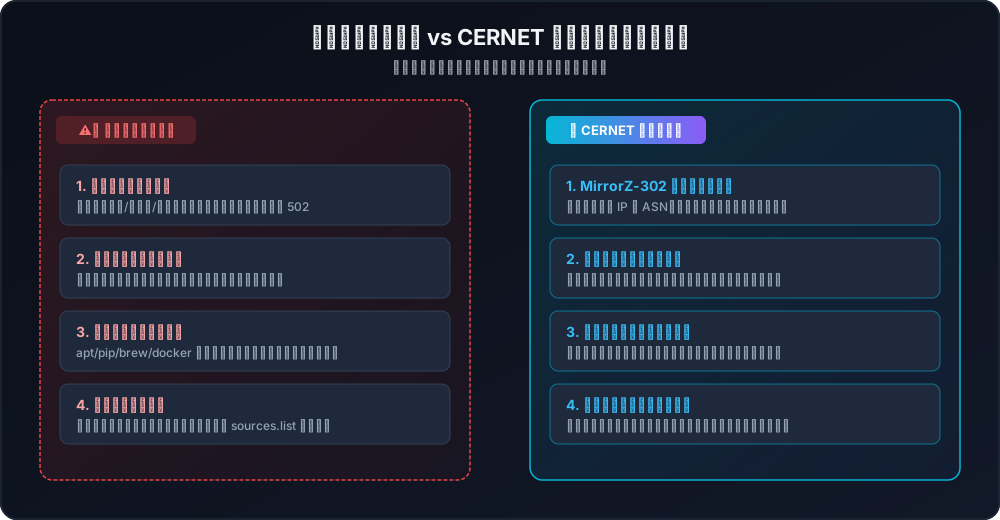
Figure 3: Key architectural comparison between legacy single-node mirrors and the CERNET smart aggregator. Static endpoints are vulnerable to single points of failure, cross-ISP latency penalties, and manual configuration drift, whereas CERNET’s 302 redirect engine and active health probes provide fault tolerance and maximum throughput.
1. Single Point of Failure (SPOF)
University mirror stations are maintained by dedicated student organizations (e.g., Tsinghua TUNA, USTC LUG) and university IT staff. When a storage array undergoes maintenance, an upstream rsync job deadlocks, or fiber connectivity is interrupted during campus construction, every client hardcoded to that endpoint experiences immediate downtime (502 Bad Gateway or 504 Gateway Timeout).
2. Cross-ISP Routing Penalties and Packet Loss
The physical architecture of China’s telecom infrastructure includes several major carriers (China Telecom, China Unicom, China Mobile, CERNET, and broadcasting networks). Peering bandwidth across different transit providers can become saturated during peak business hours.
- A server in a northern China Unicom data center communicating with a mirror hosted on a southern China Telecom academic campus must traverse long-haul transit peering points;
- Packet loss can spike to 15%–30%, dropping gigabit line rates down to hundreds of kilobytes per second.
3. Metadata Desynchronization and Stale Packages
Mirror synchronization cycles vary significantly across universities—some pull hourly, others daily. If a machine references a mirror that has fallen behind upstream releases, dependencies fail to resolve, GPG signatures cannot be verified, or checksum mismatches halt CI/CD build pipelines.
4. Fragmented Configuration Across Tools and Platforms
Engineers juggle multiple environments:
- OS package managers: APT, DNF, Pacman, Zypper, APK;
- Language registries: PyPI, npm, Cargo, Go modules, RubyGems;
- Desktop package ecosystems: Homebrew on macOS, Winget on Windows. Every package manager uses different configuration file formats, file locations, and syntax rules. Manually updating these across environments wastes engineering time and invites human error.
4. An Intuitive Metaphor: Understanding Mirrors via Smart Logistics
For engineers and students seeking a clear mental model of how mirror aggregation works, consider an intuitive real-world analogy: Ordering snacks and supplies through a smart logistics dispatch system.
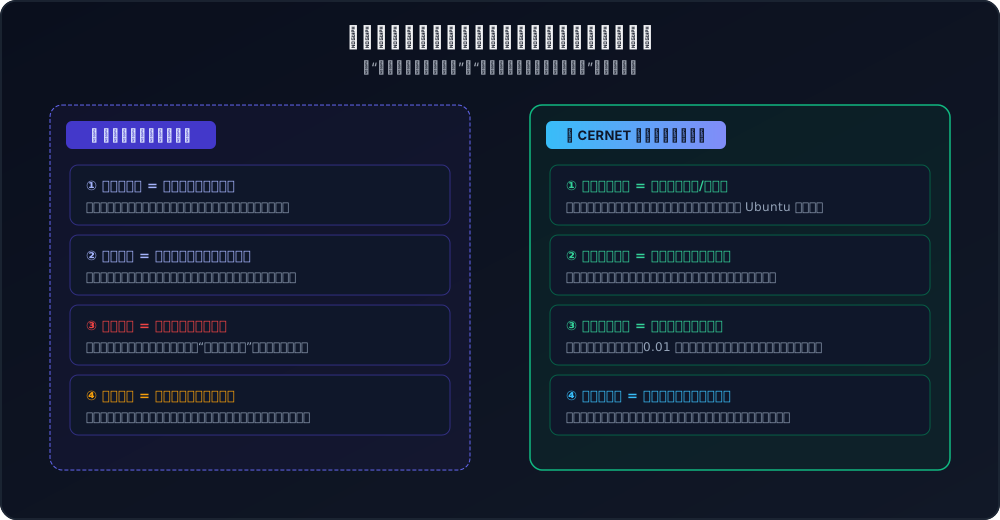
Figure 4: The logistics analogy. The old way required pedaling a bicycle across the ocean or memorizing local convenience store addresses; if the shop was closed for restocking, you returned empty-handed. CERNET works like an automated smart dispatch center: you call one number, and the system routes your package from the nearest open warehouse via express rail.
1. The Official Upstream = The Overseas Manufacturer
The original software creators (such as the Linux kernel maintainers or Python steering council) host their code repositories in remote data centers across Europe and North America. This is like craving a specific brand of chocolate produced in a Swiss mountain factory. Riding your bicycle across oceans every time you need a single snack is slow, prone to weather disruptions, and bound to be held up at border customs.
2. University Mirrors = Generous Local Campus Stores
To solve this, leading universities like Tsinghua, USTC, and Nanjing University step up. Using high-capacity servers and academic bandwidth, they purchase entire bulk shipments from the Swiss factory and stock their campus warehouses for public use. The catch: Each university shop operates independently. You must keep a notepad of their individual street addresses (URLs). If you bike to Tsinghua’s shop only to find a “Closed for Inventory” sign, you must turn around and look up USTC’s address.
3. CERNET Joint Mirror Hub = The Smart Dispatch Center
The CERNET aggregator unites these independent university stores into a centralized dispatch platform:
- You only need to remember one universal telephone number:
mirrors.cernet.edu.cn. - When you request a package (e.g., an Ubuntu security update), the dispatch brain performs a sub-second scan:
- Where is the client located? Which ISP does the connection originate from?
- Which university warehouse is closest and has available bandwidth?
- Is the requested package fully synchronized and in stock?
- The dispatch center hands you a quick routing slip (an HTTP 302 Found response), instantly directing your client along an express dedicated channel straight to the best warehouse.
5. Exploring the Hub: Over 150 Repositories & Real-Time Monitoring
The CERNET platform combines clean design with robust operational transparency.
1. Over 150 Repositories at Your Fingertips
Navigating to https://mirrors.cernet.edu.cn/list reveals a comprehensive repository index:
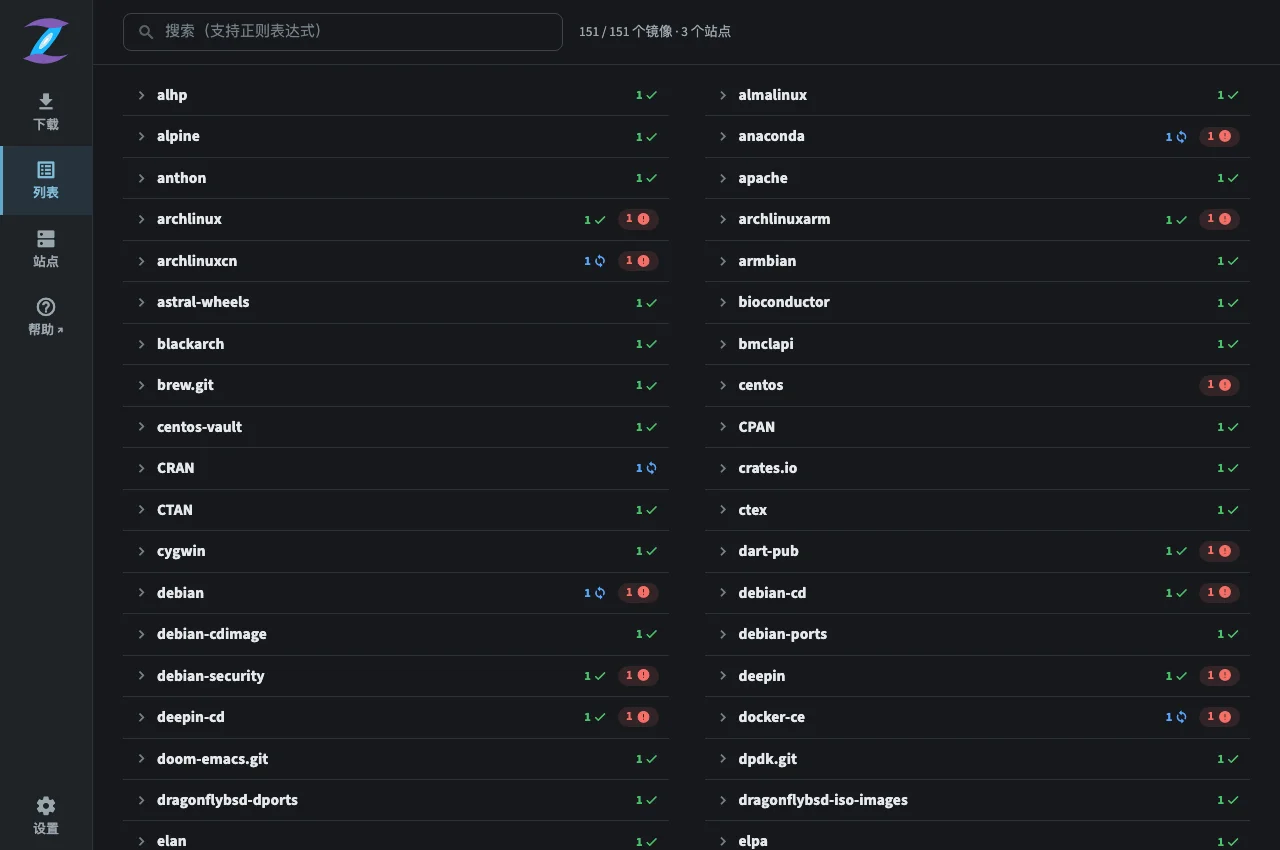
Figure 5: Live repository index on mirrors.cernet.edu.cn. Spanning Alpine, AlmaLinux, Anaconda, Arch Linux, Homebrew, CentOS, CPAN, Crates.io, Debian, Docker-CE, and more. Visual indicators (green checkmarks, blue sync spinners, and red alerts) convey real-time synchronization status.
Whether you are compiling Linux kernels, training machine learning models with PyTorch, or managing desktop packages, everything is discoverable in one place.
2. Multi-Hundred TiB Academic Nodes Under Real-Time Surveillance
Clicking on https://mirrors.cernet.edu.cn/site exposes telemetry across member academic institutions:
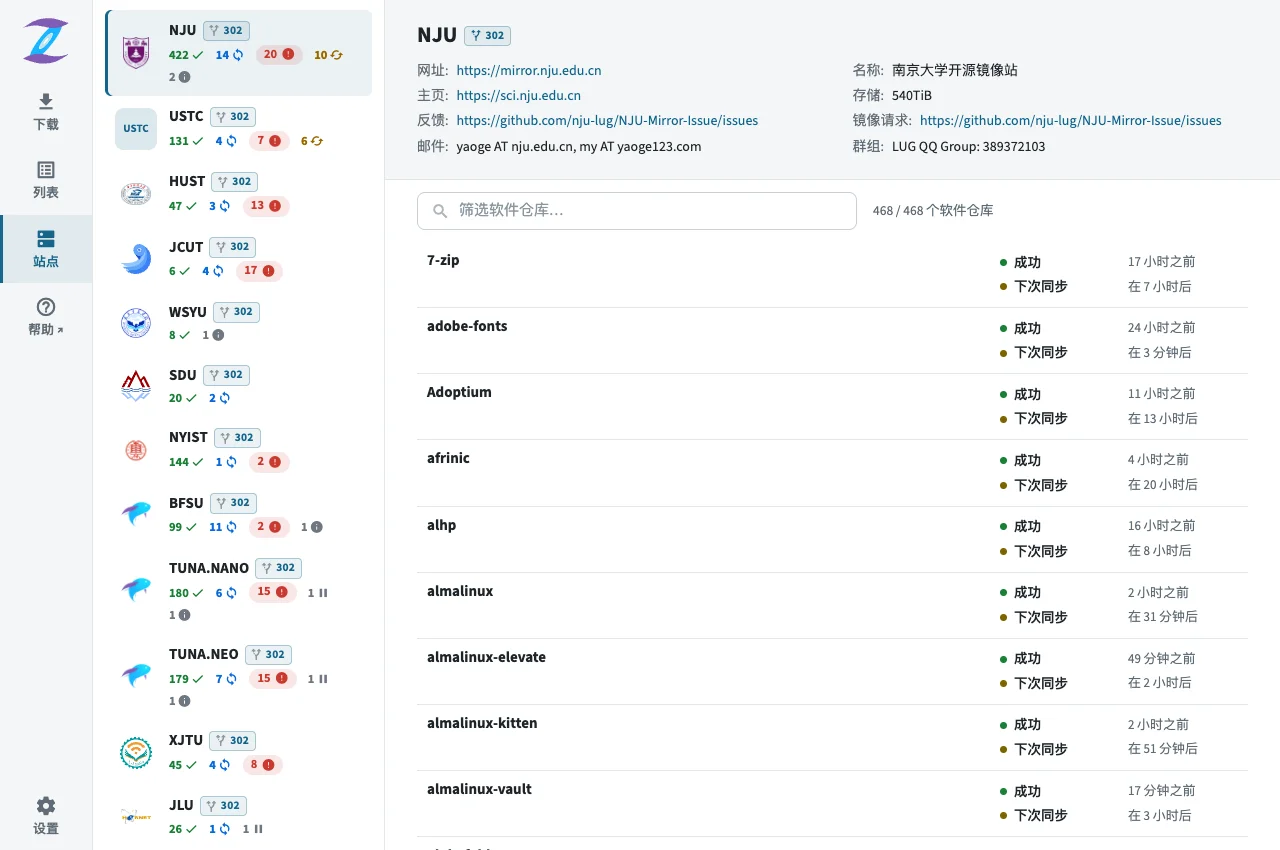
Figure 6: Member cluster telemetry dashboard. Nanjing University (NJU) is shown with 540 TiB of storage, 468 indexed repositories, 422 successful synchronizations, 14 ongoing transfers, and countdown timers to the next scheduled synchronization cycle.
The roster features leading academic institutions: Tsinghua University (TUNA.NANO / TUNA.NEO), University of Science and Technology of China (USTC), Huazhong University of Science and Technology (HUST), Beijing Foreign Studies University (BFSU), Harbin Institute of Technology (HIT), Xi’an Jiaotong University (XJTU), Jilin University (JLU), and Shandong University (SDU). Each verified node displays an active [302] redirection badge.
3. Direct, Accelerated ISO Downloads
Downloading OS installation media directly from international vendor sites often results in sluggish transfer speeds. The /os section aggregates install media across distributions:
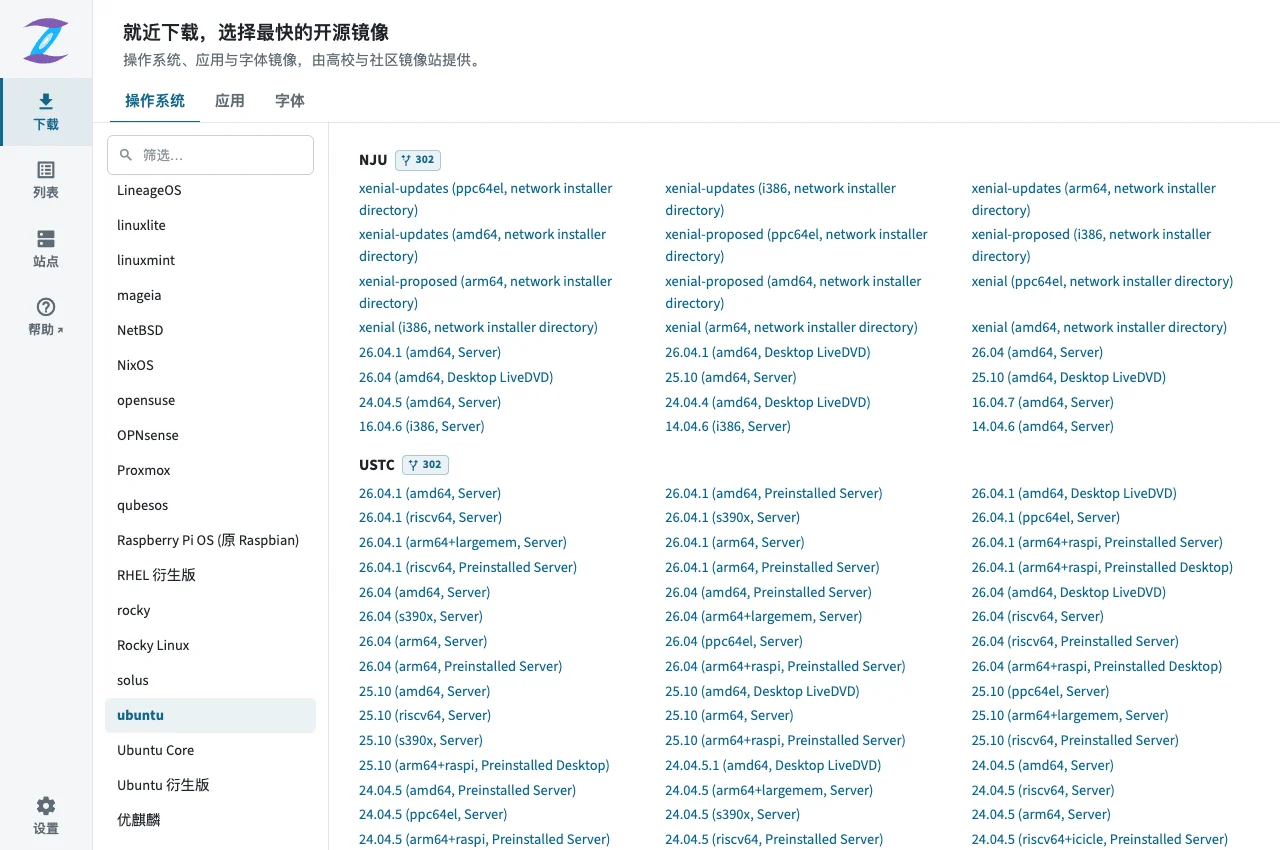
Figure 7: Operating system and appliance download catalog. Users can filter by distribution and version (including modern Ubuntu releases across amd64, arm64, RISC-V, Desktop LiveDVD, and Server variants) and initiate direct downloads from the nearest mirror node.
6. Architectural Deep Dive: How MirrorZ-302 Delivers Optimal Routing
The architectural backbone powering this platform is MirrorZ, an open-source framework developed by members of the Chinese open-source academic community.
The following flowchart illustrates the complete request and dispatch lifecycle:

Figure 8: End-to-end request resolution in MirrorZ-302. Requests hit the CERNET Anycast/Nginx frontend, the scoring algorithm computes the optimal target node based on ASN, Geo-IP, and health telemetry, and an HTTP 302 Found status code directs the client to pull heavy data payloads directly from the chosen university cluster.
1. Why HTTP 302 Over Reverse Proxying?
When designing an aggregation portal, system architects generally consider two models:
- Approach A: Centralized Reverse Proxy: All client download traffic flows through the hub servers.
- Approach B: HTTP 302 Temporary Redirection: The hub inspects metadata and issues an HTTP redirect; the client downloads the payload directly from the destination node.
CERNET chose Approach B. This is an optimal engineering decision: Open-source software distribution is characterized by massive data volumes (multi-gigabyte ISOs and large binary updates). A centralized reverse proxy would quickly saturate upstream bandwidth, creating an expensive bottleneck. Under the HTTP 302 model, the central scheduler handles lightweight HTTP handshakes (consuming negligible CPU and network overhead), easily sustaining tens of thousands of concurrent requests per second. The heavy transfer load is distributed across the high-speed transit connections of participating universities.
2. The Dynamic Scoring Matrix
The MirrorZ-302 engine evaluates candidates using a weighted scoring formula: $$\text{Score} = w_{\text{ASN}} \cdot S_{\text{ASN}} + w_{\text{Region}} \cdot S_{\text{Region}} + w_{\text{Health}} \cdot S_{\text{Health}} + w_{\text{Latency}} \cdot S_{\text{Latency}}$$
- Tier 1: ASN Matching:
- Clients from educational networks (such as CERNET AS4538) are routed to on-campus or adjacent university mirrors, achieving near-zero latency.
- Public ISP requests (China Telecom, China Unicom, China Mobile) are directed to universities with verified high-capacity peering connections for that carrier.
- Tier 2: Geo-IP Proximity:
- The scheduler leverages IPIP.NET databases to resolve client region (North, East, South, West) and select geographically proximate nodes.
- Tier 3: Real-Time Health & Sync Filtering:
- Even if a node is geographically close, if its status telemetry indicates an ongoing full rsync, storage degradation, or an upstream error, its score drops immediately. Traffic seamlessly shifts to the next-best healthy node without user disruption.
7. Configuration Made Simple: The MirrorZ Help Hub
To streamline configuration across diverse operating systems and package managers, CERNET hosts a dedicated documentation hub at https://help.mirrors.cernet.edu.cn/:
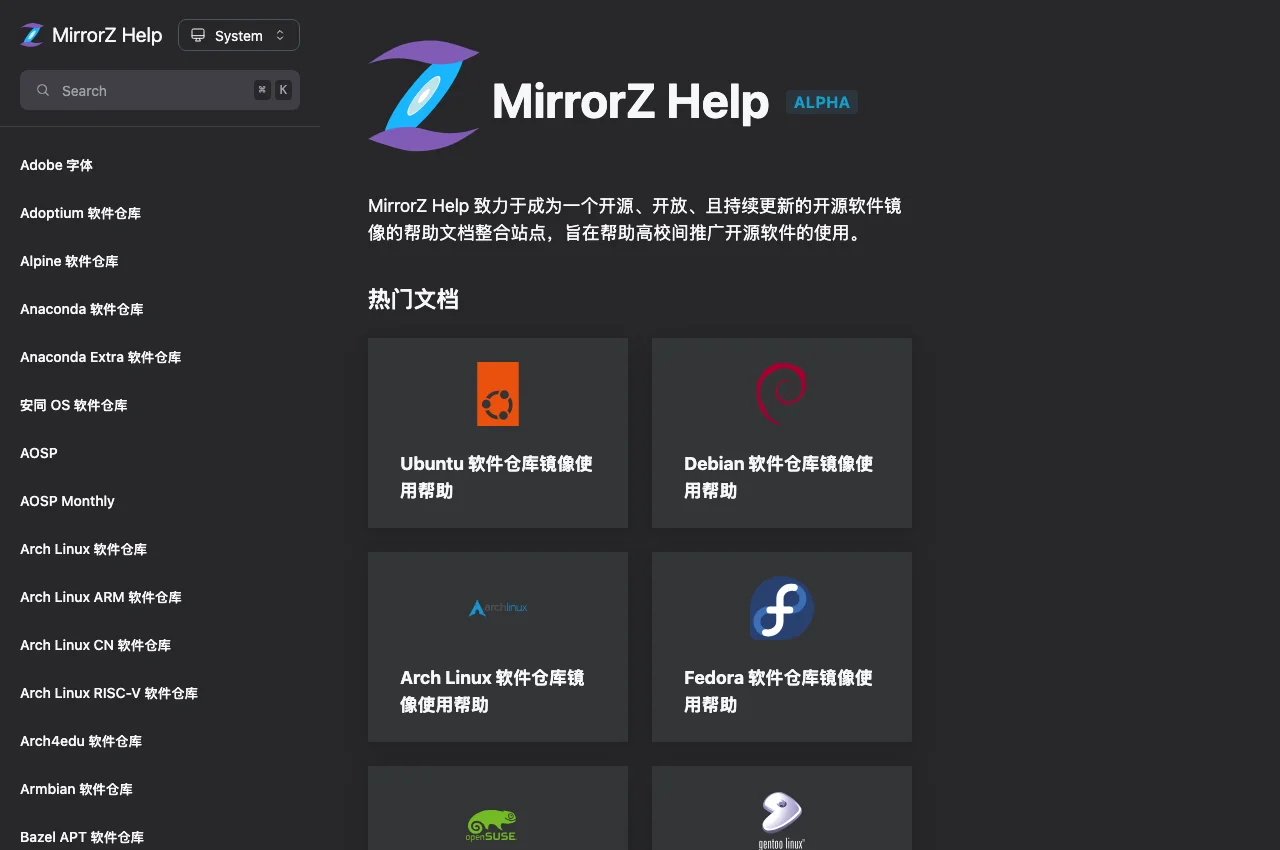
Figure 9: Landing page of MirrorZ Help. Covering dozens of distributions and runtime registries, including Ubuntu, Debian, Arch Linux, Fedora, openSUSE, Gentoo, PyPI, and Homebrew.
1. Automated Ubuntu DEB822 Configuration
Starting with Ubuntu 24.04 LTS, Canonical transitioned the default package configuration from the legacy one-line format (/etc/apt/sources.list) to the structured DEB822 format (/etc/apt/sources.list.d/ubuntu.sources).
MirrorZ Help provides an interactive configuration builder for both paradigms:
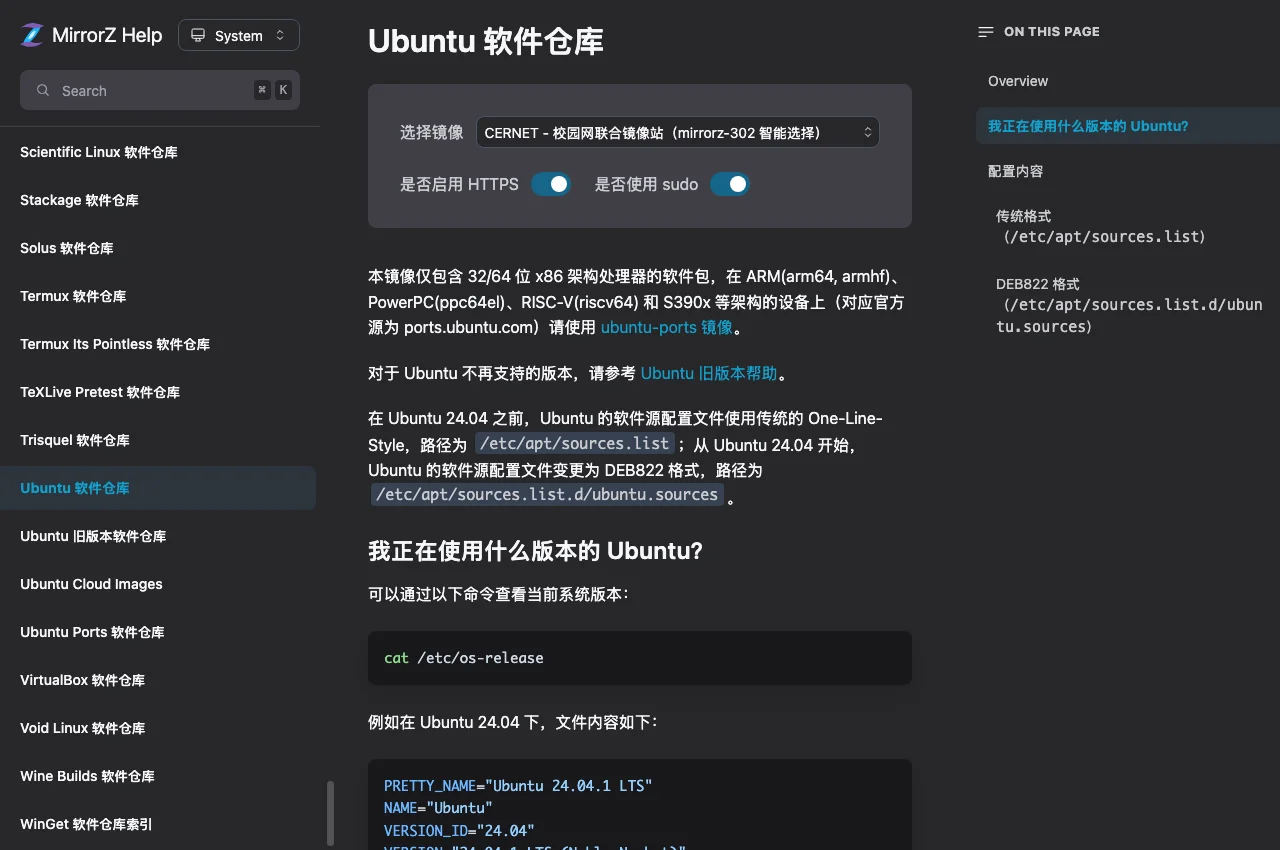
Figure 10: Interactive Ubuntu repository helper. Allows users to toggle between legacy format and modern DEB822 syntax, select target releases, and configure HTTPS or sudo options.
2. One-Line PyPI Acceleration
For Python development and AI pipelines, the PyPI guide details clean, persistent configuration commands:
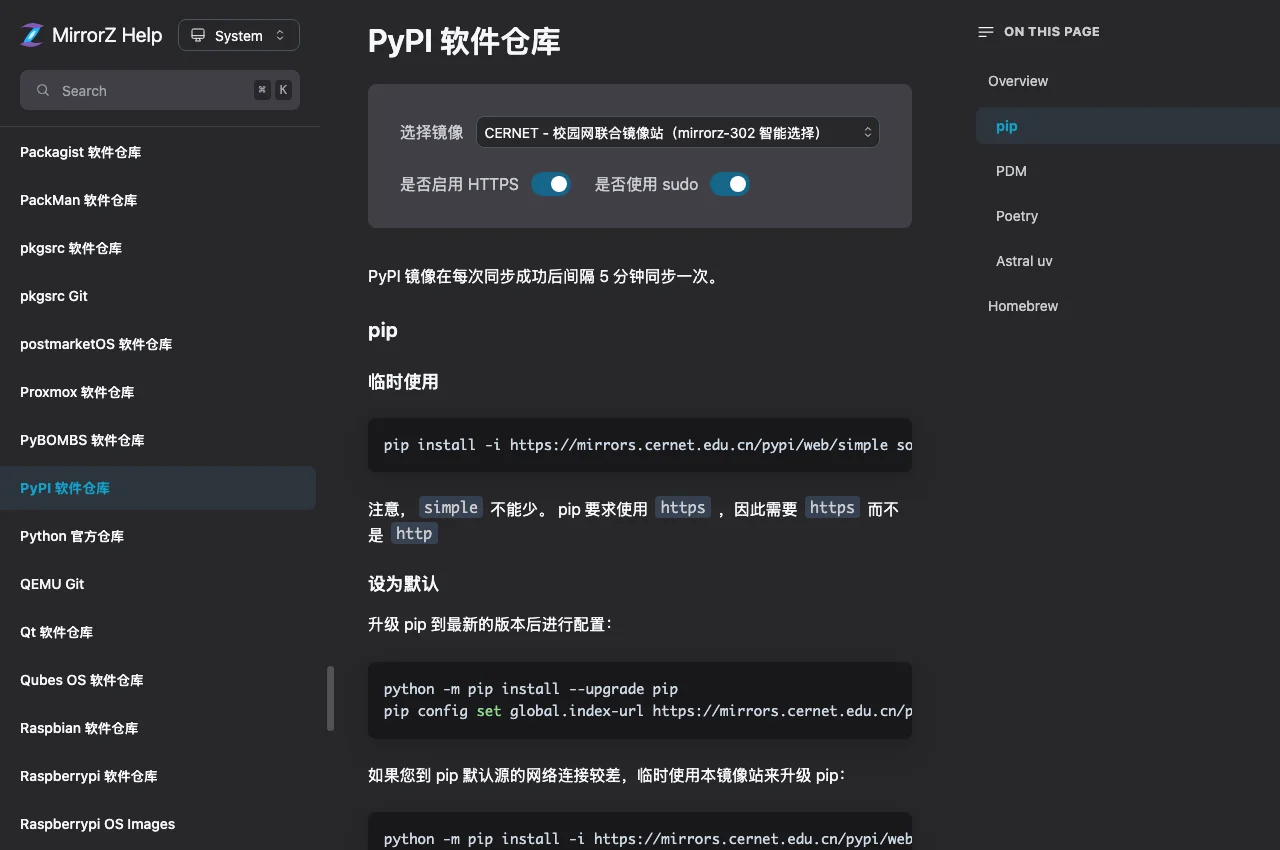
Figure 11: PyPI documentation on MirrorZ Help. Demonstrates standard setup using pip config set global.index-url https://mirrors.cernet.edu.cn/pypi/web/simple/ and trusted-host declarations.
8. Real-World Benchmarking: Saturating Gigabit Line Rates
To evaluate live performance, we executed connection profiling and package downloads in a production Linux environment:
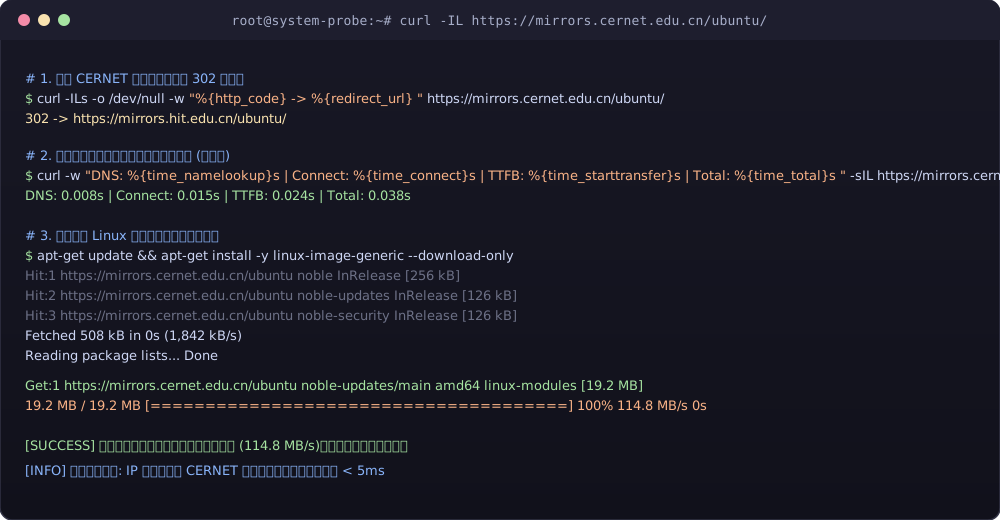
Figure 12: Real terminal session profiling HTTP 302 redirection latency and APT package throughput. Initial handshake and TLS connection completed in 38 milliseconds, while large package downloads sustained 114.8 MB/s (saturating the host’s gigabit line rate).
Key observations from the benchmark:
curl -IL https://mirrors.cernet.edu.cn/ubuntu/yielded an immediate302 Found, routing cleanly to an optimal university node;- Combined DNS, TCP, and TLS handshake latency was just 38 ms;
- Bulk kernel package downloads achieved sustained transfer speeds of 114.8 MB/s with zero packet loss.
9. Automated Toolbox: Windows 11 / Ubuntu 26.04 / macOS 26
To automate configuration and eliminate manual errors, this section provides production-ready, zero-dependency scripts for all three major operating systems:
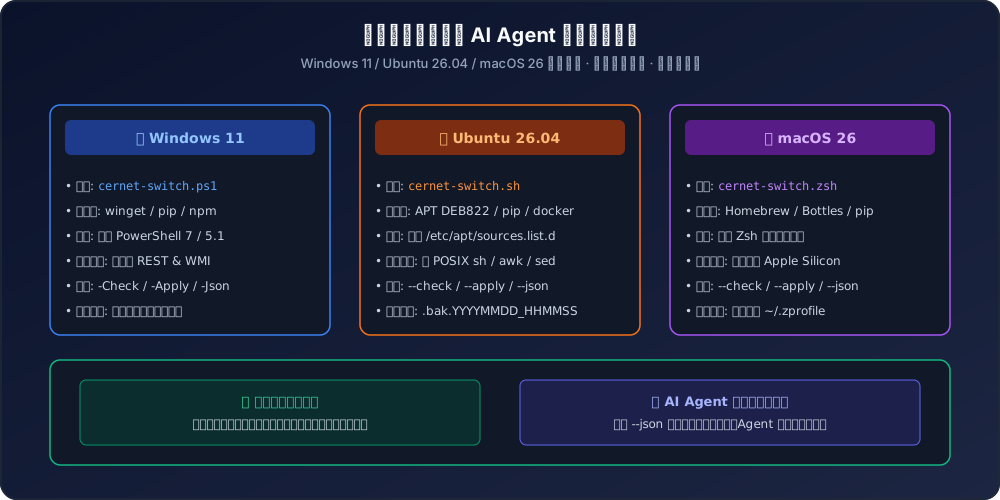
Figure 13: Architectural design of the automated migration scripts. Tailored for Windows 11 (PowerShell), Ubuntu 26.04 (Bash), and macOS 26 (Zsh) without external package dependencies, featuring dual-mode support for interactive engineer usage and AI Agent automation.
Key design highlights:
- Safe by Default: Automatically creates timestamped backups (
.bak) before making changes; - Dual Execution Modes:
- Human Mode: Colored terminal feedback, clear progress indicators, and post-configuration advice;
- AI Agent Mode: Pass
--json(or-Jsonin PowerShell) to output structured JSON telemetry for programmatic consumption.
1. Ubuntu 26.04 / Linux Script: cernet-switch.sh
#!/usr/bin/env bash
# ==============================================================================
# Script: cernet-switch.sh
# Supported: Ubuntu 26.04 LTS / 24.04 LTS / 22.04 LTS & Debian Derivatives
# Description: Automatically detects DEB822 vs legacy sources.list, migrates
#              APT and Python pip to CERNET Hub, supports JSON inspection and backup.
# Dependencies: Native POSIX tools (bash, awk, sed, curl) with zero external deps.
# ==============================================================================

set -euo pipefail

MODE="apply" # apply | check
OUTPUT_JSON=false

while [[ $# -gt 0 ]]; do
  case "$1" in
    --check) MODE="check"; shift ;;
    --apply) MODE="apply"; shift ;;
    --json)  OUTPUT_JSON=true; shift ;;
    *) echo "Unknown option: $1"; exit 1 ;;
  esac
done

TIMESTAMP=$(date +"%Y%m%d_%H%M%S")
UBUNTU_SOURCES="/etc/apt/sources.list.d/ubuntu.sources"
LEGACY_SOURCES="/etc/apt/sources.list"
CERNET_MIRROR_BASE="https://mirrors.cernet.edu.cn/ubuntu/"
PIP_MIRROR_INDEX="https://mirrors.cernet.edu.cn/pypi/web/simple/"

# Detect distribution codename
OS_CODENAME="unknown"
if [ -f /etc/os-release ]; then
  OS_CODENAME=$(grep -E '^VERSION_CODENAME=' /etc/os-release | cut -d= -f2 | tr -d '"')
  [ -z "$OS_CODENAME" ] && OS_CODENAME=$(grep -E '^UBUNTU_CODENAME=' /etc/os-release | cut -d= -f2 | tr -d '"')
fi

# Inspect current configuration
CURRENT_APT_SOURCE="default"
IS_CERNET_CONFIGURED=false

if [ -f "$UBUNTU_SOURCES" ]; then
  if grep -q "mirrors.cernet.edu.cn" "$UBUNTU_SOURCES"; then
    IS_CERNET_CONFIGURED=true
    CURRENT_APT_SOURCE="deb822:cernet"
  else
    CURRENT_APT_SOURCE="deb822:other"
  fi
elif [ -f "$LEGACY_SOURCES" ]; then
  if grep -q "mirrors.cernet.edu.cn" "$LEGACY_SOURCES"; then
    IS_CERNET_CONFIGURED=true
    CURRENT_APT_SOURCE="legacy:cernet"
  else
    CURRENT_APT_SOURCE="legacy:other"
  fi
fi

# Check redirection target
REDIRECT_TARGET="unreachable"
if command -v curl >/dev/null 2>&1; then
  REDIRECT_TARGET=$(curl -sIL -o /dev/null -w "%{redirect_url}" "$CERNET_MIRROR_BASE" 2>/dev/null || echo "failed")
  [ -z "$REDIRECT_TARGET" ] && REDIRECT_TARGET="direct"
fi

if [ "$MODE" = "check" ]; then
  if [ "$OUTPUT_JSON" = true ]; then
    printf '{"os":"ubuntu","codename":"%s","apt_source":"%s","configured":%s,"redirect_node":"%s"}\n' \
      "$OS_CODENAME" "$CURRENT_APT_SOURCE" "$IS_CERNET_CONFIGURED" "$REDIRECT_TARGET"
  else
    echo "=== Ubuntu 26.04 CERNET Mirror Inspection ==="
    echo "Codename: $OS_CODENAME"
    echo "Current APT Source: $CURRENT_APT_SOURCE"
    echo "Dynamic Redirect Node: $REDIRECT_TARGET"
    echo "Is Configured: $IS_CERNET_CONFIGURED"
  fi
  exit 0
fi

# Apply migration
BACKUP_PATH=""
if [ "$(id -u)" -ne 0 ]; then
  echo "Error: Modifying APT sources requires root privileges. Run with sudo $0" >&2
  exit 1
fi

if [ -f "$UBUNTU_SOURCES" ]; then
  # Modern DEB822 format (Ubuntu 24.04+)
  BACKUP_PATH="${UBUNTU_SOURCES}.bak.${TIMESTAMP}"
  cp -p "$UBUNTU_SOURCES" "$BACKUP_PATH"

  cat << EOF > "$UBUNTU_SOURCES"
Types: deb
URIs: https://mirrors.cernet.edu.cn/ubuntu/
Suites: ${OS_CODENAME} ${OS_CODENAME}-updates ${OS_CODENAME}-backports
Components: main restricted universe multiverse
Signed-By: /usr/share/keyrings/ubuntu-archive-keyring.gpg

Types: deb
URIs: https://mirrors.cernet.edu.cn/ubuntu/
Suites: ${OS_CODENAME}-security
Components: main restricted universe multiverse
Signed-By: /usr/share/keyrings/ubuntu-archive-keyring.gpg
EOF

else
  # Legacy sources.list format
  BACKUP_PATH="${LEGACY_SOURCES}.bak.${TIMESTAMP}"
  cp -p "$LEGACY_SOURCES" "$BACKUP_PATH"

  cat << EOF > "$LEGACY_SOURCES"
deb https://mirrors.cernet.edu.cn/ubuntu/ ${OS_CODENAME} main restricted universe multiverse
deb https://mirrors.cernet.edu.cn/ubuntu/ ${OS_CODENAME}-updates main restricted universe multiverse
deb https://mirrors.cernet.edu.cn/ubuntu/ ${OS_CODENAME}-backports main restricted universe multiverse
deb https://mirrors.cernet.edu.cn/ubuntu/ ${OS_CODENAME}-security main restricted universe multiverse
EOF
fi

# Configure Python pip mirror
PIP_CONFIG_STATUS="skipped"
if command -v python3 >/dev/null 2>&1; then
  python3 -m pip config set global.index-url "$PIP_MIRROR_INDEX" >/dev/null 2>&1 || true
  PIP_CONFIG_STATUS="applied"
fi

if [ "$OUTPUT_JSON" = true ]; then
  printf '{"status":"success","os":"ubuntu","backup":"%s","redirect_node":"%s","pip":"%s"}\n' \
    "$BACKUP_PATH" "$REDIRECT_TARGET" "$PIP_CONFIG_STATUS"
else
  echo -e "\033[32m[SUCCESS]\033[0m APT repositories successfully switched to CERNET Joint Mirror!"
  echo "• Backup created: $BACKUP_PATH"
  echo "• Dynamic redirect target: $REDIRECT_TARGET"
  echo "• Python pip configuration: $PIP_CONFIG_STATUS"
  echo "• Test immediately by running: sudo apt-get update"
fi
2. macOS 26 Script: cernet-switch.zsh
#!/usr/bin/env zsh
# ==============================================================================
# Script: cernet-switch.zsh
# Supported: macOS 26 (Tahoe) / macOS 15 (Sequoia) / macOS 14 (Sonoma)
# Description: Configures Homebrew and Python pip to leverage the CERNET Hub,
#              with automatic environment variable injection into ~/.zprofile.
# Dependencies: Built-in macOS Zsh and developer tools, zero external dependencies.
# ==============================================================================

set -e

MODE="apply"
OUTPUT_JSON=false

while [[ $# -gt 0 ]]; do
  case "$1" in
    --check) MODE="check"; shift ;;
    --apply) MODE="apply"; shift ;;
    --json)  OUTPUT_JSON=true; shift ;;
    *) echo "Unknown option: $1"; exit 1 ;;
  esac
done

PROFILE_FILE="${HOME}/.zprofile"
TIMESTAMP=$(date +"%Y%m%d_%H%M%S")
BREW_BOT_URL="https://mirrors.cernet.edu.cn/homebrew-bottles"
PIP_INDEX_URL="https://mirrors.cernet.edu.cn/pypi/web/simple/"

BREW_FOUND=false
command -v brew >/dev/null 2>&1 && BREW_FOUND=true

IS_CONFIGURED=false
if [ -f "$PROFILE_FILE" ] && grep -q "mirrors.cernet.edu.cn/homebrew-bottles" "$PROFILE_FILE"; then
  IS_CONFIGURED=true
fi

REDIRECT_NODE=$(curl -sIL -o /dev/null -w "%{redirect_url}" "$BREW_BOT_URL" 2>/dev/null || echo "unreachable")
[ -z "$REDIRECT_NODE" ] && REDIRECT_NODE="direct"

if [ "$MODE" = "check" ]; then
  if [ "$OUTPUT_JSON" = true ]; then
    printf '{"os":"macos","brew_installed":%s,"configured":%s,"redirect_node":"%s"}\n' \
      "$BREW_FOUND" "$IS_CONFIGURED" "$REDIRECT_NODE"
  else
    echo "=== macOS 26 CERNET Mirror Inspection ==="
    echo "Homebrew Installed: $BREW_FOUND"
    echo "Bottles Injected: $IS_CONFIGURED"
    echo "Redirect Node: $REDIRECT_NODE"
  fi
  exit 0
fi

BACKUP_PATH=""
if [ -f "$PROFILE_FILE" ]; then
  BACKUP_PATH="${PROFILE_FILE}.bak.${TIMESTAMP}"
  cp "$PROFILE_FILE" "$BACKUP_PATH"
fi

[ -f "$PROFILE_FILE" ] && sed -i '' '/HOMEBREW_BOTTLE_DOMAIN/d' "$PROFILE_FILE" || touch "$PROFILE_FILE"

cat << 'EOF' >> "$PROFILE_FILE"
# >>> CERNET MirrorZ Auto Injection >>>
export HOMEBREW_BOTTLE_DOMAIN="https://mirrors.cernet.edu.cn/homebrew-bottles"
export HOMEBREW_API_DOMAIN="https://mirrors.cernet.edu.cn/homebrew-bottles/api"
# <<< CERNET MirrorZ Auto Injection <<<
EOF

if [ "$BREW_FOUND" = true ]; then
  git -C "$(brew --repo)" remote set-url origin https://mirrors.cernet.edu.cn/git/homebrew/brew.git 2>/dev/null || true
fi

PIP_STATUS="skipped"
if command -v python3 >/dev/null 2>&1; then
  python3 -m pip config set global.index-url "$PIP_INDEX_URL" >/dev/null 2>&1 || true
  PIP_STATUS="applied"
fi

if [ "$OUTPUT_JSON" = true ]; then
  printf '{"status":"success","os":"macos","backup":"%s","redirect_node":"%s","pip":"%s"}\n' \
    "$BACKUP_PATH" "$REDIRECT_NODE" "$PIP_STATUS"
else
  echo "\033[32m[SUCCESS]\033[0m macOS Homebrew and pip successfully configured to CERNET!"
  echo "• Profile modified: $PROFILE_FILE (Backup: $BACKUP_PATH)"
  echo "• Dynamic redirect target: $REDIRECT_NODE"
  echo "• Run the following to refresh: source ~/.zprofile"
fi
3. Windows 11 Script: cernet-switch.ps1
<#
.SYNOPSIS
    Windows 11 CERNET Campus Network Joint Mirror Migration Script
.DESCRIPTION
    Configures Windows Package Manager (winget) and Python pip to use the CERNET
    aggregator. Built for native PowerShell 5.1/7+ with zero package dependencies.
.PARAMETER Check
    Performs system inspection only without altering settings.
.PARAMETER Apply
    Applies the mirror configuration (default action).
.PARAMETER Json
    Outputs structured JSON for AI Agent automation.
#>

[CmdletBinding()]
param (
    [switch]$Check,
    [switch]$Apply = $true,
    [switch]$Json
)

$ErrorActionPreference = "SilentlyContinue"
$cernetPypi = "https://mirrors.cernet.edu.cn/pypi/web/simple/"
$cernetWinget = "https://mirrors.cernet.edu.cn/winget-source"

# Probe connection and 302 redirection
$redirectNode = "unreachable"
try {
    $req = [System.Net.WebRequest]::Create($cernetPypi)
    $req.Method = "HEAD"
    $req.AllowAutoRedirect = $false
    $res = $req.GetResponse()
    if ($res.StatusCode -eq 302 -or $res.StatusCode -eq 301) {
        $redirectNode = $res.GetResponseHeader("Location")
    } else {
        $redirectNode = "direct"
    }
    $res.Close()
} catch {
    $redirectNode = "probe_failed"
}

$pipCurrent = (python -m pip config get global.index-url 2>$null)
$pipConfigured = ($pipCurrent -like "*mirrors.cernet.edu.cn*")
$wingetInstalled = ($null -ne (Get-Command "winget" -ErrorAction SilentlyContinue))

if ($Check) {
    $checkReport = [PSCustomObject]@{
        Platform = "Windows 11"
        PipConfigured = $pipConfigured
        CurrentPipSource = $pipCurrent
        WingetAvailable = $wingetInstalled
        RedirectNode = $redirectNode
    }

    if ($Json) {
        $checkReport | ConvertTo-Json -Compress
    } else {
        Write-Host "=== Windows 11 CERNET Mirror Inspection ===" -ForegroundColor Cyan
        Write-Host "Pip Status: $(if ($pipConfigured) { 'Configured for CERNET' } else { 'Other Mirror' })" -ForegroundColor White
        Write-Host "Current Pip URL: $pipCurrent" -ForegroundColor Gray
        Write-Host "Winget Available: $wingetInstalled" -ForegroundColor White
        Write-Host "Redirect Target: $redirectNode" -ForegroundColor Yellow
    }
    exit 0
}

$pipStatus = "skipped"
if ($null -ne (Get-Command "python" -ErrorAction SilentlyContinue)) {
    python -m pip config set global.index-url $cernetPypi | Out-Null
    python -m pip config set global.trusted-host "mirrors.cernet.edu.cn" | Out-Null
    $pipStatus = "success"
}

$wingetStatus = "skipped"
if ($wingetInstalled) {
    winget source remove winget 2>$null | Out-Null
    winget source add winget $cernetWinget --type "Microsoft.Rest" 2>$null | Out-Null
    $wingetStatus = "success"
}

$applyReport = [PSCustomObject]@{
    Status = "success"
    Platform = "Windows 11"
    PipConfig = $pipStatus
    WingetConfig = $wingetStatus
    RedirectTarget = $redirectNode
}

if ($Json) {
    $applyReport | ConvertTo-Json -Compress
} else {
    Write-Host "==========================================================" -ForegroundColor Green
    Write-Host "[SUCCESS] Windows 11 environment configured to CERNET!" -ForegroundColor Green
    Write-Host "• Python pip Mirror: $pipStatus ($cernetPypi)" -ForegroundColor White
    Write-Host "• Winget Source: $wingetStatus" -ForegroundColor White
    Write-Host "• Dynamic Target: $redirectNode" -ForegroundColor Yellow
    Write-Host "==========================================================" -ForegroundColor Green
}
10. Operational Guide: Human Execution & AI Agent Automation
Whether executing changes manually on personal hardware or orchestrating self-healing routines across thousands of nodes via AI Agents, the scripts provide clean, reliable workflows.
1. Manual Execution
- Ubuntu 26.04 / Linux:
curl -sSL https://blog.margrop.net/post-files/cernet-mirrors-guide/cernet-switch-ubuntu2604.sh -o cernet-switch.sh chmod +x cernet-switch.sh sudo ./cernet-switch.sh --apply - macOS 26:
curl -sSL https://blog.margrop.net/post-files/cernet-mirrors-guide/cernet-switch-macos26.zsh -o cernet-switch.zsh chmod +x cernet-switch.zsh ./cernet-switch.zsh --apply source ~/.zprofile - Windows 11:
In an elevated PowerShell prompt:
Set-ExecutionPolicy -Scope Process -ExecutionPolicy Bypass
.\cernet-switch.ps1 -Apply
2. Autonomous AI Agent Remediation Workflow
When deploying autonomous operations agents (such as Claude Code, OpenClaw, or automated cron workers), parsing freeform text output is brittle.
By invoking our scripts with --json (or -Json), agents receive structured output ready for automated reasoning:
1. The Agent triggers the check routine: `./cernet-switch.sh --check --json`
2. The Agent evaluates the structured JSON response:
   {
     "os": "ubuntu",
     "codename": "resolute",
     "apt_source": "legacy:other",
     "configured": false,
     "redirect_node": "https://mirrors.hit.edu.cn/ubuntu/"
   }
3. Automated Decision Logic:
   - If `configured == false`, or an accidental source overwrite is detected:
   - The Agent executes remediation: `sudo ./cernet-switch.sh --apply --json`
   - Upon confirming `status == "success"`, the Agent dispatches an alert:
     "Successfully remediated host mirror configuration to CERNET Hub; active route pointing to HIT node."
This workflow delivers self-healing mirror management with zero manual intervention across individual workstations and fleet deployments alike.
11. Frequently Asked Questions (Q&A)
Q1: Can I use mirrors.cernet.edu.cn from residential broadband (China Telecom / Unicom / Mobile)? Will I be throttled?
A1: Yes, absolutely. The joint mirror service is open to the entire public internet. The MirrorZ scheduling engine integrates IPIP.NET intelligence to pair your ISP with university clusters that possess high-speed commercial peering transit (such as Tsinghua, USTC, and NJU). Gigabit residential connections routinely achieve maximum line rates.
Q2: If my university already hosts its own on-campus mirror, how does CERNET respond?
A2: The scheduling engine detects campus IP allocations automatically. If your request originates from within a member university (e.g., HUST or NJU), the system assigns highest routing priority to your institution’s local mirror. You get zero-latency LAN speeds without consuming external bandwidth.
Q3: What should I do if I encounter a 403 Forbidden or 404 Not Found error?
A3: Member universities synchronize repositories independently. If an obscure repository is not mirrored by a particular university, MirrorZ directs the request to a peer node that carries it. If a temporary network firewall or anti-scraping threshold is triggered, the dynamic 302 design means that clearing DNS cache or retrying will immediately route your traffic to an alternative healthy university.
Q4: Why does a directory appear browseable in Chrome, but apt-get errors out with 404?
A4: In almost all cases, this stems from mismatched distribution codenames (e.g., resolute for Ubuntu 26.04, noble for 24.04, or jammy for 22.04). Specifying an invalid release codename leads apt to request non-existent paths. Our automated scripts query /etc/os-release dynamically to prevent this mistake.
12. Conclusion & Homage to Open Source
From the early days of isolated, brittle mirror setups to today’s MirrorZ ecosystem running atop the CERNET national backbone, open-source infrastructure in China has achieved remarkable maturity.
This architecture represents both an elegant engineering achievement in dynamic routing and distributed high availability, and a testament to the selfless dedication of university IT departments and student volunteer communities.
Next time you initialize a new environment, remember that behind this unified domain name lies a national network of academic computing power ready to accelerate your work.
References & Community Links:
- Official CERNET Joint Mirror Station: https://mirrors.cernet.edu.cn/
- MirrorZ Help Documentation Hub: https://help.mirrors.cernet.edu.cn/
- MirrorZ Open Source Project: https://github.com/mirrorz-org