The Kernels Were Uninstalled, but DKMS Kept Compiling 110MB of Modules for Them: Hunting the Ghost Kernels of i915-sriov-dkms
TL;DR
Right after installing the i915-sriov-dkms graphics-virtualization driver on a Proxmox VE node,
dkms statuslisted four kernel versions that were never installed on that machine — each one compiled a full set of modules, costing about 70MB of extra disk and roughly five times the build time. And those kernel image packages had been cleanly uninstalled long before the driver ever touched the system.The root cause is almost funny: the driver package’s own install script contains a single line —
export autoinstall_all_kernels=1— which cranks DKMS’s “build a copy for every kernel on the system” switch to maximum. And DKMS does not consult the dpkg database to decide whether a kernel “exists”: it reads the directory roster under/lib/modules/and checks whether the matching headers are still installed. The old kernel images were gone, but four sets of headers were still sitting in the system — so the ghosts got their work permit.The fix takes three steps: purge the orphan headers → remove the DKMS builds for ghost kernels → delete the leftover directories. This post walks through the full investigation and ships one-click health-check scripts for Windows 11 / Ubuntu 26.04 / macOS 26 (dry-run by default), in both “run it yourself” and “hand it to an AI agent” flavors.
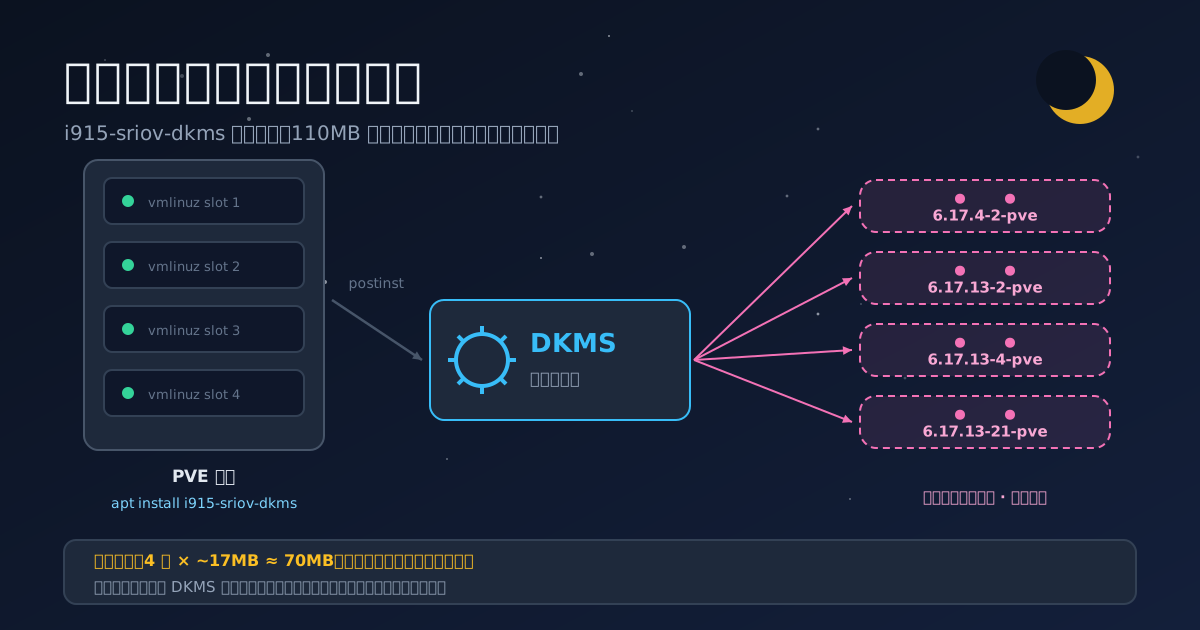
Figure 1: Original cover art. One driver installed on the PVE host — and the DKMS pipeline delivers a full set of build artifacts to four “ghost kernels” overnight.
1. Background: Giving the iGPU “one card, many VMs” Superpowers
One of the physical nodes in my home lab has an Intel iGPU that mostly collects dust after lighting up the console. To put it to work, I wanted to use SR-IOV (Single Root I/O Virtualization) to slice it into multiple virtual functions (VFs) and pass them through to several VMs — one piece of hardware, shared by everyone. A classic homelab play.
The i915 driver shipped with the stock PVE kernel does not support SR-IOV on consumer iGPUs. The community answer is strongtz/i915-sriov-dkms: the mainline i915 driver with SR-IOV patches, packaged as a DKMS module. The current release supports kernels 6.17.x ~ 7.0.x, and my node runs 7.0.14-16-pve — a perfect match.
DKMS (Dynamic Kernel Module Support) is, in short, the “auto-renovation crew” for kernel modules: every time a kernel updates, it automatically recompiles third-party modules so they keep matching. Installing such a driver is usually just dpkg -i on a deb package; seeing installed in dkms status means you are done.
After installing, I habitually glanced at the status — and froze.
2. Symptoms: A Bunch of Kernels That Do Not Exist
The full picture first:
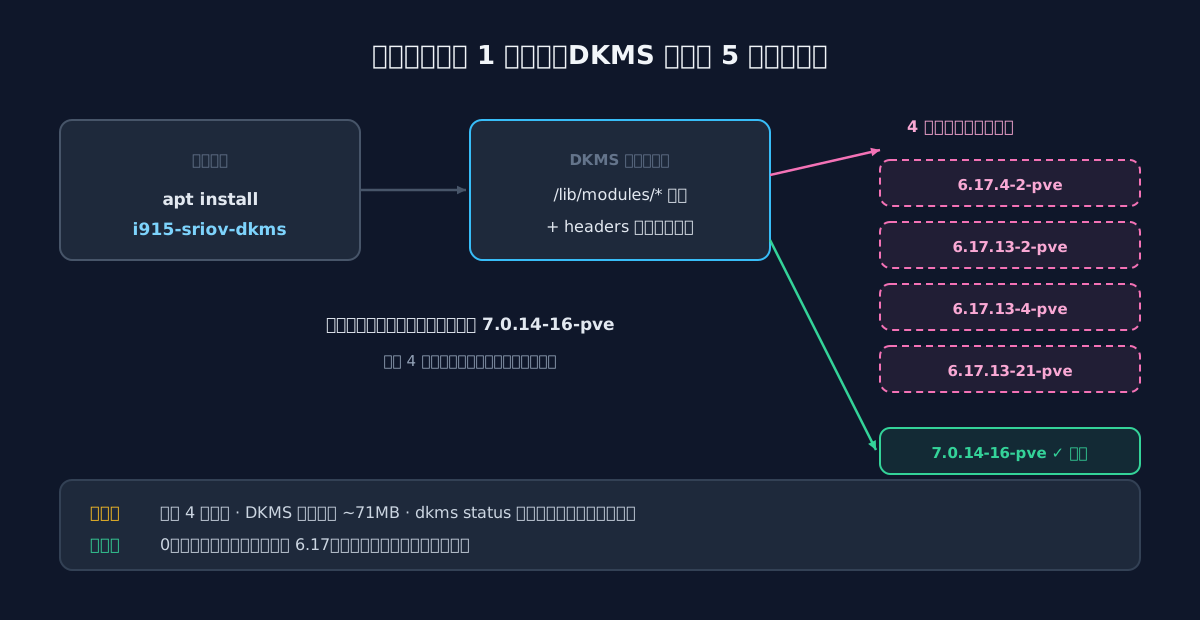
Figure 2: The full picture. Only one kernel image (7.0.14-16-pve) is actually installed, yet DKMS delivered five sets of build artifacts.
Here is the real dkms status output:
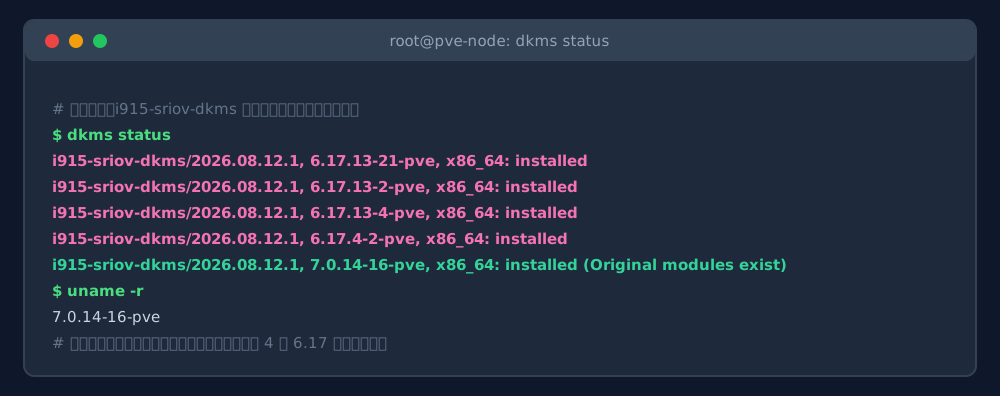
Figure 3: Real command output. All four 6.17.x entries read installed — built successfully, installed successfully, for kernels that do not exist.
The suspicious part is blunt: this machine runs exactly one kernel image, 7.0.14-16-pve, but DKMS also built modules for four 6.17.x versions. Stranger still, those kernel image packages had been uninstalled before the driver was installed — cleaning up old kernels after upgrading to the 7.0 series is standard practice, and not a single 6.17 proxmox-kernel-* package remained in apt.
In other words, DKMS was working for four “ghost kernels”, compiling modules they would never use. There was no error and no warning — everything “looked successful”. The disk was just quietly getting fatter (/var/lib/dkms held 110MB, of which ~70MB belonged to the ghosts), and the build took five times longer than it should have.
3. Analysis: On the Roster, and in the Blueprint Cabinet
3.1 Rule Out the Human Factor First
As always, eliminate the obvious suspects first:
| Suspicion | How I checked | Verdict |
|---|---|---|
| Wrong driver package? | Compared the deb version with the GitHub release | Ruled out — latest version |
| Leftovers from manual builds? | /var/lib/dkms only had this install’s timestamps |
Ruled out |
| Someone touched dkms config? | /etc/dkms/framework.conf was pristine |
Ruled out |
| DKMS acting up? | Reproduced on a clean VM: same four builds | Confirmed: deterministic behavior |
The last check matters most: this is not a haunting, it is deterministic logic. So what does DKMS actually use to decide “which kernels to build for”?
3.2 DKMS’s “Roster”: /lib/modules
DKMS is a user-space framework. It never queries the dpkg database; the “kernels on this system” are simply the subdirectories under /lib/modules/ — every installed kernel version gets a directory named after itself there. Think of it as the residential roster of an apartment complex. Let’s read the roster:
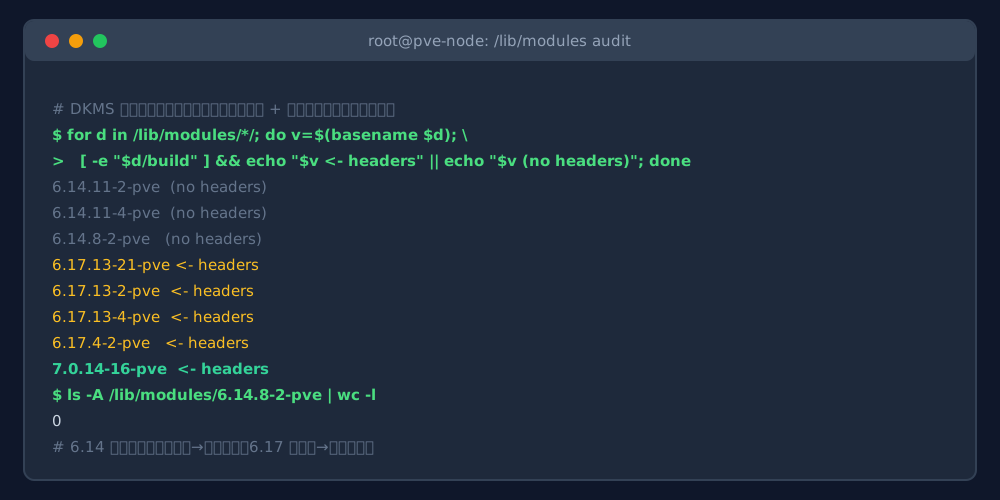
Figure 4: Real command output. Eight versions on the roster: four 6.17s with headers (yellow), three 6.14s that are empty shells without headers, plus the running 7.0.
The roster is longer than expected — besides the running 7.0.14-16-pve, there are four 6.17s and three 6.14s. Those 6.14 directories are empty shells left behind by past upgrades (ls -A counts zero files); uninstalling the kernel images never took the directories with them.
3.3 DKMS’s “Blueprint Cabinet”: headers
But being on the roster is only necessary, not sufficient. Compiling a kernel module requires the kernel headers — the original blueprints. Without blueprints, the renovation crew simply skips that apartment. The check is whether the /lib/modules/<version>/build symlink exists (created by the headers package). Whether the headers are still installed is a question for dpkg:
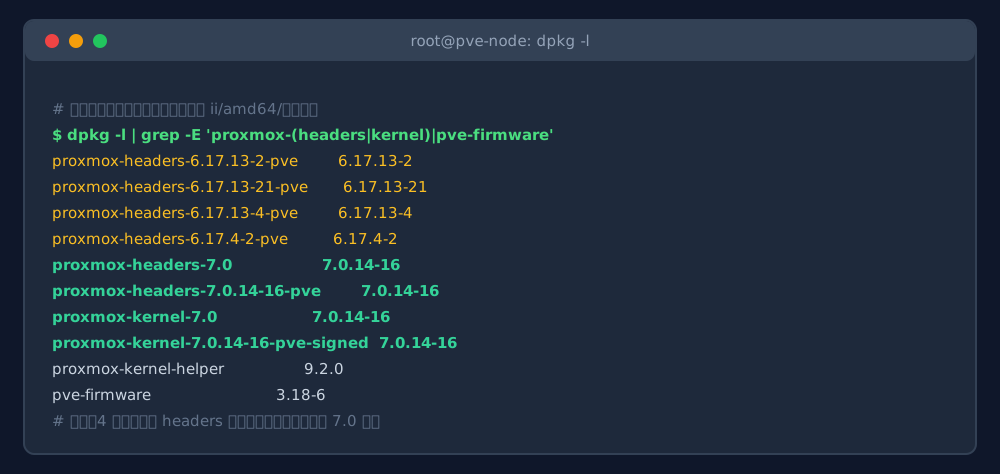
Figure 5: Real command output (columns trimmed). Only the 7.0-series kernel images remain, but four sets of 6.17 headers were sitting in the system untouched.
Now the control group is complete, and the conclusion writes itself:
- 6.17 × 4: on the roster (leftover dirs) + blueprints in the cabinet (headers never removed) → DKMS treats them as legitimate residents and builds for each one;
- 6.14 × 3: on the roster as empty directories, but their headers were cleaned long ago → DKMS skips them entirely;
dkms statusdoes not even list them.
Same ghosts, wildly different treatment — the difference is precisely that set of “blueprints”. This also explains why Figure 3 shows exactly four 6.17s and no 6.14s: for a ghost kernel to be compiled, its headers must still be installed.
4. Root Cause: One export That Opens the “Build for Everything” Switch
4.1 The Line in the Driver’s Own Script
The roster and the blueprints are only the objective conditions; someone still has to order the work. Let’s open the deb package’s own install script (the postinst — a hook that runs during package install/configure):
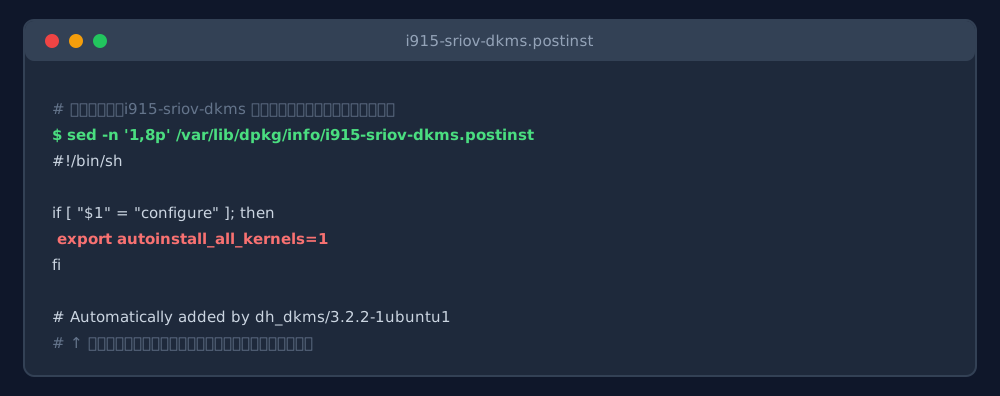
Figure 6: Real file content. The very first thing the install script does is set autoinstall_all_kernels to 1.
This variable is a switch recognized by DKMS’s official maintainer script (/usr/lib/dkms/common.postinst). Here is how the official code interprets it:
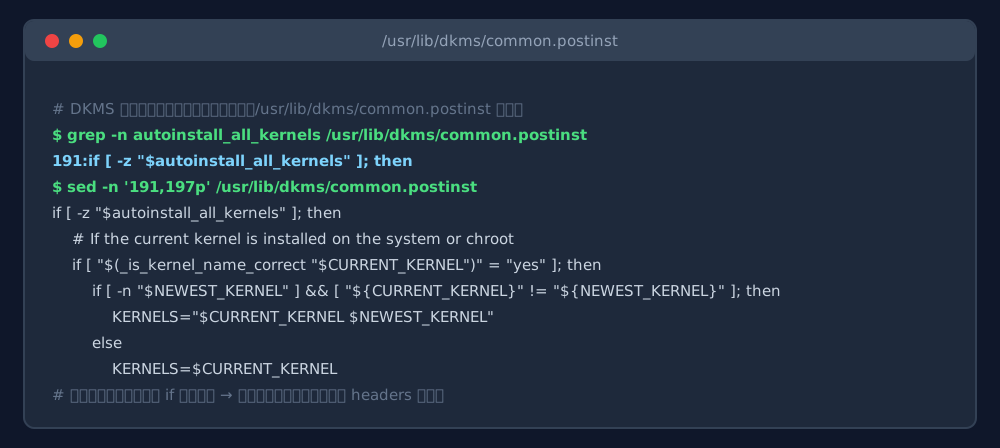
Figure 7: Real file content (excerpt). Once the variable is exported, the “build for the current kernel only” default branch is skipped entirely.
Translated into plain language: without this variable, DKMS by default builds only for the “currently running kernel + newest kernel”; once the variable is exported, it iterates over every kernel on the system. That is exactly the choice made by the i915-sriov-dkms maintainers — the upstream Debian packaging adds this export explicitly.
The behavior even has an official “medical record”: a Launchpad bug against the dkms package titled “DKMS only builds modules for the currently booted kernel version”, which states that the default comes from autoinstall_all_kernels being unset and requests setting it to yes so that all kernels get modules:
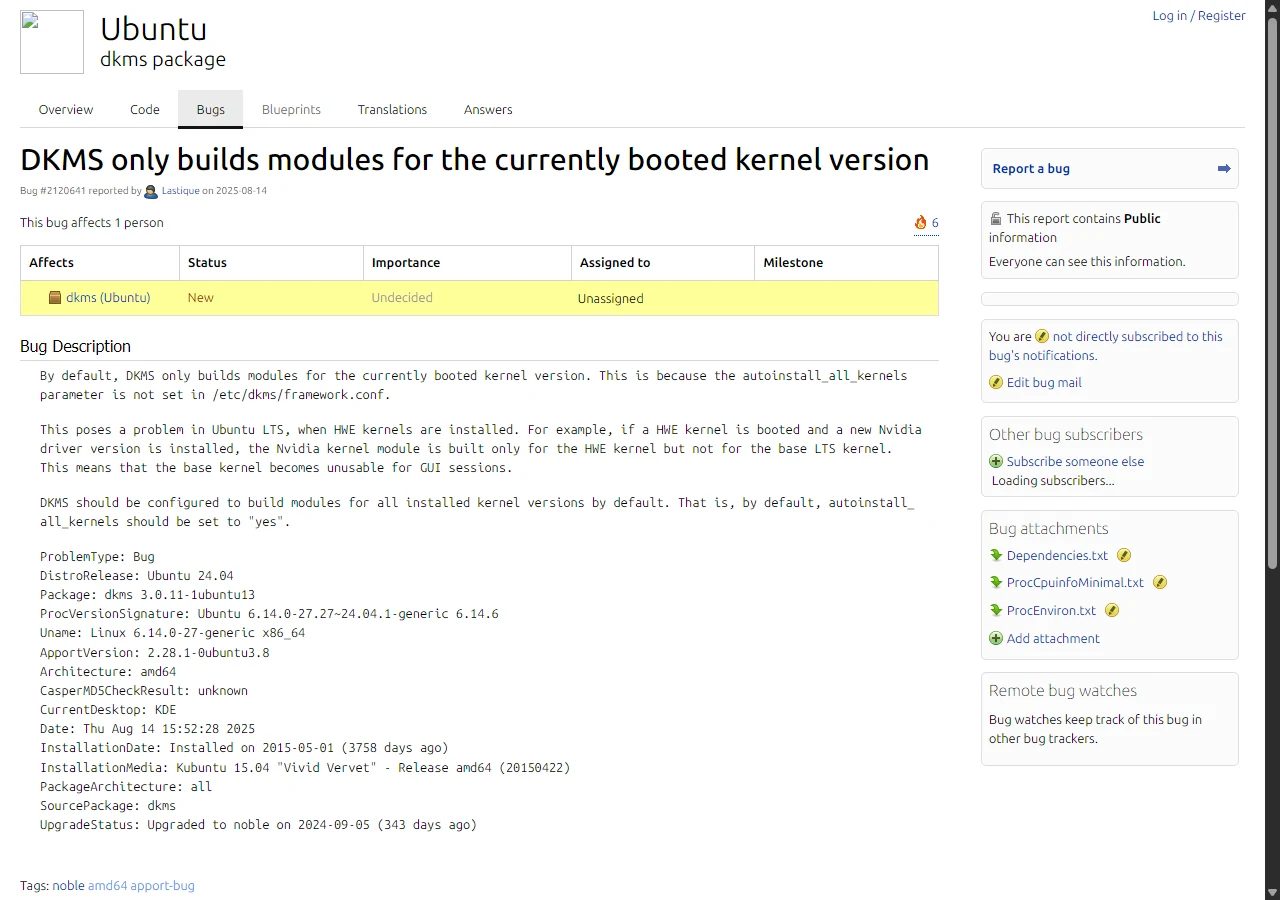
Figure 8: Real web screenshot. The Launchpad bug report confirms this switch’s existence and default value — from the opposite direction.
4.2 The Whole Decision Chain, Drawn Out
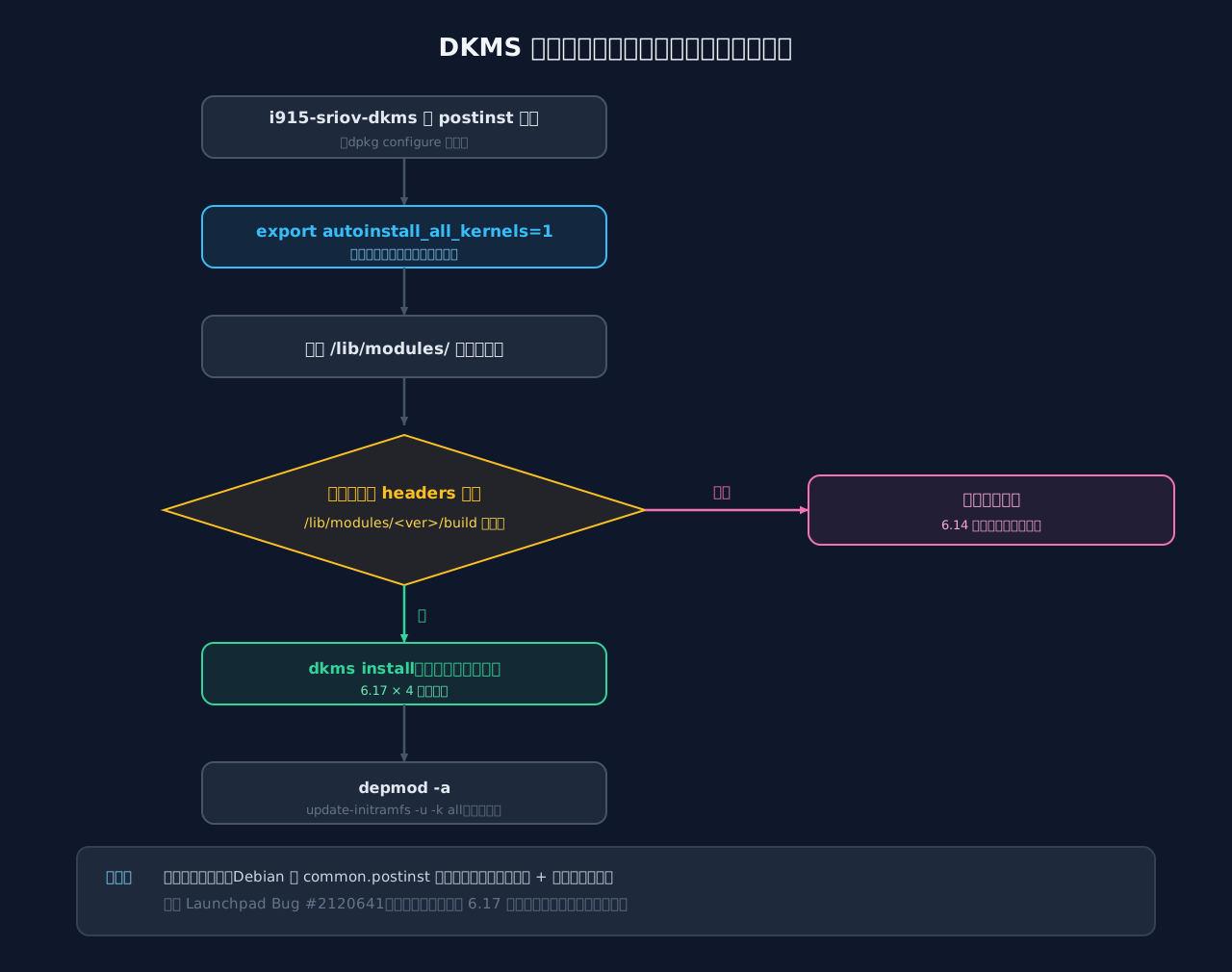
Figure 9: DKMS’s decision flow during package installation. Whether headers are present is the dividing line for whether a ghost gets compiled.
Root cause in one sentence: i915-sriov-dkms’s install script exports autoinstall_all_kernels=1 → DKMS iterates over the full /lib/modules/ roster → the four 6.17 ghosts are “on the roster + blueprints (headers) present” → each receives its own set of build artifacts; the three 6.14 ghosts are spared for lack of blueprints.
4.3 An Analogy: The Property Management’s Renovation Crew
If DKMS and headers feel too abstract, here is an apartment-complex analogy a primary-schooler can follow:
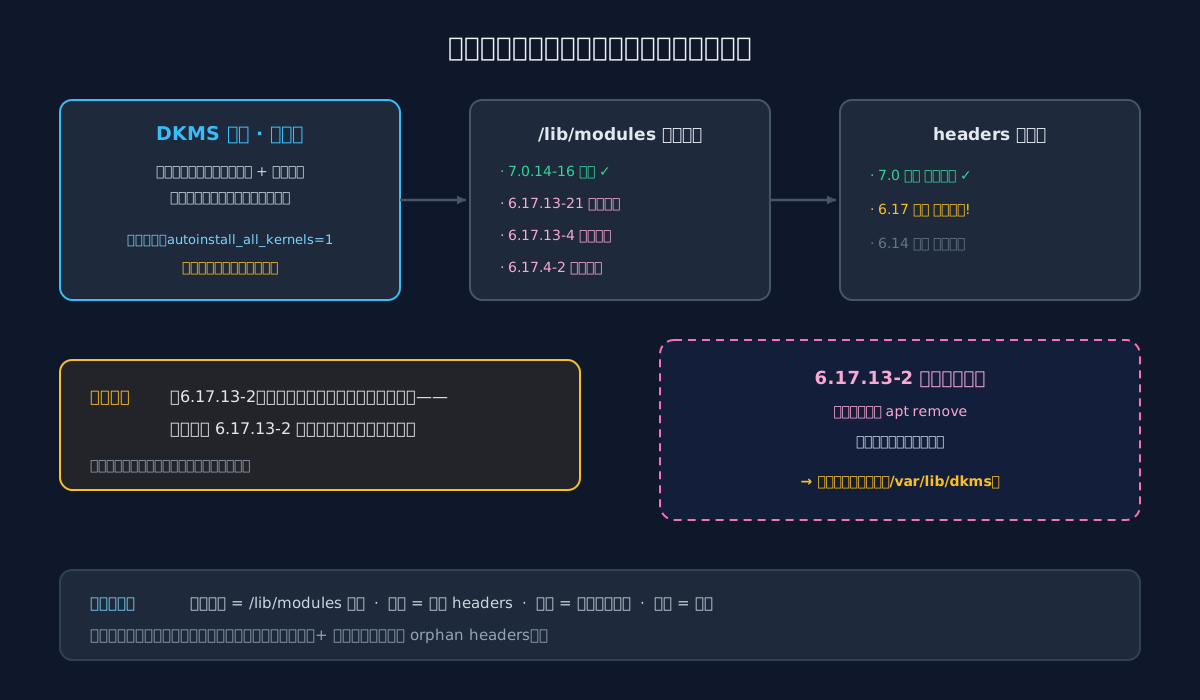
Figure 10: The analogy. Roster + blueprints are both required — and “does the building still exist” is simply not on the crew’s checklist.
- DKMS is the renovation crew of the property management office, and its rulebook reads: following the “residential roster + blueprint cabinet”, custom-build a set of furniture for every resident whose blueprints are on file;
/lib/modulesis the roster: residents register when a kernel is installed and should be crossed out when uninstalled — but leftover names are inevitable;- headers are the blueprint cabinet: headers installed = blueprints still filed; image uninstalled but headers kept = the resident moved out but the blueprints are still in the cabinet;
autoinstall_all_kernels=1is the overtime switch: a normal crew serves only the one or two apartments actually occupied; flip the switch and “every name on the roster gets furniture”;- the build artifacts are the custom furniture: building 6.17.13-2 was demolished long ago, yet the furniture is dutifully built to spec and piled into the property warehouse (disk).
Nobody in this story is a villain: upstream wants the driver available no matter which installed kernel you boot — perfectly reasonable; DKMS faithfully serves the roster — diligent and obedient. The real trap is that the crew checks the roster and the blueprints, but never verifies that the building still exists.
5. The Fix: Cross the Ghosts Off the Roster
Just reverse the root cause — three steps:
# 1) Purge the orphan headers (image uninstalled + headers still present = orphan)
apt-get purge -y proxmox-headers-6.17.13-2-pve proxmox-headers-6.17.13-21-pve \
                 proxmox-headers-6.17.13-4-pve proxmox-headers-6.17.4-2-pve

# 2) Remove the DKMS builds for the ghost kernels
for k in 6.17.13-2-pve 6.17.13-21-pve 6.17.13-4-pve 6.17.4-2-pve; do
  dkms remove i915-sriov-dkms/2026.08.12.1 -k $k
done

# 3) Delete the leftover dirs under /lib/modules (confirm the kernel packages are gone)
rm -rf /lib/modules/6.17.13-2-pve /lib/modules/6.17.13-21-pve \
       /lib/modules/6.17.13-4-pve /lib/modules/6.17.4-2-pve
Then run the “verification trio”:
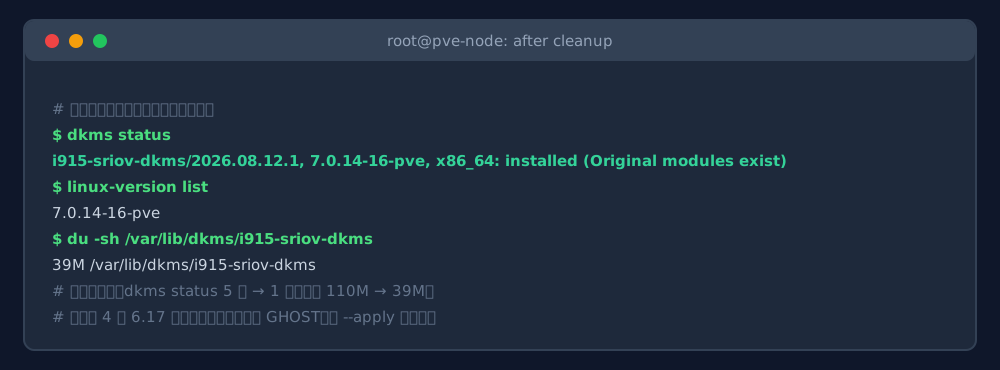
Figure 11: Real command output. dkms status drops from five entries to one, linux-version list shows only the running kernel, and the DKMS cache slims down from 110M to 39M.
One installed entry for the current kernel in dkms status, a single line from linux-version list, /var/lib/dkms down from 110M to 39M — all three checks pass. The current kernel’s modules are untouched, and GPU virtualization keeps working.
6. One-Click Health-Check Scripts
For readers who’d rather not type any of that, I wrapped the whole “check → classify → clean → verify” flow into three cross-platform scripts, with three safety rails built in:
- Dry-run by default: without a flag, the scripts only print what they would do (a report is also saved under
/tmp); you review, then apply; - The running kernel is never touched: directories matching
uname -rare unconditionally KEEPed; an additionaldpkg -Sownership check skips any directory still owned by an installed package; - Meta-package protection: meta packages like
proxmox-headers-7.0with incomplete version strings are never auto-removed — better to miss than to misfire.
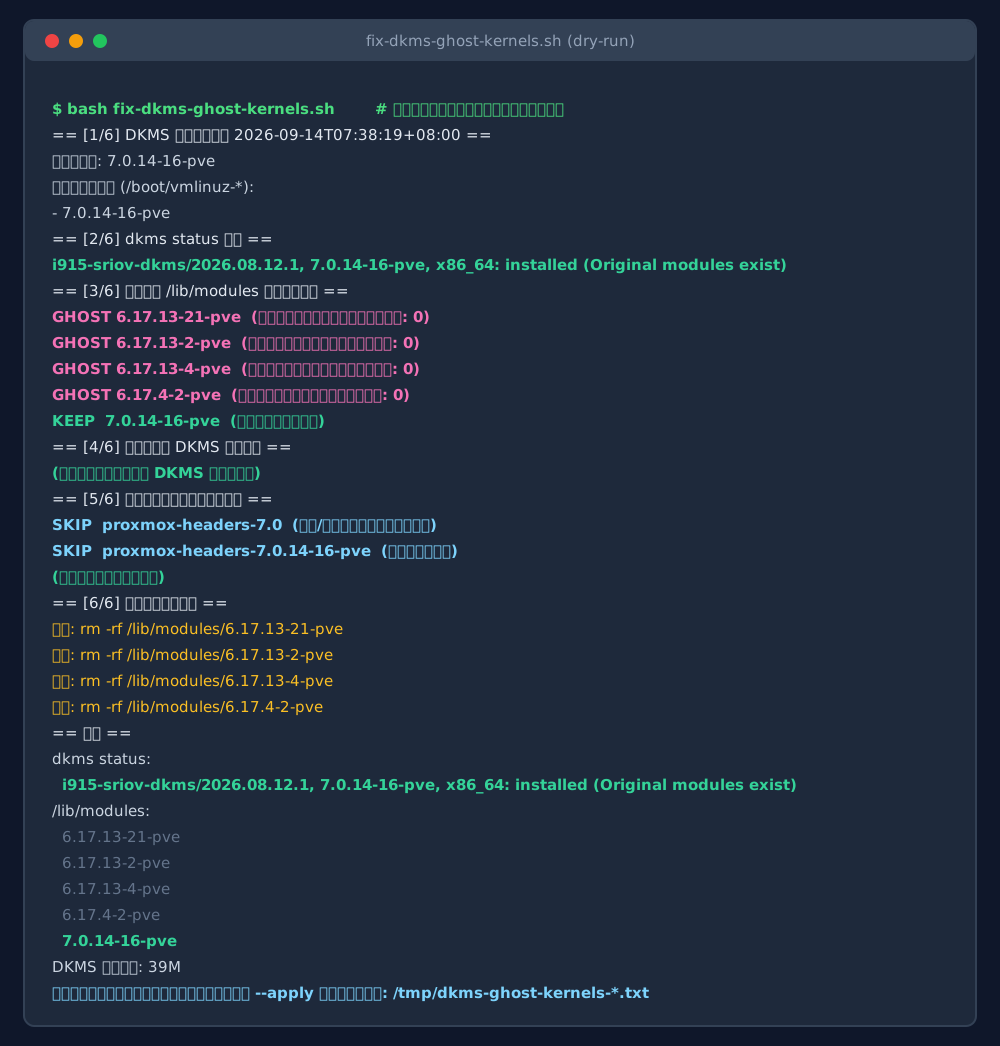
Figure 12: Real dry-run output. The four 6.17 ghosts are flagged GHOST, the running kernel is protected, the meta package is skipped, and the verification block tells the whole story.
Method 1: Run It Yourself
Ubuntu 26.04 / PVE node (fix-dkms-ghost-kernels.sh) — run locally, or pass root@<target-node> to check a remote machine:
#!/usr/bin/env bash
# fix-dkms-ghost-kernels.sh — clean "ghost kernels": leftover DKMS builds, orphan headers,
# leftover dirs for kernels whose images are already uninstalled
# Local check :  sudo bash fix-dkms-ghost-kernels.sh
# Local clean :  sudo bash fix-dkms-ghost-kernels.sh --apply
# Remote check:  bash fix-dkms-ghost-kernels.sh root@<target-node-ip>
# Remote clean:  bash fix-dkms-ghost-kernels.sh root@<target-node-ip> --apply
set -euo pipefail
TARGET=""
APPLY_ARG=""
for a in "$@"; do
  case "$a" in
    --apply) APPLY_ARG="--apply" ;;
    *) TARGET="$a" ;;
  esac
done

PAYLOAD=$(cat <<'EOS'
set -euo pipefail
APPLY=0
[ "${1:-}" = "--apply" ] && APPLY=1
REPORT="${TMPDIR:-/tmp}/dkms-ghost-kernels-$(date +%Y%m%d-%H%M%S).txt"
log(){ printf '%s\n' "$*" | tee -a "$REPORT"; }

RUNNING="$(uname -r)"
log "== [1/6] DKMS ghost-kernel health check $(date -Is) =="
log "Running kernel: $RUNNING"
INSTALLED_KERNELS="$(cd /boot 2>/dev/null && ls vmlinuz-* 2>/dev/null | sed 's/^vmlinuz-//' || true)"
log "Installed kernel images (/boot/vmlinuz-*):"
printf '%s\n' "$INSTALLED_KERNELS" | sed 's/^/  - /' | while read -r l; do log "$l"; done

log "== [2/6] dkms status =="
dkms status 2>/dev/null | while IFS= read -r l; do log "$l"; done
[ -z "$(dkms status 2>/dev/null)" ] && log "(no DKMS entries)" || true

log "== [3/6] Classifying /lib/modules entries =="
GHOST_DIRS=()
for d in /lib/modules/*/; do
  v="$(basename "$d")"
  [ "$v" = "$RUNNING" ] && { log "KEEP  $v  (running kernel, never touched)"; continue; }
  if printf '%s\n' "$INSTALLED_KERNELS" | grep -qxF "$v"; then
    log "KEEP  $v  (kernel image still installed)"; continue
  fi
  if dpkg -S "/lib/modules/$v" >/dev/null 2>&1; then
    log "KEEP  $v  (still owned by installed packages, skipped)"; continue
  fi
  GHOST_DIRS+=("$v")
  log "GHOST $v  (image uninstalled, leftover dir; files: $(find "$d" -type f 2>/dev/null | wc -l))"
done

log "== [4/6] DKMS builds for ghost kernels =="
STALE_COUNT=0
while IFS= read -r line; do
  [ -z "$line" ] && continue
  kv="$(printf '%s' "$line" | awk -F', ' '/,/{print $2}' | cut -d, -f1)"
  [ -z "$kv" ] && continue
  [ "$kv" = "$RUNNING" ] && continue
  printf '%s\n' "$INSTALLED_KERNELS" | grep -qxF "$kv" && continue
  mod="$(printf '%s' "$line" | cut -d/ -f1)"
  mv="$(printf '%s' "$line" | cut -d/ -f2 | cut -d, -f1)"
  STALE_COUNT=$((STALE_COUNT+1))
  if [ "$APPLY" = 1 ]; then
    log "CLEAN dkms remove $mod/$mv -k $kv"
    dkms remove "$mod/$mv" -k "$kv" || log "  (remove failed, please check manually)"
  else
    log "STALE $mod/$mv  for kernel $kv  (will run: dkms remove $mod/$mv -k $kv)"
  fi
done < <(dkms status 2>/dev/null)
[ "$STALE_COUNT" = 0 ] && [ "$APPLY" = 0 ] && log "(no DKMS builds for ghost kernels, clean)" || true

log "== [5/6] Orphan kernel header packages =="
ORPHANS=()
for pkg in $(dpkg --list 2>/dev/null | awk '/^ii  (linux-headers|proxmox-headers|pve-headers)-[0-9]/{print $2}'); do
  v="$(printf '%s' "$pkg" | sed -E 's/^(linux|proxmox|pve)-headers-//')"
  printf '%s' "$v" | grep -qE '^[0-9]+\.[0-9]+\.[0-9]+' || { log "SKIP  $pkg  (meta package, not handled automatically)"; continue; }
  [ "$v" = "$RUNNING" ] && { log "SKIP  $pkg  (belongs to the running kernel)"; continue; }
  [ -e "/boot/vmlinuz-$v" ] && { log "SKIP  $pkg  (kernel image still installed)"; continue; }
  ORPHANS+=("$pkg")
  log "ORPHAN $pkg  (kernel $v no longer installed)"
done
if [ "${#ORPHANS[@]}" -gt 0 ]; then
  if [ "$APPLY" = 1 ]; then
    log "PURGE: apt-get -y purge ${ORPHANS[*]}"
    DEBIAN_FRONTEND=noninteractive apt-get -y purge "${ORPHANS[@]}" || log "  (purge failed, please check manually)"
  else
    log "Dry-run: apt-get -s purge ${ORPHANS[*]}"
    apt-get -s purge "${ORPHANS[@]}" 2>/dev/null | grep -E '^(Remv|Purg)' | while IFS= read -r l; do log "  $l"; done || true
  fi
else
  log "(no orphan header packages, clean)"
fi

log "== [6/6] Removing ghost leftover dirs =="
if [ "${#GHOST_DIRS[@]}" -gt 0 ]; then
  for v in "${GHOST_DIRS[@]}"; do
    if [ "$APPLY" = 1 ]; then
      log "RMDIR /lib/modules/$v"
      rm -rf "/lib/modules/$v"
    else
      log "Dry-run: rm -rf /lib/modules/$v"
    fi
  done
else
  log "(no ghost leftover dirs, clean)"
fi

log "== Verification =="
log "dkms status:"; dkms status 2>/dev/null | sed 's/^/  /' | while IFS= read -r l; do log "$l"; done
log "/lib/modules:"; ls /lib/modules | sed 's/^/  /' | while IFS= read -r l; do log "$l"; done
log "DKMS cache usage: $(du -sh /var/lib/dkms 2>/dev/null | cut -f1)"
if [ "$APPLY" = 1 ]; then
  log "Done. Report: $REPORT"
else
  log "This was a DRY RUN (nothing changed). Re-run with --apply to clean. Report: $REPORT"
fi
EOS
)

if [ -n "$TARGET" ]; then
  ssh "$TARGET" "bash -s $APPLY_ARG" <<<"$PAYLOAD"
else
  [ "$(id -u)" -eq 0 ] || { echo "Local cleanup needs root; run with sudo."; exit 1; }
  bash -s $APPLY_ARG <<<"$PAYLOAD"
fi
Windows 11 (Fix-DkmsGhostKernels.ps1) — remote check/cleanup over the built-in OpenSSH client; run .\Fix-DkmsGhostKernels.ps1 -Target "root@<server-ip>" in PowerShell (add -Apply to actually clean). Note the script is intentionally ASCII-only: Windows PowerShell 5.1 misreads BOM-less UTF-8 scripts using the legacy code page, which garbles non-ASCII strings or even breaks parsing — plain ASCII is the robust choice:
# Fix-DkmsGhostKernels.ps1 - Check & clean "ghost kernels" on a remote Ubuntu/Debian/PVE node.
# Dry run : .\Fix-DkmsGhostKernels.ps1 -Target "root@<server-ip>"
# Apply   : .\Fix-DkmsGhostKernels.ps1 -Target "root@<server-ip>" -Apply
# Uses only the built-in OpenSSH client. (ASCII-only on purpose: Windows PowerShell 5.1
# mis-decodes BOM-less UTF-8 scripts and may fail to parse non-ASCII strings.)
param(
  [Parameter(Mandatory = $true)][string]$Target,
  [int]$Port = 22,
  [switch]$Apply
)

$payload = @'
set -euo pipefail
APPLY=0
[ "${1:-}" = "--apply" ] && APPLY=1
REPORT="${TMPDIR:-/tmp}/dkms-ghost-kernels-$(date +%Y%m%d-%H%M%S).txt"
log(){ printf '%s\n' "$*" | tee -a "$REPORT"; }

RUNNING="$(uname -r)"
log "== [1/6] DKMS ghost-kernel health check $(date -Is) =="
log "Running kernel: $RUNNING"
INSTALLED_KERNELS="$(cd /boot 2>/dev/null && ls vmlinuz-* 2>/dev/null | sed 's/^vmlinuz-//' || true)"
log "Installed kernel images (/boot/vmlinuz-*):"
printf '%s\n' "$INSTALLED_KERNELS" | sed 's/^/  - /' | while read -r l; do log "$l"; done

log "== [2/6] dkms status =="
dkms status 2>/dev/null | while IFS= read -r l; do log "$l"; done
[ -z "$(dkms status 2>/dev/null)" ] && log "(no DKMS entries)" || true

log "== [3/6] Classifying /lib/modules entries =="
GHOST_DIRS=()
for d in /lib/modules/*/; do
  v="$(basename "$d")"
  [ "$v" = "$RUNNING" ] && { log "KEEP  $v  (running kernel, never touched)"; continue; }
  if printf '%s\n' "$INSTALLED_KERNELS" | grep -qxF "$v"; then
    log "KEEP  $v  (kernel image still installed)"; continue
  fi
  if dpkg -S "/lib/modules/$v" >/dev/null 2>&1; then
    log "KEEP  $v  (still owned by installed packages, skipped)"; continue
  fi
  GHOST_DIRS+=("$v")
  log "GHOST $v  (image uninstalled, leftover dir; files: $(find "$d" -type f 2>/dev/null | wc -l))"
done

log "== [4/6] DKMS builds for ghost kernels =="
STALE_COUNT=0
while IFS= read -r line; do
  [ -z "$line" ] && continue
  kv="$(printf '%s' "$line" | awk -F', ' '/,/{print $2}' | cut -d, -f1)"
  [ -z "$kv" ] && continue
  [ "$kv" = "$RUNNING" ] && continue
  printf '%s\n' "$INSTALLED_KERNELS" | grep -qxF "$kv" && continue
  mod="$(printf '%s' "$line" | cut -d/ -f1)"
  mv="$(printf '%s' "$line" | cut -d/ -f2 | cut -d, -f1)"
  STALE_COUNT=$((STALE_COUNT+1))
  if [ "$APPLY" = 1 ]; then
    log "CLEAN dkms remove $mod/$mv -k $kv"
    dkms remove "$mod/$mv" -k "$kv" || log "  (remove failed, please check manually)"
  else
    log "STALE $mod/$mv  for kernel $kv  (will run: dkms remove $mod/$mv -k $kv)"
  fi
done < <(dkms status 2>/dev/null)
[ "$STALE_COUNT" = 0 ] && [ "$APPLY" = 0 ] && log "(no DKMS builds for ghost kernels, clean)" || true

log "== [5/6] Orphan kernel header packages =="
ORPHANS=()
for pkg in $(dpkg --list 2>/dev/null | awk '/^ii  (linux-headers|proxmox-headers|pve-headers)-[0-9]/{print $2}'); do
  v="$(printf '%s' "$pkg" | sed -E 's/^(linux|proxmox|pve)-headers-//')"
  printf '%s' "$v" | grep -qE '^[0-9]+\.[0-9]+\.[0-9]+' || { log "SKIP  $pkg  (meta package, not handled automatically)"; continue; }
  [ "$v" = "$RUNNING" ] && { log "SKIP  $pkg  (belongs to the running kernel)"; continue; }
  [ -e "/boot/vmlinuz-$v" ] && { log "SKIP  $pkg  (kernel image still installed)"; continue; }
  ORPHANS+=("$pkg")
  log "ORPHAN $pkg  (kernel $v no longer installed)"
done
if [ "${#ORPHANS[@]}" -gt 0 ]; then
  if [ "$APPLY" = 1 ]; then
    log "PURGE: apt-get -y purge ${ORPHANS[*]}"
    DEBIAN_FRONTEND=noninteractive apt-get -y purge "${ORPHANS[@]}" || log "  (purge failed, please check manually)"
  else
    log "Dry-run: apt-get -s purge ${ORPHANS[*]}"
    apt-get -s purge "${ORPHANS[@]}" 2>/dev/null | grep -E '^(Remv|Purg)' | while IFS= read -r l; do log "  $l"; done || true
  fi
else
  log "(no orphan header packages, clean)"
fi

log "== [6/6] Removing ghost leftover dirs =="
if [ "${#GHOST_DIRS[@]}" -gt 0 ]; then
  for v in "${GHOST_DIRS[@]}"; do
    if [ "$APPLY" = 1 ]; then
      log "RMDIR /lib/modules/$v"
      rm -rf "/lib/modules/$v"
    else
      log "Dry-run: rm -rf /lib/modules/$v"
    fi
  done
else
  log "(no ghost leftover dirs, clean)"
fi

log "== Verification =="
log "dkms status:"; dkms status 2>/dev/null | sed 's/^/  /' | while IFS= read -r l; do log "$l"; done
log "/lib/modules:"; ls /lib/modules | sed 's/^/  /' | while IFS= read -r l; do log "$l"; done
log "DKMS cache usage: $(du -sh /var/lib/dkms 2>/dev/null | cut -f1)"
if [ "$APPLY" = 1 ]; then
  log "Done. Report: $REPORT"
else
  log "This was a DRY RUN (nothing changed). Re-run with -Apply to clean. Report: $REPORT"
fi
'@

$arg = ''
if ($Apply) { $arg = '--apply' }
$payload | ssh -p $Port $Target "bash -s $arg"
if ($LASTEXITCODE -eq 0) {
  Write-Host "Done. Please review the final 'Verification' block above." -ForegroundColor Green
} else {
  Write-Host "Failed. Check the SSH connection and the output above." -ForegroundColor Red
}
macOS 26 (fix-dkms-ghost-kernels-macos.zsh) — run bash fix-dkms-ghost-kernels-macos.zsh root@<server-ip> in Terminal (add --apply to actually clean):
#!/usr/bin/env zsh
# fix-dkms-ghost-kernels-macos.zsh — check/clean "ghost kernels" on a remote node from macOS 26
# Check: bash fix-dkms-ghost-kernels-macos.zsh root@<server-ip>
# Clean: bash fix-dkms-ghost-kernels-macos.zsh root@<server-ip> --apply
# Uses only the built-in ssh; the target must be Ubuntu / Debian / Proxmox VE.
set -euo pipefail
TARGET="${1:?usage: bash fix-dkms-ghost-kernels-macos.zsh root@<server-ip> [--apply]}"
APPLY_ARG="${2:-}"

ssh "$TARGET" "bash -s $APPLY_ARG" <<'EOS'
set -euo pipefail
APPLY=0
[ "${1:-}" = "--apply" ] && APPLY=1
REPORT="${TMPDIR:-/tmp}/dkms-ghost-kernels-$(date +%Y%m%d-%H%M%S).txt"
log(){ printf '%s\n' "$*" | tee -a "$REPORT"; }

RUNNING="$(uname -r)"
log "== [1/6] DKMS ghost-kernel health check $(date -Is) =="
log "Running kernel: $RUNNING"
INSTALLED_KERNELS="$(cd /boot 2>/dev/null && ls vmlinuz-* 2>/dev/null | sed 's/^vmlinuz-//' || true)"
log "Installed kernel images (/boot/vmlinuz-*):"
printf '%s\n' "$INSTALLED_KERNELS" | sed 's/^/  - /' | while read -r l; do log "$l"; done

log "== [2/6] dkms status =="
dkms status 2>/dev/null | while IFS= read -r l; do log "$l"; done
[ -z "$(dkms status 2>/dev/null)" ] && log "(no DKMS entries)" || true

log "== [3/6] Classifying /lib/modules entries =="
GHOST_DIRS=()
for d in /lib/modules/*/; do
  v="$(basename "$d")"
  [ "$v" = "$RUNNING" ] && { log "KEEP  $v  (running kernel, never touched)"; continue; }
  if printf '%s\n' "$INSTALLED_KERNELS" | grep -qxF "$v"; then
    log "KEEP  $v  (kernel image still installed)"; continue
  fi
  if dpkg -S "/lib/modules/$v" >/dev/null 2>&1; then
    log "KEEP  $v  (still owned by installed packages, skipped)"; continue
  fi
  GHOST_DIRS+=("$v")
  log "GHOST $v  (image uninstalled, leftover dir; files: $(find "$d" -type f 2>/dev/null | wc -l))"
done

log "== [4/6] DKMS builds for ghost kernels =="
STALE_COUNT=0
while IFS= read -r line; do
  [ -z "$line" ] && continue
  kv="$(printf '%s' "$line" | awk -F', ' '/,/{print $2}' | cut -d, -f1)"
  [ -z "$kv" ] && continue
  [ "$kv" = "$RUNNING" ] && continue
  printf '%s\n' "$INSTALLED_KERNELS" | grep -qxF "$kv" && continue
  mod="$(printf '%s' "$line" | cut -d/ -f1)"
  mv="$(printf '%s' "$line" | cut -d/ -f2 | cut -d, -f1)"
  STALE_COUNT=$((STALE_COUNT+1))
  if [ "$APPLY" = 1 ]; then
    log "CLEAN dkms remove $mod/$mv -k $kv"
    dkms remove "$mod/$mv" -k "$kv" || log "  (remove failed, please check manually)"
  else
    log "STALE $mod/$mv  for kernel $kv  (will run: dkms remove $mod/$mv -k $kv)"
  fi
done < <(dkms status 2>/dev/null)
[ "$STALE_COUNT" = 0 ] && [ "$APPLY" = 0 ] && log "(no DKMS builds for ghost kernels, clean)" || true

log "== [5/6] Orphan kernel header packages =="
ORPHANS=()
for pkg in $(dpkg --list 2>/dev/null | awk '/^ii  (linux-headers|proxmox-headers|pve-headers)-[0-9]/{print $2}'); do
  v="$(printf '%s' "$pkg" | sed -E 's/^(linux|proxmox|pve)-headers-//')"
  printf '%s' "$v" | grep -qE '^[0-9]+\.[0-9]+\.[0-9]+' || { log "SKIP  $pkg  (meta package, not handled automatically)"; continue; }
  [ "$v" = "$RUNNING" ] && { log "SKIP  $pkg  (belongs to the running kernel)"; continue; }
  [ -e "/boot/vmlinuz-$v" ] && { log "SKIP  $pkg  (kernel image still installed)"; continue; }
  ORPHANS+=("$pkg")
  log "ORPHAN $pkg  (kernel $v no longer installed)"
done
if [ "${#ORPHANS[@]}" -gt 0 ]; then
  if [ "$APPLY" = 1 ]; then
    log "PURGE: apt-get -y purge ${ORPHANS[*]}"
    DEBIAN_FRONTEND=noninteractive apt-get -y purge "${ORPHANS[@]}" || log "  (purge failed, please check manually)"
  else
    log "Dry-run: apt-get -s purge ${ORPHANS[*]}"
    apt-get -s purge "${ORPHANS[@]}" 2>/dev/null | grep -E '^(Remv|Purg)' | while IFS= read -r l; do log "  $l"; done || true
  fi
else
  log "(no orphan header packages, clean)"
fi

log "== [6/6] Removing ghost leftover dirs =="
if [ "${#GHOST_DIRS[@]}" -gt 0 ]; then
  for v in "${GHOST_DIRS[@]}"; do
    if [ "$APPLY" = 1 ]; then
      log "RMDIR /lib/modules/$v"
      rm -rf "/lib/modules/$v"
    else
      log "Dry-run: rm -rf /lib/modules/$v"
    fi
  done
else
  log "(no ghost leftover dirs, clean)"
fi

log "== Verification =="
log "dkms status:"; dkms status 2>/dev/null | sed 's/^/  /' | while IFS= read -r l; do log "$l"; done
log "/lib/modules:"; ls /lib/modules | sed 's/^/  /' | while IFS= read -r l; do log "$l"; done
log "DKMS cache usage: $(du -sh /var/lib/dkms 2>/dev/null | cut -f1)"
if [ "$APPLY" = 1 ]; then
  log "Done. Report: $REPORT"
else
  log "This was a DRY RUN (nothing changed). Re-run with --apply to clean. Report: $REPORT"
fi
EOS
After any of the three scripts finishes, check the “Verification” block at the end: dkms status listing only the running kernel and /lib/modules matching /boot/vmlinuz-* means the system is healthy; once you confirm the dry-run report, re-run with --apply / -Apply to clean.
Method 2: Hand It to an AI Agent
The lazier route is to hand the whole problem to an AI agent (ZCode, Claude Code, etc.) — you only need to provide SSH access. This prompt can be copied as-is:
Please check and clean the DKMS "ghost kernels" on a Proxmox VE / Ubuntu server —
kernel images that were uninstalled but left behind DKMS builds, orphan header
packages, and leftover /lib/modules directories. Follow these steps exactly:

1. SSH into the node (connection details in session context / provided separately);
2. Record the current state: uname -r, dkms status, ls /lib/modules,
   dpkg -l | grep -E 'linux-headers|proxmox-headers|pve-headers';
3. Run the health check in dry-run mode first (change nothing):
   - Classification rule: dirs matching uname -r are always kept; kept if
     /boot/vmlinuz-<version> exists; skipped if dpkg -S shows the dir is still
     owned by installed packages; everything else is a ghost;
   - Orphan headers: the package's kernel version has no vmlinuz and is not the
     running kernel, and the version string has three numeric components
     (meta packages like proxmox-headers-7.0 must NOT be included);
4. Show me the dry-run report listing: dkms remove entries, apt purge packages,
   and rm -rf dirs; only after my confirmation, re-run with --apply;
5. Verify afterwards: dkms status lists only installed kernels; ls /lib/modules
   matches /boot/vmlinuz-* plus the running kernel; record du -sh /var/lib/dkms.

Constraints: never touch the running kernel (uname -r); no dist-upgrade/full-upgrade;
no reboots; do not touch the current kernel's headers or modules; rm -rf is allowed
only at the depth of /lib/modules/<ghost-version>.
When the agent finishes, check its three pieces of evidence: the GHOST/ORPHAN list from the dry run, the post-cleanup dkms status, and the consistency between /lib/modules and /boot/vmlinuz-*.
7. Takeaways: Kernel Hygiene in the DKMS Era
The lessons of this incident compress into a few rules:
- Remove kernels as image + headers pairs. Headers are the soil ghost builds grow in: as long as the blueprints stay in the cabinet, the next driver install/upgrade will wake the ghosts again. After
apt autoremove, take one glance atdpkg -l | grep headers. - Decide whether you want “build for everything” before installing a DKMS driver. If your machine always keeps a single kernel,
autoinstall_all_kernels=1is pure waste; during a transition period with old and new kernels coexisting waiting for a reboot-and-verify, the design is actually a safety net — roll back to the old kernel and the module is still there. - Read
dkms statuswith “silent waste” in mind. It reports success and failure, never “worth it”. Every machine running DKMS drivers deserves this post’s health check once a month. - Treat
/boot/vmlinuz-*and dpkg as the source of truth for “does this kernel exist” — not the/lib/modulesdirectories. The latter is a roster with leftover pages; the former is the door plate, removed whenever the building comes down.
8. Q&A
Q1: What is the actual harm of modules built for ghost kernels?
A: Zero functional harm — the ghost kernels never boot, so the modules never load. The cost is all on the resource side: extra build passes during install (update-initramfs -u -k all also runs for every kernel directory), a few dozen MB of disk, and a bunch of noise entries in dkms status. A chronic, non-fatal waste.
Q2: Why weren’t the empty 6.14 directories compiled?
A: Because compiling requires headers (the /lib/modules/<version>/build symlink). The 6.14 headers were cleaned up long ago, leaving only hollow shells — DKMS had nothing to build with. This conveniently proves the root cause from the other side: roster + blueprints, both required.
Q3: Do the ghost modules slow down booting?
A: No. Boot only loads modules for the running kernel; the ghost modules sleep in their own directories. The only indirect effect is slower initramfs updates — measured in tens of seconds, only during package install/remove.
Q4: Why would upstream “build for all kernels” by design? Isn’t this a bug?
A: Not a bug — a trade-off. A driver like i915-sriov is “required at boot”: if old and new kernels coexist and you reboot into the old one, without the module GPU virtualization simply breaks. Building for everything guarantees any installed kernel can boot with a working module. The Debian default (current + newest kernel only) is the opposite trade-off, and there are opposite requests on Launchpad asking for build-all as the default. Neither strategy is wrong; they fit different scenarios.
Q5: Will this happen again after future kernel upgrades?
A: If the “remove the image but keep the headers” habit remains, yes — the next install or upgrade of i915-sriov-dkms will wake the ghosts whose headers remain. The cure is removing image + headers as a pair, plus running this post’s health check regularly. One minute a month.
Q6: I just don’t want build-all. Can I turn it off at the root?
A: Yes — bypass the deb package’s postinst and register with DKMS manually: put the source tree under /usr/src/i915-sriov-dkms-<version>, then dkms add and dkms install -m i915-sriov-dkms -v <version> -k $(uname -r) to build for the current kernel only. Caveat: you must recompile manually after every kernel upgrade — which is exactly what the deb package plus build-all automates for you. Your call.
References
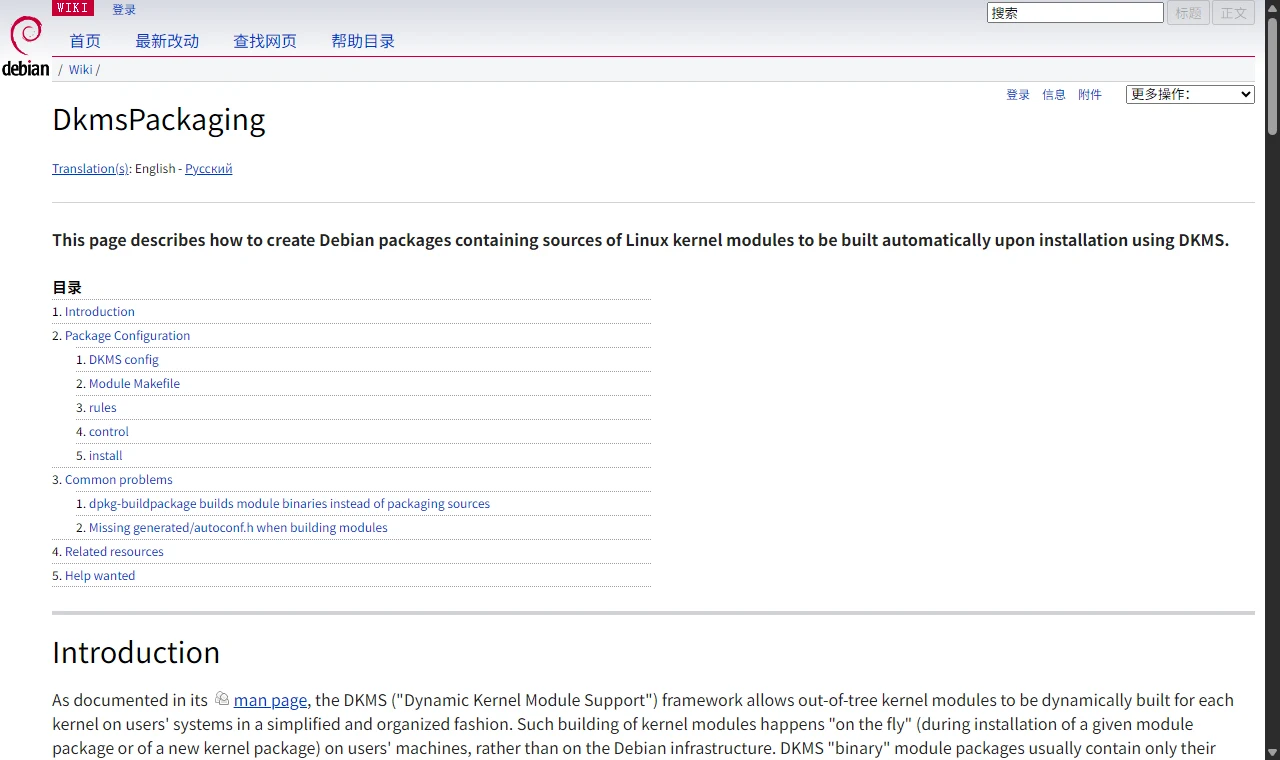
Figure 13: Real web screenshot. The Debian Wiki’s DkmsPackaging page documents DKMS packaging and the common.postinst conventions.
- strongtz/i915-sriov-dkms (GitHub) — the protagonist of this post, the community SR-IOV port of the i915/xe drivers
- Launchpad Bug #2120641: DKMS only builds modules for the currently booted kernel version — the official “medical record” of the
autoinstall_all_kernelsswitch - Debian Wiki: DkmsPackaging — DKMS packaging conventions and the common.postinst contract
- dkms(8) man page (Debian) — authoritative reference for
autoinstalland related options - dkms-project/dkms (GitHub) — the upstream DKMS source repository