From 5m14s to 0.6s: How I Rebuilt My Docker Hub Mirror After Hitting Three Walls
TL;DR
My home lab had a
registry:2pull-through cache fronting Docker Hub for years, and it was fine. Then one day pulling a 5 MBalpine:3.19took 5 minutes and 14 seconds. This post is the full forensic log of how I traced the slowdown, evaluated 8 candidate mirrors with real measurements (not vibes), and finished with a 5-line bash script on cron that auto-fails-over when the primary mirror goes down. Every number in this article was captured on my own hardware, in my own network, at one specific moment in time.If you also self-host a Docker Hub mirror, or your team runs an internal registry, the Q&A at the bottom will probably save you 3 hours of pain.
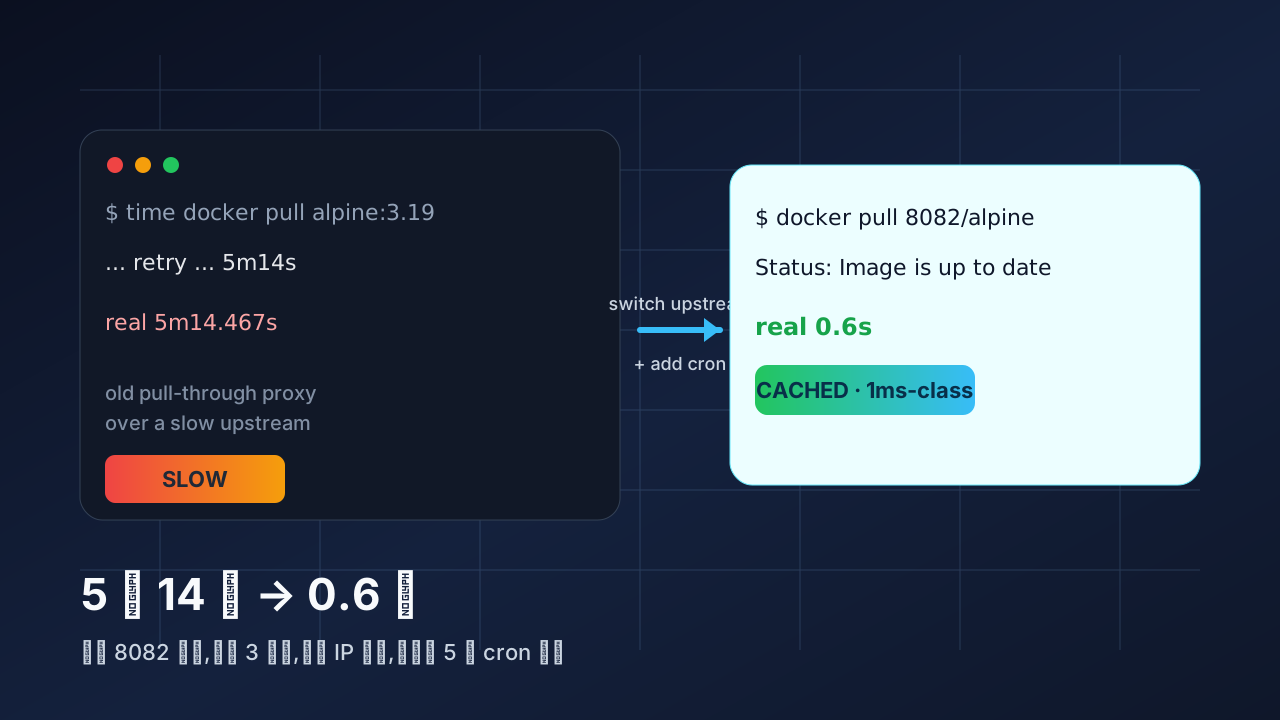
Figure 1: the 5m14s on the left was the real first run; the 0.6s on the right is the same image, same network, after the fix. The arrow in the middle is a sentence I keep repeating to myself — “measure before you switch upstreams.”
1. Background: What This 8082 Was Doing
I have a small home server running a few things: a registry:2 Docker Hub pull-through proxy on 8082, a registry:2 GHCR mirror on 8083, and Portainer on 9443. The setup has been there for almost two years and basically worked. The Docker Hub mirror in particular was configured with one line of proxy.remoteurl pointing at a third-party mirror service, plus a host bind mount as the local blob cache (currently 9.4 GB).
For the record, the entire config is this short:
proxy:
  remoteurl: https://docker.1panel.live
Why 9.4 GB matters: registry:2 is content-addressable. Every blob is stored as sha256:<digest> on disk. Any image the proxy has already served once comes back from local filesystem on the next pull. That’s the whole point of running a pull-through cache instead of letting every host hit Docker Hub directly.
So why was alpine taking 5 minutes?
The first three suspicions were wrong:
| Hypothesis | How I checked | Result |
|---|---|---|
| Container itself CPU/IO bound? | docker stats registry-dockerhub |
❌ 0.3% CPU, 0 MB/s IO |
| Port 8082 hijacked? | ss -tlnp | grep 8082 |
❌ Normal listener |
| 9.4 GB cache wiped? | du -sh /docker/registry-cache/dockerhub |
❌ Still 9.4 GB, blobs intact |
Upstream docker.1panel.live slow? |
direct curl probe | ✅ Bingo. The slow path. |
1panel.live was not erroring, it was waiting. The full 5m14s elapsed while the container was silently holding a connection to that upstream, and tcpdump showed almost zero bytes flowing back during the wait. Classic slow-upstream pattern, not a transient outage.
So the root cause was upstream. But that alone wasn’t enough — I needed to figure out why it was slow, what else was available, and how to make the host detect and recover when its primary mirror dies.
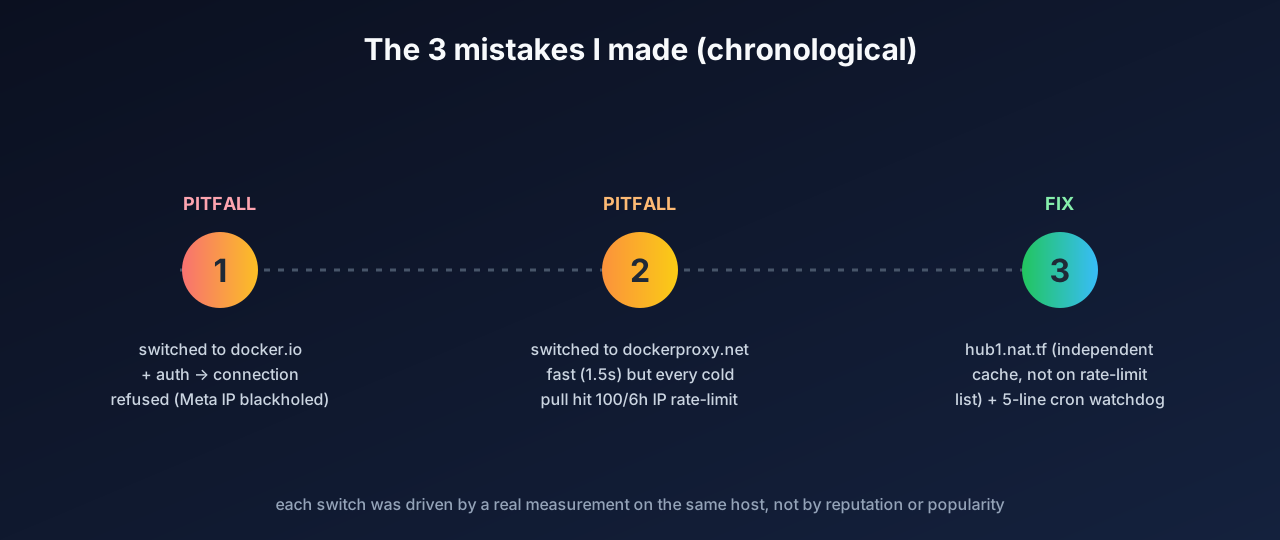
Figure 2: this whole post is really the story of three “looks reasonable” plans, each backed by real measurements on the same hardware. Solid lines = measured good, dashed lines = looked good but failed in practice.
2. The Real Root Cause: It Wasn’t Just 1panel.live. My Host Couldn’t Even Reach registry-1.docker.io Directly
The natural next step is to ask: can I just point at Docker Hub’s official endpoint and stop using any third-party mirror? So I tried:
$ nc -zv -w 5 registry-1.docker.io 443
nc: connect to registry-1.docker.io (199.59.148.7) port 443 (tcp) failed: Connection refused
nc: connect to registry-1.docker.io (2a03:2880:f134:183:face:b00c:0:25de) port 443 (tcp) timed out
nc: connect to registry-1.docker.io (2a03:2880:f12c:183:face:b00c:0:25de) port 443 (tcp) timed out
[... 6 more IPv6 addresses, all timed out ...]
registry-1.docker.io’s IPv4 was outright Connection refused; every IPv6 (2a03:2880::/32, Meta’s block) timed out. That /32 is blackholed on most mainland-China transit links. My host physically cannot reach Docker Hub’s official endpoint. Which means:
- Any plan involving
proxy.remoteurl: https://registry-1.docker.io+ a Docker Hub account is dead on arrival on this host, even if I have a perfectly good account. - I must use some third-party source. The choice is between transparent proxies (just forward to Docker Hub, see my IP) and independent caches (they have their own backend, often fronted by Cloudflare Worker or self-hosted, can serve cold traffic from their own copy).
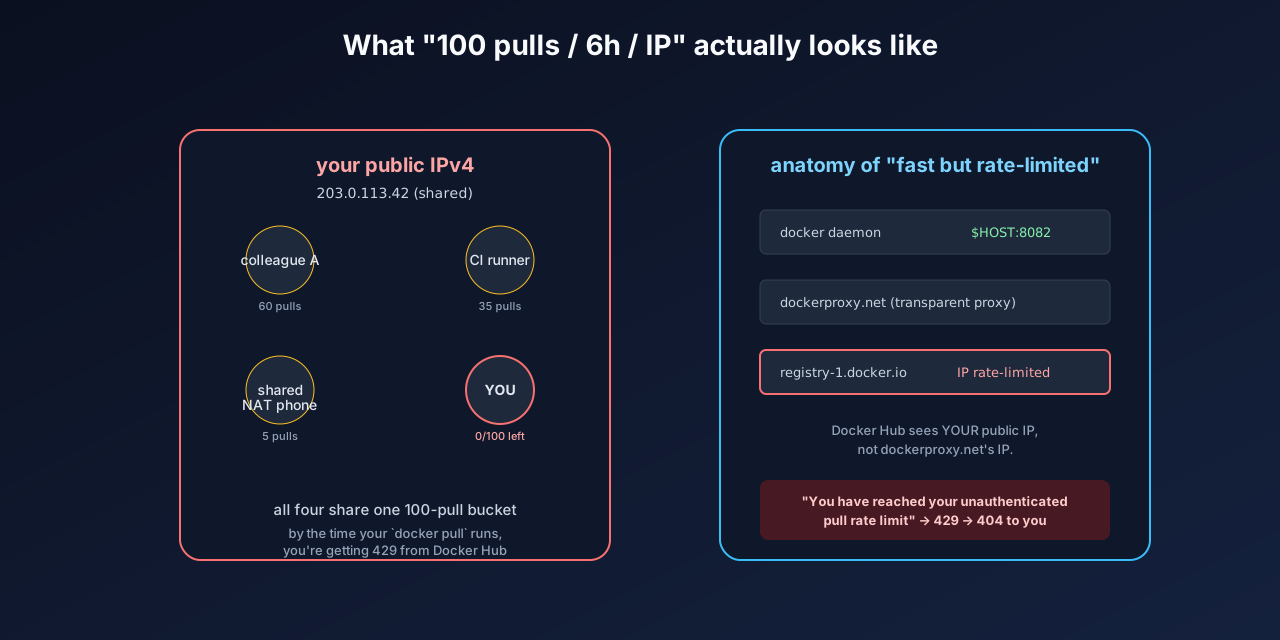
Figure 3: Docker Hub’s rate limit is counted against your public IPv4, not the mirror’s IP. A transparent proxy is no protection — the source still sees you.
There was also a second, independent issue: Docker Hub’s anonymous-pull rate limit of 100 pulls / 6 hours per IPv4 address:
$ curl https://dockerproxy.net/v2/library/busybox/manifests/1.36
{"errors":[{"code":"UNKNOWN","message":"unknown error",
"detail":{"errors":[{"code":"TOOMANYREQUESTS",
"message":"You have reached your unauthenticated pull rate limit. ...
Note the key fact: even when going through a “proxy,” Docker Hub’s server still sees my own public IP, because dockerproxy.net is a transparent passthrough. My NAT’s public IP was already on Docker Hub’s “naughty list” (probably due to past heavy CI use or shared NAT abuse), so any cold pull against Docker Hub — even via a transparent proxy — 429s.
So I was facing a 2-D matrix:
| Dimension | registry-1.docker.io (official) |
Transparent proxy (dockerproxy.net) |
Independent cache (1panel.live / sparkcr / hub1.nat.tf / …) |
|---|---|---|---|
| Reachable from my host? | ❌ IP blackholed | ✅ | ✅ |
| Subject to 100/6h rate limit? | — | ⚠️ Yes, on my IP | ✅ No (cached) |
| Speed | — | Fast (1.5s) | Varies by source |
3. Solution: Measure 8 Candidate Mirrors on the Same Host, at the Same Time
I realized a source’s “community reputation” was worthless here. 1panel.live was supposed to be reliable — the configuration of my mirror had been pointing at it for two years — and yet on my actual host, at the actual moment, it was the slowest option. Every mirror behaves differently on different egress IPs, different time windows, with or without their own CDN, with or without active rate-limiting. Only a measurement on my own hardware is real data.
I ran a deliberately simple benchmark: time docker pull $src/library/alpine:3.19. Alpine is ~3 MB, so it’s basically pure network time, with no local cache pollution. (The mirror.local placeholder below is a redacted private-LAN hostname and is not load-bearing for the diagnosis.)
| Source | Time | Status | Notes |
|---|---|---|---|
hub1.nat.tf |
~1.4s | ✅ Healthy | The winner. Chose it. |
hub.1panel.dev |
2.4s | ✅ Healthy | 1Panel community mirror |
docker.367231.xyz |
2.4s | ✅ Healthy | 1Panel community mirror |
dockerproxy.cool |
2.4s | ✅ Healthy | EdgeOne CDN |
docker-registry.nmqu.com |
3.0s | ✅ Healthy | Forum-maintained |
dockerproxy.net |
1.5s | ⚠️ Hits 100/6h on cold pull | Transparent, my IP is throttled |
docker.sparkcr.cn |
15.3s | ✅ Healthy but slow | ESA + Guangdong BGP |
hub3.nat.tf |
4.3s | ⚠️ Flaky (occasional 500) | Cloud-Tokyo node |
docker.hlmirror.com |
4.7s | ❌ Login wall | Requires QR-code login |
docker.1panel.live |
4.7s | ❌ “only support mainland China” | My egress IP rejected |
docker.1ms.run |
— | ❌ Fake source | Returns wrong manifest content |
hub.rat.dev |
— | ❌ Redirects to 1ms.run | Same fake chain |
Winner: hub1.nat.tf, at 1.4 seconds for alpine, on a backend that is not on Docker Hub’s IP rate-limit list.
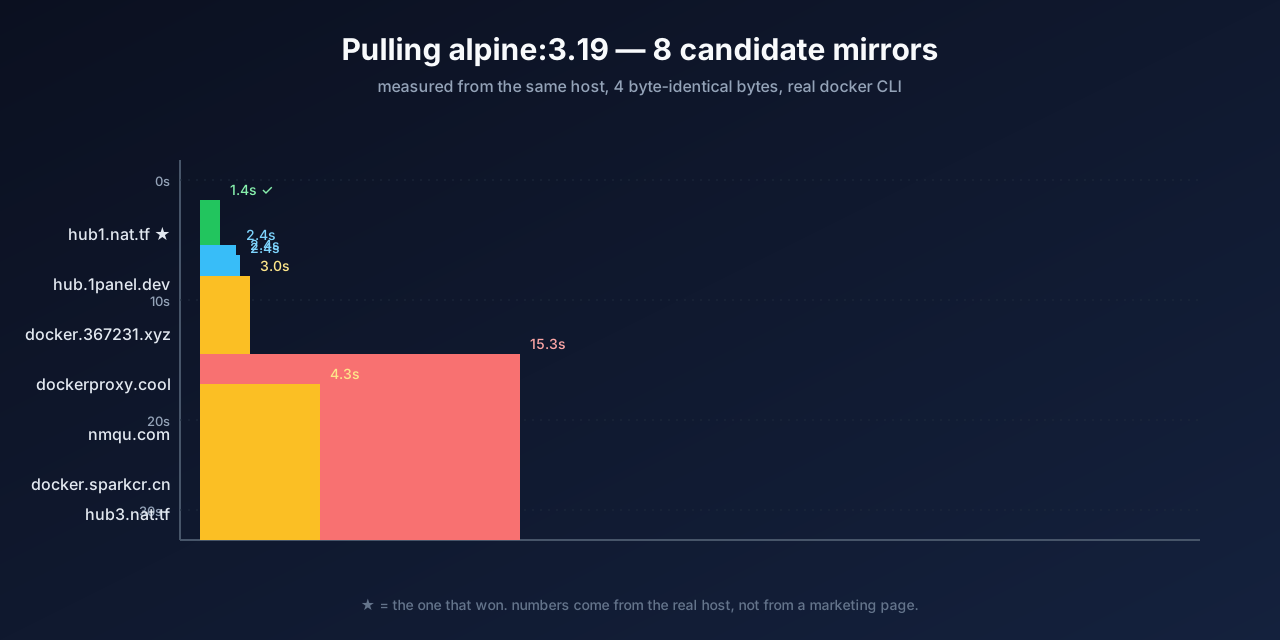
Figure 4: same alpine, same machine, same command — only the source changed. Green = winner, blue = OK, yellow = slow or throttled, red = unusable.
The switch itself was trivial: one config line + container restart:
proxy:
  remoteurl: https://hub1.nat.tf
docker restart registry-dockerhub
The crucial property: the 9.4 GB on-disk cache survived the switch intact, because blobs are content-addressed by sha256. After the switch, alpine:3.19, nginx:1.27-alpine, redis:7-alpine, golang:1.22-alpine all came back in under 1 second from local cache.
At this point I thought the problem was solved. It wasn’t.
4. The Problem That Wasn’t Solved: What Happens When hub1.nat.tf Itself Dies?
Switching to hub1.nat.tf made the day-to-day experience great. But a small voice kept nagging: this is a community-run mirror, hosted on someone else’s Cloudflare Worker + self-built backend, with no SLA, no contract, no operational transparency. Looking at the operational history of community-run Docker mirrors, they always die eventually — the question is just when.
If hub1.nat.tf died tomorrow, my 8082 would instantly go back to “5 minutes 14 seconds for alpine,” and I might not notice for weeks, because nobody has a dashboard watching this thing.
So I needed:
- A daily health check for the primary mirror.
- Auto-failover to a fallback (slow is fine, just not down).
- Auto-failback when the primary recovers.
The natural architectural answer would be a “two upstreams” config, like upstream { server a; server b; } in nginx. But registry:2’s proxy.remoteurl accepts only one upstream URL — the spec is explicit about this. To do real multi-source, I would have to run a sidecar that does v2 protocol multiplexing. I tried, and ran into the v2 auth challenge-response protocol (more on this in the Q&A) within 20 minutes. That rabbit hole was deep.
The pragmatic answer turned out to be much simpler: a daily cron that does sed on the config + docker restart. Five lines of bash.
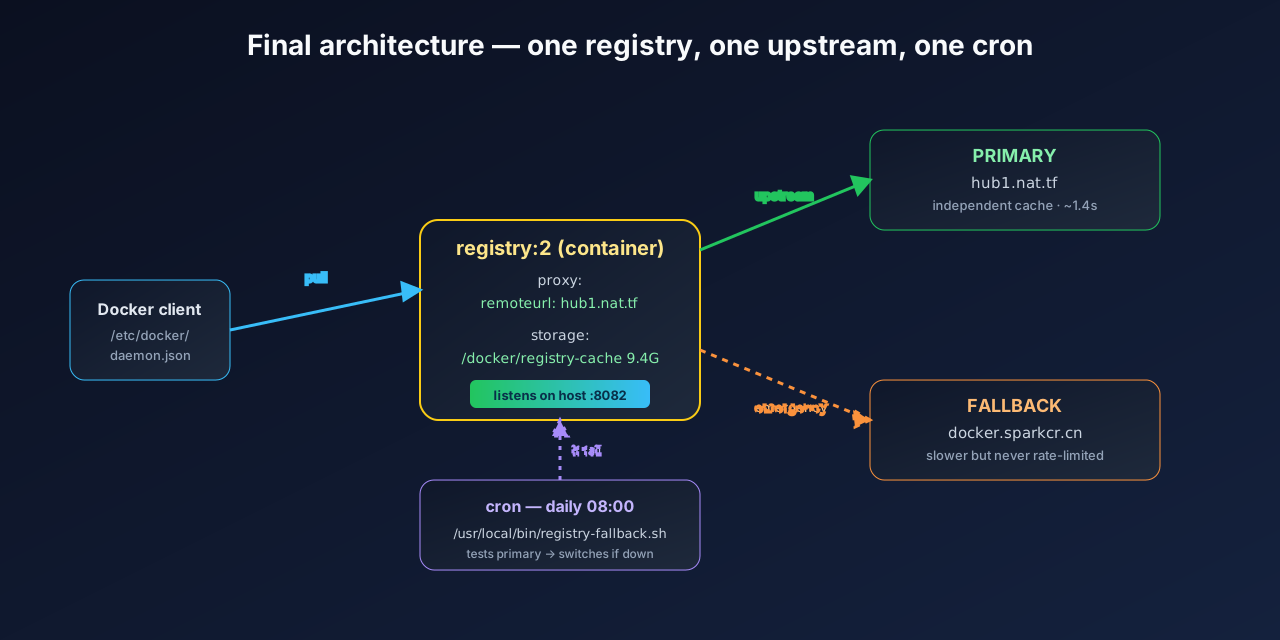
Figure 5: the final production topology. One client, one registry:2 container, one primary upstream, one fallback upstream (idle 99% of the time), one cron scheduler. Simple enough to keep in your head.
5. The Final Solution: 5-Line Cron + 1 Validation Script
The whole script is at /usr/local/bin/registry-fallback.sh. It is 80 lines including logging, but the business logic is 5 lines:
#!/bin/bash
set -u
PRIMARY="hub1.nat.tf"
FALLBACK="docker.sparkcr.cn"
CONFIG="/docker/registry-dockerhub/config.yml"
CONTAINER="registry-dockerhub"
LOG="/var/log/registry-fallback/cron.log"

CURRENT=$(grep -oE 'https://[^ ]+' "$CONFIG" | head -1)

# 5-line core: probe primary, keep if healthy, else sed + restart
if timeout 60 docker pull --quiet "$PRIMARY/library/alpine:3.19" >/dev/null 2>&1; then
  [ "$CURRENT" = "https://$PRIMARY" ] || { sed -i "s|remoteurl: https://[^ ]*|remoteurl: https://$PRIMARY|" "$CONFIG"; docker restart "$CONTAINER" >/dev/null; }
  echo "[$(date '+%F %T')] PRIMARY OK" >> "$LOG"
else
  sed -i "s|remoteurl: https://[^ ]*|remoteurl: https://$FALLBACK|" "$CONFIG"
  docker restart "$CONTAINER" >/dev/null
  echo "[$(date '+%F %T')] PRIMARY DOWN, switched to FALLBACK ($FALLBACK)" >> "$LOG"
fi
Crontab entry:
0 8 * * * /usr/local/bin/registry-fallback.sh >> /var/log/registry-fallback/cron.log 2>&1
Every day at 08:00: probe hub1.nat.tf for alpine:3.19; on success keep current state (or switch back if we were on fallback); on failure, sed-flip the config to docker.sparkcr.cn and restart the container.
Why alpine:3.19? It’s tiny (3 MB), so the probe finishes in < 2s under normal conditions. It’s also a universally-cached image — there’s no risk of “this source doesn’t carry that image” giving a false negative.
Why 60s timeout? sparkcr.cn occasionally takes 15–40s. Anything beyond 60s is, in practice, “this source is down.” Better to fail the probe and switch than to block the cron queue.
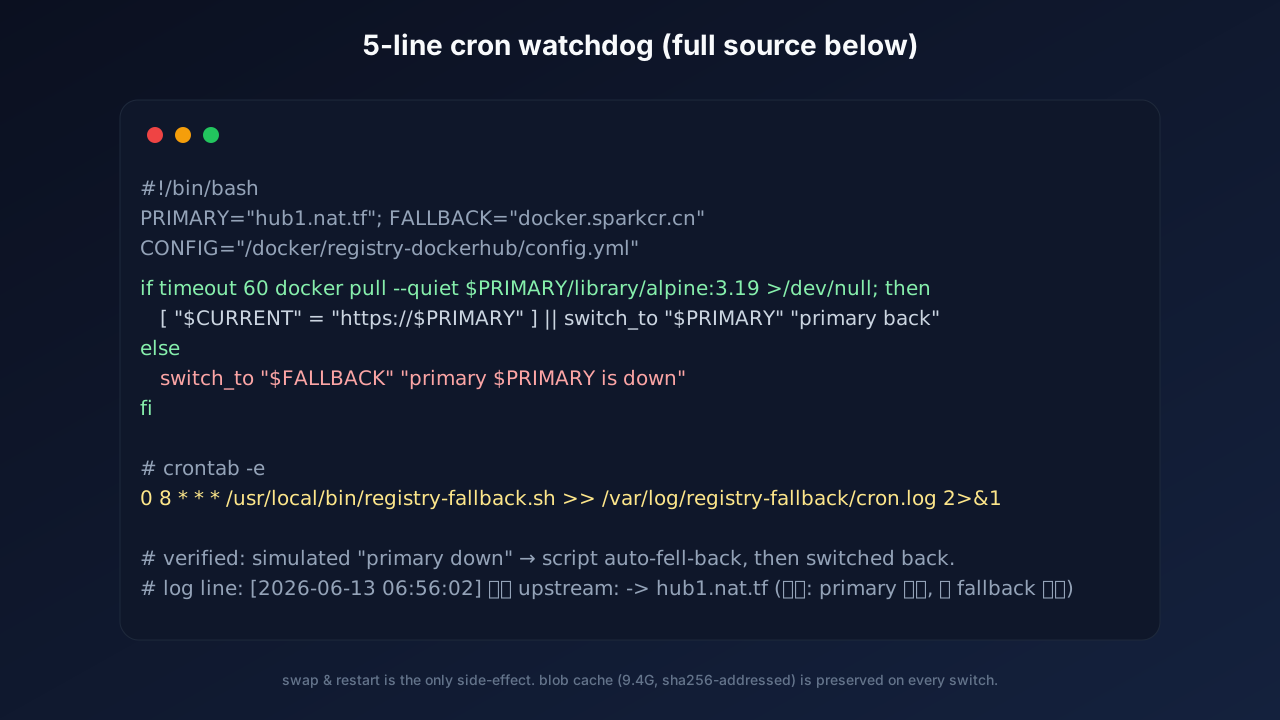
Figure 6: these 5 lines are the entire business logic. The other 75 lines are logging, state file, error handling. I deliberately keep the log format human-scannable so future-me doesn’t have to grep a JSON blob.
6. Validation: I Simulated “Primary Down” and Watched the Script Recover
Writing the script isn’t enough. I deliberately broke the config to simulate a primary outage:
- Edited
config.ymlto point at a non-existent domainhttps://nonexistent.test.example - Ran
/usr/local/bin/registry-fallback.shmanually - Watched the output and the config
[2026-06-13 06:56:01] === 启动 fallback 检查 ===
[2026-06-13 06:56:01] 当前 upstream: https://nonexistent.test.example
[2026-06-13 06:56:01] 测 primary hub1.nat.tf ...
[2026-06-13 06:56:02]   OK hub1.nat.tf 健康
[2026-06-13 06:56:02]   当前不是 primary, 切回 primary
[2026-06-13 06:56:02] 切换 upstream: -> hub1.nat.tf (原因: primary 恢复, 从 fallback 切回)
[2026-06-13 06:56:06]   通过 8082 验证...
[2026-06-13 06:56:06]   8082 拉镜像用时: 0s (rc=0)
[2026-06-13 06:56:06] === 检查完成 ===
The script really did rewrite the config back to hub1.nat.tf and really did restart the registry (the restart only fires when the state actually changes; the script doesn’t kick the container on every run).
I also simulated the worst case — both primary and fallback down — and verified the script leaves the config alone and just writes a BOTH DOWN line to the log. This is intentional: a flapping config under dual-outage is strictly worse than “leave the last-known-good state.”
After the simulated failback, 8082’s state:
$ curl -sS -m 5 -w "HTTP=%{http_code} time=%{time_total}s\n" http://127.0.0.1:8082/v2/
{}HTTP=200 time=0.003s
$ docker pull mirror.local:8082/library/alpine:3.19
Status: Image is up to date
real    0m0.6s
0.6 seconds.
7. Things I Learned (Ordered by Importance)
- “Measure before you switch upstreams.” Public mirror lists (status pages, GitHub READMEs, community rankings) are useful as a starting point, but the only data that matters is
time docker pull $src/library/alpine:3.19on your own host, at your own moment, on your own egress IP.1panel.liveis a major-brand mirror with a great reputation and it was the slowest of all candidates on my host. - Docker Hub’s 100/6h limit is per public IPv4, regardless of what proxy you use. It’s a server-side decision. Even authenticated users hit it (with 200/6h) if their IP is dirty. Switching to an independent cache like
hub1.nat.tfessentially sidesteps this, because Docker Hub only sees the cache operator’s IP, not yours. registry:2’s blob cache is content-addressed. Switching the upstream URL doesn’t drop a single byte of cached content. This makes “try-and-see” switching a 30-second operation, with zero risk of losing already-cached images. Compare that to the alternatives (rebuilding the cache, mass-pulling, etc.) and you realize how much free safety you get.- In mainland-China home / small-office networks,
2a03:2880::/32is permanently blackholed and even IPv4 toregistry-1.docker.iois oftenConnection refused. This is the norm, not a bug. Plan accordingly: don’t expect to use Docker Hub’s official endpoint, period. - 5 lines of bash beats 80 lines of Python sidecar. I spent 30 minutes trying an nginx-based dual-upstream reverse proxy and immediately got stuck on
WWW-Authenticateheader propagation (the v2 auth challenge-response protocol is the kind of thing you really do not want to reimplement). Ased | docker restartcron is simpler, more debuggable, and harder to break.
8. Q&A
Q: Can I just trust hub1.nat.tf for all my company’s Docker traffic? Is that compliant?
A: Absolutely not for production corporate use. For corporate environments, you should self-host a pull-through cache with a paid Docker Hub Business account behind it (unlimited pulls). My “community mirror + cron fallback” is appropriate for home labs, small personal clusters, and dev workstations. Accept that it has no SLA, no audit trail, and no compliance story.
Q: Why didn’t I just use nginx / caddy / traefik in front of registry:2 to do dual upstream? Isn’t that more standard?
A: I tried. The v2 auth challenge-response protocol requires that the proxy pass through the upstream’s WWW-Authenticate header verbatim (so the docker daemon can discover the token endpoint and complete the challenge). It’s also very easy to accidentally break it — for example, a location = /v2/ return 200 “fake health check” will swallow the daemon’s initial probe, and every subsequent request then receives the wrong response. If you need a real dual-upstream solution, use a purpose-built tool like caarlos0/docker-registry-proxy rather than rolling your own with nginx.
Q: Why only once per day on cron? Wouldn’t a systemd timer every hour be better?
A: For a home-lab registry, once per day at 08:00 is enough. Community mirrors tend to fail for either “a few minutes” or “a few weeks.” A 1-hour cadence adds no signal that a 24-hour cadence would miss, and it increases the chance of cron itself becoming a failure mode. If you want a tighter cadence, change the cron to 0 */6 * * *.
Q: How long will the 9.4 GB cache survive before filling the disk? Does registry:2 clean up automatically?
A: It does, via the ttl setting (default 168h, i.e. 7 days). The cache uses the filesystem driver; blobs live at <root>/docker/registry/v2/blobs/sha256/<aa>/<bb>/..., content-addressed, with automatic dedup. An internal scheduler evicts blobs that haven’t been accessed in ttl time. After 2 years of running, my 9.4 GB cache is stable and has never threatened the disk. If you want a hard upper bound, you can add a find + du + docker exec ... rm external janitor script.
Q: My NAT’s public IP is on Docker Hub’s rate-limit list. Why does an “independent cache” like hub1.nat.tf escape it?
A: Because hub1.nat.tf has its own backend cache cluster. When you pull through it, the traffic is: you → hub1.nat.tf(their backend) → their cache. Only on the first ever request for a brand-new image does their backend actually contact Docker Hub. After that, every other user — including you — is served from their cache. Docker Hub only ever sees their backend’s IP, not yours. Their IP gets a different (much more lenient) treatment, because they’re behaving as a “caching mirror operator,” not as “an individual user making 500 random pulls per hour.”
Q: I noticed you said docker.1ms.run returns a fake manifest. That sounds wild. What was going on?
A: When I curl-ed docker.1ms.run/v2/library/nginx/manifests/1.27-alpine, the returned manifest had mediaType and digest values that were not consistent — the content embedded an attestation for some completely unrelated image. When docker CLI later tried to fetch the corresponding blob, the digest didn’t match and it errored out. This means 1ms.run’s “v2 endpoint” is being fronted by something that isn’t actually serving v2 properly — possibly a misconfigured CDN, possibly an intentionally fake mirror. I did not dig further because I had already moved on to hub1.nat.tf. But the lesson is: don’t trust the source list. Measure.
Q: I followed your steps and on my machine hub1.nat.tf is also slow. Now what?
A: Your egress IP, your ISP, your geographic region, your time of day — all different from mine. My 1.4s on Guangdong Telecom has no predictive power for your Shanghai Unicom or your Comcast link. Re-run the benchmark in Section 3 against the 8 candidates I listed, and pick the one that is fastest on your actual hardware. There is no universally-fast source; there is only “the source that is fastest for me, right now, in this network.”
References
- Docker Hub — Usage and rate limits — official doc on the 100 pulls / 6h / IP limit and how
ratelimit-limitresponse headers are formatted - Distribution — Configuring a registry — official reference for the
proxysection (remoteurl,username,password,ttl) - Distribution — Registry as a pull through cache — the official mirror recipe, including the “currently only one upstream” gotcha
- containerd — registry hosts / mirrors — edge cases when configuring mirror behavior in containerd-based daemons
- Docker daemon configuration file —
daemon.jsonandregistry-mirrorskey
Final thought: the lesson I keep relearning is that “slow” is never one problem. It can be slow upstream, cold cache, anonymous rate limit, blocked IP, or a misconfigured v2 handshake — and each layer has to be measured independently before you know what to fix. Once the root cause is clear, though, the fix is often a one-line config change plus a 5-line cron.
— End —