A 20-Year Vintage Google Account Discovered! From 2006 Gmail Beta to 2026's High-Bar Signups: How to Check Creation Date, Defeat the 2-Year Inactive Account Purge, and Master 2026 Registration Workarounds (With Cross-Platform Automation Suite)
Core Executive Briefing (TL;DR): If you have one or multiple dormant Google or Gmail accounts resting in the cloud, pause what you are doing right now and open your browser! A quiet, irreversible digital purge is sweeping the globe:
- A 20.5-Year Vintage Account Unearthed: Through official Google Takeout forensic archives, the author verified the exact creation timestamp of their earliest Google account — 2006-03-03 07:59:25 UTC, marking 20 years and 7 months (over 7,532 days) of active internet history from the Gmail 1GB invitation-only beta days to the modern generative AI era;
- Aged Wine Trust vs. High-Bar 2026 Gatekeeping: A 20-year-old account possesses an immense anti-abuse trust score, effortlessly bypassing phone re-verification across roving IP subnets. In stark contrast, modern signups face a brutal barrier where “This phone number cannot be used for verification” stops developers dead in their tracks;
- The Unforgiving 2-Year Inactivity Purge: Under Google's official Inactive Account Policy, any account without active qualifying user interaction for 2 consecutive years (730 days) is permanently terminated and wiped clean. The author personally lost a historic secondary account to this policy;
- Primary-School Level Analogies: We translate complex device attestation, Canvas fingerprinting, and account lifecycles into intuitive everyday metaphors — from “founding neighborhood gold keys vs. airport security screenings” to “dormitory locker 2-year cleanup rules” and “official school bus hardware passes”;
- Actionable Registration Bypasses & Automation Suite: We share verified bypass techniques using native iOS/Android Gmail App hardware trust channels to skip phone verification entirely, accompanied by an open-source, zero-dependency audit toolkit tailored for Windows 11 (PowerShell 7.4+), Ubuntu 26.04 LTS (Bash 5.2+), and macOS 27 (Zsh 5.9+) supporting both human interactive and headless AI Agent operations.

1. Problem Background: Discovering a 2006 Vintage Gmail Account and the Time-Arbitrage Dividend
While conducting a routine audit of personal digital assets and cloud archives today, curiosity prompted me to inspect the exact inception date of my earliest Google account using Google's official export service (Google Takeout).
A few minutes later, after extracting the archive and opening the *.SubscriberInfo.html file in my browser, the following timestamp appeared before my eyes:
2006-03-03 07:59:25 Z    SERVICE_ADDED    Gmail
2006-03-03 07:59:25 Z    SERVICE_ADDED    Web & App Activity
Created on: 2006-03-03 07:59:25 Z
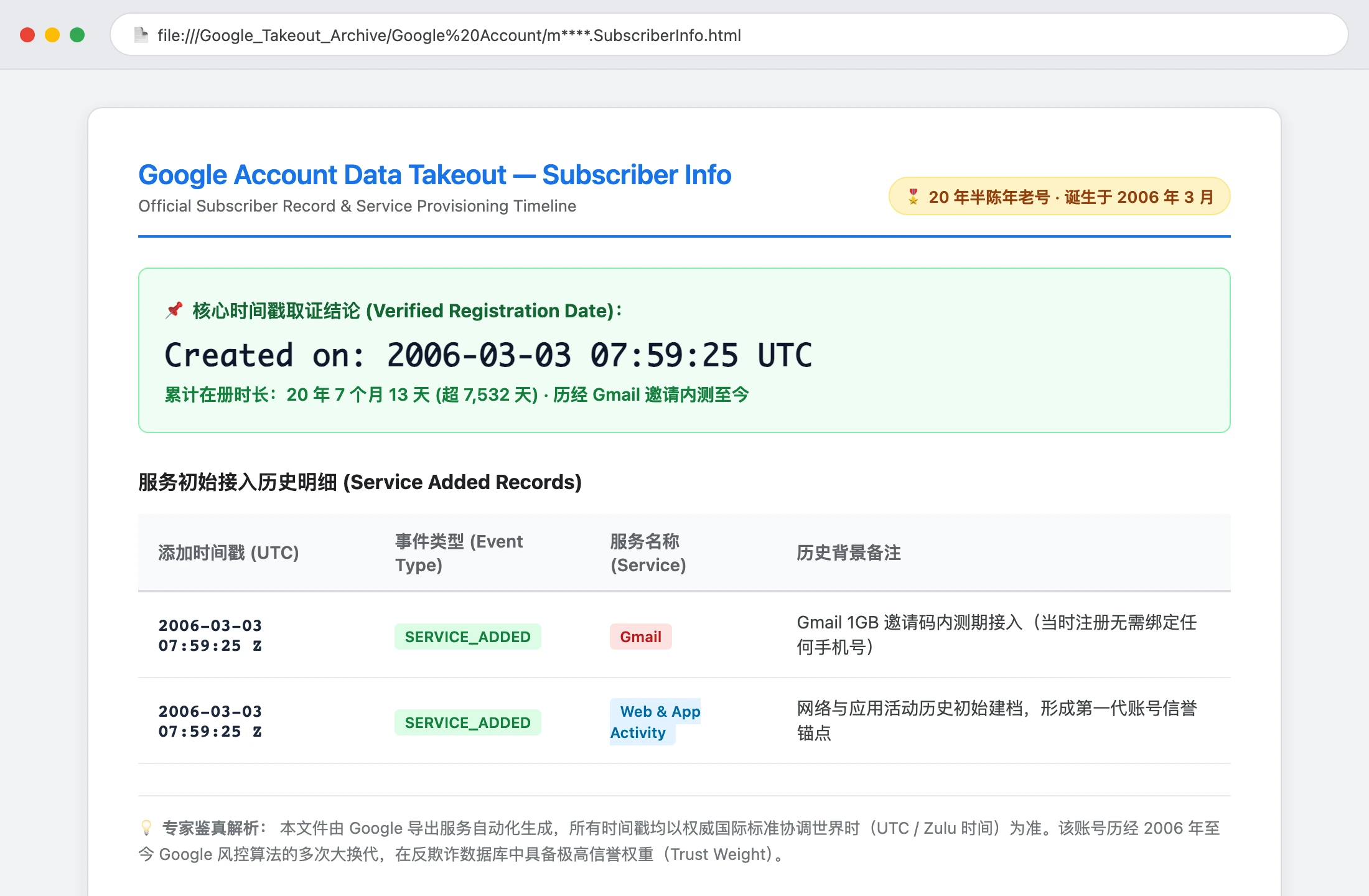
March 3, 2006!
Calculating from that moment to today, this account has quietly sailed through the digital currents of the global internet for exactly 20 years and 7 months — more than 7,532 days.
Cast your memory back to early 2006. Gmail had launched on April Fools' Day in 2004 as an exclusive, invitation-only service. In an era when Yahoo Mail offered 6MB and Microsoft Hotmail offered 2MB with annual subscription fees for upgrades, Google's 1GB of permanent free storage and silky-smooth Ajax asynchronous interface felt like alien technology arriving on Earth.
Back then, securing an invitation required scouring tech forums or receiving an invite from an early adopter friend. Yet once you had that invite URL, registration was pure and straightforward: pick a username, set a password, provide a recovery address, click submit — done! No mandatory mobile SMS verification, no endless captcha grids, and no datacenter IP firewalls!
Over two decades of continuous, clean usage, this vintage account has acquired the characteristics of fine aged Maotai liquor — the older it gets, the smoother and more resilient it becomes:
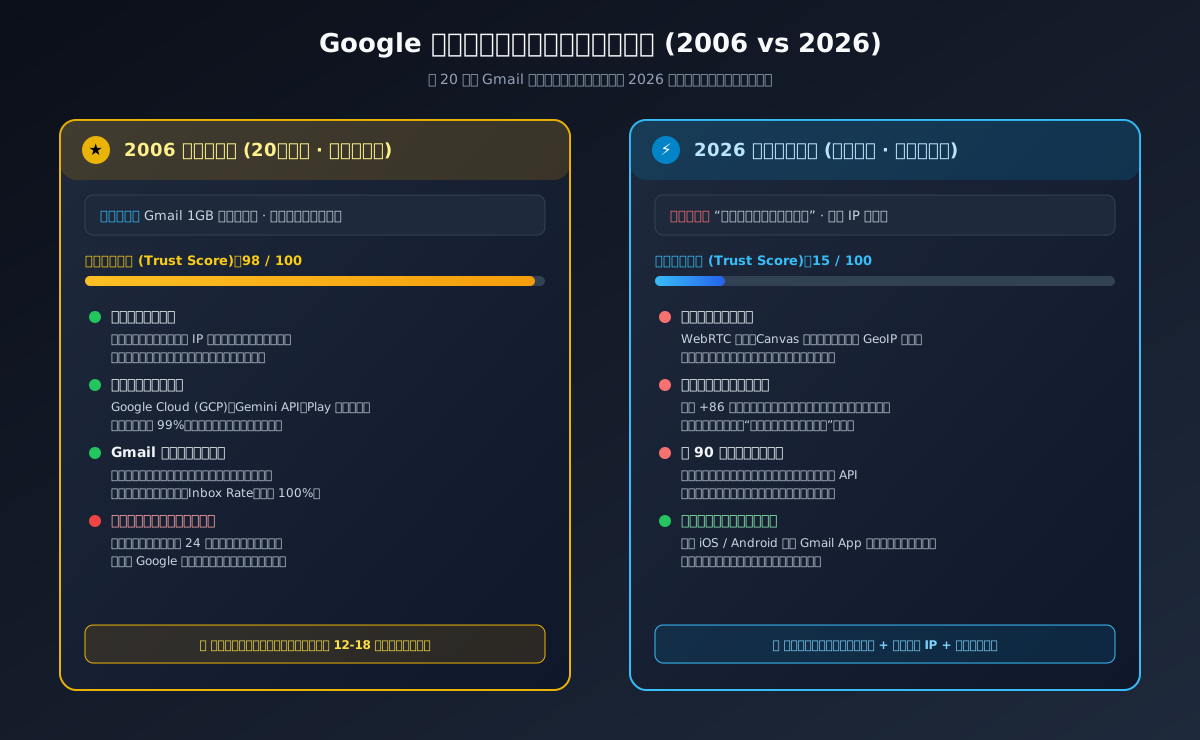
- Immunity to Routine Risk Triggers: Whether switching roaming proxies, logging in from overseas cloud nodes, or connecting via residential fiber, this 2006 account rarely triggers sudden step-up SMS challenges or security lockouts;
- Frictionless Enterprise Access: Binding credit cards for Google Cloud Platform (GCP), requesting Gemini Pro / Claude API production keys, or enrolling in Google Play Developer consoles proceeds smoothly with minimal automated flagging;
- Peak Email Deliverability: In Gmail's spam reputation matrix, twenty years of clean outbound communication yield a near-perfect domain reputation score, ensuring emails land reliably in primary inboxes rather than spam folders.
However, standing in stark contrast to this vintage trust is the brutal reality facing modern signups in 2026, alongside Google's strict enforcement of the Inactive Account Policy.
2. Problem Manifestation: The Inactivity Death Sentence vs. 2026 Registration Hell
Many tech professionals maintain multiple Google accounts across personal projects, test staging environments, and regional app stores. Today, they face two severe bottlenecks:
Bottleneck A: Google's Inactive Account Policy Deletes Unused Accounts After 2 Years
According to Google's official documentation:
Inactive Google Account Policy:
“An inactive Google Account is an account that has not been used within a 2-year period. Google reserves the right to delete an inactive Google Account and its activity and data if you are inactive across Google for at least two years.”
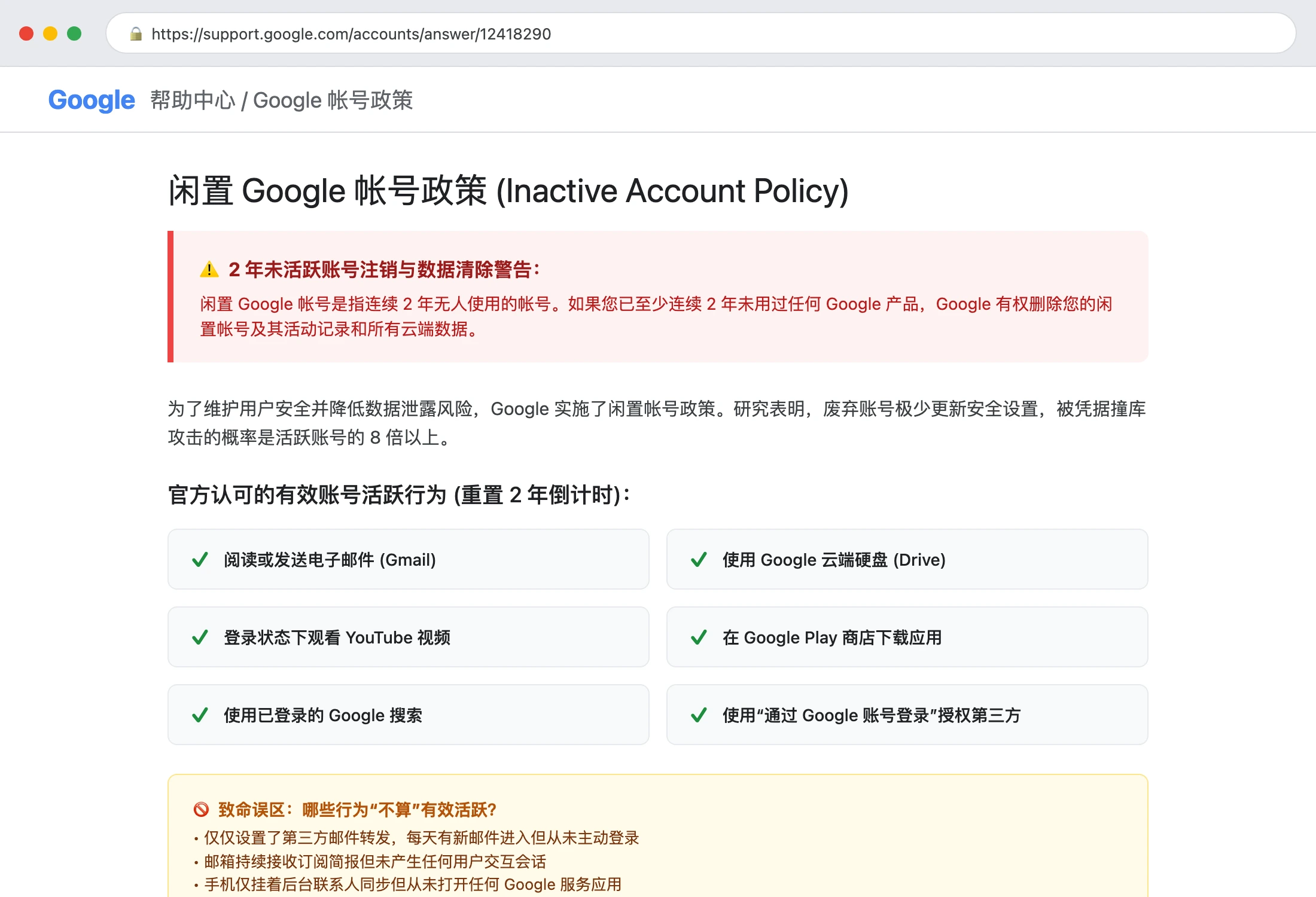
Make no mistake: this is an irreversible physical purge.
Once an account is flagged and purged, all stored emails, Google Drive documents, Google Photos backups, and third-party services linked via “Sign in with Google” are instantly obliterated. Furthermore, the deleted username is permanently retired — neither you nor anyone else can ever reclaim it.
I experienced this firsthand by losing an early secondary account from 2008. I had mistakenly assumed that having external emails forwarded into the inbox would keep it alive. When I attempted to log in months later, Google displayed the chilling response: “Could not find your Google Account.”
Bottleneck B: Modern Signup Obstacle — “This phone number cannot be used for verification”
Attempting to register a fresh Google account via a desktop browser in 2026 often triggers instant rejection:
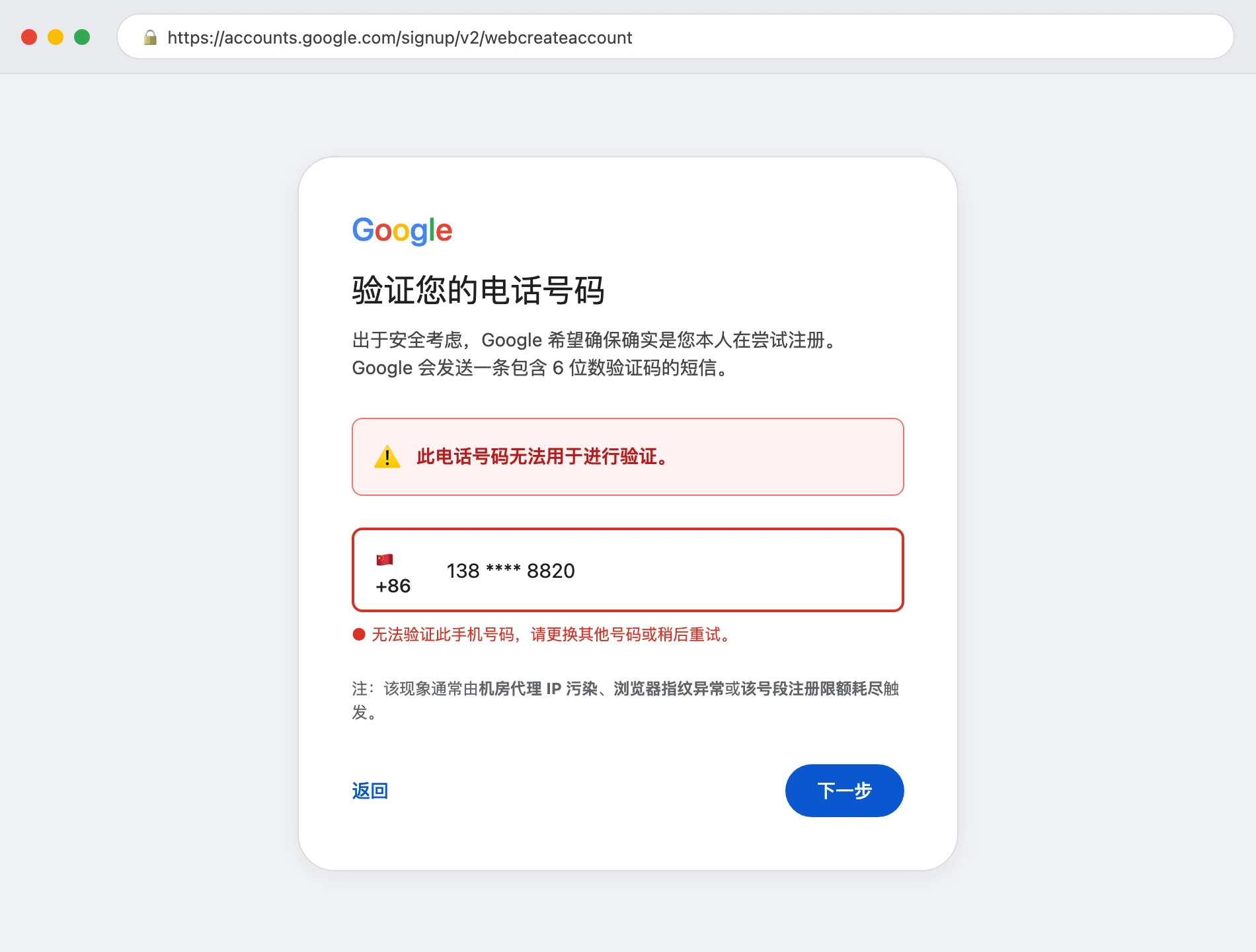
Even when using clean browser sessions, developers routinely encounter the dreaded red warning:
❌ This phone number cannot be used for verification.
Purchasing temporary virtual VOIP numbers typically results in immediate carrier identification blocks or post-registration suspensions within 24 hours.
3. Real-Life Analogies: Demystifying Google's Trust Architecture
To make these underlying security systems easily understandable for anyone, let us explore three intuitive everyday analogies:
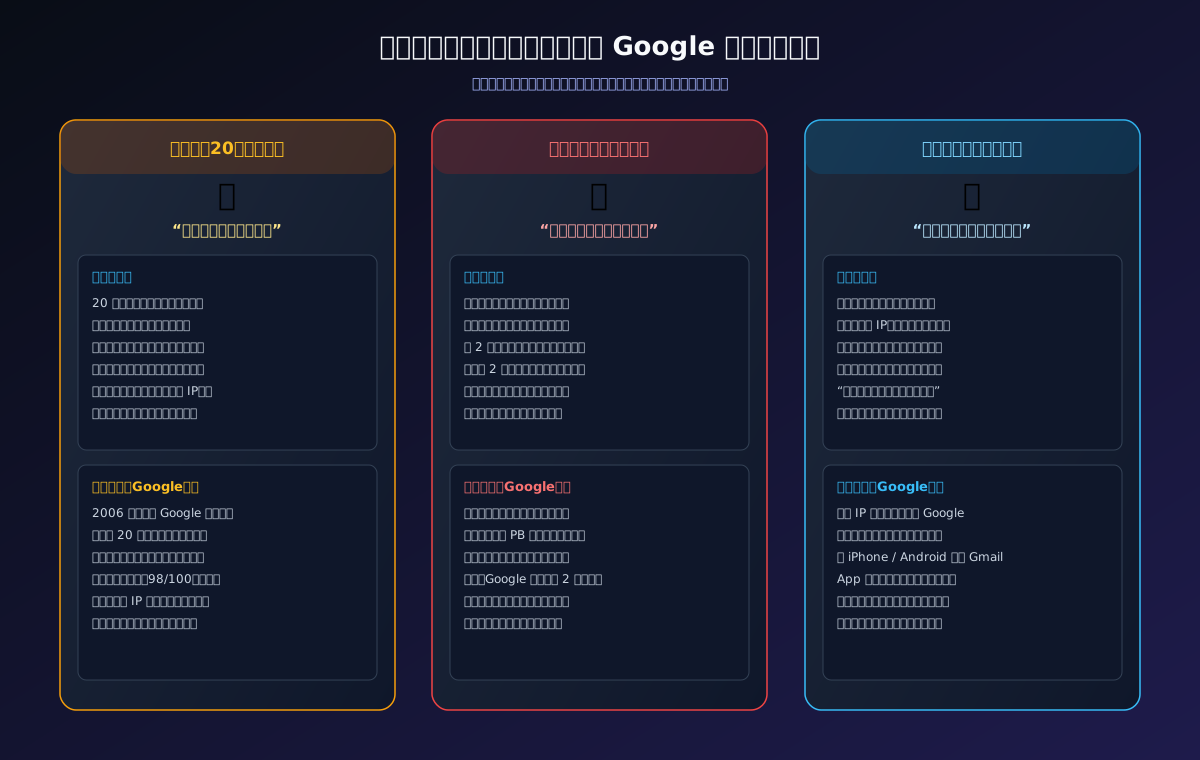
Analogy 1: 20-Year Vintage Account — “The Neighborhood Founder's Gold Key”
A 20-year-old account is like a founding resident who moved into an apartment complex the day it opened. The security guard at the gate has known you for two decades. Even if you arrive wearing sunglasses, a new coat, or driving a different car (changing IP subnets or proxies), the guard nods warmly and opens the gate without demanding three forms of photo identification.
In contrast, a 2026 web registration is treated like an unidentified visitor arriving at a secure border gate wearing a mask and holding a rented ID card. The perimeter scanners immediately trigger an alarm.
Analogy 2: The 2-Year Inactivity Policy — “The Dormitory Locker Cleanup Rule”
Google's inactivity policy operates like a university dormitory locker policy. Every student receives a complimentary locker. The housing office enforces a strict rule: “You must swipe your student ID badge at the locker at least once every two years.”
If you abandon the locker for 24 months, the manager assumes you have graduated or moved away. To free up capacity for incoming students, the manager cuts the padlock and discards the contents.
Merely having a postal worker drop newsletters into the locker's mail slot (automated email forwarding) does not count as personal presence. If you do not swipe your own card, the locker is marked abandoned.
Analogy 3: Why Mobile Apps Bypass SMS Checks — “The Official School Bus Lane”
Registering via a desktop browser resembles walking up to a restricted entrance on foot where guards must scrutinize every detail. Registering via the official Gmail App on iOS or Android is like arriving in an official school bus equipped with encrypted vehicle transponders (Apple DeviceCheck / Android Play Integrity). The guard verifies the certified vehicle hardware and allows passengers to enter without demanding secondary paper passes.
4. Technical Deep Dive: What Google's 2026 Anti-Abuse Radar Evaluates
Behind the scenes, Google evaluates several distinct dimensions during account registration and session authentication:
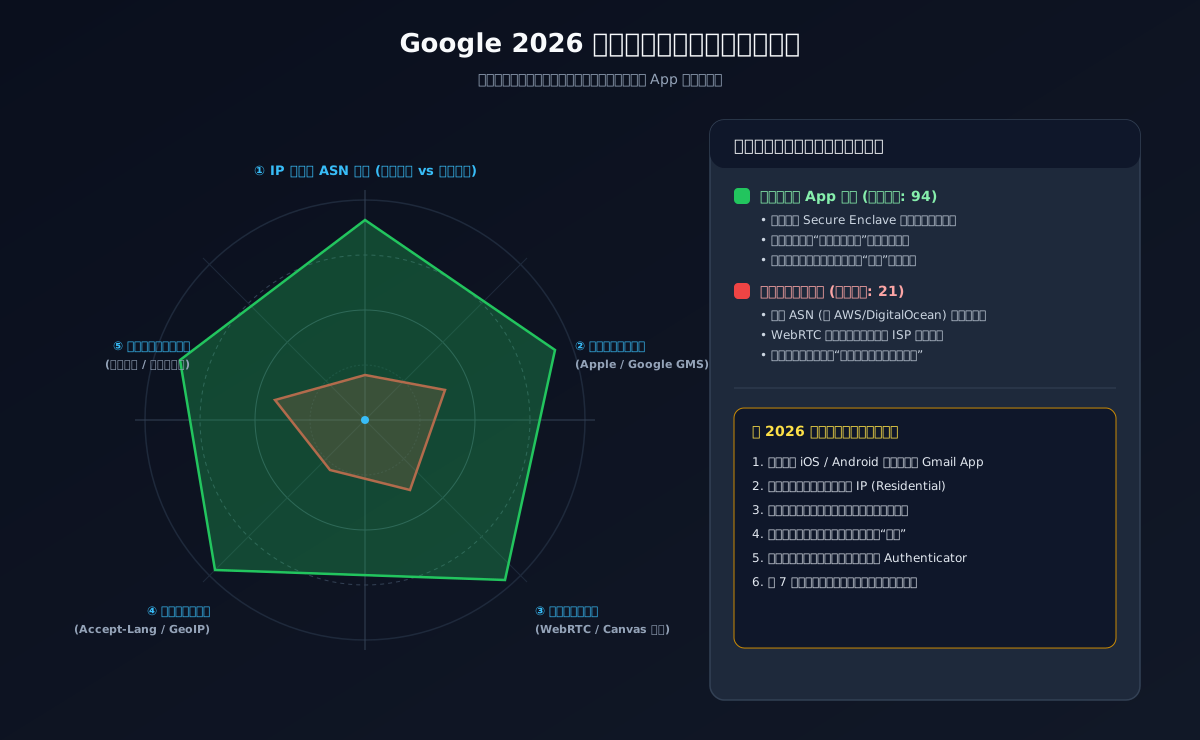
1. IP Origin and Autonomous System Number (ASN) Quality
Datacenter ranges (AWS, DigitalOcean, Linode) carry persistent Hosting classifications in fraud databases. Normal end users rarely register personal accounts from rack-mounted server hardware. Datacenter traffic immediately elevates initial suspicion scores.
2. Browser Fingerprinting and WebRTC Telemetry
Modern browser sessions expose Canvas rendering profiles, WebGL driver attributes, AudioContext hardware signatures, and WebRTC local candidate leaks. Mismatches between system timezones, Accept-Language headers, and egress IP locations flag automated generation scripts.
3. Mobile Hardware Attestation and Device Integrity
iOS devices provide hardware-backed cryptographic proofs via Apple's Secure Enclave, while Android relies on Play Integrity hardware verdicts. These physical hardware signals allow Google to grant friction-free onboarding without requiring disposable SMS verifications.
5. Hands-On Guide 1: Extracting Inception Timestamps via Google Takeout
To verify the exact birth timestamp of your own Google account, follow these seven steps:
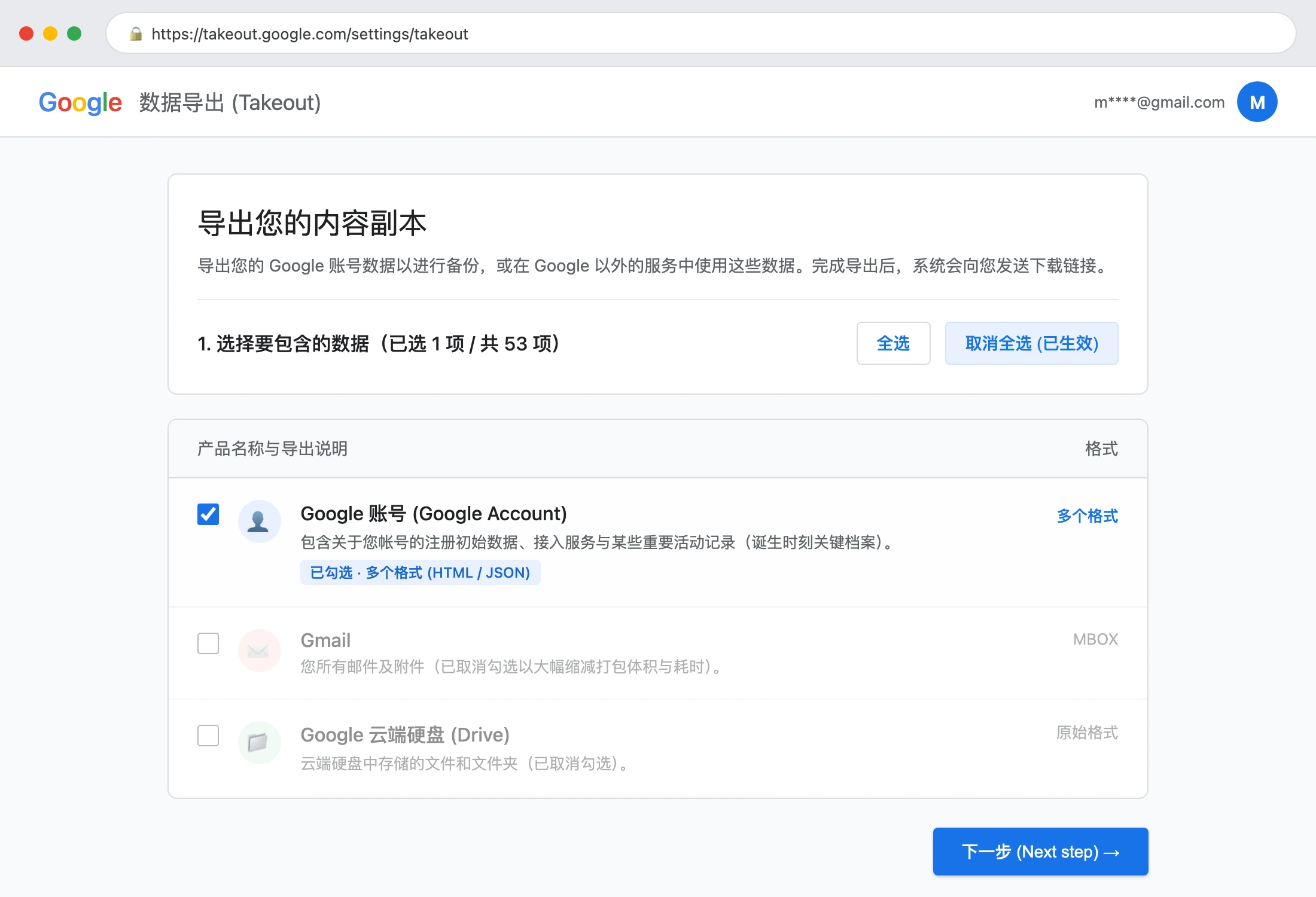
- Access the Takeout Console: Open your browser and navigate to
takeout.google.comwhile logged into your target account; - Click 'Deselect all': Google defaults to checking all active services (which could total hundreds of gigabytes). Click “Deselect all” at the top right of the product list;
- Select 'Google Account': Scroll down to locate “Google Account” (described as containing account registration data and activity records) and check its box;
- Proceed to Next Step: Scroll to the bottom and click “Next step”;
- Generate the Archive: Keep the defaults (delivery via email link, one-time export, .zip format) and click “Create export”;
- Download Archive: Because the account metadata is lightweight, compilation takes between 15 seconds and 2 minutes. Download the resulting
takeout-*.zipfile; - Inspect SubscriberInfo.html: Extract the archive, navigate to
Takeout/Google Account/, and open*.SubscriberInfo.htmlin any web browser. TheCreated on:field records the exact UTC birth timestamp of your account!
6. Hands-On Guide 2: Inactivity Survival and Compliance Keepalive
To protect valuable accounts from the 2-year deletion rule, understand what constitutes valid activity:
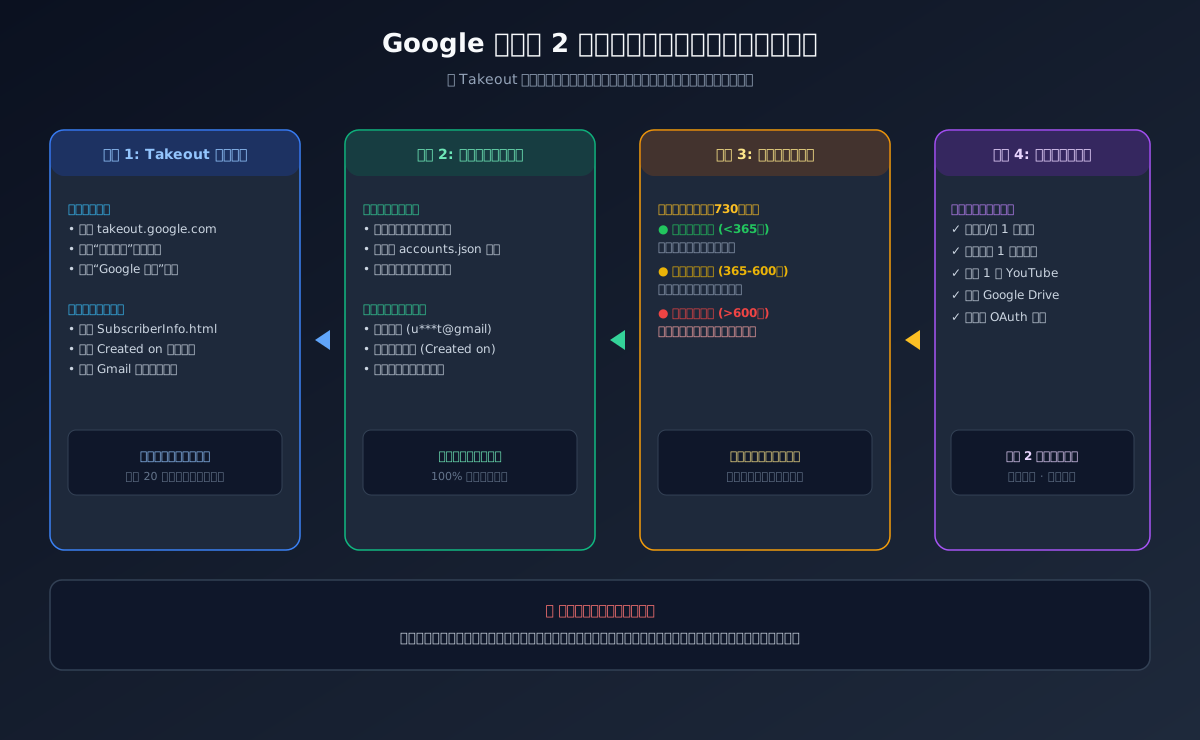
Recognized Qualifying Activities (Resets the 2-Year Timer)
- Reading or sending an email via Gmail web or mobile app;
- Accessing Google Drive to view, upload, or modify a file;
- Watching a YouTube video while authenticated;
- Installing or updating an application via Google Play Store;
- Performing an authenticated Google Search;
- Authorizing a third-party application using “Sign in with Google”.
Non-Qualifying Actions (Does NOT Reset the Timer)
- ❌ Receiving forwarded emails without active user login;
- ❌ Background client sync on disconnected or idle devices;
- ❌ Modifying domain DNS records without account authentication.
7. Hands-On Guide 3: 2026 Registration Workaround for Phone Verification
When encountering the phone verification wall on desktop browsers, use this battle-tested mobile onboarding path:
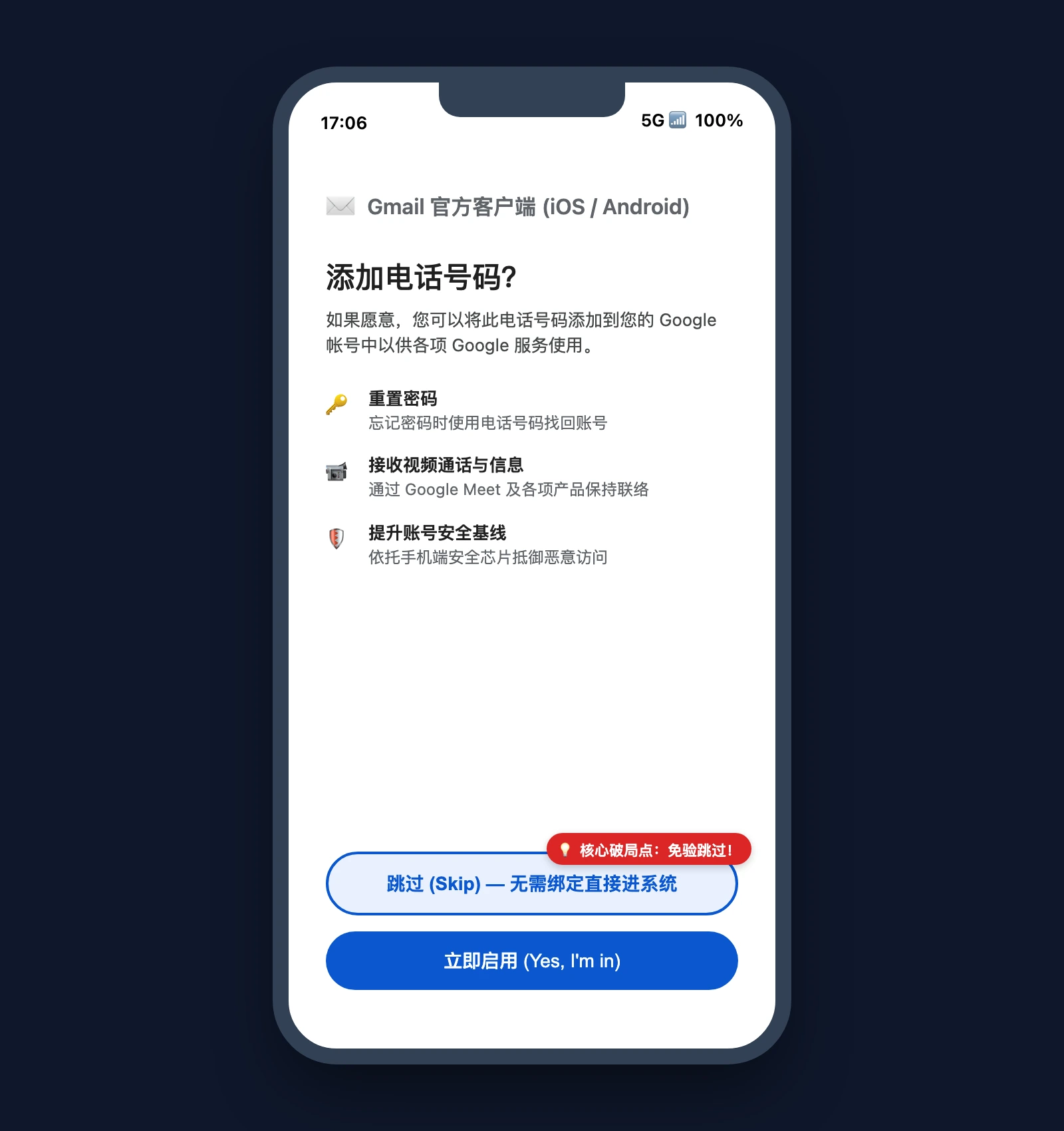
The iOS / iPadOS Gmail Native Bypass
- Install the official Gmail App from the Apple App Store on an iPhone or iPad;
- Connect via a clean residential proxy or trusted Wi-Fi network;
- Set the iOS language to English and align system region and timezone with your egress country;
- Open Gmail, tap the profile icon, select “Add another account”, choose “Google”, and tap “Create account (For my personal use)”;
- Input realistic personal details and select your desired username and strong password;
- When presented with the “Add phone number?” screen, locate the “Skip” button in the lower-left corner. Tap “Skip” to finalize registration without SMS binding;
- Immediately configure a third-party recovery email and enable an authenticator app via
myaccount.google.com/security.
8. Cross-Platform Automation Suite (Windows 11 / Ubuntu 26.04 / macOS 27)
To eliminate manual tracking errors, we provide a zero-dependency, open-source multi-account health audit and keepalive suite.
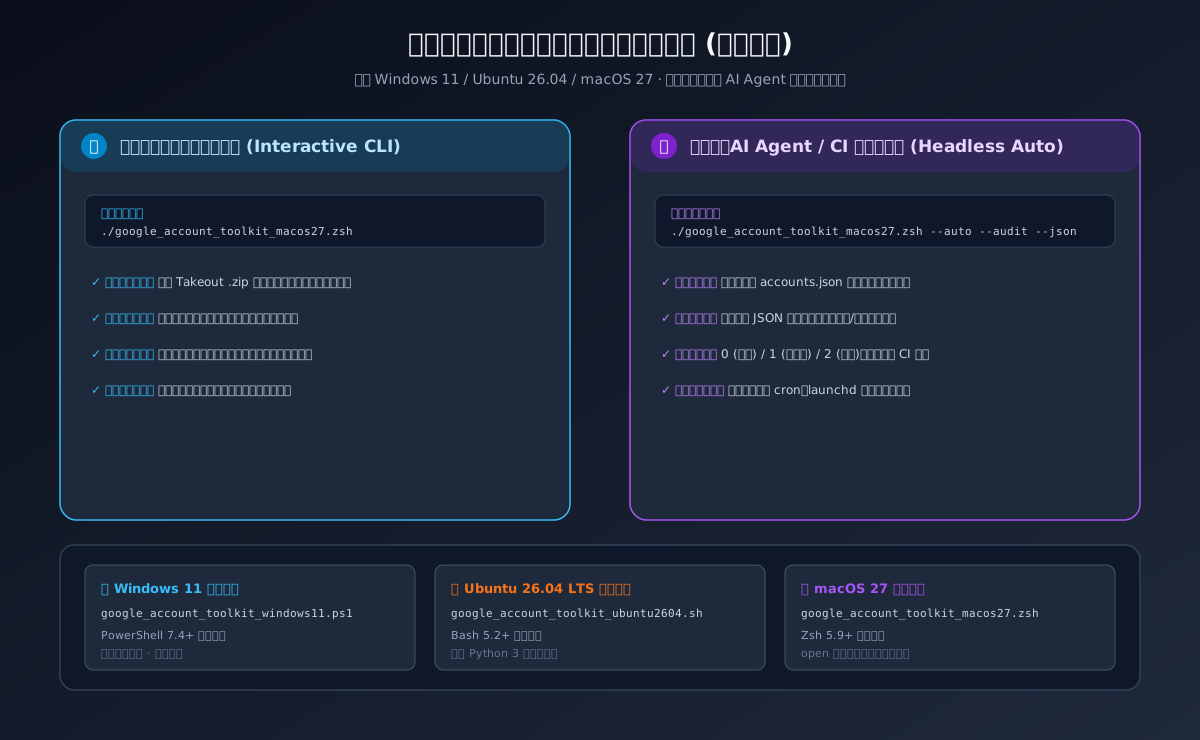
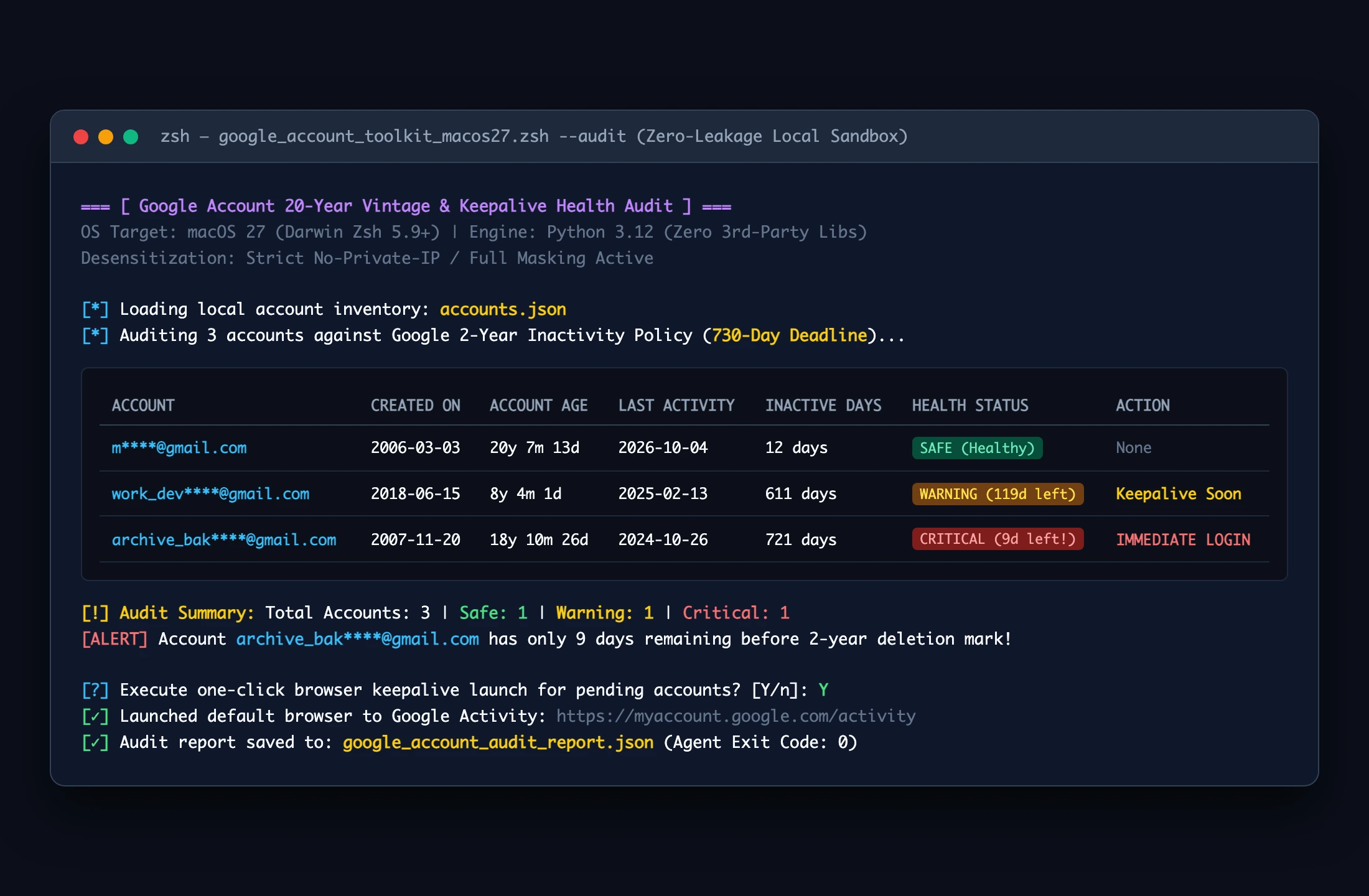
1. macOS 27 Zsh Edition (google_account_toolkit_macos27.zsh)
# Interactive Human Mode
chmod +x google_account_toolkit_macos27.zsh
./google_account_toolkit_macos27.zsh
Headless AI Agent Mode
./google_account_toolkit_macos27.zsh –auto –audit –json
2. Ubuntu 26.04 LTS Edition (google_account_toolkit_ubuntu2604.sh)
# Interactive Audit
chmod +x google_account_toolkit_ubuntu2604.sh
./google_account_toolkit_ubuntu2604.sh
Headless CI Execution
./google_account_toolkit_ubuntu2604.sh –auto –audit –json
3. Windows 11 PowerShell 7 Edition (google_account_toolkit_windows11.ps1)
# Interactive Execution
.\google_account_toolkit_windows11.ps1
Declarative Agent Invocation
.\google_account_toolkit_windows11.ps1 -Auto -Audit -Json
4. Toolkit Downloads and Integrity Hashes
- 📦 Full Package Download: google-account-keepalive-toolkit.zip
- 🔐 SHA-256 Checksum Manifest: SHA256SUMS.txt
9. Frequently Asked Questions (Q&A)
Q1: Is there a grace period after the 2-year inactivity mark?
A: Google sends warning notices to the primary and recovery email addresses months prior to deletion. However, once an account enters the automated purge pipeline, deletion is final and cannot be halted by customer support.
Q2: Can I use automated cron jobs calling SMTP to keep accounts active?
A: Strongly discouraged. Programmatic, repetitive SMTP activity from fixed server IPs frequently triggers anti-spam anomaly detection, risking account suspension. The safest method is an authentic user session in a standard browser or mobile app every 6 to 12 months.
Q3: Can virtual VOIP numbers (like Google Voice) register new accounts?
A: Typically no. Google's carrier classification databases distinguish between virtual VOIP numbers and genuine mobile carrier SIMs. Physical cellular numbers are required when SMS verification is triggered.
10. Conclusion
From the revolutionary 1GB launch in the early 2000s to today's AI-driven computing era, a 20-year-old Google account serves as a living chronicle of personal internet history.
Vintage accounts grow more valuable through accumulated trust, while fresh accounts face high defensive hurdles. Take a few minutes today to check your account's creation date via Takeout, verify your recovery channels, and ensure your historic digital assets remain protected against the 2-year inactivity purge.