Hackintosh core graphics or non-core graphics processor, how to modify the OpenCore configuration file
Note: The following is only for models with similar configurations, that is, 9th generation
IntelCPUs. Please avoid other models.
IMPORTANT NOTE
- The configuration in
OpenCorebinary is in reverse order, such as the followingplatform-id. If you need to modify other models, you need to fill inplatform-idin reverse order. - Here is
Coffee Lake帧缓冲区补丁及UHD630 Coffee Lake ig-platform-id数据整理compiled by黑果小兵 - Here is
黑苹果必备:Intel核显platform ID整理及smbios速查表compiled by黑果小兵
General instructions: How to modify the three codes
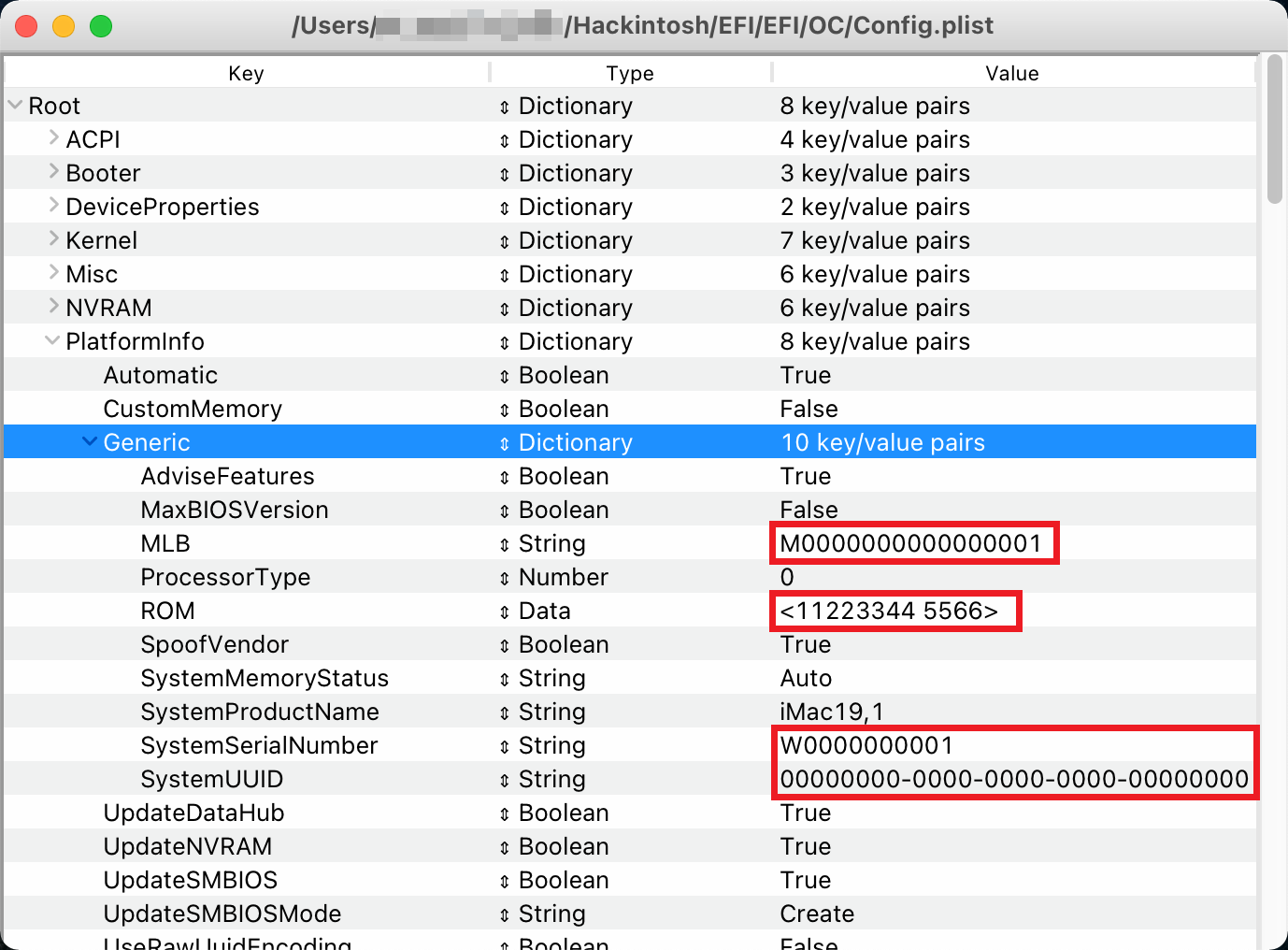
After downloading the entire package, if you have used the iMac19,1 model before in Clover, you can directly use the previous three codes, or use Clover Configurator (other tools are also available) to select the iMac19,1 model to generate a new three codes + ROM, use ProperTree to open the /EFI/OC/config.plist file, and fill it in the PlatformInfo > Generic location (as shown below).
There is nuclear display, there is independent display
- Fill in the
iMac19,1model number + ROM information to the/EFI/OC/config.plistfilePlatformInfo > Generic. - Manually change
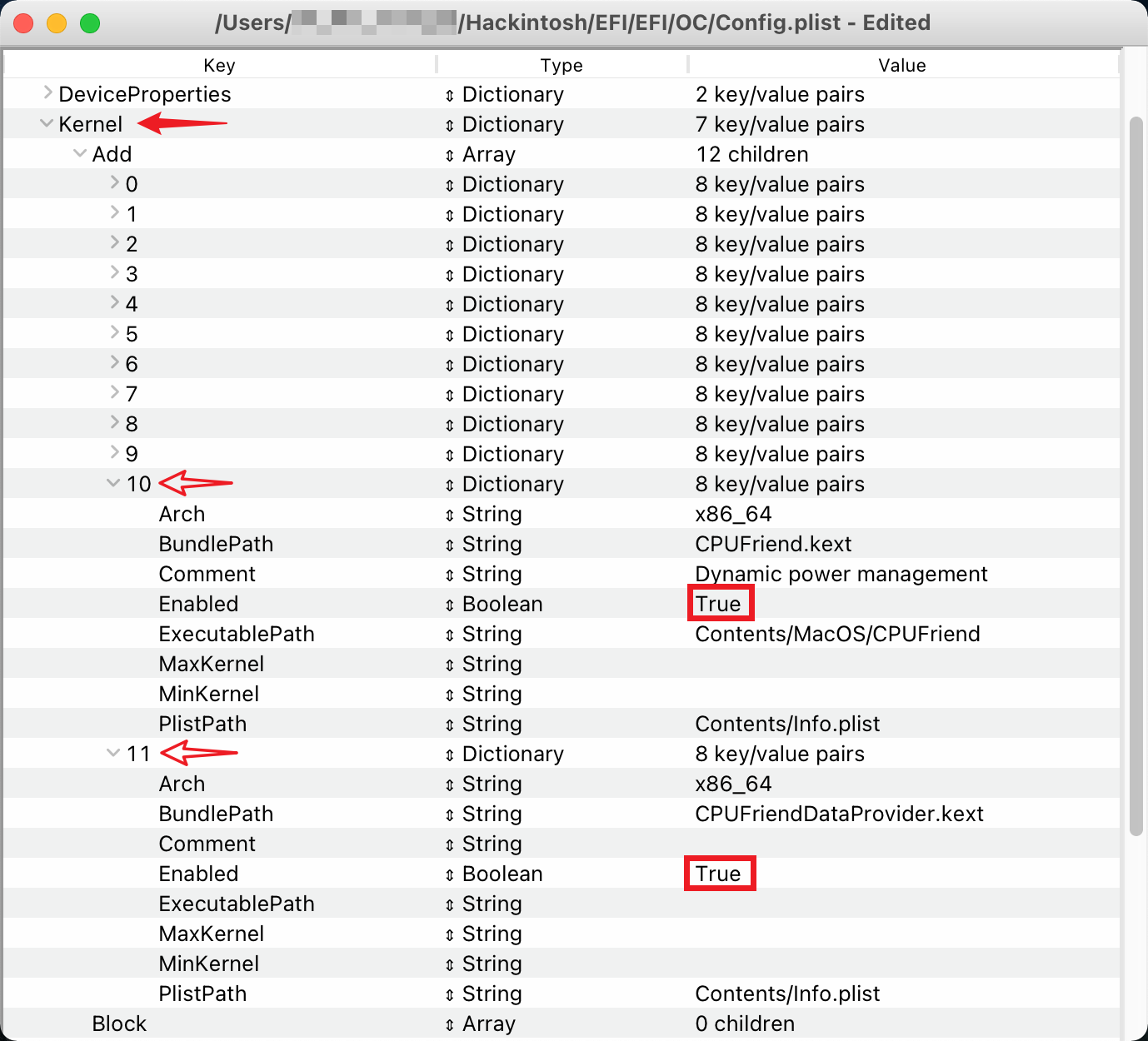
Tureof Enabled in/EFI/OC/config.plistfile Kernel > Add > 10 and 11 toFalse(as shown below). The default is the HWP frequency conversion file dedicated to 9600K, which cannot be enabled for other processors!
After saving, test boot through USB first. If there is no problem, place the EFI folder to the EFI partition of the startup disk and restart the computer.
No core display, independent display
-
Fill in the
iMacPro1,1model number + ROM information to the/EFI/OC/config.plistfile PlatformInfo > Generic, and change the model toiMacPro1,1. -
Manually change the
Tureof Enabled in the/EFI/OC/config.plistfile Kernel > Add > 10 and 11 toFalse. Since theiMacPro1,1model does not support HWP frequency conversion, you can also delete these two entries and related kext files directly. -
Delete the
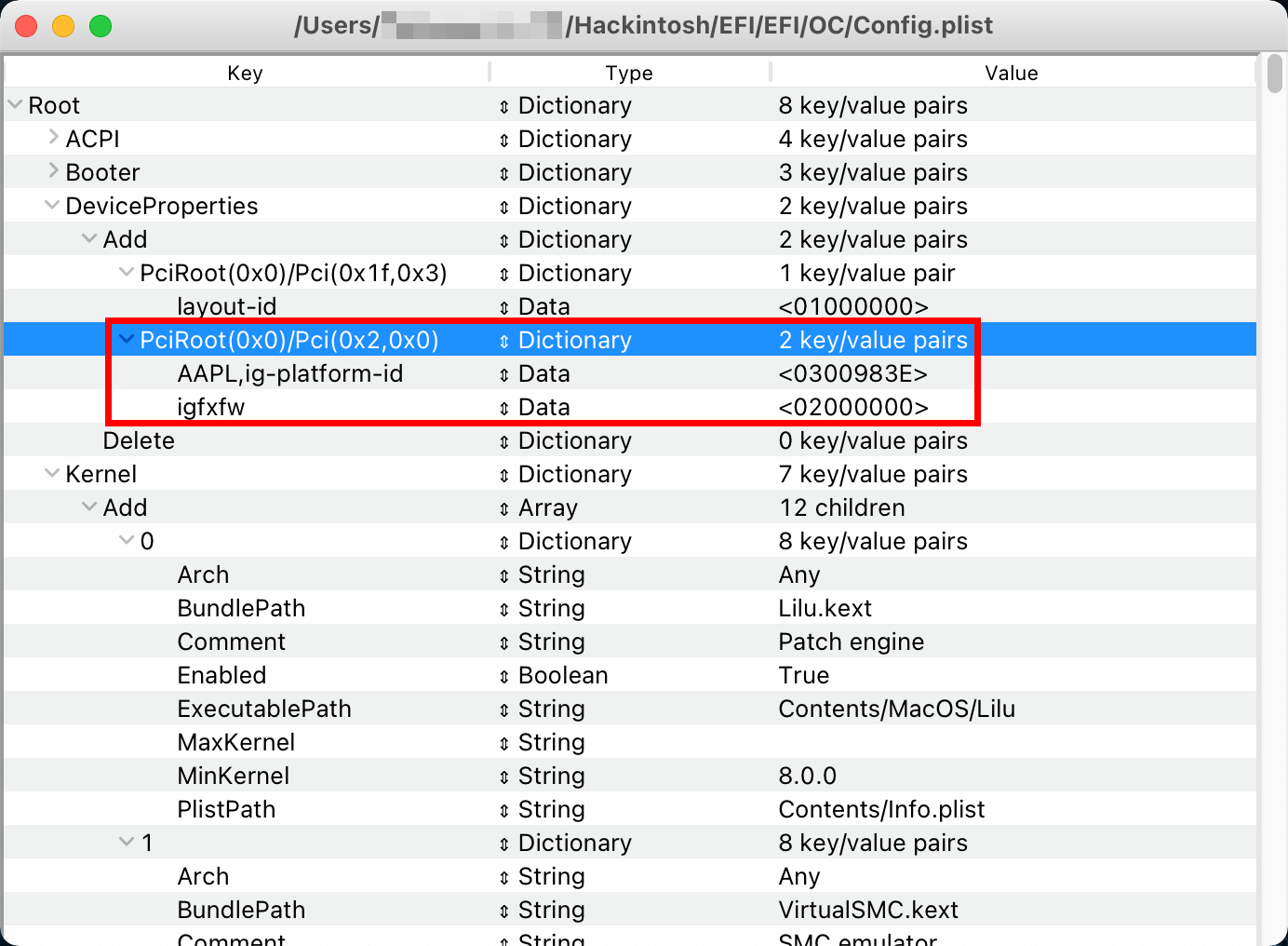
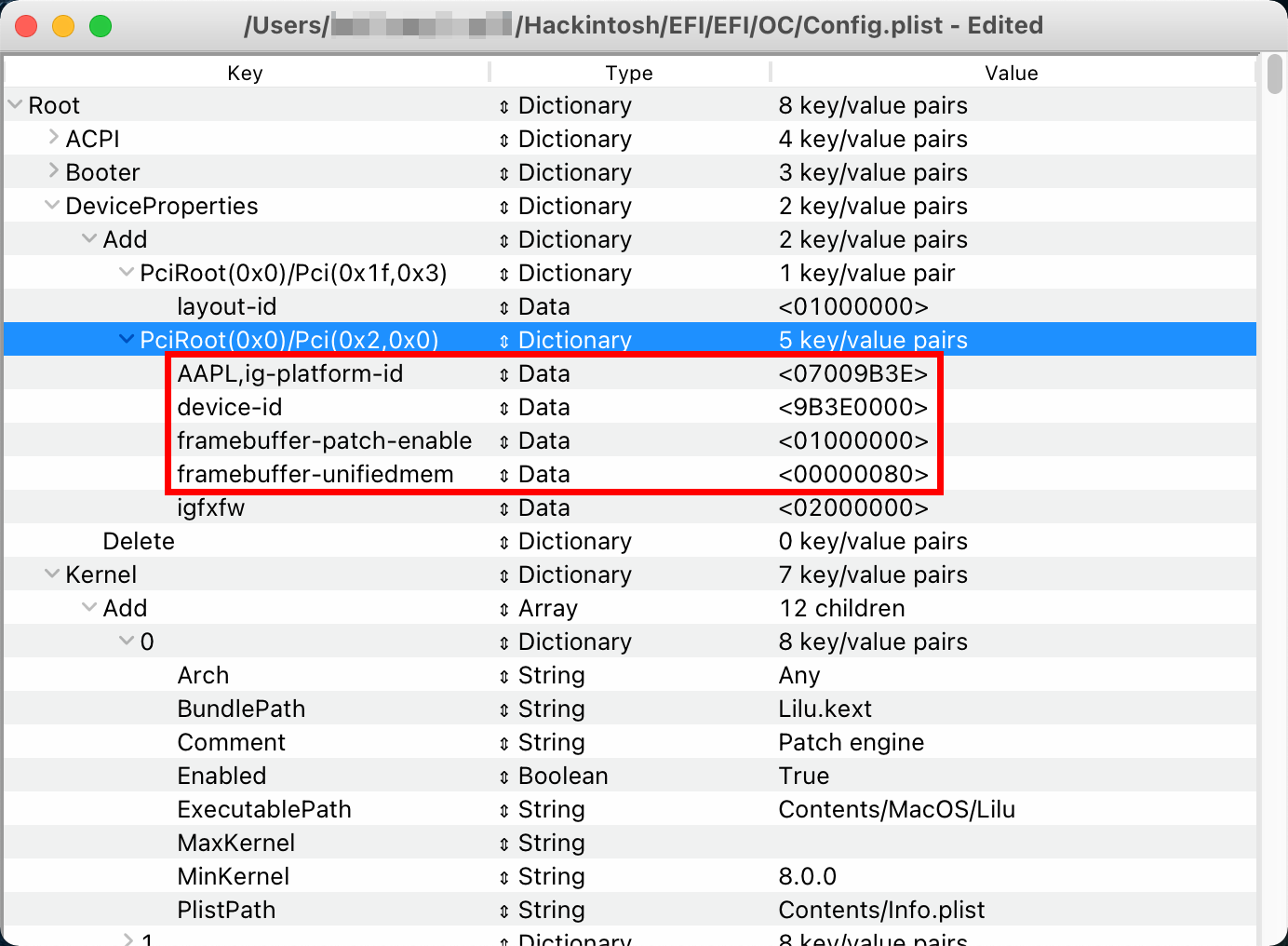
AAPL,ig-platform-idline parameter in the/EFI/OC/config.plistfile DeviceProperties > Add > PciRoot(0x0)/Pci(0x2,0x0) (as shown below). -
Right-click the
/EFI/OC/Kexts/USBPower.kextfile - display the package content, enter theContentsfolder, open theInfo.plistfile, and change the model toiMacPro1,1(as shown below).
After saving, test boot through USB first. If there is no problem, place the EFI folder to the EFI partition of the startup disk and restart the computer.
There is nuclear display, no independent display
- Fill in the
Macmini8,1model number + ROM information to the/EFI/OC/config.plistfile PlatformInfo > Generic, and change the model toMacmini8,1. - Using a non-
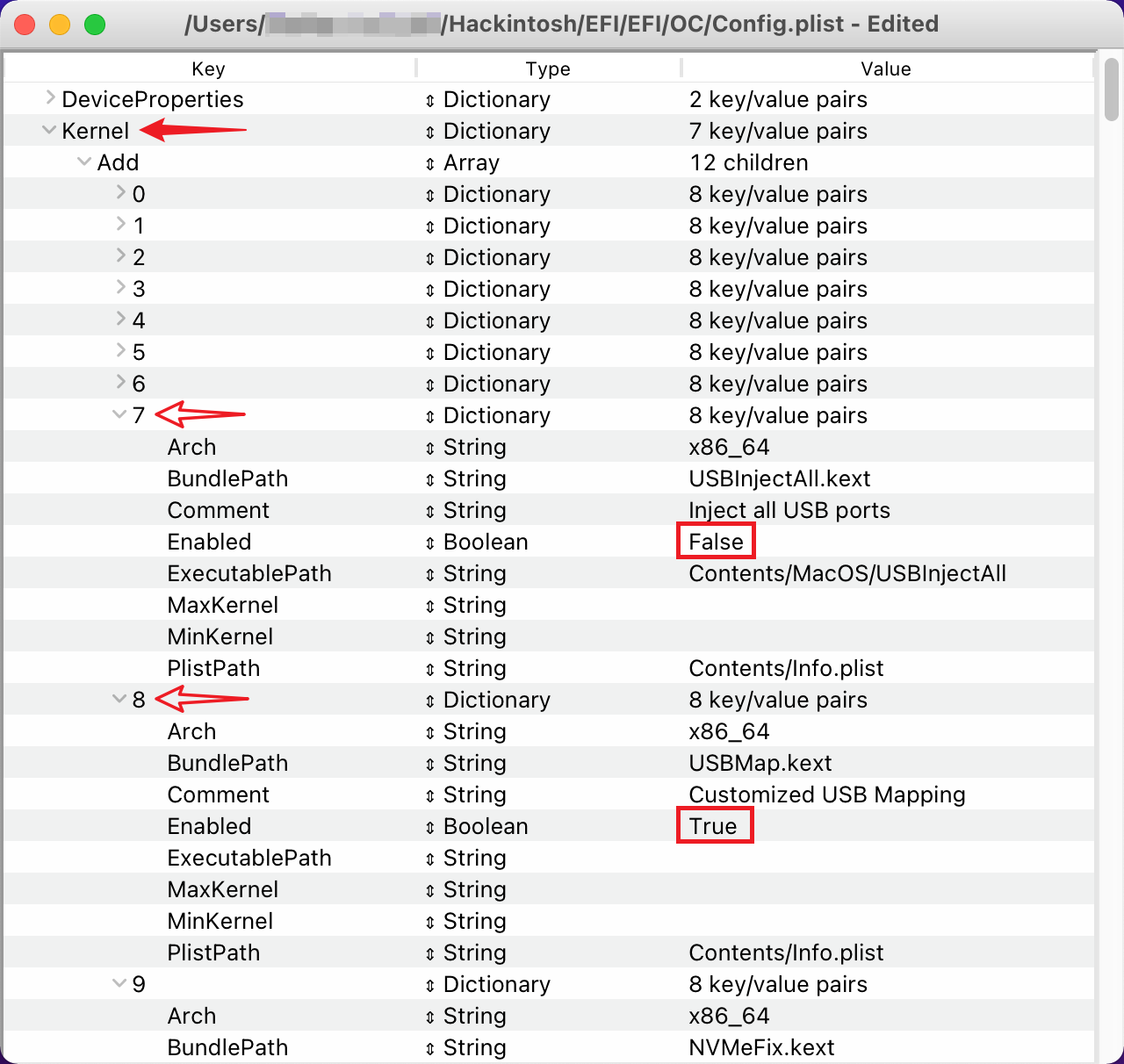
9600Kprocessor, manually change theTureof Enabled in the/EFI/OC/config.plistfile Kernel > Add > 10 and 11 toFalse.Macmini8,1 机型支持 HWP 变频,对于非9600K` The processor can customize the HWP conversion file later. - Modify the
/EFI/OC/config.plistfile under DeviceProperties > Add > PciRoot(0x0)/Pci(0x2,0x0), theAAPL,ig-platform-idparameter is07009b3e, and add theframebuffer-unifiedmemparameter to00000080(as shown below). - Right-click the
/EFI/OC/Kexts/USBPower.kextfile - display the package content, enter theContentsfolder, open theInfo.plistfile, and change the model toMacmini8,1.
After saving, test boot through USB first. If there is no problem, place the EFI folder to the EFI partition of the startup disk and restart the computer.
- **What should I do if the Apple logo does not display properly when I turn on the computer? **
There are two ways to solve this problem.
Method 1: Fill in the correct display resolution in the
/EFI/OC/config.plistconfiguration file UEFI > Output > Resolution; Method 2: Set the BIOS “STTINGS\Boot\Full Screen Logo” to [Allow]. You can choose one of the two methods. If used at the same time, the startup logo will still be displayed abnormally. Originally, method two was recommended (it will be slightly faster than method one to enter the system login interface). However, after repeated testing, it was found that if “Windows 10 WHQL support” is turned on in the BIOS, using method two may cause the Apple logo to be lost when shutting down and restarting. Please test and choose the method that suits you~~. P.S. If you are using a monitor with 2K resolution or below and cannot turn on HiDPI, you need to set the configuration file NVRAM > Add > 4D1EDE05-XXXX > UIScale to01. - **What should I do if I cannot enter sleep state normally? **
What we know so far is that
bugOSmacOS 10.15.2 to 10.15.4 (including supplementary updated versions) all have sleep-related bugs. If you still cannot enter sleep normally after using the latest EFI, please try to go to “System Preferences - Security and Privacy - Privacy - Location Services” to turn off “Siri and Dictation”, and try to turn off the location permission in “System Services”. Some machines need to set the/EFI/OC/config.plistfile Config > Kernel > Quirks > PowerTimeoutKernelPanic to True/Yes to sleep normally. The reason is not clear yet (same model motherboard, same version BIOS). - **Why is it recommended to have a CPU with integrated graphics? ** First of all, macOS Catalina natively supports 4K dual hardware resolution with a minimum independent graphics card of RX VEGA⁵⁶, while seventh-generation and later Core processor core graphics can work with independent graphics cards lower than RX VEGA⁵⁶ to complete 4K dual hardware resolution; Secondly, because Heiguo does not have a T2 chip, Heiguo without a nuclear display cannot use the sidecar function.
- **Why is it so difficult to trigger native shortcut keys during the boot process? ** I have also been troubled by this problem for a long time. I tried various configuration combinations before OC 0.5.5, but none of them could be triggered. However, after OC was updated to 0.5.5, the native shortcut keys can be triggered during the boot process by setting the TakeoffDelay parameter. It is recommended to hold down the key combination during startup, or keep pressing the key combination again when the keyboard light is on. You can adjust the TakeoffDelay parameter yourself.
- **What should I do if the NVMe hard drive temperature is too high? **
Generally speaking, the temperature of a hard disk with faster read and write speeds tends to be higher, so there is no need to worry too much. However, if the temperature exceeds 50℃ in standby mode or you think the temperature of the hard disk is abnormal, you can try loading NVMeFix to solve the problem.
Put NVMeFix.kext into the
/EFI/OC/Kexts/directory, open/EFI/OC/config.plist, and add NVMeFix.kext at Kernel > Add (refer to how to add other kexts). - **Can I watch DRM media such as Apple TV+ / Netflix? ** Thanks to the function of WhateverGreen, after adding the shikigva=80 startup parameter, machines with independent graphics cards can directly use the tv application and watch Apple TV+. It also supports Safari hard decoding to watch streaming media such as Netflix/Amazon Prime. In versions prior to macOS 10.15.4, most graphics cards of RX 4XX/5XX cannot use Safari to hard-decrypt DRM (showing a frozen screen). However, this problem has been fixed in 10.15.4, and you can directly upgrade the system. *Note: Due to the lack of Apple Firmware, iGPU cannot hard decode DRM, so machines without independent graphics cannot watch DRM media. *
- **What should I do if the sleep wake-up function is abnormal after updating OC 0.5.7? ** You can refer to this Issue to try to solve it.
- **Why is the startup item high priority function in OC 0.5.9 not enabled? **
After testing, turning on this function may cause the problem of being unable to set up the “Startup Disk”, and it is not enabled by default. To enable this feature, please set the configuration file Misc > Security > BootProtect to
Bootstrap(turn off and fill inNone). - **How to use macOS Big Sur 11? ** Please confirm that your OpenCore has been updated to version 0.6.1 or above, and all Kexts have been updated to the latest version. Set the configuration file Kernel > Quirks > DisableLinkeditJettison to True/Yes.
- To be updated
Conclusion
After completing the above steps, you basically have a black Apple device that is 99% complete. For more screenshots, please see 截图预览. Black fruit is different from white fruit. There may be problems with the compatibility of various patches and new systems. Once it is stable, don’t chase new ones too fast. It’s not too late to upgrade after being tested and improved by various big guys.
Acknowledgments
osx86zh (Telegram discussion group)