674 Entities, 157 “Unavailable”: Two Days of Giving Home Assistant a Proper Cleanup with Agents
A smart home can become strangely difficult to use. Every room has sensors, every appliance has an integration, yet opening the dashboard still leaves you wondering where the right switch went.
On October 25, 2026, I asked an Agent to perform a read-only audit of my Home Assistant installation. It found 674 state entities, 157 marked unavailable, and 126 with unknown states. Weather had stopped producing useful data. Old automations referenced sensors whose physical purpose had changed. A retired robot vacuum still had an entire configuration surrounding it.
Over the following day, appliances, electricity data, wireless networking and infrastructure monitoring joined the system. Connecting them was only part of the work. Their capabilities needed useful places: everyday controls within reach, faults somewhere visible, and a sensible explanation when an action was temporarily unavailable.
This is the account of that cleanup, including several things that looked finished until a different acceptance check revealed another problem.

Figure 1: An original illustration. The numbers describe the initial audit; entity counts continued to grow as more capabilities were added.
1. Everything was connected. Finding it was the problem.
Years ago, I wrote about reminding the household when a door stays open and installing HACS. The practical questions then were whether a device could be connected and whether an automation would execute.
Over time, several generations of configuration accumulated. There were old dashboards, newer integrations, duplicate ways to reach the same equipment, and devices whose configuration survived their retirement.
Think of a household drawer. Putting a charging cable into it makes sense. So does adding scissors, receipts and spare keys. Eventually, all those individually reasonable decisions produce a drawer that nobody can use comfortably.
The drawer is not broken. Some of its contents may be, but the first problem is the effort required to find anything.
The audit therefore separated two questions: whether the devices and automations worked, and whether the interface made them easy to use. Both needed attention. A different theme would address only a small part of the second question.
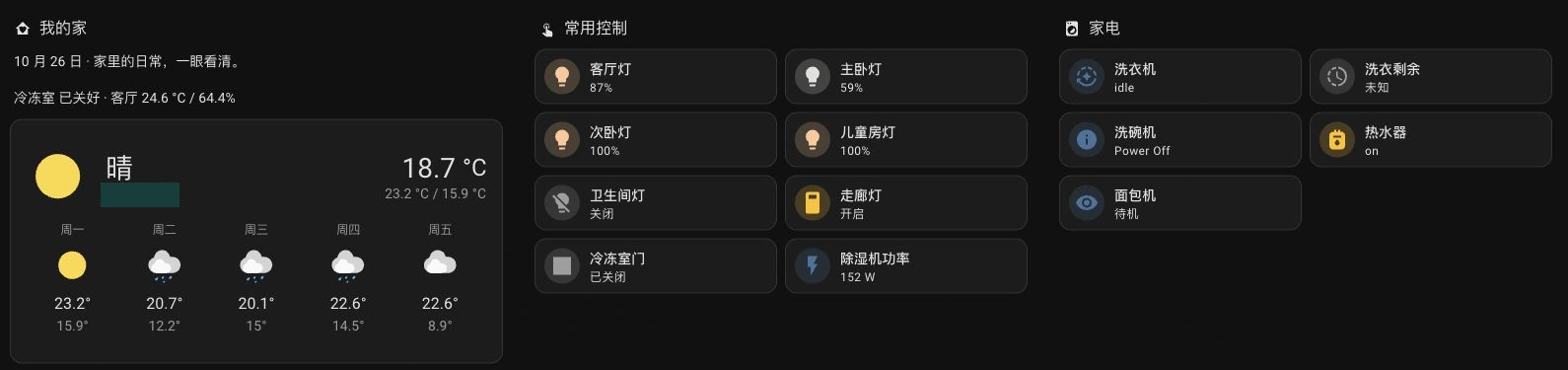
Figure 2: The actual running dashboard. Mobile readers see a separately captured phone-width view. Location details are covered with opaque redactions. Screenshots were cropped and redacted; no replacement states were invented. Click the desktop image to enlarge it. The installation’s interface language is Chinese.
2. Why deleting every unavailable entity would have been a mistake
It is tempting to ask an Agent to remove every grey entry until the dashboard stops complaining. The audit showed why that would be a poor deletion rule.
| Initial observation | Count | What it actually means |
|---|---|---|
| State entities | 674 | One device can produce many entities; this is not a device count |
| Unavailable states | 157 | Unavailable now; investigate the source and intended use |
| Unavailable with a restored marker | 139 | Restored placeholders; some may be remnants, others may await a recovering integration |
| Unknown states | 126 | No displayable state does not automatically mean a fault |
| Buttons among the unknown states | 86 | Many buttons provide an action without a lasting state |
A phone provides a simple analogy. When no call is active, there is nothing to hang up. An unavailable hang-up action would be entirely reasonable.
The bread maker behaved similarly. While idle, it had no yogurt program to cancel. While running, starting another program or editing its duration might be unavailable. Those states described the device’s operating conditions.
Deleting on the basis of a state string could remove a capability that should remain.

Figure 3: Similar-looking states can call for completely different actions. A restored marker is evidence to investigate, not sufficient permission to delete.
After I confirmed the vacuum had been retired, its 17 registered entities, unattended-cleaning automation and two scripts were removed. Another cleanup removed 133 restored placeholders and disabled 12 unavailable entries that their integrations would otherwise keep generating. Those are overlapping operation sets, so the figures should not be added into a grand deletion total.
The bread maker’s conditional controls remained in its device details. Its everyday dashboard showed operating state, fault information and temperature. The history database was preserved.
The source of unwanted entities also mattered. Removing an entry without changing the integration that discovers it can produce a very short-lived cleanup: the next restart brings it back. The retired device was excluded at its source and checked again after restarting.
3. Find a room first. Manage the system separately.
The first version of the new dashboard had four main entries: overview, rooms, environment and management.
As networking, infrastructure, computers and AI quota information were added, they followed the same information structure. Everyday use got a clear entry point; specialist details went into their own views. Someone looking for the kitchen light should not have to know its protocol or gateway.
| Layer | Question it answers | Content |
|---|---|---|
| Overview | How is the home doing now? | Weather, freezer door, common lighting, appliance summaries |
| Rooms | Which room do I want? | Seven rooms, their temperature and humidity, and device entry points |
| Environment and topics | Why is something happening? | History, electricity, Wi-Fi and infrastructure details |
| Management | How do I maintain the system? | Entities, integrations, automations, logs, backups and low batteries |
This is much like labeling drawers “kitchen” and “bedroom,” while keeping a separate toolbox. The tools remain available. They simply do not need to cover the dining table every day.
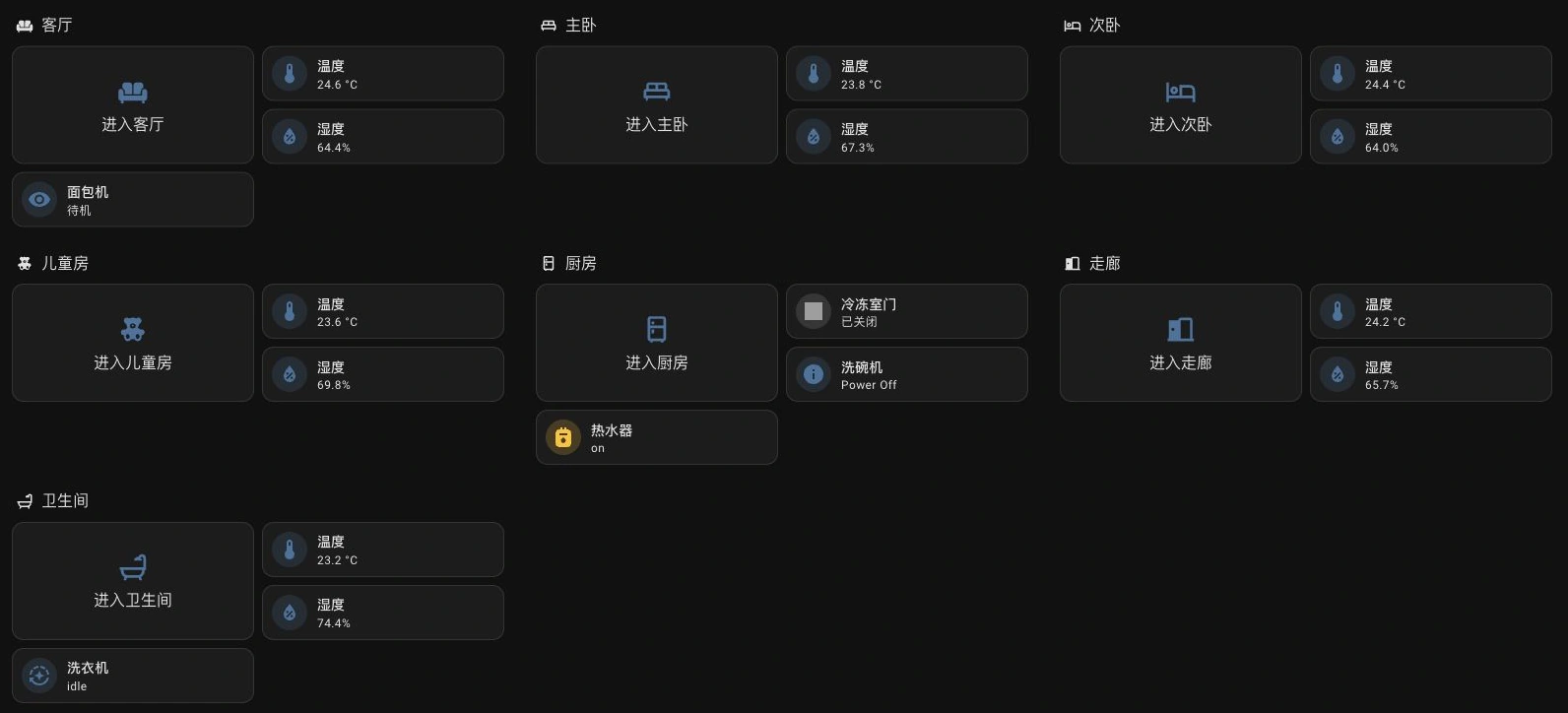
Figure 4: The real rooms view. A room is a useful directory that avoids searching through hundreds of entity names.
Two small choices helped. Cameras received on-demand viewing entry points, so opening the home page did not immediately load video. Earlier dashboards were retained while duplicate navigation entries were tucked away, making it easier to compare configurations if something had been missed.
The kitchen view grouped the freezer contact, switches, dishwasher and water heater. Device state and parameter controls lived with the room they belonged to. Actions that heat, start or stop equipment still required understanding their consequences; a tidy interface does not make arbitrary device actions appropriate.
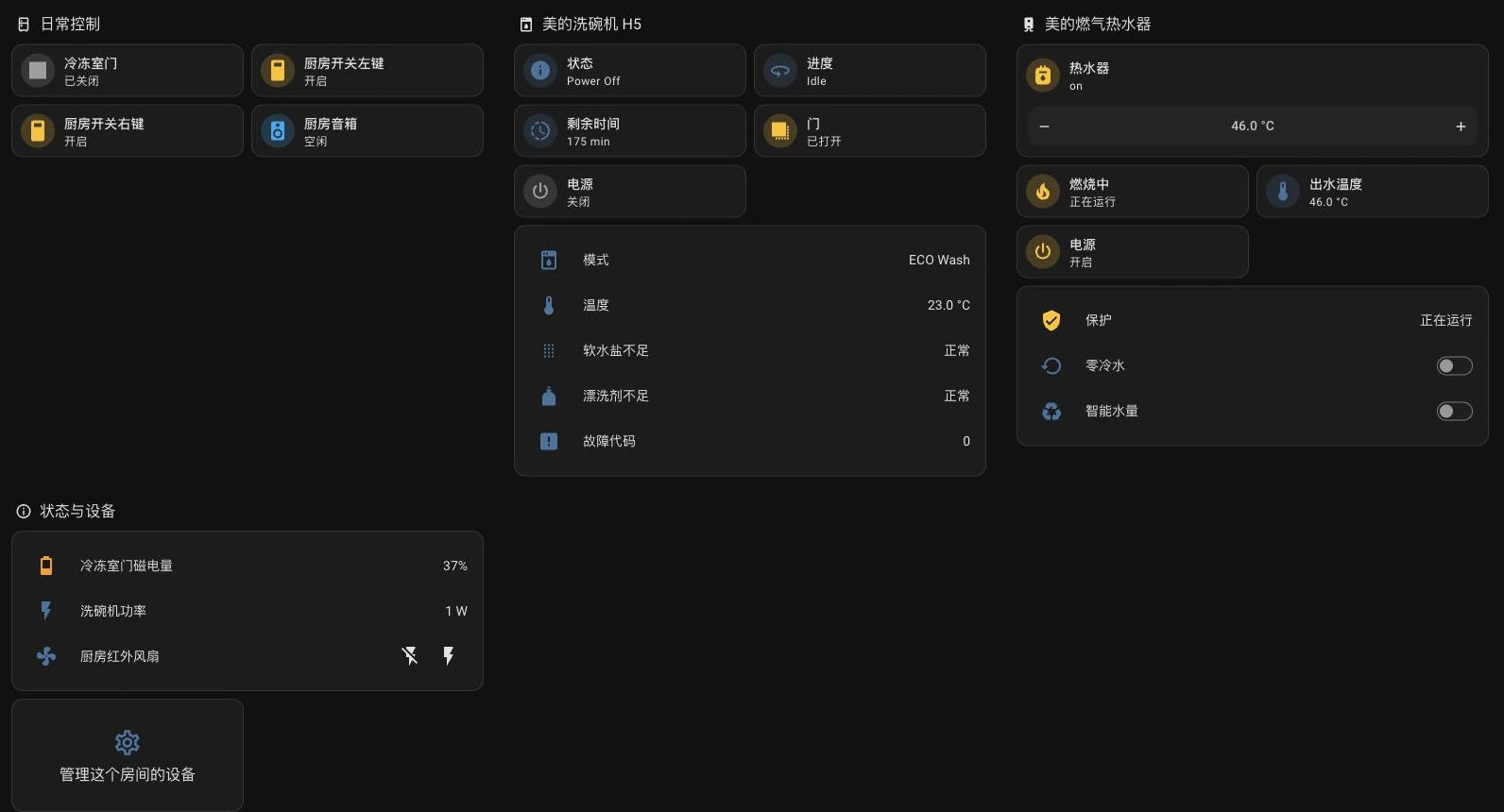
Figure 5: The actual kitchen page. A screenshot establishes that the devices and controls render. It does not establish that every physical action has been tested.
4. A contact sensor revealed how configuration ages
One particularly revealing automation still described a security-door reminder. Its contact sensor had physically moved to the freezer.
The device existed. The entity existed. The syntax could still be valid. The meaning of the automation had changed.
Software can check whether an identifier exists. It cannot infer that someone has moved the plastic sensor from the front door to the freezer. A saved phone number does not tell you that its owner has changed jobs, either.
After confirming the location, the rule became a freezer-door reminder. It waits for one minute of continuous opening, announces the reminder, then checks again every two minutes. Closing the door ends the waiting and repeating. Startup also needs a delayed check if the door is already open, so the rule does not depend entirely on observing a fresh opening event.

Figure 6: A reminder should behave like an alarm that checks again. Watching for closure during the wait avoids nagging after the door has been shut.
Acceptance had several layers. Enabled configuration that loads after a restart is one check. Running the rule while the door is closed and seeing the trace stop before announcing is a branch check. Hearing the announcement after a real opening timeout, and confirming the repeat interval, requires someone beside the equipment.
The records did not complete that last physical test. Consequently, “the rule is enabled” should not become “every reminder was delivered.”
5. Working weather also needs the right location
The initial audit found 43 unavailable weather, forecast and lifestyle-index entities. The repair switched weather to Open-Meteo while preserving the original weather entity ID. Current conditions and daily forecasts returned, and existing cards could keep their references.
The HA Open-Meteo integration does not require an account or API key. It does require internet access and remains an external weather service. That is separate from the local-only dashboard tool supplied later in this article.
There was a correction along the way. To avoid sending a precise household location, an earlier setup used a different area in the same city. That introduced too much geographical error. It was changed to a more appropriate coarse location, then the forecast was read again. Exact locations and coordinates are omitted from this article and its screenshots.
It is like looking at the timetable for a different school in the same city. The table is valid and full of information; it may still be the wrong information for your day.
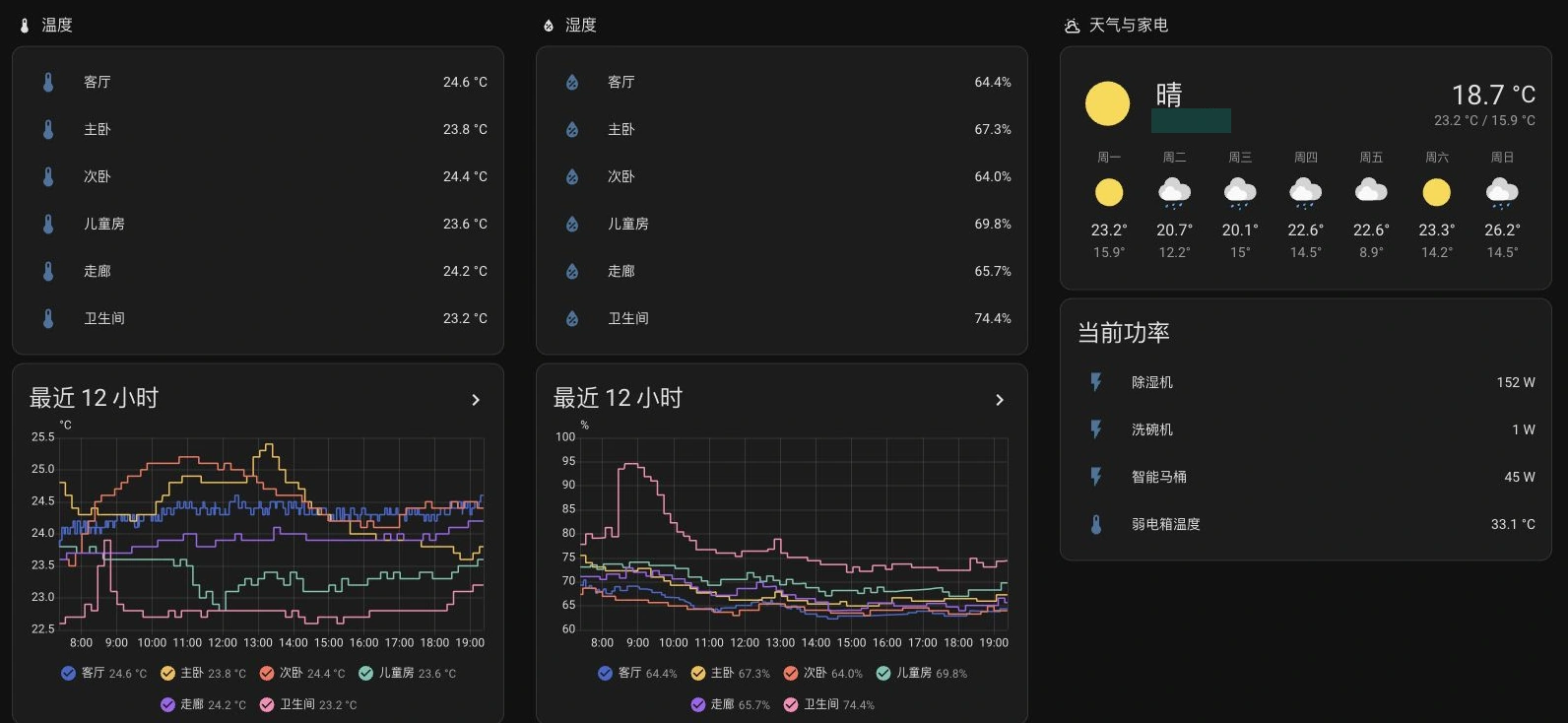
Figure 7: The actual environment page. Current readings and history together answer both “what is happening?” and “when did it start?”
6. Why billing entities disappeared after a restart
Electricity data produced another useful failure. Several cards had displayed values, yet after Home Assistant Core restarted they reported that their entities could not be found.
The cause was the ingestion mechanism. Some summary values were pushed into the state machine using POST /api/states/<entity_id>. That can make a state appear immediately. It does not automatically create a full integration, registered identity and startup restoration lifecycle.
Think of the state machine as a classroom whiteboard. Someone writes this month’s bill on it, and everyone can see it. After the room is reset, the writing may be gone until that person returns to write it again.
Here the add-on republished cached values hourly. A restart happened between two pushes, creating a real gap. Refreshing the browser could not solve an entity that was genuinely absent on the server.
The repair added restorable trigger-based template mirrors and pointed the summary cards at them. Valid values update the mirrors. Missing input retains the last known value instead of inventing zero. Previously verified cached values initialized the mirrors, followed by a read-back of the dashboard references.

Figure 8: Preserving a value and establishing its freshness are separate responsibilities. A reliable old value can still mislead if its date is hidden.
That also made “most recent day” a better label than “today.” Electricity data can arrive one or two days late. The AI quota summary added during this work also reflected the other dashboard’s most recent cached refresh; polling its cache from HA did not force a new upstream refresh.
Display the source date or an update age. Otherwise, successfully preserving old data can make it look more current than it is.
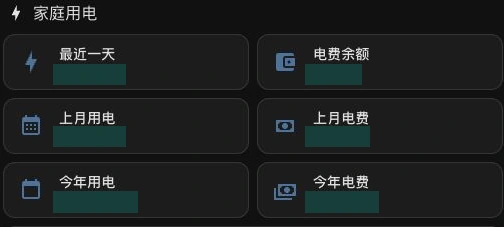
Figure 9: A crop of the actual electricity cards. Consumption and money are redacted. It shows their organization without substituting made-up household data.
7. An online network device can still report misleading metrics
Wireless monitoring made AP availability, client counts, load and bandwidth visible by room. The router’s two WAN links were displayed separately, avoiding a single reassuring network status that might conceal a failed link.
There is an important limitation in the observed data: interface counters differ between AP models. Some bridge interfaces undercount traffic in one direction. These bandwidth figures are useful for trends and troubleshooting; they are not a substitute for accurate ISP billing measurements.
The DHCP list had its own semantic problem. The API’s time-zone behavior made a newly assigned lease look expired. Deriving acquisition and expiration times from the remaining lease duration produced times consistent with the actual situation. Dynamic devices were classified using the configured address-pool range, a site-specific rule rather than a universal property of every DHCP API.
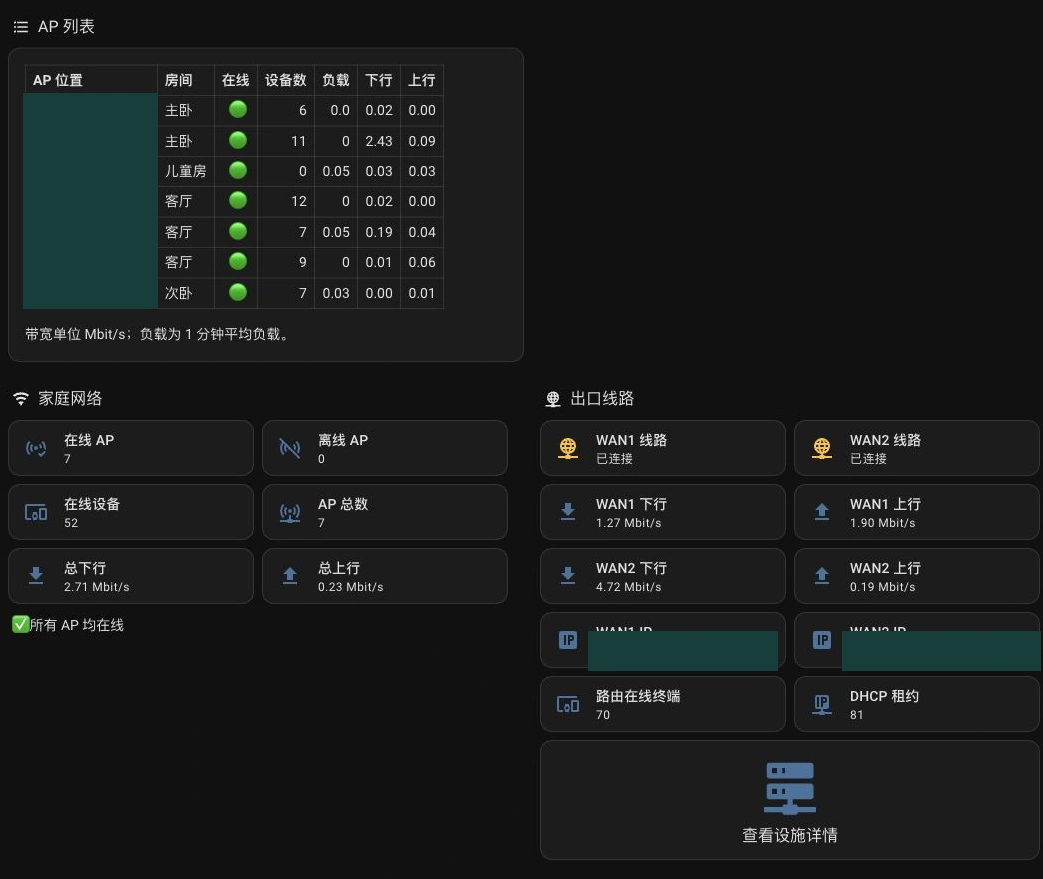
Figure 10: A crop of the real network view. Device identifiers and line addresses are hidden. Once metrics render, their meaning still needs verification.
Infrastructure monitoring used read-only access appropriate to routing, virtualization and storage. Computer wake and shutdown controls were kept in a separate page with confirmation steps. The records did not include pressing those controls against the live computers, so an integrated interface should not be reported as a completed physical power-control test.
8. Sixty-one information buttons were feeding the history database
More devices also mean more recorded history.
This installation had 61 Xiaomi Miot information buttons producing records with little long-term analytical value. The remedy excluded those entities from recorder while leaving the buttons available.
If a configuration already contains recorder, merge into it; do not create a second top-level key. This is the structure used here, and the matching scope should be checked against your own inventory before applying it:
recorder:
  purge_keep_days: 30
  exclude:
    entity_globs:
      - "button.*_info*"
During a three-minute observation after restarting, the targeted buttons produced zero new recorded entries. Other entities still produced 643, and the recorder had no backlog. That comparison shows both that the exclusion worked and that recording as a whole remained active.
Using the observed write rate, the thirty-day database size was estimated at roughly 2.1 GB, about 0.7 GB below the earlier estimate. That is a capacity forecast. It is not a measurement taken after thirty days, nor a size another household should assume.

Figure 11: Excluding a button from recording does not remove the button. Purging detailed history does not automatically remove all long-term statistics.
Detailed history is like keeping individual shopping receipts. Long-term statistics are closer to a household ledger. Receipts can have a short retention period while the ledger lasts much longer.
HA supports long-term statistics for eligible numeric sensors with the right semantics, including units and state_class. Assigning a convenient state class to an arbitrary number does not make its energy statistics correct.
“Energy used on a particular day” and “the meter’s cumulative reading” are different quantities. total_increasing has monotonic-increase and reset semantics. Choose incorrectly and a graph can render successfully while its totals are wrong.
Frequently changing large attributes, such as current lease lists, deserve the same question: is recording each version useful? Reducing low-value writes is often more sensible than continually shortening retention for everything.
9. A successful backup job still needs a contents check
The management view collected low batteries, automations, logs and backups. One small visual correction is worth mentioning: the AC entry initially looked larger than neighboring buttons because its icon-size setting was missing. Matching that setting made the real page consistent. Functional completion still benefits from looking at the output.
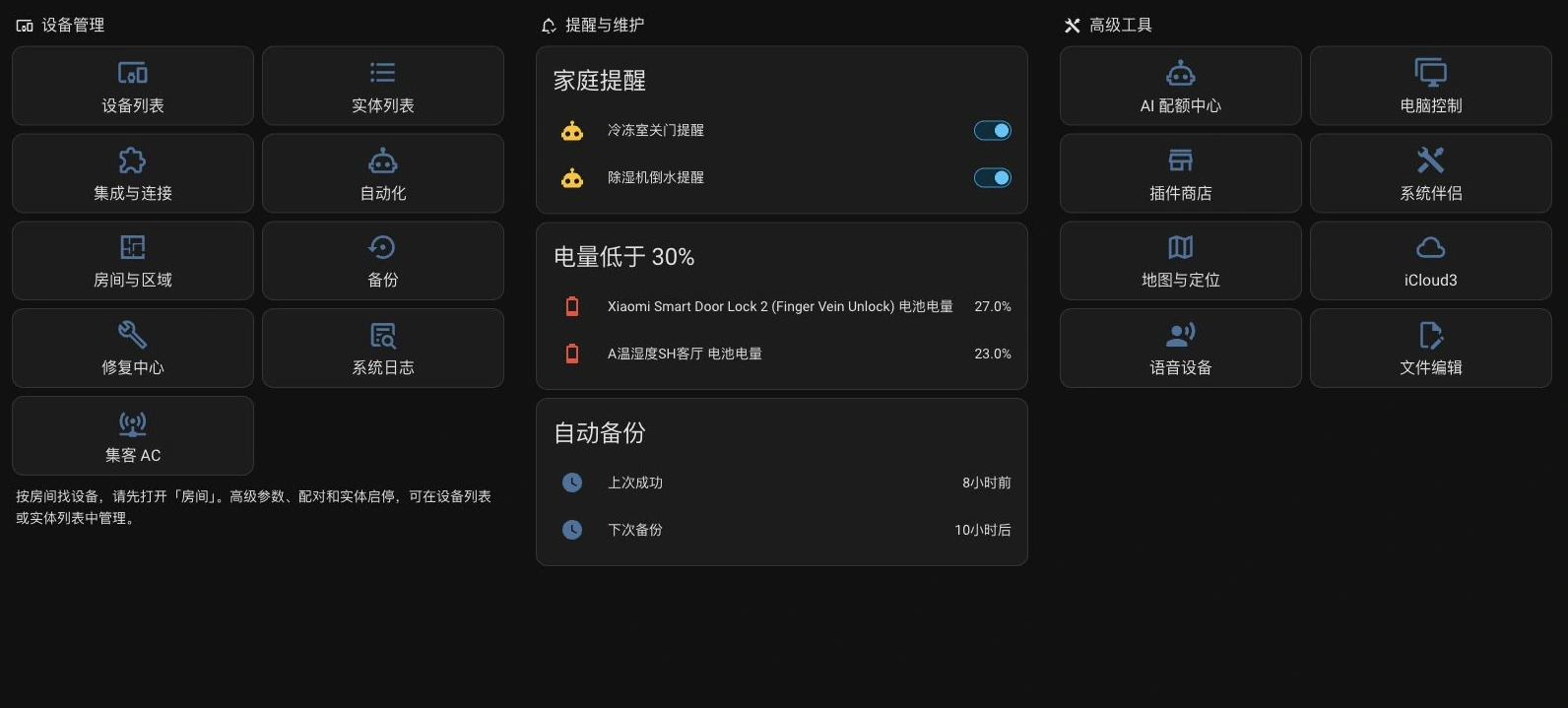
Figure 12: The actual management page. Maintenance has a clear home without becoming a mandatory path through everyday controls.
Backup scope was checked as well. It already covered HA configuration, the database, add-ons and certificates. Shared files, media and local add-on directories were added, followed by a successful encrypted backup under the updated settings.
That still leaves a gap between “the backup task succeeded” and “a full recovery is proven.” Decryption materials must be available. An independent copy matters. A restoration should be rehearsed in a temporary environment.
No complete restore rehearsal was performed during these records, so this work cannot guarantee complete recovery.
A backup is like an emergency suitcase. A machine saying that its zip is closed tells you little about whether it contains your documents, medication and charger—or whether you can find the key to open it.
10. Reproduce the method: manual organization and local scripts
There is no need to copy this household’s addresses, equipment names or integrations. The reusable part is the workflow.
Method A: Organize through the HA interface
- Create and inspect a current backup in Settings → System → Backups, checking the directories and add-ons it includes.
- In Devices & services → Entities, inspect unavailable items by their source. Confirm retirement, check references in automations, scripts and dashboards, then choose removal, disabling or repair.
- Assign devices to appropriate areas. Individual entity areas may override their device’s area, so inspect the actual arrangement.
- Create a separate dashboard using native Sections, Tile, entity lists and history charts. Start with the most frequently needed information.
- Open both desktop and phone layouts. Check references, state meanings and data ages. Verify consequential physical actions individually beside the equipment.
A separate dashboard lets the earlier interface remain available while the new one is reviewed. Set a new default only after that review.
Method B: Run the supplied platform scripts
I wrote a separate downloadable tool for this article. It implements inventory → area grouping → new dashboard → read-back. It contains none of the household’s protocol adapters, credentials, addresses or individual automations.
Download the complete kit and its SHA-256 checksum, then extract every file into a private directory. The three launchers use one Python standard-library implementation. Runtime does not need pip packages, HACS cards, cloud AI or an external relay service.
Prerequisites are Python 3.11 or newer, direct access to your own HA, and an administrator’s long-lived access token. Python must also be installed beforehand on macOS; the tool does not install software silently.
| Platform | Complete launcher | Shell |
|---|---|---|
| Windows 11 | run-windows11.ps1 | PowerShell |
| Ubuntu 26.04 | run-ubuntu2604.sh | Bash |
| macOS 27 | run-macos27.zsh | Zsh |
The shared implementation and full instructions are also available separately. A launcher needs the shared implementation in the same directory; downloading a launcher alone is insufficient.
For user-run automation, choose one command below. The program asks for the HA base URL and reads the token at a hidden prompt. Keep tokens out of command arguments.
Windows 11:
powershell -NoProfile -ExecutionPolicy Bypass -File .\run-windows11.ps1 --apply
The execution-policy override applies only to that PowerShell process, not the permanent system policy.
Ubuntu 26.04:
bash ./run-ubuntu2604.sh --apply
macOS 27:
zsh ./run-macos27.zsh --apply
Omitting --apply produces a local read-only plan. Including it creates a new administrator-only room dashboard and reads its configuration back for comparison. Card taps open details instead of directly toggling equipment. Existing dashboards, automations, entities and history are preserved.
The tool groups current registered entities by their area. Hidden, diagnostic, unknown and unavailable entities stay out of everyday cards, while registration details remain in a private local inventory for review. The result is a snapshot. Later recoveries and new devices require regeneration or manual changes; it does not continuously maintain the room layout.

Figure 13: Automation handles repetitive work. Someone who understands the household still decides whether equipment is retired and which information belongs in everyday use.
To remove a newly generated dashboard that has not been edited, use its saved receipt:
python3 ha_dashboard.py --rollback ./ha-dashboard-output/receipt.json
On Windows, py -3 can replace python3. Rollback checks the generated path, dashboard ID and configuration hash. It refuses to delete a dashboard changed after creation; review and remove that one through HA’s interface. If creation succeeds but saving fails partway through, use the receipt to inspect the new dashboard in the interface.
Validation boundaries: the macOS 27 launcher was executed against the real HA for read-only generation. Local simulated-HA tests cover WebSocket authentication, fragmented responses and ping/pong, creation and read-back, rollback, and refusal to delete edited dashboards. The Ubuntu launcher passed Bash syntax checking. Native Windows 11 and Ubuntu 26.04 execution was not performed, and this tool was not used to create a test dashboard on the household’s live HA.
Method C: Let an Agent configure it
After extracting the tool, give an Agent the task below. Supply the address through HA_URL and the token through HOME_ASSISTANT_TOKEN. Do not upload the private output directory.
Use ha_dashboard.py in the current directory to organize my Home Assistant.
Read its address from HA_URL and its admin token from HOME_ASSISTANT_TOKEN.
Do not print credentials.

First generate a read-only plan:
python3 ha_dashboard.py --non-interactive --out ./ha-private-output

Review the room groups and exclusions, then create a separate dashboard:
python3 ha_dashboard.py --non-interactive --apply --out ./ha-private-output

Preserve existing dashboards, entities, automations and history.
Do not call device actions or restart HA.
Inspect the actual page at desktop and phone widths.
Report missing references, unavailable states and source update times.
Do not classify normal button unknown states or conditional unavailability as faults.
Keep the receipt and distinguish completed tests from outstanding physical checks.
An Agent can reduce configuration copying and reference checking. Household meaning still comes from people: the vacuum is retired; the contact sensor now belongs to the freezer; cancel is unavailable because the appliance is idle. Those facts live in the household, not in the API.
11. What counts as evidence that the cleanup worked?
An absence of grey cards was never sufficient.
At the writing-time check, further integrations had brought the state count to 1,135. All 267 directly configured entity references in the current household dashboard existed. None was missing; one button was still unavailable. This checks static references, not every template, possible state or physical action.
| Check | Evidence obtained | Remaining boundary |
|---|---|---|
| Cleanup persists | The retired vacuum did not return after the first cleanup restart | New integrations continue adding entities and states |
| Dashboard renders | Desktop, phone, room, environment and management views inspected | Daily household use can reveal further layout issues |
| Data has a source | Weather read-back works; electricity cards use restoration mirrors | Freshness remains separate from existence |
| Recorder remains active | Targeted records stopped; other entities kept recording | Capacity figures remain forecasts |
| Reminder configuration loads | Validation, restart loading and closed-door trace checked | Open-door timeout and actual audio delivery untested |
| Backup scope expanded | A successful encrypted backup used the new scope | A complete recovery rehearsal remains outstanding |
The useful change over these two days was treating HA as a household product that people keep using. Integration is followed by naming, grouping, freshness, state explanations, retention and restoration.
For the next device, I will first ask which room it belongs in, when someone needs an alert, and how long its data should be retained. Then I can investigate its protocol.
Q&A
Does this require lots of third-party cards?
No. The interface primarily uses native sections, tiles, entity lists, Markdown and history charts. Clear information structure is a useful starting point before adding visual effects.
Can moving unavailable items off the home page conceal faults?
That is why management and diagnostics need their own entries. Distinguish conditional controls, retired devices and genuinely disconnected equipment. Everyday views reduce noise; maintenance views retain the review work.
Can an Agent delete every obsolete configuration automatically?
It can inventory and check references automatically. Deletion still requires retirement intent and source information. The supplied tool limits automatic writes to a new dashboard because a generic script does not know the entire household’s history.
Should I refresh the browser or restart HA when data disappears?
Check server-side entity existence, integration loading and the source’s last update first. A temporary REST-pushed state disappearing at restart is a good example of something more restarts will not fix.
Is everything here offline?
The organization tool connects only to your HA and does not call cloud AI or third-party services. Weather, electricity and certain appliance integrations can have their own external dependencies. Evaluate locality for each data path separately.
References
The following official Home Assistant resources support the technical discussion. Site-specific figures come from October 25–26 operation records and the writing-time check.
- REST API: states and actions
- WebSocket API: authentication and command responses
- Sections dashboards
- Open-Meteo integration
- Template entities and restoration
- Recorder retention and exclusions
- Long-term statistics
- Sensor state classes
- Backup integration
The Home Assistant mark comes from its official brand assets. Explanatory illustrations are original. All interface screenshots were captured from the actual installation and cropped or redacted to conceal locations, addresses, device identifiers and billing values.