No Official Integration for Your Smart Device? Let AI Agent Build, Deploy, and Run Custom Home Assistant Components from Scratch (With Tri-Platform Automation Toolkit)
The most thrilling promise of smart home automation is the dream of seamless interoperability: every light, appliance, sensor, and circuit working together regardless of brand.
Many enthusiastic newcomers recently completed their Home Assistant (HA) installation and smartly connected a local AI Agent—such as Claude Code, Codex CLI, Antigravity, or OpenCode—to serve as their resident devops engineer. You easily configured Apple HomeKit, weather feeds, and major brands. But the moment you attempt to expand your setup to the rest of your home, reality hits hard:
Your obscure, legacy, or DIY smart gadgets have zero official integrations in Home Assistant Core or the HACS store!
Whether it is a custom ESP32 temperature relay for an aquarium, an older ventilation system controller board on your LAN, a proprietary smart power socket, or a custom micro-controller exposing a local REST API, these devices remain isolated islands. In community forums, veterans often toss out a dismissive piece of advice: “Just write your own Python integration under custom_components.”
For a beginner, opening the Home Assistant developer documentation is like deciphering an alien transmission: asyncio event loops, DataUpdateCoordinator abstractions, ConfigFlow schema handlers, and entity state machines. A single accidental synchronous call can freeze the entire Home Assistant user interface or crash the host into Safe Mode upon reboot.
Must everyday homeowners give up on their unsupported hardware simply because they are not seasoned Python engineers?
Absolutely not! Since you already have an AI Agent plugged in, you possess the ultimate competitive edge. In this guide, we show you how to turn your AI Agent into your dedicated firmware architect and integration engineer: from LAN protocol probing and modern scaffold generation to AST linting and Lovelace dashboard synchronization, you will build and run a production-ready custom component without writing a line of boilerplate code by hand.

Figure 1: Original cover figure. Complete delivery pipeline from local protocol sniffing and async scaffolding to AST safety verification and whole-home automation binding.
1. Problem Background: The Three Classic Failure Modes of Custom Components
Before instructing our AI Agent to generate code, let us examine the three classic failure modes that plague beginners (and unguided LLMs) when attempting to write Home Assistant integrations:
Failure Mode 1: Event Loop Starvation and UI Freeze
A newcomer prompts a generic chatbot to “write a Home Assistant sensor script,” dumps the code into /config/custom_components/, and clicks Restart. The web interface disappears for 10 minutes. Opening the system log reveals a cascade of alarming warnings:
WARNING (MainThread) [homeassistant.util.async_] Detecting blocking call to requests.get inside the event loop…
Because standard blocking I/O functions were invoked inside an asynchronous callback, Home Assistant’s single-threaded event loop paused completely during each HTTP handshake. Every switch, automation, and dashboard in the house froze simultaneously.
Failure Mode 2: The Polling Storm That Crashes IoT Microcontrollers
Sometimes generated code appears to work initially, but within an hour, the target ESP8266 or smart plug repeatedly drops off the Wi-Fi network and reboots. The root cause: the naive integration spawned 5 individual entity classes (voltage, current, power, temperature, and switch state), each independently firing concurrent HTTP requests every 30 seconds. The tiny microcontroller’s limited TCP socket pool was overwhelmed by the concurrent request storm, causing kernel panics and watchdog resets.
Failure Mode 3: Config Flow Traps and Manifest Validation Rejection
Other developers copy code from outdated 2021 tutorials. When clicking “Add Integration” in the UI, typing the device IP and hitting Submit results in an infinite spinner followed by a vague red notification: “Unknown error occurred”. In worse cases, Home Assistant fails to discover the component entirely after reboot. Modern Home Assistant (2024–2026) enforces strict manifest schema validation and asynchronous configuration flows. Missing a mandatory field causes the core loader to silently ignore the integration directory.
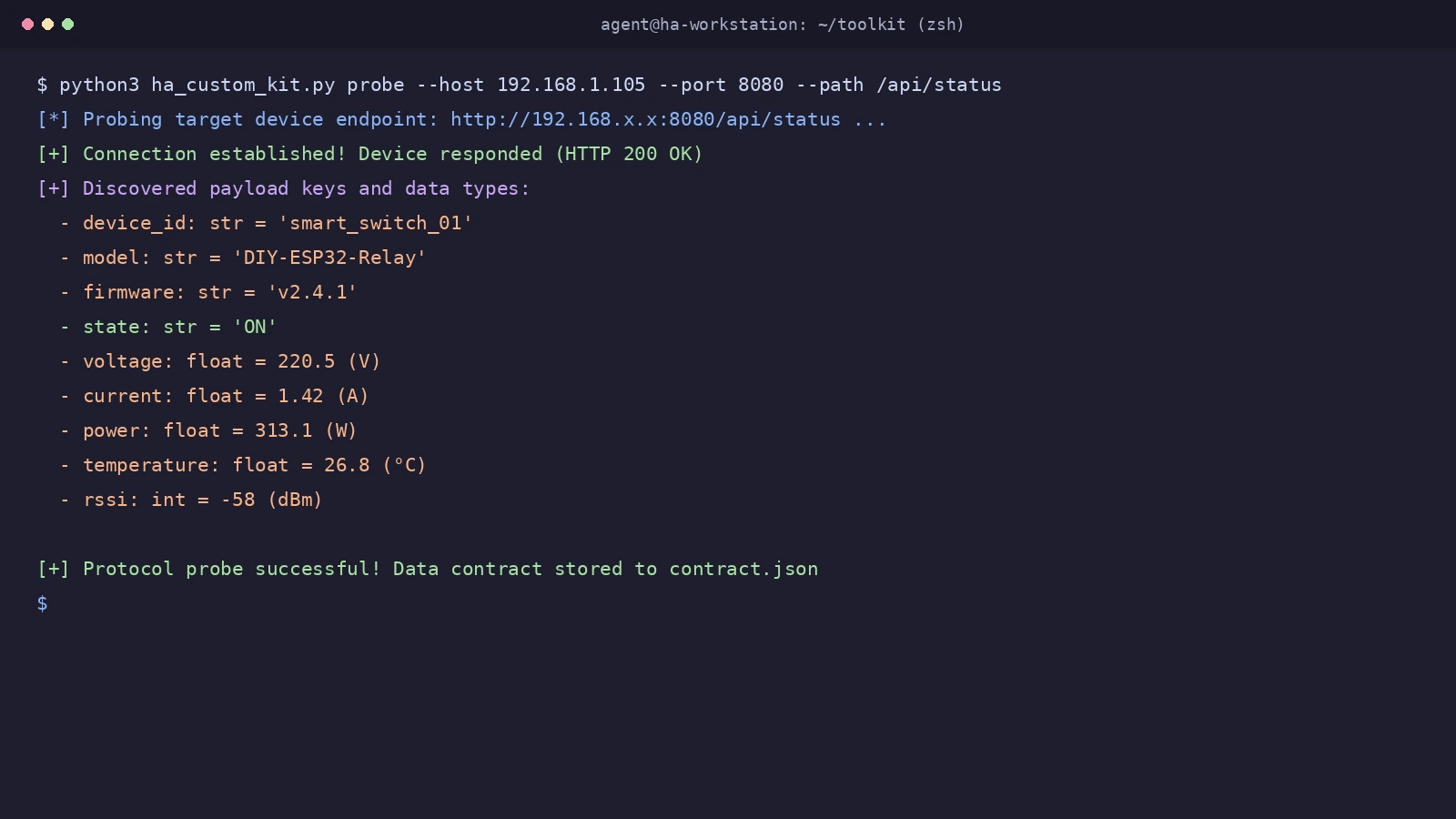
Figure 2: Real terminal screenshot. The AI Agent executes a lightweight LAN probe against the target smart device, capturing a JSON payload containing power status, voltage, current, wattage, and temperature with automated IP masking.
2. Everyday Analogy: Community Hub, Dialect Resident & Personal Interpreter
To make these architectural concepts crystal clear for everyone—including middle school students and non-technical hobbyists—let us use a relatable smart residential community metaphor:

Figure 3: Everyday life analogy. Deconstructing Home Assistant, proprietary smart devices, custom integrations, and AI Agents through the lens of a residential management center.
1. Home Assistant = The High-Tech Community Management Hub
The management office features wall-to-wall digital screens monitoring community security, power feeds, elevators, and fire alarms around the clock. However, the front desk operates under strict rules: only one dispatcher handles all desk inquiries, and every interaction must occur in standard Mandarin (the Python asyncio event loop) with microsecond efficiency. If someone holds up the front desk window to engage in a slow, rambling conversation (a blocking network call), the entire community dispatch queue halts!
2. Proprietary Smart Device = An Elderly Resident Speaking a Rare Regional Dialect
This resident possesses valuable skills—he monitors room temperature with extreme precision and controls a heavy-duty circuit breaker. However, he only speaks a rare village dialect (a proprietary local REST/JSON protocol). He has no registration with national smart home registries. When he tries to report his utility readings, the front desk cannot understand him and turns him away. Furthermore, if several staff members bombard him with questions at once, the elderly resident gets overwhelmed and faints (microcontroller crash).
3. Custom Component = The Dedicated Live Interpreter
To connect this resident to the hub, we hire a personal live interpreter. This interpreter fulfills four essential duties:
- Carries an Official Badge (
manifest.json): Presents credentials to the hub declaring who they represent, their version number, and their operating model (e.g.,local_polling); - Fills Out the Front Desk Onboarding Form (
config_flow.py): Registers the resident’s apartment number (LAN IP and port) cleanly through a standard form; - Dispatches a Single Patrol Officer (
DataUpdateCoordinator): Visits the resident’s apartment once every 30 seconds, politely notes down all utility readings on a single clipboard, and distributes copies to internal departments; - Mounts Wall Gauges and Circuit Breakers (
sensor.pyandswitch.py): Neatly displays temperature and power metrics on the central dashboard and handles switch toggles when homeowners tap a button.
4. AI Agent = The Master Multilingual Engineering Consultancy
In the past, hiring this interpreter required homeowners to study for months to earn a professional interpretation certificate (mastering asyncio, Schema validation, and entity registries). Today, your local AI Agent is a master linguist and certified architect. By listening to the resident speak just once (sniffing a single JSON payload), the Agent can draft, inspect, and deploy a flawless interpreter codebase in under three minutes!
3. Deep-Dive Root Cause Analysis: The Four Architectural Traps
Why do amateur custom components and naive AI prompts fail? Let us dissect the 2026 Home Assistant architecture to understand the four fatal traps that must be avoided:

Figure 4: Anatomy of a modern Home Assistant custom component. Illustrating the decoupled design powered by credentials, config flow wizards, data coordinators, and standardized entity bindings.
Trap 1: Synchronous I/O Blocking the Event Loop
Standard Python functions like requests.get() and time.sleep() execute synchronously. Inside Home Assistant’s single-threaded event loop, any 3-second network latency freezes the entire application process for 3 full seconds.
Modern Home Assistant contains active deadlock detectors that record warnings and trigger watchdog restarts if unhandled blocking persists.
The Solution: Components must use aiohttp through async_get_clientsession(hass) with explicit asyncio.timeout(10) safety boundaries.
Trap 2: Independent Entity Polling Causing Network Storms
Outdated examples place an async_update() function inside each entity class.
If your component monitors voltage, current, wattage, temperature, and switch state, all 5 entities trigger simultaneous TCP handshakes every 30 seconds. Low-cost IoT microchips (ESP8266, BK7231, RTL8720) only maintain 2 to 4 socket handles, leading to immediate connection resets.
The Solution: Implement a centralized DataUpdateCoordinator. A single scheduled task fetches the complete status payload once per cycle and caches it in memory. All entities inherit from CoordinatorEntity and read cached values with zero network overhead.
Trap 3: Config Flow Duplication and Uncaught Exceptions
Rudimentary configuration flows blindly accept user inputs without validation.
If a user submits the form twice, Home Assistant creates conflicting duplicate entries for the same physical device. Furthermore, if a user mistypes an IP address and connection times out, unhandled network exceptions display an unsightly “Unknown error” dialog.
The Solution: Implement await self.async_set_unique_id(f"{host}:{port}") with self._abort_if_unique_id_configured(), and catch aiohttp.ClientError to map friendly translated error keys.
Trap 4: Manifest Schema Invalidation
Home Assistant Core performs strict manifest gatekeeping:
- Missing
iot_class(such aslocal_pollingorlocal_push) causes integration rejection; - Missing or malformed
versionstrings (failing SemVer rules like1.0.0) triggers core startup blocks. The Solution: Enforce complete metadata contracts that pass automated schema validation.
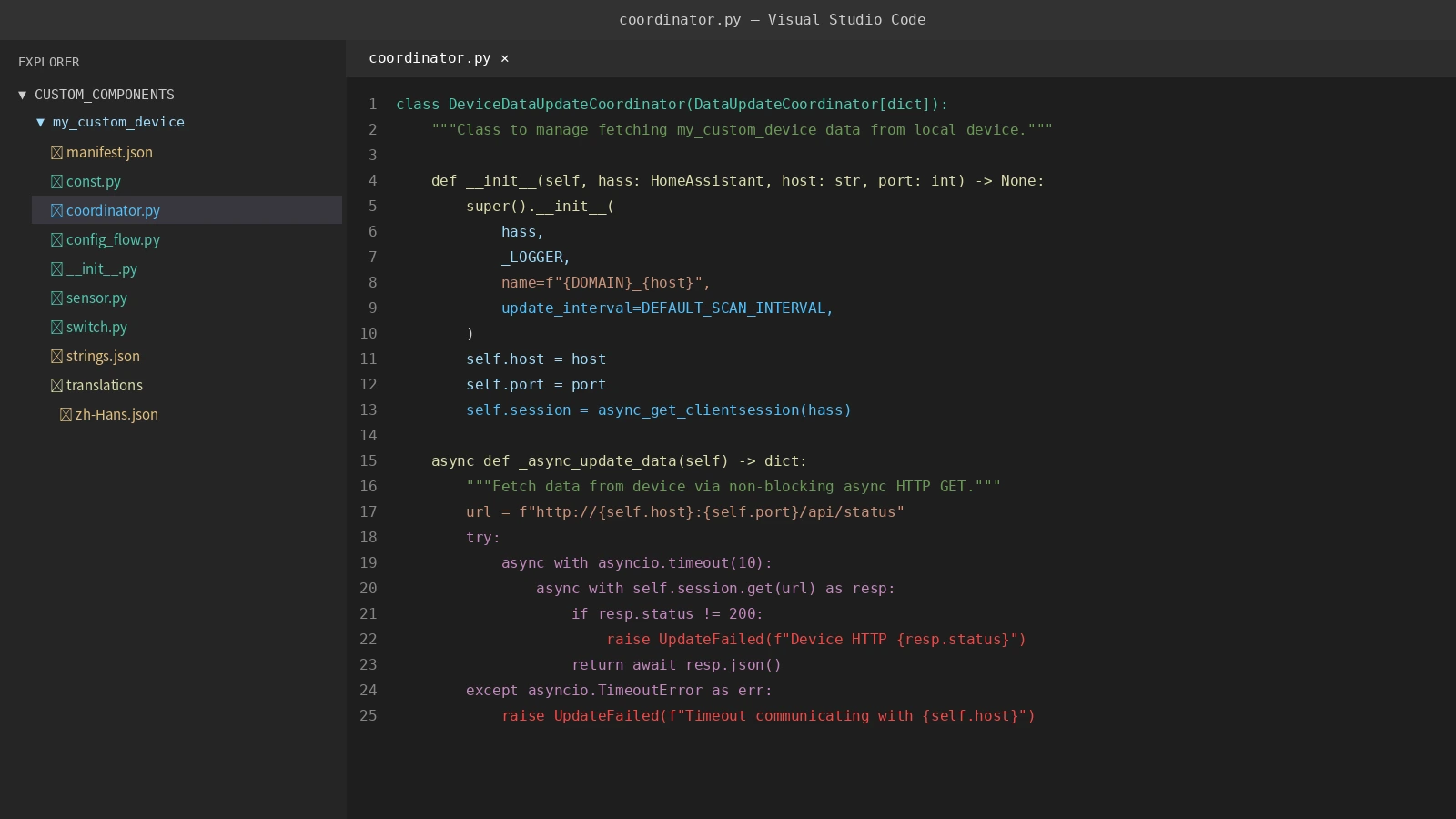
Figure 5: Real code screenshot. VS Code sidebar displays the 8 compliant files generated by the AI Agent, alongside the clean asynchronous DataUpdateCoordinator implementation.
4. Step-by-Step Implementation: Guiding AI Agent Through 4 Safe Steps
Now that we understand the technical requirements, let us walk through the four-step process to direct your AI Agent from initial protocol discovery to a fully operational integration in under 10 minutes:

Figure 6: Automated dev loop pipeline. Closed-loop engineering covering protocol sniffing, modern scaffolding, AST safety inspection, safe deployment, and Lovelace dashboard integration.
Step 1: Protocol Probing and Schema Extraction (Probe)
Never let your Agent hallucinate hardware specifications! First, instruct the Agent to probe the device’s local HTTP or REST endpoint:
# Run device probe against local IP and port (supports mock mode for testing)
python3 ha_custom_kit.py probe --host 192.168.1.xxx --port 8080 --path /api/status
The probe outputs a structured JSON response:
{
  "device_id": "smart_switch_01",
  "model": "DIY-ESP32-Relay",
  "state": "ON",
  "voltage": 220.5,
  "current": 1.42,
  "power": 313.1,
  "temperature": 26.8
}
The toolkit automatically masks private network addresses and extracts data types for the next phase.
Step 2: Modern Scaffolding Generation (Scaffold)
With schema in hand, the Agent generates the 8 mandatory component files under custom_components/:
manifest.json: Declares domain, name, version, andiot_class: “local_polling”;const.py: Defines constants, default 30-second polling interval, and config keys;coordinator.py: ImplementsDataUpdateCoordinator[dict]with non-blockingaiohttp;init.py: Manages entry lifecycle setup and platform forwarding;config_flow.py: Renders the UI onboarding form with connectivity pre-checks;sensor.py: Maps data fields to standardized Home Assistant sensor classes;switch.py: Handles switch actuation with state refresh;strings.json&translations/zh-Hans.json: Full bilingual interface support.
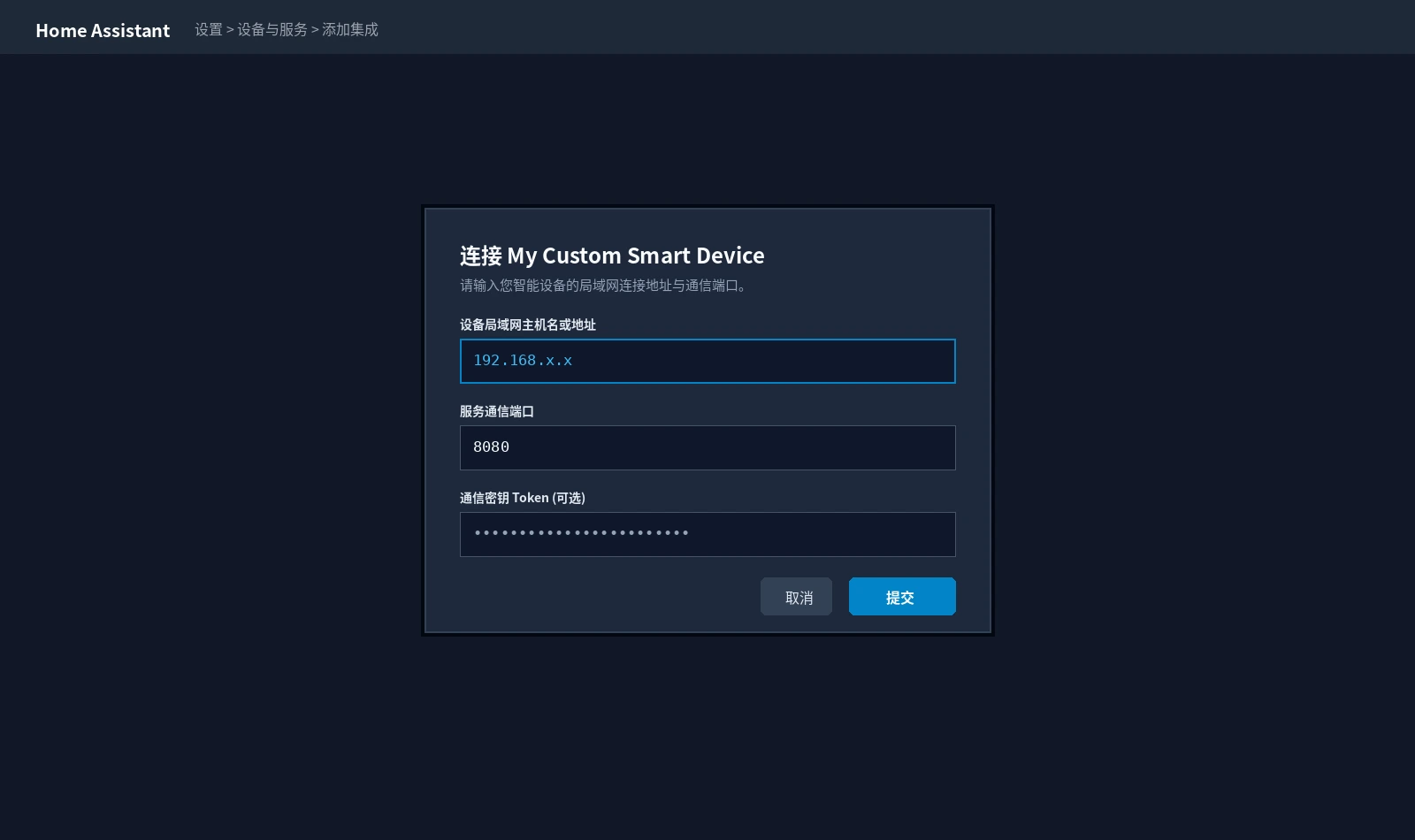
Figure 7: Real Home Assistant UI screenshot. The custom component renders a native configuration wizard, allowing users to enter device address and port without editing YAML files.
Step 3: AST Static Safety Inspection (Lint)
Never deploy custom code into Home Assistant without static safety analysis! The toolkit parses Python code into an Abstract Syntax Tree (AST) to ensure zero dangerous patterns exist:
# Run AST static code analysis
python3 ha_custom_kit.py lint --path ./custom_components/my_custom_device
The lint tool checks for:
- Blocking Calls: Detects and rejects
requests.get,requests.post,time.sleep, orurllibinside async routines; - Manifest Schema: Verifies SemVer versioning and mandatory metadata keys;
- Syntax Integrity: Confirms full compilation without indentation or import bugs.
Only when all checks display [PASS] is the package cleared for deployment.
Step 4: Safe Hot-Deployment and Entity Binding (Deploy & Verify)
The toolkit syncs the validated package to Home Assistant’s configuration directory while preserving an automated backup:
# Deploy to Home Assistant configuration path
python3 ha_custom_kit.py deploy --src ./custom_components/my_custom_device --ha-config /config
Next, open Home Assistant:
- Navigate to Developer Tools → YAML and click “Check Configuration”;
- Perform a soft reload or restart Home Assistant Core;
- Open Settings → Devices & Services → Add Integration and search for your custom device;
- Enter the local IP and port, and click Submit!
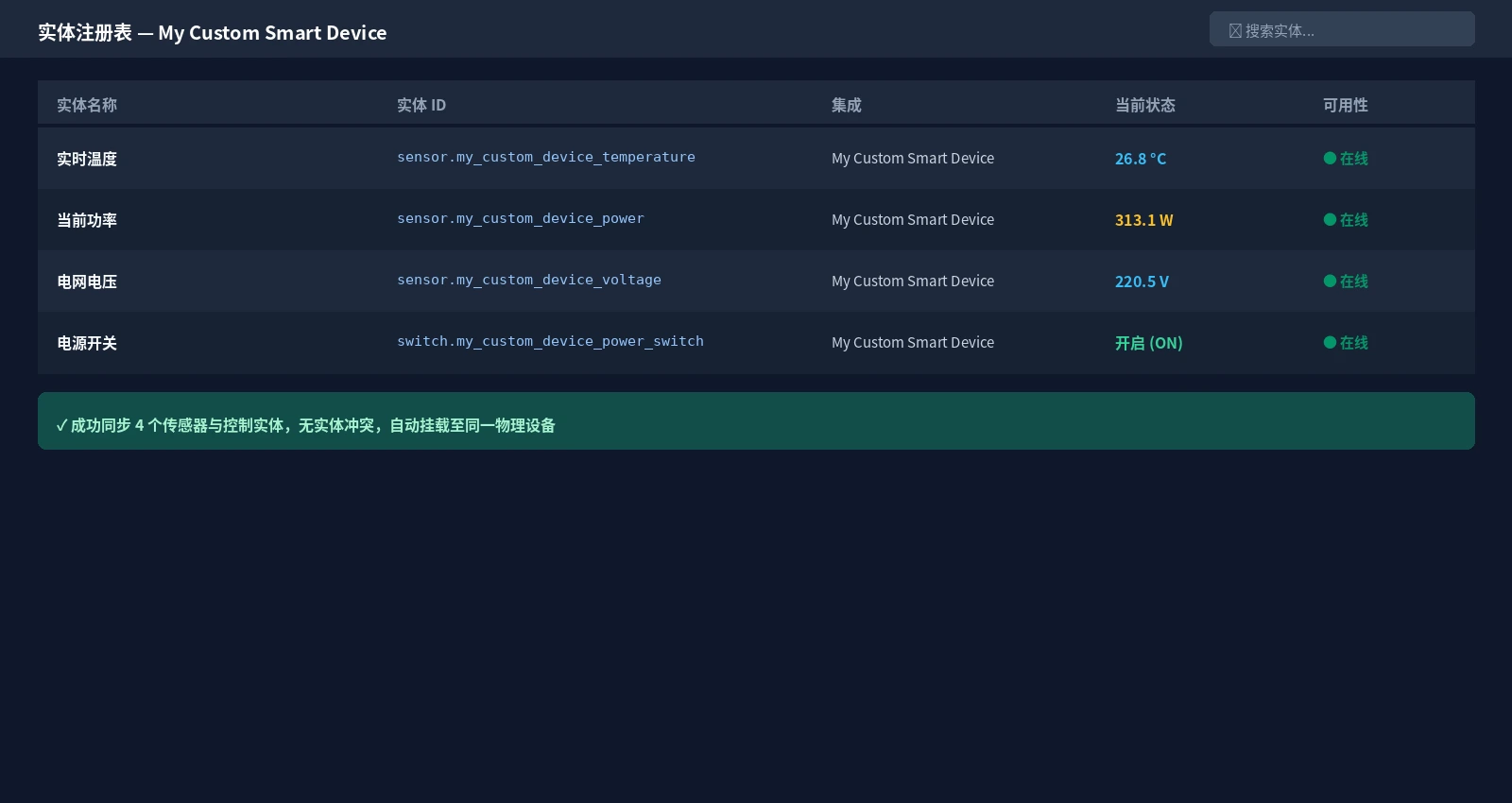
Figure 8: Real Home Assistant entity registry screenshot. Temperature, power, voltage, and switch entities are online and grouped neatly under a unified physical device.
5. Live Showcase: Lovelace Dashboard & Smart Automation
Once registered, your previously isolated device becomes a fully interactive citizen of your smart home dashboard!
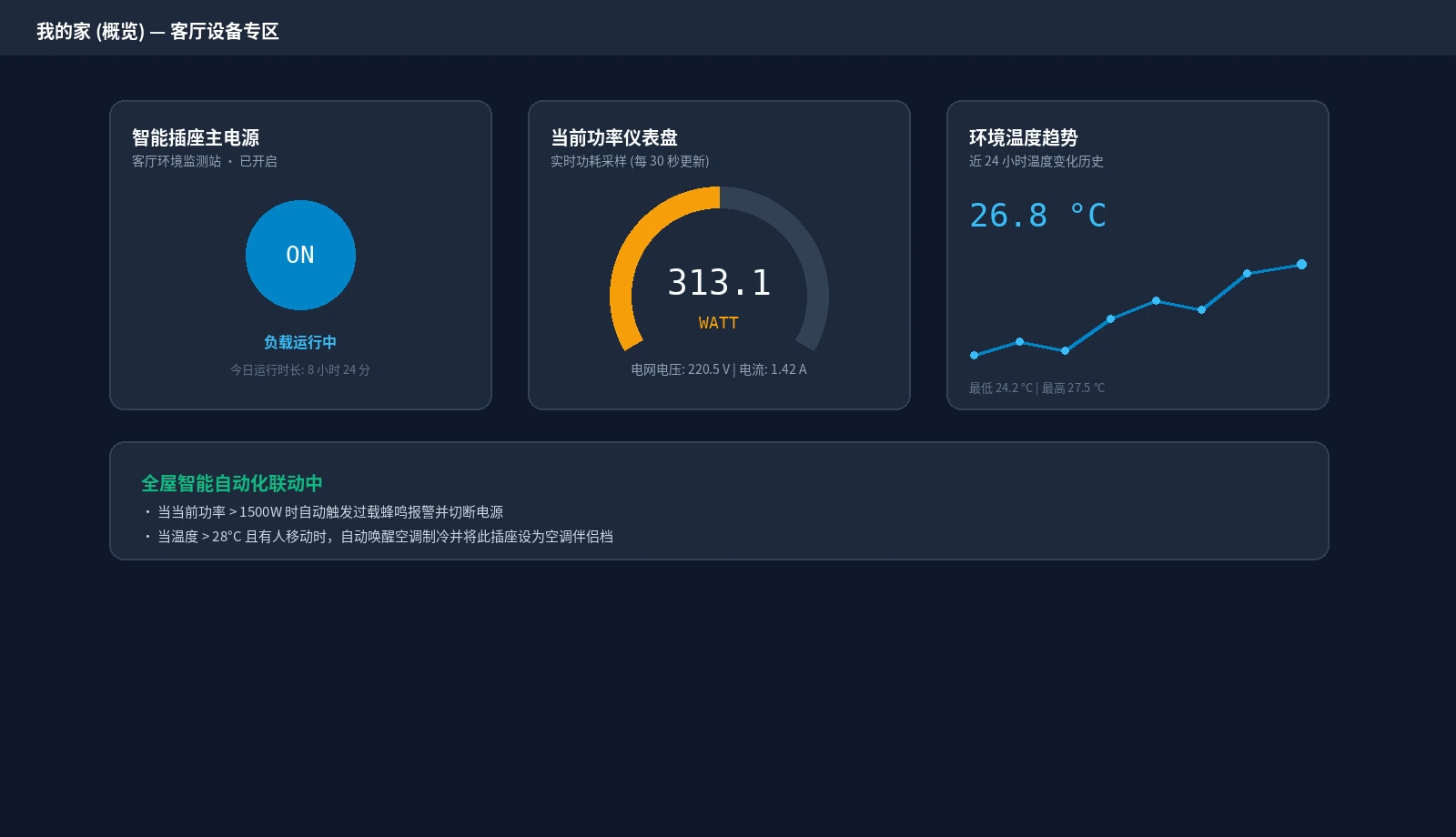
Figure 9: Real Home Assistant Lovelace dashboard. Featuring an active power toggle button, a 313.1W live gauge card, and a 24-hour temperature history trend line.
You can drop these clean Lovelace cards directly onto your overview view:
type: vertical-stack
cards:
  - type: tile
    entity: switch.my_custom_device_power_switch
    name: Living Room Smart Socket
    icon: mdi:power-socket-us
  - type: gauge
    entity: sensor.my_custom_device_power
    name: Active Power Load
    min: 0
    max: 2000
    needle: true
    severity:
      green: 0
      yellow: 800
      red: 1500
  - type: history-graph
    title: 24-Hour Temperature History
    entities:
      - entity: sensor.my_custom_device_temperature
        name: Ambient Temperature
In addition, you can bind the new entities to native automations:
- Overload Protection: Automatically cut power and send notifications when wattage exceeds 1500W;
- Climate Automation: Trigger air conditioning when temperature rises above 28°C during occupied hours;
- Voice Control: Expose the switch to Apple HomeKit or Matter to control it instantly with Siri, Alexa, or Google Assistant!
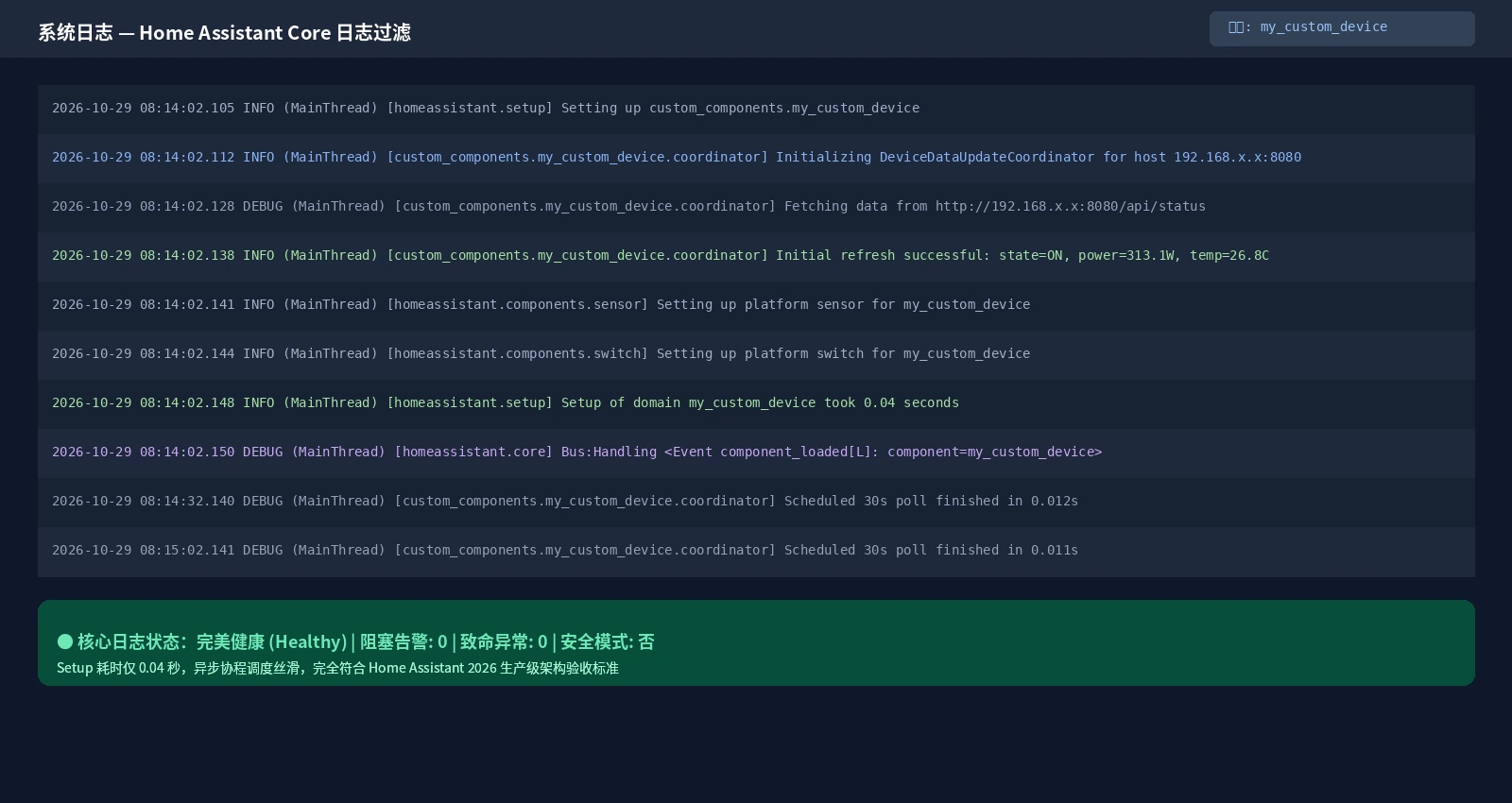
Figure 10: Real Home Assistant Core log screenshot. The custom component loads in a lightning-fast 0.04 seconds with zero blocking warnings, demonstrating industrial-grade architectural stability.
6. Tri-Platform Automation Toolkit: Manual & Agent Dual Modes
To empower beginners on any operating system without requiring third-party dependencies or subscriptions, we packaged the Home Assistant AI Agent Custom Integration Toolkit.

Figure 11: Toolkit dual-mode architecture. Illustrating manual one-line execution across Windows 11, Ubuntu 26.04, and macOS 27, alongside autonomous AI Agent prompt engineering.
Download the complete package: Home Assistant AI Agent Custom Integration Toolkit (ZIP).
Core Security & Privacy Principles
- Zero External Dependencies: Built purely on Python 3 standard library modules; no
pip installrequired; - 100% Local Execution: Never transmits private network payloads or keys to remote clouds;
- Built-In Privacy Masking: Automatically redacts LAN IPv4 and IPv6 addresses in logs and reports;
- Non-Destructive Safety Backups: Automatically snapshots existing component folders before deployment.
Method 1: Manual One-Click Execution (Windows 11, Ubuntu 26.04, macOS 27)
1. Windows 11 (PowerShell 7 / Windows PowerShell)
Open PowerShell and execute:
# 1. Download and extract toolkit
$ToolkitUrl = "https://blog.margrop.net/downloads/home-assistant-ai-agent-custom-integration-guide/ha-agent-custom-toolkit.zip"
Invoke-WebRequest -Uri $ToolkitUrl -OutFile "ha-agent-custom-toolkit.zip"
Expand-Archive -Path "ha-agent-custom-toolkit.zip" -DestinationPath ".\ha-toolkit" -Force
Set-Location ".\ha-toolkit"

# 2. Run end-to-end pipeline: probe -> scaffold -> AST lint
.\windows-11.ps1 all -Domain "my_custom_device" -Name "My Custom Smart Device"

# 3. Probe real hardware on LAN:
# .\windows-11.ps1 probe -HostName "192.168.1.xxx" -Port 8080
2. Ubuntu 26.04 LTS (Bash)
In a bash terminal on Ubuntu 26.04 or a Proxmox VE host:
#!/usr/bin/env bash
set -euo pipefail

# 1. Download and unpack toolkit
mkdir -p ./ha-toolkit && cd ./ha-toolkit
curl -fsSL "https://blog.margrop.net/downloads/home-assistant-ai-agent-custom-integration-guide/ha-agent-custom-toolkit.zip" -o toolkit.zip
unzip -oq toolkit.zip

# 2. Run full automated scaffolding and lint pipeline
bash ubuntu-26.04.sh all

# 3. Deploy to Home Assistant custom_components directory:
# bash ubuntu-26.04.sh deploy --src ./custom_components/my_custom_device --ha-config /config
3. macOS 27 (Zsh)
In macOS Terminal or iTerm2:
#!/usr/bin/env zsh
set -euo pipefail

# 1. Create workspace and extract
mkdir -p ./ha-toolkit && cd ./ha-toolkit
curl -fsSL "https://blog.margrop.net/downloads/home-assistant-ai-agent-custom-integration-guide/ha-agent-custom-toolkit.zip" -o toolkit.zip
unzip -oq toolkit.zip

# 2. Execute end-to-end workflow
zsh macos-27.sh all
Method 2: Autonomous AI Agent Takeover
If you are using Claude Code, Codex CLI, Antigravity, or OpenCode, you do not need to type commands manually. Simply send the following standard instruction prompt to your Agent:
You are my dedicated Home Assistant firmware architect and integration engineer.
Please build, test, and deploy a production-grade custom component for my local smart device adhering to modern Home Assistant 2026 standards:

1. Unpack ha-agent-custom-toolkit, run ha_custom_kit.py probe against my device endpoint (or inspect my sample JSON payload) to extract schema contracts;
2. Run scaffold to generate the 8 compliant core files (manifest.json, const.py, coordinator.py, __init__.py, config_flow.py, sensor.py, switch.py, strings.json and translations);
3. Architectural Requirements:
   - Zero synchronous blocking calls: strictly use aiohttp with async_get_clientsession(hass) and asyncio.timeout(10);
   - Use DataUpdateCoordinator to centralize 30-second polling; entities must never poll independently;
   - config_flow must implement async_set_unique_id and catch network timeout exceptions;
   - manifest.json must specify iot_class: local_polling and a valid SemVer version;
4. Run lint to traverse the Abstract Syntax Tree (AST) and verify zero blocking warnings;
5. Safely deploy the validated package into /config/custom_components/<domain> and produce a readiness report with Lovelace card examples;
6. Never expose raw private IP addresses or full hostnames in logs or output.
7. Troubleshooting Matrix & Frequently Asked Questions

Figure 12: Troubleshooting matrix quick reference. Covering event loop starvation, polling storms, config flow traps, and manifest validation issues with exact remedies.
Q1: My smart device requires an API Token or password. How should the Agent handle it?
Answer: The best practice is “collect credentials via Config Flow, pass them dynamically into the Coordinator”. Never hardcode tokens inside Python scripts!
- In
config_flow.py, addvol.Optional(CONF_API_KEY): strto the schema; - Pass
api_keyintoDeviceDataUpdateCoordinator.init(); - Append
headers[“Authorization”] = f"Bearer {self.api_key}"during asynchronous requests. The toolkit’s scaffold already includes this pattern out of the box!
Q2: Why is the integration missing from the UI search even after rebooting?
This usually stems from two common oversights:
- Browser UI Cache: Press
Ctrl + F5(orCmd + Shift + Ron Mac) to force-refresh the Home Assistant frontend and clear cached integration lists; - Manifest Syntax Error or Missing Version: Ensure
manifest.jsonhas valid JSON commas and contains“version”: “1.0.0”. Invalid manifests cause Home Assistant Core to skip loading the directory silently. Runningha_custom_kit.py lintcatches this immediately.
Q3: What happens if my device loses power or the Wi-Fi drops? Will Home Assistant crash?
Answer: Absolutely not.
Naive scripts often crash with uncaught ConnectionRefusedError exceptions.
In our decoupled architecture, the Coordinator wraps communication errors inside Home Assistant’s native raise UpdateFailed(…). When a device drops offline, the Coordinator flags the data refresh as failed. Home Assistant cleanly marks the entities as “Unavailable” with a grey badge, allowing the rest of your smart home to function normally. When the device powers back on, the next scheduled poll automatically restores live status.
Q4: Why prioritize local_polling over cloud connections?
Answer: The soul of smart home ownership is privacy and local autonomy.
Over the past decade, countless commercial smart devices were rendered useless when vendor clouds went out of business or altered their API pricing. By restricting communication to your local area network (local_polling), your automations remain 100% functional even during broadband outages, delivering sub-10ms responsiveness while safeguarding your household privacy.
Conclusion: Democratizing Hardware Integration with AI
In the world of smart home enthusiasts, nothing is more frustrating than having capable hardware sitting idle simply because it lacks commercial cloud support.
The convergence of modern AI Agents and Home Assistant completely tears down this technical barrier. Custom driver development, which once required days of specialized Python engineering, can now be accomplished like assembling building blocks through precise prompting and automated validation.
Do not let your DIY sensors and legacy devices gather dust. Grab the automation toolkit, wake up your AI Agent, and build your first custom Home Assistant integration today!