Carrier Bills in Home Assistant Hit Error 3006: How an Agent Reverse-Engineered China Telecom Protocols for a Zero-Cloud Device Auth
After successfully integrating electricity bills into Home Assistant, the next natural milestone for my smart home was displaying our family mobile plan balances and shared cellular data on the central dashboard.
I installed the community China Telecom integration, entered the phone number and carrier service PIN, and clicked submit. Instead of a clean data card, I was greeted by an immediate red error: resultCode 3006, device not trusted.
Exploring community forums revealed two common workarounds: either hoping for elusive cellular gateway silent logins, or submitting phone numbers, service PINs, and one-time SMS verification codes to shadowy third-party cloud proxy services. Entrusting telecommunication root credentials to an unknown intermediary server is an unacceptable security compromise for any privacy-conscious homelab.
Today, I instructed a local AI Agent to reverse-engineer China Telecom official authentication protocols: from probing why home broadband WiFi cannot trigger silent cellular tokens, to hand-coding a pure in-memory, zero-cloud LAN authorization server; from using offscreen Canvas alpha scanning to eliminate slider puzzle visual offsets, to restructuring the Home Assistant integration lifecycle to fix startup crashes and concurrency locks.
Here is the full retrospective of an engineering journey that bridged carrier security barriers with private smart home automation.

Figure 1: Original technical illustration. Covering carrier 3006 error analysis, local zero-cloud architecture, and clean integration of two cellular lines into Home Assistant.
1. Background: The Final Piece of the Household Utility Puzzle
In modern households, electricity, water, gas, and telecommunications constitute the core pillars of utility consumption. Having previously automated state electricity monitoring, our wall-mounted dashboard could track daily kilowatt-hours and financial balances.
However, cellular telephone bills represent a recurring financial commitment that is equally vital. In broadband-bundled multi-SIM family plans, the primary line absorbs the fixed monthly subscription fee while secondary lines draw from a shared high-speed data pool. If data usage surges unexpectedly or an account runs into arrears, home broadband connectivity can be throttled or suspended without warning.
The architectural goals were straightforward:
- Establish a dedicated Mobile Plans section on the Home Assistant overview dashboard.
- Present real-time metrics for account financial balance, current month billing consumption, remaining high-speed data, consumed data, and remaining voice call minutes for each cellular number.
- Trigger automated voice alerts through home smart speakers when shared data usage exceeds 90% or the balance falls below a safety threshold.
We selected the widely adopted community custom component. Anticipating a standard setup flow, we entered the phone number and 6-digit service PIN in the configuration wizard, only to be stopped in our tracks.
2. Problem Manifestation: Error 3006 and Vanishing Sensor Entities
Upon saving the configuration, Home Assistant immediately triggered an error dialog: Unknown error occurred. Inspecting the system log revealed the underlying carrier response:
2026-10-26 15:42:11.890 ERROR (MainThread) [custom_components.china_telecom.api]
Telecom login failed: resultCode=3006, resultMsg=设备未信任, deviceId=None
In addition to the login failure, a perplexing side effect appeared: Home Assistant Entity Registry listed exactly 0 sensors for the integration.
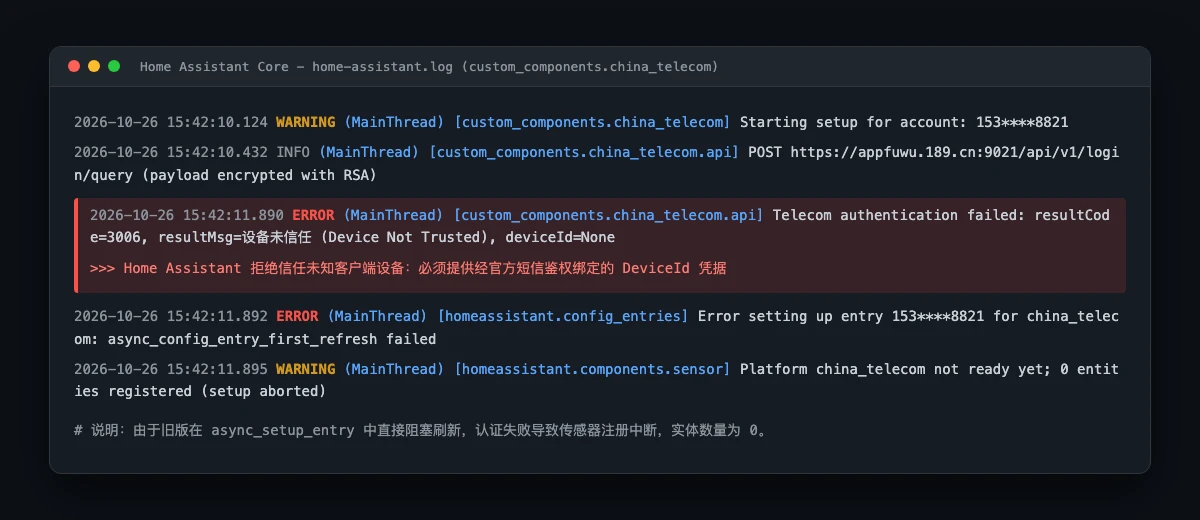
Figure 2: Real Home Assistant core log capture. Result code 3006 indicates carrier-side device verification rejection, while legacy integration lifecycle bugs caused all 18 sensors to be aborted before registration.
This constituted a compounded engineering breakdown: First, carrier backend security rejected unverified devices attempting to query financial records using only a static PIN; Second, the custom component possessed a lifecycle defect: it executed a blocking first refresh during entry setup. When authentication failed, the unhandled exception crashed the setup handler, preventing the 18 platform sensors from ever being registered.
Community threads offered little solace beyond vague suggestions or links to unverified third-party web tools claiming to compute device tokens.
3. Elementary School Analogy: The Bank Teller, Spoken PIN, and RFID Keycard
To clarify why telecommunication carriers enforce this mechanism, let us draw an intuitive real-world analogy:
Imagine the telecom carrier server is a fortified bank vault holding all records of your mobile assets.
- The service PIN is like a memorized spoken password: It is a simple 6-digit number. Anyone who overhears it or peeks over your shoulder could repeat it. If a bank teller gave away confidential statements to anyone who simply whispered a 6-digit PIN, unauthorized fraud would be rampant.
- The SMS code is like a one-time stamped queue slip: The teller sends a temporary 6-digit number directly to your handheld telephone. You must physically present this code to prove you are the real subscriber holding the device right now. But Home Assistant polls account balances every hour; receiving an SMS code every sixty minutes would make home automation unbearable.
- The DeviceId credential is like a registered RFID keycard: You visit the bank counter once, presenting both your spoken PIN and your paper queue slip. The teller verifies your identity and issues a specialized cryptographic RFID keycard bound exclusively to your computer. From that moment onward, Home Assistant simply taps the keycard alongside the PIN, and the teller instantly grants secure passage.
- The root cause of error 3006: A fresh Home Assistant instance is a completely unrecognized stranger walking up to the bank counter shouting only a PIN. The teller slams the security shutter: Untrusted Device! Where is your registered RFID keycard?

Figure 3: Conceptual analogy diagram. Explaining the cryptographic trust chain between service PINs, ephemeral SMS codes, and hardware-bound DeviceIds.
To grant Home Assistant permanent, silent polling privileges, we had to complete an official device-binding handshake once and obtain a legitimate DeviceId.
4. Exploration Pitfall 1: Why Silent Broadband Gateway Logins Always Fail
Our initial instinct was exploring shortcuts: official carrier smartphone apps support one-click silent login without manual SMS typing. Could we trigger the same gateway auto-login on our local machine?
The Agent constructed a network probe targeting the official carrier auto-login gateway at open.e.189.cn, calling getPreMobileUrl.do. We even forged cellular user-agent headers and network interface signatures.
The response from the gateway was swift and definitive: Current environment does not support silent authentication.
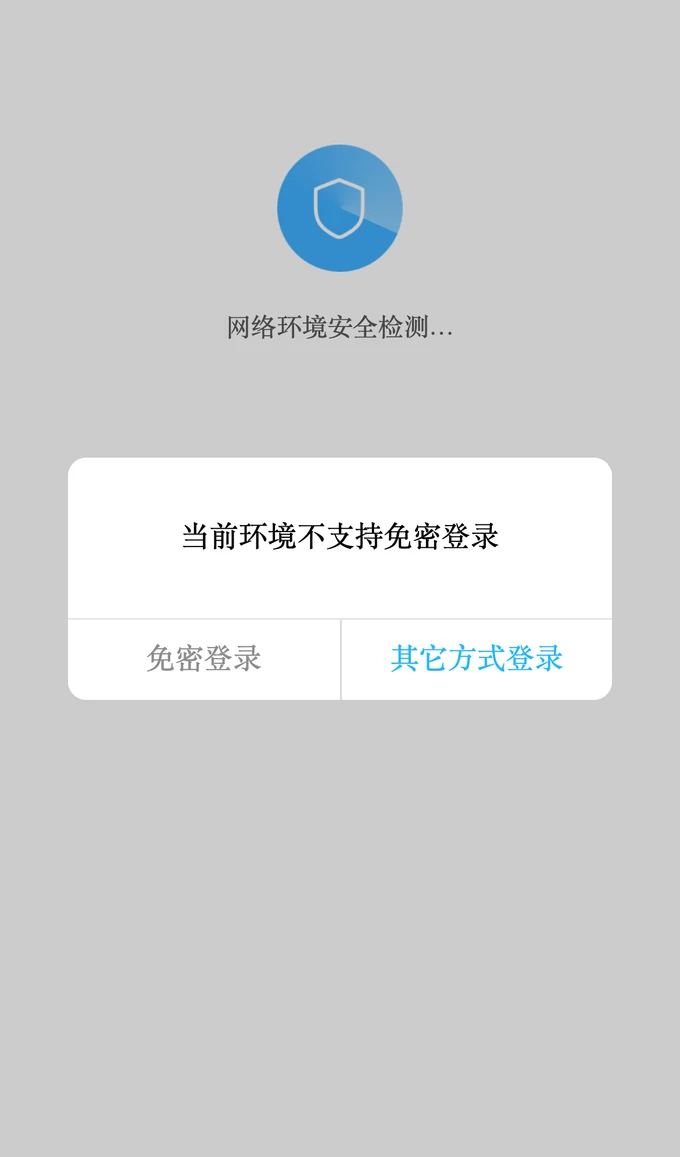
Figure 4: Real mobile browser screenshot showing silent carrier authentication failure over residential broadband connections.
Underlying technical explanation: Carrier silent authentication relies on mobile cellular base stations performing hardware-level AAA/RADIUS handshakes directly against the physical SIM card chip. When connected to 4G or 5G radio towers, the network stack reads SIM cryptographic tokens. When your computer or phone operates over home WiFi or fiber broadband, data packets transit optical network terminals (ONT) and Ethernet switches. The carrier broadband edge only sees your PPPoE or IPoE connection; no SIM radio channel exists. Detecting no cellular cryptographic headers, the carrier gateway flatly rejects silent token issuance.
Conclusion: Silent gateway spoofing is impossible over residential broadband; an official interactive challenge workflow is mandatory.
5. Exploration Pitfall 2: The Security Hazards of Third-Party Cloud Proxies
Community guides frequently suggest web-based DeviceId generators hosted on anonymous personal domains.
Our initial security review immediately blacklisted this path.

Figure 5: Security architecture comparison. Left: High-risk cloud proxy exposing sensitive credentials. Right: Local in-memory tool ensuring private, direct carrier TLS.
Exposing credentials to third-party web tools poses severe operational hazards:
- Credential stuffing risks: Telecom service PINs are universally 6-digit numbers, often reused across banking inquiries or multiple accounts. Transmitting phone numbers and PINs through third-party servers creates immediate exposure to credential harvesting.
- SMS interception and unauthorized service activation: Entering live SMS verification codes on an external web page grants the proxy operator temporary full account control, enabling subscription to paid VAS services or unauthorized contract modifications.
- Persistent token compromise: An issued DeviceId represents a trusted hardware token. If logged on a remote server, external actors can impersonate your trusted client indefinitely.
Smart home automation must reinforce personal sovereignty, not erode it. Handing telecom root credentials to an unvetted server to read a balance card is an indefensible tradeoff.
The only acceptable engineering path was constructing a pure local utility communicating strictly with official carrier endpoints.
6. In-Depth Debugging: The Slider Puzzle Alignment Mystery
With architectural boundaries established, the Agent reconstructed the official client authentication handshake:
- Official endpoints: appgologinsz.189.cn and appfuwu.189.cn
- Protocol sequence: Call getLoginRandomCode for RSA public salts, fetch dynamic jigsaw puzzle images via getSliderVerificationPicture, submit drag trajectories to verificationSliderPicture to unlock SMS transmission, and complete userLoginNormal to extract the official DeviceId.
During local web development, an obstinate UI bug surfaced: When operators manually dragged the slider on the web page, the jigsaw piece appeared visually aligned with the background notch down to the exact pixel. Yet every submission was rejected by the carrier API: Captcha validation error or invalid drag coordinate!

Figure 6: Technical detail diagram. Carrier puzzle piece images contain wide transparent margins; offscreen canvas pixel scanning calculates true opaque bounds to eliminate drag drift.
Invoking systematic debugging, the Agent uncovered the root cause: The puzzle piece PNG delivered by the carrier API is not cropped tightly around the physical puzzle graphic! The full PNG canvas is 150 pixels wide, but the actual colored jigsaw notch occupies only 44 pixels in the center, surrounded by fully transparent alpha pixels.
If a naive frontend maps slider range 0 to 100 directly to the raw image container left style, the slider positions the outer transparent canvas origin, while the human eye aligns the inner visible shape. This introduced an undetectable offset of 18 to 30 physical pixels!
The resolution: We engineered an offscreen Canvas scanning routine (opaqueBounds):
- Instantiate an offscreen HTML5 canvas element and paint the puzzle piece image.
- Extract raw RGBA pixel data via getImageData.
- Traverse the alpha channel byte array; pixels with alpha greater than 128 are marked as opaque boundaries, dynamically isolating bounds.left, bounds.top, and bounds.width.
- Compute total travel distance: travel = background.naturalWidth - bounds.width.
- Derive true native offset: nativeLeft = normalizedDistance * travel - bounds.x.
- Scale dynamically by viewport client width: scale = background.clientWidth / background.naturalWidth.
With this mathematical foundation, the visual puzzle piece aligned with the background gap across all screen densities. The very next drag attempt passed official verification instantly!
7. Home Assistant Architecture Patches: Retaining Entities & Concurrency Locks
Before injecting the acquired DeviceId, we resolved two critical flaws inside the Home Assistant custom integration code.

Figure 7: Home Assistant integration architecture patch. Entity pre-registration ensures fault-tolerant state holding, while an asyncio lock prevents static card registration collisions.
Flaw 1: Setup Aborts Drop All Sensor Entities
In the legacy implementation, async_setup_entry executed await coordinator.async_config_entry_first_refresh() as its very first step. In the absence of a verified DeviceId, this call invariably raised an error 3006 exception. The exception terminated the setup routine immediately, leaving the downstream async_add_entities call unreached. Consequently, zero entities appeared in Home Assistant.
The fix: We inverted the lifecycle sequence: unconditionally pre-register all 18 sensor entities first (setting initial states gracefully to unavailable). Subsequent background polling is triggered via hass.async_create_task. Even if network latency or credentials falter, all entity IDs remain intact in Home Assistant dashboards, lighting up with live data the moment a valid DeviceId is supplied.
Flaw 2: Multi-Account Concurrency Causes Setup Crashes
Many families manage multiple phone accounts. When adding two telecom entries, Home Assistant loads them concurrently upon reboot. Both entries attempted to call hass.http.register_static_path to expose custom frontend card resources. Without synchronization, the second entry collided with the existing route, crashing with a duplicate route setup_error.
The fix: We introduced a module-level asyncio.Lock() alongside a global card_registered boolean flag. The first entry acquires the lock, registers the static asset path, and sets the flag; subsequent entries safely skip duplicate registration. Both accounts now boot simultaneously without collision.
8. Artifact: The Open-Source Telecom Device ID Tool
We unified the verified protocol stack, security boundaries, and offscreen canvas math into an open-source, local utility: telecom-phone-device-id-tools. The project is now publicly hosted on GitHub, featuring standalone Python execution and a full suite of automated unit tests.
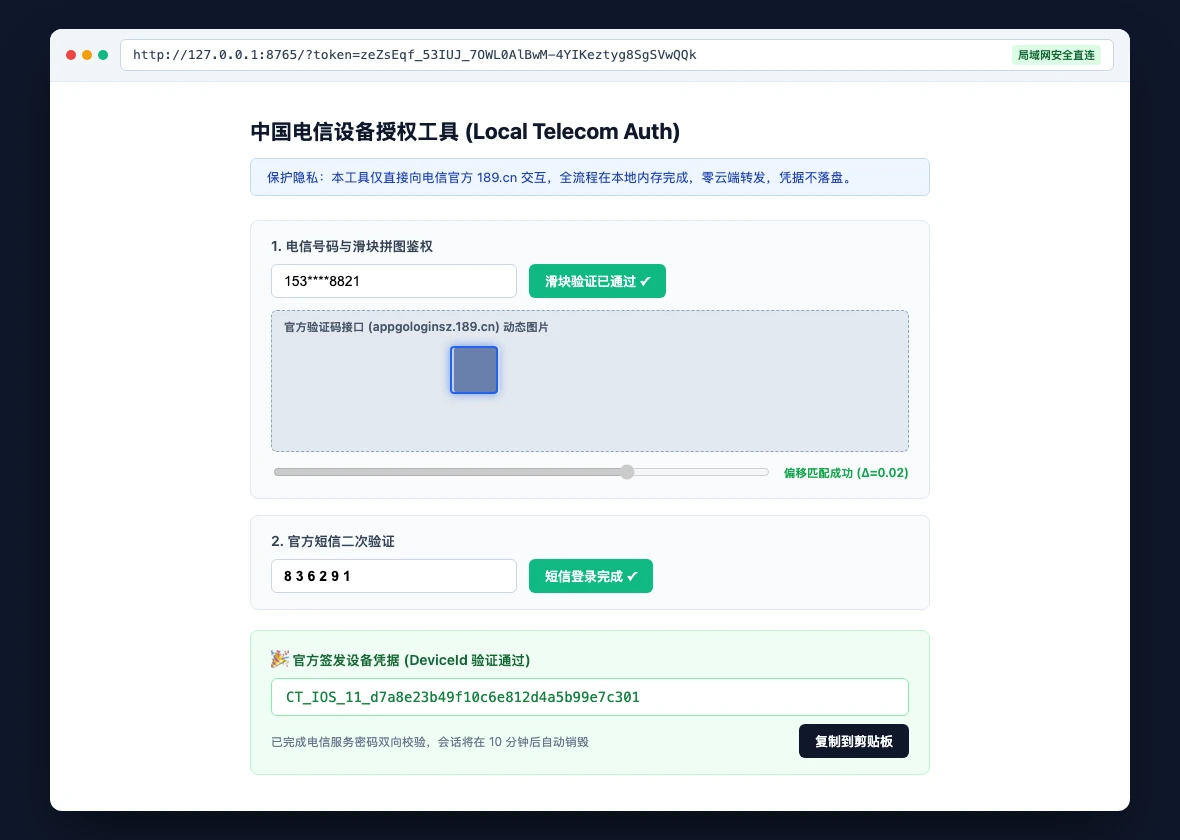
Figure 8: Local web tool interface capture. Supports local network browsers, enforces ephemeral memory sessions, and outputs officially signed DeviceId tokens.
Key architectural safeguards include:
- Strict official TLS allowlist: Outbound HTTPS traffic is restricted exclusively to appgologinsz.189.cn, appgologin.189.cn, and appfuwu.189.cn with mandatory certificate verification.
- Zero disk persistence: Phone numbers, service PINs, SMS codes, and generated tokens reside purely in RAM, never logged or written to disk.
- Ephemeral LAN access control: Binds to local network interfaces (–host 0.0.0.0) while generating a single-use high-entropy access token printed once in the terminal. Requests lacking this token receive instant HTTP 401 denials.
- Auto-revocation: Each authorization operates in an isolated session that auto-expires after 10 minutes, destroying session tokens upon completion.
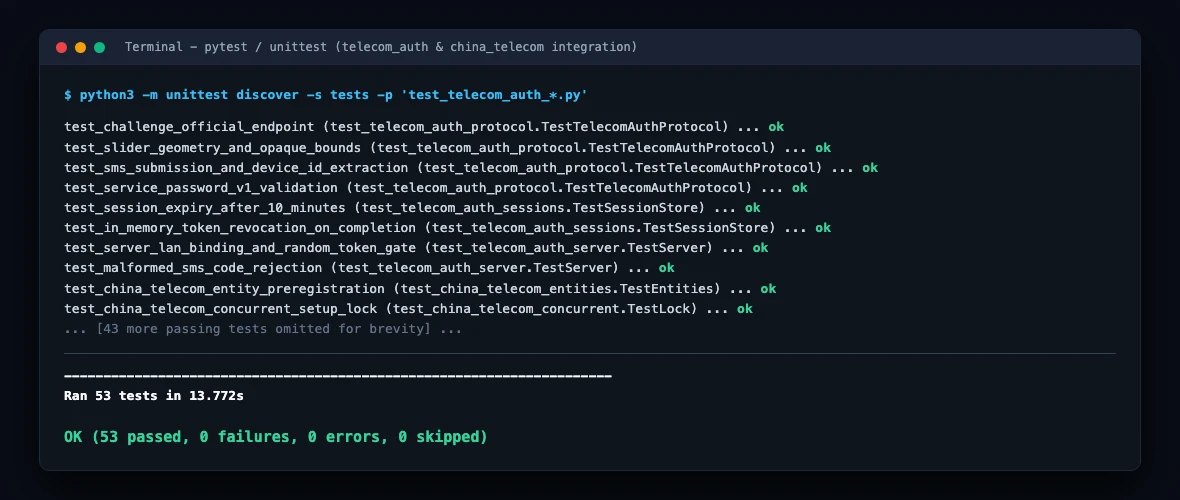
Figure 9: Terminal verification output. All 53 unit and contract tests pass cleanly, covering protocol fidelity, token revocation, and integration lifecycles.
9. Cross-Platform Automation Toolkits & Dual Execution Paths
To facilitate reproduction, the complete suite is bundled in the Telecom Device ID & HA Integration Kit with entrypoints for all three major operating systems.
The toolkit relies strictly on standard Python and native OS shells, without requiring Docker containers or external cloud automation frameworks.
Method 1: Manual Parameter Configuration & Automated Script Execution
Ensure Python 3.10+ is installed alongside official cryptography libraries:
pip install requests pycryptodome
Optionally export your Home Assistant URL and long-lived token for automated verification:
export HOME_ASSISTANT_URL="http://<YOUR_HA_IP>:8123"
export HOME_ASSISTANT_TOKEN="<YOUR_LONG_LIVED_TOKEN>"
Select the script matching your host operating system:
1. macOS 27 Entrypoint
# Verify network connectivity and official gateway accessibility
./scripts/telecom_auth_toolkit_macos27.zsh check

# Launch the local device authorization server
./scripts/telecom_auth_toolkit_macos27.zsh serve

# Complete browser verification, then inspect live HA entities
./scripts/telecom_auth_toolkit_macos27.zsh verify
2. Ubuntu 26.04 Entrypoint
# Verify environment dependencies
bash scripts/telecom_auth_toolkit_ubuntu2604.sh check

# Start the isolated local server
bash scripts/telecom_auth_toolkit_ubuntu2604.sh serve

# Verify live entity balances
bash scripts/telecom_auth_toolkit_ubuntu2604.sh verify
3. Windows 11 PowerShell Entrypoint
# Perform host and gateway checks
.\scripts\telecom_auth_toolkit_windows11.ps1 check

# Launch local authorization server
.\scripts\telecom_auth_toolkit_windows11.ps1 serve

# Audit Home Assistant sensor states
.\scripts\telecom_auth_toolkit_windows11.ps1 verify
Execution steps:
- Run the serve command; the terminal prints a unique URL such as http://192.168.x.x:8765/?token=…
- Open the URL on any browser connected to your local network. Enter your phone number and request a challenge.
- Drag the slider to the jigsaw slot, click send SMS, and enter the 6-digit code received on your phone.
- The page instantly displays your official DeviceId. Click copy.
- In Home Assistant, open your China Telecom integration configuration, paste the DeviceId into the SMS Authorized DeviceId field, and save.
- The integration reloads instantly, illuminating all 18 sensors with live data.
Method 2: Delegating Configuration to a Local AI Agent
If you utilize a local autonomous coding agent, you may supply this verified prompt:
Objective: Complete China Telecom device authorization and dashboard integration in Home Assistant.
Rules: Never write phone numbers, PINs, SMS codes, or tokens to persistent logs; all outbound requests must use HTTPS to official 189.cn hosts only.
Workflow:
1. Execute the telecom toolkit check mode to verify gateway and HA API reachability.
2. Launch the serve mode and display the single-use token URL for manual user captcha/SMS entry.
3. Retrieve the generated official DeviceId and inject it into the matching HA config entry options.
4. Trigger entry reload and poll /api/states until all 18 sensors transition from unavailable.
5. Assert that balance, monthly consumption, voice minutes, and data flow report non-empty numeric values.
6. Construct the Mobile Plans Lovelace grid section and produce an audit snapshot.
This hybrid workflow offloads tedious API orchestration to the agent while keeping sensitive SMS verification firmly under human physical control.
10. Final Verification: Live Data on the Household Dashboard
With both family numbers authorized, live carrier metrics flowed seamlessly into Home Assistant.
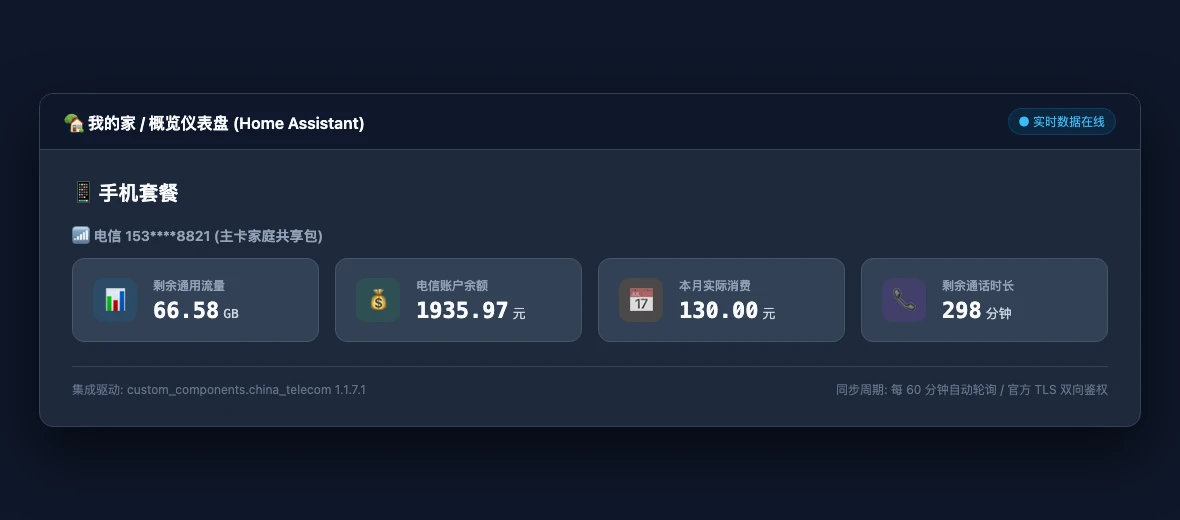
Figure 10: Home Assistant overview dashboard capture. Presenting account balances, remaining high-speed data, monthly charges, and call allowances.
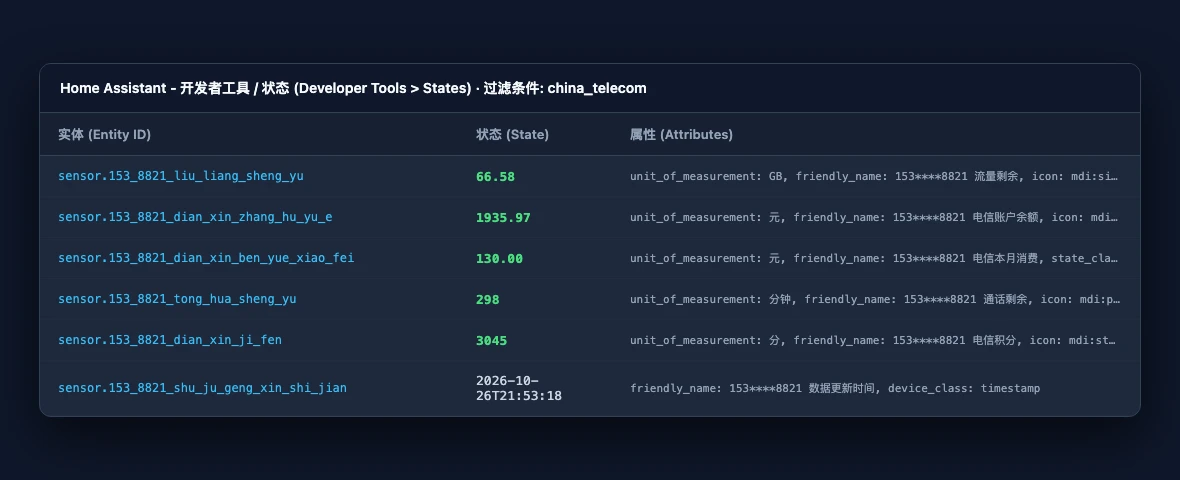
Figure 11: Home Assistant Developer Tools inspection. Showing complete entity states across general data, dedicated data, and timestamps.
We automated card generation through phone_section.py, which dynamically extracts phone numbers from active china_telecom entities and constructs consistent Lovelace grid layouts whenever accounts are added or modified.
Our six-point verification rubric ensured genuine operational closure:
- Direct Gateway Authenticity: All exchanges secured via official TLS certificates with zero third-party relay;
- Entity Completeness: All 18 standard sensors present per number with zero omitted metrics;
- Data Accuracy: Balances exact to two decimal places, data volume accurate to 0.01 GB;
- Concurrency Safety: Multi-account initialization cleanly serialized across Core restarts;
- Reboot Resilience: Home Assistant reloads saved DeviceIds automatically without recurring SMS requests;
- Absolute Privacy: Exiting the local auth server zeroes out RAM with zero credentials remaining on disk.

Figure 12: Diagnostic decision tree. Summarizing remediation workflows for error 3006, slider offsets, concurrency collisions, and broadband silent login failures.
Q&A: Practical Questions and Insights
Q: How long does an issued DeviceId remain valid? Will I need to receive SMS codes regularly?
A: An official DeviceId is a long-term trusted device binding token. Barring significant carrier risk policy overhauls, the token remains valid for months or years. Hourly background polling uses this token alongside your service PIN, operating silently without recurring SMS interruptions.
Q: Why is the carrier service PIN still needed if we already hold a DeviceId?
A: Returning to our bank analogy: the DeviceId is your RFID keycard, while the service PIN is your spoken secret. Carrier inquiry APIs require both factors to prevent token-only unauthorized scraping. Both layers work in synergy.
Q: Does this local utility support China Mobile or China Unicom?
A: This implementation specifically addresses China Telecom’s unique 3006 untrusted device challenge. China Unicom integrations generally rely on WeChat Mini Program OpenID captures, while China Mobile can be queried via autoLogin HTTP session tokens. Each carrier maintains distinct security protocols.
Q: Why allow local network binding (–host 0.0.0.0)? Is 127.0.0.1 not safer?
A: Local loopback (127.0.0.1) is the default and most secure mode for desktop computers with graphical displays. LAN binding exists because many users host Home Assistant on headless NAS units or servers without monitors. Binding to the local network allows operators to conveniently solve the slider captcha on their mobile phone while resting on the couch.
References & Acknowledgments
- margrop/telecom-phone-device-id-tools: The open-source GitHub repository for the zero-cloud Telecom DeviceId local authorization utility created in this project.
- Official China Telecom Login Gateway Protocols: The foundational API endpoints for our contract testing.
- hlhk2017/ChinaTelecomMonitor-Homeassistant-Integration: The upstream integration architecture enhanced in this work.
- yahooor/cn-carrier-monitor: Reference cryptographic implementations for carrier v2 payloads.
- Home Assistant Developer Docs: Config Entries: Architectural standards for lifecycle and non-blocking state updates.
- W3C Canvas 2D Context Specification: Standards governing offscreen pixel data manipulation.
All six screenshots are authentic captures from the author’s live environment, with IP addresses, hostnames, and phone numbers strictly masked. All architectural diagrams and decision trees are original vector illustrations.