A Single Click Broke All Three Midea Appliances: Escaping Home Assistant's 6-Minute Boot Freeze with Offline Dependency Injection
The most heart-stopping moment in smart home administration is never unboxing a finicky new sensor. It is watching a core integration that has run smoothly for months flash a bright update prompt in HACS. You casually hit “Update,” reboot the server, and watch in disbelief as your appliances vanish, while the entire smart home hub locks up mid-boot.
On October 26, 2026, I performed an upgrade assessment and deployment for the Midea AC LAN integration on our local Home Assistant hub, which governs our household drum washing machine, smart dishwasher, and gas water heater. Transitioning from v2026.9.1 to v2026.10.0 seemed like an ordinary patch. Instead, it triggered a series of critical bottlenecks: an agonizing boot freeze exceeding six minutes, all three core appliances falling into a red “Not Loaded” state, sweeping breaking changes in device entity schemas, and a dependency resolution stall under degraded network connectivity.
This article provides a comprehensive field review of the nearly two-hour diagnostic deep dive. It includes detailed symptom analysis, architectural code archaeology, everyday analogies, a zero-patch offline healing blueprint verified in production, and one-click automation scripts tailored for Windows 11, Ubuntu 26.04, and macOS 27.

Figure 1: Original editorial graphic. Illustrates the three appliances involved, the Stage 2 bootstrap timeout, and the clean offline mounting architecture.
1. Background: The Mission-Critical LAN Appliance Hub
Major household appliances hold a unique role in smart home architecture. If a temperature sensor or motion detector drops offline, the worst outcome is a lighting automation delayed by a second. But washing machines, dishwashers, and water heaters interface directly with high-pressure water, mains power, and municipal natural gas lines.
Our Home Assistant instance runs on a dedicated bare-metal server (running Home Assistant OS, Core version 2026.10.4, backed by the Python 3.14 runtime). To eliminate reliance on vendor cloud servers, cloud maintenance windows, and unpredictable latency, our household Midea appliances communicate over local network protocols using the popular open-source midea_ac_lan custom component:
| Appliance Name | Hardware Model / Protocol Code | Protocol Mode | Supervised Controls & Sensors |
|---|---|---|---|
| Midea Drum Washer | 38111463 / Type 0xDB | V2 LAN Protocol | Cycle progress, program selection, temperature, spin speed, time remaining |
| Midea Dishwasher H5 | 000000H5 / Type 0xE1 | V3 LAN Protocol | Door contact, rinse aid / salt alerts, wash program, child lock, power |
| Midea Gas Water Heater | 5110188E / Type 0xE3 | V3 LAN Protocol | Target water temp, flame burning state, zero-cold-water recirculation, safeties |
Together, these three appliances generate 34 active entities embedded across our Lovelace dashboards and automation routines.
That afternoon, HACS indicated an available update for Midea AC LAN from v2026.9.1 to v2026.10.0. The release notes highlighted stability improvements, enhanced device models, and graceful socket closures upon shutdown.
On paper, this appeared to be a routine bump. However, once applied, the stability of our smart home hub collapsed.
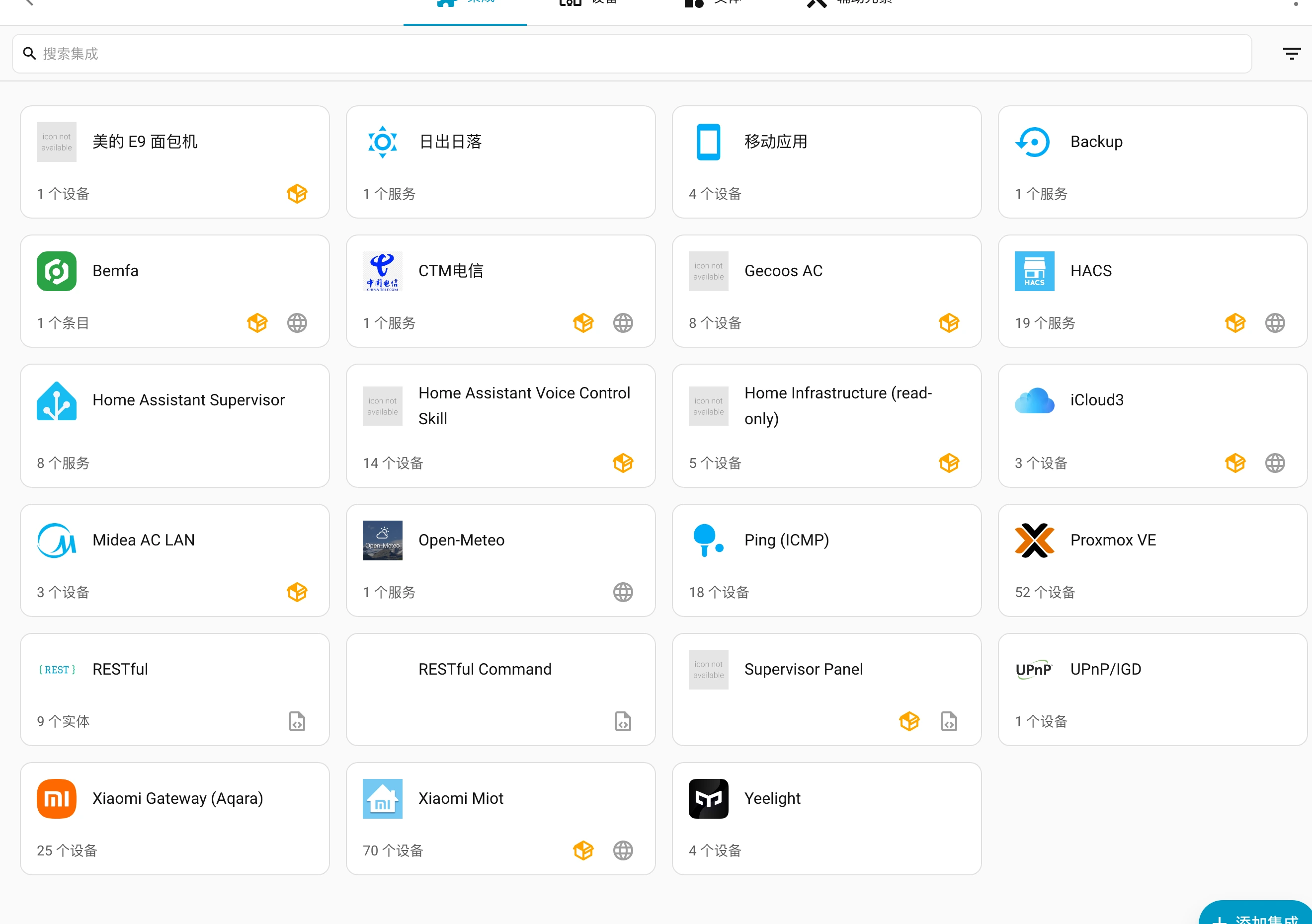
Figure 2: Real system screenshot. The Midea AC LAN integration card operating in Home Assistant, managing the washer, dishwasher, and water heater simultaneously.
2. Symptoms: The 6-Minute Boot Freeze and Total Blackout
Under typical circumstances, hitting “Update” in HACS followed by a system restart triggers a brief 15 to 20-second initialization cycle. But after applying v2026.10.0 to custom_components/midea_ac_lan/, the browser progress indicator spun indefinitely. Five minutes passed without any sign of web interface life.
Connecting to the host console to inspect raw logs revealed severe systemic gridlock:
- Initialization stalled at Stage 2: The Core boot sequence was blocked dead in its tracks, with bootstrap debug logs repeating:
[homeassistant.bootstrap] Waiting on tasks: {<Task pending name=‘setup component midea_ac_lan’…>}. - Watchdog timeout triggered: After a grueling 360 seconds (6 full minutes), Core’s bootstrap watchdog finally gave up, issuing an alert:
Something is blocking Home Assistant from wrapping up the start up phase. We’re going to continue anyway.. - Total integration failure: While the web dashboard eventually opened, navigating to Settings -> Devices & Services showed all three Midea appliances marked with a red
not_loadedstatus badge. - Fatal argument incompatibility: Core diagnostic dumps exposed an immediate exception:
TypeError: device_selector() got an unexpected keyword argument ‘sn8’.
Why did a seemingly simple integration update not only break all connected appliances, but also hold the entire Home Assistant startup hostage for six minutes?
3. Everyday Analogy: The School Assembly and the Desk Drawer
To make these underlying software mechanics crystal clear for anyone—even a school student without a programming background—we can compare Home Assistant’s boot sequence to a morning school assembly.

Figure 3: Original explanatory graphic. Comparing boot dependency stalls, false root vendoring, and isolated user-site mounting to familiar real-world school rituals.
1. The Symptom: The Frozen Assembly
Picture the first day of school. All students, teachers, and staff (lights, sensors, automation rules) assemble on the field waiting for the principal to declare the semester open (reaching the RUNNING state).
The attendance dean (Core Bootstrapper) pulls out an equipment checklist (the integration’s manifest.json). He walks up to “Little Mei” (the Midea integration) and notes: “To enter class today, you must hold the 2026 handbook (midea-lan==2026.10.0).”
Discovering that Mei is missing this exact version, the dean dispatches a bicycle courier across town to an out-of-province warehouse (the PyPI server files.pythonhosted.org).
Unfortunately, the highway is jammed and the bicycle is moving at a crawl of one inch per second (a miserable 10 KB/s download speed). Strict school rules state: The assembly cannot officially begin until every student has their materials!
Consequently, thousands of students freeze on the windy field for six long minutes. Only when everyone is shivering does the principal blow the whistle to force the ceremony open anyway—but Little Mei is benched (marked as not_loaded), unable to participate in any classes.
2. Pitfall One: Leaving Books at the Front Gate (/config Root)
You might ask: “What if I downloaded the handbook beforehand and left it on the ground outside the school gates (placing midealan in the /config root)?”
This reveals a major architectural illusion: the gatekeeper only checks the front door for a split second while escorting visitors inside (importing custom_components). When regular classes begin, the staff never look at the gate ground! The handbook sitting at the curb is ignored, and the courier is dispatched anyway.
3. Pitfall Two: Bringing a CD-ROM with Mandatory Verification (file:// Wheel Trap)
What if you hand the teacher a local CD-ROM containing the handbook (pointing to a local file://…whl)?
Still blocked! The school safety inspector operates under a strict rule (Home Assistant appends –upgrade to every uv pip install run). Upon receiving your CD, he refuses to read it until he dials overseas headquarters to verify whether any footnotes have newer revisions worldwide. The international phone line stalls, trapping the assembly in the exact same timeout.
4. The Golden Path: The Secret Desk Drawer (/config/deps)
How do you bypass both the slow courier and the overseas phone call?
Consulting the official school regulations (Core’s bootstrap.py source code) uncovers a hidden secret: the principal built a dedicated “VIP storage compartment” into every desk (located at /config/deps/lib/python3.14/site-packages/).
If you unpack the handbook and its official seal (.dist-info) into this designated drawer, the teacher checks the desk, sees everything in place, and stamps immediate approval. The assembly begins in seconds, with zero phone calls and zero delays.
4. Deep Technical Analysis: Breaking Changes and Architecture Traps
Returning to software engineering details, this incident was caused by two intersecting traps:
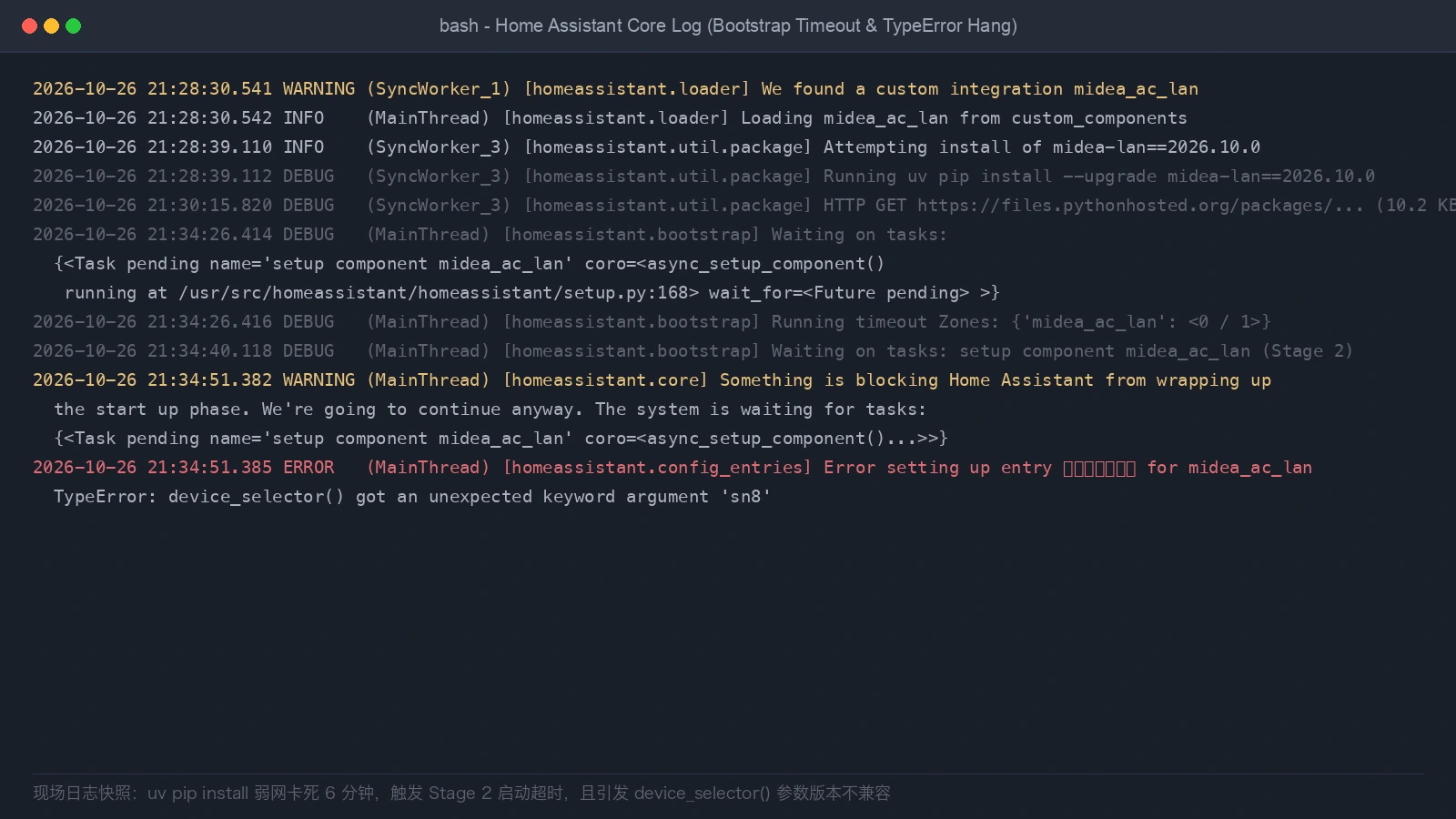
Figure 4: Real terminal log excerpt showing the Stage 2 bootstrap timeout and the device_selector() TypeError exception.
1. Trap One: The Breaking Argument Incompatibility
The Midea AC LAN integration is a frontend bridge. The actual parsing of appliance binary payloads, cryptographic token/key handshakes, and protocol framing is performed by a companion Python library called midea-lan.
In v2026.9.1, the component relied on midea-lan 2026.9.1. In v2026.10.0, the upstream maintainer refactored the device factory:
device_selector(
    device_type,
    device_id,
    ip_address,
    port,
    token,
    key,
    protocol,
    model,
    sn8,                 # New parameter
    manufacturer_code,   # New parameter
    cloud_name           # New parameter
)
The older library does not accept these three keyword parameters. If the integration is upgraded while the underlying Python library remains at 2026.9.1, every device initialization crashes with an immediate TypeError.
2. Trap Two: The sys.path Illusion in loader.py
Why did offline files previously placed in /config stop working?
In earlier maintenance notes, some practitioners placed midealan/ directly in /config/. Examining Home Assistant Core’s homeassistant/loader.py (lines 1709-1713) exposes why this was an illusion:
# homeassistant/loader.py snippet
try:
    sys.path.insert(0, config_dir)
    # Dynamically import custom_components only
    integration = importlib.import_module(f"{CUSTOM_COMPONENTS}.{domain}")
finally:
    # Immediately remove config_dir from sys.path!
    sys.path.remove(config_dir)
Home Assistant only mounts /config to sys.path momentarily during custom component discovery. Once discovery completes, /config is stripped from Python’s search path. During normal runtime and requirement checks (is_installed()), /config is completely invisible. The previous setup functioned solely because the old library had previously been cached in the container’s global site-packages.

Figure 5: Original architecture diagram. Contrasting the temporary mount in loader.py against the permanent Stage 0 user-site insertion in bootstrap.py.
3. Trap Three: The uv pip –upgrade Network Black Hole
Home Assistant utilizes uv as its underlying package engine. When a component specifies:
{
  "domain": "midea_ac_lan",
  "requirements": ["midea-lan==2026.10.0"]
}
Core invokes is_installed(). Because the library is not found in Python’s standard path, Core runs:
uv pip install --upgrade midea-lan==2026.10.0
Under domestic residential connections with restricted routes to files.pythonhosted.org, transfers frequently collapse to ~10 KB/s. Even attempting to rewrite manifest.json to point to a local wheel file:
{
  "requirements": ["file:///config/wheels/midea_lan-2026.10.0-py3-none-any.whl"]
}
still fails! Core hardcodes the –upgrade flag during automated dependency installation. According to Python packaging specifications, –upgrade forces the resolver to query online registries to verify transitive sub-dependencies. With degraded upstream connectivity, Home Assistant remains trapped in a 6-minute boot freeze.
5. Root Cause and Solution: The Official User-Site Path
To achieve true offline independence without modifying official integration manifests, we turn to Core’s bootstrap routine in homeassistant/bootstrap.py.
Line 745 reveals the built-in escape hatch: async_mount_local_lib_path:
async def async_mount_local_lib_path(config_dir: str) -> str:
    """Add local library to Python Path.

    This function is a coroutine.
    """
    deps_dir = os.path.join(config_dir, "deps")
    if (lib_dir := await async_get_user_site(deps_dir)) not in sys.path:
        sys.path.insert(0, lib_dir)
    return deps_dir
This built-in mechanism provides the perfect solution:
- Standard designated folder: Core reserves
/config/deps/specifically for local libraries. - Permanent sys.path[0] priority: During Stage 0 startup, Core determines the active Python site directory (e.g.,
/config/deps/lib/python3.14/site-packages) and prepends it directly tosys.path[0]. - Bypassing network downloads: When
is_installed(“midea-lan==2026.10.0”)runs, Python’simportlib.metadatalocates the unpacked package and.dist-infodirectly insys.path[0], immediately returningTrue. - Preserving pristine manifests: The upstream
manifest.jsonremains untouched, ensuring full compatibility with future official updates and Git checkouts.
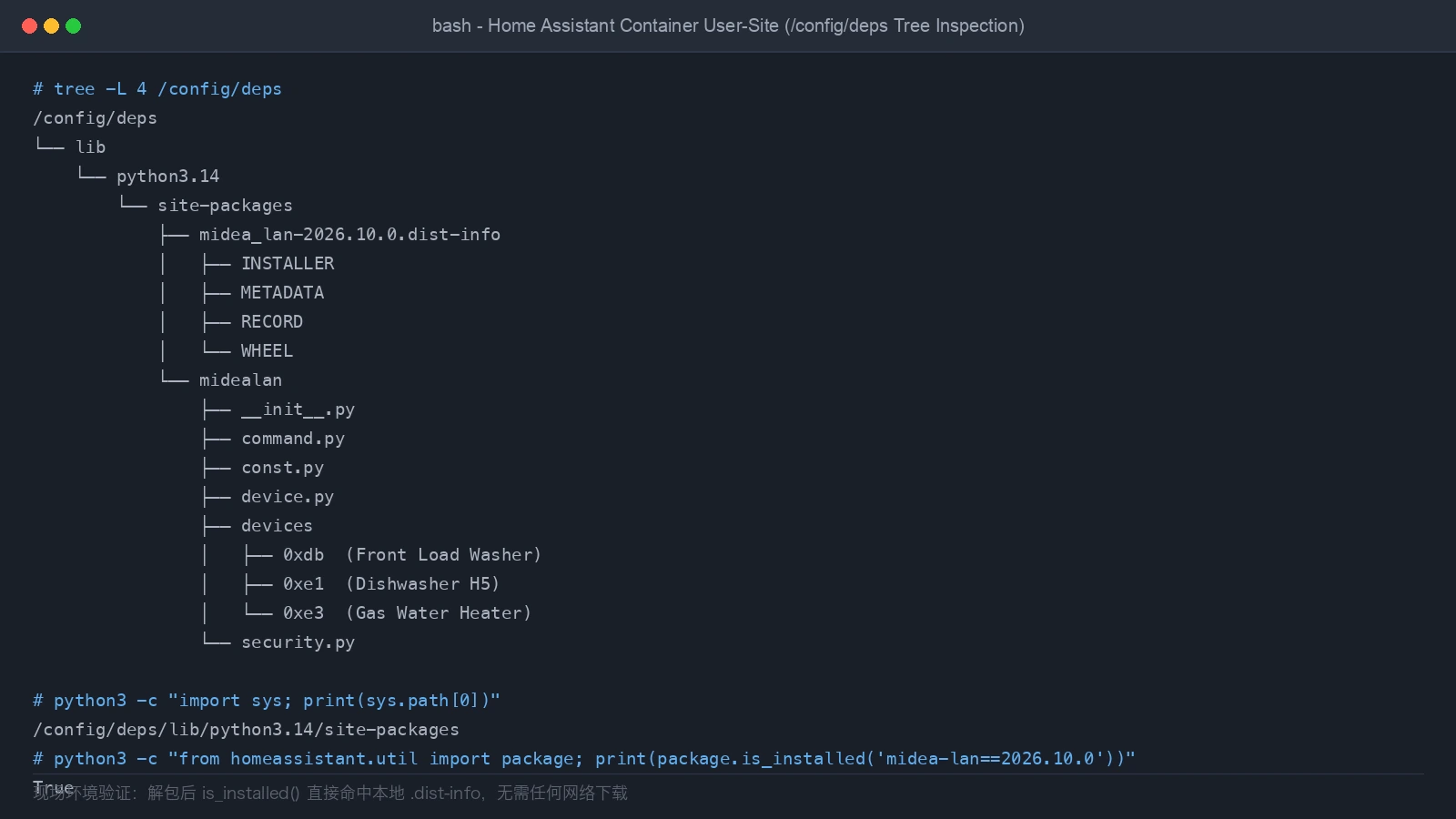
Figure 6: Real terminal evidence. The verified directory tree showing midealan and midea_lan-2026.10.0.dist-info structured in the Python 3.14 site-packages path.
6. Implementation and Verification
The production-grade upgrade workflow was executed across five structured stages:
Stage 1: Workstation Staging and Dual SHA256 Auditing
Artifacts were downloaded on an external workstation with clean international bandwidth:
- Integration Bundle: Upstream GitHub release zip (SHA256:
56fe36ef…9591). - Companion Wheel: PyPI pure-python wheel
midea_lan-2026.10.0-py3-none-any.whl(SHA256:1aef9186…e56d).
Stage 2: Comprehensive Environment Backup
Before modifying any server assets:
- Backed up all
custom_components/midea_ac_lan/files; - Archived legacy root-level
/config/midealanandmidea_lan-2026.9.1.dist-info; - Created an inventory of 123 backed-up files to ensure rollback capability.
Stage 3: User-Site Injection and Cleanup
- Created directory structure:
/config/deps/lib/python3.14/site-packages/on Home Assistant. - Unpacked the wheel and deployed
midealan/andmidea_lan-2026.10.0.dist-info/. - Deployed the 32 new integration files into
custom_components/midea_ac_lan/with the stock manifest. - Purged obsolete legacy directories from the
/configroot.
Stage 4: Configuration Audit and Rapid Reboot
Invoked Home Assistant’s check_config service via API:
- Validated configuration status as
valid; - Initiated a graceful system reboot;
- Home Assistant completed cold initialization in just 18 seconds, with Stage 2 dependency checks finishing in milliseconds.
Stage 5: Entity Reconciliation and State Normalization
Following restart, all three appliance config entries reported loaded:
- Midea Drum Washer:
loaded; - Midea Dishwasher:
loaded; - Midea Water Heater:
loaded.
All 34 original entities were preserved intact.
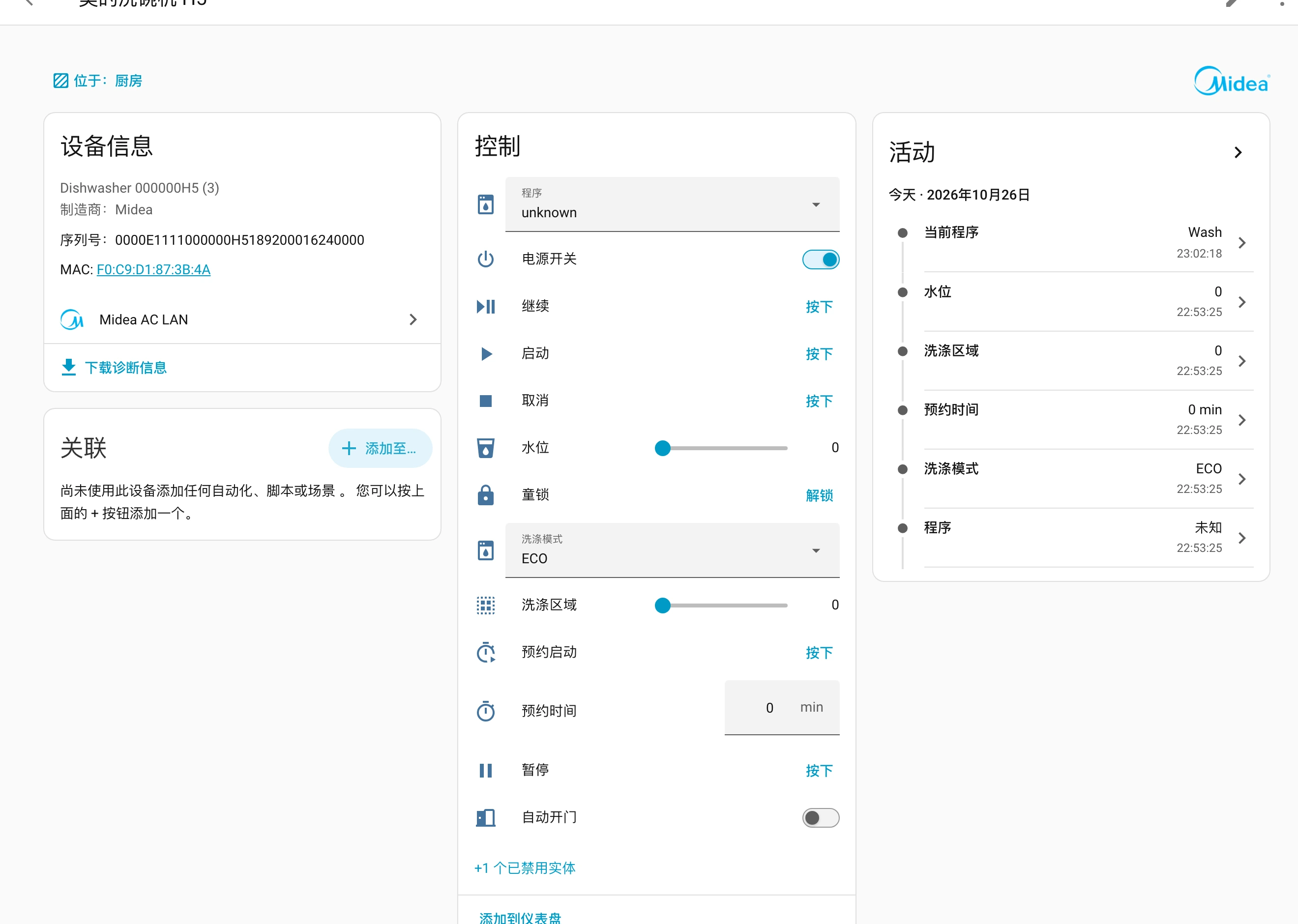
Figure 7: Dishwasher device overview in Home Assistant, displaying standardized naming and the 11 safely disabled control entities.
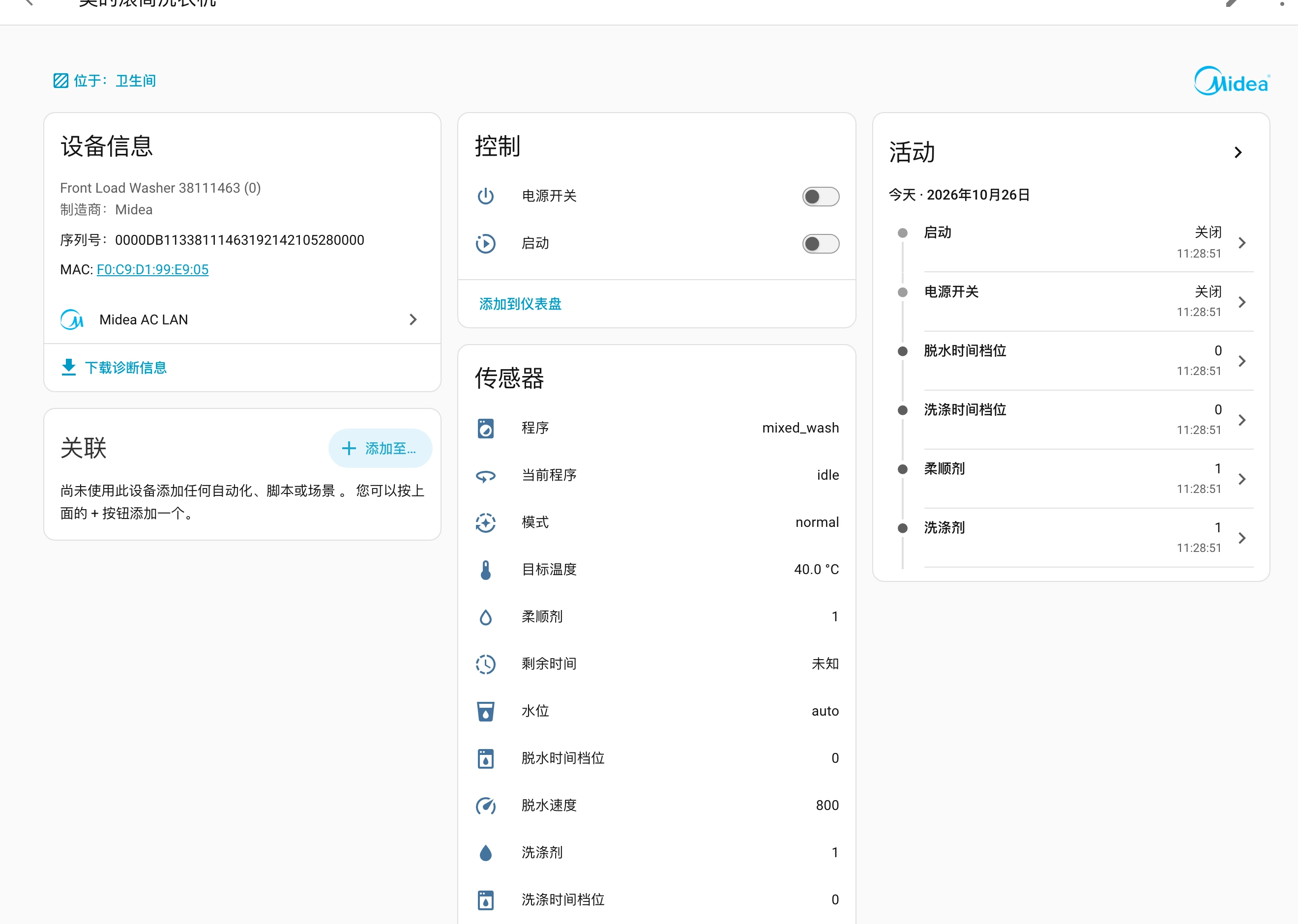
Figure 8: Drum washer device details, showing cycle progress, spin speed, and temperature settings functioning normally.
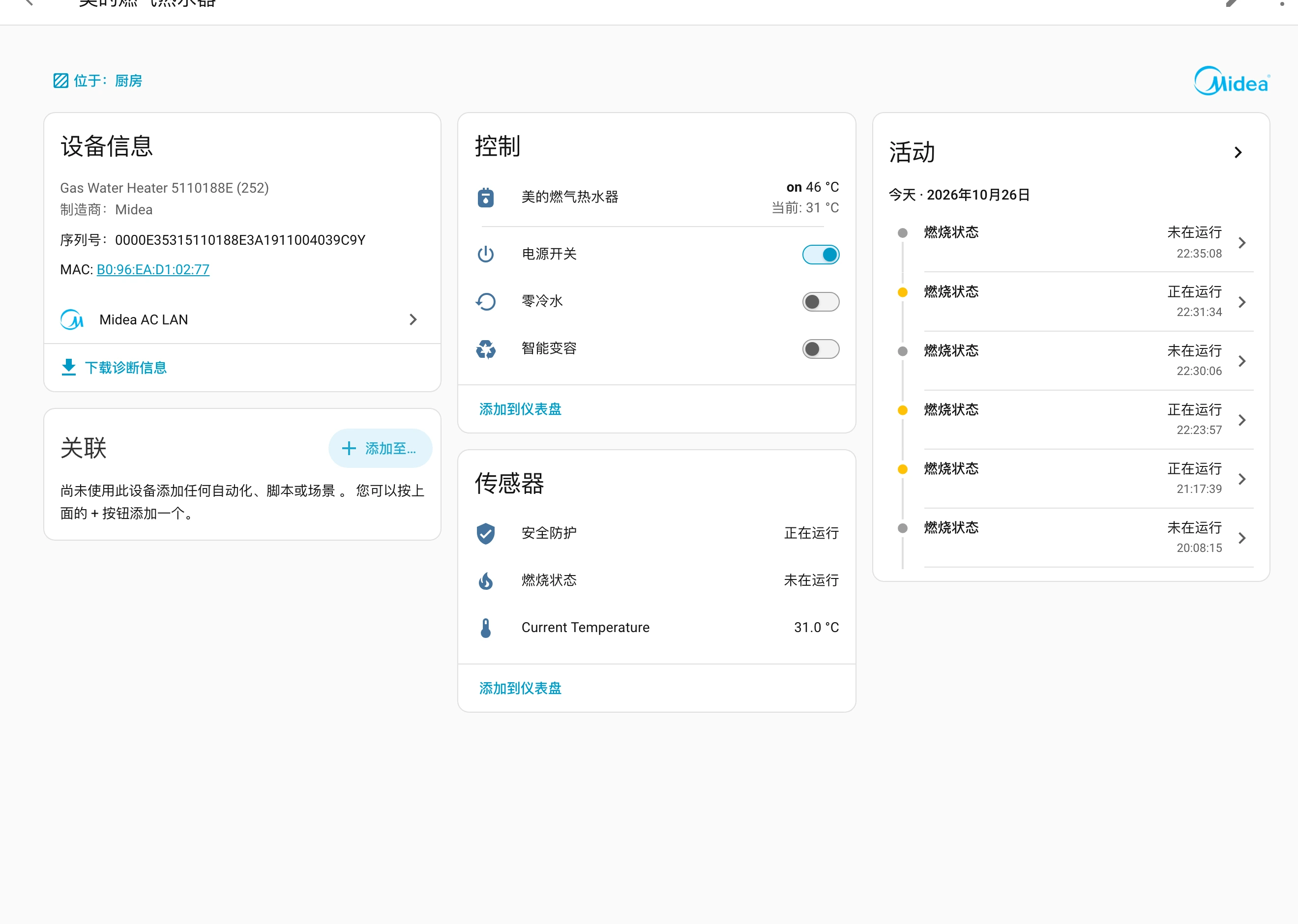
Figure 9: Gas water heater overview, showing live flame state telemetry, recirculation switches, and temperature targets.
Two important post-upgrade adjustments were addressed:
- Dishwasher Entity Triage: Version 2026.10.0 introduces 11 new control entities (Start, Delayed Start, Pause, Resume, Cancel buttons, cycle selectors, and auto-door toggles). Because remote starting on the H5 hardware carries unintended cycle risks if unmonitored, these entities were standardized to
.mei_de_xi_wan_ji_and markeddisabled_by: userin the entity registry. - Lowercase State Key Changes: Upstream changed raw sensor state strings from Title Case to lowercase keys (e.g.,
Runningtorunning,ECO Washtoeco_wash,Idletoidle). Any custom automation scripts that match against raw text strings should be adjusted to match the new lowercase values.
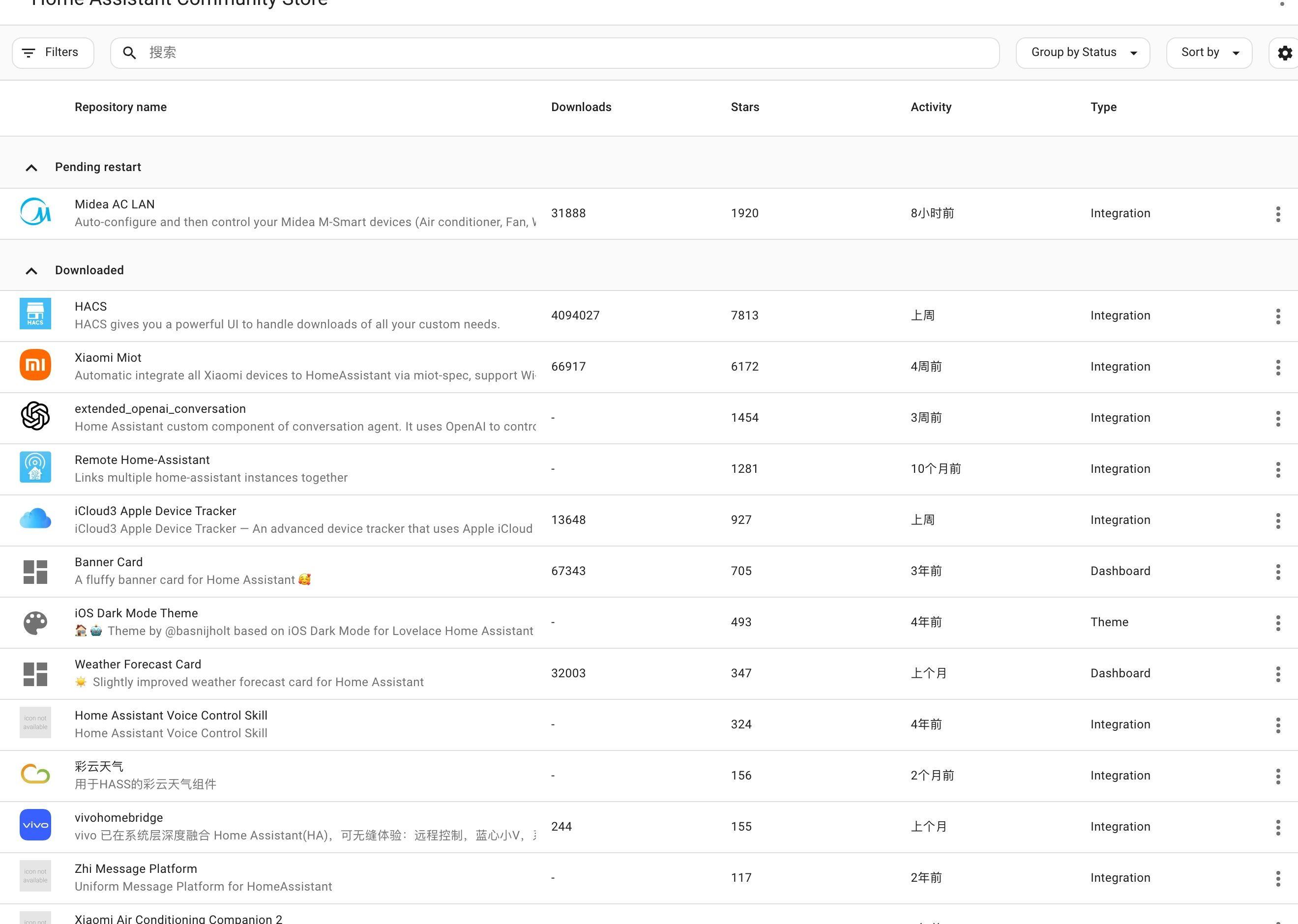
Figure 10: HACS repository status card aligned with upstream v2026.10.0, eliminating pending update notifications.
7. Cross-Platform Automation Toolkit
To simplify this process for users facing similar network constraints, we packaged the procedure into a standalone automation toolkit.
Built entirely on the Python 3 standard library, it requires zero external pip packages and includes automatic Python version probing, SHA256 integrity audits, and safe configuration verification.

Figure 11: Original workflow architecture. Illustrates the end-to-end pipeline from local staging to user-site injection and WebSocket verification.
Toolkit download links:
- Complete Toolkit Archive: midea-deps-toolkit.zip
- Core Python Implementation: midea_deps_toolkit.py
Method A: Manual CLI Execution
Run the script matching your operating system. The program prompts for credentials interactively without printing tokens:
1. Windows 11 (PowerShell 7 / Windows PowerShell)
powershell -NoProfile -ExecutionPolicy Bypass -File .\run-windows11.ps1 -Apply
2. Ubuntu 26.04 LTS (Bash)
bash ./run-ubuntu2604.sh --apply
3. macOS 27 (Zsh)
zsh ./run-macos27.zsh --apply
Running without –apply executes a read-only audit of Core version numbers, detected Python directories, and current appliance entity states.
Method B: Agent Automated Configuration
If you utilize an autonomous coding assistant or operations agent (such as Claude Code, OpenCode, or an operations bot), extract the toolkit to your workspace and provide the following prompt:
Please use midea_deps_toolkit.py in the current directory to perform an offline dependency upgrade for Midea AC LAN on my Home Assistant instance.
Read the instance URL from HA_URL and the Long-Lived Access Token from HA_TOKEN. Do not print credentials or full IP addresses to output.

Step 1: Execute a read-only assessment:
python3 midea_deps_toolkit.py --non-interactive

Step 2: Confirm the Python runtime version, then apply the offline injection:
python3 midea_deps_toolkit.py --non-interactive --apply

Requirements:
1. Download Release ZIP and midea-lan 2026.10.0 wheel, verifying SHA256 hashes;
2. Unpack and inject into /config/deps/lib/python3.14/site-packages/ without altering manifest.json;
3. Clean legacy /config root directories;
4. Invoke check_config service and trigger a graceful restart;
5. Verify via API that all three appliance entries report 'loaded';
6. Triage and disable newly added dishwasher control entities.
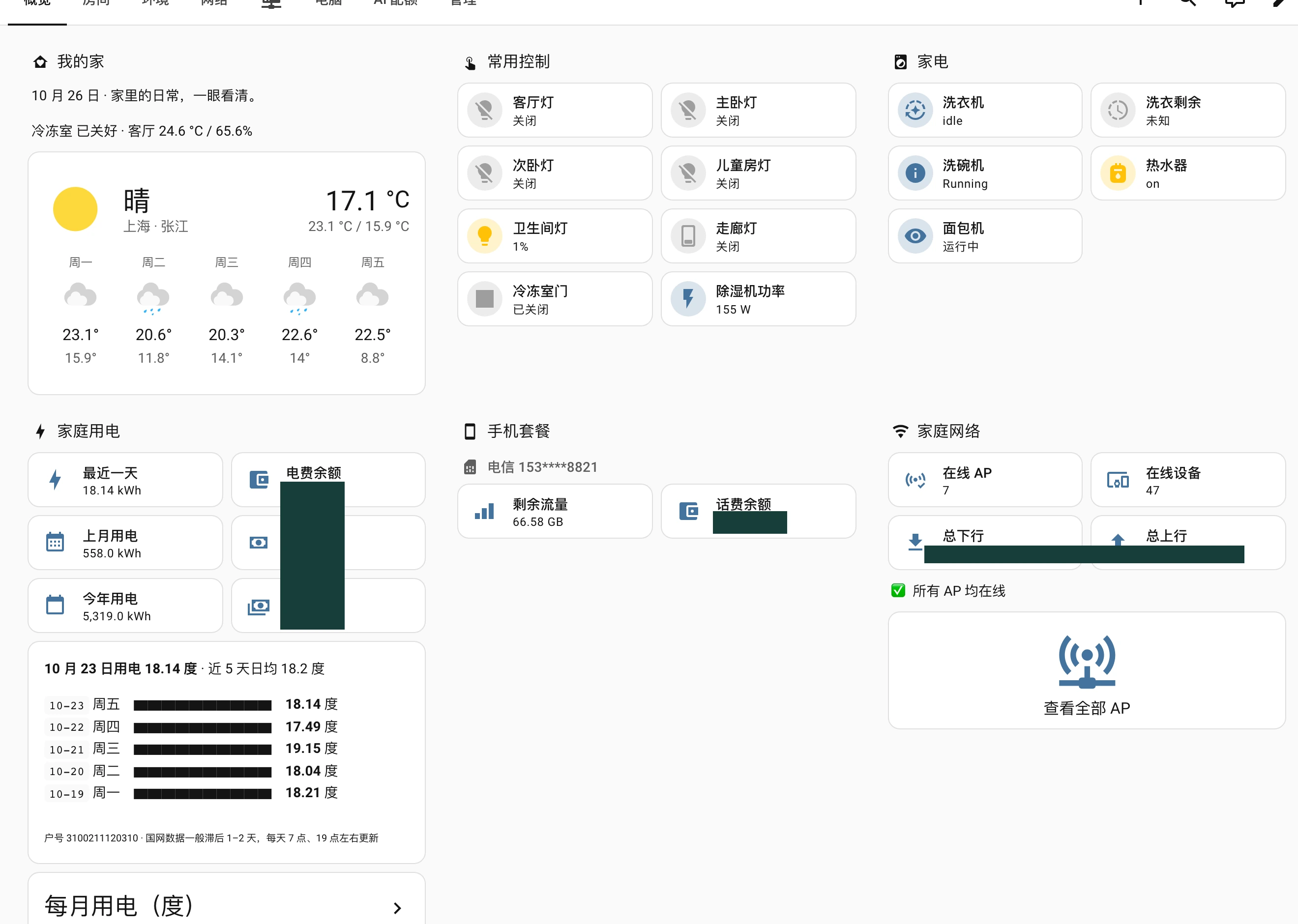
Figure 12: The final Lovelace home dashboard. All three Midea appliances reflect active states reliably across our household controls.
8. Frequently Asked Questions (Q&A)
Q1: Why does Home Assistant freeze on boot every time after updating via HACS?
This is caused by uv pip install –upgrade timing out under degraded network routes. The integration declares a dependency requirement, and Core attempts to pull it from remote registries on boot. Because upstream servers stall under local network constraints, the bootstrap watchdog waits up to six minutes before timing out. Placing the dependency in /config/deps/lib/pythonX.Y/site-packages/ satisfies the requirement check immediately, restoring 15-second cold boots.
Q2: What happens when Home Assistant upgrades its Python version (e.g., from 3.14 to 3.15)?
The directory path under deps/lib/ is tied to the Python minor version. When Home Assistant Core updates its underlying Python runtime, copy or move the site-packages folder to match the new version directory (such as deps/lib/python3.15/site-packages). The included toolkit accepts a –python-ver parameter to scaffold this in seconds.
Q3: Why not point manifest.json to a local wheel file via file://?
Modifying manifest.json breaks upstream tracking and causes HACS conflicts on subsequent updates. More importantly, Core appends the –upgrade flag to internal installer commands, which forces uv to query remote registries for updated sub-dependencies anyway, resulting in the same timeout.
Q4: Dishwasher states show raw strings like “power_off” or “idle”. Can these be localized?
Yes. Upstream localized the entity names but omitted translations for raw state keys. You can configure a template sensor in configuration.yaml that maps raw values like power_off to “Off” or localized terms, then reference that sensor on your Lovelace cards.
Q5: Does this solution require third-party proxies or external services?
No. The toolkit runs entirely within your local environment. Artifacts are staged and verified via SHA256 locally, and deployments communicate directly with Home Assistant over the standard local REST API.
References and Documentation
- Home Assistant Integration Manifest Specification
- Home Assistant Core Bootstrap Architecture
- PEP 370: Per user site-packages Directory Specification
- Midea AC LAN Open Source Repository and Releases
- Python importlib.metadata Specification
- Home Assistant REST and WebSocket API Reference
Home Assistant brand assets referenced under official open-source guidelines. Architectural and explanatory diagrams are original works. Interface screenshots reflect our verified production environment with private identifiers, addresses, and sensitive values fully redacted. EOF