Home Assistant Had My Electricity Bill. Then I Restarted It.
I wanted one small addition to my Home Assistant dashboard: how much electricity the household used each day.
An Agent installed the collector. I entered the credentials myself. The second CAPTCHA attempt succeeded, and the collector pushed the electricity data into HA. Six summary tiles and a daily list appeared. It looked finished.
Another configuration task then restarted Home Assistant. Several electricity tiles changed to “Entity not found.”
The useful part of these two days was discovering that successful login, a visible number, restart recovery and durable history are four separate acceptance tests.

Figure 1. This article follows local Agent records and configuration changes from October 25–26, with a read-only check during writing. Real device addresses, computer names, internal domains, utility account identifiers and credentials are omitted.
A small dashboard request with three separate systems behind it
Home Assistant already showed appliances and environmental readings. Checking the electricity bill still meant opening the State Grid app. I wanted the information we actually consult: the latest available daily usage, the account balance, the most recently billed month’s energy and cost, and the year-to-date totals.
That involves three jobs: obtaining data from the utility, delivering it to HA, and presenting it with the right meaning.
The collector used here was ARC-MX/sgcc_electricity_new, installed as SGCC Electricity add-on version 1.8.1. This is a community project. It automates the utility website and sends observations through HA’s REST API. It is not an official State Grid HA integration or a local, live connection to the meter. Website changes, authentication policies and regional differences can affect it.
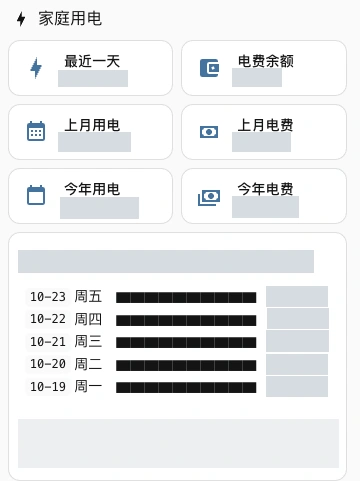
Figure 2. A crop of the real initial HA dashboard. Opaque masks cover the account identifier, monetary amounts and exact readings; the interface was not redrawn. Five dated rows mean five observed days, even though the card was designed to show up to fourteen.
The everyday dashboard displayed the household information we wanted to consult. After receiving a reading, field completeness still needed checking: obtaining the latest daily value is not the same as obtaining a complete daily list. Available data can differ between accounts and regions, so one working card cannot establish identical coverage everywhere.
For a fresh installation, prepare the collection side in this order:
- Bind your own utility accounts in the State Grid app or website and confirm that manual queries work. This project targets State Grid services; China Southern Power Grid accounts need a different solution.
- On HA OS, add the upstream repository under Settings → Add-ons → Add-on store → Repositories, then install the add-on. On HA Container, run the separate collector according to upstream instructions and preserve its data directory.
- Configure your own
HASS_URLand dedicatedHASS_TOKEN, using HA’s actual port. Enter utility credentials only in private configuration. Use an existing or self-hosted vision endpoint as appropriate. - Start collection and verify authentication, business dates and the six source metrics for every account. Complete a genuine query before enabling a sensible collection schedule, caching and startup behavior.
Public repositories can supply installation material without a hosted automation platform. Avoiding third-party AI services throughout the chain also requires a self-hosted vision service; moving a script onto your computer does not remove its remote model calls.
I previously wrote about installing HACS. This installation used a Supervisor add-on repository instead. Those are different installation mechanisms. HA Container users usually need a separate collector container rather than an add-on button available in HA OS.

Figure 3. Verify each part of the chain independently. A successful upstream step cannot certify the downstream one.
Login worked, but login was only the first test
The first practical obstacle was connectivity. The HA environment could not reliably reach GitHub, so installation used the project’s Gitee mirror. That fixed access to installation material; it did not establish the correctness or persistence of the collected data.
For authentication, the collector used an existing model gateway. I entered the utility credentials in the add-on’s configuration page. The Agent started the collector and inspected login and per-account results. The first run passed the CAPTCHA on its second attempt.
An unexpectedly important detail was the output budget. The local investigation found a very short response allowance for the icon-click challenge, approximately 50 tokens. Some models with longer reasoning behavior returned no usable final answer within that allowance. A standalone test proving that a model accepts images did not prove that it could satisfy this particular prompt, image input, output format and budget.
Imagine asking a classmate to answer a question on a tiny sticky note. Your program accepts only coordinates. If the classmate uses all the space explaining the problem, the required coordinates may never appear. The issue is the complete input/output contract, rather than the model’s reputation.
This also establishes a service boundary. The actual installation used a vision-model API; that part was not offline. The upstream README still begins with an older reference to offline recognition, while its current workflow describes model-based recognition. Read the implementation and current instructions together instead of treating an introductory sentence as a guarantee.
Readers who want to avoid third-party AI services can operate their own image-capable compatible endpoint, configuring LLM_BASE_URL, LLM_MODEL and whatever authentication that local service requires. Matching the API format still does not guarantee correct challenge responses. The downloadable scripts in this article do not call a model or handle the utility password. They automate persistence and validation after data reaches HA.
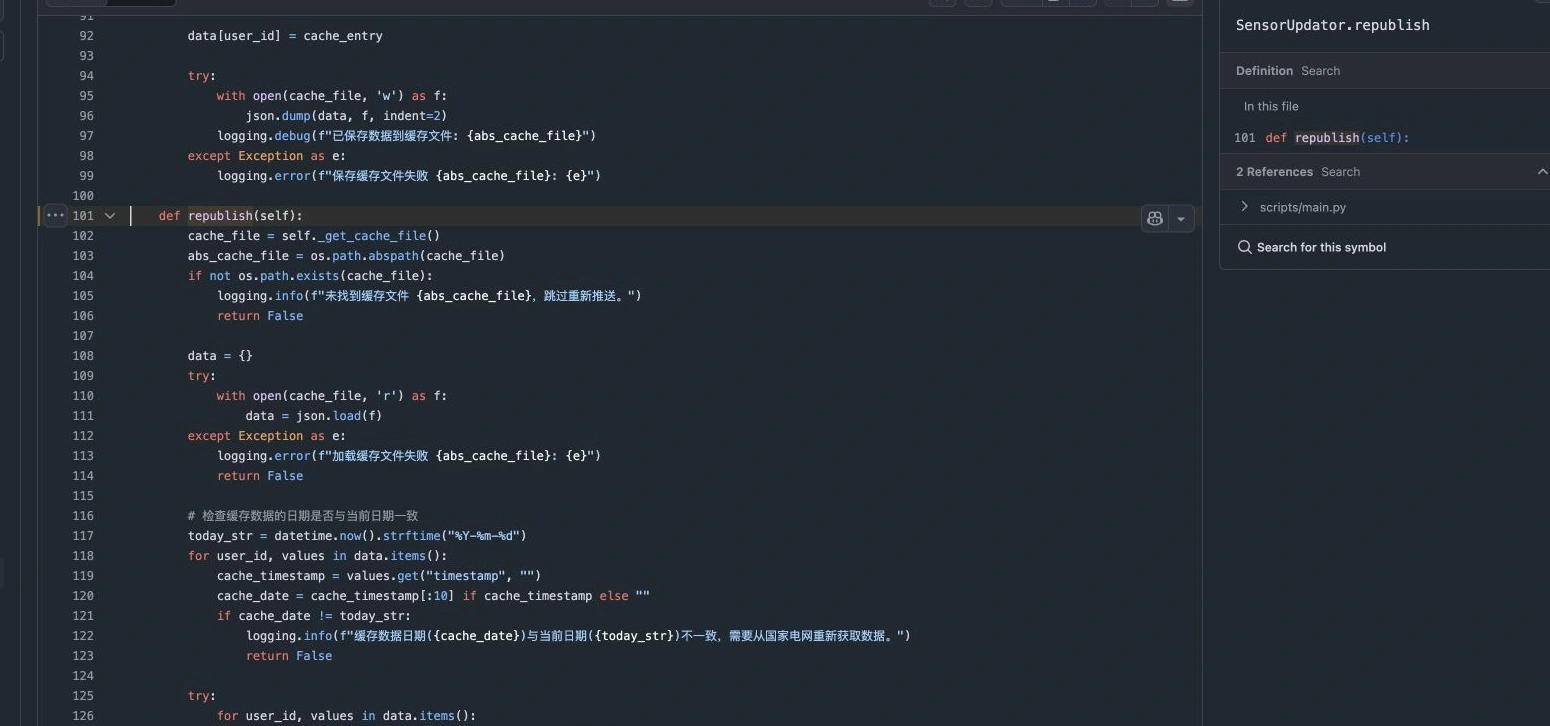
Figure 4. A real browser capture of upstream source pinned to commit bef030a. The republish() function reads cached data and checks its date. Replaying a cache and performing a new authenticated collection are separate operations.
Repeated login attempts are also a poor diagnostic strategy. The maintainer warns that the utility limits daily logins. A correctly recognized challenge can still be followed by a failed login. Inspect the response, session and restrictions rather than retrying indefinitely or promising permanent unattended access after one successful run.
A number received today may describe electricity used days ago
After connection, the latest daily reading referred to an earlier date. That did not by itself mean the integration was broken. The utility’s daily data commonly arrived one or two days late in this case, and actual delays still need observation. Compare the business date supplied by the utility with its app and website.
Three dates matter: when electricity was used, when the utility published the result, and when HA received it.
Think of a parcel ordered on Monday, dispatched on Tuesday and delivered on Wednesday. Delivery on Wednesday does not move the purchase date in your expense book to Wednesday. Likewise, Monday’s consumption remains Monday’s consumption when a collector finally delivers it on Wednesday.

Figure 5. Ordinary sensor history and statistics normally follow observation arrival in HA. An attribute named last_reset does not automatically backdate the observation to the usage day.
The local daily template maintained a list keyed by the date supplied by the source, with a maximum of 120 rows. Another reading for the same date replaces that day’s observation. A late older date is inserted in order. Missing dates stay missing; they are not filled with convenient zeros.
The read-only check during writing found five actual rows, October 19–23. An initial change note described a wider backfill, but a test observation was subsequently removed. The article therefore uses the current list as evidence instead of repeating the earlier count as though nothing had changed.
Monthly fields also need care. Here, the month shown was the most recent completed billing month supplied by the platform. It was not consumption since the beginning of the current calendar month. Depending on region and payment arrangements, a balance-like field may instead mean an amount due.
Daily readings are not cumulative meter readings either. Three days using 8, 6 and 9 kWh are three separate portions. A meter counter increasing over time is a different quantity. Applying cumulative-counter semantics to independent daily amounts can produce incorrect reset detection and changes.
The turning point: a restart erased several tiles
The initial push succeeded. The API returned states, and the cards displayed them. After another configuration task restarted Core, several summary cards could not find their entities. The daily list, already implemented through a trigger-based template, remained.
That contrast redirected the investigation from “Did the utility login fail again?” to “What recreates each of these states when HA starts?”
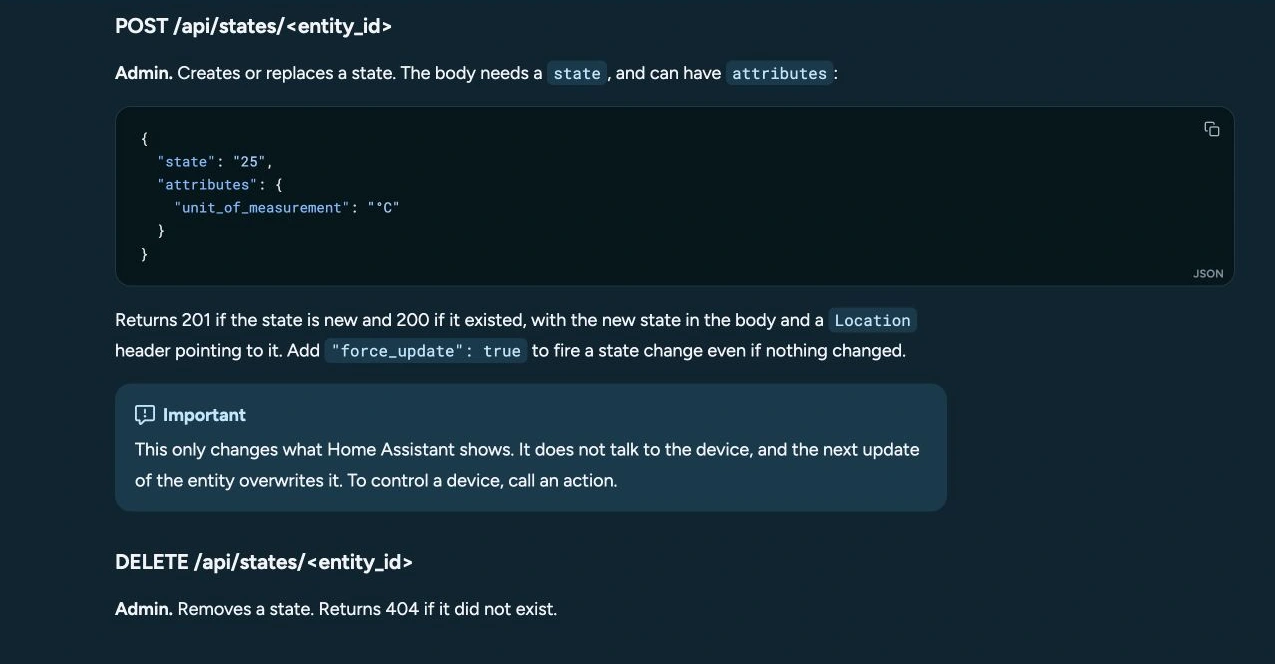
Figure 6. The official API documentation defines POST /api/states/<entity_id> as creating or replacing a state. A successful call does not install a sensor integration responsible for startup, restoration and polling.
HA’s current state machine is like a classroom whiteboard. The collector writes a balance on it, and everyone can immediately read it. When Core restarts, the runtime whiteboard is created again. Unless an integration, template or fresh push writes that line back, a dashboard card temporarily has nothing to reference.
Having the old sentence recorded in a database is not the same as automatically rewriting every temporary state on the whiteboard. Recording history and restoring entities are separate mechanisms.
An early local note summarized the issue as a missing unique_id. The more precise cause was ownership and lifecycle: these summaries were runtime REST states without a corresponding entity platform recreating them at startup. Adding unique_id to the JSON body does not turn the state endpoint into an entity-registration endpoint. That field alone cannot provide restoration.
The collector had periodic cache replay, configured locally to try roughly every 60 minutes. That was neither minute-by-minute utility collection nor immediate startup recovery. Its cache logic also checked dates, so the existence of a cache file did not guarantee it would be replayed successfully at any time.
Preserve the last valid observation without inventing a zero
The immediate repair added trigger-based template mirrors in a separate package. A mirror accepts a valid source number. If the source is missing, unknown or unavailable, it retains its previous valid value.
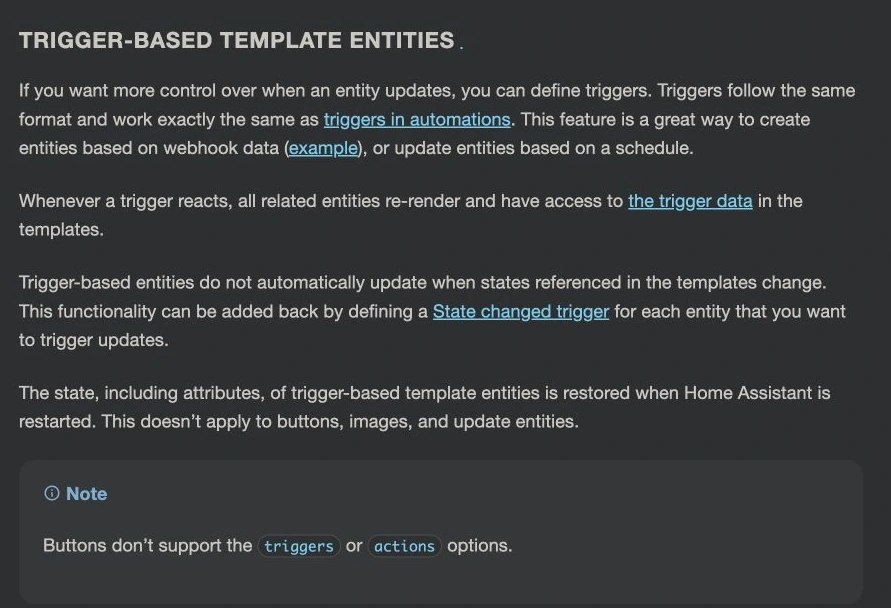
Figure 7. The official documentation says trigger-based template entities restore their states and attributes after restart. This article uses sensors; the same behavior should not be assumed for every entity type.
A simplified balance mirror looks like this. Replace xxxx with the source identifier in your own installation. A balance can legitimately be negative, so “greater than zero” would be the wrong validity test.
template:
  - triggers:
      - trigger: state
        entity_id: sensor.electricity_charge_balance_xxxx
    sensor:
      - name: SGCC cached balance
        unique_id: sgcc_cached_balance
        unit_of_measurement: CNY
        device_class: monetary
        state: >-
          {% set v = states('sensor.electricity_charge_balance_xxxx') %}
          {{ v if is_number(v) else this.state }}
Before any valid observation arrives, an empty sensor is acceptable. A fabricated zero is not a repair. Conversely, a genuine observed zero must be accepted.

Figure 8. Restoring a cached answer proves that an earlier answer survived. It does not prove a successful login today or that the balance is current.
The original template changes passed configuration validation and were loaded with template.reload, without deliberately restarting Core for that modification. Loading templates without a restart and conducting a separate restart acceptance test remain different claims. During article preparation I used read-only checks rather than restarting the household system again.
Keeping a tile and calculating a trend are different jobs
The next request was to retain electricity information indefinitely. The installation’s Recorder policy kept raw state history for 30 days. Focusing on that single number hides several different storage mechanisms.
The original local mirrors did not define state_class. They could restore current readings and carry recent dated rows, but that did not automatically create long-term statistics. The collector’s original sensors did carry statistics-related attributes. A later change switched the six main tiles back to those original sources and added two monthly-change charts based on annual totals.
That sequence matters. At writing time, the six main tiles used the original source states; the earlier mirrors and daily cache still existed. Existing statistic IDs were preserved, but the temporary post-restart gap of the original REST states remained a boundary of that final wiring. It would be misleading to describe the earlier mirror repair as an unconditional guarantee for the dashboard’s later configuration.
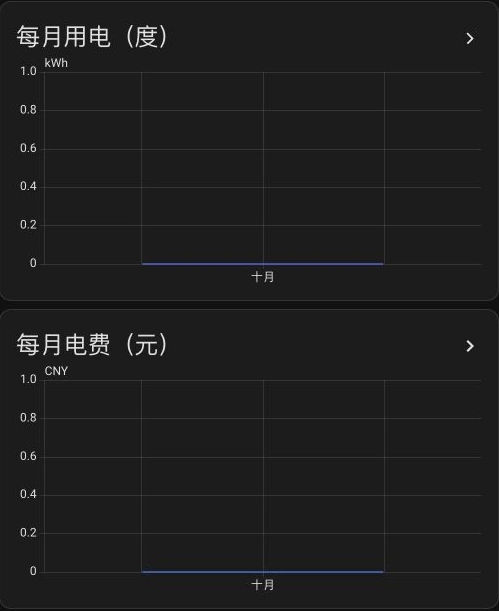
Figure 9. A fresh capture of the actual HA dashboard during writing. The monthly charts show a baseline, not reconstructed historical bills. The first observed cumulative total establishes a starting point; it cannot reveal the months before observation began.
A stronger subsequent arrangement is to use restorable mirrors for everyday cards while retaining the verified original statistics stream. Introducing a new persistent sensor with statistics requires checking its semantics and the effects of changing statistic IDs. The article kit therefore creates a separate dashboard and leaves existing statistical sources alone.

Figure 10. Three drawers hold different things: individual state changes, a recent dated notebook, and long-term aggregates. A 120-row notebook is bounded storage, not a permanent archive.
Long-term statistics are not automatically purged merely because raw history exceeds the configured 30 days. The sensor must support the right statistics, have valid numeric values and compatible units, and remain included in Recorder. Storage failures, explicit deletion and backup quality still matter.
There is also a billing-accuracy limit. Monthly changes derived from a yearly total are normally grouped by arrival time in HA. A reading for the end of one month can arrive in the next. Such charts can show trends, but exact reconciliation needs utility-dated records or formal bills. It is not enough to assume that a date-boundary error is always negligible.
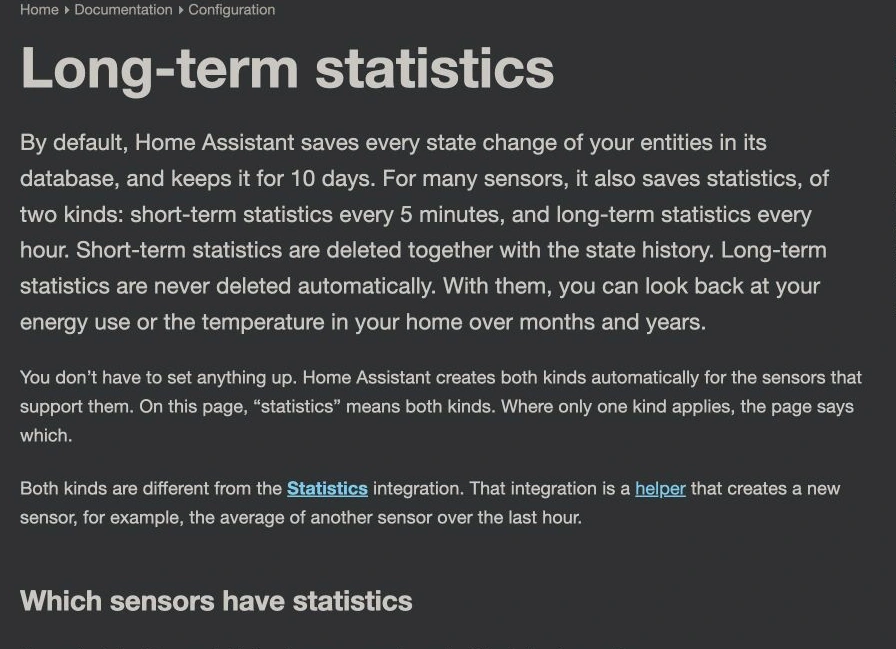
Figure 11. The official documentation separates retention from eligibility. Check a visible number, its statistics metadata, and actual statistical acceptance as separate layers.
A local automation kit for the reusable part
The SGCC Local Persistence Kit packages the reusable configuration work. Read the full instructions or Python source before applying it.
It provides Windows 11 PowerShell, Ubuntu 26.04 Bash and macOS 27 Bash entry points over one Python implementation using only the standard library. The scripts call no cloud Agent, third-party automation service or vision model. Their network operations target your own HA API. Prepare Python and the downloaded files first; utility collection naturally still needs the utility platform.
The automated scope includes six restorable sensors, dated daily deduplication, a separate electricity dashboard, checksummed backups, validation, rollback on validation failure, optional restart and read-only checks. It does not install the collector, log in to State Grid or transform a desktop OS into HA OS.
Human setup, automated configuration
First install and authenticate the collector. Confirm the six expected source readings. Make the actual HA configuration directory available as a writable mount through an existing authenticated share or container volume. A directory that HA does not read is not a deployment target.
Copy mapping.example.json to mapping.local.json and enter your six source IDs. Keep that file private. daily_date_attribute defaults to this collector’s last_reset; verify that the actual value is a YYYY-MM-DD utility usage date.
Privately set HOME_ASSISTANT_URL, HOME_ASSISTANT_TOKEN and HA_CONFIG_DIR in your process environment. Use a dedicated, revocable HA token. These values need not be sent to the author or posted in a comment.
# Windows 11: configure private settings before apply.
Copy-Item mapping.example.json mapping.local.json
# Edit the mapping and privately set the three environment variables.
.\windows-11.ps1 plan
.\windows-11.ps1 check
.\windows-11.ps1 apply --restart
.\windows-11.ps1 check --require-mirrors
# Ubuntu 26.04, after configuring your mapping and environment.
bash ubuntu-26.04.sh plan
bash ubuntu-26.04.sh check
bash ubuntu-26.04.sh apply --restart
bash ubuntu-26.04.sh check --require-mirrors
# macOS 27, after configuring your mapping and environment.
bash macos-27.sh plan
bash macos-27.sh check
bash macos-27.sh apply --restart
bash macos-27.sh check --require-mirrors
plan writes generated files without changing HA. apply saves backups, writes owned files and asks HA to validate configuration. Failed validation restores those files. --restart explicitly permits a Core restart to load the new package and sidebar dashboard. Omit that flag when maintenance should wait.
Mirrors populate on source changes or a five-minute check once a valid source exists. Run check --require-mirrors after readings arrive. It checks sources, numbers, units, dates and mirror availability rather than treating an HTTP 200 as proof that collection succeeded.
Common inline packages and !include_dir_named layouts are supported. Ambiguous external includes are refused, leaving the generated YAML for a human or Agent to review. Rollback also refuses to overwrite files edited after application. Fully automated configuration should not mean discarding an unfamiliar production configuration.
Give an existing Agent the acceptance criteria
The download includes an Agent task. This version is ready to adapt:
Create a restorable electricity dashboard over the existing SGCC collector.
Start read-only: verify installation type, version, account count, source IDs,
units and the real utility usage date. I enter account credentials locally.
Read the HA token only from the environment; never print or copy it into reports.
Run plan and review the generated package and dashboard. Preserve unrelated
configuration and existing statistic IDs. Verify annual counter semantics
before enabling yearly_counter_verified.
Apply during a maintenance window, require valid configuration, and arrange
a restart within the authorization for this task. Wait for a real push.
Verify each account, business dates, cards and actual restart recovery.
Do not fill missing data with zeros or call restored cache a fresh collection.
Report changes, backups, checks and every unverified boundary.
An Agent can save repetitive work. Account ownership, business meaning and deployment acceptance still need an accountable person.
What would count as finished?

Figure 12. These checks tell you more than an attractive screenshot. State which ones passed and which ones are still awaiting evidence.
For the original installation, evidence supports successful initial authentication, completed pushes for the target account, a visible household dashboard, an existing dated daily list and later references to the original statistical sources. Future scheduled collection, month-boundary behavior, continued statistical growth and the restart gap under the final wiring still require observation.
For the download, 15 automated checks cover same-date corrections, late observations, missing and invalid values, genuine zeros, bounded retention, configuration preservation, failure rollback, idempotency and protection of later edits. Another 17 checks used HA’s actual template-rendering API and parsed the generated YAML. File application was exercised in isolated directories with simulated validation responses, without reconfiguring the household installation for the article.
The core and Bash entry point were exercised on macOS 27. The Windows 11 wrapper received static review, without a Windows 11 machine run. The Ubuntu 26.04 entry uses the same Bash/Python implementation, but testing on another Linux host would not establish Ubuntu 26.04 validation. These are reviewable deployment tools, not a claim that every reader’s three operating systems have already been deployed successfully.
Questions worth asking before installing
Does this show how many watts the house is using right now?
No. These are delayed energy and billing observations. kWh describes how much energy was consumed; W describes the rate of consumption now. Think of water accumulated in a bucket versus the current flow from a tap. Live power requires suitable metering hardware or another live source.
Would logging in every minute make the numbers fresher?
Repeated login cannot make unpublished utility data appear. It can hit restrictions. Match collection frequency to the business update cycle. Cache replay can restore display availability, but it cannot create a new bill.
Were the Chinese-named sensors the problem?
Their names were irrelevant. Implementation determines restoration. Values, units, state class, reset behavior and Recorder configuration determine statistics. Translating a sensor name does not change its data model.
Why not give every reading total_increasing?
Balances rise with payment and fall with charges; they can be negative. Independent daily amounts fluctuate. Completed monthly bills are not continuous counters. Apply cumulative semantics only when the underlying quantity really behaves that way. The kit defaults to no cumulative statistics for those mirrors, with annual energy requiring explicit confirmation.
Can the 120-day cache or statistics replace official bills?
The cache is bounded, and normal statistics usually follow observation arrival. Exact long-lived daily accounting needs separate dated storage, backups and a verified historical-import method where appropriate.
What is easy to miss with multiple accounts?
Per-account success, date and field completeness. Source naming based only on a short account suffix can also collide, so inspect uniqueness when adding accounts. Which accounts are collected and which household appears on the daily dashboard are separate choices.
The useful stopping point moved further than I expected. After login succeeds, ask which day the number describes, what a failed collection does, who restores it after restart and what survives six months later. Answers to those questions make an electricity tile a dependable household tool.
References
- SGCC Electricity community project, including installation, coverage and authentication boundaries.
- Pinned source inspected for this article, covering pushes, cache and statistical attributes.
- State Grid online service, for account and original bill verification.
- Home Assistant REST API, defining state endpoint responsibilities.
- Trigger-based template entities, describing restoration behavior.
- Recorder and long-term statistics, explaining retention and eligibility.
- Sensor state classes, for measurement and counter semantics.
The six genuine screenshots come from my HA pages, upstream GitHub source and official HA documentation, with cropping and opaque privacy masks where required. The six other illustrations are original bilingual SVGs; the cover also has a WebP version. Sources were checked on October 26, 2026.