How to run N2N using Windows-Run
Here I only talk about how to run the N2N client edge. In fact, it is easier to run the supernode, so I won’t repeat it here.
Download and unzip N2N
Contains
edge,supernode,openssl链接库(necessary for n2n operation),tap-windows安装包(necessary for n2n operation, Win7&Win10)
Install Tap-Windows
- Depending on your platform, select the installation file of
Win10orWin7and use一路回车法to install it.
Trial run edge service
- The following takes the decompression path as
D:\TOOLS\as an example. - Enter the command line
CMDand enter the following command - Check whether the operation is successful. At the same time, open another
CMDwindow and use thepingcommand. Ifpingcan communicate with other nodes of the same N2N, the edge node has been started successfully.
D:\TOOLS\n2n\edge -a 10.1.1.51 -c HTH -k V34oswnpfNZlIXhy -l blog.margrop.net:2345 -r -v -f
Register edge as a system service
- First close the above edge service
- Enter the command line
CMDand enter the following command
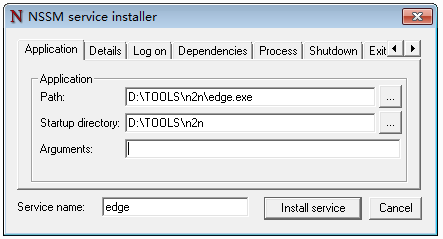
cd D:\TOOLS\n2n\
nssm install edge
Start edge system service
- Enter the command line
CMDwith administrator privileges and runnet start edge; - Or restart the computer directly, and the
edgesystem service will automatically start.