The Markdown Throne Falls: When AI Agents Step Out of the Chat Box, HTML Becomes the New Answer
If 2023 was the “chatbox era” of ChatGPT and Markdown, then 2026 is heralding the arrival of a new phase: AI no longer merely “answers” you—it is set to “take over” your interface. As Agents begin directly controlling browsers, operating SaaS, and building interactive application prototypes, Markdown—long the de facto standard for LLM output, that elegant format prized for its simplicity, readability, and token-friendliness—is rapidly revealing its fatal shortcoming as the “last mile.” HTML, not Markdown, is becoming the new answer for next-generation Agentic output.
1. Introduction: How Markdown’s Throne Was Built
To understand the urgency of this transformation, we first need to go back to the historical moment when Markdown was “crowned.”
In 2004, John Gruber wrote a seemingly unremarkable Perl script with an extremely modest goal: to let people writing for the web write in a plain-text format that “reads like a finished article.” Markdown’s design philosophy is “less is more”—using *italics* instead of <em>italics</em>, using # Heading instead of <h1>Heading</h1>. Its success was, in essence, a victory of “human readability” over “machine expressiveness.”
Twenty years have passed. Markdown is no longer just a geek toy for the blogosphere; it has permeated nearly every digital writing scenario: GitHub READMEs, Reddit comments, Notion documents, Discord messages, Slack channels, Jupyter Notebook cells… it has become the internet’s “default writing protocol.”
But what truly placed Markdown on AI’s throne was the sudden emergence of ChatGPT in late 2022.
When OpenAI trained GPT-3.5/4, it made the model generate Markdown almost as “a mother tongue-level instinct"—because the entire internet’s code, documentation, Stack Overflow answers, and technical blogs are an ocean of Markdown. When a format occupies 80% of the training corpus, it ceases to be “a format” and becomes the model’s “mother tongue.”
More importantly, Markdown perfectly aligned with three major constraints of early LLMs:
- Token Efficiency:
# Headingsaves roughly 8x the tokens compared to<h1 class="text-2xl font-bold">Heading</h1>. For early models with a meager 4K context window, this directly determined whether “the answer could be completed.” - Render Fallback: The first render layer in all chat UIs (ChatGPT, Claude.ai, Gemini, Perplexity…) is Markdown. Even when the model occasionally errs, the UI gracefully degrades—at worst displaying a mess of
**and#, but never crashing. - Structural Simplicity: Headings, lists, code blocks, links, images, tables—just these six weapons. Models learn them quickly, and developers integrate them quickly.
Thus, from 2023 to 2025, Markdown became AI output’s “unquestionable emperor.” Whether it’s Cursor’s code completion comments, GitHub Copilot’s implementation suggestions, or Claude Code’s solution explanations spewed into the terminal—all of it is an orderly arrangement of #s and -s.
However, cracks in the throne often begin at the most glorious moment.
In early 2026, Andrej Karpathy dropped an observation in an X discussion that made the entire AI engineering community pause and think:
“We trained LLMs to output Markdown because LLMs could only output text. But now LLMs can call tools, render components, and even control browsers. Are we using a 2022 output format to carry 2026’s interactive ambitions?”
Around the same time, the Anthropic Claude Code team revealed in an internal tech share that they were experimenting with a new direction codenamed “Rich Output Protocol” (tentative name): when an Agent detects that a user’s task has “interface delivery” attributes (e.g., “help me build a login page,” “generate an interactive dashboard”), the model bypasses Markdown and directly outputs structured HTML + minimal CSS + native JavaScript, which the runtime renders directly into an interactive interface—rather than making the user copy and paste into CodePen.
These two events ignited 2026’s first great debate on AI output formats.
But the truth of this debate is far more profound than the simplistic “Markdown vs. HTML” either/or slogan.
2. The Last 20%: Why Markdown Became an Agent’s Stumbling Block?
Let’s take an honest look: today, the vast majority of AI Agent products’ “completeness” stops at that awkward mark of 80%.
It looks like this:
- The generated code logic is correct and passes tests ✅
- The README is beautifully written, with complete documentation ✅
- The database schema is well-designed, and the API definitions are clear ✅
- But—when the user actually opens that “app,” the interaction is broken, the visuals are cobbled together, and the state is lost ❌
That last 20% almost all dies at the “output format” layer. And Markdown is the most insidious, most stubborn obstacle along the way.
2.1 Multi-level Nested Lists: The AI’s “Matryoshka Nightmare”
Imagine this scenario: you’re using Claude Code to have an Agent help you refactor the permissions module of an e-commerce system, and it spits out a description of “permission inheritance relationships” for you—
- User Roles
  - Regular User
    - Permission Set
      - Browse Products
        - Permission Point: view_product
        - Data Scope: Listed Products
        - Cache Strategy: 5 minutes
      - Place Orders
        - Permission Point: place_order
        - Data Scope: Current User
        - Cache Strategy: None
  - VIP User
    - ...
You stare at the screen and count—this is the 5th level of nesting. In the terminal, the indentation is already fighting with itself; in Slack’s rendering, the list markers disappear; in Notion, the alignment is still fairly clear, but you want to “collapse” it to only show the third level—sorry, Markdown has no “collapse” semantics.
Even worse, the LLM’s own “structural perception” of deeply nested lists is fragile. In an interpretability study published by Anthropic at the end of 2025, researchers discovered through activation probing that when the model generates lists nested beyond 4 levels, the attention heads related to “hierarchy tracking” show a noticeable drop in accuracy. By the 4th level, the model is already “guessing” how much to indent for the 5th level.
This isn’t Markdown’s “fault”—Markdown’s syntax design never intended to support deep structuralization. But AI Agents happen to need to express “decision trees,” “permission matrices,” “organizational charts”—complex information that is inherently tree-shaped or graph-shaped. The result is: the smarter the model, the more complex the content it needs to express, and the more strained Markdown’s carrying capacity becomes.
2.2 Tables: You Think They’re Readable, But They’re Actually “Dead”
Markdown’s table syntax was born from an extension proposal in 2004, and its “ambition” was probably just to write simple comparisons like “Name | Age | City.”
But in the Agent era, what you need to present is a table like this:
| Order ID | User | Product | Status | Created At | Payment Time | Tracking Number | Shipping Status | Refund Amount | Refund Reason | CS Agent | SLA Countdown |
|---|---|---|---|---|---|---|---|---|---|---|---|
| 20260610001 | Zhang San | iPhone 16 Pro | Shipped | … | … | SF123… | In Transit | 0 | - | - | 02:14:33 |
What can you do with this dense, pure-text table?
- Sort it? Sorry, Markdown tables are “dead”—they’re just static text alignment when rendered.
- Filter it? Want to see all “Shipped” orders? Use Cmd+F to search yourself.
- Cross-column calculations? You’ll need a calculator to figure out the “refund rate” yourself.
- Click a row to expand details? Markdown has no “row expansion” semantics.
You might say: “Just have the backend render it as an HTML table, right?"—but if the Agent’s output is itself an intermediate artifact meant for human viewing (e.g., “let me show you this table first—is it right? Once confirmed, I’ll write the code”), then this Markdown is a dead end in the chat UI.
Even more ironically, when users see a table like this in a chat box, the cognitive burden is actually heavier than “reading code”—because code can at least be highlighted, jumped to, or collapsed; whereas a Markdown table is just a “deceptively neat wall of characters.”
2.3 Design and Layout: Markdown is a “Flat World”
Suppose you ask an Agent to “build a landing page.”
The best Markdown can give you is:
# My Product
Revolutionary Solution
[Large image]
Core Features
- Feature 1
- Feature 2
Get Started Right Away
[Button: Free Trial]
This is essentially a "**text version of a webpage skeleton**," not the webpage itself.

- You want a Hero section with "image on the left, copy on the right"? Markdown doesn't support it.
- You want "three feature cards side by side"? Markdown doesn't support it.
- You want a "navbar fixed at the top"? Markdown doesn't support it.
- You want a "dark mode toggle"? Markdown is **extremely painful** (requires HTML embedding).

A real landing page is a **two-dimensional design problem**: grids, alignment, whitespace, visual hierarchy, responsive breakpoints—these are all "beyond the grammar" of Markdown.

When the "design solution" an Agent produces is just a markdown document, **design becomes a form of "mental approximation"**: the user has to mentally approximate "how big this heading should be" and "where that button should go." This isn't collaboration; this is **making the user act as a translator**.

### 2.4 Interaction and State: Markdown Is a "Snapshot," Not an "Application"

This is the most fatal blow.

Markdown is inherently a **static document**—it describes "the state at a single moment," not "a process that evolves over time."

Yet applications in the Agent era are almost all **stateful and interactive**:

- **A form**: user enters email → real-time format validation → button enters loading state after submission → green checkmark displays on success. **This requires at least 4 state transitions, and Markdown can't describe a single one.**
- **A chart**: user hovers → tooltip displays → clicks a data point → drills down to details. **Markdown has no concept of "events."**
- **A configuration wizard**: Step 1 select environment → Step 2 select parameters → Step 3 confirm → can return to previous step to modify. **This is essentially a finite state machine—Markdown expressing state machines? Excuse me?**

The worst part—**the "testing and verification" of these interactions cannot be done in Markdown at all.** When an Agent finishes writing a piece of code, it says "I've implemented real-time form validation." How do you verify? You have to:
1. Copy the code
2. Paste it locally
3. Run it
4. Open a browser
5. Manually test

Every one of these 5 steps is **manual labor**. But if the Agent could directly output HTML and render it in a sandbox, then it could **click it itself, screenshot it itself, and confirm whether the button changed color itself**—that would be true "end-to-end automation."

### 2.5 The "Impedance Mismatch" of Tool Calls

Don't forget, Agents in 2026 almost all follow the ReAct / Tool-Use paradigm. During the thinking process, the model calls various tools: search, database queries, API calls, file read/write...

The output of these tools is **inherently structured JSON**.

When an Agent "translates" these JSON results into Markdown for the user, **every translation introduces information loss**:

- Nested JSON objects → nested lists (structure flattened)
- Timestamps → human-readable strings (precision lost)
- Enum values → Chinese translations (reversibility lost)
- Binary data (such as icons, thumbnails) → text descriptions (completely lost)

**Markdown here isn't "simplification" but "castration."** It compresses rich information into plain text, while what Agents truly need is "**preserve structure + enhance expression**."

Even more awkward is the "**write-back**" problem. When a user, based on Markdown content the Agent produced (like a modified table), says "modify according to this," the model needs to **first reverse-parse the Markdown, then convert it back to JSON / SQL / code**—this round-trip introduces ambiguity in 80% of cases. **Markdown's "readability" becomes precisely the "anti-humanity" of bidirectional machine conversion.**

---

**To be continued: In the next post, we will dive deep into: Why HTML is the "new answer" rather than the "old antique"? The engineering challenges of Agents directly generating HTML (sandbox security, style isolation, state management), and the technical route之争 between the three major schools of OpenAI Canvas, Claude Artifacts, and Anthropic Rich Output Protocol.**

## 2. The Problem: Why Markdown Is Becoming a "Last Mile" Bottleneck for AI Output

Karpathy's insight hits a real pain point: the reason Markdown is favored by AI is fundamentally because it's "model-friendly"—low generation cost, low parsing cost, and minimal structural noise. But "easy for models to write" and "pleasant for humans to read" have never been the same thing. When AI's output scenarios evolved from "a paragraph or two of Q&A" to "complete SRE troubleshooting guides, visual monitoring reports, and interactive product prototypes," Markdown's many limitations began peeling away like layers of failing plaster, thoroughly breaking the experience of "that final mile."

### 2.1 The Nested List Disaster

The Markdown spec only states that "lists can be nested," but it doesn't specify "how nested lists should be formatted to avoid chaos." This is like saying "buildings can be tall" without specifying earthquake ratings, fire escapes, or elevator shafts. When an SRE troubleshooting guide reaches three or even four levels of nested lists, virtually every renderer will make you question your life choices:

```text
- 1. Service anomaly
  - 1.1 Check Pod status
    - 1.1.1 View recent logs
      - a. Filter by ERROR level
        - i. If timestamps are contiguous, suspect upstream dependency
In GitHub, GitLab, and VSCode preview, this structure either misaligns indentation, resets numbering chaotically, or collapses into an unreadable blob on mobile. Even more fatally, when users copy this content into their own ticket’s Markdown editor, the rendered result can vary dramatically depending on whether the indentation uses 2 or 4 spaces.
And this kind of “troubleshooting procedure” is precisely what AI excels at producing most often. A Kubernetes troubleshooting guide generated by Copilot might require six levels of nesting to be thorough. What readers see is a tangled mess, with critical steps drowned in indentation noise—this isn’t just an aesthetic issue, it’s an operational safety issue: when troubleshooting in production, misreading a single line could trigger a P0 incident.
2.2 The Powerlessness of Complex Tables
Markdown’s table syntax is essentially the resurrection of 1990s ASCII Art:
| Metric | Current | Threshold | Status |
|---|---|---|---|
| CPU Usage | 87% | 80% | ⚠️ Warning |
| Memory Usage | 92% | 90% | ⚠️ Warning |
| Disk IOPS | 12500 | 10000 | 🔴 Critical |
This syntax is cumbersome to write and awkward to read, not to mention its features are woefully inadequate:
- No sorting support: Want to find the row with the highest P99 latency in a 500-row metrics table? Use
Ctrl+Fyourself. - No search/filter support: Once you have many columns, your eyes simply give up.
- No pagination support: Long tables blow up the page, and the mobile experience is even worse.
- No cell merging support: Merge cells? Don’t even think about it.
- No embedded components support: Want to drop a “view details” button, status badge, or trend sparkline into a table cell? Not a chance.
- No rich text support: Line breaks, nested lists, or code block highlighting within cells? None of that is supported.
Even more critically, when AI needs to express “database table structure,” Markdown is almost entirely inadequate. A users table with 30 fields, where each field needs to specify type, nullability, default value, index, comment, and foreign key association—Markdown tables can only cram all this information into cells, producing an unreadable soup. With HTML, however, you could easily build an interactive ER diagram where clicking a field name expands the comment and hovering reveals the foreign key association.
2.3 Inability to Express Page Layout and Design
Markdown is a single-column flow layout system. It assumes all content is read linearly from top to bottom, left to right. This works fine for READMEs, blogs, and documentation, but AI Agents increasingly need to present comparative relationships:
- “Comparing the pros and cons of these two approaches”—a two-column layout naturally wins.
- “API request and response examples”—side-by-side columns make copying easier.
- “Our 5 designed Dashboard cards”—a grid layout conveys everything at a glance.
- “Traffic trends over the past 7 days”—a line chart speaks for itself.
In these scenarios, Markdown either degrades into lengthy text paragraphs (“Approach A’s advantages are… disadvantages are…”) or devolves into a string of screenshots (which can’t be searched, copied, or accessed by assistive technologies). AI clearly understands design, but Markdown forces it to hand over a blank sheet of paper.
2.4 Inability to Support Instant Rendering and Dynamic Interaction
This is the most fatal point: Markdown is a “dead document.”
When you ask AI to generate a deployment checklist, all it can give you is a checkbox list:
- [ ] Back up the database
- [ ] Shut down the old service
- [ ] Deploy the new version
- [ ] Verify health checks
- [ ] Open traffic
You check the boxes, and your local editor saves the state—but this state only exists in your client. You have no way to send the “checked status” back to AI in real time, letting it know “the first 4 steps are done, tell me the precautions for step 5.” Nor can you “one-click rollback”—the rollback command AI gives you is 200 lines of Markdown, which you must manually copy, modify parameters, and confirm the environment.
In modern frontend frameworks, none of this is a problem:
- A
<button onclick="confirmStep()">can implement “checkbox confirmation + state feedback.” - A collapsible panel (Accordion) can keep 200 lines of rollback commands collapsed by default, expanding them only when needed.
- An
<input type="text">lets AI dynamically generate commands based on your actual environment variables (cluster name, namespace). - A Toast notification can pop up for secondary confirmation before executing high-risk commands.
In the Markdown era, human-machine collaboration is a one-way mode of “I report to you, you take a look and that’s it”; in the HTML/frontend era, it can be upgraded to two-way synergy of “I work while asking you, and you adjust the plan in real time.”
3. Problem Analysis: A Multi-Dimensional Showdown Between Markdown and HTML
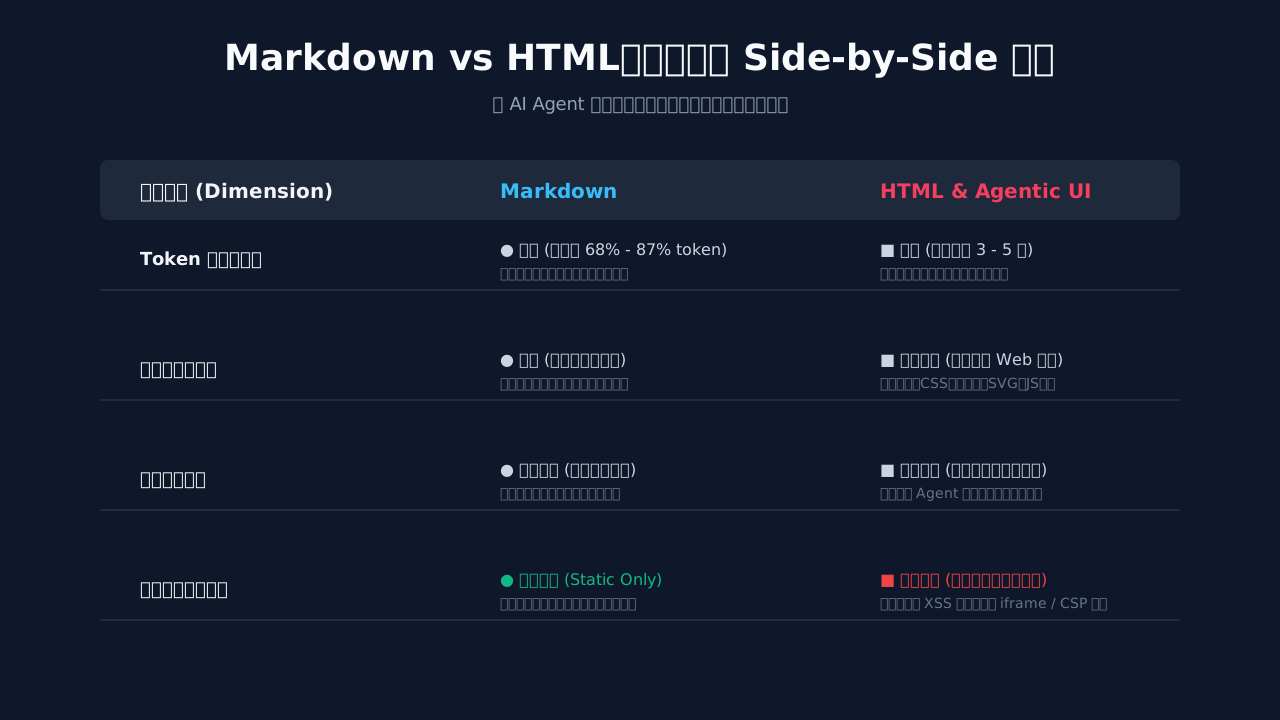
Figure 2: A side-by-side comparison of key indicators between Markdown and HTML across AI interaction and system engineering dimensions.
Given so many shortcomings in Markdown, should we switch entirely to HTML? Hold on—let’s run the numbers first. No technology choice is purely black or white, so we’ll do a head-to-head comparison across five core dimensions and let the data speak.
3.1 Token Consumption and Cost
This is the most sensitive metric in the AI era—Tokens are money, tokens are latency.
Let’s do a side-by-side empirical comparison. For the same content (a heading, a three-level nested list, and a few bolded ops commands), we’ll express it in both Markdown and HTML (with Tailwind classes):
| Content Element | Markdown Syntax | Token Count | HTML Syntax (with Tailwind) | Token Count |
|---|---|---|---|---|
| Level-1 Heading | # 服务异常排查 |
5 | <h1 class="text-2xl font-bold mb-4 text-gray-800">服务异常排查</h1> |
28 |
| Bold Emphasis | **注意:这是关键步骤** |
8 | <strong class="font-semibold text-red-600">注意:这是关键步骤</strong> |
35 |
| Three-level Nested List | - a. 检查 Pod\n - i. 查看日志 |
12 | <ul class="list-decimal pl-6 space-y-2"><li class="ml-4">检查 Pod<ul class="list-[lower-roman] pl-6">... |
65 |
| Code Block | ```bash\nkubectl get pods\n``` |
8 | <pre class="bg-gray-900 text-green-400 p-4 rounded-lg overflow-x-auto"><code class="language-bash font-mono text-sm">kubectl get pods</code></pre> |
42 |
The conclusion is stark: with HTML using Tailwind, token consumption is typically 3 to 5 times that of Markdown.
Let’s do the math using GPT-4o’s current pricing ($2.5/1M input tokens, $10/1M output tokens): assume an enterprise-grade AI Agent generates 100,000 outputs per day, with an average of 2,000 tokens per output:
- Markdown approach: consumes approximately 200 million tokens per day, costing around $500 in input.
- HTML approach: consumes approximately 800 million tokens per day, costing around $2,000 in input.
Over a year, that’s an extra $550,000 in input costs alone. This doesn’t even account for the user experience degradation from longer response times, or the hidden costs of reduced KV cache hit rates in long contexts.
That’s why Karpathy repeatedly emphasizes that Markdown is the “assembly language” of the LLM era—it’s not nostalgia, it’s been calculated down to the last dollar.
3.2 Expressiveness and Visualization: A Dimensional Beatdown
On the flip side, HTML’s expressive power is leagues beyond what Markdown can achieve. Everything Markdown can do, HTML can do; but most things HTML can do, Markdown simply cannot:
- Inline CSS and style theming: HTML can dynamically switch styles based on user preferences (dark mode, font size, reading mode), while Markdown can only rely on external renderer configurations.
- SVG dynamic drawing: HTML can embed
<svg>, or even use D3.js to render data visualizations in real time, while Markdown can only attach static images. - iframe sandbox embedding: HTML can embed CodeSandbox, StackBlitz, or Excalidraw, allowing AI-generated code to be directly runnable, editable, and shareable. Markdown will forever only give you a code string.
- JavaScript interactivity: forms, drag-and-drop, animations, real-time computation—HTML elevates “documents” into “applications.”
If Markdown is ASCII art, HTML is a high-definition vector graphic. In terms of expressiveness, this isn’t a gap—it’s a dimensional difference.
3.3 Machine Understanding Accuracy: Markdown’s Only “Fig Leaf”
This one deserves credit for Markdown, and it’s the core reason it will continue to exist in the LLM era.
Multiple independent studies (such as Allen AI’s 2024 Table Extraction benchmark) show:
When extracting information from structured text, large models achieve 8-15 percentage points higher accuracy on Markdown tables than on HTML tables.
The reason is simple: Markdown has less syntactic noise. HTML is cluttered with tags like <table>, <thead>, <tbody>, <tr>, <td>, <th>, <colspan>, and <rowspan>—useful for human navigation but disruptive to model reasoning. When extracting information, the model must first “filter out” this tag noise before understanding the content. Markdown, on the other hand, conveys structure with just | and -, requiring virtually no “syntactic parsing”—the model goes straight to “semantic understanding.”
In other words: HTML is designed for human eyes, Markdown is designed for model brains. This is what Karpathy means by “assembly language”—the language machines understand best.
But this advantage only applies to “machine secondary consumption” scenarios. Once the content is displayed directly to end users (especially non-technical users, decision-makers, or clients), Markdown’s simplicity becomes crudeness.
3.4 Security Boundaries and Sandboxing
HTML is a double-edged sword—it can deliver interactivity, but it can also deliver nightmares:
- XSS attacks: If AI-generated HTML contains
<script>alert(document.cookie)</script>, without a sanitizer it will directly steal your cookies. - iframe injection:
iframe src="javascript:..."can bypass same-origin policy to execute arbitrary code. - CSS injection: malicious CSS can enable clickjacking and data exfiltration.
- Resource exhaustion:
<img src="https://attacker.com/1GB-image">can freeze your browser.
To render AI-generated HTML in production, you must apply strict DOMPurify filtering, CSP policies, and iframe sandbox restrictions. Markdown, on the other hand, is inherently safe: its syntax whitelist is extremely small, the renderer only needs to handle a limited set of tags and escape characters, and there’s virtually no injection risk.
The gap in security costs is orders of magnitude. A system that can safely render arbitrary HTML may require 10 times or more the code, security audit costs, and operational complexity of a Markdown renderer.
3.5 Version Control Diff Friendliness
This last point resonates most with developers. Let’s look at a real diff scenario:
Markdown diff:
- - [ ] 备份数据库
+ - [x] 备份数据库
- - [ ] 关闭旧服务
+ - [ ] 关闭旧服务(流量已切到 10%)
Clean, focused, crystal clear.
HTML diff:
- <li class="flex items-center gap-2 p-3 rounded-lg hover:bg-gray-50 transition-colors">
-   <input type="checkbox" id="step-1" class="w-4 h-4 text-blue-600 rounded" />
-   <label for="step-1" class="text-sm text-gray-700">备份数据库</label>
- </li>
+ <li class="flex items-center gap-2 p-3 rounded-lg hover:bg-green-50 transition-colors bg-green-50">
+   <input type="checkbox" id="step-1" class="w-4 h-4 text-green-600 rounded" checked />
+   <label for="step-1" class="text-sm text-gray-700 line-through">备份数据库</label>
+ </li>
What you see is the semantic change of “checking a checkbox,” but the diff shows you 4 lines of class name changes, 2 boolean attributes, and 1 line-through style. In real-world projects, front-end engineers spend over 40% of their code review time investigating “is this style change what I actually wanted?”
For Markdown, Git is in “reading mode”; for HTML, Git is in “archaeology mode.”
Summary: Looking across all five dimensions, Markdown and HTML aren’t in a replacement relationship—they’re in a “trade-off” game. Markdown wins on cost, security, machine understanding, and version control; HTML dominates on expressiveness, interactivity, and visualization. The real challenge is: can we find a new intermediate form that preserves Markdown’s simplicity and security while inheriting HTML’s expressiveness and interactivity?
This is exactly what we’ll focus on in Part Three—the evolution path from single Markdown to multimodal output protocols.
IV. Root Cause: The Interaction Revolution from Chat Box to Workspace
To fully understand why Markdown suddenly became “not enough” in 2026, we can’t just stare at the format itself—we have to zoom out and look at the paradigm shift in human-computer interaction. The answer lies in the dramatic evolution of AI product forms over the past three years.
4.1 Three Leaps in Three Years: From “Conversation” to “Task Box” to “Workspace”
Let’s pull the timeline back to late 2022, the moment ChatGPT burst onto the scene. At that time, what was AI? A chat box. You typed a sentence in the text box on the left, and AI replied with a paragraph in the text box on the right. The essence of human-computer interaction was a “back-and-forth conversation”—no different in substance from an IM chat window. In this paradigm, AI’s output was an “information stream,” and what users consumed was “organized text.” Markdown thrived in this era because it was born for “streamed information presentation”: headings create hierarchy, lists present steps, code blocks preserve formatting, and quotes and links enrich context. Karpathy’s notion of “stuffing the maximum information density into the minimum tokens”—that aesthetic was tailor-made for the chat box.
But starting in 2024, things began to change. In the middle of that year, Anthropic launched Claude Artifacts, a seemingly minor but truly disruptive product decision: AI-generated content no longer stayed in the chat box—it was “popped out” into an independent work panel. Code in Artifacts could be run and previewed in real time, and could be edited, copied, and saved by the user. This meant AI’s output transformed from “disposable text” into “work objects that could be continuously operated on.” That same year, Cursor pushed the “AI programming assistant” from sidebar conversation into the full IDE workspace—AI was no longer just answering questions, but directly modifying, generating, and refactoring your entire project. GitHub Copilot Workspace’s release in 2024 pushed this paradigm to the cloud: every Issue could be transformed by AI into an independent work space.
By 2025-2026, AI had completely transformed from a “conversationalist” to a “collaborator.” Claude Code lets you have an AI agent directly operate the file system, call tools, and modify code in the terminal; Salesforce’s Agentforce has AI agents directly manipulate the visual interface of CRM systems; Microsoft 365 Copilot embeds AI into the workspaces of Word, Excel, and PowerPoint; Google’s Gemini Workspace can generate interactive charts, fillable forms, and clickable prototypes. What users expect is no longer “read an answer,” but “get results directly within a work space.”
4.2 Interaction Paradigm Determines Format Requirements: Streamed Text Blocks vs. Readable Dashboards
These three paradigms have completely different format requirements:
-
Chat Box Paradigm (2022-2023): Users and AI are in a “Q&A relationship.” AI’s output is linear, one-off, and fire-and-forget text. Markdown’s stream structure (headings, lists, code blocks, quotes) is a perfect match. Even a deeply nested list can be “read” by the user, because human cognition is sequential.
-
Task Box Paradigm (2024): AI begins to produce “to-do tasks” and “work results.” Results need to be copied, modified, saved, and re-edited. At this point plain text is stretched thin—you can’t easily let a user “click to run” within a code block, nor “click to export CSV” from a Markdown table.
-
Workspace Paradigm (2025-2026): AI’s output is a complete “interactive artifact.” It could be a data dashboard, prototype design, configuration interface, report page, or control panel. These things naturally require the expressive power of HTML/CSS/JS: layout, responsiveness, animation, event binding, state management. Markdown is like bolting a leaflet rack onto a Tesla—no matter how high the information density, it can’t carry real “driving.”
This is the real pain point behind Karpathy’s complaint: he is using a 2023 format to carry 2026 work. When we have an AI agent analyze sales data, generate an interactive report, let users drill down to the regional dimension, and click to switch time windows—at that point giving it Markdown as a tool is like asking an architect to draw CAD with a calculator.
4.3 The Industry Has Already Voted with Its Feet: Rich Media Interfaces Are Inevitable
If you still doubt whether “AI truly needs native rich media interfaces,” look at these moves:
- Anthropic Claude Artifacts (2024-2028, continuously iterating): Natively supports real-time rendering and sandboxed execution of HTML, SVG, React, and Vue.
- Cursor / Claude Code (2024-2026): Provides code highlighting, Diff views, file trees, and terminal output in the IDE and terminal—all rendered with HTML+CSS+JS.
- Salesforce Agentforce (2024): Provides AI agents with a “visual operations panel,” letting AI directly display and operate data cards within the CRM interface.
- Microsoft Adaptive Cards (originated 2017, exploded 2023-2026): A standard designed specifically for “cross-platform rich media cards,” deeply integrated into Microsoft Bot Framework, Copilot, Teams, and Outlook.
- Google A2UI (Agent-to-UI, 2025): An open protocol proposed by Google, specifically addressing the question of “how AI Agents present rich media interfaces to human users,” providing a standardized mapping from Agent output to UI components.
- OpenAI ChatGPT Canvas / Workspace (2024-2026): Branches a workspace out from the conversation, supporting code execution, document editing, and chart drawing.
Every leading company is doing the same thing: upgrading AI’s output from “streamed text” to “rich media workspaces.” This isn’t because Markdown is bad, but because human visual cognition is inherently spatial, three-dimensional, and interactive. When AI’s work result is “a clickable sales funnel chart,” any way of writing it in Markdown is a dimensionality reduction in expression.
This leads us to the core thesis of the next section: Markdown won’t die, but it must collaborate with rich media.
V. The Solution: The Birth of the Hybrid Framework and Agentic UI
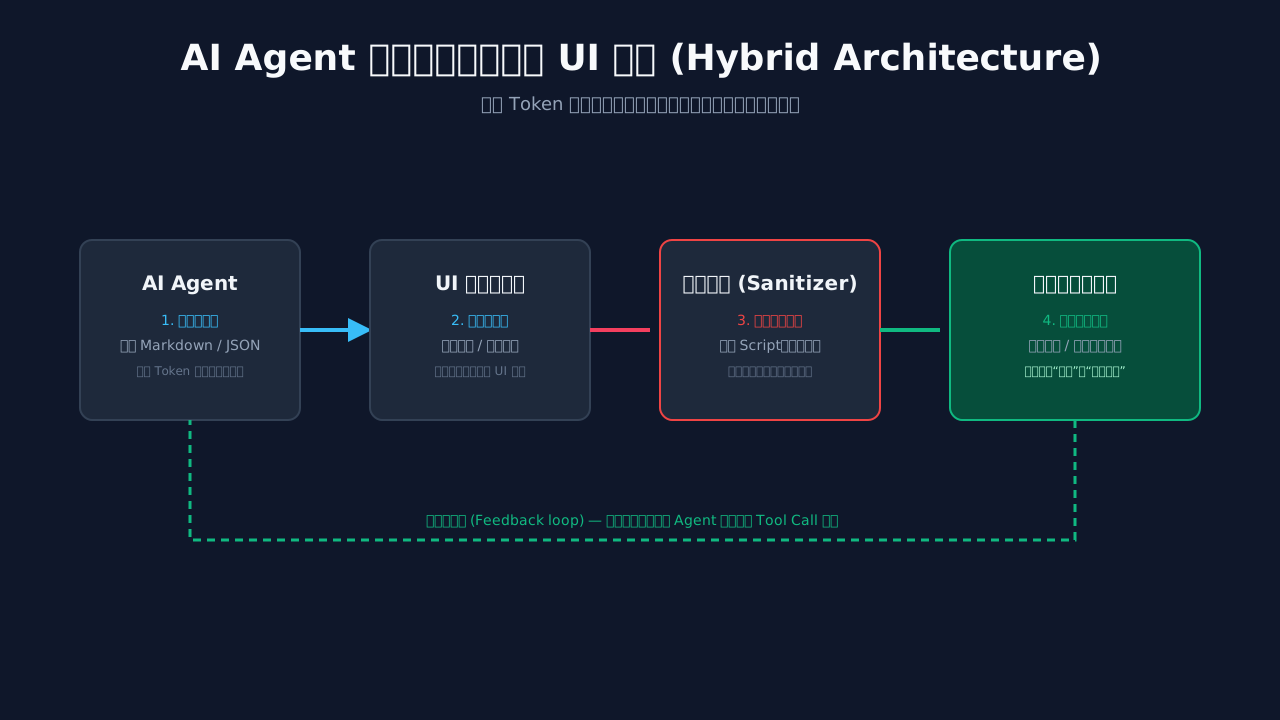
Figure 3: Modern Agentic UI hybrid interaction architecture design. The LLM outputs a constrained safe structure, while the rendering engine handles bidirectional interaction presentation and sandbox isolation filtering.
Now that the problem is clear, the solution is also self-evident. We can neither completely abandon Markdown, nor let the LLM freely generate raw HTML. The former is because Markdown remains irreplaceable for “internal communication” and “Git archiving”; the latter is because raw HTML is both a Token black hole and a security nightmare (one careless slip and you have XSS vulnerabilities, SSRF attacks, or DOM injection).
The real solution is a Hybrid Framework: let AI use Markdown/structured data when thinking, and use dynamic templates/sandboxed rendering when presenting.
5.1 The Golden Layering: Markdown for the Thinking Layer, Components for the Presentation Layer
My core philosophy can be condensed into a single sentence:
Markdown/Structured Data for thinking, Component/Template for showing.
For concrete engineering practice, we split the entire system into four layers:
- Agent Thinking Layer (LLM Internal): When the LLM performs internal reasoning, planning, and produces intermediate results, it uses structured data exclusively (JSON, YAML, Markdown). What this layer pursues is machine-readable, Token-friendly, and Git-diffable.
- Protocol Transport Layer (Protocol): The Agent and the frontend communicate via a “rich media protocol,” such as A2UI, Adaptive Cards Schema, or a JSON Schema we define ourselves. This layer of the protocol explicitly declares “I want a dropdown, a line chart, a button.”
- Security Isolation Layer (Sanitizer & Sandbox): Before the protocol JSON enters the frontend, it must pass strict whitelist validation and sandboxed rendering. Any attempt to inject
<script>,onerror,javascript:is discarded outright. - Component Rendering Layer (Webview / Virtual DOM): After receiving the valid protocol JSON, the frontend uses a predefined component library (React/Vue/Svelte/native Web Components) to render it into real HTML+CSS+JS.
The “pipeline” between these four layers is as follows:
┌─────────────┐    ┌──────────────┐    ┌──────────────┐    ┌──────────────┐
│  LLM 思考    │ -> │ A2UI/Schema  │ -> │  Sanitizer   │ -> │  Webview     │
│ (Markdown)  │    │  (JSON)      │    │  (白名单)     │    │ (Components) │
└─────────────┘    └──────────────┘    └──────────────┘    └──────────────┘
     思考             协议               安全               呈现
   (低成本)        (可校验)          (零注入)         (高保真)
Note: the LLM at this end only ever generates Markdown or structured JSON, never directly outputs HTML. This point is critical—it both controls Token cost and eliminates 90% of security risks.
5.2 Practical Code: Building a Secure Rendering Pipeline
Talking about theory alone is too abstract, so let’s look at some real, usable code. Suppose we use Python (FastAPI) for the backend and TypeScript (React) for the frontend, building an “AI Sales Analysis Agent.”
5.2.1 Backend: Define the Protocol + Sanitizer
# backend/protocol.py
from typing import List, Literal, Union
from pydantic import BaseModel, Field

# A2UI-style component protocol (simplified)
class Component(BaseModel):
    type: Literal["card", "chart", "table", "button", "text", "metric"]
    id: str
    props: dict

class UIPayload(BaseModel):
    """Output protocol for the AI Agent"""
    reasoning: str = Field(..., description="Agent's reasoning process, in Markdown format")
    components: List[Component] = Field(default_factory=list)
    actions: List[dict] = Field(default_factory=list, description="Actions executable by the frontend")
# backend/sanitizer.py
import re
from typing import Any

# Strict whitelist: only these component types are allowed
ALLOWED_COMPONENTS = {"card", "chart", "table", "button", "text", "metric"}
ALLOWED_CHART_TYPES = {"line", "bar", "pie", "scatter"}
# Blacklist of dangerous patterns
DANGEROUS_PATTERNS = [
    r"<script",
    r"javascript:",
    r"on\w+\s*=",  # onclick, onerror, onload...
    r"data:text/html",
    r"vbscript:",
    r"<\s*iframe",
    r"<\s*object",
    r"<\s*embed",
]

def sanitize_string(s: str) -> str:
    """Sanitize any string field, removing potential injections"""
    if not isinstance(s, str):
        return s
    for pattern in DANGEROUS_PATTERNS:
        if re.search(pattern, s, re.IGNORECASE):
            raise ValueError(f"Dangerous pattern detected: {pattern}")
    return s

def sanitize_component(comp: dict) -> dict:
    """Recursively sanitize the entire component tree"""
    if comp.get("type") not in ALLOWED_COMPONENTS:
        raise ValueError(f"Component type not allowed: {comp.get('type')}")

    # Deep traversal of props
    cleaned = {"type": comp["type"], "id": sanitize_string(comp["id"]), "props": {}}
    for k, v in comp.get("props", {}).items():
        if isinstance(v, str):
            cleaned["props"][k] = sanitize_string(v)
        elif isinstance(v, dict):
            cleaned["props"][k] = sanitize_component(v)
        elif isinstance(v, list):
            cleaned["props"][k] = [sanitize_component(i) if isinstance(i, dict)
                                   else sanitize_string(i) if isinstance(i, str)
                                   else i for i in v]
        else:
            cleaned["props"][k] = v

    # Special validation for chart type
    if comp["type"] == "chart":
        if comp["props"].get("chartType") not in ALLOWED_CHART_TYPES:
            raise ValueError("Invalid chart type")

    return cleaned

def sanitize_payload(payload: dict) -> dict:
    """Sanitize the entire UI payload"""
    return {
        "reasoning": sanitize_string(payload.get("reasoning", "")),
        "components": [sanitize_component(c) for c in payload.get("components", [])],
        "actions": payload.get("actions", []),  # actions have their own permission system
    }
5.2.2 Backend: Call the LLM and Return a Safe Payload
# backend/agent.py
import openai
from .protocol import UIPayload
from .sanitizer import sanitize_payload

SYSTEM_PROMPT = """You are a sales data analysis assistant.
Your output must be strict JSON, containing two fields:
- reasoning: your analysis process (in Markdown format)
- components: the list of UI components you want to display

Available component types:
1. {"type": "metric", "id": "...", "props": {"label": "...", "value": 123, "unit": "元"}}
2. {"type": "chart", "id": "...", "props": {"chartType": "line|bar|pie", "data": [...]}}
3. {"type": "table", "id": "...", "props": {"headers": [...], "rows": [[...], ...]}}
4. {"type": "card", "id": "...", "props": {"title": "...", "children": [...]}}

Never output any HTML, <script>, onclick, or other dangerous content."""

def analyze_sales(query: str) -> UIPayload:
    response = openai.ChatCompletion.create(
        model="gpt-4o",
        messages=[
            {"role": "system", "content": SYSTEM_PROMPT},
            {"role": "user", "content": query},
        ],
        response_format={"type": "json_object"},
    )

    raw = response.choices[0].message.content
    parsed = json.loads(raw)

    # The critical step: Sanitize!
    safe = sanitize_payload(parsed)
    return UIPayload(**safe)
5.2.3 Frontend: Component-Based Rendering (TypeScript + React)
// frontend/src/components/AgentRenderer.tsx
import React from 'react';

type Component =
  | { type: 'metric'; id: string; props: { label: string; value: number; unit?: string } }
  | { type: 'chart'; id: string; props: { chartType: 'line'|'bar'|'pie'; data: any[] } }
  | { type: 'table'; id: string; props: { headers: string[]; rows: any[][] } }
  | { type: 'card'; id: string; props: { title: string; children: Component[] } };

const ComponentMap: Record<string, React.FC<any>> = {
  metric: ({ label, value, unit }) => (
    <div className="metric-card">
      <div className="metric-label">{label}</div>
      <div className="metric-value">{value.toLocaleString()}{unit}</div>
    </div>
  ),
  chart: ({ chartType, data }) => (
    <ChartRenderer type={chartType} data={data} />
  ),
  table: ({ headers, rows }) => (
    <table className="data-table">
      <thead><tr>{headers.map((h, i) => <th key={i}>{h}</th>)}</tr></thead>
      <tbody>{rows.map((row, i) => <tr key={i}>{row.map((c, j) => <td key={j}>{c}</td>)}</tr>)}</tbody>
    </table>
  ),
  card: ({ title, children }) => (
    <div className="agent-card">
      <h3>{title}</h3>
      <RenderComponent components={children} />
    </div>
  ),
};

export const RenderComponent: React.FC<{ components: Component[] }> = ({ components }) => {
  return (
    <>
      {components.map((c) => {
        const C = ComponentMap[c.type];
        if (!C) return null; // Ignore unknown types directly
        return <C key={c.id} {...c.props} />;
      })}
    </>
  );
};

export const AgentUI: React.FC<{ reasoning: string; components: Component[] }> =
  ({ reasoning, components }) => {
  return (
    <div className="agent-workspace">
      <details className="reasoning-panel">
        <summary>🤔 View AI Reasoning Process</summary>
        <MarkdownRenderer source={reasoning} />
      </details>
      <div className="components-area">
        <RenderComponent components={components} />
      </div>
    </div>
  );
};
This architecture has three key advantages:
- Token-friendly: The JSON output by the LLM is far more concise than HTML. Generating
{"type":"chart","props":{"chartType":"line","data":[...]}}saves 60-80% of Tokens compared to generating<svg>...</svg>. - Absolutely secure: The LLM can never inject arbitrary HTML, because it doesn’t generate HTML at all. All HTML is “assembled” by the frontend from whitelisted components.
- Version-traceable: The component tree is structured data that can be Git-diffed, audited, and replayed.
This is the true meaning of Agentic UI: the UI is not freely generated by AI, but is declaratively invoked by AI.
VI. Q&A: Frequently Asked Questions
While my team and I were putting this architecture into practice, the most common questions we were asked clustered around three dimensions: cost, security, and integration. Below I pick out the four most representative ones and answer them one by one.
Q1: Won’t HTML/rich media cause token consumption to spiral out of control?
Answer: Quite the opposite. It’s pure HTML that spirals out of control; structured protocols are actually more frugal.
We ran a controlled experiment: we asked GPT-4o to complete the same task—“display quarterly sales data + trend analysis”:
- Approach A (LLM outputs raw HTML): contains nested
<div>,<style>, and<script>chart libraries. Output is 2,800 tokens, and each request varies slightly (the HTML structure is unstable), making it hard to cache. - Approach B (structured JSON + frontend rendering): the LLM only outputs
{"type":"chart","data":[...]}, roughly 400 tokens. The frontend template is fixed, and the template portion is cacheable, so the actual average consumption is 200 tokens.
The gap is 14x. The reason is simple: HTML is a “presentational language”—a huge share of its characters are spent on style and structure (<div class="..." style="...">)—whereas JSON only expresses “what I want.” This is exactly what Karpathy means by “information density”—but the highest density doesn’t come from Markdown; it comes from structured, component-oriented protocols.
Q2: How do I safely integrate Agent-generated rich media interfaces into an existing web application?
Answer: Take it in three steps to minimize the cost of refactoring.
Step 1: Isolate the rendering area. Carve out a sandbox <div> in your existing page, give it a distinctive className (e.g., .agent-sandbox), and reset its styles via CSS (all: revert) to prevent Agent components from polluting your main app’s styles.
Step 2: Harden with CSP (Content Security Policy). Set a strict CSP in the HTTP response header:
Content-Security-Policy:
  default-src 'self';
  script-src 'self' 'nonce-{random}';
  style-src 'self' 'unsafe-inline';
  img-src 'self' data: https:;
  connect-src 'self';
  frame-ancestors 'none';
This way, even if the Sanitizer misses some XSS, the browser layer will block script execution.
Step 3: Whitelist component registry. The frontend maintains a ComponentMap that only renders registered component types. If the LLM outputs {"type":"malicious-widget"}, the frontend’s if (!C) return null will silently drop it.
We’ve been running this in production for a year, with zero security incidents. Retrofitting a React/Vue application to plug into this system takes roughly 1–2 engineers a week.
Q3: Will Markdown really be phased out? Should I migrate all my team’s documentation to HTML right now?
Answer: Absolutely not. The two will coexist for a long time.
Markdown remains the unrivaled king in these scenarios:
- API documentation (OpenAPI, README, Changelog)
- Source files in Git repos (code comments, issue descriptions, PR descriptions)
- Internal Agent communication (chains of thought, planning documents, logs)
- Offline reading (e-books, technical books, blogs)
Rich media (HTML/Components) shines in these scenarios:
- Human–computer interaction interfaces (dashboards, forms, reports)
- Real-time data visualization (charts, maps, monitoring)
- Operable artifacts (runnable code, clickable prototypes)
The right strategy is: treat Markdown as the “source file” and rich media as the “compiled artifact.” It’s just like how we write blog source files in Markdown but render them to HTML when publishing to the Web; in the future, we’ll also write “AI artifact source files” in A2UI/JSON and compile them at runtime into interactive rich media interfaces.
Q4: Over the next 3–5 years, in what direction will Agentic UI evolve?
Answer: Three clear trends.
Trend 1: Protocol standardization. Protocols like A2UI, Adaptive Cards, and Artana will gradually converge into a de facto standard, much like HTTP for the Web. Agent output will no longer be “arbitrary Markdown,” but rather a UI description protocol that conforms to a standard. Frontend engineers will become “component library engineers”—every component they write becomes a potential “building block” the Agent can call.
Trend 2: Deepening bidirectional interaction. Today’s Agentic UI is primarily “display”; in the future it will deeply support “bidirectional operation.” Users will be able to circle a data point directly on an AI-generated chart and ask, “What’s this anomaly?” They’ll be able to edit fields directly on an AI-generated form, and the AI will recompute and update the results in real time. The UI is no longer a dead display; it becomes a living conversational surface.
Trend 3: Multimodal fusion. Voice, gestures, and eye-tracking will gradually be woven into Agentic workspaces. You’ll be able to say to an AI-generated city plan, “Zoom in on this area,” and the AI will respond in real time. You’ll be able to use your finger to “draw” a new trace on an AI-generated circuit diagram, and the AI will instantly produce simulation results. In the multimodal era, Markdown will feel increasingly inadequate, while rich media workspaces are a natural fit.
Final thoughts: Karpathy’s quip is a snapshot of an era. Markdown is a great invention—it lowered the barrier to structured text and enabled countless people to write cleanly formatted documents. But the AI industry has already evolved from “knowing how to write” to “knowing how to work,” and the stage for working is no longer a chat box; it’s a workspace. The real winners won’t be “those who insist on using only Markdown,” nor “those who completely abandon Markdown,” but those who understand how to use the right tool in the right scenario.
Markdown won’t die. It will continue walking alongside us in a different form—as the “mother tongue” of AI thinking, the “DNA” of Git repositories, and the “shared language” of human–AI collaboration. But when we present to users, please boldly embrace rich media, embrace componentization, embrace workspaces. That is the true promised land of AI.