A MySQL Veteran's PostgreSQL Field Guide: Learn It in 7 Days, Move In with One Command
TL;DR
In the previous post we covered why projects are moving from MySQL to PostgreSQL; this one is about how. For MySQL veterans, PostgreSQL is not a new language — it’s a nearby dialect. About 80% of your SQL muscle memory carries over; what you actually need to relearn is three things: the concept model (the database/schema floor-plan difference), dialect translation (auto-increment, booleans, quoting, pagination), and pgloader as the “moving company pipeline.” This post gives you a 7-day learning roadmap, a dialect cheat sheet, a real pgloader migration run (including the authentication pit I fell into), a six-step zero-downtime production migration playbook, and one-click sandbox scripts for Windows 11 / Ubuntu 26.04 / macOS 26 — all local Docker, no third-party cloud services.
Figure 1: Cover (self-made). The last post explained “why move”; this one explains “how to move and how to learn.”
1. Background: The Boss Says “We’re Moving to PG” — What Does a MySQL Veteran Do?
After the previous post went live, a reader commented: “I get it, PG is great. But our whole team is MySQL veterans — our DBA can fix replication lag and tune innodb_buffer_pool in their sleep, yet has never touched psql. The boss says the core system moves to PostgreSQL next quarter. What do I do?”
That’s the real situation in many teams right now: architects pick the technology, but the people who write SQL and carry the pager have to land it. A correct choice doesn’t guarantee a successful migration — between them lies a gap called “the team’s skill stack.”
The good news: MySQL and PostgreSQL are both relational databases sharing the same SQL worldview. You don’t need to relearn databases — you need a dialect training course. The bad news: if nobody tells you where the dialect traps are, you’ll trip in the most unexpected places — like a GROUP BY that ran fine for five years in MySQL suddenly erroring out in PG.
This post is that training course.
2. Symptoms: Five Walls a MySQL Veteran Hits
First, a concrete baseline. I built a typical MySQL “old shop” in a test environment: AUTO_INCREMENT primary keys, TINYINT(1) as booleans, ENUM for status, JSON for profiles, ON UPDATE CURRENT_TIMESTAMP — all the classic MySQL accents:
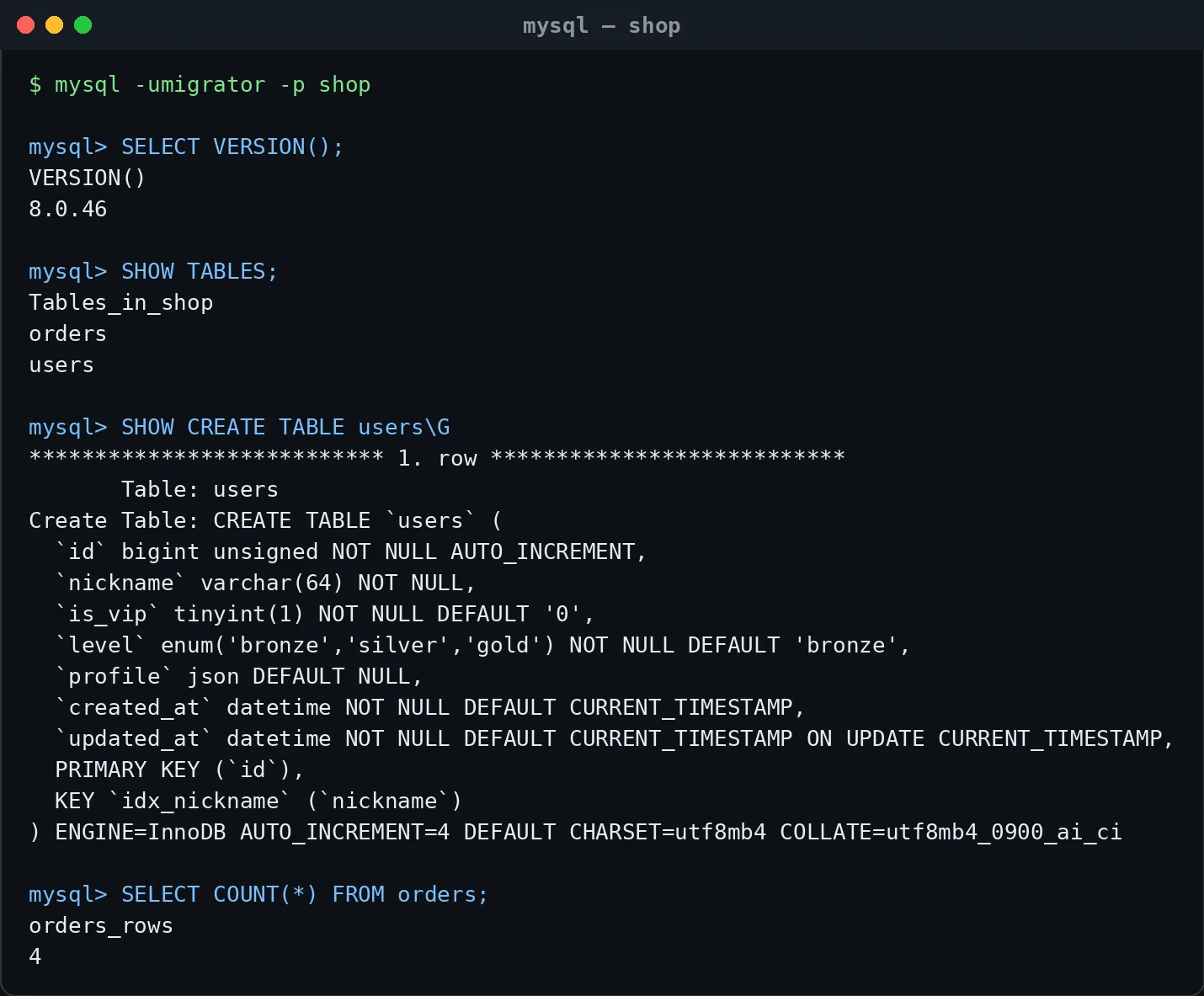
Figure 2: Real capture. This users table collects almost every representative of the MySQL dialect. We’ll use it as the patient and watch pgloader translate it piece by piece.
Carrying that muscle memory into PostgreSQL, veterans usually hit five walls:
Wall 1: The client feels alien. mysql -u root -p becomes psql -U postgres -d dbname; SHOW TABLES becomes \dt; SHOW CREATE TABLE becomes \d tablename; DESCRIBE is gone. You spend 80% of day one googling “how do I write XXX in PG.”
Wall 2: The concept of “database” doesn’t line up. In MySQL, USE shop switches your world. In PG, shop might be a database, or just a schema — with completely different permission models (details in the next section; this is the easiest thing to get wrong in a migration).
Wall 3: Case sensitivity and quoting. MySQL uses backticks `UserName`, and table-name case sensitivity depends on the OS. PG uses double quotes, and unquoted identifiers are folded to lowercase — CREATE TABLE UserName actually creates username. Mixed-case table names generated by ORMs are a classic migration car crash.
Wall 4: One error kills the whole transaction. In MySQL, a failed statement inside a transaction doesn’t block the rest. In PG, once a transaction errors, you get current transaction is aborted, commands ignored until end of transaction block until you roll back. The old “try INSERT, on duplicate key do UPDATE” pattern must become INSERT ... ON CONFLICT.
Wall 5: GROUP BY is strict. MySQL (older versions, or non-strict mode) happily runs SELECT user_id, nickname, COUNT(*) FROM orders GROUP BY user_id, returning a random nickname. PG follows the SQL standard: any column not in GROUP BY and not aggregated is an error.
3. Analysis: Read the Floor Plan First
Wall 2 is the most valuable one, so let’s expand it. An analogy: a MySQL instance is an apartment building where each database is a whole floor; a PostgreSQL cluster is also a building, but each floor (database) is subdivided into rooms (schemas).
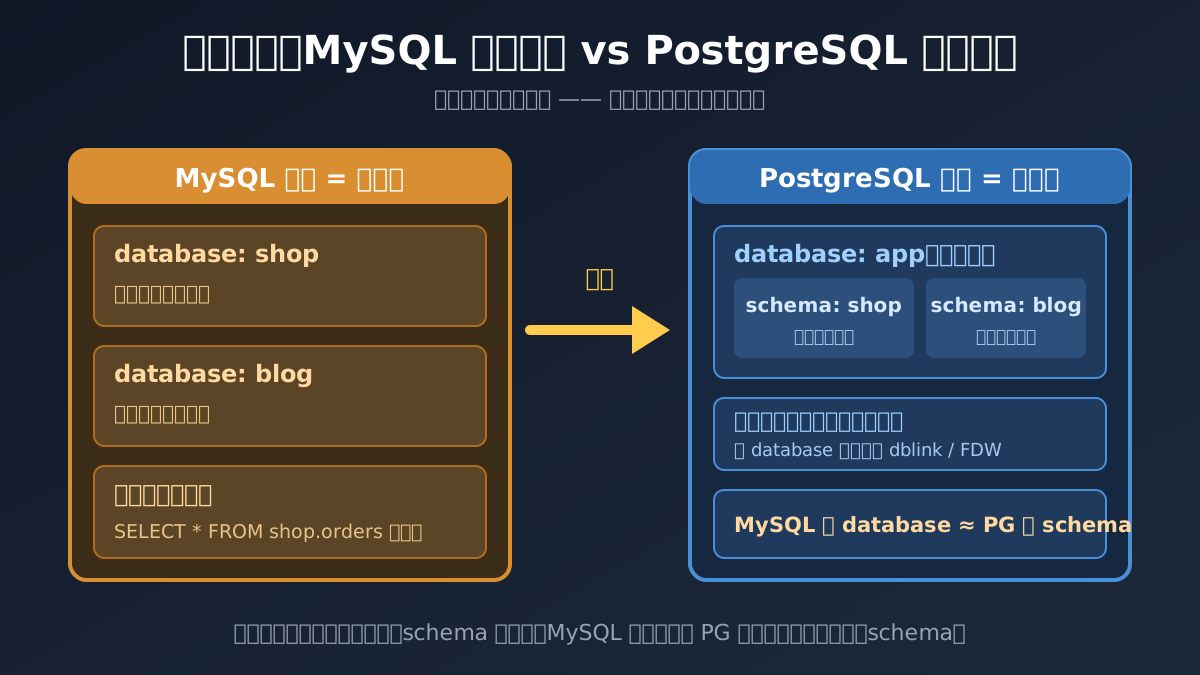
Figure 3: Self-made diagram. Remember this mantra: a MySQL “database” should usually become a “schema” in PG, not a “database.”
This difference directly decides your migration strategy:
- Cross-database joins like
SELECT * FROM shop.orders JOIN blog.users ...are everyday stuff in MySQL, because walking between floors is free; - In PG, cross-schema joins inside one database are equally free (
shop.orders JOIN blog.users), but cross-database queries require dblink or postgres_fdw — like having to go downstairs and back up to reach the second floor; - So if you mindlessly map every MySQL database to a PG database, all your old cross-database JOINs die. The right posture: one business gets one PG database; multiple MySQL databases become multiple PG schemas.
In fact, “what should a MySQL user figure out when moving to PG” is such an old topic that the official PG wiki has a famous page, Things to find out about when moving from MySQL to PostgreSQL:
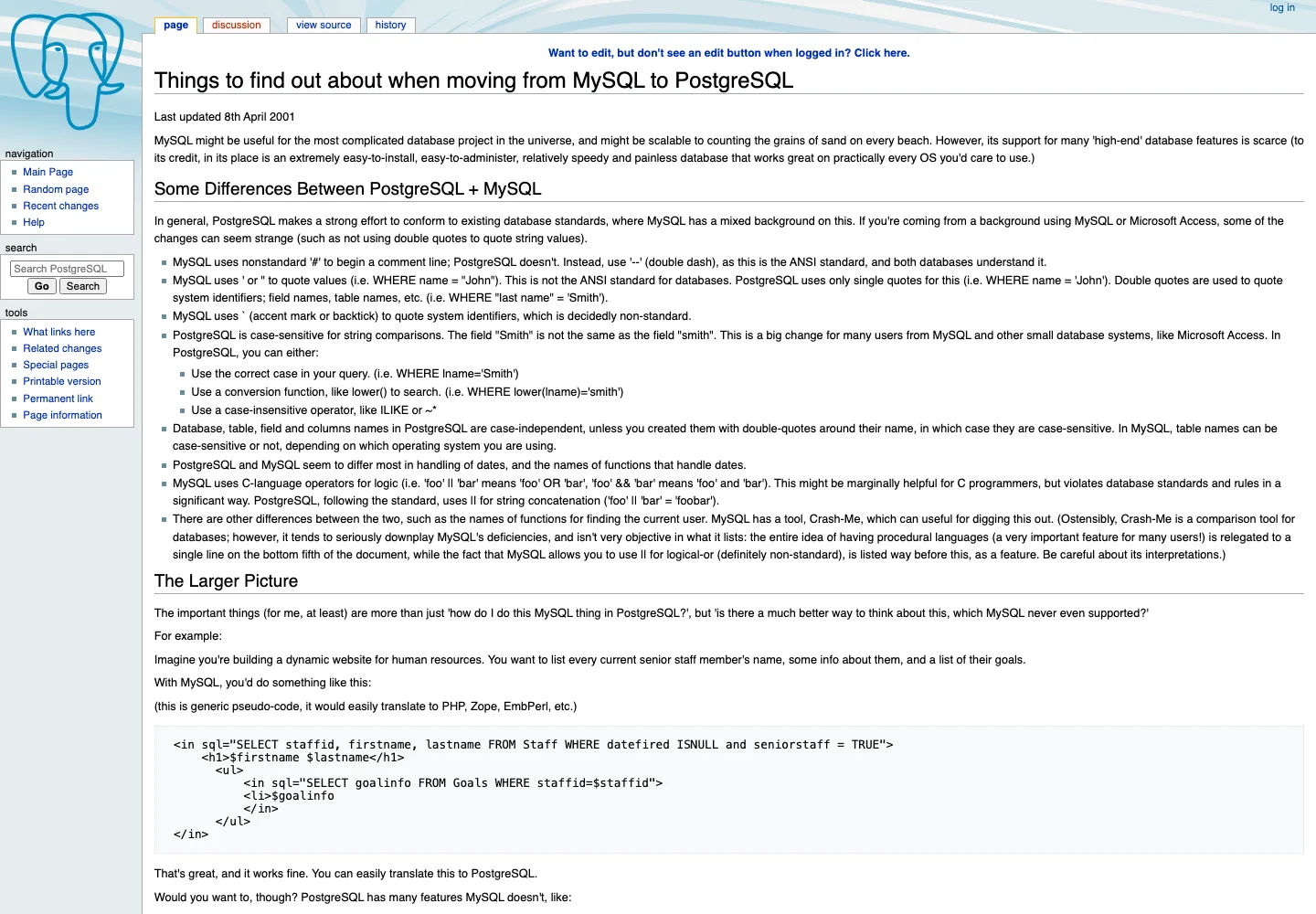
Figure 4: Real capture. Note “Last updated 8th April 2001” in the corner — this moving guide has existed for twenty-five years. The rivalry between these two databases is older than many readers’ careers.
4. How to Learn: A 7-Day Roadmap for MySQL Veterans
The best analogy for learning PG is switching from iPhone to Android: your muscle memory for calls and messaging carries over; what you relearn is where the settings live and why that button moved. Based on that, here’s a 7-day roadmap:
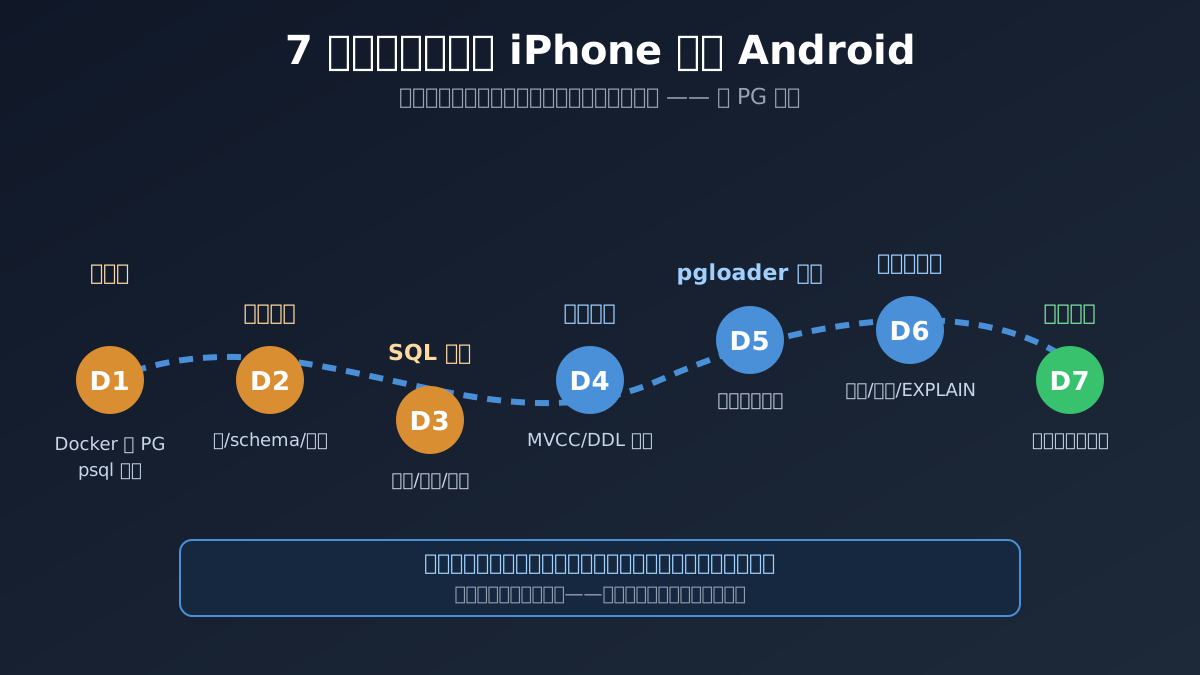
Figure 5: Self-made diagram. The core principle is “sandbox first, production later” — like backing up your phone to the cloud before switching. Rehearsal isn’t wasted time; it’s insurance.
- D1 Environment: spin up PG in Docker; learn the psql trio:
\dt(list tables),\d table(describe),\l(list databases). Today’s only goal: walk around in psql without fear. - D2 Concept mapping: nail cluster / database / schema / role; memorize the floor plan from section 3.
- D3 SQL dialect: auto-increment, pagination, quoting, booleans, time types — walk through the cheat sheet in section 5.
- D4 Transactions & locks: experience PG’s transactional DDL — schema changes can roll back. It’s the operator’s “regret pill”:
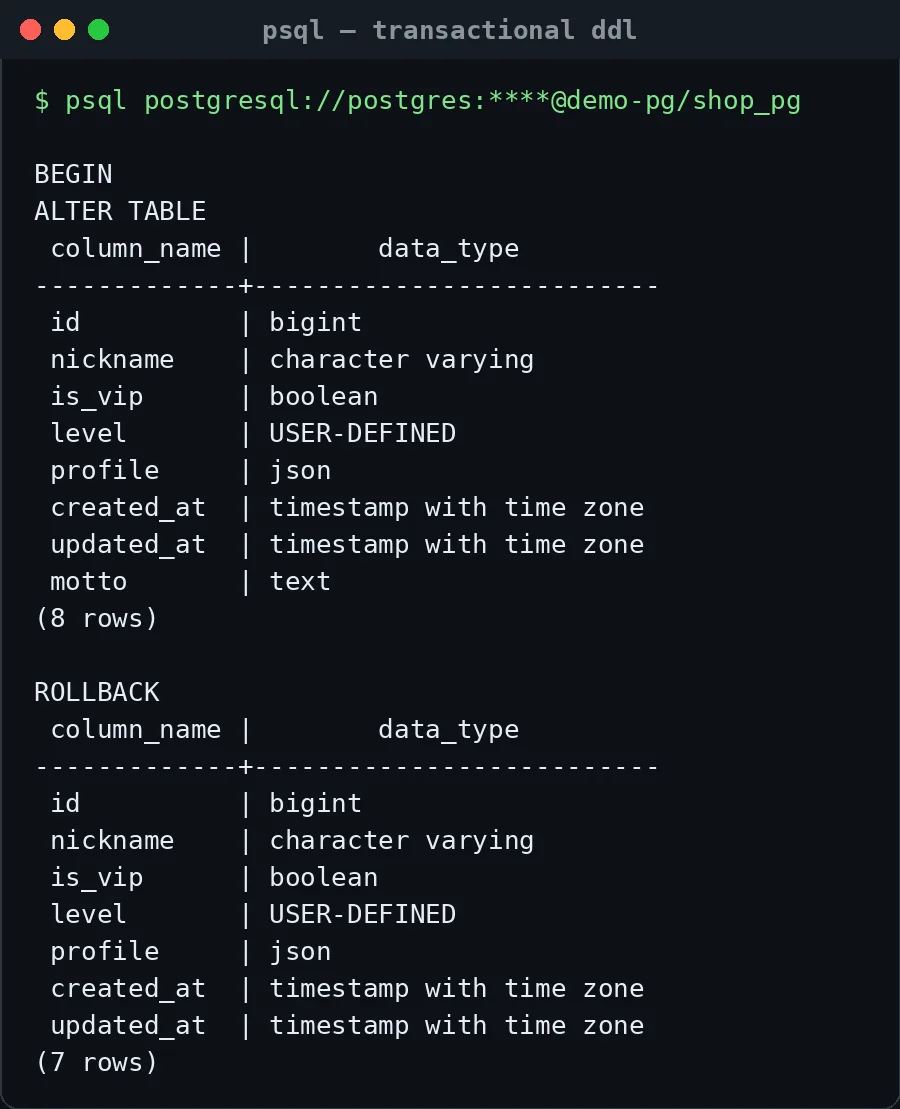
Figure 6: Real capture. After BEGIN, an ALTER TABLE adds a motto column (8 columns), then ROLLBACK makes it vanish (back to 7). Like adding an item to your shopping cart and removing it — the shelf was never touched. Most MySQL DDL implicitly commits; there’s no chance to regret.
- D5 pgloader migration: move a MySQL database into PG in the sandbox, with a replayable command.
- D6 Validation & load test: row counts, sample comparison,
EXPLAIN ANALYZEfor slow queries. - D7 Cutover rehearsal: run “stop writes → catch up → flip connection string → roll back” end to end, with a stopwatch.
For reading material, one official doc set is enough: the Tutorial chapters of the PostgreSQL 18 Documentation are written for people who “know SQL but not PG” — that’s exactly you:
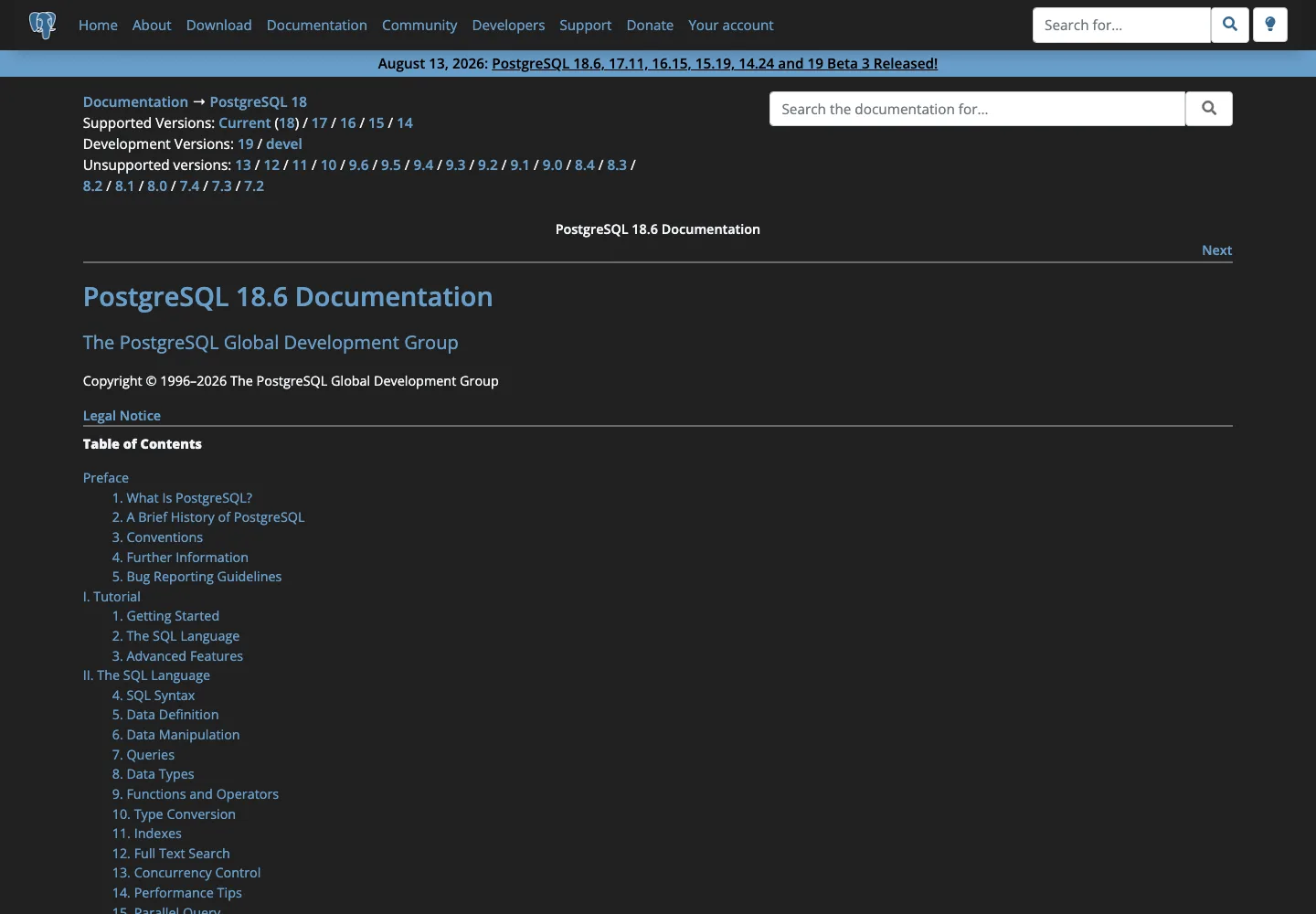
Figure 7: Real capture. The banner shows 18.6 released in August 2026 — docs and software updated on the same day. That’s the heartbeat of a community-driven project.
5. Dialect Translation Cheat Sheet
This is the most bookmark-worthy section. MySQL-speak vs PG-speak is like two regional dialects: both are SQL, the accents differ:
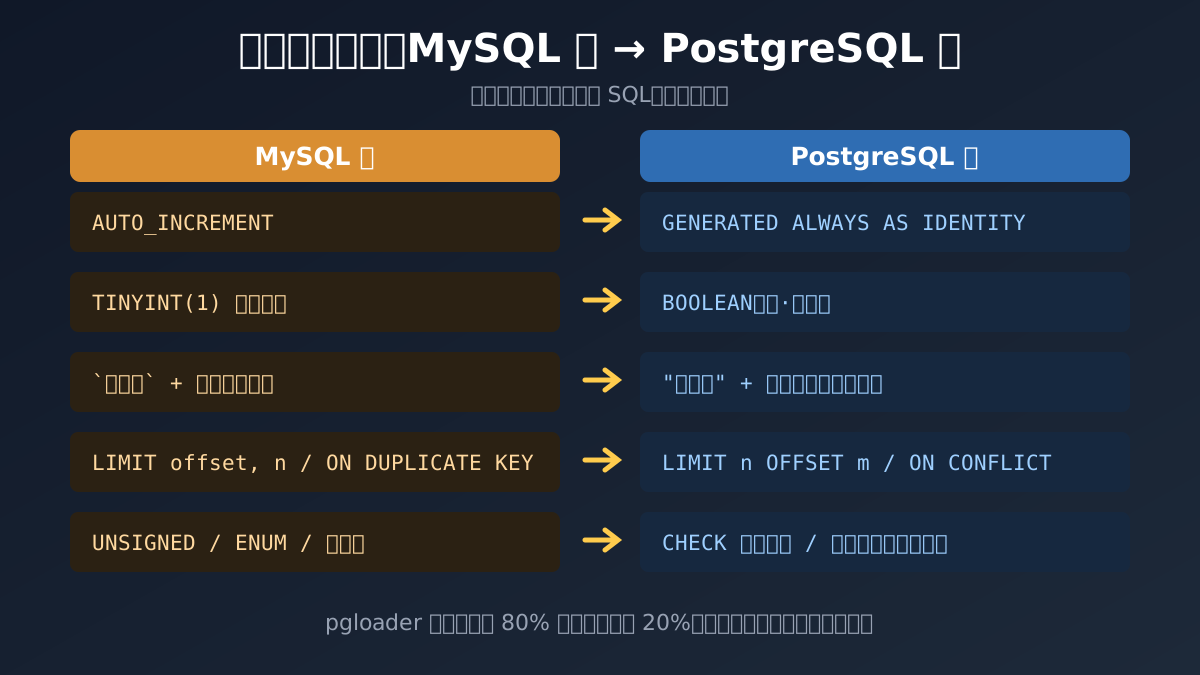
Figure 8: Self-made diagram. pgloader translates about 80% of the accent automatically; the remaining 20% (stored procedures, triggers, ON UPDATE defaults) needs a human translator.
Beyond the diagram, here are the high-frequency exam points:
| MySQL-speak | PostgreSQL-speak | Note |
|---|---|---|
LIMIT 10, 20 |
LIMIT 20 OFFSET 10 |
PG doesn’t support the comma form; use the standard syntax |
ON DUPLICATE KEY UPDATE |
ON CONFLICT ... DO UPDATE |
PG’s syntax is more explicit — and more powerful |
NOW(), CURDATE() |
now(), CURRENT_DATE |
Mostly same-named |
IFNULL(a, b) |
COALESCE(a, b) |
Standard SQL |
IF(cond, a, b) |
CASE WHEN cond THEN a ELSE b END |
PG has no IF() function |
Backticks `col` |
Double quotes "col" |
Unquoted identifiers fold to lowercase |
SHOW PROCESSLIST |
SELECT * FROM pg_stat_activity |
Inspecting live connections |
6. Migration in Action: One Command with pgloader
Don’t overthink tooling — pgloader is the de facto standard. Its slogan is literally “Migrate to PostgreSQL in a single command!”:
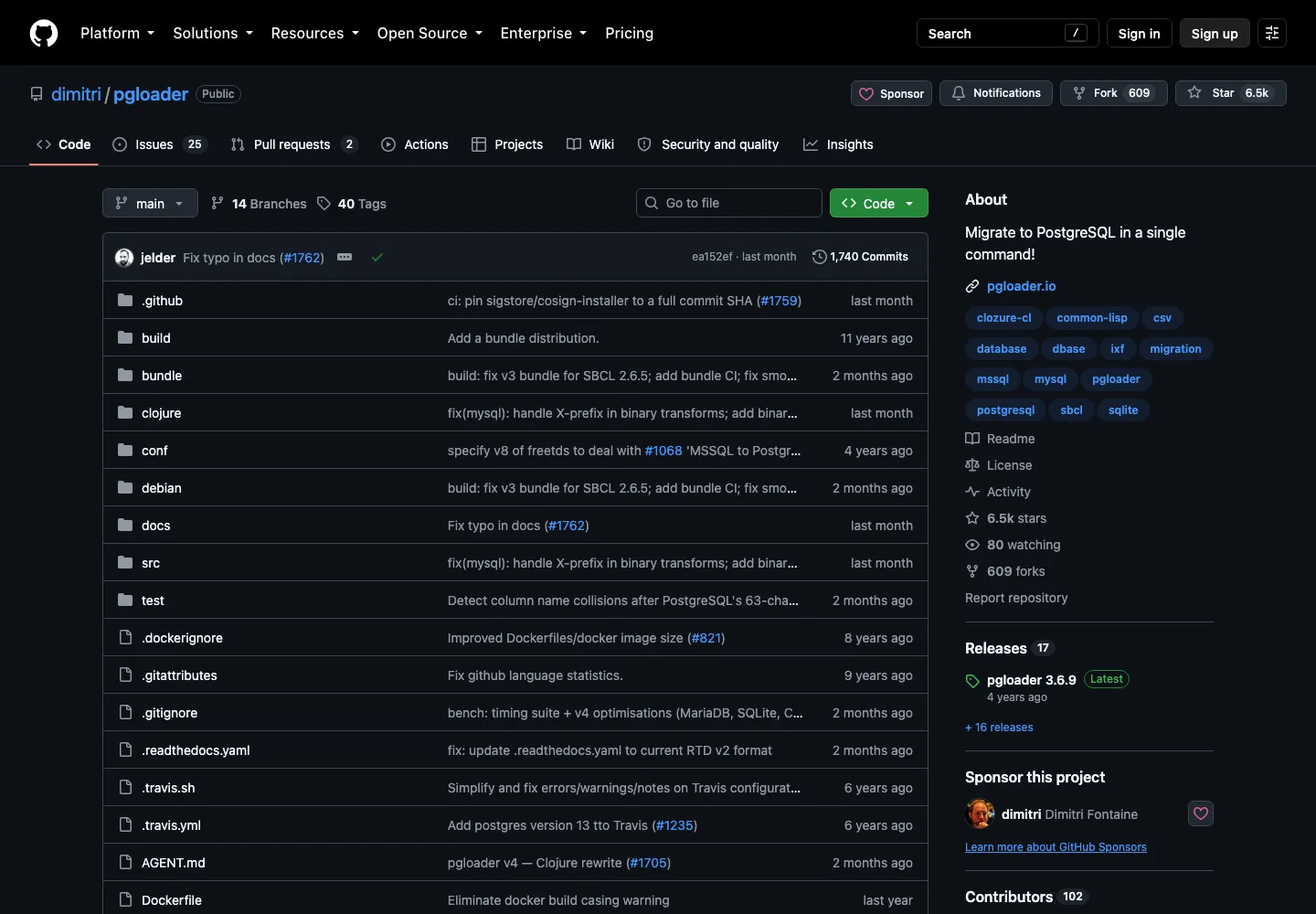
Figure 9: Real capture. 6.5k stars and actively maintained (a v4 rewrite is underway). Note it doesn’t only do MySQL — SQLite, MS SQL, and CSV are welcome too.
Using pgloader really is one command:
pgloader mysql://migrator:password@source-host/shop \
         postgresql://postgres:password@target-host/shop_pg
It’s far smarter than round-tripping mysqldump: it reads MySQL metadata, translates AUTO_INCREMENT into sequences, TINYINT(1) into real booleans, ENUM into PG enum types, then streams data over the COPY protocol, and finally rebuilds indexes and resets sequences. Here’s my real run in the test environment:
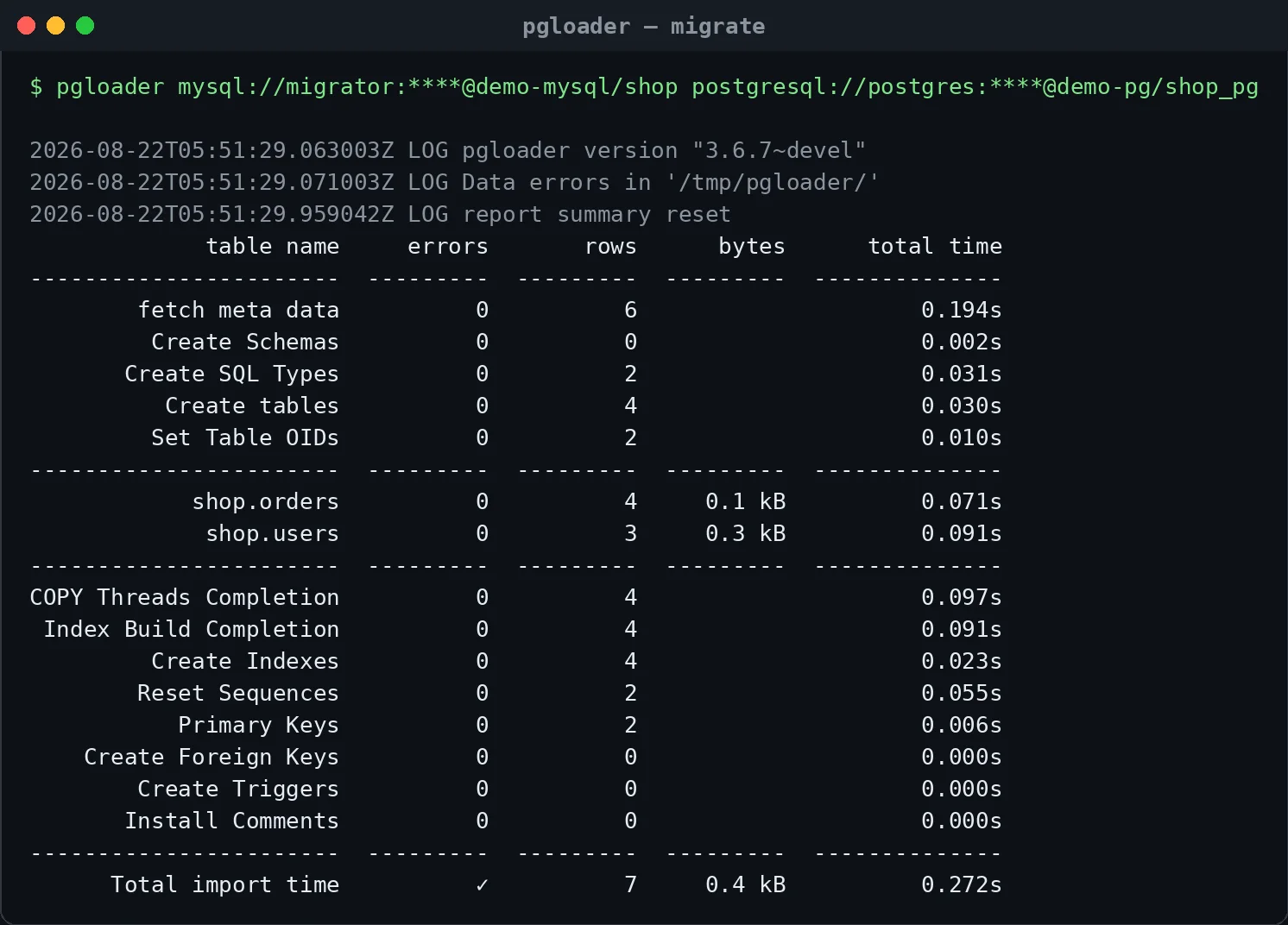
Figure 10: Real capture. Look at the two middle rows for shop.orders and shop.users: 4 + 3 rows, 0 errors, 0.272 seconds total. It’s the moving company’s receipt — how many items, how many broken, how long it took, all at a glance.
After the move, acceptance-check the dialect translation quality:
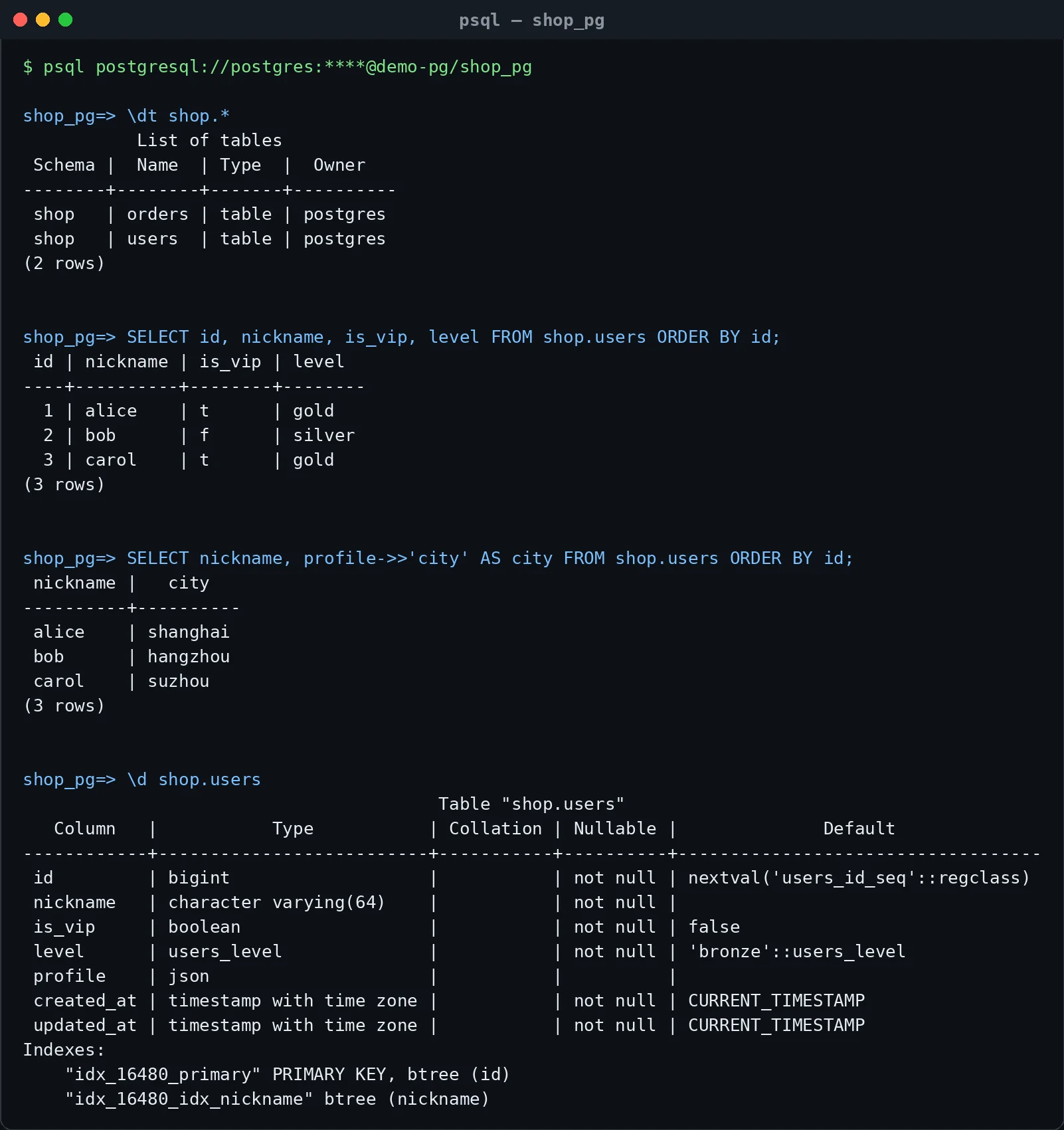
Figure 11: Real capture. Three things to notice: tables landed under the shop schema; is_vip 1/0 became real booleans t/f; JSON profiles can be queried with ->>'city'. In the \d shop.users output at the bottom, the id column already carries a nextval sequence — auto-increment translated too.
But the receipt hides two “translation accents” that need human intervention:
DATETIMEbecametimestamp with time zone(timestamptz). pgloader’s default cast treats MySQL’s naive datetime as UTC. If your app stores local time, all migrated data shifts by 8 hours. Fix: add explicit cast rules, e.g.CAST column users.created_at to timestamp drop typemod(per column, or batch-specified in a custom command file).ON UPDATE CURRENT_TIMESTAMPis lost. PG column defaults have no such semantic; write a trigger to restore it, or simply have the application setupdated_at = now()on UPDATE — simpler, and more in line with modern ORM habits.
Also note json landed as PG json, not the stronger jsonb. If you need to index into the JSON or query it heavily, upgrade afterwards: ALTER TABLE ... ALTER COLUMN profile TYPE jsonb USING profile::jsonb.
7. The Pit I Fell Into: MySQL 8.x Authentication Plugins
I stepped on a real landmine during this exercise, and it deserves its own section. pgloader failed to connect to MySQL with:

Figure 12: Real capture. MYSQL-UNSUPPORTED-AUTHENTICATION — pgloader’s built-in MySQL client library doesn’t recognize caching_sha2_password, the default auth plugin since MySQL 8.0. Like the moving company’s old truck that can’t open the new community’s Bluetooth gate.
Root cause: MySQL 8.0 switched the default authentication plugin to caching_sha2_password (in 8.4 the legacy mysql_native_password plugin is even disabled by default), while pgloader 3.6.x’s bundled qmynd client only speaks the old handshake. The fix has two steps:
-- 1. Start MySQL 8.0 with: --default-authentication-plugin=mysql_native_password
--    (On MySQL 8.4 also add --mysql-native-password=ON to enable the legacy plugin)
-- 2. Create a dedicated migration account using the legacy auth:
CREATE USER 'migrator'@'%' IDENTIFIED WITH mysql_native_password BY 'a-strong-password-for-migration-only';
GRANT ALL PRIVILEGES ON shop.* TO 'migrator'@'%';
Two extra tips: grant the migration account only the databases being moved, and delete it afterwards; if you can’t touch the production server’s default plugin, run pgloader’s Docker image in a sandbox first, dump to PG format, then load into production.
8. Moving Production: A Six-Step Zero-Downtime Playbook
What’s one command in a sandbox becomes a campaign in production. The core tension: the data is alive — it keeps growing while you move it. Imagine the moving truck has left, and you keep ordering ten more packages online — without an incremental-sync mechanism, those packages never arrive at the new home.
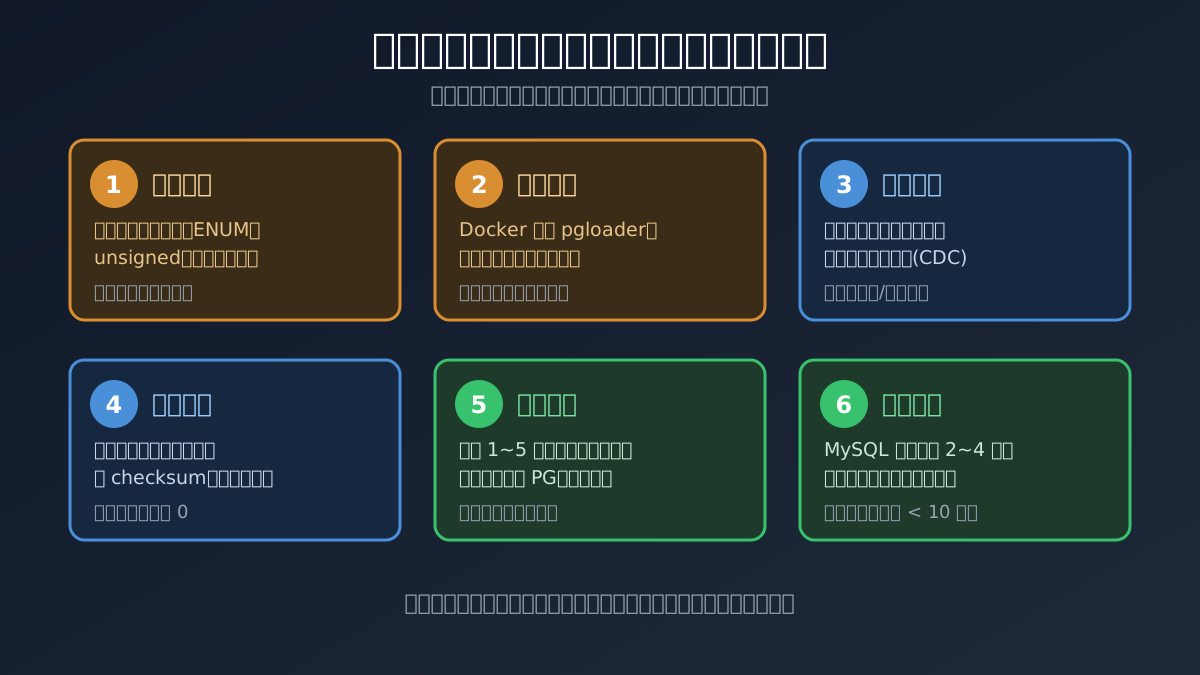
Figure 13: Self-made diagram. Every step has an acceptance receipt; if any step fails, roll back. The mantra: inventory first, rehearse the move, bulk plus incremental, reconcile then cut over, and don’t cancel the old lease yet.
Some engineering details:
- Inventory phase: scan
information_schema.ROUTINESandTRIGGERSfor stored procedures and triggers — pgloader’s blind spot; they need manual rewriting into PL/pgSQL; - Incremental sync: for small/medium databases, a “stop-writes window + second pgloader pass” works (reconciling by primary-key ranges); for large ones, bring in a CDC tool like Debezium;
- Cutover phase: real downtime = incremental catch-up time + connection-string flip time; practiced teams squeeze this under 5 minutes;
- Rollback lane: rehearse it in advance — after cutover, keep MySQL read-only but alive; new data on the PG side must be back-fillable to MySQL (at least have an export script ready); only cancel the old lease after 2–4 stable weeks.
9. One-Click Sandbox: Build Your Migration Practice Ground in Three Minutes
Reading is not doing. The three scripts below use Docker on your own machine to spin up a complete “old MySQL shop + new PostgreSQL home + pgloader moving company” sandbox, and automatically run one migration plus acceptance checks. They depend only on local Docker — no third-party services.
9.1 Run It Yourself
Windows 11 (PowerShell, Docker Desktop must be running). Save as Start-Mysql2PgLab.ps1:
# Start-Mysql2PgLab.ps1 — MySQL→PostgreSQL migration sandbox (Windows 11)
$ErrorActionPreference = "Stop"
$Net = "mysql2pg-lab"; $Pass = "LabOnly!123"
docker info | Out-Null
docker network create $Net 2>$null | Out-Null
docker rm -f lab-mysql, lab-pg 2>$null | Out-Null
docker run -d --name lab-mysql --network $Net -e MYSQL_ROOT_PASSWORD=$Pass `
  mysql:8.0 --default-authentication-plugin=mysql_native_password | Out-Null
docker run -d --name lab-pg --network $Net -e POSTGRES_PASSWORD=$Pass postgres:18 | Out-Null
Write-Host "Waiting for MySQL..."
do { Start-Sleep 3; $ok = docker exec lab-mysql mysqladmin ping -uroot -p$Pass --silent 2>$null } until ($LASTEXITCODE -eq 0)
$Seed = @"
CREATE DATABASE shop CHARACTER SET utf8mb4; USE shop;
CREATE TABLE users (id BIGINT UNSIGNED AUTO_INCREMENT PRIMARY KEY,
  nickname VARCHAR(64) NOT NULL, is_vip TINYINT(1) NOT NULL DEFAULT 0,
  level ENUM('bronze','silver','gold') NOT NULL DEFAULT 'bronze', profile JSON,
  created_at DATETIME NOT NULL DEFAULT CURRENT_TIMESTAMP);
INSERT INTO users (nickname,is_vip,level,profile) VALUES
 ('alice',1,'gold',JSON_OBJECT('city','shanghai')),('bob',0,'silver',NULL);
CREATE USER 'migrator'@'%' IDENTIFIED WITH mysql_native_password BY '$Pass';
GRANT ALL PRIVILEGES ON shop.* TO 'migrator'@'%';
"@
$Seed | docker exec -i lab-mysql mysql -uroot -p$Pass
docker exec lab-pg psql -U postgres -c "CREATE DATABASE shop_pg;" | Out-Null
Write-Host "Running pgloader migration..."
docker run --rm --network $Net dimitri/pgloader:latest pgloader `
  "mysql://migrator:$Pass@lab-mysql/shop" "postgresql://postgres:$Pass@lab-pg/shop_pg"
docker exec lab-pg psql -U postgres -d shop_pg -c "\dt shop.*" -c "SELECT * FROM shop.users;"
Write-Host "Done! Cleanup: docker rm -f lab-mysql lab-pg"
Ubuntu 26.04 (Bash, Docker required). Save as start-mysql2pg-lab.sh:
#!/usr/bin/env bash
# start-mysql2pg-lab.sh — MySQL→PostgreSQL migration sandbox (Ubuntu 26.04)
set -euo pipefail
NET=mysql2pg-lab; PASS='LabOnly!123'
docker info >/dev/null
docker network create "$NET" 2>/dev/null || true
docker rm -f lab-mysql lab-pg 2>/dev/null || true
docker run -d --name lab-mysql --network "$NET" -e MYSQL_ROOT_PASSWORD="$PASS" \
  mysql:8.0 --default-authentication-plugin=mysql_native_password >/dev/null
docker run -d --name lab-pg --network "$NET" -e POSTGRES_PASSWORD="$PASS" postgres:18 >/dev/null
echo "Waiting for MySQL..."
until docker exec lab-mysql mysqladmin ping -uroot -p"$PASS" --silent 2>/dev/null; do sleep 3; done
docker exec -i lab-mysql mysql -uroot -p"$PASS" <<'SQL'
CREATE DATABASE shop CHARACTER SET utf8mb4; USE shop;
CREATE TABLE users (id BIGINT UNSIGNED AUTO_INCREMENT PRIMARY KEY,
  nickname VARCHAR(64) NOT NULL, is_vip TINYINT(1) NOT NULL DEFAULT 0,
  level ENUM('bronze','silver','gold') NOT NULL DEFAULT 'bronze', profile JSON,
  created_at DATETIME NOT NULL DEFAULT CURRENT_TIMESTAMP);
INSERT INTO users (nickname,is_vip,level,profile) VALUES
 ('alice',1,'gold',JSON_OBJECT('city','shanghai')),('bob',0,'silver',NULL);
CREATE USER 'migrator'@'%' IDENTIFIED WITH mysql_native_password BY 'LabOnly!123';
GRANT ALL PRIVILEGES ON shop.* TO 'migrator'@'%';
SQL
docker exec lab-pg psql -U postgres -c "CREATE DATABASE shop_pg;" >/dev/null
echo "Running pgloader migration..."
docker run --rm --network "$NET" dimitri/pgloader:latest pgloader \
  "mysql://migrator:$PASS@lab-mysql/shop" "postgresql://postgres:$PASS@lab-pg/shop_pg"
docker exec lab-pg psql -U postgres -d shop_pg -c '\dt shop.*' -c 'SELECT * FROM shop.users;'
echo "Done! Cleanup: docker rm -f lab-mysql lab-pg"
macOS 26 (zsh, Docker Desktop or colima must be running). Save as start-mysql2pg-lab.zsh — nearly identical to the Ubuntu version, with the shebang swapped and a startup check added:
#!/bin/zsh
# start-mysql2pg-lab.zsh — MySQL→PostgreSQL migration sandbox (macOS 26)
if ! docker info >/dev/null 2>&1; then
  echo "Docker is not ready: start Docker Desktop, or 'colima start' if you use colima"
  exit 1
fi
set -euo pipefail
# …the rest is identical to the Ubuntu script…
All three scripts end with the same output as Figures 10 and 11 — that means your practice ground is ready. Next, replace shop with one of your own databases and replay the move.
9.2 Let an Agent Do It
If you have Kimi Code, Claude Code, Codex, or another agent that can run commands on your machine, hand it this instruction:
Build a MySQL→PostgreSQL migration practice sandbox with Docker on my machine and complete one demo migration. Requirements: 1) start mysql:8.0 (with –default-authentication-plugin=mysql_native_password) and postgres:18 containers on a docker network; 2) create a sample database
shopin MySQL with AUTO_INCREMENT, TINYINT(1), ENUM and JSON columns, inserting at least 3 rows; 3) create a migration account using mysql_native_password, scoped to the shop database only; 4) migrate shop into a PostgreSQL database shop_pg using the dimitri/pgloader image; 5) verify in psql with \dt and SELECT, checking row counts and type conversions; 6) never use real business data from the host, and never print internal addresses, machine names, or secrets; 7) when done, tell me every container’s name and the cleanup commands.
The key of this prompt is the constraints: Docker containers only, no real data, and a required cleanup report. An agent is like a temp worker from the moving company — it can do the job, but you have to tell it “stay out of the master bedroom” first.
10. Q&A
Q1: Does pgloader move stored procedures and triggers?
No. It handles table structures, data, indexes, and constraints only. MySQL stored procedures must be hand-rewritten into PL/pgSQL — the most commonly underestimated item in migration estimates. Scan information_schema.ROUTINES during the inventory phase.
Q2: Can pgloader handle databases of several hundred GB?
Yes, with tuning: workers, prefetch rows, and batch size all affect throughput; split huge tables by primary-key ranges. The real bottleneck is usually the downtime window, not the tool — large databases should follow the “bulk + incremental” route in section 8.
Q3: How much application code needs to change?
It depends on your SQL dialect density. Pure-ORM projects (MyBatis/JPA/Prisma) usually only swap the driver and connection string; projects heavy on handwritten SQL should grep for LIMIT x,y, ON DUPLICATE KEY, IFNULL, and backticks. Add a “PG dialect static check” to CI.
Q4: Will performance drop after migrating?
Stock PG is conservative; production needs at least shared_buffers, work_mem, and max_connections tuned, plus PgBouncer as the connection pool. Also, table bloat means you must watch autovacuum health — a very different operational instinct from InnoDB. Your DBA has homework.
Q5: Can we run PG alongside MySQL for a while? Yes — that’s exactly the “parallel reconciliation” stage in section 8. Keep MySQL as the source of truth; treat PG data as a disposable replica, fix PG against MySQL on any diff, and cut over only after the diff rate hits zero.
Q6: Which official doc chapters are worth reading first? The whole Tutorial, Chapter 5 (Data Definition), Chapter 13 (Concurrency Control — MVCC explained properly), and the full psql reference. Combined with the 7-day roadmap, one week is enough to build your map.
11. Closing
For MySQL veterans moving to PostgreSQL, the hardest part was never the technology — it’s the psychology, the feeling that “I haven’t even finished mastering MySQL.” But these two databases are like manual and automatic transmissions: your clutch-and-shift muscle memory isn’t wasted; it makes you understand faster what the gearbox is doing.
So don’t treat this migration as “learning a database from scratch.” Treat it as a move: take every well-worn tool from the old home (SQL fundamentals, index intuition, slow-query instincts), and enjoy the new home’s bonus — a whole wall of Lego (pgvector, PostGIS, transactional DDL). Seven days to learn, thirty days to move. Next post, we’ll talk about “renovation” after moving in: the ten knobs of PostgreSQL production tuning.
References: pgloader on GitHub, PostgreSQL Documentation, PostgreSQL Wiki: Things to find out about when moving from MySQL to PostgreSQL, Migrating from MySQL to PostgreSQL Using pgloader, Migrate MySQL to PostgreSQL Using pgloader and Docker.