Why Is Your WiFi Lagging? Networks, TCP vs UDP, and the Two “5Gs” — Explained So a Kid Gets It
TL;DR
- A network is a delivery service for computers: data is chopped into “parcels” (packets), labeled with “addresses” (IPs), and relayed by “sorting centers” (routers) hop by hop to the recipient.
- TCP is a phone call: connect first, talk later, repeat anything that wasn’t heard — reliable but fussy. UDP is a postcard: drop it in the mailbox and hope — fast, but no delivery guarantee. Live video and games prefer UDP; files and web pages prefer TCP.
- The three-way handshake is just the opening of a phone call: “Hello, can you hear me?” — “I can. Can you hear me?” — “I can too. Let’s talk.”
- Wired is a private water pipe; WiFi is shouting in a crowded square — when everyone shouts at once, nobody is heard clearly. That is the number-one reason WiFi lags.
- WiFi’s “5G” means the 5GHz frequency band (a wider lane). Your phone carrier’s “5G” means the 5th generation of mobile networks (a whole standard). They share a name and nothing else.
No jargon without an everyday analogy, but every number below comes from real measurements on real machines (all IPs and hostnames are masked). A kid can follow most of it; an adult won’t find it shallow.
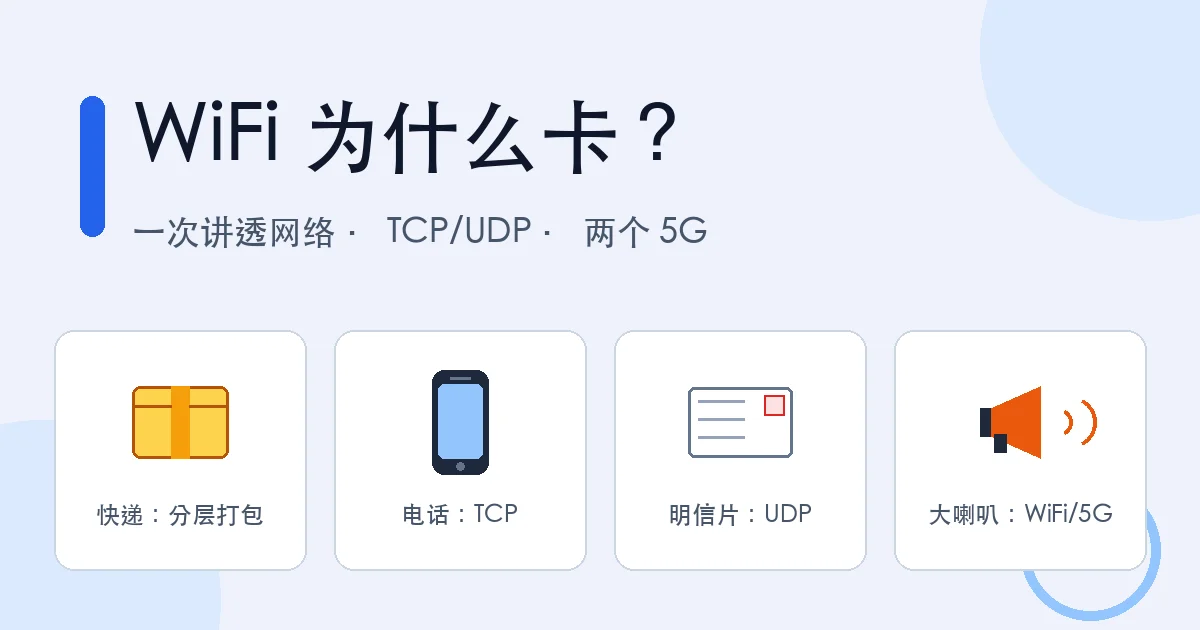
Figure 1: The four analogies of this article — the postal service, phone calls, postcards, and a crowded square.
1. What Is a Computer Network? A Global Delivery Service
Start with the simplest question: what is a network, really?
You text your mom “I’ll be home for dinner.” The message leaves your phone, passes through your home router, your ISP’s facilities, maybe a submarine cable under an ocean, and goes “ding” on her phone a second later. Connect many computers (a phone is a computer) so they can move data between each other, and you have a computer network. The biggest one, connecting the whole world, is the Internet.
The way it works is almost identical to a parcel delivery service:
| Parcel world | Network world | Technical term |
|---|---|---|
| Stuff packed into boxes | Data chopped into small chunks | Packet |
| Address label on the box | Destination address on each packet | IP address |
| Which apartment in the building | Which program on the machine | Port |
| Sorting center picks the next leg | Router forwards to the next hop | Routing |
| Trucks, planes, ships do the hauling | Cables, fiber, radio waves do the hauling | Link layer |
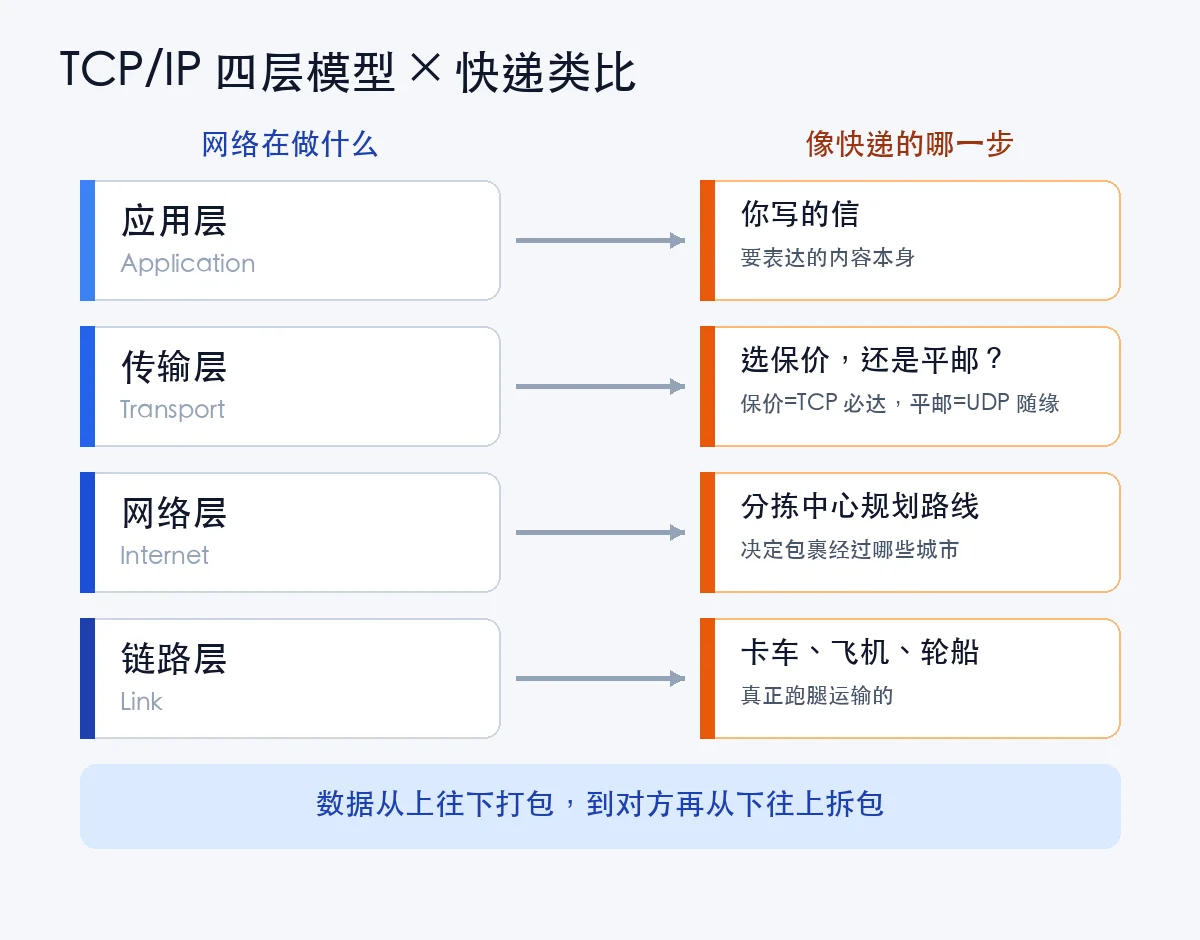
Figure 2: The four TCP/IP layers as a delivery company. You just write the letter (application layer), choose “insured express or regular mail” (transport layer: TCP/UDP), the sorting center plans the route (network layer: IP), and the truck driver drives (link layer).
For safety, every IP address and hostname in this article is masked as
x.x.x.x. It changes nothing about the lesson.
How big is this network? Most intercontinental traffic travels through submarine fiber-optic cables — glass strands thinner than a garden hose, laid on the ocean floor, carrying over 95% of the world’s intercontinental data:
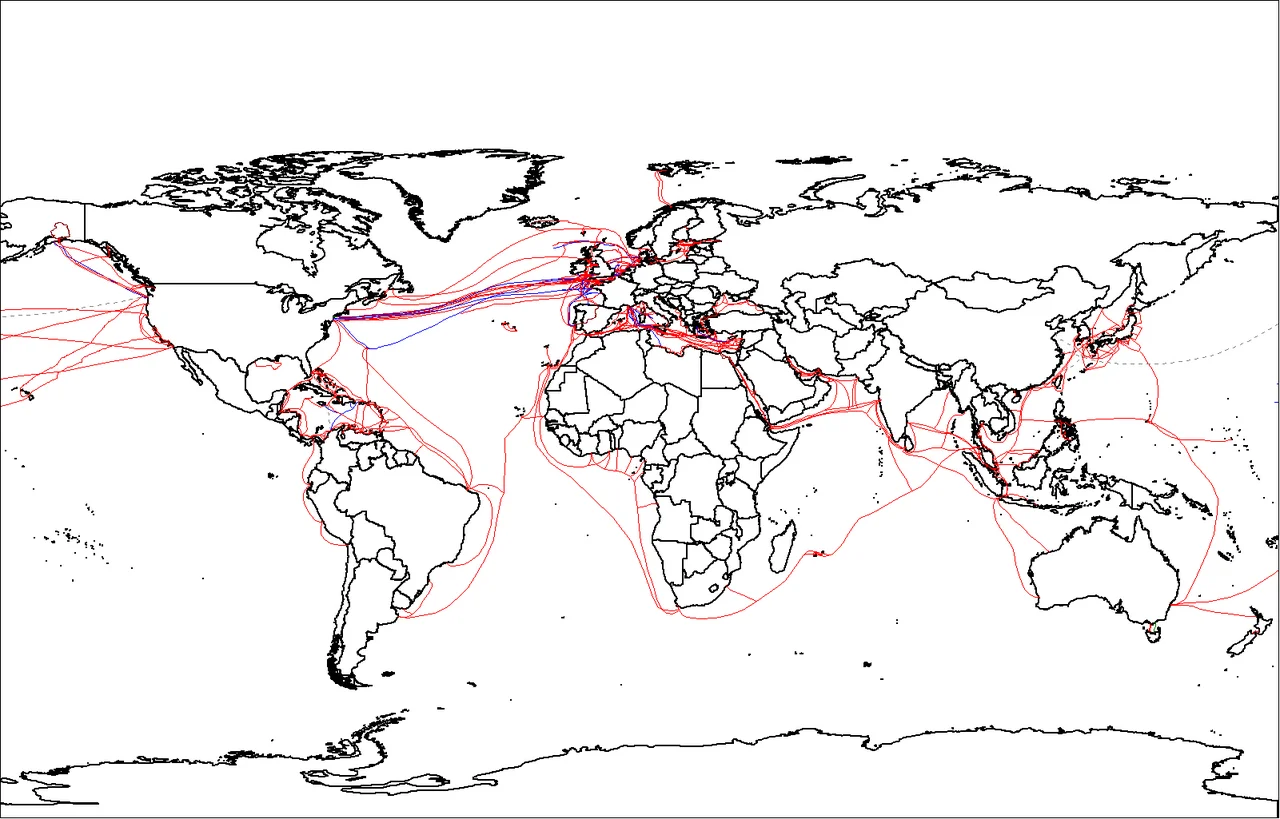
Figure 3: The global submarine cable map. When you visit a website abroad, your data is probably crossing an ocean inside one of these.
How many “sorting centers” does a packet actually pass through? You don’t have to guess — one command shows you. I ran it on my own machine (traceroute; on Windows it’s tracert):
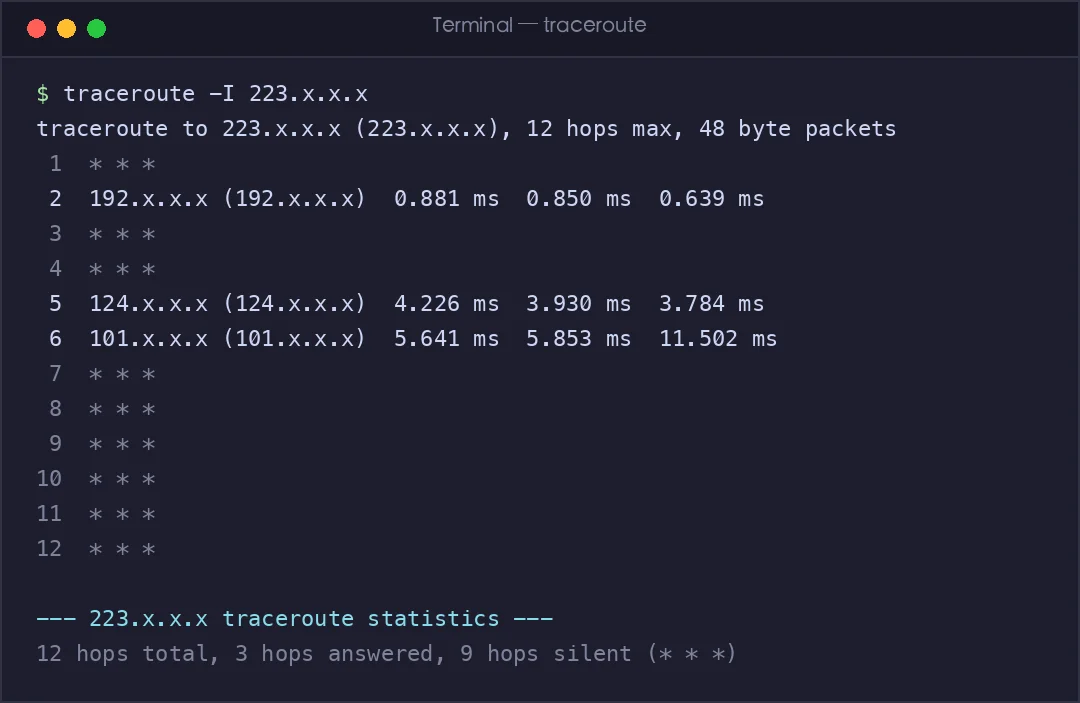
Figure 4: A real traceroute. Each line is one “sorting center” (a hop), with the round-trip time to it. Around hop 5, the packet leaves my neighborhood and enters the carrier backbone.
There’s an even friendlier command, ping, which is basically shouting across a valley and timing the echo:
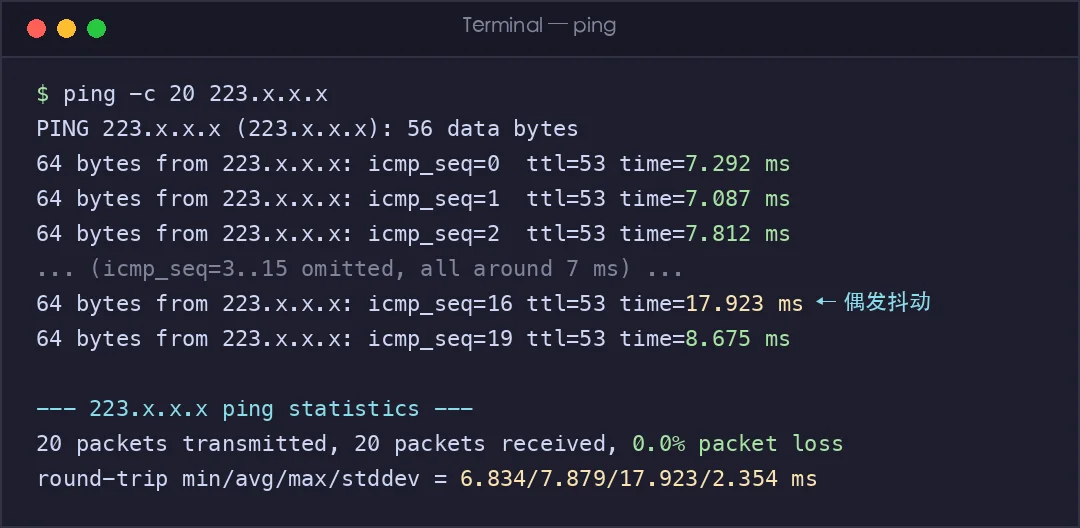
Figure 5: A real ping run. All 20 shouts got an echo (0% loss), averaging 7.9 ms — but the slowest took 17.9 ms. That unevenness is called “jitter,” and video calls are where you feel it most.
2. TCP vs UDP: Phone Call vs Postcard
Before a parcel goes out, one decision must be made: which delivery service? Networking has two main ones, living in the transport layer.
TCP is a phone call:
- Dial first; only start the real conversation after the other side says “hello” (connection setup)
- The listener keeps saying “mm-hmm” as you talk (acknowledgments)
- “Sorry, what did you just say?” — and you repeat it (retransmission)
- Both sides say goodbye before hanging up (connection teardown)
UDP is a postcard:
- Write the address, drop it in the mailbox. Did it arrive? Who knows (connectionless, no acknowledgments)
- Send three, and the second might arrive first (no ordering)
- Lost is lost; nobody resends it (no retransmission)
- But the upside is huge: fast, cheap, zero ceremony
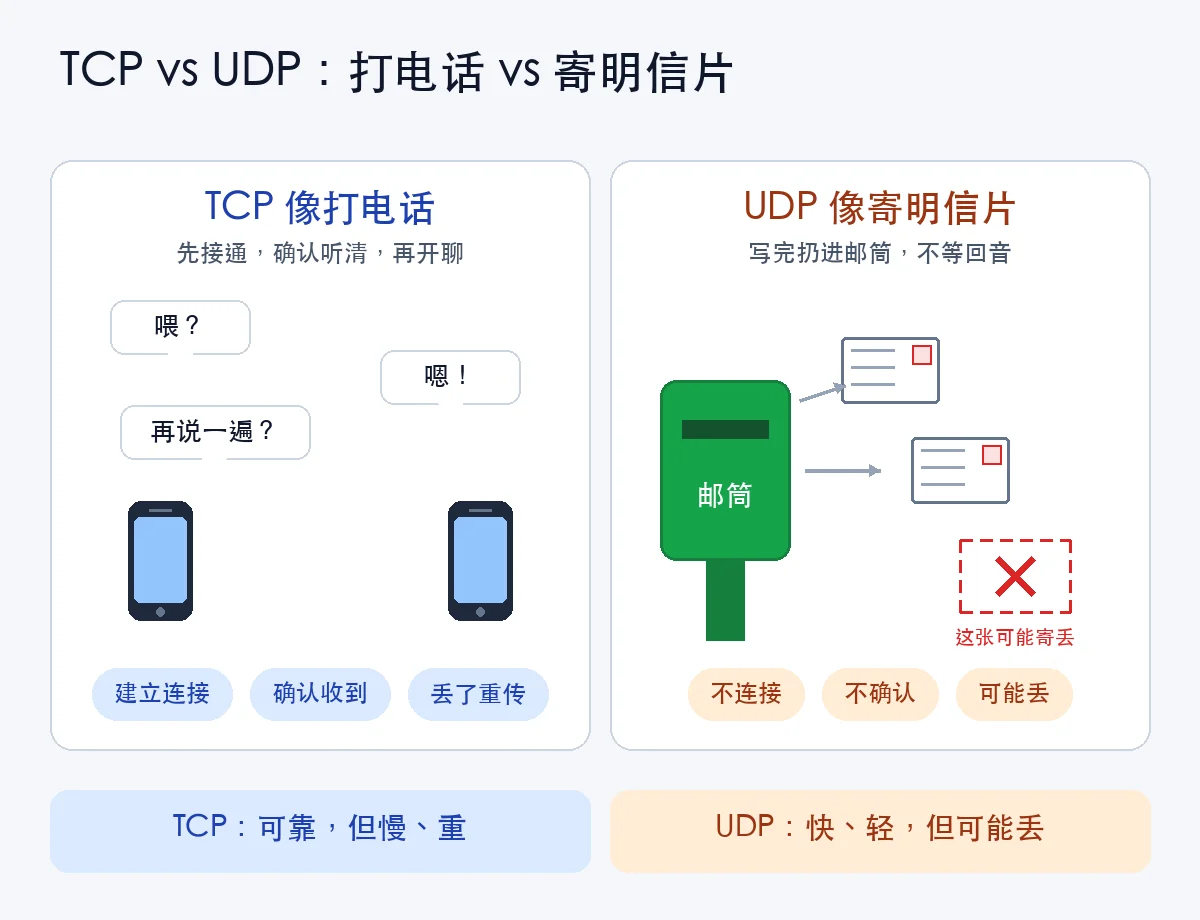
Figure 6: TCP says “not a single parcel may be lost.” UDP says “just get there fast.”
| TCP (phone call) | UDP (postcard) | |
|---|---|---|
| Connect first? | Yes (three-way handshake) | No |
| If a packet is lost | Retransmitted, delivery guaranteed | Ignored, gone forever |
| Ordering | Strictly preserved | Not guaranteed |
| Header overhead | At least 20 bytes — a fat envelope | Only 8 bytes — a thin one |
| Best for | Web, file downloads, chat messages | Voice/video calls, live streams, games, DNS |
A counter-intuitive fact: stuttering video is not always UDP’s fault — sometimes TCP is too responsible. If a live stream ran over TCP, one lost packet would freeze everyone until it’s retransmitted; over UDP you lose that frame, maybe see a glitch, and the next frame arrives on time. That’s why real-time media favors UDP-based tech. The newest web protocol, HTTP/3 (QUIC), is even built on UDP, moving reliability to a smarter layer.
Your computer is holding a pile of TCP connections right now, each in its own state:
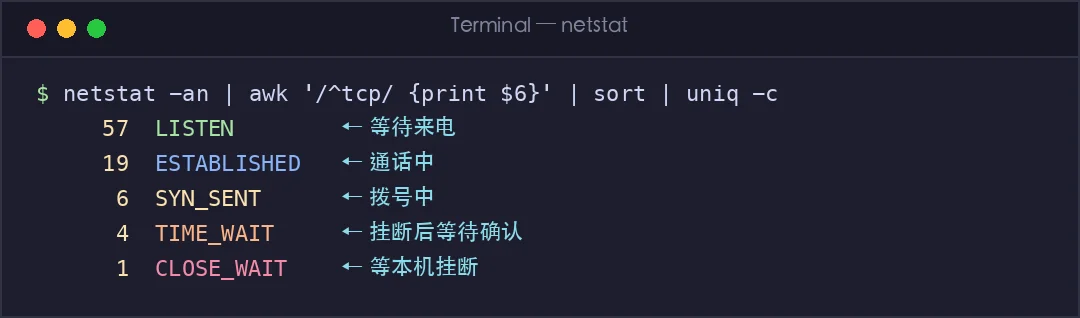
Figure 7: Real netstat counts. LISTEN means “waiting by the phone,” ESTABLISHED means “call in progress,” TIME_WAIT means “hung up, waiting a moment to be sure the other side hung up too.”
3. The Three-Way Handshake: Three Sentences to Start a Call
How does TCP “dial”? The famous three-way handshake:
- You: “Hello, can you hear me?” (SYN — I want to talk)
- Them: “I hear you! Can you hear me?” (SYN + ACK — I can receive and send; can you?)
- You: “I hear you too! Let’s begin.” (ACK — connection established)
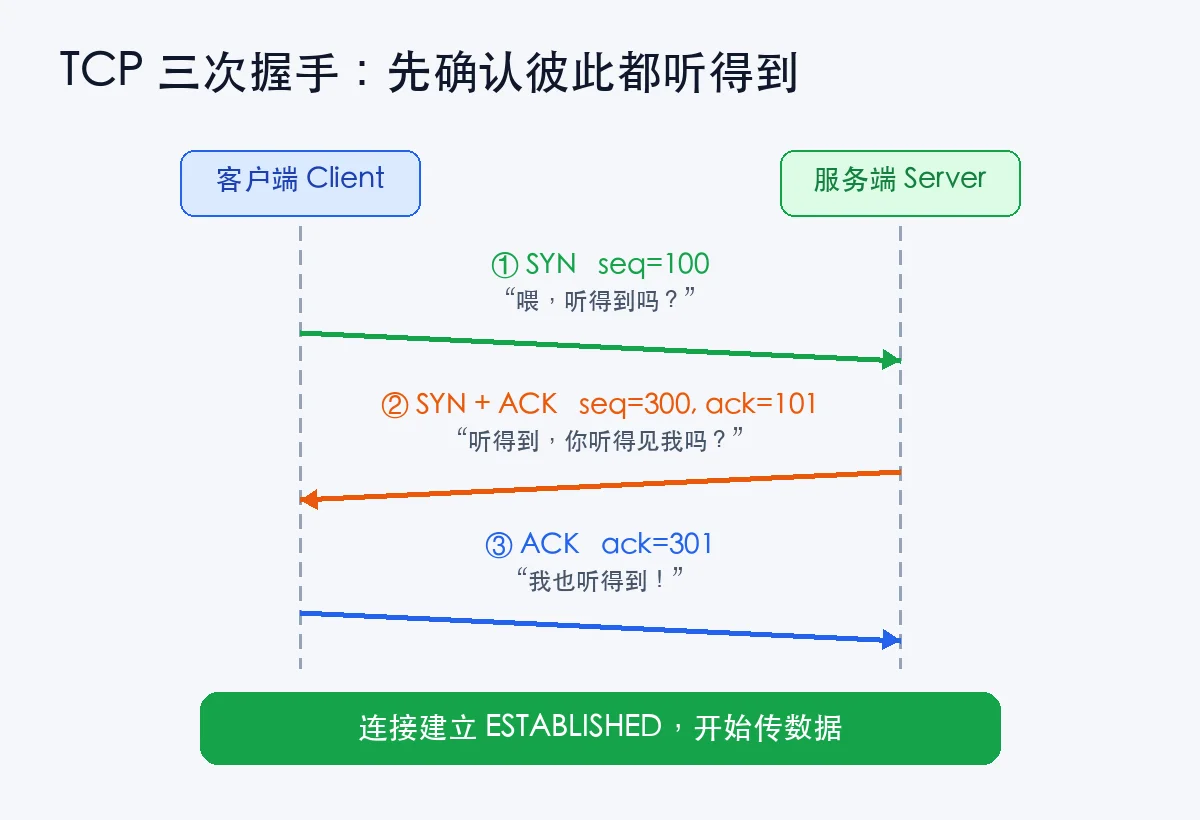
Figure 8: The three-way handshake. Notice each sentence carries a “code number” (sequence number), and the reply sends that number +1 back — proof that “what I heard is exactly what you said.”
Why three, and not two? Imagine two: you say “hello,” they reply “I hear you,” and they start talking nonstop — but how do they know you heard their reply? If you had already walked away, they’d be performing for an empty room. The third message tells them: “I got your answer.” Communication requires both sides to confirm “I can speak, I can hear, and so can you” — three checks, none skippable.
I’m not making this up — these are real packets captured from a real network (tcpdump, the tape recorder of the networking world):
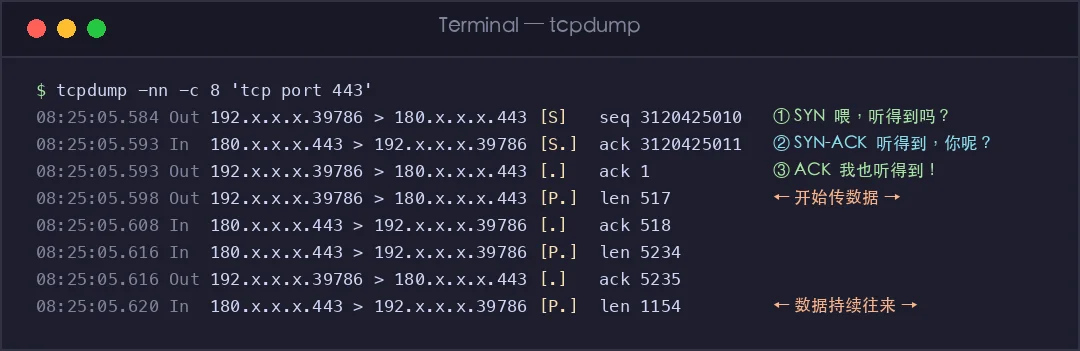
Figure 9: A real capture. Line 1 Flags [S] is SYN (“hello”), line 2 Flags [S.] is SYN-ACK (“I hear you; do you hear me?”), line 3 Flags [.] is ACK (“I do”). The Flags [P.] lines after that are actual data flowing.
Hanging up has its own ritual — the four-way wave: “I’m done talking” (FIN) → “Got it” (ACK) → “I’m done too” (FIN) → “OK, bye” (ACK). One more step than the handshake, because when you say you’re done, the other side might not be — let them finish their last sentence before the line dies.
A complete “opening a web page” is a whole chain of events, and every step can be measured with a single tool:
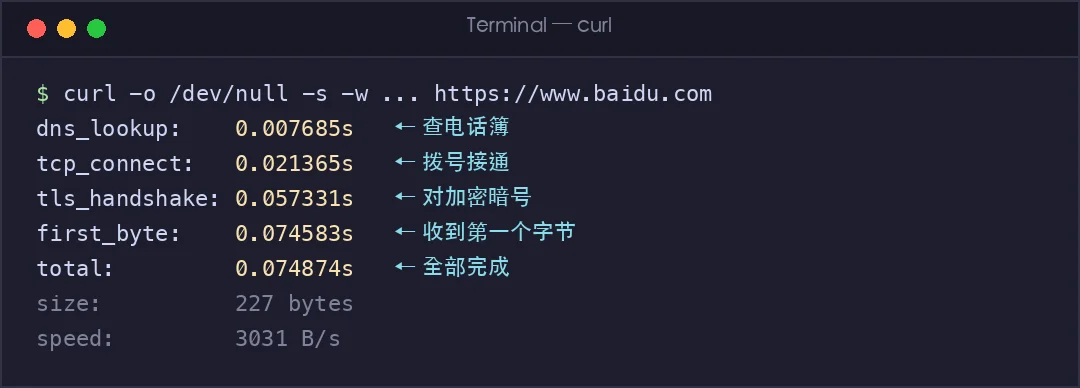
Figure 10: Real curl timing. Looking up the “phone book” (DNS): 7.7 ms → dialing (TCP handshake): 21 ms → agreeing on encryption (TLS handshake): 57 ms → first byte received: 74 ms. Your computer does all of this in a fraction of a second, every time you open a page.
4. Wired vs Wireless: Private Pipe vs Crowded Square
A packet eventually travels on some kind of “road,” and roads differ enormously.
Wired (Ethernet, fiber) is a private water pipe: your water flows in your pipe; the neighbor’s water never splashes in. Signals run inside copper or glass — enclosed, stable, nearly immune to interference.
Wireless (WiFi, 4G/5G) is shouting in a crowded square: the air belongs to everyone, and everyone on the square shares one “megaphone channel.” You shout your message, I shout mine — shout at the same time and neither is understood. So everyone agrees on “take turns, wait your turn” (the formal mechanism is called CSMA/CA — basically walkie-talkie etiquette: only one person talks at a time, and you hold your breath while others do).
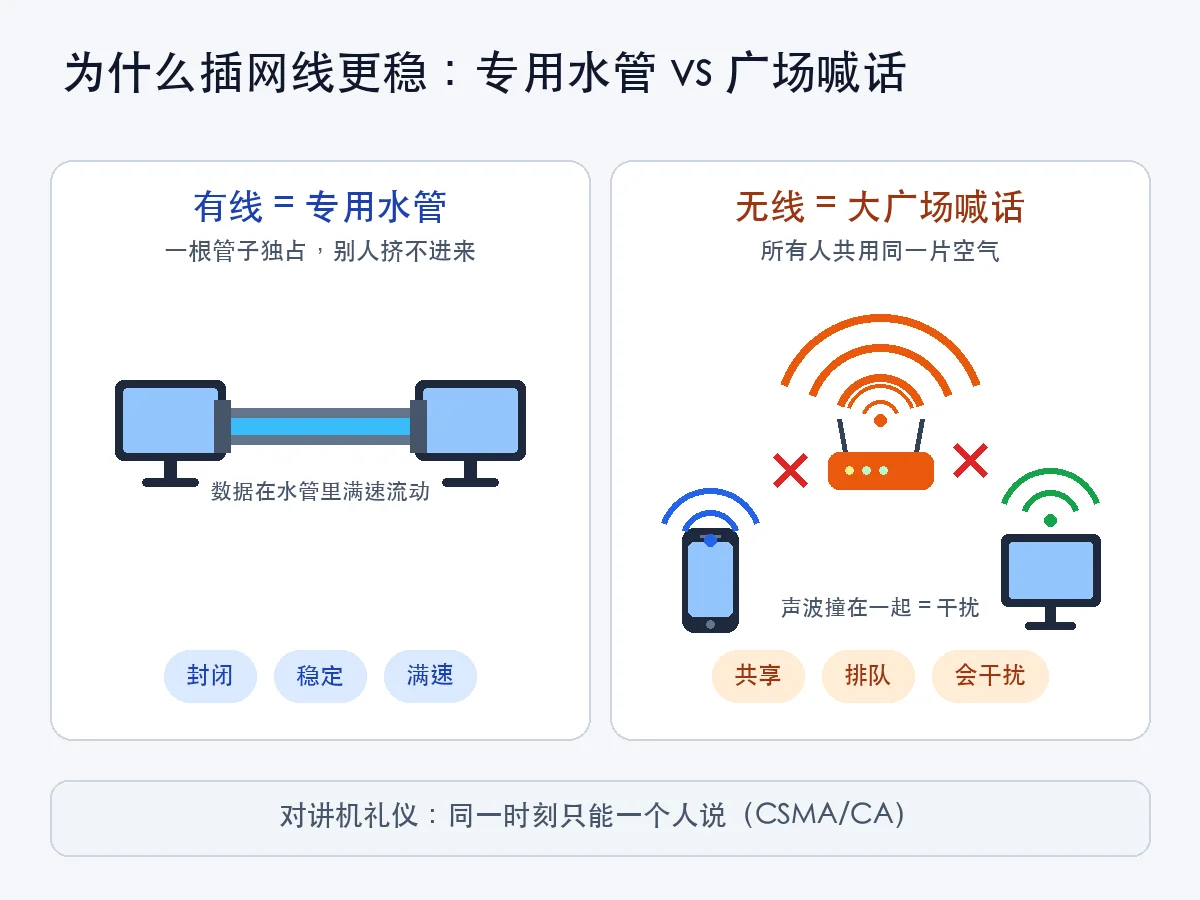
Figure 11: The essence of wired is “private.” The essence of wireless is “shared” — and sharing means queuing, collisions, and interference.
| Wired (Ethernet/fiber) | Wireless (WiFi/cellular) | |
|---|---|---|
| Medium | Enclosed cable, signal stays inside | Open air, shared by all |
| Interference | Almost none | Neighbor WiFi, microwaves, Bluetooth all compete |
| Latency/jitter | Low and steady | Uneven |
| Speed | Full speed once plugged in | Auto-downgrades with distance |
| Convenience | Tethered | Use it anywhere |
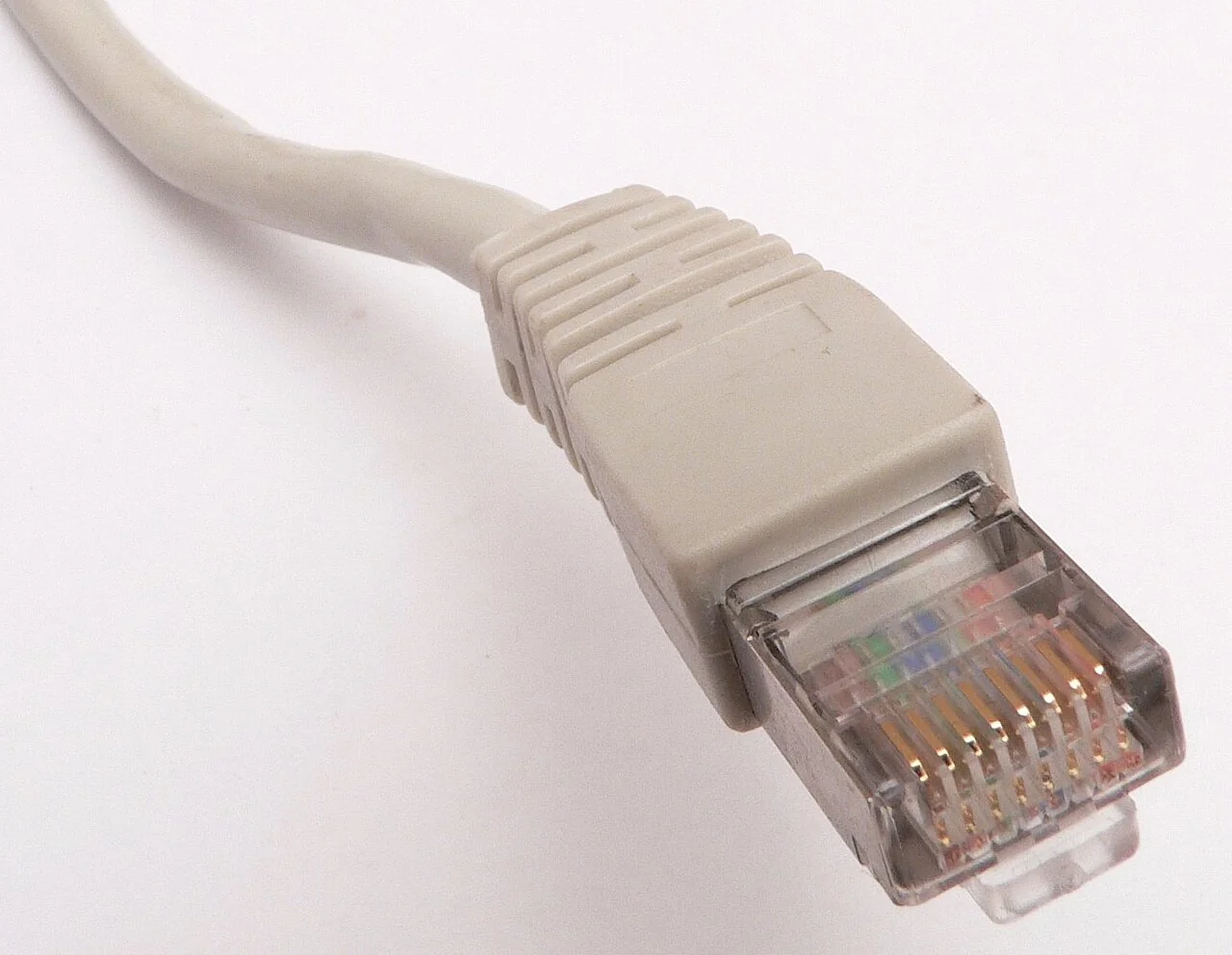
Figure 12: The humble RJ45 cable. Don’t underestimate it — for gaming and important video calls, it’s still the most reliable choice.
That’s why pro gamers and datacenter servers are always cabled, while phones and tablets go wireless for convenience. Convenience and stability have always been a trade-off.
5. WiFi vs Mobile Data: Your Home Megaphone vs a Nationwide One
Both are wireless — what’s the difference between WiFi and mobile data (“using your data plan”)?
One sentence: WiFi is your own little megaphone at home; mobile data is a nationwide megaphone network run by a carrier.
- WiFi: your home gets a broadband line (like connecting a water main to your house), and the router is the “little megaphone,” broadcasting that connection as radio waves — covering a living room, maybe a whole apartment. Walk 50 meters out the door and it’s gone. You pay a flat monthly broadband fee and use as much as you want.
- Mobile data (cellular): carriers have planted millions of base stations (big megaphones on towers and rooftops) across the country, each covering a few hundred meters to a few kilometers. As you move, your phone automatically “re-tunes” to the nearest one. It’s called “cellular” because the coverage areas drawn on a map look like a honeycomb — hexagon next to hexagon. Data is metered by your plan; exceed it and you pay extra.
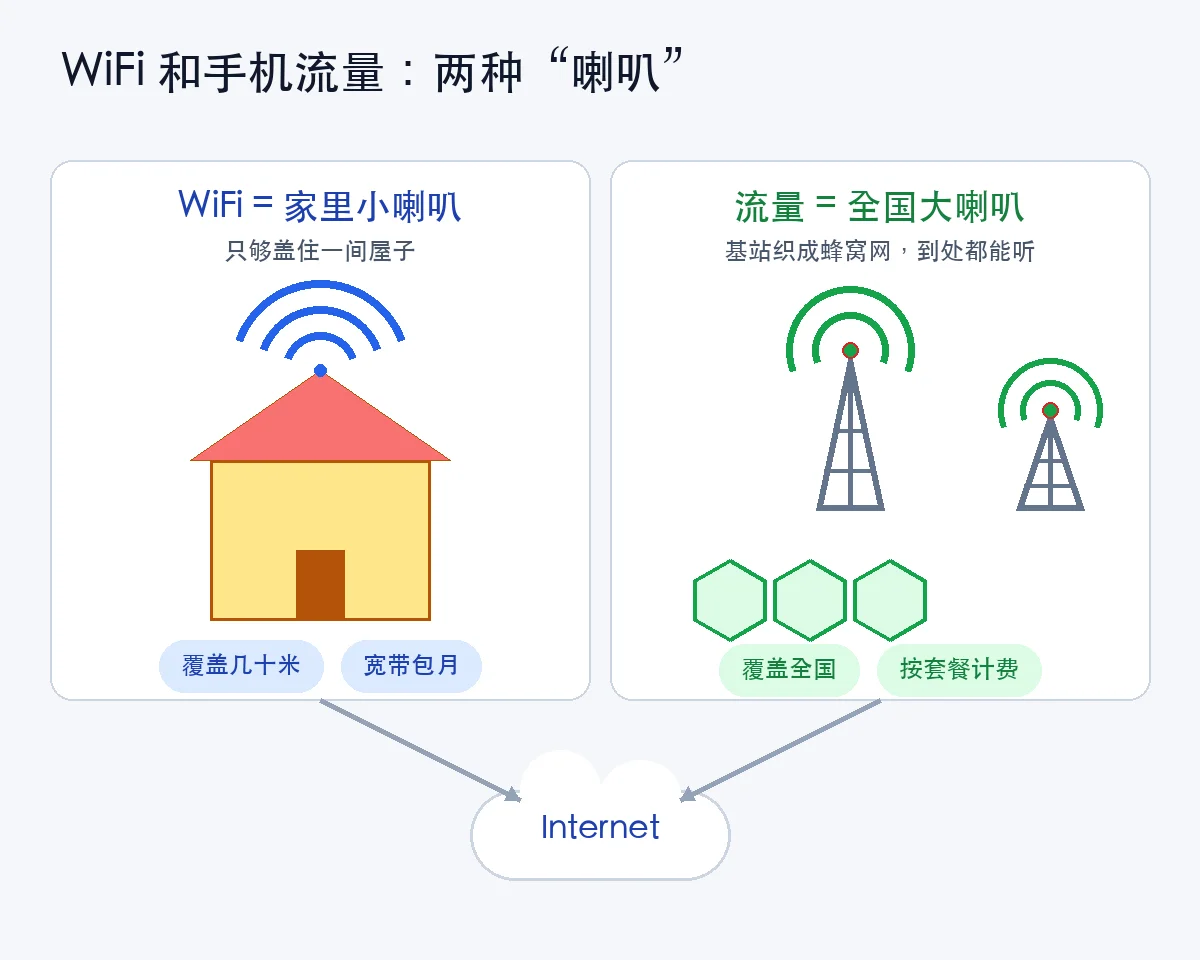
Figure 13: WiFi covers “the last few dozen meters”; cellular covers “anywhere in the country.” Both eventually merge into the same Internet.
So: stream over WiFi at home, over mobile data on the subway. They’re just different front doors — beyond the door, it’s the same Internet.
6. What Exactly Is “5G”? Two Different Things Share the Name
Here’s the most confusing — and most asked — question of all. Two completely different things are both called “5G”:
The first 5G: WiFi’s 5G means the 5GHz band.
Routers often broadcast two WiFi names, one with a “5G” suffix. That 5G refers to radio waves running on the 5GHz frequency band — it’s about which lane you’re in:
- 2.4GHz: the old lane — narrow but great at “bending around corners,” so it penetrates walls and reaches far. The downside: the whole world is on it — neighbor WiFi, Bluetooth, wireless mice, microwave ovens. Rush hour is permanent.
- 5GHz: the new lane — wide, empty, fast. The downside: it “hates walls,” fading after one or two of them.
Here’s the WiFi family tree (each generation is an upgrade of the IEEE 802.11 standard):
| WiFi generation | Standard | Born | Bands |
|---|---|---|---|
| WiFi 4 | 802.11n | 2009 | 2.4GHz + 5GHz |
| WiFi 5 | 802.11ac | 2013 | 5GHz only |
| WiFi 6 / 6E | 802.11ax | 2019+ | 2.4 + 5GHz; 6E adds 6GHz |
| WiFi 7 | 802.11be | 2024 | 2.4 + 5 + 6GHz |
Look closely: the generation literally named “WiFi 5” happens to run only on 5GHz — two coincidences colliding, and that’s where the confusion comes from.
One command shows every WiFi standard my computer’s card speaks:
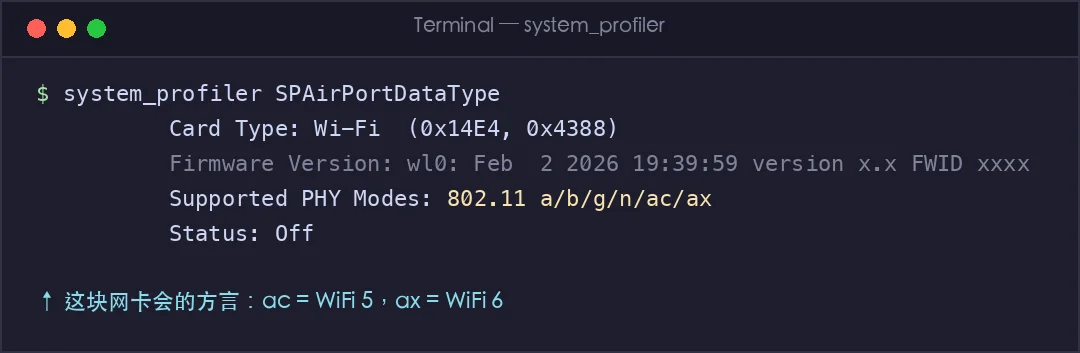
Figure 14: Real system information. The string 802.11 a/b/g/n/ac/ax lists the “dialects” this card speaks — the final ax is WiFi 6.
The second 5G: your phone’s 5G means the 5th generation of mobile networks.
In carrier ads, 5G is not a frequency — it’s a generation number, like iPhone 14 vs iPhone 15:
| Generation | Era | What it brought |
|---|---|---|
| 1G | 1980s | Brick phones, calls only |
| 2G | 1990s | Digital, text messages |
| 3G | 2000s | Web pages with pictures |
| 4G | 2010s | Smooth video, mobile payments |
| 5G | 2020s | Faster, lower latency, everything connected |
5G’s official international name is IMT-2020, standardized by the ITU, with three flagship capabilities (the three usage scenarios):
- eMBB (Enhanced Mobile Broadband): fast. Peak rates of 20Gbps — 20× that of 4G; an HD movie downloads in seconds.
- URLLC (Ultra-Reliable Low-Latency Communication): steady. Air-interface latency down to ~1 ms, reserved for remote surgery and autonomous driving — things that can’t afford a blink.
- mMTC (Massive Machine-Type Communication): many. One million devices per square kilometer — built for the sensors, water meters, and streetlights of smart cities.
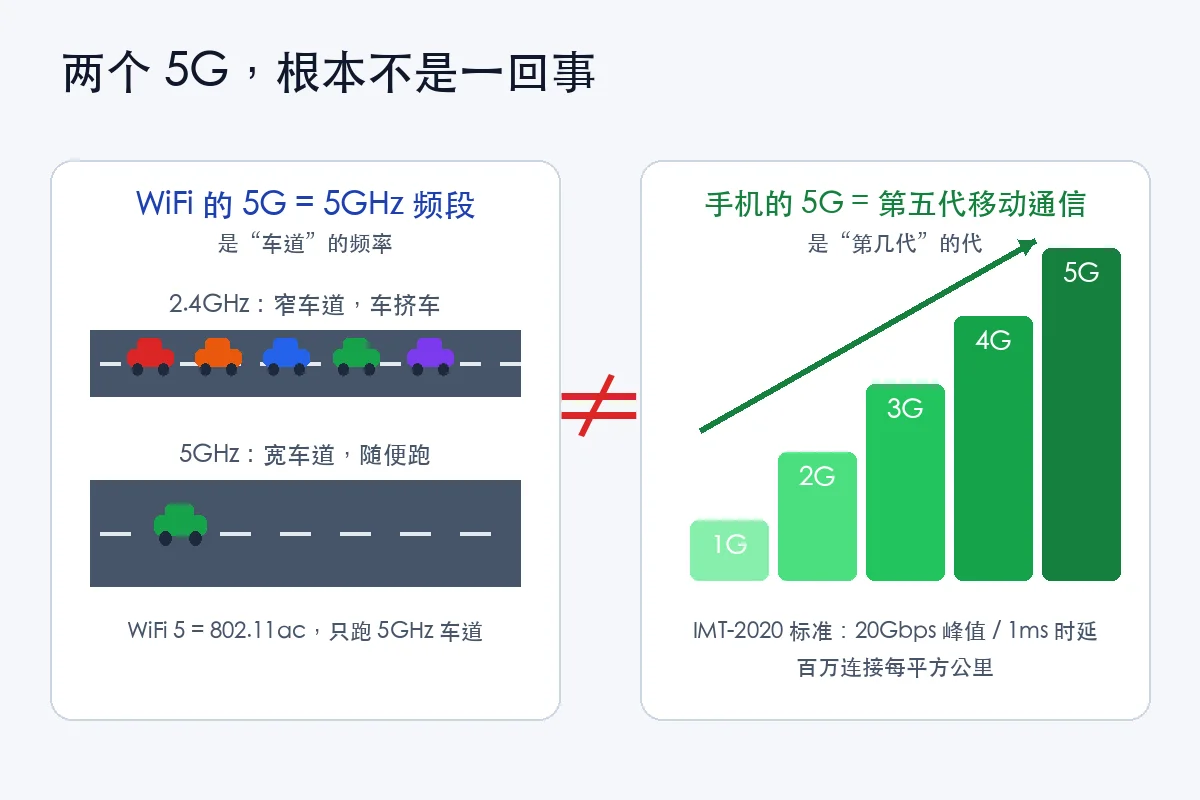
Figure 15: Remember it this way — WiFi’s 5G is “lane 5” (the 5GHz band); your phone’s 5G is “generation 5” (fifth-generation mobile). Same name, zero relation.
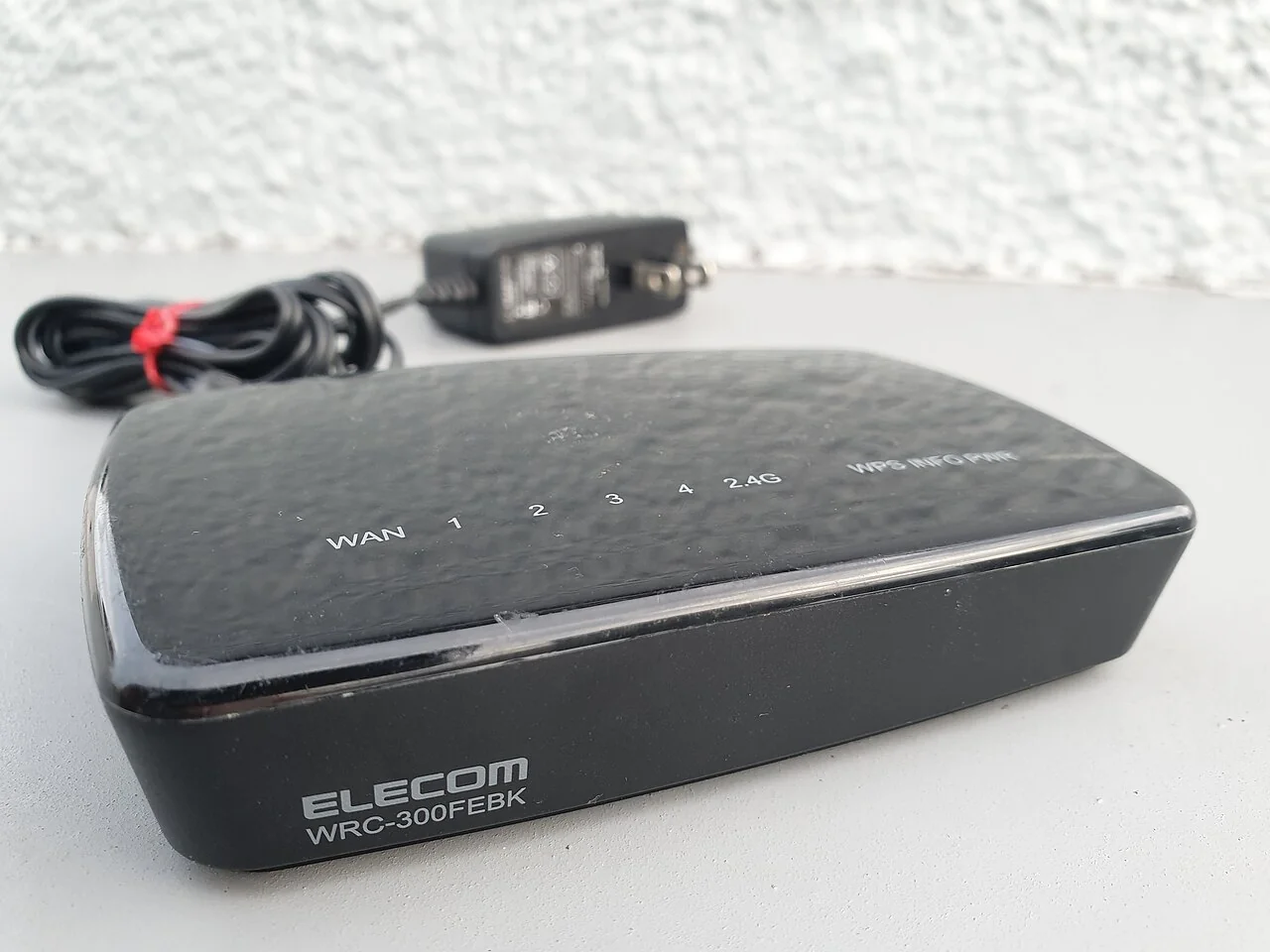
Figure 16: The little megaphone at home. The 2.4G/5G in its WiFi names are frequency bands — nothing to do with the 5G in your phone plan.
7. Why Does WiFi Lag? The Six Usual Suspects
With all the groundwork laid, we can finally answer the title question. Ranked by how often they’re guilty:
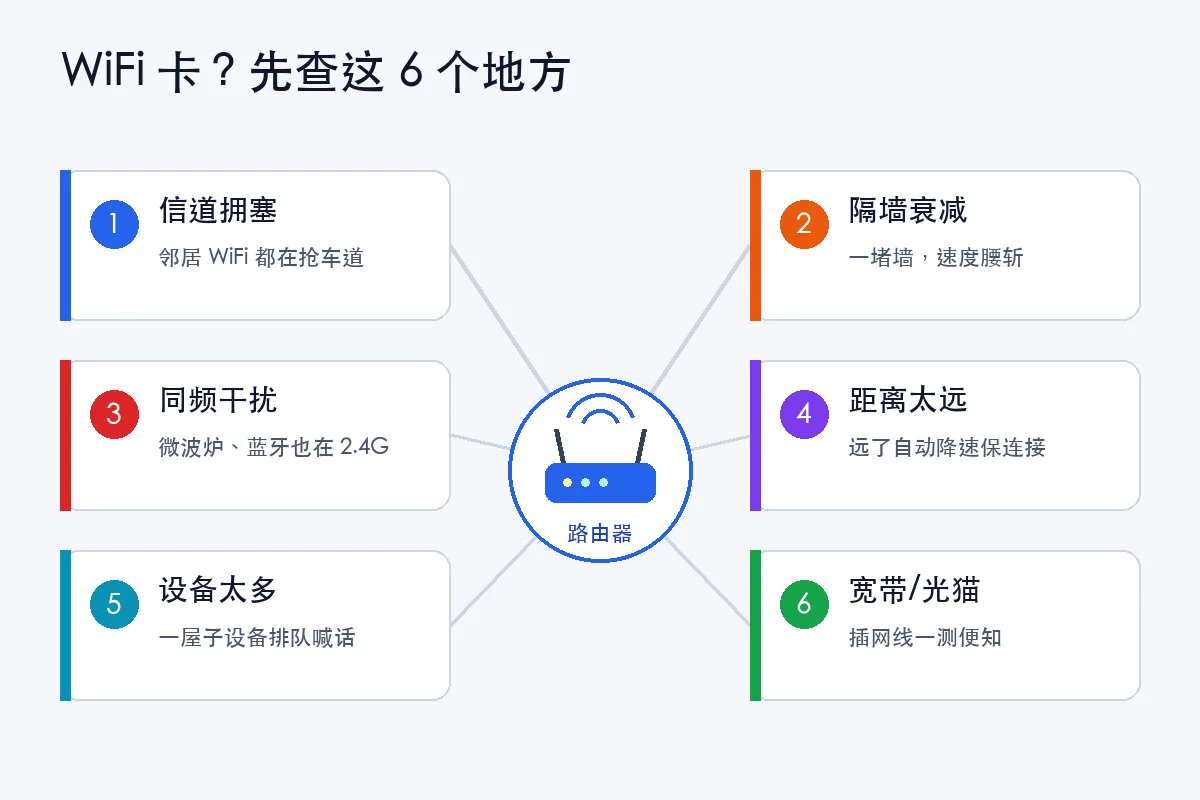
Figure 17: The six suspects. The first five all live in the “wireless” segment — none of them has anything to do with your broadband speed.
- A crowded square (channel congestion). 2.4GHz has only three non-overlapping lanes (channels 1, 6, 11), yet your phone can see dozens of neighbor networks — dozens of megaphones sharing three lanes. Lag is inevitable.
- Wall attenuation. Radio hates walls, especially 5GHz; one load-bearing wall can halve your speed. A router sleeping inside a metal network cabinet is wasted no matter how good it is.
- Same-frequency interference. Microwave ovens, Bluetooth headsets, wireless keyboards and mice, old cordless phones — all clock in at 2.4GHz. Microwave on, WiFi down. It happens in countless homes every day.
- Distance-triggered auto-downgrade. WiFi protocols are “considerate”: when the signal weakens, they trade speed for stability — from 866Mbps all the way down to 6Mbps — and your page starts spinning.
- Too many devices queuing to shout. Dozens of smart gadgets on one router means the airtime is sliced paper-thin for everyone.
- The broadband line or optical modem itself. Actually the rarest cause, yet the most wrongly accused. How to tell? Run a speed test over Ethernet: full speed wired but miserable wireless → blame WiFi; slow even wired → blame the line, call your ISP.
And one hidden culprit: slow DNS. The very first step of opening a page is “looking up the phone book” (translating the domain into an IP). If that step is slow, nothing shows up at all:
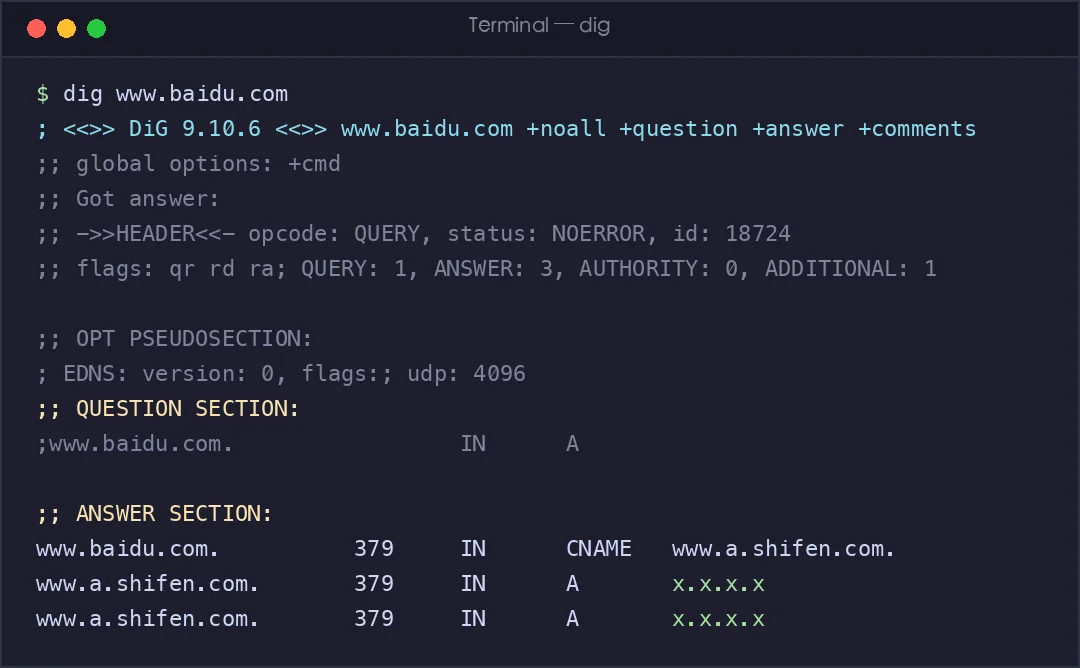
Figure 18: A real dig query. The domain is first translated to a CNAME alias, then to IP addresses — the whole “phone book lookup” laid bare.
8. The Fix-It Checklist
- Move the router out of the cabinet — center of the home, up high, in the open. One relocation often beats a new router.
- Use 5GHz nearby, 2.4GHz through walls: give the two networks different names and pick per situation.
- Switch to a quieter lane: in the router’s admin page, pin 2.4GHz to the least crowded of channels 1/6/11.
- Microwave-induced stutter is physics, not failure — wait two minutes, or use 5GHz.
- Cable up for gaming and important calls. The physical cheat code never misses.
- Big home? Mesh or wired backhaul. One router covering hundreds of square meters was never realistic.
- Reboot the router now and then; update its firmware. Old routers struggle with new devices.
- Still lagging after all that? Speed-test over Ethernet, take the numbers to your ISP, and be confidently assertive.
9. Three Little Experiments to Try with Your Kid
Every screenshot in this article came from these commands — they run on any home computer (Terminal on Mac, PowerShell/CMD on Windows):
- Hear the echo:
ping www.baidu.com— see how long a “shout” takes to come back, and watch the jitter. - Track the parcel:
traceroute www.baidu.comon Mac,tracert www.baidu.comon Windows — count how many sorting centers your packet passes before leaving town. - Look up the phone book:
dig www.baidu.comon Mac/Linux,nslookup www.baidu.comon Windows — watch a name get translated into IP addresses.
Let kids see with their own eyes that “the network” isn’t magic — it’s an engineering system you can observe, touch, and measure. That beats memorizing any definition.
Q&A
Q1: Do WeChat voice and video calls use TCP or UDP? Mostly UDP-based (in-house protocols or QUIC). A lost 20-millisecond audio frame is imperceptible to the human ear; but if TCP froze the entire conversation to retransmit that frame, the call would be unusable. In real-time scenarios, “fast” beats “complete.”
Q2: Why is there another handshake (TLS) after the three-way handshake? The TCP handshake only means “the line is connected.” The TLS handshake means “whatever we say next, only the two of us understand” — the two sides agree on encryption keys before hanging up the pleasantries. Modern TLS 1.3 has compressed this to a single round trip.
Q3: Will my phone switch from 5G to WiFi automatically at home? Yes — once WiFi is connected, traffic goes through WiFi by default. (Some phones fall back to cellular when WiFi is weak — “smart network switching.” Turn it off in settings if you’re worried about your data plan.)
Q4: Is WiFi 6E’s 6GHz the same as “6G”? No. That’s a third lane (the 6GHz band) — unrelated to 6G mobile, the sixth generation that’s still in labs. Naming collisions: a proud tradition.
Q5: When I share my phone’s hotspot, is that WiFi or mobile data? The phone’s uplink is mobile data (cellular); the link from the phone to your laptop is WiFi. Your phone is temporarily moonlighting as a little router megaphone — and spending your plan’s data.
Q6: I plugged in Ethernet — why does WiFi still seem to steal my speed? Most systems prefer the cable. But the download is “one shared water main for the whole family” — every device (TV, camera, tablet) competes at the same broadband outlet. Someone streaming 4K video will jitter your game latency. That’s an exit-bandwidth problem, not a connection-type problem.
The charm of networking is that it is both “phone calls, parcels, and megaphones” — everyday life — and the precise engineering language of seq, ack, and RTT. Next time your WiFi starts spinning, may the thought that surfaces be not frustration, but that familiar phrase: “The square is too crowded. Time to change lanes.”