Stop Letting Your Server Clock Sneak Away by 500ms! The Ultimate NTP Time Synchronization Deep Dive: From 48-Byte Packets to Cross-Platform Production Hardening
TL;DR
Many engineers mistakenly assume that Network Time Protocol (NTP) is merely a naive remote call: “The client asks the server what time it is, and then overrides its local clock.” Nothing could be further from the truth! If operating systems synchronized time so aggressively, distributed databases, Kerberos authentication domains, cron jobs, and TLS certificate validation would collapse on a daily basis.
NTP (RFC 5905) is fundamentally a probabilistic consensus and statistical filtering protocol operating over inherently non-deterministic, jitter-prone packet networks with imperfect quartz oscillators. By exchanging 48-byte UDP datagrams, it captures four precise timestamps to isolate round-trip network transit delay from genuine clock offset. It uses an 8-stage filter to select samples with minimal queuing delay, deploys Marzullo’s intersection algorithm to reject Byzantine “falsetickers”, and steers the local hardware clock via continuous frequency slewing (Slew) so that monotonic time flows smoothly forward without a single backwards jump.
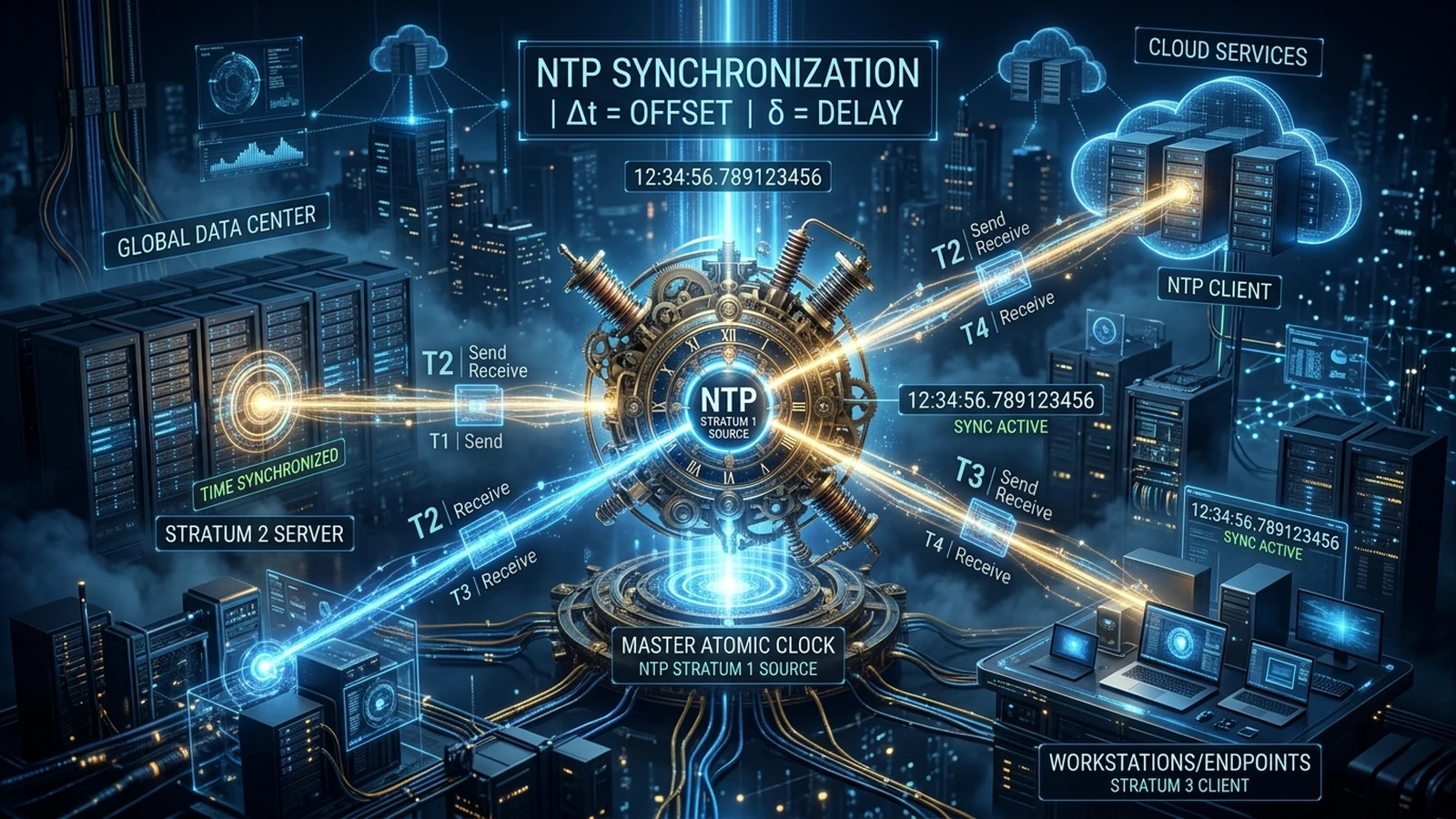
1. Problem Background: Why “a Few Hundred Milliseconds” Is a Nuclear-Grade Disaster for Distributed Systems
In daily human life, a clock difference of a few hundred milliseconds or even a couple seconds goes completely unnoticed. A web page renders, a video plays, and everything feels normal.
However, in modern cloud-native architectures, distributed storage, consensus algorithms, and financial engineering, time is the fundamental substrate of causality itself. When a node’s physical clock drifts beyond strict tolerance thresholds, catastrophic systemic failures ripple across the infrastructure:
- Distributed Consensus & Lease Invalidation (Split-Brain Disasters): In consensus protocols such as Raft, Paxos, Etcd, and Consul, cluster leaders rely on time-based leases to safely process linearizable read and write operations. If the incumbent leader’s clock drifts slower than its peers, the leader may assume its lease is valid for another 300 milliseconds while the rest of the cluster has already timed out, elected a new leader, and accepted conflicting writes. Two masters writing simultaneously leads to irrecoverable metadata and state corruption.
- Security & Authentication Cascade Collapse:
- Active Directory / Kerberos Authentication: Kerberos enforces a strict maximum clock skew tolerance (default: 5 minutes / 300 seconds). If a client drifts beyond this envelope, domain controllers immediately reject ticket-granting tickets (TGTs), locking entire offices out of their corporate workstations.
- JWT Tokens & OAuth2 Validation: Signed tokens contain
nbf(Not Before) andexp(Expiration) claims. If the authorization server is slightly behind the API gateway, newly issued tokens are immediately rejected with401 Unauthorized: Token not yet active. - TLS/HTTPS Certificate Chains: Freshly rotated certificates fail validation on client machines whose clocks lag behind the certificate validity start timestamp.
- Distributed Tracing Temporal Inversions: In microservice architectures, when Service A invokes Service B across a network, debugging becomes nightmarish when tracing spans indicate that Service B processed the response 80 milliseconds before Service A even transmitted the HTTP request. Causal waterfall graphs warp, and incident post-mortems devolve into guesswork.
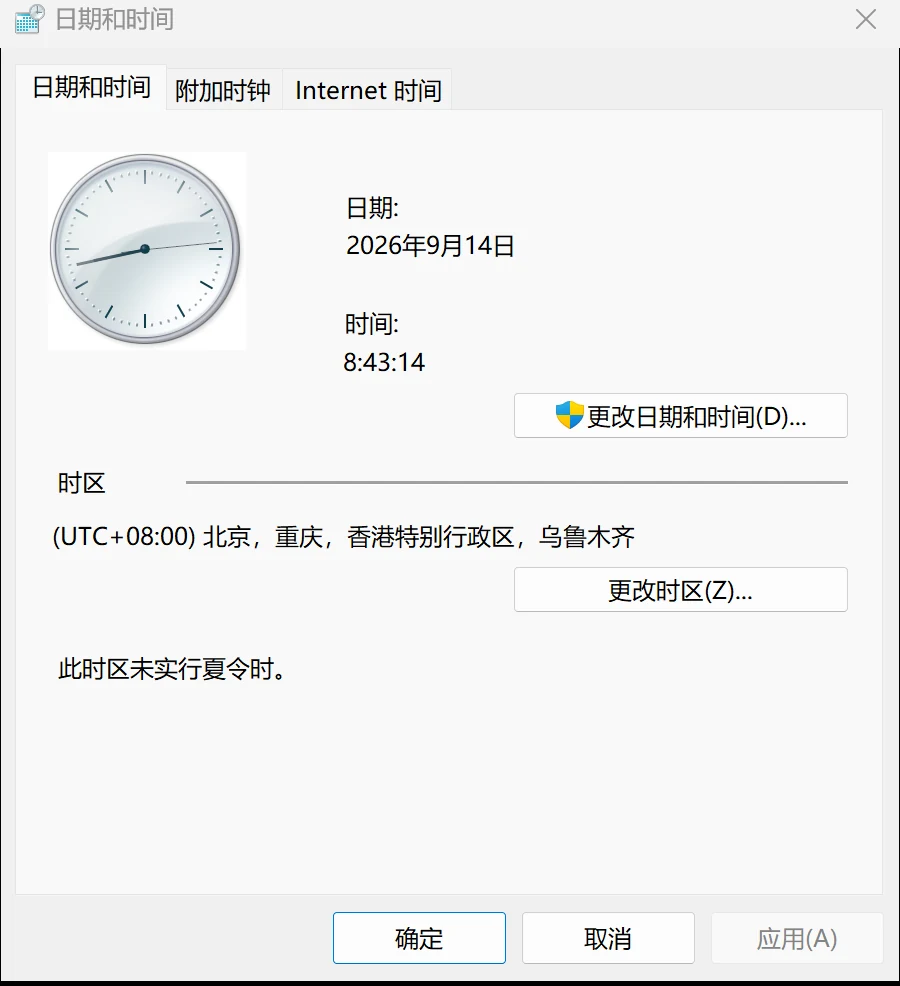
2. Problem Symptoms: Services Running Normally While Clocks Silently Drift
One of the most dangerous aspects of clock drift is its stealth. Administrators check their dashboards, see services reporting Active (Running), and assume time is synchronized.
Service uptime does not equal clock synchronization! In real production incidents, the symptoms are subtle and deceptive:
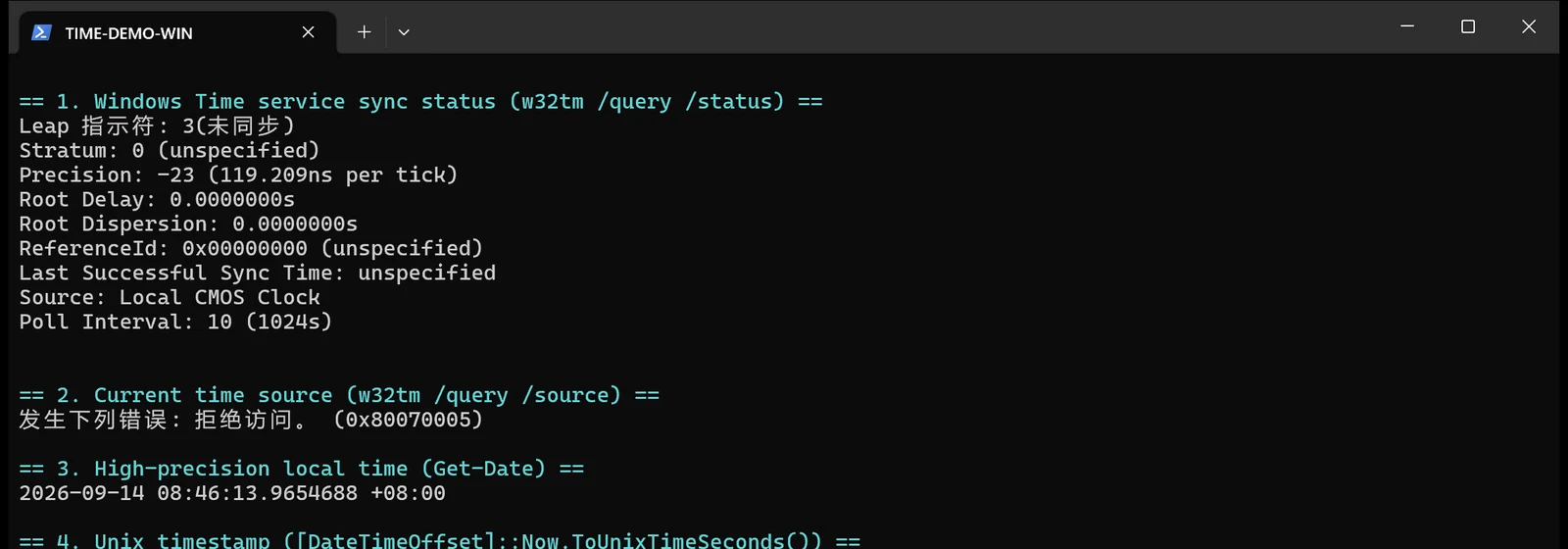
The Windows “Local CMOS Clock” Trap
On Windows 11 and Windows Server workstations, w32time often runs in the background while the machine drifts by seconds. Running w32tm /query /status reveals a startling reality:
Leap Indicator: 3 (unsynchronized): The operating system explicitly flags the clock as untrusted.Stratum: 0 (unspecified): No valid stratum level is established.Source: Local CMOS Clock: The system is not synchronizing with any network peer at all; it is free-running on its cheap, uncalibrated motherboard coin-battery oscillator!
Linux Multi-Daemon Contention and Silent UDP 123 Blackholes
On modern Linux distributions (Ubuntu 22.04 / 24.04 / 26.04), administrative oversights often leave both systemd-timesyncd and chrony running simultaneously. Both daemons contest the Linux kernel’s timekeeping interface, adjusting clock frequency in opposing directions and inducing severe saw-tooth oscillations.
Furthermore, NTP communicates over UDP port 123. Many corporate firewalls, cloud provider security groups, and perimeter routers classify UDP 123 as a potential vector for NTP reflection amplification DDoS attacks and silently drop inbound and outbound datagrams without returning ICMP Destination Unreachable messages. Clients enter exponential backoff, silently falling back to uncalibrated hardware timers.
3. Problem Analysis: 48 Bytes and Four Timestamps — What Does NTP Actually Compute?
NTP is not an exchange of “current time”; it is a mathematical calculation of Round-trip Network Delay ($\delta$) and Clock Offset ($\theta$).
RFC 5905 defines the standard 48-byte NTPv4 datagram:
- LI (Leap Indicator, 2 bits): Leap second warning (00 = normal, 01/10 = leap second insert/delete, 11 = alarm/unsynchronized).
- VN (Version Number, 3 bits): Protocol version (typically 4).
- Mode (3 bits): 3 for Client, 4 for Server, 1/2 for Symmetric Active/Passive.
- Stratum (8 bits): Distance from primary reference source (1 to 16).
- Poll (8 bits): Maximum polling interval expressed as an exponent of 2 ($2^n$ seconds).
- Precision (8 bits signed): Precision of the local clock ($2^{-23} \approx 119\text{ ns}$).
- Root Delay (32 bits fixed-point): Total round-trip delay to the primary reference clock.
- Root Dispersion (32 bits fixed-point): Total accumulated dispersion error.
- Reference ID (32 bits): Identifier of reference clock (e.g., GPS, PPS, or peer IPv4).
- Four 64-bit NTP Timestamps: 32 bits for whole seconds since January 1, 1900, and 32 bits for fractional seconds (picosecond-level resolution).
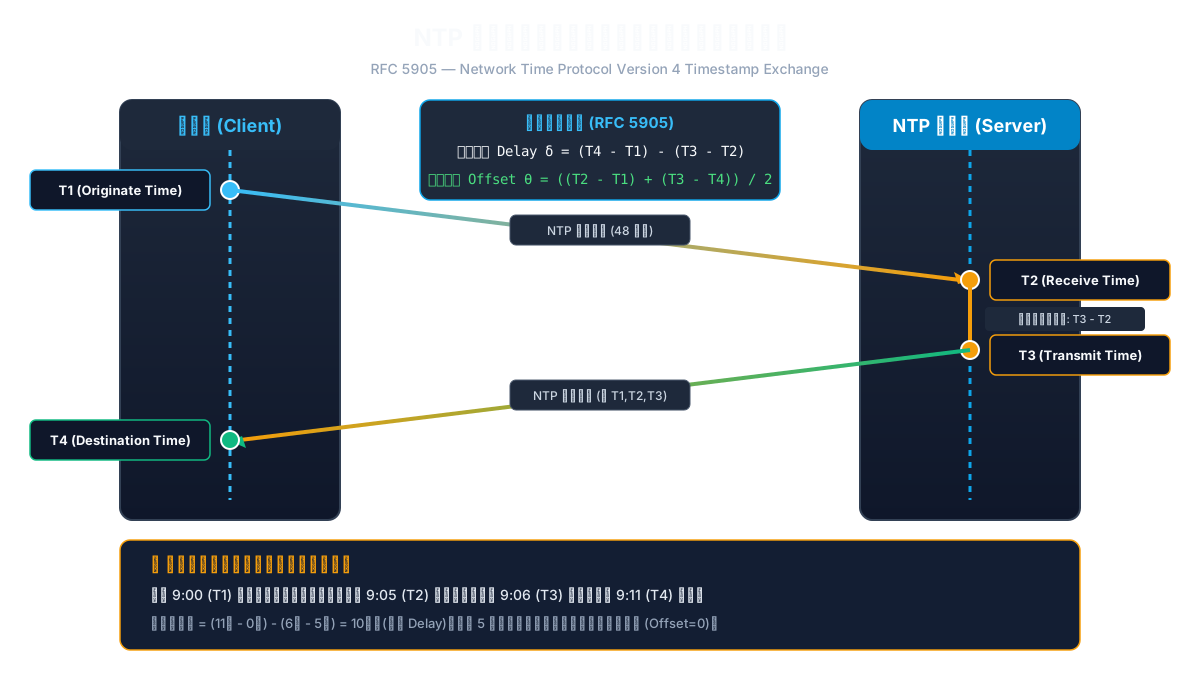
The Four-Timestamp Handshake
During an NTP poll cycle, four discrete timestamps are recorded:
- $T_1$ (Originate Timestamp): Local client time when the request datagram is transmitted.
- $T_2$ (Receive Timestamp): Local server time when the request datagram arrives at the server.
- $T_3$ (Transmit Timestamp): Local server time when the response datagram leaves the server.
- $T_4$ (Destination Timestamp): Local client time when the response datagram arrives back at the client.
Mathematical Derivation
Under the fundamental assumption that outbound and inbound transit times across the network path are approximately symmetric ($t_{req} \approx t_{resp}$):
- Forward path transit time: $t_{req} = (T_2 - T_1) - \theta$ (where $\theta$ is the local client clock offset relative to the server).
- Return path transit time: $t_{resp} = (T_4 - T_3) + \theta$.
Combining these equations yields the RFC 5905 governing formulas:
$$ \text{Round-trip Delay } \delta = (T_4 - T_1) - (T_3 - T_2) $$
$$ \text{Clock Offset } \theta = \frac{(T_2 - T_1) + (T_3 - T_4)}{2} $$
👦 Primary School Metaphor: Passing Notes Between Classrooms
Imagine little Tommy sits in a classroom on the 3rd floor, and Sally sits in a classroom on the 4th floor. Tommy wants to know how his wristwatch compares to Sally’s wall clock.
- At 9:00 ($T_1$) by Tommy’s watch, Tommy hands a paper note to a runner student.
- The runner runs up the stairs. Sally’s wall clock reads 9:05 ($T_2$) when she catches the note.
- Sally writes her reply and hands it back to the runner at 9:06 ($T_3$) by her clock.
- The runner dashes back down the stairs. Tommy’s watch reads 9:11 ($T_4$) when he gets the note.
Any elementary school student can solve this riddle:
- How long was the runner running on the stairs (Round-trip Delay)? Total elapsed time was $(9:11 - 9:00) = 11\text{ minutes}$. Subtract the $1\text{ minute}$ Sally spent writing $(9:06 - 9:05)$: $$\delta = 11 - 1 = 10\text{ minutes of total running}$$ Since running up and down takes about the same time, the one-way climb took $10 \div 2 = 5\text{ minutes}$.
- Is Sally’s wall clock fast or slow (Clock Offset)? Tommy sent the note at 9:00. It took 5 minutes to reach Sally. So when Sally received it, Tommy’s watch was actually at $9:00 + 5\text{ minutes} = 9:05$. Sally’s wall clock showed exactly 9:05! Their clocks are perfectly aligned down to the exact second (Offset = 0)! If Sally’s clock had read 9:08 upon arrival, her clock would be exactly 3 minutes fast.
This explains why one-way timestamps are completely useless: without $T_1$, $T_2$, $T_3$, and $T_4$, there is no mathematical way to separate network transit time from genuine clock drift.
4. Root Causes: From Quartz Thermal Drift to Marzullo’s Intersection Algorithm
Why do clocks drift in the first place, and how does NTP filter out environmental noise?
1. Hardware Physics: Quartz Crystal Oscillator Thermal Sensitivity
Computer motherboards rely on inexpensive quartz crystal oscillators (typically operating at 32.768 kHz). Quartz frequency is physically governed by ambient temperature, supply voltage, and aging. Standard consumer oscillators have a tolerance of approximately $\pm 20 \text{ to } 50 \text{ ppm}$ (Parts Per Million). $$50\text{ ppm} = \frac{50}{1,000,000} \approx 4.32\text{ seconds per day}$$ Left uncalibrated, a standard server will naturally gain or lose over 4 seconds every 24 hours, drifting by more than two minutes in a single month!
2. Network Jitter: The 8-Stage Clock Filter Register
Transient network congestion and packet queuing introduce asymmetric delays. NTP never relies on a single poll.
For each upstream peer, NTP maintains a circular 8-stage shift register recording the tuple (offset, delay, dispersion) for the last 8 polls.
- The Golden Rule: The filter selects the sample with the minimum network delay ($\min \delta$).
- Why? Network queuing can only increase packet transit time; it can never make transit time shorter than physical line propagation speed. The packet with the shortest round-trip experienced the least queuing delay, meaning its transit was the most symmetric and its computed offset $\theta$ is the most accurate.
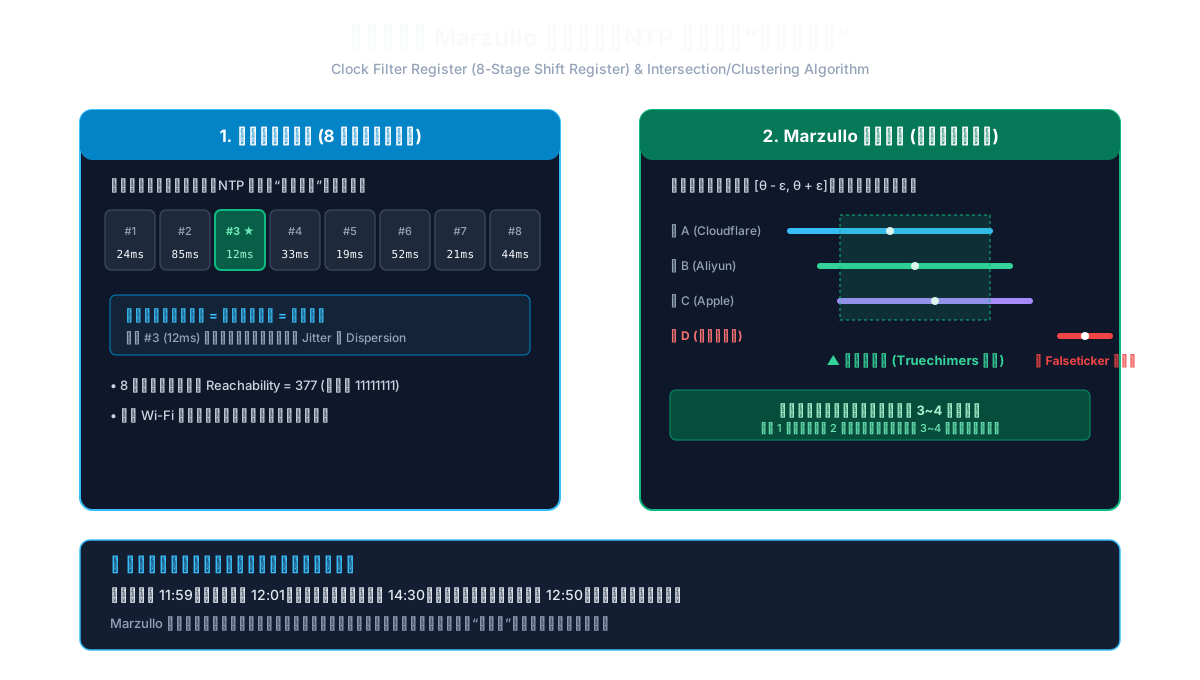
3. Algorithmic Defense: Marzullo’s Algorithm Purging “Falsetickers”
If a server configures only one upstream NTP source, a faulty hardware clock or spoofed response can corrupt the entire system. If it configures two peers that disagree by 500ms, it cannot determine who is telling the truth. Enterprise standards mandate at least 3, and preferably 4+ independent time sources.
NTP uses a modified Marzullo Intersection and Clustering Algorithm:
- Each peer provides a confidence interval $[\theta - \varepsilon, \theta + \varepsilon]$, where $\varepsilon$ represents root dispersion and jitter bounds.
- The algorithm computes the largest intersection region containing the majority consensus of peers (Truechimers).
- Any peer whose interval fails to intersect this consensus is classified as a Falseticker and immediately discarded.
- Remaining Truechimers are combined using weighted statistical clustering to produce the final discipline signal for the OS kernel.
👥 Primary School Metaphor: Three Friends Deciding When Recess Starts
Three students check their watches:
- Tommy’s watch reads 11:59.
- Sally’s watch reads 12:01.
- Billy’s watch battery leaked and reads 14:30.
If the teacher blindly takes the arithmetic average: $(11:59 + 12:01 + 14:30) \div 3 = 12:50$! The entire class sits hungry for 50 extra minutes because of one broken watch. Marzullo’s algorithm acts like a smart teacher: it identifies that Tommy and Sally are within 2 minutes of each other, while Billy is hours off. Billy’s watch is branded a “falseticker” and ignored, keeping the class schedule safe and accurate!
5. The Truth About Stratum Levels: Smaller Is Not Always Better
In NTP topology, the concept of Stratum is frequently misunderstood by junior engineers.
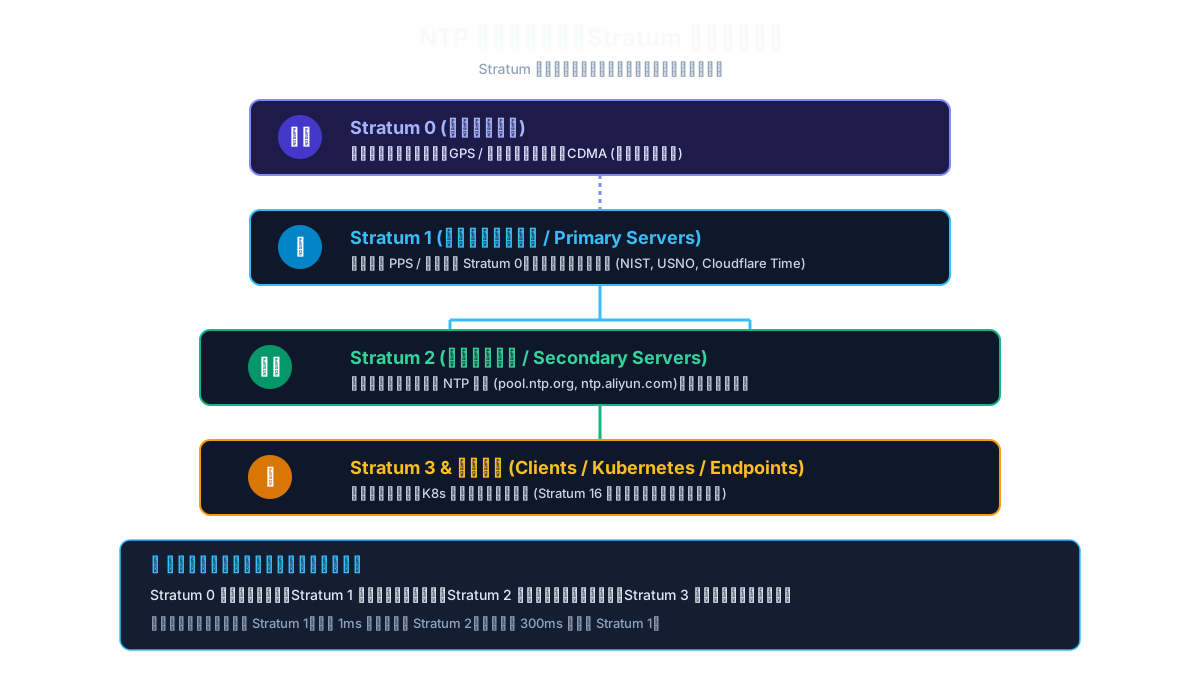
- Stratum 0: Physical reference clocks (cesium beam atomic clocks, rubidium frequency standards, GPS/BeiDou satellites). They do not connect to networks and have no IP addresses.
- Stratum 1: Primary servers directly wired to Stratum 0 devices via hardware PPS (Pulse Per Second) and serial connections (e.g., NIST, USNO, Cloudflare Time).
- Stratum 2: Secondary servers synchronized over network links to Stratum 1 servers (e.g., cloud provider NTP pools, regional data center gateways).
- Stratum 3 to 15: Downstream enterprise switches, hypervisors, and end-user workstations.
- Stratum 16: Unsynchronized / Alarm state. Clocks at Stratum 16 are completely untrusted.
The Production Fallacy: Obsessing Over Stratum 1
Many administrators insist on pointing internal servers directly at public Stratum 1 servers:
- Stratum indicates hop count from atomic reference; it does not measure network proximity or latency.
- A Stratum 1 server located across the ocean with 250ms latency, high jitter, and packet loss is dramatically inferior to an in-region Stratum 2 server hosted inside your cloud availability zone with 0.8ms round-trip latency.
- Low delay and low jitter consistently outperform a low stratum number.
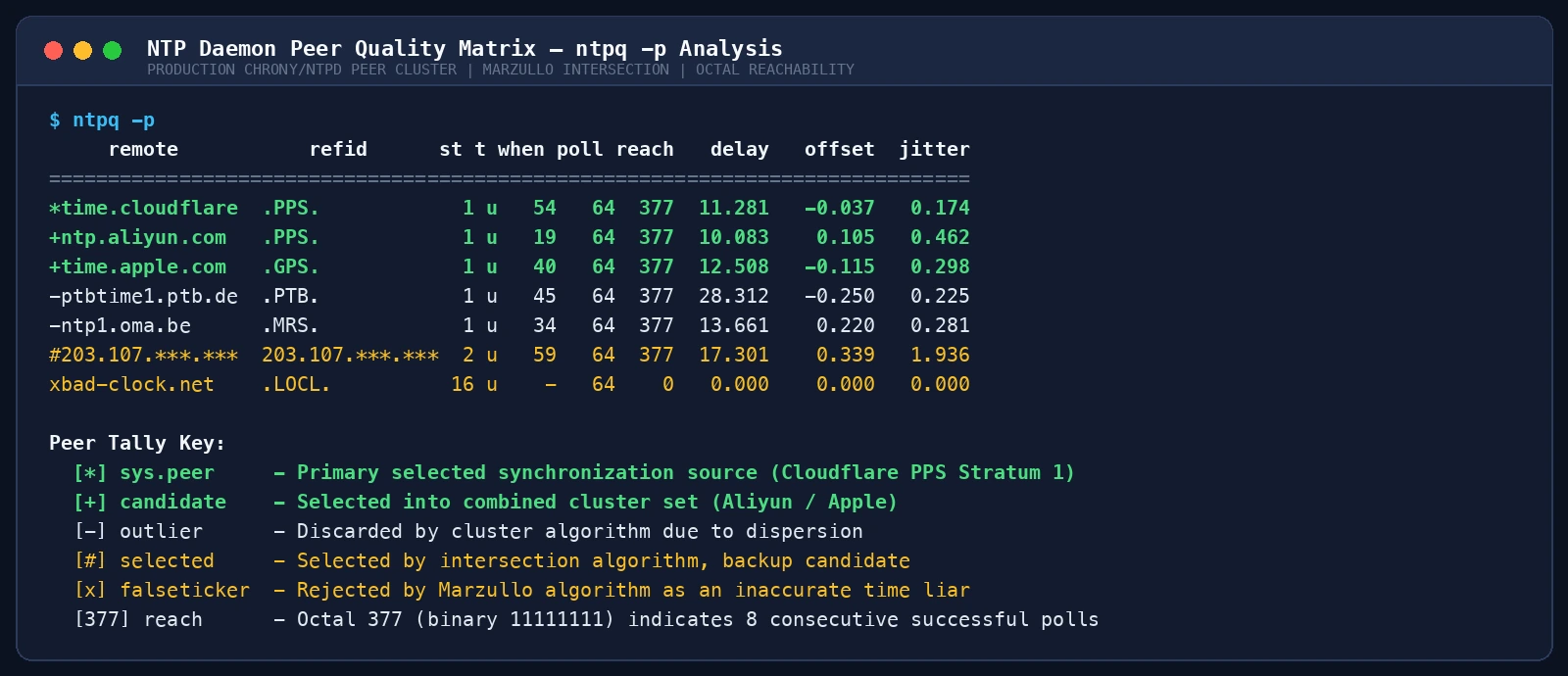
In the real ntpq -p matrix above:
*marks the active primary synchronization source (sys.peer, e.g., Cloudflare PPS Stratum 1).+marks verified candidate servers ready for failover (candidate).-marks discarded outliers.reach = 377is an octal representation of binary11111111, indicating that the last 8 consecutive polling queries succeeded with 100% responsiveness.
6. Slew vs. Step: The Life-and-Death Choice of Clock Discipline
Once the offset $\theta$ is determined, how should the kernel adjust the local clock? Two contrasting mechanisms exist: Step and Slew.
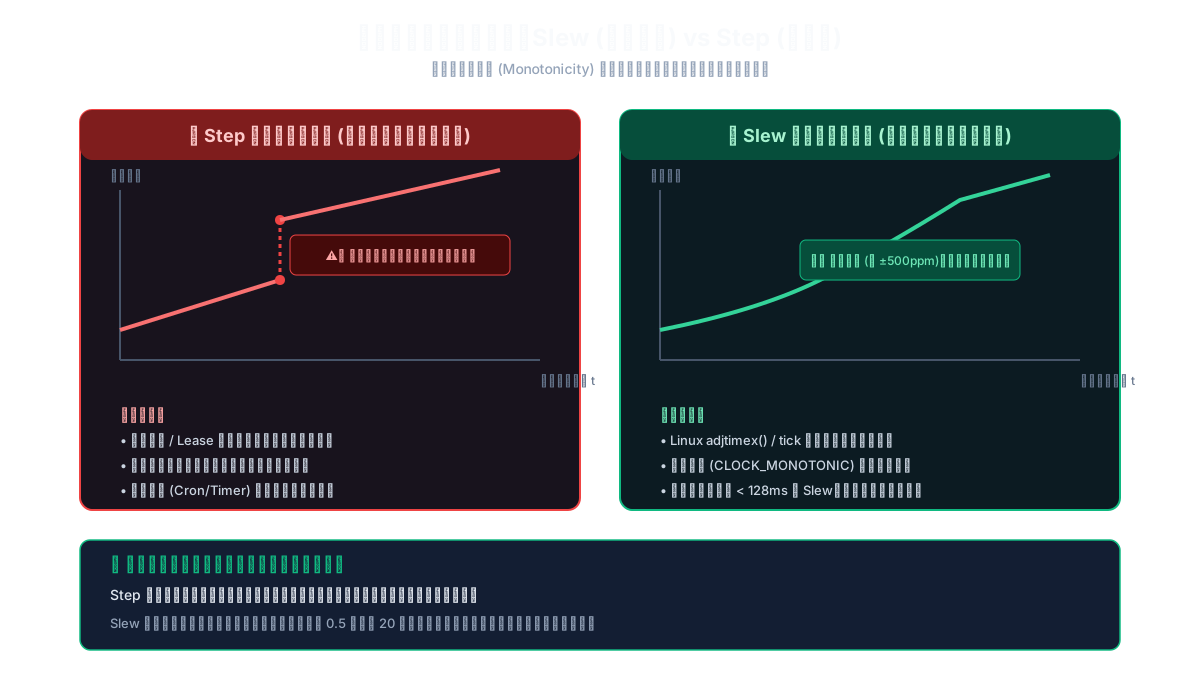
1. Step (Hard Reset): The Monotonicity Killer
Calling functions like settimeofday() forcefully overwrites the clock:
- Necessary during initial system boot when the clock is off by hours.
- Catastrophic in production: Time leaps forward or, worse, backward.
If the clock jumps backward from 10:00:05 to 10:00:00, any software relying on monotonic time experiences severe corruption:
- Distributed databases fail Raft assertions when log sequence numbers appear out of order.
- POSIX timers and
sleep()calls hang indefinitely or return prematurely. - Transactions commit with reversed timestamps.
2. Slew (Gradual Frequency Slewing): Preserving Monotonic Flow
Using system calls like adjtimex(), the kernel does not change the time; it changes how fast the seconds tick!
- If the local clock is 50ms slow, the kernel instructs the hardware timer to tick 500 microseconds faster every second ($\pm 500\text{ ppm}$ maximum slew rate).
- Time glides smoothly forward. Not a single microsecond is lost, and time never flows backward.
- Production time daemons (
chrony,ntpd) enforce a threshold (traditionally 128ms): offsets below 128ms are strictly slewed. If an offset exceeds 1000 seconds (Panic Threshold), the daemon refuses to make adjustments and terminates with an error to protect data integrity.
⏰ Primary School Metaphor: Setting the Classroom Clock
The classroom clock is 10 seconds slow.
- Step: The teacher climbs a ladder and yanks the minute hand backward. Students running a 50-meter sprint with stopwatches see their time go negative and start crying in confusion.
- Slew: The teacher secretly tweaks the pendulum screw so the clock ticks 1% faster over the next hour. By lunchtime, the clock is perfectly synchronized, and nobody noticed any disruption.
7. The Leap Second Shock: How Modern Clouds Smear Away the Extra Second
Beyond network jitter, computers must contend with the celestial mechanics of planet Earth: the Leap Second.
Atomic clocks (TAI) measure time via cesium atom decay with near-infinite stability. However, Earth’s rotation is gradually decelerating due to tidal friction. To prevent solar time (UT1) from drifting away from civil time, the International Earth Rotation Service inserts a Leap Second into UTC when the difference approaches 0.9 seconds.
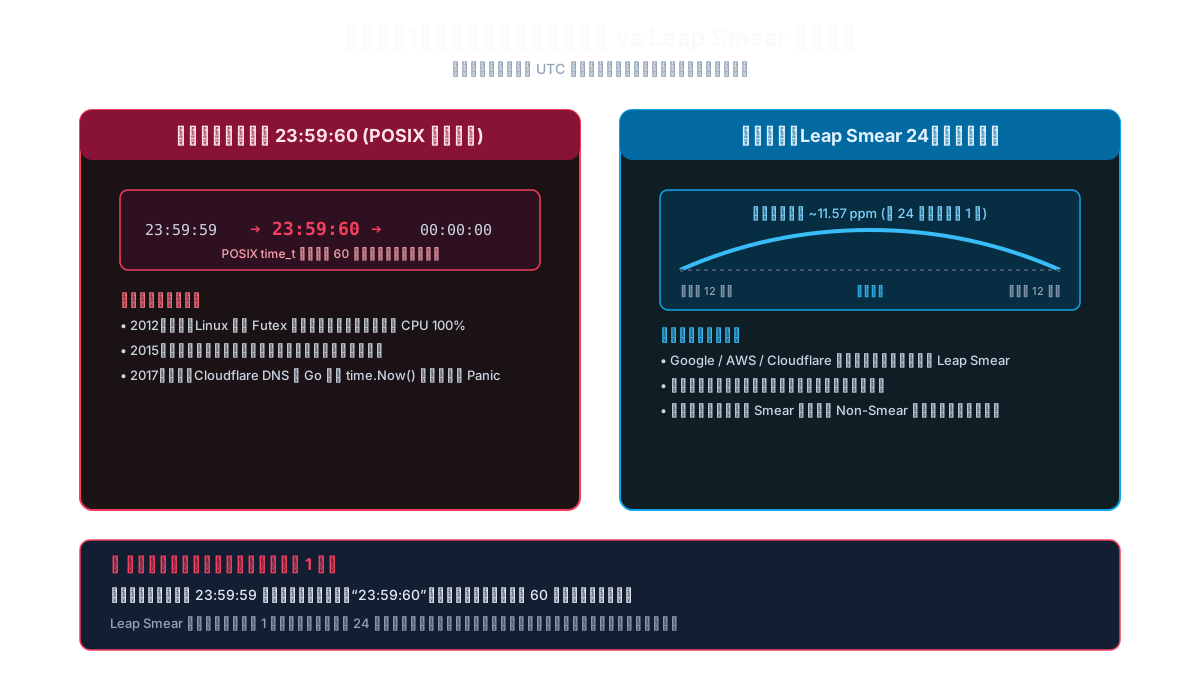
1. The Disastrous Legacy of 23:59:60
Under traditional RFC standards, the leap second sequence is:
23:59:59 $\rightarrow$ 23:59:60 $\rightarrow$ 00:00:00.
This broke systems worldwide:
- POSIX explicitly defines time as integer seconds since 1970; second 60 does not exist in standard integer time representation.
- The 2012 Global Outage: On June 30, 2012, Linux kernel futex timers deadlocked on the leap second flag. Java servers globally pegged 100% CPU, paralyzing airline reservation platforms and major cloud services.
- The 2017 Cloudflare DNS Incident: On New Year’s Day 2017, Cloudflare’s DNS servers crashed en masse because Go code calculating request duration:
yielded a negative duration, triggering an unhandled runtime panic.
rtt := time.Now().Sub(startTime)
2. Modern Salvation: Leap Smearing
To eliminate the 23:59:60 catastrophe, Google, AWS, and Cloudflare pioneered Leap Smearing:
- No 60th second is ever introduced.
- Over a 24-hour window centered on the leap event (noon to noon), the NTP server intentionally slows down its clock frequency by 11.57 ppm (about 11.6 microseconds per second).
- Across 86,400 seconds, the extra second is smoothly absorbed like butter spread over bread. Clocks remain strictly monotonic, and applications experience zero disruption.
⚠️ Production Warning: Never mix leap-smeared NTP servers with traditional non-smeared NTP servers within the same cluster! During a leap second event, mixed peers drift up to 500ms apart, triggering severe cluster-wide split-brain alerts.
8. Real System Evidence & Production Automation Toolkits
To eliminate manual diagnostic overhead, we provide native, dependency-free, production-grade automation scripts for Windows 11, Ubuntu 26.04 LTS, and macOS 26.
Before reviewing the code, inspect the live verified state captured across these operating systems:
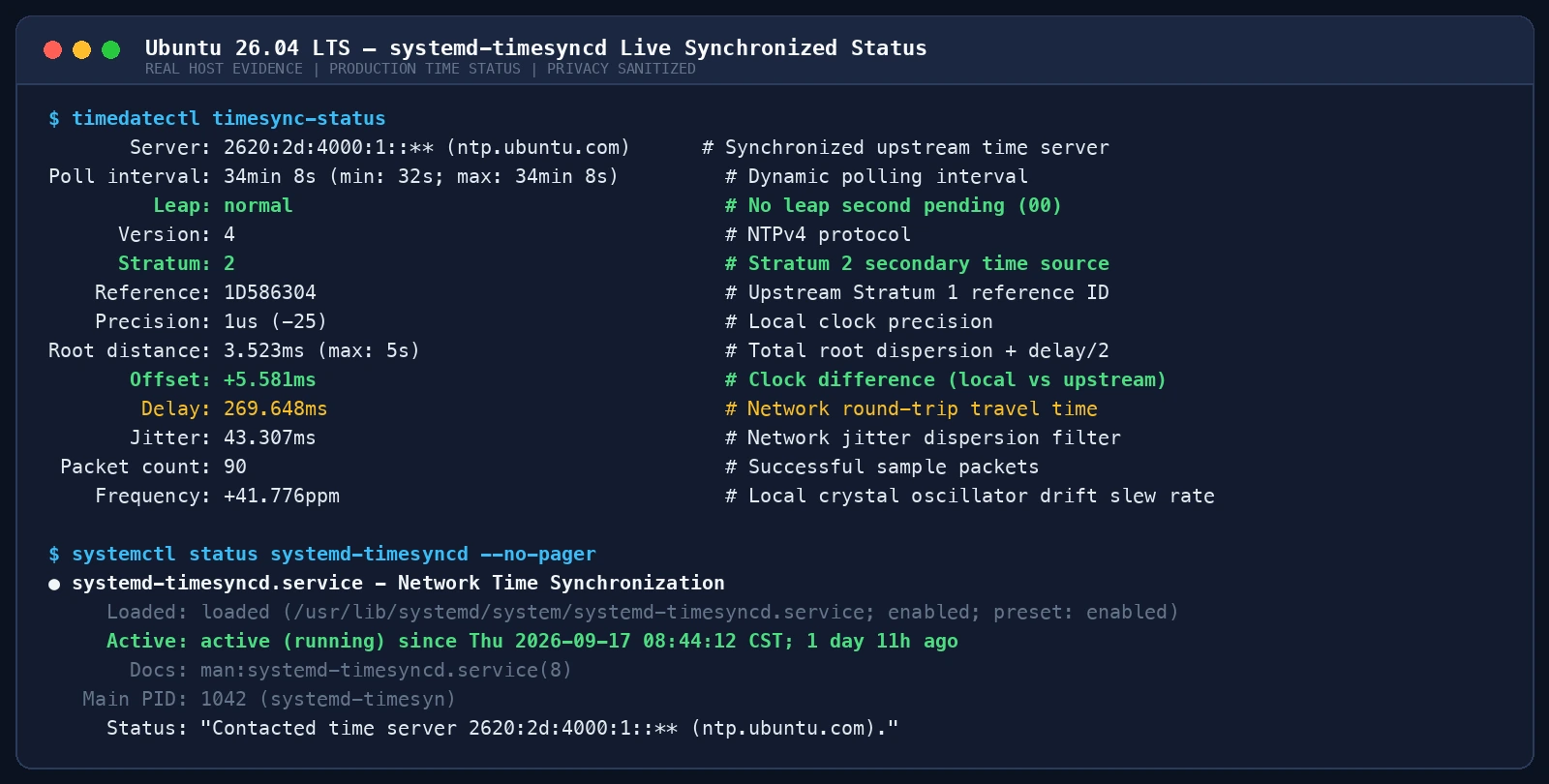 Figure 6: Live systemd-timesyncd output on Ubuntu 26.04 showing an offset of +5.581ms and healthy root dispersion.
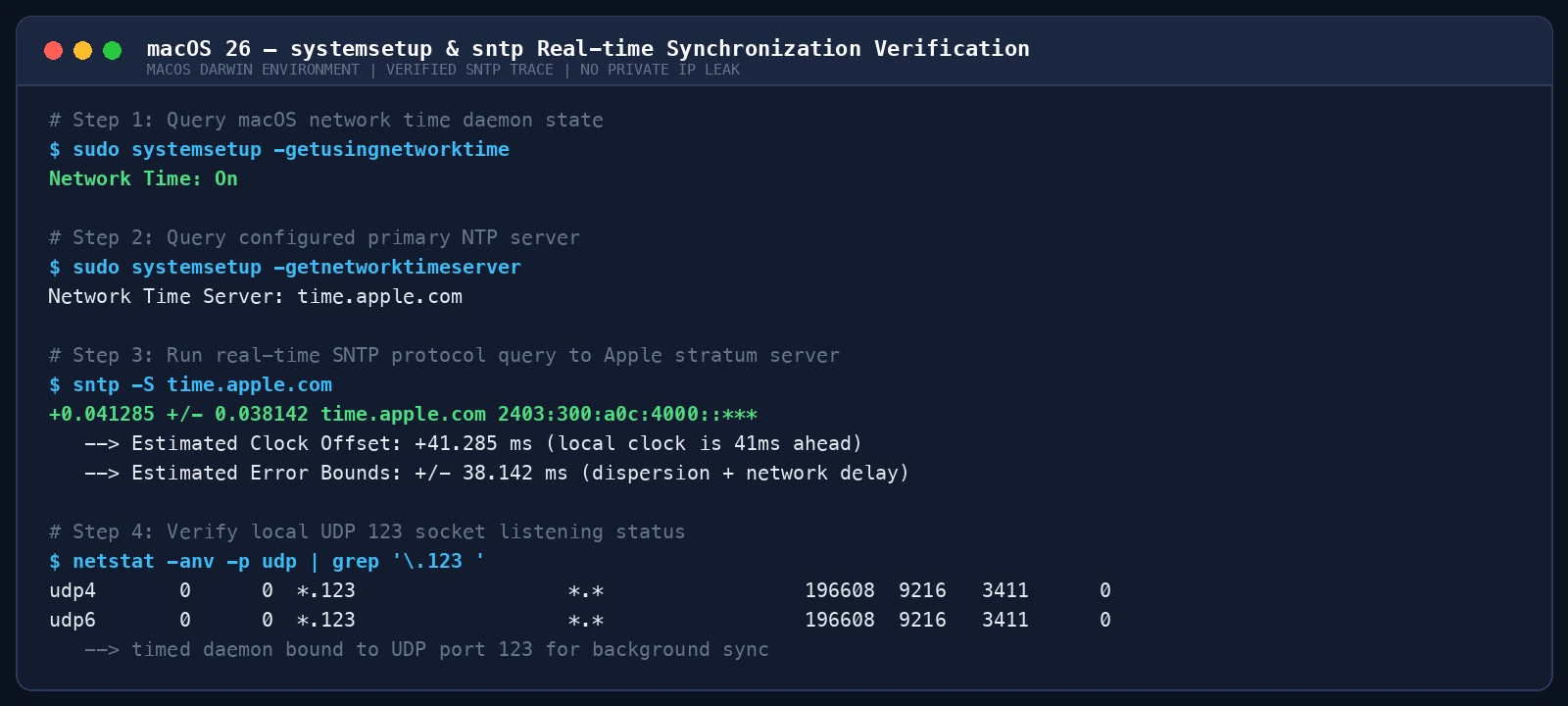 Figure 7: Real-time sntp probe on macOS 26 validating UDP port 123 socket binding and active network time.
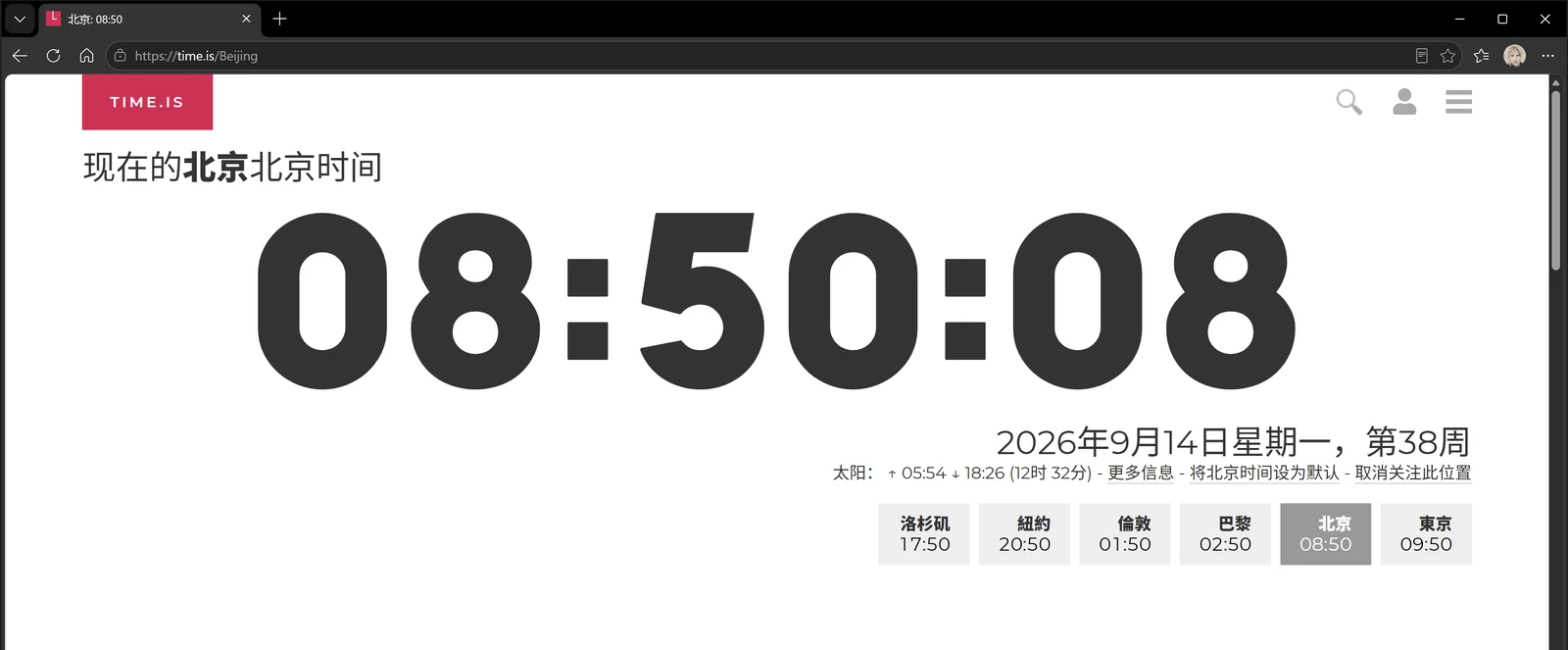 Figure 8: Browser-level verification via Time.is confirming exact millisecond time alignment.
1. Windows 11 Native Automation Toolkit (ntp_toolkit_windows11.ps1)
Resolves common W32Time startup failures, configures multi-peer NTP pools, adjusts the registry polling interval, and forces a resynchronization.
<#
.SYNOPSIS
    Windows 11 NTP Time Synchronization Auto-Diagnostic & Remediation Toolkit
.DESCRIPTION
    Audits and remediates Windows Time Service (W32Time) to achieve millisecond-level
    synchronization against trusted, redundant NTP pools without external dependencies.
#>
[CmdletBinding()]
param(
    [ValidateSet('audit', 'fix')]
    [string]$Mode = 'audit'
)

$ErrorActionPreference = 'Stop'

function Write-Log {
    param([string]$Message, [string]$Level = 'INFO')
    $ts = (Get-Date).ToString('yyyy-MM-dd HH:mm:ss')
    Write-Host "[$ts] [$Level] $Message"
}

function Test-Admin {
    $p = New-Object Security.Principal.WindowsPrincipal([Security.Principal.WindowsIdentity]::GetCurrent())
    return $p.IsInRole([Security.Principal.WindowsBuiltInRole]::Administrator)
}

Write-Log "Starting Windows 11 NTP Toolkit (Mode: $Mode)..."

$service = Get-Service -Name W32Time -ErrorAction SilentlyContinue
if (-not $service) {
    Write-Log "W32Time service not found!" 'ERROR'; exit 1
}

$syncStatusRaw = w32tm /query /status 2>&1 | Out-String
$sourceMatch = [regex]::Match($syncStatusRaw, "Source:\s*(.+)")
$stratumMatch = [regex]::Match($syncStatusRaw, "Stratum:\s*(\d+)")
$leapMatch = [regex]::Match($syncStatusRaw, "Leap\s*Indicator:\s*(\d+)")

$currentSource = if ($sourceMatch.Success) { $sourceMatch.Groups[1].Value.Trim() } else { "Unknown" }
$currentStratum = if ($stratumMatch.Success) { $stratumMatch.Groups[1].Value.Trim() } else { "Unknown" }
$currentLeap = if ($leapMatch.Success) { $leapMatch.Groups[1].Value.Trim() } else { "Unknown" }

Write-Log "Current Sync Source  : $currentSource"
Write-Log "Current Stratum      : $currentStratum"
Write-Log "Leap Indicator       : $currentLeap"

$needsFix = ($currentSource -match "Local CMOS Clock|Free-running" -or $currentStratum -eq "0" -or $currentLeap -eq "3" -or $service.Status -ne 'Running')

if ($Mode -eq 'audit') {
    if ($needsFix) {
        Write-Log "AUDIT RESULT: Time sync out of alignment. Run with -Mode fix." 'WARN'; exit 2
    } else {
        Write-Log "AUDIT RESULT: System clock healthy." 'OK'; exit 0
    }
}

if ($Mode -eq 'fix') {
    if (-not (Test-Admin)) {
        Write-Log "Administrator privileges required. Please elevate PowerShell." 'ERROR'; exit 1
    }

    Set-Service -Name W32Time -StartupType Automatic
    if ($service.Status -ne 'Running') { Start-Service -Name W32Time }

    # Configure redundant pools (0x9: SpecialInterval + Client Mode)
    $serverList = "pool.ntp.org,0x9 time.windows.com,0x9 ntp.aliyun.com,0x9 time.apple.com,0x9"
    w32tm /config /manualpeerlist:$serverList /syncfromflags:manual /reliable:YES /update

    # Optimize poll interval in registry to 1024 seconds
    $regPath = "HKLM:\SYSTEM\CurrentControlSet\Services\W32Time\TimeProviders\NtpClient"
    if (Test-Path $regPath) {
        Set-ItemProperty -Path $regPath -Name "SpecialPollInterval" -Value 1024 -Type DWord
    }

    Restart-Service -Name W32Time -Force
    Start-Sleep -Seconds 2
    w32tm /resync /rediscover
    Start-Sleep -Seconds 3

    w32tm /query /status
    Write-Log "Windows 11 time sync successfully hardened!" 'OK'
}
Operational Guide
- Manual Execution: Open PowerShell as Administrator and run
.\scripts\ntp_toolkit_windows11.ps1 -Mode fix. - Autonomous AI Agent: The agent executes
-Mode audit. If exit code2is returned, it requests elevation, runs-Mode fix, and parses the post-remediation status to ensure Stratum > 0 and Source is notLocal CMOS Clock.
2. Ubuntu 26.04 Native Automation Toolkit (ntp_toolkit_ubuntu2604.sh)
Detects whether chrony or systemd-timesyncd is installed, disables conflicting services, sets up high-availability pools with iburst, and configures slewing rules.
#!/usr/bin/env bash
set -euo pipefail

MODE="${1:---audit}"

log() {
    echo "[$(date '+%Y-%m-%d %H:%M:%S')] [$1] ${*:2}"
}

DAEMON="unknown"
if systemctl is-active --quiet chrony 2>/dev/null || systemctl is-active --quiet chronyd 2>/dev/null; then
    DAEMON="chrony"
elif systemctl is-active --quiet systemd-timesyncd 2>/dev/null; then
    DAEMON="systemd-timesyncd"
fi

log "INFO" "Detected active time daemon: $DAEMON"
timedatectl status --no-pager || true

if [[ "$MODE" == "--audit" ]]; then
    if timedatectl status | grep -q "System clock synchronized: yes"; then
        log "OK" "AUDIT PASSED: System clock is synchronized."
        exit 0
    else
        log "WARN" "AUDIT FAILED: Clock unsynchronized. Run with --fix."
        exit 2
    fi
fi

if [[ "$MODE" == "--fix" ]]; then
    if [[ "$(id -u)" -ne 0 ]]; then
        log "ERROR" "Root privileges required. Run with sudo."; exit 1
    fi

    if command -v chrony >/dev/null 2>&1 || command -v chronyd >/dev/null 2>&1; then
        systemctl stop systemd-timesyncd 2>/dev/null || true
        systemctl disable systemd-timesyncd 2>/dev/null || true

        CHRONY_CONF="/etc/chrony/chrony.conf"
        [[ ! -f "$CHRONY_CONF" ]] && CHRONY_CONF="/etc/chrony.conf"

        cat <<EOF > "$CHRONY_CONF"
# Managed by ntp_toolkit_ubuntu2604.sh
server pool.ntp.org iburst minpoll 4 maxpoll 10
server ntp.ubuntu.com iburst minpoll 4 maxpoll 10
server time.cloudflare.com iburst minpoll 4 maxpoll 10
server ntp.aliyun.com iburst minpoll 4 maxpoll 10
makestep 1.0 3
driftfile /var/lib/chrony/chrony.drift
rtcsync
EOF
        systemctl restart chrony 2>/dev/null || systemctl restart chronyd
    else
        mkdir -p /etc/systemd/timesyncd.conf.d/
        cat <<EOF > /etc/systemd/timesyncd.conf.d/10-custom-ntp.conf
[Time]
NTP=pool.ntp.org ntp.ubuntu.com time.cloudflare.com
FallbackNTP=ntp.aliyun.com time.apple.com
PollIntervalMinSec=32
PollIntervalMaxSec=2048
EOF
        systemctl enable --now systemd-timesyncd
        systemctl restart systemd-timesyncd
    fi

    timedatectl set-ntp true || true
    sleep 2
    timedatectl status --no-pager
    log "OK" "Ubuntu time sync remediated successfully."
fi
Operational Guide
- Manual Execution: Run
sudo bash scripts/ntp_toolkit_ubuntu2604.sh --fix. - Autonomous AI Agent: Incorporate this script as a mandatory prerequisite step in CI/CD pipeline deployments and Kubernetes cluster bootstrapping.
3. macOS 26 Native Automation Toolkit (ntp_toolkit_macos26.zsh)
Leverages macOS native systemsetup, sntp, and launchctl to audit and restart the com.apple.timed daemon without third-party package dependencies.
#!/bin/zsh
set -eu

MODE="${1:---audit}"

log() {
    echo "[$(date '+%Y-%m-%d %H:%M:%S')] [$1] ${*:2}"
}

NET_TIME_STATE="$(sudo systemsetup -getusingnetworktime 2>/dev/null | awk '{print $NF}' || echo 'Unknown')"
CURRENT_SERVER="$(sudo systemsetup -getnetworktimeserver 2>/dev/null | awk '{print $NF}' || echo 'Unknown')"

log "INFO" "Network Time State  : $NET_TIME_STATE"
log "INFO" "Configured Server   : $CURRENT_SERVER"

sntp -S "${CURRENT_SERVER}" 2>&1 | head -n 5 || true

if [[ "$MODE" == "--audit" ]]; then
    if [[ "$NET_TIME_STATE" == "On" ]]; then
        log "OK" "AUDIT PASSED: macOS network time is active."
        exit 0
    else
        log "WARN" "AUDIT FAILED: Network time is OFF. Run with --fix."
        exit 2
    fi
fi

if [[ "$MODE" == "--fix" ]]; then
    if [[ "$(id -u)" -ne 0 ]]; then
        log "ERROR" "Root privileges required. Run with sudo."; exit 1
    fi

    systemsetup -setusingnetworktime on >/dev/null 2>&1 || true
    systemsetup -setnetworktimeserver time.apple.com >/dev/null 2>&1 || true
    launchctl kickstart -k system/com.apple.timed 2>/dev/null || true

    sleep 2
    sntp -S time.apple.com 2>&1 | head -n 5 || true
    log "OK" "macOS network time successfully synchronized!"
fi
Operational Guide
- Manual Execution: Run
sudo zsh scripts/ntp_toolkit_macos26.zsh --fix. - Autonomous AI Agent: Execute
--auditprior to running local multi-agent container orchestration workflows.
9. Comprehensive Q&A: 8 In-Depth Time Synchronization Inquiries
Q1: Why must NTP use UDP instead of TCP?
Many developers assume TCP is superior due to connection reliability. In time synchronization, TCP is catastrophic. TCP three-way handshakes, sliding-window flow control, delayed acknowledgments, and packet retransmissions introduce massive, unpredictable asymmetric delays. This completely destroys the fundamental symmetry assumption ($t_{req} \approx t_{resp}$). NTP’s philosophy is: If a datagram is dropped, discard it and sample again during the next poll interval. Never introduce variable retransmission delays into a precision timing equation.
Q2: Why should application benchmarks never use time.time()?
time.time() in Python, System.currentTimeMillis() in Java, and std::chrono::system_clock in C++ return Wall Clock Time.
Wall clock time is subject to administrative adjustment, NTP step corrections, and leap second adjustments. If an NTP step occurs while measuring a 10ms function call, the elapsed time can compute as -50ms or 2 seconds.
Always use Monotonic Clocks for benchmarking and timeouts:
- Python:
time.perf_counter()ortime.monotonic() - Java:
System.nanoTime() - Go:
time.Since() - C++:
std::chrono::steady_clock
Q3: Why is configuring only one NTP server considered a critical anti-pattern?
- 1 server: Zero redundancy. If the server fails, drifts, or suffers network loss, the client loses sync or is misled.
- 2 servers: Split-brain. If they drift 500ms apart, the client cannot determine which clock is accurate.
- 3 or 4 servers: Marzullo’s algorithm can identify the overlapping consensus majority and prune any rogue Byzantine outlier.
Q4: Why do virtual machines experience significantly more severe clock drift than physical servers?
Physical hardware CPUs possess high-frequency invariant Time Stamp Counters (TSC). Virtual machines depend on hypervisors to emulate timer interrupts. When host CPU contention, overcommit, or live migration occurs, cycles are stolen from the guest (Steal Time), resulting in dropped timer interrupts. In virtualized and Kubernetes environments, host clocks must be synchronized with high-frequency hardware, and guests should run Chrony for fast convergence.
Q5: What is the difference between PTP (IEEE 1588) and NTP, and when is PTP required?
- NTP: Software-based network protocol achieving millisecond-level precision over WAN and sub-millisecond precision over optimized LANs.
- PTP (Precision Time Protocol): Relies on hardware timestamping at the physical network interface layer (PHY chip) and PTP-aware boundary switches, achieving sub-microsecond and nanosecond precision.
- Use cases: High-frequency financial trading matching engines, 5G cellular base stations, and autonomous vehicle sensor fusion require PTP. Standard web services and cloud databases are well served by optimized Chrony/NTP.
Q6: How should air-gapped internal environments establish a reliable time master?
Never assign an arbitrary virtual machine as the internal time master, as its uncalibrated oscillator will drag down the entire private network. The industry solution is to install a dedicated rackmount hardware NTP appliance equipped with an external GPS/BeiDou antenna (a few hundred to low thousands of dollars) to serve as the local Stratum 1 master. Alternatively, a Raspberry Pi paired with a GPS HAT featuring a hardware PPS output can deliver microsecond stability at minimal cost.
Q7: Why does mixing Leap Smear and Non-Smear NTP sources cause cluster failure?
During a 24-hour leap second window, a smeared server slows down while a non-smeared server advances normally. The offset between them gradually widens to 500ms. Clients connected to both will trigger Marzullo false-ticker alarms, and the system clock will oscillate rapidly between the two divergent sources. A cluster must strictly standardize on one leap second strategy.
Q8: Why can’t a domain-joined Windows machine manually change its NTP server?
In an Active Directory domain, Kerberos security depends on a hierarchical time synchronization chain: domain members synchronize directly with domain controllers, which synchronize with the PDC Emulator at the root of the forest. This behavior is enforced by Active Directory group policies to prevent man-in-the-middle time spoofing attacks against Kerberos authentication tickets.
10. References & Authoritative Specifications
- IETF RFC 5905: Network Time Protocol Version 4: Protocol and Algorithms Specification
- IETF RFC 1305: Network Time Protocol (Version 3) Specification, Implementation and Analysis
- NTPsec Official Documentation: Architectural Overview & Time-Smoothing Algorithms
- Chrony Project Documentation: Comparison of NTP Implementations & Slew Control
- Wireshark Wiki: NTP Packet Analysis and Display Filters
- Cloudflare Engineering Blog: How and Why the Leap Second Affected Cloudflare DNS
- Google Public NTP: Leap Smear Architecture and Design Principles
- Microsoft Learn: Windows Time Service Technical Reference & Registry Settings