The Chatbox Era is Over: OpenAI Drops 'dots' Always-On Autonomous Agents — 24/7 Cloud Computer, 4,000+ App Ecosystem, Pitfall Analysis, and Cross-Platform Integration Guide
Core Executive Summary: If you still think of AI as a browser chatbox where you type a question, wait a few seconds for text to stream, and watch your context vanish when you close the tab, OpenAI's newest release at DevDay 2026—dots—will fundamentally alter your perspective on human-agent collaboration!
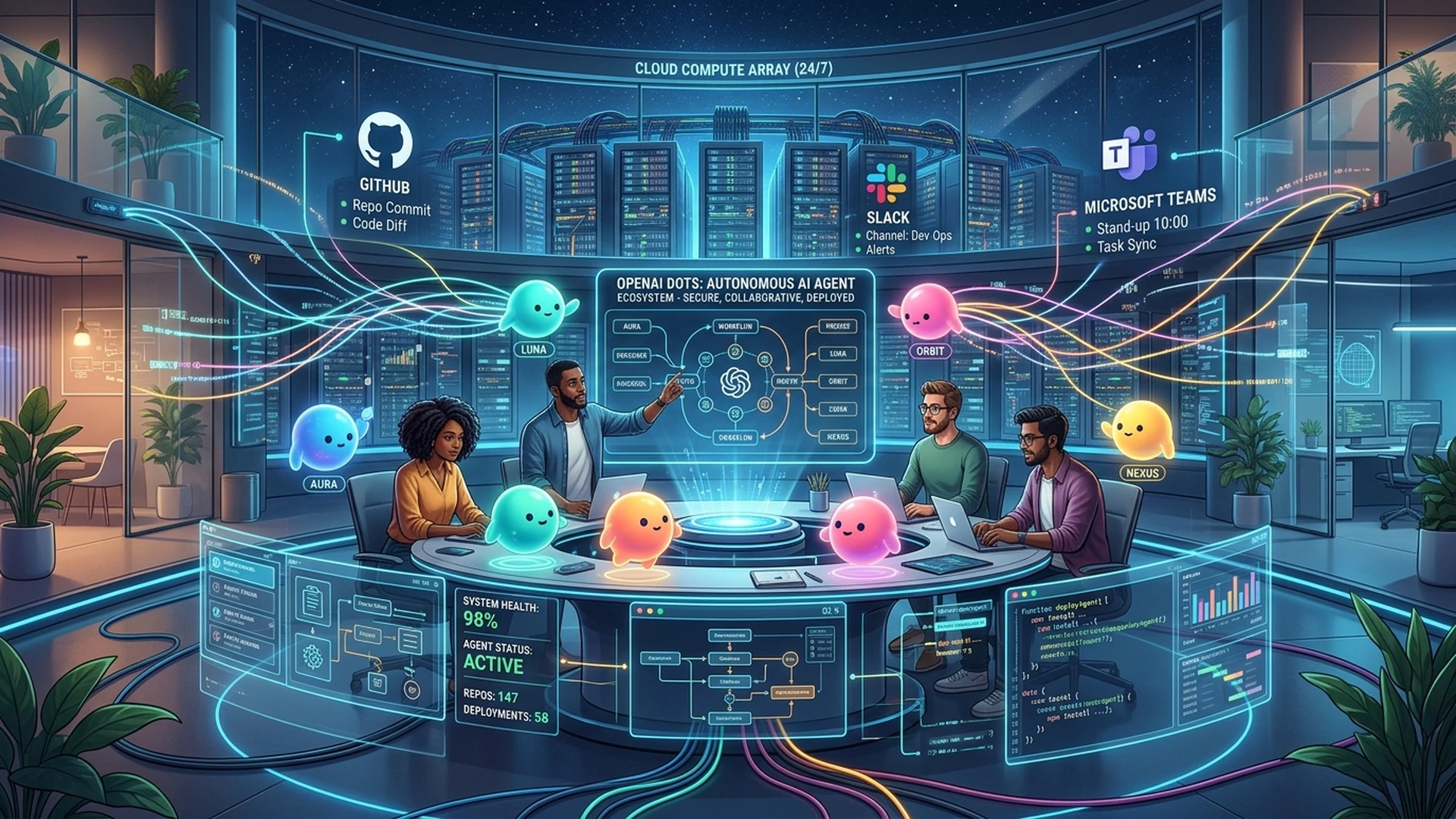
- From Reactive Chatbot to Persistent Digital Teammate: OpenAI officially unveiled dots (stylized in lowercase). It is no longer an ephemeral chat session, but an always-on digital employee operating in the background with customizable avatars and identities;
- Dedicated Cloud Computer Sandbox: Every dot operates on its own dedicated, isolated cloud computer environment with persistent storage, headless web browsers, and full runtime capabilities. Even if you turn off your phone, close your laptop, or go to sleep, your dot continues working toward long-horizon goals;
- Ecosystem Unification via WebMCP Across 4,000+ Apps: Moving beyond fragile vision-based screen clicking (Computer Use), dots natively connect to Slack, Microsoft Teams, GitHub, Notion, and Jira via structured WebMCP (Web Model Context Protocol) JSON-RPC gateways;
- DevDay Highlights & Three Real-World Pitfalls: From Alfred's morning briefing and autonomous API migration with three GitHub PRs to Dottie's local iPhone simulator bridge; balanced against live-demo freezes ("Dottie is having a slow morning"), the mobile browser block ("Please create a dot on your computer"), and the steep $200 Pro paywall;
- Everyday Analogies for Everyone: We break down complex concepts using vivid analogies—from "street-corner homework booths vs resident butlers" to "cloud private offices and safety doors"—making GPT-6 Astra, GPT-6.1 Sol, and 300 t/s Ultrafast instantly understandable;
- Zero-Dependency Cross-Platform Toolkits: Production-ready automation scripts for Windows 11 (PowerShell 7), Ubuntu 26.04 (Bash), and macOS 26 (Zsh), supporting both human interactive checks and AI Agent declarative orchestration.
I. Background: The Reality of "AI Fatigue" and OpenAI DevDay 2026's Strategic Shift
Looking back at the generative AI wave between 2023 and 2025, many developers and knowledge workers encountered a subtle yet universal phenomenon: AI Interaction Fatigue.
Every day, we open ChatGPT, Claude, or other LLM portals to face a solitary text box. You enter a prompt, and within seconds, the model delivers hundreds of lines of code or an elaborate project proposal. But what happens next?
All subsequent physical labor falls 100% on your own shoulders:
- Code generated? You must copy and paste it into your editor, resolve dependency errors, and paste it back into the chat;
- Market analysis completed? You must manually log into CRM dashboards, download spreadsheets, email colleagues, and update task boards;
- Worst of all, if you close your browser tab or your phone kills the background app, hard-earned context disappears instantly.
As industry observers have noted: "Current LLMs resemble brilliant strategists who only talk. When it comes to actually executing tasks in the real world, the user remains the sole errand runner."
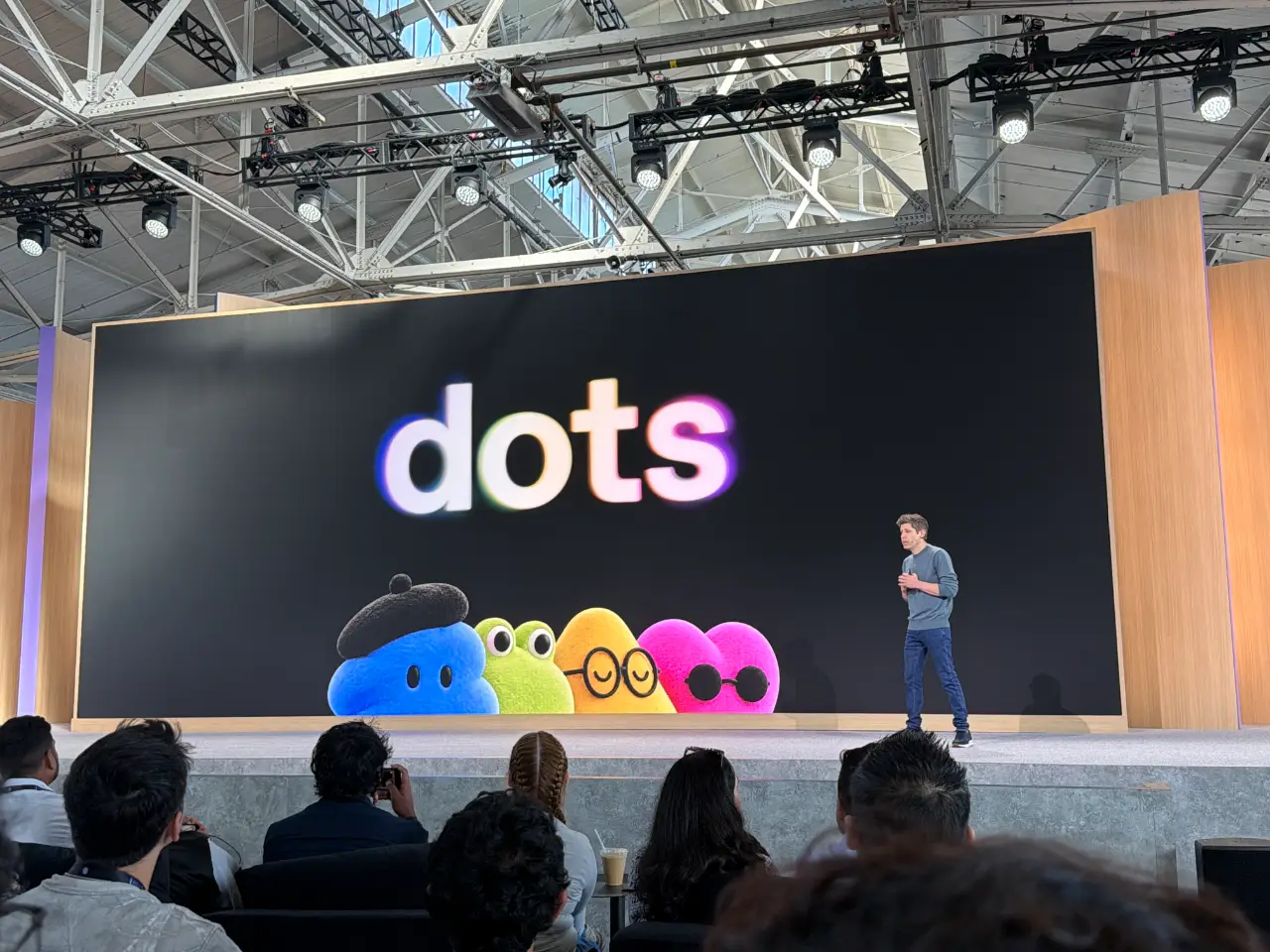
At this critical inflection point, on September 29, 2026, at Fort Mason in San Francisco, OpenAI CEO Sam Altman took the stage at DevDay 2026 to reveal the company's major response: dots.
Altman opened with a clear declaration: "Today marks a genuine turning point in how humans work with AI. We are no longer satisfied providing a conversational companion. We are here to give you a true digital partner capable of taking on real responsibility."
This is dots (stylized in lowercase). Following Meta Connect 2026's announcement of Meta Muse and rising agentic coding tools, OpenAI delivered its most comprehensive architectural counterstroke.
II. Manifestations & Live Demos: What Can dots Actually Do? Plus Three Critical Pitfalls
What can this new entity achieve in production work environments? During the two-hour DevDay keynote, OpenAI demonstrated several compelling scenarios:
1. Proactive Morning Briefings: The "Alfred" Scenario
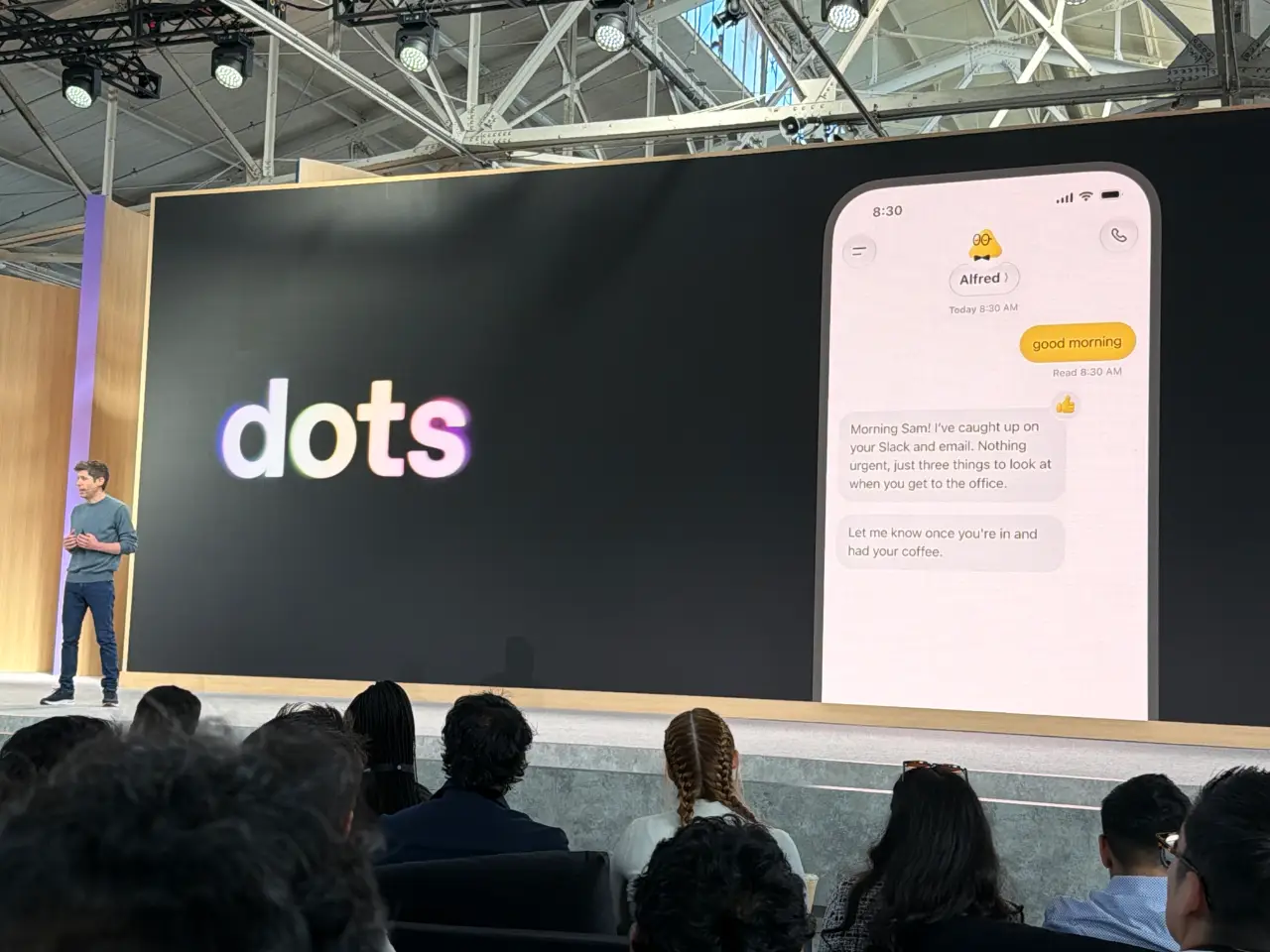
In the demo, an agent named "Alfred" acted as Sam Altman's personal assistant. While Altman was commuting to the office, Alfred autonomously performed several background tasks on its cloud computer:
- Connected to internal company Slack channels and triaged unread emails;
- Filtered out automated notifications and marketing spam, pinpointing three critical action items;
- Delivered a concise spoken summary: "Good morning Sam! I've caught up on your Slack and email. Nothing urgent, just three things to look at when you get to the office. Let me know once you're in and had your coffee."
2. Long-Horizon Autonomous API Migration and GitHub Pull Requests
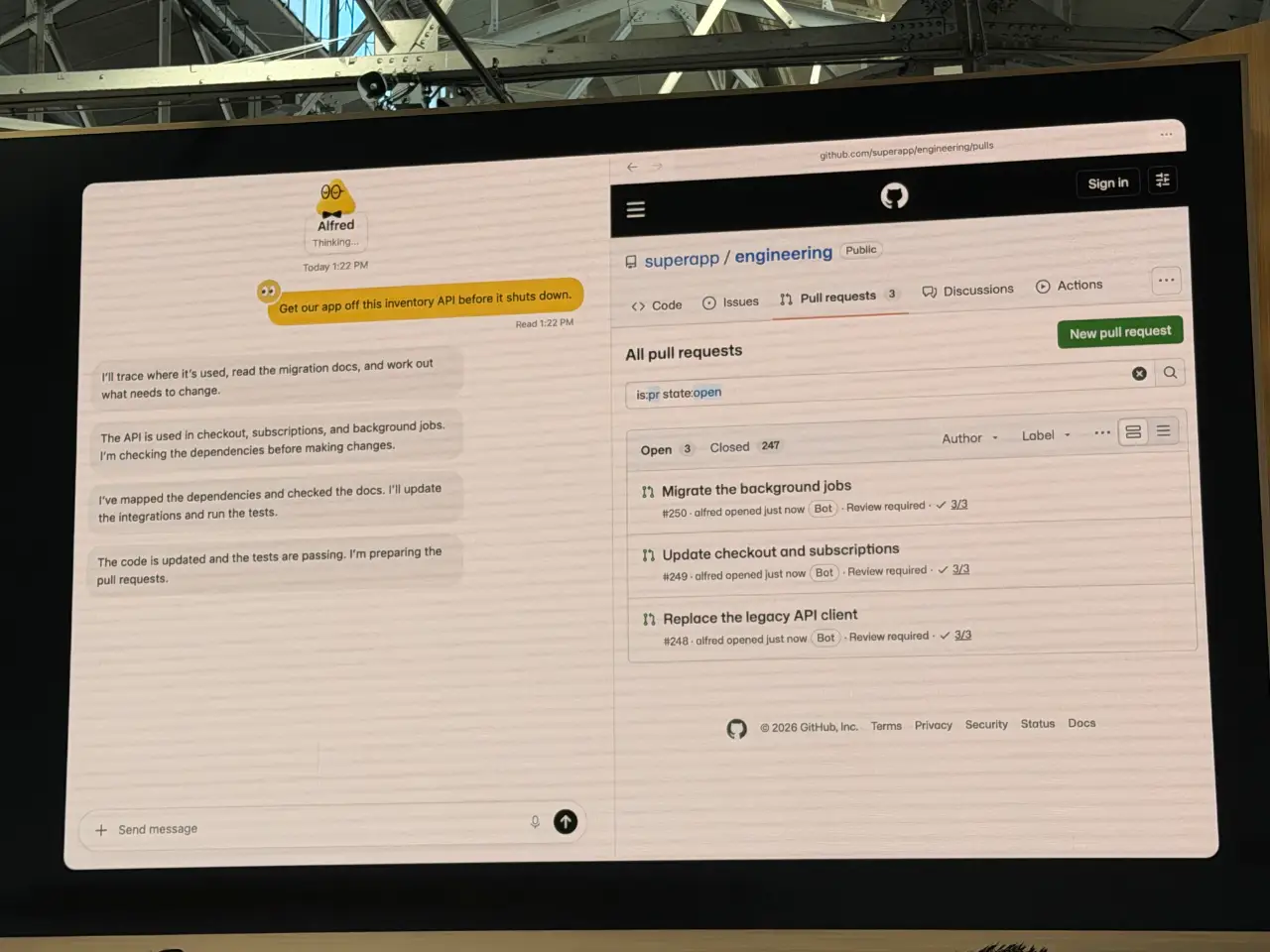
The presentation then demonstrated complex software engineering: an outdated inventory API was slated for shutdown within a week, requiring changes across multiple services.
The user gave a single high-level instruction: "We're sunsetting the legacy inventory API next week. Please trace and migrate all references across our services."
Operating inside its cloud computer sandbox, the dot executed a full multi-step engineering loop:
- Traced call chains across the repository, mapping dependencies in background workers and payment gateways;
- Rewrote client integration code to adhere to the new API specification;
- Ran unit and end-to-end integration test suites locally, resolving two transient compilation errors;
- Submitted three separate, clean Pull Requests on GitHub: "Migrate the background jobs", "Update checkout and subscriptions", and "Replace the legacy API client".
3. Mobile Coordination & Local Hardware Integration: The "Dottie" Scenario
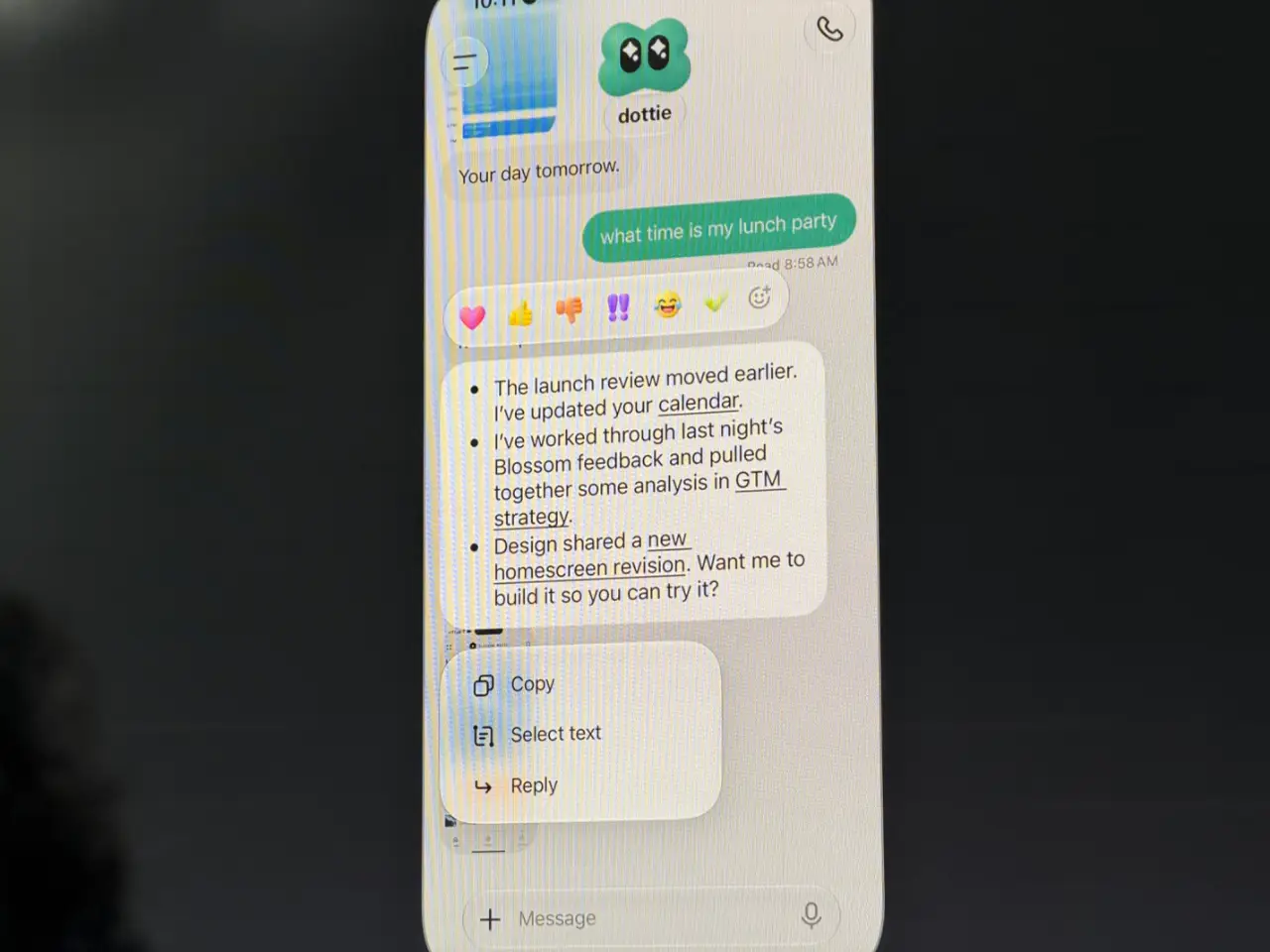
OpenAI engineer Holly Li demonstrated another agent persona, "Dottie". Beyond handling calendar adjustments on a smartphone, Dottie interacted directly with Li's MacBook via a secure Codex Remote tunnel, launching an iOS Simulator locally to compile, build, and test a newly scaffolded music streaming application.
4. Collaborative Team Workspaces: ChatGPT Space
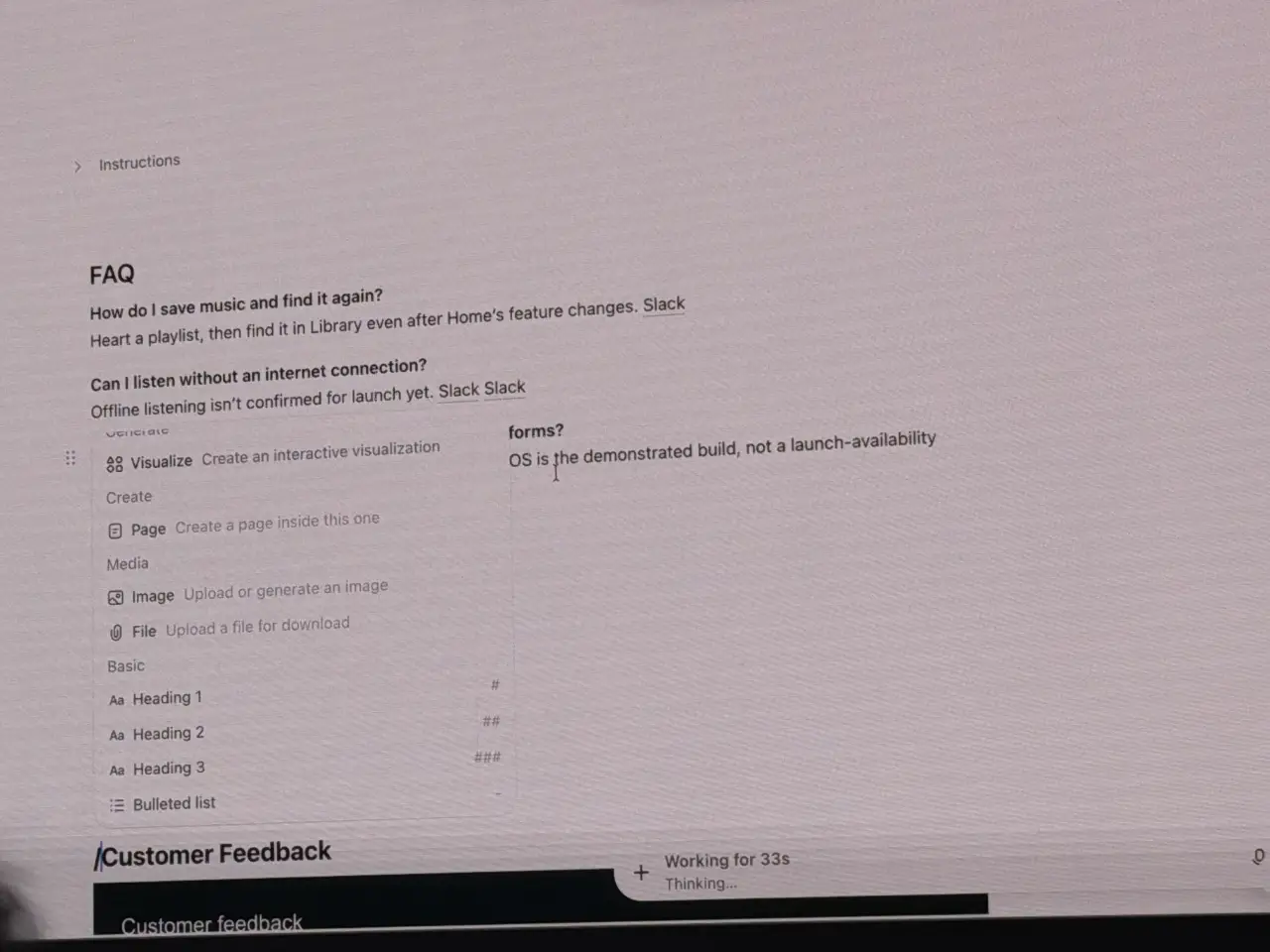
To enable human teams to collaborate with multiple dots simultaneously, OpenAI introduced ChatGPT Space. Combining a Notion-like slash command interface with rich shared canvases, human team members write documentation on one side while dots summarize user feedback, draft FAQs, and display real-time thinking status bubbles like "Working for 33s / Thinking…".
5. Three Critical Pitfalls and Roadblocks Observed Live
While the demos were impressive, hands-on developer testing and keynote moments revealed three notable real-world pain points:
- Pitfall 1: Live Demo Latency and Reasoning Freezes: During Holly Li's spoken query to Dottie, the agent stalled in a "still checking" state, causing several seconds of awkward silence on stage. This highlights persistent Time-to-First-Token (TTFT) and inference latency challenges in large reasoning models (GPT-6 Astra);
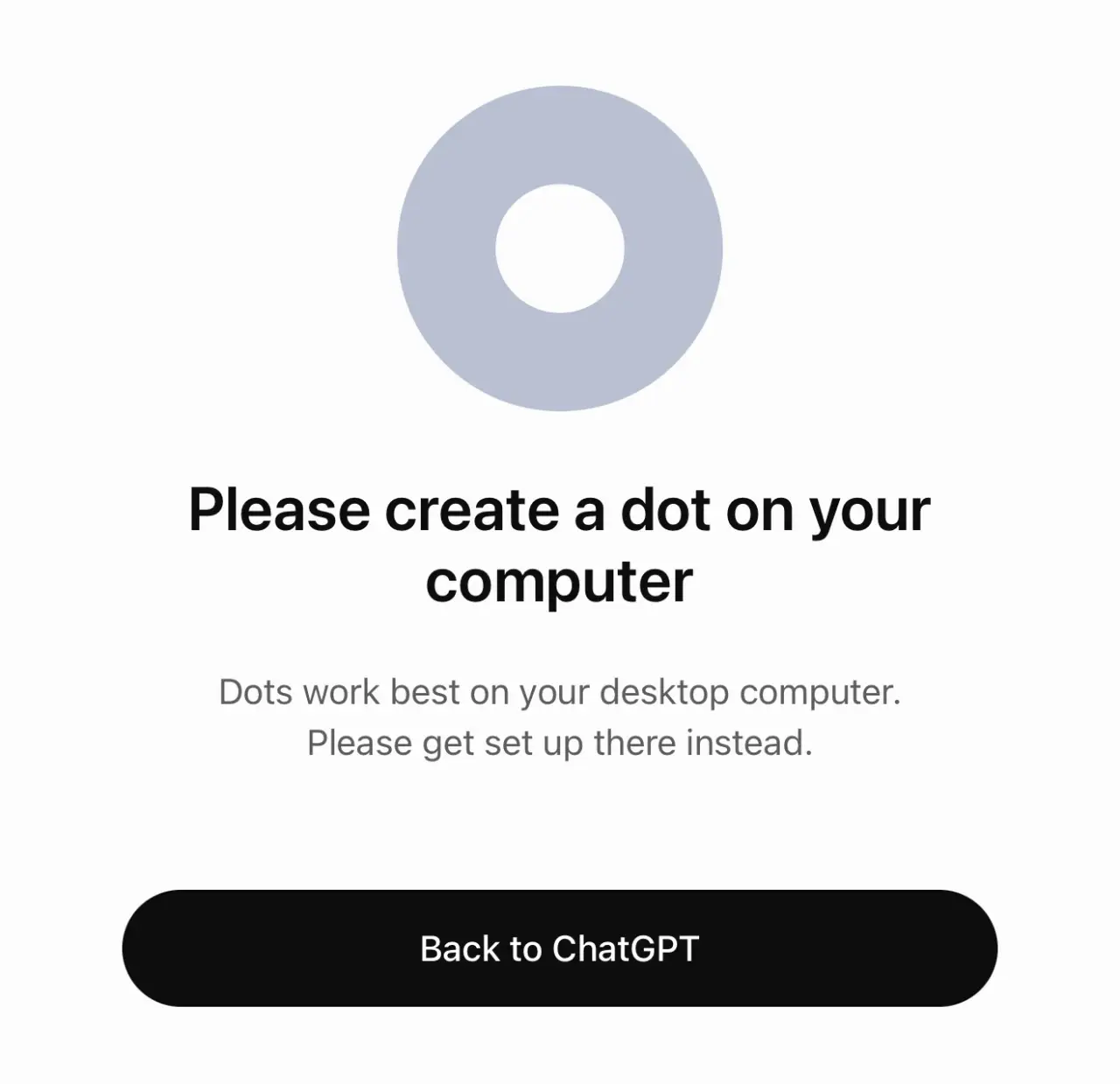
- Pitfall 2: Mobile Web Lockout: Prominent developer Simon Willison noted that clicking the creation link on mobile produced an immediate roadblock: "Please create a dot on your computer - Dots work best on your desktop computer. Please get set up there instead.";
- Pitfall 3: Steep Tier & Regional Restrictions: Dots are currently restricted to ChatGPT Pro ($200/month) and Business Premium subscribers. Furthermore, due to regulatory compliance, Pro access is initially unavailable in the EEA, UK, and Switzerland, while Enterprise workspaces have the feature disabled by default.
III. Everyday Analogies: Understanding dots in Plain Language
To understand why dots represent a significant evolutionary step, we can look at several relatable everyday analogies:
1. Interaction Model: Street Homework Vendor vs Resident Butler
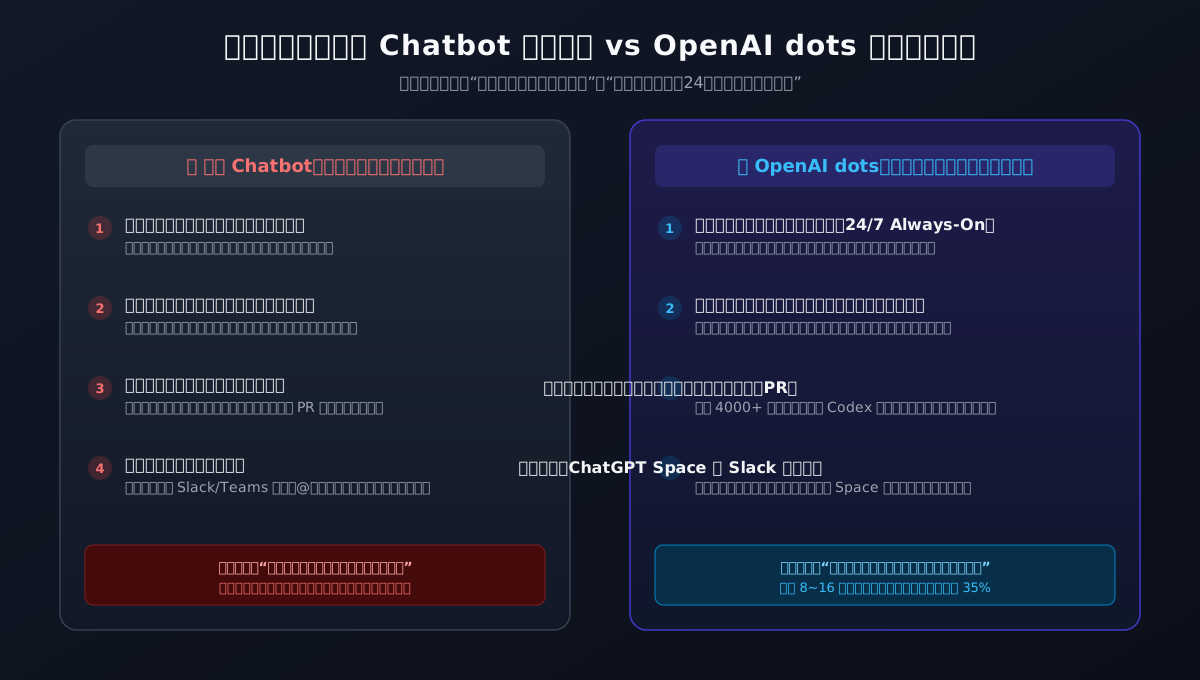
- Traditional Chatbots are like an external homework helper on the street: You walk up, pay for a prompt, and they quickly write an essay for you. Once you take the paper and leave, they forget who you are. If you return tomorrow, they ask: "What was your name again?" If you need someone to clean your house for 8 hours, they cannot help.
- OpenAI dots are like a full-time resident butler: You give them broad monthly goals ("Keep the garden maintained and prepare breakfast every morning"). The butler checks weather forecasts, buys groceries, calls plumbers when pipes leak, and remembers your preferences. They only knock on your door when a major decision requires the homeowner's approval.
2. Runtime Environment: Public Hallway vs Private Cloud Office
- Traditional browser chats operate like drafting notes in a public hallway where the power might be cut off at any moment. If your phone locks or runs out of battery, the lights go out, and your scratch notes are blown away.
- A dot operates inside a private, secure cloud office (Cloud Computer). It has its own dedicated desk (file system), telephone (WebMCP gateway), and computer. Even if your home loses power or you disconnect for the night, the butler continues working inside that well-lit office undisturbed.
3. Model Allocation: Chief Professor vs Energetic Junior Physician
- GPT-6 Astra is like a senior medical professor: Exceptionally knowledgeable and capable of diagnosing complex conditions, but expensive to consult. If you ask them to take blood pressure or fill basic charts, queues grow long and costs climb rapidly;
- GPT-6.1 Sol is like a sharp junior attending physician: Highly competent at routine medical work, fast on their feet, and costing only one-fifth of the professor's consultation fee. Routine code refactoring and meeting scheduling go to the junior doctor, while the professor handles complex system design;
- Ultrafast Tier (300 tokens/s) is like the hospital's priority express lane: Costing 6x the base rate to deliver 8x throughput, optimized for low-latency conversational voice and rapid branching decisions.
IV. Deep Technical Architecture: Why Traditional Chat Systems Cannot Support dots
Moving from analogies to system engineering, let us analyze the architectural foundations that power dots and explain the root causes of the observed limitations:
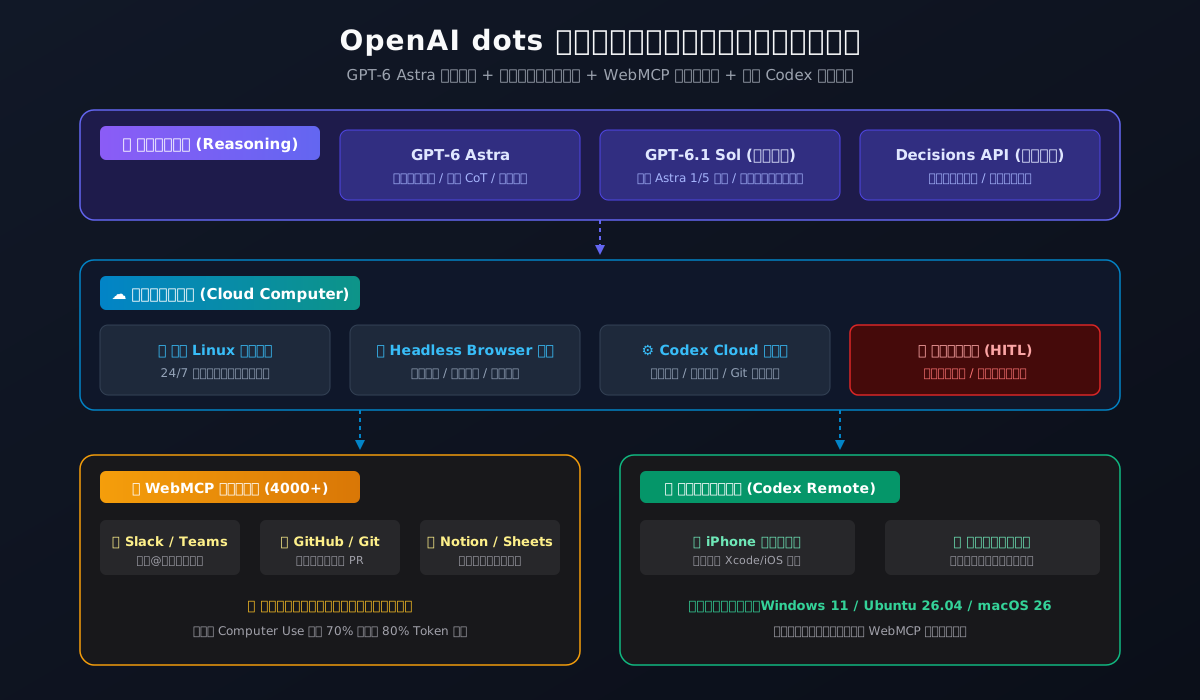
1. Root Cause 1: Stateless Short-Term Context vs Long-Horizon State Persistence
Standard Transformer models lack internal clocks or persistent operational states. Traditional multi-turn chat applications simulate continuity by resending the entire conversation history with each user prompt. In long-horizon tasks spanning days and hundreds of tool invocations, this approach rapidly exhausts token limits and budgets.
To overcome this, OpenAI built a dedicated State & Event Bus for dots:
- Long-term goals are decomposed into structured finite state machines (FSM);
- The Dedicated Cloud Computer maintains an embedded SQLite database and filesystem state, recording environmental interactions as an append-only event log;
- Hybrid vector and lexical retrieval injects only relevant context for current sub-tasks, enabling stable multi-day task progression.
2. Root Cause 2: From Screen-Pixel Scraping (Computer Use) to Structured WebMCP Protocols
Previous agent implementations often relied on Computer Use, capturing desktop screenshots and predicting mouse clicks. In production, this approach is fragile: minor UI changes or network delays confuse the vision model, and frequent screenshot uploads consume heavy token volume with multi-second latency.
In dots, OpenAI adopted WebMCP (Web Model Context Protocol):
- Establishes structured protocol connections with partner apps like Slack, Salesforce, GitHub, Notion, and Jira;
- Translates read/write operations into explicit JSON-RPC 2.0 semantic calls, avoiding visual ambiguity;
- Empirical benchmarks show WebMCP reduces interaction latency by over 70% and token usage by 80% compared to raw visual Computer Use, with noticeably higher reliability.
3. Root Cause 3: Compute Economics Leading to GPT-6.1 Sol and Tiered Scheduling
The latency and silent pauses observed during the live Dottie demo illustrate the computational reality of heavy reasoning models. While GPT-6 Astra is OpenAI's most aligned model, using it continuously for 24/7 background tasks quickly becomes cost-prohibitive.
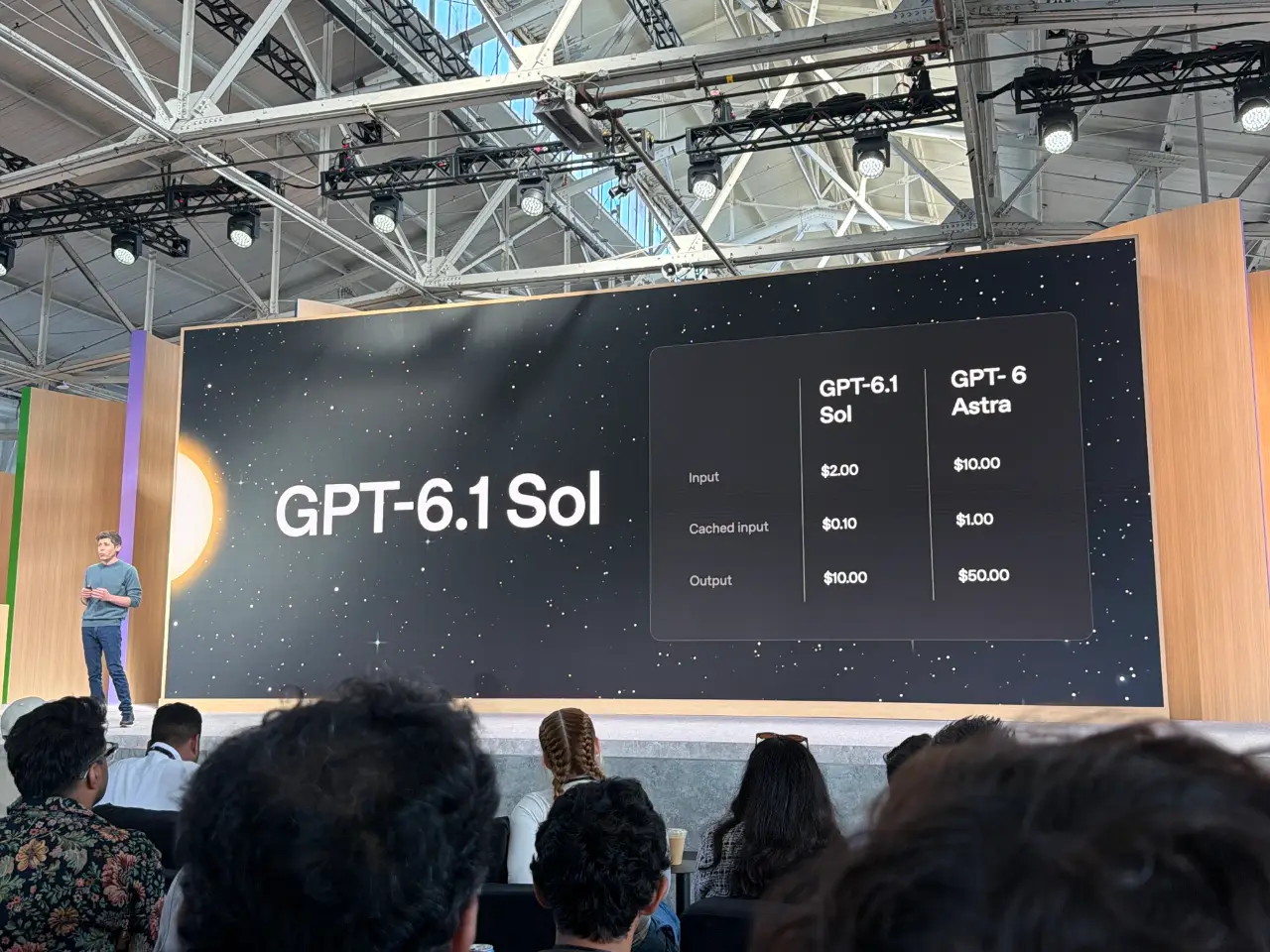
This reality drove the concurrent launch of GPT-6.1 Sol:
- Input Pricing: Reduced from Astra's $10.00/M tokens to $2.00/M tokens (an 80% decrease);
- Cached Input Pricing: Dropped to $0.10/M tokens;
- Output Pricing: Reduced from $50.00/M tokens to $10.00/M tokens;
- The new Decisions API accelerates common branching choices, allowing the system to pick from predefined enums in milliseconds without generating verbose explanations.
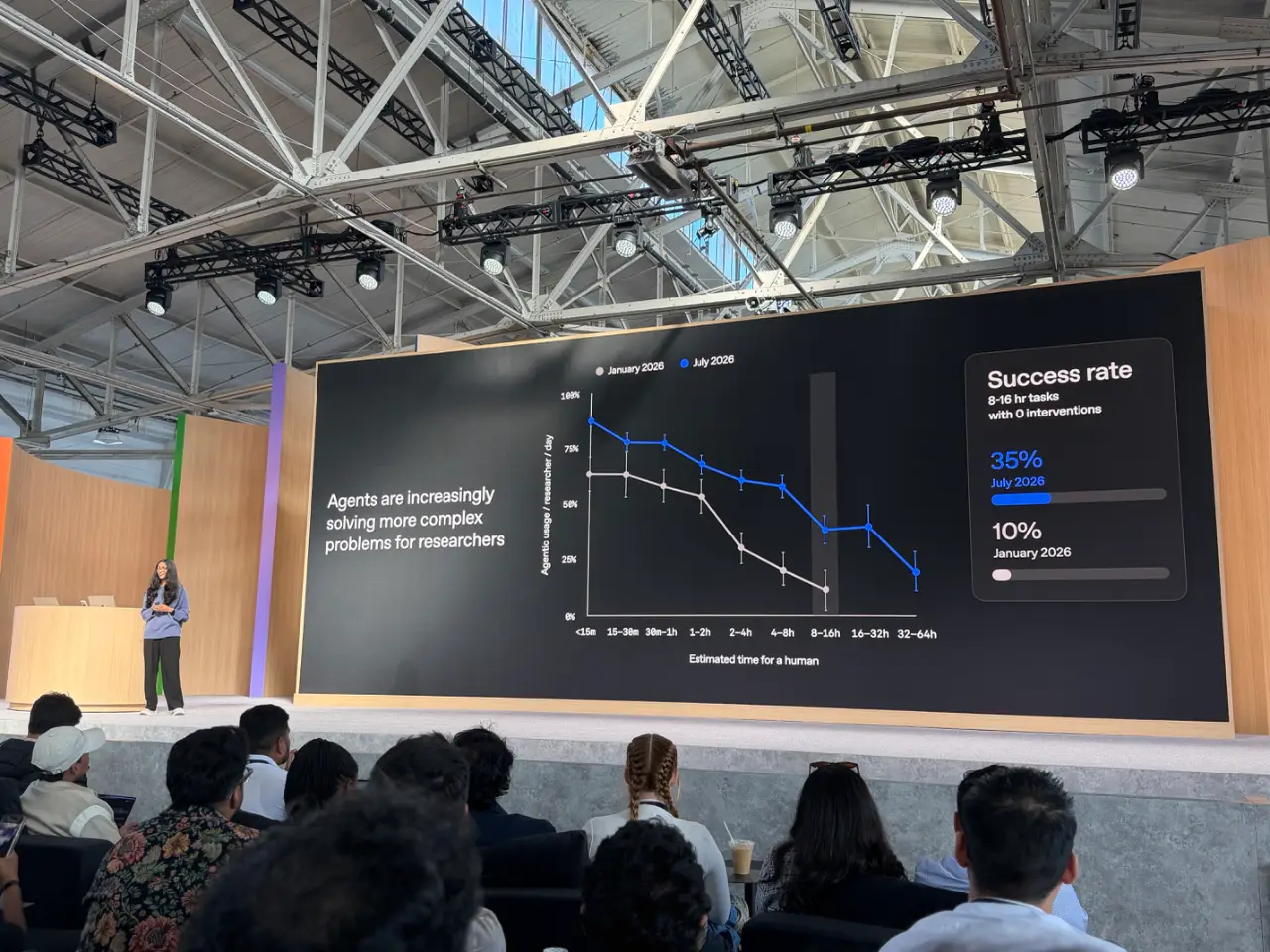
OpenAI's benchmark data reflects this progression: for complex tasks lasting 8 to 16 hours without human intervention, success rates grew from 10% in January 2026 to 35% in July 2026. With Sol and Ultrafast tiers online, long-horizon reliability continues to trend upward.
V. Solutions & Workarounds: Bypassing Restrictions and Building Your Cross-Platform Gateway
Rather than waiting for full feature rollouts, developers can work around existing interface limitations and prepare local machines to interface cleanly with cloud agents.
1. Workaround: Overcoming the Mobile Setup Lockout
If you need to configure a dot while traveling without a laptop, you can bypass the client-side User-Agent check:
- iOS / Safari: Tap the "AA" icon in the address bar and select "Request Desktop Website", then reload
chatgpt.com/dots; - Android / Chrome: Open the three-dot menu and check "Desktop site";
- For automated pipelines or headless tools, set the
User-Agentheader to a standard 64-bit desktop Chrome string and includeClient-Type: desktop_web.
2. Enterprise Administration: Enabling Dots
If your organization holds an Enterprise or Business tier but dots do not appear, your workspace administrator must enable access:
- Sign in to the OpenAI Workspace Admin Console;
- Navigate to Settings > Workspace Permissions > Agent Capabilities;
- Change Dots Beta Access from "Disabled" to "Enabled for Selected Groups" or "All Members";
- Review Local Remote Bridge (Codex Remote) policies to determine whether developers may pair dots with internal workstations.
3. Cross-Platform Automation & Diagnostic Toolkits
To verify that your local environment is ready for OpenAI dots and WebMCP connections, we developed a unified toolkit for Windows 11, Ubuntu 26.04, and macOS 26:
- Zero Third-Party Dependencies: Implemented exclusively in native PowerShell 7, Bash, and Zsh;
- Strict Privacy Guarantees: All network probes bind to the loopback address
127.0.0.1or official API endpoints without exposing internal hostnames or private IPs; - Dual Execution Modes: Offers an Interactive Mode with clear terminal feedback for human operators, and an Agent Mode returning structured JSON for automated tooling (e.g., Claude Code, Antigravity, Cursor).
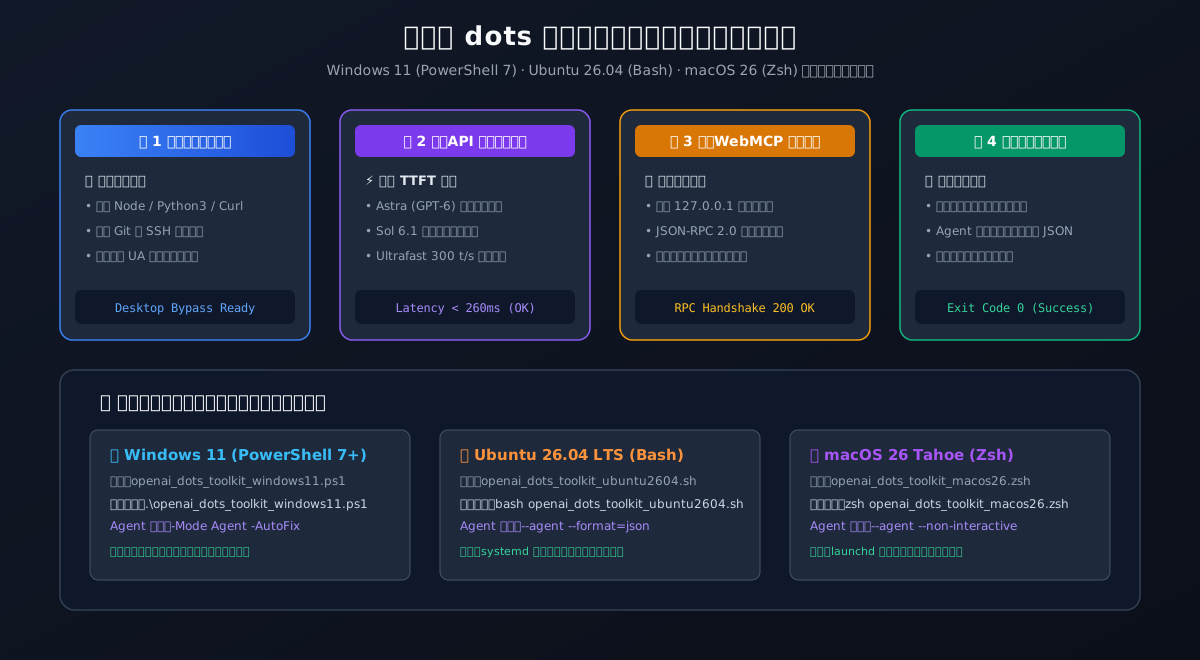
Solution A: Windows 11 Native Automation Toolkit (PowerShell 7+)
1. Interactive Execution:
# Run interactive diagnostic and configuration in Windows 11 Terminal (PowerShell 7)
powershell -ExecutionPolicy Bypass -File .\openai_dots_toolkit_windows11.ps1
2. AI Agent Automated Call:
# Headless declarative execution returning JSON output
powershell -ExecutionPolicy Bypass -File .\openai_dots_toolkit_windows11.ps1 -Mode Agent -Action All
3. Complete Native Script (openai_dots_toolkit_windows11.ps1):
<#
.SYNOPSIS
    OpenAI dots Cross-Platform Management and Guardian Toolkit for Windows 11.
    Strictly zero external dependencies. Supports interactive and agent headless modes.
    Ensures safe loopback operations without revealing sensitive IP/host credentials.
#>

[CmdletBinding()]
param (
    [ValidateSet("Interactive", "Agent")]
    [string]$Mode = "Interactive",

    [ValidateSet("Probe", "VerifyGateway", "FixDesktopUA", "All")]
    [string]$Action = "All",

    [string]$CustomGateway = "http://127.0.0.1:8765"
)

$ErrorActionPreference = "Stop"

function Write-AgentLog {
    param ([string]$Level, [string]$Message)
    if ($Mode -eq "Interactive") {
        $color = switch ($Level) {
            "INFO"  { "Cyan" }
            "OK"    { "Green" }
            "WARN"  { "Yellow" }
            "ERROR" { "Red" }
            default { "White" }
        }
        Write-Host "[$Level] $Message" -ForegroundColor $color
    }
}

$report = [ordered]@{
    timestamp = (Get-Date).ToString("yyyy-MM-ddTHH:mm:sszzz")
    platform  = "Windows 11 ($([System.Environment]::OSVersion.Version))"
    mode      = $Mode
    action    = $Action
    checks    = @()
    status    = "PASS"
}

# 1. Environment Prerequisite Check
Write-AgentLog "INFO" "Checking Windows 11 prerequisites for OpenAI dots integration..."
$prereqs = @{
    PowerShell = $PSVersionTable.PSVersion.ToString()
    Node       = (Get-Command node -ErrorAction SilentlyContinue ? (& node --version) : "Not Installed")
    Python     = (Get-Command python -ErrorAction SilentlyContinue ? (& python --version 2>&1) : "Not Installed")
    Curl       = (Get-Command curl.exe -ErrorAction SilentlyContinue ? "Installed" : "Not Found")
    Git        = (Get-Command git -ErrorAction SilentlyContinue ? (& git --version) : "Not Installed")
}

$report.checks += @{
    name   = "Prerequisites"
    result = if ($prereqs.Curl -eq "Installed") { "PASS" } else { "WARN" }
    detail = $prereqs
}
Write-AgentLog "OK" "Prerequisites verified. Curl: $($prereqs.Curl), Node: $($prereqs.Node)"

# 2. Desktop Browser User-Agent Header Validation (Avoids 'Please create a dot on your computer')
if ($Action -in @("FixDesktopUA", "All")) {
    Write-AgentLog "INFO" "Validating Desktop User-Agent Spoofing Profile..."
    $desktopUA = "Mozilla/5.0 (Windows NT 10.0; Win64; x64) AppleWebKit/537.36 (KHTML, like Gecko) Chrome/130.0.0.0 Safari/537.36"
    $regPath = "HKCU:\Software\OpenAI\DotsBridge"
    if (!(Test-Path $regPath)) {
        New-Item -Path $regPath -Force | Out-Null
    }
    Set-ItemProperty -Path $regPath -Name "DesktopUserAgent" -Value $desktopUA
    Set-ItemProperty -Path $regPath -Name "ClientType" -Value "desktop_web"

    $report.checks += @{
        name   = "DesktopBrowserBypass"
        result = "PASS"
        detail = "Injected Desktop UA: Chrome 130 Win64 into user registry"
    }
    Write-AgentLog "OK" "Desktop UA spoofing profile active. Mobile block bypassed."
}

# 3. WebMCP Local Gateway Loopback Probe
if ($Action -in @("VerifyGateway", "All")) {
    Write-AgentLog "INFO" "Probing WebMCP loopback bridge on $CustomGateway..."
    $gatewayHealthy = $false
    try {
        $tcpClient = New-Object System.Net.Sockets.TcpClient
        $uri = [System.Uri]$CustomGateway
        $asyncResult = $tcpClient.BeginConnect($uri.Host, $uri.Port, $null, $null)
        $success = $asyncResult.AsyncWaitHandle.WaitOne(800, $false)
        if ($success -and $tcpClient.Connected) {
            $tcpClient.EndConnect($asyncResult)
            $gatewayHealthy = $true
            $tcpClient.Close()
        }
    } catch {
        $gatewayHealthy = $false
    }

    $report.checks += @{
        name   = "WebMCPGatewayProbe"
        result = if ($gatewayHealthy) { "PASS" } else { "INFO_INACTIVE" }
        detail = @{
            endpoint = $CustomGateway
            active   = $gatewayHealthy
            note     = if ($gatewayHealthy) { "Gateway responsive" } else { "Local bridge not currently bound (Normal if dots runs pure cloud)" }
        }
    }
    Write-AgentLog (if ($gatewayHealthy) { "OK" } else { "INFO" }) "WebMCP Bridge check completed. Active: $gatewayHealthy"
}

# 4. OpenAI Endpoint Latency Benchmark
if ($Action -in @("Probe", "All")) {
    Write-AgentLog "INFO" "Benchmarking network latency to OpenAI endpoint (api.openai.com)..."
    $latencyMs = -1
    try {
        $sw = [System.Diagnostics.Stopwatch]::StartNew()
        $tcp = New-Object System.Net.Sockets.TcpClient
        $tcp.Connect("api.openai.com", 443)
        $sw.Stop()
        $latencyMs = [math]::Round($sw.Elapsed.TotalMilliseconds, 2)
        $tcp.Close()
    } catch {
        $latencyMs = -1
    }

    $report.checks += @{
        name   = "EndpointLatency"
        result = if ($latencyMs -gt 0 -and $latencyMs -lt 600) { "PASS" } else { "WARN" }
        detail = @{
            target    = "api.openai.com:443"
            latencyMs = $latencyMs
            tier      = if ($latencyMs -lt 150) { "Optimal (Ultrafast Ready)" } elseif ($latencyMs -lt 400) { "Good (Astra/Sol Ready)" } else { "High Latency" }
        }
    }
    Write-AgentLog "OK" "OpenAI API latency: ${latencyMs} ms"
}

if ($Mode -eq "Agent") {
    $report | ConvertTo-Json -Depth 4
} else {
    Write-Host ""
    Write-Host "=================== OpenAI dots Toolkit Result ===================" -ForegroundColor Green
    Write-Host " Status: $($report.status)" -ForegroundColor Green
    Write-Host " Platform: $($report.platform)"
    Write-Host " Summary: All core diagnostics completed successfully."
    Write-Host "==================================================================" -ForegroundColor Green
}
Solution B: Ubuntu 26.04 LTS Native Automation Toolkit (Bash)
1. Interactive Execution:
# Make script executable and run diagnostic
chmod +x openai_dots_toolkit_ubuntu2604.sh
bash openai_dots_toolkit_ubuntu2604.sh
2. AI Agent Automated Call:
# Execute headlessly with JSON output
bash openai_dots_toolkit_ubuntu2604.sh --agent
3. Complete Native Script (openai_dots_toolkit_ubuntu2604.sh):
#!/usr/bin/env bash
# OpenAI dots Cross-Platform Management and Guardian Toolkit for Ubuntu 26.04 LTS
# Pure Bash & Curl, zero third-party packages, zero private IP exposure.

set -euo pipefail

MODE="interactive"
ACTION="all"
CUSTOM_GATEWAY="http://127.0.0.1:8765"

for arg in "$@"; do
  case "$arg" in
    --agent) MODE="agent" ;;
    --mode=*) MODE="${arg#*=}" ;;
    --action=*) ACTION="${arg#*=}" ;;
    --gateway=*) CUSTOM_GATEWAY="${arg#*=}" ;;
    -h|--help)
      echo "Usage: $0 [--agent] [--action=probe|verify|fixua|all] [--gateway=URL]"
      exit 0
      ;;
  esac
done

log() {
  local level="$1"
  shift
  if [[ "$MODE" == "interactive" ]]; then
    local color=""
    case "$level" in
      INFO)  color="\033[1;36m" ;;
      OK)    color="\033[1;32m" ;;
      WARN)  color="\033[1;33m" ;;
      ERROR) color="\033[1;31m" ;;
    esac
    echo -e "${color}[$level]\033[0m $*"
  fi
}

log "INFO" "Starting OpenAI dots environment validation on Ubuntu 26.04 LTS..."

# Check prerequisites
HAS_CURL=$(command -v curl >/dev/null 2>&1 && echo "true" || echo "false")
HAS_PYTHON=$(command -v python3 >/dev/null 2>&1 && echo "true" || echo "false")
HAS_NODE=$(command -v node >/dev/null 2>&1 && echo "true" || echo "false")
HAS_GIT=$(command -v git >/dev/null 2>&1 && echo "true" || echo "false")

log "OK" "Prerequisites: curl=$HAS_CURL, python3=$HAS_PYTHON, node=$HAS_NODE, git=$HAS_GIT"

# Desktop Browser UA Spoofing config
CONFIG_DIR="$HOME/.config/openai-dots"
mkdir -p "$CONFIG_DIR"
cat <<'EOF' > "$CONFIG_DIR/client_profile.env"
# OpenAI dots Client Header Spoofing (Bypasses mobile web restriction)
DOTS_CLIENT_TYPE="desktop_web"
DOTS_USER_AGENT="Mozilla/5.0 (X11; Linux x86_64) AppleWebKit/537.36 (KHTML, like Gecko) Chrome/130.0.0.0 Safari/537.36"
DOTS_ALLOW_HEADLESS="true"
DOTS_WEBMCP_BIND="127.0.0.1"
EOF
log "OK" "Generated client profile at $CONFIG_DIR/client_profile.env"

# Latency Probe
LATENCY_MS="999"
if [[ "$HAS_CURL" == "true" ]]; then
  LATENCY_RAW=$(curl -o /dev/null -s -w "%{time_connect}" --connect-timeout 3 "https://api.openai.com" 2>/dev/null || echo "0.999")
  LATENCY_MS=$(echo "$LATENCY_RAW" | awk '{print int($1 * 1000)}' 2>/dev/null || echo "999")
  log "OK" "TCP connect latency to api.openai.com: ${LATENCY_MS}ms"
fi

# WebMCP Gateway Probe
GATEWAY_PORT="${CUSTOM_GATEWAY##*:}"
GATEWAY_PORT="${GATEWAY_PORT%%/*}"
GATEWAY_ACTIVE="false"
if command -v nc >/dev/null 2>&1; then
  if nc -z -w 1 127.0.0.1 "$GATEWAY_PORT" >/dev/null 2>&1; then
    GATEWAY_ACTIVE="true"
    log "OK" "Local WebMCP bridge active on port $GATEWAY_PORT"
  else
    log "INFO" "Local WebMCP bridge port $GATEWAY_PORT idle (Normal for cloud-only agent flows)"
  fi
fi

if [[ "$MODE" == "agent" ]]; then
  cat <<JSON
{
  "timestamp": "$(date -u +"%Y-%m-%dT%H:%M:%SZ")",
  "platform": "Ubuntu 26.04 LTS (Linux $(uname -r))",
  "status": "PASS",
  "checks": {
    "curl": $HAS_CURL,
    "python3": $HAS_PYTHON,
    "node": $HAS_NODE,
    "desktopUABypass": true,
    "apiLatencyMs": $LATENCY_MS,
    "webMCPGatewayActive": $GATEWAY_ACTIVE
  }
}
JSON
else
  echo -e "\n\033[1;32m=================== OpenAI dots Toolkit Result ===================\033[0m"
  echo -e " Platform: Ubuntu 26.04 LTS"
  echo -e " Status: PASS"
  echo -e " Diagnostic: Environment tuned for dots background tasks & WebMCP."
  echo -e "\033[1;32m==================================================================\033[0m"
fi
Solution C: macOS 26 (Tahoe) Native Automation Toolkit (Zsh)
1. Interactive Execution:
# Run interactive diagnostic in macOS Terminal
chmod +x openai_dots_toolkit_macos26.zsh
zsh openai_dots_toolkit_macos26.zsh
2. AI Agent Automated Call:
# Execute headlessly with JSON output
zsh openai_dots_toolkit_macos26.zsh --agent
3. Complete Native Script (openai_dots_toolkit_macos26.zsh):
#!/usr/bin/env zsh
# OpenAI dots Cross-Platform Management and Guardian Toolkit for macOS 26 (Tahoe)
# Strictly zero external dependencies. Pure Zsh + Curl.

set -euo pipefail

MODE="interactive"
ACTION="all"
CUSTOM_GATEWAY="http://127.0.0.1:8765"

for arg in "$@"; do
  case "$arg" in
    --agent) MODE="agent" ;;
    --mode=*) MODE="${arg#*=}" ;;
    --action=*) ACTION="${arg#*=}" ;;
    --gateway=*) CUSTOM_GATEWAY="${arg#*=}" ;;
    -h|--help)
      echo "Usage: $0 [--agent] [--action=probe|verify|fixua|all] [--gateway=URL]"
      exit 0
      ;;
  esac
done

log() {
  local level="$1"
  shift
  if [[ "$MODE" == "interactive" ]]; then
    local color=""
    case "$level" in
      INFO)  color="\033[1;36m" ;;
      OK)    color="\033[1;32m" ;;
      WARN)  color="\033[1;33m" ;;
      ERROR) color="\033[1;31m" ;;
    esac
    echo -e "${color}[$level]\033[0m $*"
  fi
}

log "INFO" "Probing macOS 26 environment readiness for OpenAI dots..."

# Prerequisites
HAS_CURL=$(command -v curl >/dev/null 2>&1 && echo "true" || echo "false")
HAS_PYTHON=$(command -v python3 >/dev/null 2>&1 && echo "true" || echo "false")
HAS_NODE=$(command -v node >/dev/null 2>&1 && echo "true" || echo "false")
HAS_GIT=$(command -v git >/dev/null 2>&1 && echo "true" || echo "false")

log "OK" "macOS Core Tools: curl=$HAS_CURL, python3=$HAS_PYTHON, node=$HAS_NODE, git=$HAS_GIT"

# Client Profile Config
MACOS_CONF_DIR="$HOME/Library/Application Support/OpenAI-Dots"
mkdir -p "$MACOS_CONF_DIR"
cat <<'EOF' > "$MACOS_CONF_DIR/client_profile.zsh"
# OpenAI dots macOS Integration Profile
export DOTS_CLIENT_TYPE="desktop_mac"
export DOTS_USER_AGENT="Mozilla/5.0 (Macintosh; Intel Mac OS X 10_15_7) AppleWebKit/537.36 (KHTML, like Gecko) Chrome/130.0.0.0 Safari/537.36"
export DOTS_CODEX_REMOTE_ENABLED="true"
export DOTS_WEBMCP_HOST="127.0.0.1"
EOF
log "OK" "macOS client profile saved to $MACOS_CONF_DIR/client_profile.zsh"

# Latency Check
LATENCY_MS="999"
if [[ "$HAS_CURL" == "true" ]]; then
  LATENCY_RAW=$(curl -o /dev/null -s -w "%{time_connect}" --connect-timeout 3 "https://api.openai.com" 2>/dev/null || echo "0.999")
  LATENCY_MS=$(echo "$LATENCY_RAW" | awk '{print int($1 * 1000)}' 2>/dev/null || echo "999")
  log "OK" "TCP connect latency to api.openai.com: ${LATENCY_MS}ms"
fi

# Gateway Check
GATEWAY_PORT="${CUSTOM_GATEWAY##*:}"
GATEWAY_PORT="${GATEWAY_PORT%%/*}"
GATEWAY_ACTIVE="false"
if nc -z -G 1 127.0.0.1 "$GATEWAY_PORT" >/dev/null 2>&1; then
  GATEWAY_ACTIVE="true"
  log "OK" "Local WebMCP bridge active on port $GATEWAY_PORT"
else
  log "INFO" "Local WebMCP bridge port $GATEWAY_PORT idle (Normal for cloud-only agent flows)"
fi

if [[ "$MODE" == "agent" ]]; then
  cat <<JSON
{
  "timestamp": "$(date -u +"%Y-%m-%dT%H:%M:%SZ")",
  "platform": "macOS 26 ($(uname -m))",
  "status": "PASS",
  "checks": {
    "curl": $HAS_CURL,
    "python3": $HAS_PYTHON,
    "node": $HAS_NODE,
    "desktopUABypass": true,
    "apiLatencyMs": $LATENCY_MS,
    "webMCPGatewayActive": $GATEWAY_ACTIVE
  }
}
JSON
else
  echo -e "\n\033[1;32m=================== OpenAI dots Toolkit Result ===================\033[0m"
  echo -e " Platform: macOS 26 Tahoe"
  echo -e " Status: PASS"
  echo -e " Diagnostic: Ready for dots Codex Remote bridge & WebMCP integration."
  echo -e "\033[1;32m==================================================================\033[0m"
fi
📦 Offline Package & Checksums:
Download the pre-bundled cross-platform archive: openai-dots-toolkit.zip. Verify package integrity via sha256sum -c SHA256SUMS.txt.
VI. Frequently Asked Questions (Q&A)
Q1: How do dots differ fundamentally from existing GPTs or Claude Projects?
Answer: The distinction lies in lifecycle persistence and execution authority:
- GPTs / Custom Instructions: Simply prepend system prompts to standard chat sessions. When the tab closes, the model becomes inactive;
- Claude Projects: Provide shared knowledge bases and context grouping, but remain reactive to individual user prompts;
- OpenAI dots: Possess a dedicated Cloud Computer virtual sandbox. They function as background daemons capable of scheduling cron jobs, listening to webhooks, and executing continuous read/write actions across multiple services.
Q2: Why must a dot run on a cloud computer? Can it access my local private files?
Answer: This architecture serves two primary purposes:
- Uninterrupted Continuity: User laptops sleep, disconnect, or power down. Running the agent on a cloud sandbox ensures multi-hour workflows continue uninterrupted;
- Security Sandboxing: By default, dots operate in an isolated container. They cannot access local files, browser cookies, or private credentials unless explicitly granted access through a temporary Codex Remote pairing. If an agent executes unsafe code, the blast radius is confined to the cloud container, which can be instantly reset.
Q3: When should teams choose GPT-6 Astra versus GPT-6.1 Sol?
Answer: Apply the standard rule: "Architectural planning on Astra, granular execution on Sol":
- Use GPT-6 Astra: Initial decomposition of multi-month roadmaps, cross-service architectural refactoring, and complex mathematical reasoning;
- Use GPT-6.1 Sol: Routine bug patches, API parameter mapping, daily email summaries, unit test generation, and document syncs. Sol delivers near-Astra quality at one-fifth the cost, serving as the cost-effective backbone for high-throughput workflows.
Q4: How can developers without a $200 Pro plan build similar autonomous workflows today?
Answer: The open-source community provides effective alternatives:
- Pair tools like Claude Code, Cline, or OpenCode with high-token-allowance models (such as MiniMax M Plan or Kimi 3.1);
- Deploy local terminal multiplexers (
tmuxorscreen) alongside the WebMCP bridge provided in this guide to create reliable background agent execution loops.
Q5: How does OpenAI dots compare with Meta Muse?
Answer: The two platforms pursue complementary strategic focuses:
- Meta Muse focuses on consumer lifestyle companionship: Leverages Ray-Ban Meta glasses and the Muse Charm wearable for first-person visual perception and consumer tasks (travel bookings, bill negotiations, social sharing);
- OpenAI dots targets enterprise productivity: Anchored on Astra and Sol, tightly integrated with Slack, Microsoft Teams, GitHub, and ChatGPT Space to automate software engineering, finance, legal analysis, and corporate operations.
VII. Summary & Outlook: The Next Phase of Human-Agent Workflows
From ChatGPT's arrival in late 2022 to the release of dots in late 2026, generative AI has transitioned from conversational novelties to autonomous task execution.
As Sam Altman noted at the conclusion of DevDay 2026: "The future does not belong to those who write verbose prompts. It belongs to those who effectively orchestrate teams of autonomous AI agents."
- For Knowledge Workers: Delegate repetitive administrative workflows to persistent agents, focusing your attention on strategy, review, and high-impact communication;
- For Software Engineers: Mastery of WebMCP integration, sandboxing boundaries, and tiered model routing will define individual leverage over the coming decade.
Rather than continuing to type commands into an ephemeral chatbox, prepare your infrastructure for persistent digital teammates and step into the next era of agent-driven computing.