Stop Babysitting 10 AI Terminal Tabs! Deep Dive into Orca Bots (Beta): Turning Your Computers into a 24/7 Cross-Machine AI Workforce
Let’s start with an uncomfortable truth: by late 2026, the most exhausting part of software engineering is no longer writing boilerplate—it is babysitting half a dozen AI coding terminals at once. Your Claude Code session on the left just hit a usage limit, your Codex tab on the right forgot yesterday’s repo conventions, a teammate pings Slack about a production bug that you still have to copy-paste manually into a terminal, and your MacBook and Linux build box remain completely blind to each other—turning you into a full-time human message relay.
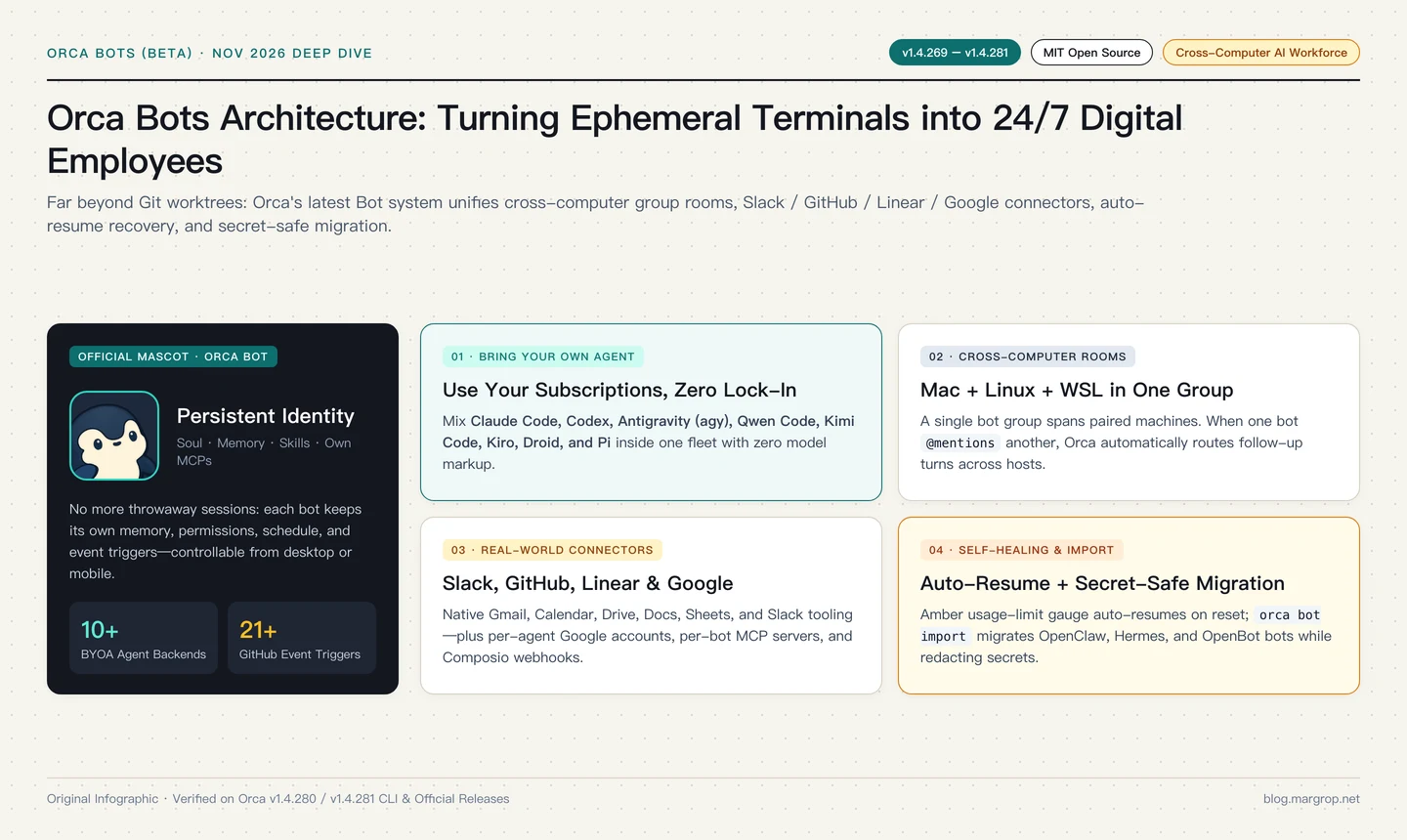
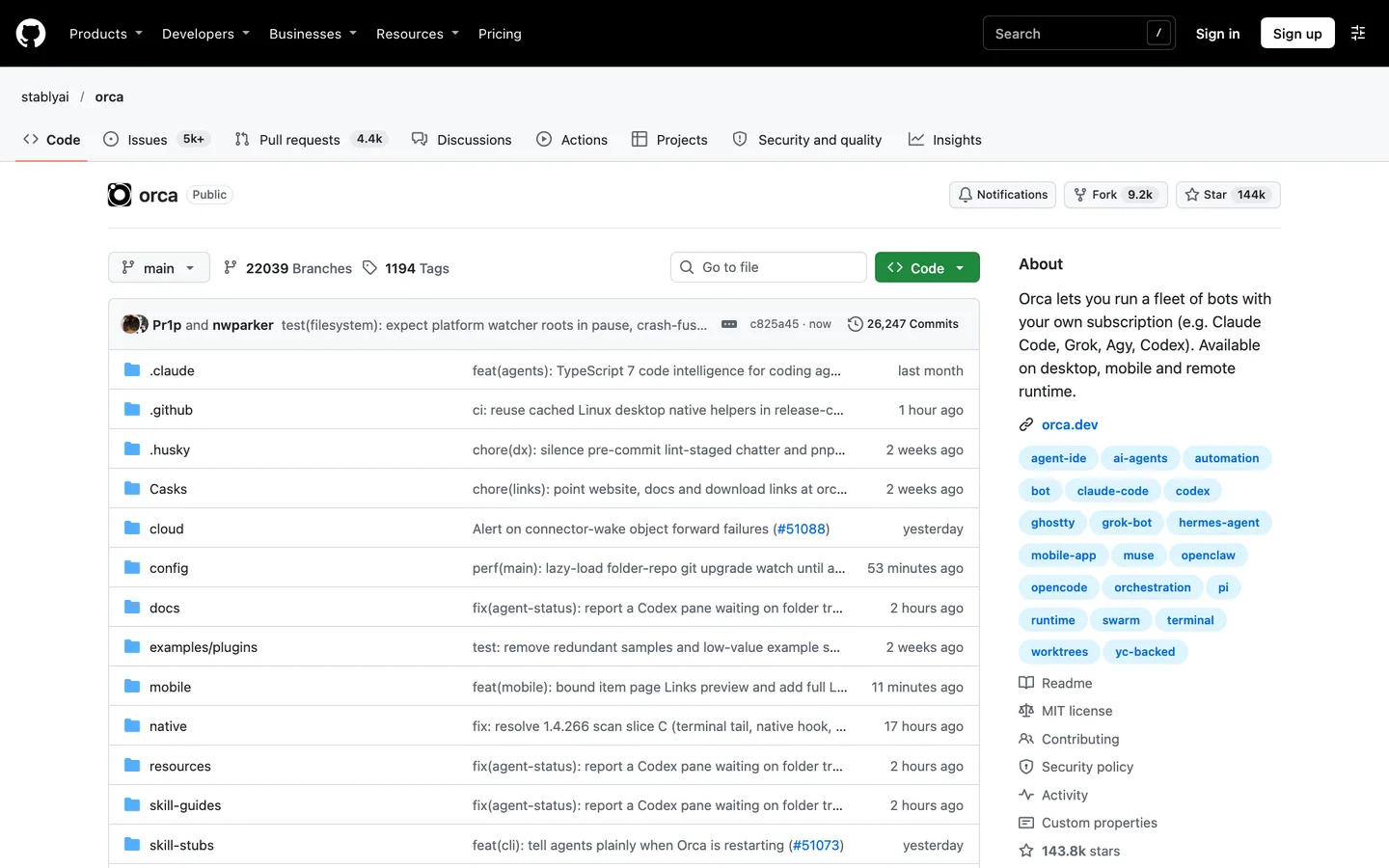
Over the past week alone (November 21–28, 2026), Orca (stablyai/orca)—the MIT-licensed Agent Development Environment that has already crossed 144,000 GitHub Stars—shipped a rapid wave of releases from v1.4.269 through v1.4.281. If you still think of Orca as “a nice wrapper for opening multiple Git worktrees,” its new Orca Bots (Beta) architecture will completely reset your expectations. It transforms throwaway terminal tabs into a 24/7 persistent digital workforce: named bots with mascots, souls, and long-term memory that sit together in cross-computer group rooms, wake up automatically on Slack, GitHub, Linear, Gmail, and Calendar events, recover gracefully from rate limits or crashes, and can be controlled end-to-end from your phone.
Instead of repeating generic AI hype, this guide combines hands-on testing on Orca v1.4.280 CLI with the official v1.4.281 release changelog. Using plain everyday analogies that even a primary school student can follow—without sacrificing engineering rigor—we will break down the problem, root cause, federation topology, four-layer security firewall, self-healing recovery, and three zero-dependency readiness scripts (Windows 11, Ubuntu 26.04, and macOS 27) with both manual and Agent auto-configuration workflows.
1. Background & Symptoms: Why Five AI Terminal Windows Feel Worse Than One
Over the last twelve months, CLI coding agents have exploded in capability: Claude Code, OpenAI Codex, Antigravity (agy), Qwen Code, Kimi Code, Kiro, Auggie, Droid, Pi, and more. Yet most power users who subscribe to several of them quickly hit a wall we can call “Multi-Agent Babysitter Fatigue”:
- Symptom 1: Perpetual onboarding amnesia. Every fresh terminal tab starts blank—you end up re-explaining repository rules, deployment conventions, and tool quirks over and over again.
- Symptom 2: Blind and deaf to the outside world. A GitHub CI check turns red, a Slack thread mentions a regression, an urgent Gmail lands, or a design review starts in 10 minutes—none of your CLI agents notice unless you manually copy-paste the context in.
- Symptom 3: Overnight jobs stall silently. You kick off a big test suite or refactor before dinner, only to discover the next morning that a 2 AM rate limit or OS reboot froze the entire run after five minutes.
- Symptom 4: Single-machine silos. Your frontend workspace lives on macOS, your Docker/GPU tests run on a headless Ubuntu server, and Windows 11 hosts WSL2—yet the agents on those machines cannot hand tasks directly to one another.
Root Cause: Temp Day-Laborers vs. a Permanent Office Team
Upgrading to a smarter frontier model does not fix any of those four problems, because the root cause is architectural—not model IQ. Traditional CLI sessions are stateless by design.
Think of it like running a real office:
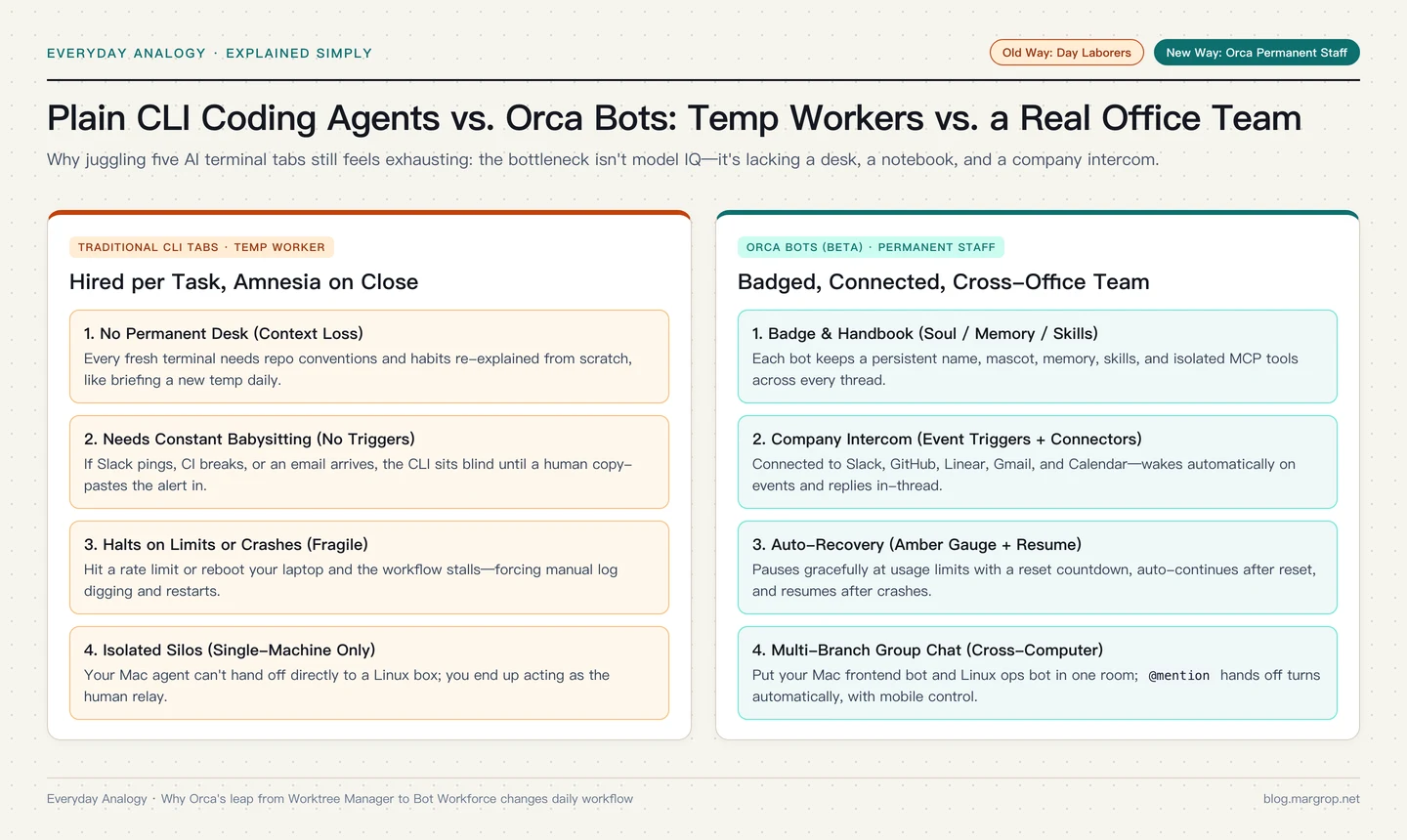
- Traditional CLI Tabs = Hiring a New Temp Worker Every Hour: You call them in for one job, they finish, and the moment you close the window they vanish—no permanent desk, no notebook of institutional memory, no company phone, and no way to call another branch office.
- Orca Bots (Beta) = Permanent Badged Department Staff: Each bot has a persistent identity—name, mascot, behavioral Soul, Memory, Skills, and its own isolated MCP tools. It stays on call across desktop and mobile, listens to real-world event triggers, and replies right inside the thread that woke it.
Crucially, Orca stays strictly BYOA (Bring Your Own Agent): it does not resell tokens or lock you into a proprietary LLM. Instead, it orchestrates the subscriptions you already pay for—Claude Code, Codex, Antigravity (agy), Qwen Code, Kimi Code, Kiro, Auggie, Droid, Pi, and Grok—under one unified control plane.
2. Deep Dive: What Orca v1.4.269 – v1.4.281 Actually Shipped
Let’s unpack the concrete engineering breakthroughs landed across v1.4.271 through v1.4.281 and verified directly via the local orca CLI.
2.1 Cross-Computer Bot Group Rooms & End-to-End Mobile Control
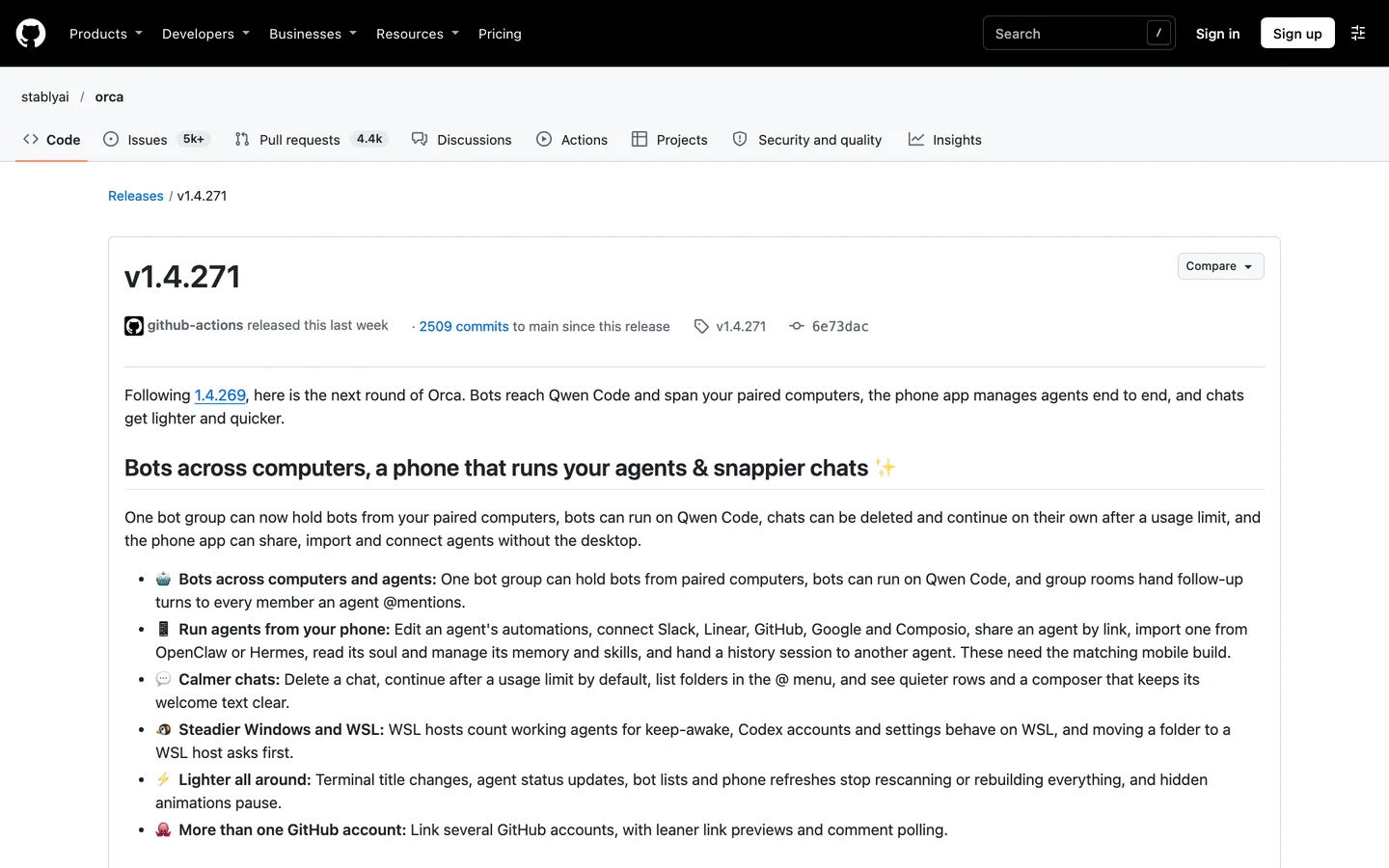
Starting in v1.4.271, Orca unlocked a genuinely novel primitive: a single Bot Group can hold bots running on different paired computers.
Imagine a headquarters connected to regional branches over one shared intercom channel:
- Host A (macOS Workstation): Runs your Frontend Reviewer Bot (Claude Code / Agy) with local Git worktrees, embedded browser annotations, and iOS Simulator access.
- Host B (Headless Ubuntu Server via
orca serve): Runs your Build & Ops Bot (Codex / Qwen Code) next to Docker containers and integration databases. - Host C (Windows 11 + WSL2): Runs your Compatibility Bot, with Orca's idle WSL auto-stop/wake and keep-awake tracking preventing wasted RAM or premature sleep.
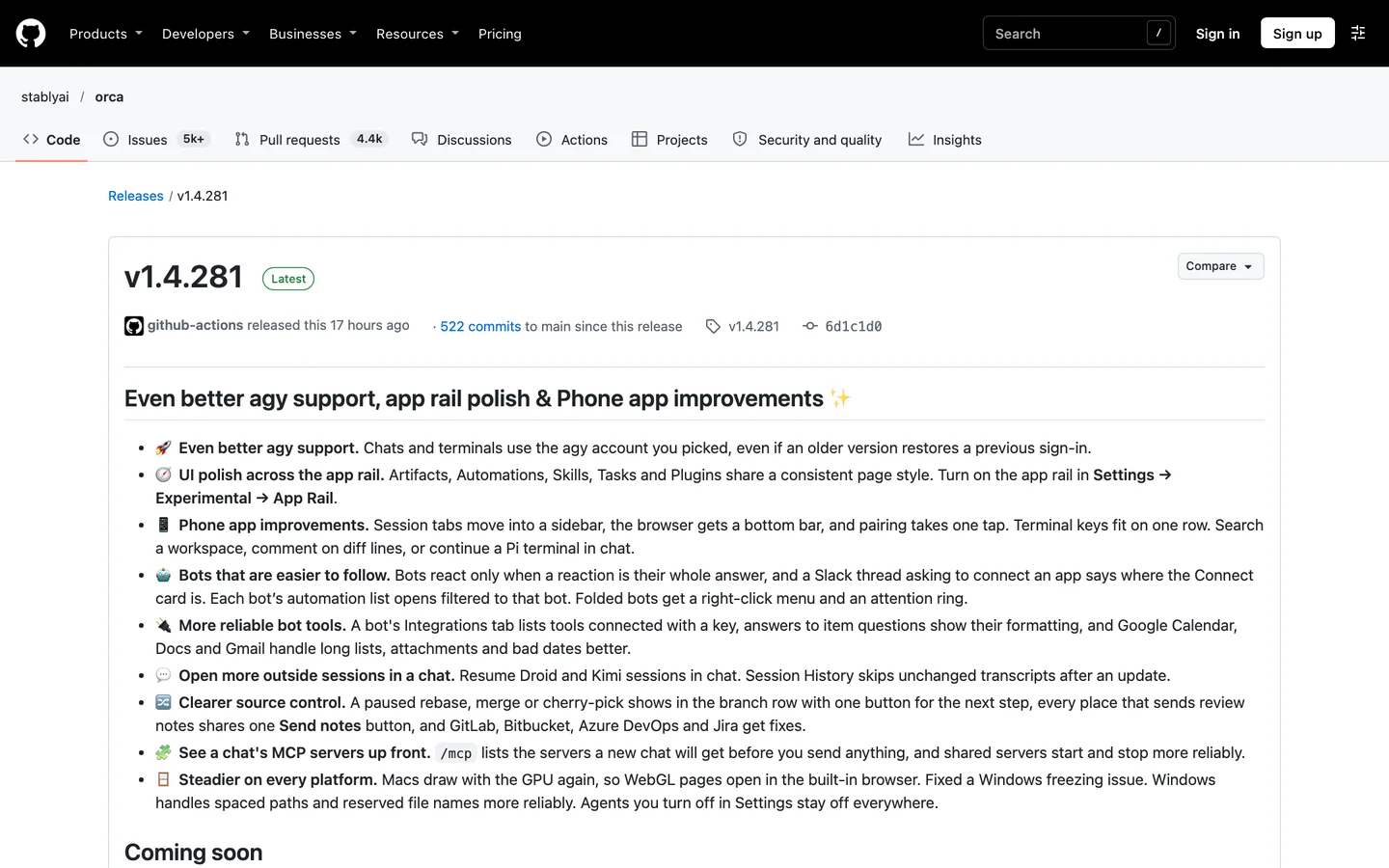
Inside a shared group room, when one bot finishes diagnosing an issue and writes @Bot-Linux, Orca automatically hands the follow-up turn to the mentioned bot on the remote Ubuntu machine. In v1.4.280 and v1.4.281, you can rename group rooms and threads right from their tabs, fold quiet bots into compact icons with an attention ring, and inspect upcoming scheduled runs right inside each bot’s panel.
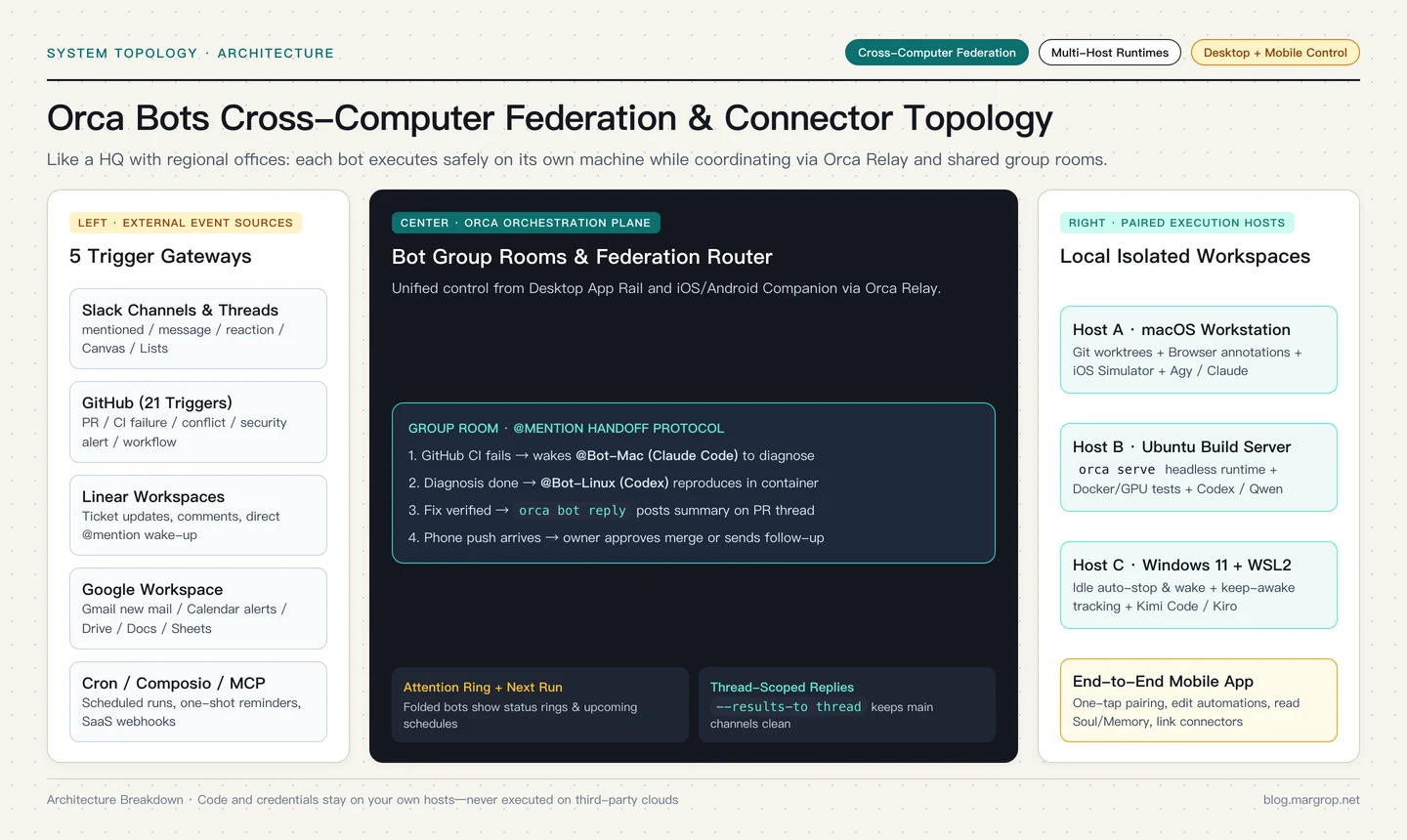
And you do not need to stay chained to your desk. Through Orca Relay, the iOS and Android companion apps now pair in one tap and manage bots end-to-end: edit automations, read a bot’s Soul and Memory, link Slack/Linear/GitHub/Google/Composio connectors, comment on diff lines, or import legacy bots straight from your phone.
2.2 31 Native Event Triggers & Real-World Connectors
Running orca automations trigger-options on Orca v1.4.280 reveals 31 native event triggers spanning five major operational surfaces:
- GitHub (21 granular triggers): Beyond
github.pr_openedandgithub.review_requested, Orca supportsgithub.ci_failed(fires once per commit on the first failed, cancelled, timed-out, or approval-blocked check),github.ci_passed,github.pr_conflicted,github.security_alert(Dependabot, code scanning, secret scanning), andgithub.workflow_finishedfor watching a specific GitHub Actions run. - Slack (Full channel & thread fluency): Triggers on
slack.mentioned,slack.message, andslack.reaction, paired with native CLI commands (orca slack find / check / read / post / attach / react / pin / canvas / list / scheduled). As refined in v1.4.277 & v1.4.281, bots display their custom mascot outfit as their Slack icon, react with an emoji only when a reaction is their entire answer, and can be asked to leave a thread—then summoned back anytime with an@mention. - Linear: Watches workspace updates and lets any comment
@mentionwake the bot directly to investigate and return a tested PR. - Google Workspace Suite: Native triggers for
gmail.new_emailandcalendar.starting_soon, backed by full CLI primitives:orca gmail,orca calendar(includingsuggest-timefor finding mutual free slots),orca contacts,orca drive,orca docs(supports editing as Docs Suggestions!), andorca sheets(including key-basedupsert). - Per-Bot MCP Tools & Composio: Give any bot its own private MCP servers via
orca bot tools add, or wire third-party SaaS webhooks viaorca bot composio setup / events.
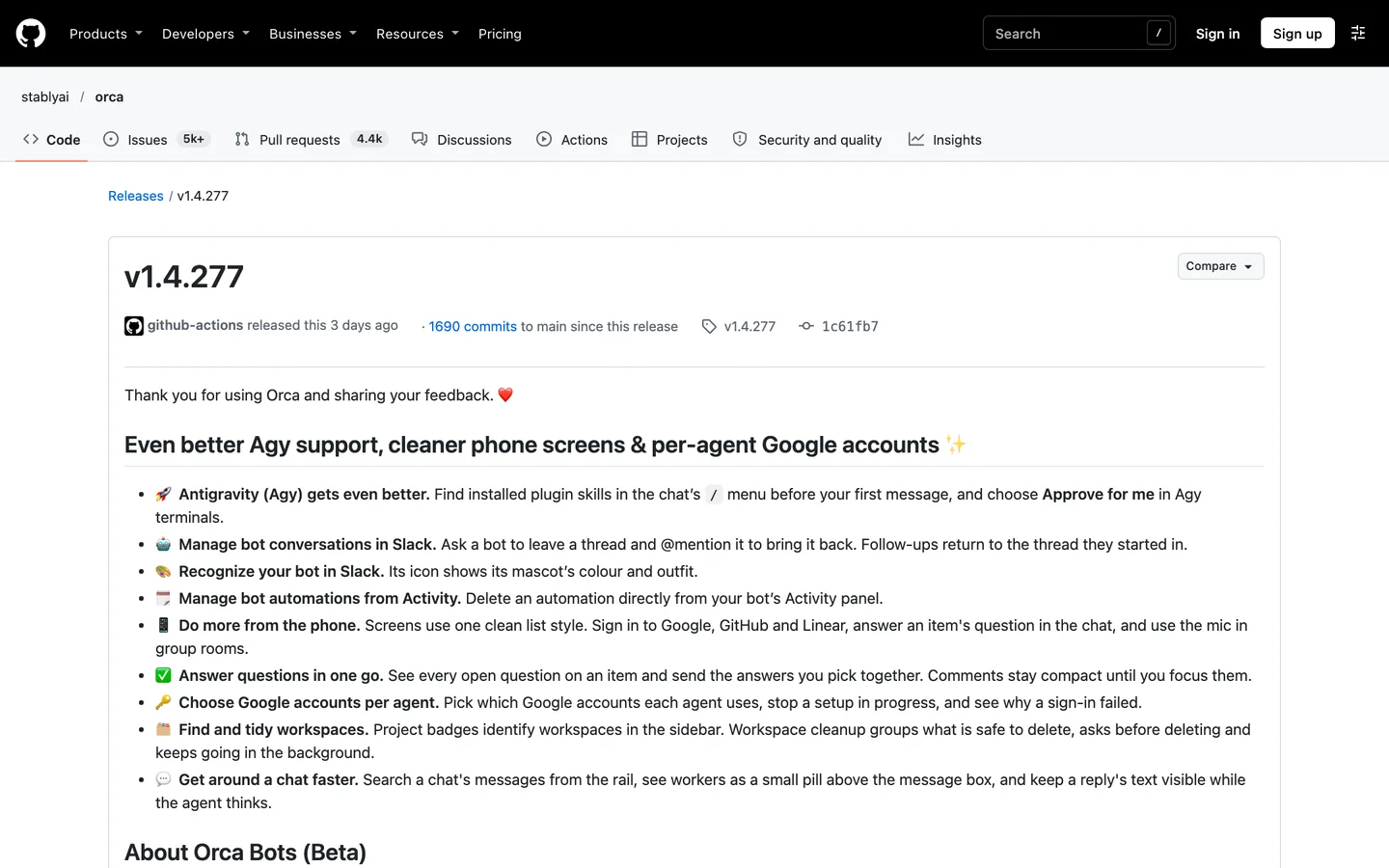
Thanks to the default –results-to thread routing, when a bot finishes an event-driven task, calling orca bot reply posts cleanly back into the originating Slack thread, PR, or issue—keeping main channels clutter-free.
3. Production Hardening: Four-Layer Security Firewall & Self-Healing Recovery
Any experienced engineer immediately asks: “Wait—if a bot reads Gmail and public GitHub issues while holding local code access, what stops a malicious email from prompt-injecting my bot?”
Inspecting Orca’s trigger specification and bot CLI contract reveals four concrete security guardrails built right into the runtime:
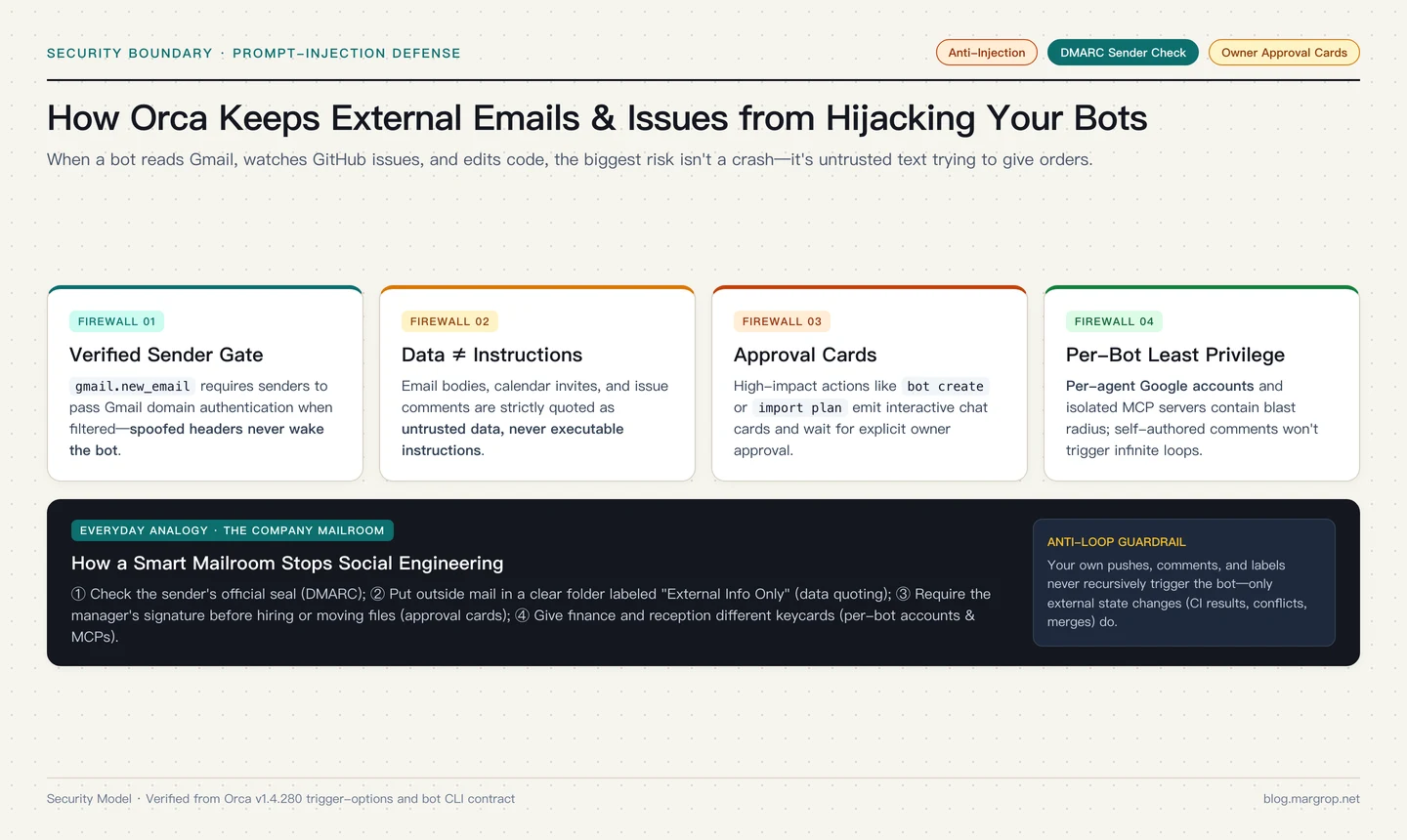
Think of it like a well-run company mailroom:
- Firewall 1 — Verified Sender Seal (Domain Authentication): When
gmail.new_emailfilters byfrom=, it only matches mail that passed Gmail's sender domain check—spoofed headers are dropped at the door and never wake a bot. - Firewall 2 — The "External Info Only" Clear Folder (Data ≠ Instructions): Incoming emails, calendar descriptions, and issue comments are strictly quoted as untrusted data, never executable instructions.
- Firewall 3 — Manager Signature Required (Interactive Approval Cards): Commands like
orca bot createandorca bot import plannever silently mutate your setup; they post a structured card in chat and wait for you to click Accept. - Firewall 4 — Separate Keycards + Anti-Loop Guardrails: Introduced in v1.4.277, Per-Agent Google Accounts isolate work vs. personal credentials per bot. Meanwhile, comments, labels, and pushes authored by you or your bot will not recursively re-trigger the same automation—preventing runaway token loops.
Game-Style Autosave Recovery & Secret-Safe Migration
Reliability and migration friction are the other two hurdles Orca tackled in v1.4.272 and v1.4.280:
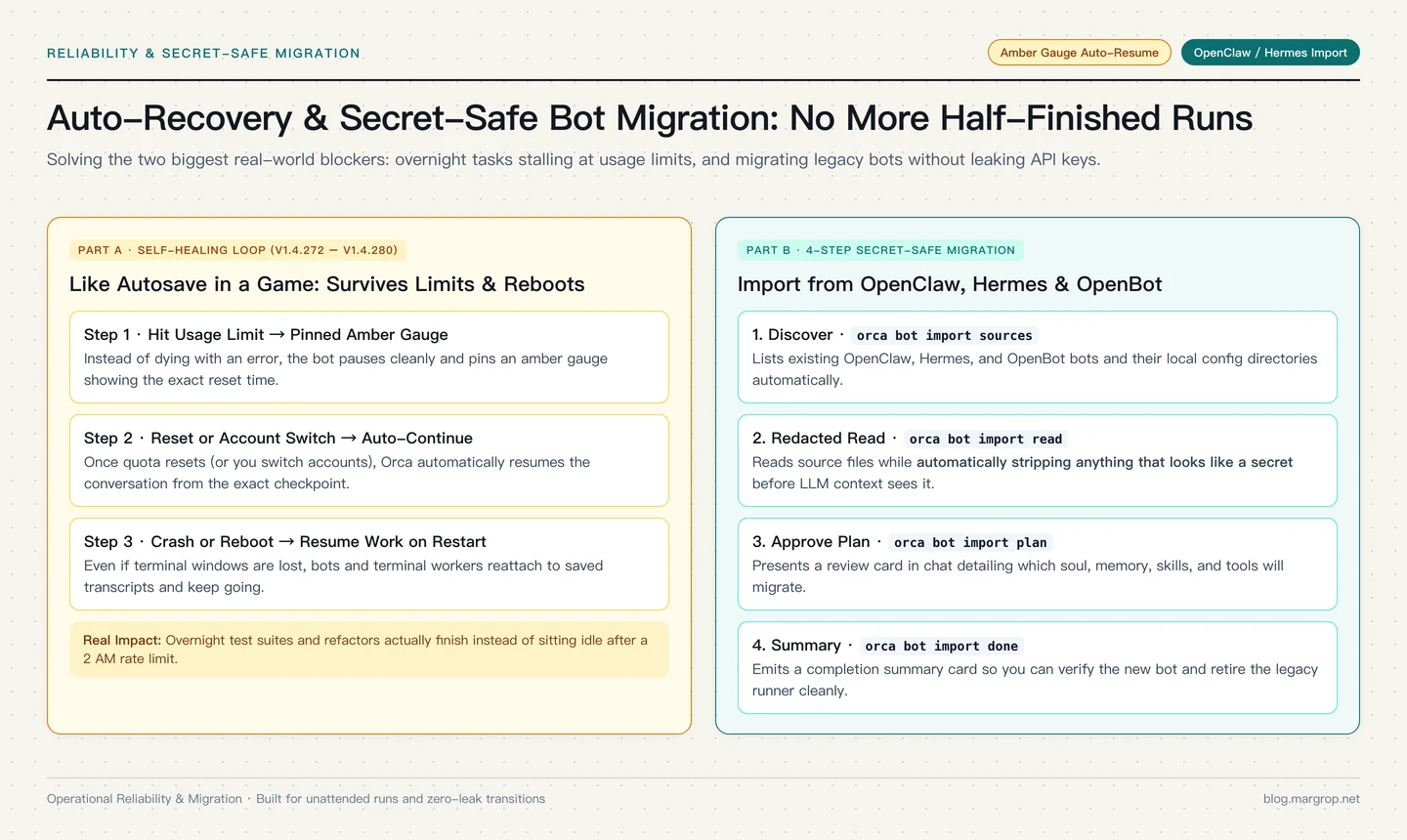
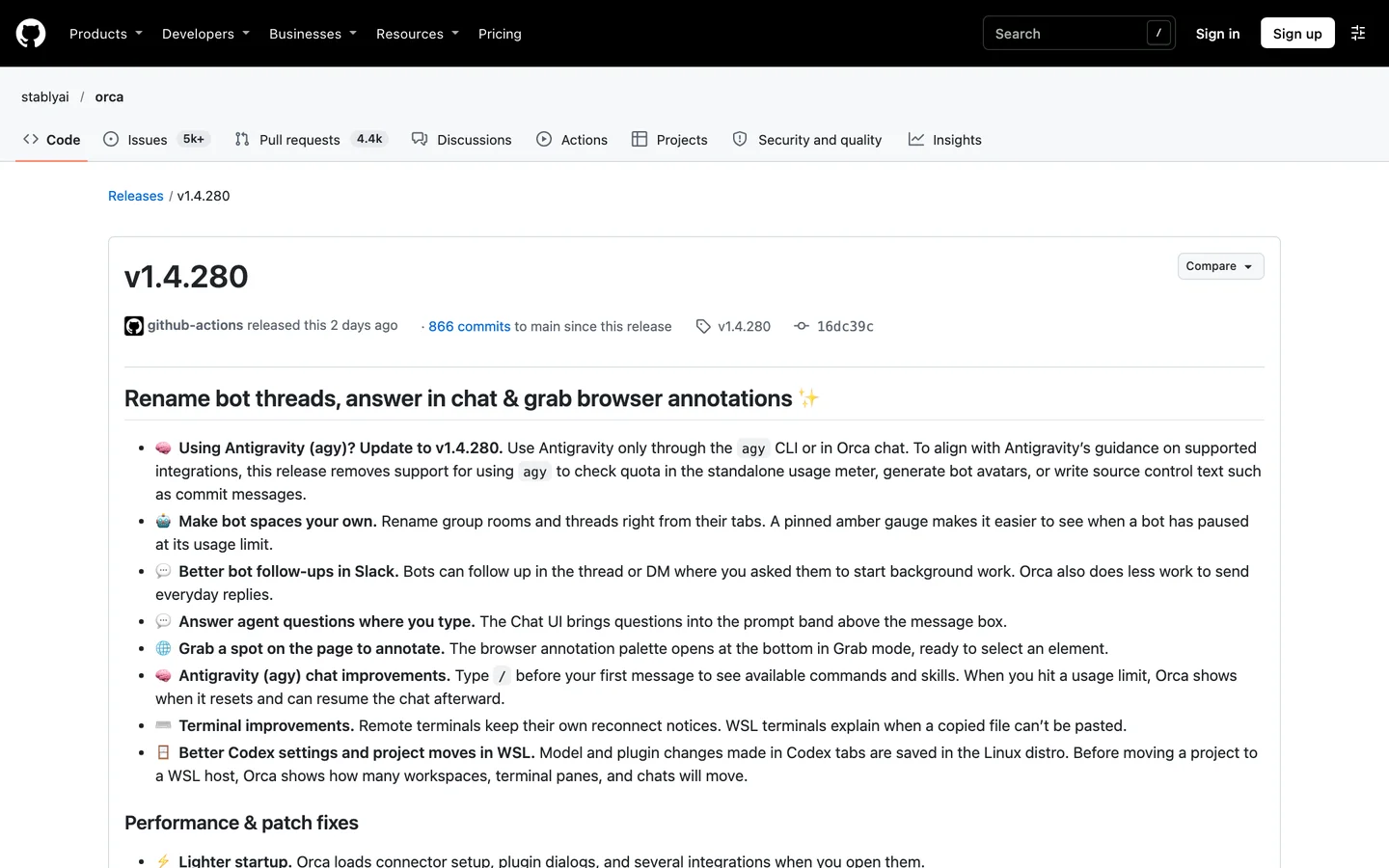
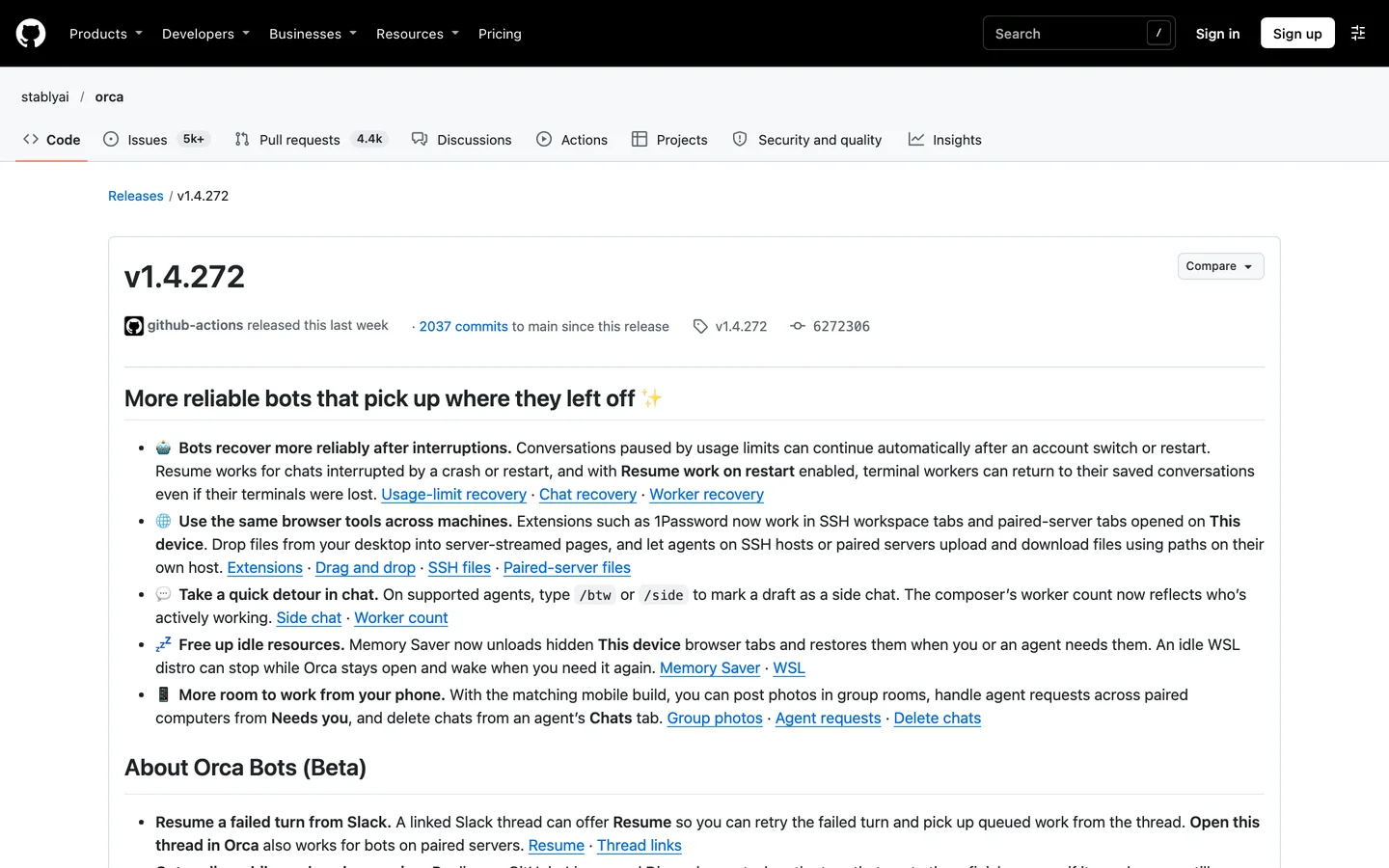
- Amber Usage-Limit Gauge + Crash Recovery: When a bot hits a subscription rate limit, Orca pins an amber gauge showing the exact reset countdown and auto-continues once quota resets or you switch accounts. With Resume work on restart enabled, both bots and terminal workers reattach to saved conversations even after a crash or reboot.
- Four-Step Secret-Safe Import (OpenClaw / Hermes / OpenBot): Already running bots on OpenClaw, Hermes, or OpenBot? Orca ships
orca bot import sources,import read(which automatically redacts anything that looks like a secret before it ever touches model context),import plan(approval card), andimport done(summary card).
4. Hands-On Playbook: 3-OS Zero-Dependency Scripts + Agent Auto-Config
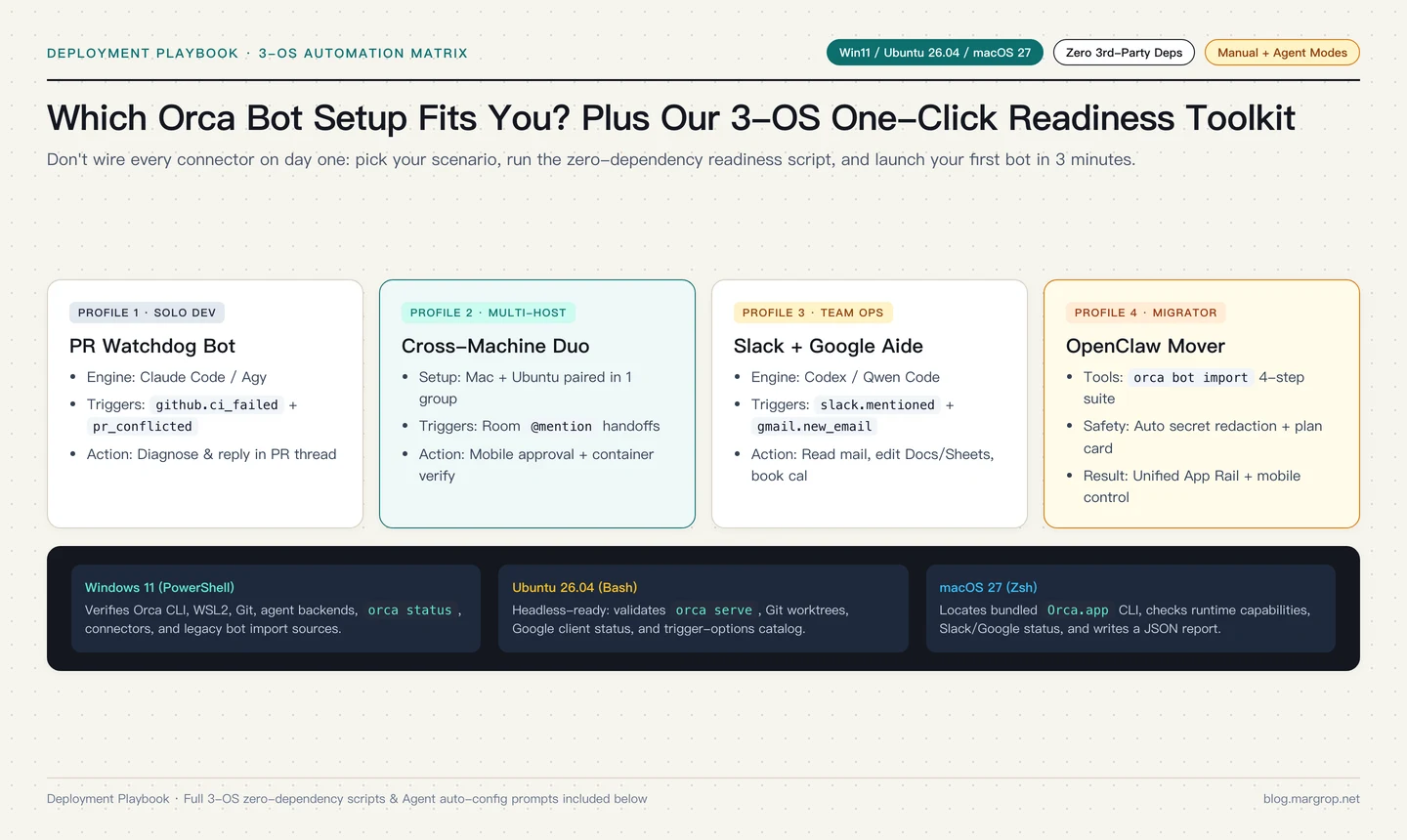
Do not wire every connector on day one. Pick the profile that fits your workflow, then run our zero-dependency readiness script to verify your machine in under 10 seconds:
Method 1: Manual One-Click Execution (Windows 11 / Ubuntu 26.04 / macOS 27)
All three scripts below use zero third-party services, auto-locate the Orca CLI, check runtime health, Git/WSL2, available BYOA agents, native trigger count, Google connector status, and legacy bot import sources, and write an anonymized JSON report with no IP addresses or hostnames.
1. Windows 11 (orca_bot_readiness_windows11.ps1)
#Requires -Version 5.1
param(
  [switch]$AutoOpen,
  [string]$ReportPath = ".\orca-bot-readiness-report.json"
)
$ErrorActionPreference = "Stop"

function Find-OrcaBin {
  $cmd = Get-Command orca -ErrorAction SilentlyContinue
  if ($cmd) { return $cmd.Source }
  foreach ($p in @(
    (Join-Path $env:LOCALAPPDATA "Programs\Orca\resources\bin\orca.exe"),
    (Join-Path $env:LOCALAPPDATA "Programs\orca\orca.exe"),
    (Join-Path $env:ProgramFiles "Orca\resources\bin\orca.exe")
  )) {
    if ($p -and (Test-Path $p)) { return $p }
  }
  return $null
}

function Invoke-SafeCmd([string]$File, [string[]]$ArgsList) {
  try {
    $out = & $File @ArgsList 2>&1 | Out-String
    return [pscustomobject]@{ ok = ($LASTEXITCODE -eq 0); output = $out.Trim() }
  } catch {
    return [pscustomobject]@{ ok = $false; output = $_.Exception.Message }
  }
}

Write-Host "=== Orca Bots Readiness Check (Windows 11) ===" -ForegroundColor Cyan
$orcaBin = Find-OrcaBin
$orcaVersion = "not-installed"
if ($orcaBin) {
  $v = Invoke-SafeCmd $orcaBin @("--version")
  if ($v.ok) { $orcaVersion = ($v.output -split "`n")[0].Trim() }
  Write-Host "[OK] Orca CLI detected: version $orcaVersion" -ForegroundColor Green
} else {
  Write-Host "[WARN] Orca CLI not found. Install Orca Desktop first." -ForegroundColor Yellow
}

$gitOk = [bool](Get-Command git -ErrorAction SilentlyContinue)
$wslOk = [bool](Get-Command wsl -ErrorAction SilentlyContinue)
$foundAgents = @("claude","codex","agy","qwen","kimi","gemini","kiro","droid","pi") |
  Where-Object { Get-Command $_ -ErrorAction SilentlyContinue }

$runtimeReady = $false; $googleSummary = "not-checked"; $importSources = "not-checked"; $triggerCount = 0
if ($orcaBin) {
  $st = Invoke-SafeCmd $orcaBin @("status", "--json")
  if (-not $st.ok -and $AutoOpen) {
    & $orcaBin open | Out-Null
    $st = Invoke-SafeCmd $orcaBin @("status", "--json")
  }
  if ($st.ok -and $st.output -match '"state"\s*:\s*"ready"') { $runtimeReady = $true }
  $g = Invoke-SafeCmd $orcaBin @("google", "status")
  $googleSummary = if ($g.output) { ($g.output -split "`n")[0].Trim() } else { "unavailable" }
  $imp = Invoke-SafeCmd $orcaBin @("bot", "import", "sources")
  $importSources = if ($imp.ok -and $imp.output) { "available" } else { "none-or-offline" }
  $trig = Invoke-SafeCmd $orcaBin @("automations", "trigger-options")
  if ($trig.ok) {
    $triggerCount = ([regex]::Matches($trig.output, "(?m)^\s+(slack|github|linear|gmail|calendar)\.[a-z0-9_]+")).Count
  }
}

$report = [ordered]@{
  platform = "Windows 11"
  checked_at_utc = (Get-Date).ToUniversalTime().ToString("yyyy-MM-ddTHH:mm:ssZ")
  orca_installed = [bool]$orcaBin
  orca_version = $orcaVersion
  runtime_ready = $runtimeReady
  git_ready = $gitOk
  wsl2_available = $wslOk
  byoa_agents = @($foundAgents)
  trigger_count = $triggerCount
  google_status = $googleSummary
  import_sources = $importSources
}
$report | ConvertTo-Json -Depth 4 | Set-Content -Path $ReportPath -Encoding UTF8
Write-Host "Report saved to $ReportPath (Triggers: $triggerCount, Runtime: $runtimeReady)" -ForegroundColor Green
Run it:
powershell -ExecutionPolicy Bypass -File .\orca_bot_readiness_windows11.ps1 -AutoOpen
2. Ubuntu 26.04 (orca_bot_readiness_ubuntu2604.sh)
#!/usr/bin/env bash
set -euo pipefail

AUTO_OPEN=0
REPORT_PATH="./orca-bot-readiness-report.json"
for arg in "$@"; do
  case "$arg" in
    --auto-open) AUTO_OPEN=1 ;;
    --report=*) REPORT_PATH="${arg#*=}" ;;
  esac
done

find_orca() {
  if command -v orca >/dev/null 2>&1; then command -v orca; return 0; fi
  for p in "/usr/local/bin/orca" "/usr/bin/orca" "$HOME/.local/bin/orca" "/opt/Orca/resources/bin/orca"; do
    [[ -x "$p" ]] && { printf '%s\n' "$p"; return 0; }
  done
  return 1
}

echo "=== Orca Bots Readiness Check (Ubuntu 26.04) ==="
ORCA_BIN="$(find_orca || true)"
ORCA_VERSION="not-installed"; RUNTIME_READY="false"
GOOGLE_STATUS="not-checked"; IMPORT_SOURCES="not-checked"; TRIGGER_COUNT=0

[[ -n "$ORCA_BIN" ]] && ORCA_VERSION="$("$ORCA_BIN" --version 2>/dev/null | head -n 1 | tr -d '\r' || echo unknown)"
GIT_READY="false"; command -v git >/dev/null 2>&1 && GIT_READY="true"

FOUND_AGENTS=()
for agent in claude codex agy qwen kimi gemini kiro droid pi; do
  command -v "$agent" >/dev/null 2>&1 && FOUND_AGENTS+=("$agent")
done

if [[ -n "$ORCA_BIN" ]]; then
  STATUS_OUT="$("$ORCA_BIN" status --json 2>/dev/null || true)"
  if [[ "$STATUS_OUT" != *'"state": "ready"'* && "$STATUS_OUT" != *'"state":"ready"'* && "$AUTO_OPEN" -eq 1 ]]; then
    "$ORCA_BIN" open >/dev/null 2>&1 || true
    STATUS_OUT="$("$ORCA_BIN" status --json 2>/dev/null || true)"
  fi
  [[ "$STATUS_OUT" == *'"state": "ready"'* || "$STATUS_OUT" == *'"state":"ready"'* ]] && RUNTIME_READY="true"
  GOOGLE_STATUS="$("$ORCA_BIN" google status 2>&1 | head -n 1 | tr -d '\r"' || echo unavailable)"
  "$ORCA_BIN" bot import sources >/dev/null 2>&1 && IMPORT_SOURCES="available" || IMPORT_SOURCES="none-or-offline"
  TRIGGER_COUNT="$("$ORCA_BIN" automations trigger-options 2>/dev/null | grep -E '^[[:space:]]+(slack|github|linear|gmail|calendar)\.[a-z0-9_]+' | wc -l | tr -d ' ' || echo 0)"
fi

AGENTS_JSON="[]"
if (( ${#FOUND_AGENTS[@]} > 0 )); then
  AGENTS_JSON="["
  for i in "${!FOUND_AGENTS[@]}"; do
    [[ $i -gt 0 ]] && AGENTS_JSON+=", "
    AGENTS_JSON+="\"${FOUND_AGENTS[$i]}\""
  done
  AGENTS_JSON+="]"
fi

cat > "$REPORT_PATH" <<JSON
{
  "platform": "Ubuntu 26.04",
  "checked_at_utc": "$(date -u +%Y-%m-%dT%H:%M:%SZ)",
  "orca_installed": $([[ -n "$ORCA_BIN" ]] && echo true || echo false),
  "orca_version": "${ORCA_VERSION}",
  "runtime_ready": ${RUNTIME_READY},
  "git_ready": ${GIT_READY},
  "byoa_agents": ${AGENTS_JSON},
  "trigger_count": ${TRIGGER_COUNT},
  "google_status": "${GOOGLE_STATUS}",
  "import_sources": "${IMPORT_SOURCES}"
}
JSON
echo "Report saved to ${REPORT_PATH} (Triggers: ${TRIGGER_COUNT}, Runtime: ${RUNTIME_READY})"
Run it:
chmod +x ./orca_bot_readiness_ubuntu2604.sh && ./orca_bot_readiness_ubuntu2604.sh --auto-open
3. macOS 27 (orca_bot_readiness_macos27.zsh)
#!/usr/bin/env zsh
set -euo pipefail

AUTO_OPEN=0
REPORT_PATH="./orca-bot-readiness-report.json"
for arg in "$@"; do
  case "$arg" in
    --auto-open) AUTO_OPEN=1 ;;
    --report=*) REPORT_PATH="${arg#*=}" ;;
  esac
done

find_orca() {
  command -v orca 2>/dev/null && return 0
  local bundled="/Applications/Orca.app/Contents/Resources/bin/orca"
  [[ -x "$bundled" ]] && { print -r -- "$bundled"; return 0; }
  return 1
}

print -r -- "=== Orca Bots Readiness Check (macOS 27) ==="
ORCA_BIN="$(find_orca || true)"
ORCA_VERSION="not-installed"; RUNTIME_READY="false"
GOOGLE_STATUS="not-checked"; IMPORT_SOURCES="not-checked"; TRIGGER_COUNT=0

[[ -n "$ORCA_BIN" ]] && ORCA_VERSION="$("$ORCA_BIN" --version 2>/dev/null | head -n 1 | tr -d '\r' || echo unknown)"
GIT_READY="false"; command -v git >/dev/null 2>&1 && GIT_READY="true"

typeset -a FOUND_AGENTS; FOUND_AGENTS=()
for agent in claude codex agy qwen kimi gemini kiro droid pi; do
  command -v "$agent" >/dev/null 2>&1 && FOUND_AGENTS+=("$agent")
done

if [[ -n "$ORCA_BIN" ]]; then
  STATUS_OUT="$("$ORCA_BIN" status --json 2>/dev/null || true)"
  if [[ "$STATUS_OUT" != *'"state": "ready"'* && "$STATUS_OUT" != *'"state":"ready"'* && "$AUTO_OPEN" -eq 1 ]]; then
    "$ORCA_BIN" open >/dev/null 2>&1 || true
    STATUS_OUT="$("$ORCA_BIN" status --json 2>/dev/null || true)"
  fi
  [[ "$STATUS_OUT" == *'"state": "ready"'* || "$STATUS_OUT" == *'"state":"ready"'* ]] && RUNTIME_READY="true"
  GOOGLE_STATUS="$("$ORCA_BIN" google status 2>&1 | head -n 1 | tr -d '\r"' || echo unavailable)"
  "$ORCA_BIN" bot import sources >/dev/null 2>&1 && IMPORT_SOURCES="available" || IMPORT_SOURCES="none-or-offline"
  TRIGGER_COUNT="$("$ORCA_BIN" automations trigger-options 2>/dev/null | grep -E '^[[:space:]]+(slack|github|linear|gmail|calendar)\.[a-z0-9_]+' | wc -l | tr -d ' ' || echo 0)"
fi

AGENTS_JSON="[]"
if (( ${#FOUND_AGENTS[@]} > 0 )); then
  AGENTS_JSON="["
  local idx=1
  for a in "${FOUND_AGENTS[@]}"; do
    (( idx > 1 )) && AGENTS_JSON+=", "
    AGENTS_JSON+="\"${a}\""
    (( idx++ ))
  done
  AGENTS_JSON+="]"
fi

cat > "$REPORT_PATH" <<JSON
{
  "platform": "macOS 27",
  "checked_at_utc": "$(date -u +%Y-%m-%dT%H:%M:%SZ)",
  "orca_installed": $([[ -n "$ORCA_BIN" ]] && echo true || echo false),
  "orca_version": "${ORCA_VERSION}",
  "runtime_ready": ${RUNTIME_READY},
  "git_ready": ${GIT_READY},
  "byoa_agents": ${AGENTS_JSON},
  "trigger_count": ${TRIGGER_COUNT},
  "google_status": "${GOOGLE_STATUS}",
  "import_sources": "${IMPORT_SOURCES}"
}
JSON
print -r -- "Report saved to ${REPORT_PATH} (Triggers: ${TRIGGER_COUNT}, Runtime: ${RUNTIME_READY})"
Run it:
chmod +x ./orca_bot_readiness_macos27.zsh && ./orca_bot_readiness_macos27.zsh --auto-open
Method 2: Agent Auto-Configuration (Paste Directly into Any Coding Agent)
Prefer letting your agent wire everything up safely? Paste this prompt into Claude Code, Codex, or Antigravity inside Orca:
Please verify my local Orca Bots (Beta) environment and propose my first bot following these exact rules:
1. Run the zero-dependency readiness script matching my OS (macOS 27 Zsh / Ubuntu 26.04 Bash / Windows 11 PowerShell) and inspect orca-bot-readiness-report.json.
2. If runtime_ready is false, run `orca open` to wake the local runtime and re-verify; do not install any third-party cloud relays.
3. Run `orca bot import sources` to detect any existing OpenClaw, Hermes, or OpenBot configs; if present, use only `orca bot import read` (secret-redacted) and `orca bot import plan` to show an approval card—never read raw secret files directly.
4. Use `orca bot create` to propose a "ci-watchdog" bot approval card backed by my strongest available BYOA agent, pre-planned for `github.ci_failed` and `github.pr_conflicted`, and wait for me to click Accept.
5. Never print full IP addresses, hostnames, email addresses, or tokens in your output.
5. Frequently Asked Questions (Q&A)
Q1: Does Orca Bots charge extra subscription fees or token markups?
A: No. Orca is MIT-licensed open-source software built around BYOA (Bring Your Own Agent). Your bots run directly on the subscriptions you already authenticate locally (Claude Code, Codex, Antigravity, Qwen Code, Kimi Code, etc.) with zero middleman markup.
Q2: Is Orca Bots still useful if I only have one laptop and no extra Linux server?
A: Absolutely. Cross-computer federation is optional. Even on a single machine, you immediately gain persistent Soul/Memory, 31 native event triggers across GitHub/Slack/Linear/Gmail/Calendar, amber-gauge usage-limit auto-resume, and full mobile control.
Q3: If I connect Gmail, can a random coding bot read my personal inbox?
A: No. Since v1.4.277, Google access is scoped per agent and disabled by default. You explicitly grant access per bot via orca google bot <bot> –on or the UI, keeping work and personal accounts strictly isolated.
Q4: Anything special to know if I use Antigravity (agy) with Orca v1.4.280+?
A: Yes. Starting in v1.4.280, Orca aligned with Antigravity’s supported integration guidance—using agy solely inside the CLI and Orca chat (removing standalone quota-meter checks, avatar generation, and commit-message authoring via agy). Upgrading to v1.4.281 also ensures your selected agy account persists cleanly across restarts.
Q5: How does a headless Ubuntu server join my Bot Group?
A: Run orca serve on the Ubuntu host and pair it with your desktop or phone via orca environment add. Once paired, bots running on that headless server can sit in the same group room as your macOS bots and exchange @mention handoffs seamlessly.
Q6: How painful is migrating existing bots from OpenClaw or Hermes?
A: Almost effortless. Use orca bot import sources / read / plan / done (or trigger the import directly from the Orca mobile app). Because import read strips anything resembling an API key or secret before passing files to the model, you get a clean migration without leaking credentials.