Same Repository, One Node on 9.2 and One Stuck on 9.1: Hunting the Fake Keyring That Silently Broke PVE Updates
TL;DR
I run two Proxmox VE 9 nodes configured with exactly the same package repository (the
pve-no-subscriptionmirror). One had already moved on to the latest 9.2.18; the other was stuck at 9.1.9 — and had been silently stuck for more than four months, with no error ever surfacing.The root cause was neither the network nor the repository config: the GPG keyring file
/etc/apt/trusted.gpg.d/proxmox-release-trixie.gpghad been created from the wrong download in the first place — it contained a “signature block” instead of a public key. Debian 13’s new signature verifier therefore refused to refresh the PVE package index every single time, then quietly kept using a four-month-old index.The fix takes three steps: back up the broken file → install the correct official key →
apt updateagain. No reinstall, no repository changes, five minutes end to end. This post walks through the full investigation and ships one-click fix scripts for Windows 11 / Ubuntu 26.04 / macOS 26, in both “run it yourself” and “hand it to an AI agent” flavors.
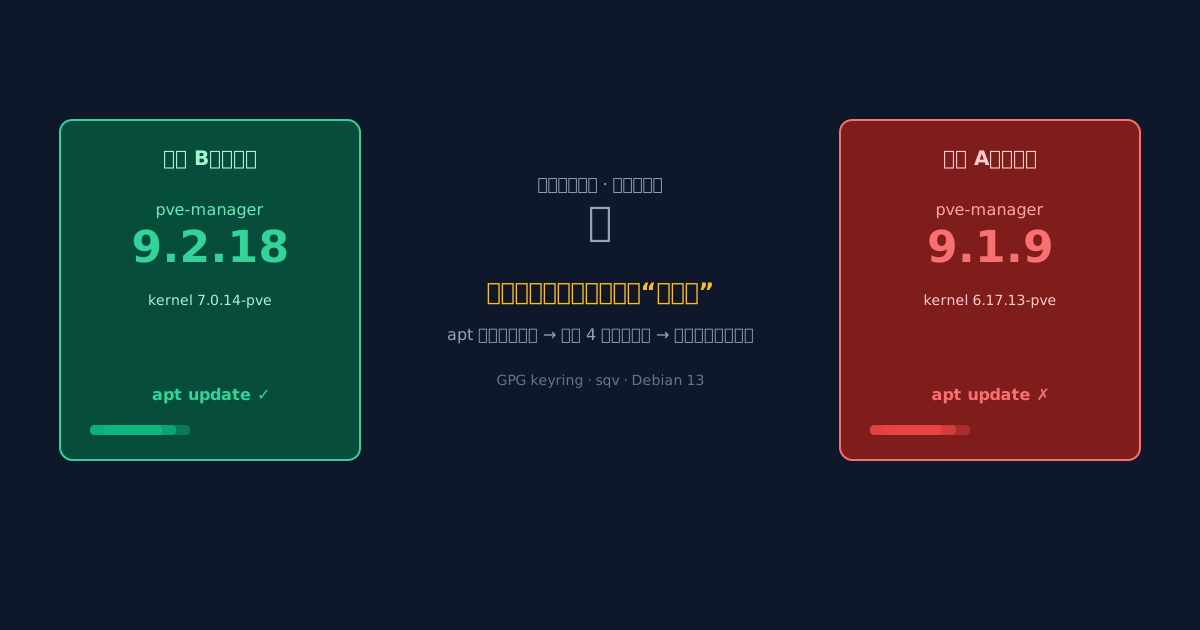
Figure 1: Original cover art. Same repository, two different version worlds — the culprit is a fake key sitting in the keyring.
1. Background: A Mundane “Version Alignment”
My home lab runs two physical PVE nodes hosting around twenty VMs: soft routers, databases, builders, reverse proxies. Both nodes were installed back in the PVE 9.0 days and point at the same pve-no-subscription mirror — a standard home-lab setup.
While aligning versions across both nodes, something odd showed up:
- Node B: hit “Refresh” in the web UI and 9.2.18 was right there; one click, done.
- Node A: the same operation topped out at 9.1.9.
apt full-upgradeinsisted the system was already up to date (0 upgraded, 0 newly installed).
My first guess was “the sources must be configured differently” — the nodes were installed at different times, after all. That assumption died within minutes, and the real hunt began.
2. Symptoms: One Source, Two Realities
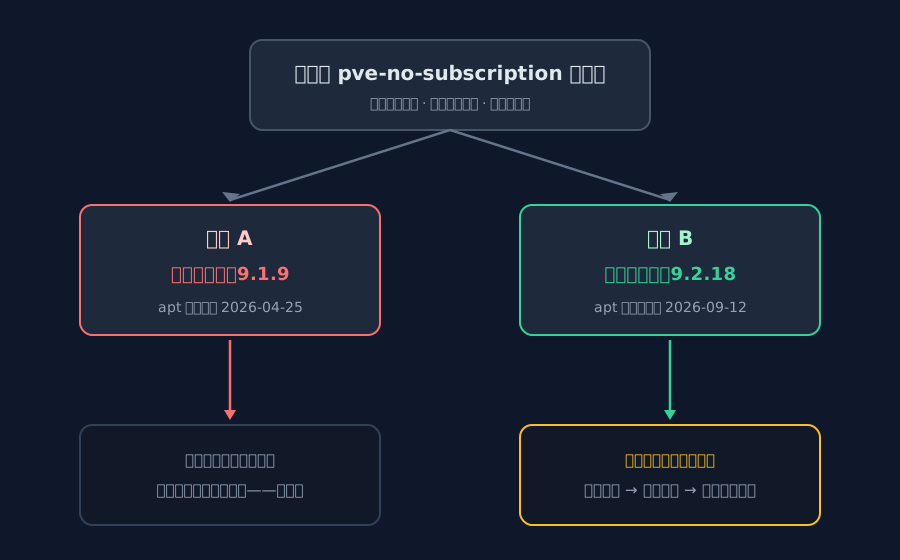
Figure 2: The full picture. Node B sees 9.2.18; node A’s ceiling is welded shut at 9.1.9.
2.1 A Whole Release Series Apart
Running pveversion on both nodes tells the story at a glance:
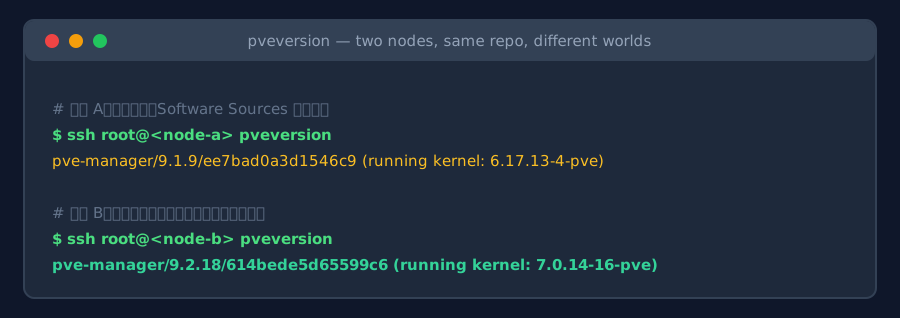
Figure 3: Real command output. Node A is on 9.1.9 (kernel 6.17 series); node B is on 9.2.18 (kernel 7.0 series).
2.2 apt Believes 9.1.9 Is the Latest
The decisive output is apt-cache policy pve-manager on node A:
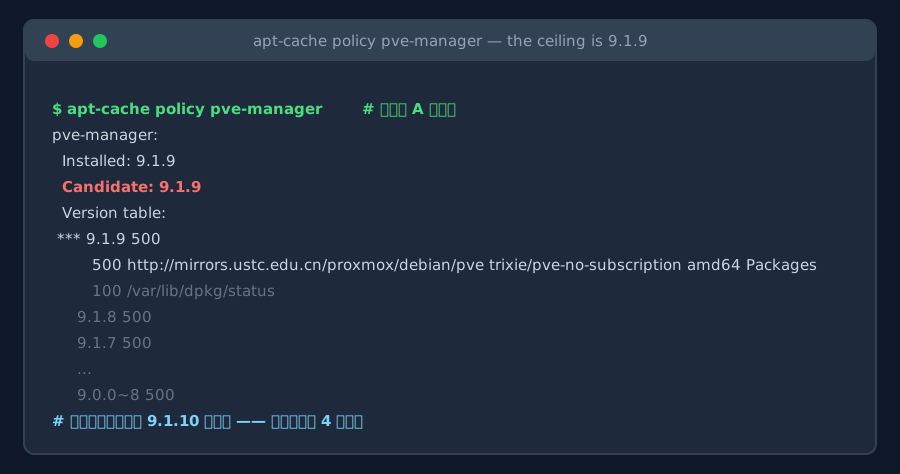
Figure 4: Real command output (abridged). The Candidate is also 9.1.9 — and even 9.1.10 is missing from the version list.
Quick primer on reading this: Installed is what’s on disk, Candidate is what apt believes is available. A candidate of 9.1.9 means apt’s “shopping list” contains no 9.2 entries at all. The problem is not the install step — it’s the seeing step: apt has no idea 9.2.18 exists.
The obvious suspects fell one by one:
| Suspect | Check | Verdict |
|---|---|---|
| Different sources? | diff of sources.list and sources.list.d/ |
Identical |
| Mirror out of sync? | Same mirror, yet node B sees 9.2.18 | Ruled out |
| Version pinned? | No pins in apt-cache policy, clean /etc/apt/preferences |
Ruled out |
| Disk full / apt lock? | df -h fine, no locks |
Ruled out |
3. Analysis: Timestamps Are the First Crime Scene
With the easy explanations exhausted, I switched angles: if apt can’t see new versions, when did it last refresh its shopping list? The index cache lives in /var/lib/apt/lists/, and file timestamps don’t lie:
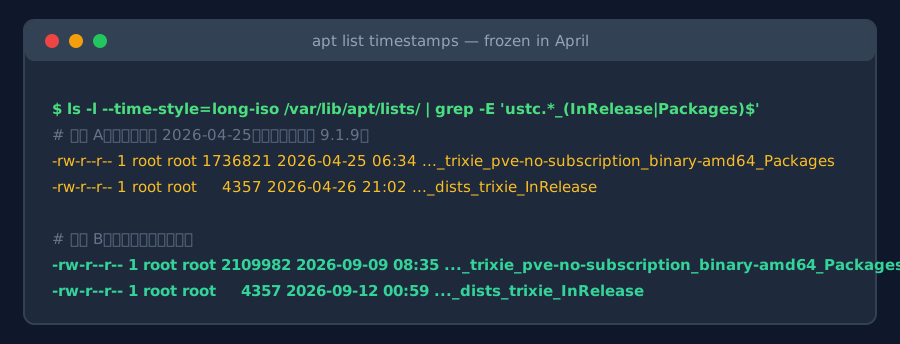
Figure 5: Real command output (filenames abridged). Node A’s PVE index is stuck at 2026-04-25; node B’s was refreshed in September.
First layer of the truth: node A’s PVE package index had not refreshed successfully for over four months. Late April 2026 is exactly when 9.1.9 was current — from that moment on, the PVE repository simply ceased to exist for this machine.
Which raises the question: why did nobody notice? Running apt-get update by hand reveals it:
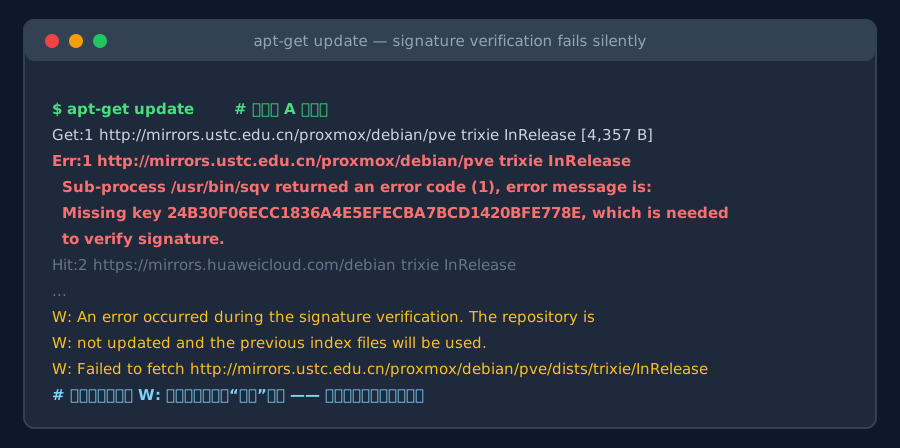
Figure 6: Real command output. The Err: points at InRelease verification failing, missing key 24B30F06… — yet the whole command exits “successfully” with only W: warnings.
Every line of that error is informative:
Sub-process /usr/bin/sqv returned an error code (1)—sqvis the new-generation signature verifier that apt uses on Debian 13 (Trixie), from the Sequoia-PGP project, replacing the aginggpgv;Missing key 24B30F06ECC1836A4E5EFECBA7BCD1420BFE778E, which is needed to verify signature— the verifier cannot find a public key in its keyring that matches the PVE repository’s signature;The repository is not updated and the previous index files will be used— this is the soul of the incident: the index refresh is refused, and the old one soldier on.
The nastiest part is what the footnote says: only W: warnings, no E: errors, cheerful exit code. A cron job running apt update && apt upgrade would report success forever, upgrade nothing, and never make a sound.
3.1 Where Exactly Is the “Missing Key”?
For this node’s repository style, the verification key should live at /etc/apt/trusted.gpg.d/proxmox-release-trixie.gpg. Putting both nodes’ files side by side catches the culprit red-handed:
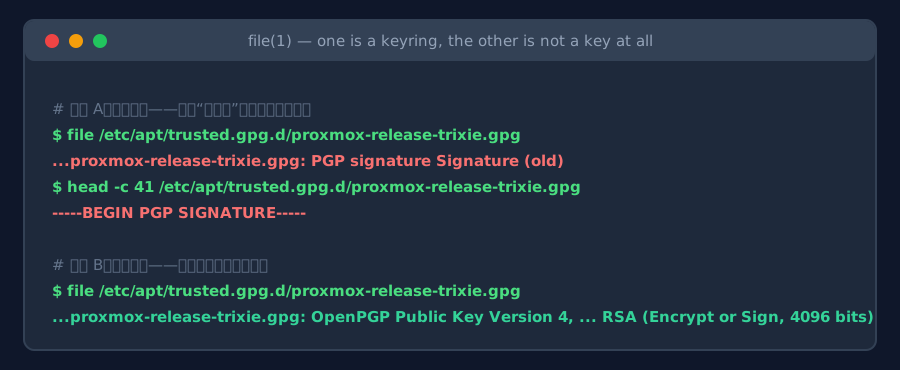
Figure 7: Real command output. Node A’s “keyring” is actually a block starting with -----BEGIN PGP SIGNATURE-----; node B’s is a proper OpenPGP public key.
The whole story snaps into focus: when the PVE repository was first configured on node A, the key-download step saved the wrong file — the repository’s signature file went into the keyring directory instead of the public key. A signature block is not a key; the verifier cannot parse it, so every refresh reports a missing key. The broken file’s timestamp, April 26, marks the day of that “successful-looking” repository change — and the last time this node ever received an update from the PVE repository.
4. Root Cause: One Failed Verification Quietly Locks the Version
Here is the full chain as a diagram — a textbook case of silent degradation:
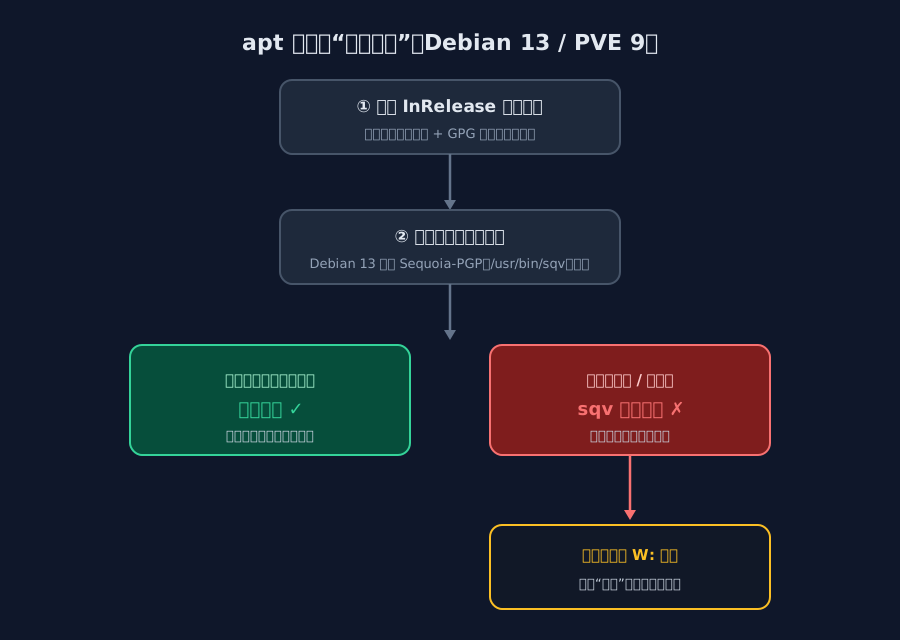
Figure 8: apt’s verification journey. With no matching public key in the keyring, sqv refuses the refresh and leaves nothing but a warning.
If GPG and keyrings feel abstract, here’s a restaurant analogy:
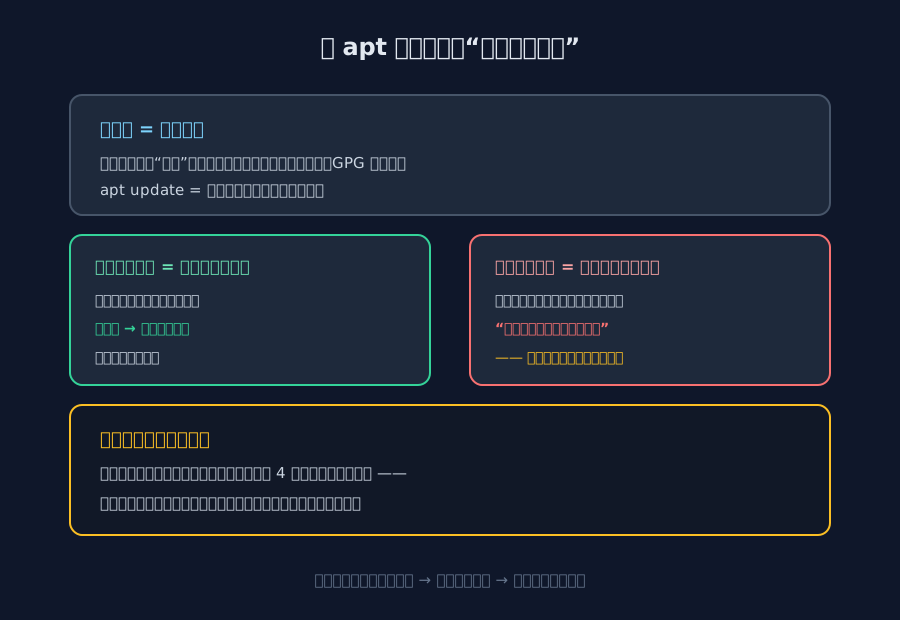
Figure 9: The restaurant analogy. Keyring = the book of official stamp samples; a broken keyring = a book with scrap paper inside, so nothing ever matches.
Mapping the metaphor to the mechanics:
- The repository publishes an
InReleaseindex on every update — the full package list plus the vendor’s GPG signature (“a menu with an anti-forgery stamp”); - The keyring is the local book of official stamp samples; every file under
trusted.gpg.dis treated as a sample; - The verifier (sqv) compares the menu’s stamp against the sample book at every refresh and rejects mismatches;
- Silent fallback: on rejection, apt neither aborts nor alerts — it just keeps serving last month’s menu (the stale index). That is the entire secret of “four months, nobody noticed”.
Root cause in one sentence: node A’s PVE keyring file contained the wrong content (a signature block posing as a key) → every index refresh failed verification → apt ran on April’s stale index → the version ceiling was locked at 9.1.9.
5. The Fix: Swap the Key in Three Steps
The fix is refreshingly plain: put the correct public key back into the keyring, then refresh the index. The only question is where the correct key comes from. Both routes below are field-tested; I recommend them in this order:
5.1 Route 1 (Recommended): Restore from the Official Keyring Package
The PVE repository ships an official package, proxmox-archive-keyring, containing all currently valid release keys. Package installs only verify checksums against the local index — no direct connectivity to the vendor’s overseas servers required, which makes this route ideal for networks where download.proxmox.com is hard to reach:
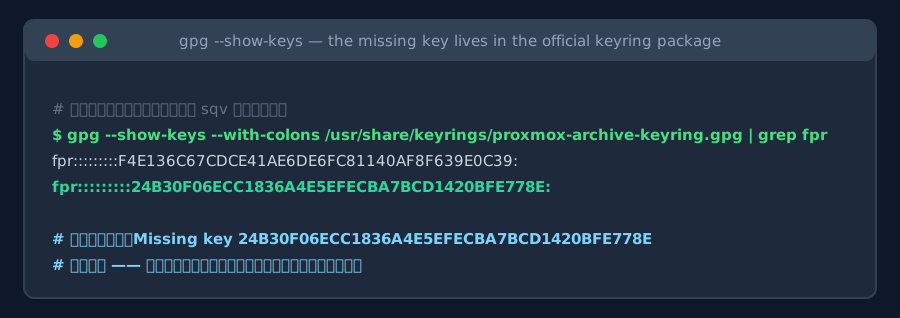
Figure 10: Real command output. The keyring shipped inside the official package contains exactly the fingerprint the error message asked for: 24B30F06….
apt-get install --reinstall -y proxmox-archive-keyring
install -m 0644 /usr/share/keyrings/proxmox-archive-keyring.gpg \
                /etc/apt/trusted.gpg.d/proxmox-release-trixie.gpg
apt-get update
5.2 Route 2 (Fallback): Copy from a Healthy Sibling Node
If your LAN has a healthy node with the same repository layout (mine happened to), copying its keyring file across is equally valid — same repository, same public key:
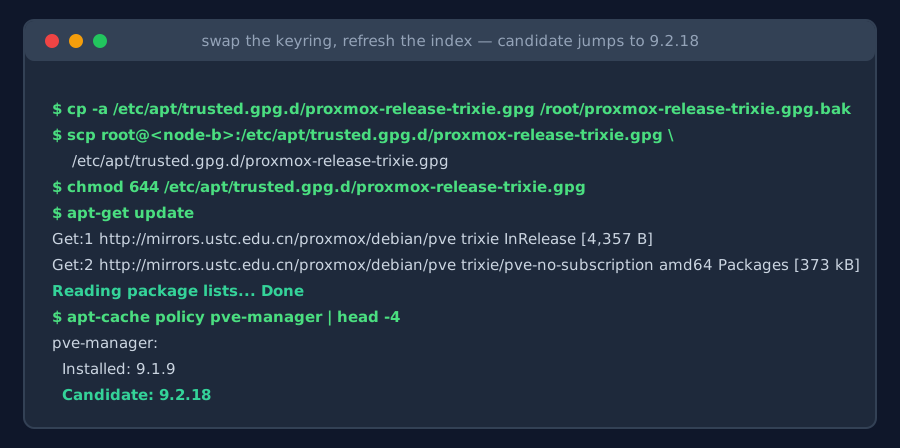
Figure 11: The actual repair. Back up the broken file → copy the good key from the healthy node → refresh the index → the candidate jumps from 9.1.9 straight to 9.2.18.
Notes that apply to both routes:
- Back up first:
cp -athe broken file to/root— instant rollback anytime; - Check the Candidate before upgrading:
apt-cache policy pve-managershowing 9.2.18 is your proof of fix; - Separate upgrading from rebooting:
apt full-upgradebrings the kernel from the 6.17 to the 7.0 series and needs a reboot to take effect — pick a maintenance window for production nodes.
By the way, the Proxmox wiki now recommends the deb822-style
.sourcesfiles plus/usr/share/keyrings/proxmox-archive-keyring.gpg(referenced explicitly viaSigned-By:), which is tidier than the globaltrusted.gpg.dkeyring. I kept the minimal-change repair here and left the repository migration as a follow-up.
6. One-Click Fix Scripts
Too lazy to type? The logic is packaged into one-click scripts for three platforms. All of them use only SSH and the official repository — no third-party services — and all follow the same “check → back up → fix → verify” flow, automatically skipping nodes whose keyring is already healthy:
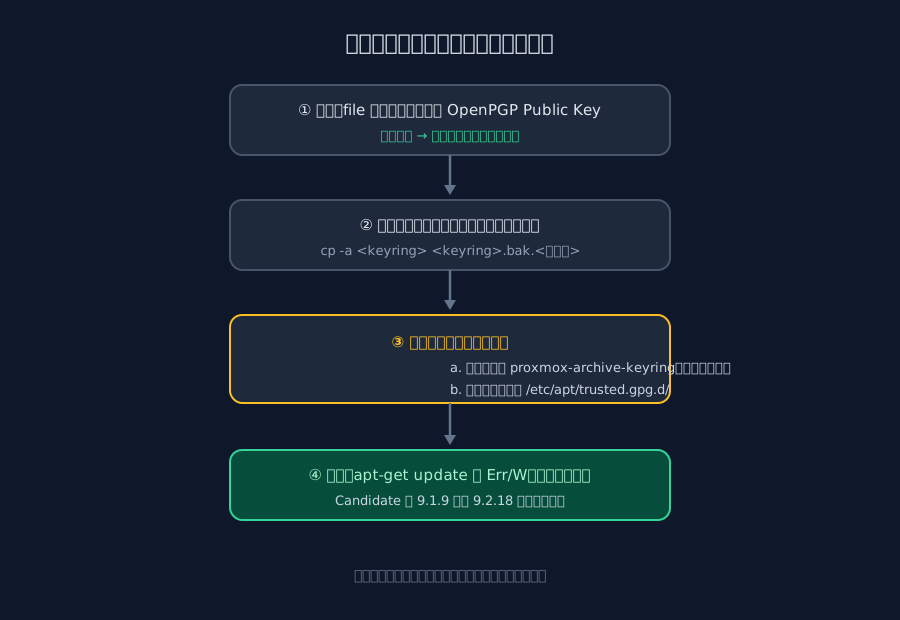
Figure 12: Script flow. Check first, back up second, fix third, verify last — idempotent and safe to re-run.
Method 1: Run It Yourself
Ubuntu 26.04 / on the PVE node itself (fix-pve-keyring.sh) — runs locally on a node, or repairs a remote one when given a root@<node> argument:
#!/usr/bin/env bash
# fix-pve-keyring.sh — repair the version ceiling caused by PVE keyring failure
# Local:   sudo bash fix-pve-keyring.sh
# Remote:  bash fix-pve-keyring.sh root@<target-node>
set -euo pipefail

PAYLOAD=$(cat <<'EOS'
set -euo pipefail
KEY="/etc/apt/trusted.gpg.d/proxmox-release-trixie.gpg"
PKG="/usr/share/keyrings/proxmox-archive-keyring.gpg"

echo "== [1/5] Version before fix =="
pveversion || true
apt-cache policy pve-manager | sed -n '1,4p'

echo "== [2/5] Keyring health check =="
if file "$KEY" 2>/dev/null | grep -q "OpenPGP Public Key"; then
  echo "OK: keyring format is healthy. If updates still fail, investigate elsewhere."
else
  echo "BAD: keyring is not a valid public key file; repair needed."
fi

echo "== [3/5] Back up the original file =="
if [ -e "$KEY" ]; then
  cp -a "$KEY" "$KEY.bak.$(date +%Y%m%d%H%M%S)"
  echo "Backed up as $KEY.bak.*"
fi

echo "== [4/5] Restore the key from the official package =="
apt-get install --reinstall -y proxmox-archive-keyring \
  || echo "Reinstall failed; falling back to the local copy of the official key"
if [ ! -s "$PKG" ]; then
  echo "Official key file $PKG not found; see the manual route."; exit 1
fi
install -m 0644 "$PKG" "$KEY"

echo "== [5/5] Refresh the index and verify =="
apt-get update
echo "== Version after fix (Candidate should be the latest) =="
apt-cache policy pve-manager | sed -n '1,4p'
EOS
)

if [ "${1:-}" != "" ]; then
  ssh "$1" 'bash -s' <<<"$PAYLOAD"
else
  bash -c "$PAYLOAD"
fi
Windows 11 (fix-pve-keyring.ps1) — uses the built-in OpenSSH client; run .\fix-pve-keyring.ps1 -Target "root@<node>" in PowerShell:
# fix-pve-keyring.ps1 — one-click remote PVE keyring repair from Windows 11
param(
  [Parameter(Mandatory = $true)][string]$Target,  # e.g. root@<target-node>
  [int]$Port = 22
)

$payload = @'
set -euo pipefail
KEY="/etc/apt/trusted.gpg.d/proxmox-release-trixie.gpg"
PKG="/usr/share/keyrings/proxmox-archive-keyring.gpg"
echo "== [1/5] Version before fix =="
pveversion || true
apt-cache policy pve-manager | sed -n '1,4p'
echo "== [2/5] Keyring health check =="
file "$KEY" 2>/dev/null | grep -q "OpenPGP Public Key" \
  && echo "OK: keyring healthy" || echo "BAD: keyring broken, repairing"
echo "== [3/5] Back up the original file =="
[ -e "$KEY" ] && cp -a "$KEY" "$KEY.bak.$(date +%Y%m%d%H%M%S)"
echo "== [4/5] Restore the key from the official package =="
apt-get install --reinstall -y proxmox-archive-keyring \
  || echo "Reinstall failed; falling back to the local copy"
[ -s "$PKG" ] || { echo "$PKG not found"; exit 1; }
install -m 0644 "$PKG" "$KEY"
echo "== [5/5] Refresh the index and verify =="
apt-get update
apt-cache policy pve-manager | sed -n '1,4p'
'@

$payload | ssh -p $Port $Target "bash -s"
if ($LASTEXITCODE -eq 0) {
  Write-Host "Fix flow finished; confirm the Candidate above is current." -ForegroundColor Green
} else {
  Write-Host "Something failed; check the SSH connection and output above." -ForegroundColor Red
}
macOS 26 (fix-pve-keyring-macos.sh) — run bash fix-pve-keyring-macos.sh root@<node> in Terminal:
#!/usr/bin/env zsh
# fix-pve-keyring-macos.sh — one-click remote PVE keyring repair from macOS
set -euo pipefail
TARGET="${1:?[usage] bash fix-pve-keyring-macos.sh root@<target-node>}"

ssh "$TARGET" 'bash -s' <<'EOS'
set -euo pipefail
KEY="/etc/apt/trusted.gpg.d/proxmox-release-trixie.gpg"
PKG="/usr/share/keyrings/proxmox-archive-keyring.gpg"
echo "== [1/5] Version before fix =="
pveversion || true
apt-cache policy pve-manager | sed -n '1,4p'
echo "== [2/5] Keyring health check =="
file "$KEY" 2>/dev/null | grep -q "OpenPGP Public Key" \
  && echo "OK: keyring healthy" || echo "BAD: keyring broken, repairing"
echo "== [3/5] Back up the original file =="
[ -e "$KEY" ] && cp -a "$KEY" "$KEY.bak.$(date +%Y%m%d%H%M%S)"
echo "== [4/5] Restore the key from the official package =="
apt-get install --reinstall -y proxmox-archive-keyring \
  || echo "Reinstall failed; falling back to the local copy"
[ -s "$PKG" ] || { echo "$PKG not found"; exit 1; }
install -m 0644 "$PKG" "$KEY"
echo "== [5/5] Refresh the index and verify =="
apt-get update
apt-cache policy pve-manager | sed -n '1,4p'
EOS
On any platform, the fix is confirmed once the final Candidate jumps to 9.2.x (or whatever is current when you read this).
Method 2: Hand It to an Agent
Even easier: give the whole problem to an AI coding agent (ZCode, Claude Code, etc.) along with SSH access. This prompt is ready to paste:
Please fix a Proxmox VE server that cannot upgrade to the latest release. The likely
root cause is a broken keyring file /etc/apt/trusted.gpg.d/proxmox-release-trixie.gpg
(e.g. it contains a PGP signature block instead of a public key), which makes apt
signature verification fail and keeps the package index stale. Steps:

1. SSH into the node (connection details are in the session context / provided separately);
2. Record the current state: run pveversion and apt-cache policy pve-manager;
3. Inspect the keyring file with `file`; if it is not "OpenPGP Public Key",
   back it up with cp -a under /root/ first;
4. Run apt-get install --reinstall -y proxmox-archive-keyring, then copy
   /usr/share/keyrings/proxmox-archive-keyring.gpg over the keyring path above
   with mode 0644; if the reinstall fails but the local file exists, copy it directly;
5. Run apt-get update and confirm there are no Err:, Missing key, or
   unsupported filetype messages;
6. Report apt-cache policy pve-manager's Candidate as evidence of the fix.

Constraints: do NOT run dist-upgrade/full-upgrade, do NOT reboot the server,
and do NOT modify repository definitions.
After the agent finishes, verify its two pieces of evidence: no Err: lines in apt-get update, and a Candidate at the current release.
7. Lessons So It Never Happens Again
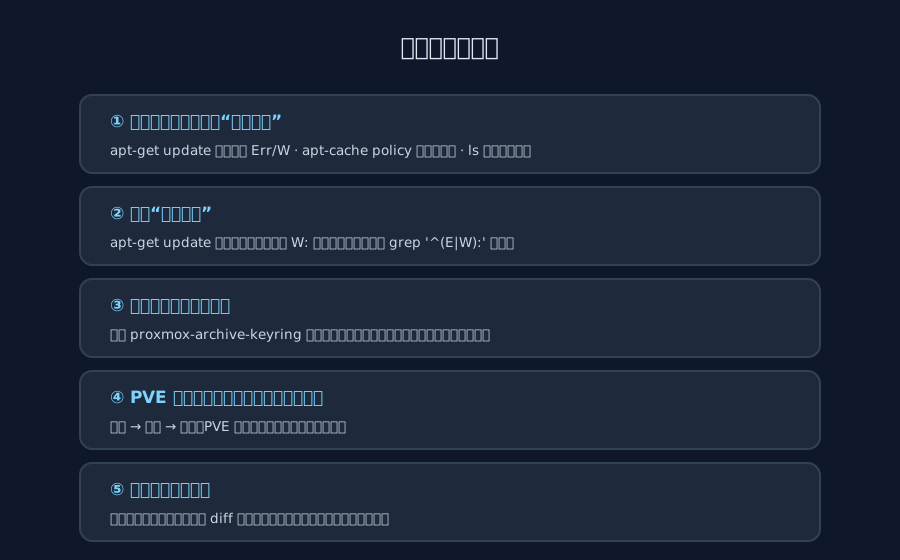
Figure 13: The prevention checklist. The core idea: never equate “no errors” with “no problems”.
The most valuable lesson here is not about GPG itself — it’s about recognizing silent degradation as a failure mode:
- Run the three-step health check before any upgrade: scan
apt-get updateoutput forErr:/W:; check the candidate withapt-cache policy <pkg>; check index freshness withls -l /var/lib/apt/lists/. Thirty seconds total, defeats 90% of “fake latest”. - Never trust exit codes alone in automation:
apt-get updateexits successfully even when repository verification fails. Assert on output instead, e.g.apt-get update 2>&1 | grep -E '^(Err|W):' && exit 1. - Source key material only from official channels: reinstalling the
proxmox-archive-keyringpackage is the most reliable route; if you must download a key by hand, always confirm withfilethat you saved anOpenPGP Public Key— this very incident started with saving the wrong file. - Let sibling nodes cross-check each other: when cluster members drift apart in versions or behavior,
difftheir repository configs and keyring directories first — the answer usually jumps out immediately.
8. Q&A
Q1: Why did the web UI look perfectly healthy while the problem sat there for four months?
A: On one hand, apt-get update only prints W: warnings when verification fails and still exits successfully, so cron-driven auto-updates never notice. On the other hand, the PVE web UI’s “Node → Updates → Repositories” panel does have a repository health check that flags signature problems — but most people (myself included, back then) rarely open that page. Add it to your routine inspection list.
Q2: Wouldn’t [trusted=yes] on the repository just make this go away?
A: That removes the stamp check entirely — whatever a man-in-the-middle injects gets installed. Never do this on production machines.
Q3: Would switching to a different mirror fix it?
A: No. The keyring is broken locally; every mirror on earth will fail verification the same way. Two nodes on the same mirror — one healthy, one stuck — is the proof.
Q4: Does 9.1 → 9.2 need the official upgrade walkthrough?
A: No. Minor-version updates within the same major release are a plain apt full-upgrade. Only major upgrades (say 8 → 9) require the official step-by-step procedure.
Q5: Should I upgrade immediately after the fix?
A: Technically you can, but it’s wiser to back up or snapshot important guests, check cluster health, and pick a maintenance window for apt full-upgrade; a reboot activates the new kernel. My node A hosts soft routers and databases, so the upgrade waited for a night window.
Q6: Does Debian 12 / PVE 8 have the same failure mode?
A: Yes, with different cosmetics. The older gpgv verifier reports NO_PUBKEY, but the mechanism is identical: broken keyring → stale index → locked version. The same repair philosophy (restore the official key, refresh the index) applies; just use the bookworm keyring filenames.
References
- Proxmox VE Wiki: Package Repositories — authoritative repository documentation, key download URLs, and the deb822 style
- Proxmox VE Wiki: Install Proxmox VE on Debian 13 Trixie
- Proxmox Forum: PVE upgrade 8 to 9 — Conflicting values set for option Signed-By — common pitfalls around key paths
- Proxmox Forum: repository … InRelease is not signed — a classic Trixie-era verification failure case