Upgrading PVE 8 to 9 Without Brute Force: Let an Agent Drive It, or Follow This Manual Checklist
Short version
Upgrading Proxmox VE 8 to 9 is not just copying a few commands. It is a major system upgrade from Debian Bookworm to Trixie, from PVE 8.4 to PVE 9.x, with kernel, storage, networking, Ceph, and HA behavior in the blast radius. The fastest practical path is to let Codex, Claude, OpenClaw, HermesAgent, or a similar Agent handle checks, command sequencing, logging, and post-upgrade verification. The human operator still needs to approve repository changes, package removals, configuration prompts, reboot timing, and recovery decisions. If you prefer doing everything by hand, the second half of this article gives a concrete manual checklist.
This article is for two groups of operators. The first group already uses Agents over SSH and wants a scoped one-sentence task for upgrading PVE. The second group prefers typing every command manually and wants a clear, ordered procedure with the main risk points called out.
All hostnames, addresses, repositories, tokens, and accounts in this article are placeholders. Replace values such as <PVE_NODE>, <BACKUP_TARGET>, and <ADMIN_CONSOLE> with your own environment. Before touching a production host, read the official Proxmox documentation and verify that your backups are restorable.
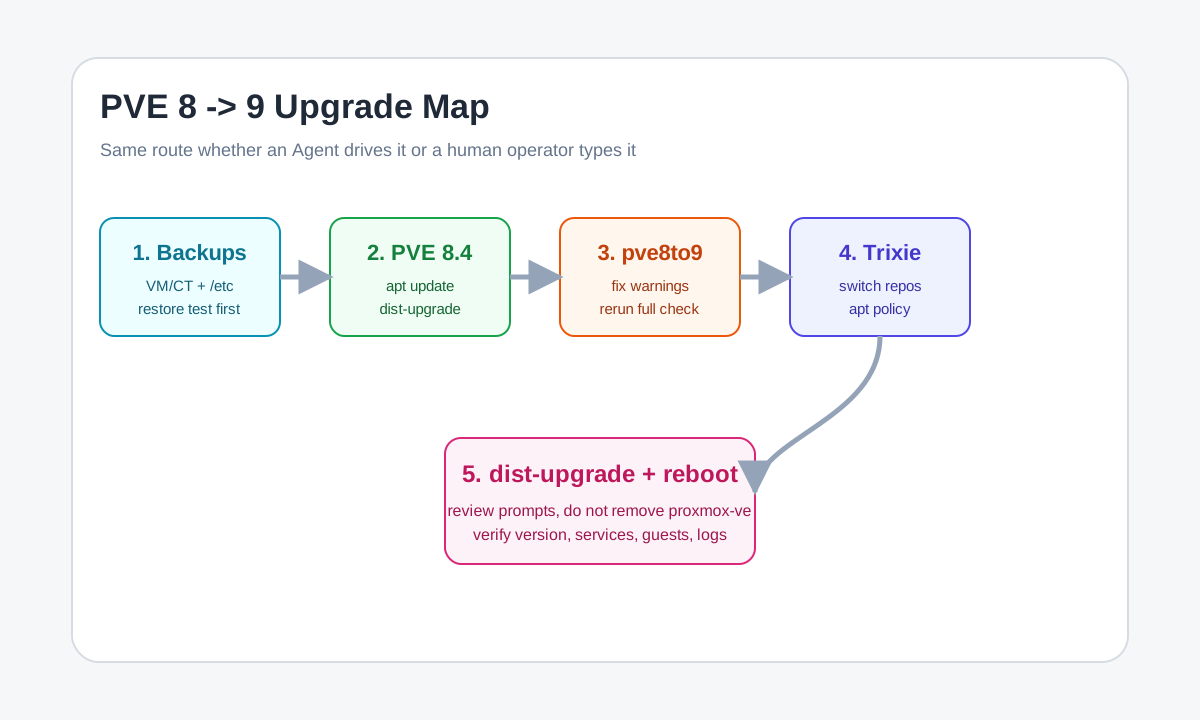
Figure 1: Whether an Agent executes it or a human types it, the route is the same: backups, latest PVE 8.4, pve8to9, Trixie repositories, dist-upgrade, reboot, and verification.
1. Why PVE 8 to 9 is not a normal minor update
PVE 8 to 9 is not a small routine update. PVE 8 is based on Debian 12 Bookworm, while PVE 9 is based on Debian 13 Trixie. The official upgrade documentation treats it as a major upgrade that requires planning, backups, testing, and manual confirmation. It can affect package repositories, the kernel, services, storage tools, networking components, Ceph versions, and some HA behavior.
On a single-node homelab, the largest risks are interruption during the upgrade, failure to boot after the reboot, and guest-specific breakage caused by old operating systems, legacy cgroup assumptions, passthrough devices, or driver compatibility. On a cluster, the risk surface grows: node order, migration direction, Ceph version, HA rule migration, and shared LVM autoactivation policy all need attention.
So the right approach is not to copy a command from a random success story. Split the upgrade into gates that can be verified:
- Backups exist and at least representative restores have been tested.
- Every node is already on the latest Proxmox VE 8.4 packages.
pve8to9 --fullhas been run, and its warnings have been understood.- apt sources have moved cleanly from
bookwormtotrixie, without old repositories mixed in. apt dist-upgradeis not trying to remove critical packages such asproxmox-ve.- After reboot, the host is running PVE 9, and services, storage, networking, and guests are healthy.
Humans can do this. Agents can do this. The technical path is the same; the difference is who types, records, checks, and reminds.
2. One prompt for an Agent: where it helps and where it does not
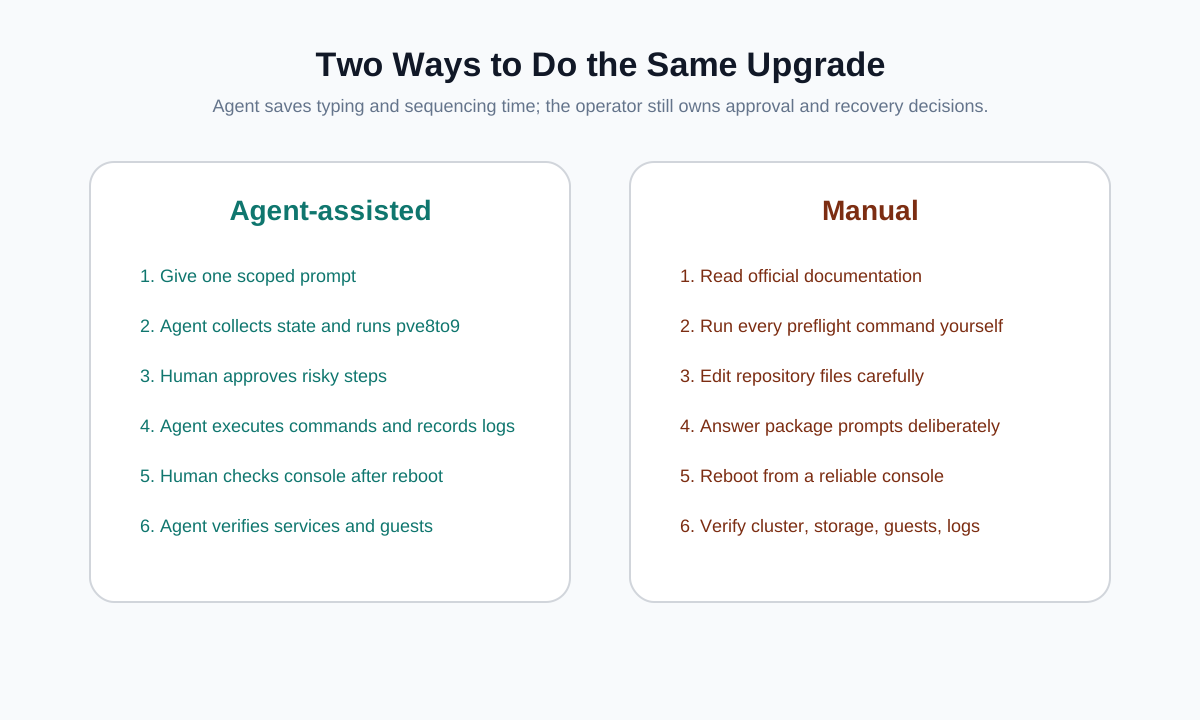
Figure 2: An Agent is good at repetitive checks, command sequencing, and logging. The operator still owns approval, maintenance windows, tested backups, and recovery decisions.
If you already use Codex, Claude, OpenClaw, HermesAgent, or another SSH-capable Agent, give it a scoped task. Do not just say “upgrade PVE for me.” State the boundaries, pause points, and acceptance checks.
You can start with this prompt:
Please SSH to <PVE_NODE> and help upgrade Proxmox VE 8 to Proxmox VE 9.
Requirements:
1. Start with read-only compatibility checks only. Do not modify the system yet. Collect pveversion, apt sources, free root space, cluster state, Ceph state, pve8to9 --full output, critical service state, and backup location.
2. Use the official Proxmox VE 8 to 9 upgrade documentation as the source of truth, then list warnings and risk points that must be handled.
3. Do not change apt repositories, run dist-upgrade, or reboot until I explicitly approve.
4. After approval, upgrade in order: latest PVE 8.4 packages, switch bookworm repositories to trixie, apt update, apt dist-upgrade.
5. If apt tries to remove proxmox-ve, pve-manager, pve-kernel, qemu-server, pve-cluster, or similar critical packages, stop immediately and report.
6. After the upgrade, reboot and verify pveversion, systemctl, journalctl, storage state, network state, VM/CT state, and the Web UI.
7. Never print real public or private IPs, tokens, passwords, secrets, or keys. The final report must be redacted and reproducible.
The goal is not to make the Agent sound smarter. The goal is to stop it from overreaching. Upgrade tasks fail in two common ways: the Agent only talks and never checks anything, or it acts too aggressively and runs through risky commands without approval. The prompt above creates four phases: read-only inspection, human approval, upgrade execution, and post-reboot verification.
If your Agent supports plans, approvals, or tool permissions, add these rules:
- Before
apt dist-upgrade, show a summary of important packages that will be installed, upgraded, or removed. - For configuration file conflicts, show the diff first and let the operator decide whether to keep the current version or install the maintainer version.
- Before rebooting, confirm that an independent management channel is available, such as physical console, IPMI, KVM, provider console, or a tested recovery path if SSH does not return.
An Agent can save real time. It can run dozens of checks, summarize pve8to9, compare repositories, log the upgrade, reconnect after reboot, and verify state. It cannot take responsibility for business impact. Maintenance windows, restore confidence, guest downtime, passthrough devices, and production dependencies remain human decisions.
3. Preparation: build the exit route first
The official PVE upgrade guide treats a valid and tested backup as a prerequisite. Do not skip that. “I have backups” often means “my backup job reported success.” Before a major upgrade, the real requirement is stronger: the backup file is on external storage, the new system can see it, and at least one representative VM or CT has been restored successfully.
Prepare these items:
- External backups for all VMs and containers, stored on PBS, NAS, remote storage, or another location outside the host being upgraded.
- A backup of key
/etccontent, especially/etc/pve,/etc/network/interfaces,/etc/resolv.conf, and authentication or user-related customizations. - Snapshots of
pveversion -v,apt policy,pvesm status,qm list,pct list,ip addr, andip route. - For clusters, record
pvecm status,ha-manager status, Ceph health, and the node upgrade order. - If you use GPU passthrough, HBA passthrough, vGPU, DKMS drivers, third-party apt repositories, or vendor tools, confirm compatibility with PVE 9 and Debian Trixie before the maintenance window.
Also check root filesystem space. The official guide requires at least 5 GB free on the root mount point, with more than 10 GB preferred. If the host has accumulated old kernels, logs, and package caches, running out of space in the middle of a major upgrade is a bad place to be.
At minimum, check:
df -h /
apt autoremove --dry-run
journalctl --disk-usage
Do not decide to delete business data during the upgrade window. If old packages, old logs, and package cache cleanup are enough, avoid touching VM disks and backup directories.
4. Manual upgrade overview
The manual route should be executed from a physical console, IPMI/KVM, provider console, or a tmux/screen session. Avoid using the Proxmox Web UI virtual console to upgrade the host itself, because the Web stack may be restarted during the upgrade.
The whole flow looks like this:
tmux new -s pve-upgrade

# Record current state
pveversion -v
apt update
apt dist-upgrade
pveversion

# Pre-upgrade checker
pve8to9 --full

# Fix warnings and rerun
pve8to9 --full

# Switch apt sources to trixie
# apt update
# apt dist-upgrade

# After package upgrade
pve8to9 --full
reboot
That is only the bird’s-eye view. The next sections break it down.
5. Step one: update to the latest PVE 8.4 first
The official path requires all nodes to be on the latest Proxmox VE 8.4 packages first. Do not switch an old PVE 8.x host directly to Trixie repositories.
apt update
apt dist-upgrade
pveversion
pveversion should report at least 8.4.1 or newer. Use dist-upgrade, not a plain upgrade, because Proxmox kernel and meta-package dependencies may require package additions or replacements. If this step requires a reboot, reboot into the latest PVE 8 kernel before starting the PVE 9 phase.
For clusters, validate the flow on a less critical node first. Migrate VMs and containers that must keep running away from the node being upgraded. The official documentation notes that migration from older PVE to newer PVE generally works, while depending on migration from newer back to older is not the supported direction.
6. Step two: run pve8to9 --full repeatedly
pve8to9 is the upgrade checker included in recent PVE 8.4 packages. It reports issues and does not automatically change the system. Run the full checker at least once before upgrading:
pve8to9 --full
Do not blindly delete or change everything listed as a warning. Focus on the meaning. Common categories include:
- apt sources are still inconsistent, or third-party repositories do not have Trixie support.
- Ceph is not on the required version. Hyper-converged Ceph environments need Ceph 19.2 Squid before the PVE 9 upgrade.
- LVM/LVM-thin guest volumes may need autoactivation migration.
- The
systemd-bootmeta-package may need action depending on the installation method and checker output. - Very old containers depending on legacy cgroup v1 need migration, because PVE 9 no longer supports legacy cgroup v1.
- NVIDIA vGPU, PCI passthrough, Veeam backup, and similar specialized setups need extra compatibility checks.
After each fix, run it again:
pve8to9 --full
This is where an Agent is useful. It can classify checker output into “must fix,” “acceptable,” and “requires human decision.” But the final decision still depends on your actual environment.
7. Step three: switch Debian and Proxmox apt sources to Trixie
Only switch repositories after the host is on the latest PVE 8.4 packages and the important pve8to9 --full issues have been handled. The official direction is to update Debian and PVE repository entries from bookworm to trixie.
For traditional .list files:
cp -a /etc/apt/sources.list /etc/apt/sources.list.bak.$(date +%Y%m%d%H%M%S)
cp -a /etc/apt/sources.list.d /etc/apt/sources.list.d.bak.$(date +%Y%m%d%H%M%S)

sed -i 's/bookworm/trixie/g' /etc/apt/sources.list
sed -i 's/bookworm/trixie/g' /etc/apt/sources.list.d/pve-enterprise.list
If you use the no-subscription repository, a deb822 .sources file is clearer. A PVE no-subscription source can look like this:
Types: deb
URIs: http://download.proxmox.com/debian/pve
Suites: trixie
Components: pve-no-subscription
Signed-By: /usr/share/keyrings/proxmox-archive-keyring.gpg
If you use Ceph, switch the Ceph repository to the matching Squid/Trixie repository as well. Without a subscription, use the ceph-squid no-subscription repository. After changing sources, do not upgrade immediately. Check first:
apt update
apt policy
grep -R "bookworm" /etc/apt/sources.list /etc/apt/sources.list.d || true
The rule is simple: do not mix old and new repositories. Bookworm sources, Trixie sources, and unsupported third-party repositories in the same plan can make apt propose removing critical packages. If apt update fails, fix repositories first.
8. Step four: run apt dist-upgrade
Once repositories are clean:
apt dist-upgrade
Read the apt plan carefully. Pay special attention to whether it wants to remove proxmox-ve, pve-manager, pve-cluster, qemu-server, pve-kernel, or other critical components. If the PVE apt hook warns that proxmox-ve is being removed, stop and go back to repository and package conflict checks.
During the upgrade, apt may ask what to do with changed configuration files. The official guide calls out several common files:
/etc/issue: usually cosmetic login text; keeping the current version is normally safe./etc/lvm/lvm.conf: if you did not customize it, installing the maintainer version is often the better choice./etc/ssh/sshd_config: if changes are only comments or deprecated option replacements, the maintainer version may be fine; if you customized login policy, inspect the diff./etc/default/grub: be careful if you added kernel parameters; keeping the current file and merging manually is often safer./etc/chrony/chrony.conf: if you have custom time sources, inspect the diff and consider moving custom entries intoconf.dorsources.d.
Do not treat these prompts as “just press Enter.” Many failed upgrades do not fail inside apt itself. They fail after reboot because configuration was overwritten, bootloader state was wrong, networking changed, or drivers were incompatible.
9. Step five: check, reboot, check again
After apt dist-upgrade returns successfully, the job is not finished. First run:
pve8to9 --full
pveversion -v
systemctl --failed
Then reboot:
reboot
After the host returns, connect through your independent console or SSH and verify:
pveversion -v
uname -a
systemctl --failed
journalctl -p warning..alert -b --no-pager | tail -n 100
pvesm status
qm list
pct list
Force-refresh the Web UI. After a major frontend upgrade, browser cache can create misleading UI errors.
For clusters, also check:
pvecm status
ha-manager status
After all nodes are on PVE 9, observe HA group to HA rule migration. If HA behaves strangely, check pve-ha-crm logs on the active CRM node first.
10. Common traps: the command is not the dangerous part
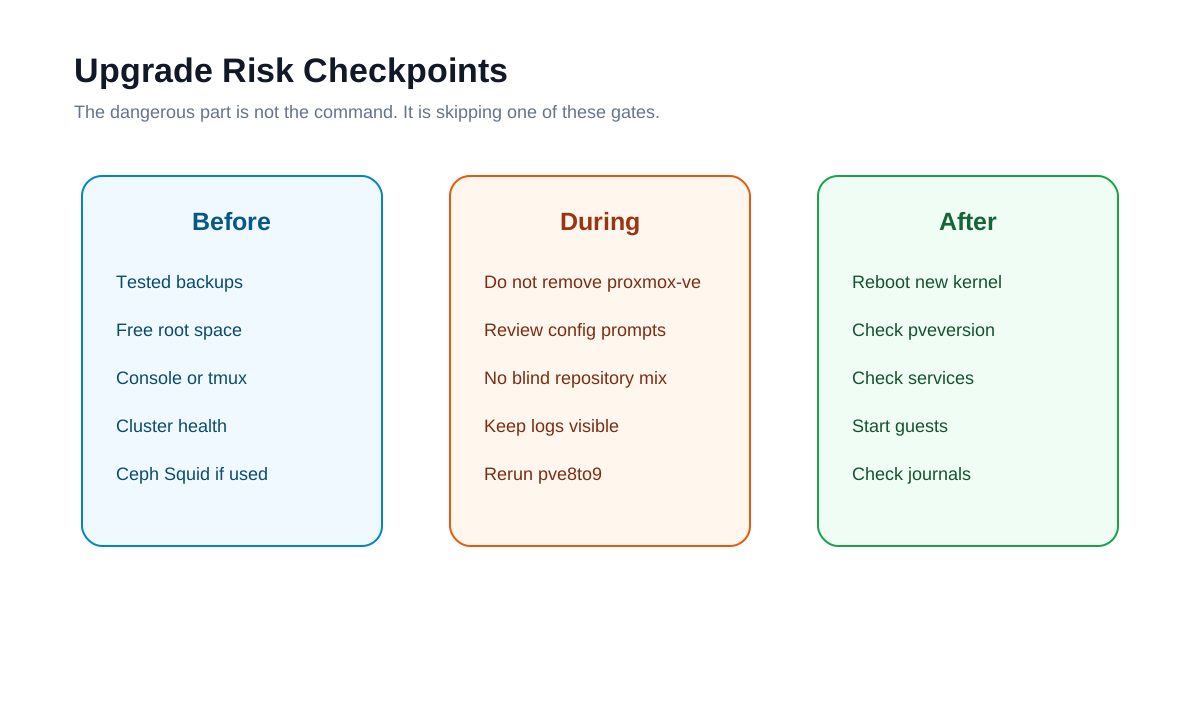
Figure 3: The dangerous failures usually come from skipping a gate before, during, or after the upgrade.
Several traps deserve explicit mention.
First, untested backups. A successful backup job is not the same as a restorable backup. Restore at least one non-critical VM or CT before the maintenance window.
Second, wrong Ceph order. In hyper-converged Ceph setups, do not upgrade PVE 9 while Ceph is still on an unsupported older major version. Follow the official Ceph Squid path first.
Third, third-party repositories. Docker, monitoring tools, drivers, vendor tools, and backports can become conflict sources during the Trixie upgrade. List them before the upgrade, disable what you can, and only re-enable what is known to support Trixie.
Fourth, ignoring package removals. apt dist-upgrade is powerful enough to remove packages to satisfy dependencies. If it plans to remove critical Proxmox meta-packages, do not proceed.
Fifth, no independent console. SSH is common, but a major upgrade should not depend only on SSH. Network services, sshd configuration, kernel behavior, and NIC naming can change. Recovery is much harder without an out-of-band path.
Sixth, old containers. PVE 9 no longer supports legacy cgroup v1. Very old system containers, especially those relying on systemd 230 or older, should be migrated or replaced before the upgrade.
Seventh, passthrough, vGPU, and backup tooling. PVE 9 uses a newer kernel. Drivers and backup software must be compatible. NVIDIA vGPU, PCI passthrough, and Veeam-style workflows need more than a simple “host booted” check.
11. Acceptance checklist for Agent-run upgrades
If an Agent performs the work, do not accept “upgrade completed” as evidence. Ask for redacted proof:
- Before and after
pveversion -vsummary. - Final
pve8to9 --fullsummary, with no unhandled critical blockers. - Evidence that apt sources no longer contain
bookworm. systemctl --failedresult.- Running kernel version and boot time.
- Storage state and VM/CT state.
- Cluster and HA state, if applicable.
- A list of all human decision points: configuration file choices, package removal prompts, and reboot timing.
If the Agent cannot provide these details and only says it “should be fine,” treat the task as unfinished. Operations work is evidence-driven.
12. Minimal manual command checklist
Here is a compact checklist suitable for a maintenance note. It does not replace the official documentation; it helps you execute in order.
# 0. Prefer tmux / screen or an independent console
tmux new -s pve8to9

# 1. Current state
pveversion -v
df -h /
pvesm status
qm list
pct list

# 2. Update to latest PVE 8.4
apt update
apt dist-upgrade
pveversion

# 3. Pre-upgrade checker
pve8to9 --full

# 4. Fix warnings, then repeat
pve8to9 --full

# 5. Back up apt sources and switch bookworm -> trixie
cp -a /etc/apt/sources.list /etc/apt/sources.list.bak.$(date +%Y%m%d%H%M%S)
cp -a /etc/apt/sources.list.d /etc/apt/sources.list.d.bak.$(date +%Y%m%d%H%M%S)
sed -i 's/bookworm/trixie/g' /etc/apt/sources.list
sed -i 's/bookworm/trixie/g' /etc/apt/sources.list.d/pve-enterprise.list

# 6. Check repositories
apt update
apt policy
grep -R "bookworm" /etc/apt/sources.list /etc/apt/sources.list.d || true

# 7. Upgrade
apt dist-upgrade

# 8. Pre-reboot checks
pve8to9 --full
systemctl --failed

# 9. Reboot
reboot

# 10. Post-reboot verification
pveversion -v
uname -a
systemctl --failed
pvesm status
qm list
pct list
journalctl -p warning..alert -b --no-pager | tail -n 100
If you use no-subscription repositories, Ceph, enterprise repositories, or third-party sources, rewrite the repository section for your setup. Do not treat the sample source configuration as universal.
13. Closing: let the Agent save time, but keep the judgment
PVE 8 to 9 is a good candidate for Agent assistance because it has many steps, many checks, lots of logs, and many places where details are easy to miss. On a multi-node cluster, an Agent can make repeated inspection and post-upgrade verification much less tedious.
But this upgrade should not be fully unattended. The important question is not who types the command. The important question is whether each gate has evidence: restorable backups, handled pve8to9 output, clean apt sources, safe package plan, and healthy services after reboot. Get that evidence first, then continue.
Sources
- Proxmox official documentation: Upgrade from 8 to 9, https://pve.proxmox.com/wiki/Upgrade_from_8_to_9
- Proxmox official Roadmap / PVE 9.0 known issues, https://pve.proxmox.com/wiki/Roadmap
- Proxmox official documentation: Ceph Reef to Squid, https://pve.proxmox.com/wiki/Ceph_Reef_to_Squid
- Debian official documentation: Debian 13 Trixie Release Notes, https://www.debian.org/releases/trixie/release-notes