Stop Running rsync Blindly: Preview Differences Before a Safe Incremental Sync
The short answer
The best rsync habit is not memorizing more switches. It is separating every risky job into two stages: generate a dry-run plan first, review it, and only then perform the real incremental sync. Deletion should be a separate, explicit permission rather than a hidden default.
The common
rsync -n -avz --delete --out-format="%n"pattern can list paths that may change, but%nonly preserves the name. A safer machine-readable plan uses--itemize-changestogether with%i, so each line identifies an addition, update, deletion, or metadata change.
Why previewing differences matters
Most sync jobs begin innocently: copy a local directory to a server, move photos to a NAS, or publish build artifacts to another machine. With only a few files, a direct rsync -av feels harmless.
The directory grows, and the command eventually becomes a scheduled job. The destination may now contain valuable files that never existed at the source. Adding --delete changes the meaning from “copy my files” to “make the destination mirror the source and remove everything extra.”
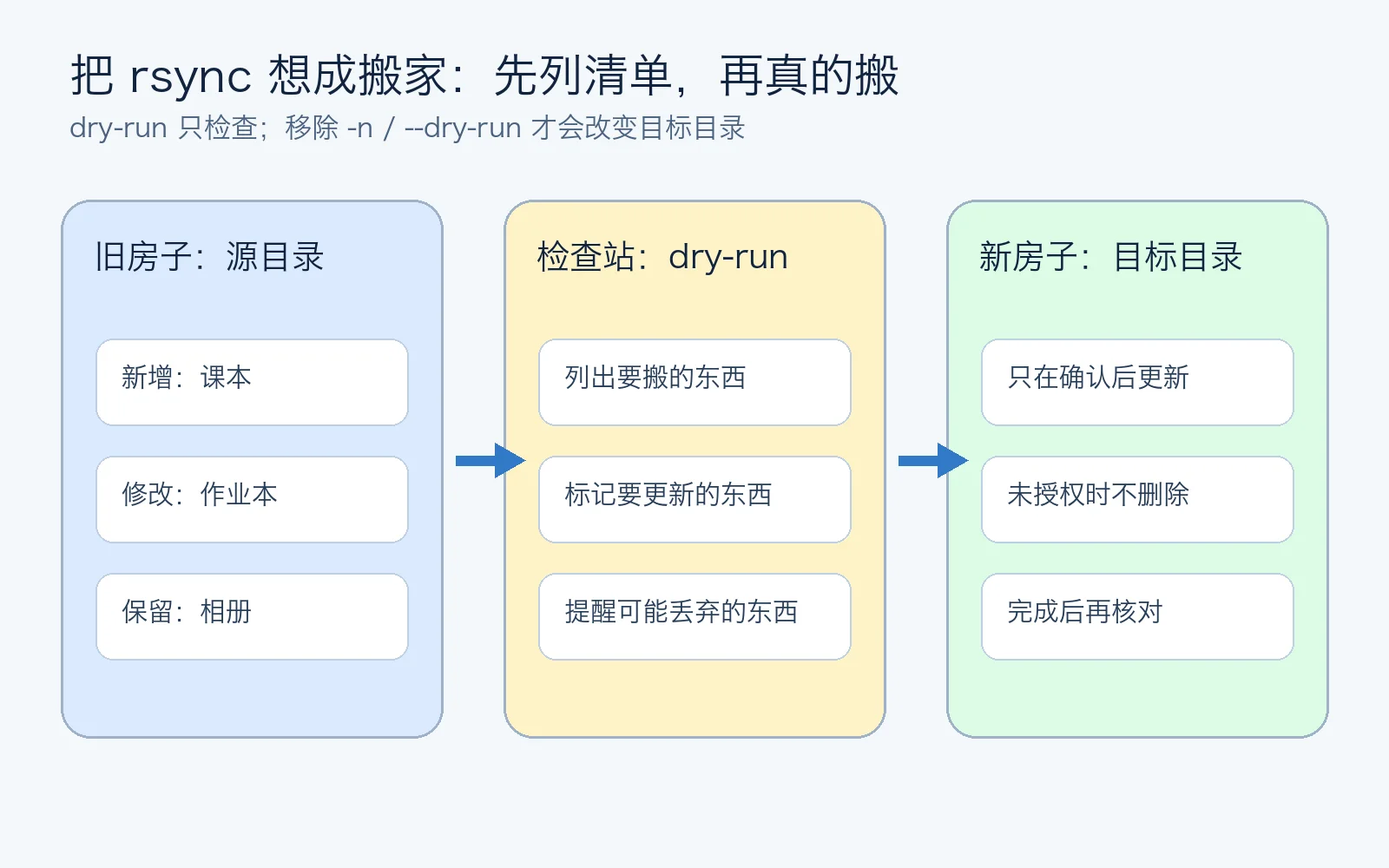
Think of rsync as a moving company. A normal move delivers boxes from the old house. With --delete, the crew may also discard anything in the new house that is absent from the old-house inventory. That can be exactly what a mirror requires, but only when you intend it.
Starting from the common script
The original idea is reasonable:
DIFF_FILE="/tmp/rsync_diff.txt"
rsync -n -avz --delete --out-format="%n" $LOCAL_DIR $REMOTE_DIR > "$DIFF_FILE"
grep -v '/$' "$DIFF_FILE" | grep -v 'deleting' > "${DIFF_FILE}_filtered"
It previews the operation and stores the output, but several details become dangerous in automation:
- Unquoted variables can be split or expanded by the shell.
%nloses the reason a path is changing.- Filtering out
deletinghides the lines that deserve the most scrutiny. - A trailing slash on the source changes whether rsync copies the directory itself or its contents.
-zcan help on constrained links, but may only waste CPU for local transfers or already-compressed media.
A real isolated experiment
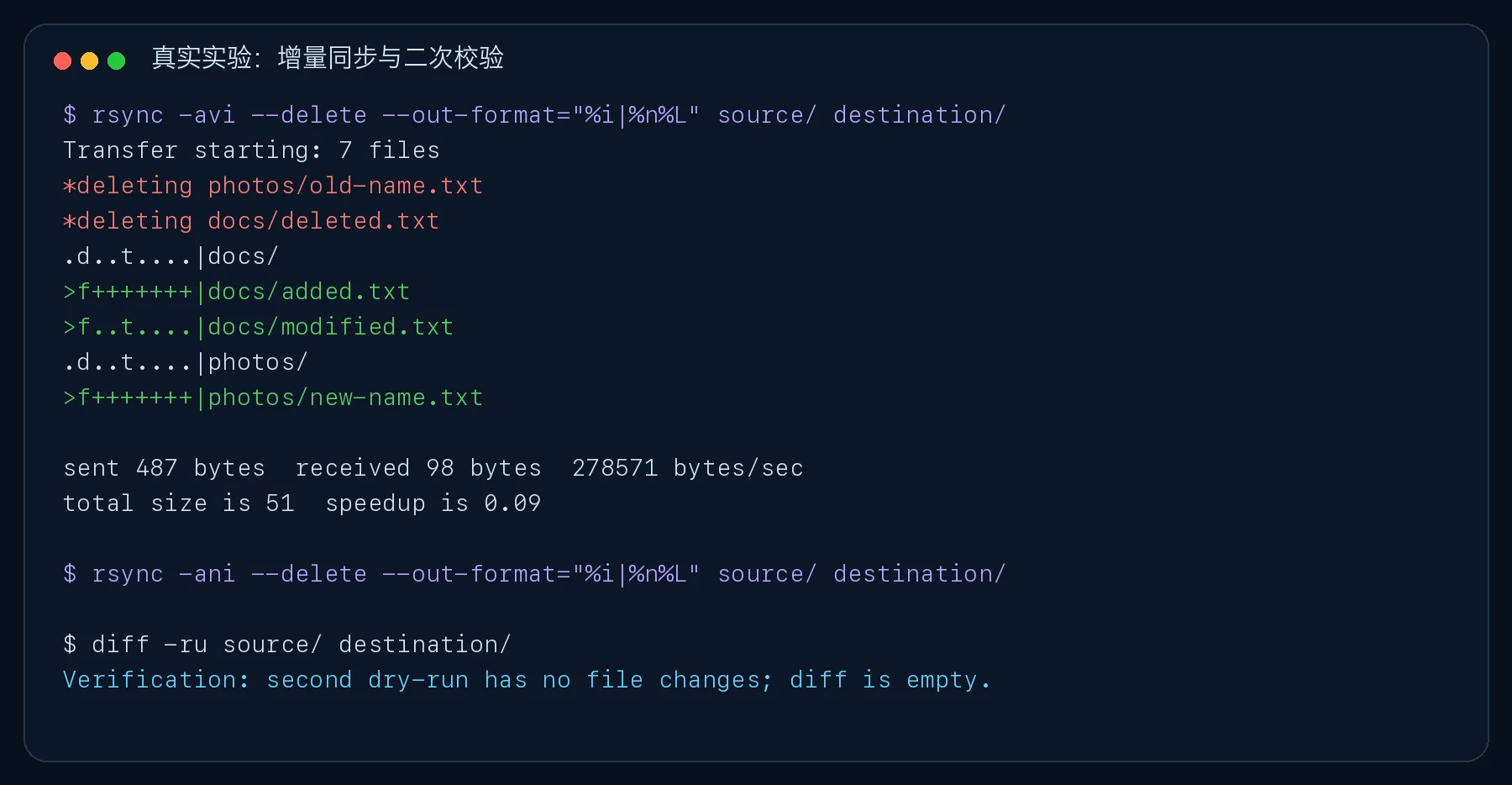
I created temporary source and destination trees containing an unchanged file, a new file, a modified file, destination-only files, and a rename-like pair. No production data was involved.
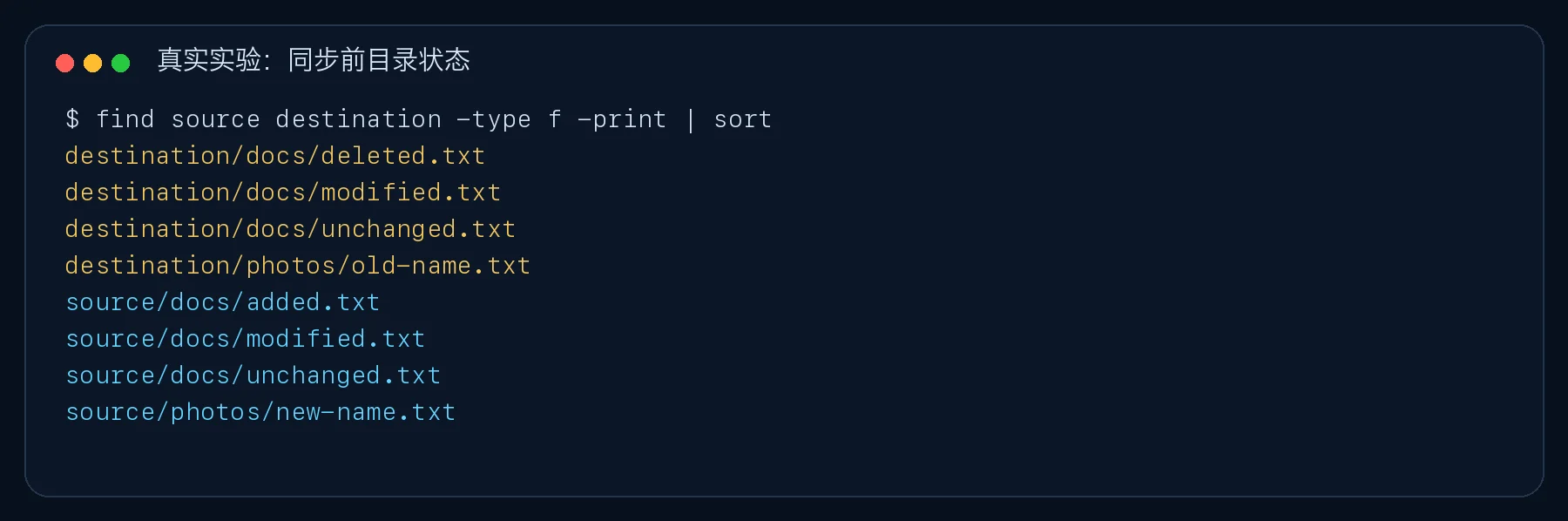
The name-only dry run identified paths, but not whether each ordinary file was new or updated. That is insufficient when another script, monitoring system, or agent must assess the result.
Build a structured plan with itemized changes
The improved preview is:
rsync -ani --delete \
  --out-format="%i|%n%L" \
  "source/" "destination/"
Its output is self-describing:
*deleting photos/old-name.txt
*deleting docs/deleted.txt
>f+++++++|docs/added.txt
>f..t....|docs/modified.txt
>f+++++++|photos/new-name.txt
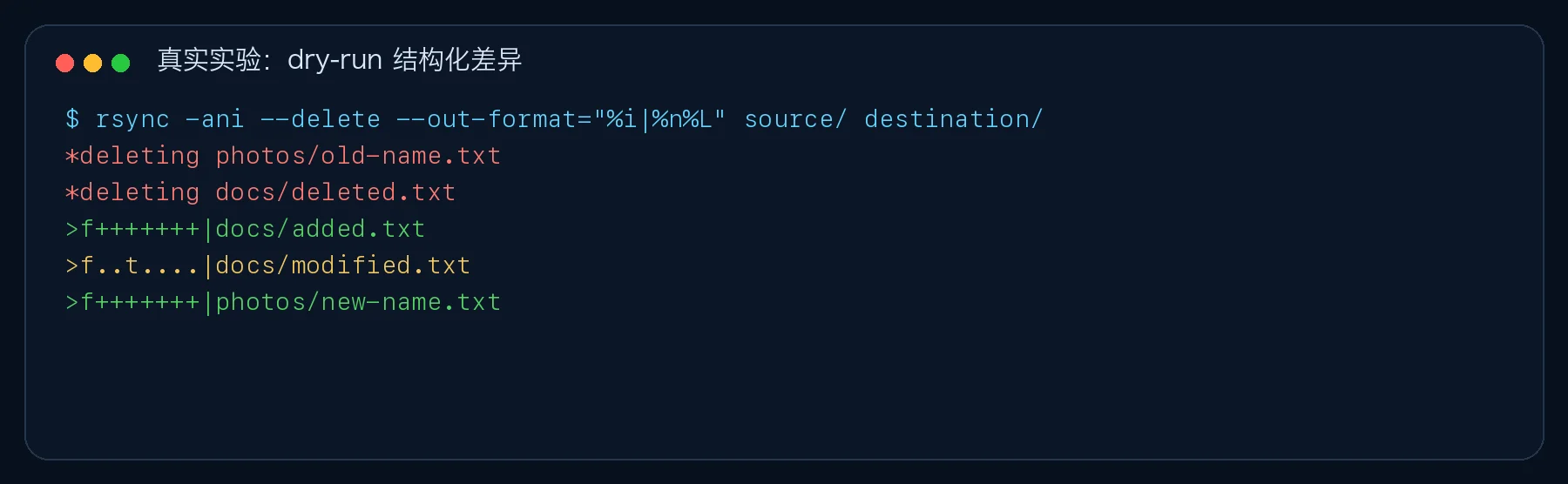
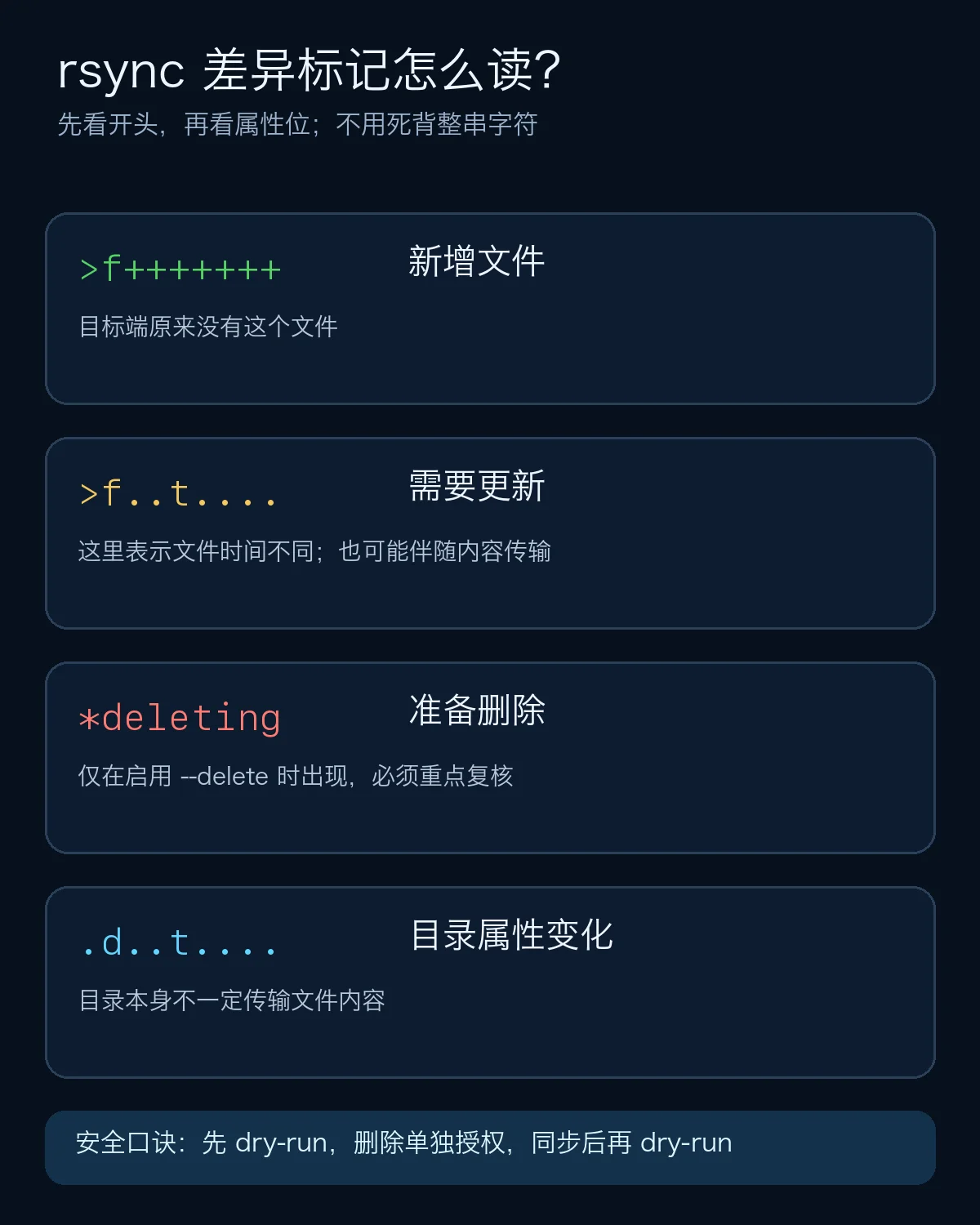
The most useful first-level interpretations are:
>f+++++++: a new regular file will be sent to the destination.>f..t....: the file requires an update; this example at least differs in modification time.*deleting: a destination path will be removed when deletion is enabled..d..t....: directory metadata differs; this is not an ordinary file transfer.
You do not need to memorize every position immediately. Read the major action first, then inspect individual attribute positions when a case needs deeper diagnosis.
How rsync performs incremental work
Rsync does not blindly recopy every file. Its normal quick check compares metadata such as size and modification time, then transfers files that require work. Remote rsync operation can also reduce the amount of data crossing the network.
--checksum forces content reads and can detect files whose size and timestamp match despite different data. That is useful for valuable migration validation, but it may be expensive across large trees because both sides must read every file. Use the default quick check for routine mirrors and stronger checks for higher-risk validation.
Keep deletion behind an explicit gate
The downloadable scripts disable deletion by default. To preview mirror deletion on Ubuntu, explicitly opt in:
ALLOW_DELETE=1 ./rsync-safe-sync-ubuntu.sh \
  "/data/source/" \
  "backup-user@<destination>:/data/archive/" \
  --plan
After reviewing every deletion, run --apply. The script generates the plan again, requires the exact word APPLY, performs the sync, and runs one more dry-run. In the isolated experiment, the second preview and recursive diff were empty.
One-click scripts for three operating systems
All three versions follow the same model: plan first, no deletion by default, explicit confirmation, and post-sync verification.
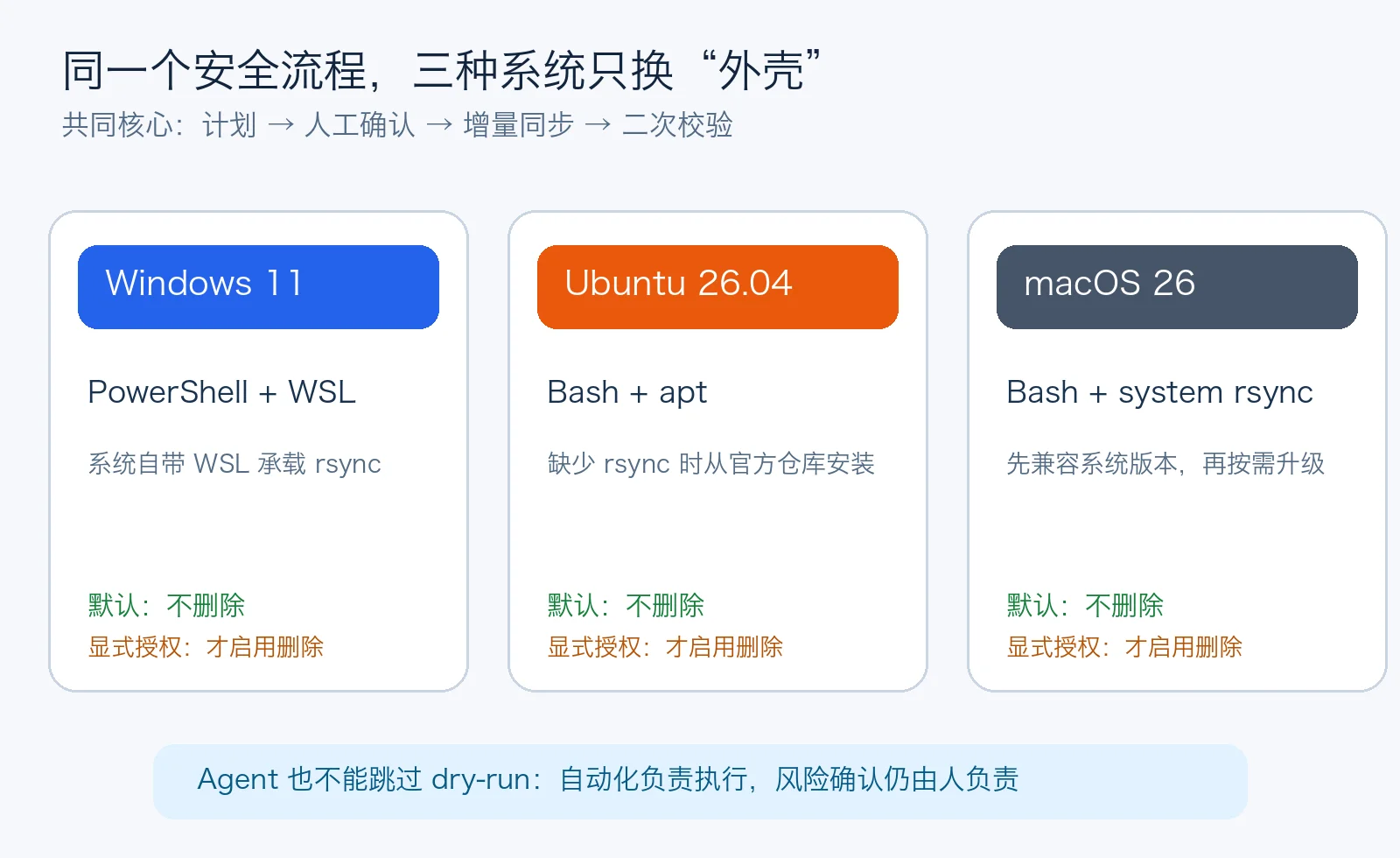
Windows 11
The PowerShell wrapper uses Windows Subsystem for Linux, avoiding a third-party synchronization service. Install WSL from an elevated terminal if required:
wsl --install
powershell -ExecutionPolicy Bypass -File .\rsync-safe-sync-windows11.ps1 `
  -Source "/mnt/c/Data/source/" `
  -Destination "backup-user@<destination>:/data/archive/" `
  -Mode Plan
Use -Mode Apply only after review, and add -AllowDelete only for intentional mirror semantics.
Ubuntu 26.04
chmod +x rsync-safe-sync-ubuntu.sh
./rsync-safe-sync-ubuntu.sh "/data/source/" \
  "backup-user@<destination>:/data/archive/" --plan
If rsync is missing, the script installs rsync and the OpenSSH client from Ubuntu’s official repositories.
macOS 26
chmod +x rsync-safe-sync-macos.sh
./rsync-safe-sync-macos.sh "$HOME/Documents/source/" \
  "backup-user@<destination>:/data/archive/" --plan
The rsync bundled with macOS may be older, so test the required options in your environment. Upgrade through a trusted package manager only when the job genuinely requires a newer feature.
Human-controlled automation
Human-controlled automation lets the script do repetitive calculation and transfer while a person owns the risky decision:
- Confirm source, destination, and trailing-slash semantics.
- Generate and save a timestamped plan.
- Review every
*deletingline separately. - Stop if the number of changes is unexpectedly large.
- Run apply mode and provide the explicit confirmation word.
- Review the second dry run; use hashes or
difffor high-value samples.
It resembles aircraft automation: software handles repetitive control, while a human still evaluates the instruments before a critical action.
Agent-assisted configuration
An agent can prepare configuration, run the preview, classify changes, and summarize risk. It should not silently grant itself permission to delete data. A useful prompt is:
Configure an incremental rsync job using only local tools, SSH, and official OS repositories.
The first run must be dry-run only.
Use itemized, structured output.
Disable deletion by default and list every proposed deletion separately.
Wait for my exact APPLY response before changing files.
After the real sync, run another dry-run and report whether it is empty.
Redact full addresses, account names, hostnames, and secrets from logs.
Agents reduce repetition; they do not own the decision to destroy destination data. A trustworthy workflow remains interruptible, reviewable, and auditable.
A safer minimal comparison script
#!/usr/bin/env bash
set -euo pipefail

: "${LOCAL_DIR:?Set LOCAL_DIR}"
: "${REMOTE_DIR:?Set REMOTE_DIR}"

DIFF_FILE="${DIFF_FILE:-/tmp/rsync-diff-$(date +%Y%m%d-%H%M%S).txt}"
LOCAL_DIR="${LOCAL_DIR%/}/"

rsync --dry-run --archive --itemize-changes \
  --out-format='%i|%n%L' \
  "$LOCAL_DIR" "$REMOTE_DIR" \
  | tee "$DIFF_FILE"

echo "Plan saved to $DIFF_FILE"
If mirror deletion is required, add --delete during review and highlight deletion lines instead of hiding them:
grep '^\*deleting ' "$DIFF_FILE" || true
Q&A
Does dry-run guarantee an identical apply result?
No. Files, permissions, mounts, free space, or network conditions can change between preview and execution. Generate the plan again immediately before apply and verify afterward.
Does --delete remove source files?
It normally removes destination paths that are absent from the source. Reversing source and destination can still be disastrous, so always print and review the direction.
Why does a rename appear as a deletion and an addition?
Rsync primarily evaluates paths and file states. When one path disappears and another appears, an ordinary run may represent the operation as removing the old path and transferring the new one.
Why is the second dry-run not completely empty?
Directory times, permissions, ownership, extended attributes, filesystem capabilities, or rsync versions may differ. Read the itemized attribute positions before adding privileged metadata options merely to make the output blank.
Can this run unattended from cron or Task Scheduler?
Yes, but observe several plan runs first. Unattended jobs should disable deletion by default, use locking and timeouts, retain logs, and alert on failure. Snapshot or version the destination before unattended deletion.
Is rsync itself a backup system?
Rsync is a synchronization tool. A mirror can reproduce accidental deletion or ransomware damage. Important data also needs history: snapshots, versioned backups, offline copies, or immutable storage.
Final safety checklist
- Confirm direction and source trailing-slash semantics.
- Quote every path variable.
- Use itemized changes instead of a name-only list.
- Keep deletion disabled unless explicitly reviewed.
- Minimize the delay between preview and apply.
- Run another dry-run afterward and verify valuable samples by content.
- Redact internal addresses, hostnames, accounts, and secrets from automation logs.
- Keep historical backups in addition to a synchronized mirror.
A safe incremental sync is not a clever one-liner. It is an explainable, interruptible, and verifiable process. Rsync moves the files efficiently; dry-run exposes the plan; the final risk decision remains yours.