Free ISP IPTV Gathering Dust for Two Years? One Virtual Cable Put 112 Live Channels on Every Screen at Home (Shanghai Telecom, Tested)
The short version
Your fiber modem (ONT) is very likely already passing the IPTV network down the cable. Nobody is picking it up. That was exactly my case: no ONT changes, no set-top-box credentials, no changes to the main router. I hot-plugged one VLAN 85 tagged virtual NIC into my side router on Proxmox VE, installed a small service called rtp2httpd, and every phone, TV and laptop at home can now watch the 112 live channels of Shanghai Telecom IPTV, with the first frame after a channel switch arriving in about 0.04 seconds.
I will explain VLANs, multicast and FCC with everyday analogies (parcel sorting, radio stations, catching a bus by taxi), show the evidence and real screenshots for each step, and finish with one-click scripts for Windows 11 / Ubuntu 26.04 / macOS 27 (tested for both apply and rollback), plus a guard-railed playbook for handing the job to an AI agent.
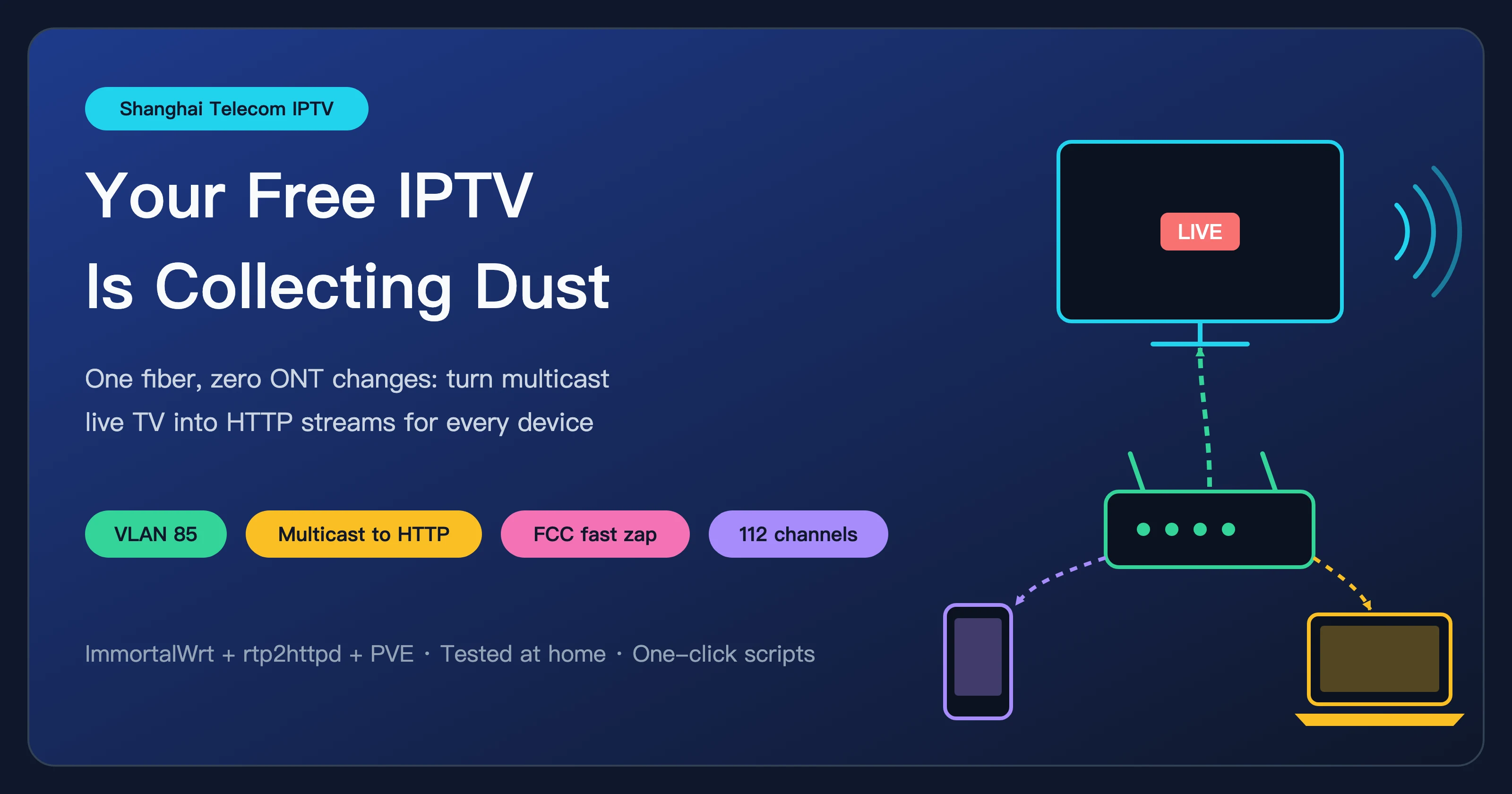
Figure 1: Cover made for this post. One fiber comes in; the side router acts as a relay and turns the ISP’s multicast TV into HTTP streams every device can play.
1. Background: a TV service I pay for every month, collecting dust
When I signed up for Shanghai Telecom broadband, the shop also enabled IPTV and handed me a set-top box. After a few days the box went into a drawer: clunky remote, slow boot, and it only works on the living-room TV.
My home network is a typical home-lab setup:
- the ONT is in bridge mode and only converts light to Ethernet;
- a small server runs Proxmox VE (PVE) with several virtual machines;
- one VM is the iKuai main router, which does the PPPoE dial-up;
- another VM is an ImmortalWrt side router that handles DNS and traffic policies, and it is the default gateway for devices at home.
The wish was simple: since IPTV is already paid for, can phones, tablets, TV boxes and laptops watch it directly, without the set-top box? Ideally without touching the existing internet path, and with a one-click undo.
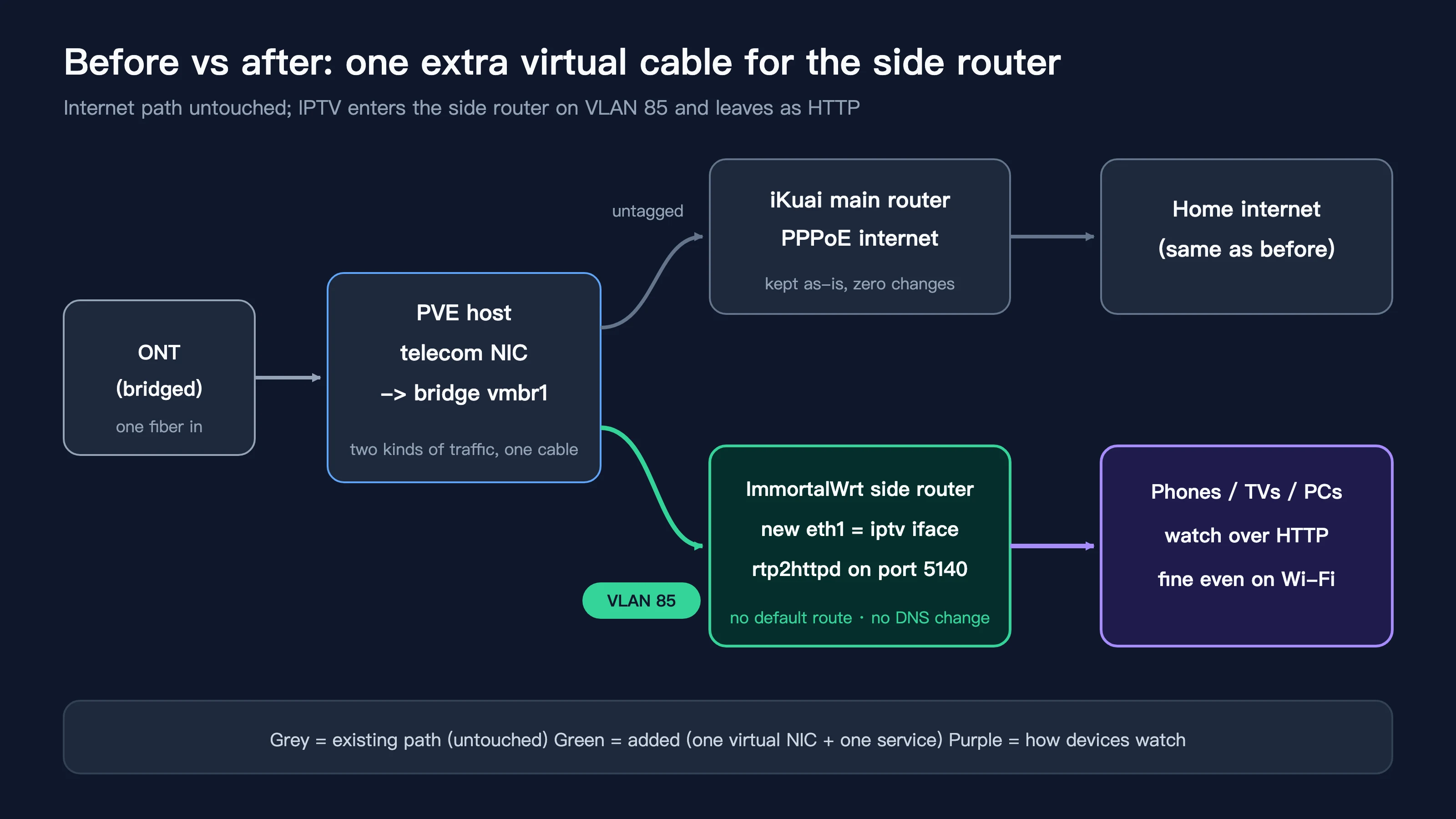
Figure 2: Topology before and after. Grey is the existing internet path, untouched; green is the new virtual NIC and service; purple is how devices at home finally watch.
2. Symptoms: I wanted to use it but had no idea where to start
Before touching anything, the confusion was bigger than the technical problem:
- Guides online disagree: change the VLAN on the ONT; capture DHCP option 60/125 from the set-top box for authentication; get the ONT super-admin password first; or buy an IPTV-capable switch.
- VLAN IDs disagree too: some say Shanghai Telecom IPTV is on 85, some say multicast is on 51, and some posts mention 45.
- iKuai has an IGMP proxy, but my iKuai 3.7 has no udpxy, and dumping raw multicast into the LAN can flood switches and Wi-Fi that lack IGMP snooping.
- I did not even know whether the ONT was delivering IPTV on my cable at all.
So I set a rule: collect evidence before acting; stay read-only whenever possible; every change must be reversible.
3. The concepts, explained with three everyday analogies
1) VLAN: one road, several lanes
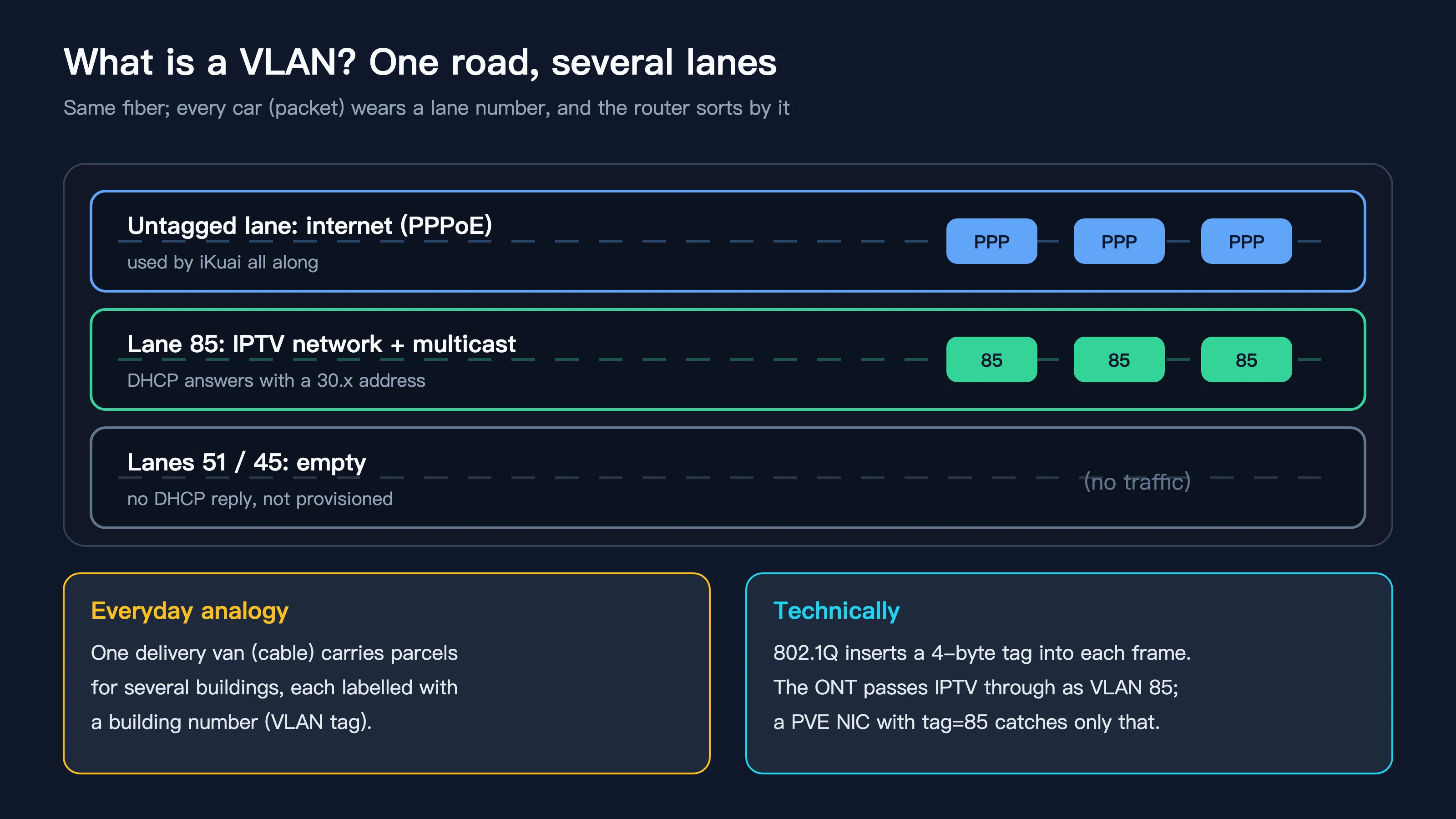
Figure 3: Several “lanes” of traffic share one fiber. In my measurements the untagged lane carries internet, lane 85 carries the IPTV network and live multicast, and lanes 51 and 45 are empty.
Picture a delivery van (the cable) carrying parcels for several buildings in one trip. Each parcel is labelled with a building number (the VLAN tag), and the gatekeeper sorts them at the entrance so nothing ends up in the wrong building.
Technically, the 802.1Q standard inserts a 4-byte tag into each Ethernet frame, carrying a number from 0 to 4095. The ONT separates internet and IPTV traffic with different numbers and sends both out of the same port. Any device that “knows building 85” can pick up the IPTV parcels on their own.
2) Multicast: a phone call versus a radio station
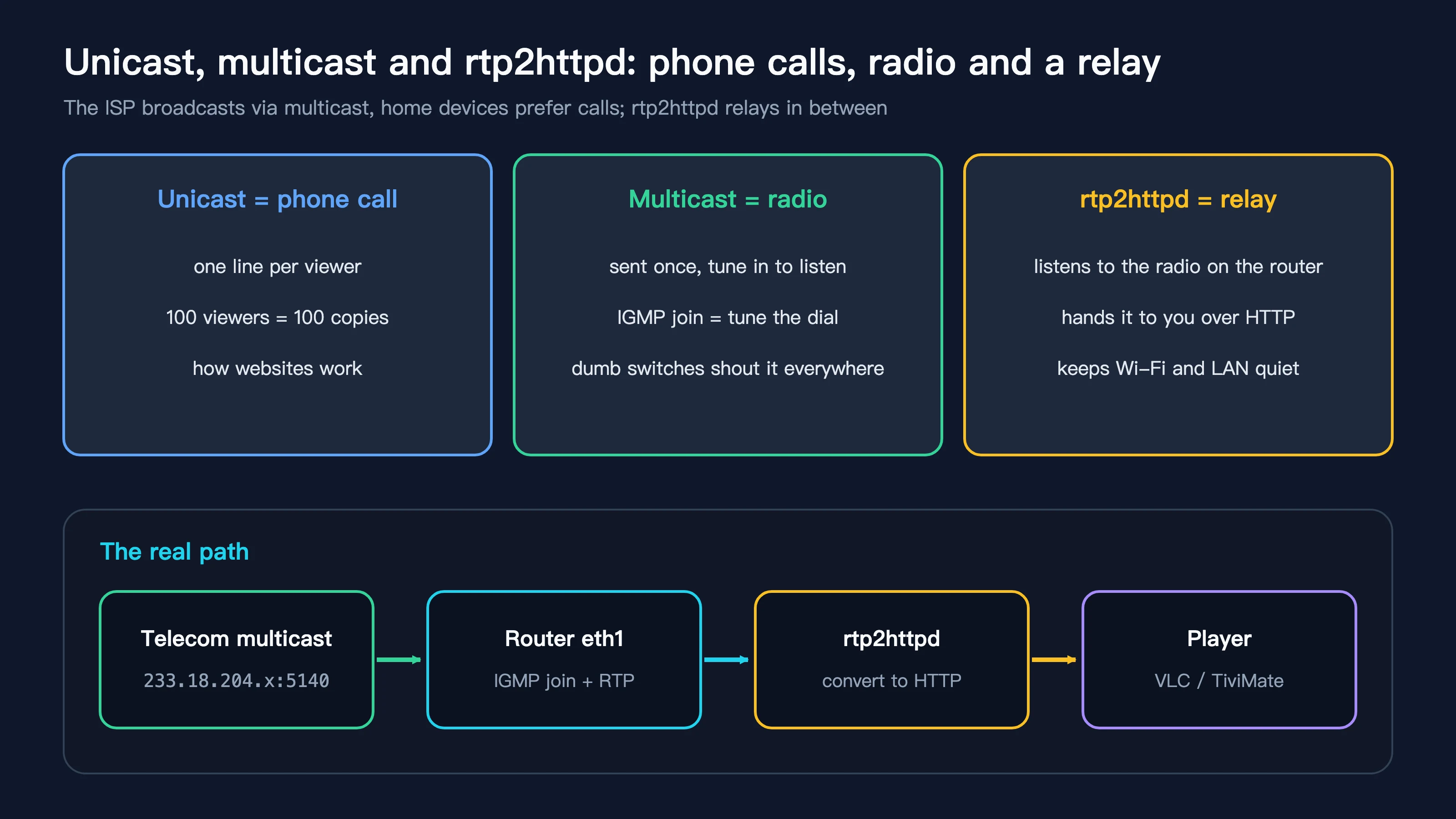
Figure 4: Unicast is a phone call, multicast is a radio station, and rtp2httpd is the relay at home. The bottom row is the real data path.
- Unicast is a phone call: one line per person, so 100 viewers means 100 copies of the stream. Web pages and video sites work this way.
- Multicast is a radio station: the station broadcasts once, and anyone who wants to listen tunes in. In networking, “tuning in” is called an IGMP join. Shanghai Telecom’s live TV is delivered this way; each channel is a multicast group such as 233.18.204.x on port 5140.
- The catch: many home switches and Wi-Fi access points do not understand radio stations. They treat multicast like a broadcast and shout it everywhere, which slows down other devices or can take Wi-Fi down completely.
So we need a relay that sits on the router, listens to the station, and hands the programme to each device over plain HTTP, one by one. That is exactly what rtp2httpd does. It is a modern replacement for udpxy, and also offers FCC fast channel change, a web player and a status page.
3) DHCP: getting a key card at the front desk
When a device joins a network, it asks a DHCP server for a “key card”: an IP address, gateway and DNS. The IPTV network has its own front desk. If you shout “I need a key card” on lane 85 and someone answers, the ONT is definitely delivering the IPTV network. That turned out to be the breakthrough of the whole investigation.
4. Analysis: ruling things out with evidence
1) Map the topology: where does the telecom line land?
On the PVE host I checked the bridge configuration. The ONT is connected to its own physical port, which a bridge (vmbr1 below) hands to iKuai for PPPoE. Another physical port was free as a spare.
2) Packet capture: lane 85 is silent
I captured 30 seconds on that physical port. With PPPoE filtered out, only switch STP heartbeats remained; there was not a single VLAN-tagged frame.
That does not mean IPTV is off. An empty floor in a building is quiet: nothing on the IPTV network was in use, so of course there was no traffic. To find out, you have to knock on the door.
3) Knock on the door: send DHCP on different VLANs
On the PVE host I created temporary VLAN sub-interfaces and sent DHCP requests with BusyBox udhcpc. The callback script only records the result and never configures an address, so the host is unaffected:
for v in 85 51 45; do
  ip link add link <telecom-nic> name iptvp.$v type vlan id $v
  ip link set iptvp.$v up
  busybox udhcpc -i iptvp.$v -n -q -f -t 4 -T 3 -s /bin/true
  ip link del iptvp.$v
done
Result (addresses masked):
== VLAN 85
udhcpc: lease of 30.111.x.x obtained from 30.111.x.x, lease time 1200
== VLAN 51
udhcpc: no lease, failing
== VLAN 45
udhcpc: no lease, failing
The front desk on lane 85 instantly handed out a 30.x address on the IPTV network, without asking for option 60 or any other credentials. The ONT had been passing the IPTV network through all along; I needed neither set-top-box credentials nor ONT changes.
4) Tune in: does multicast actually arrive?
With an address in hand, a 20-line Python script joined two multicast groups on the VLAN 85 interface:
233.18.204.x:5140 pkts=5116 bytes=6896368 ~9.2Mbps first=9021
233.18.204.x:5140 pkts=5061 bytes=6822228 ~9.1Mbps first=9021
About 9 Mbps each. The leading 0x9021 is a standard RTP header carrying an MPEG-TS video stream. Multicast also lives on lane 85; lane 51 is not needed at all.
5) Full scan: 112 of 113 channels are live
I tested every entry in the community channel list (the ihipop/Shanghai-IPTV project on GitHub). In the first pass, 12 in parallel and 3 seconds each, 37 channels produced nothing. Re-tested one by one, all 37 were live: when many groups are joined at once, the upstream takes a while to process the IGMP joins, and 3 seconds is not enough. In the end, 112 of 113 channels worked; only one niche channel was off air.
That “first pass misses some, second pass catches them” lesson went straight into the one-click script.
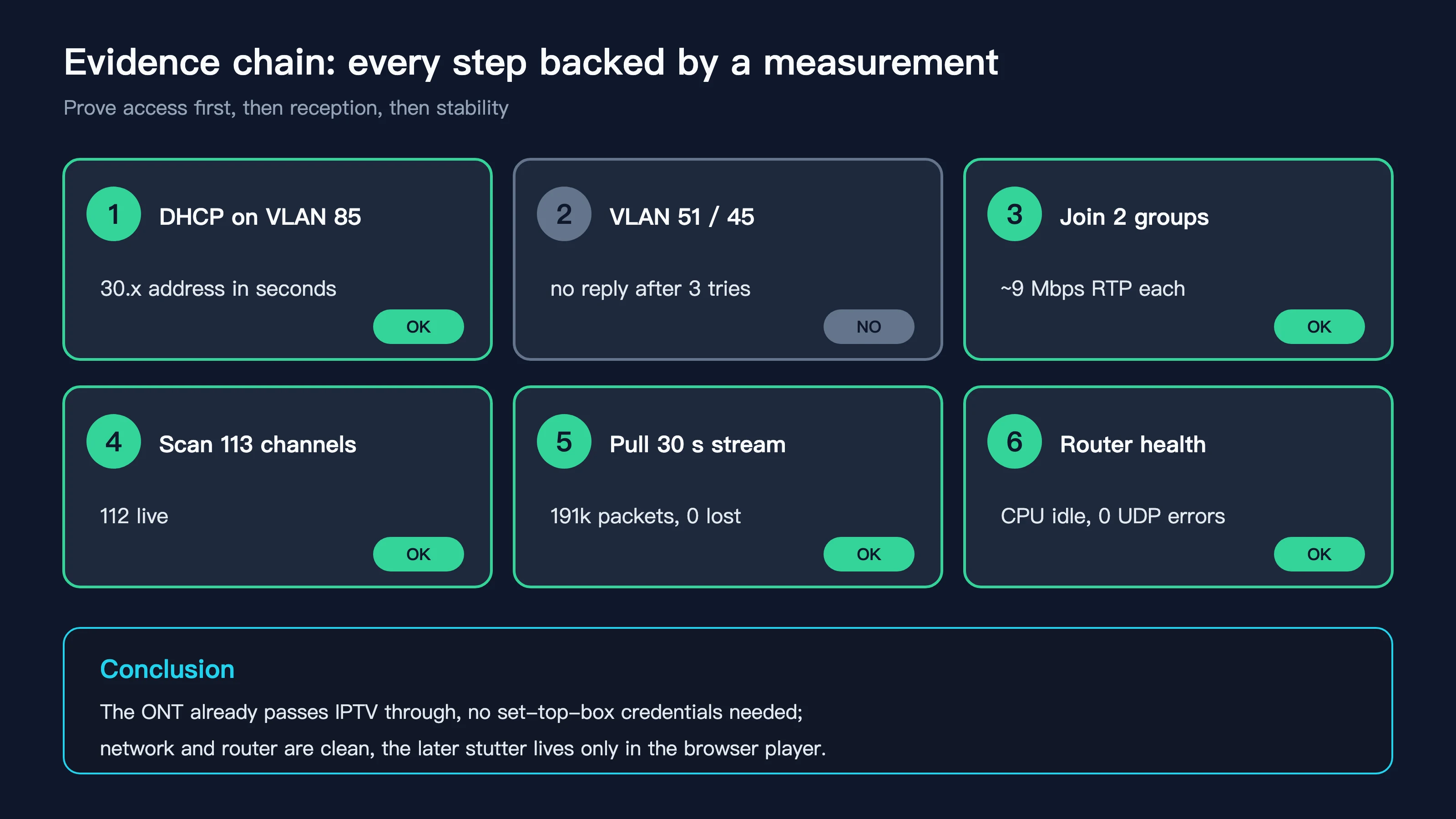
Figure 5: The evidence chain. Every step is backed by a measurement: prove access first, then reception, then stability.
5. Root cause: not “not provisioned”, but a missing receiver and converter
Put together, the root cause is clear:
- The ONT already delivers IPTV as VLAN 85 on the same cable as the internet traffic;
- Nothing at home was picking up lane 85, so IPTV sat there paid for but idle;
- Even once picked up, multicast should not go straight into home switches and Wi-Fi. It needs a converter that turns it into ordinary HTTP unicast.
So the fix almost writes itself: put a receiver on lane 85 (a new NIC on the side router) and add a converter (rtp2httpd).
6. The fix, step by step (without touching the internet path)
These are the steps I actually ran on my network. Addresses are replaced with x; use your own values.
Step 1: hot-plug a VLAN 85 NIC into the side router on PVE
In the PVE web UI, open the side-router VM, go to Hardware > Add > Network Device, choose the bridge of the telecom port, set VLAN Tag to 85 and leave the firewall unticked. Or do it with one command on the PVE host:
qm set <side-router-VMID> --net1 virtio,bridge=vmbr1,tag=85,firewall=0
virtio NICs are hot-pluggable, so the side router does not need a reboot. The home network did not drop for a single second.
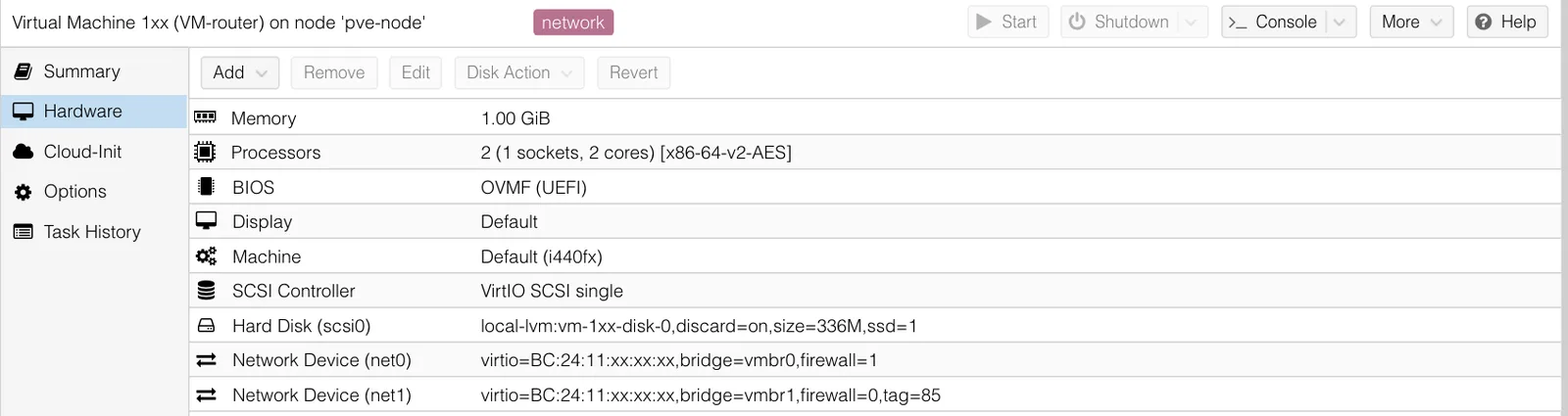
Figure 6: Real screenshot of the VM hardware tab in PVE (masked). net0 is the existing LAN port; net1 is the new IPTV NIC on the telecom bridge with tag=85.
In parcel terms, this opens a window at the gate that only accepts parcels for building 85, and it belongs to the side router.
Step 2: create an iptv interface on ImmortalWrt
A new eth1 appears in the side router. Create an interface called iptv as a DHCP client, and switch off two things:
uci set network.iptv=interface
uci set network.iptv.device=eth1
uci set network.iptv.proto=dhcp
uci set network.iptv.defaultroute=0   # never take over the default route
uci set network.iptv.peerdns=0        # ignore DNS servers from the IPTV network
uci set network.iptv.delegate=0
uci commit network
ifup iptv
Think of an apartment complex: the iptv interface is a small side door just for IPTV. defaultroute=0 means the side door may never become the main entrance (it cannot take over the household’s internet). peerdns=0 means you do not take directions from the side-door guard (the IPTV network hands out 10.x DNS servers that would break normal name resolution).
My side router also happens to have a route to the 10.x network inside my home lab, so using the IPTV DNS by mistake would be even harder to debug. Both switches are mandatory.
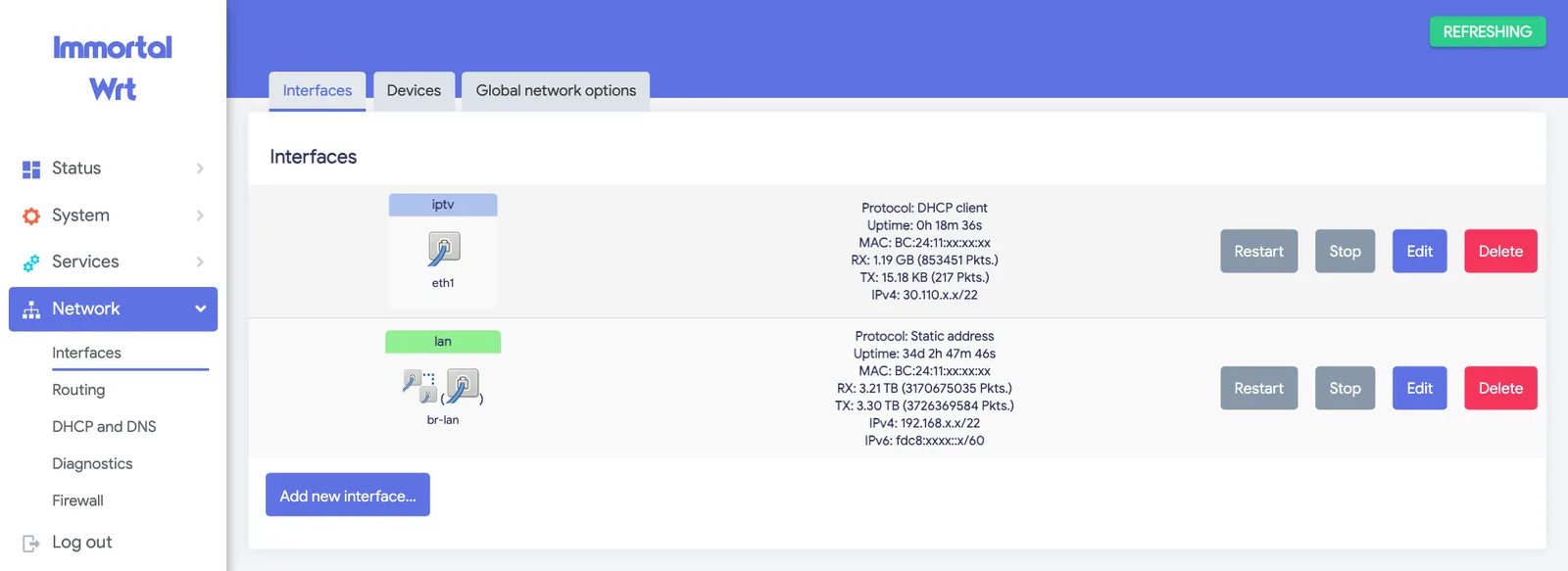
Figure 7: Real screenshot of the ImmortalWrt interfaces page (masked). The new iptv interface got a 30.110.x.x address on the IPTV network via eth1.
Step 3: give iptv its own firewall zone
The IPTV network is full of other customers’ devices, so iptv must be a separate firewall zone: inbound rejected by default, with only four kinds of traffic allowed.
z=$(uci add firewall zone)
uci set firewall.$z.name=iptv
uci add_list firewall.$z.network=iptv
uci set firewall.$z.input=REJECT
uci set firewall.$z.output=ACCEPT
uci set firewall.$z.forward=REJECT
# then add 4 inbound accept rules (full version in the script):
# 1. DHCP renew (UDP 68)  2. IGMP  3. multicast video (UDP 5140)  4. UDP from the FCC server
uci commit firewall
/etc/init.d/firewall reload
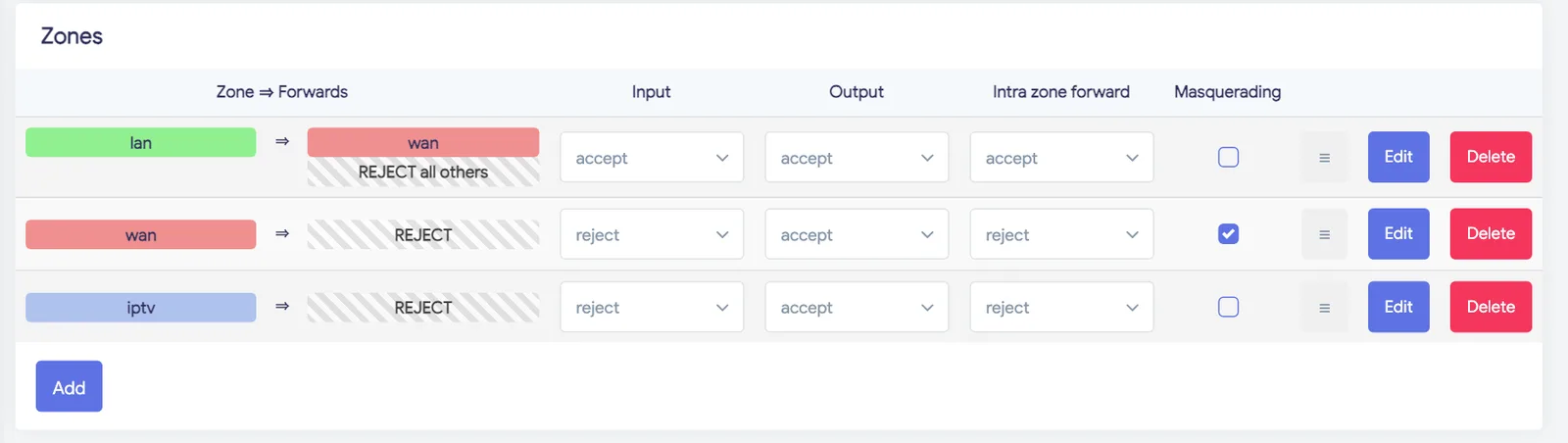
Figure 8: Real screenshot of the firewall zones. The iptv zone rejects input and forwarding and has no forwarding to or from the LAN.
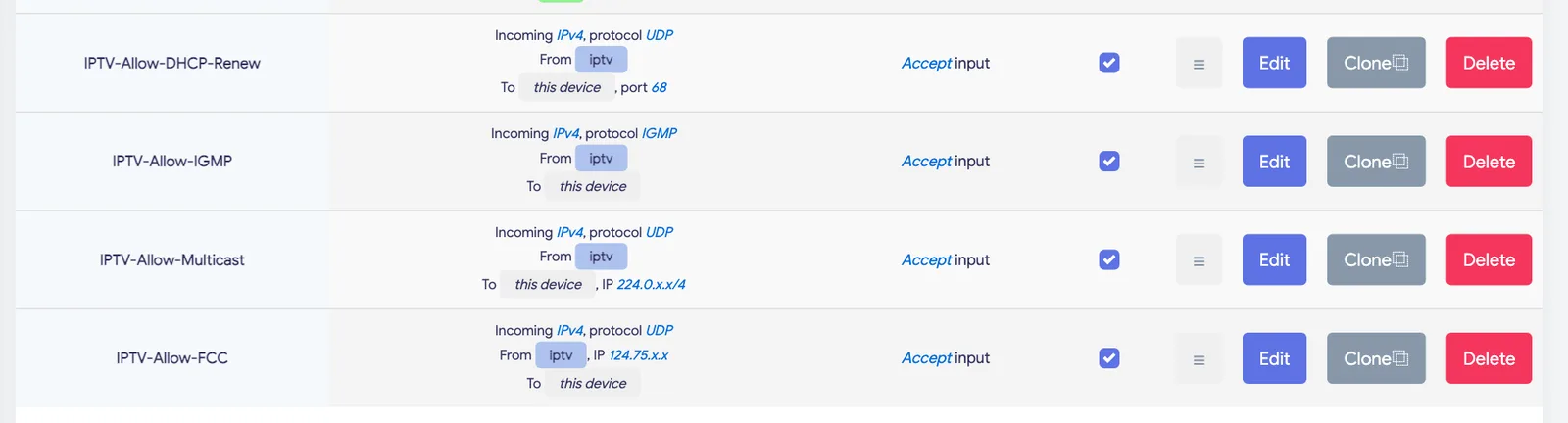
Figure 9: Real screenshot of the four IPTV rules (masked). In my manual setup the multicast rule matches the class D multicast range; the one-click script matches UDP port 5140 instead, which has the same effect and is easier to read.
Step 4: route FCC fast channel change correctly
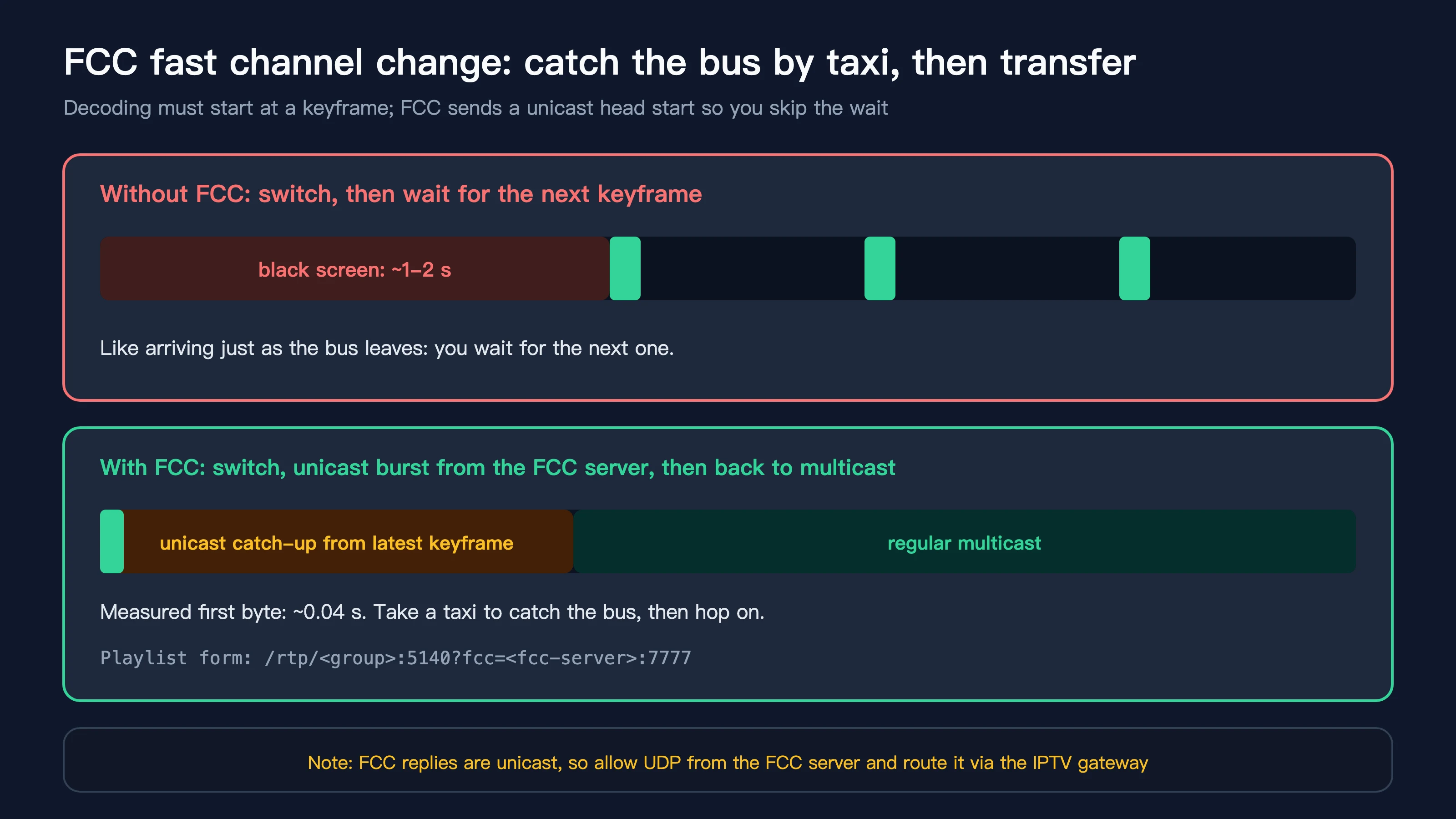
Figure 10: FCC is like taking a taxi to catch the bus and then hopping on. With it enabled, the first frame arrives about 0.04 seconds after switching.
Digital TV can only start decoding at a keyframe (I-frame). Without FCC, after switching you wait for the next keyframe, like reaching the stop just as the bus leaves: one to two seconds of black screen.
FCC (Fast Channel Change) works like this: at the moment you switch, an FCC server sends a short unicast burst starting from the latest keyframe, and once multicast is flowing the player switches over seamlessly. The community-documented Shanghai Telecom FCC server lives in the 124.75.25.x range on port 7777.
FCC replies are unicast, so two things are needed: the firewall must allow them (rule 4 in Step 3), and traffic to that server must go through the IPTV gateway. The gateway comes from DHCP and can change, so a hotplug script adds the route every time the interface gets an address:
# /etc/hotplug.d/iface/90-iptv-route
[ "$INTERFACE" = iptv ] || exit 0
case "$ACTION" in
ifup|ifupdate)
	gw=$(ifstatus iptv | jsonfilter -e '@.inactive.route[@.mask=0].nexthop' -e '@.route[@.mask=0].nexthop' | head -n1)
	[ -n "$gw" ] && ip route replace <fcc-server>/32 via "$gw" dev "$DEVICE"
	;;
esac
A small trap: with defaultroute=0, the DHCP gateway does not show up in the route field of ifstatus; it is moved to inactive.route. My first version only read route and never found the gateway.
Step 5: install and configure rtp2httpd
ImmortalWrt 24.10 ships ready-made packages:
opkg update
opkg install rtp2httpd luci-app-rtp2httpd luci-i18n-rtp2httpd-zh-cn
Key settings: listen on the LAN address only (never on the IPTV side), use eth1 upstream, and give it the channel list:
uci add_list rtp2httpd.@instance[0].listen=192.168.x.1:5140
uci set rtp2httpd.@instance[0].enabled=1
uci set rtp2httpd.@instance[0].upstream_interface=eth1
uci set rtp2httpd.@instance[0].mcast_rejoin_interval=60
uci set rtp2httpd.@instance[0].external_m3u=file:///etc/rtp2httpd/iptv.m3u
uci commit rtp2httpd
/etc/init.d/rtp2httpd enable && /etc/init.d/rtp2httpd restart
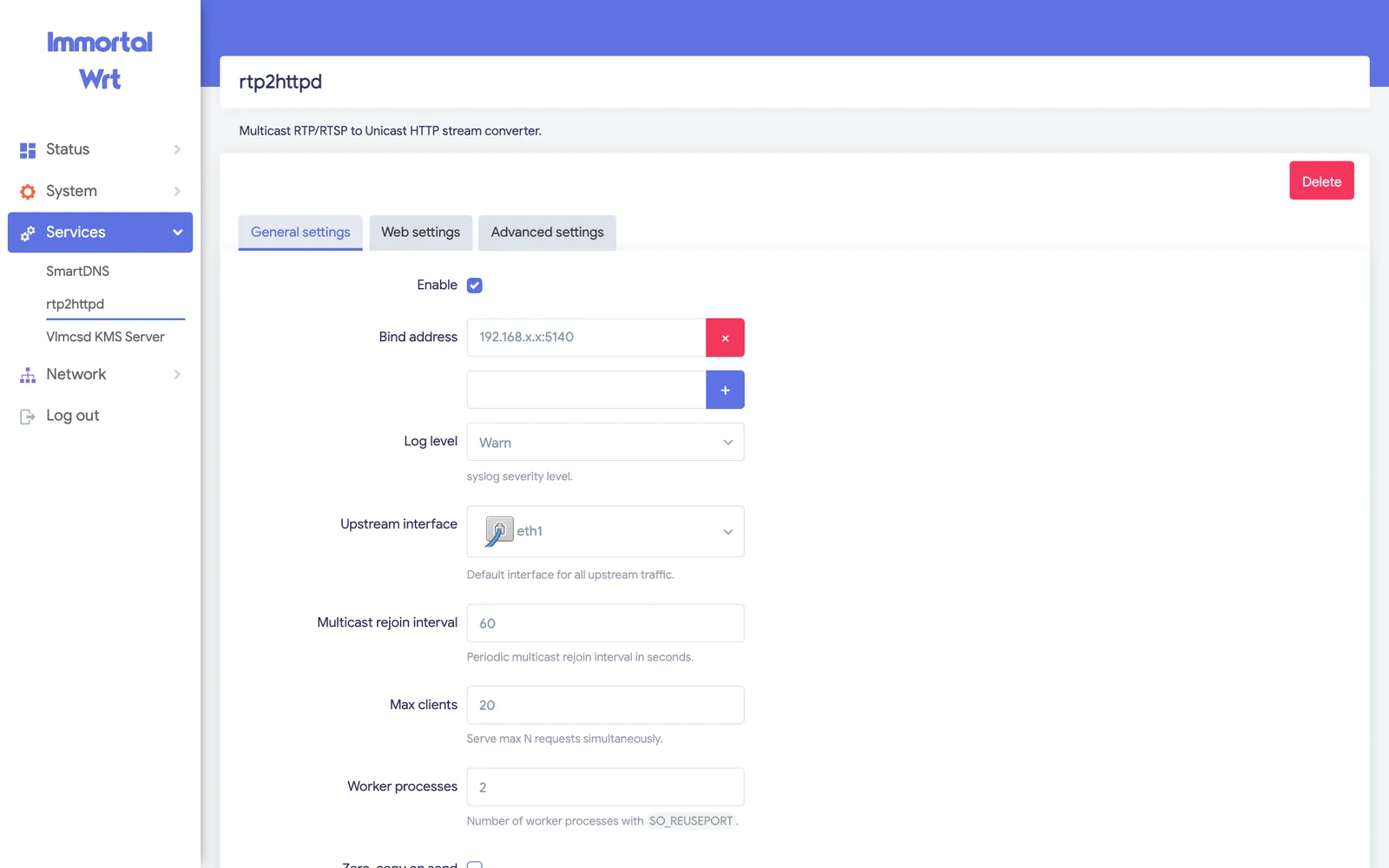
Figure 11: Real screenshot of the rtp2httpd page in LuCI (masked). The bind address is the LAN IP only; the upstream interface is eth1.
Entries in the channel list look like rtp://group:5140?fcc=fcc-server:7777. rtp2httpd rewrites them into HTTP URLs reachable from the LAN and serves:
- playlist: http://side-router:5140/playlist.m3u
- web player: http://side-router:5140/player
- status page: http://side-router:5140/status
Step 6: acceptance
I did not stop at “the page loads”; I used numbers:
- a 30-second pull on my Mac: 191,000 TS packets, zero continuity-counter errors, steady 9.6 Mbps;
- ffprobe: H.264 High 1920x1080 interlaced (1080i) at 25 fps, MP2 audio at 48 kHz;
- 4K channels around 37 Mbps, also stable;
- side-router CPU essentially idle, zero UDP receive-buffer errors;
- the default route still points to the main router, DNS unchanged, internet at home unaffected.
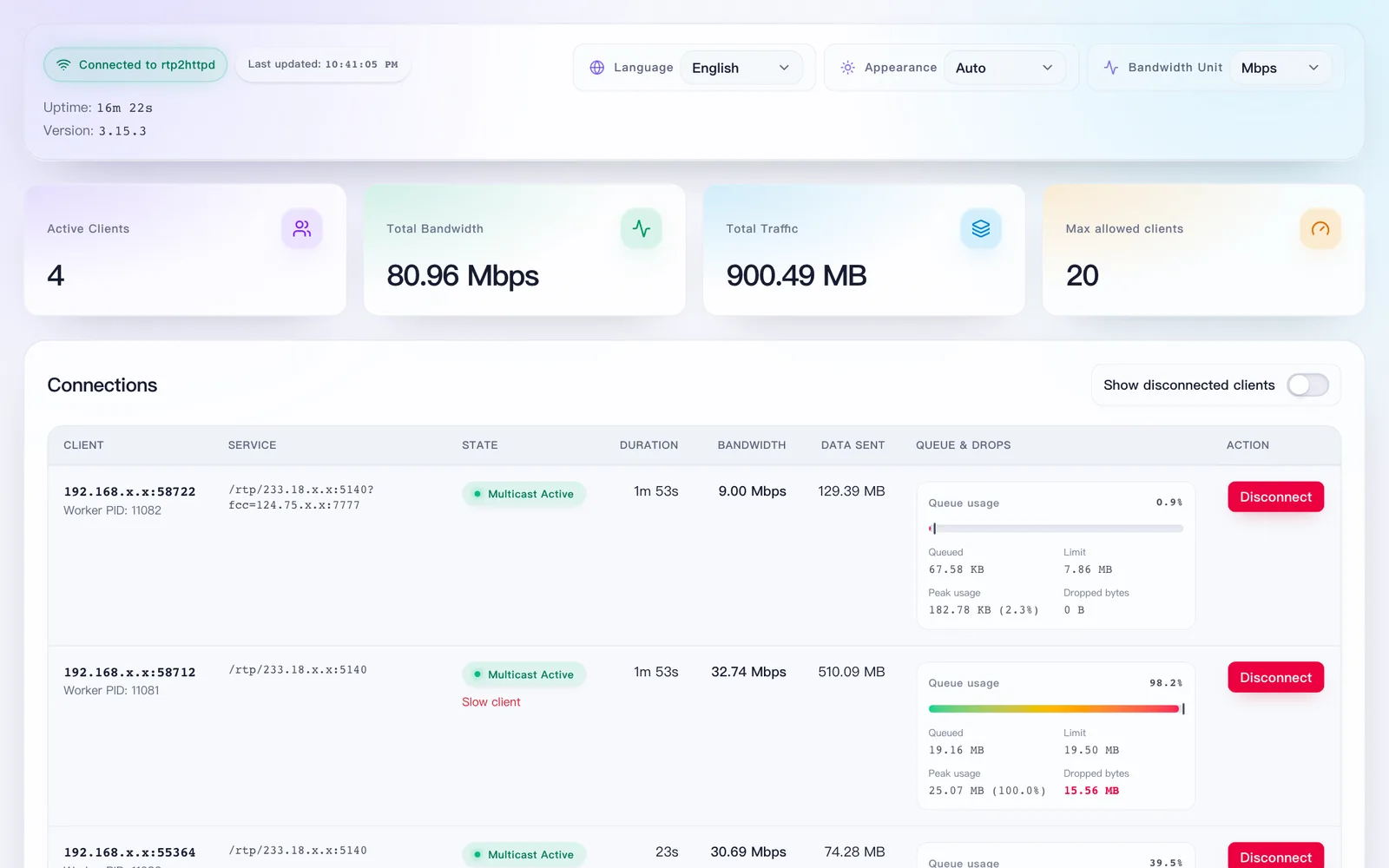
Figure 12: Real screenshot of the rtp2httpd status page (masked). One HD and one 4K stream playing at the same time, with bandwidth, queue and drops shown per connection.
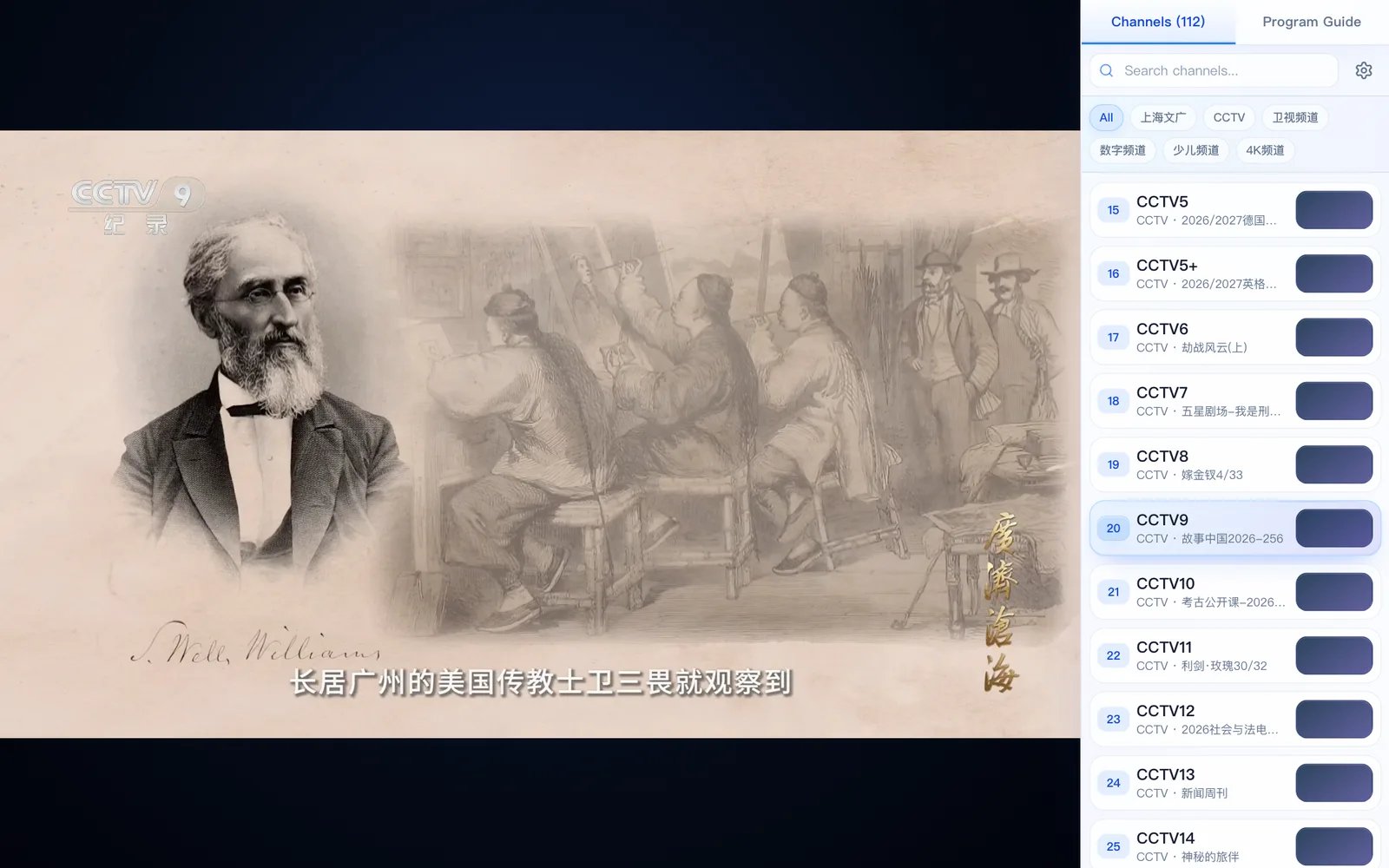
Figure 13: Real screenshot of /player in a browser playing the CCTV9 documentary channel. The 112 channels and groups are on the right, and programme-guide entries show up too.
7. Bonus: why the web player stutters while VLC is smooth
After setup I opened /player in a browser and noticed occasional stutter. My first guess was the network, but the evidence disagreed: a simultaneous 30-second curl pull showed zero loss and a steady bitrate.
So I read the web player’s code and found the reason:
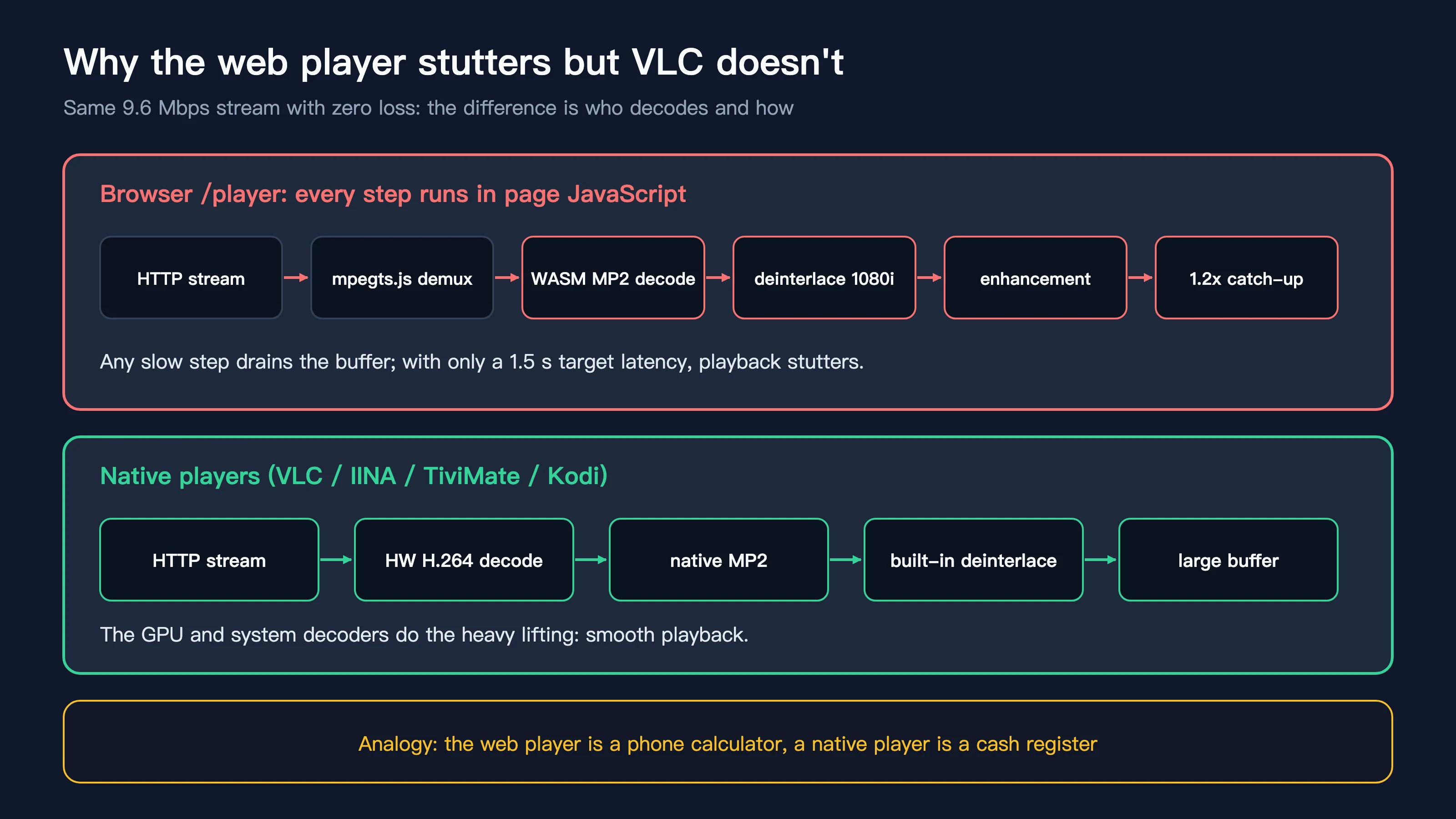
Figure 14: In the web player every step runs on the CPU inside page JavaScript; native players hand the work to the GPU and system decoders.
- The channels carry MP2 audio, which browsers do not support natively, so the player decodes it in software with WebAssembly;
- The video is 1080i interlaced, and the player enables auto-deinterlacing and picture enhancement by default, both computed frame by frame in the page;
- The player keeps latency around 1.5 seconds and speeds up to 1.2x to catch up, so whenever the buffer runs low the picture stutters.
An analogy: the web player is doing a day’s accounts on a phone calculator; a native player is a proper cash register. Both get there, at very different speeds.
What to do:
- in the web player’s settings, turn off picture enhancement and auto-deinterlacing; stutter drops noticeably;
- for everyday viewing, use a native player with http://side-router:5140/playlist.m3u: IINA or VLC on a Mac, TiviMate, APTV or Kodi on TVs and boxes;
- keep the web player for quick previews and channel surfing.
8. One-click scripts: Windows 11 / Ubuntu 26.04 / macOS 27
With the manual steps captured in scripts, the whole job is a single command. All three platforms share the same logic, work only over SSH, and depend on no third-party services. The channel table is built in and stores only the last octet of each multicast group.
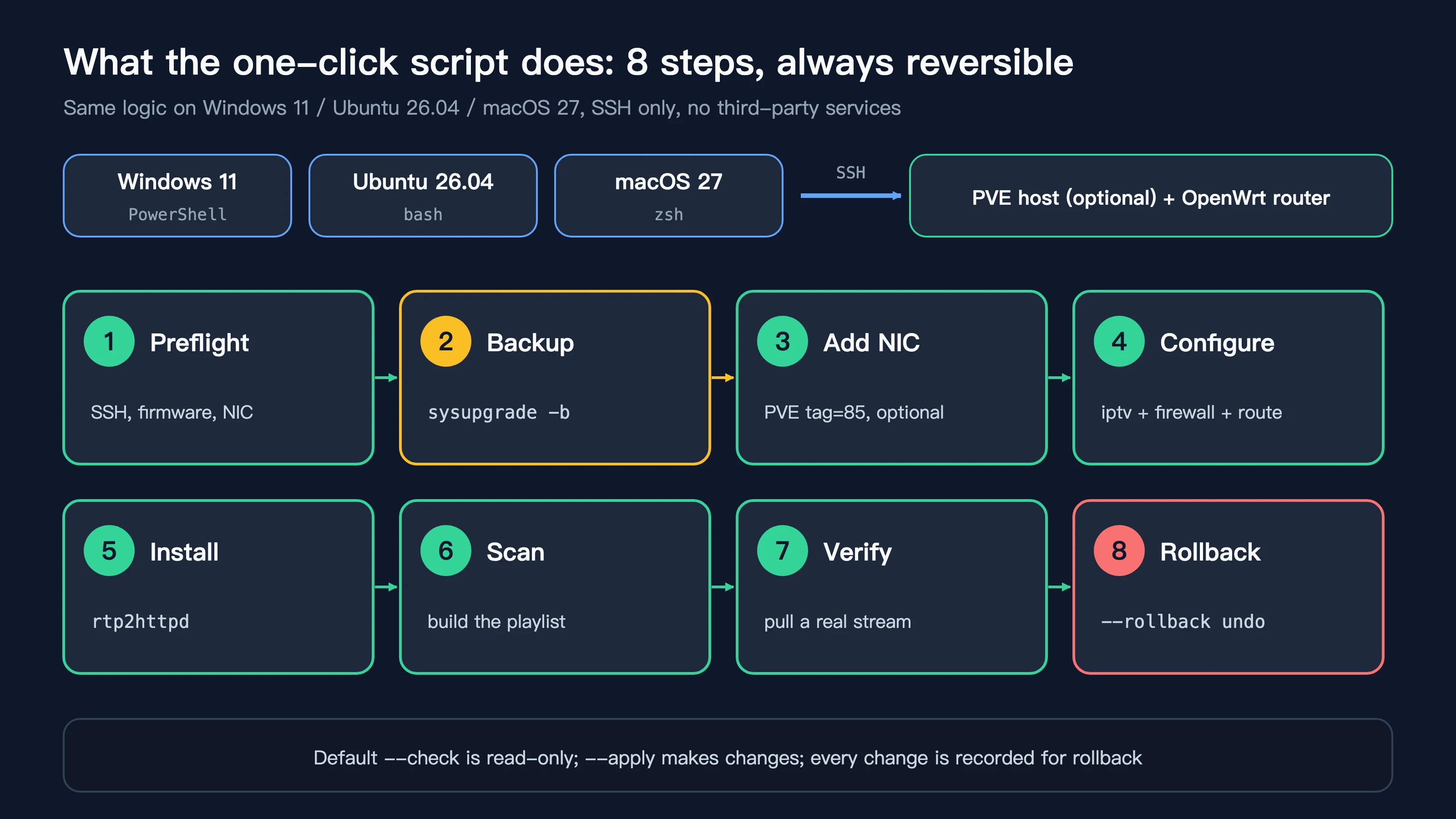
Figure 15: The 8-step pipeline. Read-only check by default; --apply makes changes; --rollback undoes them.
What the scripts do:
- three modes: check (read-only, default), apply, and rollback;
- backup first: before apply, the script runs sysupgrade -b and downloads the router backup; with PVE options it also backs up the VM config file;
- optional PVE automation: given the PVE address and VMID, it hot-plugs a tag=85 NIC and detects the new interface name inside the router;
- idempotent: running it again never duplicates firewall rules;
- two-pass channel scan: a fast pass with 12 in parallel, then a slow pass with 4 in parallel for silent channels, so slow IGMP joins do not cause misses;
- real acceptance: a stream is pulled both on the router and on your machine, and data must arrive for success;
- masked output: IP addresses printed on screen are masked.
On a throwaway ImmortalWrt 24.10.6 test VM I ran all three scripts from scratch: apply, apply again, and rollback. Every run reported 112/112 channels, and after rollback both the router and PVE were back to their original state. The test VM has been destroyed.
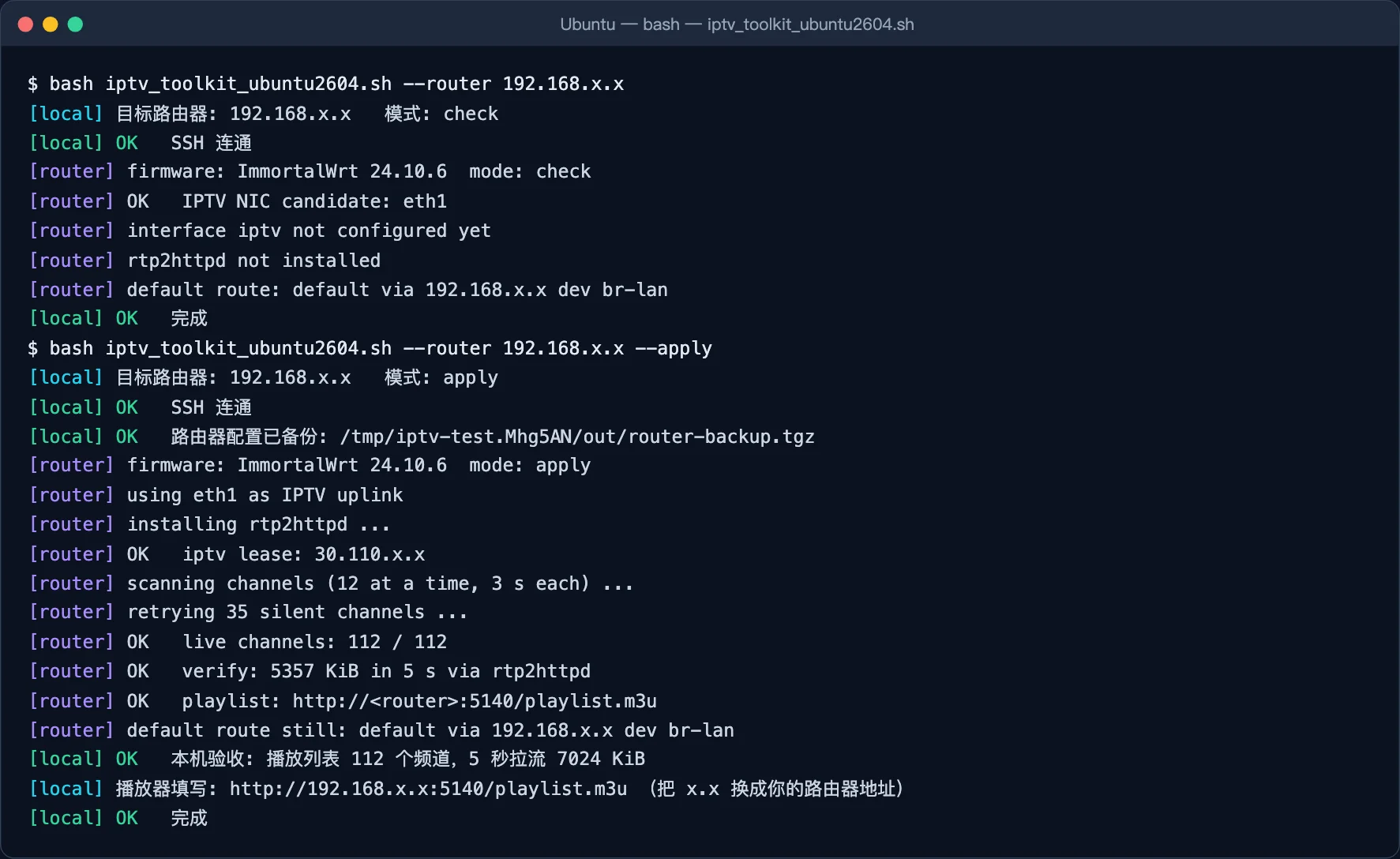
Figure 16: Real terminal output of the script on Ubuntu (addresses masked by the script itself): a read-only check, then apply, then local acceptance with 112 channels. The script’s messages are in Chinese.
Downloads
Keep all four files in the same folder:
- Bundle: iptv-toolkit.zip
- Router-side logic (shared): iptv_router_payload.sh
- Windows 11: iptv_toolkit_windows11.ps1
- Ubuntu 26.04: iptv_toolkit_ubuntu2604.sh
- macOS 27: iptv_toolkit_macos27.zsh
- Checksums: SHA256SUMS.txt
1) Router-side logic (iptv_router_payload.sh)
This is the part that actually runs on the router. It is POSIX sh, compatible with BusyBox ash, and supports both opkg (ImmortalWrt 24.10) and apk (OpenWrt 25 and later). Channel names in the built-in table are the original Chinese names, which is what players display.
#!/bin/sh
# iptv-router-payload: runs ON the OpenWrt/ImmortalWrt router (POSIX sh / BusyBox ash).
# Inputs (env): MODE=check|apply|rollback  IPTV_DEV=ethX|auto  LISTEN_PORT=5140
#               MCAST_PREFIX=233.18.204  MCAST_PORT=5140  FCC=host:port|""  SCAN_ALL=0|1
set -u
MODE="${MODE:-check}"
IPTV_DEV="${IPTV_DEV:-auto}"
LISTEN_PORT="${LISTEN_PORT:-5140}"
MCAST_PREFIX="${MCAST_PREFIX:-233.18.204}"
MCAST_PORT="${MCAST_PORT:-5140}"
FCC="${FCC:-}"
SCAN_ALL="${SCAN_ALL:-0}"
M3U=/etc/rtp2httpd/iptv.m3u
HOOK=/etc/hotplug.d/iface/90-iptv-route

say()  { printf '[router] %s\n' "$*"; }
ok()   { printf '[router] OK   %s\n' "$*"; }
warn() { printf '[router] WARN %s\n' "$*"; }
die()  { printf '[router] FAIL %s\n' "$*"; exit 1; }
mask() { sed -E 's/([0-9]+\.[0-9]+)\.[0-9]+\.[0-9]+/\1.x.x/g'; }

# Channel table: last octet | group | name  (all on ${MCAST_PREFIX}.N:${MCAST_PORT})
channels() {
cat <<'EOF'
57|上海文广|上海新闻综合
51|上海文广|东方卫视
45|上海文广|生活时尚
48|上海文广|都市剧场
53|上海文广|上海都市
55|上海文广|东方影视
58|上海文广|五星体育
59|上海文广|上海第一财经
65|上海文广|东方财经
63|上海文广|上海教育
52|CCTV|CCTV1
68|CCTV|CCTV2
69|CCTV|CCTV3
70|CCTV|CCTV4
71|CCTV|CCTV5
67|CCTV|CCTV5+
72|CCTV|CCTV6
73|CCTV|CCTV7
74|CCTV|CCTV8
75|CCTV|CCTV9
76|CCTV|CCTV10
77|CCTV|CCTV11
78|CCTV|CCTV12
79|CCTV|CCTV13
80|CCTV|CCTV14
81|CCTV|CCTV15
82|CCTV|CCTV16
83|CCTV|CCTV17
98|CCTV|CETV1
154|CCTV|CETV2
111|CCTV|CETV4
187|CCTV|CETV早期教育
28|CCTV|CGTN
93|卫视频道|安徽卫视
87|卫视频道|北京卫视
221|卫视频道|兵团卫视
94|卫视频道|东南卫视
110|卫视频道|甘肃卫视
88|卫视频道|广东卫视
107|卫视频道|广西卫视
101|卫视频道|贵州卫视
102|卫视频道|海南卫视
103|卫视频道|河北卫视
105|卫视频道|河南卫视
90|卫视频道|黑龙江卫视
92|卫视频道|湖北卫视
86|卫视频道|湖南卫视
108|卫视频道|吉林卫视
85|卫视频道|江苏卫视
95|卫视频道|江西卫视
96|卫视频道|辽宁卫视
217|卫视频道|内蒙古卫视
230|卫视频道|宁夏卫视
112|卫视频道|青海卫视
172|卫视频道|三沙卫视
91|卫视频道|山东卫视
211|卫视频道|山西卫视
223|卫视频道|陕西卫视
89|卫视频道|深圳卫视
99|卫视频道|四川卫视
97|卫视频道|天津卫视
222|卫视频道|西藏卫视
220|卫视频道|新疆卫视
155|卫视频道|延边卫视
106|卫视频道|云南卫视
84|卫视频道|浙江卫视
100|卫视频道|重庆卫视
50|数字频道|欢笑剧场
104|数字频道|金鹰纪实
47|数字频道|乐游
157|数字频道|家庭理财
231|数字频道|财富天下
49|数字频道|法治天地
42|数字频道|快乐垂钓
44|数字频道|游戏风云
116|数字频道|BesTV电影介绍
201|数字频道|IPTV测试
174|数字频道|CHC动作电影
173|数字频道|CHC家庭影院
175|数字频道|CHC影迷电影
178|数字频道|兵器科技
184|数字频道|第一剧场
183|数字频道|风云剧场
185|数字频道|风云音乐
176|数字频道|风云足球
181|数字频道|高尔夫网球
182|数字频道|怀旧剧场
180|数字频道|女性时尚
179|数字频道|世界地理
186|数字频道|文化精品
177|数字频道|央视台球
66|少儿频道|金色学堂
46|少儿频道|动漫秀场
54|少儿频道|哈哈炫动
151|少儿频道|嘉佳卡通
113|少儿频道|金鹰卡通
109|少儿频道|卡酷少儿
224|4K频道|东方卫视「4K」
115|4K频道|欢笑剧场「4K」
169|4K频道|BesTV电影「4K」
170|4K频道|BesTV记录「4K」
114|4K频道|CCTV16「4K」
188|4K频道|CCTV4K「4K」
209|4K频道|北京卫视「4K」
218|4K频道|广东卫视「4K」
227|4K频道|湖南卫视「4K」
226|4K频道|江苏卫视「4K」
228|4K频道|山东卫视「4K」
219|4K频道|深圳卫视「4K」
225|4K频道|四川卫视「4K」
229|4K频道|浙江卫视「4K」
171|4K频道|BesTV动画「4K」
EOF
}

[ -f /etc/openwrt_release ] || die "not an OpenWrt system"
. /etc/openwrt_release
say "firmware: ${DISTRIB_ID:-OpenWrt} ${DISTRIB_RELEASE:-?}  mode: $MODE"

lan_ip() { uci -q get network.lan.ipaddr | awk '{print $1}' | cut -d/ -f1; }
LAN_IP="$(lan_ip)"
[ -n "$LAN_IP" ] || die "cannot read network.lan.ipaddr"

pkg_install() {
	if command -v apk >/dev/null 2>&1; then apk update >/dev/null && apk add "$@"
	else opkg update >/dev/null && opkg install "$@"; fi
}
pkg_remove() {
	if command -v apk >/dev/null 2>&1; then apk del "$@"; else opkg remove "$@"; fi
}

pick_dev() {
	[ "$IPTV_DEV" != auto ] && { echo "$IPTV_DEV"; return; }
	cur="$(uci -q get network.iptv.device)"
	[ -n "$cur" ] && { echo "$cur"; return; }
	used="$(uci show network 2>/dev/null)"
	for d in /sys/class/net/eth*; do
		[ -e "$d" ] || continue
		n="${d##*/}"
		case "$n" in *.*) continue ;; esac
		echo "$used" | grep -q "[' ]$n['. ]" || echo "$n"
	done | head -n1
}

# fetch N seconds of a stream through rtp2httpd, print byte count
probe() {
	f="/tmp/iptv-probe.$$.$1"
	wget -q -O "$f" "http://$LAN_IP:$LISTEN_PORT/rtp/$MCAST_PREFIX.$1:$MCAST_PORT" 2>/dev/null &
	p=$!; sleep "${2:-3}"; kill "$p" 2>/dev/null; wait "$p" 2>/dev/null
	if [ -f "$f" ]; then wc -c <"$f"; else echo 0; fi; rm -f "$f"
}

do_check() {
	dev="$(pick_dev)"
	if [ -n "$dev" ]; then ok "IPTV NIC candidate: $dev"; else warn "no unused ethX found (add a VLAN-tagged NIC first)"; fi
	if uci -q get network.iptv >/dev/null; then
		st="$(ifstatus iptv 2>/dev/null | jsonfilter -e '@.up')"
		addr="$(ifstatus iptv 2>/dev/null | jsonfilter -e '@["ipv4-address"][0].address' | mask)"
		ok "interface iptv exists (up=$st ip=${addr:-none})"
	else
		say "interface iptv not configured yet"
	fi
	if [ -x /usr/bin/rtp2httpd ]; then ok "rtp2httpd installed"; else say "rtp2httpd not installed"; fi
	say "default route: $(ip route | grep '^default' | mask)"
}

do_apply() {
	dev="$(pick_dev)"
	[ -n "$dev" ] || die "no IPTV NIC; pass IPTV_DEV or add a NIC with VLAN tag first"
	[ -e "/sys/class/net/$dev" ] || die "device $dev not found"
	say "using $dev as IPTV uplink"

	uci set network.iptv=interface
	uci set network.iptv.device="$dev"
	uci set network.iptv.proto=dhcp
	uci set network.iptv.defaultroute=0
	uci set network.iptv.peerdns=0
	uci set network.iptv.delegate=0
	uci commit network

	# firewall: rebuild our zone and rules idempotently
	for s in $(uci -X show firewall | sed -nE "s/^firewall\.([^.]+)\.name='(iptv|IPTV-Allow-.*)'$/\1/p"); do
		uci delete "firewall.$s"
	done
	z=$(uci add firewall zone)
	uci set "firewall.$z.name=iptv"
	uci add_list "firewall.$z.network=iptv"
	uci set "firewall.$z.input=REJECT"
	uci set "firewall.$z.output=ACCEPT"
	uci set "firewall.$z.forward=REJECT"
	rule() {
		r=$(uci add firewall rule)
		uci set "firewall.$r.name=$1"; uci set "firewall.$r.src=iptv"
		uci set "firewall.$r.family=ipv4"; uci set "firewall.$r.target=ACCEPT"
		shift
		while [ $# -gt 1 ]; do uci set "firewall.$r.$1=$2"; shift 2; done
	}
	rule IPTV-Allow-DHCP-Renew proto udp dest_port 68
	rule IPTV-Allow-IGMP proto igmp
	rule IPTV-Allow-Multicast proto udp dest_port "$MCAST_PORT"
	[ -n "$FCC" ] && rule IPTV-Allow-FCC proto udp src_ip "${FCC%:*}"
	uci commit firewall

	if [ -n "$FCC" ]; then
		cat >"$HOOK" <<EOF
#!/bin/sh
# Route the IPTV FCC server via the IPTV VLAN gateway (DHCP-provided)
[ "\$INTERFACE" = iptv ] || exit 0
case "\$ACTION" in
ifup|ifupdate)
	gw=\$(ifstatus iptv | jsonfilter -e '@.inactive.route[@.mask=0].nexthop' -e '@.route[@.mask=0].nexthop' | head -n1)
	[ -n "\$gw" ] && ip route replace ${FCC%:*}/32 via "\$gw" dev "\$DEVICE" && logger -t iptv "FCC route via \$gw"
	;;
esac
EOF
		chmod +x "$HOOK"
	fi

	[ -x /usr/bin/rtp2httpd ] || { say "installing rtp2httpd ..."; pkg_install rtp2httpd luci-app-rtp2httpd >/dev/null || die "package install failed"; }
	pkg_install luci-i18n-rtp2httpd-zh-cn >/dev/null 2>&1 || true

	/etc/init.d/firewall reload >/dev/null 2>&1
	ifup iptv
	i=0
	while [ $i -lt 20 ]; do
		addr="$(ifstatus iptv | jsonfilter -e '@["ipv4-address"][0].address')"
		[ -n "$addr" ] && break
		i=$((i + 1)); sleep 1
	done
	[ -n "$addr" ] || die "iptv got no DHCP lease on $dev (check the VLAN tag)"
	ok "iptv lease: $(echo "$addr" | mask)"
	[ -n "$FCC" ] && ACTION=ifup INTERFACE=iptv DEVICE="$dev" sh "$HOOK"

	sec=$(uci -X show rtp2httpd | sed -nE "s/^rtp2httpd\.([^=.]+)=instance$/\1/p" | head -n1)
	[ -n "$sec" ] || sec=$(uci add rtp2httpd instance)
	uci -q delete "rtp2httpd.$sec.listen"
	uci add_list "rtp2httpd.$sec.listen=$LAN_IP:$LISTEN_PORT"
	uci set "rtp2httpd.$sec.enabled=1"
	uci set "rtp2httpd.$sec.upstream_interface=$dev"
	uci set "rtp2httpd.$sec.maxclients=32"
	uci set "rtp2httpd.$sec.workers=2"
	uci set "rtp2httpd.$sec.mcast_rejoin_interval=60"
	uci set "rtp2httpd.$sec.verbose=1"
	uci commit rtp2httpd
	/etc/init.d/rtp2httpd enable
	/etc/init.d/rtp2httpd restart >/dev/null 2>&1
	sleep 2

	say "scanning channels (12 at a time, 3 s each) ..."
	mkdir -p /etc/rtp2httpd
	tmp=/tmp/iptv-scan.$$; : >"$tmp"
	if [ "$SCAN_ALL" = 1 ]; then
		i=1; while [ $i -le 254 ]; do echo "$i|自动发现|频道 $i"; i=$((i + 1)); done
	else
		channels
	fi >"$tmp.list"
	# pass 1: 12 parallel x 3 s; pass 2: retry misses 4 parallel x 6 s (IGMP joins can be slow under load)
	scan() {  # $1 = list file, $2 = parallel, $3 = seconds
		n=0
		while IFS='|' read -r oct grp name; do
			( b=$(probe "$oct" "$3"); [ "$b" -gt 200000 ] && echo "$oct|$grp|$name" >>"$tmp" ) &
			n=$((n + 1)); [ $((n % $2)) -eq 0 ] && wait
		done <"$1"
		wait
	}
	scan "$tmp.list" 12 3
	while IFS='|' read -r oct rest; do grep -q "^$oct|" "$tmp" || echo "$oct|$rest"; done <"$tmp.list" >"$tmp.miss"
	[ -s "$tmp.miss" ] && { say "retrying $(wc -l <"$tmp.miss") silent channels ..."; scan "$tmp.miss" 4 6; }
	rm -f "$tmp.miss"
	total=$(wc -l <"$tmp.list"); live=$(wc -l <"$tmp")
	[ "$live" -gt 0 ] || die "no channel produced data; check firewall/IGMP"
	ok "live channels: $live / $total"

	q=""; [ -n "$FCC" ] && q="?fcc=$FCC"
	{
		echo '#EXTM3U'
		while IFS='|' read -r oct grp name; do
			grep -q "^$oct|" "$tmp" || continue
			printf '#EXTINF:-1 tvg-name="%s" group-title="%s",%s\n' "$name" "$grp" "$name"
			printf 'rtp://%s.%s:%s%s\n' "$MCAST_PREFIX" "$oct" "$MCAST_PORT" "$q"
		done <"$tmp.list"
	} >"$M3U"
	rm -f "$tmp" "$tmp.list"
	uci set "rtp2httpd.$sec.external_m3u=file://$M3U"
	uci set "rtp2httpd.$sec.external_m3u_update_interval=0"
	uci commit rtp2httpd
	/etc/init.d/rtp2httpd restart >/dev/null 2>&1
	sleep 2

	for f in "$HOOK" /etc/rtp2httpd/; do
		[ -e "$f" ] && ! grep -qx "$f" /etc/sysupgrade.conf && echo "$f" >>/etc/sysupgrade.conf
	done

	first=$(sed -n 's#^rtp://[0-9.]*\.\([0-9]*\):.*#\1#p' "$M3U" | head -n1)
	b=$(probe "$first" 5)
	[ "$b" -gt 1000000 ] || die "verification stream too small ($b bytes)"
	ok "verify: $((b / 1024)) KiB in 5 s via rtp2httpd"
	ok "playlist: http://<router>:$LISTEN_PORT/playlist.m3u"
	say "default route still: $(ip route | grep '^default' | mask)"
}

do_rollback() {
	/etc/init.d/rtp2httpd stop >/dev/null 2>&1
	/etc/init.d/rtp2httpd disable >/dev/null 2>&1
	pkg_remove luci-i18n-rtp2httpd-zh-cn luci-app-rtp2httpd rtp2httpd >/dev/null 2>&1
	rm -rf /etc/rtp2httpd "$HOOK" /etc/config/rtp2httpd
	sed -i '\#^/etc/rtp2httpd/$#d;\#^/etc/hotplug.d/iface/90-iptv-route$#d' /etc/sysupgrade.conf
	ifdown iptv 2>/dev/null
	uci -q delete network.iptv; uci commit network
	for s in $(uci -X show firewall | sed -nE "s/^firewall\.([^.]+)\.name='(iptv|IPTV-Allow-.*)'$/\1/p"); do
		uci delete "firewall.$s"
	done
	uci commit firewall
	/etc/init.d/firewall reload >/dev/null 2>&1
	/etc/init.d/network reload >/dev/null 2>&1
	ok "router side rolled back"
}

case "$MODE" in
	check) do_check ;;
	apply) do_apply ;;
	rollback) do_rollback ;;
	*) die "unknown MODE=$MODE" ;;
esac
2) Windows 11 (iptv_toolkit_windows11.ps1)
Uses only the built-in PowerShell 5.1, OpenSSH client and curl.exe. To avoid PowerShell 5.1 adding CRLF to piped text and writing binary output as UTF-16, the script drives ssh through .NET Process and reads and writes raw bytes. If you save it by copy and paste, save it as “UTF-8 with BOM” in Notepad.
<#
==============================================================================
 iptv_toolkit_windows11.ps1
 上海电信 IPTV -> OpenWrt/ImmortalWrt + rtp2httpd 一键配置(Windows 11 原生)
 需与 iptv_router_payload.sh 放在同一目录。只依赖系统自带的 PowerShell / OpenSSH 客户端 / curl.exe,不访问任何第三方服务。

   体检(只读): powershell -ExecutionPolicy Bypass -File .\iptv_toolkit_windows11.ps1 -Router 192.168.x.1
   一键配置    : ... -Router 192.168.x.1 -Mode apply [-Pve 192.168.x.10 -VmId 101 -Bridge vmbr1]
   一键回滚    : ... -Router 192.168.x.1 -Mode rollback -Yes [-Pve 192.168.x.10 -VmId 101]
==============================================================================
#>
param(
  [Parameter(Mandatory = $true)][string]$Router,
  [ValidateSet('check', 'apply', 'rollback')][string]$Mode = 'check',
  [string]$Pve = '',
  [string]$VmId = '',
  [string]$Bridge = 'vmbr1',
  [int]$Vlan = 85,
  [string]$User = 'root',
  [string]$IptvDev = 'auto',
  [int]$Port = 5140,
  [switch]$NoFcc,
  [switch]$ScanAll,
  [switch]$Yes,
  [string]$OutDir = (Join-Path $HOME ("iptv-toolkit-" + (Get-Date -Format 'yyyyMMdd-HHmmss')))
)
$ErrorActionPreference = 'Stop'
$FccNet = '124.75.25'; $FccId = '211'; $FccPort = '7777'   # 上海电信 FCC 服务器(社区公开)
$Fcc = if ($NoFcc) { '' } else { "$FccNet.$($FccId):$FccPort" }
if ($Pve -and -not $VmId) { throw '-Pve 需要同时指定 -VmId' }

function Mask([string]$s) { $s -replace '(\d+\.\d+)\.\d+\.\d+', '$1.x.x' }
function Info([string]$m) { Write-Host "[local] $m" -ForegroundColor Cyan }
function Ok([string]$m) { Write-Host "[local] OK   $m" -ForegroundColor Green }
function Die([string]$m) { Write-Host "[local] FAIL $m" -ForegroundColor Red; exit 1 }

$SshOpts = '-o BatchMode=yes -o ConnectTimeout=8 -o StrictHostKeyChecking=accept-new -o ServerAliveInterval=15'

# Run ssh with exact bytes on stdin/stdout (no CRLF or UTF-16 conversion).
function Invoke-Ssh {
  param([string]$Target, [string]$Command, [byte[]]$InputBytes = $null, [string]$OutFile = '', [switch]$Capture)
  $psi = New-Object System.Diagnostics.ProcessStartInfo
  $psi.FileName = 'ssh'
  $psi.Arguments = "$SshOpts $Target `"$($Command -replace '"', '\"')`""
  $psi.UseShellExecute = $false
  $psi.RedirectStandardInput = $true
  $psi.RedirectStandardOutput = [bool]($OutFile -or $Capture)
  $p = [System.Diagnostics.Process]::Start($psi)
  if ($InputBytes) { $p.StandardInput.BaseStream.Write($InputBytes, 0, $InputBytes.Length) }
  $p.StandardInput.Close()
  $text = $null
  if ($OutFile) {
    $fs = [System.IO.File]::Create($OutFile); $p.StandardOutput.BaseStream.CopyTo($fs); $fs.Close()
  } elseif ($Capture) {
    $ms = New-Object System.IO.MemoryStream; $p.StandardOutput.BaseStream.CopyTo($ms)
    $text = [System.Text.Encoding]::UTF8.GetString($ms.ToArray())
  }
  $p.WaitForExit()
  if ($p.ExitCode -ne 0) { throw "ssh $Target exited with $($p.ExitCode)" }
  return $text
}
function RouterSsh([string]$c, [switch]$Capture) { Invoke-Ssh -Target "$User@$Router" -Command $c -Capture:$Capture }
function PveSsh([string]$c, [switch]$Capture) { Invoke-Ssh -Target "root@$Pve" -Command $c -Capture:$Capture }

# 路由器端逻辑(POSIX sh)放在同目录的 iptv_router_payload.sh,按原始字节读取并去掉 CR
$PayloadFile = Join-Path $PSScriptRoot 'iptv_router_payload.sh'
if (-not (Test-Path $PayloadFile)) { Die "找不到 $PayloadFile(请和本脚本放在同一目录)" }
$PayloadBytes = [byte[]]([System.IO.File]::ReadAllBytes($PayloadFile) | Where-Object { $_ -ne 13 })

function Run-Payload([string]$m, [string]$dev) {
  Invoke-Ssh -Target "$User@$Router" -Command "MODE=$m IPTV_DEV=$dev LISTEN_PORT=$Port FCC='$Fcc' SCAN_ALL=$([int][bool]$ScanAll) sh -s" -InputBytes $PayloadBytes | Out-Null
}
function Router-Devs { (RouterSsh 'ls /sys/class/net' -Capture) -split "\s+" | Where-Object { $_ -match '^eth\d+$' } | Sort-Object }
function Pve-IptvNet {
  $cfg = PveSsh "qm config $VmId" -Capture
  foreach ($line in ($cfg -split "`n")) {
    if ($line -match "^(net\d+): .*bridge=$Bridge(,.*)?,tag=$Vlan(,.*)?$") { return $Matches[1] }
  }
  return ''
}

# 1. preflight
Info "目标路由器: $(Mask $Router)   模式: $Mode"
try { RouterSsh 'true' | Out-Null } catch { Write-Host "[local] $($_.Exception.Message)" -ForegroundColor DarkGray; Die "SSH 免密登录路由器失败,请先把公钥加入路由器(type `$env:USERPROFILE\.ssh\id_ed25519.pub | ssh $User@<路由器> 'cat >> /etc/dropbear/authorized_keys')" }
Ok 'SSH 连通'
if ($Pve) {
  try { PveSsh "qm config $VmId >/dev/null" | Out-Null } catch { Die "PVE 上找不到 VM $VmId 或 SSH 失败" }
  Ok "PVE 连通,VM $VmId 存在"
}

switch ($Mode) {
  'check' {
    Run-Payload 'check' 'auto'
    if ($Pve) { $n = Pve-IptvNet; if ($n) { Ok "PVE 已有 IPTV 网卡: $n (tag=$Vlan)" } else { Info "PVE 尚未添加 tag=$Vlan 网卡" } }
  }
  'apply' {
    New-Item -ItemType Directory -Force -Path $OutDir | Out-Null
    $bk = Join-Path $OutDir 'router-backup.tgz'
    Invoke-Ssh -Target "$User@$Router" -Command 'sysupgrade -b /tmp/iptv-pre.tgz >/dev/null 2>&1 && cat /tmp/iptv-pre.tgz && rm -f /tmp/iptv-pre.tgz' -OutFile $bk | Out-Null
    if ((Get-Item $bk).Length -lt 1024) { Die '配置备份失败' }
    Ok "路由器配置已备份: $bk"
    $dev = $IptvDev
    if ($Pve) {
      PveSsh "cp /etc/pve/qemu-server/$VmId.conf /root/$VmId.conf.bak-iptv-$(Get-Date -Format yyyyMMddHHmmss)" | Out-Null
      $n = Pve-IptvNet
      if ($n) { Ok "PVE 已存在 IPTV 网卡 $n,跳过" }
      else {
        $before = Router-Devs
        $used = ((PveSsh "qm config $VmId" -Capture) -split "`n") | Where-Object { $_ -match '^net(\d+):' } | ForEach-Object { [int]($_ -replace '^net(\d+):.*', '$1') }
        $free = 0; while ($used -contains $free) { $free++ }
        PveSsh "qm set $VmId --net$free virtio,bridge=$Bridge,tag=$Vlan,firewall=0 >/dev/null 2>&1" | Out-Null
        Ok "PVE 已热插拔 net$free (bridge=$Bridge, tag=$Vlan)"
        $new = $null
        for ($i = 0; $i -lt 20 -and -not $new; $i++) {
          $new = Router-Devs | Where-Object { $before -notcontains $_ } | Select-Object -First 1
          if (-not $new) { Start-Sleep -Seconds 1 }
        }
        if (-not $new) { Die '路由器没有识别到新网卡(虚拟机可能不支持热插拔,重启 VM 后再试)' }
        $dev = $new; Ok "路由器识别到新网卡: $dev"
      }
    }
    Run-Payload 'apply' $dev
    $m3u = & curl.exe -s -m 10 "http://$($Router):$Port/playlist.m3u"
    $urls = @($m3u | Where-Object { $_ -like 'http*' })
    if ($urls.Count -eq 0) { Die '本机取不到播放列表' }
    $bytes = [int](& curl.exe -s -m 5 -o NUL -w '%{size_download}' $urls[0])
    Ok "本机验收: 播放列表 $($urls.Count) 个频道,5 秒拉流 $([int]($bytes / 1024)) KiB"
    Info "播放器填写: http://$(Mask $Router):$Port/playlist.m3u (把 x.x 换成你的路由器地址)"
  }
  'rollback' {
    if (-not $Yes) { if ((Read-Host '确认回滚 IPTV 配置?[y/N]') -notmatch '^[yY]$') { exit 0 } }
    Run-Payload 'rollback' 'auto'
    if ($Pve) {
      $n = Pve-IptvNet
      if ($n) { PveSsh "qm set $VmId --delete $n >/dev/null 2>&1" | Out-Null; Ok "PVE 已移除 $n" } else { Info 'PVE 上没有需要移除的 IPTV 网卡' }
    }
  }
}
Ok '完成'
3) Ubuntu 26.04 (iptv_toolkit_ubuntu2604.sh)
Only needs bash, ssh and curl, and runs under set -euo pipefail.
#!/usr/bin/env bash
# ==============================================================================
# iptv_toolkit_ubuntu2604.sh
# 上海电信 IPTV -> OpenWrt/ImmortalWrt + rtp2httpd 一键配置(Ubuntu 26.04 原生)
# 需与 iptv_router_payload.sh 放在同一目录。只依赖 bash / ssh / curl,全部操作通过 SSH 完成,不访问任何第三方服务。
#
#   体检(只读): bash iptv_toolkit_ubuntu2604.sh --router 192.168.x.1
#   一键配置    : bash iptv_toolkit_ubuntu2604.sh --router 192.168.x.1 --apply \
#                    [--pve 192.168.x.10 --vmid 101 --bridge vmbr1]
#   一键回滚    : bash iptv_toolkit_ubuntu2604.sh --router 192.168.x.1 --rollback --yes \
#                    [--pve 192.168.x.10 --vmid 101 --bridge vmbr1]
# ==============================================================================
set -euo pipefail

MODE=check ROUTER="" PVE="" VMID="" BRIDGE=vmbr1 VLAN=85 USER_NAME=root
IPTV_DEV=auto PORT=5140 SCAN_ALL=0 YES=0 NO_FCC=0
FCC_NET="124.75.25" FCC_ID="211" FCC_PORT="7777"   # 上海电信 FCC 服务器(社区公开)
OUT_DIR="${HOME}/iptv-toolkit-$(date +%Y%m%d-%H%M%S)"

usage() { sed -n '3,14p' "$0"; exit "${1:-0}"; }
while [[ $# -gt 0 ]]; do
  case "$1" in
    --router) ROUTER="$2"; shift 2 ;;
    --pve) PVE="$2"; shift 2 ;;
    --vmid) VMID="$2"; shift 2 ;;
    --bridge) BRIDGE="$2"; shift 2 ;;
    --vlan) VLAN="$2"; shift 2 ;;
    --user) USER_NAME="$2"; shift 2 ;;
    --iptv-dev) IPTV_DEV="$2"; shift 2 ;;
    --port) PORT="$2"; shift 2 ;;
    --no-fcc) NO_FCC=1; shift ;;
    --scan-all) SCAN_ALL=1; shift ;;
    --out) OUT_DIR="$2"; shift 2 ;;
    --check) MODE=check; shift ;;
    --apply) MODE=apply; shift ;;
    --rollback) MODE=rollback; shift ;;
    --yes) YES=1; shift ;;
    -h|--help) usage 0 ;;
    *) echo "unknown option: $1" >&2; usage 1 ;;
  esac
done
[[ -n "$ROUTER" ]] || usage 1
[[ -z "$PVE" || -n "$VMID" ]] || { echo "--pve 需要同时指定 --vmid" >&2; exit 1; }
FCC="${FCC_NET}.${FCC_ID}:${FCC_PORT}"; [[ "$NO_FCC" == 1 ]] && FCC=""

c_ok=$'\e[32m' c_warn=$'\e[33m' c_err=$'\e[31m' c_info=$'\e[36m' c_off=$'\e[0m'
info() { printf '%s[local]%s %s\n' "$c_info" "$c_off" "$*"; }
ok()   { printf '%s[local] OK%s   %s\n' "$c_ok" "$c_off" "$*"; }
warn() { printf '%s[local] WARN%s %s\n' "$c_warn" "$c_off" "$*"; }
die()  { printf '%s[local] FAIL%s %s\n' "$c_err" "$c_off" "$*" >&2; exit 1; }
mask() { sed -E 's/([0-9]+\.[0-9]+)\.[0-9]+\.[0-9]+/\1.x.x/g'; }

SSH_OPTS=(-o BatchMode=yes -o ConnectTimeout=8 -o StrictHostKeyChecking=accept-new -o ServerAliveInterval=15)
r_ssh() { ssh "${SSH_OPTS[@]}" "${USER_NAME}@${ROUTER}" "$@"; }
p_ssh() { ssh "${SSH_OPTS[@]}" "root@${PVE}" "$@"; }

SCRIPT_DIR="$(cd "$(dirname "$0")" && pwd)"
PAYLOAD_FILE="${PAYLOAD_FILE:-$SCRIPT_DIR/iptv_router_payload.sh}"
[[ -f "$PAYLOAD_FILE" ]] || die "找不到 $PAYLOAD_FILE(请和本脚本放在同一目录)"
payload() { tr -d '\r' <"$PAYLOAD_FILE"; }

run_payload() {  # $1 = mode, $2 = iptv dev
  payload | r_ssh "MODE=$1 IPTV_DEV=$2 LISTEN_PORT=$PORT FCC='$FCC' SCAN_ALL=$SCAN_ALL sh -s"
}

router_devs() { r_ssh 'ls /sys/class/net' | grep -E '^eth[0-9]+$' | sort; }

pve_iptv_net() {  # prints netN that sits on $BRIDGE with tag=$VLAN, if any
  p_ssh "qm config $VMID" | sed -nE "s/^(net[0-9]+): .*bridge=${BRIDGE}(,.*)?,tag=${VLAN}(,.*)?$/\1/p" | head -n1
}

# 1. preflight
info "目标路由器: $(echo "$ROUTER" | mask)   模式: $MODE"
r_ssh true 2>/dev/null || die "SSH 免密登录路由器失败,请先执行: ssh-copy-id ${USER_NAME}@<路由器>"
ok "SSH 连通"
if [[ -n "$PVE" ]]; then
  p_ssh "qm config $VMID >/dev/null" 2>/dev/null || die "PVE 上找不到 VM $VMID 或 SSH 失败"
  ok "PVE 连通,VM $VMID 存在"
fi

case "$MODE" in
  check)
    run_payload check auto
    [[ -n "$PVE" ]] && { n=$(pve_iptv_net || true); [[ -n "$n" ]] && ok "PVE 已有 IPTV 网卡: $n (tag=$VLAN)" || info "PVE 尚未添加 tag=$VLAN 网卡"; }
    ;;
  apply)
    mkdir -p "$OUT_DIR"
    # 2. backup
    r_ssh 'sysupgrade -b /tmp/iptv-pre.tgz >/dev/null 2>&1 && cat /tmp/iptv-pre.tgz && rm -f /tmp/iptv-pre.tgz' >"$OUT_DIR/router-backup.tgz"
    [[ -s "$OUT_DIR/router-backup.tgz" ]] || die "配置备份失败"
    ok "路由器配置已备份: $OUT_DIR/router-backup.tgz"
    # 3. optional: add VLAN NIC on PVE
    dev="$IPTV_DEV"
    if [[ -n "$PVE" ]]; then
      p_ssh "cp /etc/pve/qemu-server/$VMID.conf /root/$VMID.conf.bak-iptv-$(date +%Y%m%d%H%M%S)"
      n=$(pve_iptv_net || true)
      if [[ -n "$n" ]]; then
        ok "PVE 已存在 IPTV 网卡 $n,跳过"
      else
        before=$(router_devs)
        free=$(p_ssh "qm config $VMID" | awk -F: '/^net[0-9]+:/{print $1}' | sed 's/net//' | sort -n | awk 'BEGIN{n=0}{if($1==n)n++}END{print n}')
        p_ssh "qm set $VMID --net$free virtio,bridge=$BRIDGE,tag=$VLAN,firewall=0" >/dev/null
        ok "PVE 已热插拔 net$free (bridge=$BRIDGE, tag=$VLAN)"
        for _ in $(seq 1 20); do
          new=$(comm -13 <(echo "$before") <(router_devs) | head -n1)
          [[ -n "$new" ]] && break; sleep 1
        done
        [[ -n "${new:-}" ]] || die "路由器没有识别到新网卡(虚拟机可能不支持热插拔,重启 VM 后再试)"
        dev="$new"; ok "路由器识别到新网卡: $dev"
      fi
    fi
    # 4-7. configure, install, scan, verify on the router
    run_payload apply "$dev" | tee "$OUT_DIR/apply.log"
    # local acceptance
    m3u=$(curl -s -m 10 "http://${ROUTER}:${PORT}/playlist.m3u" || true)
    n_ch=$(printf '%s\n' "$m3u" | grep -c '^http' || true)
    [[ "$n_ch" -gt 0 ]] || die "本机取不到播放列表"
    url=$(printf '%s\n' "$m3u" | awk '/^http/{print; exit}')
    bytes=$(curl -s -m 5 -o /dev/null -w '%{size_download}' "$url" || true)
    ok "本机验收: 播放列表 $n_ch 个频道,5 秒拉流 $((bytes / 1024)) KiB"
    info "播放器填写: http://$(echo "$ROUTER" | mask):${PORT}/playlist.m3u (把 x.x 换成你的路由器地址)"
    ;;
  rollback)
    if [[ "$YES" != 1 ]]; then
      read -r -p "确认回滚 IPTV 配置?[y/N] " a; [[ "$a" == y || "$a" == Y ]] || exit 0
    fi
    run_payload rollback auto
    if [[ -n "$PVE" ]]; then
      n=$(pve_iptv_net || true)
      if [[ -n "$n" ]]; then p_ssh "qm set $VMID --delete $n" >/dev/null; ok "PVE 已移除 $n"; else info "PVE 上没有需要移除的 IPTV 网卡"; fi
    fi
    ;;
esac
ok "完成"
4) macOS 27 (iptv_toolkit_macos27.zsh)
Pure zsh, no Homebrew required. It differs from the Ubuntu version only in zsh details such as the read prompt syntax and how the script folder is resolved.
#!/usr/bin/env zsh
# ==============================================================================
# iptv_toolkit_macos27.zsh
# 上海电信 IPTV -> OpenWrt/ImmortalWrt + rtp2httpd 一键配置(macOS 27 原生)
# 需与 iptv_router_payload.sh 放在同一目录。只依赖系统自带 zsh / ssh / curl,全部操作通过 SSH 完成,不访问任何第三方服务。
#
#   体检(只读): zsh iptv_toolkit_macos27.zsh --router 192.168.x.1
#   一键配置    : zsh iptv_toolkit_macos27.zsh --router 192.168.x.1 --apply \
#                    [--pve 192.168.x.10 --vmid 101 --bridge vmbr1]
#   一键回滚    : zsh iptv_toolkit_macos27.zsh --router 192.168.x.1 --rollback --yes \
#                    [--pve 192.168.x.10 --vmid 101 --bridge vmbr1]
# ==============================================================================
setopt errexit nounset pipefail

MODE=check ROUTER="" PVE="" VMID="" BRIDGE=vmbr1 VLAN=85 USER_NAME=root
IPTV_DEV=auto PORT=5140 SCAN_ALL=0 YES=0 NO_FCC=0
FCC_NET="124.75.25" FCC_ID="211" FCC_PORT="7777"   # 上海电信 FCC 服务器(社区公开)
OUT_DIR="${HOME}/iptv-toolkit-$(date +%Y%m%d-%H%M%S)"

usage() { sed -n '3,14p' "$0"; exit "${1:-0}"; }
while [[ $# -gt 0 ]]; do
  case "$1" in
    --router) ROUTER="$2"; shift 2 ;;
    --pve) PVE="$2"; shift 2 ;;
    --vmid) VMID="$2"; shift 2 ;;
    --bridge) BRIDGE="$2"; shift 2 ;;
    --vlan) VLAN="$2"; shift 2 ;;
    --user) USER_NAME="$2"; shift 2 ;;
    --iptv-dev) IPTV_DEV="$2"; shift 2 ;;
    --port) PORT="$2"; shift 2 ;;
    --no-fcc) NO_FCC=1; shift ;;
    --scan-all) SCAN_ALL=1; shift ;;
    --out) OUT_DIR="$2"; shift 2 ;;
    --check) MODE=check; shift ;;
    --apply) MODE=apply; shift ;;
    --rollback) MODE=rollback; shift ;;
    --yes) YES=1; shift ;;
    -h|--help) usage 0 ;;
    *) echo "unknown option: $1" >&2; usage 1 ;;
  esac
done
[[ -n "$ROUTER" ]] || usage 1
[[ -z "$PVE" || -n "$VMID" ]] || { echo "--pve 需要同时指定 --vmid" >&2; exit 1; }
FCC="${FCC_NET}.${FCC_ID}:${FCC_PORT}"; [[ "$NO_FCC" == 1 ]] && FCC=""

c_ok=$'\e[32m' c_warn=$'\e[33m' c_err=$'\e[31m' c_info=$'\e[36m' c_off=$'\e[0m'
info() { printf '%s[local]%s %s\n' "$c_info" "$c_off" "$*"; }
ok()   { printf '%s[local] OK%s   %s\n' "$c_ok" "$c_off" "$*"; }
warn() { printf '%s[local] WARN%s %s\n' "$c_warn" "$c_off" "$*"; }
die()  { printf '%s[local] FAIL%s %s\n' "$c_err" "$c_off" "$*" >&2; exit 1; }
mask() { sed -E 's/([0-9]+\.[0-9]+)\.[0-9]+\.[0-9]+/\1.x.x/g'; }

SSH_OPTS=(-o BatchMode=yes -o ConnectTimeout=8 -o StrictHostKeyChecking=accept-new -o ServerAliveInterval=15)
r_ssh() { ssh "${SSH_OPTS[@]}" "${USER_NAME}@${ROUTER}" "$@"; }
p_ssh() { ssh "${SSH_OPTS[@]}" "root@${PVE}" "$@"; }

SCRIPT_DIR="${0:A:h}"
PAYLOAD_FILE="${PAYLOAD_FILE:-$SCRIPT_DIR/iptv_router_payload.sh}"
[[ -f "$PAYLOAD_FILE" ]] || die "找不到 $PAYLOAD_FILE(请和本脚本放在同一目录)"
payload() { tr -d '\r' <"$PAYLOAD_FILE"; }

run_payload() {  # $1 = mode, $2 = iptv dev
  payload | r_ssh "MODE=$1 IPTV_DEV=$2 LISTEN_PORT=$PORT FCC='$FCC' SCAN_ALL=$SCAN_ALL sh -s"
}

router_devs() { r_ssh 'ls /sys/class/net' | grep -E '^eth[0-9]+$' | sort; }

pve_iptv_net() {  # prints netN that sits on $BRIDGE with tag=$VLAN, if any
  p_ssh "qm config $VMID" | sed -nE "s/^(net[0-9]+): .*bridge=${BRIDGE}(,.*)?,tag=${VLAN}(,.*)?$/\1/p" | head -n1
}

# 1. preflight
info "目标路由器: $(echo "$ROUTER" | mask)   模式: $MODE"
r_ssh true 2>/dev/null || die "SSH 免密登录路由器失败,请先执行: ssh-copy-id ${USER_NAME}@<路由器>"
ok "SSH 连通"
if [[ -n "$PVE" ]]; then
  p_ssh "qm config $VMID >/dev/null" 2>/dev/null || die "PVE 上找不到 VM $VMID 或 SSH 失败"
  ok "PVE 连通,VM $VMID 存在"
fi

case "$MODE" in
  check)
    run_payload check auto
    [[ -n "$PVE" ]] && { n=$(pve_iptv_net || true); [[ -n "$n" ]] && ok "PVE 已有 IPTV 网卡: $n (tag=$VLAN)" || info "PVE 尚未添加 tag=$VLAN 网卡"; }
    ;;
  apply)
    mkdir -p "$OUT_DIR"
    # 2. backup
    r_ssh 'sysupgrade -b /tmp/iptv-pre.tgz >/dev/null 2>&1 && cat /tmp/iptv-pre.tgz && rm -f /tmp/iptv-pre.tgz' >"$OUT_DIR/router-backup.tgz"
    [[ -s "$OUT_DIR/router-backup.tgz" ]] || die "配置备份失败"
    ok "路由器配置已备份: $OUT_DIR/router-backup.tgz"
    # 3. optional: add VLAN NIC on PVE
    dev="$IPTV_DEV"
    if [[ -n "$PVE" ]]; then
      p_ssh "cp /etc/pve/qemu-server/$VMID.conf /root/$VMID.conf.bak-iptv-$(date +%Y%m%d%H%M%S)"
      n=$(pve_iptv_net || true)
      if [[ -n "$n" ]]; then
        ok "PVE 已存在 IPTV 网卡 $n,跳过"
      else
        before=$(router_devs)
        free=$(p_ssh "qm config $VMID" | awk -F: '/^net[0-9]+:/{print $1}' | sed 's/net//' | sort -n | awk 'BEGIN{n=0}{if($1==n)n++}END{print n}')
        p_ssh "qm set $VMID --net$free virtio,bridge=$BRIDGE,tag=$VLAN,firewall=0" >/dev/null
        ok "PVE 已热插拔 net$free (bridge=$BRIDGE, tag=$VLAN)"
        for i in $(seq 1 20); do
          new=$(comm -13 <(echo "$before") <(router_devs) | head -n1)
          [[ -n "$new" ]] && break; sleep 1
        done
        [[ -n "${new:-}" ]] || die "路由器没有识别到新网卡(虚拟机可能不支持热插拔,重启 VM 后再试)"
        dev="$new"; ok "路由器识别到新网卡: $dev"
      fi
    fi
    # 4-7. configure, install, scan, verify on the router
    run_payload apply "$dev" | tee "$OUT_DIR/apply.log"
    # local acceptance
    m3u=$(curl -s -m 10 "http://${ROUTER}:${PORT}/playlist.m3u" || true)
    n_ch=$(printf '%s\n' "$m3u" | grep -c '^http' || true)
    [[ "$n_ch" -gt 0 ]] || die "本机取不到播放列表"
    url=$(printf '%s\n' "$m3u" | awk '/^http/{print; exit}')
    bytes=$(curl -s -m 5 -o /dev/null -w '%{size_download}' "$url" || true)
    ok "本机验收: 播放列表 $n_ch 个频道,5 秒拉流 $((bytes / 1024)) KiB"
    info "播放器填写: http://$(echo "$ROUTER" | mask):${PORT}/playlist.m3u (把 x.x 换成你的路由器地址)"
    ;;
  rollback)
    if [[ "$YES" != 1 ]]; then
      read -r "a?确认回滚 IPTV 配置?[y/N] "; [[ "$a" == y || "$a" == Y ]] || exit 0
    fi
    run_payload rollback auto
    if [[ -n "$PVE" ]]; then
      n=$(pve_iptv_net || true)
      if [[ -n "$n" ]]; then p_ssh "qm set $VMID --delete $n" >/dev/null; ok "PVE 已移除 $n"; else info "PVE 上没有需要移除的 IPTV 网卡"; fi
    fi
    ;;
esac
ok "完成"
9. Manual run versus letting an AI agent do it
Option 1: run it yourself
- Set up key-based SSH: add your public key to /etc/dropbear/authorized_keys on the router; if the script should add the PVE NIC, you also need key-based SSH to the PVE host.
- Download the four files into one folder.
- Run the read-only check first to confirm access and NIC detection:
# Windows 11 (PowerShell)
powershell -ExecutionPolicy Bypass -File .\iptv_toolkit_windows11.ps1 -Router 192.168.x.1

# Ubuntu 26.04
bash iptv_toolkit_ubuntu2604.sh --router 192.168.x.1

# macOS 27
zsh iptv_toolkit_macos27.zsh --router 192.168.x.1
- Apply (with PVE options, the NIC is added for you):
# Windows 11
powershell -ExecutionPolicy Bypass -File .\iptv_toolkit_windows11.ps1 -Router 192.168.x.1 -Mode apply -Pve 192.168.x.10 -VmId 101 -Bridge vmbr1

# Ubuntu 26.04
bash iptv_toolkit_ubuntu2604.sh --router 192.168.x.1 --apply --pve 192.168.x.10 --vmid 101 --bridge vmbr1

# macOS 27
zsh iptv_toolkit_macos27.zsh --router 192.168.x.1 --apply --pve 192.168.x.10 --vmid 101 --bridge vmbr1
- Once the script reports local acceptance with N channels, put http://side-router:5140/playlist.m3u into your player.
- To undo, replace
--applywith--rollback --yes(on Windows,-Mode rollback -Yes).
Option 2: hand it to an AI agent
If you use a terminal agent such as Claude Code or Codex, give it the four scripts along with the guard rails below. The key points: read-only first, back up first, mask everything, accept by metrics, and roll back on failure.
Task template for the agent:
You are a home-network operations assistant. The goal is to make Shanghai Telecom IPTV watchable on the LAN through rtp2httpd. Follow these rules strictly:
- Masking: no output, log or summary may contain a full IP address, MAC address, host name, broadband account or password; write IPs as 192.168.x.x.
- Read-only first: run check mode; do not run apply or rollback until I confirm.
- Backup first: before apply, confirm router-backup.tgz was created and tell me its path.
- Do not touch the internet path: never change the main router, the ONT, or the LAN default route and DNS; if the default route changes after apply, roll back immediately.
- Acceptance metrics: the iptv interface has an IPTV-network address; more than 100 live channels; a 5-second local pull larger than 1 MB; default route unchanged. If any check fails, stop and report.
- Deliverable: a table with mode, NIC name, live channel count, bytes pulled, backup path, and the rollback command.
My own change was actually done this way together with an agent: the agent probed, captured, scanned and wrote the scripts, and every step that changed configuration came with a plan and a rollback path, executed only after I said yes.
10. FAQ
Q1: I don’t run PVE; I have a physical soft router or a regular router. Does this still work?
Yes. There are only two essentials: get an IPTV-network address on VLAN 85, then install rtp2httpd. On a physical soft router, create a VLAN sub-interface on the WAN port (for example eth1.85) and pass --iptv-dev eth1.85; skip the PVE step.
Q2: My ONT only delivers IPTV on a separate “ITV” port, untagged. What now?
Even simpler: run a cable from the ITV port to a free port on the router and use that port for the iptv interface, no tag needed. Run check mode first to make sure the NIC is detected.
Q3: Are set-top-box credentials and ONT changes really unnecessary?
In my home, yes: DHCP on VLAN 85 hands out an address with no authentication. Other neighbourhoods or ONT models may differ. If your DHCP requests never get a reply, you may need to imitate the set-top box’s option 60/125 per the community guides, or ask the installer to switch the ONT’s IPTV service to pass-through.
Q4: Will watching over Wi-Fi drag the network down?
No. rtp2httpd outputs ordinary HTTP unicast, about 8 to 10 Mbps for HD and 30 to 37 Mbps for 4K, no different from streaming video. Multicast only exists on the side router’s eth1 and never enters the LAN.
Q5: Can I use catch-up and time-shift?
This post covers live TV only. Catch-up and time-shift use RTSP unicast with URLs obtained through set-top-box authentication. The nmdcli/shanghai-ct-iptv project on GitHub can fetch catch-up URLs if you provide the box account, SN and MAC, and rtp2httpd can proxy RTSP if you want to go further.
Q6: What if channels are added or removed?
Run --apply again. The script is idempotent and rescans and regenerates the playlist. To discover new channels yourself, add --scan-all to scan the whole 233.18.204.x range; new channels are named “频道 N” (Channel N).
Q7: Can I watch my home IPTV from outside?
I don’t recommend exposing port 5140 to the internet: it is a security risk, and IPTV content is usually licensed for home use only. If you really need it, come home through a VPN such as WireGuard, for your own household only.
Q8: iKuai has an IGMP proxy and IPTV features. Why not use them?
My iKuai 3.7.20 has an IGMP proxy but no udpxy. Proxying raw multicast into the LAN risks flooding switches and Wi-Fi. Also, iKuai is the main router, so changing it is far riskier than changing the side router. With IPTV on the side router, the worst case is deleting one virtual NIC.
Q9: Does the configuration survive re-flashing the side router?
With a sysupgrade, yes: the script adds the hotplug script and /etc/rtp2httpd/ to /etc/sysupgrade.conf. After a clean reinstall, just run --apply again; it takes about two minutes.
11. Takeaways
Looking back, the real win is not “112 more channels” but a reusable method:
- Evidence before conclusions: a quiet capture does not mean IPTV is off; one DHCP request revealed someone waiting on lane 85;
- Minimal change: the internet path is untouched; one virtual NIC and one service are added, and everything can be rolled back with one command;
- Isolation: iptv is its own firewall zone, never takes the default route, ignores IPTV DNS, and the service listens on the LAN only;
- Accept with data: zero loss, a steady bitrate and an unchanged default route beat “the page loads”;
- Bake lessons into scripts: missed channels under parallel scanning, inactive.route, and a pipe closed early that silently killed the script are all handled.
If your home has IPTV that nobody uses, try the read-only check first. That “lane 85” may have been waiting on your cable all along.
References
- ihipop/Shanghai-IPTV (Shanghai Telecom multicast channel list, source of the channel data): https://github.com/ihipop/Shanghai-IPTV
- stackia/rtp2httpd (multicast RTP to HTTP converter): https://github.com/stackia/rtp2httpd
- nmdcli/shanghai-ct-iptv (Shanghai Telecom IPTV channels, EPG and catch-up capture): https://github.com/nmdcli/shanghai-ct-iptv
- Bridging a Shanghai Telecom 2.5G SDN ONT while keeping IPTV working (Bilibili, Chinese): https://www.bilibili.com/opus/1083392168879456277
- Watching Shanghai Telecom IPTV with OpenWrt, a step-by-step guide (SMZDM, Chinese): https://post.smzdm.com/p/61886/
- OpenWrt documentation: VLAN: https://openwrt.org/docs/guide-user/network/vlan/start
- IEEE 802.1Q (VLAN standard) overview: https://en.wikipedia.org/wiki/IEEE_802.1Q
- RFC 3376: IGMPv3: https://www.rfc-editor.org/rfc/rfc3376