Do Not Buy the “Btrfs Drive” Blind: Cheap HM-SMR HDDs Are the 996 Version of Storage
Short version
A hard drive is not just capacity divided by price. CMR behaves like normal lanes on a road: random rewrites are relatively predictable. SMR behaves like roof shingles: tracks overlap, density improves, but changing one small area may require rewriting a larger zone. The most dangerous detail is that SMR is not one thing. Some SMR drives hide the complexity in firmware. Some expose zone controls. Some are host-managed SMR, where the operating system and software stack must obey zone write rules. Recently, some very cheap large HDDs have been marketed as “Feiniu drives” or “Btrfs drives” on PDD-like listings. In many cases, the real risk is that these are host-managed SMR enterprise drives, not ordinary NAS drives.
My buying rule is simple: no exact model, no purchase; no vendor datasheet, no purchase; Linux reports
host-managed, normal users should walk away; if the seller talks about Btrfs or Feiniu but avoids the SMR type, walk away.
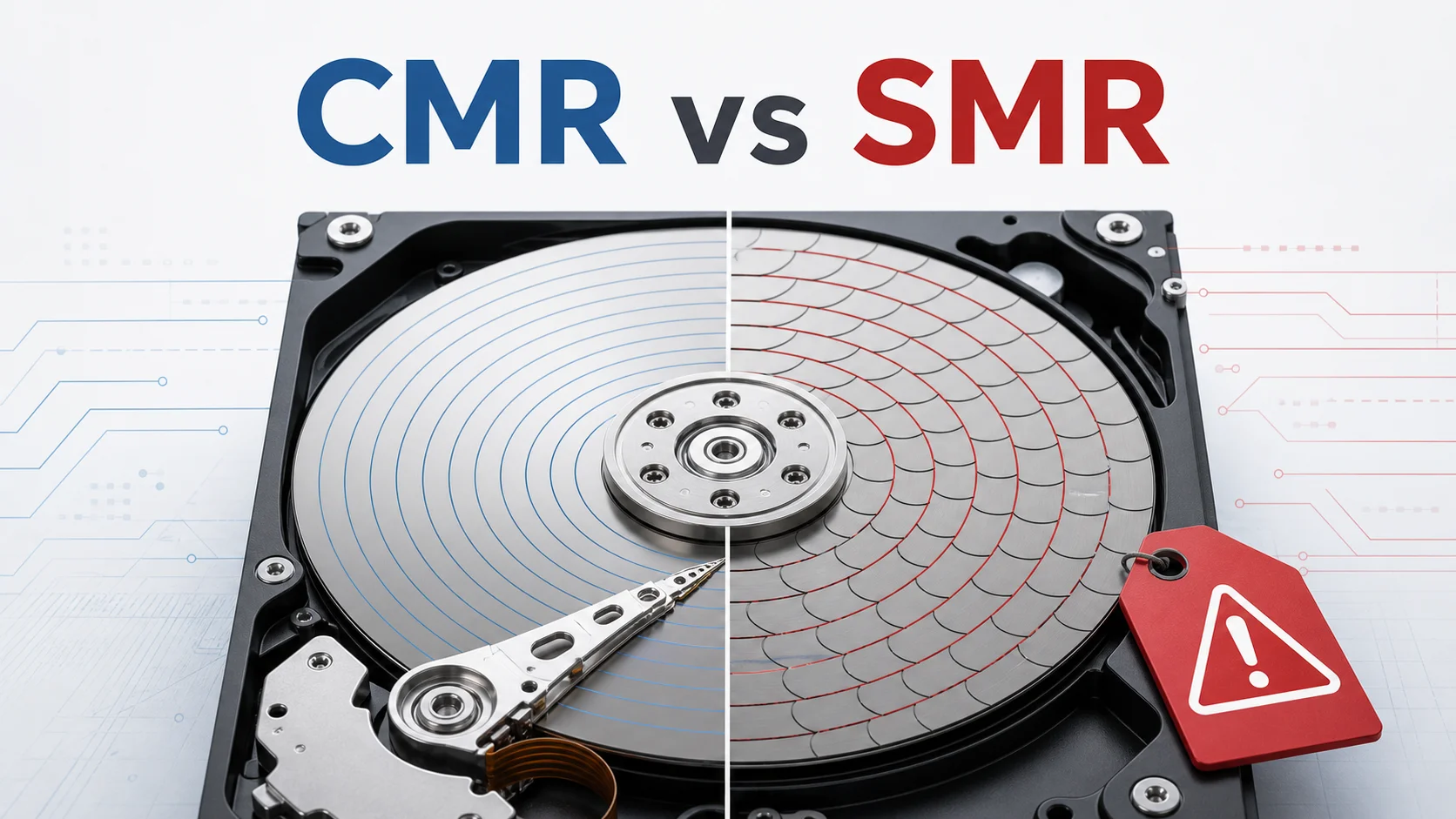
Figure 1: AI-generated cover. CMR versus SMR is not merely old versus new technology. The write rules are different.
1. Why this topic suddenly matters
If you have recently seen unusually cheap large-capacity hard drives marketed as “NAS archive drives,” “Feiniu drives,” “Btrfs drives,” or “enterprise bulk drives,” the price probably looked tempting. Ten-plus terabytes for very little money feels like a lucky find.
The hidden problem is that some of these drives are not normal CMR drives, and not even the consumer-style SMR drives where firmware tries to hide the shingling. They may be host-managed SMR drives. A host-managed SMR drive expects the host to write zones in the right order. If you plug it into an ordinary NAS, desktop, classic RAID stack, or random-write workload, the symptoms can be painful: slow initialization, slow rebuilds, stalls under random writes, unsupported devices, or a system that works at first and becomes miserable after space reclamation and fragmentation grow.
The label “Btrfs drive” is especially misleading. Btrfs does have a zoned mode, and it can support zoned block devices under the right conditions. But that does not mean your kernel, btrfs-progs version, NAS distribution, RAID design, backup software, Docker data directory, download cache, and daily workload are all ready for host-managed SMR.
Think of it like buying a manual heavy truck because it is cheap. The truck may be excellent for logistics, but that does not mean every household driver should take it into a small basement garage. The machine is real. The mismatch is the problem.
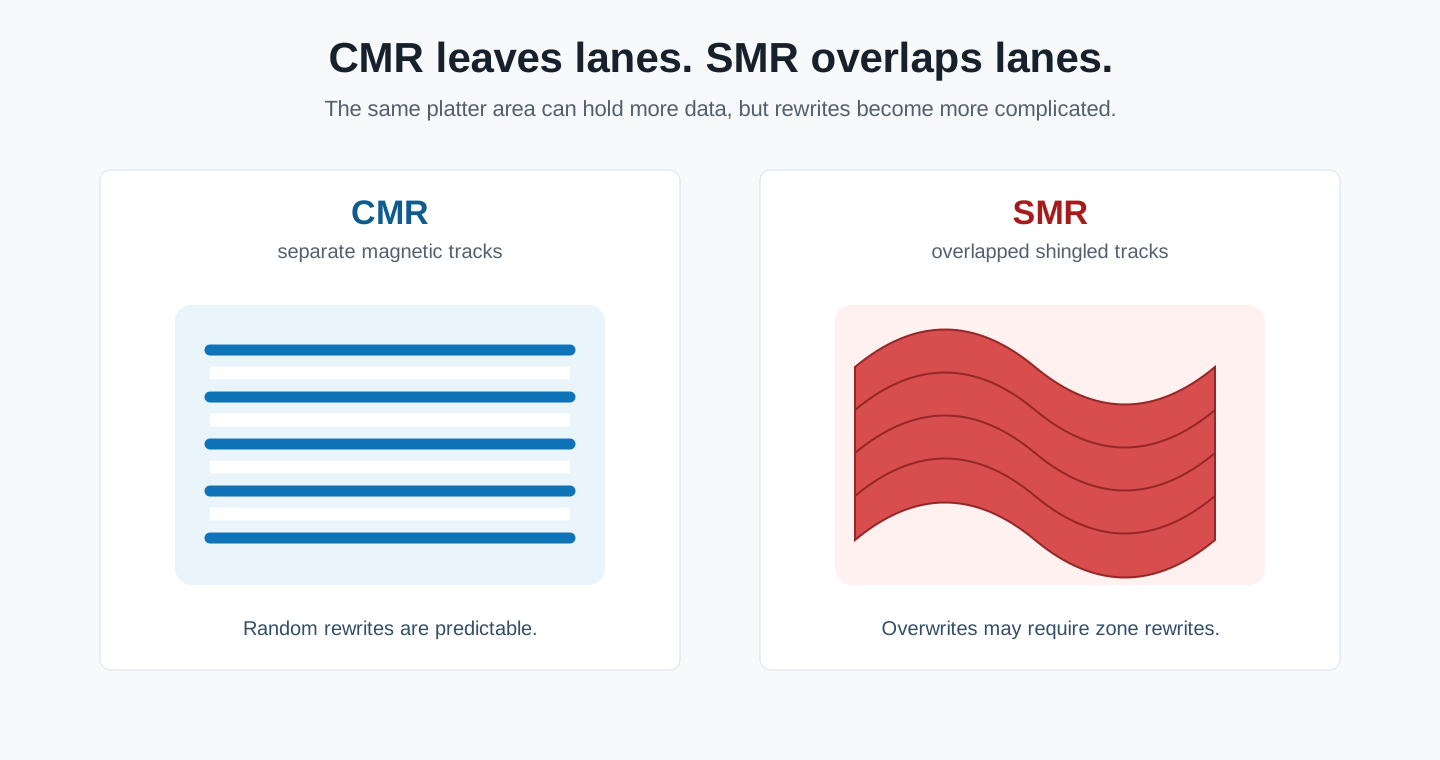
Figure 2: CMR leaves gaps between tracks. SMR overlaps them like shingles. The density improves, but local changes become more expensive.
2. What CMR and SMR actually change
CMR means Conventional Magnetic Recording. In simple terms, each track has some separation from its neighbors. When the head writes data, it is less likely to disturb adjacent tracks. That makes random rewrites easier to reason about: change this block, pay roughly for this block.
SMR means Shingled Magnetic Recording. The tracks overlap like roof shingles, so the platter stores more data in the same physical area. That is good for capacity and cost. The catch is that a track under another “shingle” cannot always be modified in isolation. Rewriting a small piece of data may force the drive or the host to reorganize a whole zone.
Here is the child-friendly version. CMR is like every student having their own desk. If one student changes a book, only that desk changes. SMR is like stacking books on top of one another to save space. You can still reach the lower book, but then you must restack the books above it. The shelf is denser, but the cleanup work moved somewhere else.
SMR is not fake storage, and it is not automatically bad. It is useful for cold data, large sequential writes, and storage systems that were designed for it. It becomes a problem when it is sold as if it were a normal drop-in NAS disk.
3. The three SMR models: host-managed is the one to fear
When people say “SMR is bad,” they are compressing several different models into one word. That is not accurate enough.
The first model is drive-managed SMR. The host sees a normal block device. The firmware hides the shingling internally with cache, garbage collection, and reorganization. Compatibility is good, but performance can collapse under sustained random writes, rebuilds, or cache exhaustion.
The second model is host-aware SMR. It can behave like a regular block device, but also exposes zone controls to software that understands them. It is a bridge model.
The third model is host-managed SMR. This is the dangerous one for normal buyers. It does not pretend to be a normal disk. The host must follow the zone write rules. Zoned Storage documentation describes the host-managed model as one that accommodates sequential-write workloads and requires host software changes. Western Digital’s Ultrastar DC HC650 datasheet is similarly direct: the drive is host-managed SMR for data centers, specifically for sequential write environments, and host-managed SMR requires application changes to sequence writes through Linux libraries.
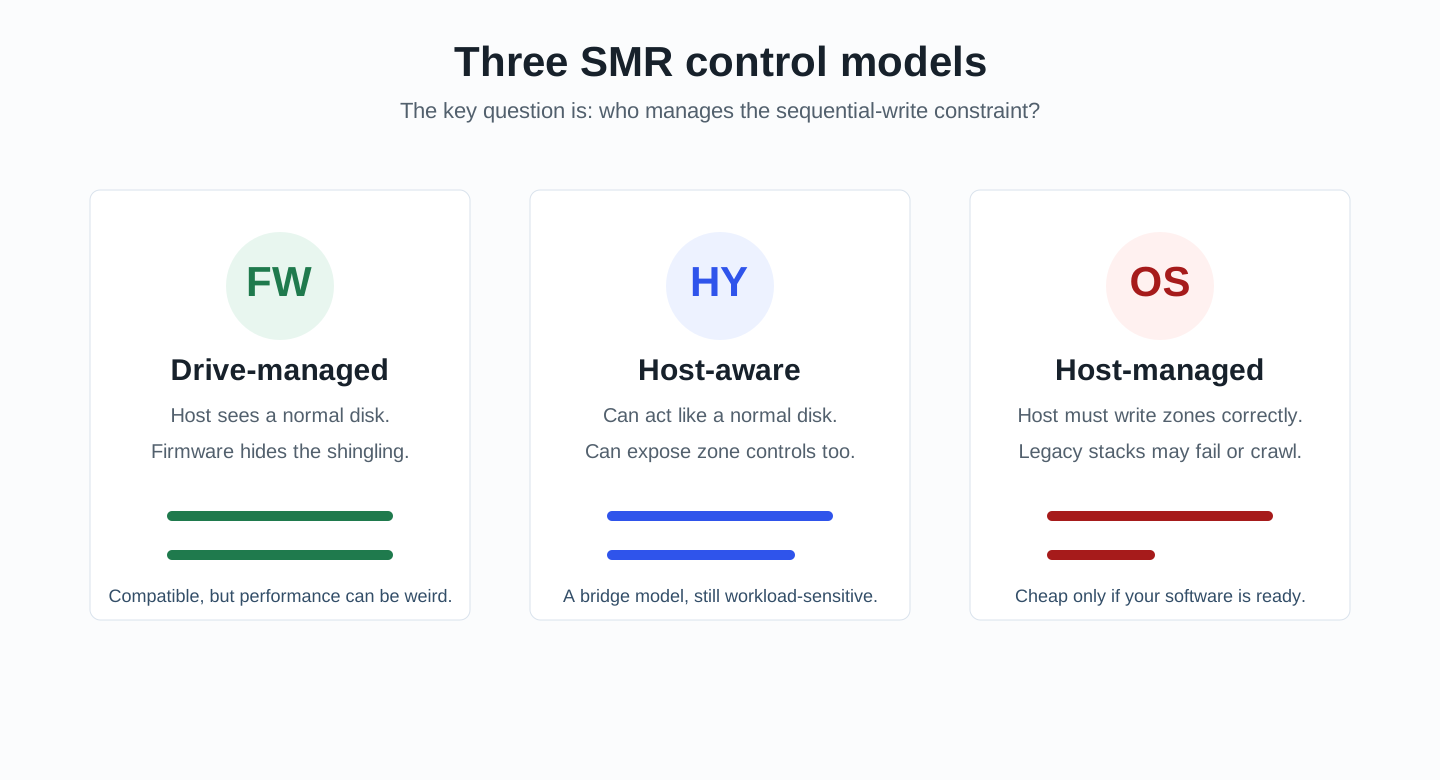
Figure 3: The real question is not only whether tracks are shingled. It is who manages the sequential-write constraint.
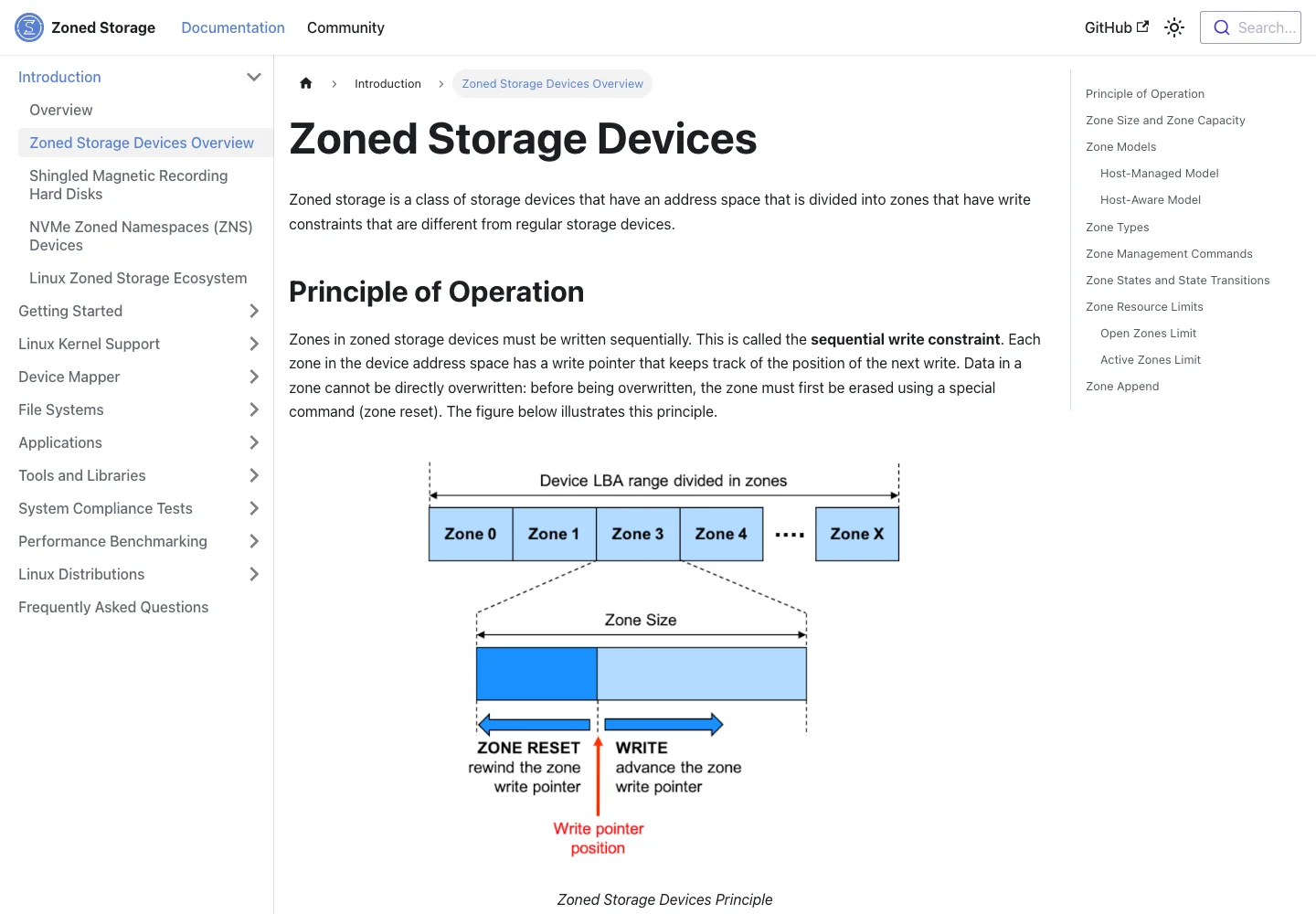
Figure 4: Real screenshot. Zoned devices are divided into zones, and zones must be written sequentially.
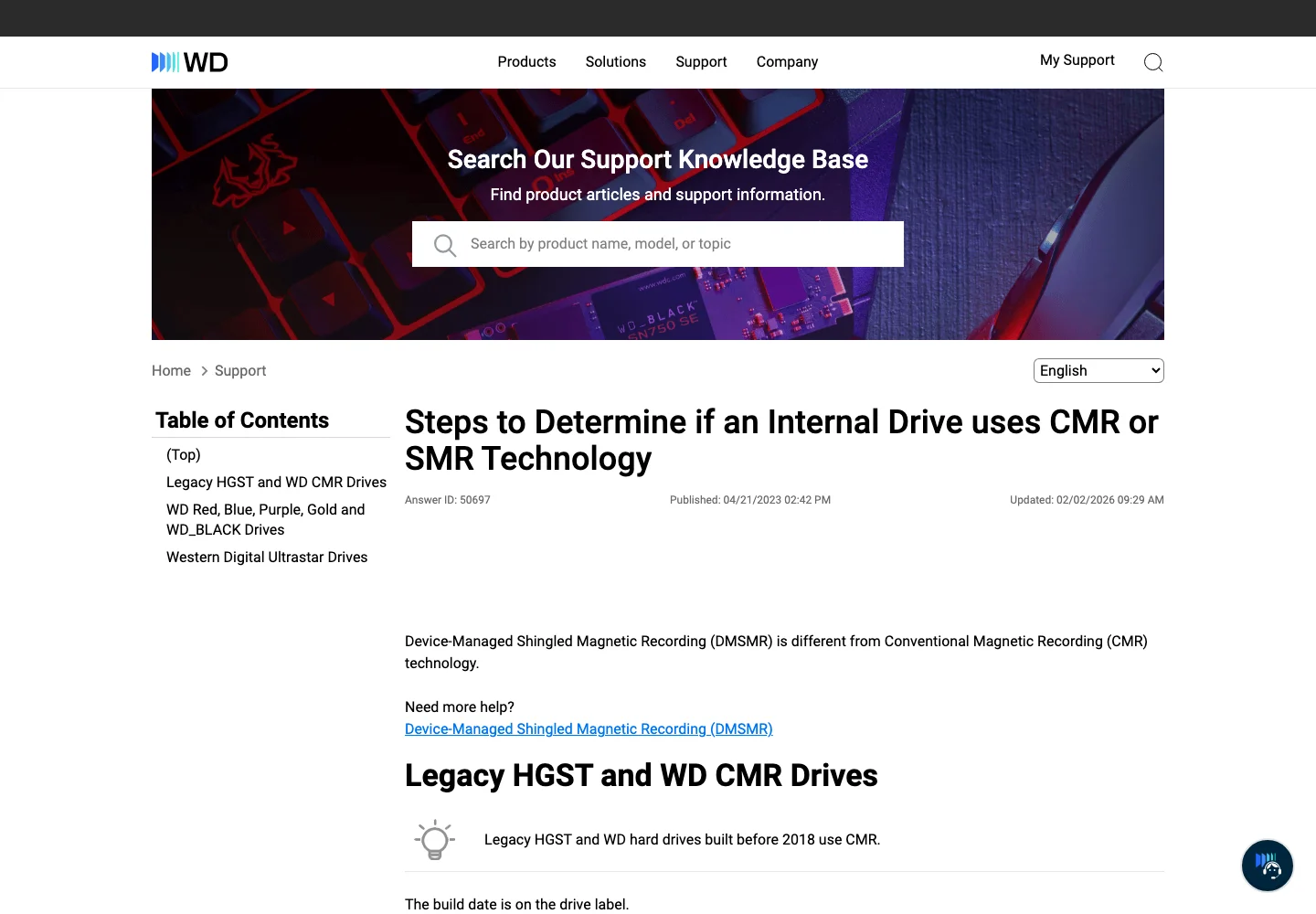
Figure 5: Real screenshot. WD recommends checking labels and product datasheets, not shop titles.
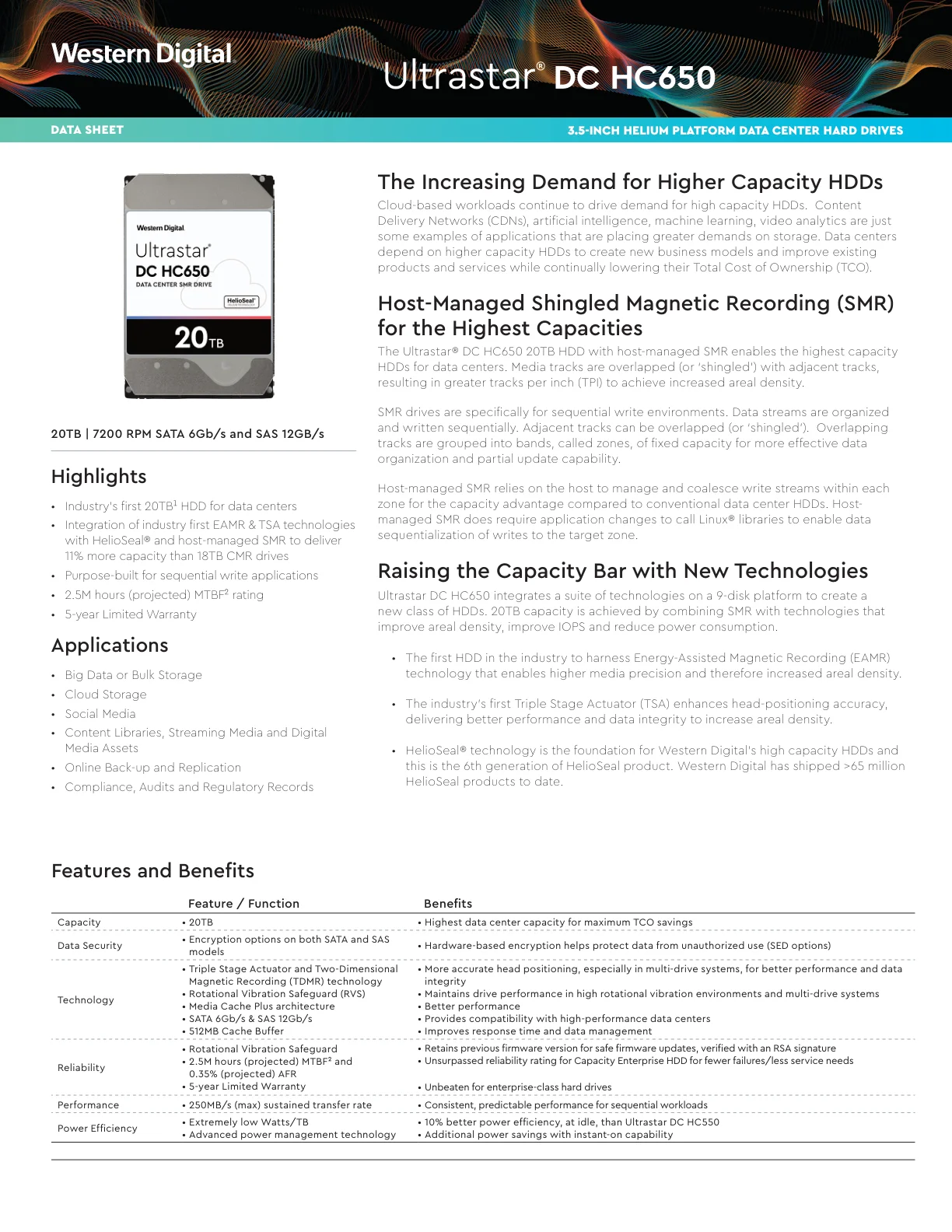
Figure 6: Real screenshot. HC650-class host-managed SMR drives are designed for sequential-write data-center environments, not casual NAS compatibility.
4. Why the “Feiniu drive” or “Btrfs drive” pitch is risky
Not every cheap used enterprise drive is a scam. Drives can be cheap because they are retired from data centers, have limited warranty, have high power-on hours, or come from bulk liquidation. The issue is different: if a seller markets a host-managed SMR drive as a “Feiniu drive” or “Btrfs drive” without explaining the difference from CMR, the buyer is being pushed into a storage design decision they may not understand.
“Feiniu drive” is not a recording technology. It is a market label. “Btrfs drive” is also not a hardware category. Btrfs zoned mode means some Linux + Btrfs stacks can work with zoned devices. It does not mean every NAS image, kernel, toolchain, RAID setup, backup workflow, container workload, or virtual-machine disk image is a good fit.
Most home NAS buyers want five boring things:
- The drive is recognized immediately.
- Expansion and rebuilds behave normally.
- Small files, photos, Docker, databases, and download caches do not freeze the system.
- Data can be migrated or recovered when something goes wrong.
- Warranty and source are understandable.
Host-managed SMR is picky exactly where normal buyers need predictability. It moves complexity from the drive firmware to the host and the user. The money saved at checkout can return as troubleshooting time, migration pain, and data anxiety.
5. How consumers can tell SMR from CMR
The most reliable order is: exact model first, vendor datasheet second, system-exposed zoned status third, seller description last.
Do not trust words like “enterprise,” “helium,” “NAS,” “Feiniu,” or “Btrfs.” Ask for a clear label photo and the exact model number. Then check the vendor’s official datasheet or support page for recording technology. WD’s own support article recommends using labels and product datasheets to determine whether an internal drive uses CMR or SMR.
If the drive is already in your hands, Linux gives you the best read-only clue:
cat /sys/block/sdX/queue/zoned
Typical values are:
none
host-aware
host-managed
none means the kernel does not expose the drive as a zoned block device. It may be CMR, but it may also be drive-managed SMR because drive-managed SMR hides the shingling. host-aware means the device can expose zone controls while still offering compatibility. host-managed is the red flag for normal users: do not assume it will behave as a normal NAS, desktop, RAID, virtualization, or mixed random-write disk.
If you have not bought the drive yet, model numbers matter. Some Ultrastar DC HC family drives exist in host-managed SMR variants. Nearby capacities or similar family names can include both CMR and SMR drives, so guessing from brand or capacity is not enough.
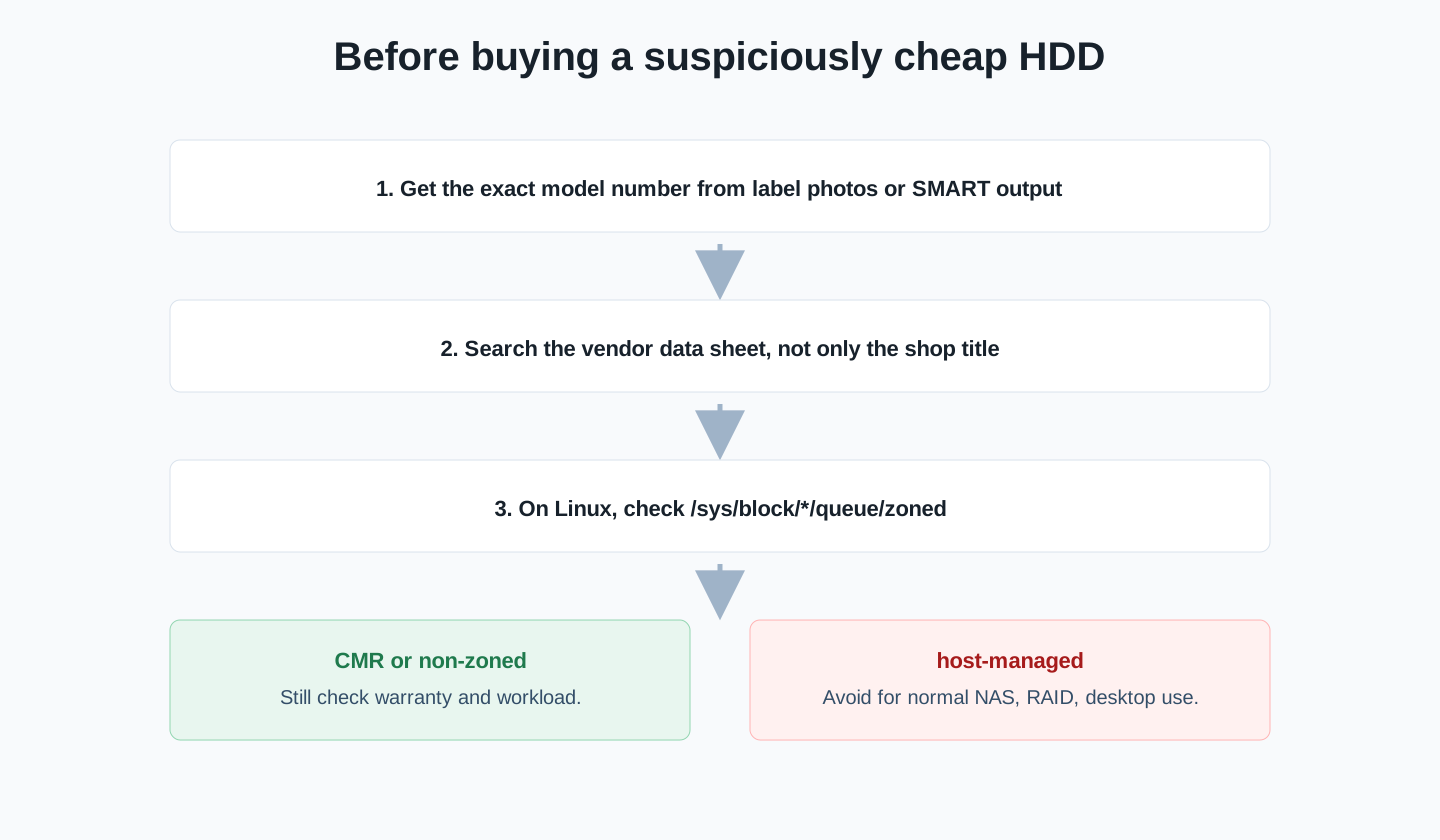
Figure 7: Do not let the shop title classify the disk for you. Exact model, vendor datasheet, and zoned status matter more than marketing labels.
6. One-command read-only detection scripts
The scripts below are read-only. They do not format, mount, unmount, partition, write to disks, use network services, or install third-party tools. Their purpose is to collect model, bus, capacity, health hints, zoned status where available, and a next-step recommendation.
6.1 Windows 11 PowerShell report
Run this in PowerShell. Windows built-in tools usually cannot prove CMR versus SMR, so the script emphasizes exact model lookup.
$ErrorActionPreference = "Stop"

function Mask-Value([string]$value) {
    if ([string]::IsNullOrWhiteSpace($value)) { return "-" }
    $v = $value.Trim()
    if ($v.Length -le 4) { return "****" }
    return ("****" + $v.Substring($v.Length - 4))
}

Write-Host "HDD CMR/SMR read-only inventory for Windows 11"
Write-Host "This script does not write to disks and does not use network services."
Write-Host ""

$physical = Get-PhysicalDisk | Sort-Object FriendlyName
foreach ($disk in $physical) {
    $sizeTb = [math]::Round($disk.Size / 1TB, 2)
    $serial = Mask-Value ([string]$disk.SerialNumber)
    Write-Host ("Name      : {0}" -f $disk.FriendlyName)
    Write-Host ("Serial    : {0}" -f $serial)
    Write-Host ("MediaType : {0}" -f $disk.MediaType)
    Write-Host ("BusType   : {0}" -f $disk.BusType)
    Write-Host ("Size      : {0} TB" -f $sizeTb)
    Write-Host ("Health    : {0}" -f $disk.HealthStatus)
    Write-Host ("Advice    : Windows built-in tools usually cannot prove CMR/SMR. Check the exact model in the vendor datasheet.")
    Write-Host "----"
}
6.2 Ubuntu 26.04 Bash report
Ubuntu and Linux are the best environments for detecting host-managed SMR, because /sys/block/*/queue/zoned can expose the zoned type.
#!/usr/bin/env bash
set -euo pipefail

mask() {
  local v="${1:-}"
  if [[ -z "$v" ]]; then printf -- "-"; return; fi
  if ((${#v} <= 4)); then printf -- "****"; return; fi
  printf -- "****%s" "${v: -4}"
}

echo "HDD CMR/SMR read-only inventory for Ubuntu 26.04"
echo "This script does not write to disks and does not use network services."
echo

for sys in /sys/block/sd* /sys/block/hd*; do
  [[ -e "$sys" ]] || continue
  dev="/dev/${sys##*/}"
  [[ -b "$dev" ]] || continue

  rotational="$(cat "$sys/queue/rotational" 2>/dev/null || echo "?")"
  [[ "$rotational" == "1" ]] || continue

  model="$(cat "$sys/device/model" 2>/dev/null | xargs || echo "unknown")"
  vendor="$(cat "$sys/device/vendor" 2>/dev/null | xargs || echo "unknown")"
  zoned="$(cat "$sys/queue/zoned" 2>/dev/null || echo "unknown")"
  size_bytes="$(blockdev --getsize64 "$dev" 2>/dev/null || echo 0)"
  size_tb="$(awk -v b="$size_bytes" 'BEGIN { printf "%.2f", b/1000/1000/1000/1000 }')"
  wwid="$(cat "$sys/device/wwid" 2>/dev/null || true)"

  echo "Device  : $dev"
  echo "Vendor  : $vendor"
  echo "Model   : $model"
  echo "WWID    : $(mask "$wwid")"
  echo "Size    : ${size_tb} TB"
  echo "Zoned   : $zoned"
  case "$zoned" in
    host-managed)
      echo "Advice  : AVOID for normal NAS, desktop, classic RAID, and mixed random-write workloads unless you explicitly planned a zoned stack."
      ;;
    host-aware)
      echo "Advice  : Treat as workload-sensitive. Confirm filesystem, kernel, and application support."
      ;;
    none)
      echo "Advice  : Not exposed as a zoned block device. It may be CMR or drive-managed SMR. Check the exact vendor datasheet."
      ;;
    *)
      echo "Advice  : Unknown zoned status. Check kernel support and vendor documentation."
      ;;
  esac
  echo "----"
done
6.3 macOS 26 Zsh report
macOS built-in tools generally cannot prove CMR or SMR either, but they can collect model hints for datasheet lookup.
#!/bin/zsh
set -euo pipefail

echo "HDD CMR/SMR read-only inventory for macOS 26"
echo "This script does not write to disks and does not use network services."
echo

echo "Physical disks:"
diskutil list physical
echo

echo "SATA and USB storage model hints:"
system_profiler SPSerialATADataType SPUSBDataType 2>/dev/null | \
  awk '
    /Model:|Product ID:|Vendor ID:|Medium Type:|BSD Name:|Capacity:/ {
      gsub(/Serial Number: .*/, "Serial Number: ****", $0);
      print
    }
  '

echo
echo "Advice:"
echo "macOS built-in tools usually cannot prove CMR/SMR."
echo "Use the exact model number from the label or this report, then check the vendor datasheet."
echo "If a seller says Btrfs-only, Feiniu-only, or Linux-only, ask whether the drive is host-managed SMR before buying."
7. Manual automation and Agent-assisted checking
Manual automation is straightforward: run the matching script, read the report, and focus on Zoned if you are on Linux. If it says host-managed, do not use the drive as a main NAS disk unless you intentionally designed a zoned storage stack.
If you use a local Agent to collect the report, give it this prompt. The important part is to keep the task read-only and privacy-safe.
Act as a local read-only storage inspection assistant:
1. Pick the Windows 11, Ubuntu 26.04, or macOS 26 script for the current system.
2. Only read disk information. Do not format, mount, unmount, partition, write to disks, or install third-party software.
3. Report model, capacity, bus type, health hints, and zoned/SMR clues for each mechanical disk.
4. Mask serial numbers, full computer names, and private addresses.
5. If Linux reports host-managed, conclude that the drive is not recommended for normal NAS, desktop, or classic RAID use.
6. If CMR/SMR cannot be determined, say that the exact model must be checked against the vendor datasheet. Do not invent a conclusion.
8. Why 996 and 965 are a useful analogy
The analogy is a little clickbait, but it explains the tradeoff well.
965 is like CMR. Work time and rest time have boundaries. The system keeps slack. If you change one plan, the impact is usually local. It may not squeeze every possible minute, but it stays predictable over the long term.
996 is like SMR. On paper, capacity or output improves because slack is removed. But when a requirement changes, someone gets sick, or a project needs rework, the system has no buffer. One small change disturbs many layers. The cost did not disappear. It moved from the schedule into people’s bodies, emotions, and families.
Drive-managed SMR is like a company that says there is no overtime, while people silently absorb the extra work until the system stalls. Host-managed SMR is more explicit: “We use a high-density schedule, and every task must arrive in the correct order.” If the whole organization was designed for that, it can work. If you are a normal home user buying a NAS disk, you are buying complexity.
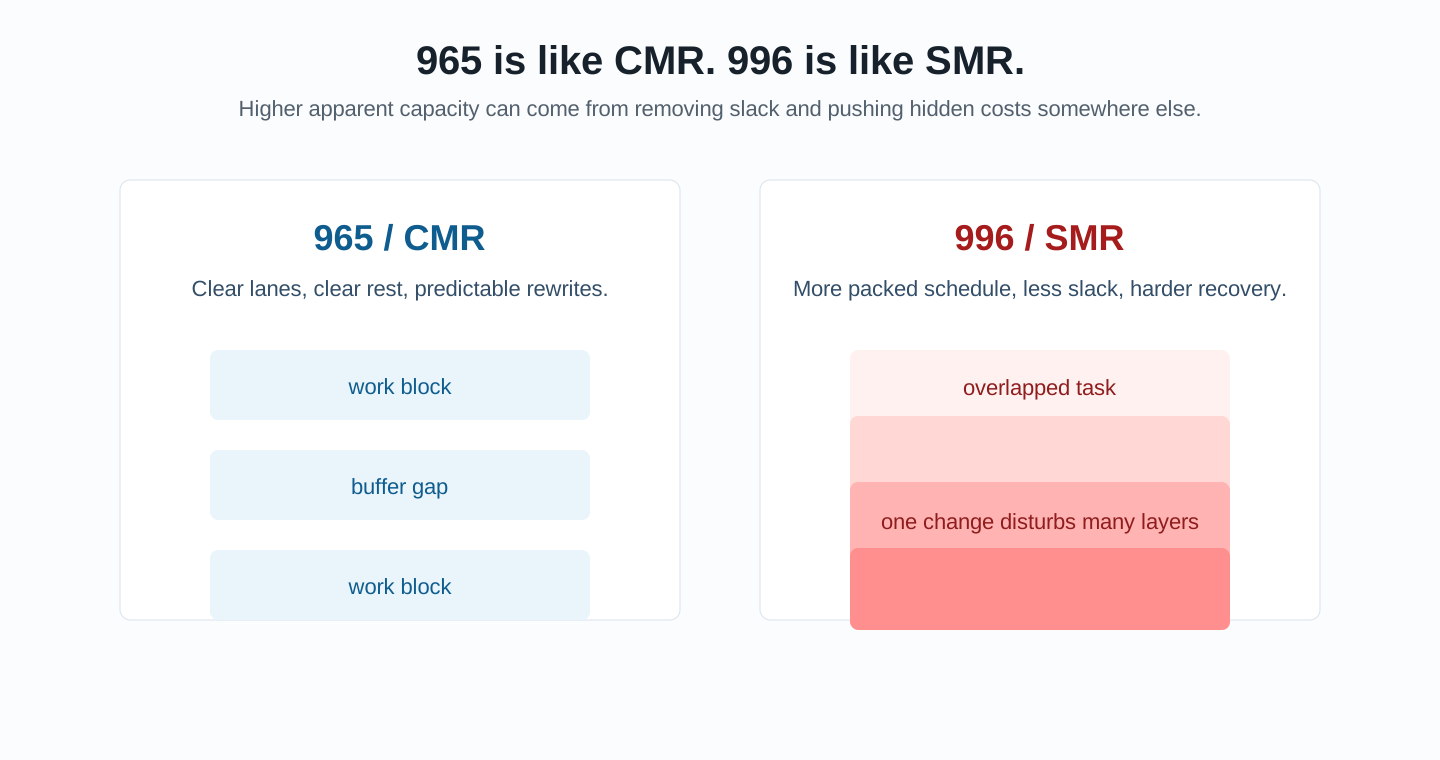
Figure 8: SMR and 996 do not create free efficiency. They compress slack and require another layer to manage the complexity.
9. Q&A
Q: Should nobody ever buy SMR?
No. SMR can be fine for cold data, sequential writes, and software stacks designed for zoned devices. The problem is selling it as if it were a cheap normal disk.
Q: If Btrfs supports zoned mode, does that make the drive safe?
No. Btrfs support is only one layer. Kernel version, btrfs-progs, NAS distribution, application write patterns, backup tools, and recovery procedures all matter.
Q: If queue/zoned says none, is the disk definitely CMR?
No. Drive-managed SMR can hide the shingling from the host and still report as non-zoned. You still need the exact model and vendor datasheet.
Q: The seller says it is an enterprise drive. Is that better?
Enterprise means it was designed for enterprise conditions. Data centers have matching software, monitoring, spares, and migration procedures. Home users usually do not.
Q: What if I already bought a host-managed SMR drive?
Do not put important data on it immediately. Confirm queue/zoned on Linux, then test sequential writes, random writes, power-loss recovery, and rebuild behavior with disposable data. For normal users, returning it or using it only as an expendable cold-data experiment is more realistic.
10. Final checklist
Before buying a large HDD, walk through this list:
- Get the exact model number.
- Check the vendor datasheet.
- Treat “Feiniu drive,” “Btrfs drive,” “Linux-only,” and “not for normal systems” as warning labels.
- If the drive is already in hand, check
/sys/block/*/queue/zonedon Linux. - Avoid
host-managedfor normal NAS, desktop, classic RAID, and VM data disks. - If the low price comes from no warranty, retirement, high power-on hours, or a special write model, it is not a bargain. It is risk priced into the product.
Cheap storage is attractive. But the expensive part is not the disk. It is your data, time, and troubleshooting energy. CMR and SMR are like 965 and 996: one keeps slack, the other increases density. You can choose density for a specific design, but do not mistake it for a normal lifestyle.
References
- Zoned Storage: Shingled Magnetic Recording Hard Disks
- Zoned Storage: Zoned Storage Devices
- Western Digital Support: Steps to Determine if an Internal Drive uses CMR or SMR Technology
- Western Digital datasheet: Ultrastar DC HC650
- Btrfs documentation: Zoned mode