Debugging Chinese Text Turning into Underscores in tmux + opencode: The Real Culprit Was client_utf8=0
Short version
This was not an opencode Chinese rendering bug, and it was not a broken terminal font. The tmux client had been detected as not supporting UTF-8. The decisive evidence was
tmux display-message -p 'client_utf8=#{client_utf8}', which returnedclient_utf8=0. In that state, tmux replaces non-ASCII output with underscores, so every Chinese character inside the opencode TUI appeared as_.
This post documents a small but very typical terminal debugging session. On the same Mac, running opencode directly displayed Chinese text correctly. But after starting a tmux session first and then running opencode, all Chinese text became underscores.
This kind of problem is easy to misdiagnose. The first instinct is often to blame the font, the terminal emulator, the opencode version, a color theme, Nerd Font configuration, Unicode width handling, or a bug in the TUI framework. In this case, however, the key question was much narrower: does the current tmux client believe it can write UTF-8 back to the outer terminal?
To avoid exposing private environment details, all examples below are generalized. They do not include real hostnames, private addresses, session names, credentials, usernames, or project paths. The only things preserved are the technical facts needed to understand the failure and the fix.
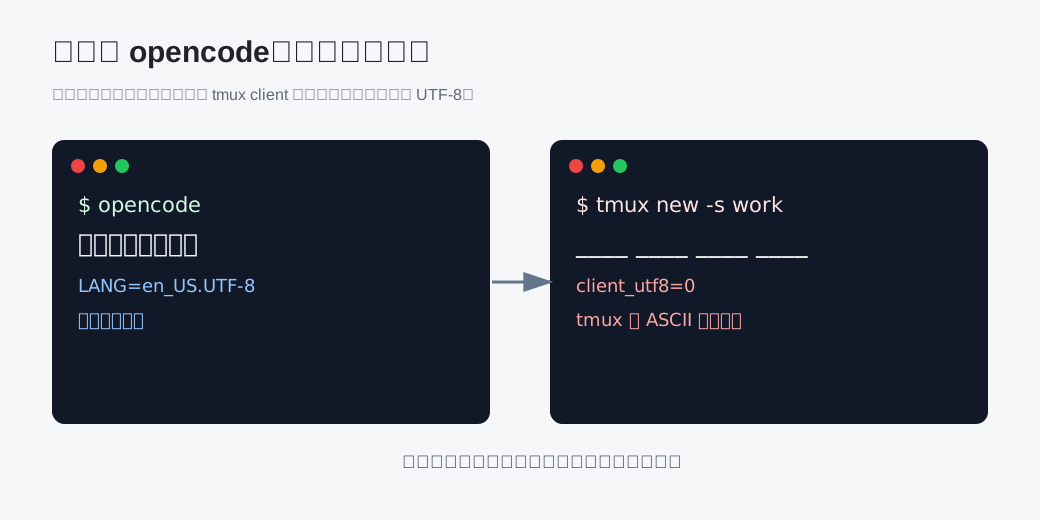
Figure 1: opencode displayed Chinese correctly in the normal terminal, but Chinese became underscores after tmux was inserted into the output path.
1. The symptom: it only failed after entering tmux
The symptom was very clean:
- Run
opencodedirectly in a normal terminal: Chinese menus, prompts, and content render correctly. - Start a tmux session with
tmux new -s work. - Run
opencodeagain inside the tmux pane. - Every place that should contain Chinese text is rendered as underscores.
That boundary matters. If opencode had failed even when launched directly, the investigation would have started with application output, locale, terminal encoding, or font coverage. But because opencode worked outside tmux and failed only inside tmux, the application itself was unlikely to be the first suspect.
The output path was different:
opencode -> tmux pane -> tmux client -> outer terminal
When opencode was run directly, the path was shorter:
opencode -> outer terminal
The only new component in the failing path was tmux. So instead of upgrading opencode, changing fonts, or tweaking terminal themes, the first useful step was to compare the environment outside and inside tmux.
2. First check: the locale looked mostly fine
For any Chinese rendering issue, locale is the obvious first check:
locale
printf 'TERM=%s\nLANG=%s\nLC_ALL=%s\nLC_CTYPE=%s\n' "$TERM" "$LANG" "$LC_ALL" "$LC_CTYPE"
Inside the tmux pane, the environment looked like a UTF-8 environment:
TERM=tmux-256color
LANG=en_US.UTF-8
LC_ALL=
LC_CTYPE=
There is a subtle detail here: LANG was UTF-8, but the LC_CTYPE environment variable itself was empty. Many programs will still derive a UTF-8 locale from LANG, so running locale may show LC_CTYPE="en_US.UTF-8". That makes the system look correct at first glance.
But tmux has another layer of state. The locale seen by a pane process is not the same thing as the output capability of the tmux client that is connected to the real terminal. That client state turned out to be the decisive signal.
3. The decisive evidence: client_utf8=0
The command that pinned down the cause was:
tmux display-message -p 'client_termname=#{client_termname} client_utf8=#{client_utf8}'
The important part of the output was:
client_termname=xterm-256color client_utf8=0
client_utf8=0 means tmux currently believes this outer client does not support UTF-8 output. To avoid writing characters that the terminal may not understand, tmux falls back to a conservative behavior: it replaces non-ASCII characters with underscores.
That explains why the result was not random mojibake. It was not a mixture of broken byte sequences, boxes, question marks, or missing glyphs. It was a regular transformation:
- opencode produced Chinese text.
- The tmux pane received UTF-8 text.
- The tmux client believed the outer terminal was not UTF-8 capable.
- tmux replaced non-ASCII characters with
_at the output boundary. - The terminal displayed underscores.
This is why the failure looked so artificial and consistent. It was a tmux output policy, not a font rendering failure.
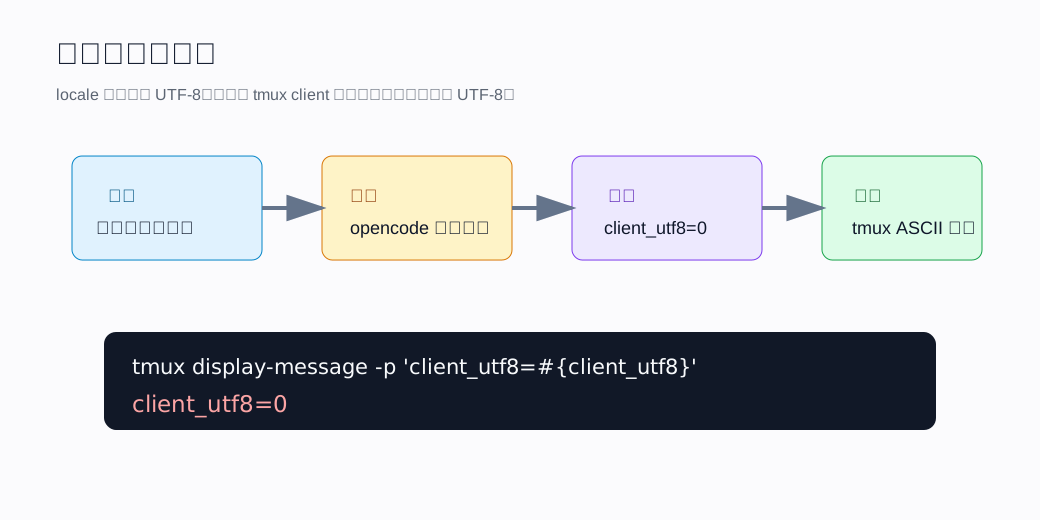
Figure 2: the real issue was not whether Chinese text could be generated, but whether the tmux client allowed UTF-8 to pass through.
4. Why opencode worked directly but failed inside tmux
This is the confusing part. The terminal was the same, the font was the same, and opencode was the same. Why would adding tmux change Chinese text into underscores?
The reason is that tmux is not a transparent pipe. It is both a terminal multiplexer and a terminal capability mediator. Programs inside a pane do not talk directly to the real terminal. They talk to a virtual terminal provided by tmux, and tmux then writes to the outer terminal through a client connection.
That gives us two separate layers to inspect:
- The pane environment: what
TERM,LANG, andLC_CTYPEare visible to opencode. - The tmux client environment: whether tmux decided that the connected outer terminal supports UTF-8 output.
In this case, the pane environment looked like UTF-8, but the connected client still reported client_utf8=0. That means the failure happened at the client-output boundary, not inside opencode and not inside the pane process.
tmux documents this behavior. If UTF-8 output is not enabled for the client, non-ASCII characters can be replaced with underscores. That exact documented behavior matched the observed symptom.
5. The minimal fix: force tmux to use UTF-8 output
Once the root cause is clear, the fix should target tmux, not opencode.
The smallest working fix is to start tmux with -u:
tmux -u new -s work
For an existing session, reattach with:
tmux -u attach -t work
The -u flag is the important part. It does not change the language of programs inside the pane. Instead, it tells tmux to write UTF-8 to the outer terminal even when environment-variable detection is ambiguous or incomplete.
To avoid typing -u every time, add an alias to the shell configuration:
alias tmux='tmux -u'
After that, the usual command still works:
tmux new -s work
but the actual command line includes the UTF-8 forcing behavior.
6. Hardening the setup: make locale and tmux configuration explicit
Using tmux -u fixes the core issue. Still, I prefer to make the surrounding environment explicit as well, because terminal problems often come from implicit assumptions at process boundaries.
In ~/.zshrc, or the equivalent shell startup file, set:
export LANG=en_US.UTF-8
export LC_CTYPE=en_US.UTF-8
alias tmux='tmux -u'
Setting LC_CTYPE explicitly is useful. LANG is the default locale, but some programs and intermediate layers look specifically at LC_CTYPE when deciding character classification and encoding behavior. Writing it explicitly removes a class of “it looks like UTF-8 in one place, but not at the boundary” problems.
A minimal ~/.tmux.conf can also make the tmux side clearer:
set -g default-terminal "tmux-256color"
set -gq set-clipboard on
set -as terminal-features ",xterm-256color:RGB"
set -as terminal-features ",tmux-256color:RGB"

set-environment -g LANG "en_US.UTF-8"
set-environment -g LC_CTYPE "en_US.UTF-8"
These lines do three things:
- Use
tmux-256coloras the default terminal type inside tmux. - Declare truecolor support for common outer terminal names and tmux itself.
- Ensure new panes receive an explicit UTF-8 locale.
One important distinction remains: set-environment affects new pane environments inside tmux. It does not retroactively change the UTF-8 state of an already connected client. The client state is determined when the client connects, which is why reattaching with tmux -u is still necessary.
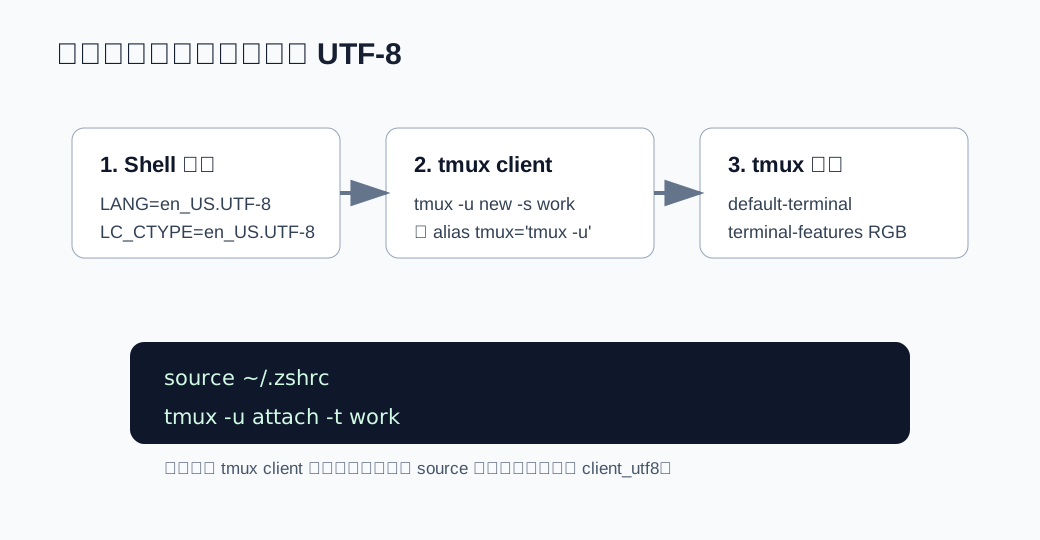
Figure 3: the robust fix makes all three layers explicit: shell locale, tmux client startup, and tmux pane environment.
7. Why sourcing the config is not enough
After editing ~/.tmux.conf, it is natural to run:
tmux source-file ~/.tmux.conf
That is useful, but it does not automatically turn an already connected client from client_utf8=0 into client_utf8=1. The current client made its UTF-8 decision when it connected to the tmux server.
The safer sequence is:
# Detach from tmux first.
# The default binding is Ctrl-b d.

# Back in the outer terminal:
source ~/.zshrc
tmux -u attach -t work
If there is no important work inside tmux, restarting the server also works:
tmux kill-server
tmux -u new -s work
But I would not use kill-server casually during troubleshooting. tmux often contains editors, long-running jobs, logs, or remote sessions. Detaching and reattaching with tmux -u is safer and usually sufficient.
8. Verification: do not rely only on visual inspection
After applying the fix, verify the layers separately.
First, check the shell environment:
printf 'LANG=%s\nLC_CTYPE=%s\n' "$LANG" "$LC_CTYPE"
Expected output:
LANG=en_US.UTF-8
LC_CTYPE=en_US.UTF-8
Second, check the pane environment inside tmux:
printf 'TERM=%s LANG=%s LC_CTYPE=%s\n' "$TERM" "$LANG" "$LC_CTYPE"
Expected output:
TERM=tmux-256color LANG=en_US.UTF-8 LC_CTYPE=en_US.UTF-8
Third, check the tmux client state:
tmux display-message -p 'client_utf8=#{client_utf8} client_termname=#{client_termname}'
The important expectation is client_utf8=1. If it still reports 0, the current client is probably an old connection, or tmux was started without -u. Detach and reattach with tmux -u attach -t work.
Finally, run:
opencode
If Chinese text is rendered correctly again, the fix has addressed the actual root cause.
9. A reusable debugging order for terminal TUI issues
When a TUI program renders Chinese incorrectly inside tmux but works directly outside tmux, I would use this order next time:
- Run the program directly to confirm the application itself can output Chinese correctly.
- Inside tmux, inspect
TERM,LANG, andLC_CTYPE. - Use
tmux display-messageto inspectclient_utf8. - Start or reattach tmux with
tmux -uas the smallest possible test. - If the test works, persist the fix with explicit
LC_CTYPE, a tmux alias, and a small~/.tmux.conf.
The value of this order is that each step narrows the boundary. Avoid changing fonts, terminal themes, application versions, locale files, and tmux configuration all at once. If everything changes together, even a successful result does not explain which change actually fixed the problem.
10. Final notes
The complete chain in this incident was:
- opencode rendered Chinese correctly when launched directly, so opencode and the terminal font were not the first suspects.
- Chinese became underscores only after tmux was added to the path, which pointed to a changed output boundary.
client_utf8=0proved that the connected tmux client was not using UTF-8 output.- tmux replaces non-ASCII characters with underscores in that state, matching the symptom exactly.
- Starting tmux with
-u, exportingLC_CTYPE, and making the tmux configuration explicit restored the output path.
I like this kind of debugging case because it is a good reminder that many issues that look like application bugs actually happen at a boundary. opencode did not change. The terminal did not change. The font did not change. What changed was that a terminal multiplexer was inserted into the path, and that multiplexer made a capability decision.
The practical rule is simple:
When Chinese text inside tmux turns into regular underscores, check
client_utf8before blaming the font or the application.
11. What I deliberately did not change
It is also worth mentioning what was not changed. I did not treat the opencode binary as the broken component, because the direct run already proved that it could render Chinese correctly. I did not change the terminal font, because a missing glyph problem would usually produce boxes or fallback glyphs rather than a clean run of underscores. I also did not start by changing every terminal-related setting at once, because that would have made the final result harder to trust.
The useful discipline here was to keep one hypothesis at a time. First prove the output path changed. Then prove tmux was the component that changed it. Then inspect the tmux client state. Only after client_utf8=0 matched the documented underscore behavior did it make sense to persist the tmux -u and locale fix.
That is the part I want to keep for future terminal incidents: when the symptom is regular and reproducible, look for the component that is intentionally regular. In this case, the underscores were not random corruption. They were tmux doing exactly what it was configured, or mis-detected, to do.