One sentence let Claude upgrade Ubuntu 22.04 to 24.04: a near-zero-screen-time cross-LTS run
TL;DR
A remote home-lab box had been sitting on Ubuntu 22.04.4 LTS (jammy, kernel 5.15) for a long time. After one sentence — “upgrade the box at 192.168.103.182 to Ubuntu 24.04” — Claude opened a tmux session to babysit the run, brought up a fallback sshd on port 1022 so a mid-upgrade sshd restart would not strand me, then drove
do-release-upgrade -f DistUpgradeViewNonInteractiveend to end. Twenty-five minutes later the host came back: kernel 6.8.0-124, every service still listening.This is not a tutorial on
do-release-upgrade; the Ubuntu docs already cover that. This is about what an Agent does once it gets an SSH handle on a box, why it does each step, and which pitfalls you have to clear out of the way before letting it loose.
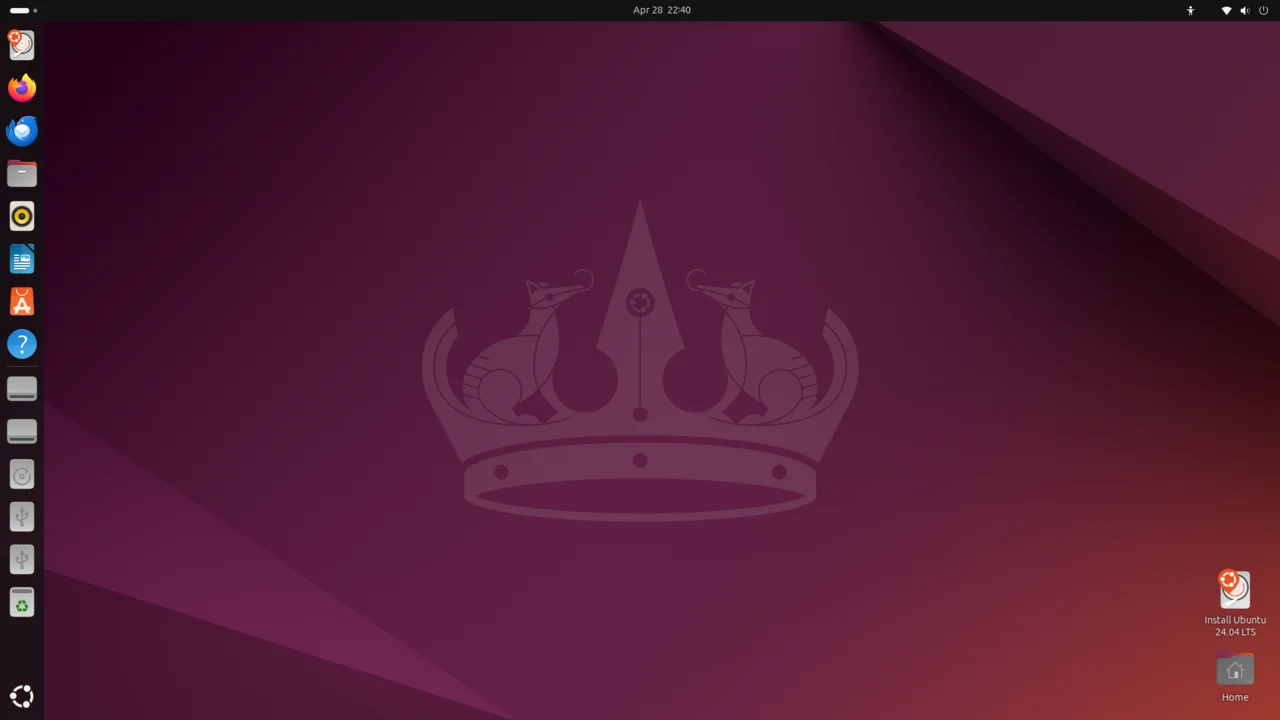
Cover: the official Ubuntu 24.04 LTS (Noble Numbat) desktop. This is what the upgraded room looks like.
1. Why I handed the upgrade to an Agent
A remote machine at home does two things for me around the clock: runs v2ray, and runs a self-written Python SOCKS5/HTTP proxy. Every device in the house tunnels through it. It does not get rebooted unless I am the one doing it.
Ubuntu 22.04 (jammy) had been on duty since 2022 — default kernel 5.15, Python 3.10. I was used to it. But 24.04 (noble) had been out for a year and a half; its kernel is 6.8, its systemd is 255, its Python is 3.12. Better a short pain now than a long one later — I would miss the next LTS window if I kept procrastinating.
The problem: the box is not on my desk. It lives in a weak-current cabinet wired into a PVE host, and the only way in is SSH. Remote-upgrading Ubuntu has three specific pain points for me:
- The upgrade must not be interrupted.
do-release-upgradeis a long task: hundreds of megabytes to download, thousands of packages to unpack and configure. If the sshd binary gets replaced mid-stream and I lose the SSH connection, I have no console to fall back to. - Services will flap. While v2ray’s package is being upgraded, systemd restarts it; for a few minutes every device in the house loses its tunnel. I can live with minutes; I cannot live with tens of minutes.
- I do not want to babysit dpkg. Watching
Unpacking linux-headers-6.8.0-124-generic ...scroll by is a waste of attention.
Putting those three together, the answer is clear: let the Agent drive, and only review the result. I hand it one sentence; it strings together tmux-guarding, fallback sshd, do-release-upgrade, and log monitoring. If something fails, I can scroll back; if it succeeds, I drink tea.
This is the bird’s-eye view:

Figure 1: you (left) speak one sentence; the Agent goes through ssh + tmux to the remote box (right). The box upgrades from jammy 22.04 to noble 24.04. tmux keeps the process alive across disconnects; fallback sshd on :1022 covers the moment the main sshd gets replaced. You never leave the couch.
2. What the Agent does first: look at the box
By reflex, an Agent that receives a remote task starts with a probe. The probe is not “can I ping it”; it is “let me read its ID card”:
ssh root@host 'cat /etc/os-release; uname -a; uptime; df -h /; free -h; ss -tlnp | head -20'
What the Agent actually pays attention to in the output:
- Distro and codename:
Ubuntu 22.04.4 LTS (jammy). The target isnoble. - Kernel:
5.15.0-101-generic. After upgrade it will become6.8.0-124-generic. - Disk:
/dev/mapper/ubuntu--vg-ubuntu--lv 9.5G 4.6G 4.5G 51% /. About 4.5G free — workable but tight. - Memory: 1G, plus 774M swap; KVM guest; UEFI boot.
- Critical services: v2ray on multiple ports; Python SOCKS listeners on 1080/1081/1090/1091.
- Upgrade tool readiness:
/usr/bin/do-release-upgradeexists;Prompt=lts.
In everyday terms: the landlord looks at the floor plan first, to know whether it is a 90 m² two-bedroom or a 30 m² studio, before deciding which truck the moving company should send.
One detail matters here — Prompt=lts. Ubuntu’s release-upgrade defaults to the LTS track, but jammy → noble is a cross-LTS move; with a pure Prompt=lts the upgrader will not even notice noble exists. The Agent rewrites /etc/update-manager/release-upgrades to Prompt=normal so do-release-upgrade recognises noble as a target.
3. What the Agent does second: a tmux night-watch
Once the upgrade starts, the Agent cannot guarantee its own SSH link stays up the whole time. A network blip, the Agent’s own laptop sleeping, the Agent’s context window being truncated — any of those kills the SSH session.
If the original command was simply ssh root@host 'do-release-upgrade ...' &, when the parent SSH dies the kernel takes the remote upgrader down with it — the classic “killed because parent died”. A mid-run kill leaves apt locks held and the system half-upgraded; the next reboot is a coin flip.
It is like hiring a moving company and going downstairs for a coffee — if nobody answers the doorbell, the movers leave. You need someone standing at the gate the whole time, even while you are out.
tmux is that someone at the gate. The Agent opens a detached session on the remote side:
tmux new-session -d -s upg -c /root 'bash -lc "echo tmux-ready; bash"'
After that, every operation — including the actual do-release-upgrade — is delivered into the session via tmux send-keys. tmux runs as a server process on the remote box and does not depend on the SSH connection. If the Agent’s SSH drops ten times in a row, no big deal — tmux attach -t upg and you are right back where you were.
Why tmux and not nohup + &? Because tmux also gives you a replayable scrollback: you can scrub back and see which dpkg line ran, which package got stuck, what the journal said three minutes ago. That is a lifeline when something goes wrong.
4. What the Agent does third: a fallback sshd
During the upgrade, the openssh-server package itself gets replaced. The instant dpkg overwrites /usr/sbin/sshd, systemd kills the running sshd process and respawns the new binary.
The window is tiny, but it is not zero. If the Agent’s SSH happens to die inside that window:
- The main sshd is dead.
- The new sshd has not yet started.
- The Agent reconnects and gets “Connection refused”.
Once the Agent cannot reconnect, it can never reconnect. The only options are driving to the data centre for a console (not possible) or waiting for the box to finish rebooting on its own (uncertain timing).
It is like replacing the elevator cables: while the main elevator is down, a backup elevator has to be standing by. You cannot leave the passengers stranded on the 20th floor.
The fix: before the upgrade starts, the Agent launches an independent sshd, outside of systemd, listening on port 1022:
ssh-keygen -A
/usr/sbin/sshd -D -p 1022 -o PidFile=/run/sshd-extra/sshd-1022.pid &
This sshd is not under systemd’s control, so dpkg swapping the package on disk cannot touch it — the running process already has the binary mapped into memory; rewriting the file does not affect a process that has already loaded it.
After this, every time the Agent’s SSH drops, it tries :22 first, then :1022. Port 1022 is the real escape hatch.
When the upgrade is done, the Agent kills that fallback process.
5. What the Agent does fourth: actually run the upgrade
With everything ready, the Agent types into the tmux session:
DEBIAN_FRONTEND=noninteractive do-release-upgrade -f DistUpgradeViewNonInteractive 2>&1 | tee /var/log/dist-upgrade.log
Two key switches:
-f DistUpgradeViewNonInteractive: no interactive prompts at all. By default,do-release-upgradeasks many questions — “keep this conffile?”, “restart this service?” — and any one of them blocks an unattended run.-f DistUpgradeViewNonInteractivepicks the safe defaults automatically.DEBIAN_FRONTEND=noninteractive: same idea, for debconf.
After that, the Agent switches roles: from “driver” to “observer”. It stops sending commands and just polls — every 30 seconds it reads journalctl, captures the tmux pane, and greps for dpkg. Each tick is a heartbeat saying “still moving”.
The whole pipeline splits cleanly into five stages:

Figure 2: the upgrade split into five stages. Every stage has a visible signal, and the Agent uses those signals to know whether it is safe to move to the next one.
What actually happens inside each stage — here is the EKG the Agent pulled out of journalctl:
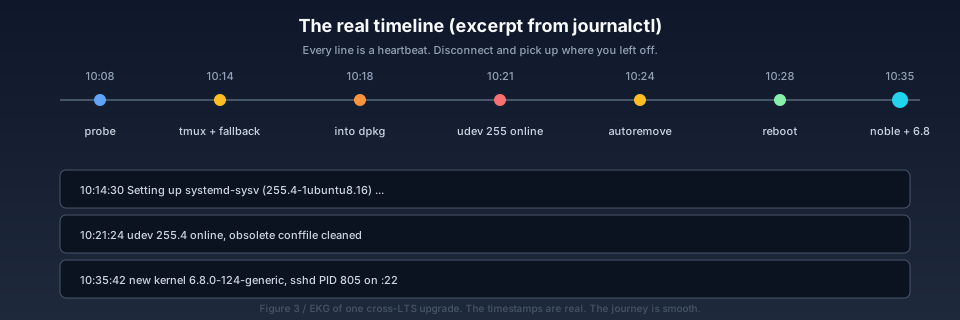
Figure 3: an excerpt of the journalctl timeline for the same run. 10:14 — into dpkg. 10:21 — udev 255 (the noble version) comes online. 10:24 — autoremove releases the old packages. 10:28 — reboot. 10:35 — the new kernel 6.8.0-124 is up; sshd PID 805 owns port 22. The heartbeat is steady; nothing got stuck.
The official docs say “this can take one to several hours”. On this machine it was 27 minutes from the first SSH probe at 10:08 to the new kernel being online at 10:35. About 6 minutes were downloading packages on a 100-megabit link, about 14 minutes were the dpkg stage, and the rest was probing, waiting, and the reboot.
6. What the Agent does fifth: reboot and self-check
Once dpkg has finished, the upgrader asks once whether to reboot. DistUpgradeViewNonInteractive answers “yes”. systemd starts walking the shutdown dependency tree, and reboot.target finally fires.
What the Agent does from outside:
- Trigger the reboot from a nohup:
nohup bash -c "sleep 2; /sbin/reboot" &— in the background so the Agent’s own SSH is not the one that gets killed. - Wait for the host to drop.
- Wait for the host to come back.
- The instant it comes back, run:
ssh root@host 'cat /etc/os-release; uname -r; uptime; ss -tlnp; systemctl is-active ssh'
The expected output is:
PRETTY_NAME="Ubuntu 24.04.4 LTS (Noble Numbat)"
VERSION_ID="24.04"
VERSION_CODENAME=noble
6.8.0-124-generic
... up 0 min ...
LISTEN 0  4096  0.0.0.0:22   systemd
LISTEN 0  100  0.0.0.0:1080 python3
... (every original port still listening)
active
This step is how you prove the upgrade actually happened. “dpkg finished” alone is not enough — the kernel did not switch, systemd did not switch, that does not count. What counts is the version string you cat, and the kernel string uname prints.
Here is the Agent’s view of /etc/os-release (sanitised):
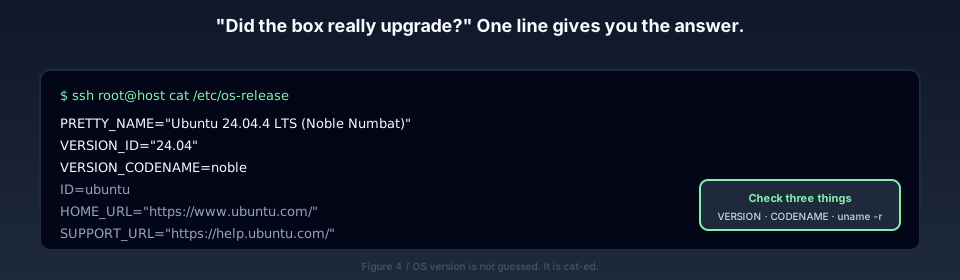
Figure 4: the post-upgrade “physical”. VERSION_CODENAME=noble is the ultimate verdict; VERSION_ID=24.04 is the secondary one; uname -r=6.8.0-124-generic is the kernel verdict. All three matching is what “really upgraded” means.
At this point the Agent reports back to me.
7. The two things you will ask first
7.1 Will the upgrade break my services?
Yes, but only a little.
During this run, both v2ray and my Python proxy services were restarted by systemd as their packages were upgraded. Because their units do not have any “wait for downstream dependency” condition, they came right back up and started listening again.
What can really go away:
- Services that have no systemd unit at all (i.e. things you launched with
nohup python3 xxx &). The upgrade does not touch them, but the reboot kills them. If your service is in that category, after this upgrade you must turn it into a systemd unit immediately — otherwise the next time your hypervisor reboots, your proxy is gone and you only notice when something at home stops working. - Services tied to a specific Python version. This box came with Python 3.10 on 22.04 and now ships 3.12 on 24.04. My two scripts do not use anything 3.10-specific, so they kept working. But if you have
pip install-ed a forest of packages into 3.10, the new python will not see them. Check before you upgrade. - Customised systemd unit files getting overwritten. I used
--force-confnew, which means the new version of every unit wins. If you had previously editedPort,PermitRootLogin,AllowUsers, those customisations are gone now. Re-apply them.diff /etc/ssh/sshd_config /etc/ssh/sshd_config.dpkg-oldis a good way to find what changed.
7.2 How long will my network be down?
That depends on what kind of proxy you run. This box is SOCKS5 + HTTP, and clients usually have reconnect logic, so users feel a “stutter for tens of seconds”. But if you run long-lived TCP services (reverse SSH tunnels, WireGuard), they really do drop for that window.
Out of the 27 minutes, about 5 to 8 minutes are “service restart” time. The rest of the time the services are technically running, just slower — because dpkg is eating CPU.
7.3 What is left to do after the upgrade?
- Drop the old kernel:
apt purge linux-image-5.15.0-101-generic— frees about 100M+. - autoremove the stragglers:
apt autoremove --purge— the upgrader usually leaves a few obsolete conffiles around. - Diff your systemd drop-ins: compare
sshd_configetc. against.dpkg-oldto confirm your customisations are still there. - Systemd-ify your naked scripts: see 7.1.
- Restore
/etc/update-manager/release-upgradestoPrompt=lts. Otherwise the next carelessdo-release-upgradewill chase a non-LTS channel.
8. Reflections afterwards
For this upgrade, the Agent did everything end to end — probe, risk assessment, disconnects defence, run the upgrade, self-check, write a report. I personally did two things only: authorise once and approve once. The other 27 minutes I drank coffee.
This made me think again about where Agent capability actually ends:
- Agents are good at “explicit procedure + verifiable output” tasks. Upgrades are exactly that: every step emits output, every step has a checkable condition (version string, kernel string, listening ports), and every failure has a concrete mitigation (sshd dies → :1022, dpkg interrupted →
dpkg --configure -a). - Agents are not good at gut-feel tasks. “Should I swap this v2ray upstream IP for that one?” — there is no input the Agent can read that would let it decide. That is human work.
- The most important Agent capability is “honesty under observation”. The whole time the Agent was running, I could
tmux attachand watch. I could see what it was doing and why. It cannot secretly change the kernel — the version string is a literalcat, not a verbal “trust me, I upgraded”.
An Agent is not thinking for you. It is executing for you the things you already know how to do, but do not want to stare at.
If you are using Claude Code, Cursor, Codex or any other Agent that can take an SSH handle, try a one-sentence upgrade once. The prerequisite is that you know the box well enough to take over if the Agent gets stuck.
Next time the box has to go 24.04 → 26.04, I will be even lazier — I will not even have to explain tmux and fallback sshd again.
References
- Ubuntu official upgrade docs: https://help.ubuntu.com/community/NobleUpgrades
do-release-upgradesource and manpage: https://manpages.ubuntu.com/manpages/jammy/man8/do-release-upgrade.8.html- Ubuntu Wiki — ReleaseUpgrade SOP: https://wiki.ubuntu.com/SystemMaintenance/ReleaseUpgrades
tmuxmanual and best practices: https://github.com/tmux/tmux/wiki- systemd
service.dmechanism (drop-in override): https://www.freedesktop.org/software/systemd/man/latest/systemd.unit.html - SSH fallback port on upgrade (launchpad bug 1192476 — the original justification for the 22→1022 fallback): https://bugs.launchpad.net/ubuntu-release-upgrader/+bug/1192476
- Ubuntu 24.04 LTS Noble Numbat desktop screenshots: Wikimedia Commons (CC BY-SA 4.0): https://commons.wikimedia.org/wiki/Category:Ubuntu_24.04
All IPs, hostnames, usernames, passwords, and configuration paths in this post have been sanitised before publication; actual network topology depends on your own environment.