I dockerized AnythingLLM and the container turned into a wound-up squirrel — restarting forever until I handed it that magic 1000:1000
TL;DR
AnythingLLM, Mintplex Labs’ “stuff-anything-in-a-LLM” desktop, ships an official Docker image. In the happy path one
docker runis all you need. But the in-container useranythingllmis picky: the host directory you bind-mount has to be owned by1000:1000, otherwise it can’t write its own SQLite file, the Prisma migration step on startup crashes, and the container enters a restart-crash-restart loop. The fix takes under a minute:chown -R 1000:1000 /your/data/dir, thendocker compose up -dagain, and it dutifully listens on3001.I’ll also explain why Prisma’s
file:../storage/anythingllm.dbrelative path is a footgun, give you a Portainer-ready stack file, and finish with a Q&A on the most common gotchas.
Cover: the official AnythingLLM screenshot — single-pane RAG desktop with chat on the left and a knowledge base on the right. If yours doesn’t look like this, you installed it wrong.
1. Why I put AnythingLLM in Docker in the first place
My home NAS runs the usual “I’m too lazy to set this up twice” services: Portainer, PhotoPrism, qBittorrent, Jellyfin, Open WebUI. I call them the lazy workstation — out of sight, out of mind, until I open a browser tab.
AnythingLLM is an open-source “personal RAG desktop” by Mintplex Labs. The pitch is simple: drop in PDFs, notes, web pages, then ask it questions. It can be a chat client (OpenAI / Claude / Ollama / local llama.cpp), or a self-hosted knowledge base.
I wanted the second one. Stuff my kid’s picture-book PDFs, my own research notes, the household utility contracts into it, and have it actually “understand” what I’m asking.
Why not just pip install or npm install? Because the dependency tree is brutal: Node 18, Chromium (for Puppeteer), ffmpeg, Prisma, a forest of GPU packages. After one apt-get, the host is unusable. Docker is the cheapest isolation.
But —
Docker isn’t just “installing software”. It’s “renting an apartment”. If the key you hand the tenant doesn’t match the lock, they’ll never get in.
That image is the metaphor I drew while debugging. We’ll use it throughout:
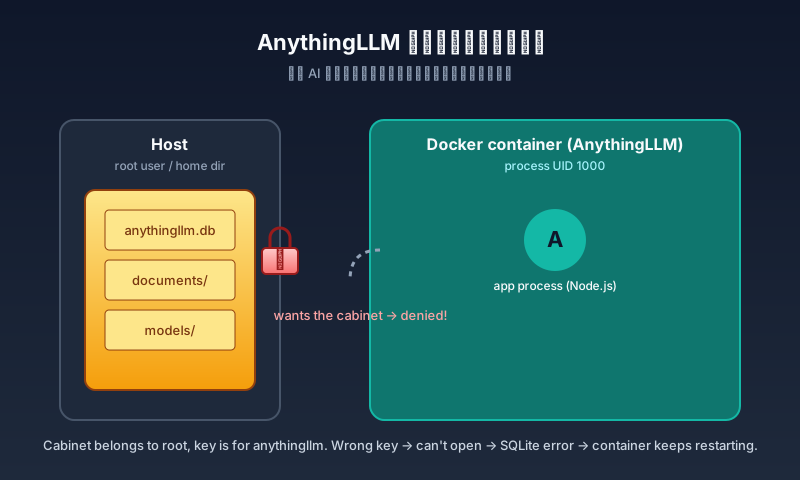
Figure 1: the host is the landlord, /docker/anythingllm_data is the cabinet, and the in-container user anythingllm is the tenant. The landlord thinks they handed over a key, but the key and the lock don’t match → the tenant can’t fetch their own stuff.
2. The symptom: a wound-up squirrel that won’t stop restarting
The story starts quietly. I created a new stack in Portainer with a docker-compose.yml that looked roughly like this (sanitized):
services:
  anythingllm:
    image: <REGISTRY>/mintplexlabs/anythingllm:latest
    container_name: anythingllm
    ports:
      - "3002:3001"
    cap_add:
      - SYS_ADMIN
    environment:
      - STORAGE_DIR=/app/server/storage
      - JWT_SECRET=<PLACEHOLDER>
      - TZ=Asia/Shanghai
    volumes:
      - /docker/anythingllm_data:/app/server/storage
    restart: always
Hit Deploy the stack. Portainer went green for a few seconds, then… the container sat at Restarting (1). The logs cycled the same line over and over:
Datasource "db": SQLite database "anythingllm.db" at "file:../storage/anythingllm.db"
Error: Schema engine error:
SQLite database error
unable to open database file: ../storage/anythingllm.db
[collector] info: Document processor app listening on port 8888
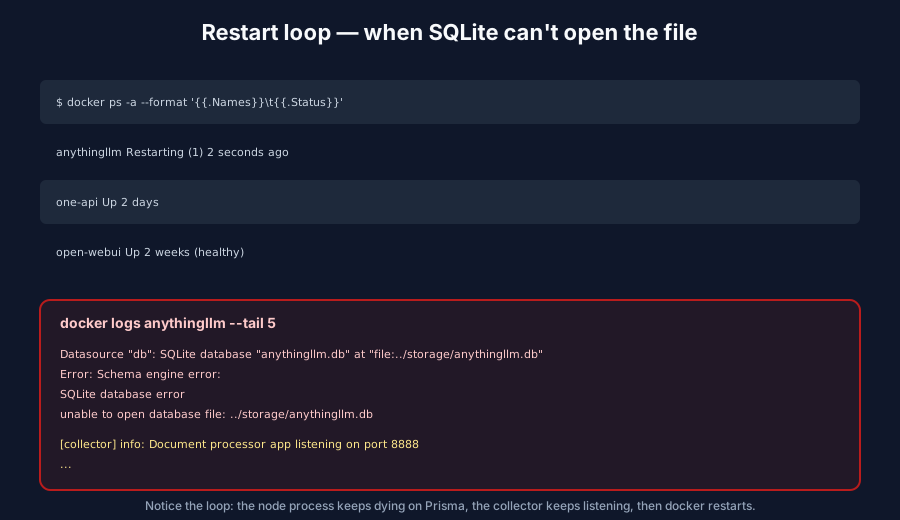
Figure 2: the log looks like this. The Node process dies before it can serve anything, the collector process is alive, then Docker restarts the whole container and we go again.
docker ps -a shows it Restarting, no port is open. curl http://localhost:3002 is connection refused.
On the surface, it looks like a bad image or a typo in compose. It isn’t. It’s something else.
3. The analysis: splitting “start” into three phases
To figure out why it dies, the first move is to break the word start apart.
AnythingLLM doesn’t go “button press → service online” in one go. It has at least three distinct phases:
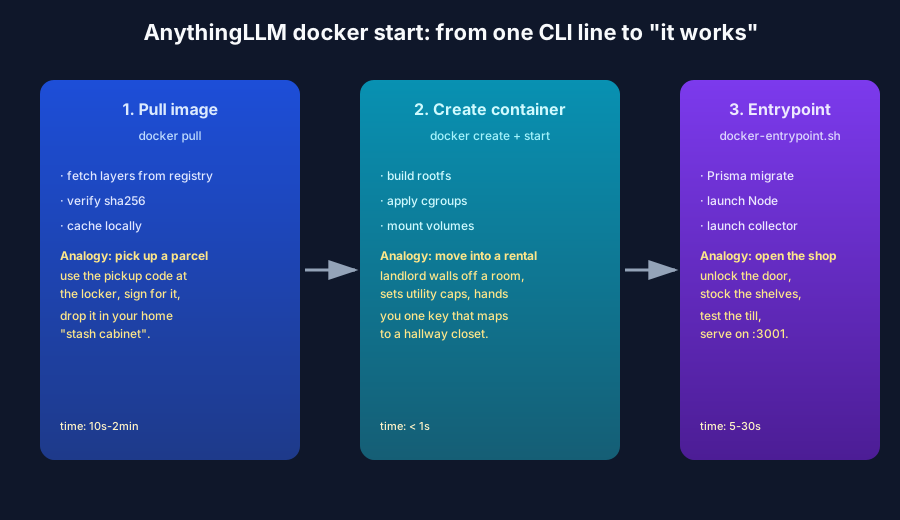
Figure 3: pulling the image is picking up a parcel, starting the container is moving into a rental, and the entrypoint is opening the shop. All three must finish before we can call ourselves “open for business”.
Phase 1 — Pull the image (10s–2min)
docker pull fetches every layer of mintplexlabs/anythingllm from the registry, verifies the SHA-256 hashes, and stores them in the local image cache. Failures here are usually network or disk, and they don’t affect later phases.
Phase 2 — Start the container (< 1s)
The Docker daemon uses the image as a template to create a rootfs, set cgroups, set capabilities, mount volumes, and map ports. No application code is running yet, but one decision has already been made: does the in-container user anythingllm (UID 1000) have write permission on the host directory you bind-mounted?
Phase 3 — Run the entrypoint (5–30s)
PID 1 inside the container is /bin/bash /usr/local/bin/docker-entrypoint.sh. That script does:
cd /app/server/ &&
  npx prisma generate &&
  npx prisma migrate deploy &&
  node /app/server/index.js
So:
prisma generate— generate the Prisma client fromschema.prisma;prisma migrate deploy— try to open the SQLite database and apply migrations;node index.js— actually start the web server.
Phase 3.2 is the kill switch. It has to open <STORAGE_DIR>/anythingllm.db. If it can’t write, the whole Node process exits with code 1 and Docker enters the restart loop.
4. The root cause: wrong key + Prisma’s relative path trap
Stitch the logs and the source together and you find two reasons, one shallow, one deep.
4.1 The shallow reason: the host directory isn’t owned by 1000
AnythingLLM’s Dockerfile runs something like this:
RUN groupadd -g "$ARG_GID" anythingllm && \
    useradd -l -u "$ARG_UID" -m -d /app -s /bin/bash -g anythingllm anythingllm && \
    mkdir -p /app/frontend/ /app/server/ /app/collector/ && chown -R anythingllm:anythingllm /app
In other words: the in-image “app user” is named anythingllm, with UID/GID locked to 1000.
But when I bind-mount /docker/anythingllm_data into the container from Portainer, that host directory is owned by root:root (or by my own account margrop:margrop). When the in-container anythingllm user tries to write it, the Linux VFS says permission denied:
unable to open database file: ../storage/anythingllm.db
ls -la /docker/anythingllm_data shows:
drwxr-xr-x 2 root root 4096 Jun 17 17:38 .
Permissions 755, owner root. From the container’s point of view, anythingllm is neither the owner nor in the group, and the other bits are r-x, no w. SQLite can’t even create the file.
4.2 The deep reason: Prisma’s relative-path trap
The log also has a counterintuitive bit: file:../storage/anythingllm.db.
My first reaction was:
“If
STORAGE_DIR=/app/server/storage, then the path should be/app/server/storage/anythingllm.db, right?”
Wrong. Prisma resolves relative paths against the directory that contains schema.prisma — i.e. /app/server/prisma/. So ../storage/... resolves to /app/server/storage/... — which happens to equal STORAGE_DIR and happens to equal the directory we mounted — by coincidence.
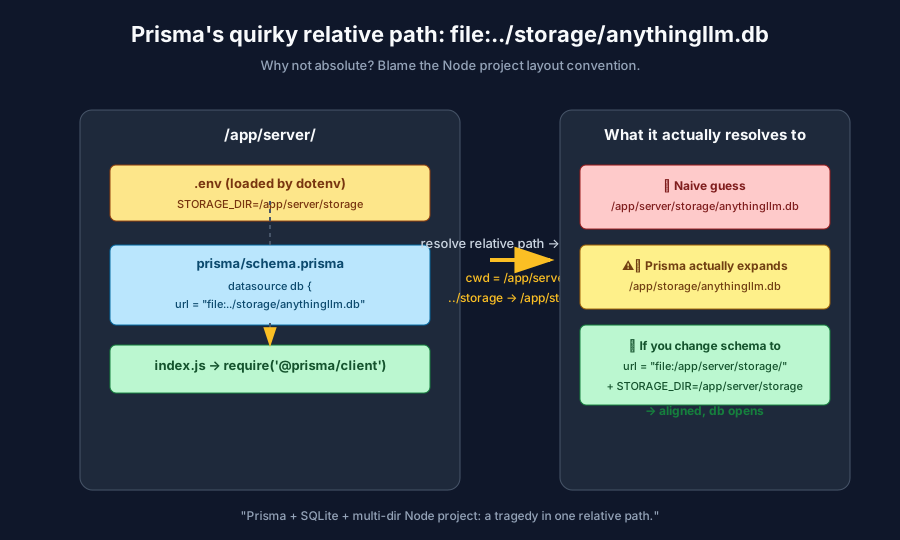
Figure 4: the left side is the /app/server/ tree with .env declaring STORAGE_DIR; the middle shows what Prisma does when it sees file:../storage/anythingllm.db; the right shows what it actually wants.
If someone moves schema.prisma to a sub-directory like /app/server/orm/ for better organization, then ../storage/anythingllm.db resolves to /app/server/storage/anythingllm.db and no longer lines up with the mounted host directory. The “coincidence” stops being a coincidence and turns into a bug.
This is a hidden Prisma convention: if you move the schema, you have to update the datasource URL, or switch to an absolute path.
In our case we didn’t move the schema, so the relative path is right; but the container still can’t write → SQLite still can’t open → still crashes.
4.3 Putting it together
The full event chain is:
T0  docker compose up -d
T1  Docker daemon bind-mounts /docker/anythingllm_data (root:root, 755)
    into the container at /app/server/storage
T2  entrypoint.sh starts
T3  prisma migrate deploy tries to open /app/server/storage/anythingllm.db
T4  the in-container anythingllm user has no write permission → SQLite errors
T5  the Node process exits with code 1
T6  Docker sees restart: always, waits 1s, restarts the container
T7  Back to T1, an infinite loop.
5. The fix: hand the key to the right person
The fix is two commands:
# 1. Stop the container first, so it doesn't create temp files mid-restart
docker stop anythingllm

# 2. Change the host directory's owner to 1000:1000 (the in-container UID/GID)
chown -R 1000:1000 /docker/anythingllm_data

# 3. Bring it back up
docker compose up -d
If you’re using Portainer:
- In Stacks, click Stop the stack;
- On the host, run
chown -R 1000:1000 /docker/anythingllm_data; - Back in Portainer, click Start the stack.
Then health-check:
docker ps --filter name=anythingllm --format '{{.Status}}'
# Up 12 seconds (healthy)

curl -fsS http://localhost:3002/api/ping
# pong
Open http://<your-server>:3002 in a browser and you get the welcome page.
5.1 A few best practices to bake in
(1) Declare UID and GID explicitly, not as the default 1000
If your NAS has a non-root user with 1000:1000, declare it explicitly:
environment:
  - UID=1000
  - GID=1000
Or pick a free pair (e.g. 1001:1001) to avoid conflicts.
(2) Prepare the data volume’s ownership up front
A tiny init.sh you run before the first deploy:
#!/usr/bin/env bash
set -euo pipefail
mkdir -p /docker/anythingllm_data
chown -R 1000:1000 /docker/anythingllm_data
(3) Don’t trust Docker’s default healthcheck
The image’s healthcheck only hits /api/ping. It can prove the web server is up; it cannot prove SQLite can write. You can add a side check:
healthcheck:
  test: ["CMD", "bash", "-c", "test -w /app/server/storage/anythingllm.db"]
  interval: 30s
  retries: 3
(4) Multiple instances
AnythingLLM is single-tenant. Multiple instances can’t point at the same database (SQLite file-lock collisions). If you want multiple, give each its own data directory.
6. The official docker-compose.yml
Before writing your own, look at the canonical version in the AnythingLLM repo (docker-compose.yml):
name: anythingllm

networks:
  anything-llm:
    driver: bridge

services:
  anything-llm:
    container_name: anythingllm
    build:
      context: ../.
      dockerfile: ./docker/Dockerfile
      args:
        ARG_UID: ${UID:-1000}
        ARG_GID: ${GID:-1000}
    cap_add:
      - SYS_ADMIN
    volumes:
      - "./.env:/app/server/.env"
      - "../server/storage:/app/server/storage"
      - "../collector/hotdir/:/app/collector/hotdir"
      - "../collector/outputs/:/app/collector/outputs"
    user: "${UID:-1000}:${GID:-1000}"
    ports:
      - "3001:3001"
    env_file:
      - .env
    networks:
      - anything-llm
    extra_hosts:
      - "host.docker.internal:host-gateway"
A few details that bite:
cap_add: SYS_ADMIN— the collector process needs this capability to chroot into the hot directory;extra_hosts: host.docker.internal:host-gateway— lets the container reach the host’s127.0.0.1;- the
.envin volumes is a host file — not auto-generated inside the container — you have to prepare it on the host; user: "${UID:-1000}:${GID:-1000}"— pins the app to whatever UID/GID you choose, avoiding host collisions.
A trimmed production version:
services:
  anythingllm:
    image: mintplexlabs/anythingllm:latest
    container_name: anythingllm
    restart: unless-stopped
    ports:
      - "3001:3001"
    cap_add: [SYS_ADMIN]
    environment:
      - STORAGE_DIR=/app/server/storage
      - JWT_SECRET=please-generate-a-32-char-string
      - TZ=Asia/Shanghai
    volumes:
      - /srv/anythingllm/storage:/app/server/storage
      - /srv/anythingllm/hotdir:/app/collector/hotdir
      - /srv/anythingllm/outputs:/app/collector/outputs
    extra_hosts:
      - "host.docker.internal:host-gateway"
Before the first deploy on the host:
mkdir -p /srv/anythingllm/{storage,hotdir,outputs}
chown -R 1000:1000 /srv/anythingllm
Then:
docker compose up -d
docker compose logs -f anythingllm
# When you see "Primary server in HTTP mode listening on port 3001" you're good.
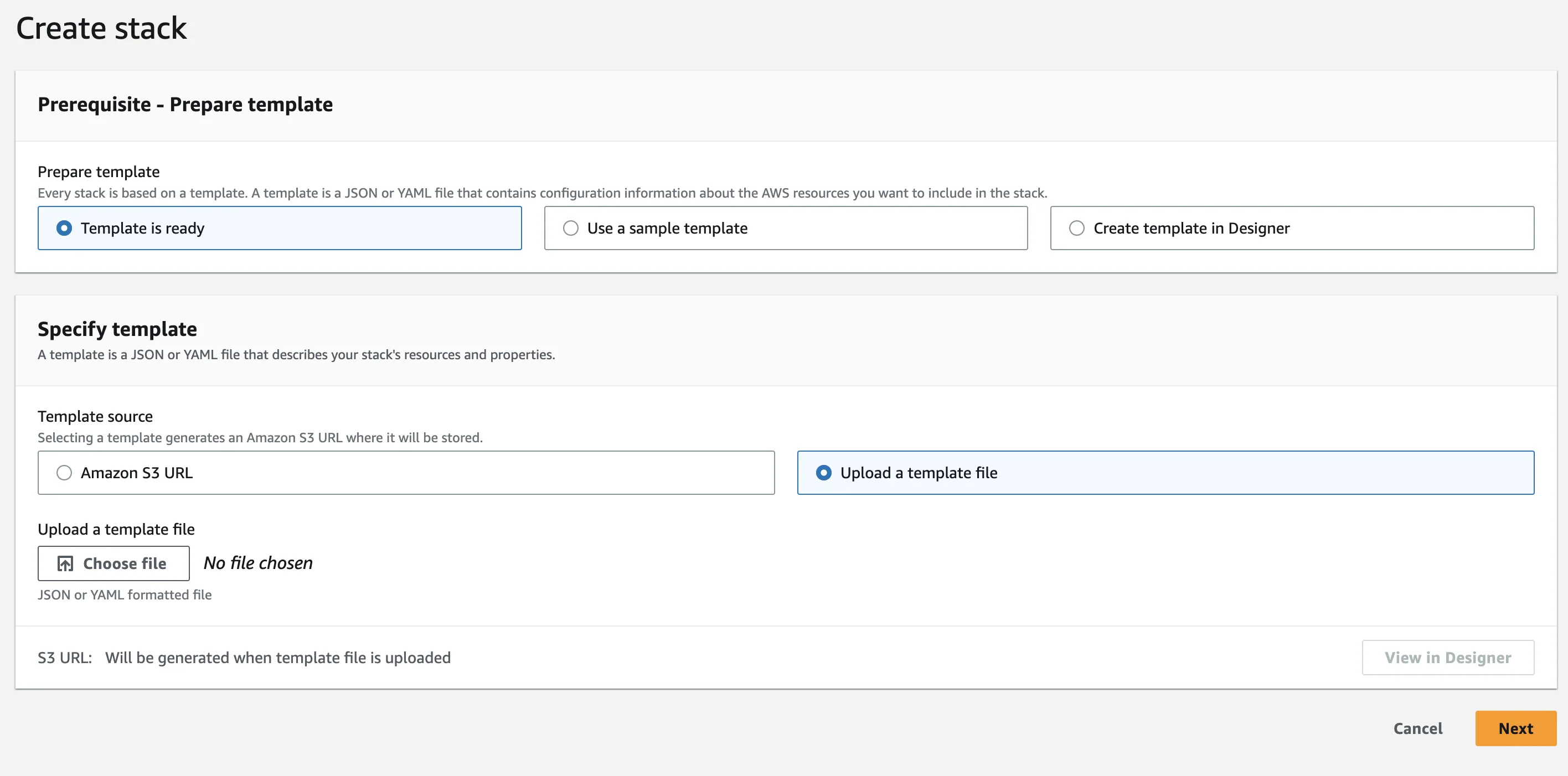
Figure 5: the official upload screen — drag in PDFs, text files, or web pages.
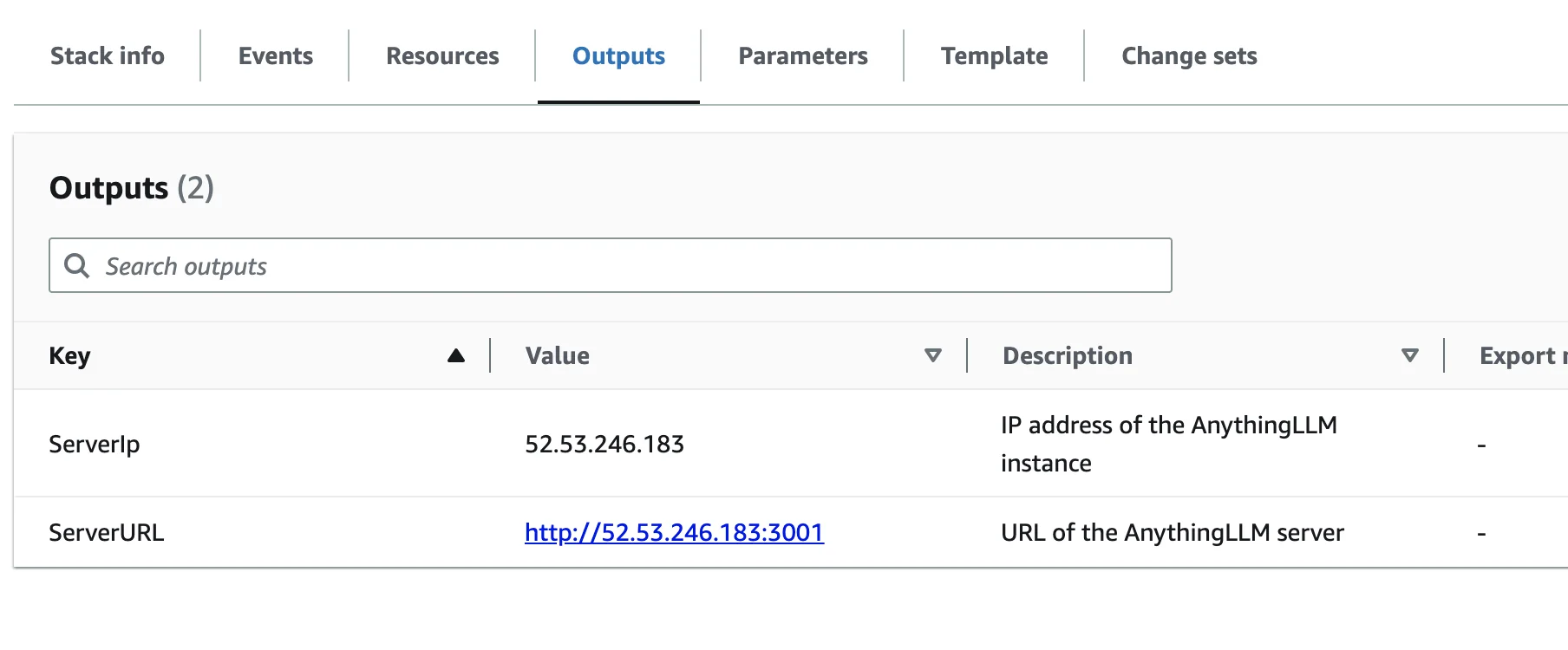
Figure 6: the official demo. Drop a PDF in, ask “what’s on page 3”, and it pulls the answer from the document and rephrases it.
7. Q&A
Q1: Can I use a non-SQLite relational database?
Yes. AnythingLLM’s source supports SQLite (default), Postgres, MySQL, MariaDB, and MSSQL. Change the provider and url in prisma/schema.prisma, then run prisma migrate deploy. For production I recommend at least Postgres — SQLite’s write concurrency is poor.
Q2: Can I use local Ollama / LM Studio?
Yes. LLM_PROVIDER=ollama + OLLAMA_BASE_PATH=http://host.docker.internal:11434. The extra_hosts line exists exactly for this.
Q3: Is cap_add: SYS_ADMIN mandatory?
SYS_ADMIN is what the collector needs to chroot into hotdir/. Without it, uploaded files will never be parsed. The image’s hot directory uses a chroot jail; missing the capability means uploads silently no-op.
Q4: If /api/ping returns 200, is the service healthy?
Not necessarily. It proves the web server is up, but it does not prove SQLite is writable. A real health check should also confirm [backend] info: Primary server in HTTP mode listening on port 3001 and the absence of any Prisma errors in the log.
Q5: How do I migrate data from one host to another?
# On the old host
docker stop anythingllm
docker run --rm -v /old/storage:/from -v $(pwd):/to alpine \
  cp -a /from/. /to/

# On the new host
mkdir -p /new/storage
chown -R 1000:1000 /new/storage
docker compose up -d
As long as the owner is right and everything in the directory is 1000:1000, the migration is painless.
Q6: How do I write the volumes in a Portainer stack?
Just like normal compose:
volumes:
  - /docker/anythingllm_data:/app/server/storage
Portainer doesn’t keep a long-lived compose file (it writes to a tmpfs on each start), so editing the stack means redeploying — your data is safe.
8. Closing thought: Docker is not a black box, it’s a “house with rules”
AnythingLLM is one of the pickiest apps I’ve ever containerized. It isn’t picky about its algorithm — it’s picky about its user identity and its directory ownership. This is the standard Linux disease: an application process isn’t root, so it can only touch what belongs to it. Docker didn’t change that. It just replaced “what belongs to it” with “the volume you mounted”.
Keep this image in your head:
Figure 1 (recap): every time you write a volume, ask — whose key is it? Whose lock? If they don’t match, don’t blame the door.
If I had to leave you with one sentence:
90% of “won’t start” Docker problems are one
chownaway from fixed — provided you know what user the in-container process runs as.
Run docker exec <container> id to see the first number, plug it into the host’s owner, and you’re done.