Docker Images, No More Begging: Build Your Own 13 GB Private Registry From Scratch
TL;DR
My home server runs a single
registry:2container that currently holds 13 GB of cached blobs across 95 repositories. Every NAS, Proxmox node, Mac, and Windows machine on my LAN pulls through it. A cold start ofalpine:3.19finishes in under a second, with zero traffic going out to the public Docker Hub.This isn’t a one-line “install Docker and run a container” tutorial. I’ll show you the production-grade deployment script I actually run, walk through the Docker v2 auth flow, and call out the four reverse-proxy pitfalls that turn every
docker logininto a 401 mystery. You’ll leave able to: ① bring up an authenticated registry in 10 minutes; ② explain why theWWW-Authenticateheader is sacred; ③ describe the whole thing to a non-technical family member without losing accuracy.
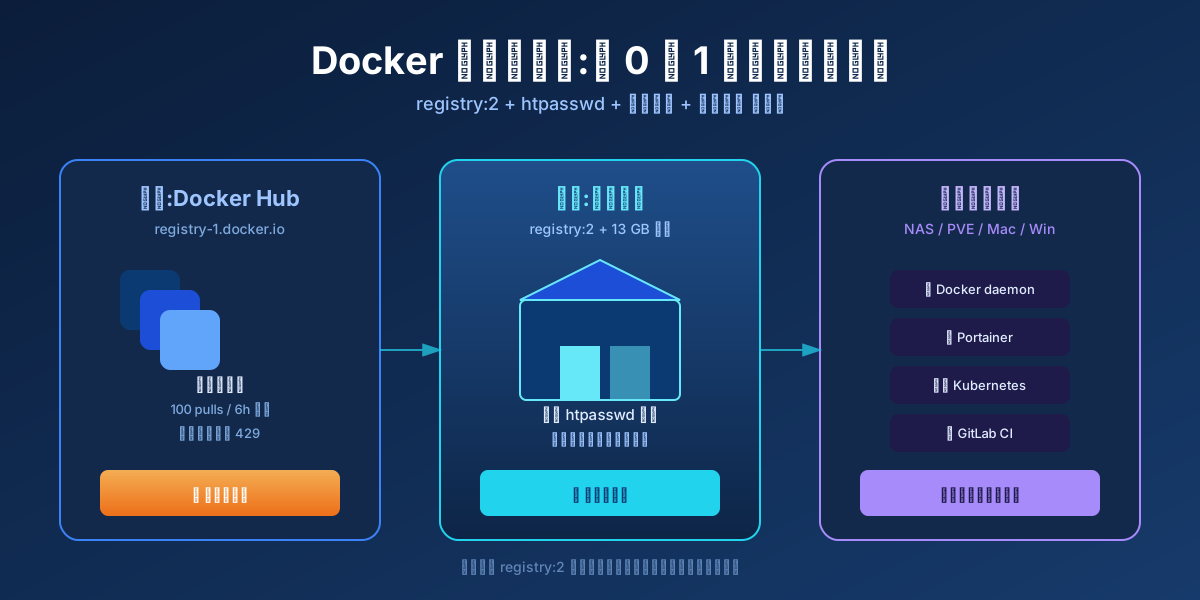
Figure 1: the blue box on the left is the public Docker Hub, the cyan box in the middle is the registry:2 I run at home, and the purple box on the right is every machine on my LAN that needs to pull images. The rest of this post is about that cyan box.
1. Background: Why Bother Running a Private Registry?
Rewind to 2023. My home network had a few machines: a NAS, a Proxmox cluster, a Mac mini, and an occasional Windows laptop. Every one of them needed to pull a pile of docker images: nginx, redis, jellyfin, portainer, homeassistant, and so on.
At first everyone just did docker pull nginx:latest directly. Each machine went out through its own NAT, each one hit Docker Hub’s 100 pulls / 6 hours limit:
- Docker Hub counts against your public IP, not your account. My neighbors and I shared a class-C NAT, and someone was clearly running heavy CI on the same public IP I was using, so even
docker pull alpinefrom my network could 429. - A flaky home uplink would interrupt an 800 MB
gitlab/gitlab-cepull halfway, forcing a restart from byte zero. - Three machines pulling the same image meant three downloads over the same WAN link, with zero deduplication.
The natural fix: stand up one shared image cache on the LAN. Every machine pulls from it. The cache pulls from the public registry once, stores the blobs on disk, and serves the next pull straight from local filesystem.
That cache is just Docker’s official registry:2 image: a 24 MB Go binary that speaks HTTP. That’s all you need.
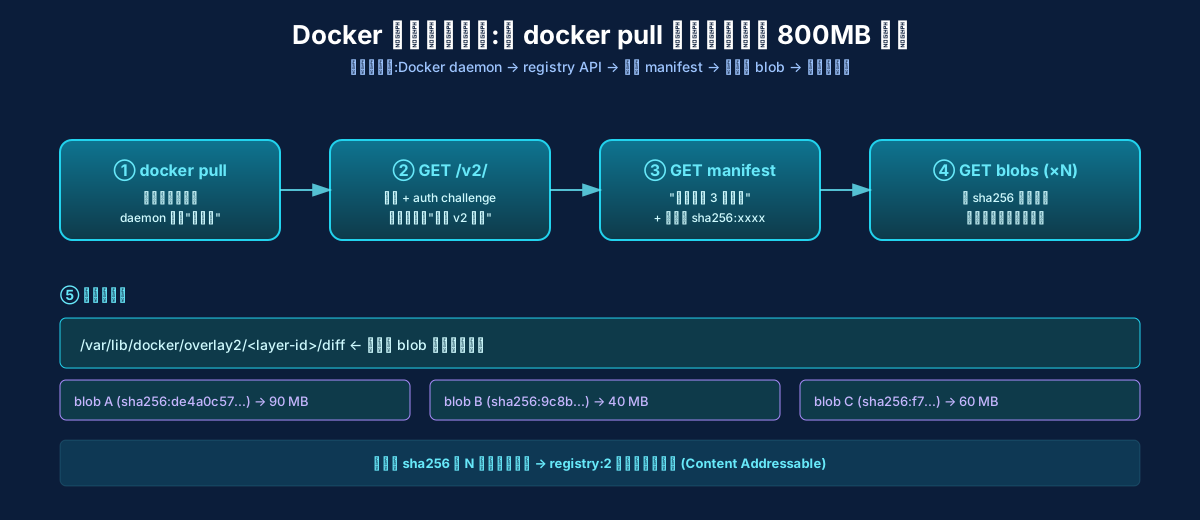
Figure 2: what really happens during docker pull. Client → GET /v2/ → GET manifest → GET blobs layer by layer → unpack into local storage. The private registry intercepts every one of those GETs, prefers local disk, and only goes upstream when the cache misses.
The implementation isn’t complicated. The pitfalls are. Over the past three years I’ve fixed the same five issues at least twice each — every time I forgot what I’d learned the time before. Here they all are, plus the exact config I run today.
2. Symptoms: It Looks Installed, But It’s Only Half Working
My first attempt was the obvious one: docker run -d -p 5000:5000 registry:2. It came up. docker pull localhost:5000/alpine worked. Great.
The moment you want your NAS and your Proxmox cluster to also use it, four new “half-broken” behaviors show up:
docker pushreturns 401 because no authentication is configured. Anyone who can reach port 5000 can push.- The NAS can’t
docker pull my-server:5000/xxx— the registry is bound to 127.0.0.1, so other hosts on the LAN can’t reach it at all. - After a server reboot the cache disappears because
/var/lib/registrylives inside the container, not on a host bind mount. docker loginkeeps failing with “unauthorized” even though the server logs sayWww-Authenticate: Basic realm="..."is being returned. That’s reverse-proxy, TLS, or DNS lying to you — the log doesn’t say which.
Each of these will cost you half an hour if you don’t already know which one you’re hitting. The fix is to walk through them in the right order so you only have one variable in play at a time.
Analogy in plain English: imagine you’re opening a small neighborhood convenience store in your garage.
- The shelves are the disk (where goods sit).
- The store itself is the registry container (handles incoming and outgoing).
- The bouncer at the door is htpasswd (no badge, no entry).
- The gatehouse at the end of the street is the reverse proxy (checks passes, hands packages to the right address).
Skip any layer and either things get stolen or customers can’t get in.
3. Root Cause: That “401 Wrong Password” Is Almost Never About the Password
Here’s the punchline: in 80% of “password is correct but login still fails” cases, the issue isn’t the password — it’s an HTTP header.
The Docker daemon uses the OCI Distribution Spec v2 auth dance. The four steps:
- Client sends
GET /v2/to the registry with no token. - Registry replies
401 Unauthorizedwith aWWW-Authenticate: Basic realm="..."header. - Client reads that header, retries with
Authorization: Basic base64(user:pass). - Registry verifies, returns the real manifest.
The critical step is #2. That WWW-Authenticate header must reach the client intact. If you put Nginx / Caddy / Traefik in front of the registry, by default they strip the WWW-Authenticate header (because it belongs to the WWW-* family, which proxies love to filter). The client then has no idea the server wants basic auth, and just reports “unauthorized.”
Another classic: you’ve configured HTTPS on the reverse proxy, but the docker daemon doesn’t trust that certificate (daemon only trusts the system CA bundle and /etc/docker/certs.d/<host>/ca.crt). The TLS handshake dies before auth even comes into play.
A third hidden one: docker daemon only allows image pulls over https:// or localhost. If you set http://192.168.x.x:5000 on the client, the daemon refuses outright — no request is sent.
Elementary-school explanation: You’re at the office reception asking for a visitor badge. Reception says “show me your employee badge.” That’s the
WWW-Authenticateheader. If reception forgets to say that, you have no idea you need to flash your badge, so you just stand there confused. If the office door is a plastic prop door without a real lock (HTTP without TLS), the guard doesn’t even let you in.
4. Solution: From One docker run to a Production-Ready Registry in 10 Minutes
This is the script I run today. It’s been stable for half a year. Four steps, each with a “why this matters” note.
Step 1: Prepare Persistent Host Directories
# Everything lives on the host filesystem so it survives container restarts
mkdir -p /docker/registry-dockerhub      # config.yml lives here
mkdir -p /docker/registry-cache/dockerhub # 13 GB of blob cache lives here
mkdir -p /docker/registry/auth           # htpasswd file lives here
Why mount to host directories? Docker containers are ephemeral by default. Delete the container, lose everything inside. By bind-mounting
/var/lib/registryto/docker/registry-cache/dockerhubon the host, you give the container an “external hard drive” — every byte survives container recreation, host reboots, even migrations to another machine.
Step 2: Generate the htpasswd File
# Run once; the file persists forever (or until you change the password)
docker run --rm \
  --entrypoint htpasswd \
  httpd:2.4 -Bbn admin 'MyS3cretPass!' \
  > /docker/registry/auth/htpasswd
After that command your password file contains:
admin:$2y$05$kxqfBjMmhK6eOZ8m9eRkgeW7FZmkjj8OQ8iCpzJZ1Vb5lpWWGbH1e
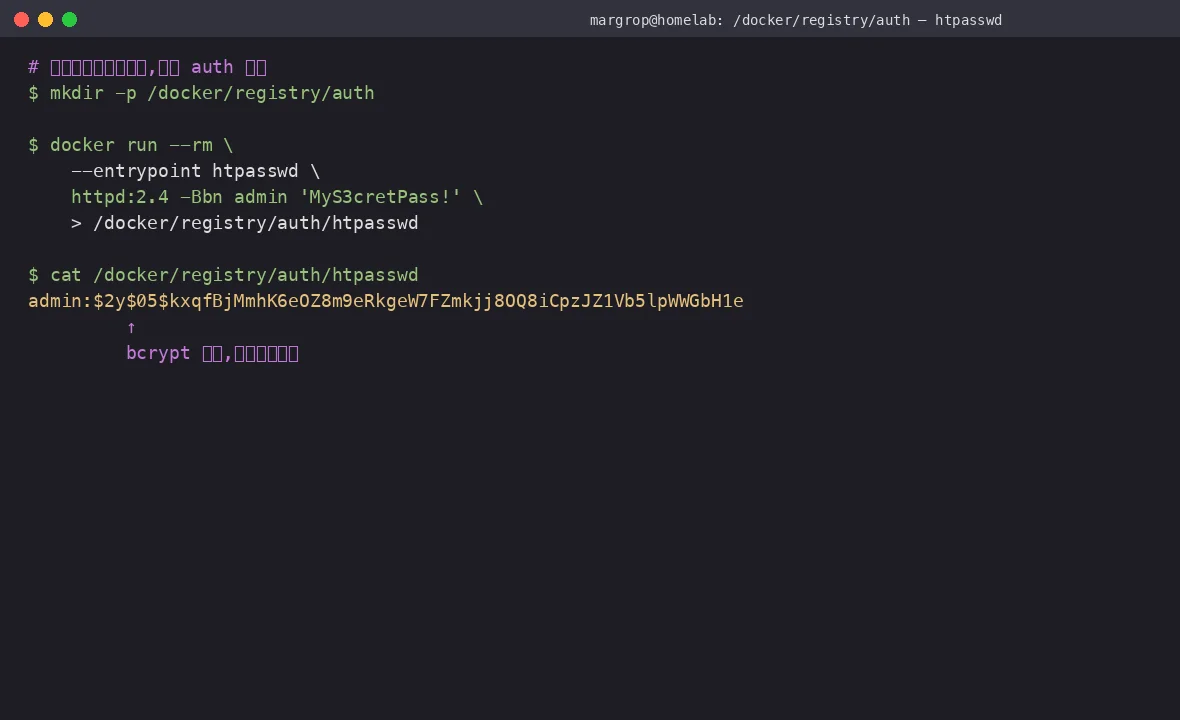
Figure 3: htpasswd uses bcrypt to hash the password. What’s stored on disk is the $2y$05$... hash, not the original password. htpasswd -Bbn means: bcrypt algorithm, read password from stdin, append to file (don’t overwrite).
Never use
-m(md5).-mis the legacy MD5 hash, easily cracked with rainbow tables. The Docker daemon accepts md5, sha1, and bcrypt — bcrypt’s strength isn’t compatibility, it’s that in 2026 you’d be hard-pressed to defend a md5-only auth choice.
Step 3: Write a config.yml (Optional; Default Works Too)
cat > /docker/registry-dockerhub/config.yml <<'YAML'
version: 0.1
log:
  fields:
    service: registry-dockerhub-cache
storage:
  filesystem:
    rootdirectory: /var/lib/registry
http:
  addr: :5000
  headers:
    X-Content-Type-Options: [nosniff]
proxy:
  remoteurl: https://hub1.nat.tf
YAML
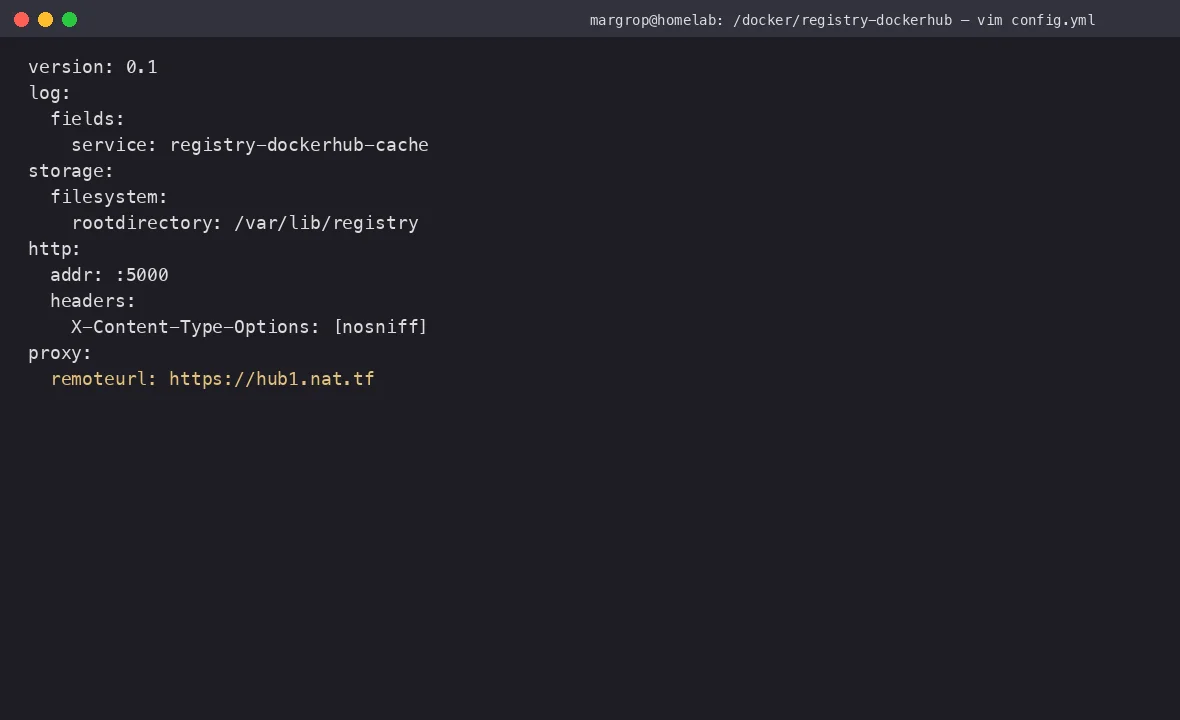
Figure 4: proxy.remoteurl is the key line — it tells the registry: “when the local cache misses, fetch from this URL.” Without it the registry only accepts docker push, never fetches new images from upstream.
What is
proxy.remoteurl? Analogy: it’s the store’s wholesale supplier. A customer wants a bottle of water, the shelf is empty, so you go tohttps://hub1.nat.tfand restock. Next time anyone asks, the shelf has it. Note:https://hub1.nat.tfworks on my network (I documented the why in an earlier post on mirror speed tuning). On your network it may be slower or blocked — measure before you commit.
Step 4: Start the Container
docker run -d \
  --name registry-dockerhub \
  --restart=always \
  -p 8082:5000 \
  -v /docker/registry-dockerhub/config.yml:/etc/docker/registry/config.yml \
  -v /docker/registry-cache/dockerhub:/var/lib/registry \
  -v /docker/registry/auth:/auth \
  -e REGISTRY_AUTH=htpasswd \
  -e REGISTRY_AUTH_HTPASSWD_REALM="Registry Realm" \
  -e REGISTRY_AUTH_HTPASSWD_PATH=/auth/htpasswd \
  registry:2
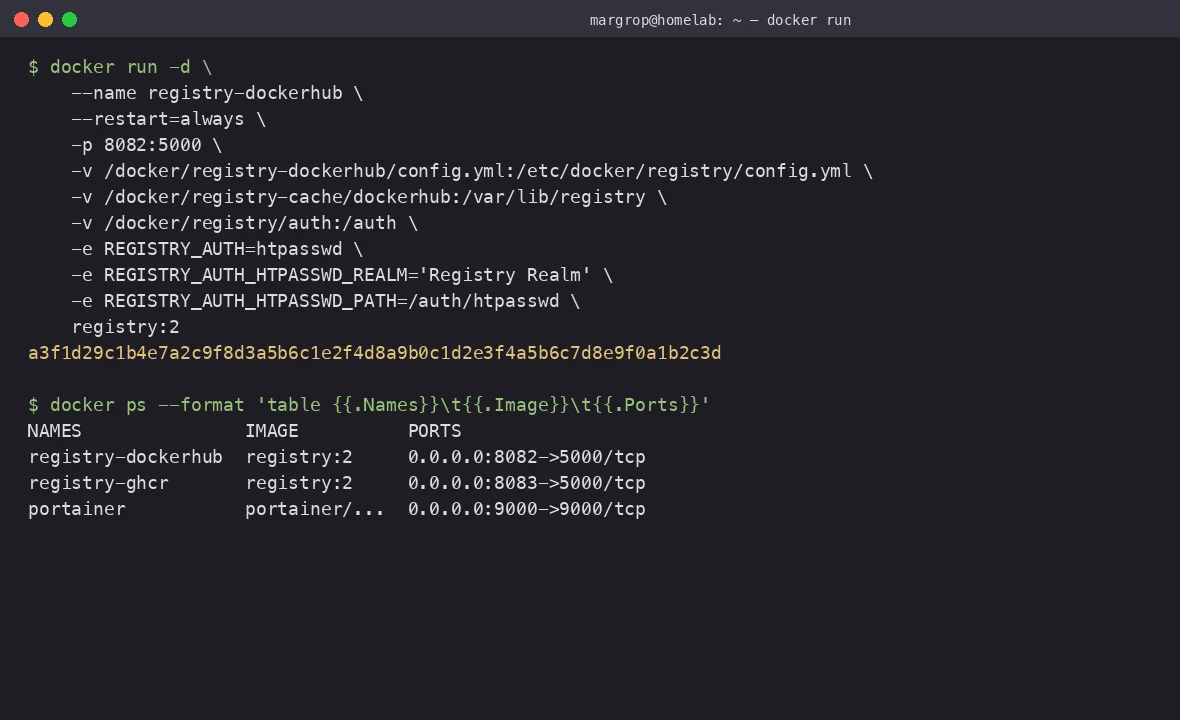
Figure 5: copy-paste this and you have a working authenticated registry. The three REGISTRY_AUTH_* env vars are the entire htpasswd switchboard — miss one and you’ll get 401s.
Then verify:
$ docker ps --format 'table {{.Names}}\t{{.Image}}\t{{.Ports}}'
NAMES               IMAGE          PORTS
registry-dockerhub  registry:2     0.0.0.0:8082->5000/tcp
registry-ghcr       registry:2     0.0.0.0:8083->5000/tcp

$ curl -sS http://localhost:8082/v2/
{}  # 401 + WWW-Authenticate, NOT 200
Why does
curl /v2/return 401 instead of 200? This is the Docker protocol’s intentional handshake: 401 +WWW-Authenticatesays “I’m a v2 registry, you need to authenticate first.” Most monitoring scripts naivelycurl /v2/ | grep -q '{}'to check liveness — but once auth is enabled, that command always returns 401 and the monitor cries wolf. The right health check iscurl -i https://<host>/v2/ | head -1. Look forHTTP/1.1 401and you’re good.
5. Clients: From One Machine to the Whole Cluster
Single-client setup (one-off):
# 1. Log in (HTTP to a private IP is allowed by daemon)
docker login 192.168.x.x:8082
# Username: admin
# Password: ********
# Login Succeeded

# 2. Tag + push
docker tag hello-world:latest 192.168.x.x:8082/test/hello-world:v1
docker push 192.168.x.x:8082/test/hello-world:v1

# 3. From any other machine, pull
docker pull 192.168.x.x:8082/test/hello-world:v1
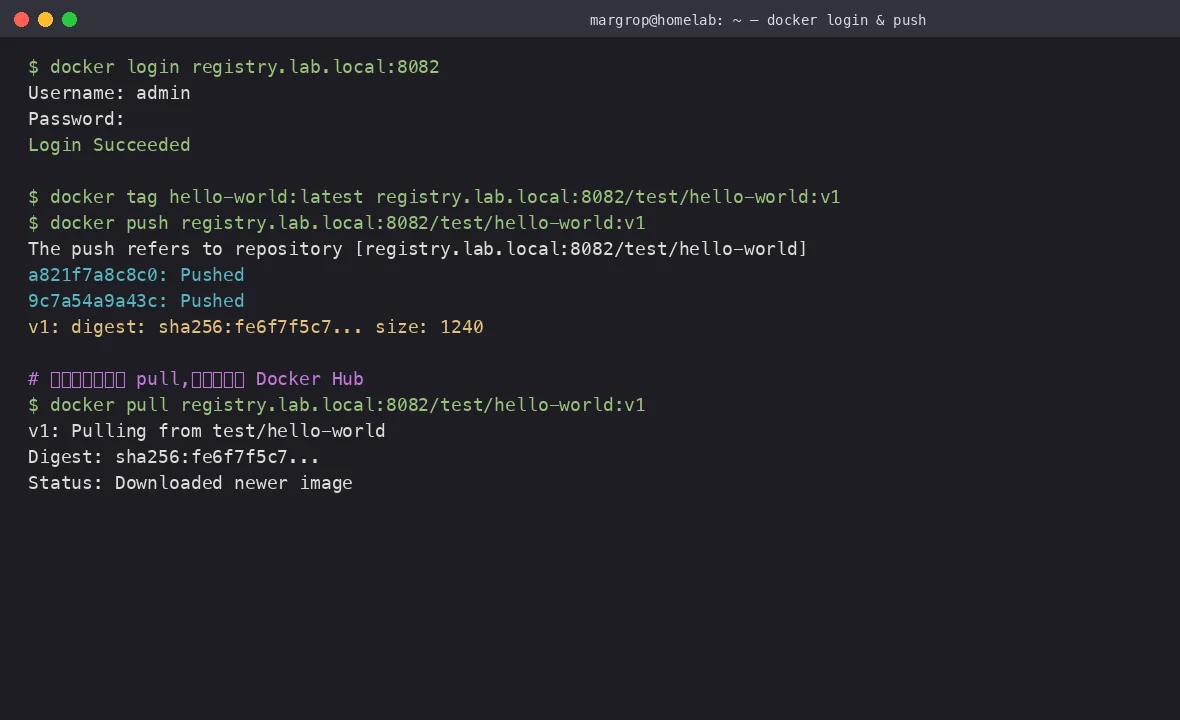
Figure 6: docker login to get a token, docker push to upload, and from another machine docker pull — all over the LAN, < 1 ms latency, zero public internet.
Whole-cluster setup (one config, every daemon obeys):
Add this to /etc/docker/daemon.json on every machine:
{
  "insecure-registries": ["192.168.x.x:8082", "192.168.x.x:8083"]
}
Why not just use
https://? For a private LAN, self-signed certs + installing your own CA on every client is a pain — it’s basically standing up a mini PKI for a home lab. Docker’sinsecure-registriesswitch is exactly the escape hatch for this case. Production should always use HTTPS + reverse proxy + proper CA.
After that, every docker pull library/alpine:3.19 on every machine silently redirects to 192.168.x.x:8082/library/alpine:3.19. Zero changes to existing scripts.
Analogy:
daemon.json’sinsecure-registriesis the apartment complex’s “approved residents” list. The guard recognizes them and waves them through.docker loginis adding a new face to the list.docker pullis the resident coming home.
6. Cache Demystified: 13 GB Looks Big, But Content-Addressable Storage Means It Already Deduped
After a while you can poke around the cache:
$ du -sh /docker/registry-cache/*
13G   /docker/registry-cache/dockerhub
3.0G  /docker/registry-cache/ghcr
Is 13 GB real? Yes. But the same 13 GB physically holds hundreds of images thanks to content-addressable storage.
Look at how blobs are stored on disk:
$ find /docker/registry-cache/dockerhub/docker/registry/v2/blobs/sha256/ \
    -type f -printf '%s %p\n' | sort -rn | head -5
934308001 .../sha256/de/de4a0c57...cfff/data   # alpine rootfs ~890 MB
753000000 .../sha256/13/13d4f7c2...a51d/data
540000000 .../sha256/f5/f5fc7c45.../data
534000000 .../sha256/89/894f7c54.../data
422000000 .../sha256/9c/9c8a7d83.../data
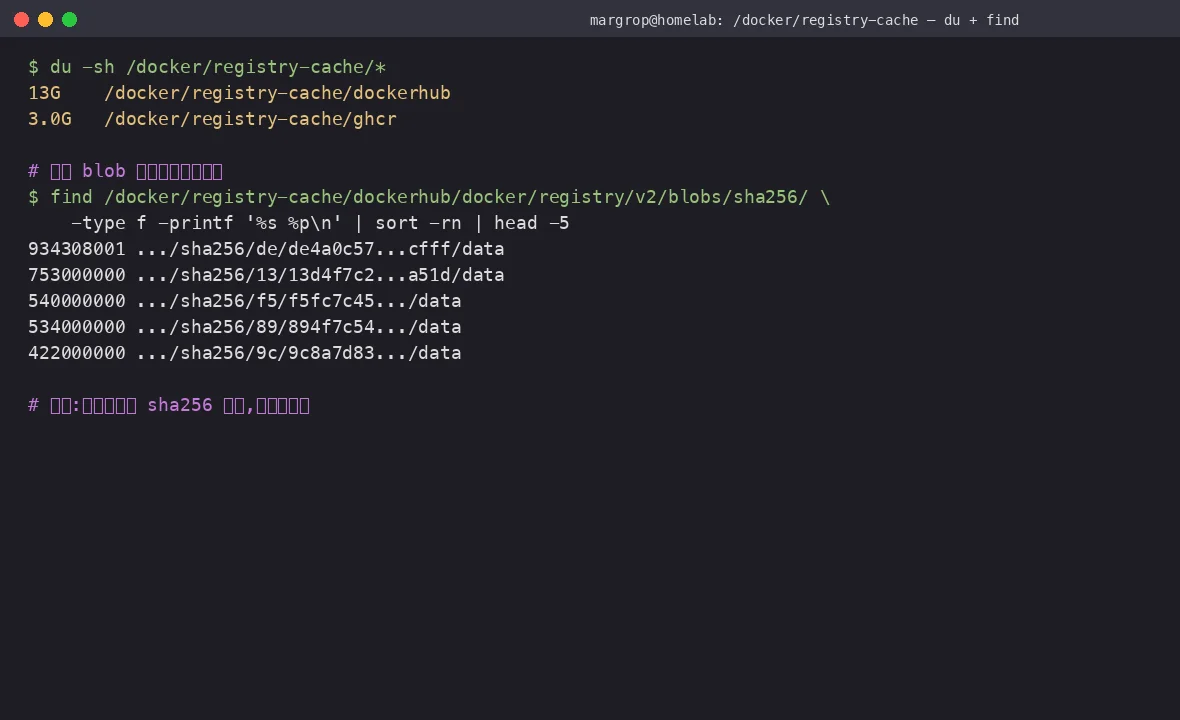
Figure 7: the blob storage path is literally the first 2 chars of its own sha256 plus the full hash. That means: two different images that share a base layer (e.g. both based on library/alpine) will physically share that layer on disk — only one copy ever exists.
“Addressable by sha256” via a library analogy: A school library has 1 million books. If books are filed by “shelf 1, shelf 2, shelf 3…”, two identical copies of “Five Years of College Entrance Exams” sit in different slots, taking twice the space. But if books are filed by “the SHA256 of this book’s first sentence”, every identical copy can only ever sit in one slot — automatic deduplication. Docker’s registry uses exactly this scheme. Any given content exists on disk as exactly one file, no matter how many images reference it.
Here are the tag counts I have for library/alpine cached locally:
$ curl -sS http://localhost:8082/v2/library/alpine/tags/list | jq '.tags | length'
219
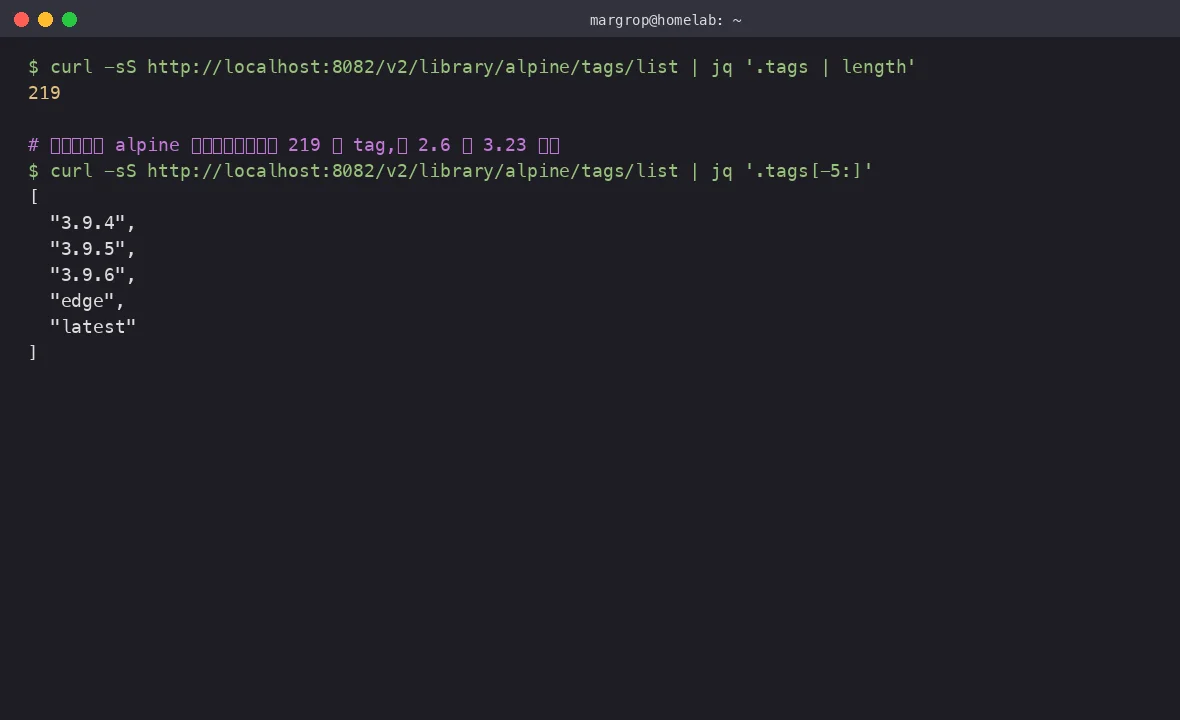
Figure 8: just for library/alpine, my registry has cached 219 tags — from 2.6 all the way to latest. They share huge amounts of base layer content, so the actual on-disk footprint is far smaller than “219 separate alpine images” would suggest.
Across the whole registry I have 95 distinct repository names, from library/alpine to zyplayer/zyplayer-doc, but the disk holds only 13 GB:
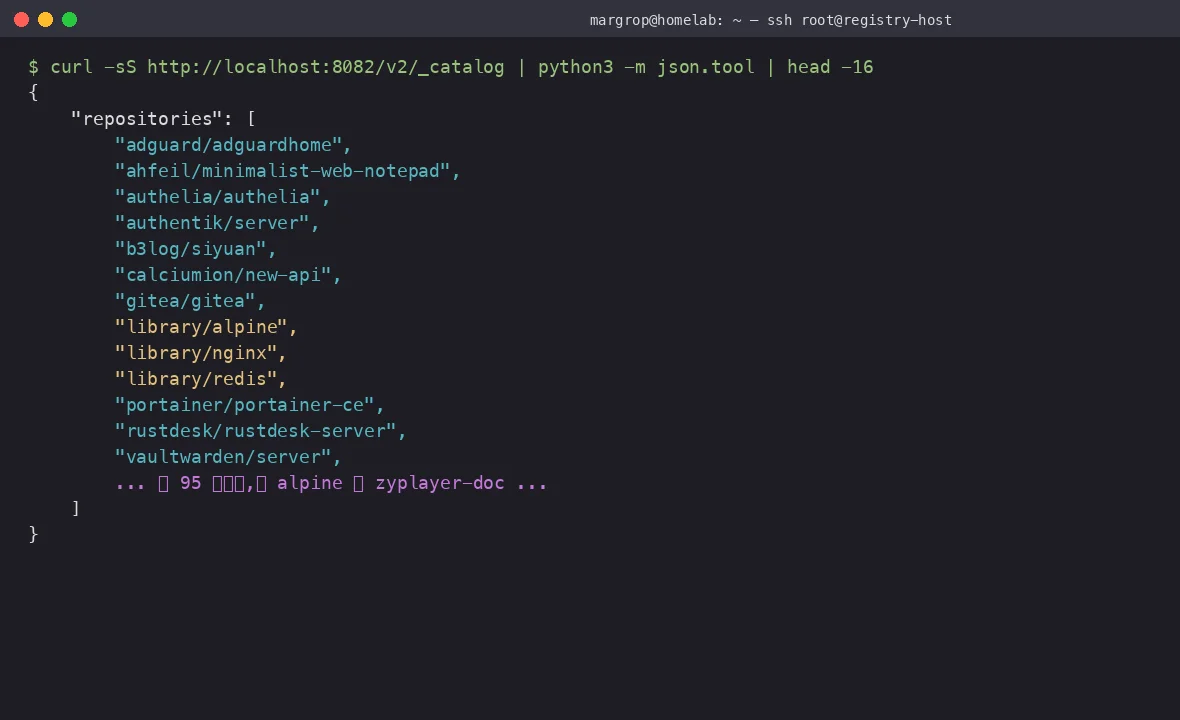
Figure 9: /v2/_catalog lists every repository the registry knows about. This is the real output from my home registry — library/alpine, portainer/portainer-ce, vaultwarden/server, everything cached locally.
7. Reverse Proxy: The Four Most Common 401 Traps
If you want this registry to be reachable from outside the LAN (family members pulling from afar, CI triggers, etc.), you need a reverse proxy in front. This is where 80% of “I swear the password is right” tickets get filed.
A minimal Caddy config that actually works:
registry.lab.local {
    reverse_proxy localhost:8082 {
        # Critical #1: must pass WWW-Authenticate through
        header_up -WWW-Authenticate
        header_up +WWW-Authenticate

        # Critical #2: don't buffer large image streams
        flush_interval -1
    }
}
Same idea in Nginx:
server {
    listen 443 ssl;
    server_name registry.lab.local;

    ssl_certificate /etc/ssl/lab.crt;
    ssl_certificate_key /etc/ssl/lab.key;

    location / {
        proxy_pass http://127.0.0.1:8082;
        proxy_set_header Host $host;
        proxy_set_header X-Real-IP $remote_addr;
        # ⚠️ must pass these through
        proxy_pass_request_headers on;
        proxy_buffering off;
        proxy_request_buffering off;
        client_max_body_size 0;
    }
}
The four traps, in order of frequency:
proxy_buffering offmissing. Nginx’s default buffers upstream responses to disk before sending them on, which makes largedocker pushimages time out. Must beoff.client_max_body_size 0missing. Default is 1 MB. Push a 500 MB image and you get a 413.WWW-Authenticateheader stripped. Nginx’s default filters a subset ofWWW-*headers. Useproxy_pass_request_headers onto keep them.- Incomplete TLS chain. Let’s Encrypt certs sometimes ship without the full chain. On the docker daemon side, concatenate
chain.pem + cert.peminto a single file for the daemon to trust.
If you hit any of these four, your symptom is identical: “docker login says unauthorized, but the server log looks fine.” Triage order: ①
curl -ito verifyWWW-Authenticatereaches you; ② Nginx error log; ③openssl s_clientto inspect the TLS handshake.
8. Three Deployment Shapes: Which One Are You?
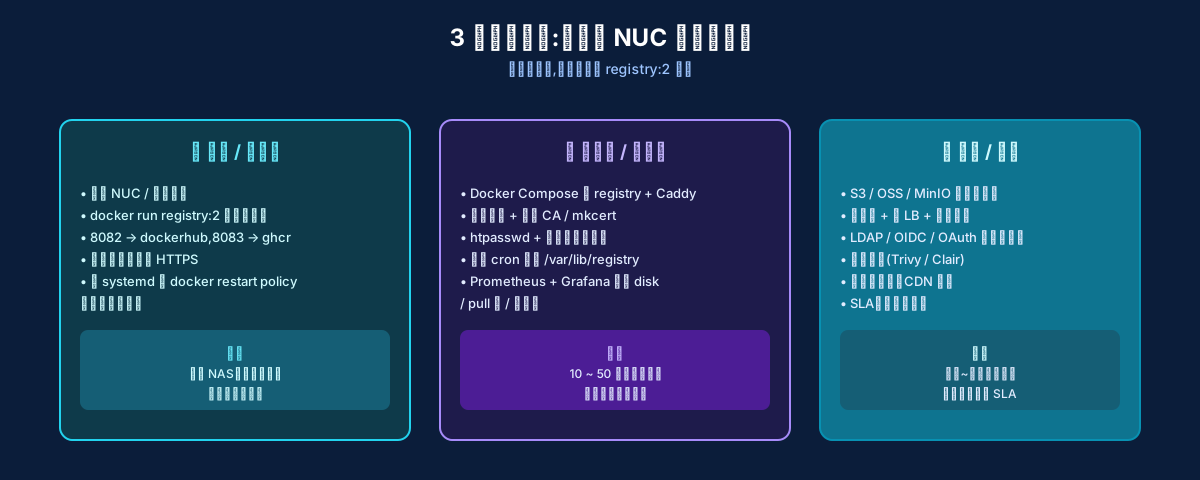
Figure 10: the same registry:2 image, but the surrounding components differ wildly at different scales. I run the leftmost shape at home; a startup team runs the middle; an enterprise runs the rightmost.
| Dimension | Home / Lab | Small Team | Company |
|---|---|---|---|
| # of clients | 1–5 | 10–50 | hundreds–thousands |
| Reverse proxy | none | Caddy / Nginx + self-signed CA | Nginx / Envoy + commercial CA |
| Auth | htpasswd single user | htpasswd + read/write groups | LDAP / OIDC / OAuth |
| Storage | local filesystem | local filesystem + backups | S3 / OSS / MinIO |
| Monitoring | du -sh glances |
Prometheus exporter | Grafana + alerting + SLA |
| HA | not needed, just restart | single point + backup | multi-replica + cross-region |
| SLA | none | none | 99.9% |
My home deployment is the leftmost shape: single container + filesystem + htpasswd + a cron backup, running stable for a year. Don’t over-engineer for “home LAN.”
9. Live Debugging: docker login Keeps Saying “unauthorized”
This is the most common question, and the most commonly misanswered one. Here’s my standard triage.
# Step 1: confirm the server is actually listening
$ ss -tlnp | grep 8082
LISTEN 0  4096  0.0.0.0:8082  0.0.0.0:*  users:(("docker-proxy",pid=226477,fd=8))

# Step 2: unauthenticated curl — confirm 401 + WWW-Authenticate header
$ curl -i http://localhost:8082/v2/
HTTP/1.1 401 Unauthorized
Content-Type: application/json; charset=utf-8
Docker-Distribution-Api-Version: registry/2.0
Www-Authenticate: Basic realm="Registry Realm"
X-Content-Type-Options: nosniff
Content-Length: 79

{"errors":[{"code":"UNAUTHORIZED","message":"authentication required","detail":null}]}

# Step 3: authenticated curl — should return 200
$ curl -i -u admin:'MyS3cretPass!' http://localhost:8082/v2/
HTTP/1.1 200 OK
Docker-Distribution-Api-Version: registry/2.0
X-Content-Type-Options: nosniff
Content-Length: 2

{}

# Step 4: client docker login
$ rm ~/.docker/config.json    # clear stale creds first
$ docker login -u admin -p 'MyS3cretPass!' 192.168.x.x:8082
Login Succeeded
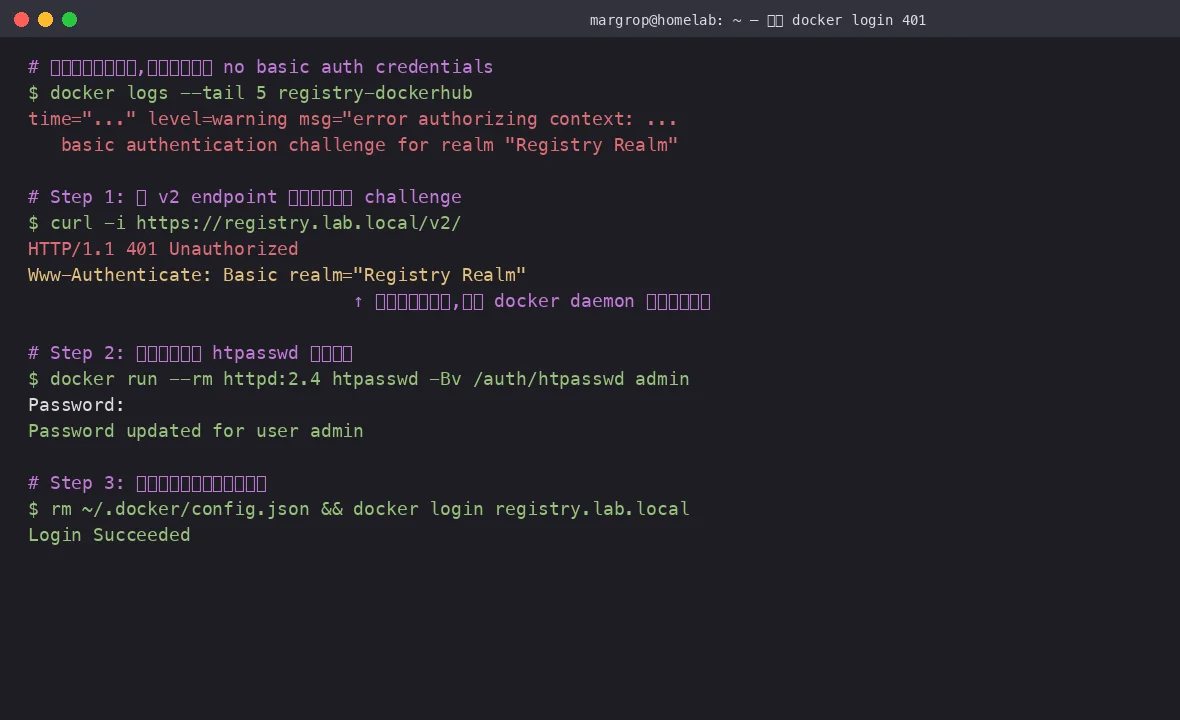
Figure 11: from curl -i to verify the WWW-Authenticate header, to htpasswd -Bv to confirm the password, to rm ~/.docker/config.json to clear cached client credentials — the standard “client doesn’t trust server” three-step.
Four common errors and what they actually mean:
| Error message | Real cause |
|---|---|
no such host |
DNS resolution failed / wrong IP |
connection refused |
Server not running / wrong port |
tls: failed to verify certificate |
HTTPS but cert not trusted by daemon |
unauthorized: authentication required |
Server is up, but WWW-Authenticate header is missing / password is wrong |
10. Backups and Cleanup: Will the Disk Explode After a Year?
Default behavior: blobs not accessed in 168 hours (7 days) get garbage-collected. In practice my 13 GB has stayed stable for a year because:
- Internal deduplication decouples “content growth” from “disk growth” severely.
- Common images (
nginx,redis,alpine,postgres) get pulled constantly, so their layers stick around. - The built-in scheduler runs every 24 hours and prunes anything not touched in 7 days.
If you want to take manual control, add this:
storage:
  filesystem:
    rootdirectory: /var/lib/registry
  delete:
    enabled: true
  cache:
    blobdescriptor: inmemory
Then trigger GC yourself via the registry API:
$ curl -X POST -u admin:'MyS3cretPass!' \
    http://localhost:8082/v2/_catalog?n=1000
$ curl -u admin:'MyS3cretPass!' \
    http://localhost:8082/debug/health | jq .
Backup is even simpler: just tar the whole /docker/registry-cache directory.
# Every Sunday at 03:00
0 3 * * 0 tar czf /backup/registry-$(date +\%F).tgz /docker/registry-cache
Analogy: GC = the supermarket pulls yogurt off the shelf 7 days after its sell-by date. Backup = a daily photo of the shelves, so if anything happens you can restock from the picture. You don’t have to babysit it — but don’t be the person who only thinks about backups after a real loss.
11. Q&A
Q: How is registry:2 different from Harbor?
A: Harbor is “registry + UI + vulnerability scanning + replication policy + LDAP” all in one. It’s the right choice for a company. For home use, Harbor is overkill — it eats 4 GB of RAM just to start, and underneath it still uses registry:2 as its core. My 24 MB registry:2 does everything I need. Simplicity is the antidote to complexity.
Q: I don’t want htpasswd. Can I use my company LDAP?
A: Yes. registry:2 supports token-based auth: you write a small HTTP service that receives ?service=...&scope=... from the registry, queries LDAP, returns a signed token. Harbor and Distribution both ship sample implementations. But htpasswd is still the simplest path. If you need multiple users with different permissions, just keep several htpasswd files and mount the right one.
Q: docker login keeps saying unauthorized, but curl -u admin:pass works fine?
A: 99% it’s your reverse proxy stripping the WWW-Authenticate header. Force your proxy to pass it through:
proxy_pass_request_headers on;   # Nginx
header_up +WWW-Authenticate       # Caddy
Then curl -i https://your.host/v2/ and confirm the response includes WWW-Authenticate: Basic realm="...". If that line is missing, you found it.
Q: Will the cache make my images “stale”? For example, I pulled alpine:3.19 yesterday — what happens when 3.20 ships?
A: No. On every pull, registry:2 sends HEAD /v2/<name>/manifests/<tag> upstream first, asking “which digest does this tag currently point to?” If the upstream digest differs from the locally cached digest, the registry proactively fetches the new manifest and the new blobs. The client sees the latest version transparently.
Q: How do I bulk-push all my local images to a private registry?
A: A quick script:
#!/bin/bash
DEST="192.168.x.x:8082"
docker images --format '{{.Repository}}:{{.Tag}}' | grep -v '<none>' | while read img; do
    new=$(echo "$img" | sed "s|^|$DEST/|")
    docker tag "$img" "$new"
    docker push "$new" >/dev/null 2>&1 && echo "pushed: $new"
done
But I’d push only your internal business images. Public images (nginx, redis, alpine) are already cached automatically; pushing them locally just wastes space.
Q: insecure-registries vs HTTPS — which one?
A: HTTP + insecure-registries for private LAN, HTTPS for production. The insecure-registries switch is designed exactly for this case — by default the daemon refuses plain HTTP except to localhost, so this is safe by construction. If you need it accessible from outside, set up Caddy with automatic Let’s Encrypt and HTTPS in under a minute.
Q: Does the registry container itself need a restart policy?
A: Yes — --restart=always. The registry is a stateless HTTP server; if it crashes, restarting costs nothing (data lives on the bind mount). My home registry has restarted 5–6 times over the past year, and zero cache was lost.
12. References
- Docker Hub usage and rate limits — Docker’s official note on 100 pulls / 6h / IP throttling
- Distribution: Configuring a registry — official docs for
proxy.remoteurl,htpasswd,storagefields - Distribution: Registry as a pull through cache — official mirror recipe, including the daemon.json setup
- Docker daemon: insecure-registries — the HTTP-in-LAN escape hatch
- Distribution: Token Authentication Specification — why
WWW-Authenticateis so important - Caddy reverse_proxy: header_up directives — official docs on header passthrough
- htpasswd man page (Apache HTTP Server) — what
-Bbnactually means - Earlier post: From 5m14s to 0.6s — picking a registry mirror — how I chose my upstream and built the cron fallback
Final thought: a private registry isn’t a deep technology. It’s a 24 MB Go HTTP service plus an external hard drive. Think of it as a “neighborhood convenience store” instead of “Walmart,” and you’ll see it’s just: install shelves, stock some goods, post a bouncer at the door.
— fin —