Claude Code Upgrade Broke Every Model? Before You Rotate Keys, Check the Compatibility Gateway
The short version
After a Claude Code upgrade, every model call failed with the same error:
API Error: 400 invalid params, chat content has invalid message role: system (2013). At first glance this looks like a bad API key, a dead model, an exhausted account, a broken proxy, or a provider-wide outage. The root cause was different: a newer Claude Code request shape crossed an Anthropic-compatible model gateway that had not caught up with the client-side protocol behavior. The gateway, or a downstream chat validation layer behind it, rejected asystemrole in a place where it did not expect one.The practical fix was not to randomly reinstall things. I reproduced the failure with the smallest possible prompt, tested adjacent Claude Code versions, and found the last known good version.
2.1.150returnedOK;2.1.154and2.1.156reproduced the 400. Pinning the global Claude Code installation back to2.1.150restored the existing provider path.
This post is a troubleshooting write-up for a local Claude Code environment. The fix itself was small, but the incident is useful because it shows a pattern that is becoming common in AI agent tooling: the CLI, environment settings, model gateway, API compatibility layer, and actual model backend are often separate moving pieces. When one layer changes its request structure, the terminal may only show a vague 400.
All private details have been removed. This article does not include real internal addresses, usernames, tokens, private provider names, local absolute paths, or private service domains. Configuration examples use placeholders such as <PLACEHOLDER>, <MODEL_GATEWAY>, and <MODEL_NAME>. The goal is to document a reusable debugging method, not to expose a specific environment.

Figure 1: The visible error looked model-side. The useful path was to trace Claude Code, Anthropic API semantics, and the compatibility gateway between them.
1. Background: Claude Code is often not just “CLI talks to Anthropic”
The simplest mental model for Claude Code is straightforward: you run claude in a terminal, Claude Code calls Anthropic, and the model returns an answer. That model is good enough for a direct official setup, but many real development environments are more layered.
A common setup looks more like this:
- Claude Code runs locally as the CLI. It reads the project, manages sessions, executes tools, and builds model requests.
- Settings or environment variables define
ANTHROPIC_BASE_URL,ANTHROPIC_API_KEY,ANTHROPIC_AUTH_TOKEN, and default model names. - The request may not go directly to Anthropic. It may go to an Anthropic-compatible endpoint.
- That endpoint may route to a model vendor, an enterprise token platform, a unified model gateway, or an OpenAI-compatible adapter.
- The backend response is translated back into the shape Claude Code expects.
This architecture is useful. It gives teams unified authentication, model routing, cost control, provider switching, and access to models that do not natively expose Anthropic’s Messages API. It also creates a new failure mode: when Claude Code evolves, when Anthropic API semantics change, or when the adapter has a subtle mismatch, the user sees “every model is broken” even though the actual model backend may never receive the request.
That was the pattern in this incident. The user saw every model fail, but the failure was concentrated in the currently selected compatible endpoint.
2. Symptom: even the smallest prompt returned 400
The visible error was:
API Error: 400 invalid params, chat content has invalid message role: system (2013)
Several details matter.
First, it is a 400. This points toward request parameters or protocol compatibility, not authentication, quota, rate limiting, or a provider outage. A 401 or 403 would lead the investigation toward credentials. A 429 would lead toward quota and concurrency. A 5xx would lead toward upstream stability. A 400 that mentions a message role is a very different class of problem.
Second, the error explicitly names system. That means some layer parsed the request body, found a message role, and rejected it as invalid in that position.
Third, it happened across models. That can be misleading. “Every model fails” does not necessarily mean every model backend is down. If all model calls pass through the same gateway and the gateway rejects the request before routing, all models will appear broken.
The first useful check was a minimal reproduction:
claude -p "reply only OK"
The same 400 came back. This ruled out a lot of noise: project-specific instructions, a bad CLAUDE.md, conversation history, tool calls, MCP servers, long context compaction, and prompt complexity. A single prompt through the global configuration was enough to fail.
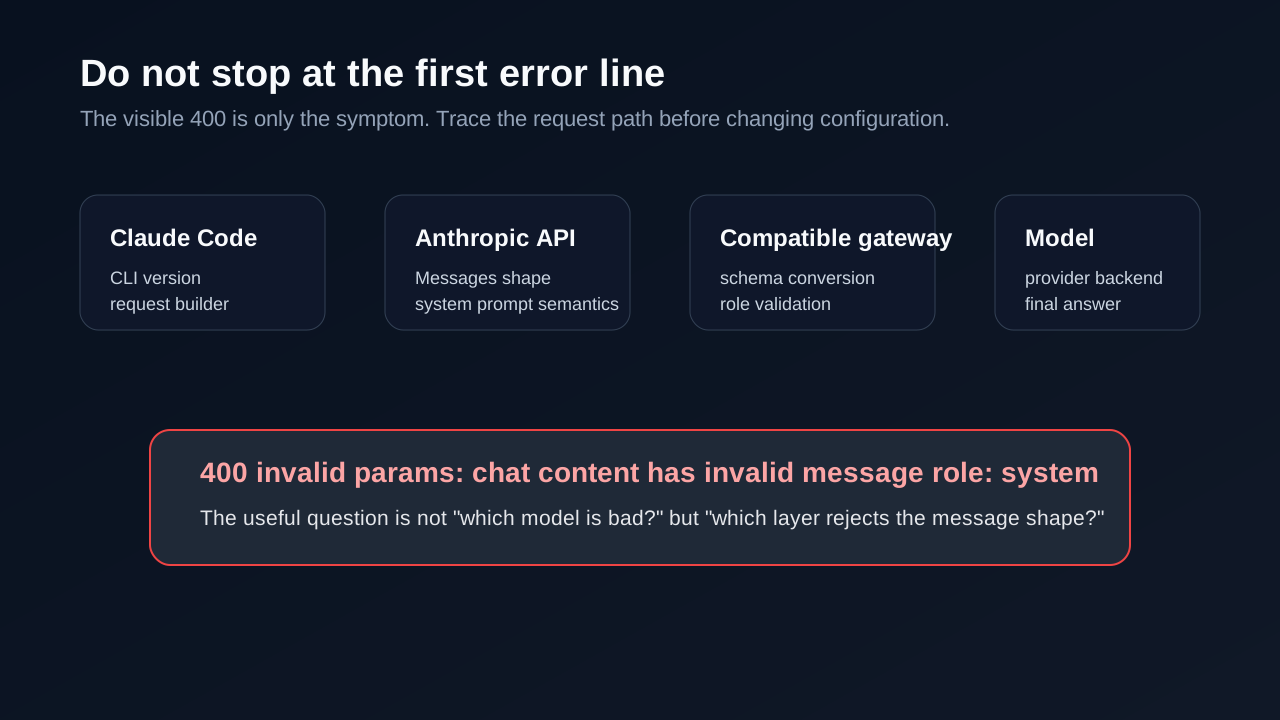
Figure 2: Do not stop at the first error line. Identify which layer rejects the request shape.
3. First pass: identify who is rejecting the request
For this kind of failure, I do not start by rotating keys or reinstalling the tool. Those are broad changes, and they can destroy useful evidence. I start by recording the current version, current provider path, relevant environment variables, and minimal request behavior.
3.1 Check the Claude Code version
The first command was:
claude --version
The installed version was 2.1.156. The user also mentioned that the problem might be related to a recent Claude update. That matters. If a setup worked before the update and failed immediately after it, the client version belongs at the top of the suspect list.
3.2 Check whether the client is using a custom base URL
The Claude Code settings showed a structure like this after redaction:
{
  "env": {
    "ANTHROPIC_BASE_URL": "https://<MODEL_GATEWAY>/anthropic",
    "ANTHROPIC_AUTH_TOKEN": "<TOKEN>",
    "ANTHROPIC_MODEL": "<MODEL_NAME>",
    "ANTHROPIC_DEFAULT_SONNET_MODEL": "<MODEL_NAME>",
    "ANTHROPIC_DEFAULT_HAIKU_MODEL": "<MODEL_NAME>",
    "ANTHROPIC_DEFAULT_OPUS_MODEL": "<MODEL_NAME>"
  }
}
That changes the entire investigation. This was not simply Claude Code calling the official Anthropic endpoint. It was Claude Code calling an Anthropic-compatible endpoint, which then had to translate or route the request.
From that point, there were three likely categories:
- Claude Code changed how it builds or organizes requests.
- The Anthropic Messages API has a specific semantic for system prompts.
- The compatibility gateway did not fully adapt the new request shape, or it translated Anthropic-style input into a chat-message format incorrectly.
3.3 Test provider paths without changing global state
The machine had a provider switching tool. The provider list contained multiple Claude provider definitions: the current compatible endpoint and a few alternatives. In redacted form, it looked like this:
Current: <Provider A>  -> https://<MODEL_GATEWAY_A>/anthropic
Other:   <Provider B>  -> https://<MODEL_GATEWAY_B>/anthropic
Other:   <Provider C>  -> https://<MODEL_GATEWAY_C>/anthropic
Instead of changing the global default immediately, I temporarily launched Claude Code through each provider:
cc-switch start claude <PROVIDER_ID> -- -p "reply only OK"
The results were useful:
- The current provider failed with the same
invalid message role: systemerror. - Another similar compatible endpoint also failed.
- A different provider path returned
OK.
This proved that the local CLI was not completely unusable and that the network was not universally broken. The failure was tied to specific Anthropic-compatible gateway paths.
4. The key API detail: in Anthropic Messages, system is not just another chat message role
To understand the error, you need one bit of API context.
In many OpenAI-compatible Chat Completions APIs, the system prompt is commonly represented as a message inside the messages array:
{
  "messages": [
    {"role": "system", "content": "You are a helpful assistant."},
    {"role": "user", "content": "Hello"}
  ]
}
Anthropic’s Messages API is not shaped in exactly the same way. In Anthropic’s API, the system prompt is represented as a top-level system parameter, while messages represents the conversation turns, typically with user and assistant roles.
That difference is small enough to miss and large enough to break adapters.
If a gateway exposes an Anthropic-compatible endpoint while internally talking to a backend that expects OpenAI-style chat messages, it must translate correctly:
- Claude Code sends an Anthropic-style request.
- The gateway reads top-level
system,messages, tools, thinking settings, metadata, and related fields. - The gateway converts that request into the backend model’s expected protocol.
- The backend response is translated back into an Anthropic-style response for Claude Code.
If the adapter places system into the wrong message list, or if a new Claude Code version introduces a shape the adapter does not understand, a downstream chat validator may reject it with an error like invalid message role: system.
This also explains the wording. The phrase “chat content” does not sound like a clean Anthropic official error. It sounds like an intermediate gateway or downstream chat validation layer describing a message-schema violation.
5. Second pass: use version probes to find the regression window
Because the user suspected a recent update, the next step was not to merely agree. The suspicion needed to be tested.
The method was simple: run adjacent Claude Code versions with the same minimal prompt and the same current configuration. npx makes that easy:
npx -y @anthropic-ai/claude-code@2.1.154 -p "reply only OK" --model <MODEL_NAME>
npx -y @anthropic-ai/claude-code@2.1.150 -p "reply only OK" --model <MODEL_NAME>
The observed behavior was:
2.1.156 -> 400 invalid message role: system
2.1.154 -> 400 invalid message role: system
2.1.150 -> OK
At that point the issue was no longer “maybe the upgrade matters.” It had a reproducible version boundary. I did not need to test every version between 2.1.150 and 2.1.154 to restore service. For practical recovery, it was enough to identify the last known good version.
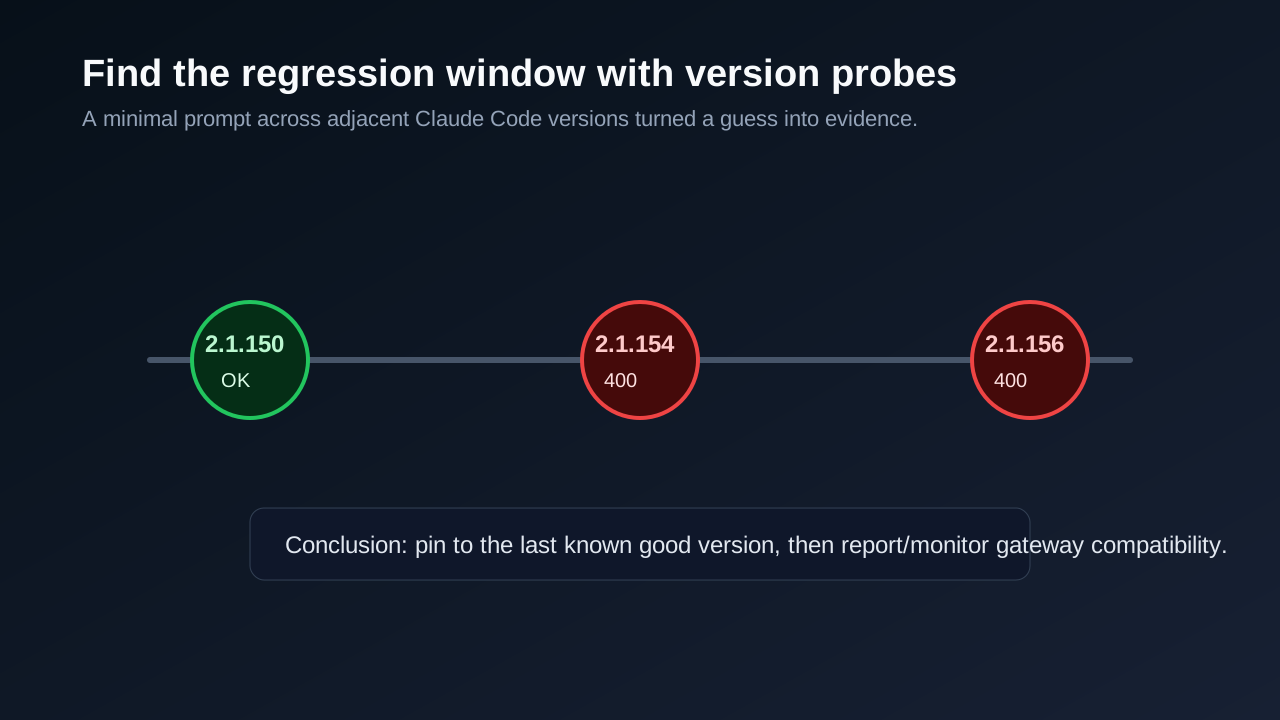
Figure 3: A minimal prompt across adjacent versions gives much better evidence than blind reinstalling.
This is the important distinction: rolling back is not a debugging strategy by itself. Rolling back becomes a valid recovery action when you know exactly which version works, which version fails, and what command proves it.
6. Root cause: a protocol compatibility break between the newer client and the gateway
The evidence points to this root cause:
Between Claude Code
2.1.150and the later2.1.154/2.1.156behavior, the request sent to an Anthropic-compatible endpoint changed in a way that the current compatible gateway path did not handle. The gateway, or a downstream chat validation layer, rejectedsystemas an invalid message role. The actual model backend may not have participated in inference at all.
This conclusion is based on observed behavior, not on reading every line of Claude Code source:
- A minimal prompt failed, so project instructions and conversation history were not required to trigger the bug.
- The setup used a custom
ANTHROPIC_BASE_URL, so a compatibility gateway was on the path. - Different providers behaved differently, so the CLI and network were not universally broken.
2.1.150worked while2.1.154and2.1.156failed, so client version was a necessary factor.- The error text pointed to message-role validation, not authentication, quota, rate limits, or a missing model.
I am intentionally calling this a compatibility break rather than simply “a Claude Code bug” or “a gateway bug.” In practice, these incidents often sit between components. Claude Code may legitimately evolve its request format. A compatible gateway must track those changes closely. The operational failure is that the compatibility contract was not tested tightly enough across versions.
7. The fix: pin Claude Code to the last known good version
Once 2.1.150 was confirmed to work, the recovery command was straightforward:
npm install -g @anthropic-ai/claude-code@2.1.150
After installation, I verified three things.
First, the installed version:
claude --version
Expected output:
2.1.150 (Claude Code)
Second, the explicit-model minimal prompt:
claude -p "reply only OK" --model <MODEL_NAME>
Expected output:
OK
Third, the default model path:
claude -p "reply only OK"
Expected output:
OK
The third check matters. Real interactive usage usually does not pass --model every time. If the explicit model works but the default Sonnet/Haiku/Opus mapping still points to a broken path, the user will hit the same failure as soon as they start a normal session.
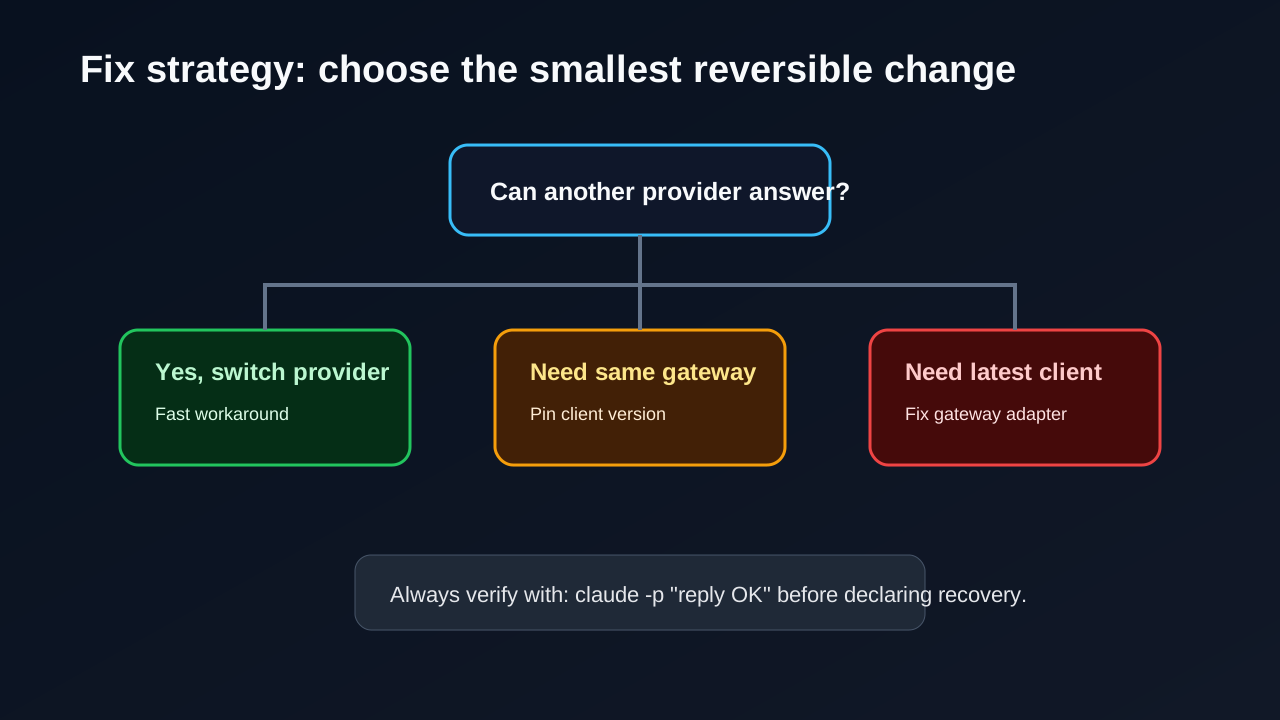
Figure 4: If another provider is acceptable, switch temporarily. If the same gateway is required, pin the last known good client version while the adapter catches up.
8. Why I did not start by changing the key, model, or session
Several tempting fixes would have been wrong or at least premature.
8.1 Rotating the API key
A bad key usually produces an authentication or authorization error. This was a 400 with a schema-specific message. Rotating credentials would not change where system appears in the request body.
8.2 Renaming the model
When all models under the same provider fail with the same schema error, model name is unlikely to be the root cause. The request is probably rejected before routing reaches the model. Testing a different provider path is more useful than testing ten model names under the same failing gateway.
8.3 Clearing conversation history
The minimal claude -p command reproduced the failure. That means conversation history was not required. Clearing sessions would add risk and remove useful state without evidence.
8.4 Upgrading again immediately
Upgrading is a good fix for many problems, but this incident was caused by an upgrade interacting badly with a compatibility layer. Until the gateway catches up, chasing the newest client can reproduce the same failure.
9. A reusable checklist for “every model is broken” incidents
Here is the checklist I would use next time.
9.1 Classify the error code first
400 -> request shape, parameters, protocol compatibility
401/403 -> authentication, authorization, account status
404 -> endpoint path, model name, route mapping
429 -> rate limits, quota, concurrency
5xx -> upstream service, provider outage, gateway instability
This is not a perfect rule, but it prevents the first step from going in the wrong direction.
9.2 Use a minimal prompt
claude -p "reply only OK"
If this fails, investigate global configuration, provider routing, client version, and endpoint behavior before project-specific instructions.
9.3 Record the exact client version
claude --version
Do not write “latest” in a troubleshooting note. “Latest” changes. A version number is evidence.
9.4 Check whether a custom Anthropic base URL is configured
Look for:
ANTHROPIC_BASE_URL
ANTHROPIC_MODEL
ANTHROPIC_DEFAULT_SONNET_MODEL
ANTHROPIC_DEFAULT_HAIKU_MODEL
ANTHROPIC_DEFAULT_OPUS_MODEL
A custom ANTHROPIC_BASE_URL means a compatibility layer is part of the incident until proven otherwise.
9.5 Test provider paths horizontally
If you have a provider switching tool, avoid changing the global default first. Start temporary sessions:
cc-switch start claude <PROVIDER_ID> -- -p "reply only OK"
If provider A fails and provider B succeeds, you have learned more than a global reinstall would tell you.
9.6 Test client versions vertically
npx -y @anthropic-ai/claude-code@<VERSION> -p "reply only OK"
Find the last known good version, then decide whether to pin or report the compatibility issue.
9.7 Change global state only after you know the recovery target
Once you know which provider and which client version work, then update the global installation or provider configuration. After that, verify both explicit and default model paths.
10. Notes for model gateway maintainers
If you maintain an enterprise model gateway, token platform, or Anthropic-compatible endpoint, this incident is a strong argument for client-version regression tests.
At minimum, test these cases:
- Top-level
systemparameter, not onlymessages.role=system. - Multi-turn
userandassistantmessages. - Empty system prompt, long system prompt, and system prompts containing newlines.
- Tools, tool use, and tool results.
- Streaming and non-streaming responses.
- Thinking or reasoning fields, especially when different clients use different switches.
- The latest Claude Code version and at least one pinned known-good version.
- Error response shape, so clients see useful diagnostics instead of generic failures.
A single curl test against a simple messages array is not enough to claim Claude Code compatibility. Agent clients send richer requests: system prompts, tool definitions, permission context, metadata, and sometimes model-specific fields. The adapter has to handle the request shape the client actually sends, not only the simplified shape in a smoke test.
11. Q&A
Q1: Why does the error mention system role if Anthropic uses top-level system?
That is exactly why this class of bug happens. OpenAI-style chat APIs often represent system prompts as a messages entry with role system. Anthropic’s Messages API uses a top-level system parameter. If an adapter mixes those semantics or misplaces the field during conversion, a downstream chat validator can reject the request with invalid message role: system.
Q2: Does this prove Claude Code 2.1.156 is broken?
No. It proves that this provider path failed with 2.1.156 and worked with 2.1.150. The root cause could be a client request-shape change, an adapter assumption, a downstream validator rule, or a combination. Operationally, pinning the client restores service. Strategically, the gateway should be updated and tested against newer clients.
Q3: Why not just switch to the provider that returned OK?
That is a valid workaround if the provider is acceptable. In some environments the current provider is required for authentication, audit, cost controls, quota management, or access to specific models. Pinning 2.1.150 restored the existing provider path without changing routing policy.
Q4: Is pinning an old version safe?
It is a temporary recovery measure, not a long-term strategy. Older versions may lack features, bug fixes, or security improvements. Document why the pin exists, add a regression test, and revisit the pin after the gateway catches up.
Q5: How do I prevent an accidental upgrade from reintroducing this?
Put the explicit version in your setup script or machine bootstrap script:
npm install -g @anthropic-ai/claude-code@2.1.150
Then add a post-install smoke test:
claude -p "reply only OK"
If that command does not return OK, treat the environment as not ready.
Q6: What if I do not have a provider switching tool?
Inspect ~/.claude/settings.json, shell startup files, and environment variables. Find ANTHROPIC_BASE_URL. If it points to a custom endpoint, treat the endpoint as part of the system under test. Then test Claude Code versions vertically with npx.
Q7: Do all Anthropic-compatible endpoints have this issue?
No. In this incident, one provider path returned OK. Compatibility depends on the gateway implementation, supported client versions, message conversion logic, and downstream model validation rules.
12. Retrospective: the valuable part was not the downgrade; it was the evidence chain
The final command was short:
npm install -g @anthropic-ai/claude-code@2.1.150
But the important part was the evidence chain:
- Minimal prompt reproduced the failure.
- Exact Claude Code version established the timeline.
ANTHROPIC_BASE_URLshowed that a compatibility gateway was involved.- Horizontal provider testing proved that not all paths were broken.
- Vertical version testing found the last known good client.
- Explicit and default model smoke tests confirmed recovery.
AI agent tooling is getting more capable, and the request path is getting longer. More failures will look like model errors while actually living in gateways, adapters, client versions, or protocol edge cases. The useful habit is to locate the layer before changing things.
Once the layer is known, the fix is often simple.
References
- Anthropic Messages API: https://docs.anthropic.com/en/api/messages
- Claude Code settings documentation: https://docs.anthropic.com/en/docs/claude-code/settings
- Claude Code release notes: https://docs.anthropic.com/en/release-notes/claude-code
@anthropic-ai/claude-codeon npm: https://www.npmjs.com/package/@anthropic-ai/claude-code- MiniMax image generation API reference. The cover image in this post was generated locally through a CLI call: https://platform.minimaxi.com/docs/api-reference/image-generation-t2i