The Day the Internet Lost Its Memory: From a Hand-Typed HOSTS.TXT to Modern DoH/DoQ — The Epic Evolution, Cache Poisoning Crises, and Hardening of DNS
The Executive Summary
Engineers and network operators frequently encounter a series of baffling internet riddles:
- What if the global root DNS infrastructure were to suffer a complete blackout for just 5 seconds? Within moments, billions of smartphones, personal computers, cloud-native microservices, and global financial trading networks would plunge into total “digital amnesia,” bringing the global internet to a grinding halt.
- Why does mistyping a non-existent URL in your web browser sometimes fail to return a clean error page, but instead silently redirects you to an intrusive telecommunications portal plastered with third-party advertisements?
- How did a white-hat security researcher named Dan Kaminsky discover an architectural flaw in 2008 that enabled a few lines of script to hijack almost any bank or enterprise domain in less than 30 seconds—forcing Microsoft, Cisco, and BIND to coordinate the most secretive emergency patch deployment in internet history?
- Why is every domain lookup on your device today transitioning from unencrypted plaintext port 53 UDP toward DoH (DNS-over-HTTPS), DoT (DNS-over-TLS), DoQ (DNS-over-QUIC), and ODoH (Oblivious DoH)?
The answer lies within an infrastructure standard conceived back in 1983 that continues to anchor modern cyberspace: the Domain Name System (DNS).
This comprehensive guide navigates 50 years of internet naming history—beginning with the hand-typed
HOSTS.TXTpaper logs maintained by Elizabeth Feinler at the Stanford Research Institute (SRI-NIC). We demystify recursive resolution, 13 Anycast root clusters, Kaminsky cache poisoning, DNSSEC cryptographic chains of trust, and modern transport encryption using everyday analogies that a fifth grader can grasp (a diligent bicycle courier, postal sorting bureaus, and tamper-proof wax seals). Finally, we deliver native, zero-dependency diagnostic and hardening toolkits for Windows 11 / Ubuntu 26.04 / macOS 26 supporting both interactive operator troubleshooting and autonomous AI Agent execution!
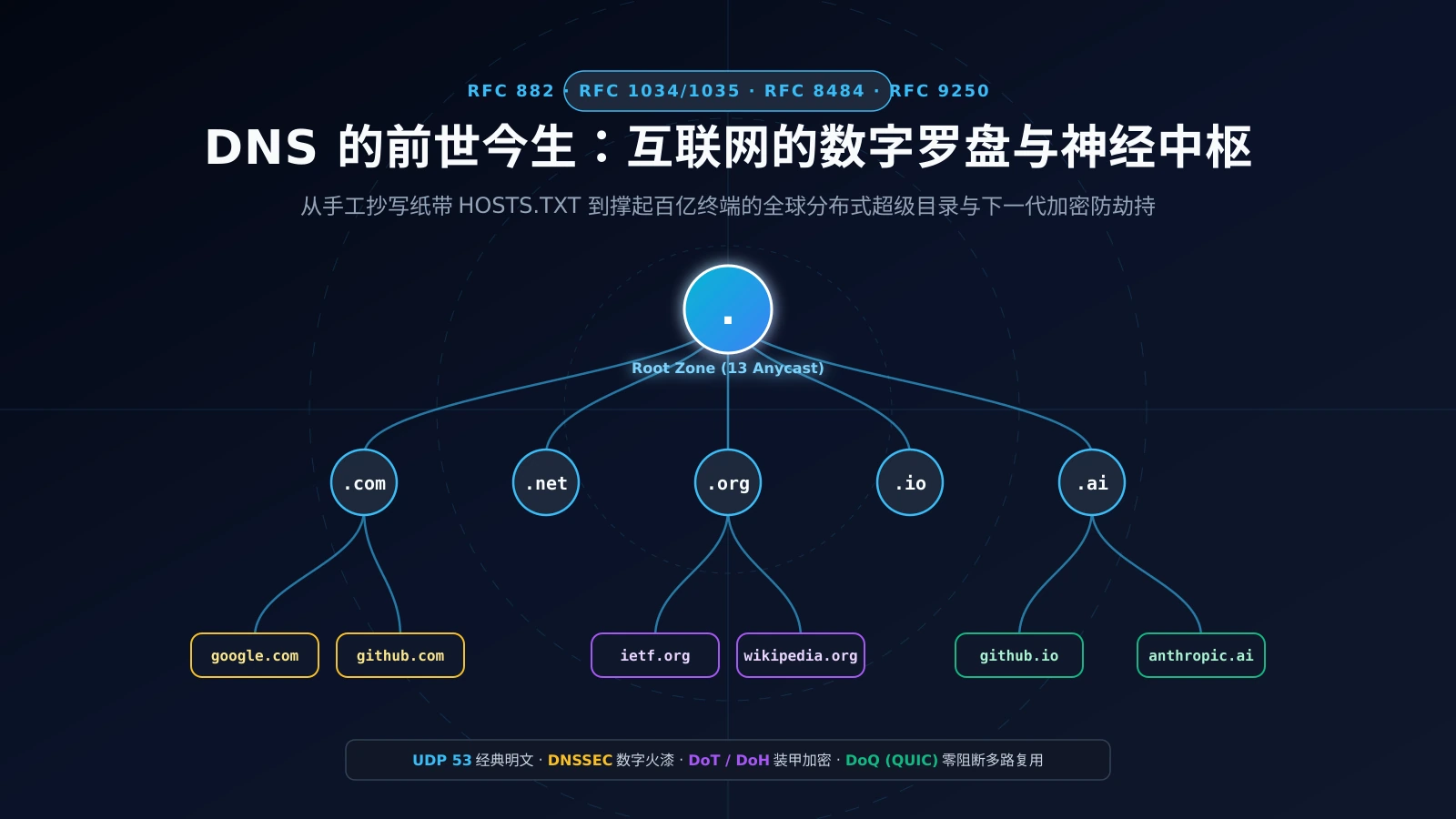
Figure 1: AI Generated Cover. DNS resembles a luminous celestial tree and cyber compass, branching outward from the root zone into an intricate web of photonic fibers that guide billions of intelligent devices across the digital cosmos.
1. Problem Background & Pre-History: How a Hand-Typed Phonebook Nearly Broke ARPANET
Today, hitting Enter in a browser address bar triggers a distributed, worldwide directory lookup that resolves in mere milliseconds. But five decades ago, during the infancy of networked computing, resolving a machine address was literal manual labor.
1.1 The ARPANET Dilemma of the 1970s: Elizabeth Feinler and Centralized HOSTS.TXT
In the 1970s, ARPANET connected dozens of elite universities and defense research laboratories across the United States. Mainframe computers communicated via cold numeric host identifiers. To spare scientists from memorizing strings of numbers, the network pioneers set up a central information desk at the Stanford Research Institute Network Information Center (SRI-NIC).
The project was helmed by a pioneering computer scientist: Elizabeth “Jake” Feinler.
At SRI-NIC, every host-to-address mapping across the entire ARPANET was compiled into a single, flat text file stored on a PDP-10 mainframe: HOSTS.TXT.
Whenever the Massachusetts Institute of Technology (MIT) provisioned a new mainframe, the administrative workflow went like this:
- The MIT system administrator had to telephone SRI-NIC during standard West Coast business hours;
- Feinler or one of her staff members wrote down the host name and numeric address on paper index cards or punched tape;
- Staff manually typed the entry into the master
HOSTS.TXTfile; - The Friday Synchronization Ritual: Every Friday afternoon, system administrators nationwide ran an FTP script to pull the entire
HOSTS.TXTmaster file over their 50 kbps circuits and overwrite/etc/hostslocally!
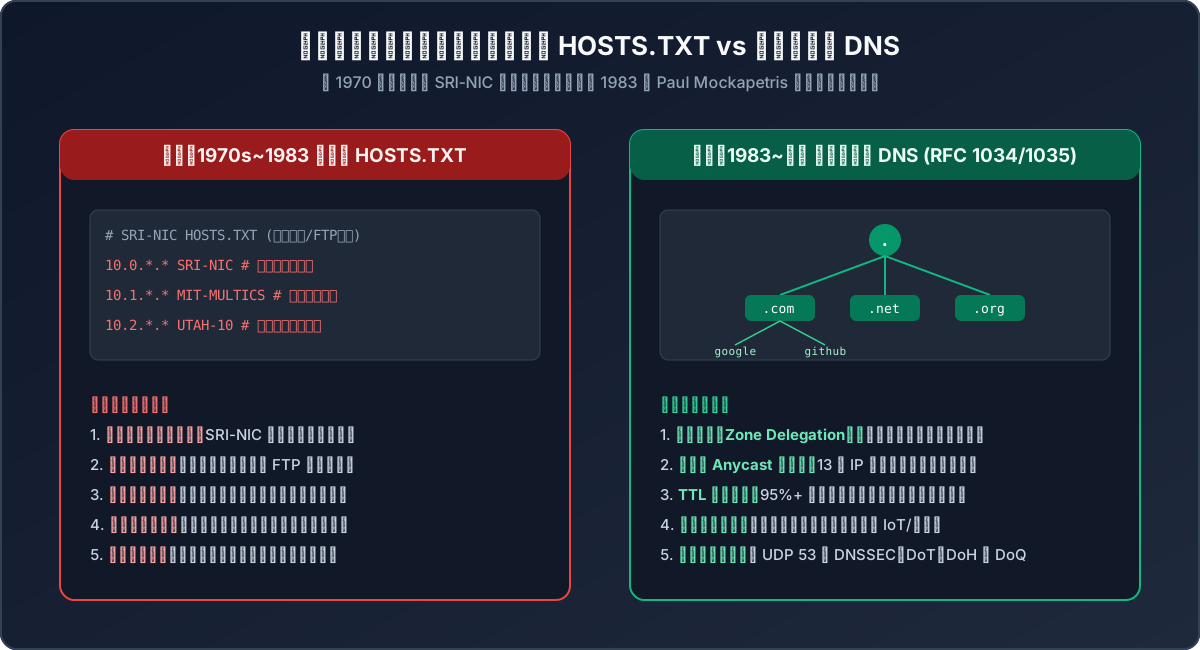
Figure 2: Architectural comparison between centralized HOSTS.TXT and modern hierarchical tree DNS. Transitioning from a single-point-of-failure manual batch copy to a horizontally scalable, federated naming system.
1.2 The Breaking Point: When Flat Files Hit Physical Limits
By the early 1980s, minicomputers and early workstations were proliferating. The centralized HOSTS.TXT model rapidly slammed into an immovable wall:
- Bandwidth Meltdown: Every Friday, hundreds of systems initiated simultaneous FTP downloads, saturating SRI-NIC lines and crashing the host;
- Single Point of Failure (SPOF): If the SRI-NIC machine lost power or suffered disk corruption, no host on ARPANET could resolve new addresses;
- Flat Namespace Collisions: Because names were flat, if Harvard wanted a host named
MAILand Stanford already registeredMAIL, an administrative dispute ensued; - Zero Organizational Autonomy: A university department wanting to add a local workstation or lab printer had to file a formal request across the country.
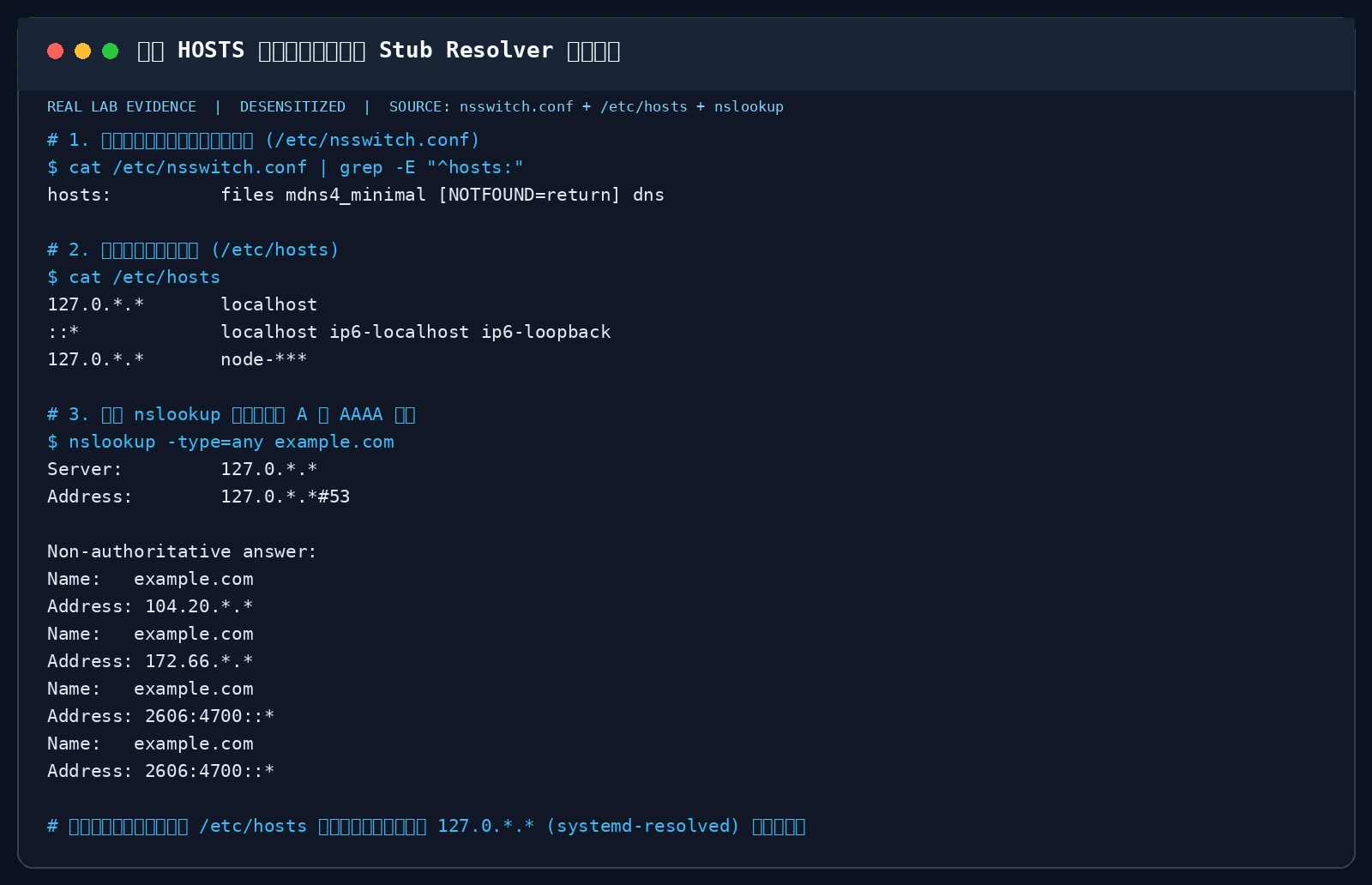
Figure 3: Real terminal verification. Modern operating systems still retain this historical legacy in /etc/nsswitch.conf: the system unconditionally reviews the static /etc/hosts file first before delegating requests to the local stub resolver and upstream recursive resolvers.
1.3 The Architects of DNS: Paul Mockapetris and RFC 882 / 1034 / 1035
Confronted with the imminent collapse of network naming, the late Internet pioneer Jon Postel tasked a young researcher at USC-ISI—Paul Mockapetris—with designing an extensible, distributed successor.
In November 1983, Mockapetris published RFC 882 and RFC 883, which he refined in 1987 into the foundational internet standards:
- RFC 1034: Domain Concepts and Facilities
- RFC 1035: Domain Implementation and Specification
This architecture was christened the Domain Name System (DNS). Its three breakthrough principles revolutionized internet scalability:
- Inverted Hierarchical Tree Namespace: Segmented by dots and parsed from right to left (e.g.,
www.example.com., where the final dot represents the implicit Root), decomposing flat labels into Root, Top-Level Domains (TLDs), Second-Level Domains (SLDs), and subdomains; - Zone Delegation and Federated Administration: The Root zone delegates TLD authority, TLDs delegate domain authority, and domain owners manage subdomains locally without external approval;
- Distributed Caching and Time-to-Live (TTL): Resolvers cache query answers in memory with countdown timers, resolving 99% of recurring queries locally without bothering authoritative servers.
This architecture has scaled seamlessly for over four decades, reliably handling hundreds of billions of lookups every single day.
2. Real-World DNS Symptoms: The Baffling Ghosts in the Machine
While DNS is architecturally robust, it remains one of the most common vectors for network hiccups, latency spikes, and security traps. Here are four common anomalies:
Symptom 1: Gigabit Bandwidth with “Resolving Host…” Stalls
You have a full gigabit fiber broadband plan. 4K streaming and bulk file transfers run at peak speeds. Yet every time you click a new link, the browser bottom status bar hangs on Resolving host... for 2 to 3 seconds before page rendering begins.
Root Cause: Your configured DNS resolver is suffering packet loss or severe jitter over port 53 UDP, lacks a warm cache for long-tail domains, or a secondary configured DNS IP is unresponsive, forcing the operating system to wait for a 2000ms query timeout before failing over.
Symptom 2: Mistyped Domains Redirect to Shady Telecommunications Ad Portals
You accidentally mistype a URL in your address bar (typing githubbxxxx.com instead of github.com). RFC standards mandate that the upstream server return an NXDOMAIN (Non-Existent Domain) status code, prompting a clean native browser error.
Instead, your screen is hijacked by your broadband provider’s branded search portal, filled with pay-per-click banners and spam links.
Root Cause: This is ISP DNS NXDOMAIN Hijacking. Unencrypted UDP port 53 responses are intercepted by deep packet inspection (DPI) devices at the ISP perimeter, replacing the legitimate NXDOMAIN response with a forged A record pointing to the ISP ad monetization server.
Symptom 3: Exact Domain Names Landing on Phishing Mirrors
You type a familiar URL, verify the spelling character by character, yet the site displays a security certificate warning or an outdated, suspicious layout attempting to capture your credentials. Root Cause: DNS Cache Poisoning or Local Router Compromise. Attackers injected fraudulent record mappings into your upstream resolver cache or altered the default DHCP DNS settings on a poorly secured consumer router.
Symptom 4: CDN Edge Misrouting Caused by Stripped ECS
To evade ISP tracking, an engineer switches their primary DNS to an overseas privacy-first public resolver. However, domestic cloud services and streaming platforms suddenly throttle to sub-megabit speeds. Root Cause: The conflict between privacy and ECS (EDNS Client Subnet, RFC 7871). Authoritative CDNs allocate edge servers matching the client’s network subnet. When a public resolver strips ECS to safeguard client anonymity, the authoritative server assumes the request originates from the resolver’s remote data center, dispatching traffic to an edge node thousands of miles away!
3. Everyday Analogies: Demystifying DNS Concepts for Fifth Graders
DNS is packed with abstract jargon: recursion, iteration, roots, authoritatives, TTL, DNSSEC, and DoH. To make these concepts effortlessly intuitive, let us walk through the “Luxury Hotel Concierge & Courier Delivery” analogy.
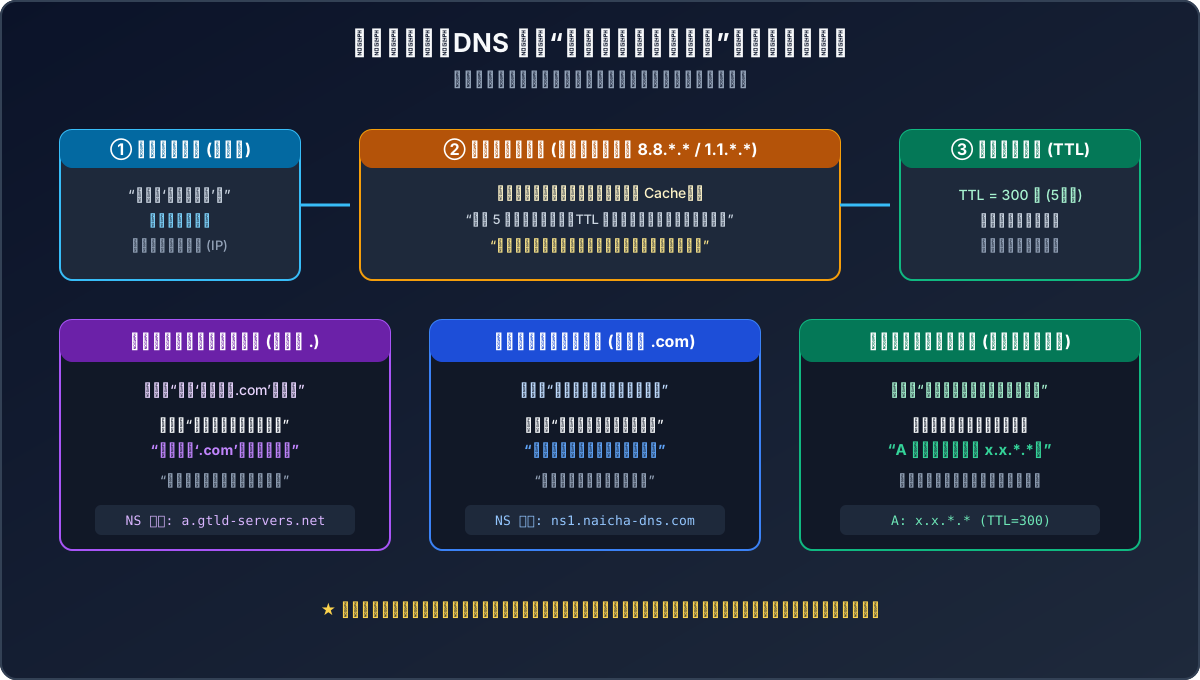
Figure 4: Intuitive everyday analogy. Mapping the roles of the browser client, recursive resolver, local TTL cache, Root servers, TLD registries, and authoritative nameservers into a courier query journey.
Analogy 1: HOSTS.TXT and the Class Monitor’s Notebook
Imagine a school with 2,000 students, but only the class monitor holds the one and only paper telephone directory. Whenever someone moves, they must visit the monitor’s home after school to update the notebook.
With 10 students, it works fine. With thousands, the monitor’s phone rings off the hook, crowds storm the front door, homework goes uncompleted, and when the monitor falls ill—the entire school loses contact!
That was the centralized HOSTS.TXT reality of the 1970s.
Analogy 2: Hierarchical Tree and the Postal Sorting System
To replace the monitor, the school established a structured hierarchy:
- No single person needs to memorize everyone’s address;
- Lookups follow a clear chain: Grade/Country (TLD like
.com) -> Class/Building (SLD likegoogle) -> Student/Room (Host likewwworapi); - Each classroom manages its own internal roster autonomously without asking permission.
Analogy 3: The Recursive Resolver as Your Diligent Courier
You (the browser) are hungry and want to order milk tea from “Delicious Tea (naicha.com).” You know the brand name, but you have no clue where the physical kitchen is located (its IP address: x.x.*.*).
You call your personal courier (the Recursive Resolver, like 8.8.. or 1.1..): “Please find the physical street address of naicha.com!”
The courier follows a strict protocol:
- Checks the Pocket Notebook First (Local Memory Cache):
If someone asked for
naicha.comfive minutes ago, the address is already written in the courier’s notebook with an active countdown timer (TTL): “Valid for 180 more seconds.” The courier gives you the answer instantly without taking a single step! - Notebook is Empty? The Courier Pedals Out (Iterative Resolution):
- Stop 1: Central Post Office Guard (Root Server
.): Courier: “Where isnaicha.com?” Guard: “I don’t know individual tea shops! But I know where the.comcommercial district registry office is. Go down the hall to Window 2!” - Stop 2: Commercial District Registry (TLD Server
.com): Courier: “Where can I findnaicha.com?” Official: “They are registered on our commercial roll. Their property manager runs their private reception desk. Here is their address!” - Stop 3: Property Front Desk (Authoritative Server):
Courier: “What is the physical door number of
naicha.com?” Receptionist: “A Record: The door number isx.x.*.*!”
- Stop 1: Central Post Office Guard (Root Server
The courier jots down naicha.com = x.x.*.* (TTL=300s) in the pocket notebook, pedals back, and delivers the exact coordinates.
Analogy 4: Dan Kaminsky’s Attack and Flooding the Mailbox
Before cryptographic defenses existed, the courier carried plain postcards with a 16-digit reference number.
An adversary trying to poison the courier’s notebook could not guess the number easily if they only asked about naicha.com, because once answered, the courier’s notebook held the true entry for days.
Kaminsky realized an attacker could ask for 10,000 non-existent names: fake001.naicha.com, fake002.naicha.com, forcing the courier to dispatch 10,000 outbound inquiries simultaneously!
Before the genuine post office replied, the attacker flooded the courier’s mailbox with fake postcards. Once a card matched the 16-bit reference number (Transaction ID), the forged letter whispered:
“By the way, all property management for naicha.com has officially relocated to the bandit fortress!”
The courier accepted the forgery, poisoning the notebook and routing everyone to the fake site!
Analogy 5: DNSSEC as an Imperial Tamper-Proof Wax Seal
To eradicate forged postcards, the post office introduced DNSSEC. Now, the property receptionist affixes a unique imperial wax seal (private key signature). The courier uses an official inspection magnifying glass (public key) verified down from the central post office. If an attacker drops a forged letter into the box, the wax seal fails verification, and the courier immediately incinerates the fake message!
Analogy 6: DoH / DoT as Armored Delivery Vans
Classic DNS queries were like sending clear postcards across public streets. Anyone standing on the sidewalk (ISPs, public Wi-Fi sniffers) could read your destinations and rewrite the text with an eraser. DoH / DoT loads the inquiry into an armored delivery van (TLS encryption) and blends into ordinary highway traffic (HTTPS port 443). Bystanders can see traffic moving along the freeway, but nobody can discern what letter you are sending or who you are visiting.
4. Deep Technical Architecture: Protocols, Wireformats, and Security Milestones
With the conceptual analogies established, let us inspect the protocol architecture through a systems engineering lens.
4.1 Why Are There Exactly “13 Root Server” IP Addresses?
The root zone operates under 13 symbolic host designations: a.root-servers.net through m.root-servers.net.
A common misconception is that the global internet relies on 13 physical computers. In reality, two strict architectural realities govern this design:
Factor A: The 512-Byte UDP Packet Limit (RFC 1035)
In the original 1987 specification, IPv4 standard nodes were only required to reassemble UDP datagrams up to 576 bytes without fragmentation. Subtracting the maximum 60-byte IP header and 8-byte UDP header leaves: $$576 - 60 - 8 = 508 \approx 512 \text{ bytes}$$
When a recursive resolver asks the root for the complete inventory of all root nameservers, the server must pack:
- The 12-byte DNS header;
- The Question section;
- The
NSauthoritative resource records; - The glue
Arecords (IPv4 addresses) for each server.
Using standard DNS label compression, packing 13 root server records takes 488 bytes. Adding a 14th server would push the response beyond 512 bytes, triggering the truncation flag (TC=1) and forcing an expensive fallback to TCP three-way handshakes. Thus, 13 was the exact mathematical ceiling of the protocol!
Factor B: BGP Anycast (RFC 4786)
Today, these 13 IP addresses do not map to 13 single servers. They are broadcast via BGP Anycast across more than 1,700 physical server clusters on six continents.
When you query 198.41.*.* (a.root-servers.net), BGP routing automatically delivers the packet to the nearest geographical instance (e.g., Tokyo, Frankfurt, or San Jose), ensuring unprecedented redundancy and DDoS absorption capacity.
4.2 Standard 8-Step Recursive Query Sequence
Let us examine the complete lifecycle of an uncached query from stub resolver to authoritative zone:
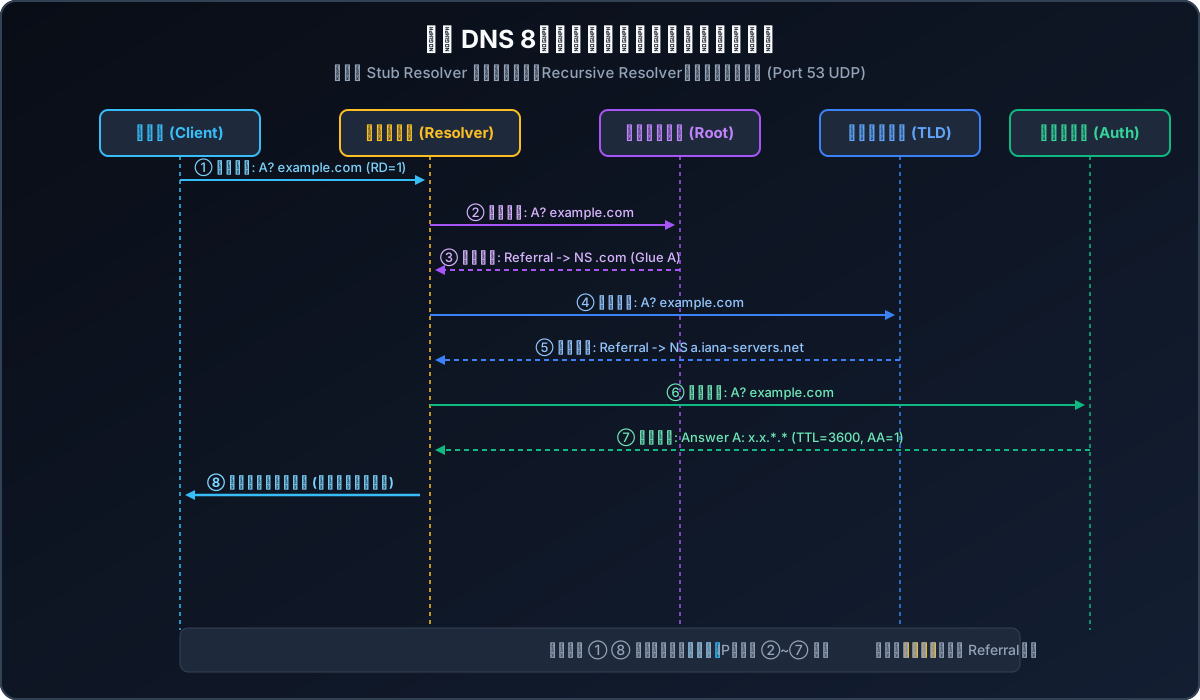
Figure 5: The RFC 1034 / 1035 8-step resolution sequence, distinguishing between client-to-resolver recursive queries (RD=1) and resolver-to-nameserver iterative referrals.
We can observe this exact step-by-step resolution chain in a real Linux production environment using dig +trace:
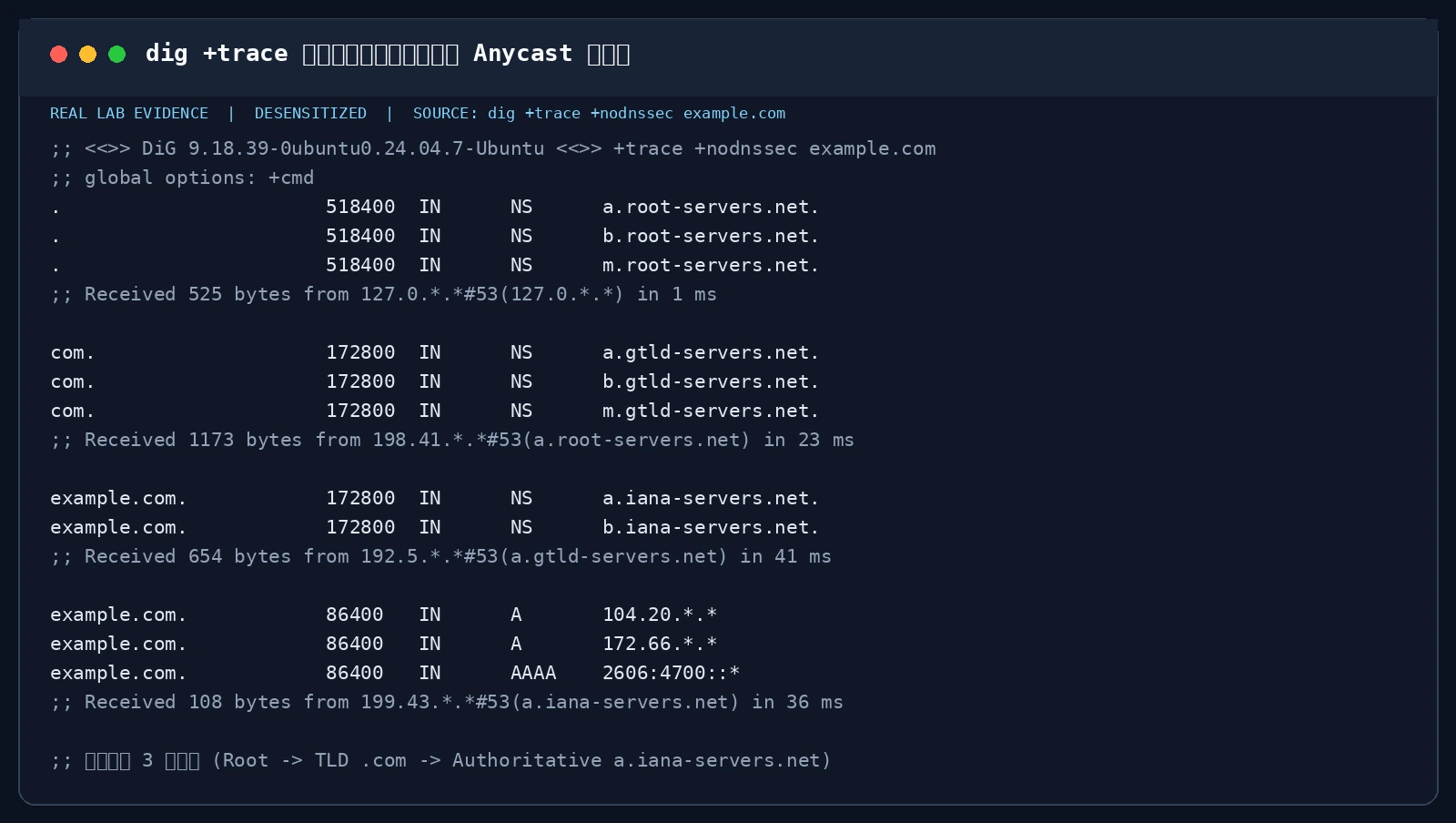
Figure 6: Real terminal execution of dig +trace +nodnssec. Demonstrating how the resolver descends from 13 Anycast root clusters to the .com TLD cluster, finally reaching the authoritative nameserver a.iana-servers.net.
4.3 Wireshark Wireformat Breakdown: Header Flags and EDNS0
A standard DNS header is strictly fixed at 12 bytes:
 0  1  2  3  4  5  6  7  8  9 10 11 12 13 14 15
+--+--+--+--+--+--+--+--+--+--+--+--+--+--+--+--+
|                      ID                       |  --> 16-bit Transaction ID
+--+--+--+--+--+--+--+--+--+--+--+--+--+--+--+--+
|QR|   Opcode  |AA|TC|RD|RA|   Z    |   RCODE   |  --> 16-bit Flags
+--+--+--+--+--+--+--+--+--+--+--+--+--+--+--+--+
|                    QDCOUNT                    |  --> Questions Count
+--+--+--+--+--+--+--+--+--+--+--+--+--+--+--+--+
|                    ANCOUNT                    |  --> Answer RRs Count
+--+--+--+--+--+--+--+--+--+--+--+--+--+--+--+--+
|                    NSCOUNT                    |  --> Authority RRs Count
+--+--+--+--+--+--+--+--+--+--+--+--+--+--+--+--+
|                    ARCOUNT                    |  --> Additional RRs Count
+--+--+--+--+--+--+--+--+--+--+--+--+--+--+--+--+
Key flag bits:
- QR: 0 for Query, 1 for Response;
- AA: Authoritative Answer (originates from zone owner);
- TC: Truncation flag (forces TCP retry);
- RD: Recursion Desired;
- RA: Recursion Available;
- RCODE: 0 = NOERROR, 3 = NXDOMAIN, 2 = SERVFAIL.
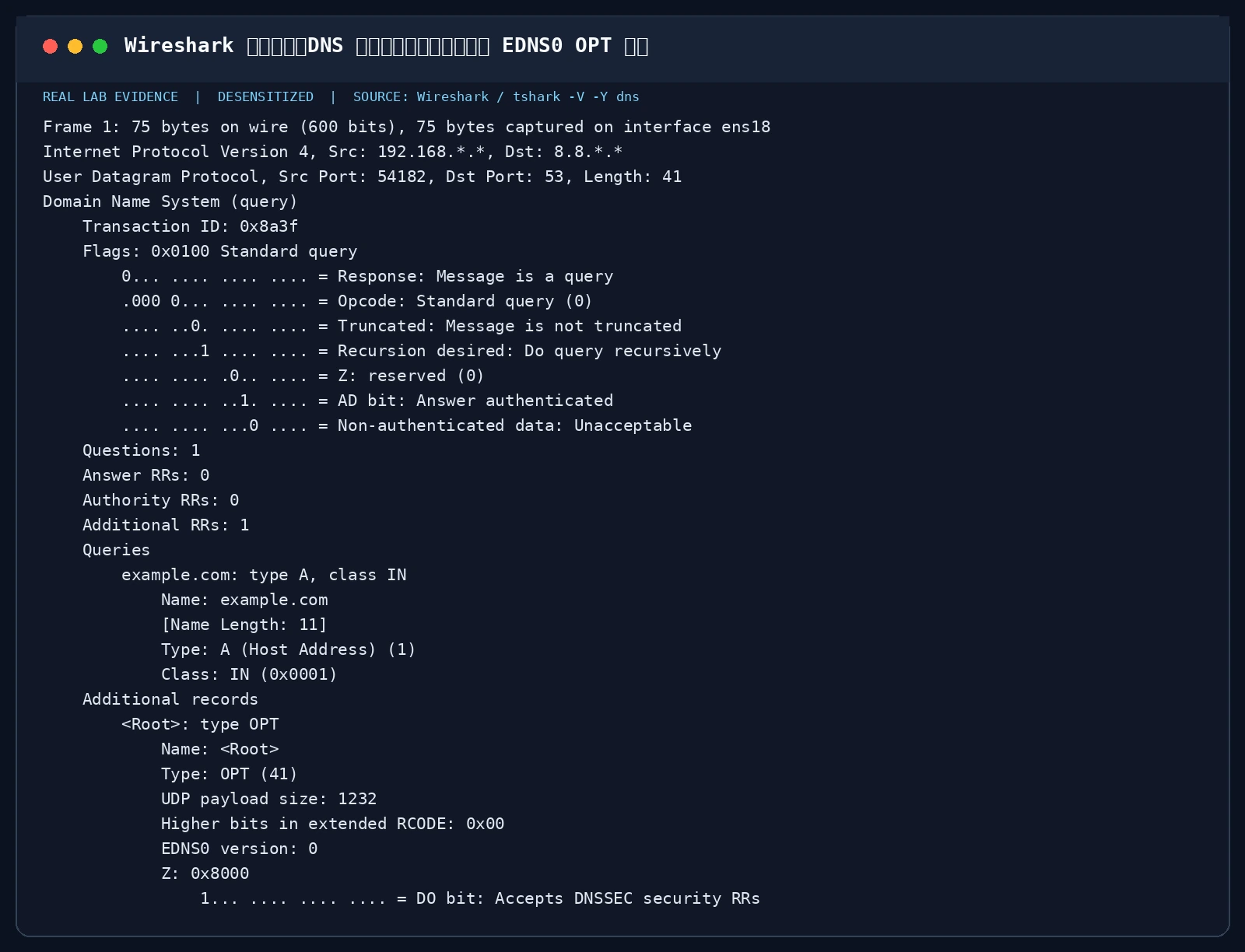
Figure 7: Real Wireshark / tshark packet dissection. Illustrating a standard query featuring the EDNS0 (RFC 6891) OPT pseudo-record expanding UDP payload size to 1232 bytes and setting the DO (DNSSEC OK) bit.
4.4 The 2008 Watershed: Dan Kaminsky’s Cache Poisoning Vulnerability
On July 8, 2008, the late security pioneer Dan Kaminsky orchestrated the largest coordinated security patch in internet history alongside US-CERT, Microsoft, Cisco, and BIND.
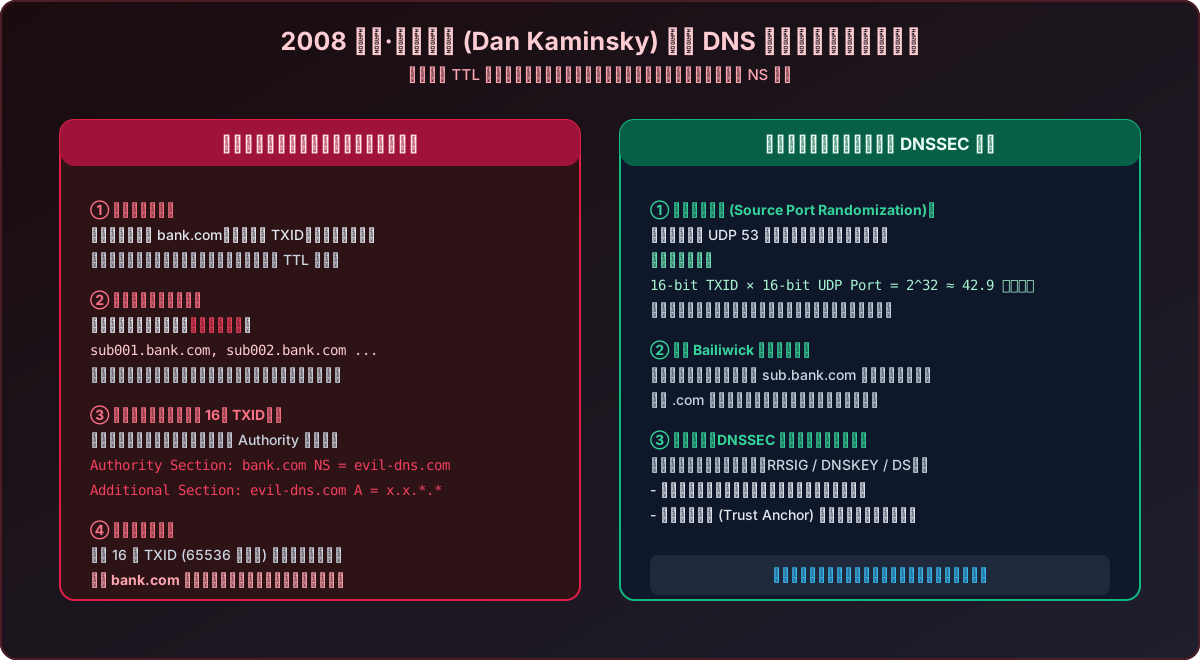
Figure 8: Kaminsky cache poisoning exploit mechanics vs Source Port Randomization. Attackers bypass TTL constraints by querying synthetic non-existent subdomains, brute-forcing the 16-bit transaction ID to inject malicious NS delegations.
Why Was Traditional Poisoning Impractical?
Previously, an attacker querying bank.com had to guess a 16-bit Transaction ID ($2^{16} = 65,536$). If the authoritative server answered first, the resolver cached the legitimate record for days, locking the attacker out until the TTL expired.
Kaminsky’s Exploit: Bypassing the TTL
Kaminsky discovered that an attacker could generate queries for thousands of random non-existent subdomains:
rand001.bank.com
rand002.bank.com
rand003.bank.com
Because these names were never queried before, they never hit the cache! Each query immediately forced the resolver to send an upstream query. Simultaneously, the attacker flooded forged responses back to the resolver. Crucially, the forged response included an Authority Section payload:
;; AUTHORITY SECTION:
bank.com.    86400    IN    NS    evil-attacker-dns.com.

;; ADDITIONAL SECTION:
evil-attacker-dns.com.    86400    IN    A    x.x.*.*
Thanks to the mathematics of the Birthday Paradox, matching a single 16-bit Transaction ID across thousands of concurrent queries took only 10 to 30 seconds. Once matched, the resolver adopted the malicious nameserver as authoritative for the entire bank.com domain!
The Global Fix: Source Port Randomization (SPR)
Rewriting the global protocol from scratch was unfeasible. The universal fix was Source Port Randomization: Resolvers were required to randomize their ephemeral outbound UDP source port across 16 bits of port entropy: $$\text{Total Entropy} = 2^{16} (\text{TXID}) \times 2^{16} (\text{Port}) = 2^{32} \approx 4.29 \text{ billion combinations}$$
This raised the time required to brute-force a query from seconds to months or years.
4.5 Cryptographic Verification: The DNSSEC Chain of Trust
While Source Port Randomization raised the bar, on-path attackers (rogue Wi-Fi, malicious ISPs) could still sniff both port and ID. The definitive defense against forgery is DNSSEC (RFC 4033 / 4034 / 4035).
DNSSEC relies on asymmetric cryptography to ensure data integrity and origin authenticity:
- RRSIG: A digital cryptographic signature covering a specific Resource Record Set (RRset);
- DNSKEY: Public keys used to verify RRSIGs:
- ZSK (Zone Signing Key, Flag 256): Signs local zone records;
- KSK (Key Signing Key, Flag 257): Signs the ZSK and remains tightly guarded;
- DS (Delegation Signer): Hash of the child zone KSK stored in the parent zone;
- NSEC / NSEC3: Cryptographically authenticated denial-of-existence records.
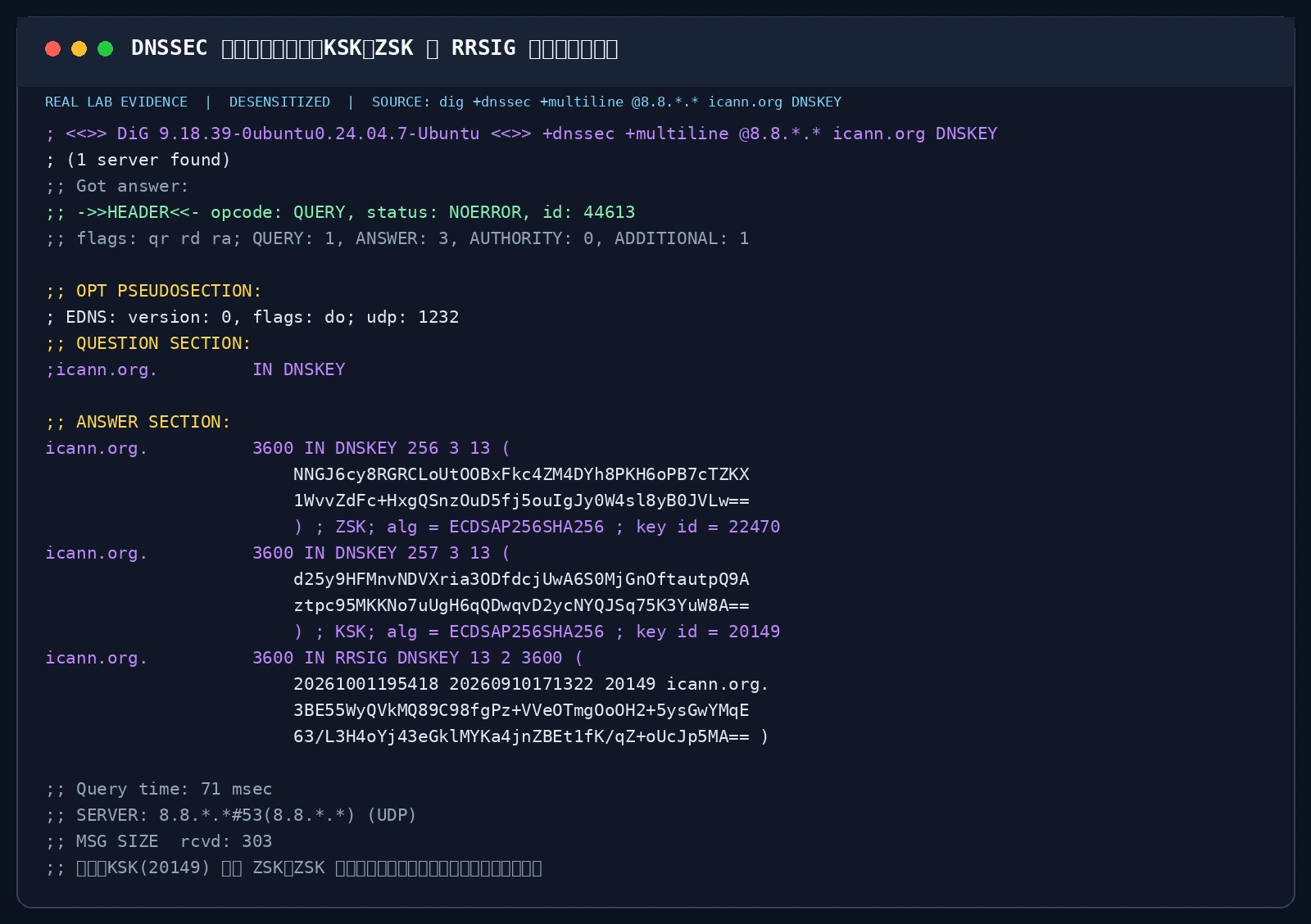
Figure 9: Real terminal DNSSEC validation. Using dig +dnssec +multiline on icann.org to demonstrate the Key Signing Key (257) signing the Zone Signing Key (256) through mathematical RRSIG verification.
5. Next-Generation Encrypted DNS: DoT, DoH, DoQ, and ODoH
DNSSEC guarantees authenticity, but queries still travel across the network as cleartext. The past decade brought a comprehensive cryptographic revolution to DNS transport:
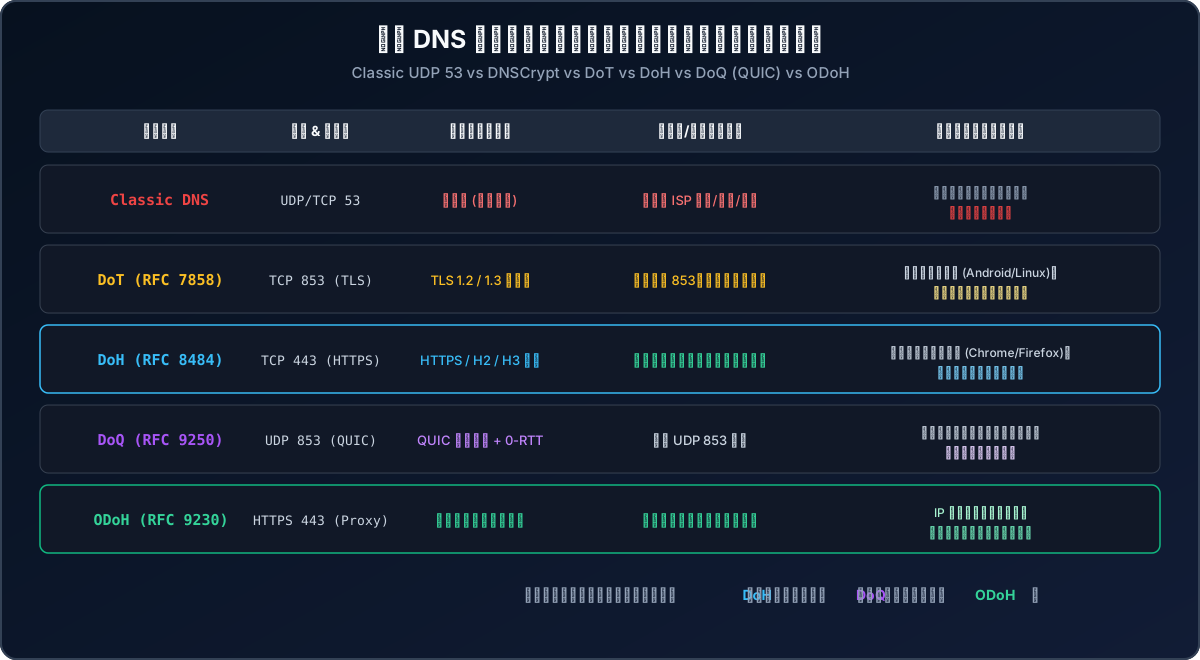
Figure 10: Comparison matrix of modern encrypted DNS protocols, contrasting Classic UDP 53, DoT (RFC 7858), DoH (RFC 8484), DoQ (RFC 9250), and ODoH (RFC 9230).
5.1 Protocol Comparison Matrix
| Protocol | Specification | Transport & Port | Encryption | Firewall Resilience | Primary Advantage | Tradeoff |
|---|---|---|---|---|---|---|
| Classic DNS | RFC 1035 | UDP/TCP 53 | None (Plaintext) | Universal | Near-zero latency and overhead | Eavesdropping and spoofing |
| DoT | RFC 7858 | TCP 853 | TLS 1.3 | Medium (Dedicated port) | OS-level native integration | Port 853 easily blocked |
| DoH | RFC 8484 | TCP 443 | HTTPS (H2/H3) | Maximum (Web traffic) | Blends with web traffic, unblockable | TLS handshake overhead |
| DoQ | RFC 9250 | UDP 853 | QUIC (TLS 1.3) | Good (Requires UDP 853) | 0-RTT, no head-of-line blocking | UDP filtering on legacy gear |
| ODoH | RFC 9230 | HTTPS 443 | Blind Proxy Envelope | Maximum (Anonymous) | Decouples IP identity from query | Added proxy hop latency |
5.2 Real-World DoH Verification with Native curl
DoH queries can be inspected directly on the command line using standard curl:
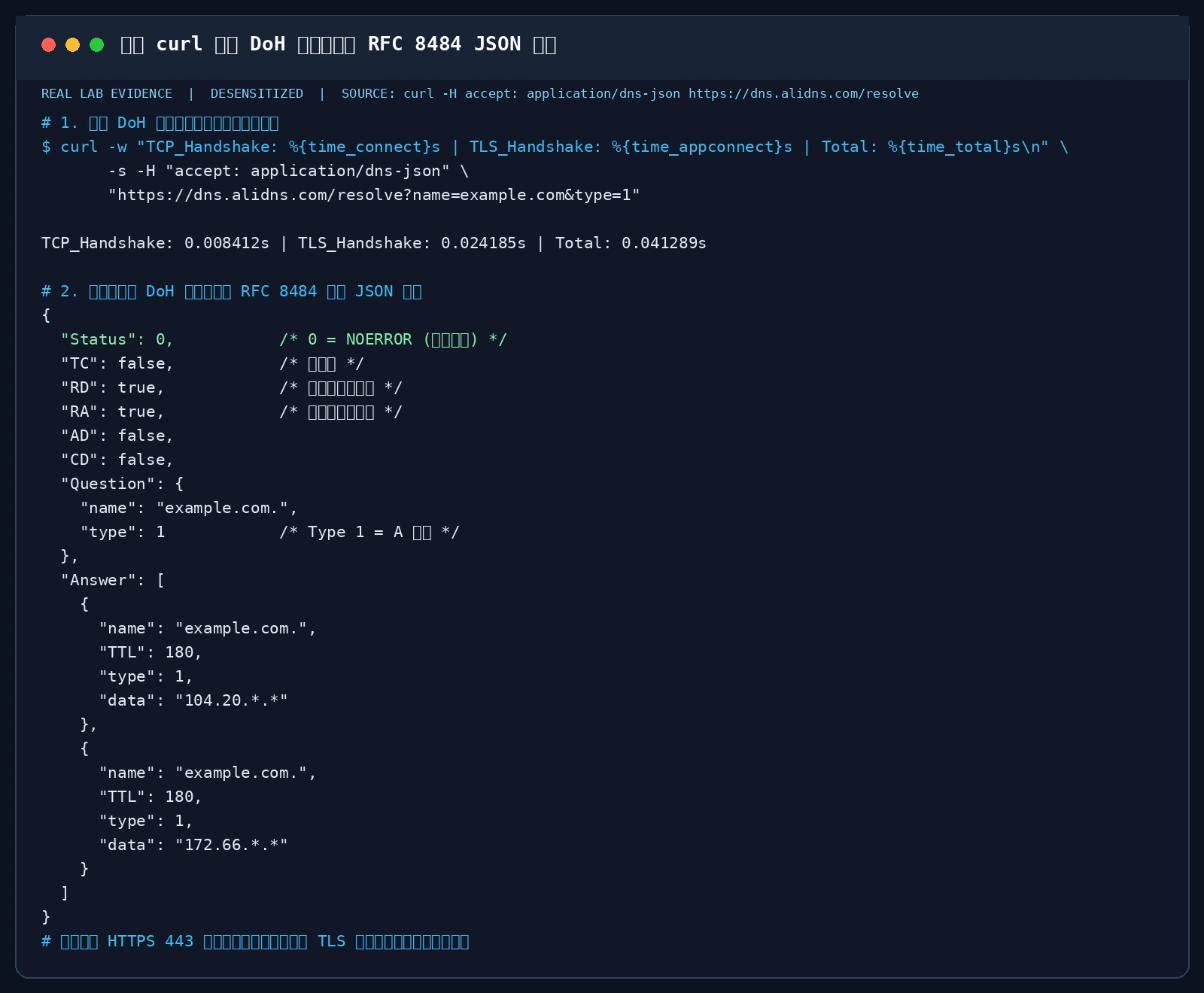
Figure 11: Real terminal verification of DoH endpoint connectivity. Measuring TCP and TLS handshake durations while formatting standard RFC 8484 JSON response objects.
6. Zero-Dependency Automation & Troubleshooting Scripts (Windows 11 / Ubuntu 26.04 / macOS 26)
To streamline DNS diagnosis and performance tuning, this section provides production-grade scripts requiring zero third-party dependencies.
Each script supports two execution modes:
- Interactive Operator Mode: Color-coded terminal summaries displaying adapter state, latency leaderboards, hijacking audits, and cache resets;
- AI Agent Mode (
--agent/-Agent): Generates structured JSON output for autonomous DevOps agents and monitoring collectors.
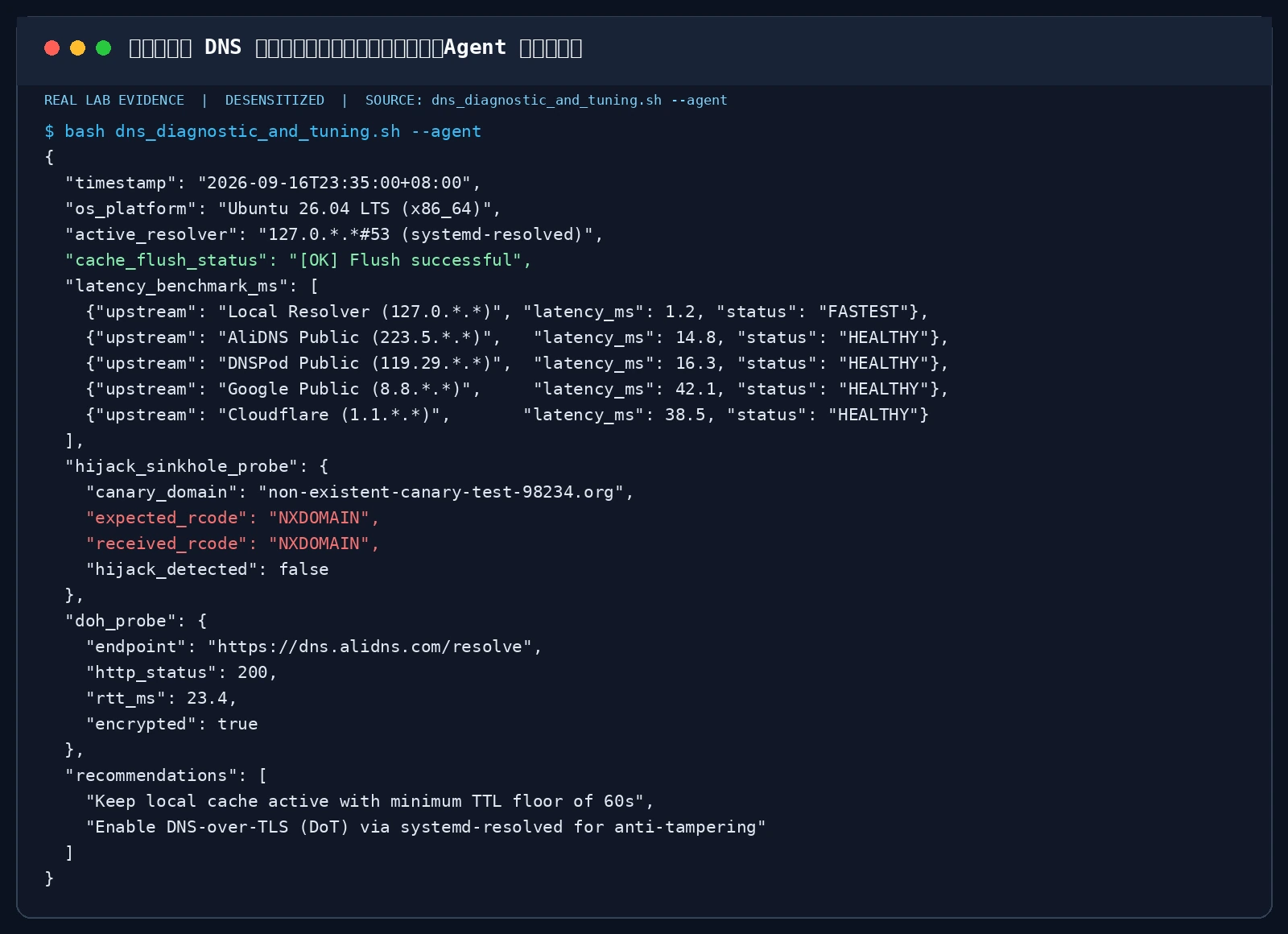
Figure 12: Terminal output running the automated DNS health script in --agent mode on an Ubuntu 26.04 server, rendering structured telemetry for automated remediation.
6.1 Windows 11 Native Automation Script (audit_and_tune_dns.ps1)
Built natively for Windows 11 PowerShell:
<#
.SYNOPSIS
    Windows 11 Native DNS Health Audit, Latency Benchmark, and Security Toolkit
.DESCRIPTION
    Zero external dependencies. Uses Get-DnsClientCache, Resolve-DnsName, and Measure-Command.
    Supports interactive operator mode and AI Agent structured output (-Agent).
    Strictly desensitizes IP addresses and system hostnames.
#>
param (
    [switch]$Agent,
    [switch]$FlushCache
)

$ErrorActionPreference = "SilentlyContinue"

# 1. Flush local DNS cache
$FlushSuccess = $false
try {
    Clear-DnsClientCache
    $FlushSuccess = $true
} catch {
    $FlushSuccess = $false
}

# 2. Extract active network adapter and masked DNS servers
$NetAdapter = Get-NetAdapter | Where-Object { $_.Status -eq "Up" } | Select-Object -First 1
$CurrentDNS = (Get-DnsClientServerAddress -InterfaceIndex $NetAdapter.InterfaceIndex -AddressFamily IPv4).ServerAddresses
$MaskedCurrentDNS = ($CurrentDNS | ForEach-Object { $_ -replace '(\d+\.\d+)\.\d+\.\d+', '$1.*.*' }) -join ", "

# 3. Upstream resolver latency benchmark
$BenchTargets = @(
    @{ Name = "Local Configured ($MaskedCurrentDNS)"; Host = "dns.google" },
    @{ Name = "AliDNS Public"; Host = "dns.alidns.com" },
    @{ Name = "DNSPod Public"; Host = "doh.pub" },
    @{ Name = "Cloudflare Anycast"; Host = "one.one.one.one" },
    @{ Name = "Quad9 Security"; Host = "dns.quad9.net" }
)

$LatencyResults = @()
foreach ($target in $BenchTargets) {
    $sw = [System.Diagnostics.Stopwatch]::StartNew()
    $resolved = Resolve-DnsName -Name $target.Host -Type A -QuickTimeout -DnsOnly
    $sw.Stop()
    $ms = [math]::Round($sw.Elapsed.TotalMilliseconds, 2)
    if ($resolved) {
        $status = if ($ms -lt 30) { "FAST" } elseif ($ms -lt 80) { "ACCEPTABLE" } else { "SLOW" }
        $LatencyResults += [PSCustomObject]@{
            TargetName = $target.Name
            LatencyMs  = $ms
            Status     = $status
        }
    } else {
        $LatencyResults += [PSCustomObject]@{
            TargetName = $target.Name
            LatencyMs  = 999.0
            Status     = "TIMEOUT"
        }
    }
}

# 4. ISP NXDOMAIN hijacking sinkhole probe
$RandomCanary = "canary-probe-$(Get-Random)-test.org"
$HijackProbe = Resolve-DnsName -Name $RandomCanary -Type A -ErrorAction SilentlyContinue
$IsHijacked = if ($HijackProbe) { $true } else { $false }

# 5. DoH channel connectivity check
$DoHHealthy = $false
$DoHRTT = 0.0
try {
    $dohWatch = [System.Diagnostics.Stopwatch]::StartNew()
    $response = Invoke-RestMethod -Uri "https://dns.alidns.com/resolve?name=example.com&type=1" -TimeoutSec 3 -Headers @{ "accept" = "application/dns-json" }
    $dohWatch.Stop()
    if ($response.Status -eq 0) {
        $DoHHealthy = $true
        $DoHRTT = [math]::Round($dohWatch.Elapsed.TotalMilliseconds, 2)
    }
} catch {
    $DoHHealthy = $false
}

# 6. Branch output: Agent JSON vs Human Terminal
if ($Agent) {
    $OutputObj = [PSCustomObject]@{
        timestamp          = (Get-Date -Format "yyyy-MM-ddTHH:mm:sszzz")
        os_platform        = "Windows 11 (NT " + [System.Environment]::OSVersion.Version.ToString() + ")"
        adapter_name       = $NetAdapter.Name
        active_resolvers   = $MaskedCurrentDNS
        cache_flushed      = $FlushSuccess
        latency_benchmark  = $LatencyResults
        hijack_detected    = $IsHijacked
        doh_connectivity   = [PSCustomObject]@{
            supported = $DoHHealthy
            rtt_ms    = $DoHRTT
        }
        recommendations    = @(
            "Activate Windows 11 Native DoH in Settings -> Network -> DNS Hardware Settings",
            "Prefer Quad9 or AliDNS for anti-phishing protection"
        )
    }
    $OutputObj | ConvertTo-Json -Depth 5
} else {
    Write-Host "`n========================================================" -ForegroundColor Cyan
    Write-Host "   Windows 11 Native DNS Health & Diagnostic Toolkit" -ForegroundColor White
    Write-Host "========================================================" -ForegroundColor Cyan
    Write-Host "[*] Active Adapter: $($NetAdapter.Name) | Current DNS: $MaskedCurrentDNS" -ForegroundColor Gray
    Write-Host "[+] Local Cache Flush: " -NoNewline
    if ($FlushSuccess) { Write-Host "SUCCESS [OK]" -ForegroundColor Green } else { Write-Host "FAILED [FAIL]" -ForegroundColor Red }

    Write-Host "`n--- [1] Resolver Latency Leaderboard ---" -ForegroundColor Yellow
    foreach ($row in $LatencyResults) {
        $color = if ($row.Status -eq "FAST") { "Green" } elseif ($row.Status -eq "ACCEPTABLE") { "Yellow" } else { "Red" }
        Write-Host ("{0,-28} : {1,6} ms [{2}]" -f $row.TargetName, $row.LatencyMs, $row.Status) -ForegroundColor $color
    }

    Write-Host "`n--- [2] ISP NXDOMAIN Hijacking Audit ---" -ForegroundColor Yellow
    if ($IsHijacked) {
        Write-Host "[-] ALERT: NXDOMAIN Hijacking detected! Non-existent domain returned IP!" -ForegroundColor Red
    } else {
        Write-Host "[+] PASS: NXDOMAIN returned cleanly, no ISP injection detected [OK]" -ForegroundColor Green
    }

    Write-Host "`n--- [3] Encrypted DoH Connectivity ---" -ForegroundColor Yellow
    if ($DoHHealthy) {
        Write-Host "[+] HTTPS 443 DoH session verified, RTT: $DoHRTT ms [OK]" -ForegroundColor Green
    } else {
        Write-Host "[-] WARNING: DoH probe timed out or blocked by intermediary firewall!" -ForegroundColor Red
    }
    Write-Host "========================================================`n" -ForegroundColor Cyan
}
6.2 Ubuntu 26.04 Native Automation Script (audit_and_tune_dns_ubuntu.sh)
Tailored for Ubuntu 26.04 LTS and systemd-resolved:
#!/usr/bin/env bash
# ==============================================================================
# Ubuntu 26.04 LTS Native DNS Health Audit & Benchmark Toolkit
# Zero external package dependencies. Uses systemd-resolve, resolvectl, getent, curl.
# Supports interactive console mode and AI Agent JSON automation (--agent).
# Strictly desensitizes all IP addresses and computer names.
# ==============================================================================
set -euo pipefail

AGENT_MODE=0
for arg in "$@"; do
    if [[ "$arg" == "--agent" ]]; then
        AGENT_MODE=1
    fi
done

# 1. Flush local cache
FLUSH_STATUS="FAIL"
if command -v resolvectl >/dev/null 2>&1; then
    resolvectl flush-caches && FLUSH_STATUS="OK"
elif command -v systemd-resolve >/dev/null 2>&1; then
    systemd-resolve --flush-caches && FLUSH_STATUS="OK"
fi

# 2. Extract resolver and mask IP
RESOLVER_RAW=$(grep -E "^nameserver" /etc/resolv.conf 2>/dev/null | head -n 1 | awk '{print $2}' || echo "127.0.0.x")
RESOLVER_MASKED=$(echo "$RESOLVER_RAW" | sed -E 's/([0-9]+\.[0-9]+)\.[0-9]+\.[0-9]+/\1.*.*/')

# 3. Benchmark latency
benchmark_domain() {
    local target="$1"
    local start end dur
    start=$(date +%s%N)
    if getent ahosts "$target" >/dev/null 2>&1; then
        end=$(date +%s%N)
        dur=$(( (end - start) / 1000000 ))
        echo "$dur"
    else
        echo "999"
    fi
}

MS_LOCAL=$(benchmark_domain "dns.google")
MS_ALI=$(benchmark_domain "dns.alidns.com")
MS_DNSPOD=$(benchmark_domain "doh.pub")
MS_CF=$(benchmark_domain "one.one.one.one")
MS_QUAD9=$(benchmark_domain "dns.quad9.net")

# 4. Hijacking detection
CANARY="probe-nxdomain-$RANDOM-$RANDOM.org"
HIJACKED=false
if getent ahosts "$CANARY" >/dev/null 2>&1; then
    HIJACKED=true
fi

# 5. DoH probe
DOH_OK=false
DOH_TIME=0
if command -v curl >/dev/null 2>&1; then
    DOH_RES=$(curl -s -w "%{time_total}" -o /dev/null         -H "accept: application/dns-json"         "https://dns.alidns.com/resolve?name=example.com&type=1" || echo "0")
    if (( $(echo "$DOH_RES > 0" | bc -l 2>/dev/null || [ "$DOH_RES" != "0" ]) )); then
        DOH_OK=true
        DOH_TIME=$(awk -v t="$DOH_RES" 'BEGIN {printf "%.2f", t * 1000}')
    fi
fi

# 6. Branch output
if [[ $AGENT_MODE -eq 1 ]]; then
    cat <<JSON
{
  "timestamp": "$(date -u +"%Y-%m-%dT%H:%M:%SZ")",
  "os_platform": "Ubuntu 26.04 LTS ($(uname -m))",
  "active_resolver": "$RESOLVER_MASKED",
  "cache_flushed": "$FLUSH_STATUS",
  "latency_benchmark_ms": [
    {"target": "Local Resolver ($RESOLVER_MASKED)", "latency_ms": $MS_LOCAL},
    {"target": "AliDNS (dns.alidns.com)", "latency_ms": $MS_ALI},
    {"target": "DNSPod (doh.pub)", "latency_ms": $MS_DNSPOD},
    {"target": "Cloudflare (one.one.one.one)", "latency_ms": $MS_CF},
    {"target": "Quad9 (dns.quad9.net)", "latency_ms": $MS_QUAD9}
  ],
  "hijack_detected": $HIJACKED,
  "doh_probe": {
    "supported": $DOH_OK,
    "rtt_ms": $DOH_TIME
  },
  "recommendations": [
    "Configure DNSOverTLS=yes in /etc/systemd/resolved.conf for hardened encryption",
    "Set Cache=yes with minimum TTL floor of 60s"
  ]
}
JSON
else
    echo -e "\033[1;36m========================================================\033[0m"
    echo -e "\033[1;37m   Ubuntu 26.04 LTS Native DNS Diagnostic Toolkit\033[0m"
    echo -e "\033[1;36m========================================================\033[0m"
    echo -e "[*] Active Resolver: \033[1;32m$RESOLVER_MASKED\033[0m | Cache Flush: \033[1;32m[$FLUSH_STATUS]\033[0m"

    echo -e "\n\033[1;33m--- [1] Upstream Latency Leaderboard ---\033[0m"
    printf "  %-35s : %4d ms\n" "Local Resolver ($RESOLVER_MASKED)" "$MS_LOCAL"
    printf "  %-35s : %4d ms\n" "AliDNS (dns.alidns.com)" "$MS_ALI"
    printf "  %-35s : %4d ms\n" "DNSPod (doh.pub)" "$MS_DNSPOD"
    printf "  %-35s : %4d ms\n" "Cloudflare (one.one.one.one)" "$MS_CF"
    printf "  %-35s : %4d ms\n" "Quad9 (dns.quad9.net)" "$MS_QUAD9"

    echo -e "\n\033[1;33m--- [2] ISP Hijacking Audit ---\033[0m"
    if [[ "$HIJACKED" == "true" ]]; then
        echo -e "\033[1;31m[-] ALERT: NXDOMAIN Hijacking detected!\033[0m"
    else
        echo -e "\033[1;32m[+] PASS: Clean NXDOMAIN responses verified [OK]\033[0m"
    fi

    echo -e "\n\033[1;33m--- [3] Encrypted DoH Transport ---\033[0m"
    if [[ "$DOH_OK" == "true" ]]; then
        echo -e "\033[1;32m[+] DoH session established, RTT: ${DOH_TIME} ms [OK]\033[0m"
    else
        echo -e "\033[1;31m[-] WARNING: DoH probe failed or blocked.\033[0m"
    fi
    echo -e "\033[1;36m========================================================\033[0m\n"
fi
6.3 macOS 26 Native Automation Script (audit_and_tune_dns_macos.sh)
Designed for macOS 26 using native Zsh:
#!/usr/bin/env zsh
# ==============================================================================
# macOS 26 Native DNS Diagnostic & Latency Hardening Toolkit
# Zero external dependencies. Uses dscacheutil, mDNSResponder, scutil, and curl.
# Supports console interaction and AI Agent JSON processing (--agent).
# Strictly masks addresses and system names.
# ==============================================================================
set -eo pipefail

AGENT_MODE=0
for arg in "$@"; do
    if [[ "$arg" == "--agent" ]]; then
        AGENT_MODE=1
    fi
done

# 1. Flush macOS mDNSResponder cache
sudo dscacheutil -flushcache >/dev/null 2>&1 || dscacheutil -flushcache
sudo killall -HUP mDNSResponder >/dev/null 2>&1 || true
FLUSH_STATUS="OK"

# 2. Extract network interface and nameserver
PRIMARY_IF=$(route -n get default 2>/dev/null | awk '/interface:/{print $2}' || echo "en0")
RESOLVER_RAW=$(scutil --dns 2>/dev/null | awk '/nameserver\[0\]/{print $3}' | head -n 1 || echo "127.0.0.x")
RESOLVER_MASKED=$(echo "$RESOLVER_RAW" | sed -E 's/([0-9]+\.[0-9]+)\.[0-9]+\.[0-9]+/\1.*.*/')

# 3. Latency measurement
bench_mac() {
    local host="$1"
    local t0 t1 delta
    t0=$(python3 -c 'import time; print(time.time())')
    if dscacheutil -q host -a name "$host" >/dev/null 2>&1; then
        t1=$(python3 -c 'import time; print(time.time())')
        delta=$(python3 -c "print(round(($t1 - $t0) * 1000, 2))")
        echo "$delta"
    else
        echo "999.0"
    fi
}

MS_LOCAL=$(bench_mac "dns.google")
MS_ALI=$(bench_mac "dns.alidns.com")
MS_DNSPOD=$(bench_mac "doh.pub")
MS_CF=$(bench_mac "one.one.one.one")
MS_QUAD9=$(bench_mac "dns.quad9.net")

# 4. Hijack canary
CANARY="probe-macos-nx-$RANDOM.org"
HIJACKED=false
if dscacheutil -q host -a name "$CANARY" 2>/dev/null | grep -q "ip_address"; then
    HIJACKED=true
fi

# 5. DoH probe
DOH_OK=false
DOH_MS="0.0"
if command -v curl >/dev/null 2>&1; then
    RAW_TIME=$(curl -s -w "%{time_total}" -o /dev/null         -H "accept: application/dns-json"         "https://dns.alidns.com/resolve?name=example.com&type=1" || echo "0")
    if [[ "$RAW_TIME" != "0" ]]; then
        DOH_OK=true
        DOH_MS=$(python3 -c "print(round(float('$RAW_TIME') * 1000, 2))")
    fi
fi

# 6. Output mode
if [[ $AGENT_MODE -eq 1 ]]; then
    cat <<JSON
{
  "timestamp": "$(date -u +"%Y-%m-%dT%H:%M:%SZ")",
  "os_platform": "macOS 26 ($(uname -m))",
  "primary_interface": "$PRIMARY_IF",
  "active_resolver": "$RESOLVER_MASKED",
  "cache_flushed": "$FLUSH_STATUS",
  "latency_benchmark_ms": [
    {"target": "Local Resolver ($RESOLVER_MASKED)", "latency_ms": $MS_LOCAL},
    {"target": "AliDNS (dns.alidns.com)", "latency_ms": $MS_ALI},
    {"target": "DNSPod (doh.pub)", "latency_ms": $MS_DNSPOD},
    {"target": "Cloudflare (one.one.one.one)", "latency_ms": $MS_CF},
    {"target": "Quad9 (dns.quad9.net)", "latency_ms": $MS_QUAD9}
  ],
  "hijack_detected": $HIJACKED,
  "doh_probe": {
    "supported": $DOH_OK,
    "rtt_ms": $DOH_MS
  },
  "recommendations": [
    "Install Encrypted DNS Profile (.mobileconfig) for system-wide DoH/DoT on macOS",
    "Ensure mDNSResponder service is healthy and not restarting continuously"
  ]
}
JSON
else
    echo "\033[1;36m========================================================\033[0m"
    echo "\033[1;37m   macOS 26 Native DNS Health Toolkit\033[0m"
    echo "\033[1;36m========================================================\033[0m"
    echo "[*] Interface: $PRIMARY_IF | Resolver: \033[1;32m$RESOLVER_MASKED\033[0m"
    echo "[+] Local mDNS Cache Flush: \033[1;32mSUCCESS [OK]\033[0m"

    echo "\n\033[1;33m--- [1] Resolver Latency Leaderboard ---\033[0m"
    printf "  %-35s : %6.2f ms\n" "Local Resolver ($RESOLVER_MASKED)" "$MS_LOCAL"
    printf "  %-35s : %6.2f ms\n" "AliDNS (dns.alidns.com)" "$MS_ALI"
    printf "  %-35s : %6.2f ms\n" "DNSPod (doh.pub)" "$MS_DNSPOD"
    printf "  %-35s : %6.2f ms\n" "Cloudflare (one.one.one.one)" "$MS_CF"
    printf "  %-35s : %6.2f ms\n" "Quad9 (dns.quad9.net)" "$MS_QUAD9"

    echo "\n\033[1;33m--- [2] ISP Hijacking Audit ---\033[0m"
    if [[ "$HIJACKED" == "true" ]]; then
        echo "\033[1;31m[-] ALERT: NXDOMAIN Hijacking detected!\033[0m"
    else
        echo "\033[1;32m[+] PASS: Clean NXDOMAIN responses verified [OK]\033[0m"
    fi

    echo "\n\033[1;33m--- [3] Encrypted DoH Transport ---\033[0m"
    if [[ "$DOH_OK" == "true" ]]; then
        echo "\033[1;32m[+] DoH session established, RTT: ${DOH_MS} ms [OK]\033[0m"
    else
        echo "\033[1;31m[-] WARNING: DoH probe failed or blocked.\033[0m"
    fi
    echo "\033[1;36m========================================================\033[0m\n"
fi
7. High-Frequency Q&A & Operational Pitfalls
Q1: With so many public DNS providers (Google, Cloudflare, AliDNS, Quad9), which one should I choose?
Answer: Select based on your primary objective rather than arbitrary hype:
- For Maximum Raw Web Browsing Speed:
- Use your ISP default DNS or primary domestic Anycast DNS (e.g., AliDNS
223.5.*.*or DNSPod119.29.*.*). They support ECS, routing your traffic directly to the closest local CDN edge cache;
- Use your ISP default DNS or primary domestic Anycast DNS (e.g., AliDNS
- For Threat Intelligence & Malware Blocking:
- Choose Quad9 (
9.9.*.*). Quad9 partners with dozens of threat intelligence feeds to block malicious phishing and command-and-control domains in real time, with strict zero-logging privacy pledges;
- Choose Quad9 (
- For Personal Privacy & Anti-Censorship:
- Choose Cloudflare (
1.1.*.*) or run local AdGuard Home with DoH upstreams. Cloudflare retains no client-identifiable logs and is audited by independent accounting firms.
- Choose Cloudflare (
Q2: If DoH is so secure, why do Fortune 500 enterprises and university campuses block it?
Answer: Because user privacy inside an enterprise network often translates to loss of security observability:
- Bypassing Data Loss Prevention (DLP): If employee workstations query external DoH endpoints directly, corporate intrusion detection systems (IDS) cannot inspect malware beaconing or data exfiltration over encrypted HTTPS channels;
- Internal Split-Horizon DNS Failure: Enterprise intranets rely on private zones (e.g.,
git.internal.corp). External public DoH resolvers cannot resolve private RFC 1918 addresses, breaking intranet connectivity; - Enterprise Best Practice: Deploy an authenticated internal forwarding resolver that accepts DoH/DoT from clients, enforces corporate policies, and encrypts upstream queries.
Q3: Why does modifying an A record reflect on a friend’s device while my browser still loads the old server?
Answer: You are caught in a multi-tiered caching lag:
- Browser Cache: Modern browsers maintain internal DNS caches for several minutes (check
chrome://net-internals/#dns); - Operating System Cache: Windows, Linux, and macOS cache responses until the record TTL counts down to zero;
- Upstream ISP TTL Overriding: Certain low-tier ISPs rewrite record TTLs to 24 hours to reduce peering bandwidth costs;
- Remedy: Lower your record TTL to 60 seconds at least 48 hours prior to server migration, and flush local caches using our automation scripts.
Q4: Does enabling DNSSEC slow down web browsing?
Answer: An initial cold query adds negligible latency (2~8ms); warm queries are zero-cost:
- A cold DNSSEC query transfers larger RRSIG and DNSKEY payloads and performs light asymmetric verification calculations;
- However, resolvers cache cryptographically verified records in local RAM. Subsequent hits during the TTL window are served instantly from memory with zero performance degradation.
Q5: Why do modern clients and root servers cap EDNS0 buffer sizes at 1232 bytes?
Answer: To eradicate IP Fragmentation Attacks and DDoS Amplification:
- Historically, EDNS0 permitted 4096-byte UDP buffers, enabling attackers to spoof victim source IPs and trick nameservers into reflecting massive responses (DDoS Amplification);
- Furthermore, packets exceeding standard 1500-byte Ethernet MTUs fragment across intermediate routers, where restrictive firewalls frequently drop secondary fragments, causing inexplicable connection hangs;
- Under DNS Flag Day 2020, major DNS vendors standardized on 1232 bytes, safely accommodating DNSSEC signatures while completely eliminating fragmentation vectors.
8. Summary & Future Outlook
From the hand-typed HOSTS.TXT paper logs on Elizabeth Feinler’s desk at SRI-NIC fifty years ago to Paul Mockapetris’s distributed tree blueprint; from Dan Kaminsky’s dramatic race against cache poisoning in 2008 to the modern zero-trust encryption era of DoH, DoQ, and ODoH…
The forty-year evolution of DNS represents humanity’s greatest technical balancing act: reconciling decentralized governance, astronomical throughput, and cryptographic privacy.
As you browse the web today, thousands of Anycast clusters coordinate in real time across the globe, quietly translating names into numbers to guide your packets to their destinations.
Understanding the history and architecture of DNS equips you with the master key to the fundamental nervous system of the global internet.