How to Edit GRUB2 Boot Parameters During Linux Startup
To edit Grub2 during the boot process try the following:
To edit GRUB2 during boot, you can try the following steps
- Immediately after the BIOS splash screen during boot, press and hold the
SHIFTbutton. This will display yougrubcontaining a list of kernels and recovery options After the BIOS splash screen appears during the boot process, immediately press and hold theSHIFTkey. This will display thegrubcontaining a list of kernels and recovery options.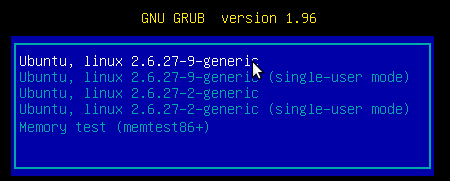
-
Press
eto edit the first kernel displayed Presseto edit the first kernel displayed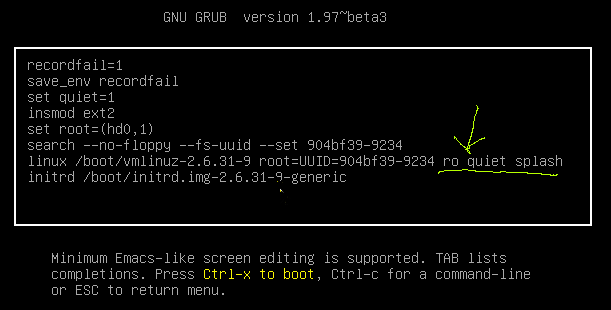
-
Find the line ending with
quiet splash. Add your boot option before these key words - i.e. so the line looks like […]nomodeset quiet splashFind the line ending withquiet splash. Add your boot option before these keywords - i.e. so the line looks like […]nomodeset quiet splash -
Press
CTRL+Xto boot PressCTRL+Xto boot
Reference Articles
https://askubuntu.com/questions/38780/how-do-i-set-nomodeset-after-ive-already-installed-ubuntu https://www.dell.com/support/kbdoc/zh-cn/000123893/%E6%89%8B%E5%8A%A8-nomodeset-%E5%86%85%E6%A0%B8%E5%BC%95%E5%AF%BC-%E8%A1%8C%E9%80%89%E9%A1%B9-%E7%94%A8%E4%BA%8E-linux-%E5%BC%95%E5%AF%BC