A 1024 Programmer's Day Gift! Kimi K3.1 Pro & Highspeed Unleashed: 3T MoE at a 35% Price Cut, and Why Moonshot Scrubbed 9.5% of Its Cyber Exploit Power
Today is October 24, 2026 — celebrated across the tech world as 1024 Programmer’s Day (since 2^10 = 1024, the fundamental binary building block of computing). Right before midnight on the eve of 1024 Programmer’s Day (October 23), Moonshot AI skipped the theatrics of a livestream countdown and dropped a massive holiday gift for developers worldwide: kimi-k3.1-pro, the first 3-trillion-parameter-class Mixture-of-Experts (MoE) flagship in the K3.1 series, alongside kimi-k3.1-pro-highspeed, an identical-intelligence turbo tier streaming tokens at 2 to 3 times the speed.
There is even a geeky binary Easter egg baked right into the spec sheet: Kimi K3.1 Pro’s context window is set to exactly 1,048,576 tokens — which is 1024 × 1024 (2^20)! Celebrating 1024 Programmer’s Day with a 1024 × 1024 context window model feels almost poetic.
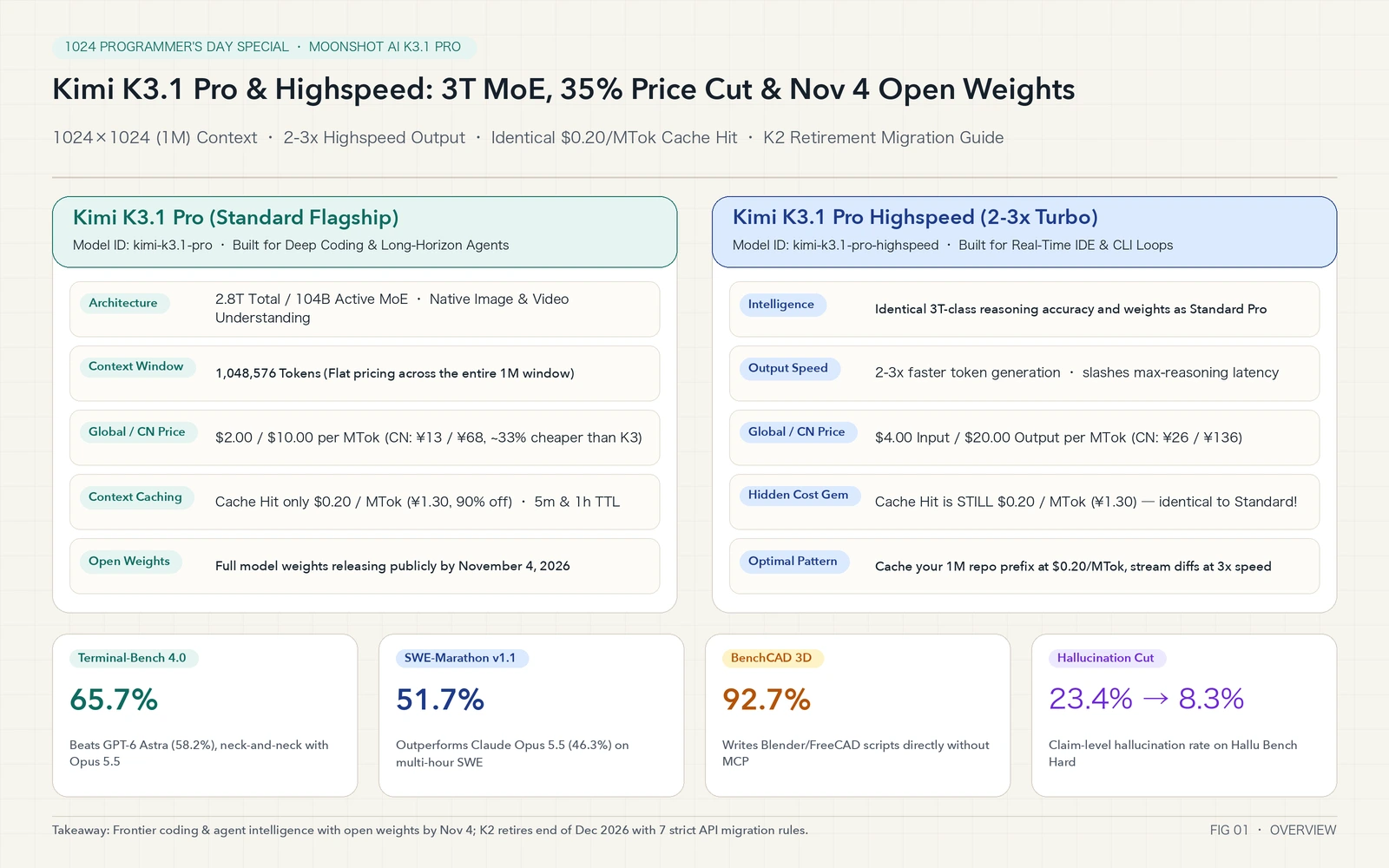
If you live inside terminal coding agents like Claude Code, OpenAI Codex CLI, or custom multi-step agent harnesses, four counter-intuitive facts from this 1024 Programmer’s Day release deserve your immediate attention:
- Despite scaling to 2.8 trillion total parameters (104 billion active parameters per token) with a flat
1024 × 1024(1,048,576) token context window, API pricing is roughly 33% to 35% cheaper than its predecessorkimi-k3($2.00/MTokinput and$10.00/MTokoutput globally;¥13/MTokinput and¥68/MTokoutput in China). - While
kimi-k3.1-pro-highspeedcharges 2x for uncached input and output ($4.00/MTokand$20.00/MTok), its Context Cache Hit rate is$0.20/MTok(¥1.30/MTok) — the exact same price as Standard Pro. With a properly pinned prefix cache, your 500K-token repository context costs the exact same pennies while your diffs stream back 3x faster. - Moonshot pledged to release the full open model weights by November 4, 2026. Even more remarkably, the technical report revealed that during reinforcement learning (RL) scaling, internal checkpoints hit an astonishing
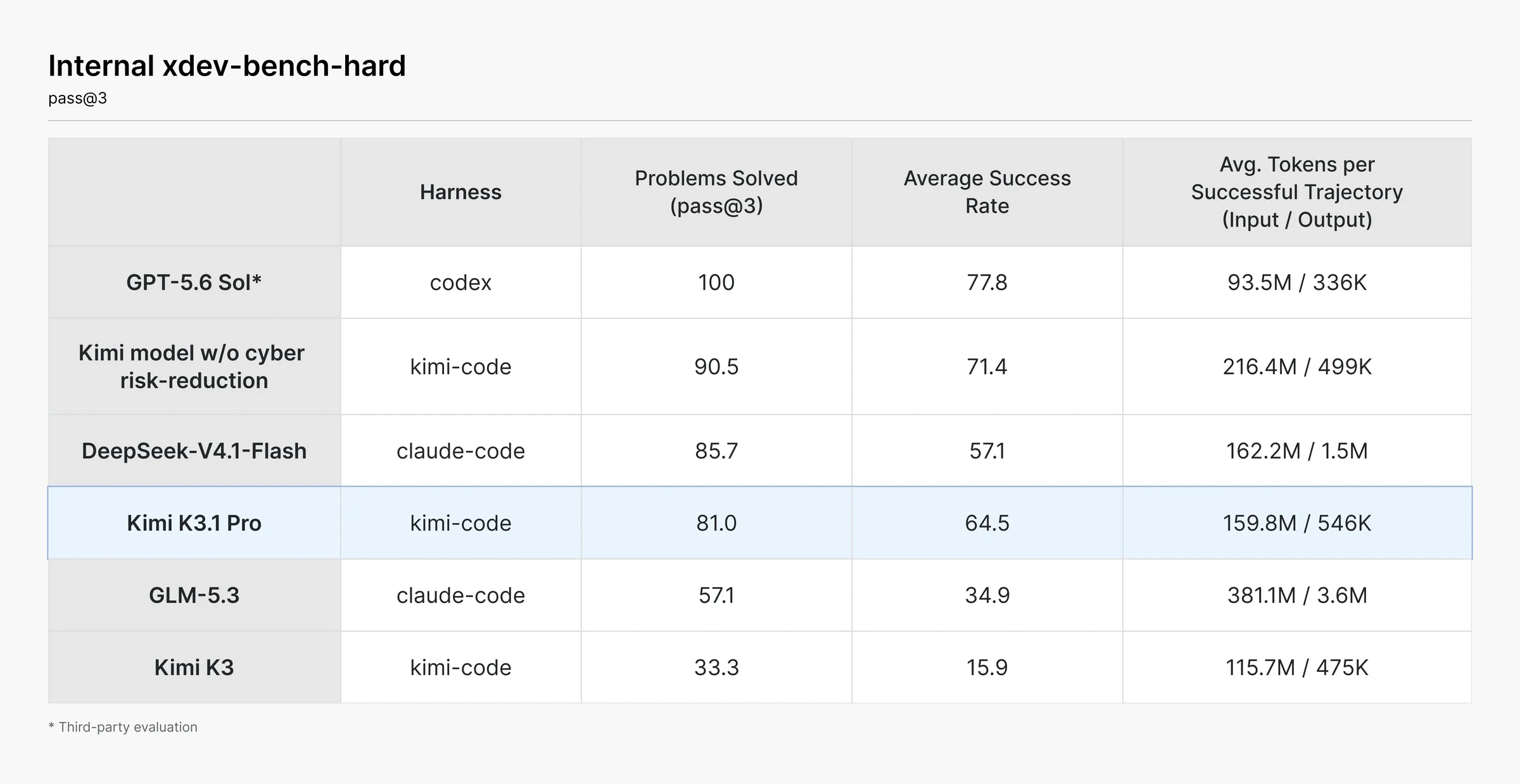
90.5%pass@3 rate onxdev-bench-hard(real-world vulnerabilities in the Linux kernel, Node.js, JavaScriptCore, Exim, and VirGL). To avoid handing automated zero-day exploit capabilities to anyone with a GPU cluster on November 4, Moonshot deliberately scrubbed cyber-offensive training data from mid-training and RL environments, bringing the final model to81.0%. - Alongside this 1024 gift comes an official sunset schedule for the legacy K2 family:
kimi-k2.6,kimi-k2.7-code, andkimi-k2-thinkingstop accepting new users on October 31, 2026 and retire completely at the end of December 2026. Yet developers who naively replaced"kimi-k2.6"with"kimi-k3.1-pro"in their codebases last night were greeted by a wall ofHTTP 400 Bad Requesterrors, 0% cache hit rates, and broken subagent loops — threatening to turn 1024 Programmer’s Day into an unplanned debugging night.
In this 1024 Programmer’s Day deep dive, we will unpack the engineering breakthroughs behind Kimi K3.1 Pro and Highspeed, explain the hardest concepts using plain-English everyday analogies, diagnose all seven root causes of K2-to-K3.1 migration failures, and hand you a zero-dependency one-click automation script for Windows 11, Ubuntu 26.04, and macOS 27 (supporting both manual execution and AI Agent auto-configuration).
1. Background: Why Kimi K3.1 Pro Is Far More Than a Minor Point Release
Over the past six months, software engineers have grown understandably skeptical of minor version bumps. Plenty of models climb multiple-choice leaderboards yet fall apart on step 40 of a real-world debugging loop — blindly guessing three-line patches when a test fails, hallucinating financial numbers, or forgetting constraints buried 200K tokens earlier.
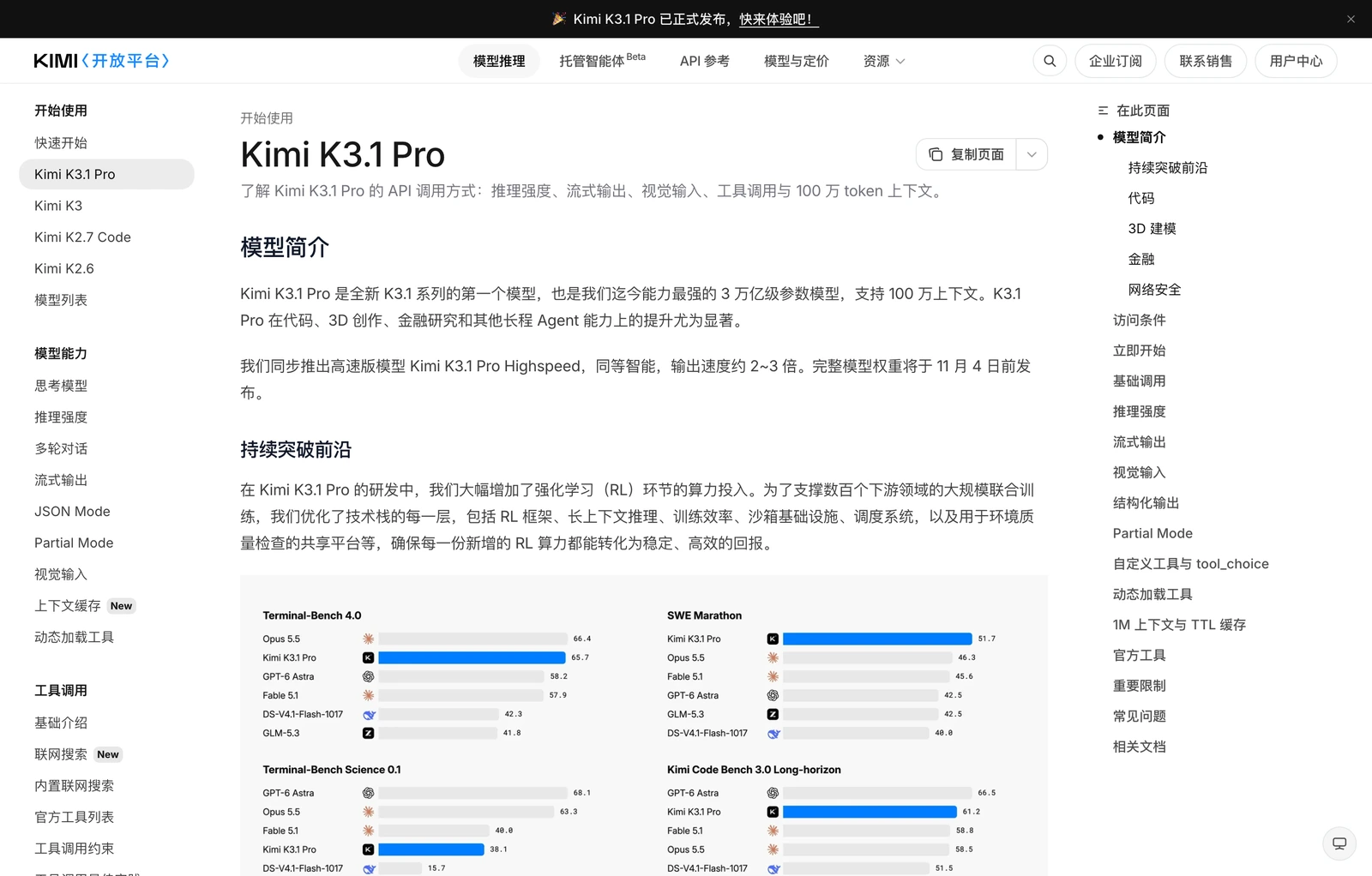
According to Moonshot AI’s engineering disclosure, K3.1 Pro did not merely add pre-training tokens. Instead, Moonshot substantially scaled post-training reinforcement learning compute and re-engineered every layer of its RL stack — from long-context reasoning and sandboxed execution schedulers to a shared environment quality-assurance platform spanning hundreds of downstream domains.
Let us inspect the comprehensive benchmark scorecard verified at the default reasoning_effort = "max" setting alongside independent Artificial Analysis evaluations:
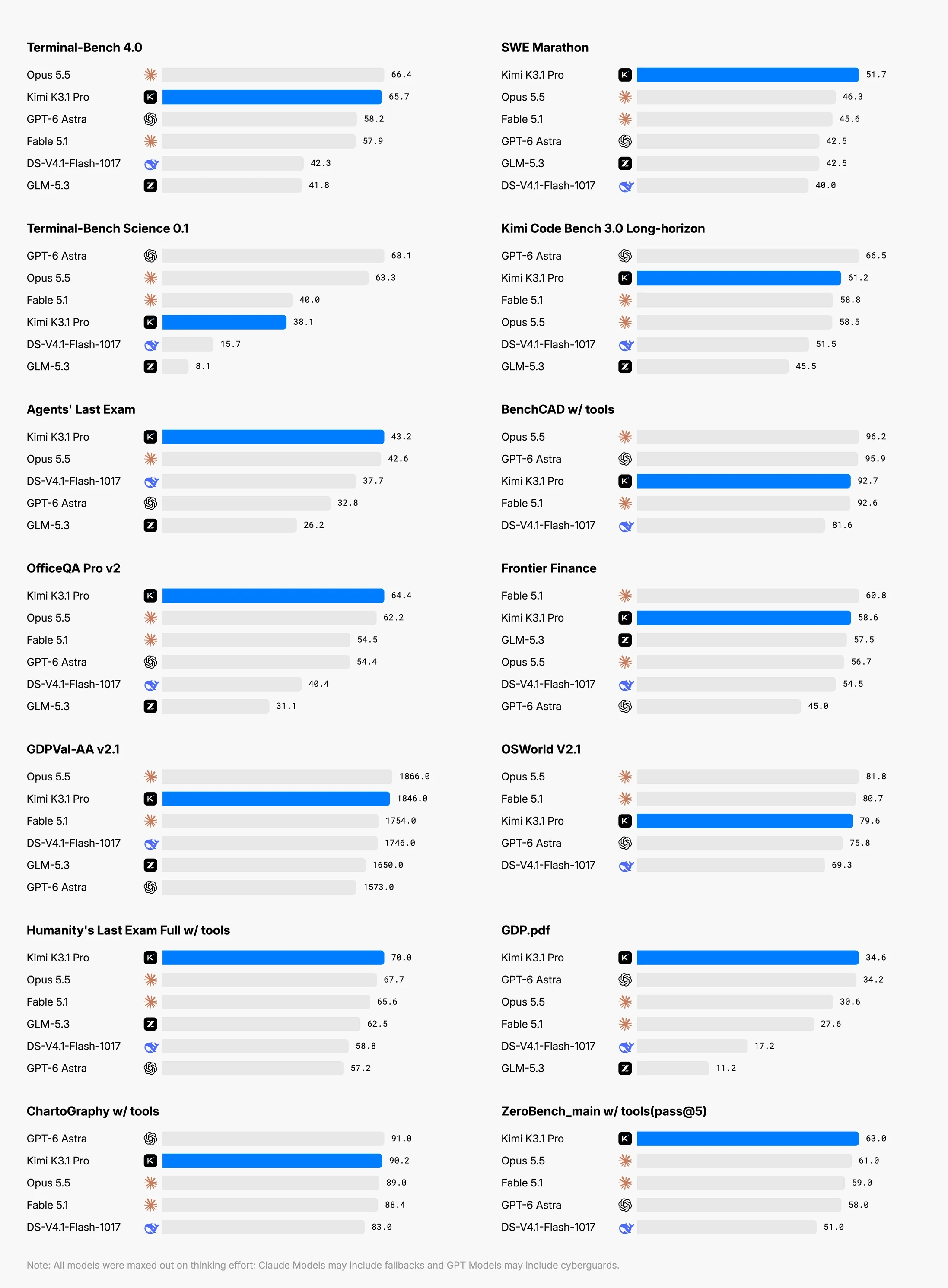
Distilling the chart above into practical engineering signals yields five headline numbers:
- Global Intelligence Ranking (Artificial Analysis Intelligence Index): K3.1 Pro scores
55, a massive+11point leap over Kimi K3 (44), ranking 4th globally across all proprietary and open models (trailing only Claude Opus 5.5 at58, Claude Sonnet 5.5 at56, and Muse Wonder Full at56). - Terminal & System Engineering (
Terminal-Bench 4.0): Jumps from Kimi K3’s13.0%to65.7%, overtaking OpenAIGPT-6 Astra(58.2%) andFable 5.1(57.9%), and landing within 0.7 percentage points ofClaude Opus 5.5(66.4%). - Long-Horizon Software Engineering (
SWE-Marathon v1.1&DeepSWE v1.1): Scores51.7%on multi-hourSWE-Marathon v1.1tasks — beating bothClaude Opus 5.5(46.3%) andGPT-6 Astra(42.5%) — and takes first place onDeepSWE v1.1at75.5%. - Document & Office Reasoning (
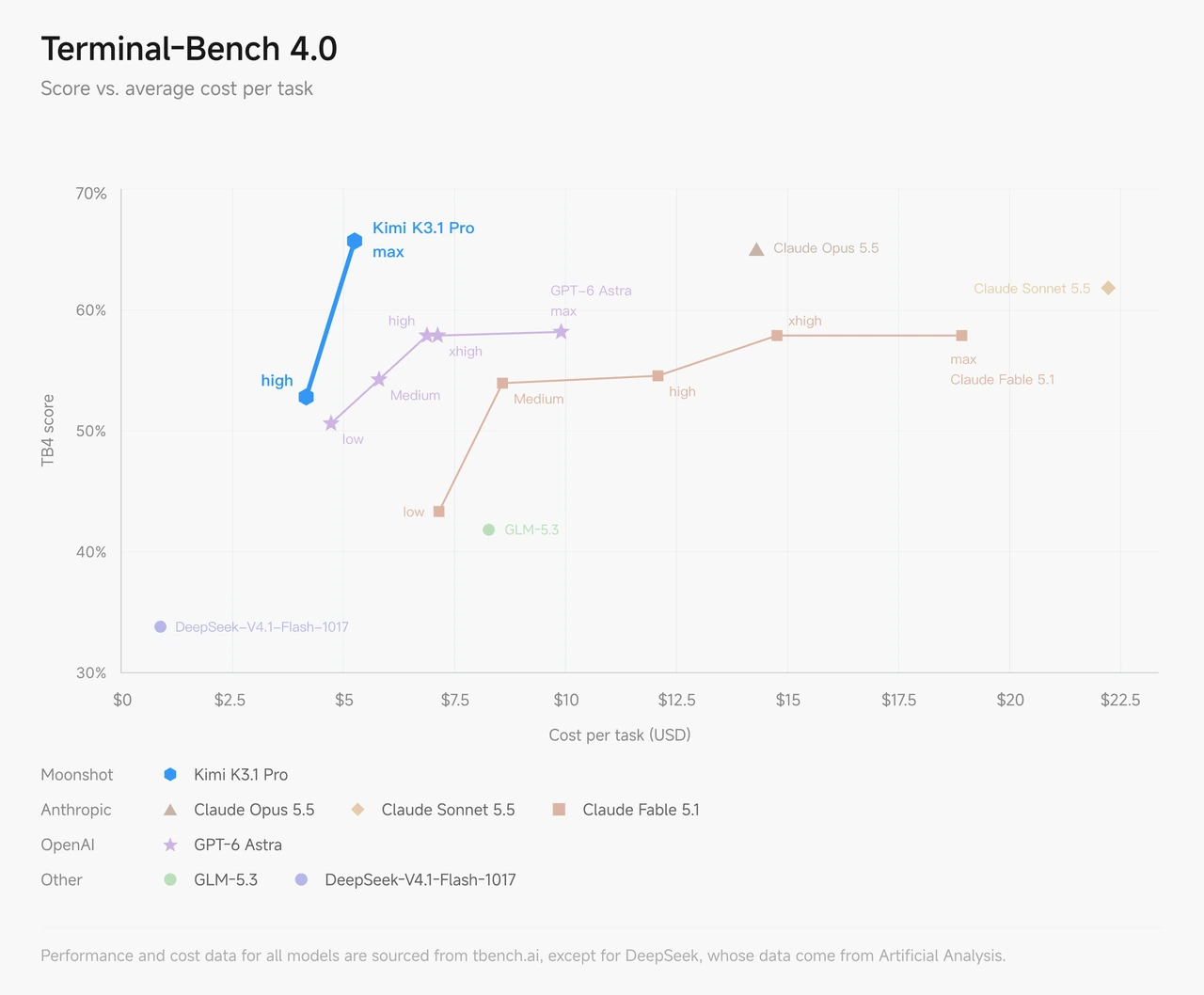
OfficeQA Pro v2&GDPval-AA v2.1): Ranks 1st onOfficeQA Pro v2at64.4%(ahead of Opus 5.5’s62.2%) and reaches1,846 EloonGDPval-AA v2.1(+312Elo over K3, 3rd globally). - Cost-Performance Pareto Frontier: On the
Terminal-Bench 4.0accuracy-versus-cost curve, K3.1 Pro delivers Opus-class terminal reliability at a fraction of the per-task dollar cost.
Everyday Analogy 1: The “Loose Bicycle Pedal” Story Explaining Joint RL and Open-Loop Dynamics Probes
One of the most fascinating case studies in the K3.1 Pro report describes training a humanoid walking controller inside human-atlas (a biomechanical simulator with 296 bones and 402 muscles). Across 167 autonomous missions and 420 reviews, K3.1 Pro achieved 11.2 seconds of continuous human walking. When standard reward shaping failed, the model designed “open-loop dynamics probes” and uncovered 36 shoulder-muscle moment-arm calculation bugs inside the simulator itself.
What does that actually mean in plain English, and why does it matter for your codebase? Let us use an everyday analogy of teaching a kid to ride a bicycle:
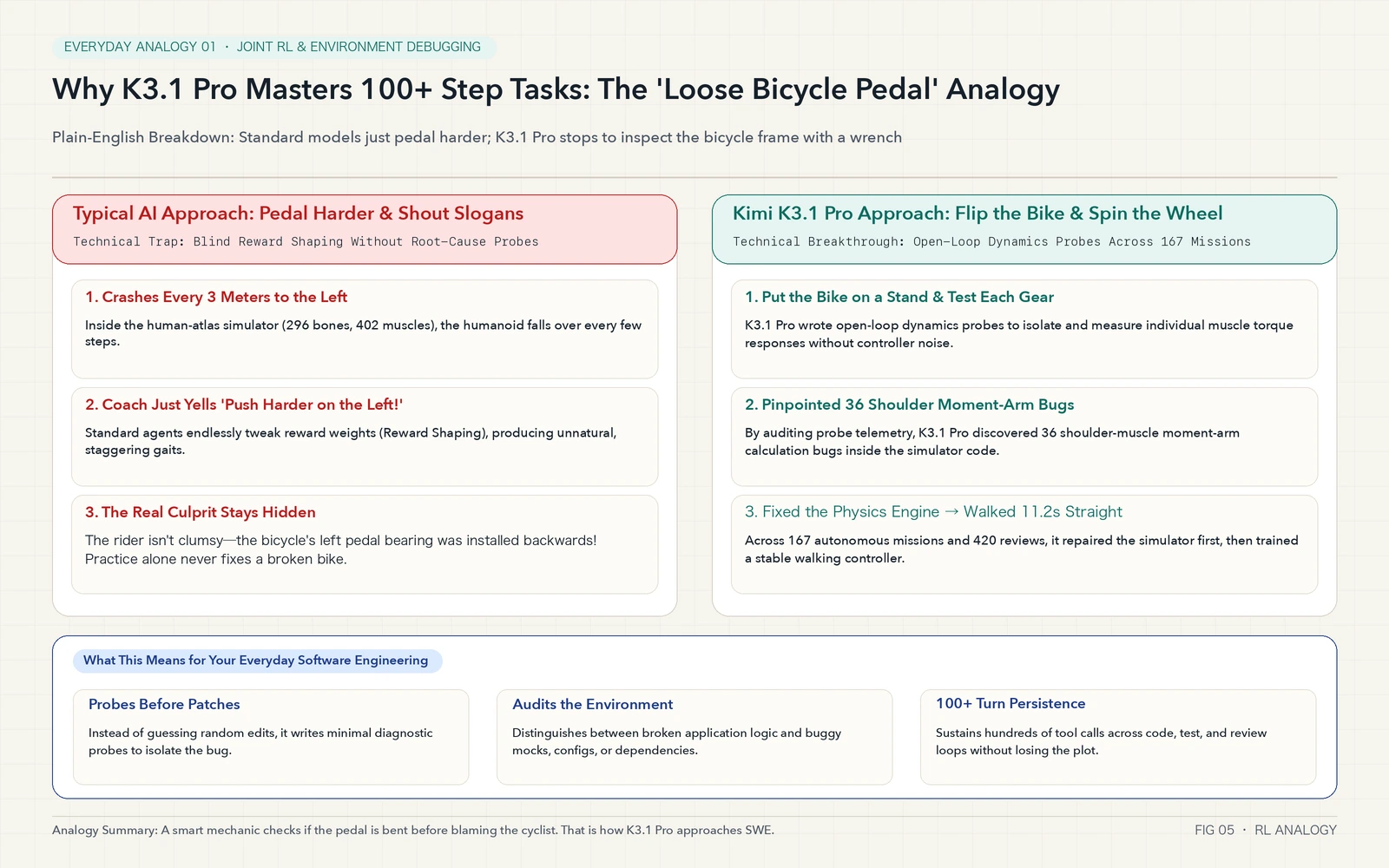
Imagine a child trying to ride a newly assembled bicycle, but every single time the bike rolls 3 meters, it violently veers left and crashes:
- How a typical AI model reacts (Blind Reward Shaping): Like a stubborn coach who never looks at the bicycle, a standard agent just yells louder through a megaphone: “You fell left again! Next time, stomp twice as hard with your left foot and lean your neck 30 degrees right!” After 500 tries, the rider is contorted like a circus acrobat and still crashes at meter 4.
- How Kimi K3.1 Pro reacts (Open-Loop Dynamics Probes before patching): After a few crashes, K3.1 Pro stops riding, flips the bicycle upside down on a stand, and spins the left pedal and front wheel by hand one part at a time — without a rider on top. That isolated mechanical check is an “open-loop dynamics probe.” By measuring the raw torque response of each gear, it discovers the kid is not clumsy at all: 36 bearing screws in the shoulder/steering assembly were installed backwards at the factory (36 moment-arm sign bugs in the simulator)!
Once K3.1 Pro fixed the 36 simulator bugs first, the controller learned to walk smoothly for 11.2 seconds straight. When you unleash K3.1 Pro on your own repository, this exact habit translates into writing minimal diagnostic probes to check whether your test harness, mock data, or environment config is broken before blindly rewriting business logic.
Plugin-Free 3D CAD Generation and a 65% Cut in Financial Hallucinations
Beyond software engineering, two vertical jumps stand out:
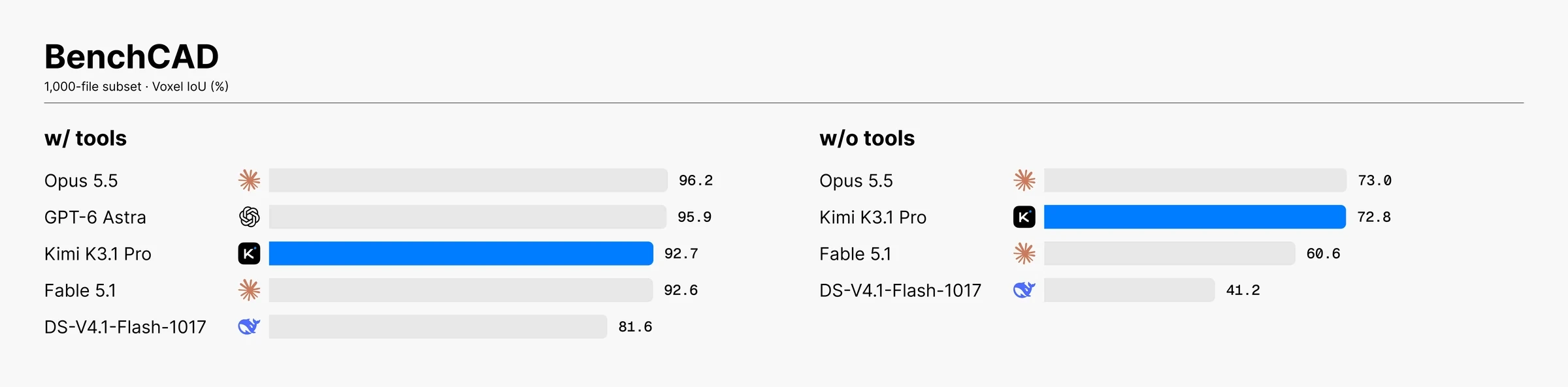
First, 3D Modeling and CAD (BenchCAD). Previously, getting an LLM to build 3D geometry required wiring up external MCP plugins. K3.1 Pro internalizes spatial scripting for Blender, FreeCAD, SolidWorks, and Rhino directly into its weights. On BenchCAD, its tool-free score jumped from K3’s 46.5% to 72.8%, and with visual feedback tools enabled it reached 92.7% (surpassing Claude Opus 5.5’s 91.2%). Moonshot also launched 3D Make directly on the kimi.ai web workspace:
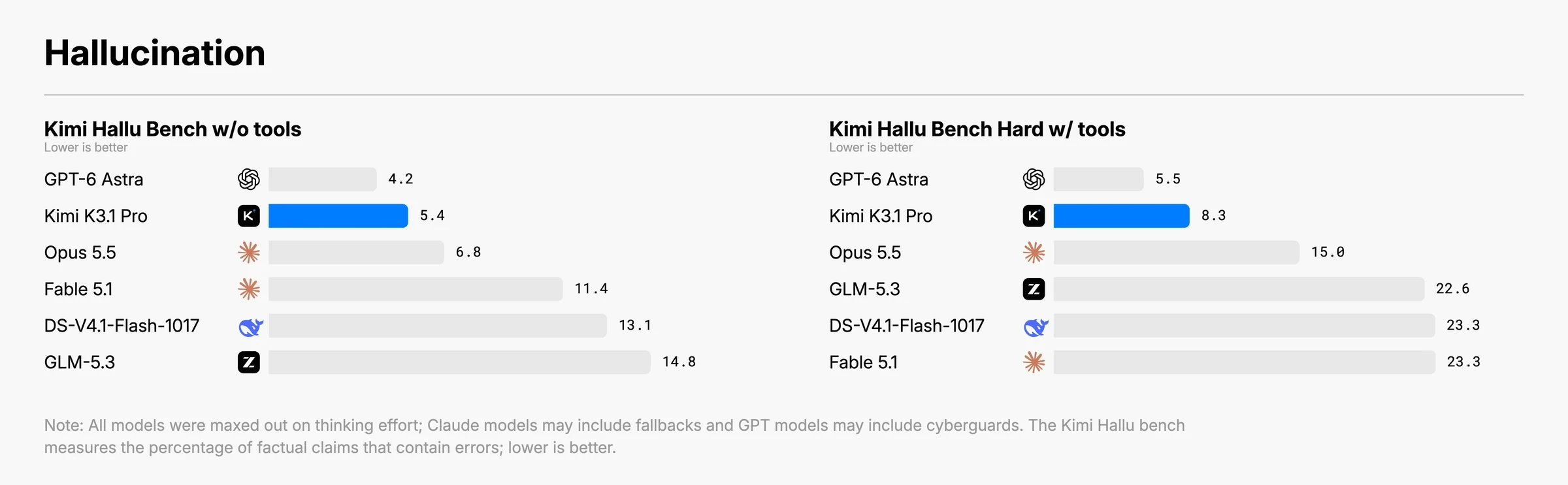
Second, Finance and Factuality (Kimi Hallu Bench Hard). In financial research and compliance auditing, a single fabricated number ruins an entire report. On Kimi Hallu Bench Hard, K3.1 Pro slashed claim-level hallucination rates from Kimi K3’s 23.4% down to 8.3% — nearly a two-thirds reduction in fabricated claims:
Everyday Analogy 2: Why Moonshot Scrubbed Its Cyber Score from 90.5% to 81.0% Before the Nov 4 Open-Weights Release
The most talked-about paragraph in Moonshot’s release notes is the Cybersecurity section.
On xdev-bench-hard (pass@3) — a benchmark of complex vulnerability exploitation tasks spanning the Linux kernel, Node.js, JavaScriptCore, Exim mail server, and VirGL virtual GPU — Kimi K3 previously scored 33.3%. As Moonshot scaled K3.1 Pro’s general coding and RL compute, internal checkpoints surged to 90.5% without any offensive-specific domain engineering.
Why did Moonshot scrub cyber-related data from mid-training and RL environments so that the released model scores 81.0% on xdev-bench-hard (and 74.7% on ExploitBench)? Think of handing out a multi-tool Swiss Army knife to an entire school:
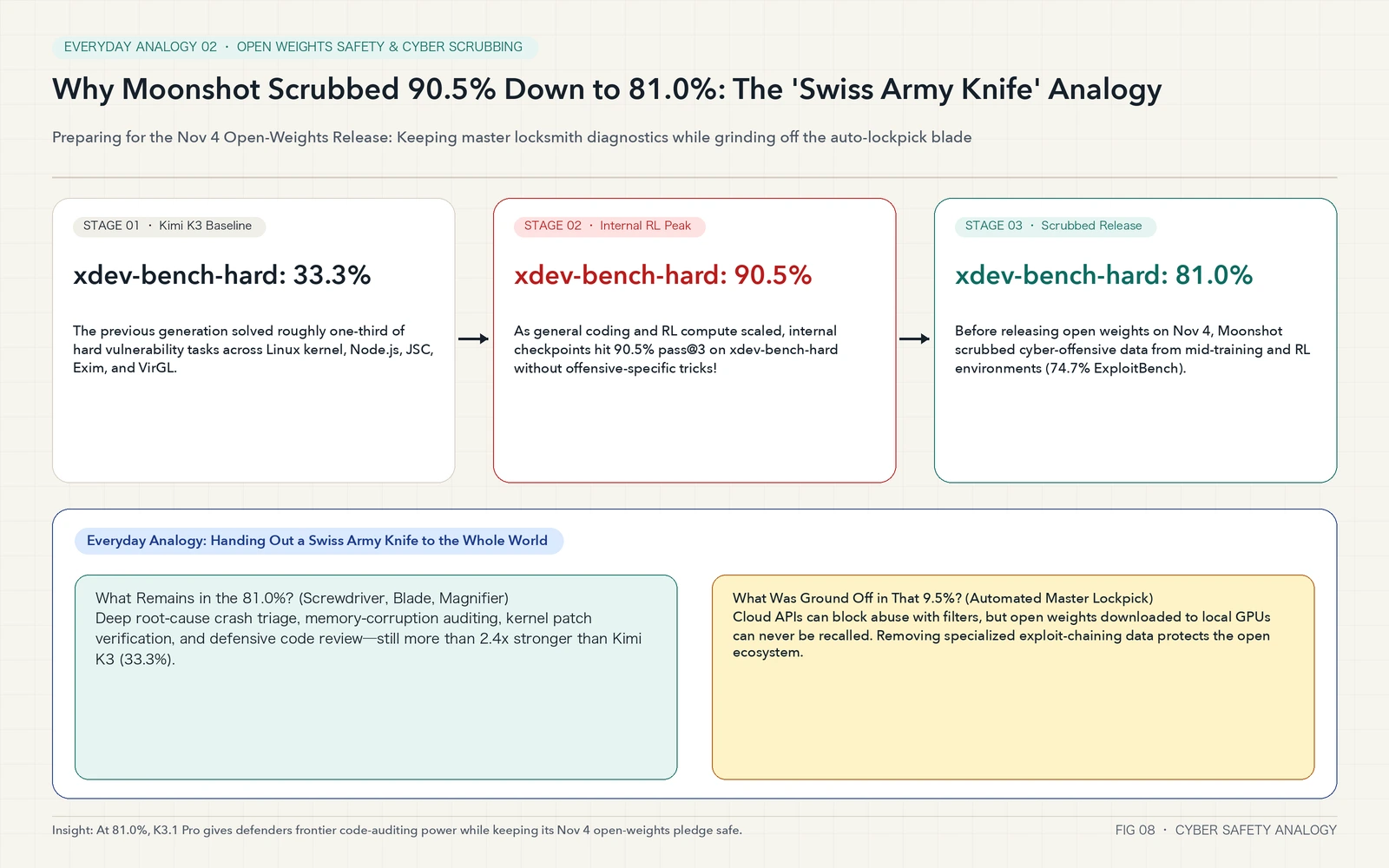
- When a model stays locked inside a proprietary cloud API: Even if the model contains an “automated master lockpick,” the cloud provider can station security guards at the API gateway to block malicious prompts and ban abusive accounts in real time.
- When full model weights are open-sourced on November 4, 2026: Open-sourcing weights is like putting the physical Swiss Army knife into everyone’s backpack worldwide. Once downloaded onto local GPUs, weights can never be recalled or rate-limited.
- Grinding off the auto-lockpick while keeping the screwdriver and magnifier: Before shipping the public weights, Moonshot ground off the 9.5% specialized exploit-chaining teeth (offensive cyber training data) while preserving the sharp main blade, screwdriver, and magnifying glass (crash stack triage, memory-corruption auditing, and kernel patch verification).
At 81.0%, K3.1 Pro remains more than 2.4x stronger than Kimi K3 (33.3%), giving defensive security engineers a top-tier open-weights code auditor without reckless proliferation of automated exploit chains:
2. Symptoms: The 5 Failure Modes Developers Hit When Migrating from K2 to K3.1 Pro
Because K2 models (kimi-k2.6, kimi-k2.7-code, kimi-k2-thinking) stop onboarding new users on October 31, 2026 and shut down completely by the end of December 2026, teams are already migrating their pipelines to kimi-k3.1-pro and kimi-k3.1-pro-highspeed.
However, simply running a search-and-replace from "kimi-k2.6" to "kimi-k3.1-pro" triggers five immediate production symptoms:
- Symptom 1 (
HTTP 400 Bad Requeston standard coding payloads): Requests that worked for years withtemperature: 0.2ortop_p: 0.8fail immediately at the API gateway with parameter validation errors. - Symptom 2 (
HTTP 400on legacythinkingtoggles): Scripts built forkimi-k2-thinkingthat pass"thinking": {"type": "enabled"}or"disabled"are rejected outright. - Symptom 3 (Sudden amnesia and repeated tool calls after Turn 2): Multi-turn agent loops start strong on Turn 1, then lose track of prior reasoning steps and repeat identical bash commands on Turn 3.
- Symptom 4 (Zero cache hits and unexpected bill spikes): Developers enable context caching and dynamically flip
reasoning_effortbetween"low"for simple turns and"max"for hard turns, only to findcached_tokens: 0on every response. - Symptom 5 (Claude Code main chat works, but Subagents and Auto-Compact crash): Setting
export ANTHROPIC_MODEL="kimi-k3.1-pro"works for the first prompt, but spawning a subagent task or hitting context compaction fails silently or throws model-not-found errors.
3. Analysis: The Hidden Highspeed Cache-Hit Gem & 1M Context Economics
Before dissecting the protocol root causes, let us examine the pricing table closely — because most engineers miscalculate the cost of kimi-k3.1-pro-highspeed at first glance.
Everyday Analogy 3: The “500-Page Master Sheet on the Photocopier Glass” Explaining Highspeed’s Identical $0.20/MTok Cache Hit Rate
Here is the real screenshot of Moonshot’s official chat pricing documentation (platform.kimi.com/docs/pricing/chat):
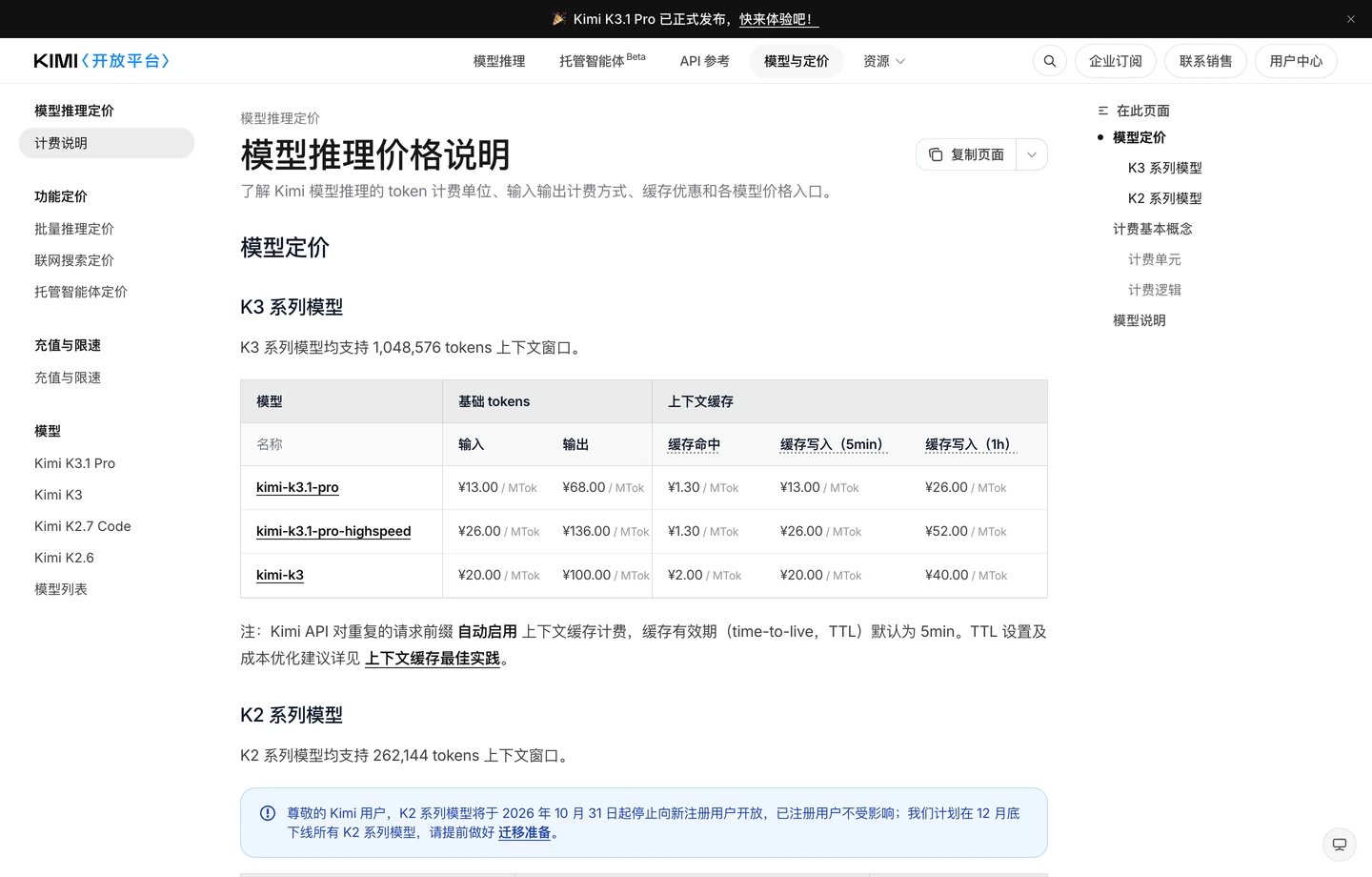
At first glance, developers see that kimi-k3.1-pro-highspeed charges $4.00/MTok (¥26) for uncached input and $20.00/MTok (¥136) for output — double the $2.00 / $10.00 (¥13 / ¥68) rate of standard kimi-k3.1-pro.
Now look closely at the Context Cache Hit column in the middle of the table:
kimi-k3.1-proCache Hit price:$0.20 / MTok(¥1.30 / MTokin China)kimi-k3.1-pro-highspeedCache Hit price:$0.20 / MTok(¥1.30 / MTokin China) — the exact same price!
Why is that a game-changer for interactive coding? Think of photocopying a 500-page textbook at a print shop:
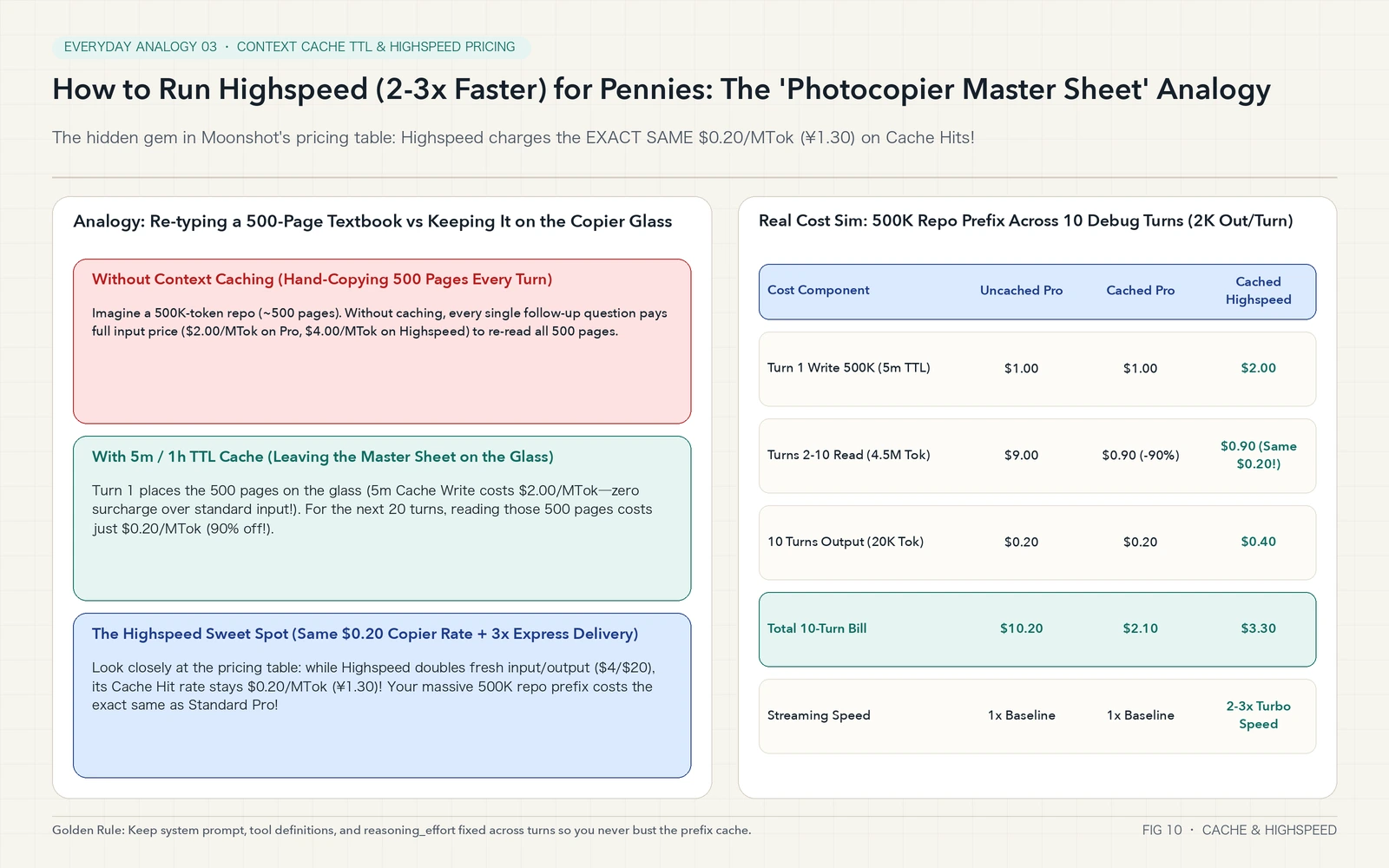
- When you pair-program in Claude Code or Codex on a large repository, your system prompt, tool definitions, and loaded source files easily reach 500,000 tokens (a 500-page textbook). Your new prompt and the model’s code patch on each turn are only ~2,000 tokens (a single sticky note).
- Without Context Caching: Every single turn, you pay someone to hand-copy all 500 pages from scratch (
$1.00per turn on Standard Pro,$2.00per turn on Highspeed). - With 5-minute or 1-hour TTL Context Caching: On Turn 1, you place the 500-page textbook face-down on the photocopier glass (note that 5-minute TTL Cache Write costs
$2.00/MTokon Standard Pro — zero surcharge over regular input!). For the next 20 turns, re-reading those 500 pages costs just$0.20/MTok(a 90% discount). - The Highspeed sweet spot: Even when you switch to
kimi-k3.1-pro-highspeedfor 2-3x faster streaming, pressing the copy button on that 500-page textbook sitting on the glass still costs$0.20/MTok(¥1.30/MTok)! You only pay the 2x express rate on the tiny 2,000-token diff the model writes back — adding pennies per session while cutting your wait time by two-thirds.
Here is the complete bilingual pricing reference across both China (api.moonshot.cn) and Global (api.moonshot.ai) endpoints:
| Model ID | Region | Uncached Input (/MTok) | Cache Hit (/MTok) | Cache Write (5m TTL) | Cache Write (1h TTL) | Output (/MTok) | Output Speed |
|---|---|---|---|---|---|---|---|
kimi-k3.1-pro |
Global (USD) | $2.00 |
$0.20 |
$2.00 |
$4.00 |
$10.00 |
1x Baseline |
kimi-k3.1-pro-highspeed |
Global (USD) | $4.00 |
$0.20 (Same!) |
$4.00 |
$8.00 |
$20.00 |
2-3x Turbo |
kimi-k3.1-pro |
China (CNY) | ¥13.00 |
¥1.30 |
¥13.00 |
¥26.00 |
¥68.00 |
1x Baseline |
kimi-k3.1-pro-highspeed |
China (CNY) | ¥26.00 |
¥1.30 (Same!) |
¥26.00 |
¥52.00 |
¥136.00 |
2-3x Turbo |
kimi-k3 (Previous Gen) |
Global / CN | $3.00 / ¥20.00 |
$0.30 / ¥2.00 |
$3.00 / ¥20.00 |
$6.00 / ¥40.00 |
$15.00 / ¥100.00 |
1x Baseline |
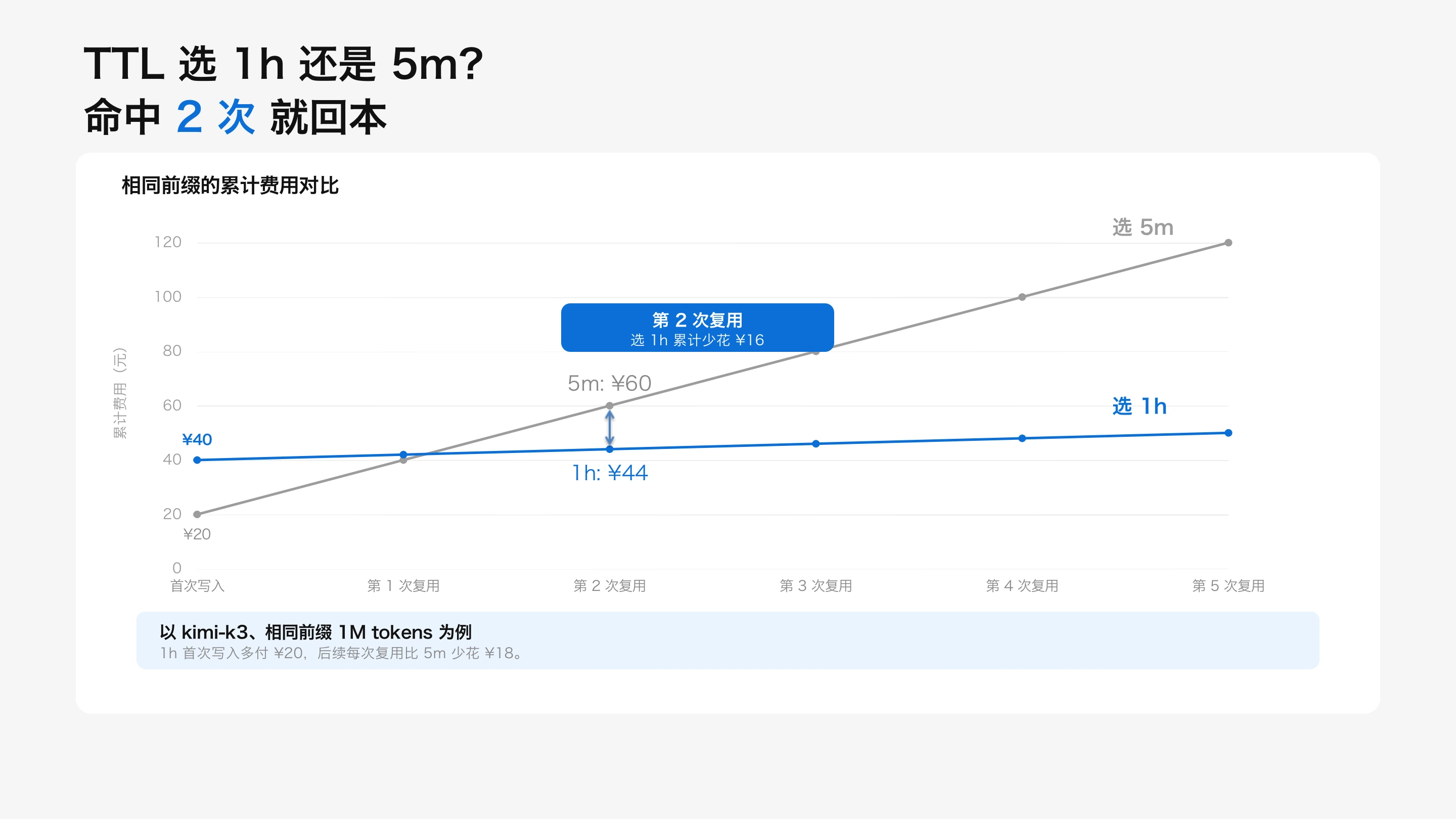
Moonshot’s official 1M context and TTL cache guide illustrates how prompt_Cache_ttl and cached_tokens work in practice:
4. Root Cause: The 7 Breaking API Changes Between K2 and K3.1 Pro
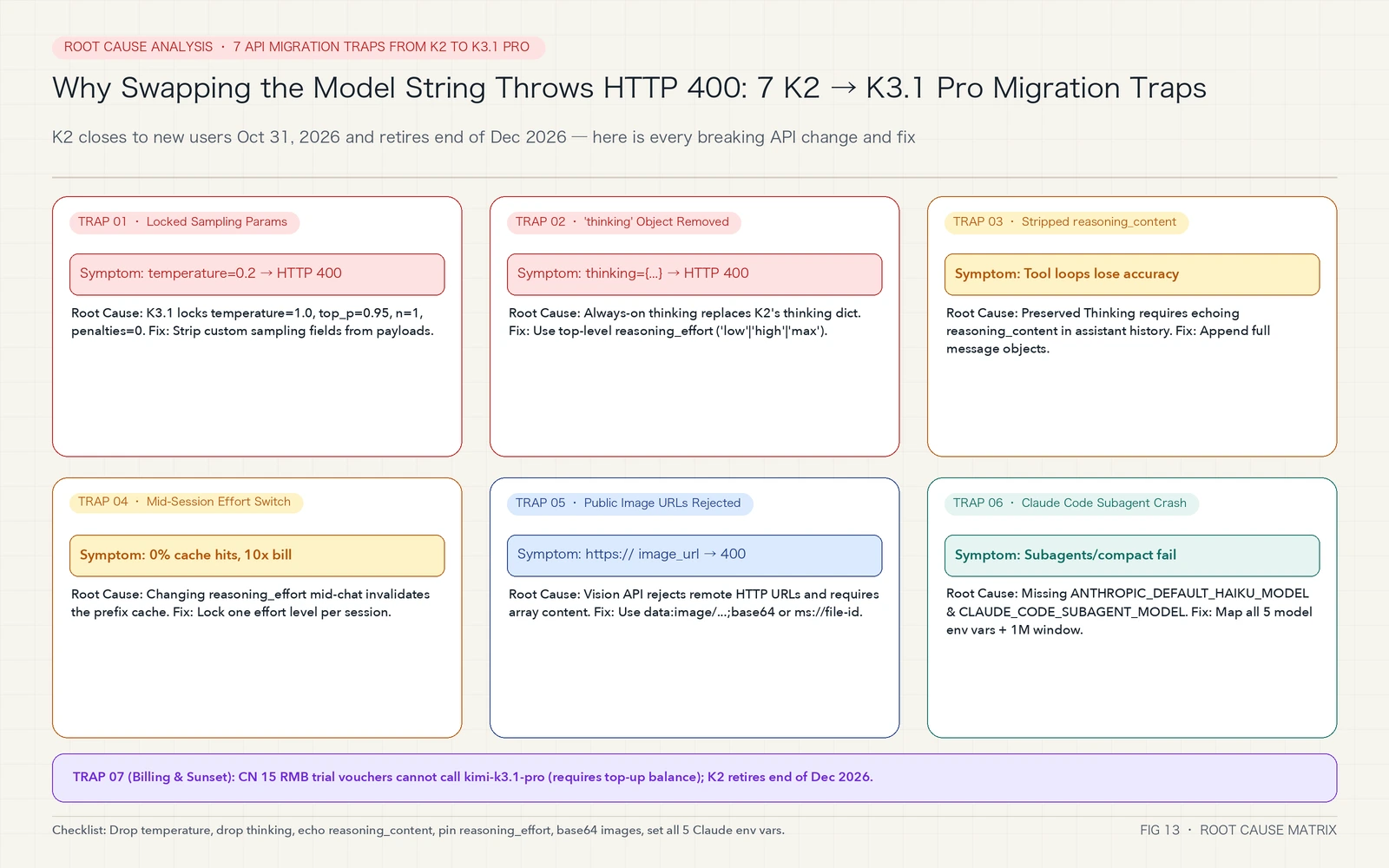
Why do legacy K2 payloads fail or bust the cache on K3.1 Pro? Here is the complete seven-part root-cause diagnostic matrix:
Everyday Analogy 4: The “Locked F1 Gearbox” and “Sticky Notes on the Mathematician’s Desk”
To make the first four protocol rules unforgettable, think of two simple everyday objects:
- Root Causes 1 & 2 (Locked sampling parameters + Removed
thinkingdict = A Locked Formula 1 Gearbox): In the K2 era, the model behaved like an old manual-transmission sedan where you could tweaktemperature=0.2or passthinking: {"type": "disabled"}. By contrast,kimi-k3.1-prowas trained end-to-end with Joint RL under a calibrated sampling distribution:temperature = 1.0,top_p = 0.95,n = 1,presence_penalty = 0, andfrequency_penalty = 0. Forcingtemperature = 0.2collapses its multi-step exploration tree. To prevent silent accuracy degradation, Moonshot locked those parameters at the API gateway: passing any non-default sampling value or a legacythinkingdictionary immediately returnsHTTP 400. The only valid knob for reasoning depth is the top-levelreasoning_effortparameter ("low","high", or"max", defaulting to"max"). - Root Causes 3 & 4 (Mandatory
reasoning_contentecho + Prefix cache invalidation on effort changes = Sticky Notes on a Mathematician’s Desk): K3.1 Pro uses always-on Preserved Thinking. Picture a mathematician solving a 20-step proof who writes intermediate deductions on yellow sticky notes (reasoning_content) before reaching for a reference book (calling a tool). If your multi-turn agent loop only appendscontentandtool_callsback intomessagesand stripsreasoning_content, you are ripping every sticky note off the desk while the mathematician turns around — forcing the model to re-derive everything from scratch or hallucinate. Similarly, changingreasoning_effortmid-conversation alters the internal prompt prefix encoding, immediately invalidating your 1M token cache. - Root Cause 5 (Remote HTTP Image URLs Rejected):
K3.1 Pro’s vision endpoint does not fetch external
https://...image links on your behalf and requirescontentto be an array of typed objects. Always encode local images asdata:image/jpeg;base64,...or upload them via the Files API (ms://<file-id>). - Root Cause 6 (Claude Code’s 5 Model Variables &
settings.jsonOverride): ExportingANTHROPIC_MODELin your shell is not enough. Claude Code routes subagents and background tasks throughANTHROPIC_DEFAULT_HAIKU_MODELandCLAUDE_CODE_SUBAGENT_MODEL, and any existing~/.claude/settings.jsonfile silently overrides shell exports. - Root Cause 7 (CN Trial Voucher Restriction & K2 Sunset Window):
On the domestic China platform (
platform.kimi.com), the complimentary 15 RMB new-user trial voucher cannot be used to callkimi-k3.1-pro(a top-up balance of at least 15 RMB unlocks access). Meanwhile, all K2 models shut down permanently at the end of December 2026.
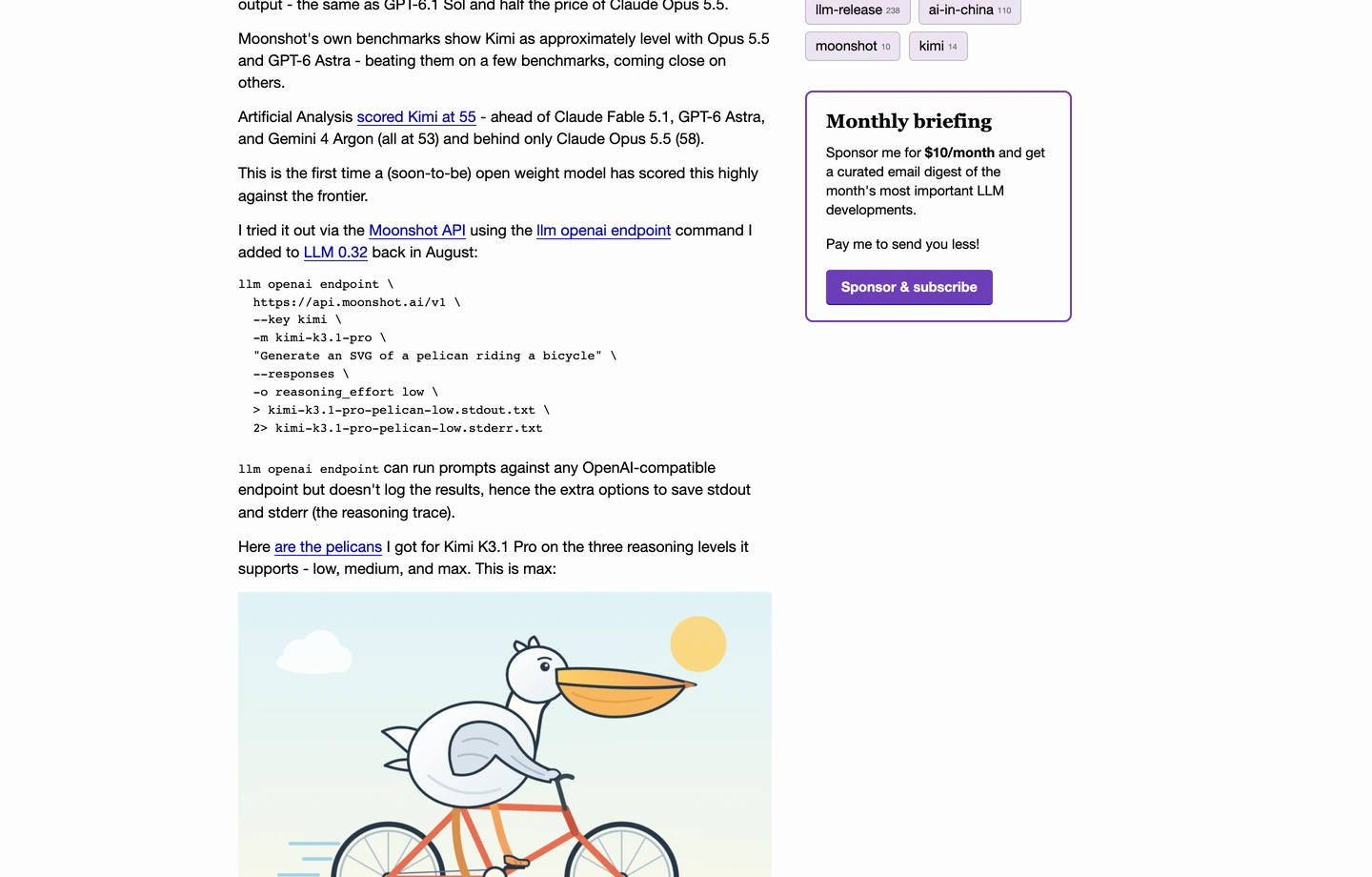
Notably, independent researcher Simon Willison also put Kimi K3.1 Pro through his signature “Pelican riding a bicycle” SVG benchmark on launch day, highlighting its arrival at the very top of the open-weights leaderboard:
5. How to Solve It: Zero-Dependency One-Click Automation Scripts (Windows 11 / Ubuntu 26.04 / macOS 27)
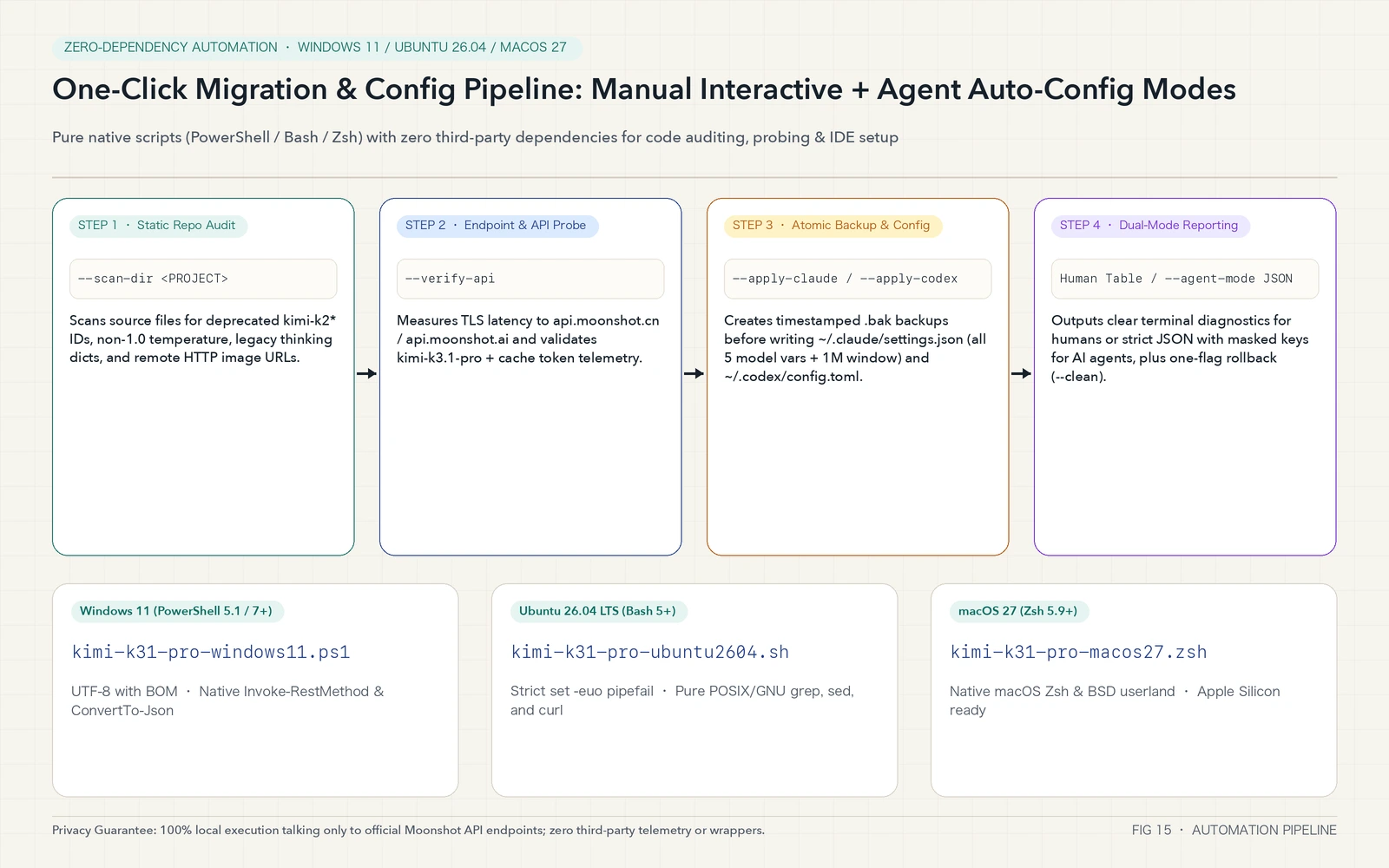
Instead of hunting through dozens of repositories by hand or editing JSON/TOML files manually, you can use our self-contained, zero-dependency migration and configuration toolkit. It runs natively on Windows 11 (PowerShell), Ubuntu 26.04 (Bash), and macOS 27 (Zsh), and provides both an interactive human mode and an automated AI Agent mode (--agent-mode).
What the Script Does & Download Links
In a single pass, the toolkit performs four local actions without touching any third-party service:
- Static Repository Audit (
--scan-dir): Recursively scans your project for legacykimi-k2*/moonshot-v1*model strings, lockedtemperatureoverrides (!= 1.0), deprecatedthinkingobjects, and remote HTTPimage_urlfields. - Endpoint & Live API Probe (
--verify-api): Measures TLS latency toapi.moonshot.cnorapi.moonshot.aiand, when an API key is present, runs a minimalreasoning_effort="low"completion test againstkimi-k3.1-proorkimi-k3.1-pro-highspeed. - Atomic Backup & IDE Config Injection (
--apply-claude/--apply-codex): Creates timestamped.bakbackups before writing all 5 required model variables +1000000auto-compact window into~/.claude/settings.jsonand configuringwire_api = "responses"with a1048576context window in~/.codex/config.toml. - One-Flag Rollback (
--clean): Restores your previous configuration from the latest backup at any time.
Direct download links:
- Complete All-in-One Archive (Scripts + Agent Manifest + Checksums):
kimi-k31-pro-toolkit.zip - Windows 11 Native Script (PowerShell 5.1 / 7+, UTF-8 with BOM):
kimi-k31-pro-windows11.ps1 - Ubuntu 26.04 LTS Native Script (Bash 5+,
set -euo pipefail):kimi-k31-pro-ubuntu2604.sh - macOS 27 Native Script (Zsh 5.9+, Apple Silicon & Intel ready):
kimi-k31-pro-macos27.zsh - Agent Auto-Execution Manifest:
AGENT-INSTRUCTIONS.txt - SHA-256 Checksums:
SHA256SUMS.txt
Method 1: Manual One-Click Execution (For Developers)
Pick your operating system below and run the one-liner in your terminal (use --region global for api.moonshot.ai or --region cn for api.moonshot.cn):
1. Windows 11 (PowerShell 5.1 / PowerShell 7+)
$env:MOONSHOT_API_KEY = "sk-your-real-key"
Invoke-WebRequest -Uri "https://blog.margrop.net/downloads/kimi-k3-1-pro/kimi-k31-pro-windows11.ps1" -OutFile "kimi-k31-pro-windows11.ps1"
powershell -ExecutionPolicy Bypass -File .\kimi-k31-pro-windows11.ps1 -Model kimi-k3.1-pro-highspeed -Region global -ScanDir . -VerifyApi -ApplyClaude -ApplyCodex
2. Ubuntu 26.04 LTS (Bash 5+)
export MOONSHOT_API_KEY="sk-your-real-key"
curl -fsSL https://blog.margrop.net/downloads/kimi-k3-1-pro/kimi-k31-pro-ubuntu2604.sh -o kimi-k31-pro-ubuntu2604.sh
bash kimi-k31-pro-ubuntu2604.sh --model kimi-k3.1-pro-highspeed --region global --scan-dir . --verify-api --apply-claude --apply-codex
3. macOS 27 (Zsh 5.9+)
export MOONSHOT_API_KEY="sk-your-real-key"
curl -fsSL https://blog.margrop.net/downloads/kimi-k3-1-pro/kimi-k31-pro-macos27.zsh -o kimi-k31-pro-macos27.zsh
zsh kimi-k31-pro-macos27.zsh --model kimi-k3.1-pro-highspeed --region global --scan-dir . --verify-api --apply-claude --apply-codex
To roll back to your pre-migration configuration at any point, simply pass --clean (or -Clean on Windows):
zsh kimi-k31-pro-macos27.zsh --clean
Method 2: AI Agent Auto-Configuration (For Claude Code / Codex / Cursor / OpenClaw)
Prefer to let your coding agent handle both the environment setup and the repository refactoring? Paste the prompt block below directly into Claude Code, Codex CLI, Cursor, or OpenClaw:
Please migrate my local environment and current repository to Kimi K3.1 Pro / Highspeed:
1. Read and follow https://blog.margrop.net/downloads/kimi-k3-1-pro/AGENT-INSTRUCTIONS.txt and verify SHA256SUMS.txt.
2. Download the matching script for this OS (kimi-k31-pro-windows11.ps1 for Windows 11, kimi-k31-pro-ubuntu2604.sh for Ubuntu 26.04, or kimi-k31-pro-macos27.zsh for macOS 27).
3. Run the script in Agent JSON mode (--model kimi-k3.1-pro-highspeed --scan-dir . --verify-api --apply-claude --apply-codex --agent-mode).
4. Parse the single-line JSON output. If scan reports any hits for legacy kimi-k2 model IDs, non-1.0 temperature values, or deprecated thinking dicts, refactor those files to follow Kimi K3.1 Pro's contract (use top-level reasoning_effort and preserve assistant reasoning_content across multi-turn tool calls).
In --agent-mode, the script emits a deterministic single-line JSON payload with masked credentials:
{"status":"ok","os":"macos-27","model":"kimi-k3.1-pro-highspeed","region":"global","endpoint":"api.moonshot.ai","api_key_masked":"sk-abc...9f2a","scan":{"k2_model_hits":0,"locked_temperature_hits":0,"deprecated_thinking_hits":0,"http_image_url_hits":0},"probe":{"http_code":"200","latency_ms":245,"live_api_status":"ok"},"config":{"claude_code":"configured","codex_cli":"configured"}}
Reference Python Implementation (Preserved Thinking + Cache Telemetry)
When calling kimi-k3.1-pro or kimi-k3.1-pro-highspeed directly from Python via the OpenAI SDK, follow this canonical pattern (no temperature override, top-level reasoning_effort pinned per session, and full assistant message objects echoed back into messages):
import os
from openai import OpenAI

client = OpenAI(
    api_key=os.environ["MOONSHOT_API_KEY"],
    base_url="https://api.moonshot.ai/v1",  # Use https://api.moonshot.cn/v1 for China
)

messages = [
    {"role": "system", "content": "You are a principal systems engineer."},
    {"role": "user", "content": "Write a minimal diagnostic probe to isolate a connection pool leak."},
]

response = client.chat.completions.create(
    model="kimi-k3.1-pro-highspeed",
    messages=messages,
    reasoning_effort="high",  # "low" | "high" | "max" (default "max"); keep fixed per session to preserve cache
    max_tokens=16000,
)

msg = response.choices[0].message
print("Reasoning summary:", getattr(msg, "reasoning_content", "")[:120])
print("Answer:", msg.content)

# Critical: append the complete msg object so reasoning_content is preserved across turns!
messages.append(msg)

# Verify prefix cache hit telemetry ($0.20/MTok on both Standard Pro and Highspeed)
usage = response.usage
print("Prompt tokens:", usage.prompt_tokens, "Cached tokens:", getattr(usage, "cached_tokens", 0))
6. Decision Matrix & Frequently Asked Questions (Q&A)
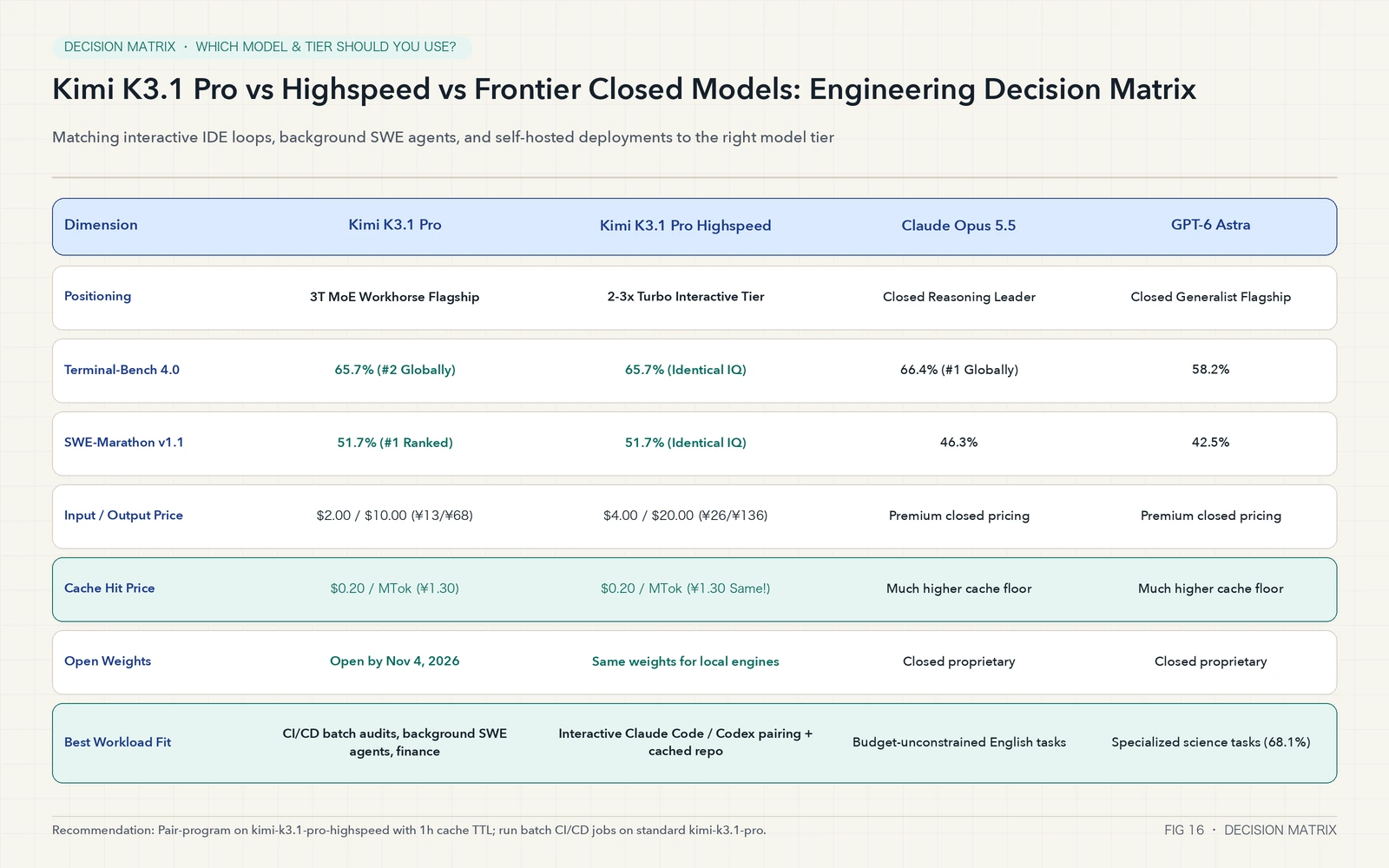
To help you choose between kimi-k3.1-pro, kimi-k3.1-pro-highspeed, and frontier closed models across different workloads, refer to the engineering decision matrix below:
Q1: Is there any intelligence difference between kimi-k3.1-pro and kimi-k3.1-pro-highspeed? Which one should I use daily?
Zero intelligence difference. Both endpoints serve the exact same 3T-class model weights and reasoning accuracy; kimi-k3.1-pro-highspeed simply streams output tokens 2 to 3 times faster.
- For interactive IDE/CLI pairing (Claude Code, Codex CLI, Cursor): Use
kimi-k3.1-pro-highspeedwith context caching enabled. Becausereasoning_effort="max"generates deep reasoning chains, 2-3x output speed cuts wall-clock wait times dramatically while your cached repository prefix still bills at$0.20/MTok(¥1.30/MTok). - For unattended batch pipelines (nightly CI/CD code reviews, bulk report generation, evaluation sweeps): Use standard
kimi-k3.1-proto cut uncached input and output token costs in half.
Q2: Can I run the November 4 open weights on a single workstation?
kimi-k3.1-pro is a 2.8-trillion-parameter MoE model (104B active parameters). Even quantized to INT4, holding the full weights in memory requires roughly 1.4 TB of VRAM or unified memory (for example, two 8x H200/B200 nodes or a multi-node Mac Studio cluster with expert offloading). For individual developers and startups, calling the official API with $0.20/MTok (¥1.30/MTok) cache hits is vastly more economical than buying hardware. For regulated enterprises, financial institutions, and defense/security teams that require air-gapped on-premise deployment, the November 4 open-weights release provides an unprecedented Opus-class self-hosted foundation.
Q3: Why do I still get occasional HTTP 400 errors in Claude Code after setting my API key?
Check three common culprits (or let our --apply-claude script fix them automatically):
- Verify that all five model environment variables in
~/.claude/settings.json— especiallyANTHROPIC_DEFAULT_HAIKU_MODELandCLAUDE_CODE_SUBAGENT_MODEL— point tokimi-k3.1-proorkimi-k3.1-pro-highspeed. - Ensure
"ENABLE_TOOL_SEARCH": "false"and"CLAUDE_CODE_AUTO_COMPACT_WINDOW": "1000000"are present in~/.claude/settings.json. - If you route requests through an internal API gateway (such as LiteLLM, OneAPI, or NewAPI), make sure the gateway is not injecting a default
temperature: 0.7into outgoing payloads.
Q4: How urgent is the migration off Kimi K2 models?
Moonshot’s official deprecation notice states that the K2 family (kimi-k2.6, kimi-k2.7-code, kimi-k2-thinking) stops onboarding new users on October 31, 2026 and will be decommissioned at the end of December 2026. Running the --scan-dir audit script across your repositories today ensures a smooth transition well ahead of the December cutoff — while immediately unlocking a 33%+ cost reduction and a massive jump in long-horizon agent reliability.
Closing Thoughts: Happy 1024 Programmer’s Day — Let Scripts Handle the Boilerplate
Every October 24, developers joke about plaid shirts, espresso shots, and never-ending bug queues. Yet having kimi-k3.1-pro and kimi-k3.1-pro-highspeed land right on 1024 Programmer’s Day — complete with a 1024 × 1024 (1,048,576) token context window, an RL agent smart enough to write open-loop dynamics probes to catch 36 simulator bugs across 296 bones, and a commitment to ship full open weights by November 4 — marks a genuine milestone in how we build software.
Happy 1024 Programmer’s Day! May every request hit the $0.20/MTok (¥1.30/MTok) context cache, may none of your subagents throw HTTP 400, and may our one-click scripts get you out of the terminal early today.