Web Loads 200 OK While Login Fails and 400/500 Errors Rage Unrecovered Tonight: Inside Kimi's Nov 2026 Outage Cascade—From 4028 & Status Split-Brain to Why Retrying Makes It Worse
Bottom line up front: If you opened Kimi tonight (November 20, 2026) only to find yourself locked out of login, staring at infinite message spinners, or slammed by a barrage of HTTP 400, 401, 403, 500, and 4028 errors, stop blaming your home Wi-Fi and stop hammering F5. You are witnessing the unrecovered aftershocks of a multi-layer backend cascade that has battered Moonshot AI’s infrastructure for over 24 hours.
Just minutes before this post went to press—between 21:04 and 21:37 CST on November 20, 2026—Moonshot AI’s official status dashboard fired four consecutive Critical alerts within seven minutes across every flagship engine powering Kimi Code: K3.1 Pro, K3.1 Pro Highspeed, K3, and K2.8 Preview. As of 22:20 CST tonight, the authoritative status feed still displays an active yellow banner: Minor Service Outage, with both Kimi Code and its newly launched Remote Control relay still stuck in Partial Outage.
What makes tonight’s disruption maddening for developers and everyday users alike is its split-personality failure mode. The landing page opens smoothly; one status URL does not resolve at all while an older one smiles back with “100% All Systems Operational”; and hitting retry in your IDE suddenly switches from 500 Server Error to relentless 400 Bad Request rejections. Let’s unpack every layer of what broke tonight—and how to recover cleanly without making the storm worse.
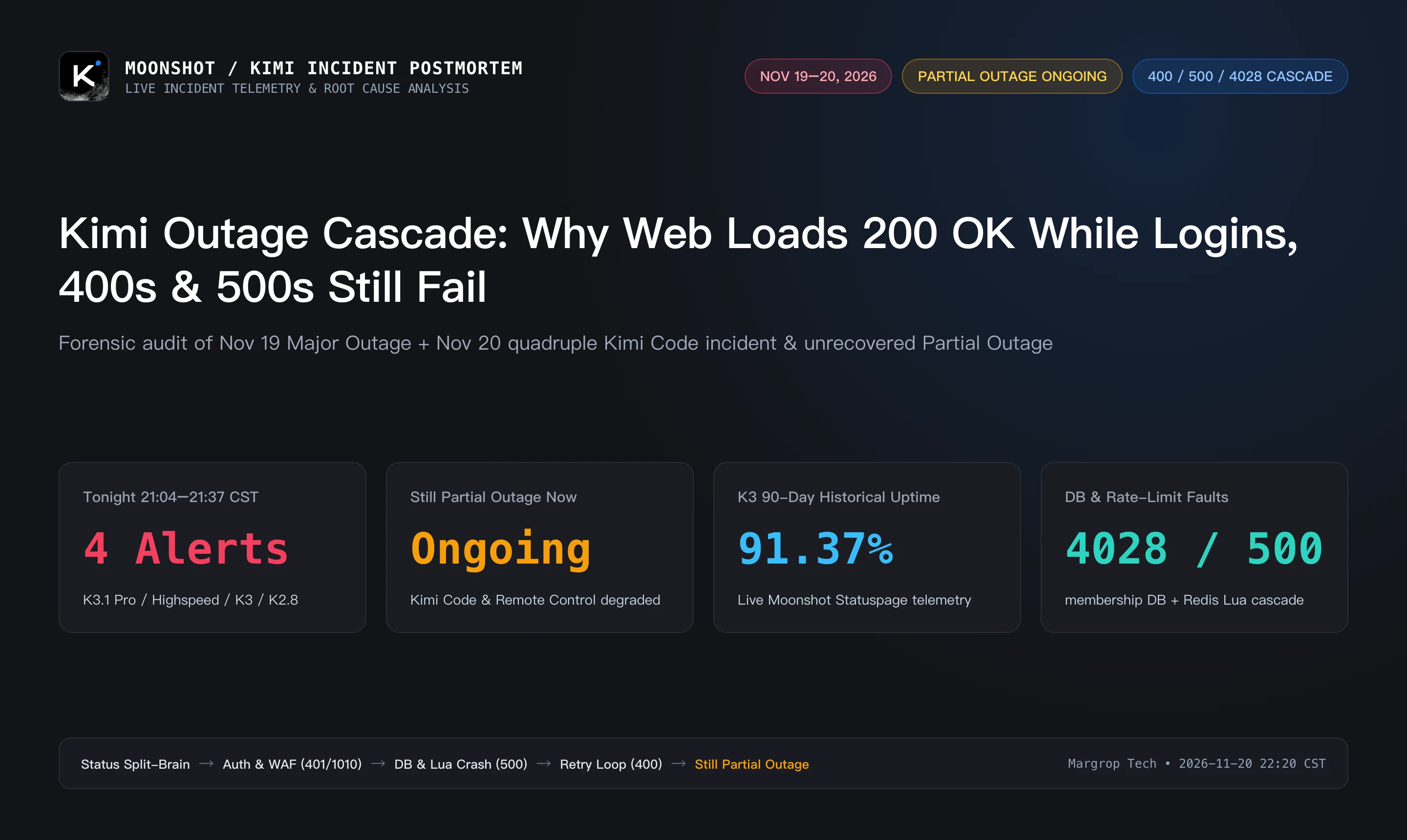
Figure 1: Original incident overview. Summarizing tonight’s 4 simultaneous Critical model alerts (21:04–21:37 CST), ongoing Partial Outage across Kimi Code & Remote Control, K3’s 91.37% 90-day uptime, and the 4028/500/400/401 failure cascade.
1. Tonight's Live Telemetry: Just How Broken Is Kimi Right Now?
When cloud AI platforms wobble, guessing from social media rumors wastes hours. Instead, we queried Moonshot AI’s live Statuspage JSON endpoints (status.moonshot.cn/api/v2/summary.json and incidents.json) between 22:14 and 22:25 CST tonight to capture verifiable ground truth.
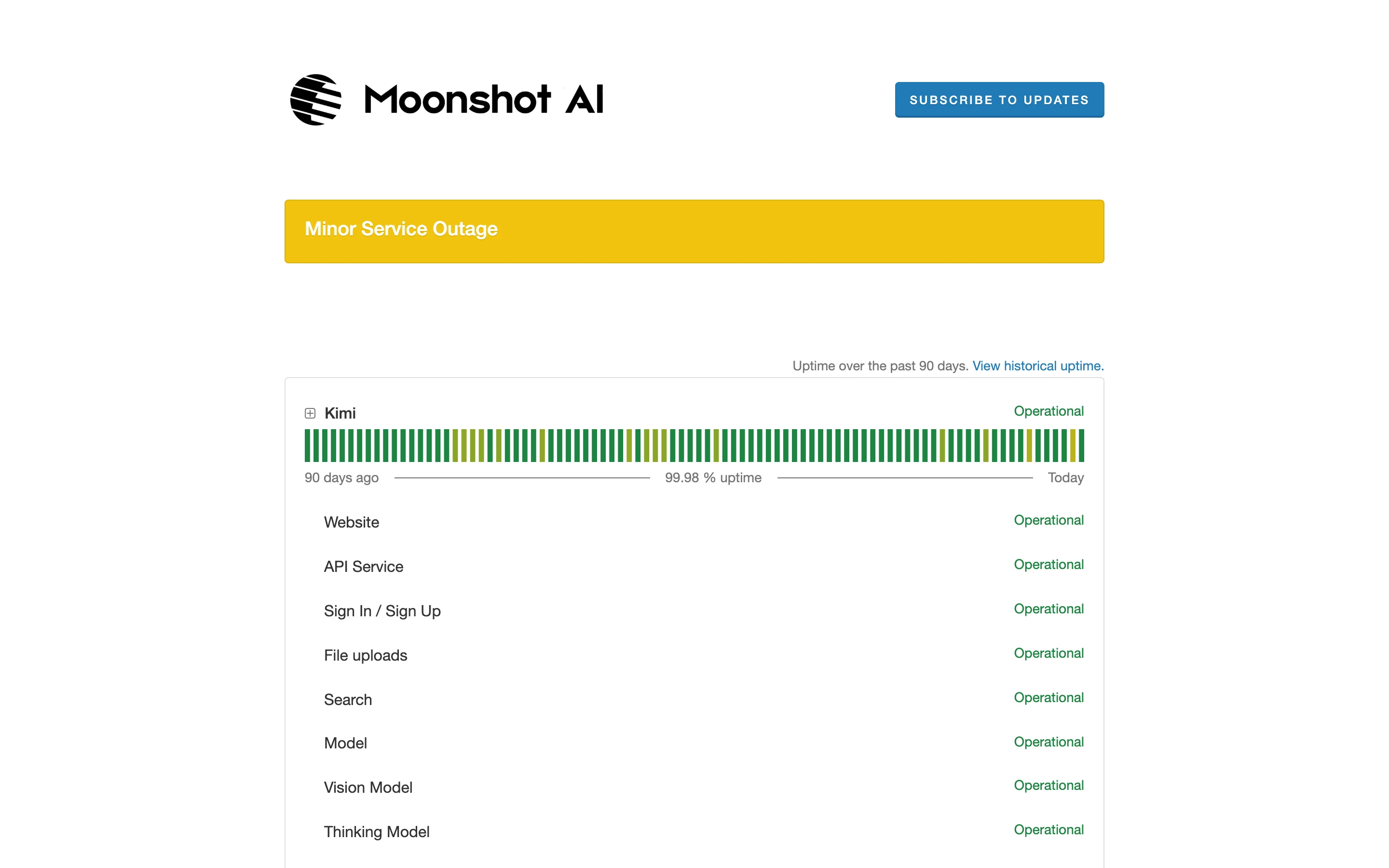
Figure 2: Live browser capture of status.moonshot.cn tonight (Nov 20, 2026), showing the active amber Minor Service Outage banner.
Expanding the collapsed Kimi Code component group reveals the true picture beneath the surface:
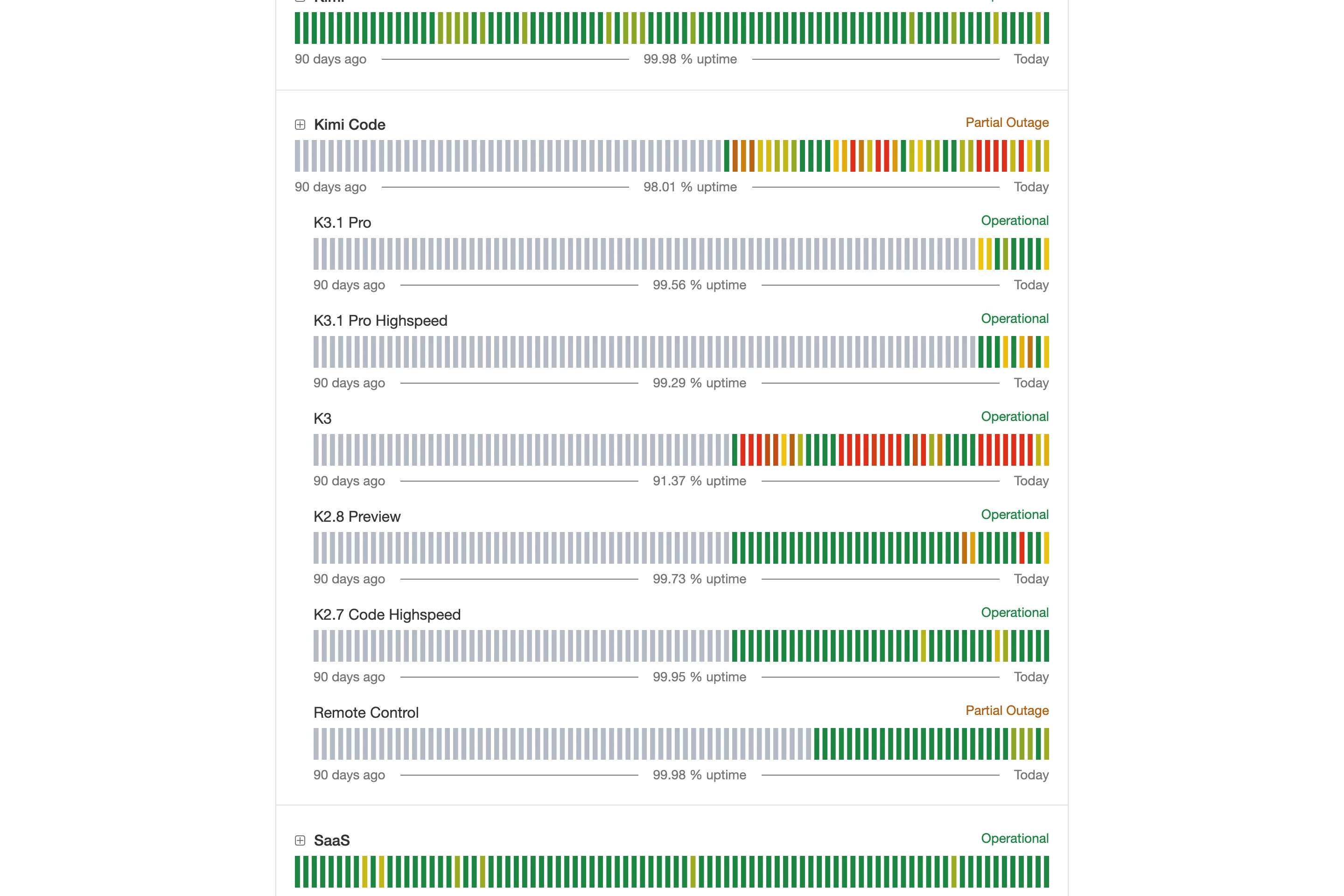
Figure 3: Expanded Kimi Code component telemetry. Both Kimi Code and Remote Control (updated 22:10 CST) remain in Partial Outage, while flagship K3’s 90-day historical uptime sits at an eye-popping 91.37%—dotted with consecutive red and amber outage bars.
Scrolling down to Past Incidents explains why coding workflows and API pipelines started exploding at 9 PM tonight:
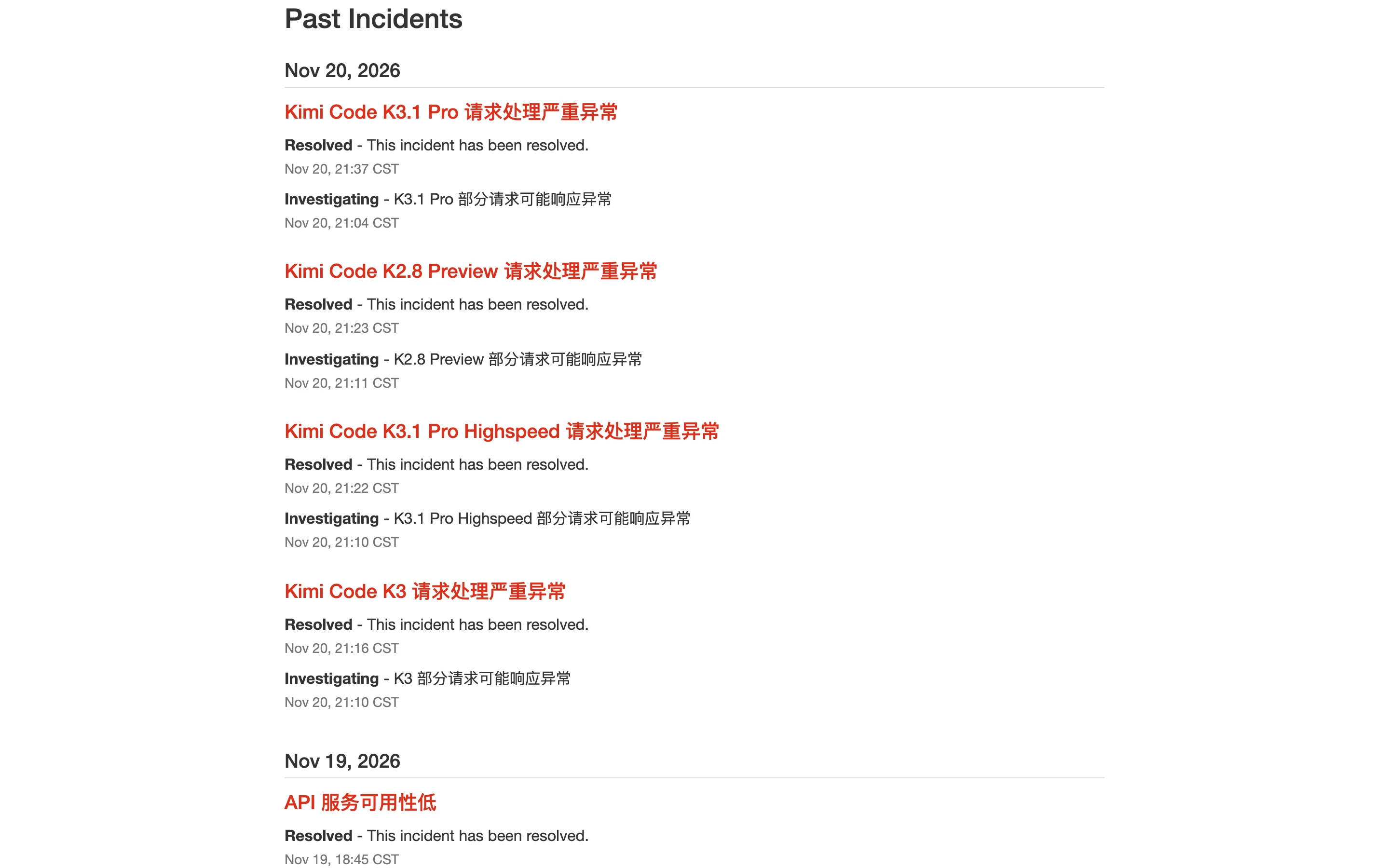
Figure 4: Official incident ledger for Nov 20, 2026 (21:04–21:37 CST). All four models—K3.1 Pro, K2.8 Preview, K3.1 Pro Highspeed, and K3—triggered simultaneous Critical request-handling alerts right beneath yesterday’s (Nov 19, 17:25–18:45 CST) API 服务可用性低 (Low API Service Availability) and google登录异常 (Google Login Failure).
Across user reports and our own live endpoint probes, tonight’s symptoms cluster into three distinct failure patterns:
- Symptom 1: Front-end shell opens, everything interactive stalls. Browsers load the UI shell cleanly, only to spin indefinitely on chat submission or reject background account calls;
- Symptom 2: Authentication walls and regional lockouts. Following three SMS login crashes on Nov 14 and a Google OAuth outage on Nov 19, any expired session cookie or proxy IP shift locks users outside the login modal;
- Symptom 3: Dual-sided 400 and 500 storms in developer tools. Even after Moonshot marks an individual alert as
Resolved, lingering edge instability and half-broken conversation states keep throwing500,4028, and400errors in an endless loop.
2. Why Does One Page Say "100% Green" While Nothing Works? Status Split-Brain & Media Timeline
Our investigation uncovered a classic operational trap that misled thousands of users tonight: Moonshot’s status domains suffer from severe split-brain.
Engineers instinctively try status.kimi.com first. In direct DNS checks, status.kimi.com fails to resolve entirely (NXDOMAIN / curl exit code 6), while routed HTTP proxies return 502 Bad Gateway. Searching for an alternative often lands users on Moonshot’s older Instatus portal, moonshot.instatus.com—which misleadingly displays a serene green badge:
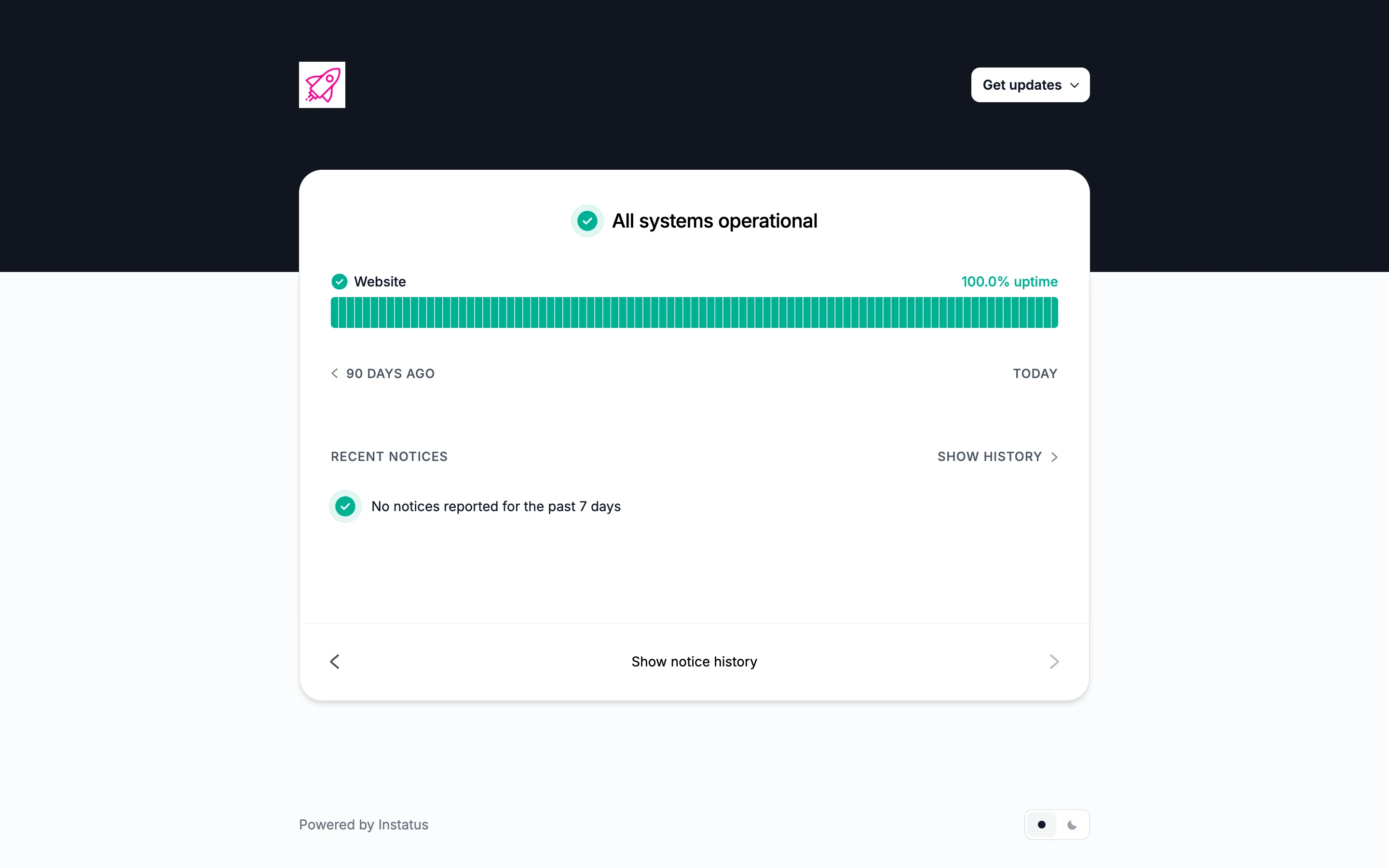
Figure 5: Status-page split-brain in action. While status.moonshot.cn actively warns of partial outages, moonshot.instatus.com continues displaying All systems operational and 100.0% uptime with zero notices in the past 7 days.
The web front-end plays a similar optical trick. Probing www.kimi.com (build 9a6e0d0, released 2026-11-19) returns HTTP 200 because its header explicitly declares x-render: mode=csr (Client-Side Rendering). The CDN hands your browser a static JavaScript shell immediately; only afterward does the browser fire asynchronous gRPC-Web calls to /apiv2/. Whenever session cookies expire or auth backends wobble, background calls to GetUserStorageQuota and GetSubscriptionStats immediately return HTTP 401 (REASON_INVALID_AUTH_TOKEN: Session expired), throwing up the login gate below:
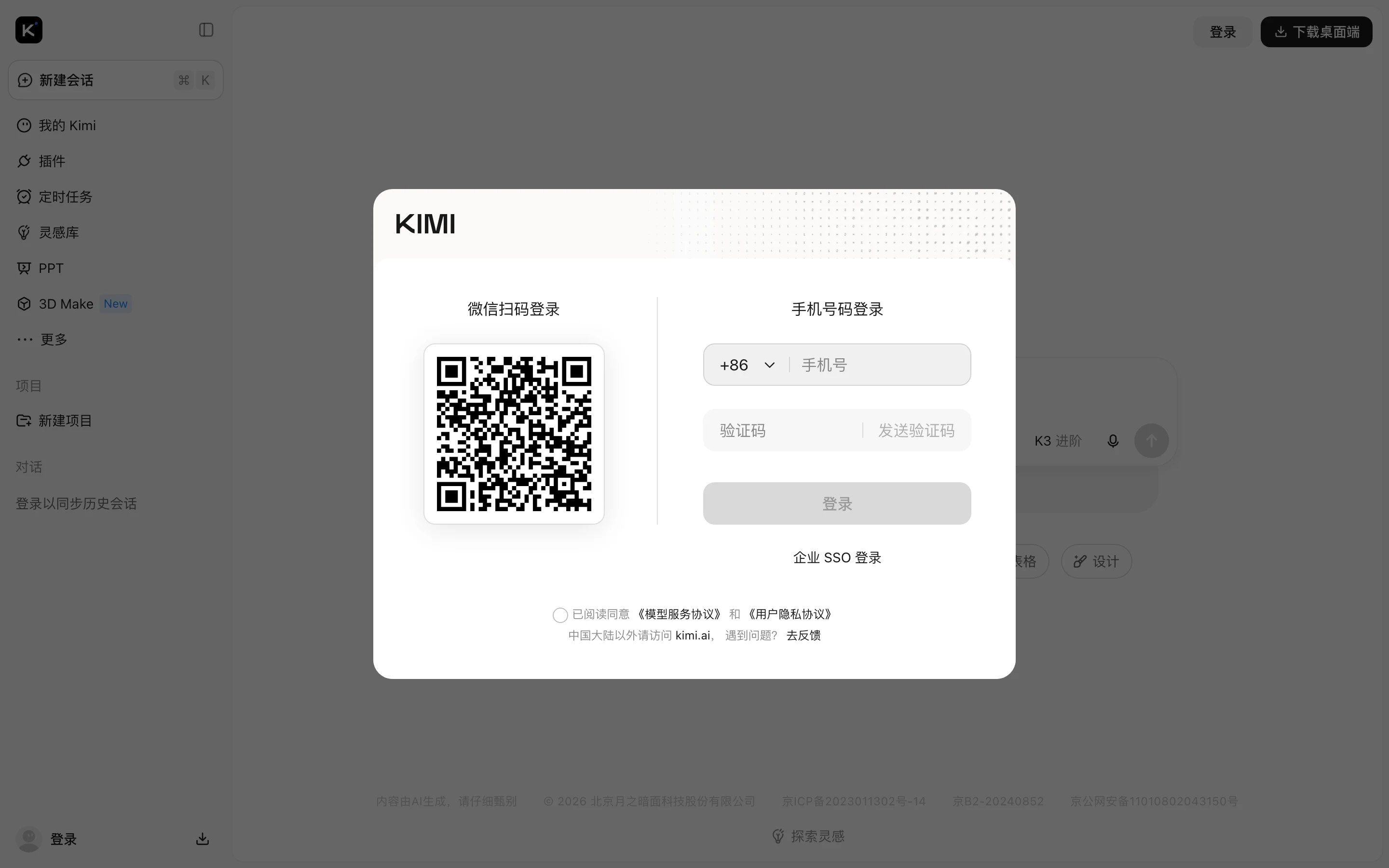
Figure 6: Live capture of the www.kimi.com login prompt. Notice the fine print at the bottom—“Access kimi.ai outside Mainland China”—meaning proxy routing drift between Mainland and international endpoints instantly triggers cross-region session mismatches.
Just 24 hours earlier, on November 19, Chinese tech outlets including ITHome, Ifeng Tech, and PChome documented the first major wave when #Kimi崩了# trended across social platforms:
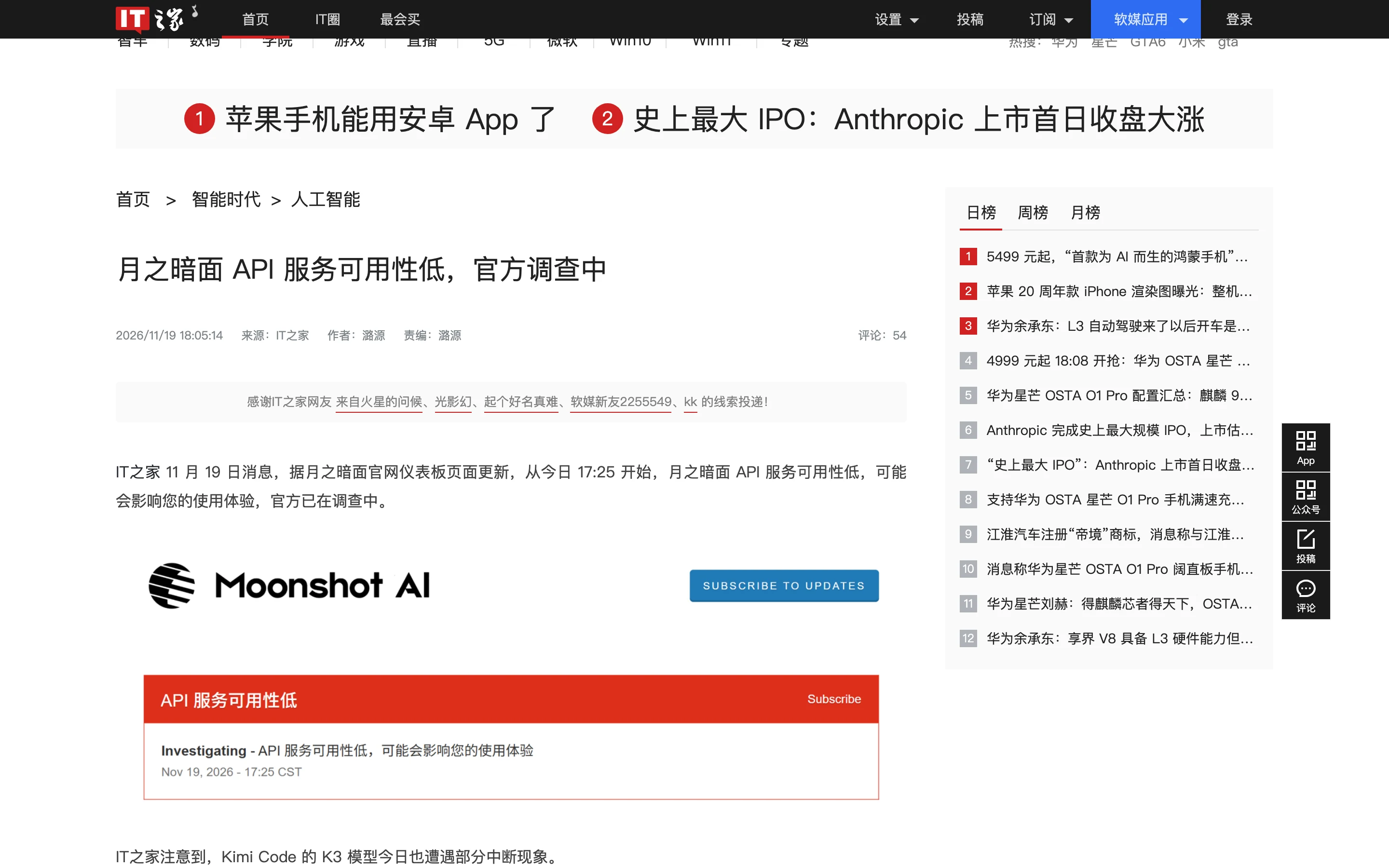
Figure 7: ITHome’s Nov 19 (18:05 CST) coverage capturing Moonshot’s red API 服务可用性低 banner alongside simultaneous Kimi Code K3 interruptions.
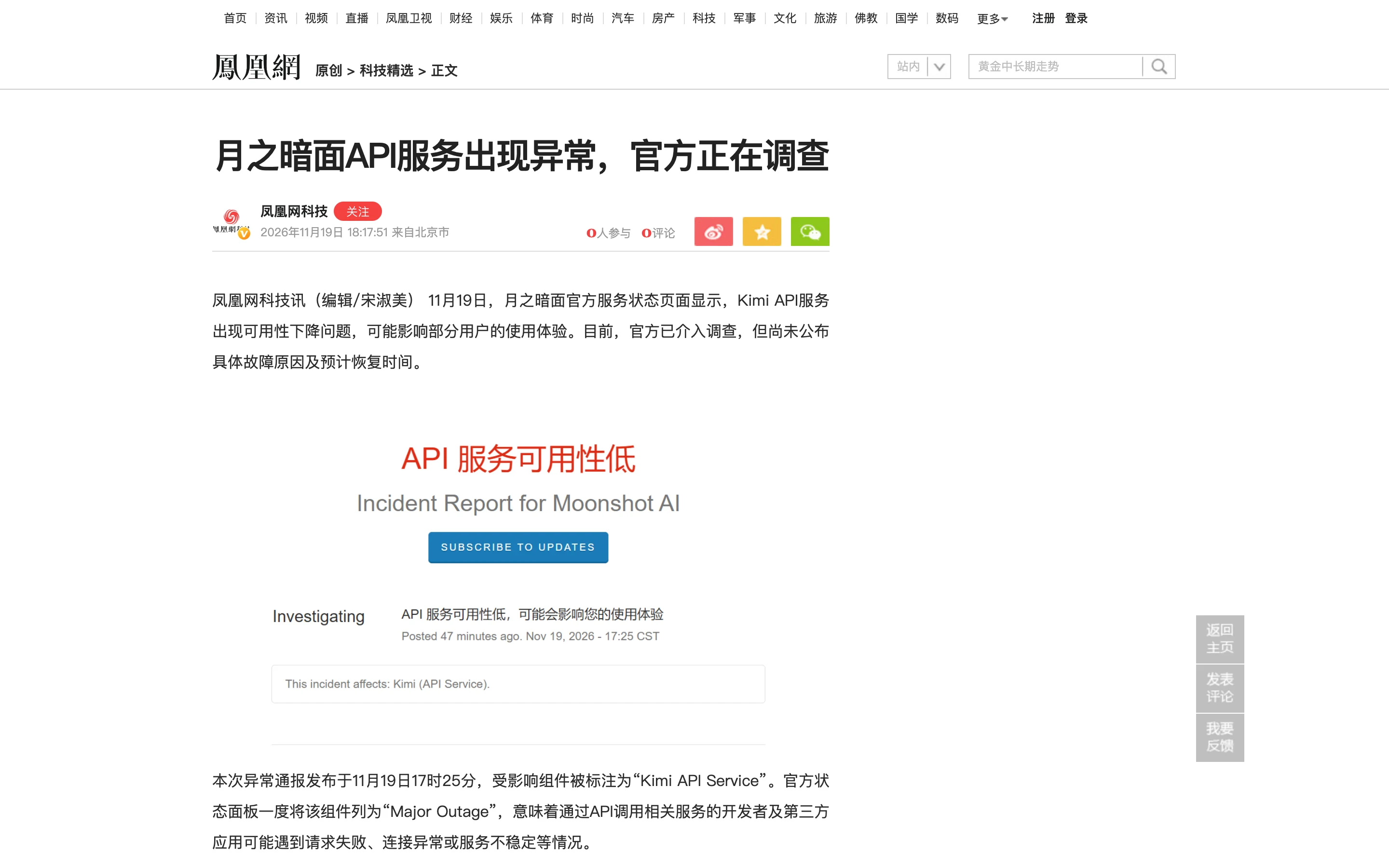
Figure 8: Ifeng Tech’s Nov 19 report confirming the Major Outage escalation. Across PChome and Weibo developer threads, even paying subscribers lost mid-session document analysis and coding runs while backend callers received repeated 4028 failure codes.
3. Everyday Analogies: Why Do 200, 401, 400, and 500 Errors Explode Together?
To understand why a single platform disruption produces four totally different error codes at the same moment, forget distributed microservices jargon for two minutes and picture Kimi as a packed late-night buffet restaurant.
Analogy 1: The Neon Sign Is Lit (200 OK), While the Card Reader and Kitchen Are Jammed
- The Front Neon Sign & Paper Menu (
www.kimi.comreturns200 OK): You walk up to the door and see bright neon lights and a host handing out blank paper menus. It looks completely open—that's the static CSR browser shell. No actual food has been ordered yet; - The Broken Membership Card Scanner (
401 / 500 database=membership_): You swipe your badge to log in or check your dining tier, but the card reader lost its wire to the member ledger. It spits your card back out screaming "Invalid session, log in again (401)" or crashes with "Account lookup failed (500)"; - The Jammed Queue Ticket Machine (
500 rate limit script / 429): Even guests who sneak inside must pull a ticket from the quota counter (tracking 5-hour and 7-day rolling limits via Redis Lua). Under a stampede of anxious retries, the ticket machine runs out of ink and jams (500); - The Overheated Kitchen Stoves (
Partial Outage / 4028 / 504): Orders that reach the kitchen find chefs running on emergency backup stoves. Halfway through stir-frying your code, the breaker trips—leaving your browser spinner spinning forever or spitting out drop code4028.
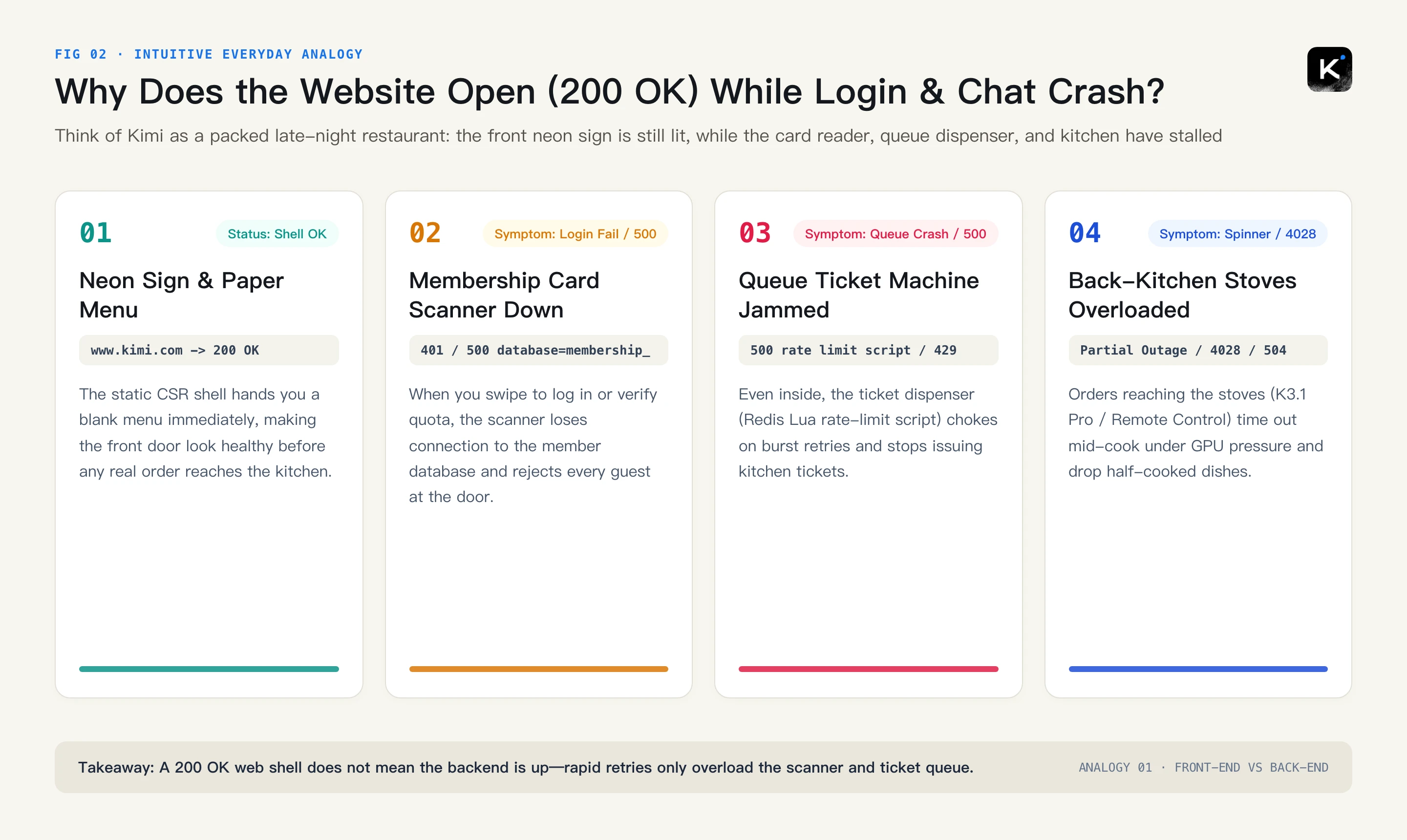
Figure 9: Original restaurant analogy explaining how a static 200 OK front-end shell hides catastrophic failures at the membership scanner, queue machine, and kitchen stoves.
Analogy 2: Why Does a Kitchen Power Cut (500) Make the Counter Blame Your Order Slip (400)?
This is the single most frustrating puzzle tonight. Developers keep asking: “I didn’t change a single line of code! Why did a server 500 crash suddenly turn into non-stop 400 Bad Request errors when I clicked Retry?”
- Step 1 — Mid-Dish Power Cut (
500): You ordered a complex dish where the chef first sketches a scratchpad plan (reasoning_content) and calls prep tools. Halfway through plating, the stove trips (500 i/o timeout) and hands back a half-torn receipt; - Step 2 — Your Client Saves the Torn Receipt: Auto-retry logic in chat apps and IDE plugins appends that incomplete assistant message—missing its
reasoning_contentor holding an unclosedtool_call_id—into your local conversation array; - Step 3 — Strict Front-Desk Security Blocks Every Retry (
400): Even two minutes later when power returns, hitting Retry sends that torn order slip straight into K3.1 Pro's ultra-strict input validator. The validator immediately rejects it with400 thinking is enabled but reasoning_content is missing. Because you keep retrying the poisoned history, the 400 loop never heals until you start a clean thread!
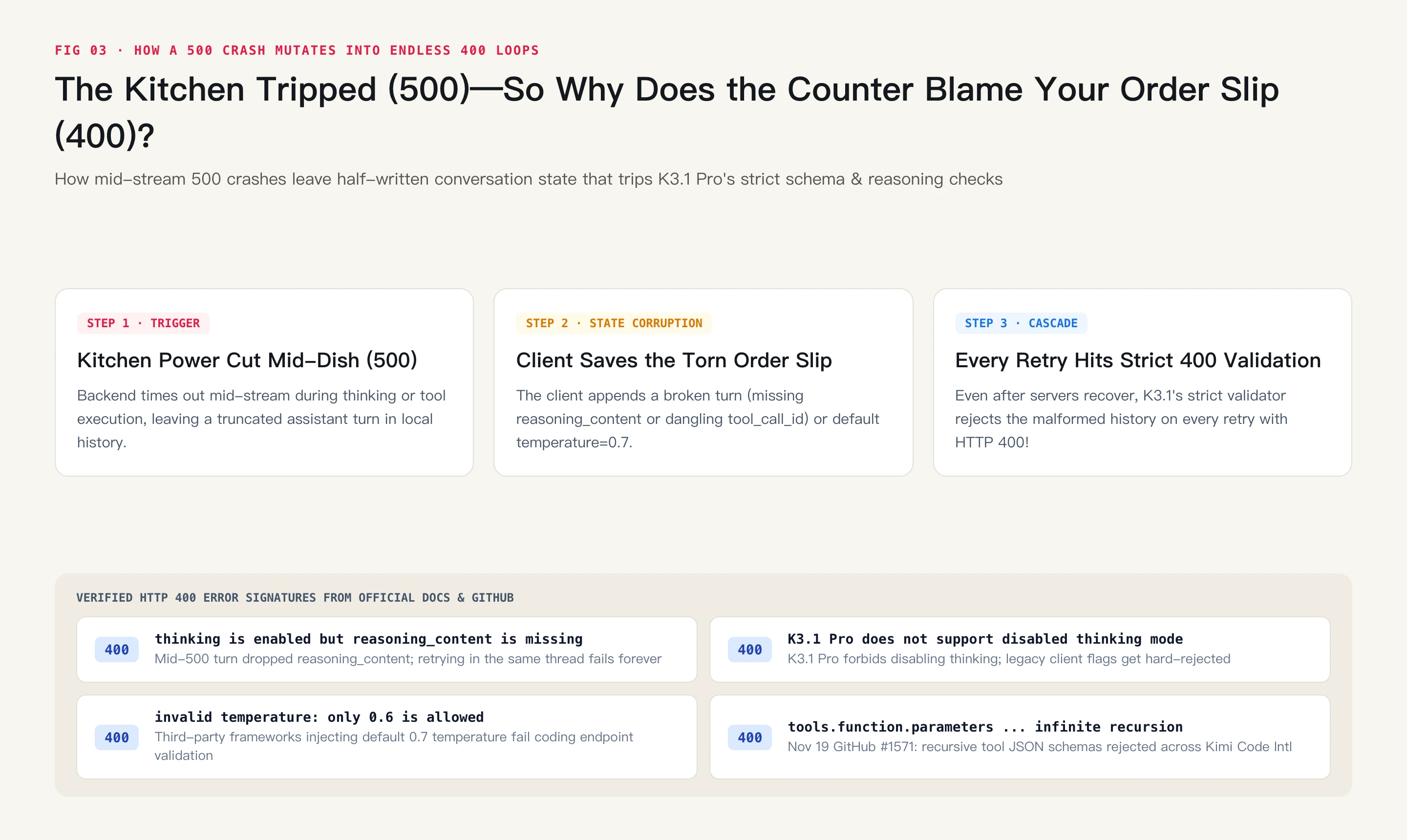
Figure 10: Original analogy showing how mid-stream 500 disconnects poison local multi-turn state and lock clients into permanent 400 Bad Request rejection loops.
4. Forensic Deep Dive: Reversing Kimi's 4-Layer Architecture From Its Own Error Docs
Combining live endpoint probes, Moonshot’s official Error Reference documentation, and recent GitHub issue trackers lets us reconstruct the exact four-layer cascade behind tonight’s meltdown.
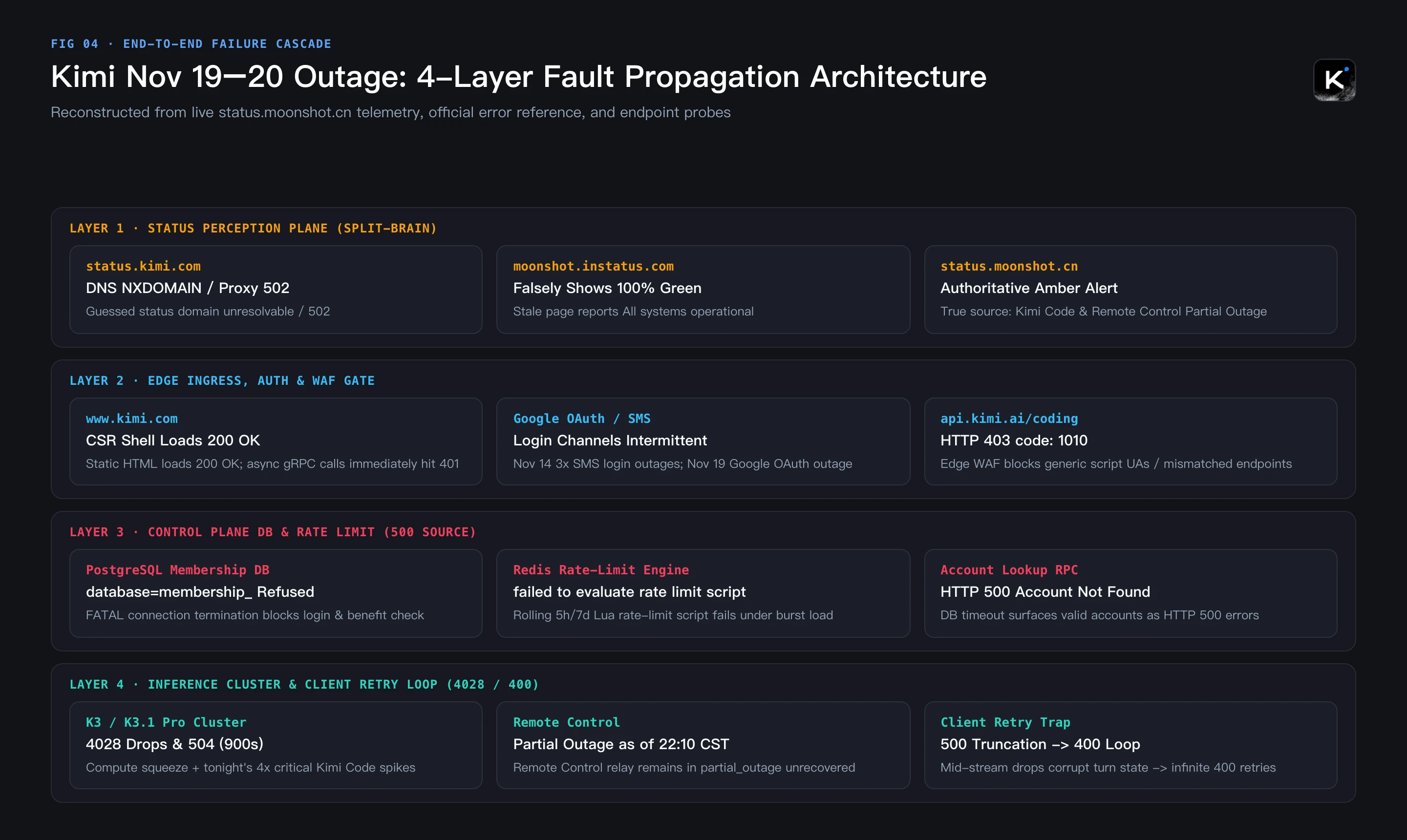
Figure 11: Four-layer technical failure cascade reconstructed from live status telemetry, Kimi Code’s official Error Reference, and direct protocol probes.
1. Control-Plane Bottlenecks Exposed in Kimi's Own 500 Error Reference
Reading the 500 Server Internal Error rows inside Kimi Code’s official documentation (kimi.com/code/docs/kimi-code/error-reference.html) reveals startlingly specific architectural fingerprints:
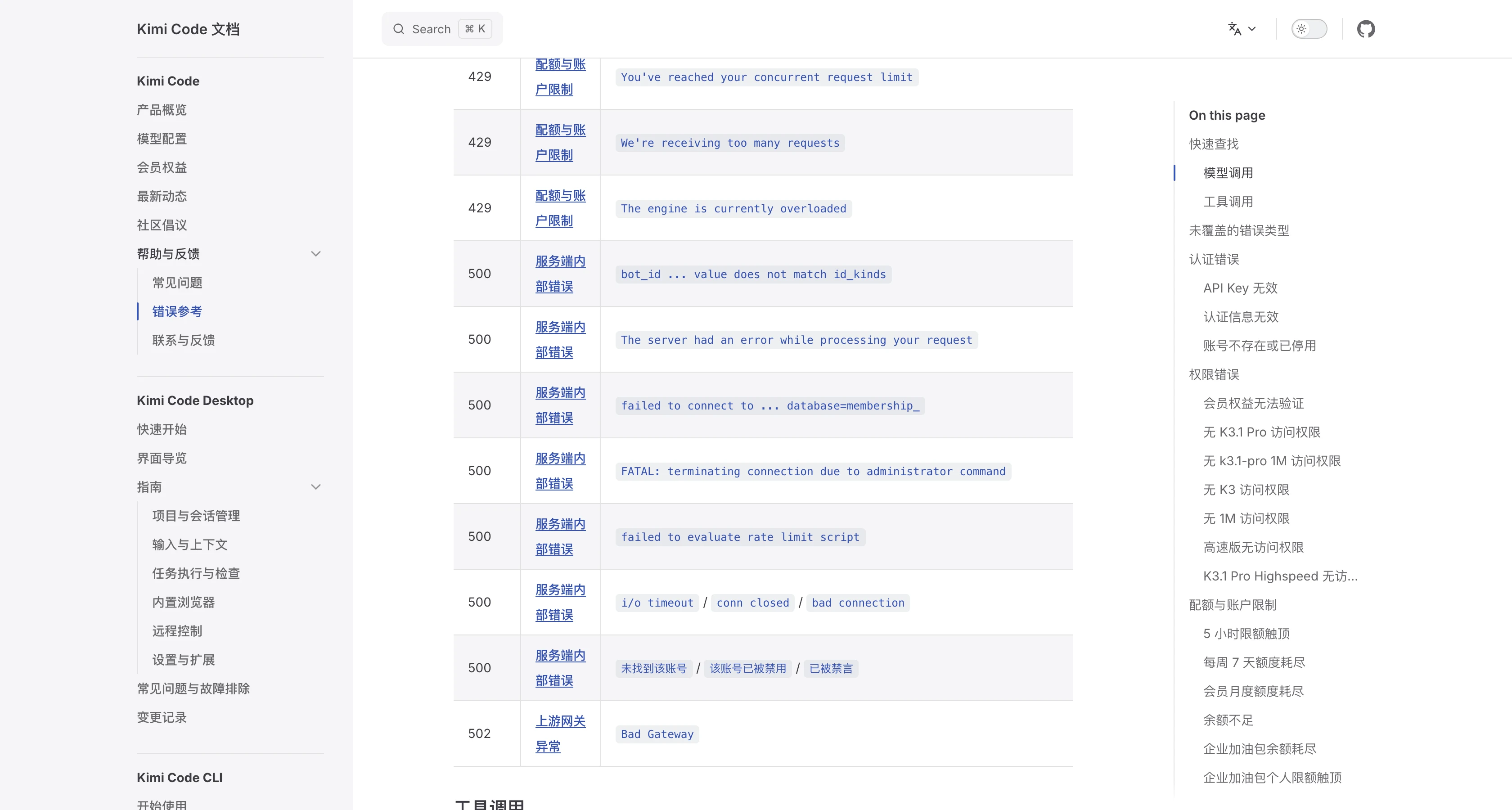
Figure 12: Verbatim screenshot of Kimi Code’s official Error Reference showing 500 internal strings: failed to connect to … database=membership_, FATAL: terminating connection due to administrator command, failed to evaluate rate limit script, and 未找到该账号 (Account not found).
Every SRE recognizes those exact strings immediately:
- PostgreSQL Membership DB on the Critical Path: Both
failed to connect to ... database=membership_andFATAL: terminating connection due to administrator commandare unmistakable PostgreSQL connection-pool exhaustion / forced backend reset signatures. Because subscription verification, quota tiers, and login resolution all touchmembership_synchronously, a DB wobble simultaneously breaks web login (500 Account not found), triggers403 unable to verify your membership benefits, and stalls API inference; - Redis Lua Rate-Limit Script Contention: Kimi's 5-hour, 7-day, and monthly rolling quota pools execute a server-side Lua evaluation script before dispatching inference. Under retry storms,
failed to evaluate rate limit scriptimmediately rejects requests as HTTP500; - Upstream Inference Timeouts & 4028 Drops: Downstream inference workers drop connections with
i/o timeout / conn closed / bad connection, non-streaming requests time out at504 Gateway Time-outafter 900 seconds, and internal gateways surface drop code4028.
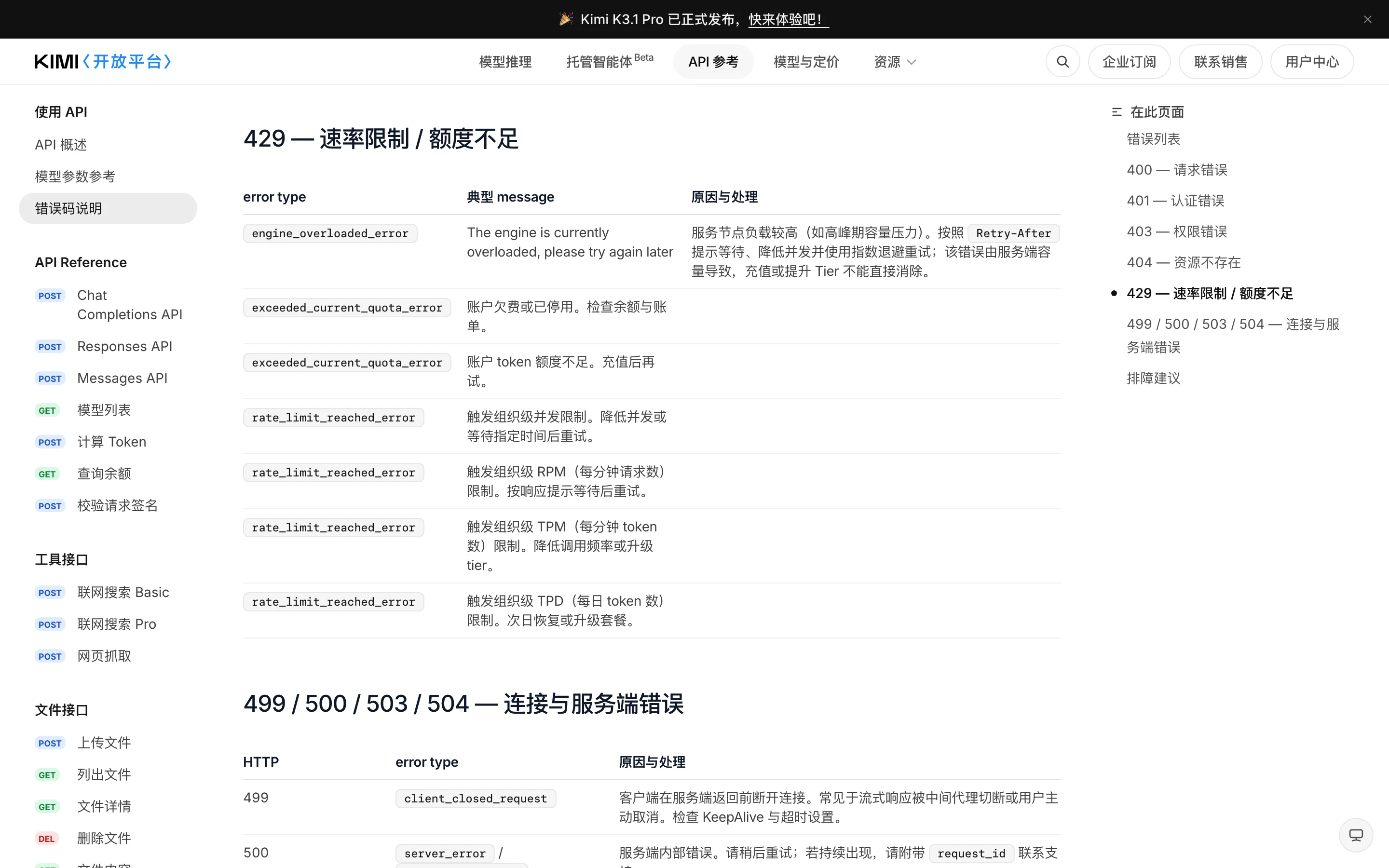
Figure 13: Moonshot’s Open Platform documentation candidly notes under engine_overloaded_error (429): “Caused by server-side capacity; topping up balance or upgrading tiers cannot eliminate this error.”
2. Why 400 Errors Multiply Right Around Every Outage
Meanwhile, the official 400 documentation and fresh open-source issues expose four rigid validation traps that turn minor hiccups into chronic 400 loops:
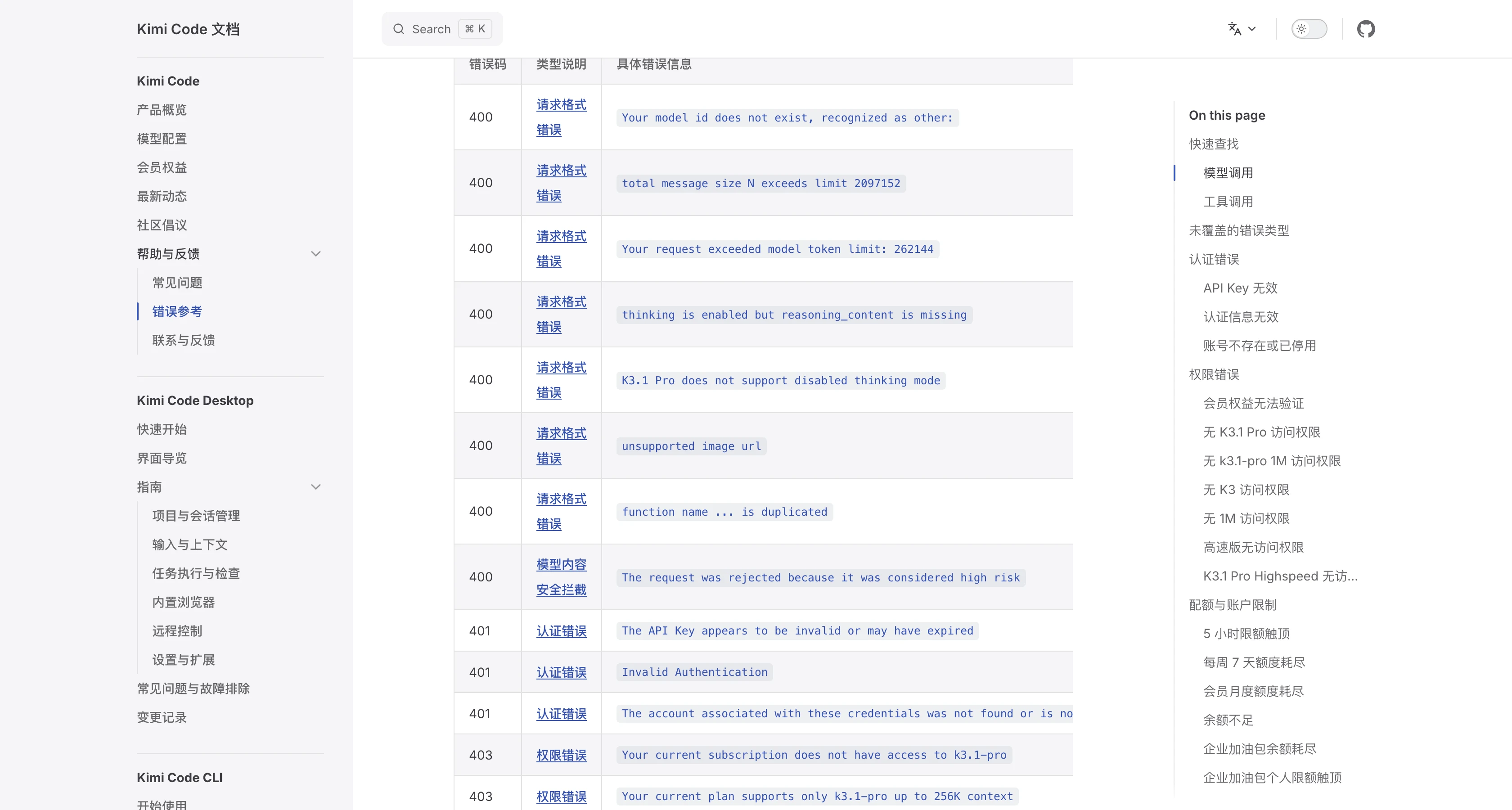
Figure 14: Official Kimi Code 400 / 401 / 403 matrix highlighting thinking is enabled but reasoning_content is missing and K3.1 Pro does not support disabled thinking mode.
- Missing
reasoning_contentAfter Mid-Stream Drops: Any partial turn cut short by a500omits the required reasoning trace; re-sending that thread triggers an instant400; - Forced Thinking Mode Constraint:
K3.1 Pro does not support disabled thinking mode—legacy client toggles attempting to disable reasoning get hard-rejected; - Strict Sampling Temperature Locks: Coding endpoints reject non-standard temperatures (such as Hermes Agent Issue #11765 hitting
HTTP 400: invalid temperature: only 0.6 is allowed); - Recursive JSON Schema Rejection: Just yesterday (Nov 19, 2026),
zai-org/feedback#1571confirmed that forwarding tool definitions containing recursive references toapi.kimi.ai/coding/v1causes every prompt—even a plain "hello"—to fail with400 tools.function.parameters is not a valid moonshot flavored json schema.
3. The Hidden 401 / 403 / 404 Maze: WAF 1010 & Isolated Endpoints
Our live endpoint probes tonight also confirmed two client-side traps disguised as platform outages:
- Edge WAF
403 error code: 1010: Callinghttps://api.kimi.ai/coding/v1/messageswith a generic PythonurllibUser-Agent immediately returnedHTTP 403 error code: 1010at the edge before ever reaching Moonshot's application layer, whereas passing a clean custom orcurlUser-Agent sailed straight through to standard auth validation (401 Invalid Authentication); - Strict Three-Account & Two-Region Isolation: Kimi Web Membership, Kimi Code Plans, and Open Platform Pay-As-You-Go balances do NOT share keys, and Mainland endpoints (
api.moonshot.cn/api.kimi.com/coding/) are completely isolated from International endpoints (api.moonshot.ai/api.kimi.ai/coding/). Mixing regions or hitting mismatched HTTP paths immediately produces401or404 url.not_found.
5. Seven-Day Escalation Timeline & The Compute Capacity Squeeze
Placing Moonshot’s November incident log beside this week’s geopolitical compute headlines shows tonight’s instability didn’t materialize out of thin air:
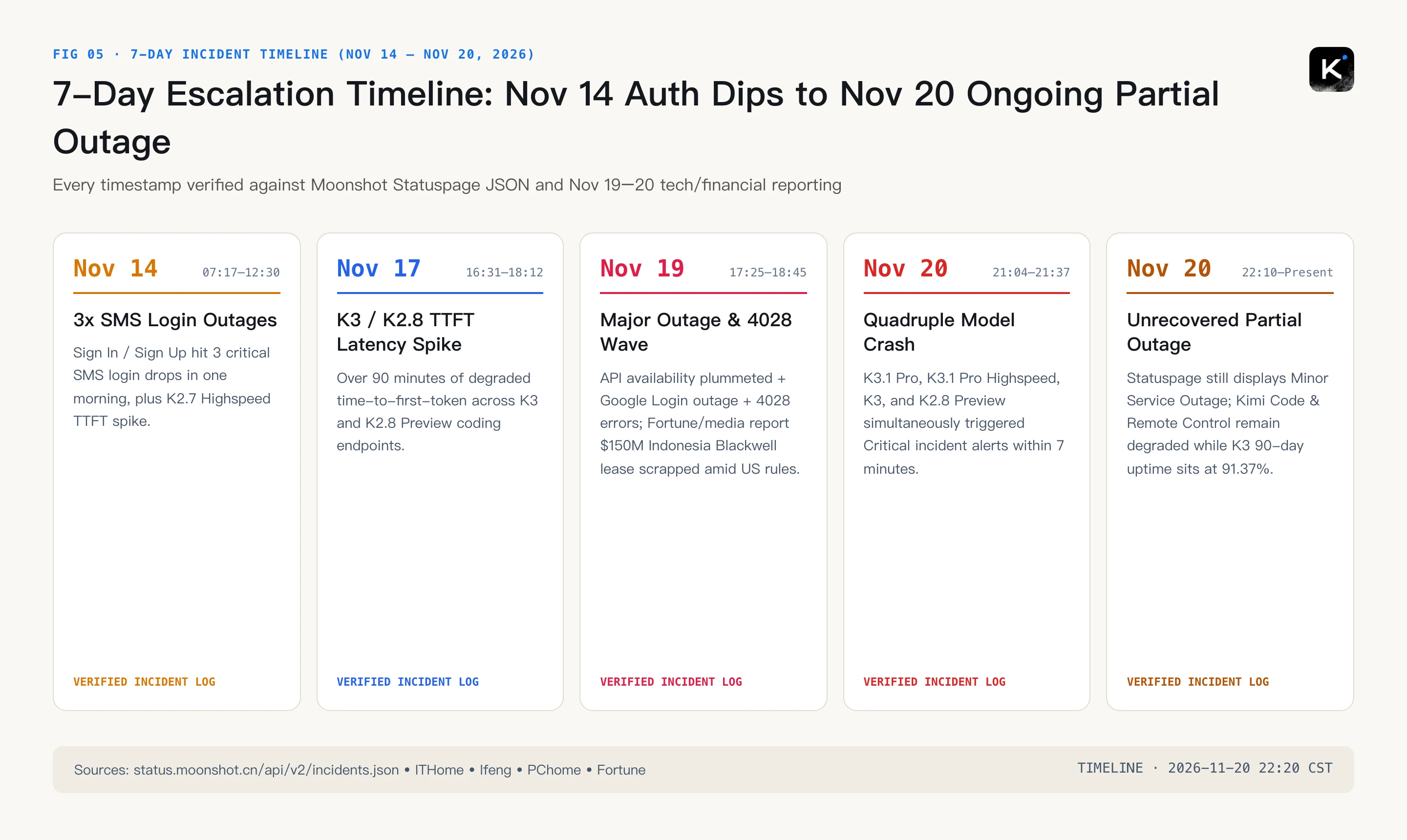
Figure 15: Verified 7-day incident escalation timeline constructed from Moonshot Statuspage JSON and Nov 19–20 media reporting.
- Nov 14 (07:17–12:30 & 23:43 CST): Three separate
CriticalSMS login outages struckSign In / Sign Upin a single morning, followed by severe TTFT latency spikes onK2.7 Code Highspeed; - Nov 17 (16:31–18:12 CST): Over 90 minutes of degraded time-to-first-token latency across
K3andK2.8 Preview; - Nov 19 (17:25–18:45 CST):
API 服务可用性低escalated to a fullMajor Outagealongside aGoogle Loginoutage and widespread4028errors. On the very same day, Fortune and financial outlets reported that Moonshot scrapped a $150 million Southeast Asian (Indonesian) data center lease for Nvidia Blackwell Ultra B300 compute following new Nov 16–19 U.S. BIS rules tightening remote compute access; - Nov 20 Tonight (21:04–22:20+ CST): Four simultaneous
CriticalKimi Code incidents erupted at 21:04–21:37, leavingKimi CodeandRemote Controlstill inPartial Outagelate tonight.
6. How to Diagnose & Recover: Zero-Dependency 3-OS Playbook (Manual + AI Agent Modes)
When an outage hits, the most valuable step is cleanly separating upstream server failures (wait with backoff) from local 400/WAF/DNS traps (fix in seconds). We built a suite of zero-third-party-dependency triage scripts for macOS 27, Ubuntu 26.04, and Windows 11 that query Moonshot’s own public endpoints directly, detect status split-brain, audit local configs/sessions, and support both Human Interactive Dashboards and AI Agent JSON automation.
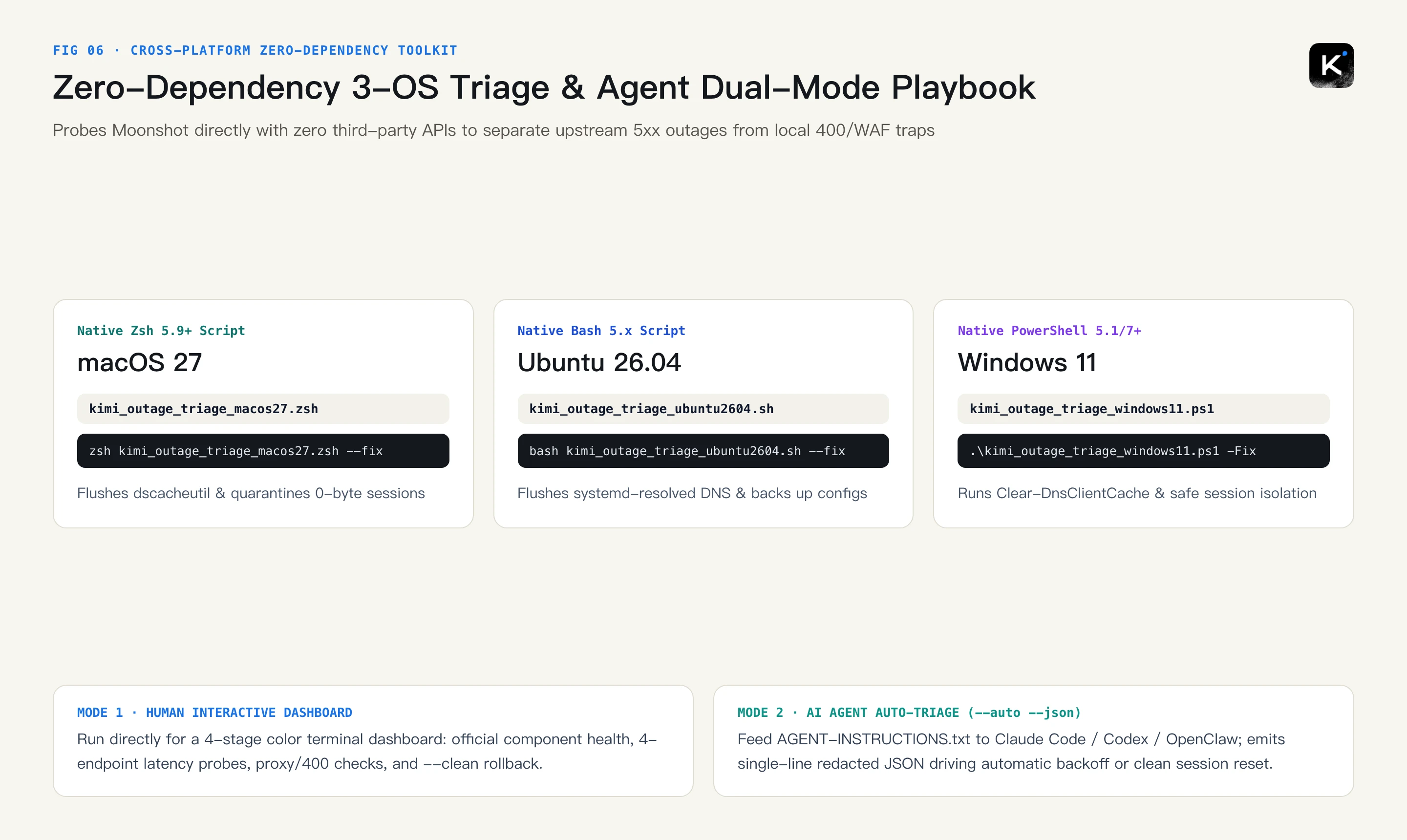
Figure 16: Cross-platform 3-OS triage and safe remediation workflow supporting both human interactive execution and AI Agent JSON pipelines.
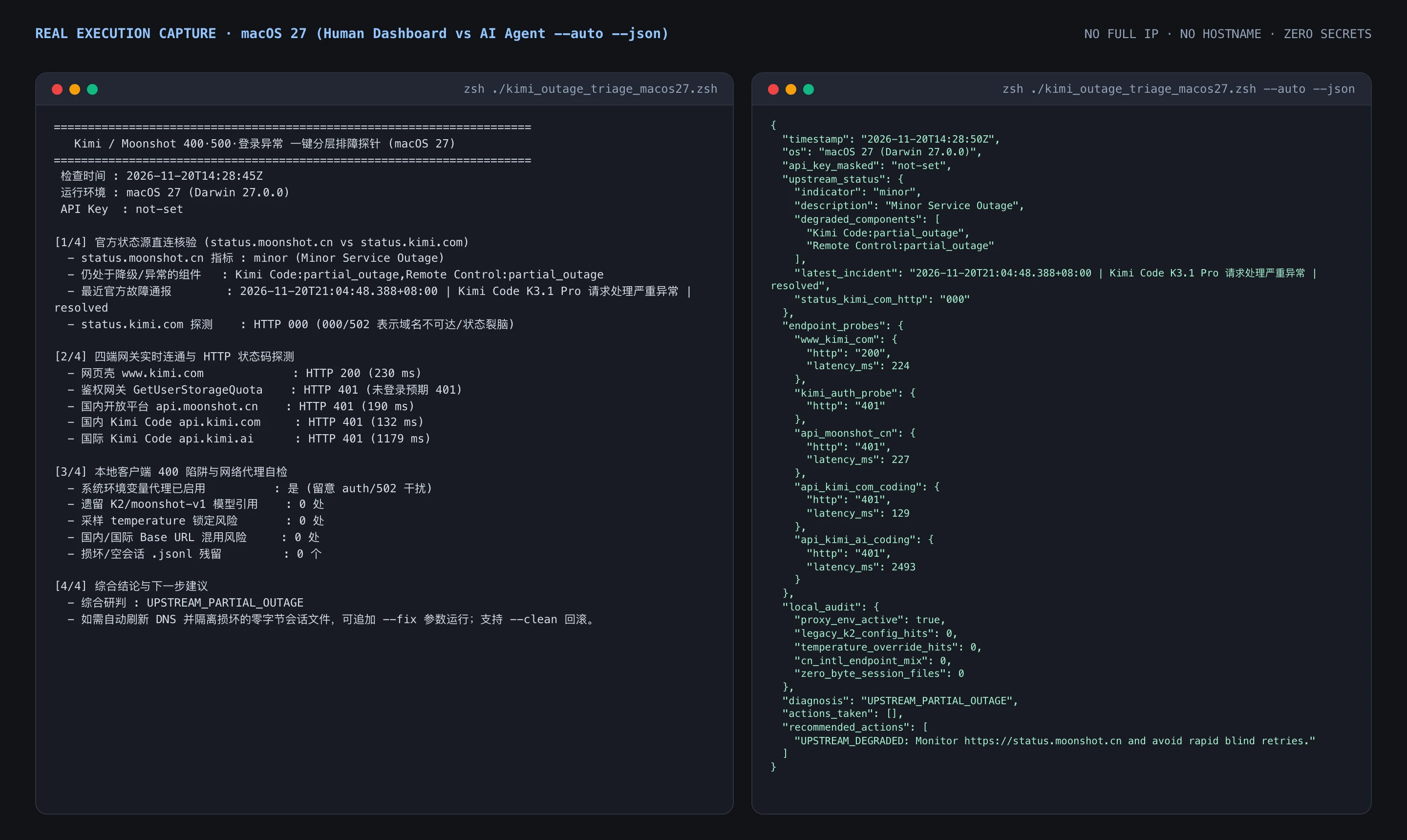
Figure 17: Live execution captured tonight (Nov 20, 2026 at 22:28 CST) on macOS 27 with all sensitive hostnames and full IPs omitted. Left: Human dashboard catching live minor (Minor Service Outage), Kimi Code:partial_outage, Remote Control:partial_outage, and status.kimi.com HTTP 000. Right: Single-line sanitized JSON for AI Agents.
Download the Complete Toolkit Bundle & Checksums:
- Full Archive: kimi-outage-triage-toolkit.zip (SHA256SUMS.txt)
- Agent Manifest: AGENT-INSTRUCTIONS.txt
Method 1: Manual One-Click Execution Across All 3 Operating Systems
1. macOS 27 (Native Zsh 5.9+, Zero Dependencies)
Download kimi_outage_triage_macos27.zsh and run:
curl -fsSL https://blog.margrop.net/downloads/kimi-outage-2026-400-500-login-root-cause-guide/kimi_outage_triage_macos27.zsh -o kimi_outage_triage_macos27.zsh
chmod +x kimi_outage_triage_macos27.zsh
# 1) Read-only diagnostic dashboard
zsh ./kimi_outage_triage_macos27.zsh
# 2) Safe remediation (flush macOS DNS + backup configs + quarantine 0-byte sessions)
zsh ./kimi_outage_triage_macos27.zsh --fix
# 3) Rollback local config backups anytime
zsh ./kimi_outage_triage_macos27.zsh --clean
Expand macOS 27 core diagnostic logic (full script available via download link above)
#!/usr/bin/env zsh
emulate -L zsh
set -euo pipefail
STATUS_JSON="$(curl -sS --max-time 8 "https://status.moonshot.cn/api/v2/summary.json" 2>/dev/null || true)"
curl -sS -m 8 -A "kimi-triage/1.0" -o /dev/null -w "api.kimi.com -> HTTP %{http_code} (%{time_total}s)\n" \
  -X POST -H "Content-Type: application/json" \
  -d '{"model":"kimi-for-coding","max_tokens":4,"messages":[{"role":"user","content":"ping"}]}' \
  "https://api.kimi.com/coding/v1/messages"
# Safe local cleanup under --fix:
dscacheutil -flushcache 2>/dev/null || true
find "$HOME/.kimi/sessions" -type f -name "*.jsonl" -size 0c 2>/dev/null
2. Ubuntu 26.04 (Native Bash 5.x, Zero Dependencies)
Download kimi_outage_triage_ubuntu2604.sh and run:
curl -fsSL https://blog.margrop.net/downloads/kimi-outage-2026-400-500-login-root-cause-guide/kimi_outage_triage_ubuntu2604.sh -o kimi_outage_triage_ubuntu2604.sh
chmod +x kimi_outage_triage_ubuntu2604.sh
# 1) Read-only diagnostic dashboard
bash ./kimi_outage_triage_ubuntu2604.sh
# 2) Flush systemd-resolved DNS & quarantine broken 0-byte sessions
bash ./kimi_outage_triage_ubuntu2604.sh --fix
# 3) Rollback local config backups
bash ./kimi_outage_triage_ubuntu2604.sh --clean
Expand Ubuntu 26.04 core diagnostic snippet (full script available via download link above)
#!/usr/bin/env bash
set -euo pipefail
STATUS_JSON="$(curl -sS --max-time 8 "https://status.moonshot.cn/api/v2/summary.json" 2>/dev/null || true)"
if command -v resolvectl >/dev/null 2>&1; then resolvectl flush-caches 2>/dev/null || true; fi
find "$HOME/.kimi/sessions" -type f -name "*.jsonl" -size 0c 2>/dev/null
3. Windows 11 (Native PowerShell 5.1 / 7+, Zero Dependencies)
Download kimi_outage_triage_windows11.ps1 and execute directly without WSL or external dependencies:
Invoke-WebRequest -Uri "https://blog.margrop.net/downloads/kimi-outage-2026-400-500-login-root-cause-guide/kimi_outage_triage_windows11.ps1" -OutFile ".\kimi_outage_triage_windows11.ps1"
# 1) Read-only diagnostic dashboard
powershell -ExecutionPolicy Bypass -File .\kimi_outage_triage_windows11.ps1
# 2) Flush Windows DNS client cache & isolate broken session files
powershell -ExecutionPolicy Bypass -File .\kimi_outage_triage_windows11.ps1 -Fix
# 3) Rollback backups
powershell -ExecutionPolicy Bypass -File .\kimi_outage_triage_windows11.ps1 -Clean
Expand Windows 11 core PowerShell snippet (full script available via download link above)
[Net.ServicePointManager]::SecurityProtocol = [Net.SecurityProtocolType]::Tls12
$sum = Invoke-RestMethod -Uri "https://status.moonshot.cn/api/v2/summary.json" -TimeoutSec 8
Write-Host "Moonshot Indicator: $($sum.status.indicator) - $($sum.status.description)"
Clear-DnsClientCache
Method 2: Autonomous AI Agent Configuration (Claude Code / Codex / OpenClaw)
Paste the task prompt below into your coding agent so it automatically fetches the OS-appropriate script, checks SHA-256 hashes, executes –auto –json, and applies safe backoff or config fixes based on live machine-readable output:
My Kimi / Kimi Code setup is failing with login issues, 400, and 500 errors tonight. Please triage and resolve automatically:
1. Read https://blog.margrop.net/downloads/kimi-outage-2026-400-500-login-root-cause-guide/AGENT-INSTRUCTIONS.txt and verify SHA256SUMS.txt.
2. Download the matching script for my OS (macOS 27 / Ubuntu 26.04 / Windows 11).
3. Run it in read-only Agent JSON mode (--auto --json or -Auto -Json) and inspect upstream_status plus local_audit.
4. If Moonshot is still in partial_outage, pause rapid retries and switch my workflow to exponential backoff or fallback routing; if local_audit detects K2 leftovers, temperature locks, or zero-byte session files, run --fix and start a clean thread.
7. Five Golden Rules to Survive AI Platform Outages
- Bookmark the real status authority: Track
status.moonshot.cn(or its JSON API) directly rather than trusting unresolvablestatus.kimi.comor stale green Instatus mirrors; - Start a fresh thread after any 500 crash: Never hammer Retry inside a session interrupted mid-thinking—otherwise K3.1 Pro's
reasoning_contentrules lock you into infinite400errors; - Keep three wallets and two regions strictly separated: Web Membership, Kimi Code Plan, and Open Platform API keys are non-transferable, and Mainland vs. International endpoints never mix;
- Set clean User-Agent headers and strip forced sampling overrides: Avoid generic script UAs hitting Cloudflare/WAF
403 1010onapi.kimi.ai, and avoid passing invalid temperatures or disabled-thinking flags to K3.1 Pro; - Maintain a multi-provider fallback route: Between regulatory compute bottlenecks and control-plane DB/Redis contention, single-vendor dependency is a production liability.
8. FAQ: Seven Sharp Questions Everyone Is Asking Tonight
Q1: Why can my teammate still squeeze messages through while I'm stuck at login or 401/500?
During a Partial Outage, shards fail unevenly. A teammate whose browser still holds a valid, cached session token bypasses overloaded login/membership_ DB paths, whereas any expired cookie or proxy IP shift immediately triggers 401 or 500 validation errors.
Q2: What does error code 4028 mean? Was my account banned or out of credits?
Neither. As observed across Nov 19–20 developer logs and media coverage, 4028 is a server-side internal gateway/inference failure code during capacity crunches. True quota exhaustion returns HTTP 429 (exceeded_current_quota_error or 5-hour usage limit).
Q3: If 500 is Moonshot's fault, why am I also seeing so many 400 Bad Request errors?
Three causes collide: poisoned history missing reasoning_content after a mid-stream 500 drop; rigid K3.1 Pro parameter rules (forbidding disabled thinking and locking temperature); and third-party tool schemas containing recursive references (as documented in zai-org/feedback#1571 on Nov 19).
Q4: When will Kimi Code and Remote Control fully recover tonight?
As of 22:25 CST on Nov 20, 2026, status.moonshot.cn still reports Minor Service Outage with Kimi Code and Remote Control in Partial Outage following tonight's 21:04–21:37 quadruple critical alerts. Intermittent jitter may persist until connection pools and retry queues drain completely.
Q5: Will canceling the $150M Indonesian Blackwell lease cause chronic Kimi outages?
Tightened U.S. BIS remote-compute rules undeniably complicate rapid offshore capacity scaling right as K3.1 Pro coding agents consume surging GPU hours. Expect tighter peak-hour engine_overloaded_error throttling in the near term while domestic compute clusters and scheduling optimizations catch up.
Q6: Is HTTP 403 error code: 1010 an IP ban?
Usually no—it is an edge WAF signature block. In our live probes tonight, default Python urllib User-Agents received 403 error code: 1010 on api.kimi.ai/coding/v1/messages while standard curl and custom headers passed straight through.
Q7: What are the three simplest steps for non-technical web users tonight?
First, check status.moonshot.cn before refreshing endlessly; second, open a brand-new chat thread rather than clicking Regenerate inside a thread that crashed mid-reply; third, temporarily disable misrouted proxies and clear site cookies if SMS/QR login stalls on www.kimi.com.