Pricier Mac, Longer Wait: Why the $899 Mac mini M6 Ships in a Month While the $5,499 Mac Studio M5 Ultra Takes Three
The short version
Apple just refreshed its entire desktop lineup at once: Mac mini (M6 / M5 Pro) and Mac Studio (M5 Max / M5 Ultra), all launching September 22. But open the store and you will notice something counter-intuitive: the cheapest Mac mini M6 arrives in about a month, while high-end Mac Studio M5 Ultra configs are queued out to three months or more.
This is not Apple trolling its wealthiest customers. It is a very standard supply-chain equation: ship date = stockpile ÷ order rate. The M5 Ultra happens to max out both sides in the wrong direction — a dual-die package that ramps yield slowly, a flagship 512GB memory option that only goes on sale in late October, and an AI crowd fighting over unified memory. This post breaks down the four machines first, then dissects exactly why the most expensive one ships last.
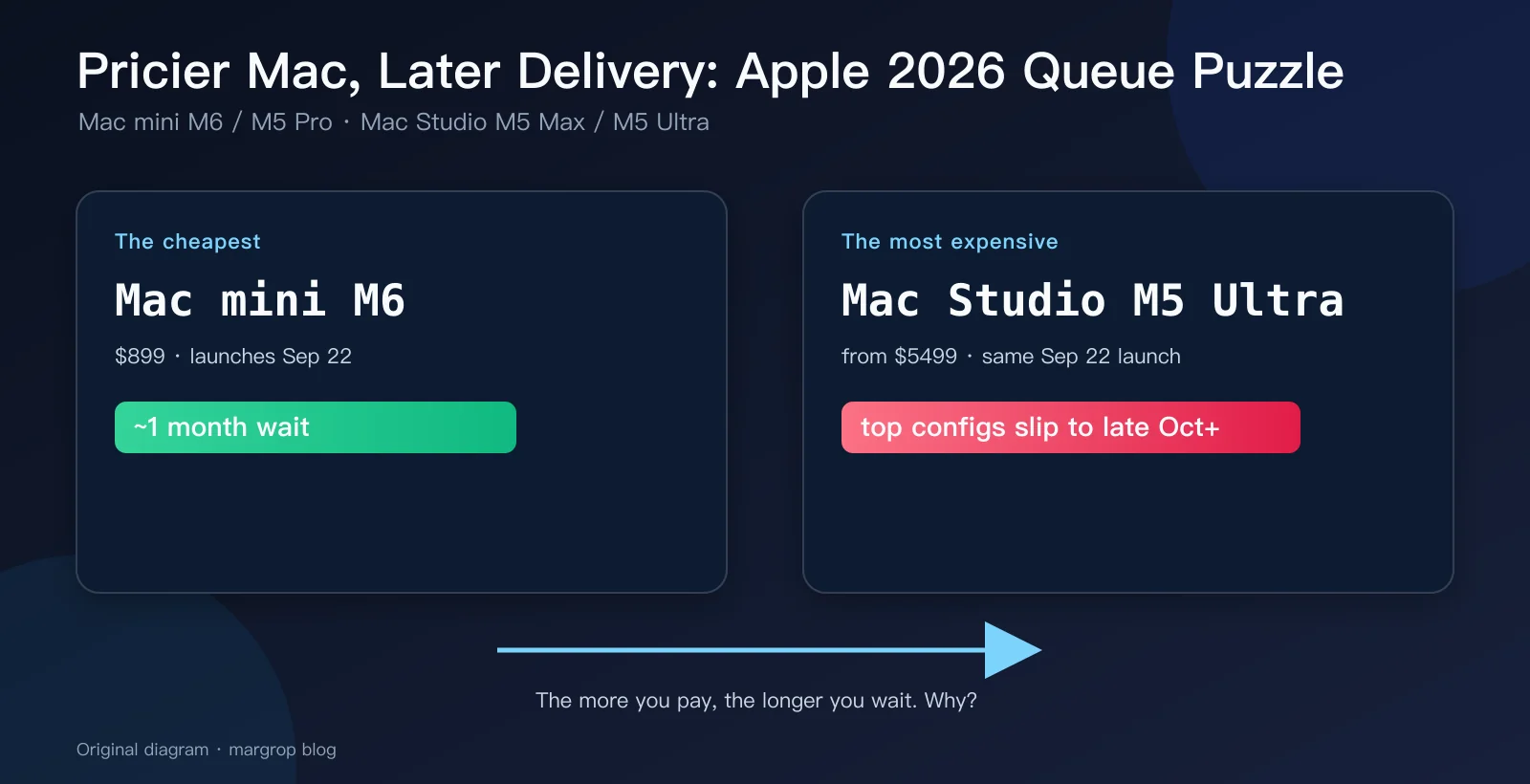
Figure 1: Same launch day, wildly different delivery dates. Original diagram.
Background: what Apple actually launched in August
In August 2026, Apple refreshed its whole desktop Mac line. One oddity: chip naming is “misaligned” for the first time. The Mac mini gets the brand-new M6 (Apple’s first 2nm chip) alongside the previous-generation M5 Pro; the Mac Studio keeps the M5 family with M5 Max and M5 Ultra.
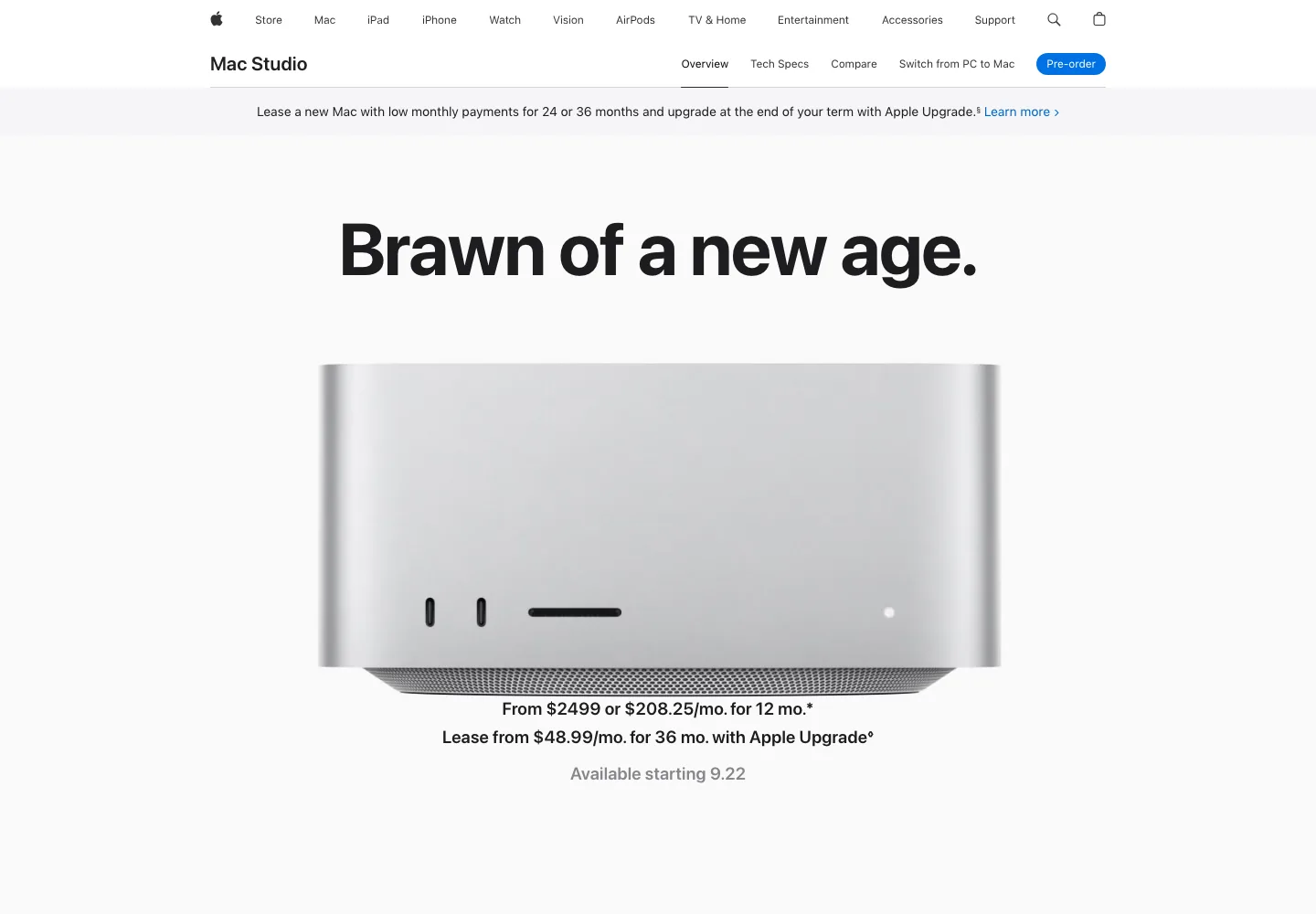
Figure 2: The Mac Studio homepage, “Brawn of a new age.” Real screenshot from apple.com.
Why the strange “M6 next to M5 Pro” pairing? Simple: M5 Pro and M5 Max finished their production ramp earlier this year in the MacBook Pro — they are shelf chips. M6 is a brand-new process node that just came off the line, so it goes to the volume seller first. Apple has no M6 Pro ready in 2026, so the higher-end Mac mini gets M5 Pro as a stopgap.
The four machines in one table
Here are the core specs side by side (from Apple’s tech specs pages, August 2026):
| Model | Mac mini M6 | Mac mini M5 Pro | Mac Studio M5 Max | Mac Studio M5 Ultra |
|---|---|---|---|---|
| Entry price (US) | $899 | $1,699 | $2,499 | $5,499 |
| Process | 2nm | 3nm | 3nm | 3nm, dual-die |
| CPU | 12-core | 15-18-core | 18-core | 30-36-core |
| GPU | 12-core | 16-20-core | 32-40-core | 64-80-core |
| Unified memory | 16-32GB | 24-64GB | 36-128GB | 96-512GB |
| Memory bandwidth | 153-170GB/s | 307GB/s | 460-614GB/s | 1.2TB/s |
| Thunderbolt | 3x TB4 | 3x TB5 | 4x TB5 | 6x TB5 |
| External displays | up to 3 | up to 3 | up to 5 | up to 8 |
| SSD | 256GB-2TB | 512GB-8TB | 512GB-8TB | 1TB-16TB |
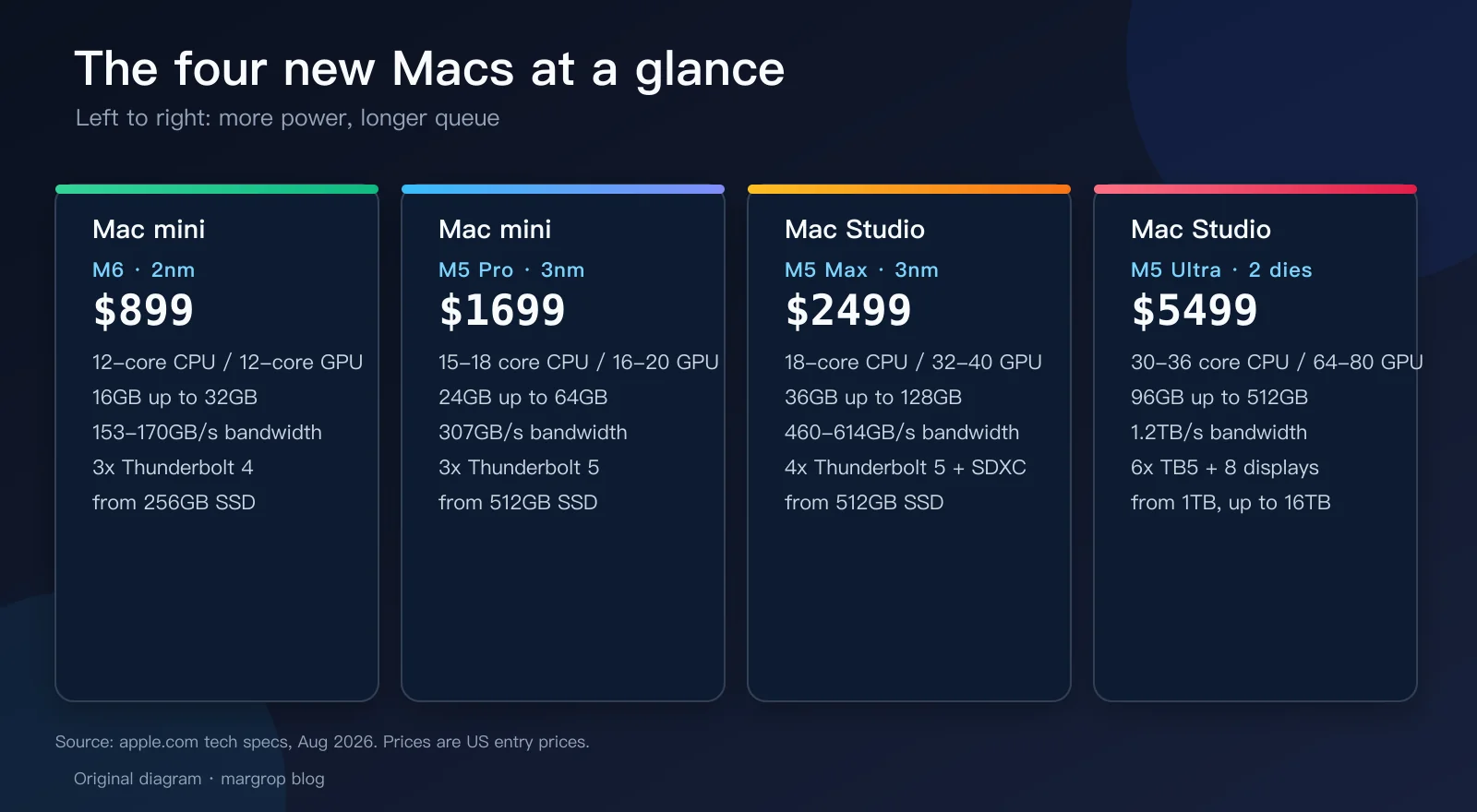
Figure 3: The lineup at a glance. Original diagram.
A few details worth noting:
- M6 is Apple’s first 2nm chip, claimed up to 4.8x faster than M4, with a first-ever dual 16-core Neural Engine. But it ships only in the Mac mini — no M6 Pro/Max/Ultra this year, because early 2nm capacity goes to the volume machine.
- M5 Ultra is literally two M5 Max dies fused together, in what Apple calls a quad-die architecture — a first for Apple silicon. 1.2TB/s of memory bandwidth, up to 512GB unified memory, 8 external displays, 33 simultaneous streams of 8K ProRes.
- Every Mac Studio supports Thunderbolt 5 clustering: Apple’s own number is up to 3x faster AI inference with a four-machine cluster.
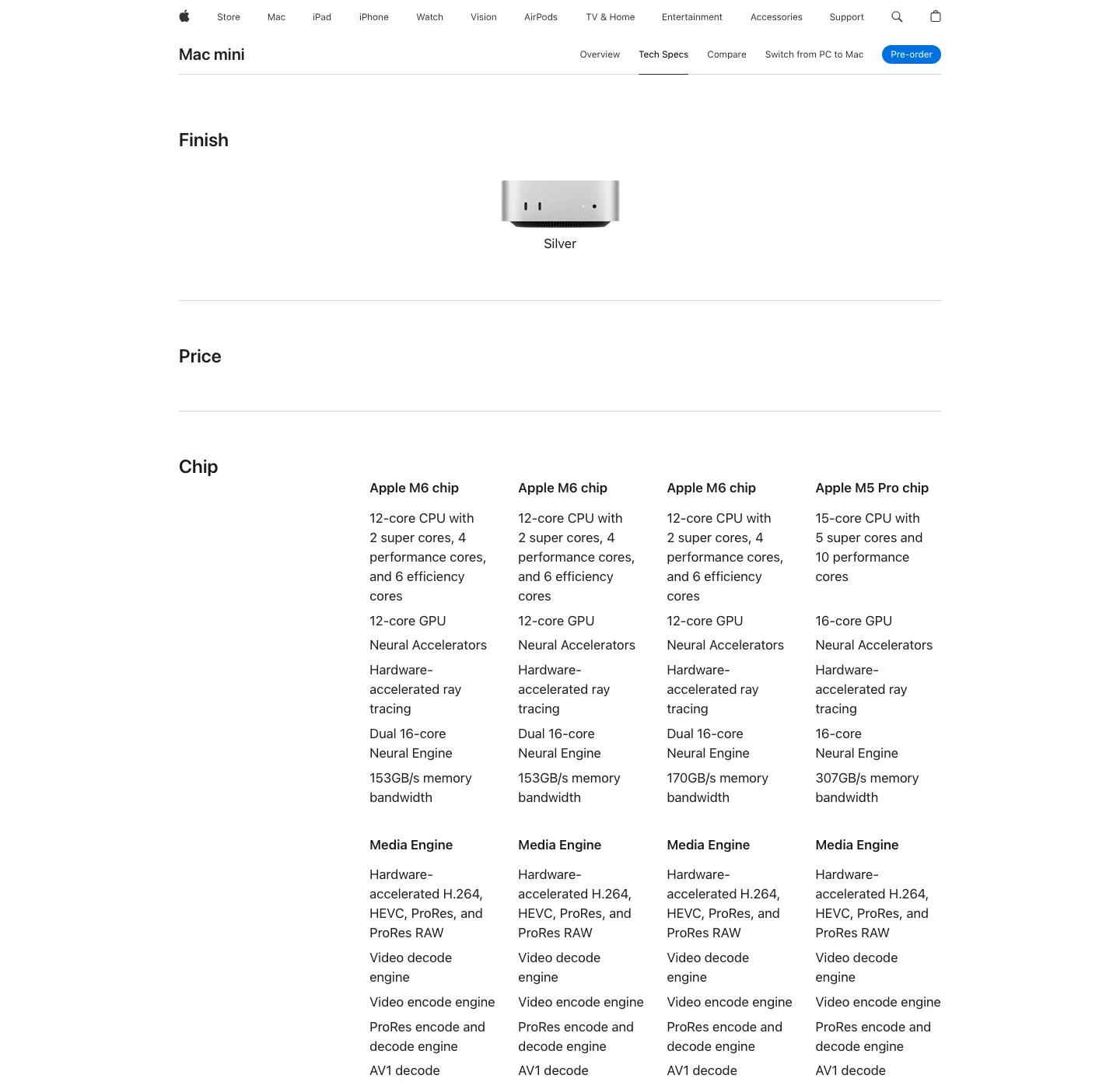
Figure 4: Mac mini tech specs — M6 (12-core CPU, dual Neural Engine) next to M5 Pro (up to 18-core CPU, 307GB/s bandwidth). Real screenshot from apple.com.
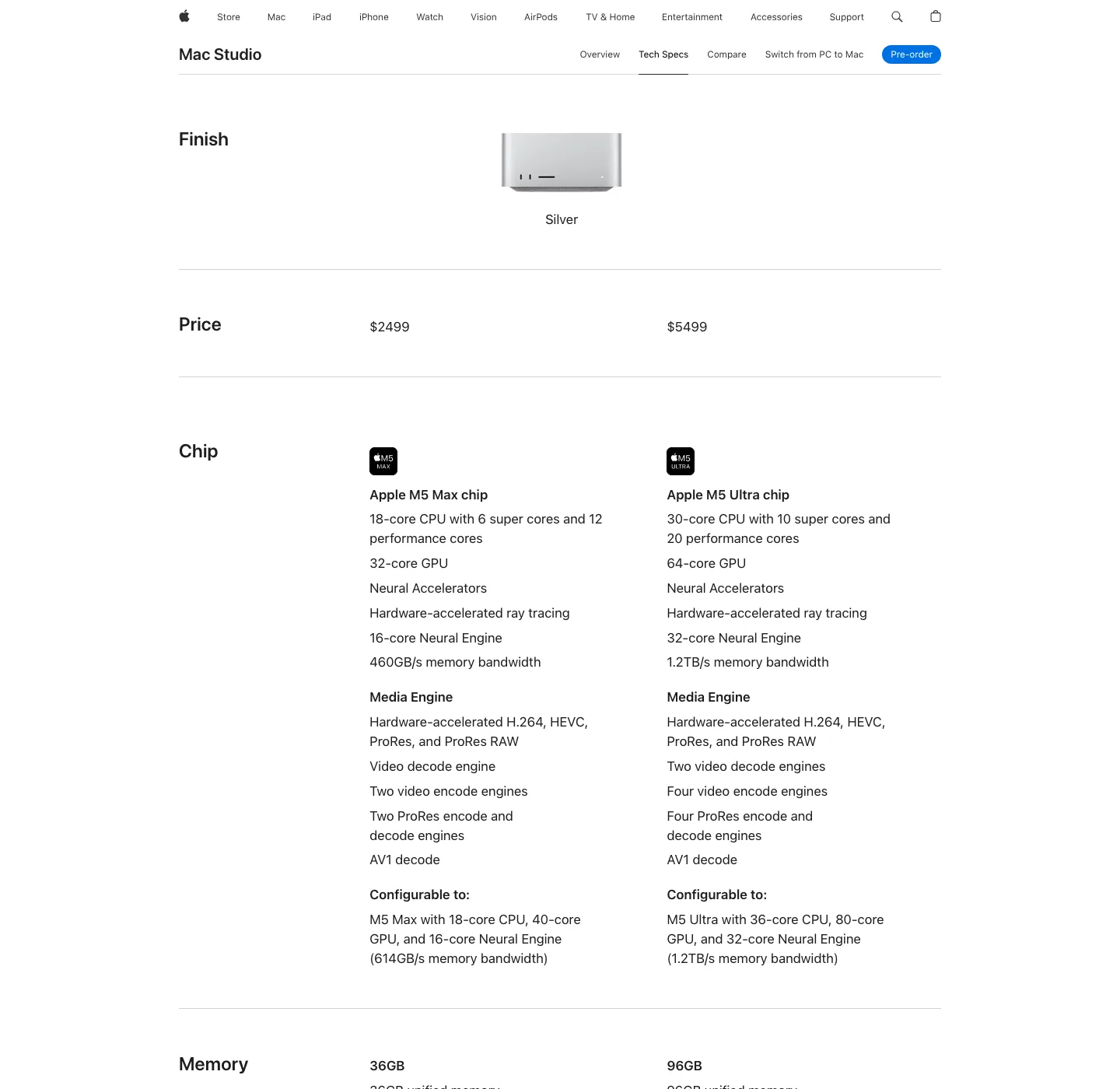
Figure 5: Mac Studio tech specs — M5 Ultra ships with a 64-core GPU and 1.2TB/s bandwidth as standard. Real screenshot from apple.com.
The symptom: one launch day, four waiting times
All four machines say “Available starting 9.22,” and pre-orders opened together. But the delivery estimate at checkout tells a different story:
- Mac mini M6 (from $899): in stock within roughly a month of launch day;
- Mac mini M5 Pro (from $1,699): similar to M6, base configs barely slip;
- Mac Studio M5 Max (from $2,499): standard configs ship near launch;
- Mac Studio M5 Ultra (from $5,499): high configs (especially the 36-core CPU / 80-core GPU / big-memory builds) carry the longest queues, and the 512GB unified memory option is explicitly listed as on sale only in late October — a full three months after the August announcement.

Figure 6: “Available starting 9.22” means sales begin — not that your machine ships that day. Real screenshot from apple.com.
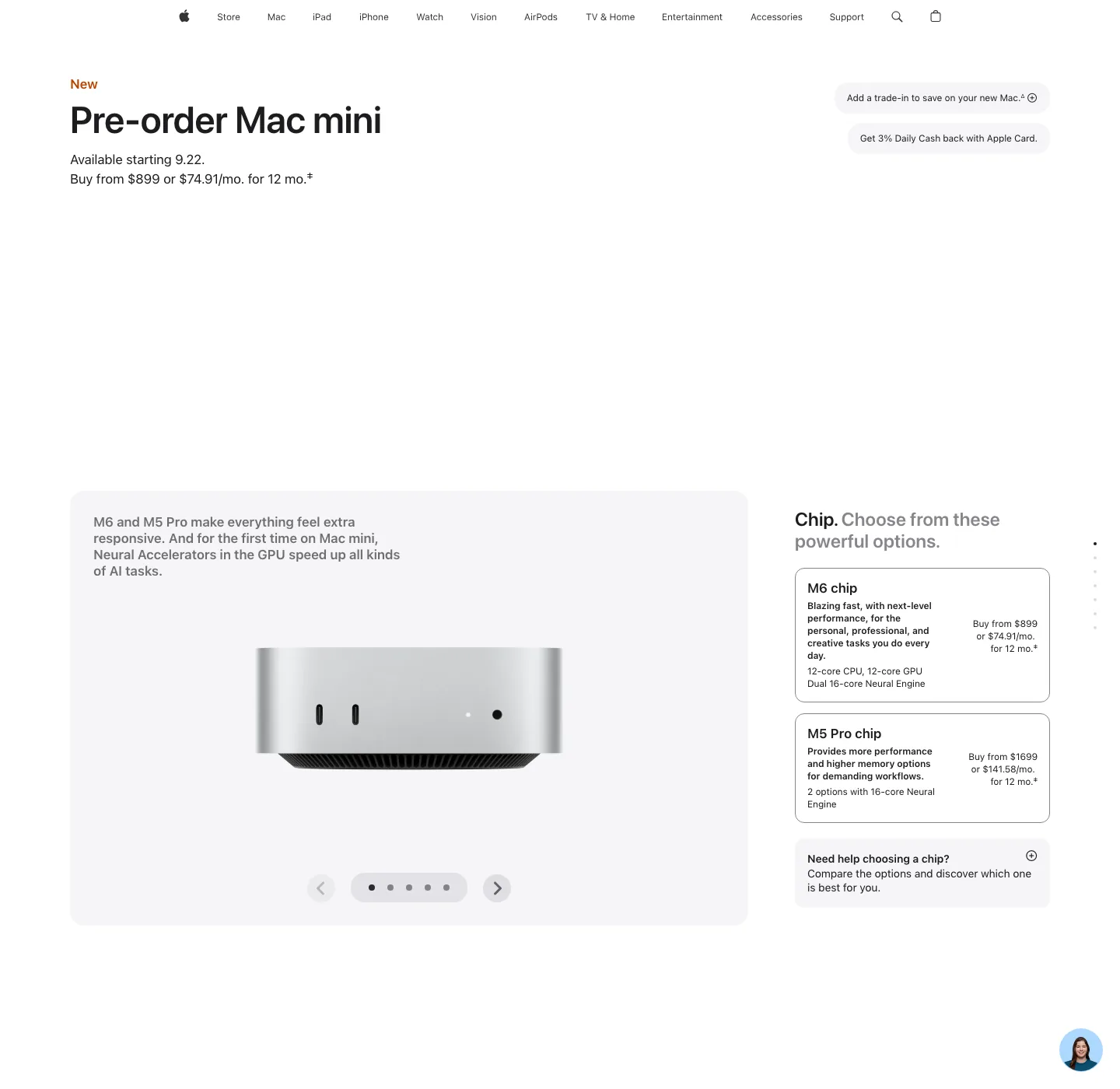
Figure 7: Mac mini pre-order page — M6 from $899, M5 Pro from $1,699. Real screenshot from apple.com.
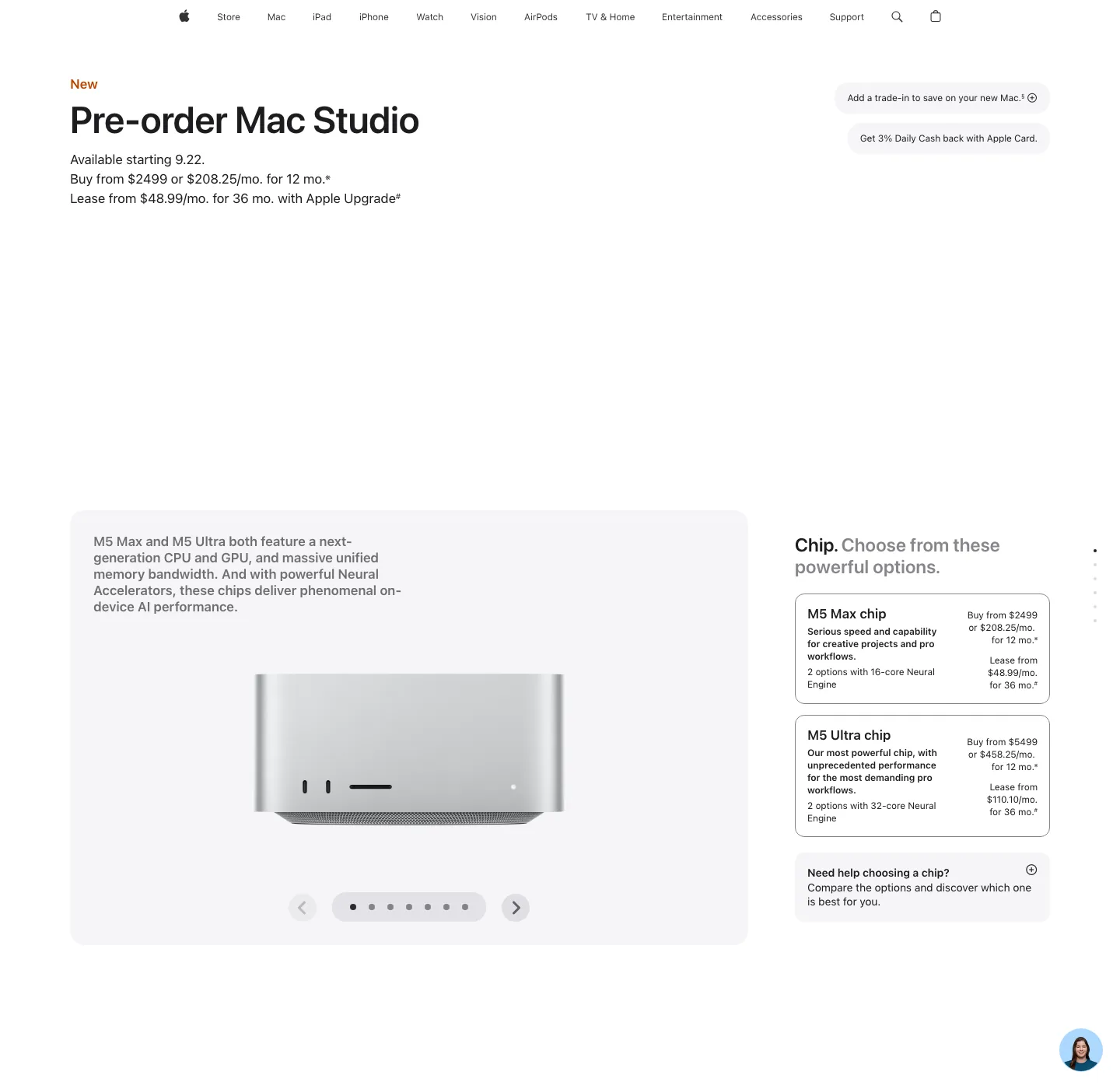
Figure 8: Mac Studio pre-order page — M5 Ultra starts at $5,499. Real screenshot from apple.com.
And so we get the absurd headline: the more you pay, the longer you wait. What is going on?
An analogy: think of apple.com as a bakery
To understand shipping queues, remember one formula:
How fast the ship date slips = order rate ÷ resupply rate
Now imagine apple.com as a bakery with two counters:
Counter A sells signature bread (M6, M5 Pro, M5 Max). The dough rises daily, the ovens run daily, and the staff baked a whole room of loaves in advance. You order in the morning, the clerk takes one off the shelf — the “queue” is really just the courier. Even when demand spikes, the kitchen restocks fast, so the line barely moves.
Counter B sells bespoke wedding cakes (high-end M5 Ultra). Three problems here: first, it is two doughs baked together (dual-die packaging), and if either layer fails the whole cake is scrap; second, the priciest topping (512GB memory) has not arrived from the supplier yet — it lands in late October; third, every wedding in town is booked this month. You order, and the clerk writes in the ledger: “Number 374, pick up in about three months.”
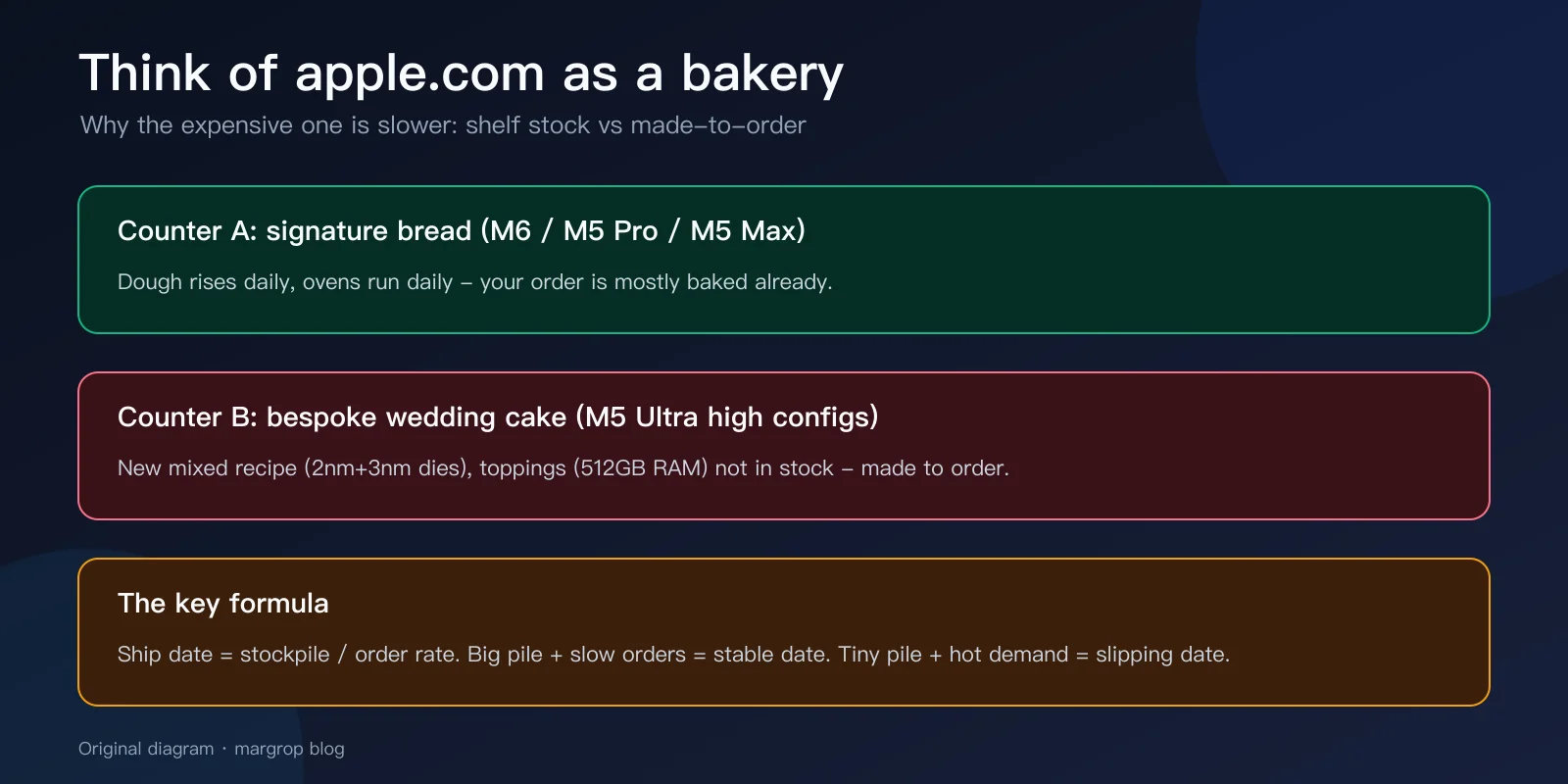
Figure 9: apple.com as a bakery — one counter sells shelf stock, the other makes to order. Original diagram.
So “why is the expensive one slower” decomposes into three sub-questions: why is the Ultra slow to build, why is its demand so hot, and why didn’t Apple stockpile more?
Root cause 1: Ultra is a gacha game — yield ramps slowly
Start with manufacturing. Chips are diced from a wafer, and every wafer has randomly scattered microscopic defects.
- M6 is a small die: each wafer yields many chips, and a defect kills at most one. High yield, high volume.
- M5 Max is a big die: larger area means fewer chips per wafer and a higher chance of hitting a defect.
- M5 Ultra is two Max dies fused: building one good Ultra requires two Max dies that are both healthy enough and can be paired and packaged successfully. Pulling one SSR is easy; needing TWO SSRs that also have to work as a pair slows everything down.
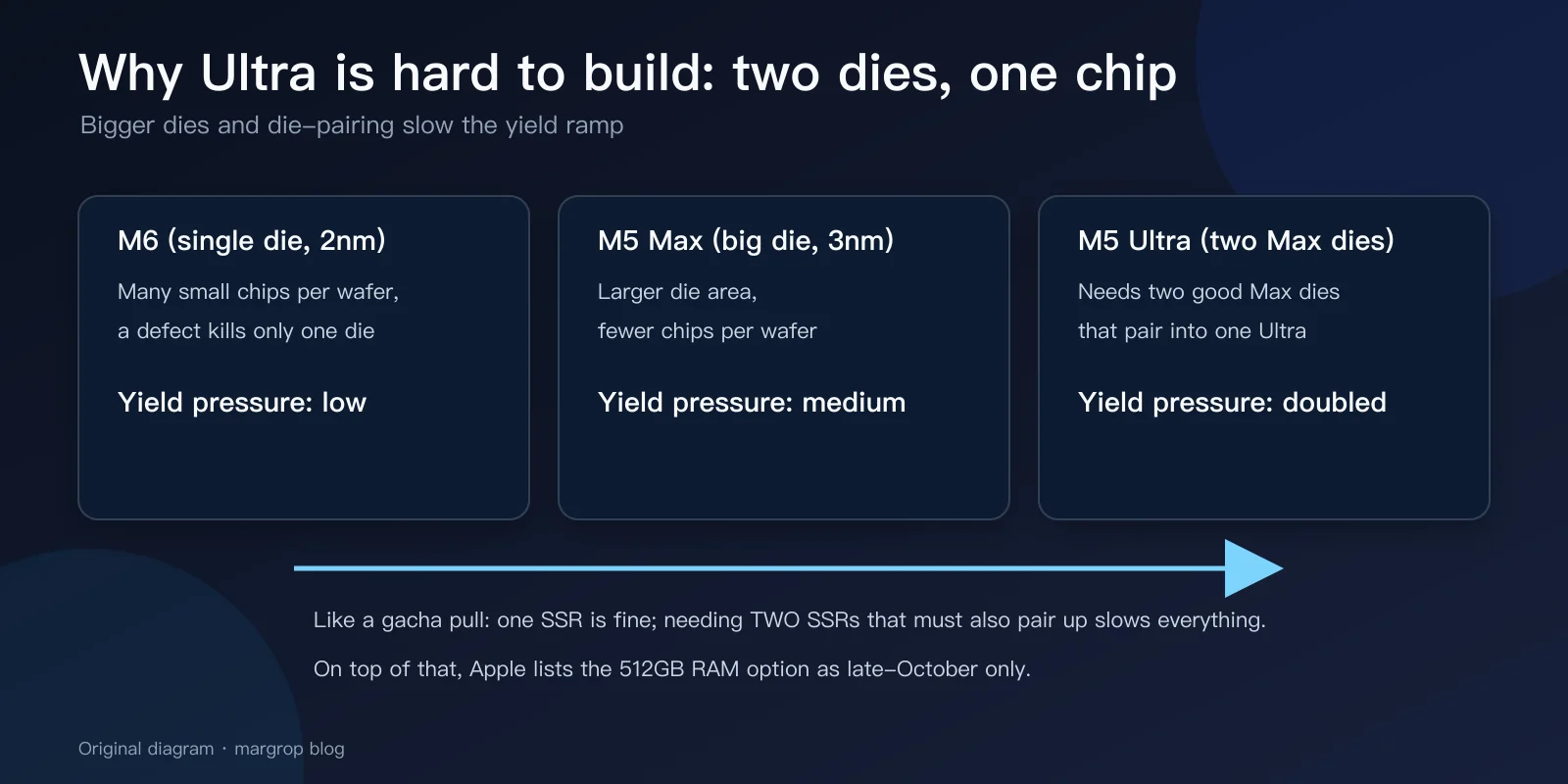
Figure 10: Bigger dies and die-pairing slow the yield ramp. Original diagram.
And the flagship makes it worse: the 512GB unified memory M5 Ultra is listed by Apple as available only in late October 2026. That means the top Ultra you can order today caps at 256GB — the 512GB config has not even opened its queue yet, and buyers can only wait.
Root cause 2: the AI boom turned Ultra into a “local LLM machine”
Now the demand side. The M5 Ultra’s core pitch has quietly shifted — it is no longer just a video workstation; it is the price/performance king for running big models locally.
Apple’s own Mac Studio page quotes LM Studio numbers: M5 Ultra delivers up to 9.8x faster time-to-first-token than M1 Ultra, and the page explicitly mentions deploying open-weight models like Gemma, Kimi, and Mistral on-device — “no cloud tokens needed.”
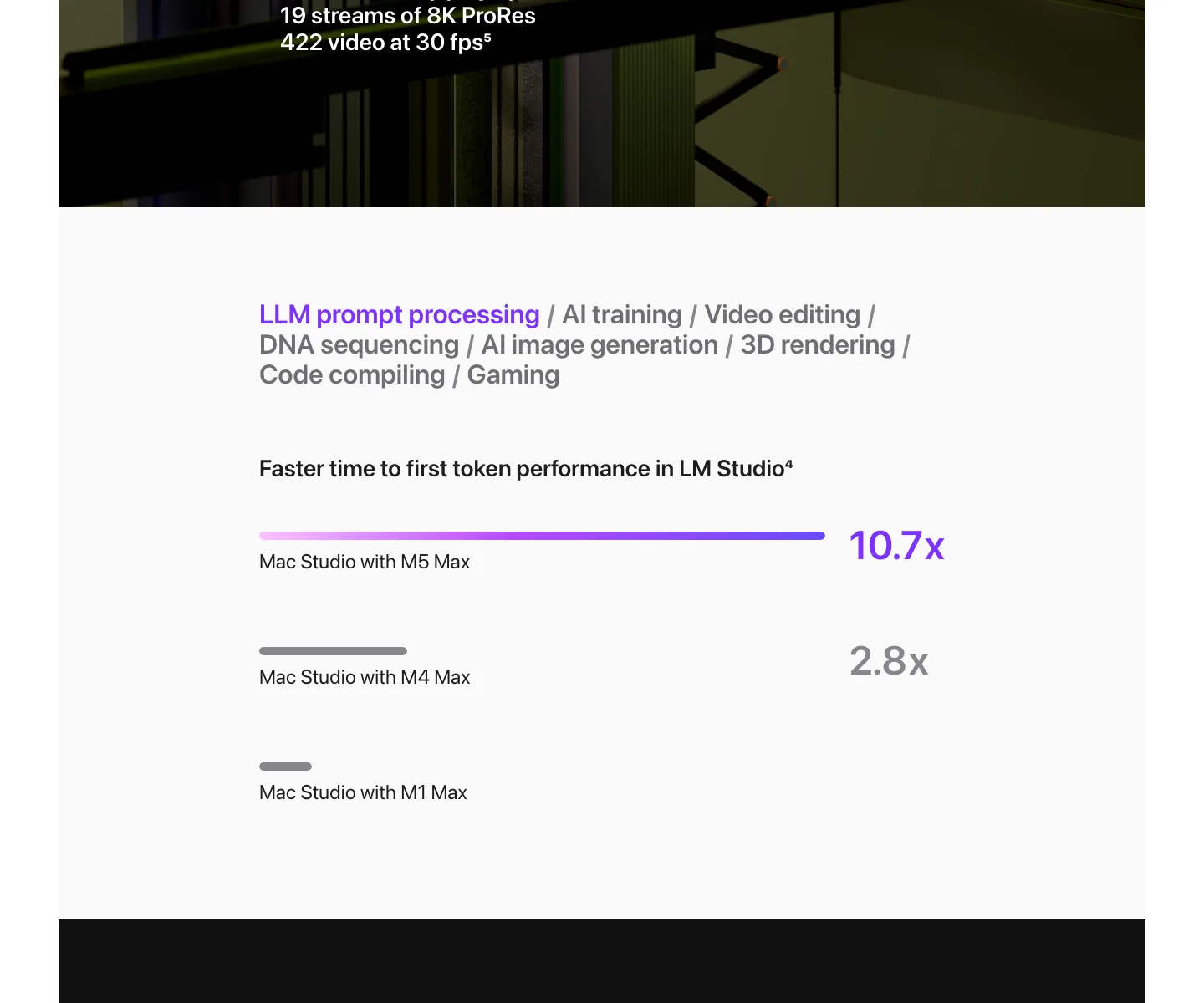
Figure 11: Apple markets LM Studio time-to-first-token directly: M5 Max is 10.7x faster than M1 Max. Real screenshot from apple.com.
Why are LLM buyers fixated on the Ultra? Two words: unified memory. Running large models is all about VRAM capacity and bandwidth. A 24GB GPU costs a fortune; the M5 Ultra offers up to 512GB of unified memory at 1.2TB/s — a combination with almost no rival in the consumer market. So AI developers, small studios, and research teams all piled into the same queue — the queue with the lowest production capacity.
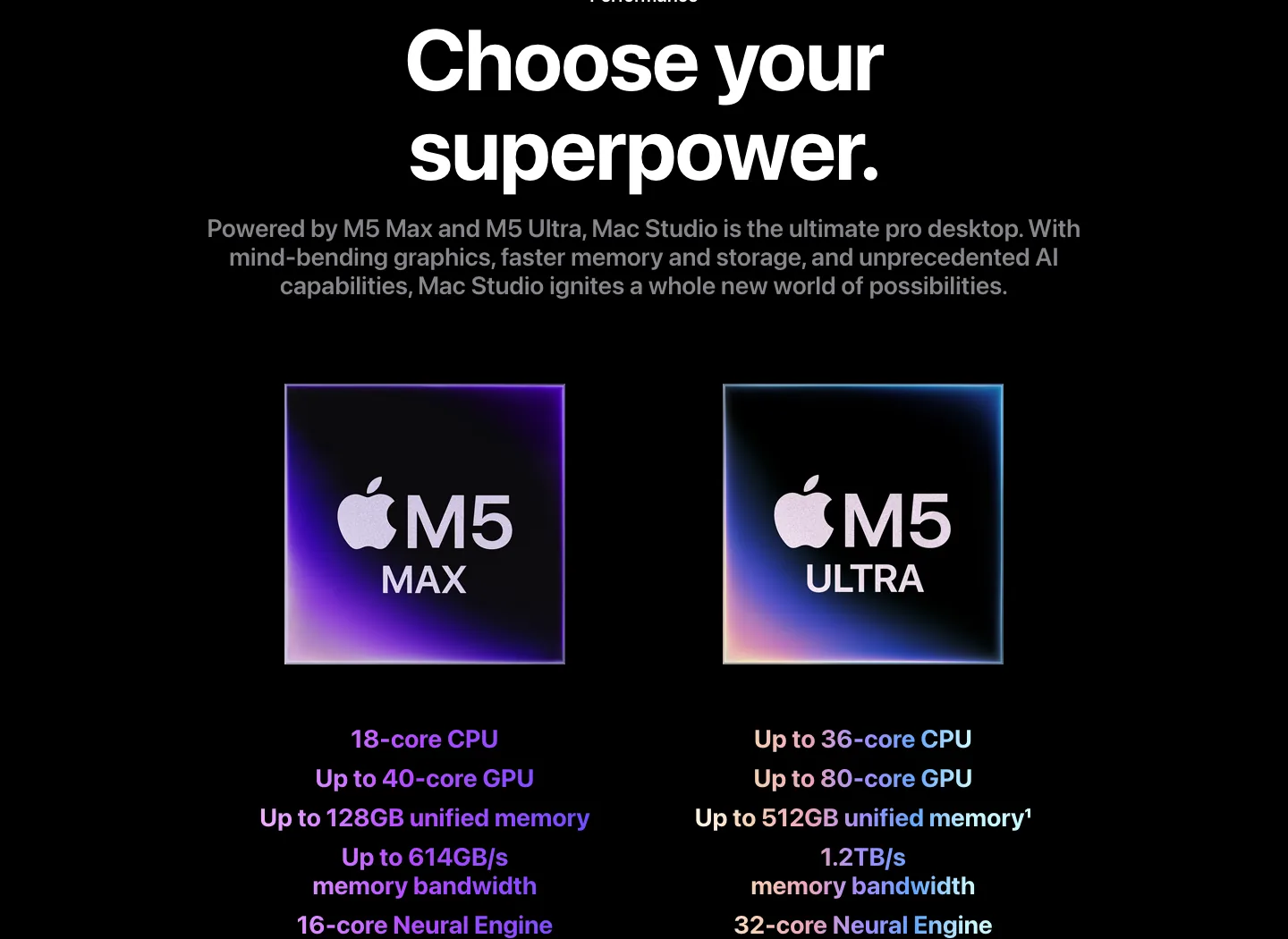
Figure 12: M5 Max (up to 128GB) vs M5 Ultra (up to 512GB, 1.2TB/s) official spec cards. Real screenshot from apple.com.
Slow supply plus surging demand — the queue date slides backwards day after day.
Root cause 3: launch day is not ship day
One last misconception to clear: “Available starting 9.22” is the launch date — the day Apple is allowed to let units leave the warehouse. Your ship date comes from a different system entirely: current stock minus every order ahead of you, divided by how many units the factory adds each week.
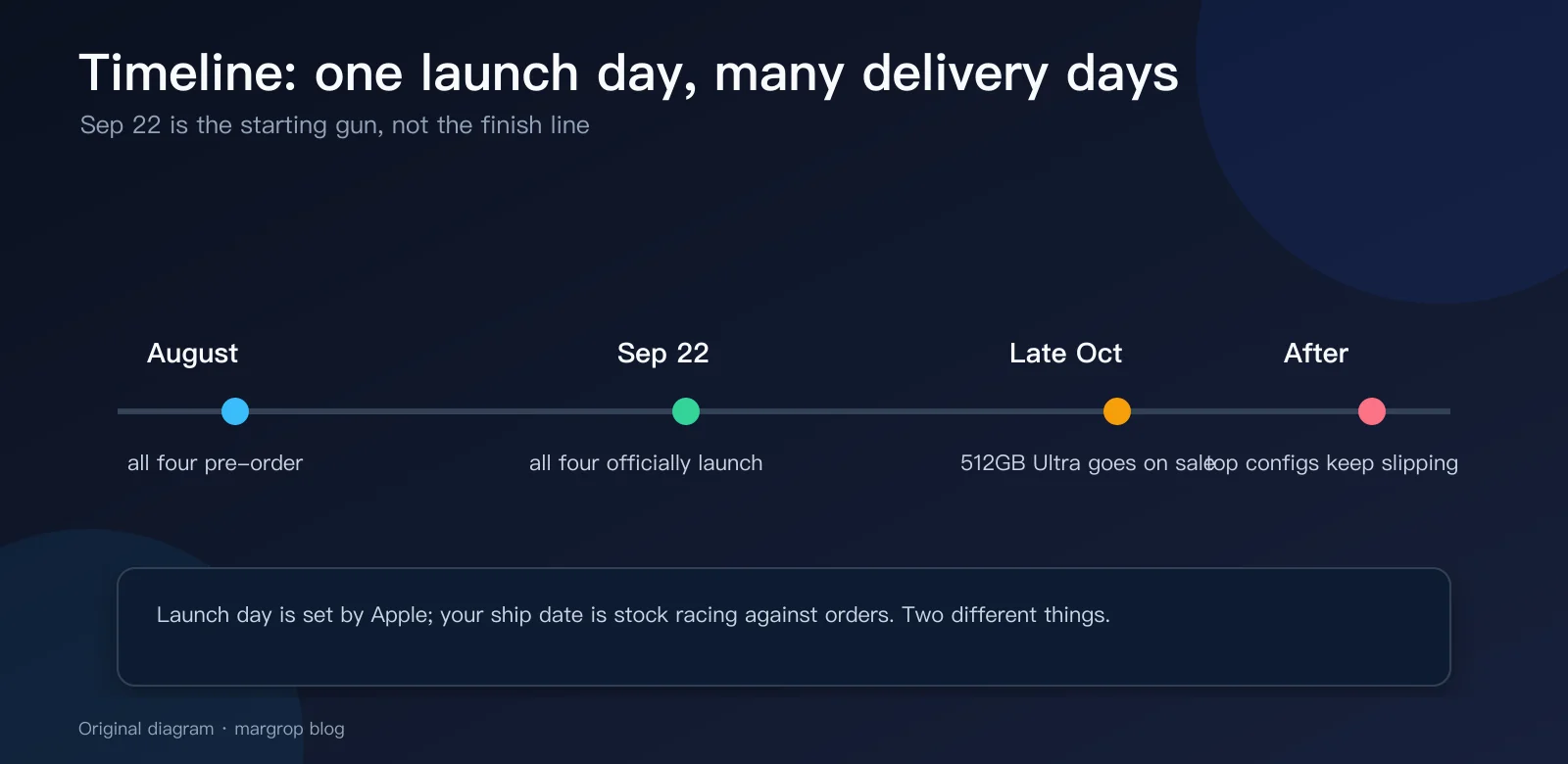
Figure 13: September 22 is the starting gun, not the finish line. Original diagram.
Apple deliberately launches all four machines on one day — one starting gun for marketing. But each machine has a different production line, yield curve, and inventory depth behind it, so the finish lines sit at different distances. That is not a bug; it is a carefully calculated plan: M6 drives volume and the quarterly numbers, Ultra carries margin and the halo. Both on schedule.
What to do: three ways to avoid the three-month wait
Path 1: lock your order early, then never touch it. Apple’s queue is strictly ordered by purchase time, and every config edit can push you to the back. If you want 512GB, be ready the moment it opens in late October.
Path 2: downgrade and start working. If your model fits in 256GB, that Ultra config queues far shorter than the top one; if 128GB is enough, the M5 Max is nearly in stock. A machine you have beats a machine you are waiting for.
Path 3: think different — cluster. Apple officially supports distributed inference over Thunderbolt 5, claiming up to 3x faster inference with a four-machine cluster. Two to four Mac mini M5 Pro units (64GB, TB5, from $1,699 each) give you a memory pool comparable to a high-end Studio — and every one of them is a volume model that ships within a month.
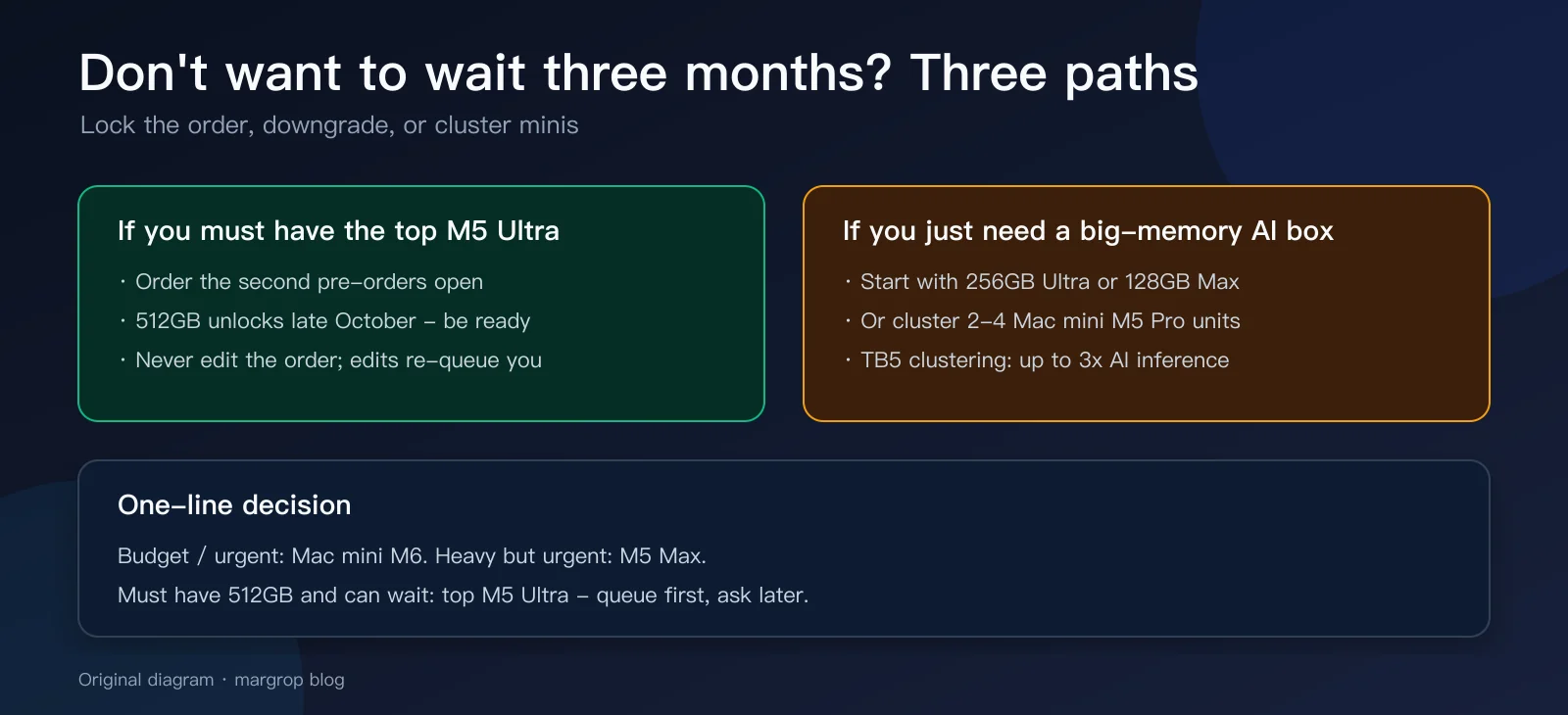
Figure 14: Lock the order, downgrade, or cluster — how to choose. Original diagram.
Q&A
Q1: Will ship dates keep slipping forever? Usually they go through “fast slip → stable → pull-in.” Dates slip fastest around launch when orders are densest; once the yield ramp completes, estimates stabilize and often move earlier. Past Mac and iPhone launches have all seen “your delivery moved up” emails.
Q2: What happens if I edit my M5 Ultra order? You very likely re-queue. Decide your config before checkout — especially memory, because unified memory is fused into the package and can never be upgraded.
Q3: M6 Mac mini or M5 Pro Mac mini for a normal user? Daily work, light creative tasks, small models: M6 is plenty, on a newer 2nm process with a longer runway. 30B+ models, heavy video work, multiple 6K displays: M5 Pro — its 307GB/s bandwidth is a hard advantage.
Q4: Is the M5 Ultra worth a three-month wait? It depends on whether your model needs 512GB. If you want to run several-hundred-B parameter models locally, it has almost no substitute — wait. For 70B-class models, the 256GB Ultra or an M5 Max is more practical.
Q5: Why is “M6” lower-end than “M5 Pro” despite the bigger number? Generation and tier are two axes. M6 is the new-generation base chip (2nm); M5 Pro is the previous generation’s pro tier. Like “next year’s base car” vs “last year’s fully-loaded car” — the former wins on single-thread and new features, the latter on core count and bandwidth.
Closing thoughts
“Pricier means later” looks absurd until you unpack it: a dual-die package with a hard yield ramp, a flagship memory option that only ships in late October, an AI demand spike, and volume-first stocking for the cheap models. Apple did not break physics — it just wrote the honest answer to this arithmetic into your delivery estimate.
For buyers, one piece of advice: figure out how much memory your models and projects actually need, then pick a queue. Queuing is fine. Queuing in the wrong line is not.
Sources: Apple Mac mini product and tech specs pages, Apple Mac Studio product and tech specs pages (apple.com, Aug 2026), MacRumors Mac mini / Mac Studio Buyer’s Guides (Aug 2026). All product-page images are real screenshots taken by the author; comparison and explainer diagrams are original.