Intel Macs Have Reached the Gate: macOS 27 Ends Upgrades, but Is Your Mac Really Finished?
The short version
Apple has drawn the finish line for Intel Mac operating-system upgrades: macOS 26 Tahoe is the last major release for supported Intel Macs. macOS 27 Golden Gate moves to Apple silicon.
That does not make an older computer unusable overnight. Three questions matter separately: Can it install a new operating system? Is its existing software receiving security maintenance? Do the applications you need still support it?
One more detail is easy to misread: macOS 27 remains the final major release with general-purpose Rosetta support. Rosetta helps newer Macs run older Intel Mac applications. It does not let Intel Macs run an Apple silicon operating system.
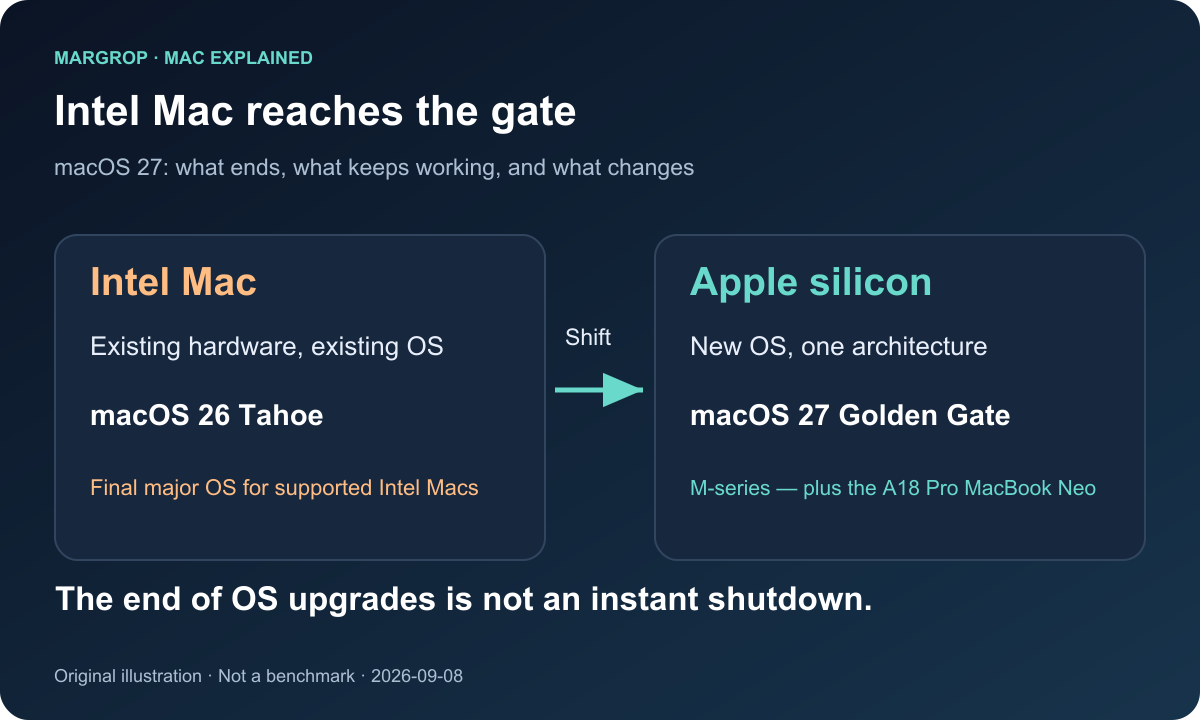
Figure 1. Original SVG illustration. The end of major OS upgrades is not the moment a computer loses all useful life.
The biggest macOS 27 change is hiding in the compatibility list
Apple’s preview page presents a familiar collection of attractions: Siri AI, a deeper role for Apple Intelligence, refinements to Liquid Glass, and improvements to everyday performance and usability.
For someone still using an Intel Mac, however, the most consequential part of that page sits near the bottom. Intel Macs no longer appear in the official upgrade path for the new operating system. [1][2]
As checked on September 8, 2026, Apple still labels macOS 27 Golden Gate a Preview, with availability described as “coming this fall.” Siri AI has a separate qualification: English availability later this year. In this article, “introduced” therefore means announced and previewed. It does not mean the final operating system has already shipped to everyone, or that every feature will arrive on the same day in every language and region.
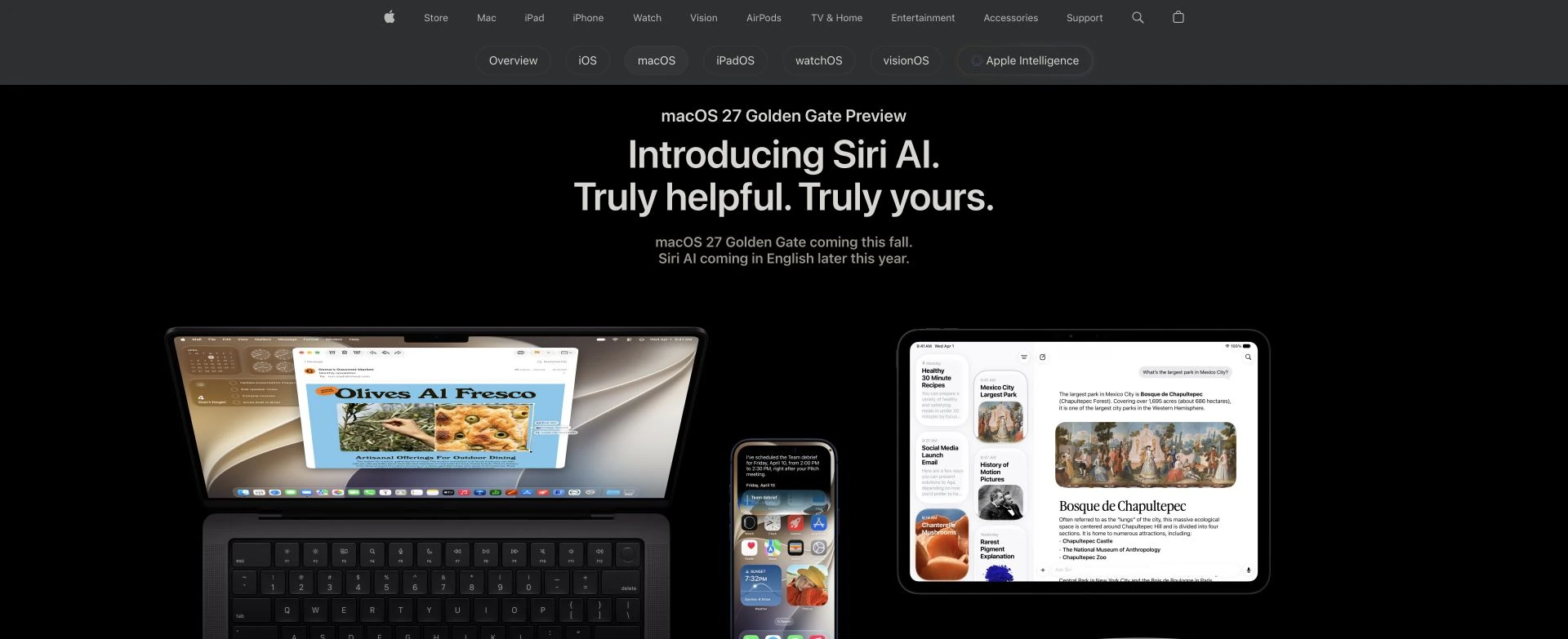
Figure 2. Real screenshot of Apple’s public preview page, captured September 8, 2026. Notice both “Preview” and the separate Siri AI availability wording.[1]
This decision also has a longer runway than a dramatic headline suggests. Apple introduced the M1 in shipping Macs in 2020. At WWDC25 it explicitly said Tahoe would be the final major release for Intel Macs. The WWDC26 Platforms State of the Union confirmed that the transition was reaching its conclusion.[2][3][6]
Think of a bus route. For several years, Apple ran two kinds of vehicles along the same line. The next extension is now reserved for the newer platform. Older buses can still travel the roads they already serve. Continuing to operate on those roads is different from being able to reach every future station.
Three clocks, rather than one countdown to the scrap heap
“Support is ending” can describe several different events.
| Clock | The question it answers | What it means for an Intel Mac |
|---|---|---|
| Major operating-system upgrades | Can this computer install the next macOS release? | macOS 27 excludes Intel Macs |
| Security maintenance | Are updates available for the software actually installed? | Check the OS version, model, and published security notices; exclusion from 27 alone does not answer this |
| Application compatibility | Do the browser, office suite, plug-ins, and other tools still support this environment? | Each developer sets its own requirements and schedule |
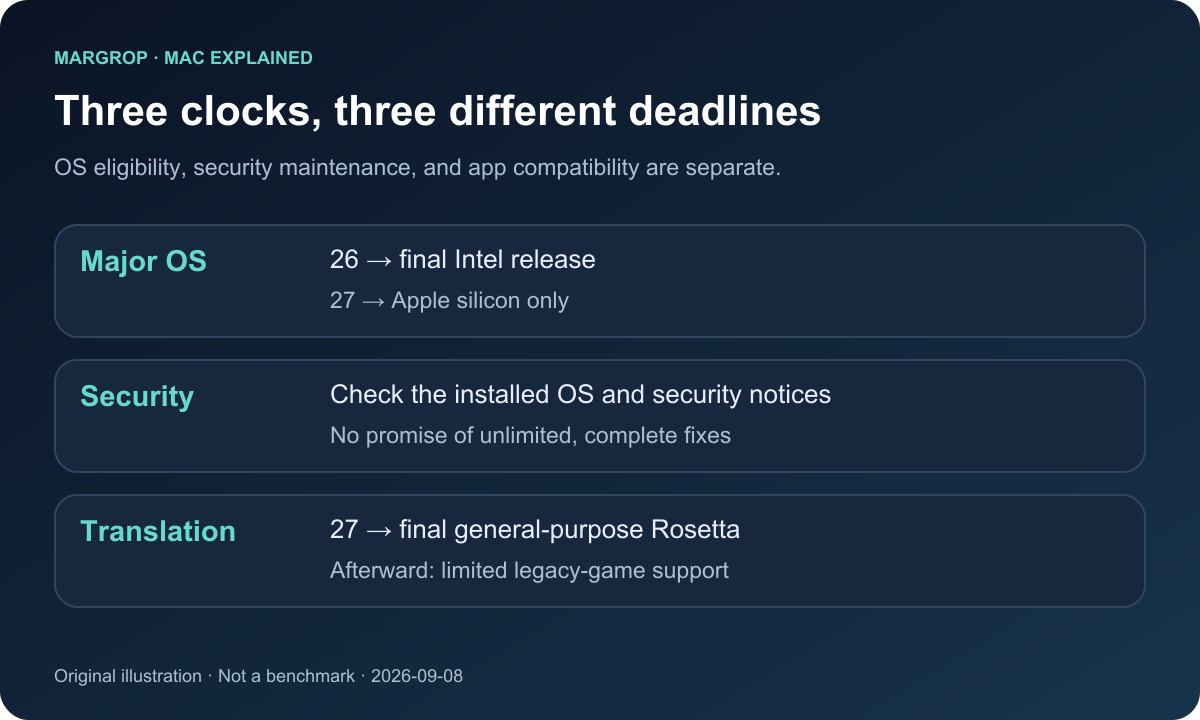
Figure 3. Original SVG illustration. Upgrade eligibility, vulnerability fixes, and application compatibility do not share a single deadline.
Suppose an older Mac opens your documents, plays videos, and organizes photos today. Releasing macOS 27 does not send that computer a command to stop booting. Your files do not automatically disappear when Apple edits a compatibility list.
What gradually becomes harder is interacting with the changing world around it. A browser stops supporting its OS. An office application raises its minimum requirement. A collaboration service begins depending on features missing from older software. A useful machine often becomes less suitable through accumulated changes, rather than one dramatic failure.
Security needs the same careful distinction. Do not convert a customary maintenance pattern into a promise that every Intel Mac has a fixed number of fully protected years remaining. A machine already stuck on a much older release is in a different position from one that can run Tahoe. Whether it remains appropriate for banking or work accounts depends on the maintenance status of the OS and applications actually in use.
Which Macs are affected? “I bought it in 2020” is not enough
Apple’s macOS 27 compatibility list includes:
- MacBook Air and MacBook Pro with Apple silicon, from 2020 onward.
- iMac with Apple silicon, from 2021 onward.
- Mac mini with Apple silicon, from 2020 onward.
- Mac Studio, from 2022 onward.
- Mac Pro with Apple silicon, the 2023 model.
- MacBook Neo, the 2026 model.[1]
The crucial qualification is “with Apple silicon.” An Intel MacBook Air and an M1 MacBook Air may both have 2020 in their model descriptions, but they do not have the same upgrade eligibility.
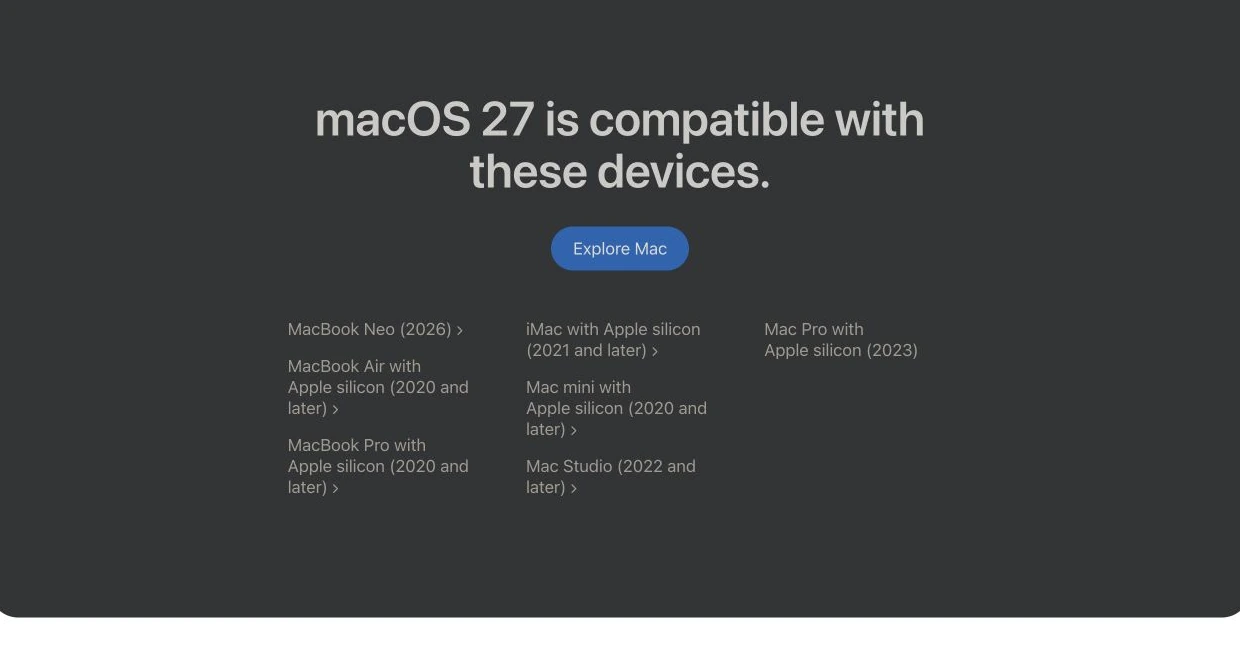
Figure 4. Real screenshot of the official compatibility list. The exact model and chip matter more than the purchase year.[1]
There is also a detail that makes some older shorthand inaccurate: Apple silicon is no longer interchangeable with “M-series Mac.” Apple’s support documentation lists the MacBook Neo with an A18 Pro, and the Neo appears in the macOS 27 list. The precise statement is that the operating system moves to Apple silicon. The comparisons below focus on the M-series Macs most readers will recognize.[1][4]
Looking backward, Tahoe itself only supports a small remaining group of Intel Macs:
| Intel Mac in the Tahoe compatibility list | Important qualification |
|---|---|
| 16-inch MacBook Pro, 2019 | Not every MacBook Pro released in 2019 |
| 13-inch MacBook Pro, 2020 | The model with four Thunderbolt 3 ports |
| 27-inch Retina 5K iMac, 2020 | Not every Intel iMac |
| Mac Pro, 2019 | Not earlier Intel Mac Pro generations |
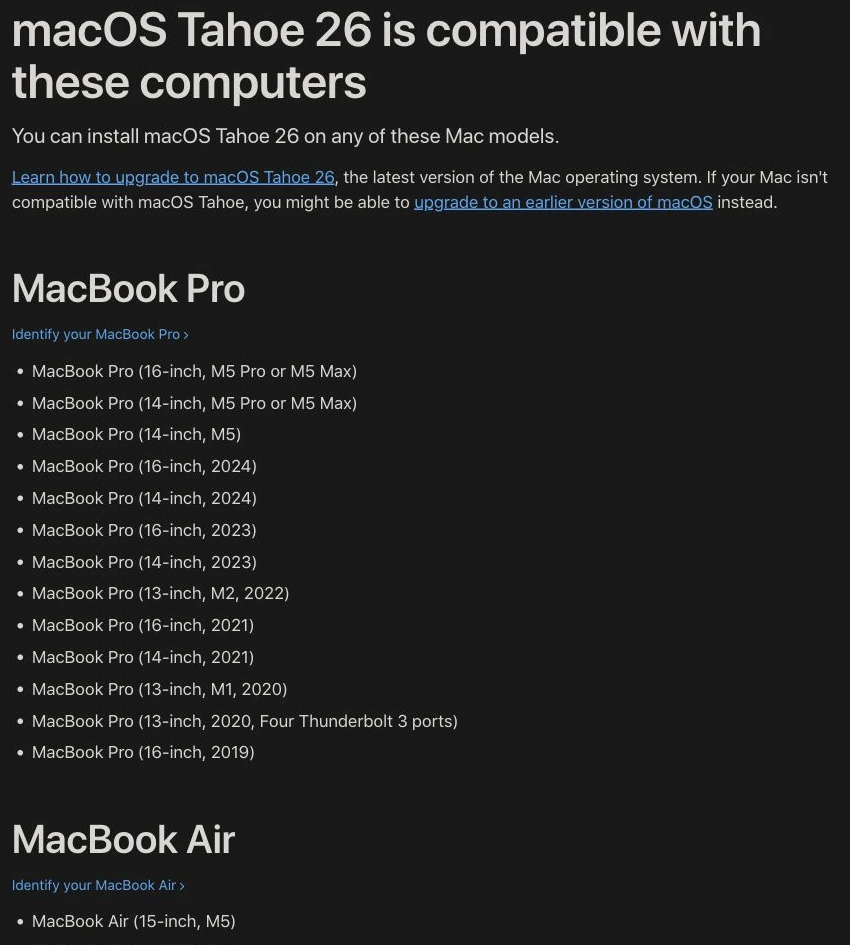
Figure 5. Cropped real screenshot of the Tahoe compatibility page. This image shows the MacBook Pro section; other families are listed further down the source page.[4]
Saying “Intel Macs can go up to macOS 26” therefore needs an extra condition: your particular model must qualify for Tahoe in the first place. This announcement does not grant every old Intel Mac one last upgrade.
Intel versus M-series: understand the kitchen before comparing the menu
Here is a compact reference before we unpack the terminology.
| Dimension | Intel Mac | M-series Mac |
|---|---|---|
| Processor instruction architecture | Primarily x86-64 | Arm64 |
| Chip design | Intel designs the CPU; Apple designs the Mac and OS | Apple designs the M-series SoC alongside its hardware and software platform |
| Hardware organization | Varies by model; includes integrated and discrete GPU designs | Highly integrated compute blocks with unified memory |
| Everyday efficiency | Depends on model, workload, and battery condition | Usually better performance per watt than historical Intel Macs |
| Applications | Runs matching Intel Mac applications natively | Runs Arm64 applications natively; some older apps depend on Rosetta |
| Windows | Supported models have a Boot Camp path documented for Windows 10 | No equivalent Boot Camp native dual-boot path; Arm Windows VMs are a common route |
| Expansion | Some desktops allow RAM or GPU upgrades; many notebooks are also restricted | Unified memory is normally selected at purchase and cannot be expanded with ordinary RAM modules |
| New macOS releases | Eligible models stop at Tahoe | The main platform for macOS 27, subject to the actual model list |
1. x86 and Arm are different recipe languages
The CPU is the head chef; a program is a recipe. An Intel Mac’s chef reads x86-64 recipes, while an M-series chef reads Arm64 recipes. Both can make fried rice, but “put the rice in the pan” is written differently in each instruction language.
That explains why an application can look identical while its developer supplies separate Intel and Apple silicon builds. Architecture defines the instructions the machine understands. It is not the case design or the application icon.
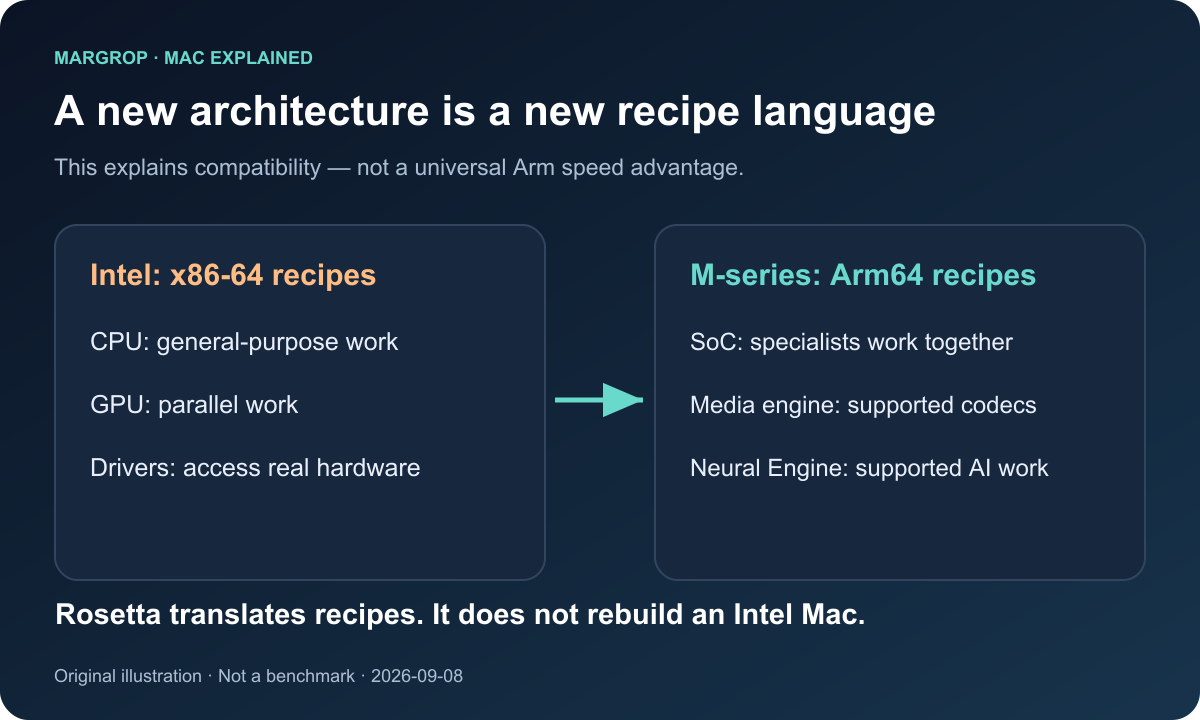
Figure 6. Original SVG illustration. Different instruction architectures explain compatibility issues; they do not prove that one architecture is always faster.
Avoid the opposite oversimplification too: “Arm is a phone chip, so it must save power; x86 is old, so it must be slow.” Real performance depends on microarchitecture, manufacturing process, power targets, cooling, and software. Moving from an older Intel Mac to a current M-series machine changes much more than an instruction vocabulary.
2. A SoC puts several specialists in one kitchen
SoC stands for system on a chip. An M-series design brings together CPU and GPU cores, media engines, a Neural Engine, and other controllers in a tightly integrated platform.
Imagine a well-organized kitchen. A chef handles complicated dishes, assistants perform repetitive preparation, and a specialized oven handles a particular baking process. Supported video formats can use dedicated media hardware rather than requiring the CPU to perform all of the work through general-purpose instructions.
Apple’s original 2020 M1 announcement identified the SoC and unified memory as central changes. That makes it useful historical documentation for the architecture. Its launch-day performance claims are not a universal benchmark for every Mac available in 2026.[6]
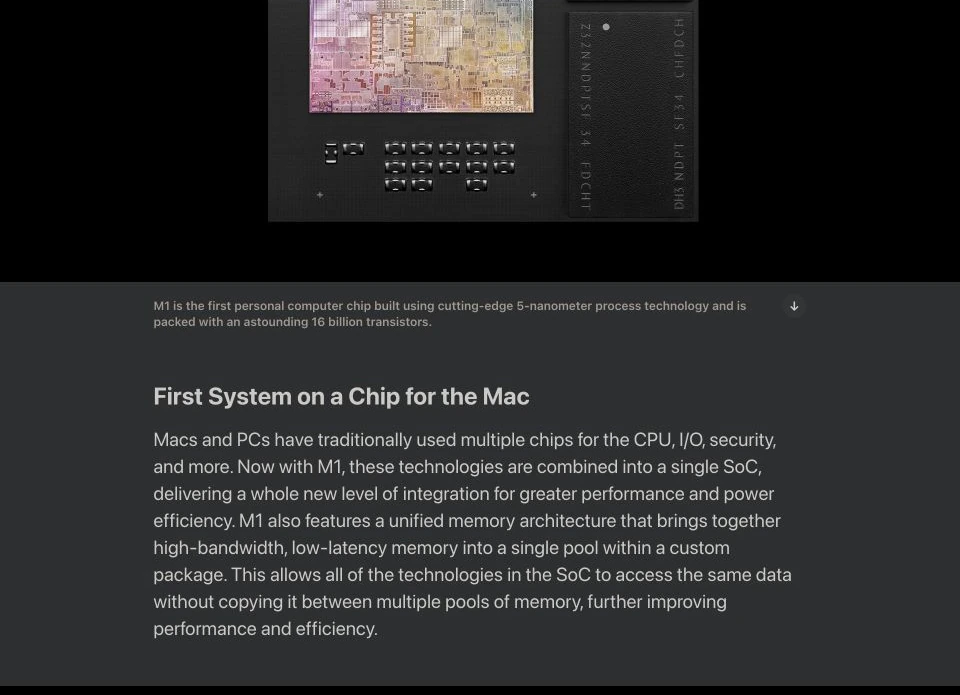
Figure 7. Real screenshot of Apple’s 2020 M1 announcement. It documents the design approach; it is not a performance test conducted for this article.[6]
3. Unified memory is a shared storeroom, not infinite space
In some computers with discrete graphics, the CPU uses system RAM while the GPU has its own video memory. Data may need to travel between those pools. Picture a kitchen assistant packing ingredients, carrying them into another building, and unpacking them for another worker.
M-series unified memory allows multiple compute units to access a shared pool of high-bandwidth memory. Suitable workloads can avoid some repeated transfers, improving efficiency.[6]
The analogy has two limits. Intel integrated GPUs can also share system memory, and a unified pool still has a finite capacity. Apple did not invent the broad idea of shared memory; it integrated the memory system closely with its own computing platform.
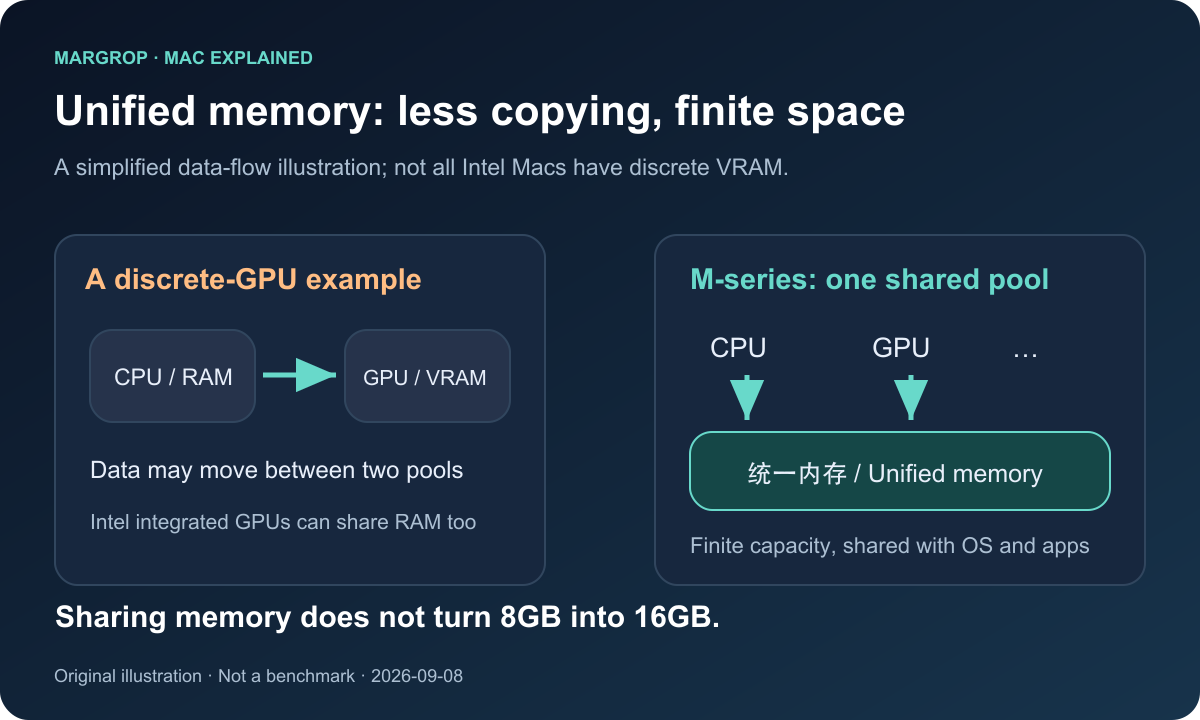
Figure 8. Original SVG illustration. Sharing a storeroom can reduce box carrying. It does not double the floor area.
This is why “8GB of unified memory equals 16GB of normal RAM” is a poor buying rule. Your browser, operating system, images, video, and local models all need space. GPU allocations also draw from the shared budget. Compression and SSD swap can soften memory pressure, but they cannot remove capacity and latency limits.
For creative work and local AI, capacity, bandwidth, and software support all matter. A model fitting into memory does not guarantee fast inference. A powerful Apple GPU also does not mean that software requiring NVIDIA CUDA will run unchanged. The GPU ecosystem and available acceleration paths must match the application.
4. Battery life and fans: noticeable improvements, not universal promises
Many people moving from an Intel MacBook to an M-series notebook notice longer battery life, less fan noise, and a better experience away from a power outlet. Efficiency and coordinated hardware and software design help explain those impressions.
But M-series does not mean permanently cool or immune to sustained-load limits. A fanless MacBook Air and an actively cooled MacBook Pro may behave differently during long workloads. Even one chip can have very different power use across tasks. Compare the actual model, workload, memory configuration, and sustained performance, rather than treating a processor family name as a complete review.
If Intel Macs are leaving, why does Rosetta still exist?
Because the two policies answer questions in opposite directions.
Intel Mac OS support asks whether older hardware can install a new operating system.
Rosetta asks whether newer hardware can run a Mac application supplied only as an Intel binary.
Rosetta is a translator for the recipe. It is not a construction crew that replaces the kitchen. It cannot turn an Intel CPU, motherboard, and driver stack into Apple silicon.[5][7]
Apple’s developer announcement dated September 1, 2026 sets out the transition:
- On macOS 26.4 and later, launching an application that relies on Rosetta may display a notification encouraging an Apple silicon native update.
- macOS 27 is the final major release with general-purpose Rosetta support.
- Beyond that, Apple retains limited functionality for particular older, unmaintained games that depend on Intel-based frameworks. That exception is not a promise of continued compatibility for every legacy application.[5]
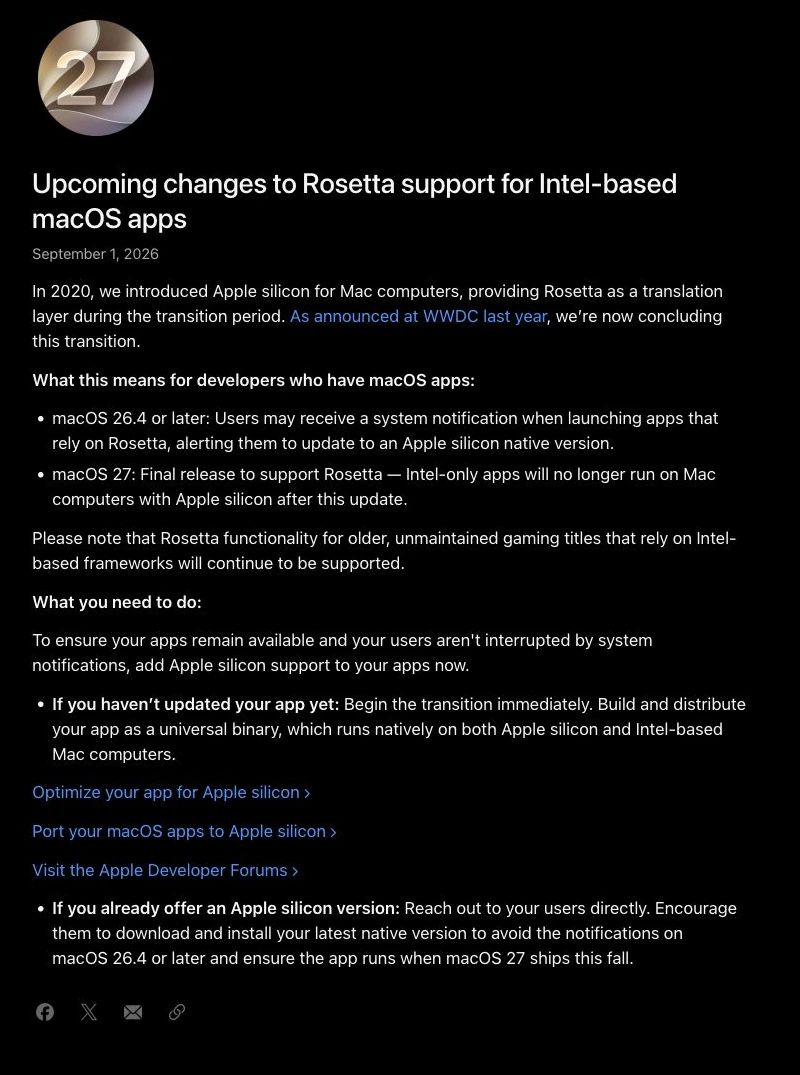
Figure 9. Cropped real screenshot of the developer announcement. “27 is the final supported release” is different from “27 has already removed all support.”[5]
Owners of M-series Macs should therefore pay attention too. The office suite might already be native, while an old audio plug-in, scanner utility, or specialized business application still depends on translation.
Apple also documents that Arm64 and x86-64 code cannot simply be mixed inside the same process. A native application trying to load an Intel-only plug-in can encounter compatibility problems. “The main application supports Apple silicon” does not prove that the entire workflow does.[7]
There is another detail worth checking against current documentation rather than older headlines. Apple’s developer page says macOS 27 directly integrates Intel binary translation for Arm Linux virtual machines and containers without requiring Rosetta installation. That should be understood separately from general compatibility for Intel Mac applications. “Rosetta is being phased out” does not mean every amd64 Linux container suddenly becomes impossible to run. Conversely, integrated translation does not guarantee every container or virtual machine will work.[7]
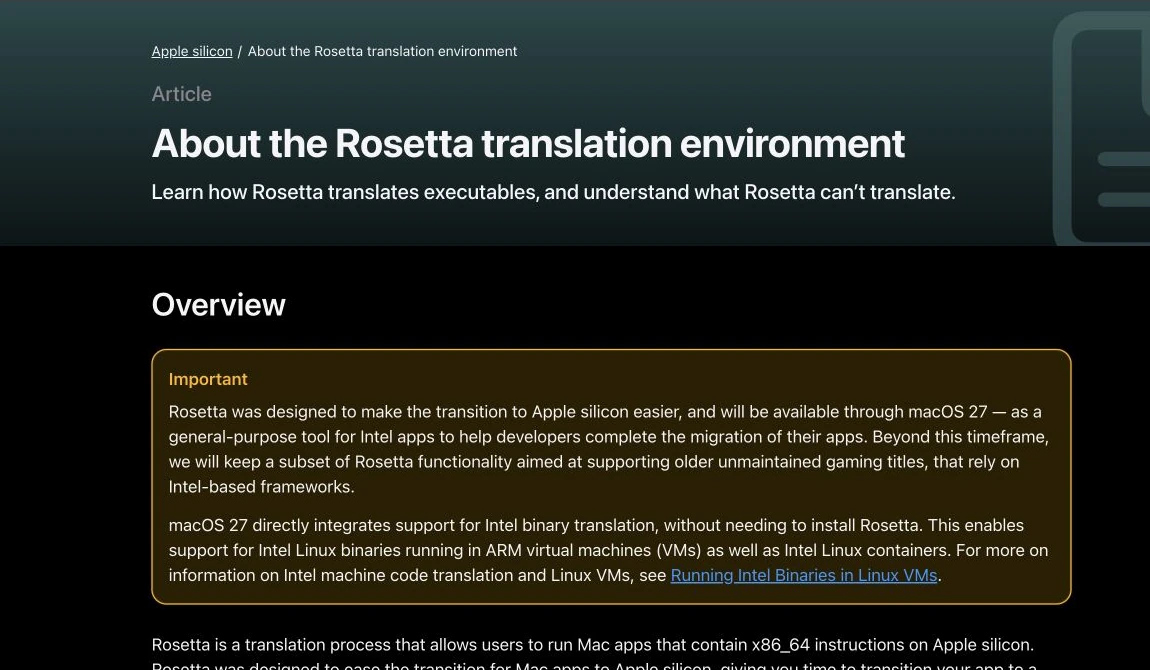
Figure 10. Real screenshot of Apple’s developer documentation. Ordinary Mac application migration and Linux virtualization translation have different details.[7]
Why an M-series upgrade delights some people—and needs planning for others
A computer is valuable because its tools work together, not merely because its CPU is fast.
Windows: “can run” does not mean the old route still exists
Boot Camp was a distinctive option on supported Intel Macs. It could install Windows on a separate partition and let the user choose an operating system at startup. Apple’s current getting-started guide specifically describes Windows 10 on Intel-based Macs.[8]
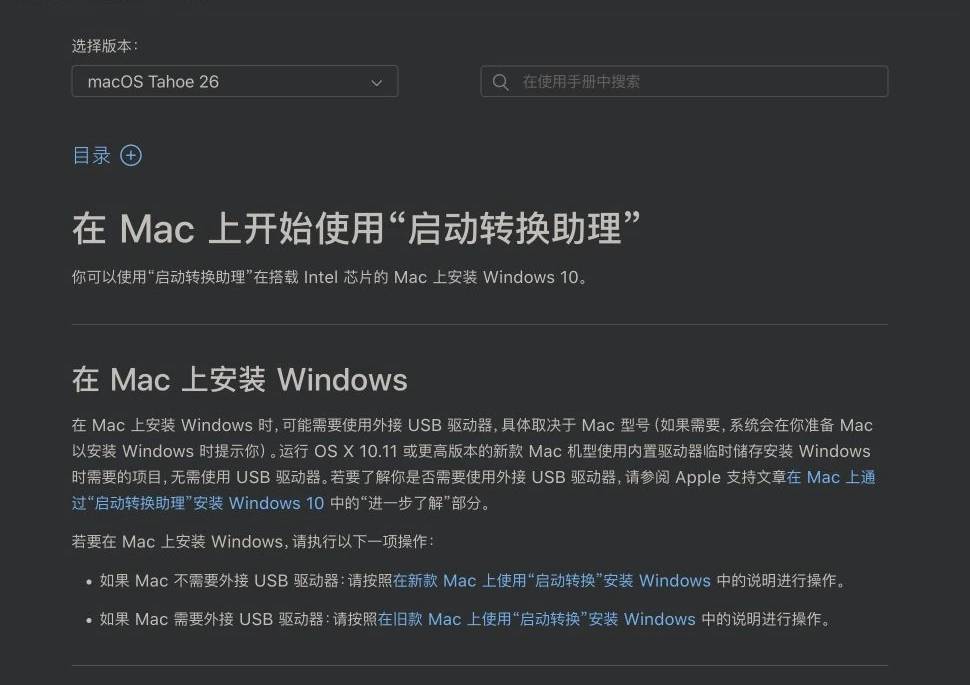
Figure 11. Real screenshot of Apple’s official guide, displayed in Chinese. Its opening sentence specifies Windows 10 on Intel Macs; it does not establish official Windows 11 support for every Intel Mac.[8]
M-series Macs do not offer the same native Boot Camp dual-boot route. A common Windows option is Windows 11 Arm in a virtual machine, with Windows handling supported x86/x64 application compatibility within that environment. The virtualization product, Windows licensing, drivers, game anti-cheat systems, and specialized devices each introduce their own requirements.
Think of a building. Boot Camp is like handing the whole building to a different operator: once Windows boots, it manages the supported hardware directly. A virtual machine is more like renting a room inside the macOS building. A room can be very useful, but the tenant cannot assume they can redesign the elevators and access-control systems.
Windows security maintenance is another separate clock. Successfully installing an older Windows release does not by itself establish a long-term supported setup.
Expansion and peripherals: a matching connector is not a compatibility guarantee
Intel Mac does not automatically mean freely replaceable RAM and graphics. Many Intel notebooks were already highly integrated. Some Intel desktops, however, do offer expansion capabilities that matter to particular users. M-series unified memory is normally chosen when ordering the machine; it is not something you expand later by inserting ordinary desktop RAM modules.
Likewise, a Thunderbolt connector does not guarantee an existing external-GPU workflow transfers unchanged. Apple silicon Macs do not have the same official eGPU support path as supported Intel Macs. Capture cards, audio hardware, and legacy drivers need platform-specific vendor support too.[9]
For professional work, the useful unit of compatibility is the whole chain: main application, plug-ins, licensing tools, drivers, and peripherals. One unsupported link can interrupt an otherwise fast and capable setup.
The underlying reason: a platform transition is reaching its end
There is a commercial side to this decision. Ending support for older hardware may encourage some users to replace it. Support life also forms part of the cost of buying a computer, and users are entitled to judge that tradeoff.
But “Apple wants to sell another Mac” is not the entire engineering explanation. Maintaining two architectures creates more build targets, test combinations, driver differences, and possible failure cases. It resembles a restaurant maintaining two recipe languages, two sets of equipment, and two training manuals. Every new dish needs checking in both kitchens.
Apple’s WWDC26 explanation emphasizes finishing the macOS transition to a single architecture. It also says developers can distribute Apple silicon-only binaries on the Mac App Store, reducing download size and concentrating testing on one architecture.[2]
That describes Apple’s direction. It explains why the company is closing the transition without proving that every working Intel Mac has become worthless. The right replacement date for a user still depends on the work the machine needs to do.
How much life is left? Ask when replacement becomes worthwhile
There is no single retirement date that suits every machine and every owner. Three situations offer a more useful framework.
Your everyday work still runs well, and the OS and essential applications are maintained. Continuing to use the machine can be reasonable. Keep backups and pay attention to changing support. A processor name without an M does not prevent useful writing, photo organization, or light office work.
An essential application now needs a newer OS, or battery life and performance are interfering with your work. Moving to Apple silicon will generally make continued access to current Mac software easier. Validate the workflow first, then choose memory, storage, and display capabilities. Leaving Intel does not require buying the most expensive Ultra configuration.
You rely on an unmaintained plug-in, a specific Windows environment, or specialized older hardware. Preserve a working environment while finding native versions or suitable alternatives, then migrate gradually. An older machine can serve as a bridge, but a sensitive, internet-connected workload still needs a realistic assessment of ended security maintenance.
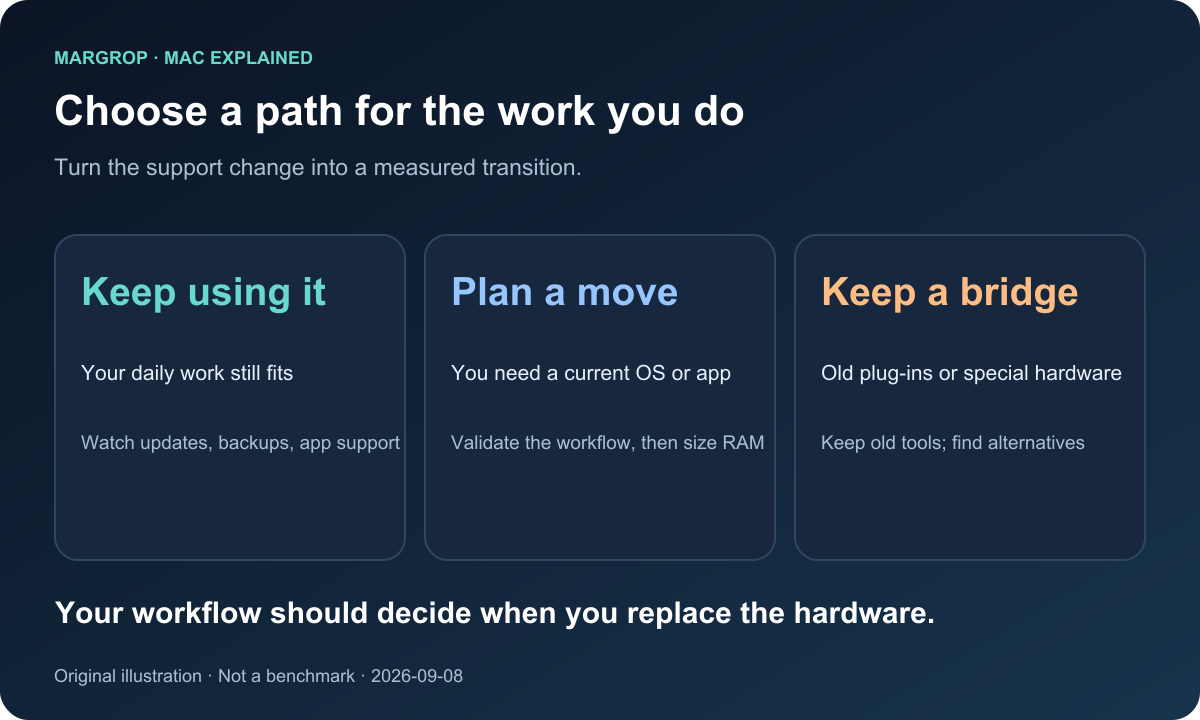
Figure 12. Original SVG illustration. Not everyone needs to order a computer today, but understanding the next step is useful.
A second-hand Intel Mac deserves the same whole-cost calculation: purchase price, remaining software support, battery and repair costs, and any special capability you actually need. “Top of the range when new” describes a past market position. It does not promise future compatibility.
Q&A
Will Apple remotely disable my Intel Mac when macOS 27 ships?
Not as a result of this compatibility policy. The computer can keep running the installed operating system and applications that still work. Whether it remains suitable for a task depends on changing security maintenance and application requirements.
Can more RAM or a new SSD make an Intel Mac eligible for macOS 27?
No. Those upgrades can address capacity and some performance limitations. They do not change the CPU instruction architecture or Apple’s supported operating-system platform. This is not simply a shortage of hardware resources.
Could Rosetta or a tool such as OpenCore solve the problem?
Rosetta works in the direction of running Intel Mac applications on Apple silicon, not the reverse. Tools such as OpenCore have helped some older Macs bypass model restrictions or restore particular support components. That does not imply they can transform an Arm-focused macOS release into a complete, usable x86 operating system. Experimental possibilities and reliable everyday use are also separate questions.
Is M1 still supported? Should I buy the newest generation instead?
The current macOS 27 list includes the corresponding M1 models. Feature availability, memory, and display capabilities still differ between machines. Inclusion in this release proves current eligibility, not perpetual support for every future release. A sensible purchase also depends on workload, condition, and price.
What do Intel, Apple silicon, and Universal mean on an application download?
They are like language editions of a recipe. An Intel build primarily supplies x86-64 instructions. An Apple silicon build supplies Arm64 instructions. A Universal binary typically includes both, allowing the system to choose the appropriate version. Including two instruction sets does not remove minimum OS requirements or plug-in compatibility constraints.[5][7]
Are M-series Macs better in every possible respect?
Modern M-series machines generally have advantages in efficiency, native application performance, and access to new macOS releases. Some Intel Macs still serve specific x86, legacy software, or expansion needs. Compare actual workflows rather than awarding a universal victory to a chip family.
Does this mean Intel or the whole x86 ecosystem is finished?
No. This is Apple’s support policy for its Intel Mac product line. Windows PCs, servers, and their software ecosystems have their own development paths.
A useful computer does not become useless because the version number changes
Intel’s departure from new macOS releases closes the period in which Apple maintained two processor paths for the Mac. For Apple, that is a platform milestone. For users, it is a reason to take stock of the tools they depend on.
An older computer can still create value. What it cannot do is turn its original premium price into a promise of future support.
The best reason to buy another Mac is that your documents, projects, plug-ins, peripherals, and everyday work need a more suitable kitchen—not simply that a presentation slide now says 27.
Further reading: Mac product positioning and buying tradeoffs and On the Importance of Mac Computers and Time Machine.
References and image credits
This is an explanation of platform policy and hardware architecture, not a hands-on macOS 27 review. Facts and screenshots were checked on September 8, 2026. Preview features and subsequent policies remain subject to Apple’s final announcements. Each language edition includes seven real screenshots from public official webpages, cropped where helpful and compressed as WebP, plus five original SVG illustrations. Illustrations are not represented as operating-system screenshots. Apple retains the rights to its webpages and product imagery, quoted here for explanation and commentary.
- Apple: macOS 27 Golden Gate Preview and device compatibility.
- Apple Developer: WWDC26 Platforms State of the Union, including the Intel transition, single-architecture focus, and Apple silicon-only app distribution.
- Apple Developer: WWDC25 Platforms State of the Union, with the Intel Mac support statement at approximately 54:50 onward.
- Apple Support: macOS Tahoe 26 compatibility.
- Apple Developer: Upcoming changes to Rosetta support for Intel-based macOS apps, September 1, 2026.
- Apple Newsroom: Apple unleashes M1, November 10, 2020.
- Apple Developer: About the Rosetta translation environment.
- Apple Support: Get started with Boot Camp Assistant.
- Apple Support: Use an external graphics processor with your Mac.