Python App in macOS LaunchAgent Can't Reach the Internet? Here's the httpx Proxy Trap You Need to Know
TL;DR:
When a Python application using httpx with
trust_env=Trueruns inside a macOS LaunchAgent, it silently picks up the system proxy settings fromscutil --proxy. But the LaunchAgent process may not be able to reach that proxy server at all — resulting inAll connection attempts failedorNo route to hosterrors.The fix is one line: add
NO_PROXY=*to the LaunchAgent’s plistEnvironmentVariables.This article documents the full debugging journey: from discovering that my AI Agent’s WeChat Enterprise (WeCom) messages weren’t being replied to, through methodical proxy troubleshooting, to finally pinning down the root cause — macOS system proxy + LaunchAgent network isolation. We’ll dive deep into Python httpx source code, macOS proxy architecture, and the many gotchas of LaunchAgent runtime environments.
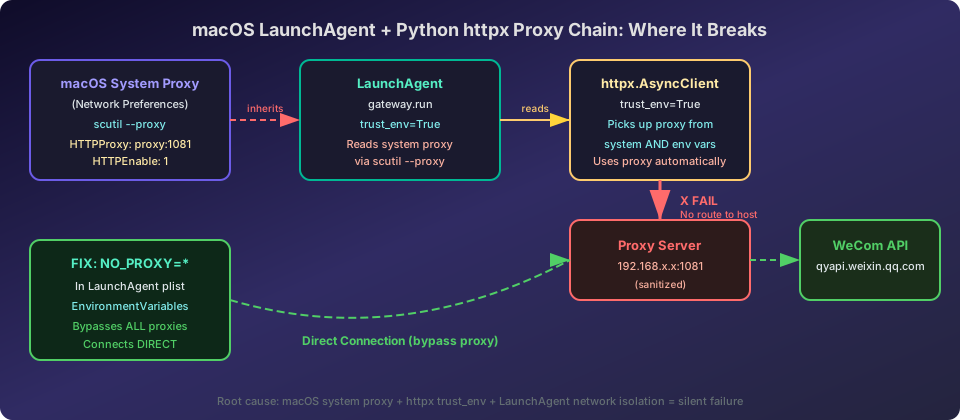
Figure 1: The proxy chain problem in macOS LaunchAgent with Python httpx. httpx reads system proxy settings via trust_env=True, but the LaunchAgent process cannot reach the proxy server, causing connection failures.
The Symptom: WeChat Enterprise Stopped Replying After Migration
Here’s the situation: I recently migrated my home AI Agent system from one framework to another. The AI Agent is a self-driving intelligent system that automatically executes scheduled tasks, manages memory, and handles multi-platform messaging. After the migration, most things worked perfectly:
- Cron jobs executing normally — daily health checks, blog writing, memory maintenance
- Web Dashboard running fine — browse Agent status in any browser
- DingTalk (Chinese Slack equivalent) messages flowing normally via Stream Mode persistent connections
- Memory system and Skills all migrated successfully
But WeChat Enterprise (WeCom) was completely dead.
Every message sent to the WeCom AI Agent went unanswered. Checking the Gateway logs, I found this familiar error:
[WecomCallback] Initial token refresh failed for app 'default': All connection attempts failed
This was strange — on the same network, DingTalk connected fine, but WeCom didn’t.
Round 1: Scoping the Problem
First, I needed to understand where exactly things broke. WeCom’s callback mode requires two operations:
- Receiving messages: WeCom POSTs encrypted XML to a local HTTP server
- Sending replies: Calling WeCom’s
message/sendAPI via an Access Token
The HTTP server for receiving messages started fine:
[WecomCallback] HTTP server listening on 0.0.0.0:8645/wecom/callback
The problem was step two — getting the Access Token failed.
The token endpoint is https://qyapi.weixin.qq.com/cgi-bin/gettoken, which requires an HTTP request. This request runs during Gateway startup, and it failed every time.
Round 2: Direct Run vs. LaunchAgent Run
To pinpoint the issue, I ran a controlled experiment.
Running Gateway directly in terminal
export HTTP_PROXY=http://your-proxy:port
export HTTPS_PROXY=http://your-proxy:port
python -m hermes_cli.main gateway run
Result: Token refresh succeeded!
[WecomCallback] Token refreshed for app 'default', expires in 7200s
Running Gateway via LaunchAgent
launchctl load ~/Library/LaunchAgents/ai.hermes.gateway.plist
Result: Token refresh failed!
[WecomCallback] Initial token refresh failed for app 'default': All connection attempts failed
This was the key finding — same code, same configuration, same environment variables. Direct run succeeds, LaunchAgent run fails.
This comparison tells us the problem isn’t in the code itself or in the environment variable values — it’s in what’s different between the LaunchAgent runtime environment and the terminal environment.
Round 3: Proxy Connectivity Testing
Since the error was All connection attempts failed, I tested the proxy server’s reachability:
# Test proxy from terminal
curl -x http://your-proxy:port -s -o /dev/null -w '%{http_code}' \
  'https://qyapi.weixin.qq.com/cgi-bin/gettoken?corpid=test&corpsecret=test'
Result: 200 OK (returned a business error code, but the request reached WeCom’s API)
# Test direct connection without proxy
curl -s -o /dev/null -w '%{http_code}' 'https://qyapi.weixin.qq.com'
Result: 200 OK
So:
- The proxy server is reachable
- WeCom API is accessible through the proxy
- WeCom API is also accessible without the proxy
Then why does the LaunchAgent process fail?
Round 4: Checking LaunchAgent Environment Variables
I inspected the Gateway process’s environment variables:
PID=$(pgrep -f 'hermes_cli.main gateway')
ps eww -p $PID | tr ' ' '\n' | grep -i proxy
Result:
NO_PROXY=localhost,127.0.0.1,your-proxy-ip,api.minimaxi.com
HTTPS_PROXY=http://your-proxy:port
HTTP_PROXY=http://your-proxy:port
Environment variables are set correctly! HTTP_PROXY and HTTPS_PROXY are both present.
But here’s the question — does httpx actually use these environment variables?
Round 5: Testing httpx Directly
To verify whether httpx actually uses the proxy environment variables, I wrote a simple test script:
import httpx
import asyncio
import os

async def test():
    print(f"HTTP_PROXY: {os.environ.get('HTTP_PROXY')}")
    print(f"HTTPS_PROXY: {os.environ.get('HTTPS_PROXY')}")

    client = httpx.AsyncClient(timeout=10.0, trust_env=True)
    try:
        resp = await client.get(
            'https://qyapi.weixin.qq.com/cgi-bin/gettoken',
            params={'corpid': 'test', 'corpsecret': 'test'}
        )
        print(f'Status: {resp.status_code}')
        print(f'Body: {resp.text[:200]}')
    except Exception as e:
        print(f'ERROR: {type(e).__name__}: {e}')
    finally:
        await client.aclose()

asyncio.run(test())
Run in terminal: Success, returns 200.
Run in LaunchAgent environment: Failure, All connection attempts failed.
This confirmed the issue is at the httpx network request level.
Key Discovery: httpx’s trust_env=True Reads More Than Environment Variables
This was the breakthrough.
How httpx detects proxies
When Python’s httpx library creates a client with trust_env=True, here’s what happens:
# Python stdlib urllib.request.getproxies() logic
def getproxies():
    return getproxies_environment() or getproxies_macosx_sysconf()
This means:
- Environment variables are checked first:
HTTP_PROXY,HTTPS_PROXY,NO_PROXY, etc. - Only if environment variables are empty, system proxy settings are read: On macOS, this happens via the
_scproxymodule, which callsSCDynamicStoreCopyProxies— the same data source asscutil --proxy
The catch: Even if NO_PROXY is set to just localhost,127.0.0.1, getproxies_environment() returns a non-empty result, so getproxies_macosx_sysconf() is never called.
macOS’s _scproxy Module
Python has a special C extension module on macOS called _scproxy. It reads system proxy settings through macOS’s SystemConfiguration framework. The implementation looks roughly like this:
// CPython source: Modules/_scproxy.c
static PyObject*
get_proxies(PyObject *self, PyObject *Py_UNUSED(ignored))
{
    // Call macOS SystemConfiguration API
    CFDictionaryRef proxies = SCDynamicStoreCopyProxies(NULL);
    // Convert proxy config to Python dict
    // ...
}
This module reads the same data as scutil --proxy — the proxy servers configured in macOS System Preferences.
The NO_PROXY=* Special Case
Reading httpx’s source code, I found a critical detail:
# httpx/_utils.py
if hostname == "*":
    # If NO_PROXY=* is used, bypass any information
    # from HTTP_PROXY, HTTPS_PROXY, ALL_PROXY, and always ignore proxies.
    return {}
When NO_PROXY is set to *, httpx returns an empty proxy map, effectively disabling all proxies entirely. This is the “nuclear option” for proxy bypass.
Root Cause: System Proxy + LaunchAgent Network Isolation = Connection Failure
After extensive testing, I identified the complete root cause chain.
macOS Has Two Independent Proxy Systems
macOS maintains two separate proxy configurations:
| Source | Configuration Method | Scope | How Programs Read It |
|---|---|---|---|
| Environment Variables | export HTTP_PROXY=... |
Terminal and child processes | os.environ |
| System Proxy | System Preferences → Network → Proxies | GUI apps, system services | _scproxy / SCDynamicStoreCopyProxies |
When no proxy environment variables are set in the terminal, httpx reads system proxy settings via _scproxy.
The LaunchAgent Network Isolation Problem
macOS LaunchAgents are managed by launchd. Although they run as the current user, their network routing may differ from the terminal environment:
- A proxy server that’s perfectly reachable from the terminal may be
No route to hostfrom a LaunchAgent - This is due to macOS security sandboxing and network isolation policies
- LaunchAgents run as child processes of
launchdand may not fully inherit the terminal’s network stack configuration
The Complete Root Cause Chain
1. System Preferences has a proxy server configured
          ↓
2. LaunchAgent starts the Gateway process
          ↓
3. httpx creates AsyncClient with trust_env=True
          ↓
4. httpx reads system proxy settings via _scproxy
          ↓
5. httpx tries to connect to WeCom API through the proxy
          ↓
6. Proxy server is unreachable from LaunchAgent (No route to host)
          ↓
7. Connection fails: "All connection attempts failed"
Why Did DingTalk Work?
DingTalk uses Stream Mode (persistent connection) with its own networking library. It doesn’t go through httpx’s proxy detection mechanism, so it connected successfully. DingTalk SDK has its own network connection logic that may use a different code path or different proxy strategy.
macOS Proxy Architecture: The Full Picture
To help everyone better understand this problem, let me break down macOS’s proxy architecture in detail.
Three Layers of Proxy Configuration
Layer 1: System Preferences (System Preferences)
This is the most intuitive way to configure proxies, through the GUI:
System Preferences → Network → Advanced → Proxies
After configuration, the data is stored in the SystemConfiguration framework and can be viewed via scutil --proxy.
Layer 2: Environment Variables
Set via export HTTP_PROXY=..., only affects the current terminal session and child processes.
Layer 3: Application-Level Configuration
Some applications (browsers, IDEs) have their own proxy settings, independent of system settings.
httpx’s Proxy Detection Priority
httpx’s trust_env=True detects proxies in this priority:
- Environment variables (
HTTP_PROXY,HTTPS_PROXY,NO_PROXY) - System proxy (via
_scproxy)
Key point: If any proxy-related configuration exists in environment variables (including NO_PROXY), the system proxy won’t be read.
LaunchAgent Specifics
LaunchAgent is macOS’s background service management mechanism, managed by launchd. Its special characteristics:
- Not launched through Shell: Won’t read
.zshrc,.bashrc, or other Shell configuration files - Network environment may differ: Although running as the current user, network routing may differ from the terminal
- Environment variables must be explicitly set: Configure in plist’s
EnvironmentVariables - Logs must be explicitly configured: Via
StandardOutPathandStandardErrorPath
Solution
Understanding the root cause makes the fix straightforward.
Option 1: NO_PROXY=* (Recommended, Simplest)
Add NO_PROXY=* to the LaunchAgent’s plist file:
<key>EnvironmentVariables</key>
<dict>
    <key>PATH</key>
    <string>/usr/local/bin:/usr/bin:/bin</string>
    <key>NO_PROXY</key>
    <string>*</string>
</dict>
This tells httpx to skip all proxies and connect directly.
Option 2: Remove System Proxy Settings
If you don’t need the system proxy, disable it in System Preferences:
System Preferences → Network → Advanced → Proxies → Uncheck all
But this affects all applications — not recommended.
Option 3: Disable Proxy in Code
If you can modify the source code, explicitly set proxy=None:
client = httpx.AsyncClient(
    timeout=20.0,
    proxy=None,
    trust_env=False,
)
But this requires code changes and isn’t flexible.
Recommended Approach
Option 1 is the best — no code changes, no system setting changes, just one line in the plist.
Verifying the Fix
After modifying the plist, reload the LaunchAgent:
launchctl unload ~/Library/LaunchAgents/ai.hermes.gateway.plist
launchctl load ~/Library/LaunchAgents/ai.hermes.gateway.plist
Check the Gateway logs:
[WecomCallback] Token refreshed for app 'default', expires in 7200s
[WecomCallback] ✓ wecom_callback connected
Perfect! Token refresh succeeded, WeCom connected normally. DingTalk also stayed connected — confirming that NO_PROXY=* doesn’t break already-working connections.
Similar Problems in Other Scenarios
This issue isn’t limited to LaunchAgents. Similar proxy traps can occur in:
Docker Containers
Docker containers may inherit the host’s proxy settings, but the container’s network environment differs from the host. Solution: explicitly set NO_PROXY in Dockerfile or docker-compose.yml.
CI/CD Environments
GitHub Actions, GitLab CI, and other CI/CD environments may have different proxy settings than your local environment. Explicitly set all proxy-related environment variables in your CI configuration.
SSH Remote Execution
When executing commands via SSH, environment variables may differ from SSH login. Explicitly set proxy environment variables in remote commands.
Common Pitfalls and Best Practices
Pitfall 1: Setting HTTP_PROXY Without NO_PROXY
<!-- Wrong -->
<key>HTTP_PROXY</key>
<string>http://proxy:port</string>
<!-- Missing NO_PROXY -->
All requests will try to use the proxy. If it’s unreachable, everything fails.
Pitfall 2: Incomplete NO_PROXY
<!-- Not thorough enough -->
<key>NO_PROXY</key>
<string>localhost,127.0.0.1</string>
Only local addresses are excluded. Everything else still tries the proxy.
Pitfall 3: Assuming Terminal and LaunchAgent Environments Are Identical
This is the most common misconception. Programs that work perfectly in the terminal may have issues in LaunchAgent, including:
- Different network routing
- Missing environment variables
- Different file paths
- Different permissions
- Different DNS resolution behavior
Pitfall 4: Ignoring _scproxy Existence
Many developers don’t know about macOS’s _scproxy mechanism, thinking httpx only reads environment variables. In fact, when environment variables are empty, httpx automatically reads system proxy settings.
Best Practices
- Explicitly set all needed environment variables in the LaunchAgent plist
- Use
NO_PROXY=*to bypass system proxy unless you’ve verified the proxy is reachable - Set
StandardOutPathandStandardErrorPathin the plist for easy log access - Use
launchctl list | grep your-labelto check LaunchAgent status - Set
PATHin the LaunchAgent to ensure all needed commands are found
Q&A
Q1: Why does it work in the terminal but fail in LaunchAgent?
A: Because macOS LaunchAgents run in a launchd-managed isolated environment. Although they run as the current user, network routing may differ from the terminal. The proxy server might be unreachable from the LaunchAgent (No route to host).
Q2: How do I know if my program is affected?
A: If your Python program uses httpx or requests with trust_env=True (the default for httpx) and runs in a macOS LaunchAgent, you may be affected.
Check with:
# View system proxy settings
scutil --proxy

# View LaunchAgent process environment
ps eww -p <PID> | tr ' ' '\n' | grep -i proxy
Q3: Will NO_PROXY=* break other functionality?
A: No. NO_PROXY=* simply tells httpx not to use proxies and connect directly. If your network allows direct connections (most home and office networks do), this won’t affect anything.
Q4: Does the requests library have this problem too?
A: Yes. Python’s requests library also has a trust_env parameter (default True). Programs using requests in LaunchAgent may encounter the same issue. The fix is the same: add NO_PROXY=*.
Q5: Does Linux systemd have this problem?
A: Linux systemd services typically don’t have this issue because their network environment matches the terminal. However, if your systemd service uses specific network namespaces or security policies, similar problems may arise.
Q6: Can I set both HTTP_PROXY and NO_PROXY=* in the plist?
A: Yes, but NO_PROXY=* makes httpx ignore HTTP_PROXY. If you need some requests proxied and others direct, set NO_PROXY more granularly (e.g., NO_PROXY=localhost,127.0.0.1,internal.company.com).
Q7: How do I debug LaunchAgent network issues?
A: Follow these steps:
- Set
StandardOutPathandStandardErrorPathin the plist - Add detailed logging in your program
- Use
ps eww -p <PID>to check process environment variables - Use
netstat -an | grep <port>to check network connection status - Use
tcpdumporWiresharkfor packet capture analysis
Key Takeaways
- macOS LaunchAgent network environment differs from terminal — especially regarding system proxy server access
- Python httpx’s
trust_env=Truereads more than environment variables — it also reads macOS system proxy settings via_scproxywhen env vars are empty - When proxy is unreachable, httpx reports
All connection attempts failed— a misleading error that’s hard to diagnose - The fix is one line: add
NO_PROXY=*to the LaunchAgent’s plistEnvironmentVariables
macOS’s proxy mechanism is a black box for many developers. I hope this article helps others who encounter similar issues avoid the long debugging journey. If you have questions about macOS LaunchAgent or Python proxy configuration, feel free to discuss in the comments!
References
- httpx Documentation - Environment Variables
- httpx Documentation - Proxies
- Apple Developer - Daemons and Services Programming Guide
- Python urllib.request.getproxies Documentation
- httpx GitHub Issue #1929 - Proxy settings not picked up from system (issue no longer accessible)
- httpx GitHub Issue #1669 - Support system proxy configuration
- macOS scutil man page
- Python _scproxy Source Code