VPN Connected, But Internal Hostnames Won't Resolve? A Complete macOS Routing Table Walkthrough
TL;DR:
When two VPNs run side-by-side on macOS (e.g.
utun0andutun15), an aggregate10.0.0.0/8route pushed by one of them can silently “swallow” every address in the 10.x.x.x range — including the one you actually wanted to reach on the other VPN. DNS resolves fine; TCP/ICMP just hangs.route -n getis the first knife you should reach for.
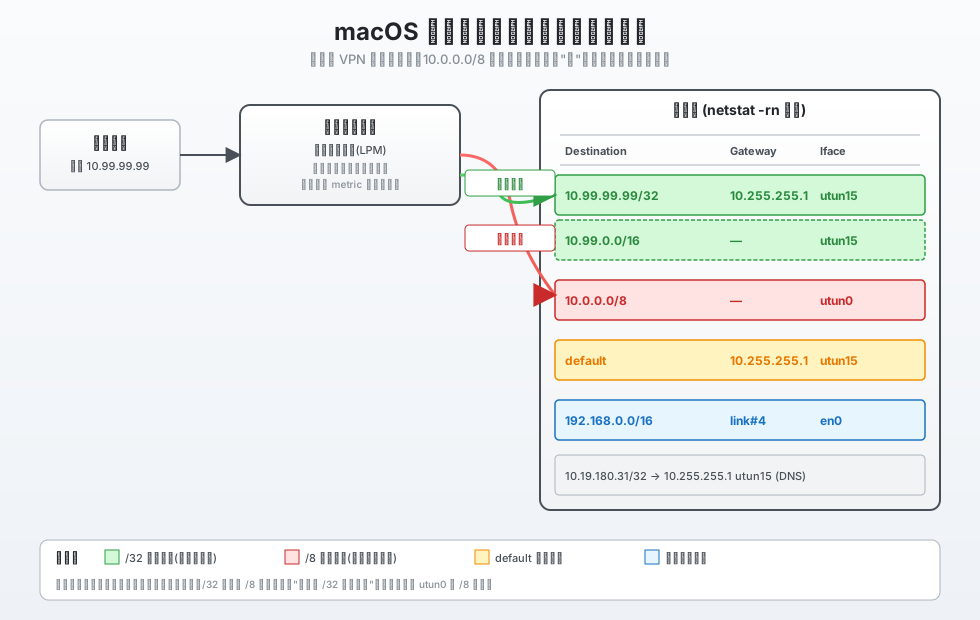
Figure 1: macOS kernel route lookup flow. An application sends a packet toward a destination IP. The kernel walks the routing table by “longest prefix match” — a match on 10.0.0.0/8 selects utun0, while a more specific /32 host route selects utun15.
Background: VPN Is Up, but Internal Hostnames Are Dead
Picture this: on a remote macOS workstation I’m connected to over SSH, two VPNs are running concurrently:
- VPN-A (system layer,
utun0): covers the entire10.0.0.0/8block; this is my daily-driver tunnel - VPN-B (assigned
utun15): dialed up by a client, the local address sits in10.255.255.0/24, the remote side is the corporate intranet
Once VPN-B finished dialing, ifconfig utun15 reported a valid IP and the routing table gained a default → 10.255.255.1 utun15 fallback route.
So far so good — but when I open a browser and try to reach a couple of internal hostnames, things go sideways:
curl http://internal-nas.example.corp/— hangs and eventually times outcurl http://internal-nas.example.corp/(FQDN) — same thingnslookup internal-nas.example.corp— returns an IP just fine, e.g.10.99.99.99
DNS works perfectly; the packets simply never arrive. Clearly this is an L3 (routing) problem, not an L7 (application) problem.
To make it weirder, ping to the resolved IP also fails:
PING 10.99.99.99 (10.99.99.99): 56 data bytes
Request timeout for icmp_seq 0
Request timeout for icmp_seq 1
--- 10.99.99.99 ping statistics ---
2 packets transmitted, 0 packets received, 100% packet loss
But on the same machine, other internal IPs (10.19.x, 10.20.x, 10.127.x) are reachable without any issue.
Why does 10.99.99.99 fail in particular?
Investigation: Looking Through the Routing Table
When in doubt, dump the routing table. SSH into the box and run:
netstat -rn
Truncated output (the lines that matter):
Internet:
Destination        Gateway            Flags     Netif
default            10.255.255.1      UGScg     utun15
10                 utun0             USc       utun0
10.255.255.1/32    127.0.0.1         UGSc      lo0
...
Pay attention to the first highlighted line: 10 utun0 USc — this means every packet whose destination falls within 10.0.0.0/8 (i.e. 10.0.0.0 ~ 10.255.255.255) is routed to utun0.
Meanwhile, utun15 only has default plus a handful of /32 host routes (DNS servers, etc.). There is no route covering 10.99.0.0/16 or anything close.
So:
- 10.19.180.31 (DNS) has a /32 host route → goes to utun15 ✅
- 10.99.99.99 (NAS) has no /32 → matches utun0’s /8 aggregate → goes to utun0 ❌
There’s the problem.
But “going to utun0” alone shouldn’t break things. Why doesn’t it work? Two reasons:
- The remote gateway of
utun0(VPN-A) has no idea where 10.99.99.99 actually is — that address sits on a different intranet segment - Even if VPN-A could forward the packet, the return path from 10.99.99.99 may not come back to my machine, because the destination’s own routing table is consulted on the way back
Either way, the packet goes out and never comes back, or it’s dropped at the far end.
Root Cause: The “Longest Prefix Match” Trap
The macOS kernel (like every BSD/Linux kernel) uses Longest Prefix Match (LPM) for route lookup:
The kernel picks the route with the longest prefix length as the winning decision. If multiple routes tie on prefix length, the one with the lower metric wins.
There are two layers of foot-guns here:
Pitfall 1: Aggregate Routes Are “Too Greedy”
utun0’s 10 utun0 USc represents 10.0.0.0/8, a prefix length of just 8. It “covers” 16,777,216 addresses — 10.99.99.99 naturally falls in that range.
As long as no more-specific route exists, the /8 route intercepts it.
Pitfall 2: “Silent Override” by VPN Client Pushed Routes
utun0 is established at the system level and automatically pushes that /8 aggregate into the routing table every time it connects — the user is never informed.
Meanwhile, utun15 is dialed on demand, and the routes it pushes simply don’t include the 10.99.0.0/16 segment. The client does not auto-fill the gap.
Stack the two together, and the destination IP is quietly hijacked by utun0.
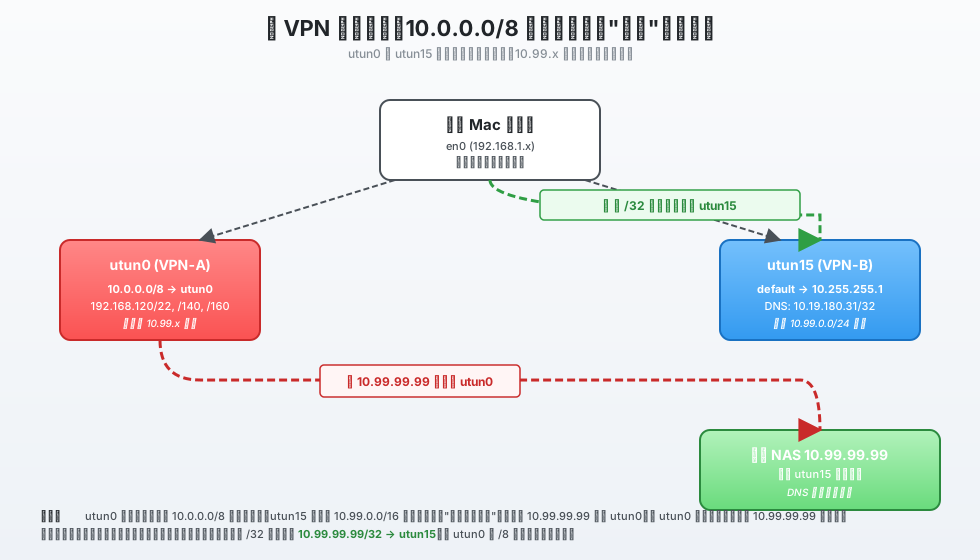
Figure 2: Routing conflict when two VPNs coexist. utun0 pushes a 10.0.0.0/8 aggregate that shadows the entire range; utun15 has no 10.99.0.0/16 route. Result: 10.99.99.99 ends up on utun0 instead of utun15.
Verification: route -n get Is the Most Direct Diagnostic
When you suspect routing is wrong, don’t guess. Let the kernel tell you with route -n get <target>:
$ route -n get 10.99.99.99

   route to: 10.99.99.99
destination: 10.99.99.99
  interface: utun0        ← THIS is the line to look at
      flags: <UP,HOST,DONE,WASCLONED,IFSCOPE,IFREF>
If the interface here is not what you expected (we wanted utun15), you’ve confirmed the routing went to the wrong place.
Then cross-check the table to see why utun0 matched:
$ netstat -rn | grep -E "^10 |utun15|default"
default            10.255.255.1      UGScg     utun15
10                 utun0             USc       utun0
10.19.180.31/32    10.255.255.1      UGHS      utun15
You can see utun15 only has a few /32s and no 10.99.x route at all — the /8 aggregate “wins” in LPM.
The Fix: Add a More-Specific Route
The idea: give the kernel a route for 10.99.99.99 with a prefix length longer than /8 (even a /32 will do) so it outranks utun0’s aggregate.
macOS uses route -n add to add a static route:
# A single IP via utun15
sudo route -n add -host 10.99.99.99 -interface utun15

# The whole 10.99.0.0/16 subnet via utun15
sudo route -n add -net 10.99.0.0/16 -interface utun15
A few syntax points worth remembering:
-hostis equivalent to-net 10.99.99.99/32— adds a /32 host route-interface utun15binds directly to the interface. No gateway is required, because point-to-point interfaces are their own gateway- The
-nflag means “do not resolve names.” It affects display only, not behavior
After running the command, verify again:
$ route -n get 10.99.99.99

   route to: 10.99.99.99
destination: 10.99.99.99
  interface: utun15        ← now correct
      flags: <UP,HOST,DONE,WASCLONED,IFSCOPE,IFREF>

$ ping -c 3 10.99.99.99
PING 10.99.99.99 (10.99.99.99): 56 data bytes
64 bytes from 10.99.99.99: icmp_seq=0 ttl=63 time=12.4 ms
64 bytes from 10.99.99.99: icmp_seq=1 ttl=63 time=11.8 ms
64 bytes from 10.99.99.99: icmp_seq=2 ttl=63 time=12.1 ms
--- 10.99.99.99 ping statistics ---
3 packets transmitted, 3 received, 0% packet loss
It works.
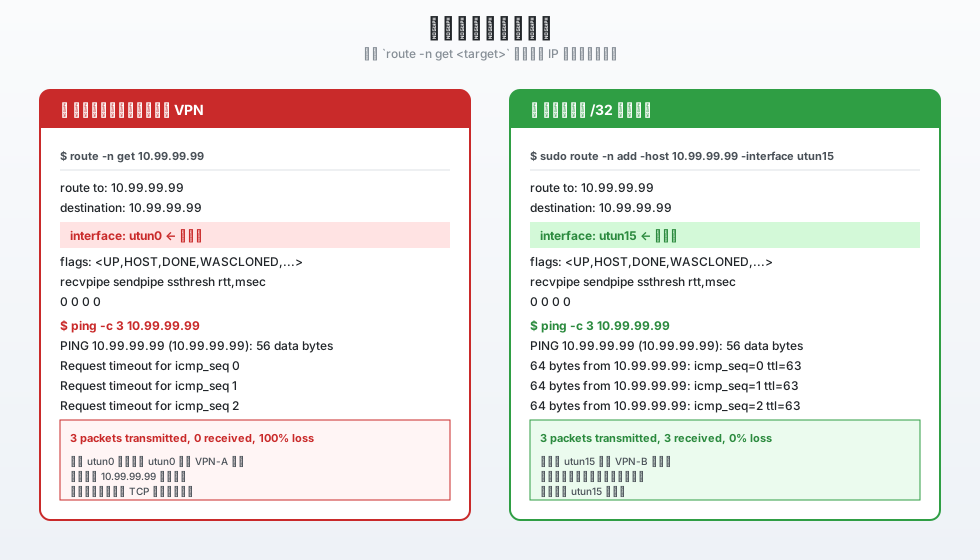
Figure 3: Side-by-side comparison of route -n get and ping output before and after the fix. Left: packets are sent to utun0, 100% packet loss. Right: after adding the /32 host route, packets successfully reach the destination through utun15.
Making It Permanent: launchd Startup Items
route -n add is session-scoped — it lives only in the current kernel routing table. A reboot, a network event, or a VPN reconnect will wipe it. To rebuild the route automatically at startup, you have several options.
Option 1: A launchd Task (Recommended)
The most reliable approach on macOS is to drop a launchd plist into /Library/LaunchDaemons/:
sudo tee /Library/LaunchDaemons/com.local.vpn-route-fix.plist <<'PLIST'
<?xml version="1.0" encoding="UTF-8"?>
<!DOCTYPE plist PUBLIC "-//Apple//DTD PLIST 1.0//EN" "http://www.apple.com/DTDs/PropertyList-1.0.dtd">
<plist version="1.0">
<dict>
    <key>Label</key>
    <string>com.local.vpn-route-fix</string>
    <key>ProgramArguments</key>
    <array>
        <string>/sbin/route</string>
        <string>-n</string>
        <string>add</string>
        <string>-host</string>
        <string>10.99.99.99</string>
        <string>-interface</string>
        <string>utun15</string>
    </array>
    <key>RunAtLoad</key>
    <true/>
    <key>KeepAlive</key>
    <false/>
    <key>UserName</key>
    <string>root</string>
</dict>
</plist>
PLIST

sudo chmod 644 /Library/LaunchDaemons/com.local.vpn-route-fix.plist
sudo launchctl load -w /Library/LaunchDaemons/com.local.vpn-route-fix.plist
RunAtLoad set to true makes the task run as soon as launchd loads it. UserName is root because route needs sudo.
Caveat: launchd runs the task at system boot — but utun15 may not be up yet. A more robust pattern is to wrap the command in a shell script that waits for the interface to appear.
A more resilient version with a wrapper script:
# /usr/local/bin/vpn-route-fix.sh
#!/bin/sh
# Wait up to 30s for utun15 to come up
for i in $(seq 1 30); do
    if ifconfig utun15 >/dev/null 2>&1; then
        break
    fi
    sleep 1
done
# If the interface exists, add the route
if ifconfig utun15 >/dev/null 2>&1; then
    /sbin/route -n add -host 10.99.99.99 -interface utun15
fi
sudo chmod +x /usr/local/bin/vpn-route-fix.sh
Then update the plist’s ProgramArguments to call this script.
Option 2: rc.local / StartupItem
The legacy approach. /etc/rc.local is deprecated on modern macOS — not recommended.
Option 3: Hand It Off to the VPN Client
If your VPN-B client supports a “Connect Script” or “Post-Connect Hook” (OpenConnect, Viscosity, Cloudflare WARP, and most others do), drop the route -n add line straight in. The route is added the moment the VPN comes up — no startup-order concerns.
Option 4 (Strongly Recommended): Push It From the VPN Server
The most thorough fix is to ask the VPN-B administrator to push the 10.99.0.0/16 route from the server side. Benefits:
- Zero configuration on the client
- The route auto-restores after every VPN reconnect
- Every other teammate gets the same fix, not just your machine
Keep adding entries for every internal segment your team needs, until nobody has to touch the routing table by hand.
macOS Routing Table Command Cheat-Sheet
A quick reference of the commands you’ll reach for the most:
Inspect the Routing Table
# Default format (IPv4 + IPv6; flags as letters, more readable)
netstat -rn

# Numeric form, no DNS resolution
netstat -rn -f inet

# Look at the default route
netstat -rn -f inet | grep "^default"

# See which exit a specific destination uses
route -n get 8.8.8.8
Add / Delete / Change Routes
# Add a /32 host route
sudo route -n add -host 10.99.99.99 -interface utun15

# Add a /24 subnet route (with explicit gateway)
sudo route -n add -net 10.99.0.0/24 10.255.255.1

# Add a default route (usually unnecessary; the system manages it)
sudo route -n add default 10.255.255.1

# Delete a route
sudo route -n delete -host 10.99.99.99 -interface utun15
sudo route -n delete -net 10.99.0.0/24 10.255.255.1

# "Change" a route (effectively delete + add)
sudo route -n change -host 10.99.99.99 -interface utun0
Temporarily Disable an Interface
# Bring utun0 down so all 10.x falls through to utun15
sudo ifconfig utun0 down

# Bring it back up
sudo ifconfig utun0 up
Watch Routing Changes Live
# Refresh the table once a second (handy when debugging VPN route pushes)
watch -n 1 'netstat -rn -f inet'
Clear All Manually-Added Routes
# Safest: just reboot. The system rebuilds the table from scratch.
sudo reboot
Q&A
Q1: Can I just delete utun0’s 10.0.0.0/8 route?
Technically yes:
sudo route -n delete -net 10.0.0.0/8 -interface utun0
But this is usually a bad idea, because:
- Other normally-reachable IPs (10.19.x, 10.20.x, 10.127.x) will lose their route
- VPN-A re-connects and silently re-pushes the /8 route — your delete was temporary
- If utun15 dies for any reason, you’ll have no path to 10.x at all
Prefer adding precise /32 host routes over brutally deleting an aggregate.
Q2: I added a route and it still doesn’t work. What now?
Walk down this list:
- Is the interface name correct? Run
ifconfig | grep utunto confirm - Is the VPN itself up?
ping 10.255.255.1(the remote gateway) as a sanity check - Is DNS pointing at the right IP?
dig <hostname>ornslookup <hostname>to confirm - Is the remote firewall / ACL permitting the traffic? Ask the VPN-B admin whether 10.99.99.99 is reachable from inside the intranet
- Is the TCP/UDP port blocked? Try
telnet 10.99.99.99 80ornc -zv 10.99.99.99 80
Q3: What’s the difference between route -n add and route add?
route -n addskips name resolution (does not reverse-resolve IPs to hostnames, and does not forward-resolve hostnames in arguments)route addwill try to resolve arguments, and can misbehave when DNS is broken
Behavior is identical otherwise. Always use -n in scripts to avoid surprises.
Q4: Can I add a permanent route through the GUI?
System Preferences → Network → the interface you want → Advanced → Routes lets you add IPv4 routes.
But it only takes effect on physical interfaces, and it doesn’t play well with dynamic utun VPN interfaces (the number changes on every reconnect). The CLI + launchd path is far more reliable.
Q5: How do I see which routes the VPN-B client is pushing?
Most VPN clients log the pushed routes at connect time — OpenConnect looks like:
ESP detected: using UDP
Connected as 10.255.255.x
Pushed routes:
  0.0.0.0/0
  10.0.0.0/8 via 10.255.255.1
  ...
You can also diff the routing table before/after the connection. For continuous visibility, use:
sudo route -n monitor
This prints every change to the kernel routing table in real time — extremely useful when debugging a flaky VPN client.
Q6: Why are utun numbers dynamic?
macOS assigns a fresh utun<N> number every time a new tunnel/VPN comes up. The number is not stable. Today it might be utun15; tomorrow after connecting a different VPN it could be utun16.
Never hard-code a utun number in a script. Identify the right interface by:
- Its IP (grep
ifconfigoutput) - Its description (the
interface-idline inifconfigoutput) - The interface that owns your
defaultroute innetstat -rn
Q7: Does route -n add survive a reboot?
No. route -n add inserts an entry into the kernel’s in-memory routing table. Reboot, or a routing daemon (e.g. routed) reloading its config, will erase it.
For persistence, use the launchd approach above, or add it inside the VPN client’s hook script.
Q8: Can I just put route commands in ~/.zshrc?
Strongly discouraged. Reasons:
~/.zshrcruns every time a new shell opens; runningroute -n addon an already-present route will throw “File exists”- User shells aren’t always zsh — iTerm2, SSH logins, and launchd-spawned processes may not read zshrc at all
- Putting a sudo-required command in a user login script is a code smell
Just write a launchd plist.
Q9: What’s “metric” and how does it affect route selection?
Metric is a “cost” assigned to a route — lower is better. You can see it (and rtt,msec, hopcount, etc.) in route -n get output:
$ route -n get 8.8.8.8
...
      flags: <UP,GATEWAY,IFSCOPE>
   recvpipe  sendpipe  ssthresh  rtt,msec    rttvar  hopcount
        0         0         0         0         0         0
When two routes have the same prefix length, the one with the lower metric wins. The trailing letters in the Flags column (e.g. S for static, D for dynamic) just identify where the route came from; they don’t influence the metric.
Q10: Do I need to look at the IPv6 routing table separately?
Yes. netstat -rn mixes IPv4 and IPv6 by default. Filter with -f:
netstat -rn -f inet     # IPv4 only
netstat -rn -f inet6    # IPv6 only
If your services are pure IPv4, you can usually ignore IPv6. But if your intranet is dual-stack, a wrong IPv6 route can also manifest as “webpages don’t open” — same root cause, different family.
Summary
Walking through the whole investigation, the core of the fix boils down to three things:
netstat -rn— get the full picture of the routing tableroute -n get <target>— verify exactly which exit a specific IP uses- Add a /32 host route or /16 subnet route — outrank the bad aggregate via longest prefix match
The hard part of VPN routing issues isn’t the commands — it’s the invisibility:
- The routing table is an abstract list; VPN clients push routes transparently
- When DNS works, people often wrongly assume the network is fine
- Aggregate routes like
10.0.0.0/8silently take over vast address ranges
Burn route -n get into muscle memory, and the next time you hit “VPN is connected, but that one internal segment is unreachable,” you’ll be able to localize it in seconds.