7.4M Reports & 20 Hours Dark: Inside the Nov 2026 Microsoft 365 Global Outage — How Auto-Health Checks Knocked Out Exchange and Restarts Triggered Stampedes
Let us cut straight to the conclusion: if you opened your laptop yesterday morning to find Outlook spinning indefinitely, Teams calendars blank, Microsoft 365 Copilot unreachable, and even GoDaddy or Gmail senders receiving mysterious bounce notices—you were not hacked, your office Wi-Fi did not collapse, and you should definitely not reinstall Office or delete your local mail cache.
Beginning late on November 12, 2026 UTC (early morning November 13 across Asia-Pacific), Microsoft’s flagship productivity cloud endured one of the largest and longest sustained outages in modern enterprise SaaS history. What opened as regional Exchange Online connectivity trouble in the Americas (tracked internally as EX1550543) rapidly cascaded into the global multi-workload incident MO1550821. Across 70+ affected countries—from the U.S. House of Representatives suspending a day of legislative business and U.K. NHS clinics falling back to pen-and-paper prescriptions, to Japanese enterprises dusting off fax machines and New Zealand pausing visa processing—modern cloud-first institutions slammed into a collective brick wall as local workdays began around the globe.
Even stranger for seasoned SREs and IT administrators: why did this outage drag on for roughly 20 hours—even knocking Microsoft’s own status portal into Azure Front Door 504 Gateway Timeout errors? Why did TCP port 443 answer health pings in milliseconds while browsers hung forever? And why did restarting recovered servers repeatedly knock them back offline within minutes?
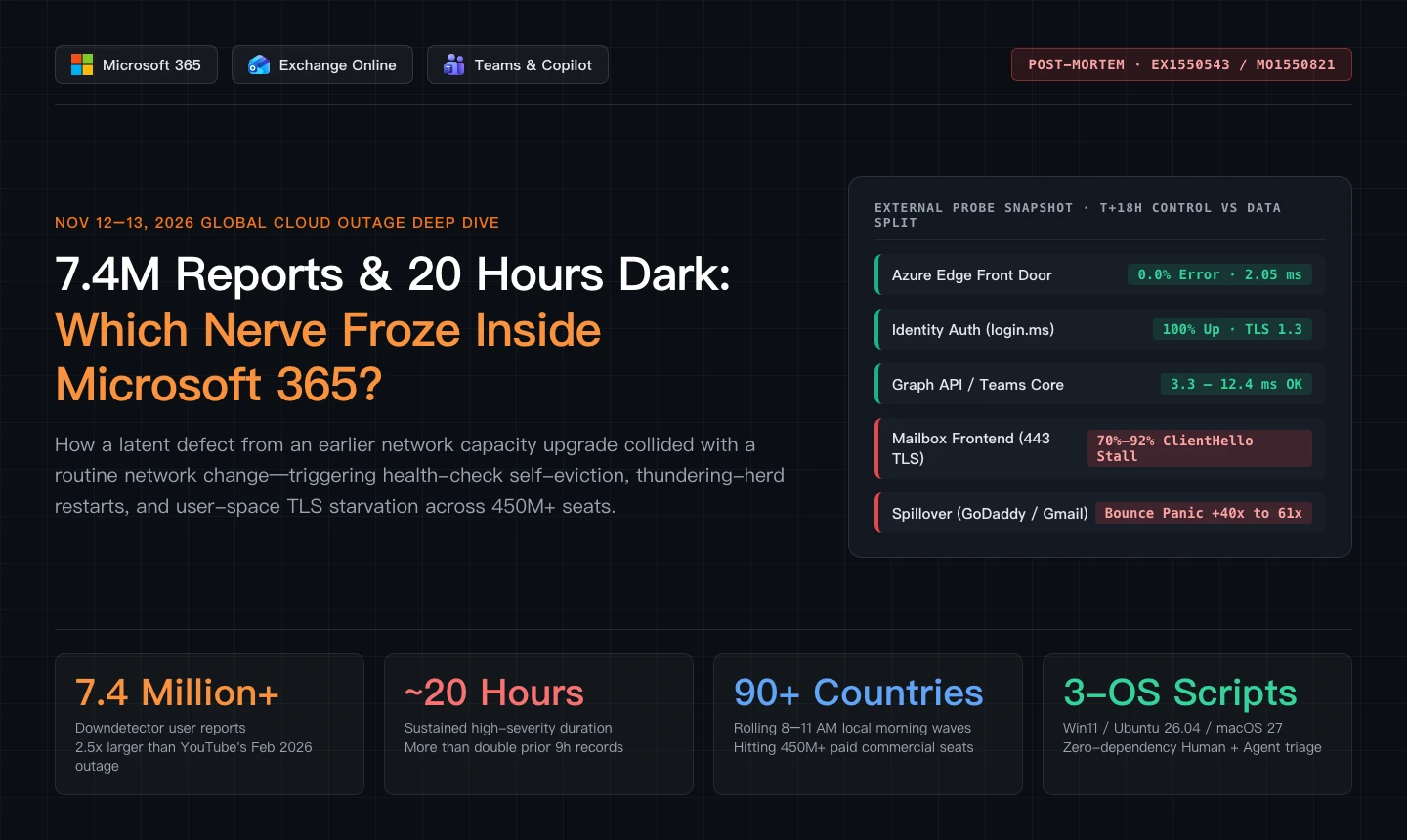
Figure 1: Original cover blueprint summarizing the Nov 12–13, 2026 Microsoft 365 outage metrics alongside independent telemetry showing Azure Edge and Entra ID staying healthy while Mailbox TLS stalled.
1. How It Started: When Even Microsoft's Own Status Page Returned 504
Every infrastructure engineer knows one uniquely sinking feeling: reaching for your cloud provider’s status dashboard to verify an upstream outage—only to watch the status page itself throw a gateway error back at you.
Between 16:17 and 17:54 UTC on November 12, 2026 (late morning to noon along the U.S. East Coast), enterprise desks across the Americas watched Outlook desktop stall on folder updates while OWA webmail and Exchange ActiveSync mobile sync went dark. Microsoft logged EX1550543, initially scoping the disruption to Exchange Online mailbox connections.
Yet within half an hour (18:07–18:26 UTC), the blast radius spilled well beyond email into global suite incident MO1550821. At the same time, admins attempting to load Microsoft’s public portal at status.cloud.microsoft were greeted intermittently by raw Azure Front Door 504 Gateway Timeout pages—leaving thousands of helpdesks blind without third-party status aggregators and Service Health text feeds.
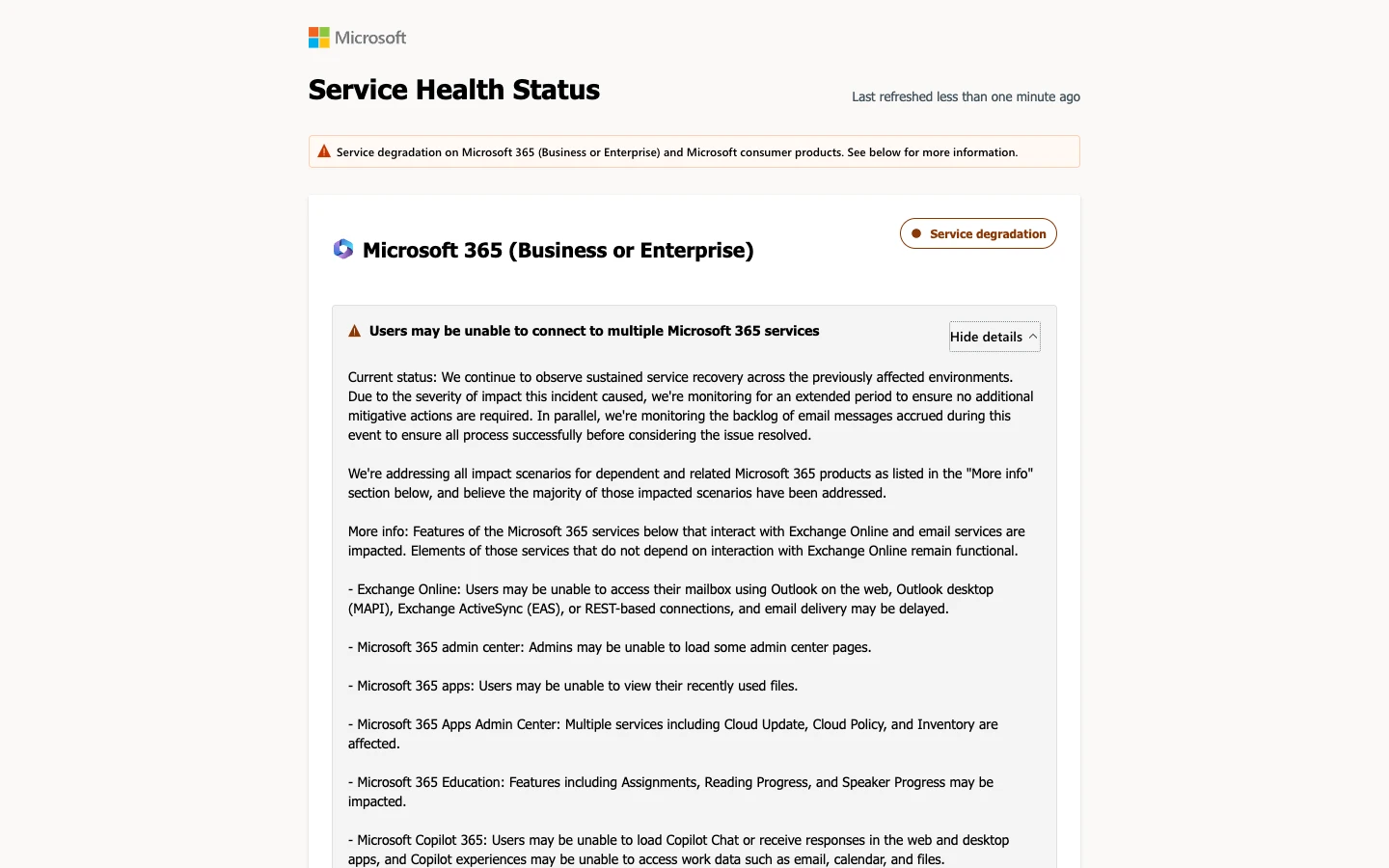
Figure 2: Captured live screenshot of status.cloud.microsoft displaying active Service Degradation notices across Exchange Online and companion Microsoft 365 workloads.
2. Measuring the Damage: 7.4 Million Reports & a "Follow-the-Sun" Crash Wave
Routine SaaS hiccups typically spike and subside within two to four hours as bad rollouts get reverted. According to crowdsourced telemetry published by Ookla’s Downdetector, the November 12–13 Microsoft 365 incident rewrote the past year’s disruption charts on both scale and endurance.
By 16:00 UTC on November 13, Downdetector logged more than 7 million total reports—reaching 7.4 million across Microsoft 365 services. That made it roughly 2.5x larger than the next-biggest outage of the preceding 12 months (YouTube in February 2026 at 2.8 million), dwarfing Verizon (January 2026, 2.5 million) and Meta (June 2026, 1.7 million).
Even more extraordinary was duration. Measuring sustained elevated disruption (hours staying above one-fifth of the busiest hour), prior recent marathons like Cloudflare (Nov 2025) and Verizon (Jan 2026) topped out around 9 hours. Microsoft’s outage burned hot for nearly 20 hours—closely corroborated by Kentik director Doug Madory, who tracked roughly 18 hours of suppressed Microsoft cloud traffic globally.
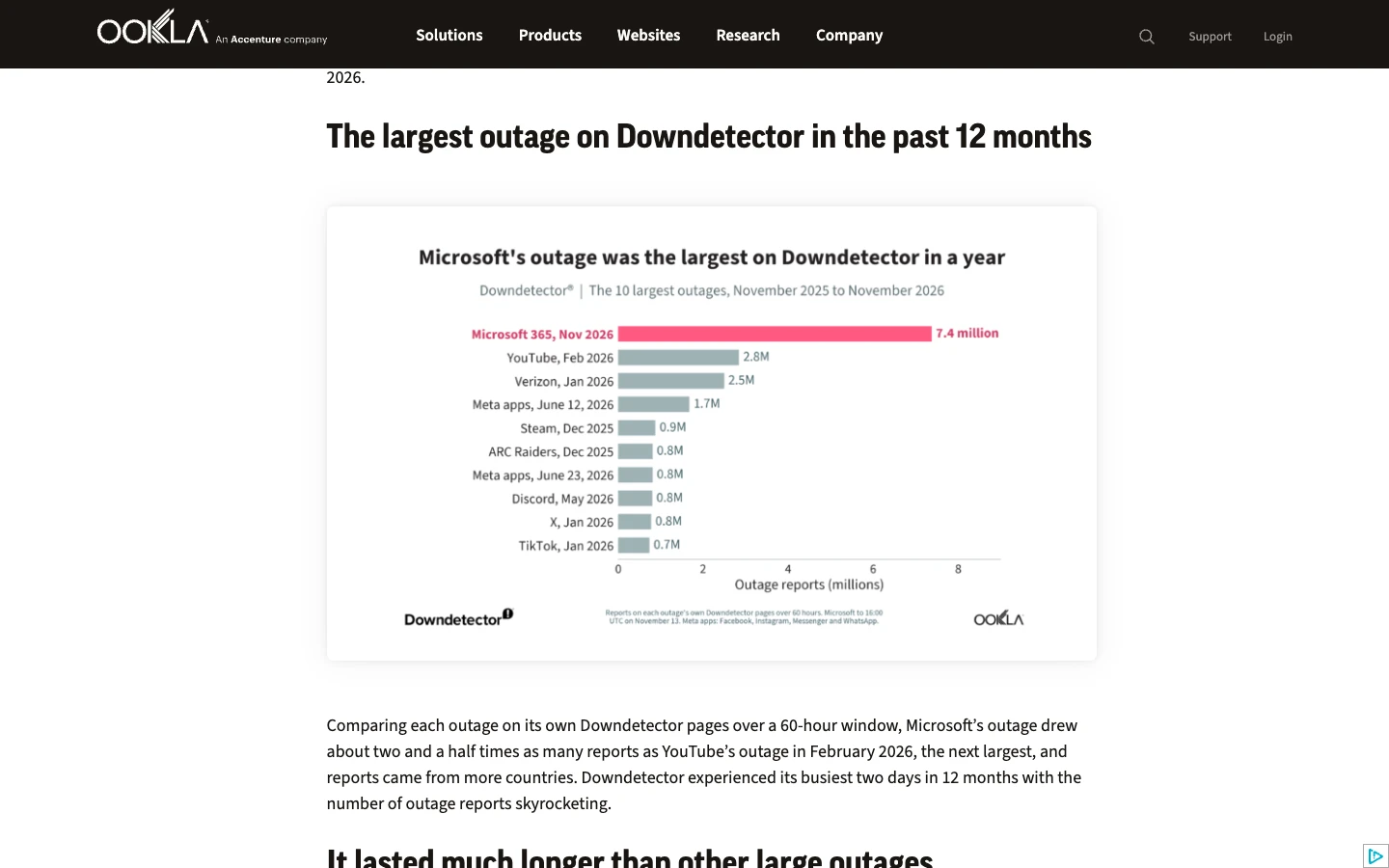
Figure 3: Real Ookla Downdetector comparison showing the Nov 2026 Microsoft 365 incident (7.4 million reports) towering at ~2.5x above YouTube’s Feb 2026 disruption.
Why did the graph resemble multiple punishing peaks rather than a single bell curve? Look at Earth’s rotation.
Over 90 countries and territories recorded at least 1,000 incident reports. While the Americas absorbed the initial afternoon shockwave, millions in Asia-Pacific and Europe were asleep. As daylight swept westward—hitting desks at roughly 9:00 AM JST in Japan, 9:30 AM SGT in Singapore, 10:15 AM IST in India, and 8:30–9:15 AM local time across the UK and Europe—hundreds of millions of knowledge workers flipped open laptops simultaneously, unleashing consecutive morning retry storms onto strained frontend pools.
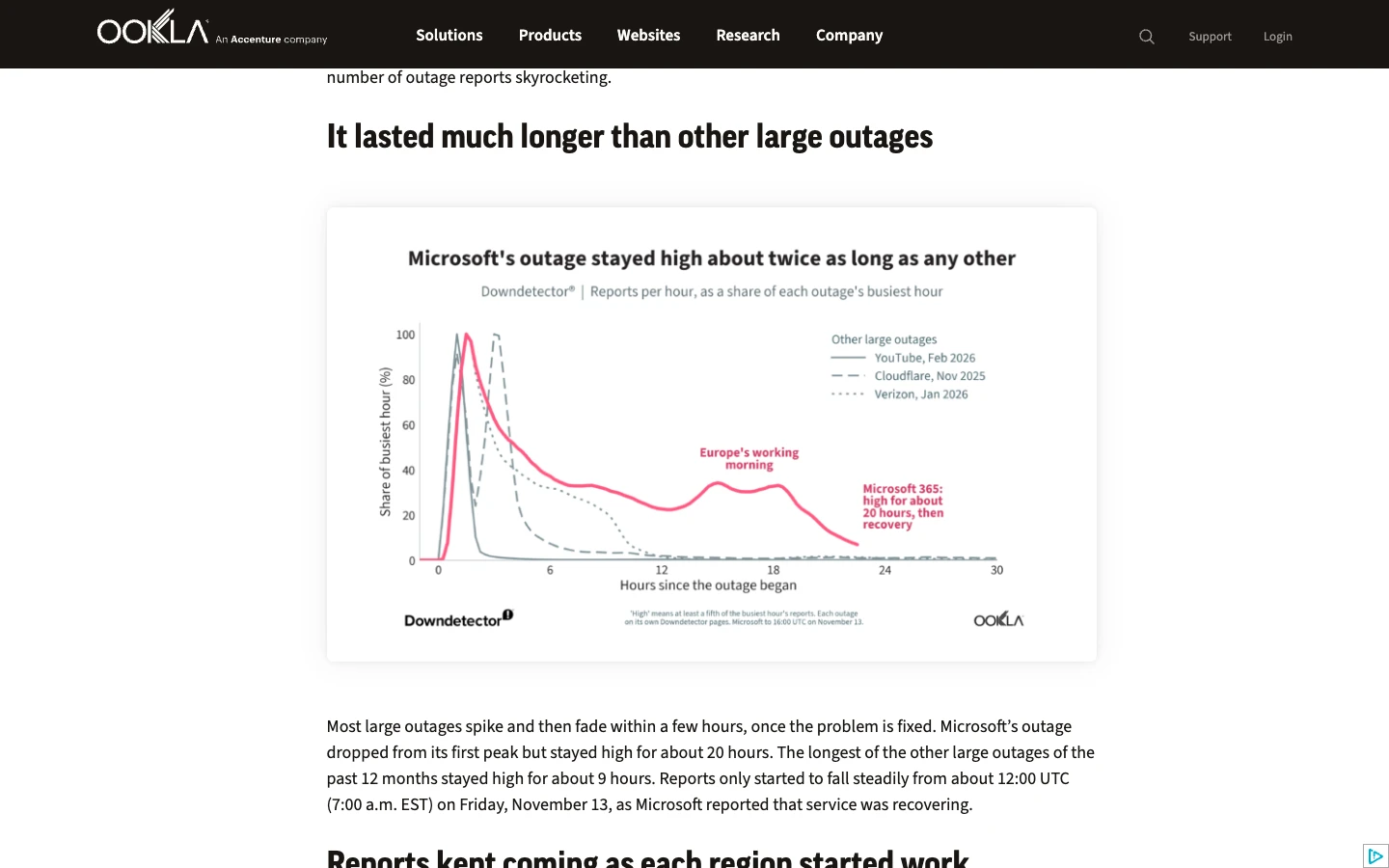
Figure 4: Real Ookla chart highlighting why Nov 12–13 felt unusually grueling—nearly 20 hours of sustained high-severity impact, more than double prior 9-hour major outages.
Collateral panic even dragged innocent bystanders onto outage leaderboards. Because Outlook mailboxes rejected or timed out inbound mail, senders assumed their own email providers had broken; meanwhile small businesses relying on GoDaddy resold M365 accounts inundated GoDaddy support, and locked-out Teams users stampeded alternative meeting apps:
- GoDaddy anomaly reports jumped 61x above normal (GoDaddy resells and bundles Microsoft 365 email to millions of SMB domains);
- Zoom spiked 52x as displaced organizations scrambled to salvage scheduled meetings;
- Gmail spiked 46x because bounces from Outlook targets convinced Gmail senders their own outbox was broken;
- RingCentral (45x) and iCloud Mail (17x) suffered parallel spillover noise.
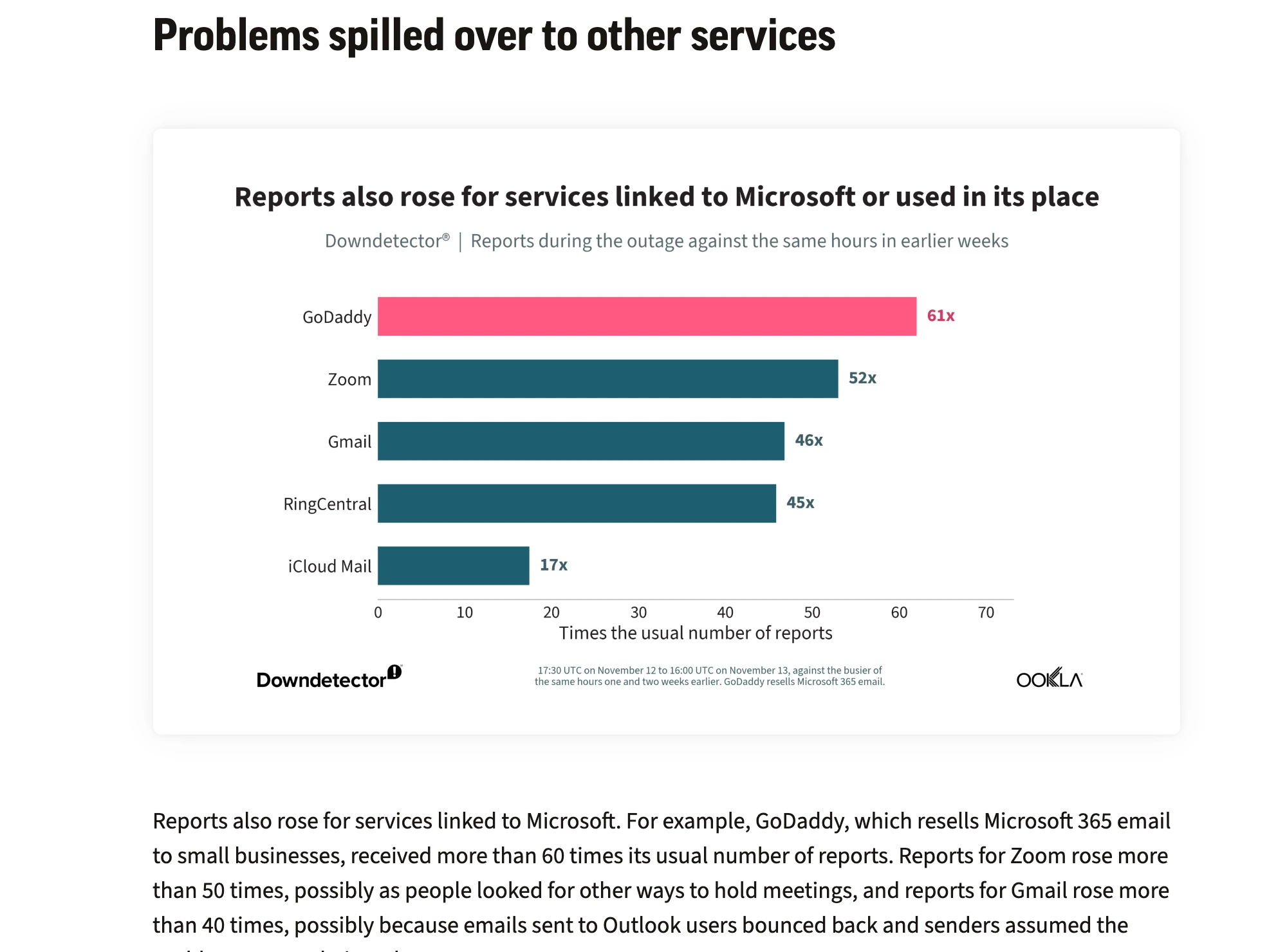
Figure 5: Real Ookla spillover telemetry showing GoDaddy (61x), Zoom (52x), and Gmail (46x) reporting surges triggered indirectly by Microsoft 365’s blackout.
Beyond charts, Microsoft 365 underpins roughly 430 to 450 million paid commercial seats. Pulling that single digital rug forced institutions in over 70 countries back into analog fallbacks:
- United Kingdom Healthcare & Public Sector: Multiple NHS hospital trusts reverted to handwritten paper medical notes and paper prescriptions, postponing routine appointments and non-urgent procedures. Rail operators, police units, schools, Ofsted, and the Bank of England reported disruption, prompting Defence Minister Luke Pollard to call publicly for stronger institutional resilience.
- United States Governance: House of Representatives staffers lost working email and cloud collaboration tools mid-day, effectively ending a full day of legislative activity early; several courts and detention facilities saw bail and scheduling workflows delayed.
- APAC & Global Enterprises: Major Japanese organizations—including Sagawa Express, Japan's Digital Agency, and major pharmaceutical manufacturers—switched back to fax machines and phone trees; Australian intelligence and police administrative channels (ASIO/AFP) and courts slowed down; New Zealand Immigration paused visa processing; courts in Singapore and the Philippines, Code-Grey Canadian hospitals, and luxury group Richemont (delaying earnings) all felt direct operational impact.
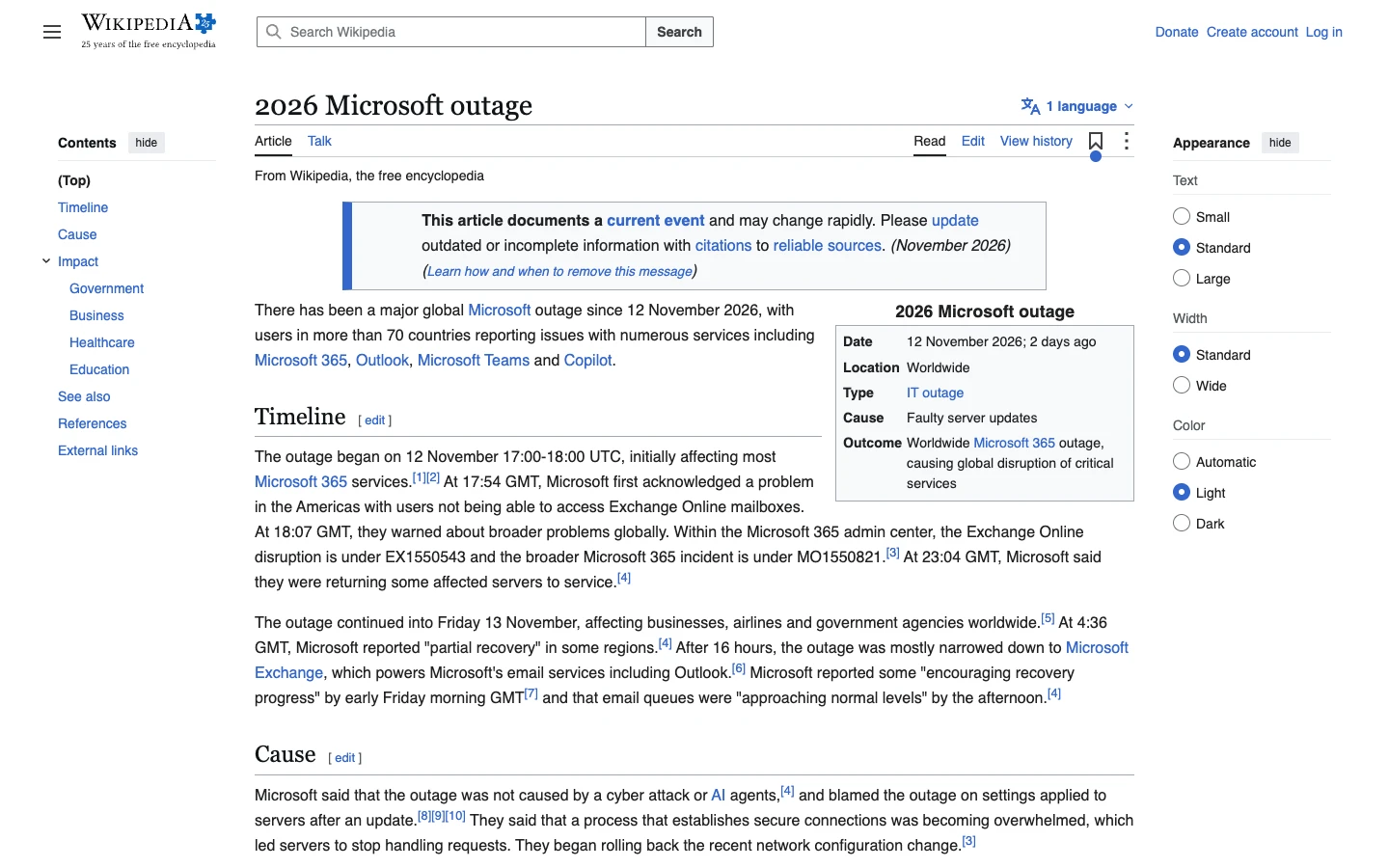
Figure 6: Live snapshot of the Wikipedia article documenting EX1550543 / MO1550821 alongside verified healthcare, parliamentary, and enterprise fallout across continents.
3. The 24-Hour Chronology: Why Did an Email Outage Take Down 15+ Suites?
Non-specialist observers repeatedly asked the same fair question: if Exchange is “just email,” why did Microsoft Teams calendars vanish, Microsoft 365 Copilot disconnect, and even Purview DLP, Defender Safe Links, Intune, and Windows 365 Cloud PCs break simultaneously?
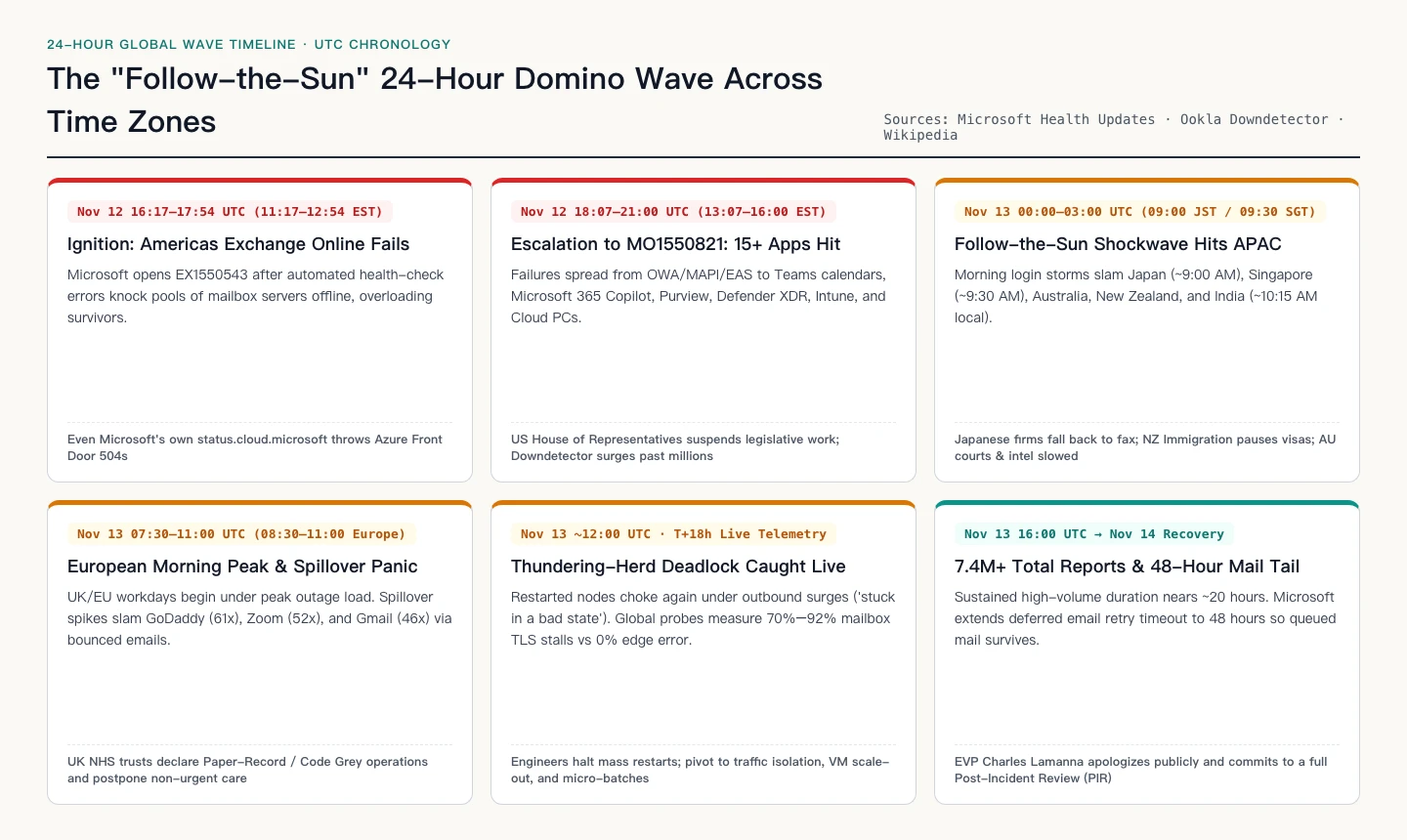
Figure 7: Custom chronological map combining Service Health milestones with the rolling regional morning peaks across the Americas, APAC, and Europe.
The architectural reality is simple: inside modern Microsoft 365, Exchange Online is no longer merely an email post office—it is the hidden data and policy substrate for calendars, compliance state, and user context. Verbatim Service Health logs preserved by ENow Software under MO1550821 list more than 15 degraded workloads sharing that dependency chain:
- Exchange Online Protocols: OWA webmail, desktop MAPI, mobile EAS, and REST APIs suffered prolonged stalls and connection drops.
- Microsoft Teams Collaboration: While core real-time media stayed mostly reachable, loading calendars, booking meetings, and evaluating Information Barriers policies failed systematically.
- Microsoft 365 Copilot: Prompts relying on mailbox/calendar context and Exchange-backed permission checks timed out.
- Security, Governance & Companion Suites: Microsoft Defender XDR and Defender for Office 365 (Safe Links evaluation), Microsoft Purview (DLP, Auto-Labeling, Authorization, eDiscovery, RBAC logs), Microsoft Intune, SharePoint Online, Planner, To Do, Power BI (MIP-protected PDF export), Microsoft Fabric, Graph API, Apps Admin Center, Universal Print, and Windows 365 Cloud PCs using Purview Customer Key all experienced cascading degradation.
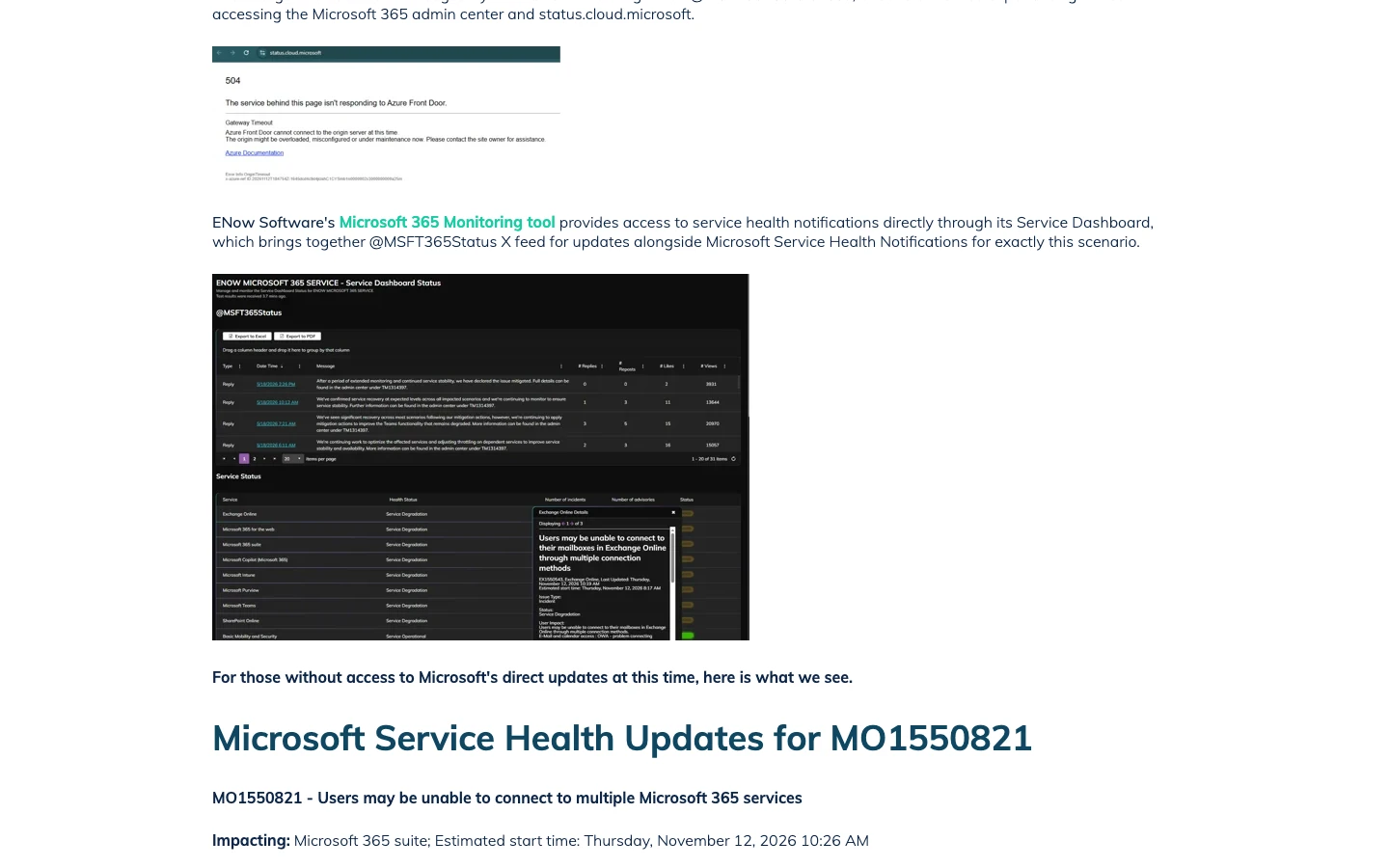
Figure 8: ENow archive capturing both the 504 Azure Front Door error on status.cloud.microsoft and internal Service Health telemetry under MO1550821.
4. Plain-English Analogies: Understanding Self-Eviction & TLS Starvation in Two Minutes
Before diving into sockets and DNS records, you can explain the entire engineering failure to an elementary-school student using two everyday analogies—without sacrificing technical truth.
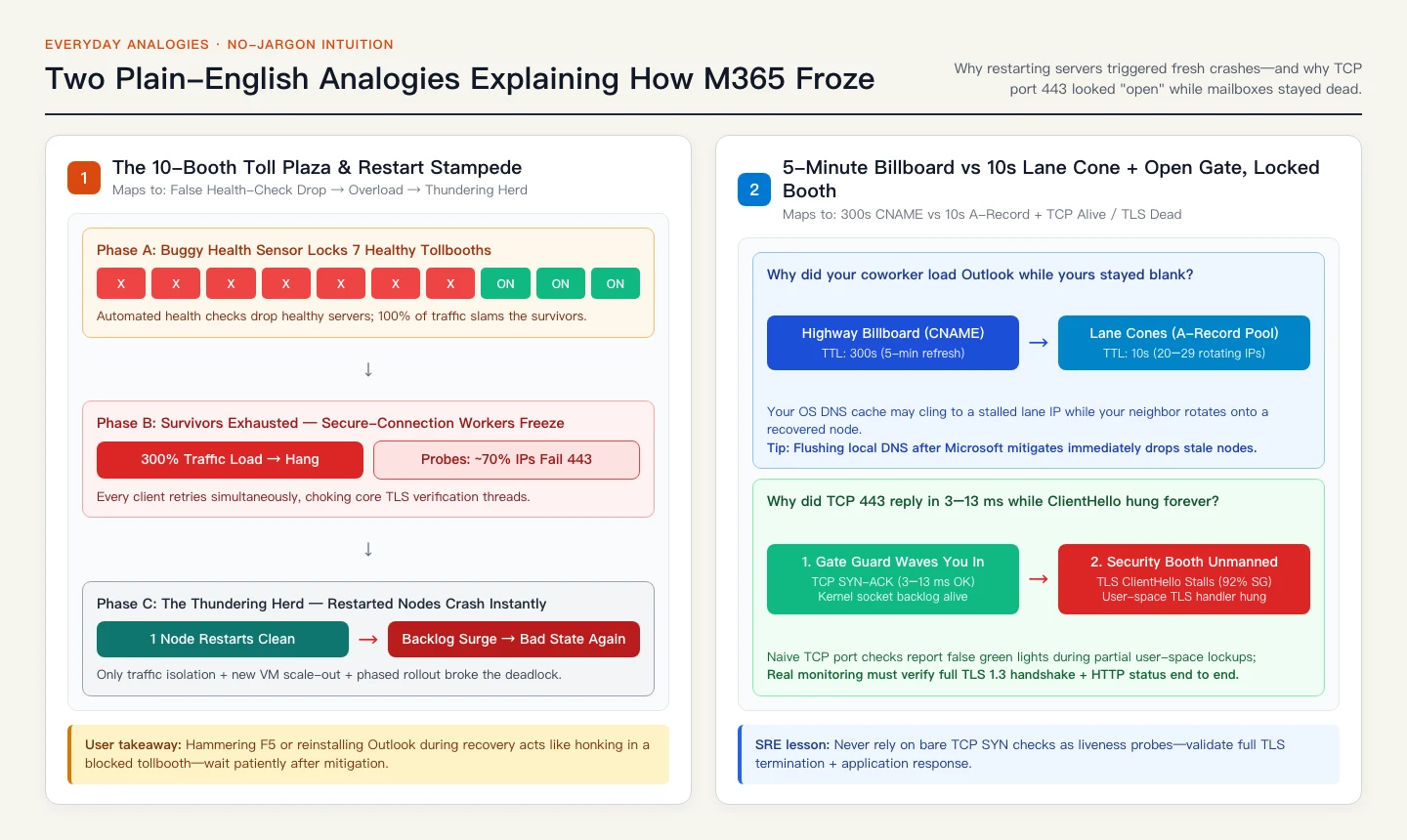
Figure 9: Original two-part analogy diagram translating automated health-check self-eviction, thundering-herd restarts, 300s/10s DNS TTLs, and kernel TCP vs user-space TLS lockups.
Analogy 1: The 10-Booth Highway Toll Plaza & Restart Stampede
Imagine the busiest 10-lane highway toll plaza in the country. Ordinarily, all 10 booths run smoothly together.
One evening, maintenance crews make a routine lane-marking update, unknowingly triggering a hidden flaw left behind months earlier when the plaza was widened. The automated booth health sensor starts hallucinating failures—slamming the barrier gates shut on 7 perfectly healthy booths and pulling them out of service!
Instantly, 100% of highway traffic gets funneled into the 3 surviving booths. Those 3 booths were already busy; forced to handle more than triple normal volume—plus thousands of impatient drivers honking and re-entering the queue—the booth clerks handling ticket verification freeze from exhaustion. That matches Microsoft’s own Service Health description: automated health-check drops triggered cascading overload on remaining infrastructure until the core process handling secure connections stalled.
Then comes the nightmare twist. Engineers rush in and reboot one crashed booth cleanly. You would expect opening a fourth lane to help, right? Wrong. Miles of backed-up semi-trucks (outbound routing queues and millions of auto-retrying clients) instantly stampede through that single newly opened lane the second its arm lifts, crushing the clerk back into a frozen “bad state” within minutes! That exact “thundering herd” dynamic forced Microsoft EVP Charles Lamanna and engineering teams to halt brute-force fleet restarts, isolate outbound traffic, scale up brand-new virtual machines, and release capacity slowly in tightly validated regional batches.
Analogy 2: 5-Minute Billboards vs 10s Cones — and an Open Gate to an Unmanned Security Booth
Two mysteries baffled office IT teams all day: First, why could your desk neighbor suddenly open Outlook while your browser stayed dead? Second, why did port-443 TCP tests look 100% green when Outlook still wouldn’t load?
Think of finding your way to the toll plaza via two signs: a big highway billboard (DNS CNAME) that updates every 300 seconds (5 minutes) pointing you to the right regional complex, and small lane cones (DNS A records) that shuffle between 20–29 individual entrance booths every 10 seconds. If your laptop or office DNS cache happens to hold onto an older booth IP for a few extra seconds while your coworker refreshes onto a newly scaled VM lane, one person works while the next sits stuck.
As for green port-443 pings paired with frozen webmail: picture an entrance security guard (the operating system’s kernel TCP stack) waving cars into the courtyard in 3 to 13 milliseconds (returning a valid TCP SYN-ACK). Basic network monitors see the guard wave and happily flash green! Yet once your car pulls up to the encrypted ticket scanner (TLS ClientHello), nobody is alive inside the user-space booth to inspect your certificate—so your browser hangs indefinitely until the timer expires.
5. Deep Engineering Analysis: Official Post-Incident Clues vs Independent 11-Region Probes
Merging Microsoft’s public statements and verbatim Service Health notes with timestamped external measurements captured around T+18 hours across 11 Globalping regions and Singapore AS45102 paints a crystal-clear anatomical picture of what stayed alive and what suffocated.
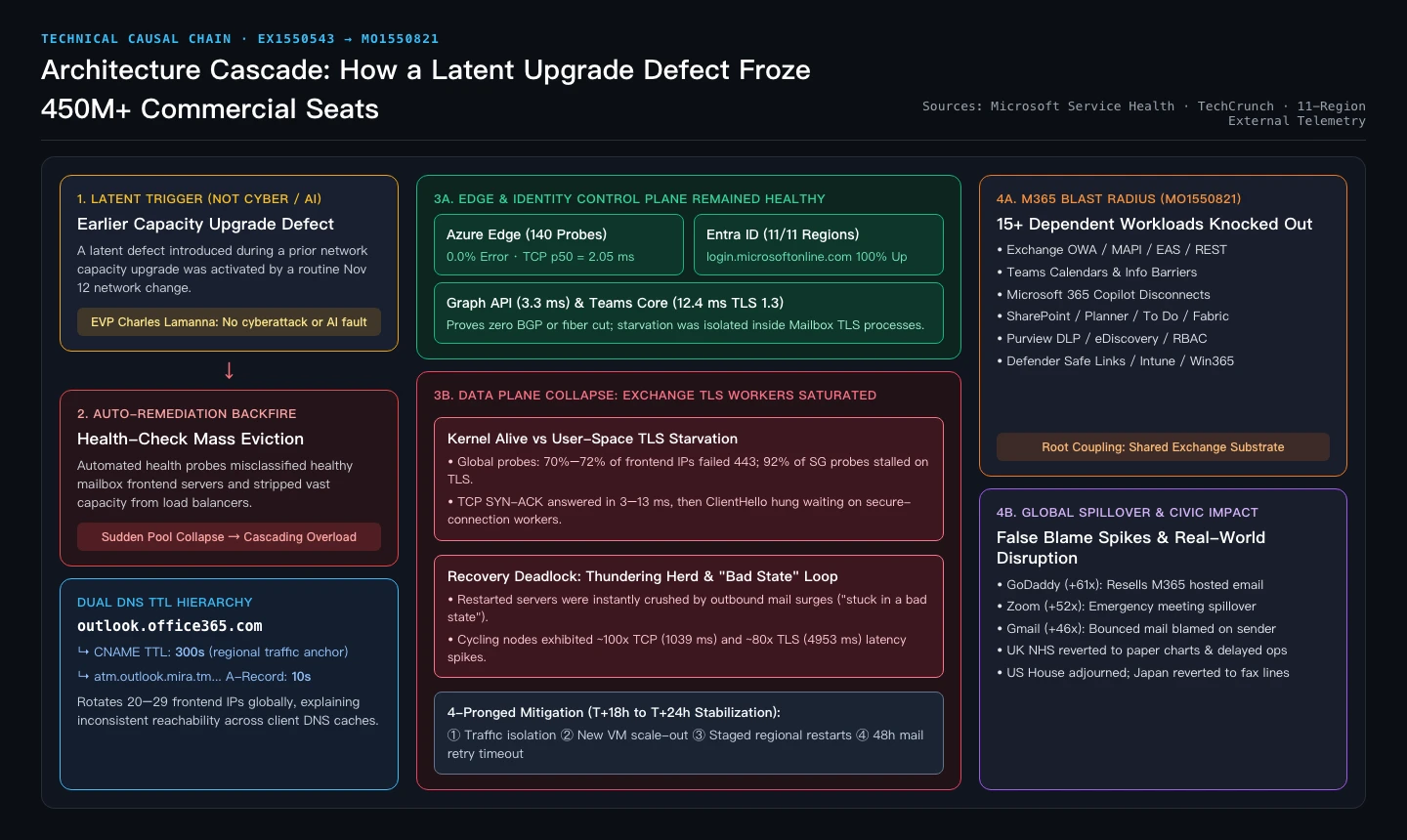
Figure 10: Complete technical causal map contrasting healthy edge/identity layers against Exchange TLS starvation and Microsoft’s four-part stabilization strategy.
1. Control & Edge Layers Stayed Rock-Solid (Ruling Out Subsea Cuts, BGP, or AI Agents)
Major outages immediately attract speculation about cyberattacks, BGP hijacks, or rogue AI agent deployments. Microsoft EVP Charles Lamanna addressed those rumors directly:
"We are deeply sorry for the disruption this incident has caused our customers and partners... This was a technical issue not related to cyber or AI / agents. The incident was introduced by an issue during an earlier network capacity upgrade that surfaced following a recent network change... We will provide a full post-incident report once our review is complete."
Independent third-party telemetry backs up that localization completely. At the height of T+18h disruption:
- Azure Edge Layer: 140 cross-region probes logged 0.0% error with a median TCP connect time of 2.05 ms.
- Entra ID Authentication (
login.microsoftonline.com): Passed cleanly in 11/11 global regions. - Graph API & Teams Core Edge:
graph.microsoft.com(3.3 ms p50) andteams.microsoft.com(12.4 ms full TLS 1.3 handshake) answered normally everywhere.
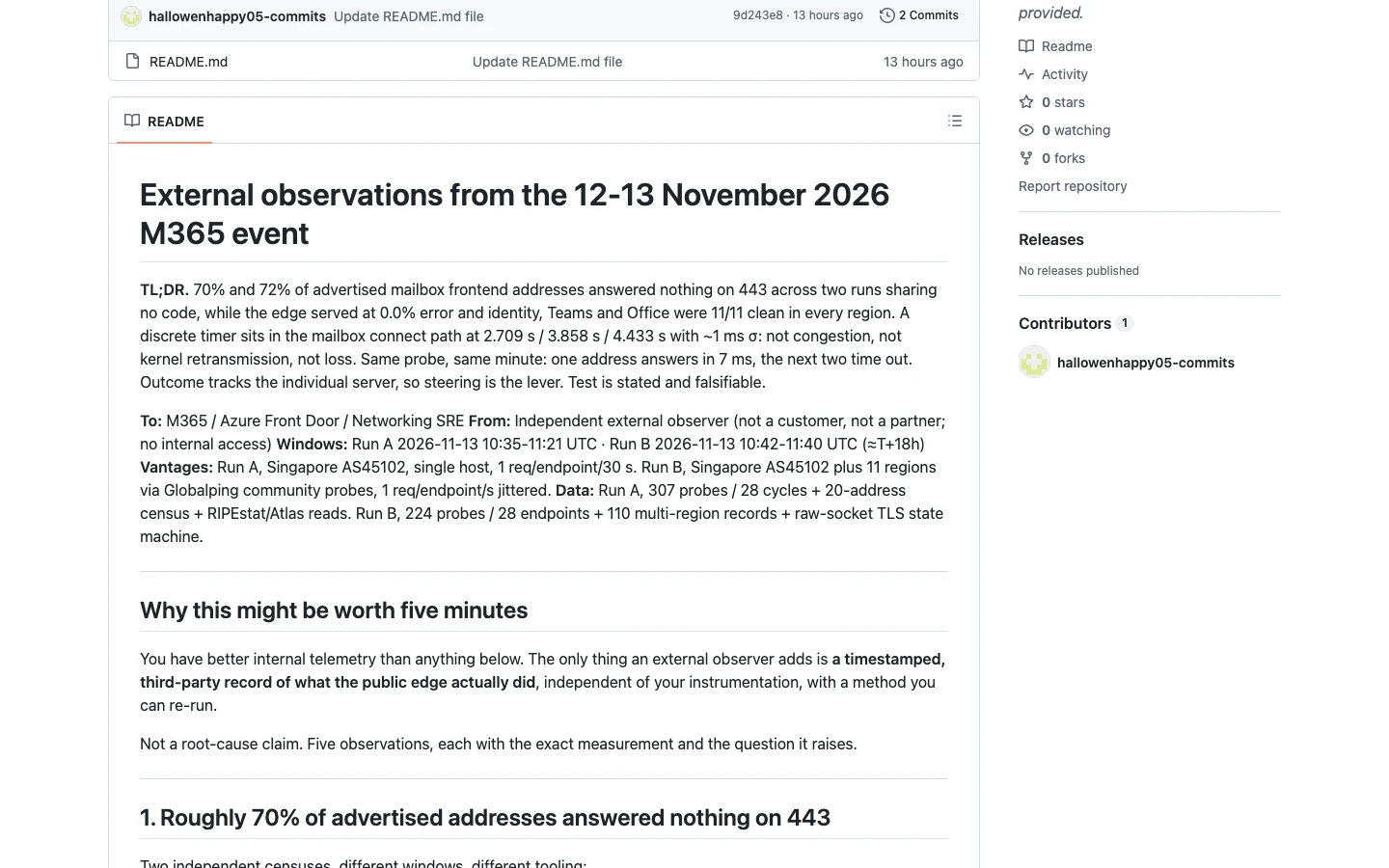
Figure 11: Public GitHub telemetry report published at T+18h proving zero edge errors while ~70%–72% of advertised mailbox frontend endpoints failed on port 443.
2. Inside the Fracture: 70% Pool Failure, 92% TLS Stall & 100x Recovery Jitter
By aligning raw socket telemetry with Microsoft’s Service Health logs, three sequential failure stages emerge with forensic precision:
- Stage 1 — Health-Check Component Self-Eviction: Following the Nov 12 network change, a latent defect from an earlier capacity upgrade triggered errors inside Microsoft's automated health-check component, causing load balancers to pull large swaths of healthy Exchange frontend servers offline.
- Stage 2 — Secure-Connection Process Starvation: Overloaded survivors choked inside the core process handling encrypted sessions. Across two independent censuses of
outlook.office365.com→outlook.cloud.microsoft(300s CNAME) →atm.outlook.mira.tm.svc.cloud.microsoft(10s A-record pool of 20–29 records), 70% (14/20) and 72% (21/29) of advertised frontend addresses failed port 443. Worse, 44 out of 48 probes (92%) from Singapore received a clean 3–13 ms TCP SYN-ACK before hanging silently right after sendingTLS ClientHello—even displaying discrete application timer steps at 2.709 s, 3.858 s, and 4.433 s, proving user-space handler congestion rather than network packet loss. - Stage 3 — The "Bad State" Recovery Loop: On a mailbox node actively cycling through recovery, probes caught ~100x TCP latency (1,039 ms vs 8.5–11.1 ms baseline) alongside ~80x TLS handshake spikes (4,953 ms vs 60.9–63.7 ms) before failing again—verifying Microsoft's note that restarted servers immediately got overwhelmed by outbound routing surges and got "stuck in a bad state."
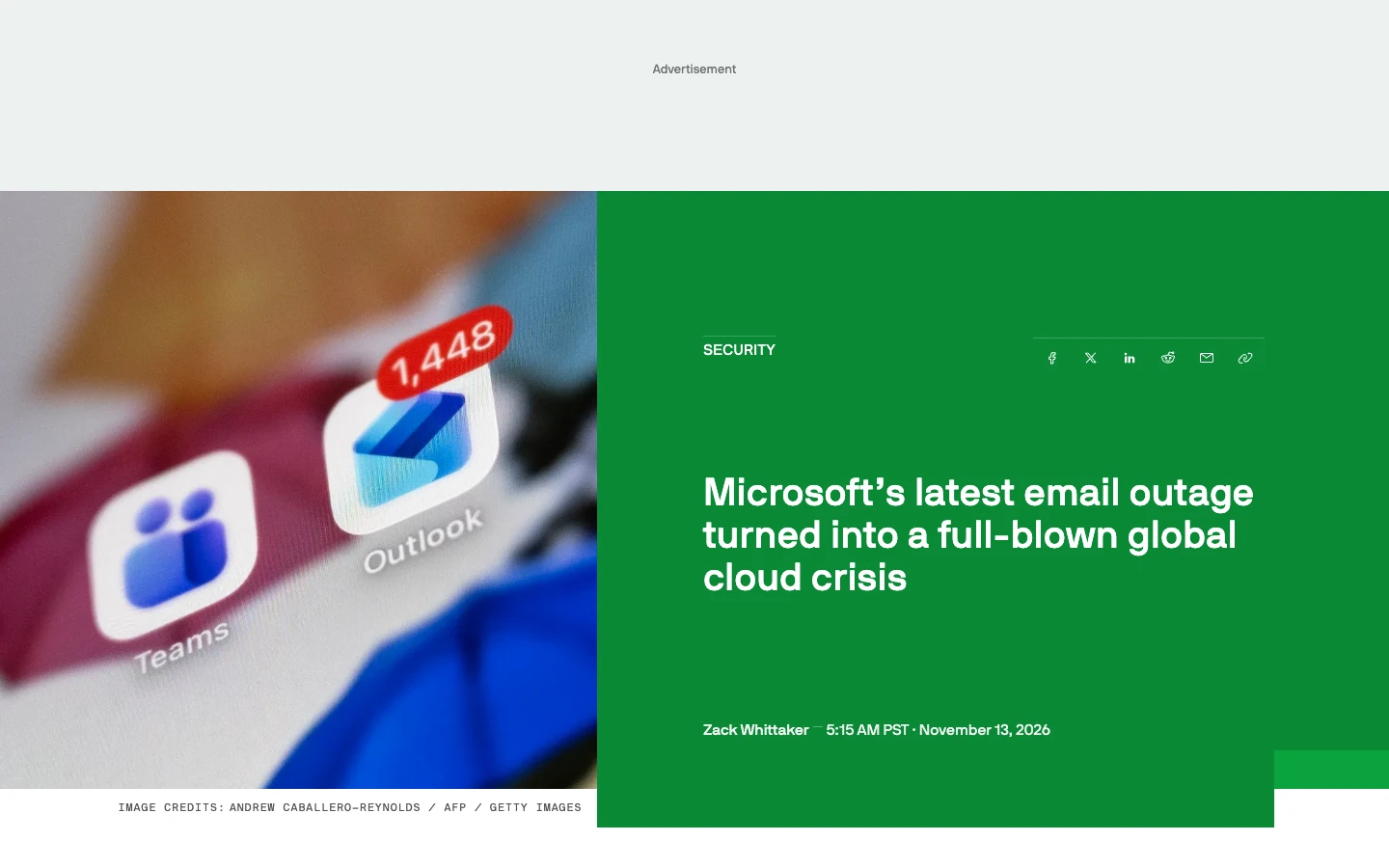
Figure 12: TechCrunch report detailing the transition from regional email outage to 20-hour global crisis, alongside Charles Lamanna’s thundering-herd and capacity-upgrade explanation.
To contextualize how Nov 2026 compares against September 2026 and the July 2024 CrowdStrike disaster:
| Dimension | Nov 2026 M365 Outage (This Event) | Sept 2026 Microsoft Cloud Outage | July 2024 CrowdStrike BSOD Event |
|---|---|---|---|
| Primary Trigger | Latent prior network capacity upgrade bug activated by routine network change | Configuration error in core identity authentication service | Faulty Windows kernel driver update (Channel File 291) |
| Broken Layer | Mailbox Data Plane & User-Space TLS Workers (Edge & Entra ID stayed healthy) | Authentication Control Plane (sign-in and token issuance failures) | Customer Endpoint OS Kernel (boot-loop BSODs) |
| Why Recovery Took Long | Thundering-herd surges pushed restarted servers back into a "bad state" (~20h gradual validation + VM scaling) | Config rollback propagation stabilized services faster | Physical/manual Safe-Mode intervention needed across millions of offline endpoints |
| Right Client Action | Do NOT wipe OSTs; flush stale local DNS post-recovery; wait up to 48h for queued mail | Re-authenticate tokens after auth config rollback | Boot to WinRE / Safe Mode locally or cycle ~15 reboots |
6. Practical Mitigation & Zero-Dependency 3-OS Automation Scripts
Let us state one crucial engineering truth plainly: no local endpoint script can repair stalled TLS workers inside Microsoft’s Exchange datacenters. Any blog claiming a secret registry tweak or Hosts edit can bypass a global Exchange backend collapse is spreading cargo-cult misinformation.
What local triage and automation genuinely accomplish—saving IT teams dozens of wasted hours and preventing self-inflicted data loss—breaks down into three concrete steps:
- 60-Second Layer Isolation (Stop Destructive Troubleshooting): Prove immediately via TLS probes that Entra ID (
login.microsoftonline.com) and Edge succeed while Mailbox endpoints stall on ClientHello. Looking at Microsoft Learn Q&A threads during the outage (Figure 13), frantic users repeatedly deleted Outlook profiles and wiped multi-gigabyte.ostcaches—only to discover zero improvement and cause catastrophic re-download storms once service resumed. - Clean Post-Recovery Handoff (Flush Sticky 300s/10s DNS + Volatile WebView Caches): Once Microsoft announces regional mitigation, OS resolvers or browser/PWA containers may cling briefly to degraded frontend IPs. Flushing OS DNS caches cleanly and backing up volatile WebView caches (while strictly leaving mail archives untouched) speeds up recovery cleanly.
- Protect Queued Delivery Over the 48-Hour Window: Because Microsoft extended deferred message retry timeouts to 48 hours, avoid flooding outboxes with duplicate huge attachments while queues drain.
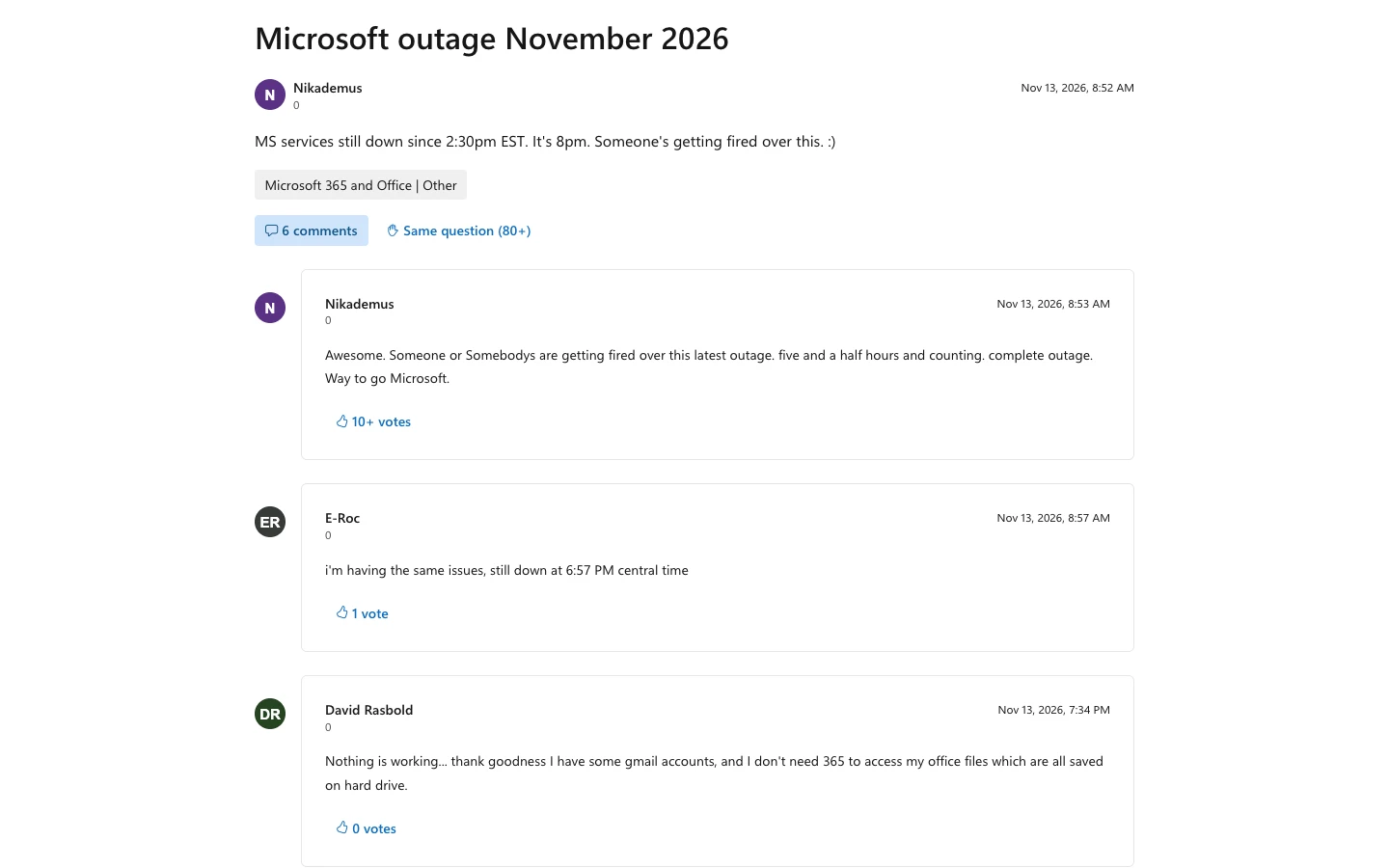
Figure 13: Microsoft Q&A community reports from Nov 13—without layer separation telemetry, desperate users burned hours resetting working local clients during an upstream TLS stall.
Below are unified, zero third-party dependency scripts for Windows 11, Ubuntu 26.04, and macOS 27. Each script runs both in Interactive Human Mode and unattended AI Agent / CI Mode (–auto –json).
Privacy Guarantee: None of these scripts print full IP addresses or local hostnames; resolved pools are summarized exclusively as anonymized short SHA-256 hashes (e.g., pool-795e344a) plus record counts.
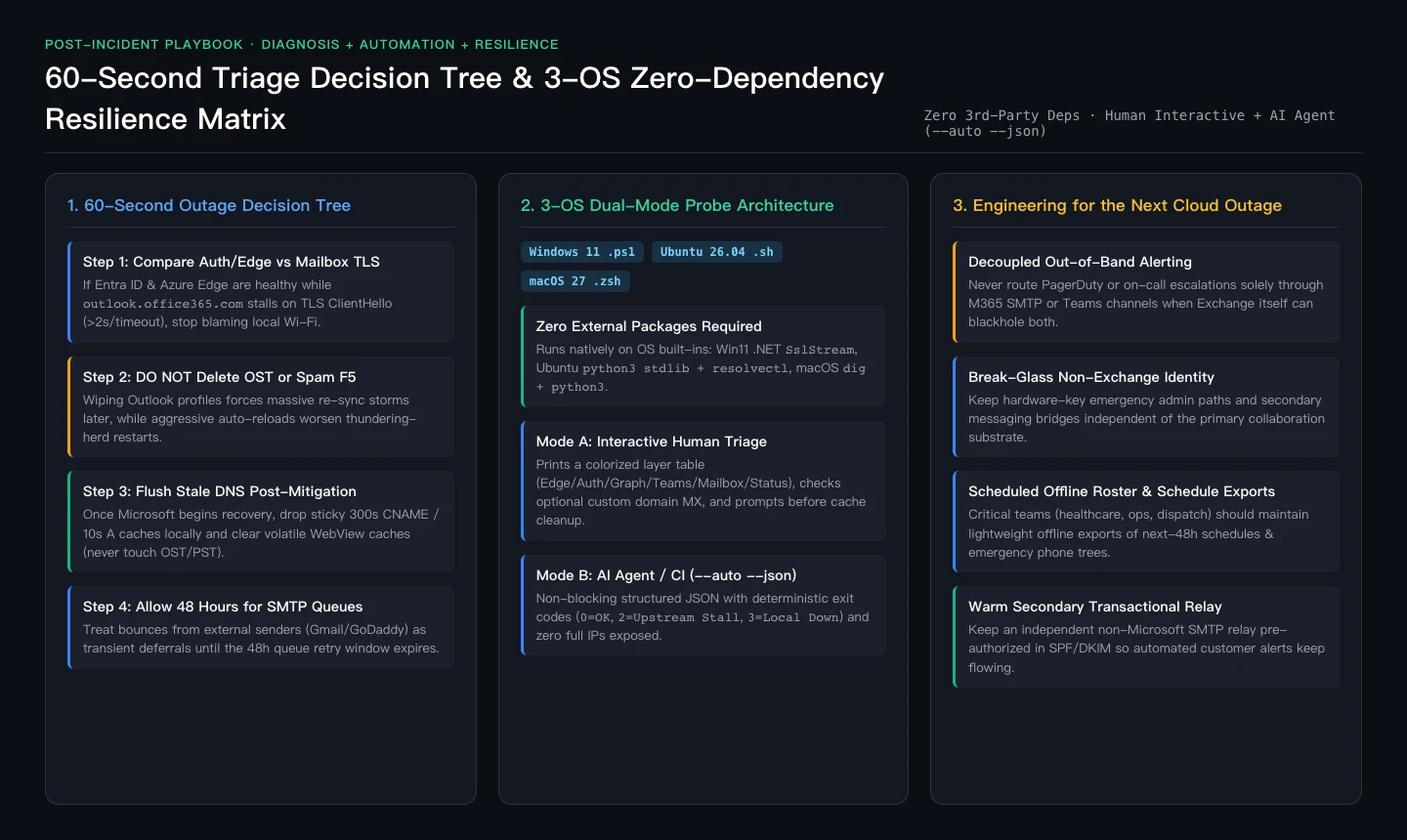
Figure 14: 60-second incident triage decision tree paired with our zero-dependency 3-OS script architecture and enterprise resilience checklist.
1. Windows 11 Script (Zero-Dependency PowerShell + Native .NET SslStream)
Save as m365_outage_triage_windows11.ps1. Uses native .NET TcpClient + SslStream with zero external modules:
<#
.SYNOPSIS
    Microsoft 365 Outage Triage & Post-Recovery Client Helper for Windows 11 (Zero 3rd-Party Dependencies).
.DESCRIPTION
    Supports Interactive Human mode (default) and unattended AI Agent mode (-Auto -Json).
    Separates local ISP/DNS issues from upstream Mailbox TLS stalls, inspects DNS TTLs,
    safely flushes Windows DNS cache, and optionally clears volatile WebView2/OneAuth caches
    without touching OST/PST archives or printing full IPs / computer names.
#>
[CmdletBinding()]
param(
    [switch]$Auto,
    [switch]$Json,
    [switch]$FlushDns,
    [switch]$ClearClientCache,
    [string]$Domain = "",
    [int]$TimeoutMs = 5000
)

$ErrorActionPreference = "Stop"

$Targets = @(
    @{ Layer = "Edge_FrontDoor"; Host = "www.microsoft.com"; Path = "/" },
    @{ Layer = "Identity_Auth";  Host = "login.microsoftonline.com"; Path = "/common/v2.0/.well-known/openid-configuration" },
    @{ Layer = "Graph_API";      Host = "graph.microsoft.com"; Path = "/v1.0/`$metadata" },
    @{ Layer = "Teams_Core";     Host = "teams.microsoft.com"; Path = "/" },
    @{ Layer = "Mailbox_EXO";    Host = "outlook.office365.com"; Path = "/owa/healthcheck.htm" },
    @{ Layer = "Mailbox_Web";    Host = "outlook.office.com"; Path = "/mail/" },
    @{ Layer = "Service_Health"; Host = "status.cloud.microsoft"; Path = "/" }
)

function Get-MaskedPoolHash {
    param([string[]]$Addresses)
    if (-not $Addresses -or $Addresses.Count -eq 0) { return "none" }
    $sorted = ($Addresses | Sort-Object -Unique) -join ","
    $sha = [System.Security.Cryptography.SHA256]::Create()
    try {
        $bytes = [System.Text.Encoding]::UTF8.GetBytes($sorted)
        $hash = ($sha.ComputeHash($bytes) | ForEach-Object { $_.ToString("x2") }) -join ""
        return "pool-" + $hash.Substring(0, 8)
    } finally {
        $sha.Dispose()
    }
}

function Test-EndpointLayer {
    param([hashtable]$Target, [int]$TimeoutMs)
    $hostName = $Target.Host; $layer = $Target.Layer
    $cnameChain = @(); $ttlSec = $null; $resolvedCount = 0; $poolHash = "none"
    $tcpMs = $null; $tlsMs = $null; $tlsProto = $null; $httpCode = $null; $state = "UNKNOWN"; $detail = ""

    try {
        if (Get-Command Resolve-DnsName -ErrorAction SilentlyContinue) {
            $dnsRecs = Resolve-DnsName -Name $hostName -Type A -DnsOnly -ErrorAction SilentlyContinue
            if ($dnsRecs) {
                $cnameChain = @($dnsRecs | Where-Object { $_.QueryType -eq "CNAME" } | ForEach-Object { $_.NameHost })
                $aRecs = @($dnsRecs | Where-Object { $_.QueryType -eq "A" })
                $resolvedCount = $aRecs.Count
                if ($dnsRecs.Count -gt 0) { $ttlSec = ($dnsRecs | Select-Object -ExpandProperty TTL | Measure-Object -Minimum).Minimum }
                if ($aRecs.Count -gt 0) { $poolHash = Get-MaskedPoolHash -Addresses ($aRecs | ForEach-Object { $_.IPAddress }) }
            }
        }
        if ($resolvedCount -eq 0) {
            $ips = [System.Net.Dns]::GetHostAddresses($hostName)
            $resolvedCount = $ips.Count
            $poolHash = Get-MaskedPoolHash -Addresses ($ips | ForEach-Object { $_.IPAddressToString })
        }
    } catch {
        return [ordered]@{
            layer = $layer; host = $hostName; cname_chain = $cnameChain; ttl_seconds = $ttlSec
            resolved_record_count = 0; address_pool_hash = "none"; tcp_443_ms = $null
            tls_handshake_ms = $null; tls_version = $null; http_status = $null
            state = "DNS_FAIL"; detail = "DNS resolution failed"
        }
    }

    if ($resolvedCount -eq 0) {
        return [ordered]@{
            layer = $layer; host = $hostName; cname_chain = $cnameChain; ttl_seconds = $ttlSec
            resolved_record_count = 0; address_pool_hash = "none"; tcp_443_ms = $null
            tls_handshake_ms = $null; tls_version = $null; http_status = $null
            state = "DNS_FAIL"; detail = "Zero A/AAAA records returned"
        }
    }

    $tcp = $null; $ssl = $null
    try {
        $tcp = New-Object System.Net.Sockets.TcpClient
        $swTcp = [System.Diagnostics.Stopwatch]::StartNew()
        $arTcp = $tcp.BeginConnect($hostName, 443, $null, $null)
        if (-not $arTcp.AsyncWaitHandle.WaitOne($TimeoutMs, $false)) {
            $swTcp.Stop(); $tcp.Close()
            return [ordered]@{
                layer = $layer; host = $hostName; cname_chain = $cnameChain; ttl_seconds = $ttlSec
                resolved_record_count = $resolvedCount; address_pool_hash = $poolHash
                tcp_443_ms = [math]::Round($swTcp.Elapsed.TotalMilliseconds, 1)
                tls_handshake_ms = $null; tls_version = $null; http_status = $null
                state = "TCP_TIMEOUT"; detail = "TCP 443 SYN timed out"
            }
        }
        $tcp.EndConnect($arTcp); $swTcp.Stop()
        $tcpMs = [math]::Round($swTcp.Elapsed.TotalMilliseconds, 1)

        $stream = $tcp.GetStream()
        $stream.ReadTimeout = $TimeoutMs; $stream.WriteTimeout = $TimeoutMs
        $ssl = New-Object System.Net.Security.SslStream($stream, $false)
        $swTls = [System.Diagnostics.Stopwatch]::StartNew()
        $authTask = $ssl.AuthenticateAsClientAsync($hostName)
        if (-not $authTask.Wait($TimeoutMs)) {
            $swTls.Stop()
            return [ordered]@{
                layer = $layer; host = $hostName; cname_chain = $cnameChain; ttl_seconds = $ttlSec
                resolved_record_count = $resolvedCount; address_pool_hash = $poolHash
                tcp_443_ms = $tcpMs; tls_handshake_ms = [math]::Round($swTls.Elapsed.TotalMilliseconds, 1)
                tls_version = $null; http_status = $null
                state = "TLS_STALL_OR_DEGRADED"; detail = "TCP open but TLS ClientHello stalled"
            }
        }
        $swTls.Stop()
        $tlsMs = [math]::Round($swTls.Elapsed.TotalMilliseconds, 1)
        $tlsProto = $ssl.SslProtocol.ToString()

        $req = "HEAD $($Target.Path) HTTP/1.1`r`nHost: $hostName`r`nConnection: close`r`nUser-Agent: M365-Triage-Win11/1.0`r`n`r`n"
        $reqBytes = [System.Text.Encoding]::ASCII.GetBytes($req)
        $ssl.Write($reqBytes, 0, $reqBytes.Length); $ssl.Flush()
        $reader = New-Object System.IO.StreamReader($ssl)
        $statusLine = $reader.ReadLine()
        if ($statusLine -match "HTTP/\S+\s+(\d{3})") { $httpCode = [int]$Matches[1] }

        if ($httpCode -ge 500 -or $tlsMs -gt 2000) { $state = "TLS_STALL_OR_DEGRADED"; $detail = "High TLS latency or HTTP 5xx ($httpCode)" }
        else { $state = "HEALTHY"; $detail = "OK" }
    } catch {
        $state = if ($tcpMs) { "TLS_STALL_OR_DEGRADED" } else { "TCP_TIMEOUT" }
        $detail = "Connection exception during handshake/HTTP probe"
    } finally {
        if ($ssl) { try { $ssl.Dispose() } catch {} }
        if ($tcp) { try { $tcp.Dispose() } catch {} }
    }

    return [ordered]@{
        layer = $layer; host = $hostName; cname_chain = $cnameChain; ttl_seconds = $ttlSec
        resolved_record_count = $resolvedCount; address_pool_hash = $poolHash
        tcp_443_ms = $tcpMs; tls_handshake_ms = $tlsMs; tls_version = $tlsProto
        http_status = $httpCode; state = $state; detail = $detail
    }
}

$results = @()
foreach ($t in $Targets) { $results += Test-EndpointLayer -Target $t -TimeoutMs $TimeoutMs }

$domainInfo = $null
if (-not $Auto -and -not $Domain) {
    $inputDomain = Read-Host "Optional: Enter custom mail domain for MX check (press Enter to skip)"
    if ($inputDomain) { $Domain = $inputDomain.Trim() }
}
if ($Domain) {
    try {
        $mx = Resolve-DnsName -Name $Domain -Type MX -ErrorAction SilentlyContinue | Sort-Object Preference
        $domainInfo = [ordered]@{
            domain = $Domain
            mx_hosts = @($mx | ForEach-Object { $_.NameExchange })
            mx_uses_exo = [bool]($mx | Where-Object { $_.NameExchange -like "*.mail.protection.outlook.com*" -or $_.NameExchange -like "*.mx.microsoft*" })
        }
    } catch { $domainInfo = [ordered]@{ domain = $Domain; mx_hosts = @(); mx_uses_exo = $false } }
}

$authOk = ($results | Where-Object { $_.layer -eq "Identity_Auth" }).state -eq "HEALTHY"
$edgeOk = ($results | Where-Object { $_.layer -eq "Edge_FrontDoor" }).state -eq "HEALTHY"
$exoState = ($results | Where-Object { $_.layer -eq "Mailbox_EXO" }).state
$webState = ($results | Where-Object { $_.layer -eq "Mailbox_Web" }).state
$allDnsFail = (@($results | Where-Object { $_.state -eq "DNS_FAIL" }).Count -eq $results.Count)

$signature = "NORMAL"; $exitCode = 0
if ($allDnsFail) { $signature = "LOCAL_DNS_OR_NETWORK_DOWN"; $exitCode = 3 }
elseif ($authOk -and $edgeOk -and (($exoState -ne "HEALTHY") -or ($webState -ne "HEALTHY"))) {
    $signature = "M365_MAILBOX_TLS_CASCADE"; $exitCode = 2
} elseif (@($results | Where-Object { $_.state -ne "HEALTHY" }).Count -gt 0) {
    $signature = "PARTIAL_EDGE_OR_WORKLOAD_DEGRADATION"; $exitCode = 2
}

$actions = @(); $doFlushDns = $FlushDns.IsPresent; $doClearCache = $ClearClientCache.IsPresent

if (-not $Auto) {
    Write-Host "`n=== Microsoft 365 Outage Triage (Windows 11) ===" -ForegroundColor Cyan
    $results | Select-Object layer, host, ttl_seconds, resolved_record_count, tcp_443_ms, tls_handshake_ms, http_status, state | Format-Table -AutoSize
    Write-Host "Diagnosis Signature: $signature" -ForegroundColor Yellow
    if (-not $doFlushDns) {
        $ans = Read-Host "Flush Windows DNS cache (Clear-DnsClientCache) to drop stale CNAME/A records? [y/N]"
        if ($ans -match "^[Yy]$") { $doFlushDns = $true }
    }
    if (-not $doClearCache) {
        $ans2 = Read-Host "Backup & clear volatile New Outlook WebView2 / OneAuth temp cache (preserves OST/PST mail)? [y/N]"
        if ($ans2 -match "^[Yy]$") { $doClearCache = $true }
    }
}

if ($doFlushDns) {
    try {
        if (Get-Command Clear-DnsClientCache -ErrorAction SilentlyContinue) { Clear-DnsClientCache } else { & ipconfig /flushdns | Out-Null }
        $actions += "flushed_windows_dns_cache"
    } catch { $actions += "dns_flush_failed" }
}

if ($doClearCache) {
    $stamp = (Get-Date).ToString("yyyyMMdd-HHmmss")
    foreach ($p in @("$env:LOCALAPPDATA\Microsoft\Olk\EBWebView\Default\Service Worker\CacheStorage", "$env:LOCALAPPDATA\Microsoft\OneAuth\cache")) {
        if (Test-Path $p) {
            try { Move-Item -Path $p -Destination ($p + ".bak-" + $stamp) -Force; $actions += ("backed_up_volatile_cache:" + (Split-Path $p -Leaf)) }
            catch { $actions += ("skipped_locked_cache:" + (Split-Path $p -Leaf)) }
        }
    }
}

$payload = [ordered]@{
    schema_version = "1.0"
    timestamp_utc = (Get-Date).ToUniversalTime().ToString("yyyy-MM-ddTHH:mm:ssZ")
    os_platform = "Windows 11"
    diagnosis_signature = $signature
    checks = $results
    domain_mx_audit = $domainInfo
    actions_taken = $actions
    recommended_next_steps = @(
        "If Auth/Edge are HEALTHY while Mailbox_EXO shows TLS_STALL_OR_DEGRADED, do NOT reinstall Office or recreate OST profiles.",
        "Avoid hammering F5 during recovery; wait 5-10 minutes or flush stale 300s CNAME DNS cache once status recovers.",
        "Wait up to 48 hours for deferred SMTP queue delivery before declaring messages lost."
    )
}

if ($Json -or $Auto) { $payload | ConvertTo-Json -Depth 6 }
else {
    Write-Host ("Actions completed: " + ($(if ($actions.Count) { $actions -join ", " } else { "none" }))) -ForegroundColor Green
    $payload.recommended_next_steps | ForEach-Object { Write-Host ("  - " + $_) }
}
exit $exitCode- Interactive Human Execution: Run
.\m365_outage_triage_windows11.ps1in PowerShell for an interactive multi-layer readout and guided prompts before DNS or WebView cache cleanup. - Automated AI Agent Execution: Run
pwsh -File .\m365_outage_triage_windows11.ps1 -Auto -Json -FlushDnsfor non-blocking machine-readable JSON output with standardized exit codes (0=NORMAL,2=UPSTREAM_M365_DEGRADED,3=LOCAL_NETWORK_DOWN).
2. Ubuntu 26.04 Script (Zero-Dependency Bash + Native python3 stdlib & resolvectl)
Save as m365_outage_triage_ubuntu2604.sh and run chmod +x:
#!/usr/bin/env bash
# Microsoft 365 Outage Triage & Post-Recovery Client Helper for Ubuntu 26.04
# Zero 3rd-party dependencies (uses OS python3 stdlib & resolvectl).
set -euo pipefail

AUTO=0; JSON_OUT=0; FLUSH_DNS=0; CLEAR_CACHE=0; DOMAIN=""; TIMEOUT_SEC=5

while [[ $# -gt 0 ]]; do
  case "$1" in
    --auto) AUTO=1; JSON_OUT=1; shift ;;
    --json) JSON_OUT=1; shift ;;
    --flush-dns) FLUSH_DNS=1; shift ;;
    --clear-client-cache) CLEAR_CACHE=1; shift ;;
    --domain) DOMAIN="${2:-}"; shift 2 ;;
    --timeout) TIMEOUT_SEC="${2:-5}"; shift 2 ;;
    -h|--help)
      echo "Usage: $0 [--auto] [--json] [--flush-dns] [--clear-client-cache] [--domain example.com]"
      exit 0 ;;
    *) echo "Unknown argument: $1" >&2; exit 1 ;;
  esac
done

if [[ $AUTO -eq 0 && -z "$DOMAIN" && -t 0 ]]; then
  read -r -p "Optional: Enter custom mail domain for MX check (Enter to skip): " DOMAIN || true
fi

PROBE_JSON="$(python3 - "$TIMEOUT_SEC" "$DOMAIN" <<'PYEOF'
import hashlib, json, shutil, socket, ssl, subprocess, sys, time
from datetime import datetime, timezone

timeout = float(sys.argv[1])
domain = sys.argv[2].strip() if len(sys.argv) > 2 else ""

targets = [
    ("Edge_FrontDoor", "www.microsoft.com", "/"),
    ("Identity_Auth", "login.microsoftonline.com", "/common/v2.0/.well-known/openid-configuration"),
    ("Graph_API", "graph.microsoft.com", "/v1.0/$metadata"),
    ("Teams_Core", "teams.microsoft.com", "/"),
    ("Mailbox_EXO", "outlook.office365.com", "/owa/healthcheck.htm"),
    ("Mailbox_Web", "outlook.office.com", "/mail/"),
    ("Service_Health", "status.cloud.microsoft", "/"),
]

def get_dns_meta(host):
    cnames, ttl, ips = [], None, []
    if shutil.which("resolvectl"):
        try:
            out = subprocess.check_output(["resolvectl", "query", "--legend=no", host], timeout=timeout, text=True, stderr=subprocess.DEVNULL)
            for line in out.splitlines():
                if "looks like" in line or "authenticated" in line: continue
                for tok in line.split():
                    if ("." in tok) and (tok.endswith("microsoft.com") or tok.endswith("cloud.microsoft")):
                        clean = tok.rstrip(".,:")
                        if clean != host and clean not in cnames: cnames.append(clean)
        except Exception: pass
    try:
        infos = socket.getaddrinfo(host, 443, type=socket.SOCK_STREAM)
        ips = sorted({item[4][0] for item in infos})
    except Exception: ips = []
    pool_hash = "pool-" + hashlib.sha256(",".join(ips).encode()).hexdigest()[:8] if ips else "none"
    return cnames, ttl, len(ips), pool_hash

checks = []
for layer, host, path in targets:
    cnames, ttl, rec_cnt, pool_hash = get_dns_meta(host)
    if rec_cnt == 0:
        checks.append({
            "layer": layer, "host": host, "cname_chain": cnames, "ttl_seconds": ttl,
            "resolved_record_count": 0, "address_pool_hash": "none", "tcp_443_ms": None,
            "tls_handshake_ms": None, "tls_version": None, "http_status": None,
            "state": "DNS_FAIL", "detail": "Zero A/AAAA records returned"
        })
        continue

    tcp_ms = tls_ms = tls_ver = http_status = None
    sock = ssock = None
    try:
        t0 = time.monotonic()
        sock = socket.create_connection((host, 443), timeout=timeout)
        tcp_ms = round((time.monotonic() - t0) * 1000.0, 1)
        ctx = ssl.create_default_context()
        t1 = time.monotonic()
        ssock = ctx.wrap_socket(sock, server_hostname=host)
        tls_ms = round((time.monotonic() - t1) * 1000.0, 1)
        tls_ver = ssock.version()
        req = f"HEAD {path} HTTP/1.1\r\nHost: {host}\r\nConnection: close\r\nUser-Agent: M365-Triage-Ubuntu2604/1.0\r\n\r\n"
        ssock.settimeout(timeout); ssock.sendall(req.encode("ascii"))
        head = ssock.recv(256).decode("latin1", errors="ignore")
        parts = (head.splitlines()[0] if head else "").split()
        if len(parts) >= 2 and parts[1].isdigit(): http_status = int(parts[1])
        if (http_status and http_status >= 500) or (tls_ms and tls_ms > 2000.0):
            state, detail = "TLS_STALL_OR_DEGRADED", f"High TLS latency or HTTP {http_status}"
        else:
            state, detail = "HEALTHY", "OK"
    except ssl.SSLWantReadError:
        state, detail = "TLS_STALL_OR_DEGRADED", "TLS ClientHello stalled"
    except TimeoutError:
        state = "TCP_TIMEOUT" if tcp_ms is None else "TLS_STALL_OR_DEGRADED"
        detail = "TCP 443 SYN timed out" if tcp_ms is None else "TCP SYN-ACK succeeded; TLS handshake stalled"
    except Exception as exc:
        state = "TLS_STALL_OR_DEGRADED" if tcp_ms is not None else "TCP_TIMEOUT"
        detail = f"Socket error: {type(exc).__name__}"
    finally:
        for s in (ssock, sock):
            if s:
                try: s.close()
                except Exception: pass

    checks.append({
        "layer": layer, "host": host, "cname_chain": cnames, "ttl_seconds": ttl,
        "resolved_record_count": rec_cnt, "address_pool_hash": pool_hash,
        "tcp_443_ms": tcp_ms, "tls_handshake_ms": tls_ms, "tls_version": tls_ver,
        "http_status": http_status, "state": state, "detail": detail
    })

domain_audit = None
if domain and shutil.which("resolvectl"):
    try:
        out = subprocess.check_output(["resolvectl", "query", "--type=MX", "--legend=no", domain], timeout=timeout, text=True, stderr=subprocess.DEVNULL)
        mx_hosts = [ln.strip().split()[-1].rstrip(".") for ln in out.splitlines() if ln.strip()]
        domain_audit = {"domain": domain, "mx_hosts": mx_hosts, "mx_uses_exo": any("outlook.com" in m or "mx.microsoft" in m for m in mx_hosts)}
    except Exception: domain_audit = {"domain": domain, "mx_hosts": [], "mx_uses_exo": False}

by_layer = {c["layer"]: c["state"] for c in checks}
if all(c["state"] == "DNS_FAIL" for c in checks): sig, code = "LOCAL_DNS_OR_NETWORK_DOWN", 3
elif by_layer.get("Identity_Auth") == "HEALTHY" and by_layer.get("Edge_FrontDoor") == "HEALTHY" and (by_layer.get("Mailbox_EXO") != "HEALTHY" or by_layer.get("Mailbox_Web") != "HEALTHY"):
    sig, code = "M365_MAILBOX_TLS_CASCADE", 2
elif any(c["state"] != "HEALTHY" for c in checks): sig, code = "PARTIAL_EDGE_OR_WORKLOAD_DEGRADATION", 2
else: sig, code = "NORMAL", 0

print(json.dumps({
    "schema_version": "1.0", "timestamp_utc": datetime.now(timezone.utc).strftime("%Y-%m-%dT%H:%M:%SZ"),
    "os_platform": "Ubuntu 26.04", "diagnosis_signature": sig, "exit_code": code,
    "checks": checks, "domain_mx_audit": domain_audit
}))
PYEOF
)"

if [[ $AUTO -eq 0 && -t 0 ]]; then
  echo -e "\n=== Microsoft 365 Outage Triage (Ubuntu 26.04) ==="
  python3 - "$PROBE_JSON" <<'PYEOF'
import json, sys
data = json.loads(sys.argv[1])
fmt = "{:<16} {:<26} {:<5} {:<8} {:<8} {:<5} {}"
print(fmt.format("LAYER", "HOST", "RECS", "TCP(ms)", "TLS(ms)", "HTTP", "STATE"))
print("-" * 88)
for c in data["checks"]:
    print(fmt.format(c["layer"], c["host"], str(c["resolved_record_count"]),
        str(c["tcp_443_ms"] if c["tcp_443_ms"] is not None else "-"),
        str(c["tls_handshake_ms"] if c["tls_handshake_ms"] is not None else "-"),
        str(c["http_status"] if c["http_status"] is not None else "-"), c["state"]))
print(f"\nDiagnosis Signature: {data['diagnosis_signature']}")
PYEOF
  if [[ $FLUSH_DNS -eq 0 ]]; then
    read -r -p "Flush systemd-resolved DNS cache (resolvectl flush-caches)? [y/N]: " ans_dns || true
    [[ "$ans_dns" =~ ^[Yy]$ ]] && FLUSH_DNS=1
  fi
  if [[ $CLEAR_CACHE -eq 0 ]]; then
    read -r -p "Backup & clear volatile browser/PWA Outlook/Teams ServiceWorker cache? [y/N]: " ans_cache || true
    [[ "$ans_cache" =~ ^[Yy]$ ]] && CLEAR_CACHE=1
  fi
fi

ACTIONS=()
if [[ $FLUSH_DNS -eq 1 ]] && command -v resolvectl >/dev/null 2>&1; then
  if resolvectl flush-caches 2>/dev/null || sudo -n resolvectl flush-caches 2>/dev/null; then
    ACTIONS+=("flushed_systemd_resolved_cache")
  else
    ACTIONS+=("dns_flush_requires_sudo")
  fi
fi

if [[ $CLEAR_CACHE -eq 1 ]]; then
  STAMP="$(date +%Y%m%d-%H%M%S)"
  for dir in "$HOME/.config/Microsoft/Microsoft Teams/Service Worker/CacheStorage" "$HOME/.config/google-chrome/Default/Service Worker/CacheStorage" "$HOME/.cache/microsoft-edge/Default/Cache"; do
    [[ -e "$dir" ]] && mv "$dir" "${dir}.bak-${STAMP}" 2>/dev/null && ACTIONS+=("backed_up_volatile_cache:$(basename "$dir")") || true
  done
fi

FINAL_OUT="$(python3 - "$PROBE_JSON" "${ACTIONS[*]:-}" <<'PYEOF'
import json, sys
data = json.loads(sys.argv[1]); code = data.pop("exit_code", 0)
data["actions_taken"] = [a for a in sys.argv[2].split() if a]
data["recommended_next_steps"] = [
    "If Identity_Auth and Edge_FrontDoor are HEALTHY while Mailbox_EXO shows TLS_STALL_OR_DEGRADED, do NOT churn local mail configs.",
    "Avoid rapid manual retries during recovery; flush stale 300s CNAME caches once Microsoft mitigates.",
    "Expect up to 48 hours for deferred SMTP queues to clear completely."
]
print(json.dumps({"code": code, "payload": data}))
PYEOF
)"

EXIT_CODE="$(python3 -c 'import json,sys; print(json.loads(sys.argv[1])["code"])' "$FINAL_OUT")"
if [[ $JSON_OUT -eq 1 ]]; then
  python3 -c 'import json,sys; print(json.dumps(json.loads(sys.argv[1])["payload"], indent=2))' "$FINAL_OUT"
else
  echo "Actions completed: ${ACTIONS[*]:-none}"
fi
exit "$EXIT_CODE"- Interactive Human Execution:
./m365_outage_triage_ubuntu2604.sh - Automated AI Agent Execution:
./m365_outage_triage_ubuntu2604.sh --auto --json --flush-dns --domain example.com
3. macOS 27 Script (Zero-Dependency Zsh + dig + dscacheutil)
Save as m365_outage_triage_macos27.zsh (tested directly in live interactive PTY and –auto –json modes on macOS):
#!/usr/bin/env zsh
# Microsoft 365 Outage Triage & Post-Recovery Client Helper for macOS 27
# Zero 3rd-party dependencies (native macOS dig / python3 / dscacheutil).
set -euo pipefail

AUTO=0; JSON_OUT=0; FLUSH_DNS=0; CLEAR_CACHE=0; DOMAIN=""; TIMEOUT_SEC=5

while [[ $# -gt 0 ]]; do
  case "$1" in
    --auto) AUTO=1; JSON_OUT=1; shift ;;
    --json) JSON_OUT=1; shift ;;
    --flush-dns) FLUSH_DNS=1; shift ;;
    --clear-client-cache) CLEAR_CACHE=1; shift ;;
    --domain) DOMAIN="${2:-}"; shift 2 ;;
    --timeout) TIMEOUT_SEC="${2:-5}"; shift 2 ;;
    -h|--help)
      echo "Usage: $0 [--auto] [--json] [--flush-dns] [--clear-client-cache] [--domain example.com]"
      exit 0 ;;
    *) echo "Unknown argument: $1" >&2; exit 1 ;;
  esac
done

if [[ $AUTO -eq 0 && -z "$DOMAIN" && -t 0 ]]; then
  printf "Optional: Enter custom mail domain for MX check (Enter to skip): "
  read -r DOMAIN || true
fi

PROBE_JSON="$(python3 - "$TIMEOUT_SEC" "$DOMAIN" <<'PYEOF'
import hashlib, json, shutil, socket, ssl, subprocess, sys, time
from datetime import datetime, timezone

timeout = float(sys.argv[1])
domain = sys.argv[2].strip() if len(sys.argv) > 2 else ""

targets = [
    ("Edge_FrontDoor", "www.microsoft.com", "/"),
    ("Identity_Auth", "login.microsoftonline.com", "/common/v2.0/.well-known/openid-configuration"),
    ("Graph_API", "graph.microsoft.com", "/v1.0/$metadata"),
    ("Teams_Core", "teams.microsoft.com", "/"),
    ("Mailbox_EXO", "outlook.office365.com", "/owa/healthcheck.htm"),
    ("Mailbox_Web", "outlook.office.com", "/mail/"),
    ("Service_Health", "status.cloud.microsoft", "/"),
]

def get_dns_meta(host):
    cnames, ttls = [], []
    if shutil.which("dig"):
        try:
            out = subprocess.check_output(["dig", "+noall", "+answer", host, "A"], timeout=timeout, text=True, stderr=subprocess.DEVNULL)
            for line in out.splitlines():
                cols = line.split()
                if len(cols) >= 5:
                    try: ttls.append(int(cols[1]))
                    except ValueError: pass
                    val = cols[4].rstrip(".")
                    if cols[3] == "CNAME" and val not in cnames: cnames.append(val)
        except Exception: pass
    try:
        infos = socket.getaddrinfo(host, 443, type=socket.SOCK_STREAM)
        ips = sorted({item[4][0] for item in infos})
    except Exception: ips = []
    pool_hash = "pool-" + hashlib.sha256(",".join(ips).encode()).hexdigest()[:8] if ips else "none"
    return cnames, (min(ttls) if ttls else None), len(ips), pool_hash

checks = []
for layer, host, path in targets:
    cnames, ttl, rec_cnt, pool_hash = get_dns_meta(host)
    if rec_cnt == 0:
        checks.append({
            "layer": layer, "host": host, "cname_chain": cnames, "ttl_seconds": ttl,
            "resolved_record_count": 0, "address_pool_hash": "none", "tcp_443_ms": None,
            "tls_handshake_ms": None, "tls_version": None, "http_status": None,
            "state": "DNS_FAIL", "detail": "Zero A/AAAA records returned"
        })
        continue

    tcp_ms = tls_ms = tls_ver = http_status = None
    sock = ssock = None
    try:
        t0 = time.monotonic()
        sock = socket.create_connection((host, 443), timeout=timeout)
        tcp_ms = round((time.monotonic() - t0) * 1000.0, 1)
        ctx = ssl.create_default_context()
        t1 = time.monotonic()
        ssock = ctx.wrap_socket(sock, server_hostname=host)
        tls_ms = round((time.monotonic() - t1) * 1000.0, 1)
        tls_ver = ssock.version()
        req = f"HEAD {path} HTTP/1.1\r\nHost: {host}\r\nConnection: close\r\nUser-Agent: M365-Triage-macOS27/1.0\r\n\r\n"
        ssock.settimeout(timeout); ssock.sendall(req.encode("ascii"))
        head = ssock.recv(256).decode("latin1", errors="ignore")
        parts = (head.splitlines()[0] if head else "").split()
        if len(parts) >= 2 and parts[1].isdigit(): http_status = int(parts[1])
        if (http_status and http_status >= 500) or (tls_ms and tls_ms > 2000.0):
            state, detail = "TLS_STALL_OR_DEGRADED", f"High TLS latency or HTTP {http_status}"
        else:
            state, detail = "HEALTHY", "OK"
    except ssl.SSLWantReadError:
        state, detail = "TLS_STALL_OR_DEGRADED", "TLS ClientHello stalled"
    except TimeoutError:
        state = "TCP_TIMEOUT" if tcp_ms is None else "TLS_STALL_OR_DEGRADED"
        detail = "TCP 443 SYN timed out" if tcp_ms is None else "TCP SYN-ACK succeeded; TLS handshake stalled"
    except Exception as exc:
        state = "TLS_STALL_OR_DEGRADED" if tcp_ms is not None else "TCP_TIMEOUT"
        detail = f"Socket error: {type(exc).__name__}"
    finally:
        for s in (ssock, sock):
            if s:
                try: s.close()
                except Exception: pass

    checks.append({
        "layer": layer, "host": host, "cname_chain": cnames, "ttl_seconds": ttl,
        "resolved_record_count": rec_cnt, "address_pool_hash": pool_hash,
        "tcp_443_ms": tcp_ms, "tls_handshake_ms": tls_ms, "tls_version": tls_ver,
        "http_status": http_status, "state": state, "detail": detail
    })

domain_audit = None
if domain and shutil.which("dig"):
    try:
        out = subprocess.check_output(["dig", "+short", domain, "MX"], timeout=timeout, text=True, stderr=subprocess.DEVNULL)
        mx_hosts = [ln.split()[-1].rstrip(".") for ln in out.splitlines() if ln.strip()]
        domain_audit = {"domain": domain, "mx_hosts": mx_hosts, "mx_uses_exo": any("outlook.com" in m or "mx.microsoft" in m for m in mx_hosts)}
    except Exception: domain_audit = {"domain": domain, "mx_hosts": [], "mx_uses_exo": False}

by_layer = {c["layer"]: c["state"] for c in checks}
if all(c["state"] == "DNS_FAIL" for c in checks): sig, code = "LOCAL_DNS_OR_NETWORK_DOWN", 3
elif by_layer.get("Identity_Auth") == "HEALTHY" and by_layer.get("Edge_FrontDoor") == "HEALTHY" and (by_layer.get("Mailbox_EXO") != "HEALTHY" or by_layer.get("Mailbox_Web") != "HEALTHY"):
    sig, code = "M365_MAILBOX_TLS_CASCADE", 2
elif any(c["state"] != "HEALTHY" for c in checks): sig, code = "PARTIAL_EDGE_OR_WORKLOAD_DEGRADATION", 2
else: sig, code = "NORMAL", 0

print(json.dumps({
    "schema_version": "1.0", "timestamp_utc": datetime.now(timezone.utc).strftime("%Y-%m-%dT%H:%M:%SZ"),
    "os_platform": "macOS 27", "diagnosis_signature": sig, "exit_code": code,
    "checks": checks, "domain_mx_audit": domain_audit
}))
PYEOF
)"

if [[ $AUTO -eq 0 && -t 0 ]]; then
  echo -e "\n=== Microsoft 365 Outage Triage (macOS 27) ==="
  python3 - "$PROBE_JSON" <<'PYEOF'
import json, sys
data = json.loads(sys.argv[1])
fmt = "{:<16} {:<26} {:<5} {:<5} {:<8} {:<8} {:<5} {}"
print(fmt.format("LAYER", "HOST", "TTL", "RECS", "TCP(ms)", "TLS(ms)", "HTTP", "STATE"))
print("-" * 92)
for c in data["checks"]:
    print(fmt.format(c["layer"], c["host"],
        str(c["ttl_seconds"] if c["ttl_seconds"] is not None else "-"),
        str(c["resolved_record_count"]),
        str(c["tcp_443_ms"] if c["tcp_443_ms"] is not None else "-"),
        str(c["tls_handshake_ms"] if c["tls_handshake_ms"] is not None else "-"),
        str(c["http_status"] if c["http_status"] is not None else "-"), c["state"]))
print(f"\nDiagnosis Signature: {data['diagnosis_signature']}")
PYEOF
  if [[ $FLUSH_DNS -eq 0 ]]; then
    printf "Flush macOS DNS cache (dscacheutil + mDNSResponder)? [y/N]: "
    read -r ans_dns || true
    [[ "$ans_dns" =~ ^[Yy]$ ]] && FLUSH_DNS=1
  fi
  if [[ $CLEAR_CACHE -eq 0 ]]; then
    printf "Backup & clear volatile Outlook/Teams WebView cache (preserves local database/mail)? [y/N]: "
    read -r ans_cache || true
    [[ "$ans_cache" =~ ^[Yy]$ ]] && CLEAR_CACHE=1
  fi
fi

ACTIONS=()
if [[ $FLUSH_DNS -eq 1 ]]; then
  dscacheutil -flushcache 2>/dev/null || true
  if sudo -n killall -HUP mDNSResponder 2>/dev/null; then
    ACTIONS+=("flushed_macos_dns_and_mdnsresponder")
  else
    ACTIONS+=("flushed_dscacheutil_only_mdnsresponder_needs_sudo")
  fi
fi

if [[ $CLEAR_CACHE -eq 1 ]]; then
  STAMP="$(date +%Y%m%d-%H%M%S)"
  for dir in "$HOME/Library/Containers/com.microsoft.Outlook/Data/Library/Caches/WebKit" "$HOME/Library/Containers/com.microsoft.teams2/Data/Library/Caches"; do
    [[ -e "$dir" ]] && mv "$dir" "${dir}.bak-${STAMP}" 2>/dev/null && ACTIONS+=("backed_up_volatile_cache:$(basename "$dir")") || true
  done
fi

FINAL_OUT="$(python3 - "$PROBE_JSON" "${ACTIONS[*]:-}" <<'PYEOF'
import json, sys
data = json.loads(sys.argv[1]); code = data.pop("exit_code", 0)
data["actions_taken"] = [a for a in sys.argv[2].split() if a]
data["recommended_next_steps"] = [
    "If Identity_Auth and Edge_FrontDoor are HEALTHY while Mailbox_EXO shows TLS_STALL_OR_DEGRADED, do NOT delete Outlook local profile.",
    "Do not spam reconnect/reload during Microsoft's rolling restarts; flush stale 300s CNAME caches once service recovers.",
    "Allow up to 48 hours for delayed SMTP queues to drain cleanly."
]
print(json.dumps({"code": code, "payload": data}))
PYEOF
)"

EXIT_CODE="$(python3 -c 'import json,sys; print(json.loads(sys.argv[1])["code"])' "$FINAL_OUT")"
if [[ $JSON_OUT -eq 1 ]]; then
  python3 -c 'import json,sys; print(json.dumps(json.loads(sys.argv[1])["payload"], indent=2))' "$FINAL_OUT"
else
  echo "Actions completed: ${ACTIONS[*]:-none}"
fi
exit "$EXIT_CODE"- Interactive Human Execution:
zsh ./m365_outage_triage_macos27.zsh - Automated AI Agent Execution:
zsh ./m365_outage_triage_macos27.zsh --auto --json --flush-dns
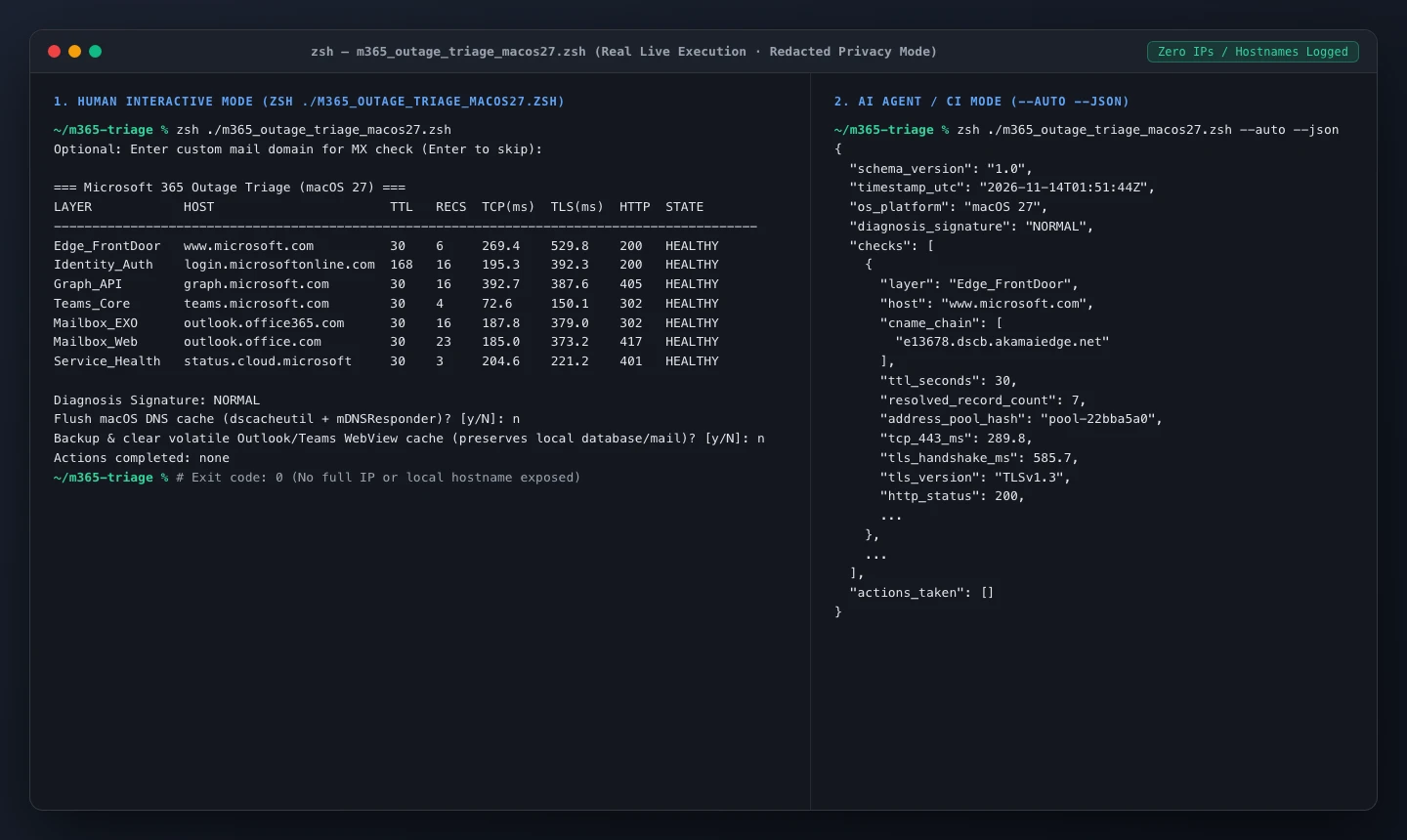
Figure 15: Live terminal capture executing m365_outage_triage_macos27.zsh interactively (left) and in –auto –json AI Agent mode (right) with zero raw IPs or computer names leaked.
7. Engineering Resilience Before the Next Cloud Blackout Hits
Every historic SaaS failure risks fading into collective amnesia 48 hours after service returns. Four concrete architecture habits will separate prepared engineering teams from everyone else next time:
- Move Incident Paging Completely Out-of-Band: Never route PagerDuty alerts, incident bridges, or executive war rooms solely over Microsoft 365 SMTP or Teams calendars. If Exchange freezes, your own alerting pipeline goes silent right when it matters most.
- Maintain Lightweight Cold Offline Schedules: Hospitals, logistics hubs, and support rotations should snapshot the next 48 hours of schedules and escalation phone trees offline nightly.
- Upgrade Synthetic Probes Beyond Bare TCP Port Checks: As demonstrated in Singapore and across 11 globalping regions, kernel TCP handshakes stay green while user-space TLS hangs. Ensure uptime checks complete full TLS 1.3 negotiation plus HTTP response validation.
- Provision a Pre-Authorized Backup Transactional Relay: Keep a secondary non-Microsoft SMTP relay authorized inside SPF/DKIM records so customer alerts and password resets never bottleneck inside a single vendor substrate.
8. Frequently Asked Questions (Q&A)
Q1: Was the November 2026 Microsoft 365 blackout caused by cyberattackers or an AI agent gone wrong?
No. Microsoft EVP Charles Lamanna confirmed explicitly that the incident was "a technical issue not related to cyber or AI / agents." It stemmed from a latent issue introduced during an earlier network capacity upgrade that surfaced following a routine November 12 network change.
Q2: Why did my colleague regain Outlook hours before my laptop stopped throwing errors?
Two factors create staggered client recovery: first, Microsoft rolled recovery out cautiously in small regional increments alongside newly scaled VM capacity to prevent thundering-herd collapses; second, sticky client/router DNS caches can cling to stale 10-second A records behind the 300-second CNAME chain. Running a clean local DNS flush post-mitigation clears that lag quickly.
Q3: Did inbound emails sent during the ~20-hour blackout vanish permanently?
Most legitimate SMTP mail queues retry automatically, and Microsoft explicitly extended its delayed email retry timeout to 48 hours so backlogged messages wouldn't drop prematurely. Wait the full 48-hour window before treating delayed correspondence as lost, and ask critical external senders who received hard bounce notifications to re-send once clear.
Q4: Why could Teams still send chat messages occasionally while calendars, meetings, and Copilot failed?
Real-time Teams chat and media edges run relatively independent signaling pipelines (measured healthy in probes alongside login.microsoftonline.com and Graph API), whereas Teams calendars, meeting scheduling, Information Barriers, and Copilot context queries depend directly on Exchange's mailbox substrate and secure-connection frontend pool.
Q5: What is the single worst mistake IT teams made during the height of the outage?
Directing users to recreate local Outlook profiles, delete cached .ost files, or deploy aggressive auto-retry scripts. That both destroyed local offline access and amplified the post-recovery thundering-herd surge when servers came back online.
Q6: Why did Gmail, Zoom, and GoDaddy spike 45x–61x on Downdetector at the exact same time?
GoDaddy bundles and resells Microsoft 365 hosted email for SMBs, Zoom absorbed a sudden flood of displaced Teams meetings, and Gmail users saw outgoing messages bounce from Outlook addresses—leading thousands of confused senders to report Gmail as broken.
Q7: Microsoft promised a full Post-Incident Review (PIR). What engineering fixes should we watch for?
Look closely at three future safeguards: bounded circuit-breakers inside automated health-checkers (so a probe bug cannot mass-evict 70%+ of capacity simultaneously), backpressure isolation inside Exchange's TLS worker pool, and gateway rate-shaping during restart phases to eliminate "stuck in a bad state" deadlocks permanently.