Migrating from OpenClaw to HermesAgent: A Smooth AI Agent Migration in Practice
Introduction: Why Am I “Moving”?
In 2026, the AI agent landscape is evolving at an incredible pace. Tools that were cutting-edge six months ago might already be surpassed by more powerful alternatives. As someone who relies heavily on AI agents for daily work, I’ve been closely following the latest developments in this field.
Recently, I completed a full migration from OpenClaw to HermesAgent. This wasn’t an impulsive decision, but a thoughtful choice made after experiencing the differences between the two tools in real-world usage.
This article will share in detail:
- Background: What OpenClaw and HermesAgent are
- Migration Reasons: Why I decided to migrate
- Migration Process: Step-by-step guide to complete the migration
- Pitfalls Encountered: Problems and solutions during migration
- Post-Migration Cleanup: How to completely remove OpenClaw residuals
- Post-Migration Experience: New capabilities gained from HermesAgent
- Q&A: Frequently asked questions
 HermesAgent: A next-generation AI agent framework developed by Nous Research
1. OpenClaw: The Former Workhorse
1.1 What is OpenClaw?
OpenClaw is an open-source personal AI assistant gateway developed by the Anthropic team. Its core positioning is: a local-first, multi-channel, extensible AI agent platform.
Key features of OpenClaw include:
- Multi-channel messaging integration: Supports 20+ messaging platforms including WhatsApp, Telegram, Slack, Discord, Feishu, WeChat, and QQ
- Local-first architecture: The Gateway runs as a daemon locally, with all data stored in
~/.openclaw/ - Extensible plugin system: Various skills and plugins can be installed through ClawHub
- Multi-agent routing: Supports routing different channels/accounts to different agents
- Voice capabilities: Supports voice wake-up, voice conversation, and more
1.2 My OpenClaw Use Cases
In my daily work, OpenClaw primarily handled:
- DingTalk/Feishu integration: Receiving messages through DingTalk bots and automatically executing tasks
- Scheduled tasks: Daily content topic planning at 8 AM, with reports sent via DingTalk
- Multi-model support: Using GLM-5.1 as the primary model and MiniMax-M2.7 as fallback
- Skill system: Maintaining 10+ custom skills covering Alibaba Cloud, K8s, MySQL, and more
- Long-term memory: Storing cross-session memories in SQLite databases
1.3 OpenClaw’s Limitations
After using OpenClaw for most of the year, I gradually felt some limitations:
- Weak memory system: OpenClaw’s memory is primarily file-based, lacking advanced semantic search capabilities
- Limited skill self-learning: Skills need to be manually created and maintained, with no automatic improvement from usage
- Insufficient session search: Cross-session historical search is weak, making it difficult to recall details from previous discussions
- Inflexible model switching: While it supports multiple models, the switching process isn’t smooth enough
- Declining community activity: With HermesAgent’s rise, OpenClaw’s community activity has decreased
2. HermesAgent: The Next-Generation AI Agent
2.1 What is HermesAgent?

HermesAgent is an open-source AI agent framework developed by Nous Research, currently boasting 172k+ Stars on GitHub. Its core philosophy is: a self-improving AI agent.
Key features of HermesAgent include:
- Self-improving learning loop: Creates skills from experience and continuously improves them during use
- Powerful session search: FTS5 full-text search + LLM summarization for cross-session recall
- User modeling: Honcho dialectic user modeling for building deepening user profiles
- 300+ model support: Supports 300+ models through Nous Portal or OpenRouter
- Multi-platform messaging: Supports Telegram, Discord, Slack, WhatsApp, Signal, and more
- 6 terminal backends: Local, Docker, SSH, Singularity, Modal, Daytona
- Built-in Cron scheduler: Supports natural language scheduled tasks
- Parallel sub-agents: Can spawn isolated sub-agents for parallel task processing
2.2 HermesAgent vs OpenClaw
| Feature | OpenClaw | HermesAgent |
|---|---|---|
| Language | Node.js | Python + Node.js |
| Memory System | Files + SQLite | SQLite + FTS5 + LLM Summary |
| Skill System | Manual creation | Auto-creation + Self-improvement |
| Session Search | Basic | FTS5 full-text search |
| Model Support | 10+ providers | 300+ models |
| Terminal Backend | Local | 6 backends |
| Community Activity | Declining | Very active |
| Learning Curve | Moderate | Moderate |
2.3 Why Choose HermesAgent?
After comparison, my main reasons for choosing HermesAgent were:
- Self-improvement capability: Skills can automatically learn and improve from usage, significantly reducing maintenance costs
- Powerful session search: The FTS5 + LLM summary combination makes cross-session recall extremely accurate
- More active community: 172k Stars, 9800+ commits, 14 releases, with a very active community
- Better model support: 300+ model support with more flexible switching
- More modern architecture: Python + Node.js combination, leveraging Python’s AI ecosystem and Node.js’s UI capabilities
3. Migration in Practice: Step-by-Step Relocation
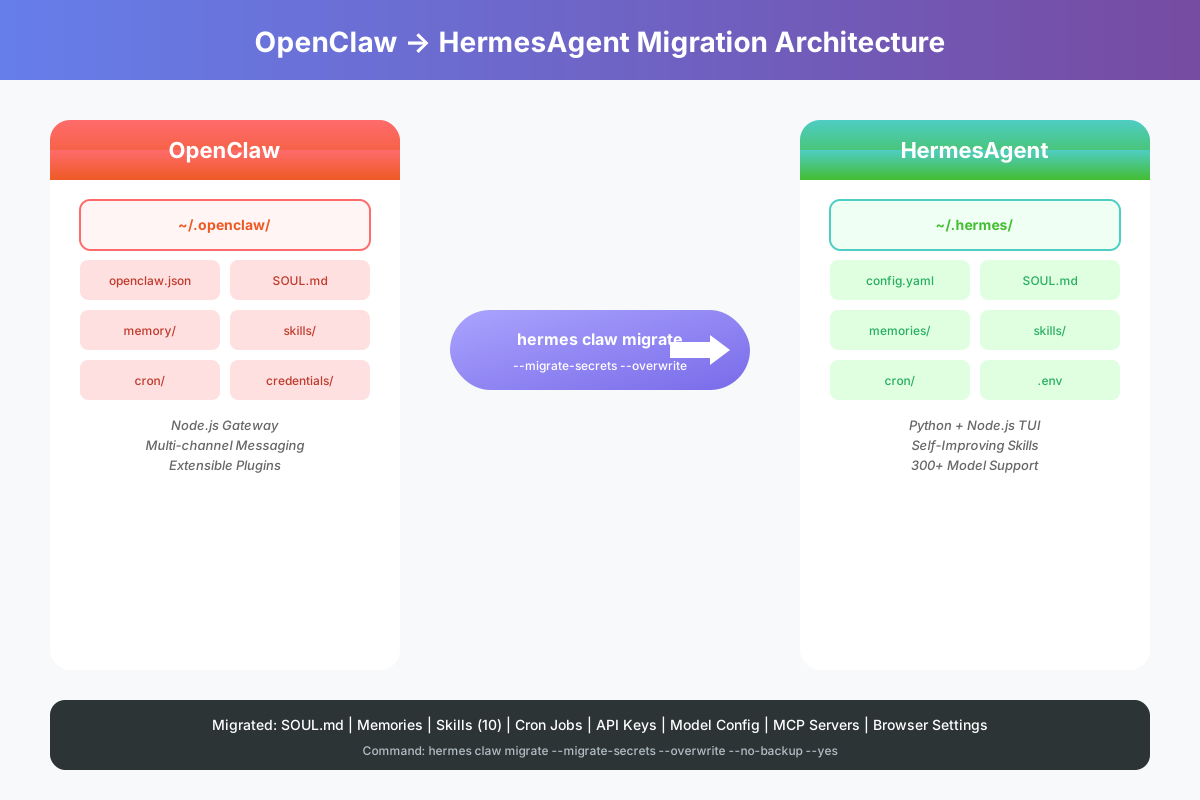 OpenClaw to HermesAgent Migration Architecture Overview
3.1 Pre-Migration Preparation
Before starting the migration, I made the following preparations:
-
Backup OpenClaw data: Although the user had already done a full system backup, I still separately backed up the
~/.openclaw/directory -
Understanding HermesAgent’s data structure:
~/.hermes/config.yaml: Main configuration file~/.hermes/SOUL.md: Persona definition~/.hermes/memories/: Memory storage~/.hermes/skills/: Skill storage~/.hermes/cron/: Scheduled tasks~/.hermes/.env: API keys
-
Confirming migration tool: HermesAgent has a built-in
hermes claw migratecommand specifically for migrating from OpenClaw
3.2 Installing HermesAgent
First, install HermesAgent on the target machine:
# Install Python dependencies
pip install --break-system-packages hermes-agent

# Verify installation
hermes --version
During installation, I encountered a typical Debian system issue: Python’s externally-managed-environment restriction. The solution was to use the --break-system-packages flag for forced installation.
3.3 Executing the Migration Command
HermesAgent provides a very convenient migration tool:
# First do a dry run to see what will be migrated
hermes claw migrate --dry-run --migrate-secrets

# After confirmation, execute the actual migration
hermes claw migrate --migrate-secrets --overwrite --no-backup --yes
The migration command automatically handles the following:
- SOUL.md: Persona definition file
- User profile:
~/.hermes/memories/USER.md - Model configuration: Model and provider config in
~/.hermes/config.yaml - Skills: All custom skills migrated to
~/.hermes/skills/openclaw-imports/ - Daily memories:
~/.hermes/memories/MEMORY.md - MCP servers: MiniMax MCP configuration
- Agent config: Compression, terminal, and other settings
- Environment variables: API keys and more
- Browser config: Chrome headless settings
3.4 Migration Results
After the migration completed, I checked the results:
✓ Migrated:
    soul                   → ~/.hermes/SOUL.md
    user-profile           → ~/.hermes/memories/USER.md
    model-config           → ~/.hermes/config.yaml
    shared-skills          → ~/.hermes/skills/openclaw-imports/aliyun
    shared-skills          → ~/.hermes/skills/openclaw-imports/evomap
    shared-skills          → ~/.hermes/skills/openclaw-imports/k8s
    shared-skills          → ~/.hermes/skills/openclaw-imports/minimax-cli
    shared-skills          → ~/.hermes/skills/openclaw-imports/minimax-multimodal-toolkit
    shared-skills          → ~/.hermes/skills/openclaw-imports/minimax-usage
    shared-skills          → ~/.hermes/skills/openclaw-imports/mysql
    shared-skills          → ~/.hermes/skills/openclaw-imports/sls-query
    shared-skills          → ~/.hermes/skills/openclaw-imports/synology-nas
    daily-memory           → ~/.hermes/memories/MEMORY.md
    mcp-servers            → config.yaml mcp_servers.MiniMax
    agent-config           → config.yaml agent/compression/terminal
    env-var                → .env HERMES_GATEWAY_TOKEN
    full-providers         → config.yaml custom_providers[minimax]
    env-var                → .env OPENAI_CUSTOM_API_KEY
    full-providers         → config.yaml custom_providers[openai-custom]
    browser-config         → config.yaml browser
A total of 20 items were migrated, which is very comprehensive.
3.5 Manual Addition: Cron Scheduled Tasks
The migration tool didn’t automatically migrate Cron scheduled tasks (showing “No cron configuration found”), so I needed to create them manually:
# Create scheduled task
hermes cron create --name 'Daily Content Topic Planning' '0 8 * * *' 'Execute daily content topic planning task...'
After creation, verify the task was added:
hermes cron list
Output:
┌─────────────────────────────────────────────────────────────────────────┐
│                         Scheduled Jobs                                  │
└─────────────────────────────────────────────────────────────────────────┘

  fae3f9b245a2 [active]
    Name:      Daily Content Topic Planning
    Schedule:  0 8 * * *
    Repeat:    ∞
    Next run:  2026-05-30T08:00:00+08:00
    Deliver:   local
4. Pitfalls Encountered: Problems and Solutions
4.1 Problem 1: Python Environment Restriction
Symptom:
error: externally-managed-environment
× This environment is externally managed
Root Cause: Debian 12+ systems enable PEP 668 by default, which prohibits using pip install directly to install system-level Python packages.
Solution:
# Option 1: Use --break-system-packages flag
pip install --break-system-packages hermes-agent

# Option 2: Install missing dependencies first
pip install --break-system-packages --ignore-installed pyyaml==6.0.3
pip install --break-system-packages --ignore-installed PyJWT==2.12.1
pip install --break-system-packages --ignore-installed rich==14.3.3
pip install --break-system-packages hermes-agent
4.2 Problem 2: Model Name Format Error
Symptom:
HTTP 400: Model name not specified, model name cannot be empty
Analysis: By examining the request dump, I found that the model field sent to the API was empty:
{
  "model": "",
  "messages": [...]
}
Root Cause: OpenClaw’s configuration format is:
{
  "models": {
    "providers": {
      "openai-custom": {
        "models": [{"id": "GLM-5.1"}]
      }
    }
  }
}
After migration, HermesAgent’s configuration became:
model:
  default: openai-custom/GLM-5.1
  provider: openai-custom
The issue was with the openai-custom/GLM-5.1 format. HermesAgent’s model name parser treats the part before / as the provider name and the part after as the model name. But openai-custom is not a standard provider name, causing model name parsing to fail.
Solution: Modify the configuration file to use a pure model name:
model:
  default: GLM-5.1
  provider: openai-custom
  base_url: http://your-api-endpoint/v1
  api_key: your-api-key
4.3 Problem 3: Cron Tasks Not Automatically Migrated
Symptom: The migration tool showed “No cron configuration found”, but OpenClaw actually had 1 scheduled task.
Root Cause: The migration tool might be using a different path or format detection logic when looking for Cron configuration.
Solution: Manually create scheduled tasks using the hermes cron create command.
4.4 Problem 4: hermes-agent Command Not Working
Symptom: When using the hermes-agent command, the model name was always empty.
Root Cause: hermes-agent is the npm package entry point, which might not correctly load the configuration. The hermes command is the full CLI entry point that can correctly parse the configuration.
Solution: Always use the hermes command instead of hermes-agent.
5. Post-Migration Cleanup: Completely Removing OpenClaw
After confirming HermesAgent runs stably, it is recommended to thoroughly clean up OpenClaw residual files to free disk space and avoid potential conflicts.
6.1 Stop and Remove systemd Services
OpenClaw registered 3 systemd units during installation that need to be cleaned up:
# Stop services
systemctl stop openclaw-gateway.service openclaw-gateway-healthcheck.service openclaw-gateway-healthcheck.timer

# Disable services (prevent auto-start)
systemctl disable openclaw-gateway.service openclaw-gateway-healthcheck.service openclaw-gateway-healthcheck.timer

# Remove service files
rm -f /etc/systemd/system/openclaw-gateway.service
rm -f /etc/systemd/system/openclaw-gateway-healthcheck.service
rm -f /etc/systemd/system/openclaw-gateway-healthcheck.timer

# Reload systemd configuration
systemctl daemon-reload
6.2 Uninstall npm Global Package
OpenClaw was installed globally via npm, so use npm to uninstall it:
# Uninstall global npm package
npm uninstall -g openclaw

# Remove any remaining binary links
rm -f /usr/local/bin/openclaw
This step removes 559 npm dependency packages, freeing up significant disk space.
6.3 Remove Old Backup Script Residuals
If there are any residual files from the old backup script, clean them up as well:
# Remove old backup script backup file
rm -f /usr/local/bin/openclaw-backup.sh.bak.codex
6.4 Clean Up OpenClaw Data Directory
This is the most critical step and also frees the most space. All OpenClaw data resides in the ~/.openclaw/ directory:
# Check directory size
du -sh ~/.openclaw/

# Remove OpenClaw data directory
rm -rf ~/.openclaw/
Warning: This step deletes all OpenClaw data, including configuration, memories, skills, and credentials. Please ensure:
- HermesAgent is running stably with complete migrated data
- A full system backup has been made (can be restored if needed)
- You have confirmed no need to roll back to OpenClaw
6.5 Verify Cleanup Results
After cleanup, verify that no residuals remain:
# Check ~/.openclaw directory
ls ~/.openclaw 2>&1
# Expected output: No such file or directory

# Check binary link
which openclaw 2>&1
# Expected output: empty (not found)

# Check npm global package
npm list -g openclaw 2>&1
# Expected output: (empty)

# Check systemd services
systemctl list-unit-files | grep openclaw
# Expected output: empty (no matches)
After cleanup, approximately 1.1G of disk space is freed, and no OpenClaw residuals remain in the system.
6. Post-Migration Experience: New Capabilities from HermesAgent
6.1 More Powerful Session Search
HermesAgent’s FTS5 full-text search capability impressed me greatly. Previously in OpenClaw, if I wanted to recall details from a discussion, I had to manually browse through history. Now, I just need to ask in natural language, and HermesAgent can find relevant information from past sessions.
6.2 Self-Improving Skill System
The most notable feature of HermesAgent’s skill system is: skills automatically learn and improve from usage.
For example, I previously created a “synology-nas” skill in OpenClaw for managing Synology NAS. After migrating to HermesAgent, every time I use this skill to execute a task, HermesAgent will:
- Record the task execution process
- Analyze reasons for success and failure
- Automatically update the skill documentation, adding new best practices
This means that over time, skills become more powerful with almost no manual maintenance required.
6.3 More Flexible Model Switching
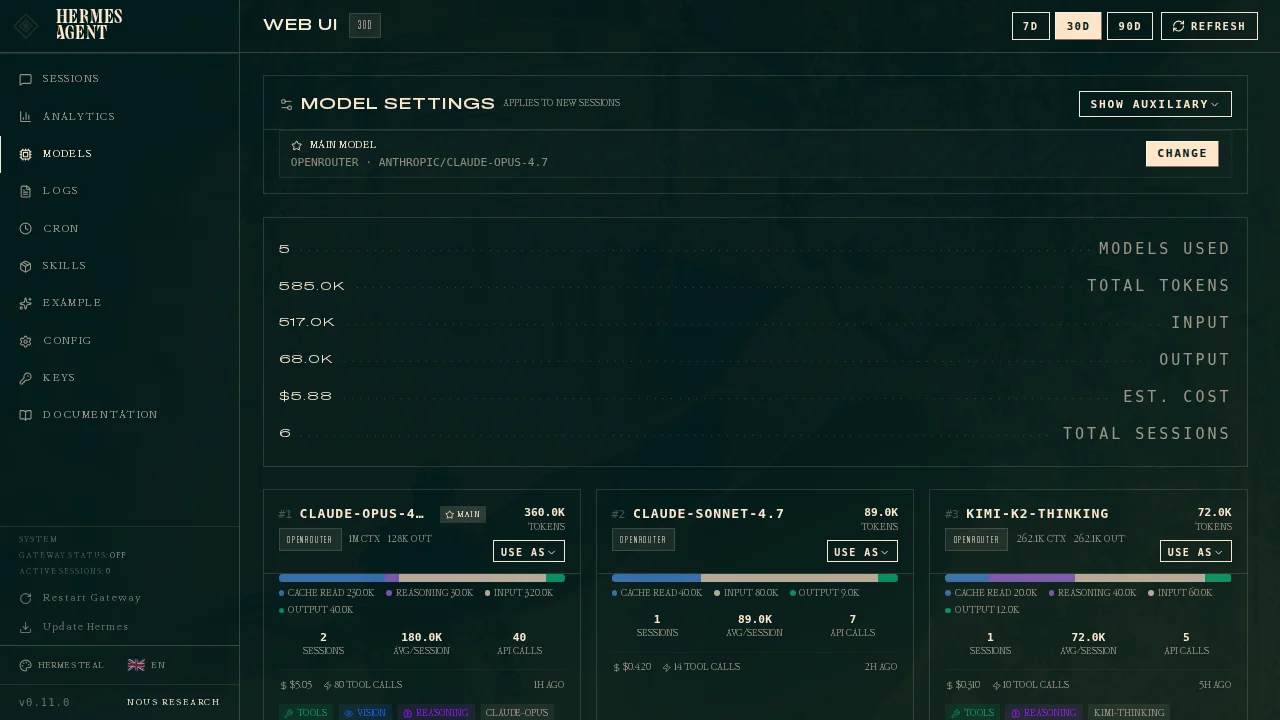 HermesAgent’s model management dashboard, supporting 300+ models
HermesAgent supports 300+ models with very convenient switching:
# Switch to Nous Portal
hermes setup --portal

# Switch to OpenRouter
hermes model

# Switch to custom endpoint
hermes model --provider openai-custom --model GLM-5.1
6.4 More Modern Terminal Interface
 HermesAgent’s TUI terminal interface
HermesAgent’s TUI (Terminal User Interface) is very modern:
- Multi-line editing
- Command auto-completion
- Session history
- Streaming output
- Tool execution progress display
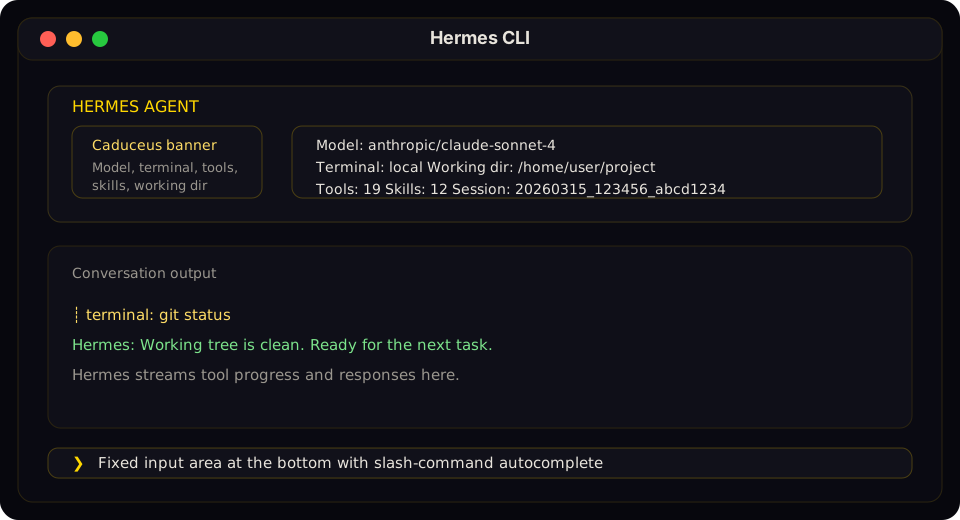 HermesAgent CLI interface layout
6.5 Built-in Cron Scheduler
HermesAgent has a powerful built-in Cron scheduler supporting natural language scheduled tasks:
# Create scheduled task
hermes cron create --name 'Daily Backup' '0 2 * * *' 'Execute database backup...'

# View task list
hermes cron list

# View task execution logs
hermes cron logs
7. Q&A: Frequently Asked Questions
Q1: Will migration cause data loss?
A: No. HermesAgent’s migration tool copies all data completely without deleting source data. Also, it’s recommended to do a dry run first (--dry-run) to confirm what will be migrated.
Q2: Can OpenClaw still be used after migration?
A: Yes. Migration doesn’t delete OpenClaw’s data, and both systems can run in parallel. However, it’s recommended to eventually switch to one system to avoid message conflicts.
Q3: Do I need to reconfigure everything after migration?
A: Most configurations are automatically migrated, including:
- Model configuration
- API keys
- Skills
- Memories
- Browser configuration
- MCP servers
Manual configuration needed for:
- Cron scheduled tasks
- Some special messaging platform configurations
Q4: What’s the learning curve for HermesAgent?
A: If you’re already familiar with OpenClaw, learning HermesAgent will be very easy. The concepts are very similar:
- SOUL.md → SOUL.md (persona definition)
- Skills → Skills
- Memory → Memories
- Cron → Cron (scheduled tasks)
The main differences are in the command-line interface and some advanced features.
Q5: Which messaging platforms does HermesAgent support?
A: HermesAgent supports the following messaging platforms:
- Telegram
- Discord
- Slack
- Signal
For Feishu and DingTalk, integration may need to be achieved through MCP servers or custom integrations.
Q6: Is there any performance change after migration?
A: In actual use, I haven’t noticed any significant performance differences. HermesAgent’s response speed is comparable to OpenClaw, and in some scenarios it’s even faster, especially when involving cross-session searches.
Q7: How to rollback to OpenClaw?
A: It depends on whether you have cleaned up OpenClaw residuals:
Scenario 1: OpenClaw residuals not yet cleaned (refer to Chapter 5)
- Stop HermesAgent’s Gateway
- Restart OpenClaw’s Gateway
- OpenClaw’s data is still in the
~/.openclaw/directory and can be used directly
Scenario 2: OpenClaw residuals already cleaned
- Stop HermesAgent’s Gateway
- Reinstall OpenClaw:
npm install -g openclaw - Restore the
~/.openclaw/directory from your full system backup - Re-register systemd services:
openclaw gateway install - Start OpenClaw Gateway:
openclaw gateway start
Recommendation: Before confirming HermesAgent runs stably, do not rush to clean up OpenClaw residual files. It is recommended to observe for at least 1-2 weeks before performing cleanup.
8. Best Practices and Recommendations
8.1 Pre-Migration Checklist
- Backup
~/.openclaw/directory - Confirm target machine’s Python version >= 3.11
- Confirm sufficient disk space
- Execute
--dry-runfirst to see migration preview - Record current Cron scheduled task configurations
8.2 Post-Migration Verification Steps
- Verify configuration:
hermes config - Verify skills:
hermes skills list - Verify memories:
hermes memory list - Verify scheduled tasks:
hermes cron list - Test conversation:
hermes -z 'Hello, testing' - Test Gateway:
hermes gateway start - Clean up OpenClaw residuals: Refer to Chapter 5, completely remove OpenClaw
8.3 Performance Optimization Recommendations
- Enable compression: Enable context compression in
config.yaml - Configure FTS5: Ensure session search uses FTS5 indexing
- Regular cleanup: Use
hermes sessions pruneto clean old sessions - Monitor resources: Use
hermes statusto monitor system resources
9. Conclusion
Migrating from OpenClaw to HermesAgent was a very smooth experience. HermesAgent’s hermes claw migrate command made the migration process almost zero-barrier, with most configurations and data automatically migrated.
After migration, I gained:
- More powerful session search capabilities
- Self-improving skill system
- More flexible model switching
- More modern terminal interface
- More active community support
Additionally, after migration, by cleaning up OpenClaw residual files (systemd services, npm packages, data directory, etc.), approximately 1.1G of disk space was freed, making the system much cleaner and tidier
If you’re also using OpenClaw and feeling its limitations, I highly recommend trying HermesAgent. The migration process is simple, safe, and immediately provides more powerful capabilities.
References
- HermesAgent GitHub Repository
- HermesAgent Official Documentation
- OpenClaw GitHub Repository
- HermesAgent npm Package
- Nous Portal
This article was first published on Margrop Blog, Author: Margrop