Why My AI Assistant Repeated One Reply Four Times: Debugging an OpenClaw WeChat Channel Issue
Short version
The symptom looked like a messaging-channel bug: an AI assistant connected to a personal chat channel appeared to repeat the same reply multiple times. The real bug was earlier in the chain. Before the reply ever reached the message-sending layer, the OpenClaw agent had already produced duplicated visible text. The useful fix was not to patch the chat sender blindly, but to split the path into transport, session, model-routing, and provider layers, then compare the OpenAI-compatible gateway path with the native provider path. Once the faulty compatible provider candidate was removed from the visible model set and the personal IM channel was pinned to the native provider, the same minimal prompt returned exactly once.
This post is deliberately privacy-safe. It contains no real internal addresses, account IDs, tokens, session IDs, personal chat identifiers, or private file paths. Configuration examples use placeholders. The value is the debugging method, not the private environment.
Figure 1: A generated cover image for this post. The apparent chat-channel problem turned out to be a model execution path problem.
1. Background: IM-connected agents make output bugs much more visible
Many AI agents no longer live only in a terminal. It is increasingly common to connect them to everyday messaging surfaces: personal chat, enterprise IM, Slack-like channels, Telegram-like bots, email, or mobile notifications. That is convenient because the agent becomes part of the daily workflow. You send a message, it checks something, summarizes something, runs a safe task, or reminds you of the next step.
The downside is that messaging channels make output quality issues impossible to ignore. A duplicated line in a terminal may be annoying. A duplicated line inside a personal chat message looks broken. If the assistant replies with the same sentence four times in one message, users will naturally blame the visible channel first.
That was the situation here. A local OpenClaw instance was connected to a personal messaging channel. Whenever the user chatted with the assistant, the reply was repeated several times inside a single message. It was not four separate messages. It was one message body containing repeated text.
That distinction matters. Four separate messages suggest webhook retries, queue duplication, missing acknowledgements, polling offsets, or outbound send retries. One message containing repeated text suggests that the reply payload itself may already be duplicated before the sending layer sees it. Both are “duplicate replies” from a user perspective, but they lead to completely different investigations.
This is why AI-agent debugging needs to be treated like production debugging. The visible UI is only the last layer. Behind it there may be inbound event normalization, session routing, model selection, provider compatibility, streaming assembly, fallback selection, and outbound delivery. Guessing from the final symptom is not enough.
2. Symptom: one message, repeated content
The issue can be reduced to this minimal form:
User prompt: Reply with exactly these two characters: test
Expected: test
Actual: testtesttesttest
The real language and content do not matter. What matters is the pattern: the assistant did not send multiple messages. It built one final reply whose visible text had been duplicated.
I used a minimal prompt for diagnosis:
Reply with exactly these two characters: test
A minimal prompt is useful because it removes noise. Long real prompts bring in history, tools, markdown, summaries, system instructions, and language style. If the minimal prompt already duplicates, the problem is likely not the business request itself. If the minimal prompt is clean but a real task duplicates, then session history, tool output, or long-context behavior becomes more suspicious.
For each test run, I did not only look at the final chat message. I recorded the final raw text, the provider, the model, the winner provider, and the execution attempts. The goal was to answer a precise question: did the duplication happen before or after the agent produced its final visible reply?
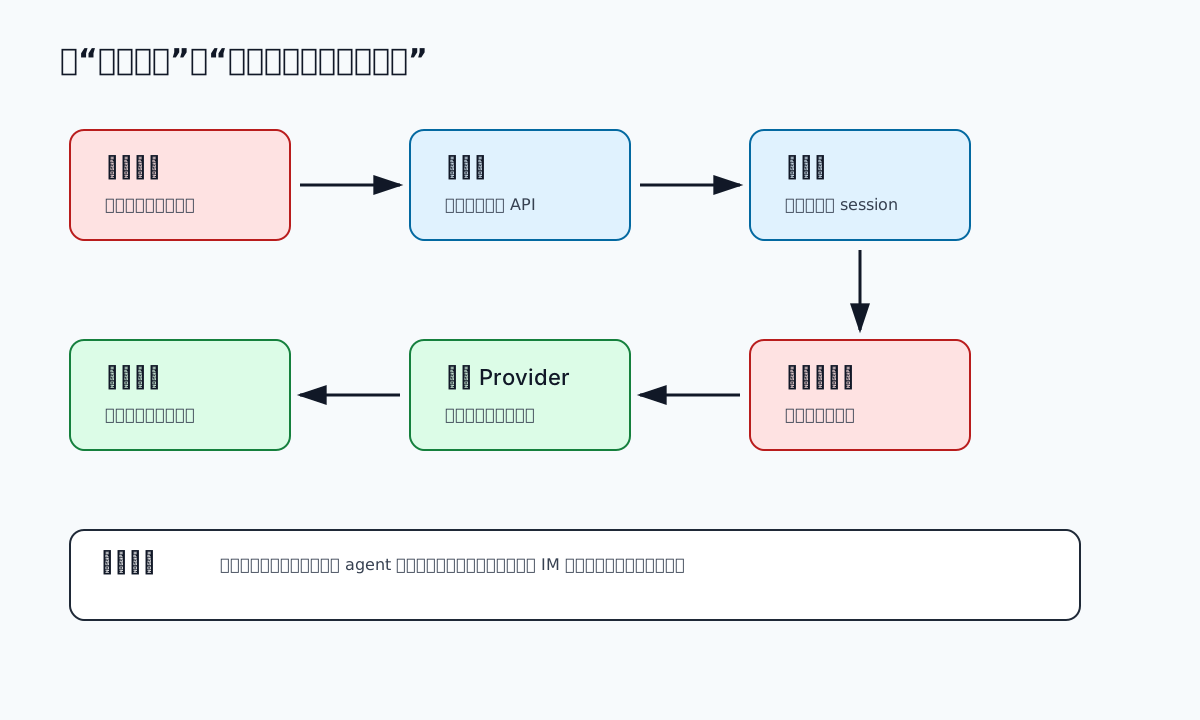
Figure 2: The first task is to locate the layer where duplication first appears.
3. First hypothesis: did the messaging sender call the API multiple times?
It is reasonable to inspect the sender first. IM integrations often have retries, acknowledgements, offsets, queues, and deduplication rules. If a receiver does not acknowledge properly, or if a queue consumer runs twice, users may receive repeated messages.
But the symptom here pushed against that theory. The output was repeated inside one message body. Looking at the outbound path, the sender assembled a single text item and sent one outbound message payload. That made the transport layer less likely to be the root cause.
The important split was this:
- If the sender calls the outbound API multiple times, investigate retries, queue duplication, and idempotency.
- If the sender calls once but the text is already duplicated, investigate the upstream agent result.
The evidence pointed to the second case. The visible text was already duplicated before the chat sender became relevant. That moved the investigation from the channel plugin to the agent execution path.
4. Second hypothesis: was an old session state being reused?
Agents are not plain stateless API calls. They usually have sessions. A session can store history, whether the system prompt was already sent, the selected model, overrides, fallback provenance, delivery context, parent session information, compaction state, and more.
Session state can cause surprising behavior. A previous model override may keep applying. A main session may be reused when you thought you started fresh. A fallback selected during a previous failure may still be active. Old repeated text may be present in history and influence the next response.
To separate these possibilities, I ran tests with fresh session keys and with the actual main session used by the personal IM channel. The fresh sessions still reproduced the duplication. That meant this was not only a polluted historical conversation. The model execution path itself was suspect.
The main session still mattered for final verification. A debug session can prove a theory, but the user’s actual entry point is the main chat session. A fix is not complete until the real entry point produces a clean response.
5. Third hypothesis: was the agent selecting the wrong provider path?
This was the turning point.
In OpenClaw, a practical model selection is not just a model name. It is a provider plus a model. Two providers can expose the same model ID. One may be a native provider. Another may be an OpenAI-compatible gateway that wraps the same or similar backend model.
That distinction matters a lot in agent workflows. A gateway may be perfectly fine for a simple non-streaming curl test and still behave differently when an agent uses streaming deltas, reasoning fields, content blocks, tool calls, usage accounting, stop reasons, fallback handling, and final text assembly. Compatibility needs to be verified against the actual client workflow, not only against a tiny happy-path request.
I compared two paths using the same minimal prompt:
Compatible gateway path: testtest
Native provider path: test
The result was decisive. The model name looked the same, but the provider path was different. The duplicate visible text came from the OpenAI-compatible execution path in this agent context, while the native provider produced a single clean reply.
That does not mean OpenAI-compatible gateways are bad. They are extremely useful for unifying access to multiple models. It does mean that compatibility is an engineering claim that must be tested at the layer where it will be used. For an agent, “the endpoint returns text” is not enough.
6. Root cause: same model name, faulty compatible candidate, real execution picked that candidate
The root cause can be summarized like this:
The OpenClaw configuration had multiple provider candidates exposing the same model name. One OpenAI-compatible provider path produced duplicated final visible text in the agent execution flow. Even after the default model appeared to point to the native provider, the actual execution trace still selected the compatible provider candidate. Therefore the personal messaging channel received a reply payload that was already duplicated before delivery.
The key lessons are:
- The chat channel did not send the message four times.
- The user input was not duplicated.
- The model name alone was not enough to identify the runtime path.
- Restarting the gateway was not sufficient while the faulty provider candidate remained visible.
- The real proof was the execution trace: final raw text and winner provider.
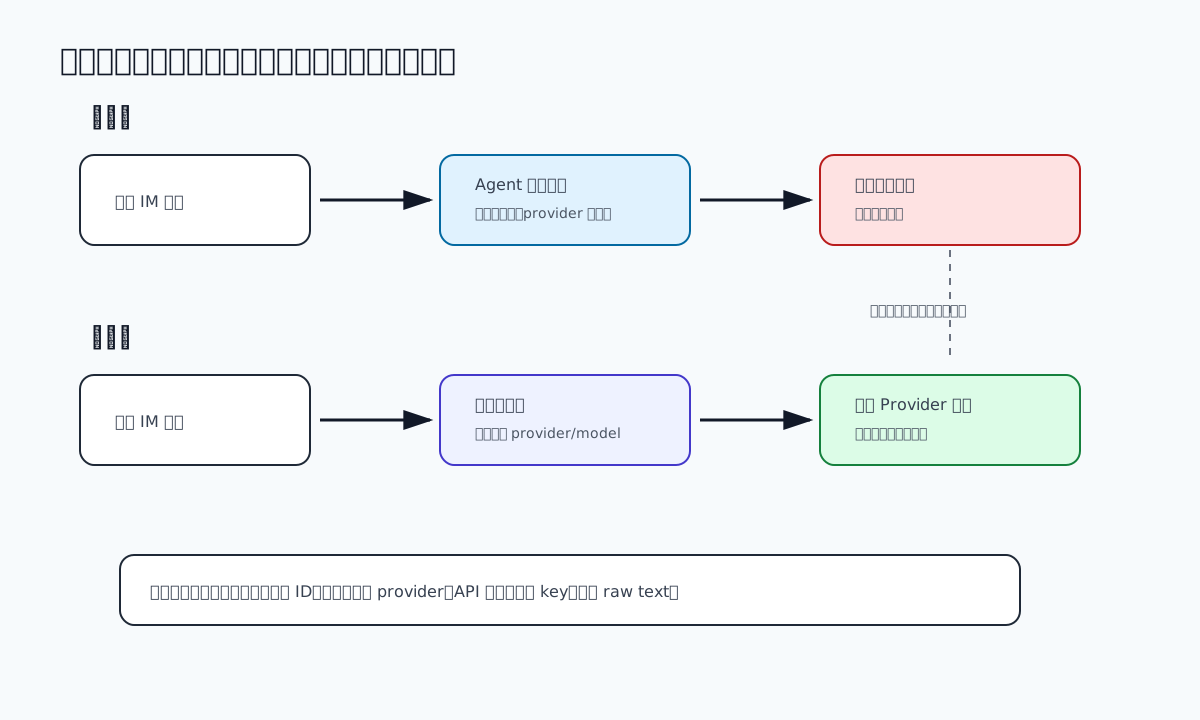
Figure 3: The same model name can hide different provider paths. Debug the provider, not only the model ID.
7. The fix: pin the channel and remove the faulty visible candidate
The first attempted fix was the obvious one: set the default model to the native provider.
A privacy-safe version looks like this:
{
  "agents": {
    "defaults": {
      "model": {
        "primary": "native-provider/Model-X",
        "fallbacks": ["compatible-gateway/Model-X"]
      }
    }
  }
}
That was not enough. The runtime execution trace still selected the compatible provider. That told me the model selection system had more layers than the visible default: session state, channel overrides, fallback candidates, allowlists, and model catalog resolution can all affect the final route.
The next step was to remove the faulty provider from the fallback list:
{
  "agents": {
    "defaults": {
      "model": {
        "primary": "native-provider/Model-X",
        "fallbacks": []
      }
    }
  }
}
Then I added a channel-level model override for the personal IM channel:
{
  "channels": {
    "modelByChannel": {
      "personal-im-channel": {
        "*": "native-provider/Model-X"
      }
    }
  }
}
Finally, the decisive step was to remove the faulty compatible provider candidate from the visible model configuration for this agent path. Keeping a known-bad candidate visible is dangerous because it may reappear through fallback, alias resolution, or catalog selection.
After restarting the gateway, the same minimal prompt returned once:
Input: Reply with exactly these two characters: test
Output: test
provider: native-provider
winner: native-provider
The actual main personal chat session was then tested as well. It also returned a single response and selected the native provider. That was the point where the fix was verified.
8. Why I would not solve this with text deduplication
A tempting workaround is to deduplicate the final message body. If abcabcabcabc appears, compress it to abc. That is fast, but it is the wrong primary fix.
First, not all repetition is invalid. A user may ask the assistant to repeat something, generate test data, write a poem, show repeated log lines, or explain a pattern. Blind deduplication changes content.
Second, post-processing hides the upstream bug. If the provider path is assembling content incorrectly, other features may still be broken: tool calls, structured output, summaries, markdown blocks, or longer responses.
Third, repeated output is not always a perfect string repeat. It may be paragraph duplication, reasoning text mixed with visible content, repeated streaming fragments, or duplicated markdown sections. A deduplication filter will keep growing until it becomes another fragile subsystem.
Message idempotency is still useful at the transport layer. The sender should avoid delivering the same message event repeatedly when retries happen. But that is different from rewriting the content after the agent has already produced a bad reply.
9. A reusable checklist for duplicate AI replies
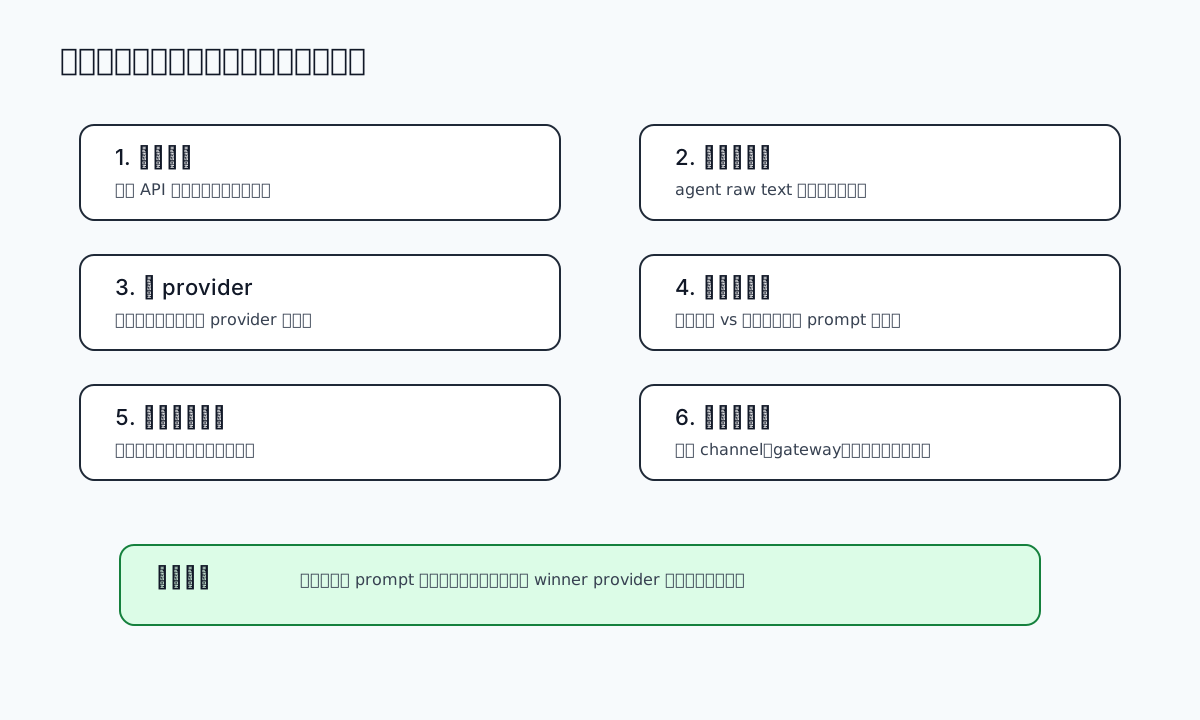
Figure 4: A practical checklist for this class of issue.
9.1 Classify the duplication
Ask whether the user sees multiple messages or one message with duplicated content.
Multiple messages suggest transport retries, queue duplication, missing acknowledgement, or polling offsets. One message with duplicated content suggests reply payload assembly, agent raw text, streaming, or model routing.
9.2 Reproduce with a minimal prompt
Use a tiny deterministic prompt. If the minimal prompt duplicates, the issue is probably not the business prompt. If it does not, inspect session history, tools, summaries, or long-context behavior.
9.3 Record provider and model together
Never record only the model name. Record provider, model, API protocol, final raw text, winner provider, and whether fallback was used.
9.4 Compare native and compatible paths
If you have both a native provider and an OpenAI-compatible gateway, run the same prompt through both. For an agent, a raw API curl is useful but insufficient; run the actual agent turn and inspect the final visible text.
9.5 Check session and channel overrides
Model selection can happen at several levels: global defaults, agent defaults, session overrides, channel overrides, fallbacks, and allowlists. Know which layer you are changing.
9.6 Remove known-bad candidates
A fallback that reliably produces wrong content is not a fallback. It is a delayed incident. Remove it from the visible candidate set until the compatibility issue is fixed.
9.7 Verify the real entry point
After changing configuration, verify gateway health, channel health, and the real main session used by the messaging channel. A debug session passing is not enough.
10. Q&A
Q1: Why can a direct curl test pass while the agent still duplicates?
Because a curl test often verifies only a single API request. An agent verifies the full execution chain: system prompt, session state, streaming, reasoning, tool calls, fallback selection, context budgeting, and final text assembly.
Q2: Are OpenAI-compatible gateways unsafe for agents?
No. They are useful. But they must be tested with the actual agent client. “Returns text” is not the same as “works correctly for streaming agent execution.”
Q3: Why not keep the compatible path as fallback?
Fallbacks should be safer alternatives. A known-bad fallback is a hidden recurrence path. For a user-visible messaging channel, fewer known-good options are better than many uncertain ones.
Q4: Why use a channel-level model override?
Different channels have different risk tolerance. A personal chat channel should be stable and predictable. Pinning it to a known-good provider prevents unrelated global model experiments from affecting it.
Q5: What if the compatible gateway must remain in use?
Then treat it as a compatibility bug. Capture raw streaming and non-streaming responses, compare content deltas, check reasoning-field handling, confirm stop reasons, and test the exact agent workflow before making it visible again.
Q6: Can prompt engineering fix this?
Not reliably. “Do not repeat yourself” is not a fix for duplicated streaming fragments, faulty field mapping, or incorrect provider routing. Evidence beats prompt superstition.
11. Closing thoughts: debug AI agents like production systems
The main lesson is that an AI agent is no longer “just a chatbot.” It is a production chain with transport, sessions, model routing, providers, compatibility layers, streaming assembly, and fallbacks. A duplicated chat reply is the visible symptom of a chain-level fault.
The questions that matter are concrete:
- Did duplication happen before or after delivery?
- Did it happen in session handling or model execution?
- Which provider actually won the run?
Once those are answered with evidence, the fix becomes straightforward. Without them, every change is a guess.
One final privacy note: troubleshooting posts should teach methods, not expose private infrastructure. Redact internal addresses, user identifiers, tokens, session IDs, account names, and private paths before anything becomes a blog post, screenshot, issue, or pull request.
References
- OpenClaw CLI Models documentation:
https://docs.openclaw.ai/cli/models - OpenClaw CLI Agent documentation:
https://docs.openclaw.ai/cli/agent - OpenAI Chat Completions API documentation:
https://platform.openai.com/docs/api-reference/chat/create - Anthropic Messages Streaming documentation:
https://docs.anthropic.com/en/api/messages-streaming