PhotoPrism Stuck for 5 Minutes on First Boot? A Postmortem on PHOTOPRISM_INIT=intel
TL;DR (The Short Version)
The
PHOTOPRISM_INIT: "intel"line in PhotoPrism’s Plus Docker image is not just a flag to enable Intel hardware acceleration at runtime — it’s a one-shot system-level installer that runsapt-get dist-upgradeagainstarchive.ubuntu.comand then installs 8 Intel/VA-API packages before the main process is allowed to start. On a fresh container this takes 5–10 minutes (sometimes more), during which nothing inside the container listens on port2342.Meanwhile:
docker pssaysUp, Portainer is green,ss -ltnon the host shows:2342LISTEN — but your browser getsERR_CONNECTION_RESET/Connection reset by peer. Because host-sidedocker-proxyaccepts the connection and then tries to forward to a port inside the container that has no listener, the kernel sends back an RST.Fix: just remove or empty that one line. If you already pass
/dev/dri/renderD128viadevices:, the host’s drivers and userland libraries are perfectly usable from the container — there’s nothing to “install” in there.

Cover: this is what PhotoPrism looks like when it actually works. If you see this — you’re fine. If you see Connection reset by peer — keep reading.
Background: How a Self-Hosted PhotoPrism Usually Gets Deployed
I run a small Synology DSM-based home server. Dozens of containers live there: Portainer, Syncthing, qBittorrent, Jellyfin, PhotoPrism and a photo library read-only view — all deployed as Portainer stacks.
Two PhotoPrism instances run side by side:
- The main
photoprisminstance with admin / write access - A
photoprism-roinstance with a read-only library view that other people on the network can browse
Both docker-compose.yml files look almost identical. The differentiating line — the one that triggered this whole investigation — was:
environment:
  PHOTOPRISM_INIT: "intel"
The intent was reasonable: I want PhotoPrism to use Intel Quick Sync (QSV) for hardware-accelerated video transcoding, so that watching / indexing large videos doesn’t peg the CPU.
Everything looked fine on paper.
Symptom: Container is “Up”, but the Browser Refuses to Connect
After deploying the stack I checked Portainer:
Status: Up 3 minutes(green / healthy)- Port mapping:
0.0.0.0:2342->2342/tcp
On the host, ss -ltn:
LISTEN  0  128  0.0.0.0:2342  0.0.0.0:*  users:(("docker-proxy",pid=5867,fd=4))
LISTEN  0  128  [::]:2342     [::]:*     users:(("docker-proxy",pid=5873,fd=4))
Looks great. The port is LISTEN, docker-proxy is happily waiting for connections.
But when I open http://<NAS>:2342/ in a browser, Chrome says ERR_CONNECTION_RESET. Safari too. And curl:
$ curl -v http://<NAS>:2342/
> GET / HTTP/1.1
> Host: <NAS>:2342
> User-Agent: curl/8.7.1
>
* Request completely sent off
* Recv failure: Connection reset by peer
* Closing connection
Connection reset by peer. That’s an RST at the TCP layer.
But Portainer still says the stack is green and healthy.
So… did the container start, or not?
Analysis: Three Different Meanings of “Up”
My first instinct was “the container didn’t start” — so I docker inspected it, saw Status=running, and moved on. But that was the wrong conclusion. Up and “service available” are not the same thing when the entrypoint uses s6-overlay.
I went inside the container and ran ps -ef:
$ docker exec photoprism ps -ef
UID   PID  PPID  C STIME  CMD
root    1     0  0 23:28  /package/admin/s6/command/s6-svscan -d4 -- /run/service
root   17     1  0 23:30  s6-supervise s6-linux-init-shutdownd
root   18    17  0 23:30  /package/admin/s6-linux-init/...shutdownd
root   28     1  0 23:30  s6-supervise s6rc-oneshot-runner
root   29     1  0 23:30  s6-supervise s6rc-fdholder
root   30     1  0 23:30  s6-supervise photoprism
root   36    28  0 23:30  s6-rc-oneshot-run
root   60    30  0 23:30  bash /scripts/cmd.sh /opt/photoprism/bin/photoprism start
root   63    60  0 23:30  bash /scripts/entrypoint-init.sh
root   65    63  0 23:30  make --no-print-directory -C /scripts intel
root  106    65  0 23:31  apt-get -qq dist-upgrade
Notice: PID 1 is s6-svscan — that is the process docker calls “Up”. But the real “work” is happening deeper down: entrypoint-init.sh → make -C /scripts intel → apt-get -qq dist-upgrade.
And critically: the PhotoPrism main process is not running. It’s stuck in s6-supervise photoprism’s “not yet” state — /scripts/cmd.sh is blocked waiting for entrypoint-init.sh to finish before it spawns the real photoprism start.
Let’s also check the listener side:
$ docker exec photoprism ss -ltn
# (empty — nothing is listening)

$ docker exec photoprism bash -c 'for p in 2342 3000; do
    timeout 1 bash -c "</dev/tcp/127.0.0.1/$p" && echo $p OPEN || echo $p CLOSED
  done'
2342 OPEN    # this is the in-namespace docker-proxy, not the app
3000 CLOSED  # the real application port
Truth table:
| Where I look | What I see | What it really means |
|---|---|---|
docker ps (host) |
Up 3 minutes |
The s6 supervision tree is alive ✅ |
ss -ltn (host) |
0.0.0.0:2342 LISTEN |
docker-proxy is waiting ✅ |
curl http://<NAS>:2342/ |
Connection reset by peer |
The app isn’t running yet, proxy has nothing to forward to ❌ |
docker exec ... ps -ef |
Stuck on apt-get dist-upgrade |
The init stage is not done ❌ |
docker exec ... ss -ltn |
Empty | The app process inside the container hasn’t started listening ❌ |
Three “Up” layers, only one of them is the real signal. Only “the app process inside the container is listening” actually means the service is up.
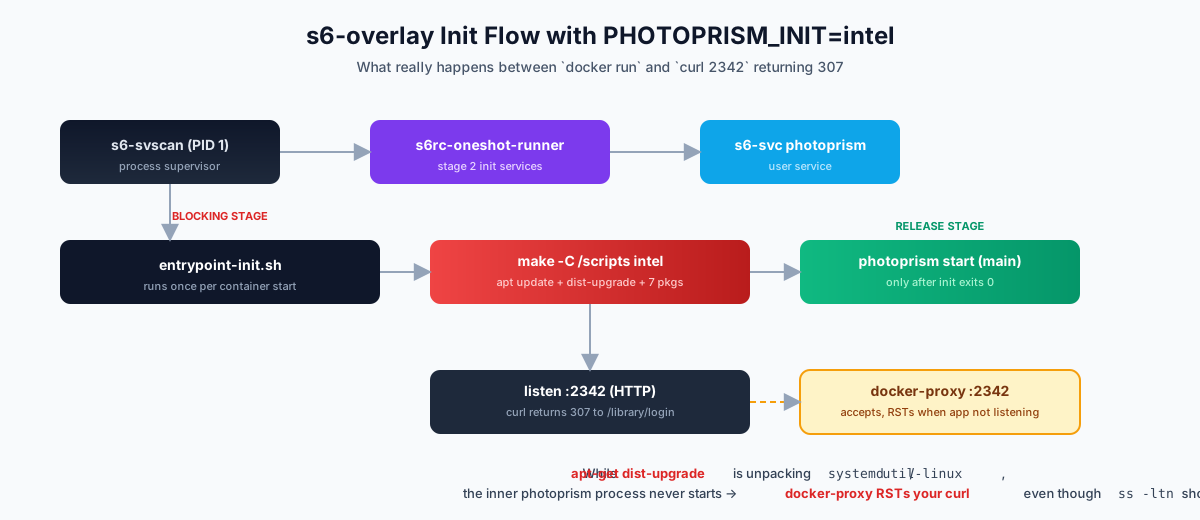
Figure 1: PhotoPrism’s s6-overlay startup path. s6-svscan is PID 1, but it only supervises. The real “init” is stage 2’s s6rc-oneshot-runner, which runs entrypoint-init.sh. PHOTOPRISM_INIT=intel makes that script call make -C /scripts intel, which runs apt-get dist-upgrade + installs 7 GPU packages. The photoprism start main process is blocked behind this — the entire time, nothing on 2342 is listening.
Root Cause: PHOTOPRISM_INIT=intel Is a Disguised “Reinstall the OS” Switch
To understand why PHOTOPRISM_INIT=intel blocks for so long, we need to look at what the variable really does.
The PhotoPrism official docs describe it in one line:
Run/install on first startup. Common options:
update tensorflow https intel gpu davfs yt-dlp.
That’s it. One line. It doesn’t tell you what intel installs, where it goes, or how long it takes. The truth lives in the PhotoPrism Makefile — the intel target expands to:
intel: update install-intel
update:
	apt-get update
	apt-get -qq dist-upgrade      # ← full system upgrade
install-intel:
	@echo "Installing Intel GPU Drivers..."
	apt-get -qq install \
	  intel-opencl-icd \
	  intel-media-va-driver-non-free \
	  i965-va-driver-shaders \
	  mesa-va-drivers \
	  libmfx-gen1.2 \
	  va-driver-all \
	  vainfo \
	  libva2                       # ← 8 packages
And the image’s entrypoint-init.sh invokes it like so:
make --no-print-directory -C /scripts intel
# expands to:
# apt-get update
# apt-get -qq dist-upgrade   (pulls 25MB+ of package indexes, full dist-upgrade)
# apt-get install 8 intel/va-api packages
And all of this happens before the photoprism main process is allowed to start.
I captured the live log (sanitized):
apt-get -qq dist-upgrade
Get:1 http://archive.ubuntu.com/ubuntu plucky InRelease [265 kB]
...
Fetched 25.2 MB in 16s (1571 kB/s)
...
Preparing to unpack .../systemd_257.4-1ubuntu3.2_amd64.deb ...
Preparing to unpack .../util-linux_2.40.2-14ubuntu1.2_amd64.deb ...
Setting up libc6:amd64 (2.41-6ubuntu1.2) ...
apt is unpacking systemd, libc6, util-linux, linux-libc-dev — this isn’t “install an Intel driver”, this is a full OS upgrade of the container.
The process state I observed:
PID   ELAPSED  CMD
106   02:45    apt-get -qq dist-upgrade
2 minutes 45 seconds in, and dpkg is still unpacking.
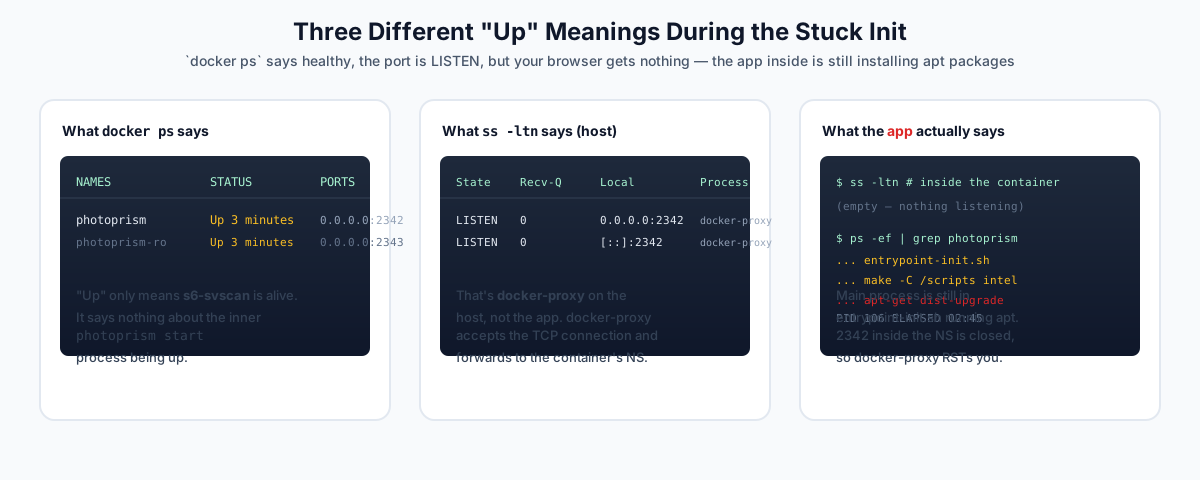
Figure 2: at the same instant, three layers of “Up” semantics. Portainer’s green dot only reflects the outermost — s6-svscan is still alive. To know if the service is actually up, you have to go inside the container and look at ss -ltn and ps -ef.
Why Does curl Get an RST?
Now an even subtler question: the host’s ss -ltn clearly says :2342 is LISTEN, so why does curl get RST?
This is standard Docker docker-proxy (aka dockerd-proxy) behavior.
When you docker run -p 2342:2342, docker spawns a docker-proxy process on the host that does this:
- Listens on
0.0.0.0:2342(that’s the LISTEN you see inss -ltn) - Accepts TCP connections
- Forwards each connection to the container’s network namespace at
127.0.0.1:2342
The key is: forwarding is per-connection. Every new connection, docker-proxy does a connect(127.0.0.1:2342) inside the container’s NS. If something is listening — the handshake completes, traffic flows. If nothing is listening — the kernel returns an RST, docker-proxy receives it, and propagates the RST back to the client.
And on the host you cannot distinguish “proxy has nothing to forward to” from “the app is just thinking” — the proxy is always LISTEN. That’s exactly what makes this failure so confusing.
Pseudo-code:
client        →  SYN   →  docker-proxy
docker-proxy  →  SYN   →  container_NS:2342   # nothing LISTEN here
container_NS  →  RST   →  docker-proxy        # kernel returns RST
docker-proxy  →  RST   →  client              # propagated
client: Connection reset by peer
After the init eventually finishes (8–10 minutes later), the same curl works fine:
$ curl http://<NAS>:2342/
< HTTP/1.1 307 Temporary Redirect
< Location: /library/login
A normal 307 redirect to the login page. The PhotoPrism process wasn’t broken — it just hadn’t started yet, and the host’s “everything is fine” indicators misled me.
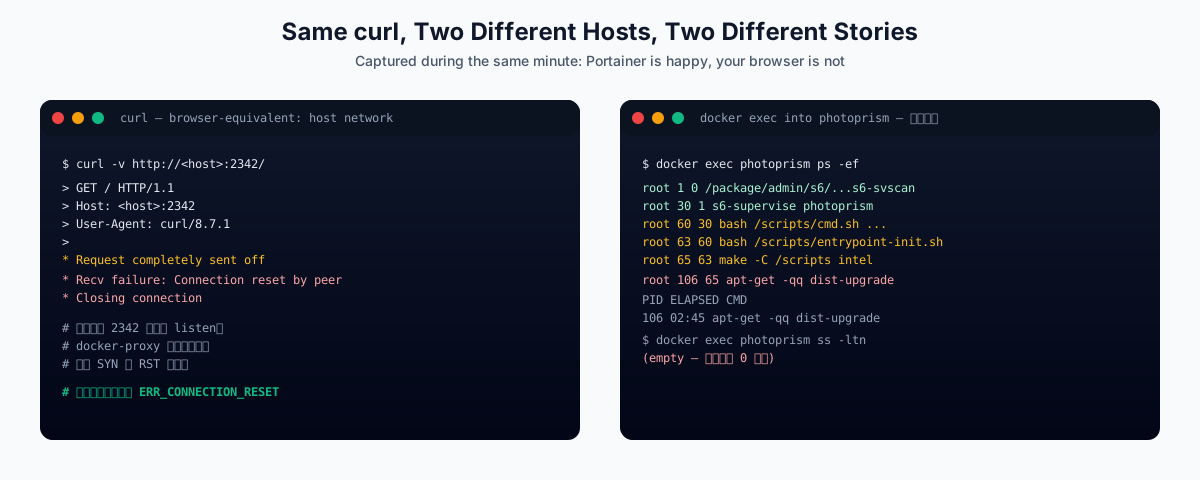
Figure 3: Left: browser/curl from the host gets RST. Right: docker exec photoprism ps -ef shows the truth — the main process is stuck inside apt-get dist-upgrade, the app process hasn’t even been spawned yet.
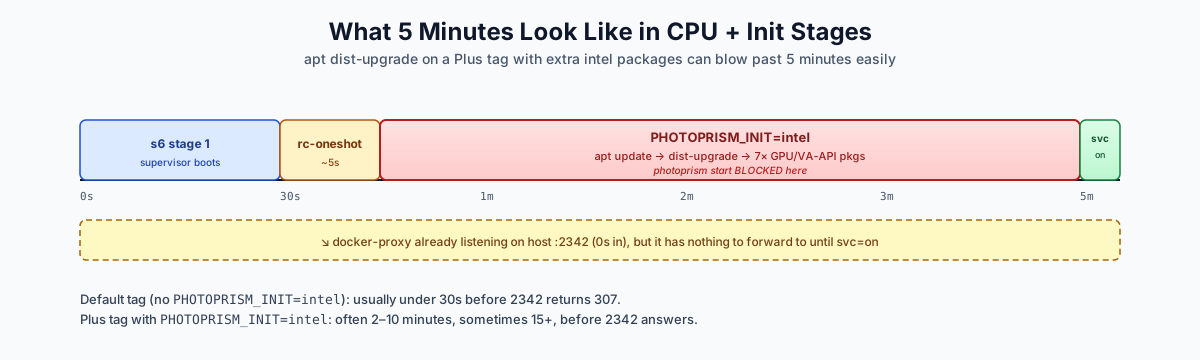
Figure 4: typical timing. s6-svscan is up at t=0, docker-proxy :2342 is LISTEN immediately — but that’s just an empty room with a doorbell. The real apt-get dist-upgrade runs for 60–300 seconds, and the subsequent apt install 8 packages adds another 60–180. On the Plus tag’s 250426 image, expect 5 minutes with decent network and 10–15 minutes when the link is slow.
Why Does PHOTOPRISM_INIT Exist At All?
Now that we know the behavior, let’s look at why this switch is even there.
When PhotoPrism designed PHOTOPRISM_INIT, the assumed deployment was “the container is a complete little machine” — first boot should pull TensorFlow models, install Intel drivers, install Caddy for HTTPS, install ytdlp, etc. In that world:
- The container has no host device passthrough
- The container has no pre-installed GPU userland tools
- Installing system-level packages makes sense
But my deployment is the opposite:
devices:
  - /dev/dri/renderD128:/dev/dri/renderD128    # ← the host's iGPU is passed through
Which means:
- The container doesn’t need
intel-opencl-icd,libmfx-gen1.2,va-driver-all— these exist on the host and are exposed via the device - All the Go code needs is to call QSV through
/dev/dri/renderD128 - The whole
apt dist-upgrade+ 8 GPU packages is pure waste
The right mental model: install the driver on the layer that knows how to install it. The host already has the driver; the container just needs to use it via the device.
Solutions: Three Layers, Three Tradeoffs
Ordered by least invasive to most:
✅ Option 1 (Strongly Recommended): Remove or Empty PHOTOPRISM_INIT
Edit the stack:
services:
  photoprism:
    image: 192.168.103.8:8082/photoprism/photoprism:250426
    container_name: photoprism
    # ... everything else stays ...
    environment:
      # PHOTOPRISM_INIT: "intel"     ← delete this line, or set it to ""
      PHOTOPRISM_FFMPEG_ENCODER: "intel"
      # ... other env vars unchanged ...
    devices:
      - /dev/dri/renderD128:/dev/dri/renderD128
    restart: always
In Portainer:
- Open the stack’s editor view
- Delete the
PHOTOPRISM_INITline (or set it to"") - Click Update the stack, do NOT check “Re-pull image and redeploy” (we only want to restart the app layer, not re-pull the image)
- Within 30 seconds,
2342should return 307
Why this is the cleanest fix:
- The driver is on the host, the device is passed through, using it doesn’t require installing packages inside the container — that’s the whole point of Linux device passthrough
PHOTOPRISM_FFMPEG_ENCODER: "intel"should stay — that line actually tells PhotoPrism which encoder backend to use at runtime, which is a totally different concern fromPHOTOPRISM_INIT- Your
volumes, the external MySQL database, the/dev/dri/renderD128device — everything stays; users, libraries, indexes are all preserved
Verified locally on DSM:
Before: apt still installing, curl gets RST
After:  307 → /library/login within 30 seconds
🟡 Option 2: “Pre-bake” the Init into Your Own Image
If you have a hard requirement to keep PHOTOPRISM_INIT=intel (or some other init), you can pre-run the init once and commit a new image:
# 1. Run a one-shot container to let init finish
docker run -d --name pp-init-tmp \
  -e PHOTOPRISM_INIT=intel \
  192.168.103.8:8082/photoprism/photoprism:250426

# 2. Wait ~10 minutes, follow logs until init finishes
docker logs -f pp-init-tmp
# When you see "photoprism: started" or similar, init is done

# 3. Commit a baked image
docker commit pp-init-tmp 192.168.103.8:8082/photoprism/pp-baked:latest

# 4. Clean up
docker rm -f pp-init-tmp
Then point your stack at the baked image and don’t set PHOTOPRISM_INIT. Startup is also ~30 seconds.
The cost: the image grows by ~200–300 MB (Intel packages + dist-upgraded system). But in the long run, it’s cheaper than re-installing on every container start.
🟢 Option 3: Skip dist-upgrade? Nope, Not Possible
You might be tempted to think “I just want the intel packages, no dist-upgrade”. This doesn’t work — the Makefile’s intel: update install-intel always runs apt-get dist-upgrade first. Unless you fork the image and rewrite the Makefile, there’s no clean “intel only” path.
I list it here so you know that line of thinking is a dead end.
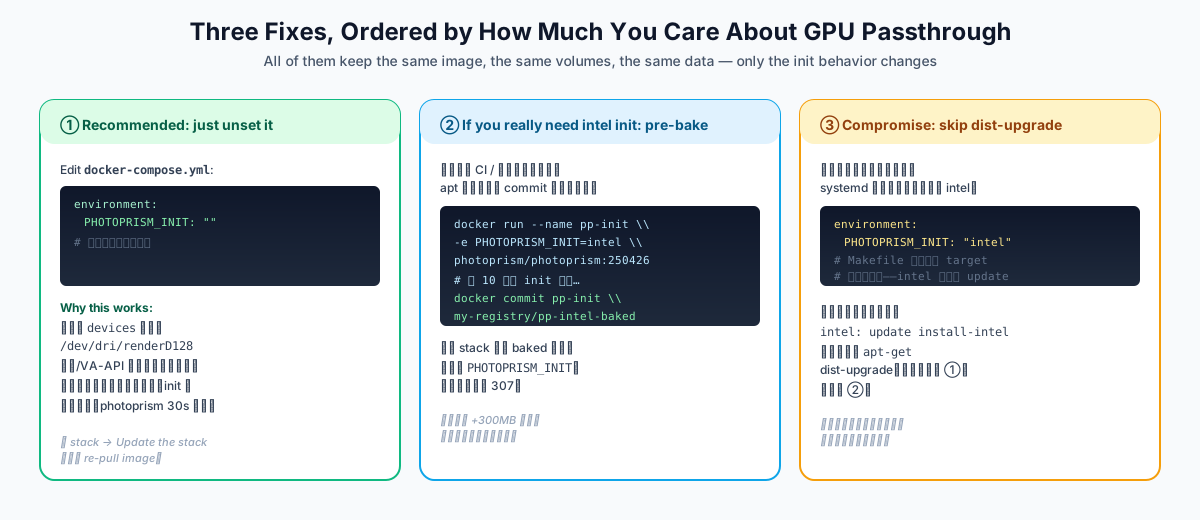
Figure 5: Option 1 is what 99% of you should use. Option 2 is for the case “I really need the Intel codec libs inside the container”. Option 3 is a non-starter shown for completeness.
How Do I Verify the Fix Actually Worked?
Don’t judge by “how long you waited”. The only reliable way to confirm a service is up is:
# 1. Process tree inside the container
docker exec photoprism ps -ef | grep -E 'photoprism|entrypoint|apt|make'
# /opt/photoprism/bin/photoprism start = really up
# /scripts/entrypoint-init.sh still alive = still stuck

# 2. Listener inside the container
docker exec photoprism ss -ltn | grep 2342
# or
docker exec photoprism bash -c '</dev/tcp/127.0.0.1/2342 && echo OPEN'
# OPEN = up; empty = stuck

# 3. External curl
curl -I http://<NAS>:2342/
# expected: HTTP/1.1 307 Temporary Redirect
#           Location: /library/login
# not expected: Connection reset by peer
The service is truly available only when all three say “yes”.

Figure 6: what the UI actually looks like when PhotoPrism is up. If you can reach this screen, your fix worked.
Bonus: Other “Up but Not Available” Containers
This same pattern — “s6-overlay init stage hasn’t finished, main process never starts” — shows up across many other images. Symptoms are similar:
| Image | What init does on first start | Typical duration | How to detect |
|---|---|---|---|
| PhotoPrism | apt dist-upgrade + GPU packages / TF models |
5–15 min | docker exec ... ps -ef | grep apt |
| Nextcloud | install cron, init SQLite | 30s–2 min | check docker logs |
| GitLab | pull / reconfigure Omnibus | 5–10 min | check gitlab-ctl reconfigure logs |
| Home Assistant | pip install integrations |
1–5 min | docker exec ... ps -ef | grep pip |
| Vaultwarden | usually 5s | < 30s | check 80/3012 |
Universal check:
docker exec <ctr> ps -ef | grep -E 'apt|pip|curl|make|init'
# If any of those are still running, init isn't done.
Q&A
Q1: Isn’t PHOTOPRISM_INIT=intel supposed to be “use Intel acceleration”? Why can’t I just keep it?
Yes, PHOTOPRISM_INIT=intel does enable Intel acceleration — but its implementation is “reinstall the driver + userland libraries inside the container”. If you’ve already passed /dev/dri/renderD128 through devices:, the driver and userland libs are on the host, and the container doesn’t need them — that’s the entire point of Linux device passthrough.
Worse, the intel target always runs apt-get update && apt-get dist-upgrade first — which is what makes it block for 5–10 minutes, even if you don’t care about the Intel packages.
Q2: Do I keep PHOTOPRISM_FFMPEG_ENCODER: "intel"?
Yes, keep it. That line is runtime configuration — it tells PhotoPrism “use Intel QSV for ffmpeg encoding” — which is a completely different concern from PHOTOPRISM_INIT. The former is “what to install”, the latter is “what to use”.
Q3: I use the plain photoprism/photoprism:latest and don’t set PHOTOPRISM_INIT — why is first start still slow?
Because PhotoPrism’s default init is https tensorflow, which pulls TensorFlow models (hundreds of MB) and installs Caddy. Expect 2–5 minutes. If you don’t want the models, set PHOTOPRISM_DISABLE_TENSORFLOW: "true" (it’ll also disable face recognition and image classification).
Q4: Does docker ps showing Up 5 minutes mean the service is up?
No. Up only means “PID 1 inside the container is alive”. For PhotoPrism (s6-overlay), PID 1 is s6-svscan — and that stays alive even if the main process never starts. The only reliable signal is “the port is listening inside the container’s network namespace” — docker exec <ctr> ss -ltn.
Q5: Portainer shows my stack as green — is that normal?
Not necessarily. Portainer’s “healthy” indicator is “the container is Running” plus (if configured) Docker’s own healthcheck. The PhotoPrism image has no built-in healthcheck (and you didn’t add one), so Portainer’s green is the same as Up — the s6 supervision tree is still alive. Common misconception.
Q6: Can I just docker exec ... kill the apt process?
Not recommended. s6-overlay’s stage 2 oneshot runs once; only after it exits does the next service get started. If you manually kill apt or entrypoint-init.sh, s6 might:
- Mark the whole oneshot as failed → photoprism service never starts
- Or just let the next stage proceed → missing packages, photoprism then fails to start
- Behavior is undocumented and depends on the version
If you really don’t want to wait, the safest path is:
docker compose -f /path/to/your/stack.yml pull
# after editing
docker compose up -d
But this is more work than just deleting the one line in the stack. So: edit the one line; it’s the highest-value-per-keystroke fix.
Q7: Why does the official docker-compose template still include PHOTOPRISM_INIT: "intel"?
The PhotoPrism official compose template targets the broadest deployment — users on bare Docker Desktop, Synology, unRAID, who may not have device passthrough. For them, that line is a helpful safety net: “I’ll install the drivers for you”.
But for advanced users who already have device passthrough, it’s redundant or actively harmful. No silver bullet — understanding what each layer of your stack does is more important than copy-pasting a template.
Takeaways
The lessons from this debug session:
Upis a weak status word. It only guarantees PID 1 is alive. Always confirm withss -ltninside the container to know if a service is truly listening.- Host-side
docker-proxyLISTEN ≠ app is up. The host LISTEN is just docker-proxy holding the doorbell; if no one inside the container answers, the kernel sends an RST, and you getConnection reset by peer. - Official templates are not gospel.
PHOTOPRISM_INIT=intelis “a friendly safety net” in the official context, but it’s “a system installer” in a device-passthrough context. The same line can mean opposite things in different deployments.
Next time you see “Portainer is green, but my browser can’t connect” — don’t restart the container. First docker exec ... ps -ef and see where the main process actually is.
References:
- PhotoPrism docs — environment variables
- PhotoPrism docs — Docker Compose deployment
- PhotoPrism GitHub repository
- s6-overlay project
- Docker userland-proxy implementation
- Docker networking — published ports
All configuration, commands, IPs, and domains in this post have been sanitized before publication; the exact network topology depends on your own environment.